

Call center CRM software is a valuable asset for any company. With the right software, teams can improve customer interactions and enhance communication. However, finding the right call center CRM software can be challenging, especially with so many available options.
Using my experience with revenue operations software, I tested and compared several of the top call center CRM software programs available. Then, I compiled my results into detailed reviews to help you find the best software for your needs.
Why Trust Our Software Recommendations
6,700+
Reviews
20
Industry experts
16+
Evaluation factors
14
Years
Our reviews reflect our independent judgment—not a sales pitch. Learn how we stay transparent.
For this guide, we evaluated tools using hands-on testing and independent research, scoring tools using our selection criteria.
Our reviews reflect our human editorial judgment, not a sales pitch.
Call Center CRM Software Comparison Table
This comparison table summarizes pricing details for the best CRM software for call centers:
| Tool | Best For | Trial Info | Price | ||
|---|---|---|---|---|---|
| 1 | Best for AI-assisted agent workflows | Free demo available | From $15/user/month (billed annually) | Website | |
| 2 | Best for call analytics | 14-day free trial | From $25/user/month (billed annually) | Website | |
| 3 | 14-day free trial | From $35/user/month (billed annually) | Website | ||
| 4 | Best for AI voice integration | Free demo available | From $25/month (billed annually) | Website | |
| 5 | Best for cost-effective CRM | Free plan + free demo available | From $13.79/user/month (billed annually) | Website | |
| 6 | Best for small sales teams | Free demo available | Pricing upon request | Website | |
| 7 | Best for efficient call routing | 7-day free trial available | From $19/user/month + $5/additional user | Website | |
| 8 | Best for marketing automation | Free demo available | From $60/user/month (billed annually) | Website | |
| 9 | Best for predictive dialing | Free demo available | From $199/user/month | Website | |
| 10 | Best for international calling | 14-day free trial | From $29/user/month (billed annually) | Website |


Best Call Center CRM Software Reviews
Below are my detailed summaries of the best call center CRM software on my shortlist. My reviews look at each tool’s key features, pros and cons, integrations, and ideal use cases to help you find the best one.
 Best for AI-assisted agent workflows
- Free demo available
- From $15/user/month (billed annually)
Visit WebsiteCustomer Rating:4.5/5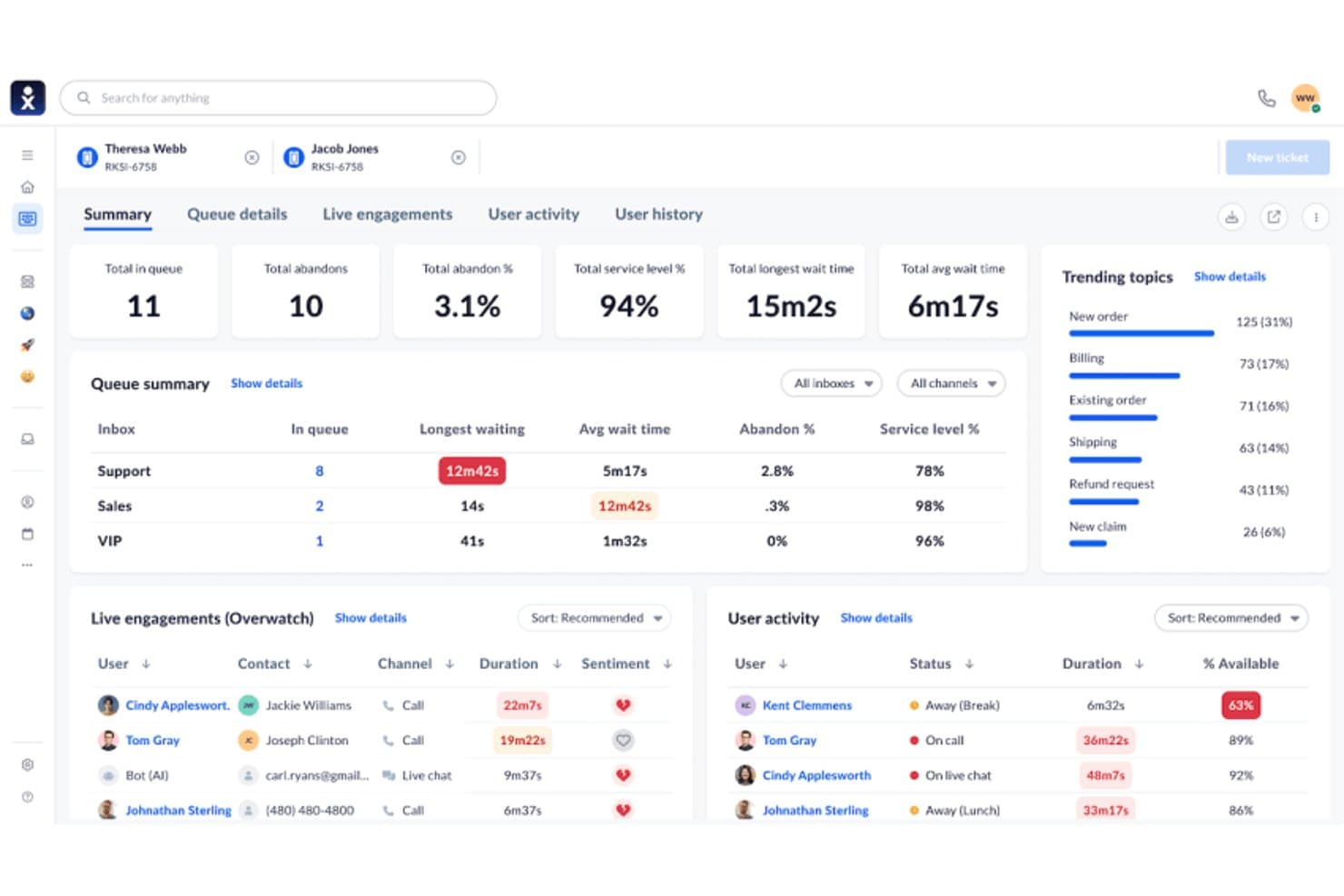
Nextiva displays real-time queue metrics and agent activity in one dashboard. Nextiva is a contact center platform that combines AI-assisted agent workflows, omnichannel routing, outbound dialing, and CRM integrations to manage inbound and outbound call operations.
Who Is Nextiva Best For?
Nextiva suits contact center directors and operations teams who want AI-driven agent workflows—including real-time assist, transcription, and predictive analytics—layered on top of their existing CRM.
Why I Picked Nextiva
I picked Nextiva as one of the best because its AI-assisted agent workflows go well beyond basic call handling. XBert delivers real-time agent assist with next-best-action suggestions and sentiment flagging mid-conversation, while AI transcription and post-call summaries with action items remove manual note-taking entirely. I also like that predictive analytics surface upsell and churn signals, giving contact center teams forward-looking insight, not just call logs.
Nextiva Key Features
- Omnichannel routing: Routes inbound contacts across voice, SMS, chat, email, and social channels within a single conversation thread.
- Outbound dialer modes: Supports predictive, power, progressive, and preview dialing modes for outbound call campaigns.
- CRM screen pops: Surfaces customer records from Salesforce or HubSpot automatically when a call connects, without agents switching applications.
- AI quality management: Scores agent interactions using AI-generated scorecards to support performance reviews and coaching.
Nextiva Integrations
Nextiva lists 32+ integrations, including Salesforce, HubSpot, Zoho CRM, Pipedrive, Microsoft Dynamics, Zendesk, Marketo, Power BI, and Zapier. It also describes a REST API for custom integrations.
Pros and Cons
Pros:
- Omnichannel context follows customers across conversations
- Predictive signals expose upsell and churn risk
- AI summaries reduce manual after-call work
Cons:
- Reporting gaps limit contact center visibility
- Native customer records remain unavailable
Learn more about Nextiva: Best for call analytics
- 14-day free trial
- From $25/user/month (billed annually)
Visit WebsiteCustomer Rating:4.4/5
CloudTalk delivers flexible call routing, real-time tracking, and call management for remote and international teams. CloudTalk is a call center solution primarily for sales and support teams. It offers advanced call analytics to improve communication strategies and helps businesses monitor and optimize their call operations.
Why I picked CloudTalk: It provides detailed call analytics that allows your team to gain insights into call performance and customer interactions. The platform's custom reporting can be tailored to your specific needs, offering flexibility in how data is viewed. If you want to enhance your team's communication efficiency, CloudTalk's analytics capabilities aim to help.
Standout features & integrations:
Features include call monitoring, which allows you to listen in on calls and provide real-time feedback. Call recording helps ensure quality and compliance by storing conversations for review.
Integrations include Salesforce, HubSpot, Zendesk, Pipedrive, Intercom, Freshdesk, Zoho CRM, Slack, Shopify, and Google Workspace.
Pros and Cons
Pros:
- Effective call monitoring
- Customizable reporting options
- Detailed call analytics
Cons:
- Call waiting times aren't easily trackable
- Delays in call connection initialization
Learn more about CloudTalk:
 Learn more about Close CRM:
 Best for AI voice integration
- Free demo available
- From $25/month (billed annually)
Visit WebsiteCustomer Rating:4.8/5
Squaretalk's dashboard for managing call center operations effectively. Running a call center out of your CRM means every conversation needs to be logged, visible, and easy for your team to act on without bouncing between tabs. Squaretalk gives sales and support teams a contact-center layer that sits on top of tools like Zoho, Salesforce, Freshworks, and Pipedrive, so calls, notes, and follow-ups live right next to deal and customer data.
Why I Picked Squaretalk
The platform’s centralized contact management brings key customer details, history, and notes into a single view for quicker, more relevant conversations. I also like its unique ability to integrate AI voice agents with predictive dialers, providing a sophisticated approach to automating customer interactions. This combination enhances communication efficiency while offering valuable insights through AI-powered conversation analytics. Additionally, the platform's global HD voice SIP trunking ensures high-quality voice communication, making it ideal for businesses aiming to maintain excellent customer service standards.
Squaretalk Key Features
In addition to its AI voice agents and predictive dialers, Squaretalk offers other valuable features for call center CRM software users:
- WhatsApp Messaging: Facilitates direct communication with customers through a popular messaging platform.
- Spam Checker: Protects your communication channels by filtering out unwanted and potentially harmful calls.
- Unlimited Free Call Recording: Allows for comprehensive call monitoring and quality assurance without additional costs.
- Interactive Voice Response (IVR): Automates call routing and enhances customer self-service options.
Squaretalk Integrations
Integrations include Zoho, Salesforce, Freshworks, Pipedrive, Zendesk, HubSpot, Microsoft Dynamics, and SugarCRM.
Pros and Cons
Pros:
- Comprehensive analytics tools provide valuable insights for decision-making.
- Reliable call management with minimal downtime ensures continuous operation.
- AI integration enhances productivity and customer interaction efficiency.
Cons:
- Limited dashboard customization options compared to competitors.
- Lack of mobile optimization may hinder on-the-go accessibility.
Learn more about Squaretalk: Best for cost-effective CRM
- Free plan + free demo available
- From $13.79/user/month (billed annually)
Visit WebsiteCustomer Rating:4.7/5
EngageBay integrates marketing and call management, automating tasks while offering detailed reporting for efficient team operations. EngageBay is an all-in-one CRM solution for small to medium businesses looking for a cost-effective way to manage customer interactions. It offers marketing, sales, and service automation, making it a versatile tool for various business functions.
Why I picked EngageBay: It provides a budget-friendly CRM option that combines marketing, sales, and support features into one platform. Your team can benefit from email marketing, lead management, and customer support tools without breaking the bank. The simple interface makes navigating and utilizing its features easy for your team.
Standout features & integrations:
Features include email marketing, which allows you to create and send campaigns to engage your audience effectively. Lead management helps you track and nurture potential customers through the sales funnel. Customer support tools ensure your team can handle inquiries and issues efficiently, keeping your clients satisfied.
Integrations include Salesforce, HubSpot, Mailchimp, Shopify, Zapier, QuickBooks, Stripe, Xero, Slack, and Google Workspace.
Pros and Cons
Pros:
- Easy email marketing tools
- All-in-one platform
- Cost-effective for small teams
Cons:
- Inconsistent call connection stability
- Limited call queue management features
Learn more about EngageBay:

CallTools handles high call volumes with customizable routing, real-time tracking, and reporting for call centers. CallTools is a call center CRM designed for small sales teams. It focuses on outbound calling and lead management. This customer relationship management tool enhances sales efficiency by automating dialing processes and providing real-time data analytics.
Why I picked CallTools: It efficiently caters to small sales teams by offering auto-dialing and call-monitoring features that maximize your team's or helpdesk’s productivity. The predictive dialer reduces downtime between calls, allowing your team to follow up on more leads. Real-time analytics offer insights to refine your sales strategy. This contact center CRM solution is suitable for boosting your team's reps' call efficiency without added complexity.
Standout features & integrations:
Features include auto-dialing, which reduces manual dialing time and increases your team's efficiency. Real-time analytics provide insights into call performance, helping refine your sales strategies and avoid customer issues. Call monitoring allows for quality assurance and training opportunities, ensuring your team consistently improves.
Integrations include Salesforce, Zoho CRM, HubSpot, Pipedrive, Infusionsoft, Freshsales, SugarCRM, Microsoft Dynamics, Zendesk, and Slack.
Pros and Cons
Pros:
- Detailed real-time analytics
- Effective call monitoring
- Easy setup process
Cons:
- Call quality can fluctuate
- Requires regular manual updates
Learn more about CallTools: Best for efficient call routing
- 7-day free trial available
- From $19/user/month + $5/additional user
Visit WebsiteCustomer Rating:4.4/5
TalkRoute allows your call centre to set up rules for call distribution based on criteria like time of day or specific departments, navigating unnecessary delays. TalkRoute is a virtual phone system designed for businesses to enhance communication by integrating talking, messaging, and meeting functionalities within a single application. It offers features such as call forwarding, text messaging, video conferencing, voicemail management, and customizable settings. The platform supports different phone number types, including toll-free and local numbers, and is accessible via desktop, mobile, and web applications.
Why I picked TalkRoute: One reason TalkRoute stood out to me in regards to call center CRM needs is its call forwarding and routing feature. This function lets you manage incoming calls efficiently, ensuring they reach the right team members without unnecessary delays. You can set up rules for call distribution based on criteria like time of day or specific departments. This means your customers won't be left waiting, and your team can handle calls more effectively, improving overall customer satisfaction. Plus, the ability to customize these routing options allows you to tailor the system to your specific business needs.
TalkRoute Standout Features and Integrations
Features include call forwarding, call recording, custom greetings, various phone number options (toll-free, vanity, local), voicemail access through apps, customizable greetings, unlimited voicemail storage, SMS and MMS messaging, video conferencing for up to 100 participants, screen sharing, whiteboard feature, call routing adjustments.
Integrations include Zapier, Google Sheets, HubSpot, Slack, Gmail, Facebook Leads, Mailchimp, Shopify, Trello, WooCommerce, ActiveCampaign, and Pipedrive
Pros and Cons
Pros:
- Multi-level auto-attendant enhances customer experience by reducing wait times
- Customizable greetings create a professional image
- Call stacking feature prevents busy tones, ensuring no calls are missed
Cons:
- Supports a maximum of 100 participants in meetings
- Absence of a virtual fax feature may limit some businesses
Learn more about TalkRoute: Best for marketing automation
- Free demo available
- From $60/user/month (billed annually)
Visit WebsiteCustomer Rating:4.4/5
LeadSquared offers customizable call workflows, detailed reporting, and scalable solutions for high-volume call handling and campaign management. LeadSquared is a marketing automation and CRM tool for sales and marketing teams. It aims to enhance lead management by supporting key functions like lead scoring, nurturing, and tracking to optimize sales efforts.
I picked LeadSquared: It provides marketing automation features that allow your team to automate lead capturing. With tools for nurturing leads through custom workflows, your team can focus on converting prospects into customers. The platform's analytics offer insights into lead behavior, helping you refine marketing strategies.
Standout features & integrations:
Features include lead capture and scoring, which helps businesses automatically track and prioritize leads from multiple sources such as websites, social media, and email. Additionally, it provides workflow automation and detailed analytics to optimize sales and marketing strategies, improving overall efficiency and revenue growthlead scoring, which helps your team prioritize high-value prospects.
Integrations include Salesforce, HubSpot, Microsoft Dynamics, Mailchimp, Zapier, Google Analytics, WordPress, Shopify, Zoho CRM, and QuickBooks.
Pros and Cons
Pros:
- Detailed lead analytics
- Customizable lead workflows
- Effective marketing automation
Cons:
- Requires manual setup for call workflows
- Difficult to track call bounce rates
Learn more about LeadSquared: Best for predictive dialing
- Free demo available
- From $199/user/month
Visit WebsiteCustomer Rating:4.5/5
Readymode provides scalable solutions for high-volume calls with real-time monitoring, automation, and workflow customization. Readymode is a call center CRM for sales teams seeking predictive dialing solutions. It helps streamline outbound call processes, making it ideal for sales-focused environments.
Why I picked Readymode: This contact center solution offers predictive dialing, enabling your team to maximize call efficiency by minimizing wait times. It also provides advanced call routing to ensure calls are directed to suitable agents. Real-time monitoring allows you to track performance and make necessary customer journey adjustments.
Standout features & integrations:
Features include predictive dialing that significantly reduces idle time between calls, making your team's outreach more efficient. Advanced call routing ensures that calls go to the most suitable agents, improving response quality. Real-time monitoring lets you keep track of performance metrics, allowing you to make informed adjustments to your strategy.
Integrations include Salesforce, HubSpot, Zendesk, Pipedrive, Freshdesk, Zoho CRM, Intercom, Slack, Microsoft Teams, and Google Workspace.
Pros and Cons
Pros:
- Real-time performance monitoring
- Advanced call routing
- Effective predictive dialing
Cons:
- Needs frequent updates for optimal use
- Limited call recording storage options
Learn more about Readymode: 10Best for international calling
JustCall
- 14-day free trial
- From $29/user/month (billed annually)
Visit WebsiteCustomer Rating:4.1/5
JustCall manages international calls, automates workflows, and provides real-time tracking for growing teams. JustCall is a cloud-based phone system that improves businesses' international calling capabilities. It serves sales and support teams by providing features that facilitate global communication and collaboration.
Why I picked JustCall: It offers features like international phone numbers and call forwarding, which makes it a strong choice for teams managing global clients. Your team can leverage its contact center software capabilities to enhance communication with clients worldwide. The real-time call monitoring feature allows for quality assurance and training.
Standout features & integrations:
Features include international phone numbers, allowing your team to connect with clients globally. Call forwarding ensures that calls are directed to the right person regardless of location. Real-time call monitoring helps you maintain quality and provides opportunities for training and improvement.
Integrations include Salesforce, HubSpot, Zoho CRM, Pipedrive, Slack, Intercom, Freshdesk, Zapier, Help Scout, and Microsoft Dynamics.
Pros and Cons
Pros:
- Real-time call monitoring
- Effective call forwarding
- Supports international numbers
Cons:
- Voicemail transcription is unreliable
- Difficult to manage agent call queues
Learn more about JustCall:
Other Call Center CRM Software
Here are some additional call center CRM software options that didn’t make it onto my shortlist but are still worth checking out.
- 11NUACOMBest for remote workforces
- 12
- 13Keona HealthBest for healthcare teams
- 14Ricochet360 Best for lead management
- 15ICTContactBest for broadcasting campaigns
- 16Bitrix24Best for free collaboration
- 17Creatio CRMBest for 360 customer views
- 18LiveAgentBest for automatic call distribution
- 19RingCentralBest for unified communications
- 20Agile CRMBest for small businesses
How I Evaluate Call Center CRM Software
I look at these tools in two layers—baseline requirements like embedded telephony and auto-logged call records, and differentiators like AI coaching and dialer modes that determine the right fit.
Core Functionality (Table Stakes For This List)
When I'm selecting tools for my list, I rank each one on a scale from 0 (does not offer the functionality) to 5 (excels in this area) for each core functionality listed below. Then, I calculate the tool's total score into a percentage. Each tool needs to achieve a minimum total score of 65% to be considered for inclusion.
- Integrated Telephony & CRM: I check whether agents can place, receive, and manage calls from within the CRM itself rather than toggling between a standalone dialer and a separate contact database.
- Unified Customer Profiles: Each tool should surface a complete view of a contact's call history, deal stage, support tickets, and notes so agents aren't asking callers to repeat information.
- Automatic Call Logging: I look for platforms that capture call recordings, duration, disposition codes, and outcomes against the right contact or deal record without manual agent input.
- Screen Pops & Call Routing: When an inbound call arrives, agents should see account context instantly and the system should route calls using CRM data like account tier or assigned rep.
- Call Analytics & Reporting: Dashboards should cover more than basic call counts. I evaluate whether the tool can break down metrics like conversion rates, talk time by rep, and pipeline sourced from calls.
- Revenue Stack Integrations: The platform needs to connect with the tools RevOps teams already rely on, such as Salesforce, HubSpot, marketing automation platforms, and helpdesk systems.
Once I have a list of tools that meet the criteria, I consider what sets each platform apart.
Differentiating Factors (What Sets Vendors Apart)
Here's how I compare and contrast different vendors:
Standout Features
AI conversation intelligence is a big differentiator—I look for tools that can flag deal risk or coaching moments from recorded calls without a manager listening to every one. Predictive and power dialers also matter for outbound teams running high-volume campaigns, where connect rates directly impact pipeline generation. Omnichannel support is worth evaluating too, since many revenue teams now handle follow-ups over SMS or chat alongside voice.
Beyond Features
Compliance is a major consideration—I check whether a platform supports call recording consent workflows, data redaction, and standards like PCI-DSS and GDPR, especially for teams handling payment information over the phone. Pricing structure matters too, since some vendors bundle voice minutes into seat licenses while others charge usage-based fees that can spike with high call volumes. I also evaluate scalability, looking at how easily you can add or remove agent seats during seasonal peaks without long-term contract penalties.
How To Choose Call Center CRM Software
It’s easy to get bogged down in long feature lists and complex pricing structures. Here's a checklist of factors to remember to help you stay focused as you work through your unique software selection process.
| Factor | What to Consider |
| Scalability | Will the software grow with your team? |
| Integrations | Does it connect with your existing tools? |
| Customizability | Can you tailor it to fit your specific needs? |
| Ease of Use | Is the software intuitive for your team to use? |
| Budget | Does it fit within your financial constraints? |
| Security Safeguards | Are your data and customer information protected? |
| Support | Is customer support readily available when needed? |
| Reporting | Does it offer insights that benefit your operations? |
Trends In Call Center CRM Software
In my research, I sourced countless product updates, press releases, and release logs from different call center CRM software vendors. Here are some of the emerging trends I’m keeping an eye on.
- AI-driven customer insights: More vendors integrate AI to analyze customer interactions and provide actionable insights. This helps businesses understand customer preferences and improve service quality. For example, some tools now offer real-time sentiment analysis to gauge customer satisfaction during calls.
- Omnichannel communication: There's a growing focus on offering a unified view of customer interactions across different channels. This trend allows call centers to handle queries easily via phone, email, or social media. Vendors are enhancing their platforms to support this holistic approach to customer service.
- Voice biometrics for security: Some call center CRM software now includes voice biometrics to enhance security. This technology verifies the caller’s identity based on unique voice patterns, reducing the risk of fraud. It's becoming an essential feature for industries dealing with sensitive information.
- Self-service options: Customers increasingly prefer resolving issues independently before contacting support. Call center CRM software vendors are integrating self-service portals that allow users to find solutions or track issues independently. This trend not only empowers customers but also reduces call centers' workload.
- Remote workforce support: With more teams working remotely, call center CRM solutions are adapting to support remote operations. Features like cloud-based access and virtual call centers are becoming standard. Vendors are focusing on tools that allow agents to connect and collaborate from anywhere, ensuring uninterrupted customer support.
What Is Call Center CRM Software?
Call center CRM software is designed to manage customer interactions and improve service efficiency in call centers. It is generally used by customer service representatives, sales teams, and support staff to enhance customer engagement and simplify communication.
Features like AI-driven insights, omnichannel communication, and self-service options help understand customer needs, provide consistent service, and reduce workload. These tools offer significant value by improving customer satisfaction and boosting operational productivity.
Features Of Call Center CRM Software
When selecting call center CRM software, look for the following key features:
- Call analytics: Provides insights into call performance and customer interactions, helping to optimize communication strategies.
- Omnichannel communication: Offers a unified view of interactions across multiple channels, ensuring consistent customer service.
- AI-driven insights: Analyzes customer interactions to deliver actionable insights, improving service quality and customer understanding.
- Self-service options: Empowers customers to resolve issues independently, reducing the workload on call centers.
- Voice biometrics: Enhances security by verifying caller identity through unique voice patterns, minimizing fraud risk.
- Predictive dialing: Minimizes downtime between calls, increasing team productivity by automating the dialing process. Some sales teams also opt for auto-dialers or dedicated sales dialer software with similar capabilities.
- Customizable dashboards: Allows users to tailor views and reports according to their specific needs, enhancing usability.
- Call recording: Stores conversations for quality assurance and compliance, ensuring service standards are met.
- Lead management: Tracks and nurtures potential customers through the sales funnel, supporting sales efforts.
- Real-time monitoring: Enables supervisors to listen in and provide feedback during calls, improving agent performance.
Benefits Of Call Center CRM Software
Implementing call center CRM software provides several benefits for your team and your business. Here are a few you can look forward to.
- Improved customer satisfaction: AI-driven insights and omnichannel communication enhance the quality and consistency of interactions, leading to happier customers.
- Increased efficiency: Features like predictive dialing and self-service options reduce manual tasks and speed up processes, boosting productivity.
- Better security: Voice biometrics add a layer of protection by verifying identities, which helps prevent fraud and secure customer data.
- Enhanced decision-making: Call analytics and real-time monitoring provide valuable data, enabling informed decisions to improve service and performance.
- Cost savings: Automating routine tasks and optimizing workflows with customizable dashboards save time and resources, reducing operational costs.
- Stronger lead conversion: Lead management capabilities help track and nurture prospects, increasing the likelihood of turning leads into customers.
Costs And Pricing Of Call Center CRM Software
Selecting call center CRM software requires understanding the various pricing models and plans available. Costs vary based on features, team size, add-ons, and more. The table below summarizes standard plans, average prices, and typical features of call center CRM software solutions.
Plan Comparison Table for Call Center CRM Software
| Plan Type | Average Price | Common Features |
| Free Plan | $0 | Basic call management, limited analytics, and essential customer interaction tools. |
| Personal Plan | $5-$25/user/month | Enhanced call routing, basic reporting, and integration with email services. |
| Business Plan | $30-$60/user/month | Advanced analytics, omnichannel support, and customizable dashboards. |
| Enterprise Plan | $70-$150/user/month | Full AI-driven insights, comprehensive security features, and priority support. |
A breakdown of plan types, costs, and features for call center CRM software.
Call Center CRM Software FAQs
Here are some answers to common questions about call center CRM software.
What is the significance of call center management in call center CRM software implementation?
Integrated with CRM software, call center management allows agents to handle customer data efficiently and automate workflows. This allows your team to resolve customer needs and issues more effectively, improving customer relationships. This integration ensures that call centers run smoothly, which results in happier customers and better business outcomes.
How do you use call center CRM software for customer service?
To use CRM software for customer service, select a CRM system that fits your needs. Add users, set their roles, and create automated processes. Integrate the CRM with third-party tools to enhance functionality. As you manage customer data, track performance to improve operations continuously.
What is the difference between a call center CRM software and a contact center?
A CRM centralizes customer interaction and marketing data, focusing on managing relationships and sales processes. In contrast, a contact center is designed to centralize and support customer service operations, handling inquiries and support issues. Both play distinct roles but can work together to improve customer experience.
How can call center CRM software improve efficiency?
CRM software enhances call center efficiency by automating routine tasks and providing valuable customer insights. Features like predictive dialing reduce manual work, while analytics offer data to refine strategies. This leads to faster response times and better service quality, benefiting your team and customers.
What role does AI play in call center CRM software?
AI in call center CRM software provides insights by analyzing customer interactions, helping your team understand preferences and trends. It can automate routine processes, freeing up time for more complex tasks. AI-driven tools like sentiment analysis offer real-time feedback, enabling agents to adjust their approach during calls.