

Are you tired of chasing down leads and feeling like you're always a step behind? Automated lead generation can help your team stay ahead by efficiently capturing and nurturing prospects. As a revenue operations expert, I know the challenges you face in managing leads and maximizing conversion rates.
In my experience, using the right tools can make a significant difference in your workflow. In this article, I'll share my top picks for automated lead generation software. You can expect unbiased, well-researched reviews that focus on what truly matters for your team. Let's find the best solution to boost your lead generation efforts.
Why Trust Our Software Recommendations
6,700+
Reviews
20
Industry experts
16+
Evaluation factors
14
Years
Our reviews reflect our independent judgment—not a sales pitch. Learn how we stay transparent.
For this guide, we evaluated tools using hands-on testing and independent research, scoring tools using our selection criteria.
Our reviews reflect our human editorial judgment, not a sales pitch.
Automated Lead Generation Comparison Table
This comparison table summarizes pricing details for my top automated lead generation selections:
| Tool | Best For | Trial Info | Price | ||
|---|---|---|---|---|---|
| 1 | Best for always-updated global B2B contact data | Free plan + 14-day free trial + free demo available | From $49/user/month (billed annually) | Website | |
| 2 | Best with customizable lead routing workflows | Free demo available | Pricing upon request | Website | |
| 3 | Best for engaging forms | Free plan available | From $28/month (billed annually) | Website | |
| 4 | Best for extensive contact data | Free trial available | From $397/month | Website | |
| 5 | Best for instant callbacks | 14-day free trial | From $31/month (billed annnually) | Website | |
| 6 | Best for personalized popups | 7-day free trial available | From $62/month | Website | |
| 7 | Best for conversational marketing | Free demo available | Pricing upon request | Website | |
| 8 | Best for landing page guidance | 7-day free trial available | From $23/month (billed annually) | Website | |
| 9 | Best for B2B lead generation | 14-day free trial | From $49/month | Website | |
| 10 | Best for CRM integrations | 14-day free trial + free plan available | From $22/month (billed annually) | Website |


Best Automated Lead Generation Reviews
Below are my detailed summaries of the best automated lead generation that made it onto my shortlist. My reviews offer a detailed look at the key features, pros & cons, integrations, and ideal use cases of each tool to help you find the best one for you.
 Best for always-updated global B2B contact data
- Free plan + 14-day free trial + free demo available
- From $49/user/month (billed annually)
Visit WebsiteCustomer Rating:4.5/5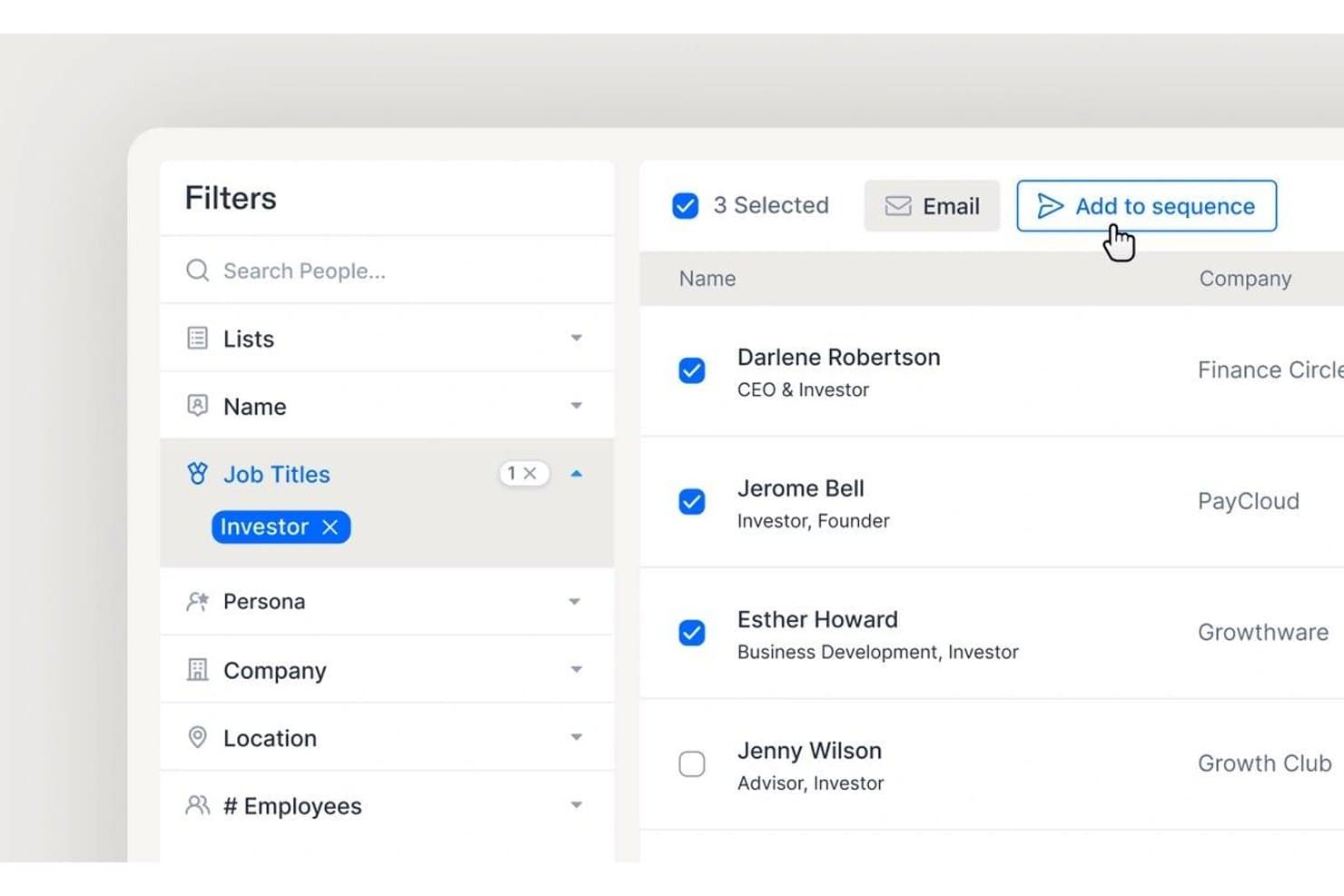
Apollo.io offers a people search interface with job title filters and bulk actions like 'Add to sequence' for automated lead outreach. Apollo.io is a B2B sales intelligence and engagement platform that combines a 275M+ contact database, automated sequencing, lead scoring, intent signals, and built-in dialer tools into a single prospecting and outreach system.
Who Is Apollo.io Best For?
Apollo.io is a strong fit for SDR-led sales teams at scaling B2B companies that run high-volume outbound prospecting and need data and outreach tools in one place.
Why I Picked Apollo.io
Apollo.io earns its spot on my shortlist because the data doesn't sit still. Behind the 275M+ contact database, there's a contributor network of 2M+ sources and third-party providers processing 230M+ records monthly, with a 7-step email verification pass refreshing 150M contacts per month. I like that when I pull a lead list and push it straight into a sequence, I'm working with contacts verified recently, not a year ago.
Apollo.io Key Features
- Chrome extension for on-the-fly prospecting: Lets you source verified contact data from LinkedIn, Gmail, Salesforce, or any website directly in your browser.
- Multi-channel sales engagement: Enables SDRs to run automated email, LinkedIn, and call sequences within a unified platform.
- Lead scoring with custom ICP filters: Helps prioritize outbound targets using customizable rules layered with intent and engagement signals.
- Bidirectional CRM sync: Keeps Salesforce and HubSpot data up to date with automatic syncing of leads, activities, and enrichment fields.
Apollo.io Integrations
Apollo.io offers native integrations with Salesforce, HubSpot,Outreach, Salesloft, Pipedrive, Zoho CRM, and Slack, and it connects with Zapier. An API is available for custom integrations.
Pros and Cons
Pros:
- Lookalike modeling generates net-new ICP account lists
- Outreach and sourcing in one unified platform
- Continuously refreshed contact data across 275M+ records
Cons:
- Monthly export credits cap high-volume enrichment runs
- Weaker data coverage outside North America
Learn more about Apollo.io: Best with customizable lead routing workflows
- Free demo available
- Pricing upon request
Visit WebsiteCustomer Rating:5/5
Phonexa’s unified dashboard brings call tracking, lead distribution, and marketing automation together for streamlined, automated lead generation. Phonexa is an automated lead generation platform that combines lead distribution, call tracking, email and SMS marketing, and analytics in a single system.
Who Is Phonexa Best For?
Phonexa is a good fit for marketing teams and agencies that need to manage high lead volumes across multiple channels.
Why I Picked Phonexa
I picked Phonexa as one of the best because I can build highly customizable lead routing workflows that match my team’s sales process. I like that I can set rules based on lead source, time of day, or agent availability. My team uses the drag-and-drop workflow builder to automate complex distribution logic and ensure every lead gets to the right person fast.
Phonexa Key Features
- Call tracking and analytics: Track inbound calls and analyze performance by source, campaign, or agent.
- Email and SMS marketing automation: Launch and manage drip campaigns across email and SMS channels from one platform.
- Lead management dashboard: View, filter, and manage all incoming leads in a centralized dashboard.
- API and third-party integrations: Connect Phonexa with your CRM, ad platforms, and other marketing tools.
Phonexa Integrations
Phonexa offers native integrations with Salesforce, HubSpot, Mailchimp, Zoho CRM, and Google Analytics. An API is available for custom integrations.
Pros and Cons
Pros:
- Real-time reporting dashboard for lead tracking
- Multi-channel drip campaign automation included
- Customizable lead routing workflows by rules
Cons:
- Reporting customization options can be restrictive
- Setup complexity for advanced workflows
Learn more about Phonexa: Best for engaging forms
- Free plan available
- From $28/month (billed annually)
Visit WebsiteCustomer Rating:4.7/5
Typeform is an automated lead generation tool that creates interactive forms, surveys, and quizzes. Typeform captures leads by engaging users with a conversational and interactive form-filling experience. This automated lead generation approach increases completion rates and provides businesses with high-quality leads.
Why I picked Typeform: Typeform helps to make lead generation more engaging through its interactive form design. Unlike traditional forms, Typeform’s conversational approach keeps users engaged, increasing completion rates and lead quality. This makes it the best tool for creating engaging, interactive forms that capture user attention.
Standout features & integrations:
Features include its intuitive drag-and-drop form builder, customizable design options, and conversational interface that enhances user engagement.
Integrations include HubSpot, Mailchimp, Google Sheets, Slack, Zapier, Salesforce, Trello, Asana, ActiveCampaign, and Intercom.
Pros and Cons
Pros:
- Wide range of integrations
- Easy-to-use drag-and-drop builder
- Highly engaging and interactive forms
Cons:
- May require customization for complex needs
- Higher starting price
Learn more about Typeform: Best for extensive contact data
- Free trial available
- From $397/month
Visit WebsiteCustomer Rating:4.7/5
LeadFuze is an automated lead generation software that improves the process of building targeted lead lists and syncing them with CRM and outreach tools. LeadFuze can collect, match, and validate information in real time across a large database, ensuring that users have the most accurate and complete contact information possible.
Why I picked LeadFuze: LeadFuze's unparalleled data intelligence capabilities and ability to provide hyper-targeted lead searches and complete list-building automation sets it apart from other lead generation tools. It not only offers a vast pool of professional data but also ensures that the information is double-verified for accuracy, which is crucial for any revenue team or recruiter looking to connect with their target market effectively.
Standout features & integrations:
Features include lead generation, contact data enrichment, automated email campaigns, sales prospecting, account-based marketing, CRM integration, list building, AI-driven lead scoring, personalized outreach, market segmentation, data export options, reporting and analytics, team collaboration tools, customizable templates, and real-time lead updates
Integrations include Salesforce, HubSpot, Zapier, Pipedrive, Mailchimp, Slack, Close, Zoho CRM, Outreach, and Freshsales.
Pros and Cons
Pros:
- Extensive search filters for targeted lead generation
- Real-time data verification for accuracy
- AI-driven list-building automation
Cons:
- Limited customization for email templates
- Steep learning curve for advanced features
Learn more about LeadFuze: Best for instant callbacks
- 14-day free trial
- From $31/month (billed annnually)
Visit WebsiteCustomer Rating:4.7/5
CallPage is an automated lead generation tool that provides instant callbacks to website visitors. CallPage automates lead generation by offering instant callbacks to website visitors, connecting them with sales representatives in seconds, and increasing conversion rates.
Why I picked CallPage: CallPage's unique ability to engage website visitors by offering immediate callbacks, which is a standout feature in the realm of lead generation tools. It ensures that potential customers are connected to a representative within seconds, significantly reducing the chance of losing a lead due to delayed response times.
Standout features & integrations:
Features include automatic callbacks, scheduled calls, and the ability to leave messages. It also offers meeting scheduling and automation, essential virtual numbers features, and essential widget customization and call settings.
Integrations include Google Analytics, Zapier, HubSpot, Salesforce, Slack, Pipedrive, GetResponse, Zendesk, Livespace, API, and Webhooks.
Pros and Cons
Pros:
- Integrates with a wide range of tools and services
- Customizable widget and call settings to match business needs
- Instant callback feature connects visitors to representatives quickly
Cons:
- Additional costs for extra user licenses, call operators, and successful calls
- Limited customization of call widgets
Learn more about CallPage: Best for personalized popups
- 7-day free trial available
- From $62/month
Visit WebsiteCustomer Rating:4.7/5
Sleeknote enables automated lead generation through its customizable and user-friendly on-site engagement tools. Sleeknote is a tool that turns traffic into revenue with personalized popups, forms, and sidebars. It allows users to create targeted messages based on visitor behavior and preferences.
Why I picked Sleeknote: Sleeknote offers users the ability to deliver personalized experiences to website visitors. Its advanced targeting and triggering features enable precise delivery of popups based on user behavior, location, and other criteria, enhancing the overall user experience and conversion rates. Additionally, Sleeknote integrates seamlessly with various platforms and tools, further optimizing its effectiveness in personalizing interactions.
Standout features & integrations:
Features include a drag-and-drop editor, advanced targeting options, and real-time analytics. It also offers A/B split testing and gamification to enhance engagement.
Integrations include Voyado, Agilic, Klaviyo, HubSpot, Mailchimp, Drip, Unisender, GetResponse, Wix, and WordPress.
Pros and Cons
Pros:
- User-friendly interface with drag-and-drop editor
- Over 1,200 native integrations
- Advanced targeting and personalization options
Cons:
- Learning curve for advanced features
- Visitor-based pricing may not suit all businesses
Learn more about Sleeknote: Best for conversational marketing
- Free demo available
- Pricing upon request
Visit WebsiteCustomer Rating:4.4/5
Drift is an automated lead generation tool that focuses on conversational marketing to engage and convert website visitors. Drift is an automated lead generation tool that uses AI-driven chatbots to engage website visitors in real time. It helps businesses capture and qualify leads more effectively by facilitating instant communication.
Why I picked Drift: Drift offer a unique approach to automated lead generation through conversational marketing. Unlike traditional lead generation tools, Drift stands out by using AI-powered chatbots to engage visitors in real-time, creating a more interactive and personalized experience.
Standout features & integrations:
Features include AI-driven chatbots for real-time visitor engagement, customizable chat playbooks to guide conversations, and strong analytics to track performance and optimize strategies.
Integrations include Salesforce, HubSpot, Marketo, Slack, Google Analytics, Zapier, Segment, Outreach, Pardot, and LinkedIn.
Pros and Cons
Pros:
- Comprehensive analytics
- AI-driven chatbots
- Real-time visitor engagement
Cons:
- Requires setup and configuration
- Higher starting price
Learn more about Drift: Best for landing page guidance
- 7-day free trial available
- From $23/month (billed annually)
Visit WebsiteCustomer Rating:4.4/5
LeadPages simplifies automated lead generation with its user-friendly landing page builder and conversion optimization tools. LeadPages is an advanced lead generation platform with a focus on landing page creation and conversion. It has optimized templates and conversion tools.
Why I picked LeadPages: LeadPages has a proven track record in delivering high conversion rates, which is essential for effective lead generation. Its user-friendly interface and industry-leading tools make it a standout choice for many businesses. It provides optimized templates based on extensive conversion data, making it easy for users to create effective landing pages even without marketing expertise.
Standout features & integrations:
Features include a drag-and-drop landing page builder, real-time analytics, AI-generated content, and strong lead management systems.
Integrations include Klaviyo, Google Workspace, Webhooks, Mailchimp, ActiveCampaign, Formatter, Zoom, Flodesk, and HubSpot.
Pros and Cons
Pros:
- User-friendly interface
- Access to marketing experts
- High-performing landing page templates
Cons:
- Limited customization for advanced users
- May require additional tools for a full marketing suite
Learn more about Leadpages:

AeroLeads specializes in automated lead generation, efficiently extracting contact information from diverse sources to streamline sales processes. AeroLeads is a game-changer in automated lead generation, swiftly gathering contact information from multiple sources to accelerate prospecting efforts for businesses.
Why I picked AeroLeads: AeroLeads excels in identifying and verifying B2B leads, which is crucial for businesses looking to connect with other companies. Its strong database and real-time verification capabilities are essential for acquiring high-quality leads, making it an ideal automated lead generation software.
Standout features & integrations:
Features include advanced prospect search with filters, one-click email extraction from various websites, and real-time email verification. It also provides a Chrome extension and an email finder for LinkedIn.
Integrations include SalesForce, HubSpot, Pipedrive, Zoho CRM, Freshsales, Insightly, Mailchimp, Slack, Google Sheets, and Zapier.
Pros and Cons
Pros:
- Direct CRM integrations
- Real-time email verification feature
- Comprehensive B2B prospect database
Cons:
- Credits-based system may require monitoring
- Higher starting price point
Learn more about AeroLeads: Best for CRM integrations
- 14-day free trial + free plan available
- From $22/month (billed annually)
Visit WebsiteCustomer Rating:4.4/5
LeadsBridge is an automated lead generation tool that connects marketing platforms with CRM systems. LeadsBridge provides easy data transfer and synchronization, improving lead management and efficiency across several systems.
Why I picked LeadsBridge: LeadsBridge successfully integrates marketing tools with CRM systems, which is essential for effective lead management. Its advanced suite of integrations distinguishes it from other lead generation tools. The software also facilitates the swift transfer of lead information into CRM systems, making it vital for businesses to maintain engagement and follow-up with potential customers efficiently.
Standout features & integrations:
Features include real-time lead syncing, ensuring immediate transfer of leads to CRMs, and compatibility with numerous advertising platforms.
Integrations include Salesforce, HubSpot, Mailchimp, Google Ads, Facebook Ads, Zoho CRM, Shopify, ActiveCampaign, LinkedIn Ads, and Klaviyo.
Pros and Cons
Pros:
- Flexible pricing plans with a free option are available
- Immediate lead syncing
- Wide range of CRM and email software integrations
Cons:
- Complex setup process
- Occasional data syncing issues
Learn more about LeadsBridge:
Other Automated Lead Generation Software
Here are some additional automated lead generation options that didn’t make it onto my shortlist, but are still worth checking out:
- 11GetResponseBest for integrated webinars
- 12WishpondBest for easy landing pages
- 13Agile CRMBest for small team CRM
- 14OptiMonkBest for conversion optimization
- 15CoresignalBest for detailed lead enrichment
- 16UnbounceGood for quick landing page creation
- 17Mailchimp Good for email marketing campaigns
- 18EngageBayGood for all-in-one marketing
- 19ActiveCampaignGood for customer experience automation
- 20OptinMonsterGood for converting visitors
How I Evaluate Automated Lead Generation
I split my evaluation into two layers: the core functionality every tool needs—automated prospecting, enrichment, and CRM routing—and the differentiators that make one tool the right fit over another.
Core Functionality (Table Stakes For This List)
When I'm selecting tools for my list, I rank each one on a scale from 0 (does not offer the functionality) to 5 (excels in this area) for each core functionality listed below. Then, I calculate the tool's total score into a percentage. Each tool needs to achieve a minimum total score of 65% to be considered for inclusion.
- Lead Sourcing Automation: I evaluate whether the tool can discover net-new contacts automatically based on ICP filters, rather than just offering a static database you manually search.
- Data Enrichment: Each tool should append verified emails, direct dials, firmographics, and technographics—similar to how Apollo.io and ZoomInfo handle contact appending.
- Intent & Behavior Signals: I look for platforms that surface buying signals like job postings, tech installs, or content engagement to help your SDRs prioritize accounts showing real demand.
- Lead Scoring & Qualification: The scoring engine should let you weight attributes like company size, tech stack, and engagement recency so reps focus on leads that match your ICP.
- Outreach Automation: Multi-channel sequencing across email, LinkedIn, and phone matters here, along with personalization tokens and A/B testing to optimize reply rates.
- CRM & Workflow Integration: Bidirectional sync with platforms like Salesforce or HubSpot is essential, including support for custom fields, lead routing rules, and real-time data flow.
Once I have a list of tools that meet this criteria, I consider what sets each platform apart.
Differentiating Factors (What Sets Vendors Apart)
Here's how I compare and contrast different vendors:
Standout Features
Website visitor de-anonymization is a big one. Tools like Clearbit and Leadfeeder can turn anonymous traffic into actionable accounts, giving your SDRs a warm list before any form fill happens. I also evaluate AI-driven email personalization, where the platform drafts outreach using prospect-specific signals like funding rounds or job changes. Lookalike account modeling matters here too, since it lets you expand your TAM based on patterns from closed-won deals rather than guesswork.
Beyond Features
Data quality is the first thing I check. A tool's database size means nothing if bounce rates are high or contact records are stale. I compare vendors on verification methods and refresh cadences. Compliance also weighs heavily—I look for SOC 2 certification, built-in suppression list management, and GDPR-ready opt-out handling, since one misstep in outbound can burn your domain reputation. Pricing structure matters too. Credit-based models can spike costs fast when your SDR team scales, so I evaluate how each vendor's pricing holds up as volume grows.
How to Choose Automated Lead Generation
It’s easy to get bogged down in long feature lists and complex pricing structures. To help you stay focused as you work through your unique software selection process, here’s a checklist of factors to keep in mind:
| Factor | What to Consider |
|---|---|
| FactorScalability | What to ConsiderCan the tool grow with your business? Consider user limits and the ability to handle increased lead volume. |
| FactorIntegrations | What to ConsiderDoes it connect with your existing CRM and other essential tools? Check for seamless data flow. |
| FactorCustomizability | What to ConsiderCan you tailor the tool to fit your specific workflows and processes? Look for adaptable features. |
| FactorEase of use | What to ConsiderIs the interface intuitive for your team? Test the demo or trial to ensure minimal training is needed. |
| FactorImplementation and onboarding | What to ConsiderHow quickly can you set it up and start seeing results? Evaluate the time and resources required for onboarding. |
| FactorCost | What to ConsiderDoes the pricing fit your budget? Compare costs across similar tools and consider long-term value. |
| FactorSecurity safeguards | What to ConsiderDoes it meet your data protection needs? Check for encryption and compliance with regulations. |
| FactorSupport availability | What to ConsiderWhat support options are available? Ensure you have access to timely help when needed. |
What Is Automated Lead Generation Software?
Automated lead generation software is a tool that automatically finds and qualifies potential customers for your business. Sales teams and marketers use it to save time on manual outreach and connect with leads who are more likely to convert. This software helps you fill your sales pipeline while letting you focus on building real relationships.
Features
When selecting automated lead generation, keep an eye out for the following key features:
- Lead capture: Automates the process of collecting leads from multiple channels, saving time and ensuring no potential customer is missed.
- Lead scoring: Helps prioritize leads by assigning scores based on their likelihood to convert, allowing sales teams to focus on high-value prospects.
- CRM integration: Ensures seamless data flow between the lead generation tool and your existing customer relationship management system.
- Automated follow-ups: Sends timely, personalized emails to nurture leads without manual effort, keeping prospects engaged.
- Analytics and reporting: Provides insights into lead behavior and campaign performance to help refine strategies and improve results.
- Customizable workflows: Allows you to tailor lead generation processes to fit your specific business needs and sales strategies.
- Multi-language support: Enables businesses to engage with leads in different languages, expanding reach and improving communication.
- AI-driven insights: Offers predictive analytics and recommendations to enhance decision-making and optimize lead generation efforts.
- Security safeguards: Protects sensitive lead information with encryption and compliance with data protection regulations.
- Mobile accessibility: Ensures that you can access and manage leads on the go, enhancing flexibility and responsiveness.
Benefits
Implementing automated lead generation provides several benefits for your team and your business. Here are a few you can look forward to:
- Time savings: Automates repetitive tasks like lead capture and follow-ups, freeing up time for your team to focus on closing deals.
- Improved lead quality: Uses lead scoring to prioritize high-value prospects, increasing the chances of conversion.
- Better data management: Integrates with CRM systems to maintain organized and up-to-date lead information.
- Enhanced engagement: Keeps prospects engaged with timely, personalized communication through automated follow-ups.
- Informed decision-making: Offers analytics and reporting to provide insights into lead behavior and campaign effectiveness.
- Global reach: Multi-language support allows you to connect with leads in different regions, expanding your market presence.
- Increased flexibility: Mobile accessibility ensures you can manage leads anytime, anywhere, enhancing responsiveness.
Costs & Pricing
Selecting automated lead generation requires an understanding of the various pricing models and plans available. Costs vary based on features, team size, add-ons, and more. The table below summarizes common plans, their average prices, and typical features included in automated lead generation solutions:
Plan Comparison Table for Automated Lead Generation
| Plan Type | Average Price | Common Features |
|---|---|---|
| Plan TypeFree Plan | Average Price$0 | Common FeaturesBasic lead capture, limited integrations, and basic reporting. |
| Plan TypePersonal Plan | Average Price$10-$30/user/month | Common FeaturesLead scoring, email automation, CRM integration, and basic analytics. |
| Plan TypeBusiness Plan | Average Price$50-$100/user/month | Common FeaturesAdvanced analytics, customizable workflows, multi-language support, and mobile access. |
| Plan TypeEnterprise Plan | Average Price$150-$300/user/month | Common FeaturesAI-driven insights, enhanced security, dedicated support, and full customization. |
Automated Lead Generation Software FAQs
Here are some answers to common questions about automated lead generation software:
What is the primary purpose of automated lead generation software?
The primary purpose is to automate the process of capturing and managing potential leads for your business. It helps save time by automating repetitive tasks like data entry and follow-ups. This allows your team to focus on nurturing high-quality leads and closing deals. For example, it can automatically send personalized emails to new leads and update your CRM with their details.
Is technical expertise required to implement automated lead generation software?
No, most software solutions are designed for easy implementation without technical expertise. They often come with user-friendly interfaces and guided onboarding processes. However, having some technical support can help with custom integrations or troubleshooting. Ensure the software provider offers comprehensive support and resources to assist you during the setup phase.
How do you ensure lead quality when using automated lead generation software?
You’ll want to set up your system so it filters out leads that don’t match your ideal customer profile (ICP) or show low intent. Then your team can prioritise leads based on engagement, behaviour and fit, rather than volume alone. Many solutions offer lead-scoring capabilities to help you flag high-value prospects.
When is it appropriate to scale up your use of automated lead generation software?
Once you have consistent lead flow, reliable conversion data and a process that handles lead assignment and follow-up, then scaling makes sense. Also check that the tool and your infrastructure can handle higher volume without breakdowns in data or response time.