

O software CRM bancário proporciona às instituições financeiras um local central para gerir os dados dos clientes, o histórico de transações, as preferências de comunicação e os detalhes das relações. Com esta informação, as equipas podem compreender melhor as necessidades dos clientes, gerir as interações e disponibilizar serviços financeiros mais relevantes.
Escolher a plataforma certa pode ser difícil, devido à grande variedade de opções de CRM bancário disponíveis. Com base na minha experiência na análise de software de operações de receitas, testei e comparei várias plataformas líderes com base nas suas funcionalidades, facilidade de utilização e adequação aos fluxos de trabalho bancários.
Este guia apresenta as minhas conclusões e análises para facilitar a comparação das opções e encontrar o software CRM bancário certo para as suas necessidades.
Why Trust Our Software Recommendations
6,700+
Reviews
20
Industry experts
16+
Evaluation factors
14
Years
Our reviews reflect our independent judgment—not a sales pitch. Learn how we stay transparent.
For this guide, we evaluated tools using hands-on testing and independent research, scoring tools using our selection criteria.
Our reviews reflect our human editorial judgment, not a sales pitch.
Tabela de comparação de software CRM bancário
Utilize esta tabela de comparação para consultar os detalhes de preços das minhas principais escolhas de software CRM bancário.
| Tool | Best For | Trial Info | Price | ||
|---|---|---|---|---|---|
| 1 | Best for customizable workflows | 15-day free trial | From $23/user/month (billed annually) | Website | |
| 2 | Best for visual sales pipeline views | 14-day free trial | From $65/user/month (billed annually) | Website | |
| 3 | Best for sales productivity tools | Free demo available | From $19/month | Website | |
| 4 | Best for loan origination and borrower management | Free demo available | Pricing upon request | Website | |
| 5 | Best for integrated sales, marketing, and support | 15-day free trial + free demo available | From $12/user/month (billed annually) | Website | |
| 6 | Best for AI-powered lead scoring | 21-day free trial | From $9/user/month (billed annually) | Website | |
| 7 | Best for project management integration | 14-day free trial + demo available | From $29/user/month (billed annually) | Website | |
| 8 | Best for unified client financial insights | Free consultation available | Pricing upon request | Website | |
| 9 | Best for field force management | Free demo available | Pricing upon request | Website | |
| 10 | Best for agentic automation | Not available | From $40/user/month | Website |


Análises do melhor software CRM bancário
Abaixo encontram-se os meus resumos detalhados do melhor software CRM bancário da minha seleção. As minhas análises examinam minuciosamente as principais funcionalidades, vantagens e desvantagens, integrações e casos de utilização ideais de cada ferramenta, para o ajudar a encontrar a melhor opção.
 Best for customizable workflows
- 15-day free trial
- From $23/user/month (billed annually)
Visit WebsiteCustomer Rating:4.7/5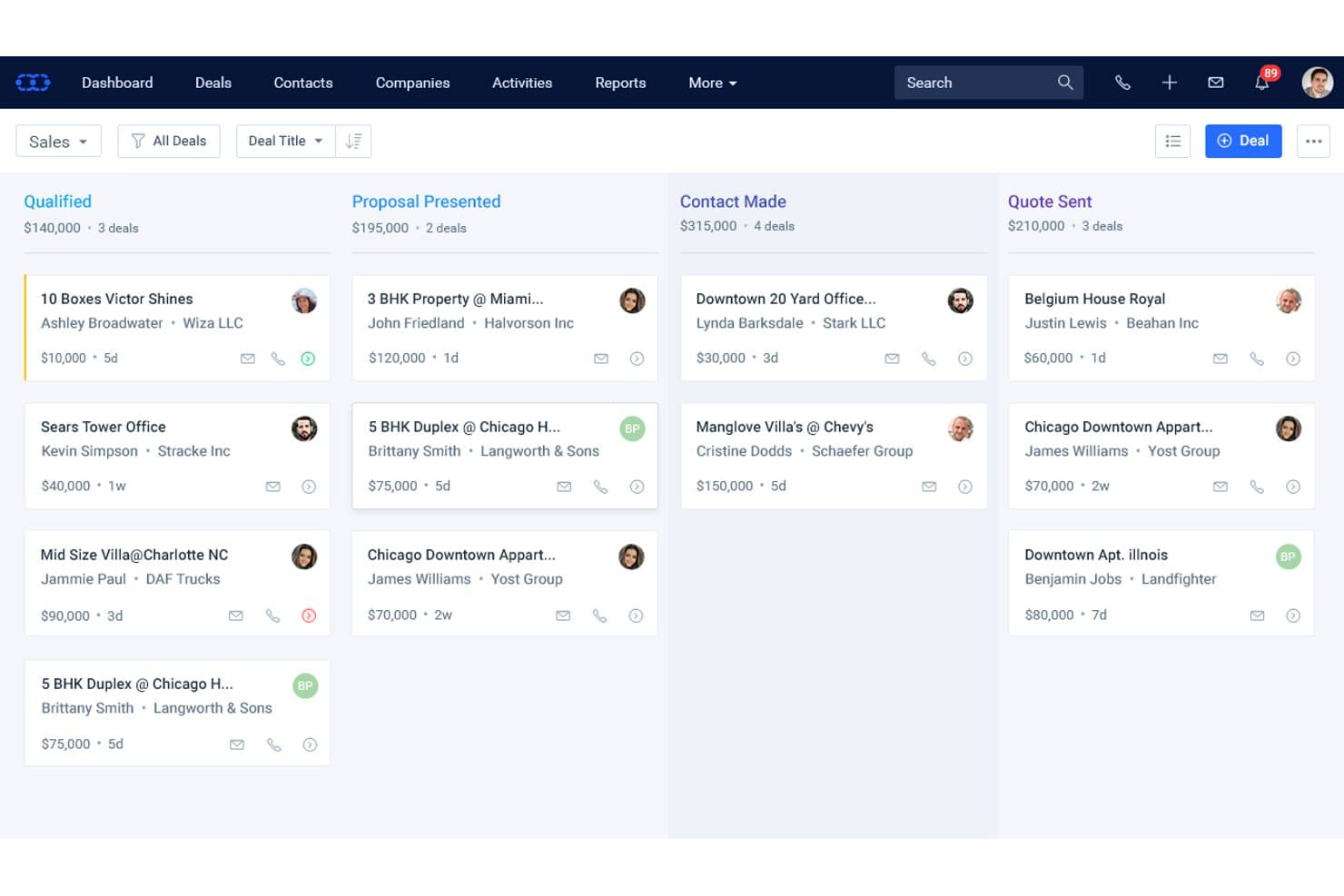
Salesmate CRM organizes banking deals across pipeline stages by value and contact. Salesmate CRM is a general-purpose sales CRM that offers customizable pipelines, built-in calling and SMS, AI-assisted contact insights, and no-code workflow automation through its Smart Flows engine.
Who Is Salesmate CRM Best For?
Salesmate is a good fit for smaller financial services teams that want to build custom sales workflows without relying on a developer or a purpose-built banking platform.
Why I Picked Salesmate CRM
I picked Salesmate CRM as one of the best because its Smart Flows engine lets smaller financial services teams build precisely the client workflows they need without writing a single line of code. I like that you can trigger multi-step automations off virtually any CRM event, like a deal stage change or an email open, then chain follow-ups, task creation, and SMS outreach automatically. Pair that with unlimited configurable pipelines, and you can map separate flows for different product lines from scratch.
Salesmate CRM Key Features
- Sandy AI contact insights: Sandy AI analyzes communication history and engagement data to surface next-best-action recommendations for each contact.
- Built-in VoIP and SMS: Native calling and texting tools let your team log, record, and track every client interaction directly within the CRM.
- Custom modules: Available on the Business plan and above, custom modules let you build out banking-specific data structures like loan records or treasury relationships.
- Revenue attribution tracking: Links revenue back to specific campaigns, workflows, and client interactions so you can see which activities are actually driving results.
Salesmate CRM Integrations
Salesmate CRM offers about 40 native integrations, including Microsoft 365, Google Workspace, DocuSign, Clearbit, QuickBooks Online, and Xero. It also provides a REST API, webhooks, and Zapier for custom connectivity, but no native integrations with core banking systems.
Pros and Cons
Pros:
- Built-in calling, texting, and AI insights
- Unlimited pipelines for different banking functions
- Highly customizable workflow automation engine
Cons:
- Audit trails restricted to Enterprise plan only
- No native banking data models or workflows
Learn more about Salesmate CRM: Best for visual sales pipeline views
- 14-day free trial
- From $65/user/month (billed annually)
Visit WebsiteCustomer Rating:4.6/5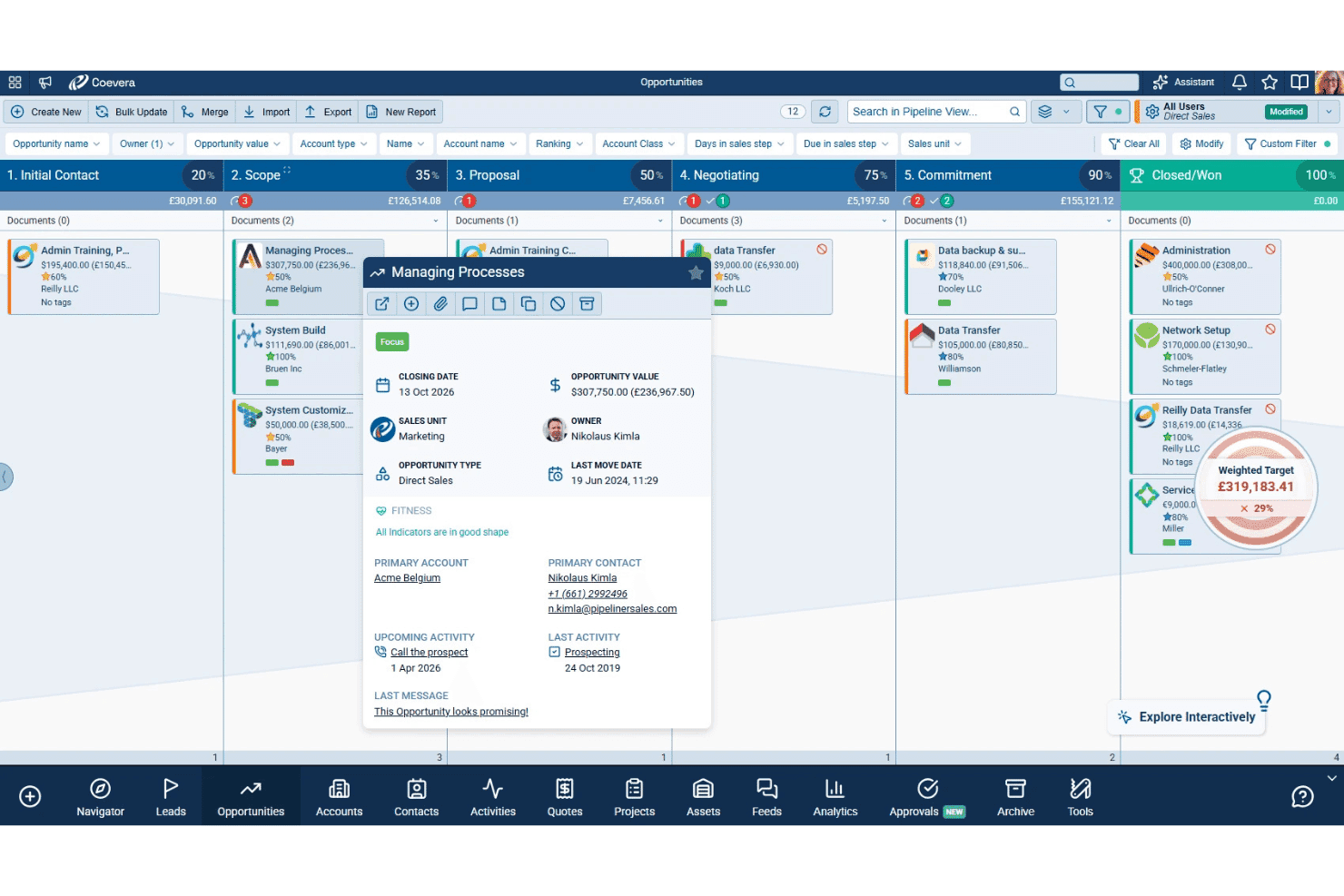
Coevera combines visual sales pipelines, AI tools, key account management, and no-code workflows. Coevera (formerly Pipeliner CRM) is a CRM platform built around visual pipeline management, offering multiple deal view types, AI-powered sales tools, key account management features, and no-code workflow automation.
Who Is Coevera Best For?
Coevera suits commercial banking teams and relationship managers who need a visually intuitive pipeline tool and don't require native core banking system integrations out of the box.
Why I Picked Coevera
I picked Coevera as one of the best because its visual pipeline engine is genuinely unlike anything else in the CRM space. You can switch between Kanban, bubble, chart, and map views on the fly, with a Dynamic Target tracker overlaid directly in the pipeline so your commercial banking team can see real-time performance without running a separate report. Voyager AI's relationship mapping also automatically builds org charts and identifies missing contacts within an account, which matters when you're managing complex stakeholder networks across a commercial lending deal.
Coevera Key Features
- Automatizer workflow builder: A no-code, drag-and-drop automation tool that lets you build trigger-based workflows for task assignments, notifications, and external app connections without developer support.
- Predictive forecasting: AI-powered revenue forecasting that scores deal risk and analyzes pipeline coverage to support more accurate revenue projections.
- Whitespace analysis: An account matrix overlay that maps your existing product catalog against current accounts to surface upsell and expansion opportunities.
- BI Feeder: A built-in data export tool that pushes CRM data to Tableau or Power BI on a daily refresh cycle for external reporting and analytics.
Coevera Integrations
Coevera offers native integrations with Microsoft 365, Google Workspace, Tableau, Power BI, SharePoint, OneDrive, Dropbox, PandaDoc, and RingCentral. Business-tier and higher plans include a REST API; Coevera also supports webhooks and Zapier.
Pros and Cons
Pros:
- No-code workflow automation for sales processes
- AI-driven relationship mapping for complex accounts
- Visual pipeline views simplify deal tracking
Cons:
- Lacks banking-specific compliance and data models
- No prebuilt banking product pipelines
Learn more about Coevera (formerly Pipeliner CRM): Best for sales productivity tools
- Free demo available
- From $19/month
Visit WebsiteCustomer Rating:4.4/5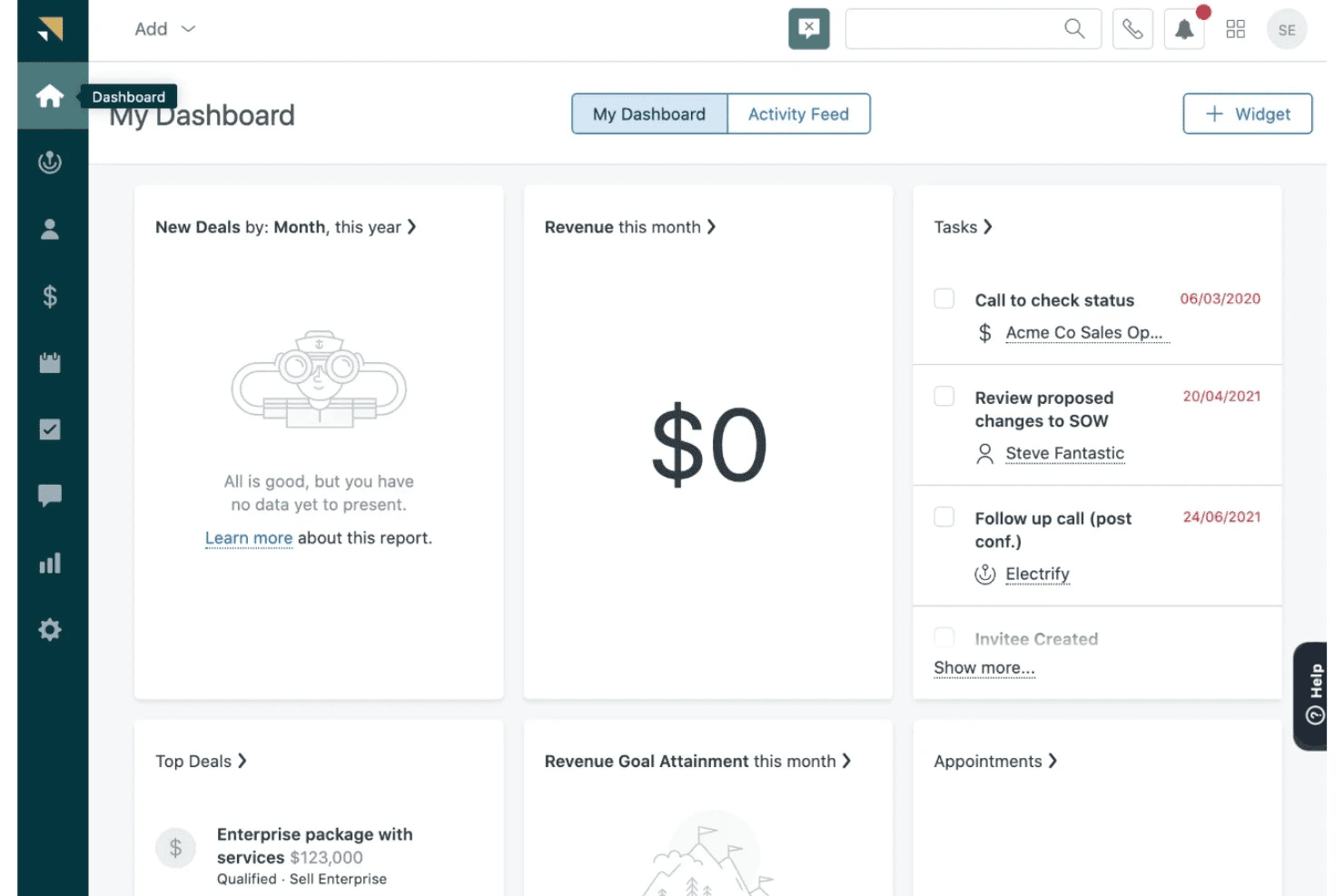
Zendesk Sell centralizes contacts, deals, pipeline tracking, sales engagement, and activity reporting. Zendesk Sell is a sales CRM that centralizes contact and deal management, pipeline tracking, sales engagement, and activity reporting in a single platform.
Who Is Zendesk Sell Best For?
Zendesk Sell suits small sales teams in financial services that already use Zendesk Support and want a shared sales-and-service customer view without a steep learning curve.
Why I Picked Zendesk Sell
I've included Zendesk Sell in my top picks because its sales productivity tools give client-facing banking teams a clear edge in managing daily outreach volume. The Power Dialer cycles through call lists automatically while logging outcomes directly to contact records, and the Task Player consolidates repetitive follow-up actions into a single screen so reps don't lose time context-switching. Bulk email sequences sent to Smart List segments let retail banking teams run targeted outreach across filtered lead groups without manual effort.
Zendesk Sell Key Features
- Smart Lists: Real-time, filterable views of leads and deals that let you segment contacts by custom criteria and act on targeted groups instantly.
- Sales triggers: Rule-based automation that fires follow-up tasks, notifications, or field updates when deals or contacts meet defined conditions.
- AI-powered lead and deal scoring: Available on Professional and above, this feature ranks leads and open deals by likelihood to convert using historical performance data.
- Built-in prospecting database: Access to 44M+ business records and 350M+ prospect profiles directly within the CRM for building targeted outreach lists.
Zendesk Sell Integrations
Zendesk Sell offers native integrations with Zendesk Support, Google Workspace, Microsoft 365, and WhatsApp, plus 85 marketplace apps. It provides an open API for custom core banking connections and supports Zapier.
Pros and Cons
Pros:
- Mobile app enables field relationship management
- Built-in business prospecting database included
- Short deployment time for sales teams
Cons:
- Official product retirement announced for 2027
- No banking product pipeline templates available
Learn more about Zendesk Sell: Best for loan origination and borrower management
- Free demo available
- Pricing upon request
Visit WebsiteCustomer Rating:4.4/5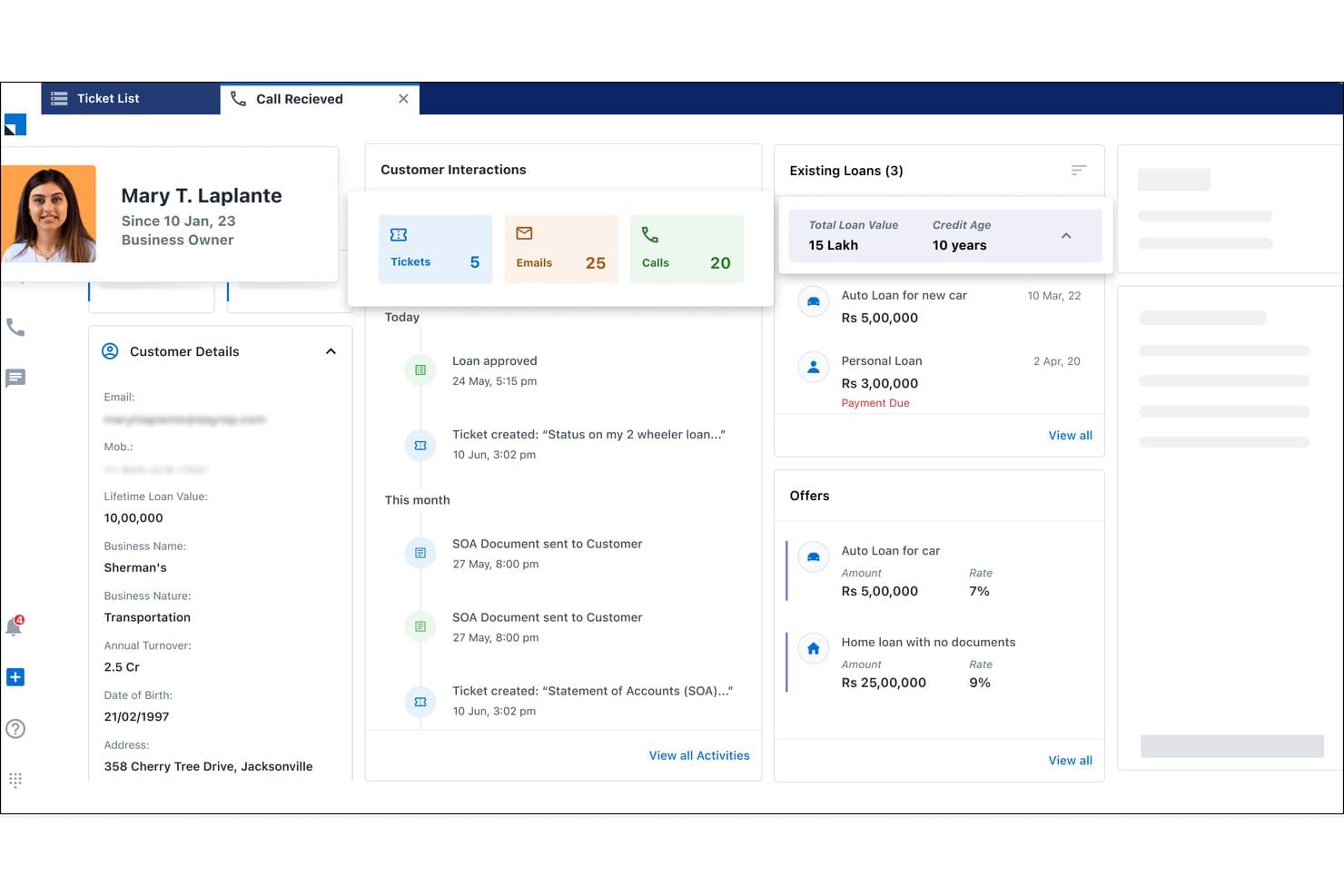
LeadSquared surfaces customer loans, offers, and history in one view. LeadSquared is a BFSI-focused CRM platform built around lead management automation, loan origination workflows, digital borrower onboarding, and retail banking sales operations.
Who Is LeadSquared Best For?
LeadSquared is a strong fit for retail banking and lending teams that need to manage high volumes of loan applications, automate borrower onboarding, and track field sales activity across large agent networks.
Why I Picked LeadSquared
I picked LeadSquared as one of the best because its loan origination and borrower management workflows go far deeper than a typical CRM pipeline. I'm particularly impressed by its automated lead distribution, which routes incoming loan inquiries to agents based on loan type, availability, and location in real time. Its behavior-based borrower scoring and digital onboarding portals, where applicants upload documents, track status, and verify identity via eKYC, make it genuinely built for high-volume retail lending operations.
LeadSquared Key Features
- Mobile CRM with geo-fencing: Relationship managers can only log field activities when physically present at a client location, with auto check-in/check-out and offline mode support.
- Collections CRM module: Tracks defaulters, prioritizes debt recovery cases, and segments borrowers by risk level to support banking collections teams.
- Behavior-based cross-sell automation: Identifies cross-sell opportunities from customer activity data and routes targeted product offers via email, SMS, or call center queues.
- Role-based access controls: Configurable permission templates restrict data access by role, supporting governance requirements across banking sales and operations teams.
LeadSquared Integrations
LeadSquared offers 162+ marketplace integrations, including Ameyo, WhatsApp, Google Ads, Acuity Scheduling, and Airtel Enterprise Messaging Manager. It connects to CBS, LOS/LMS, back-office, and trading systems through open APIs, though named FIS, Fiserv, and Jack Henry connectors aren’t documented.
Pros and Cons
Pros:
- Automated lead routing based on borrower behavior
- Mobile CRM supports geo-fenced field operations
- Advanced borrower onboarding and eKYC features
Cons:
- Lacks commercial and wealth management hierarchies
- No native integrations to major US core banking
Learn more about LeadSquared: Best for integrated sales, marketing, and support
- 15-day free trial + free demo available
- From $12/user/month (billed annually)
Visit WebsiteCustomer Rating:4.3/5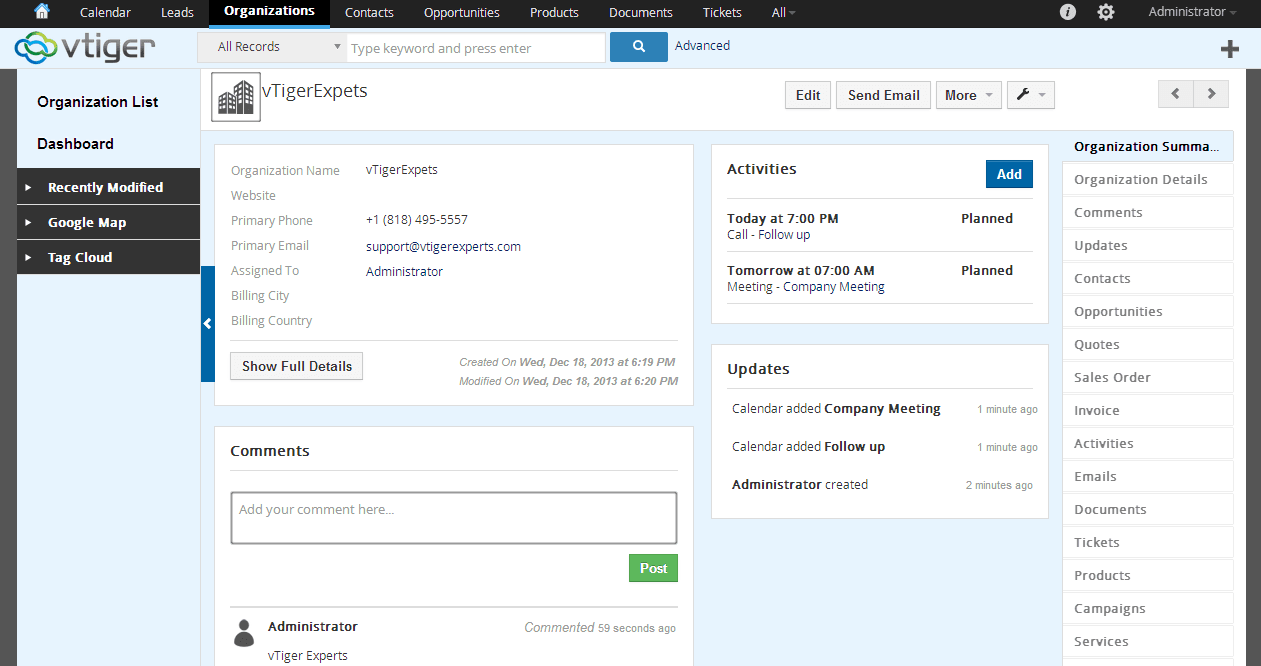
Vtiger is a cloud CRM for SMBs, enhancing collaboration in sales and support. Vtiger is an all-in-one CRM platform that combines sales pipeline management, marketing automation, and customer support tools in a unified interface.
Who Is Vtiger Best For?
Vtiger is a strong fit for smaller financial firms and community banks that want sales, marketing, and support tooling in one affordable platform without managing multiple vendors.
Why I Picked Vtiger
I picked Vtiger as one of the best because it pulls sales pipelines, marketing campaigns, and customer support cases into a single platform, which smaller financial firms rarely get without stitching multiple tools together. I like how the One View dashboard surfaces a client's full interaction history across all three functions in one place. The Process Designer also lets me build trigger-based workflows for things like KYC reminder sequences and renewal follow-ups without writing any code.
Vtiger Key Features
- Calculus AI deal scoring: Scores open deals using fit, engagement, and sentiment signals to help prioritize which opportunities need attention.
- Process Designer: A visual, trigger-based workflow builder that automates task assignments, approval chains, and follow-up sequences without writing code.
- Multi-pipeline management: Supports unlimited, independently configured sales pipelines so your team can track different product lines or client segments separately.
- Customer portal: A branded self-service portal where clients can submit requests, access documents, and track case status without contacting your team directly.
Vtiger Integrations
Vtiger offers native integrations with QuickBooks, Xero, Tally, Google Suite, Microsoft Office 365, Zoom, Microsoft Teams, Stripe, and Mailchimp, but no documented FIS, Fiserv, Jack Henry, or Temenos connectors. It supports custom connections through its REST API and VTAP, plus Zapier.
Pros and Cons
Pros:
- Built-in AI for deal scoring and forecasts
- Strong workflow automation and process designer
- All-in-one CRM for sales, marketing, support
Cons:
- No native core banking system integrations
- No purpose-built banking compliance modules
Learn more about Vtiger: Best for AI-powered lead scoring
- 21-day free trial
- From $9/user/month (billed annually)
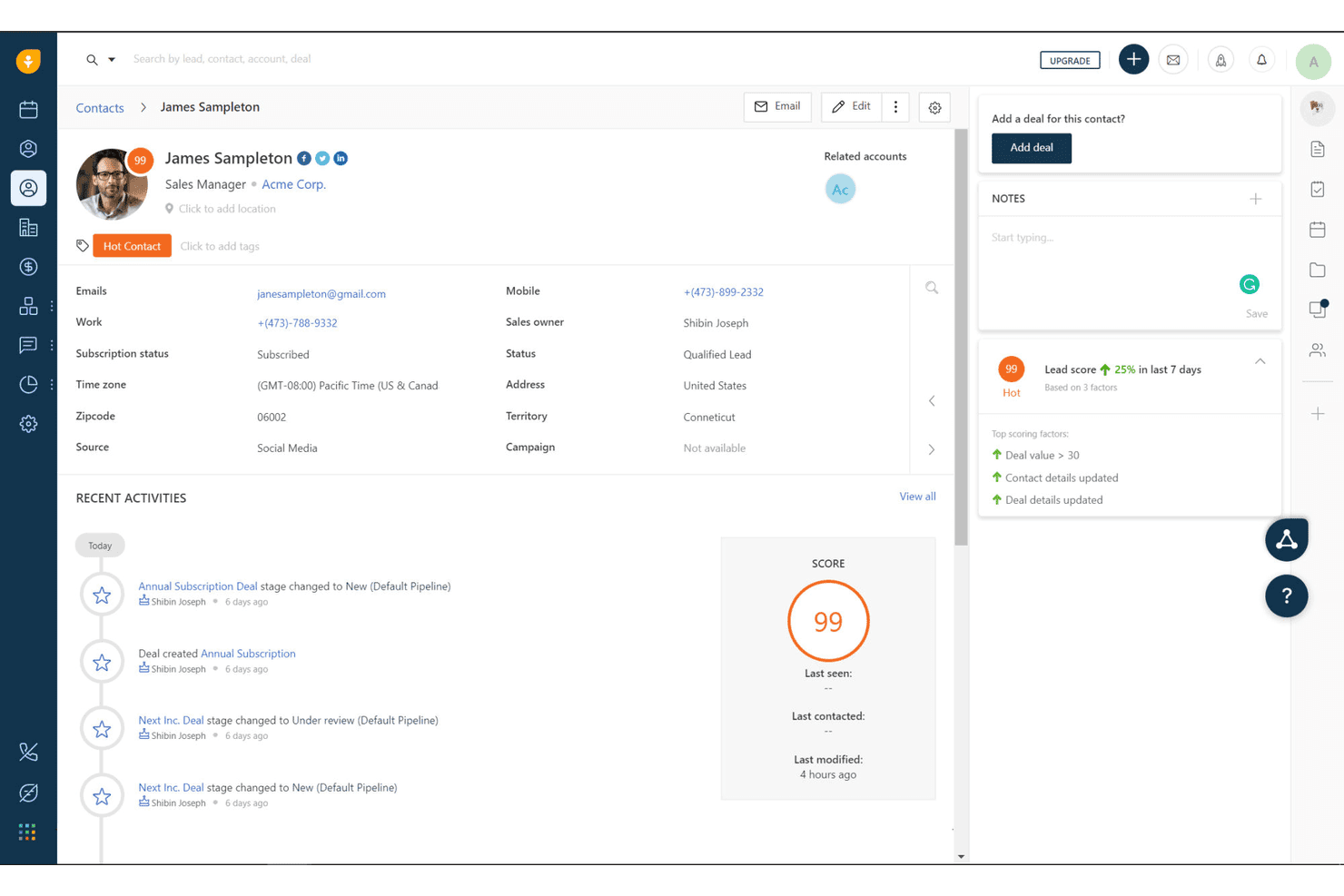
Freshworks CRM tracks lead scores and contact activity for banking clients. Freshworks CRM is a general-purpose sales CRM that combines AI-powered lead scoring, configurable pipelines, omnichannel communication, and workflow automation for banking sales teams.
Who Is Freshworks CRM Best For?
Freshworks CRM is a strong fit for community banks and credit unions that need AI-driven lead prioritization without the cost or complexity of enterprise banking platforms.
Why I Picked Freshworks CRM
I've included Freshworks CRM in my top picks because Freddy AI's contact scoring is one of the most practical lead prioritization tools I've seen at this price point. It assigns each contact a score from 0 to 99 based on real engagement signals like email opens, call activity, and web behavior, so bankers know exactly who to call first. Freddy also flags deals as "At Risk" or "Likely to Close," which helps retail banking teams act before opportunities go cold.
Freshworks CRM Key Features
- Multiple configurable pipelines: Build separate pipelines for loans, deposits, or wealth management products, each with custom stages and Kanban or table views.
- Built-in omnichannel dialer: Make and log calls directly in the CRM with call recording, voicemail drop, and automatic activity tracking across client profiles.
- Rule-based workflow automation: Set up "if-then" trigger rules with up to 10 conditions to automate task assignment, email alerts, and cross-sell prompts based on client activity.
- SOC 2 Type II and ISO 27001 security certifications: Access role-based permissions, audit logs, and a sandbox environment to meet baseline security and governance requirements for financial institutions.
Freshworks CRM Integrations
Freshworks CRM offers native integrations with Google Workspace, Microsoft 365, Slack, Zoom, DocuSign, QuickBooks, and Xero. It supports REST API, webhooks, marketplace integrations, and Zapier, but lacks native connectors for major core banking platforms.
Pros and Cons
Pros:
- Fast onboarding with minimal IT support needed
- Easy cross-sell workflows and pipeline customization
- Freddy AI lead scoring surfaces high-intent clients
Cons:
- No built-in KYC or AML workflows
- No native core banking system integrations
Learn more about Freshworks CRM: Best for project management integration
- 14-day free trial + demo available
- From $29/user/month (billed annually)
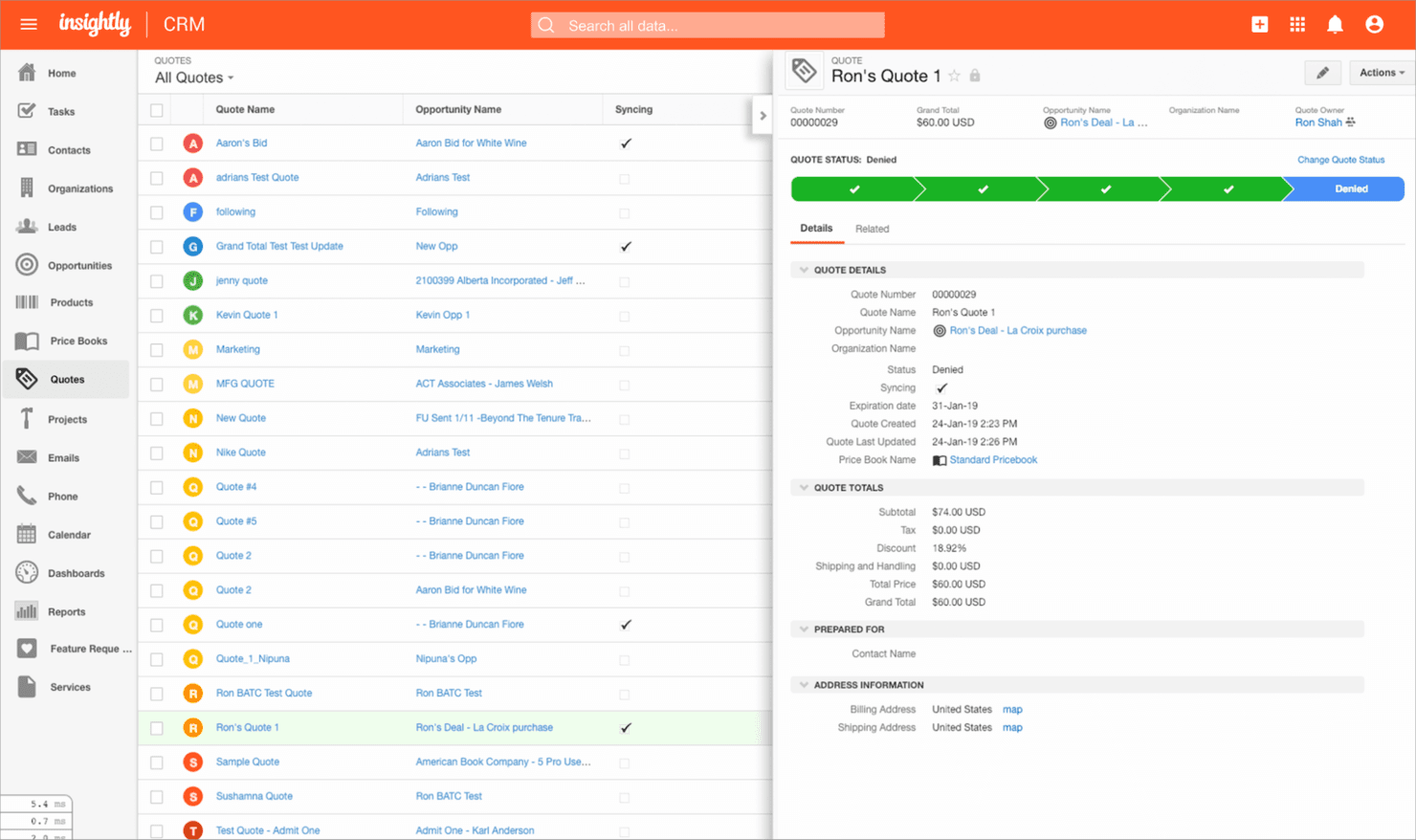
Insightly is a cloud CRM that helps small to medium businesses manage relationships and projects. Insightly is a CRM platform that combines contact management, customizable sales pipelines, workflow automation, and a native project management module for tracking client relationships and deals.
Who Is Insightly Best For?
Insightly suits smaller financial institutions—community banks, credit unions, and regional firms—that need to manage client relationships and post-deal workflows in a single platform without the overhead of an enterprise CRM.
Why I Picked Insightly
I picked Insightly as one of the best because its native CRM-to-project management pipeline solves a real pain point in banking: the handoff gap between closing a deal and delivering on it. When a commercial loan closes, Insightly converts that opportunity directly into a tracked project, carrying all contacts, communications, and tasks across without re-entry. I also like that post-sale "care pipelines" let you manage ongoing client relationships alongside active project delivery in the same platform.
Insightly Key Features
- AI Copilot: A conversational AI assistant that lets you query CRM data in natural language, surface relationship summaries, and trigger workflow automation through chat prompts.
- AppConnect integration builder: A no-code, drag-and-drop interface for connecting Insightly to 500+ apps, including QuickBooks, DocuSign, Slack, and ZoomInfo.
- Customizable sales pipelines: Configurable multi-stage pipelines for tracking deal flow, with built-in quote generation and pipeline reporting dashboards.
- Role-based access control: Permission settings that restrict data visibility and editing rights by user role, available on Professional and Enterprise plans.
Insightly Integrations
Insightly AppConnect provides 500+ pre-built connectors and access to 1,200+ apps, including QuickBooks Online, NetSuite, Sage Intacct, DocuSign, Slack, ZoomInfo, and Microsoft Outlook. It also offers an open API for custom core banking integrations.
Pros and Cons
Pros:
- Strong security and compliance certifications
- Drag-and-drop workflow automation included
- Built-in project management for deal handoffs
Cons:
- No core banking system integrations
- No banking-specific pipeline or referral tools
Learn more about Insightly: Best for unified client financial insights
- Free consultation available
- Pricing upon request
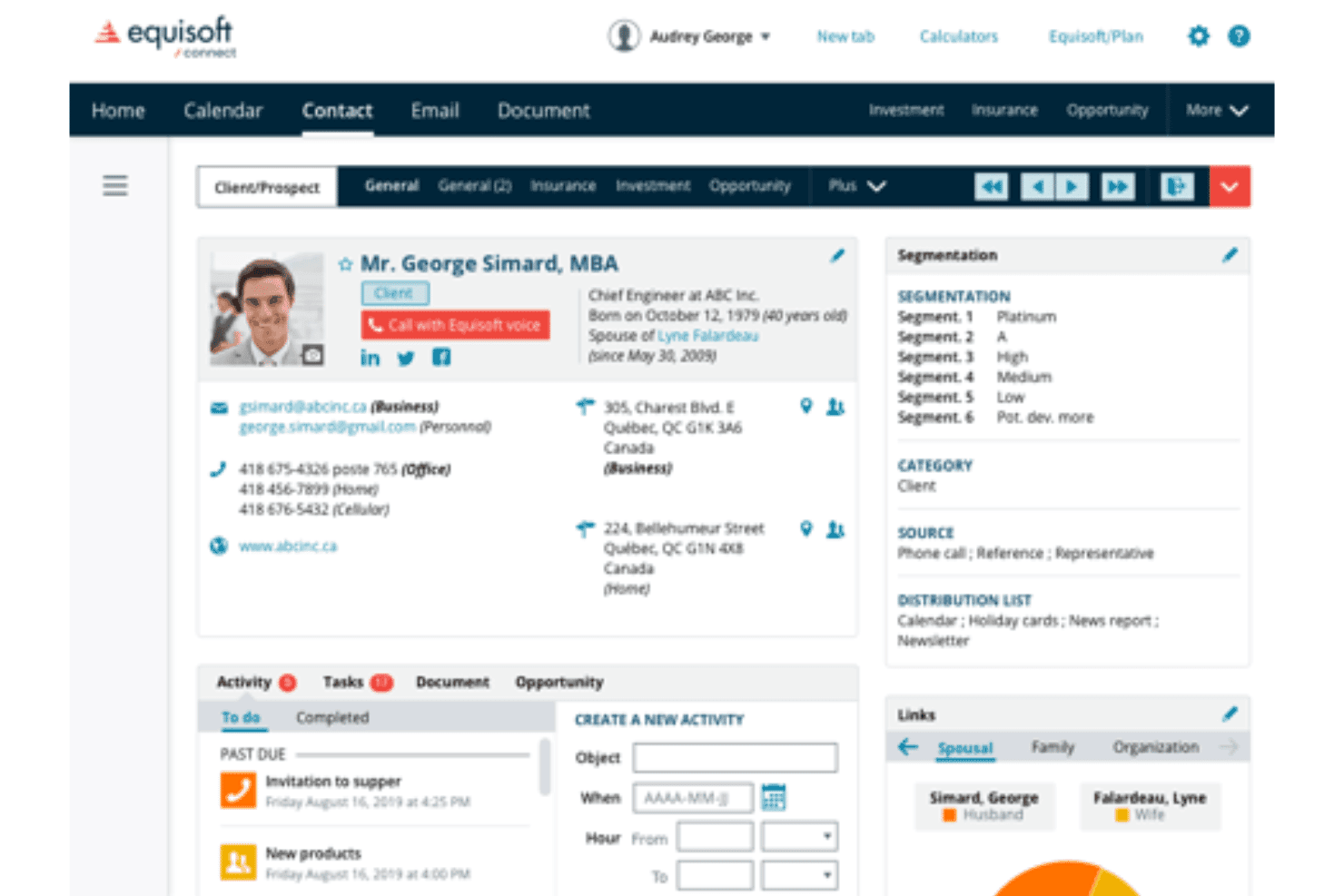
Equisoft centralizes insurance, investments, and advisor client communications. Equisoft is a financial advisor CRM that centralizes client insurance policies, investment portfolios, and communication history while connecting to 80+ carrier and MGA data sources.
Who Is Equisoft Best For?
Equisoft is a strong fit for independent financial advisors and wealth management professionals who need a single platform to manage insurance policies, investment accounts, and client communications.
Why I Picked Equisoft
I picked Equisoft as one of the best because it pulls insurance policies, investment portfolios, and communication history into a single client view automatically, sourcing live data from 80+ carrier and MGA connections. I love that advisors get a complete financial picture per client without manual data entry, which matters when you're tracking coverage gaps or flagging upsell opportunities across a household's full portfolio.
Equisoft Key Features
- Automated compliance audit trail: Equisoft timestamps and stores every client interaction—calls, emails, and wealth records—so your records stay audit-ready without manual logging.
- Native mobile app: Advisors can access full CRM data, manage client records, and track sales activity directly from a mobile device.
- Unlimited document storage: Client documents, pre-filled forms, and industry paperwork are stored and organized within the platform, eliminating the need to access external carrier portals.
- AI-powered cross-sell triggers: Machine learning models analyze client data to surface upsell and cross-sell opportunities, flagging growth potential directly within the advisor workflow.
Equisoft Integrations
Equisoft/connect has 80+ documented integrations with Canadian insurance carriers, MGAs, and investment dealers, including Manulife, Sun Life Financial, Canada Life, RBC Insurance, Investia Financial, and Richardson Wealth. It also connects with Equisoft/centralize, VirtGate, Microsoft 365, Gmail, DocuSign, and Mailchimp, but lacks documented FIS, Fiserv, Jack Henry, or Temenos integrations.
Pros and Cons
Pros:
- AI surfaces insurance upsell opportunities
- Automated compliance tracking for advisor regulations
- Consolidates insurance and investment client data
Cons:
- Lacks core banking integrations and analytics
- No support for banking product workflows
Learn more about Equisoft: 9Best for field force management
Vymo
- Free demo available
- Pricing upon request
Visit WebsiteCustomer Rating:5/5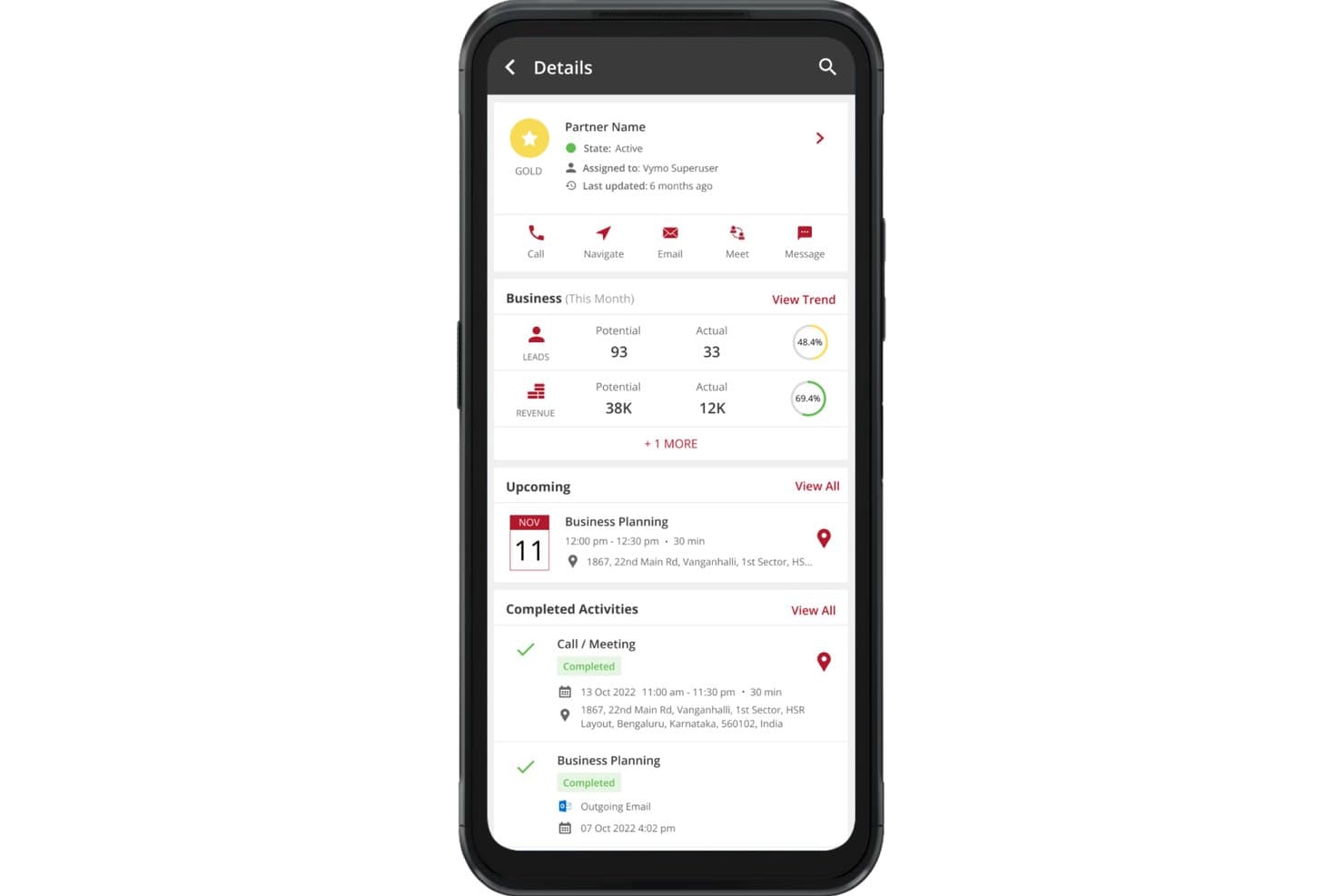
Vymo surfaces partner activity, leads, and revenue in one mobile view. Vymo is a mobile-first CRM built for banking and financial services field teams, combining passive activity capture, AI-driven next-best-action recommendations, lead management, pipeline tracking, and compliance workflows.
Who Is Vymo Best For?
Vymo is a strong fit for retail and commercial banking teams that rely heavily on field-based relationship managers to drive client acquisition and sales activity.
Why I Picked Vymo
I picked Vymo as one of the best because no other tool on this list handles field force management the way it does. Its passive activity capture automatically logs calls, meetings, and check-ins without relationship managers ever touching a form, which keeps CRM data accurate even across large distributed teams. I'm also impressed by its AI-driven next-best-action engine, which models top-performer behavior to coach every field RM in real time.
Vymo Key Features
- Account 360° view: Consolidates client data, engagement history, organizational hierarchies, and multi-branch RM mapping into a single client record.
- AI-powered lead allocation: Automatically assigns leads to relationship managers based on workload, skills, and past performance data.
- Compliance workflow tools: Built-in KYC workflows, AML monitoring, audit trails, and role-based access controls with PII masking.
- Debt collections module: Tracks, prioritizes, and manages collections activity directly within the platform.
Vymo Integrations
Vymo lists integrations with Salesforce, Microsoft Dynamics 365, Zoho CRM, Oracle CRM, SAP CRM, and Zendesk, plus generic CBS, LOS, and LMS connections. It offers an API for custom integrations; named FIS, Fiserv, Jack Henry, and Temenos connectors aren’t documented.
Pros and Cons
Pros:
- AI recommends next-best actions to sellers
- Passive activity capture improves CRM adoption
- Mobile-first design for field sales teams
Cons:
- Lacks relationship profitability analytics tools
- No native connectors for core banking platforms
Learn more about Vymo:
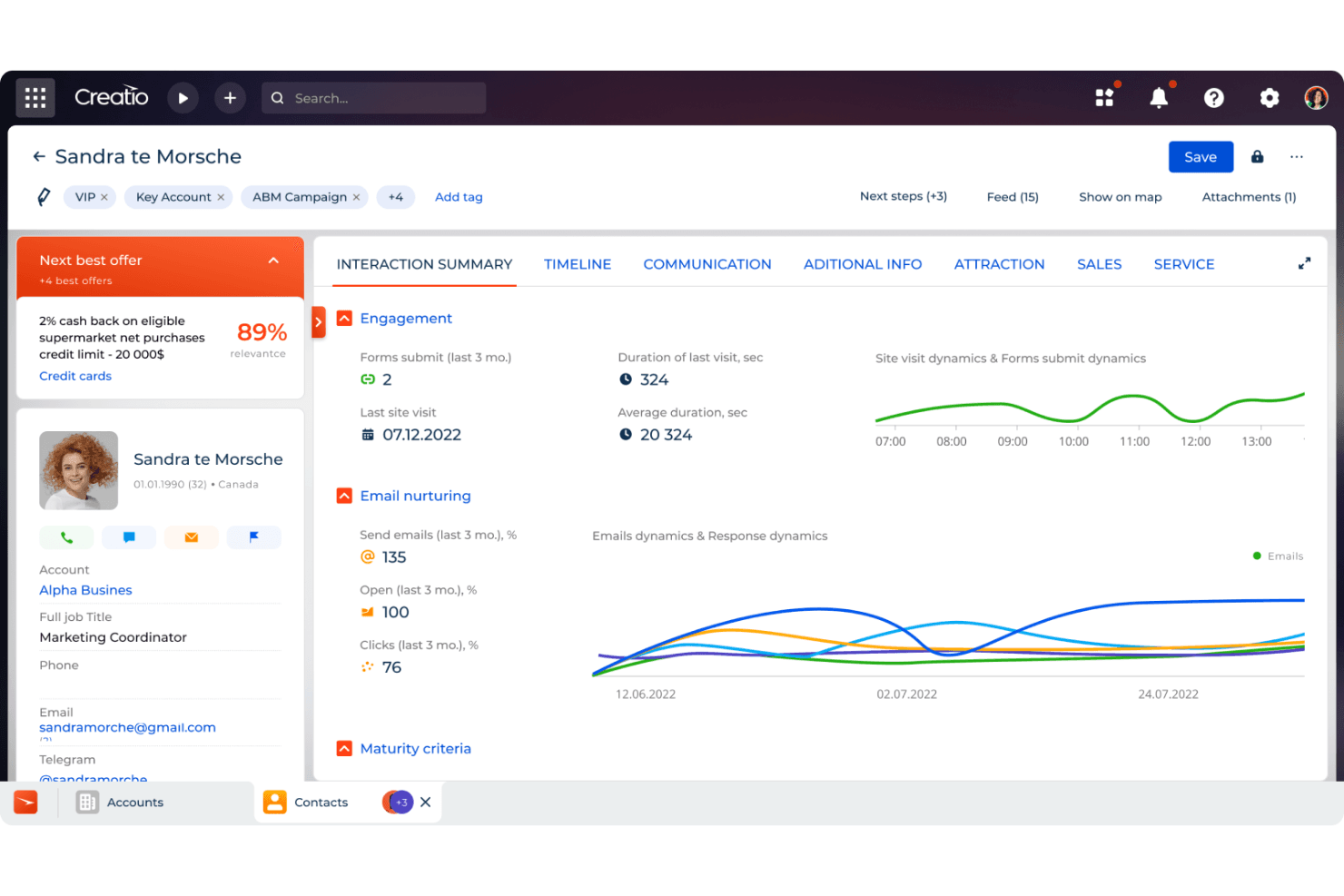
CRM Creatio's 360-degree customer dashboard provides a comprehensive view of customer interactions and history. Creatio CRM is a financial services CRM platform built around no-code workflow automation, AI-driven next-best-offer recommendations, multi-LOB pipeline management, and native KYC/AML compliance tooling for retail and commercial banking teams.
Who Is Creatio CRM Best For?
Creatio CRM is a strong fit for community and regional banks that want to automate complex, compliance-sensitive workflows without relying on developers to make changes.
Why I Picked Creatio CRM
Creatio CRM earns its spot on my shortlist because it's built around agentic AI in a way that banking CRMs rarely are. I'm particularly impressed by the Retention Agent, which autonomously detects churn risk and triggers personalized outreach before a relationship sours, and the Next Best Offers engine, which surfaces ML-driven product recommendations with sale probability scores directly in the banker's workflow. Non-technical teams can also configure and update these processes without touching code.
Creatio CRM Key Features
- Household and legal entity profiles: Unified financial records that capture account hierarchies, ownership structures, and member relationships across both retail and commercial banking customers.
- No-code BPM workflow engine: A drag-and-drop process builder that lets non-technical banking staff configure onboarding flows, loan origination stages, and compliance routing without developer support.
- Sales forecasts module: Pipeline-based revenue projections with plan-versus-actual tracking across sales associates, account segments, and industry verticals.
- ComplyTrack integration: A marketplace add-on that screens customers against OFAC, EU, UN, Dow Jones, and LexisNexis sanctions and PEP lists with configurable risk scoring and audit trails.
Creatio CRM Integrations
Creatio CRM offers marketplace integrations via Solutions Metrix for Jack Henry Symitar and Fiserv, plus ComplyTrack through Creatio Marketplace. Its OData REST APIs and webhooks support custom integrations; no native FIS connector is documented.
Pros and Cons
Pros:
- Referral program management is built for banks
- No-code BPM adapts to banking compliance changes
- Agentic AI drives proactive retention workflows
Cons:
- Reporting tools are less intuitive than peers
- Advanced AML features require a paid add-on
Learn more about Creatio AI CRM:
Outro software CRM bancário
Eis algumas opções adicionais de soluções CRM bancárias que não entraram na minha seleção, mas que ainda vale a pena consultar.
- 11Zoho CRMBest for personalized banking client relationships
- 12SugarAIBest for customizable solutions
- 13Microsoft Dynamics 365Best for enterprise resource planning
- 14monday CRMBest for custom automation
- 15Salesforce Financial Services CloudBest for financial service providers
- 16PipedriveBest for visual sales pipeline
- 17Copper CRMBest for Google Workspace integration
- 18Oracle NetSuite CRMBest for financial management integration
- 19BankPointBest for bank portfolio management
- 20360ViewBest for cross-LOB referral and cross-sell tracking
How I Evaluate Banking CRM Software
I split my evaluation into baseline criteria—like core banking integrations and compliance workflows—and differentiating factors that separate the best fits from the rest.
Core Functionality (Table Stakes For This List)
When I'm selecting tools for my list, I rank each one on a scale from 0 (does not offer the functionality) to 5 (excels in this area) for each core functionality listed below. Then, I calculate the tool's total score into a percentage. Each tool needs to achieve a minimum total score of 55% to be considered for inclusion.
- Unified Client Profiles: I check whether the CRM can link individual contacts to households, entities, and account hierarchies across retail, commercial, and wealth divisions.
- Banking-Specific Pipeline Management: Each tool should support pipelines tailored to banking products like loans, deposits, and treasury services—not just generic deal stages.
- Core Banking System Integrations: I look for prebuilt connectors to platforms like FIS, Fiserv, Jack Henry, or Temenos so relationship data flows without manual imports.
- Compliance & Regulatory Workflows: Built-in KYC/AML fields, audit trails, and role-based access matter here—especially for teams managing onboarding across multiple product lines.
- Revenue & Profitability Analytics: I evaluate whether the platform reports on relationship-level profitability and wallet share, not just standard win/loss metrics.
- Referral & Cross-Sell Workflows: The CRM should route referrals between lines of business with tracking and attribution, so a commercial banker can hand off a wealth prospect with full context.
Once I have a list of tools that meet the criteria, I consider what sets each platform apart.
Differentiating Factors (What Sets Vendors Apart)
Here's how I compare and contrast different vendors:
Standout Features
Relationship pricing tools are a real differentiator—I look for platforms that let bankers model loan rates and fee waivers against total relationship value before structuring a deal. AI-driven next-best-action prompts also matter, especially when they flag cross-sell opportunities based on a client's existing product mix. Call report automation is another feature I evaluate closely, since relationship managers who can log meeting notes via voice-to-text on mobile spend far less time on data entry between client visits.
Beyond Features
I pay close attention to regulatory and security posture—certifications like SOC 2 Type II and data residency options tell you a lot about whether a vendor is built for banking or just adapted to it. Implementation timelines matter too, since core banking integrations can stretch deployments by months if prebuilt data models and banking-specific accelerators aren't available. I also evaluate institution size fit, because a CRM designed for community banks with a handful of branches often falls short for a regional institution running multiple lines of business.
Como escolher um software CRM bancário
Ao comparar software CRM bancário, a escolha certa depende das necessidades relativas aos dados dos seus clientes, dos requisitos de conformidade, da oferta de produtos e dos sistemas bancários existentes.
| Se a sua prioridade é… | Procure… |
|---|---|
| Se a sua prioridade é…Criar perfis completos dos clientes | Procure…Registos unificados dos clientes que incluam contas, interações, produtos e histórico da relação |
| Se a sua prioridade é…Ligar sistemas bancários existentes | Procure…Conectores nativos ou APIs para plataformas bancárias centrais, de crédito, gestão de património e pagamentos |
| Se a sua prioridade é…Gerir processos regulamentares | Procure…KYC, AML, registo de consentimentos, registos de auditoria e fluxos de trabalho de conformidade configuráveis |
| Se a sua prioridade é…Aumentar as oportunidades de vendas cruzadas | Procure…Recomendações de produtos, informações sobre relações e ferramentas para a próxima melhor ação |
| Se a sua prioridade é…Gerir a comunicação com os clientes | Procure…E-mail, telefone, SMS e mensagens seguras nos registos dos clientes |
| Se a sua prioridade é…Suportar relações bancárias complexas | Procure…Mapeamento das relações entre agregados familiares, empresas, beneficiários e partes relacionadas |
Como avaliar a sua seleção
- Testar a consolidação dos dados dos clientes: Peça aos fornecedores que demonstrem como os dados de conta, interação, produto e relação aparecem num único perfil de cliente.
- Verificar a conectividade com o sistema bancário central: Solicite uma demonstração em direto utilizando a sua plataforma bancária central ou um ambiente de teste comparável.
- Rever os fluxos de trabalho de conformidade: Teste a forma como o CRM gere as revisões KYC, os alertas AML, os registos de consentimento e os históricos de auditoria.
- Avaliar a inteligência relacional: Peça ao fornecedor que demonstre recomendações de produtos, acompanhamento de referências e mapeamento de relações utilizando cenários realistas de clientes.
- Verificar as permissões e os controlos de dados: Confirme que o acesso pode ser restringido por agência, departamento, função, tipo de conta ou relação com o cliente.
O que é o software CRM bancário?
O software CRM bancário é uma plataforma de gestão das relações com os clientes concebida para bancos e instituições financeiras. Centraliza os perfis dos clientes, as relações com as contas, o histórico de comunicações, as oportunidades de vendas e as atividades de serviço.
Estas plataformas proporcionam às equipas bancárias uma visão mais clara de cada relação com o cliente. Podem também apoiar o processo de integração de clientes, os processos de conformidade, as referências, as recomendações de produtos e a comunicação contínua com os clientes.
Funcionalidades do software CRM bancário
Ao selecionar um software CRM bancário, esteja atento às seguintes funcionalidades principais:
- Perfis unificados dos clientes: Combina informações de contacto, produtos financeiros, histórico de comunicações, relações com contas e atividade de serviço num único registo.
- Mapeamento de relações: Liga clientes a agregados familiares, empresas, beneficiários, consultores, contas e outras partes relacionadas.
- Conectividade com sistemas bancários: Troca dados com plataformas bancárias centrais, sistemas de crédito, plataformas de gestão patrimonial, sistemas de pagamentos e outras aplicações financeiras.
- Fluxos de trabalho KYC e AML: Apoia a verificação de identidade, a recolha de documentos, as revisões de clientes, as avaliações de risco e os processos relacionados com a conformidade.
- Integração de clientes: Gere candidaturas, documentos necessários, aprovações, assinaturas e tarefas de integração desde o contacto inicial até à ativação da conta.
- Gestão do funil de vendas: Acompanha potenciais clientes, referências, oportunidades, candidaturas a produtos e atividades de desenvolvimento de relações.
- Venda cruzada e recomendações de produtos: Identifica produtos bancários relevantes com base nas contas existentes, nos perfis dos clientes, na atividade e nos dados relacionais.
- Comunicação omnicanal: Regista emails, chamadas telefónicas, SMS, reuniões e outras interações no perfil do cliente correspondente.
- Gestão de tarefas e fluxos de trabalho: Atribui acompanhamentos, aprovações, revisões e tarefas de serviço ao cliente com base em processos bancários predefinidos.
- Relatórios e painéis: Acompanha a atividade dos clientes, as referências, o desempenho do funil, a adoção de produtos, o valor das relações e a atividade dos colaboradores.
Funcionalidades comuns de IA
Para além das funcionalidades padrão do software CRM bancário, muitas plataformas estão a adicionar capacidades de IA, tais como:
- Recomendações da próxima melhor ação: Analisa a atividade do cliente, os produtos existentes e os dados relacionais para sugerir ações de acompanhamento relevantes.
- Modelos de recomendação de produtos: Identifica produtos bancários que podem corresponder ao perfil financeiro, às contas existentes ou à atividade recente de um cliente.
- Resumos das interações com os clientes: Gera resumos concisos de emails, chamadas, reuniões e interações anteriores no registo do cliente.
- Classificação de contactos e oportunidades: Avalia potenciais clientes e clientes existentes com base no envolvimento, comportamento, dados das contas e padrões de conversão.
- Análise do sentimento dos clientes: Analisa os padrões de comunicação para identificar insatisfação, alterações no envolvimento ou possíveis problemas relacionados com o serviço.
- Informações sobre as relações: Identifica ligações entre clientes, contas, agregados familiares, empresas e outras relações financeiras associadas.
Benefícios do software CRM bancário
A implementação de software CRM bancário pode proporcionar vários benefícios às equipas bancárias:
- Visibilidade completa do cliente: Os registos centralizados dão aos funcionários acesso às relações com as contas, ao histórico de comunicações, às preferências e à atividade de serviços anterior.
- Recomendações de produtos mais relevantes: Os dados sobre as relações e os conhecimentos sobre os clientes podem revelar oportunidades adequadas para produtos bancários adicionais.
- Comunicação consistente com os clientes: Os registos partilhados das interações reduzem as perguntas repetidas e fornecem aos funcionários o contexto necessário antes de contactarem os clientes.
- Acompanhamento reforçado da conformidade: Os registos KYC, os históricos de aprovações, os dados de consentimento e as pistas de auditoria criam uma documentação mais clara para as análises regulamentares.
- Integração mais rápida dos clientes: As ferramentas de fluxo de trabalho coordenam a recolha de documentos, as verificações de identidade, as aprovações e as atividades de abertura de contas.
- Melhor gestão das relações: O mapeamento de agregados familiares e de relações proporciona às equipas um contexto mais abrangente sobre relações bancárias pessoais e comerciais complexas.
- Maior visibilidade das vendas: Os painéis do funil mostram referências, oportunidades, candidaturas e atividade relacionada com produtos em todas as equipas e agências.
Custos & preços do software CRM bancário
O preço do software CRM bancário varia consideravelmente, uma vez que a dimensão da implementação, os registos de clientes, os requisitos de segurança, a personalização e as ligações aos sistemas bancários afetam o custo total.
Tabela de comparação de planos para software CRM bancário
| Tipo de plano | Preço médio | Funcionalidades comuns |
|---|---|---|
| Tipo de planoPlano gratuito | Preço médio$0/utilizador/ mês | Funcionalidades comunsGestão básica de contactos, armazenamento limitado, integração de e-mail e relatórios básicos. |
| Tipo de planoPlano pessoal | Preço médio$10-$20/ utilizador/mês | Funcionalidades comunsGestão avançada de contactos, painéis personalizados, acompanhamento de e-mails e automatização básica. |
| Tipo de planoPlano empresarial | Preço médio$30-$60/ utilizador/mês | Funcionalidades comunsAutomatização de fluxos de trabalho, análise avançada, integrações de terceiros e suporte melhorado ao cliente. |
| Tipo de planoPlano empresarial de grande dimensão | Preço médio$100-$300/ utilizador/mês | Funcionalidades comunsSoluções personalizáveis, gestor de conta dedicado, funcionalidades de segurança avançadas e análise abrangente. |
Perguntas frequentes sobre software CRM bancário
Eis algumas respostas a perguntas comuns sobre software CRM bancário:
Quão seguro é o software CRM bancário para armazenar dados sensíveis dos clientes?
O software CRM bancário inclui normalmente encriptação, controlos de acesso baseados em funções, registos de auditoria, autenticação multifator e monitorização da segurança. Os compradores devem também analisar as certificações relevantes, as opções de localização dos dados e as políticas de segurança do fornecedor antes de escolherem uma plataforma.
O software CRM bancário é compatível com fluxos de trabalho KYC, AML e outros processos de conformidade?
Muitas plataformas de CRM bancário são compatíveis com KYC, AML, verificação de identidade, recolha de documentos, fluxos de trabalho de aprovação e pistas de auditoria. A profundidade destas funcionalidades varia, pelo que os compradores devem confirmar quais os processos de conformidade integrados e quais requerem ferramentas adicionais.
O software CRM bancário pode gerir relações complexas entre clientes e agregados familiares?
Sim. Muitas plataformas conseguem associar pessoas, agregados familiares, empresas, beneficiários, consultores e contas relacionadas. O mapeamento de relações proporciona uma visão mais clara da forma como os clientes e as relações financeiras estão ligados.
Qual é o nível de personalização do software CRM bancário para diferentes processos bancários?
A personalização pode incluir campos, fluxos de trabalho, etapas de aprovação, painéis, funis, permissões e relatórios. Os bancos com processos complexos devem procurar ferramentas configuráveis que não exijam um desenvolvimento extenso para alterações de rotina.
O software CRM bancário pode apoiar vendas cruzadas e recomendações de produtos?
Sim. Algumas plataformas analisam os perfis dos clientes, os produtos existentes, a atividade de transações e o histórico das relações para identificar oportunidades relevantes de venda cruzada. Os sistemas mais avançados podem utilizar IA para sugerir as próximas melhores ações ou produtos financeiros adequados.
Qual é o desempenho do software CRM bancário à medida que é expandido para várias agências e equipas?
Muitas plataformas de CRM bancário são compatíveis com várias agências, departamentos, funções e grandes bases de dados de clientes. Os compradores devem avaliar os controlos de permissões, os relatórios entre localizações, a consistência dos fluxos de trabalho e o desempenho do sistema à medida que aumentam os volumes de utilizadores e de dados.