

As melhores alternativas ao Thryv oferecem-lhe os mesmos benefícios essenciais — comunicação simplificada com os clientes, acompanhamento de projetos, agendamento, faturação e gestão das redes sociais — sem o preço elevado ou a complexidade excessiva. Se procura uma plataforma mais fácil de utilizar ou mais económica, tem excelentes opções.
De seguida, apresentarei as minhas principais escolhas de alternativas ao Thryv, para que possa encontrar uma ferramenta adequada às necessidades da sua empresa e manter tudo a funcionar sem problemas.
O que é o Thryv?
O Thryv é uma plataforma completa de gestão empresarial que ajuda as pequenas empresas a simplificar tarefas como o agendamento, a comunicação com os clientes, a faturação e o marketing. Embora o Thryv ofereça uma vasta gama de funcionalidades para simplificar as operações diárias, alguns utilizadores podem procurar alternativas ao Thryv por motivos como o preço, necessidades específicas de funcionalidades ou a preferência por uma experiência de utilização diferente. Explorar outras opções pode ajudá-lo a encontrar a solução mais adequada aos seus fluxos de trabalho e objetivos específicos.
Why Trust Our Software Recommendations
6,700+
Reviews
20
Industry experts
16+
Evaluation factors
14
Years
Our reviews reflect our independent judgment—not a sales pitch. Learn how we stay transparent.
For this guide, we evaluated tools using hands-on testing and independent research, scoring tools using our selection criteria.
Our reviews reflect our human editorial judgment, not a sales pitch.
Tabela de comparação: alternativas ao Thryv
Esta tabela de comparação resume os detalhes dos preços das minhas principais escolhas de alternativas ao Thryv.
| Tool | Best For | Trial Info | Price | ||
|---|---|---|---|---|---|
| 1 | Best for marketing automation and CRM integration | Free demo available | Pricing upon request | Website | |
| 2 | Best for social profile enrichment | 14-day free trial available | From $29.90/user/month | Website | |
| 3 | Best for fitness studio management | Free demo available | From $69/month | Website | |
| 4 | Best for an affordable all-in-one CRM | Free plan available | From $8.99/user/month | Website | |
| 5 | Best for small business client management | 14-day free trial + free demo available | From $29/month (billed annually) | Website | |
| 6 | Best for a free forever plan with unlimited users | Free plan + 15-day trial + demo available | From €69/month | Website | |
| 7 | Best for spa and salon management | Not available | Pricing upon request | Website | |
| 8 | Best for all-in-one marketing automation | Free plan + free demo available | Pricing upon request | Website | |
| 9 | Best for project and resource management | 14-day free trial + demo available | Pricing upon request | Website | |
| 10 | Best for home service job management | 14-day free trial | From $49/month | Website |


Análise das melhores alternativas ao Thryv
Nesta análise, abordarei as vantagens e desvantagens de cada alternativa ao Thryv, incluindo as suas funcionalidades e os casos de utilização mais adequados, para o ajudar a tomar uma decisão informada.
 Best for marketing automation and CRM integration
- Free demo available
- Pricing upon request
Visit WebsiteCustomer Rating:4.5/5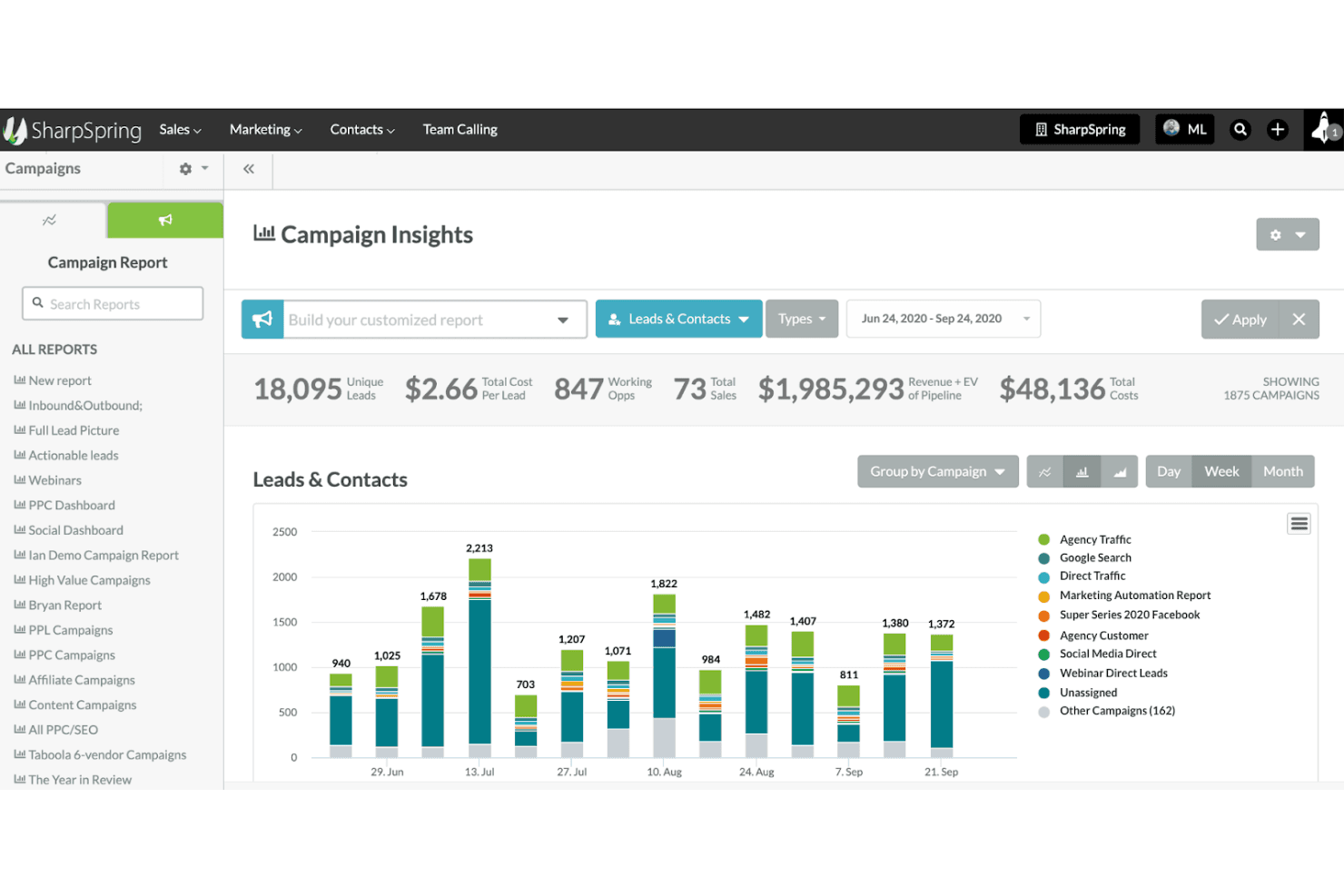
SharpSpring tracks campaign performance with leads and cost insights. SharpSpring, now rebranded as Lead Gen & CRM by Constant Contact, is a marketing automation and CRM platform built for marketing managers who need to capture, score, and nurture leads through automated campaigns and a centralized sales pipeline.
Who Is SharpSpring Best For?
SharpSpring suits marketing managers at small-to-mid-sized businesses who need lead scoring, automated nurturing, and CRM in one place.
Why I Picked SharpSpring
I picked SharpSpring as one of the best because its marketing automation and CRM integration work as a genuinely unified system, not two bolted-together tools. Lead scoring updates automatically as contacts engage with emails or campaigns, so my team can hand off only the most qualified prospects to sales without manual review. I also like that multi-step nurturing workflows and social publishing across Instagram, Facebook, and LinkedIn all live in the same platform, keeping campaign execution and contact records in sync.
SharpSpring Key Features
- Lead scoring: Automatically scores contacts based on their engagement activity, so your sales team knows which prospects to prioritize.
- Pipeline management: Tracks deals and opportunities through a visual sales pipeline from first touch to close.
- Time-based automations: Triggers email reminders and follow-ups at specific dates and times without manual intervention.
- Social listening feeds: Monitors and tracks social media activity across connected accounts directly within the platform.
SharpSpring Integrations
Lead Gen & CRM offers marketplace integrations with Bookeo, Paperform, InvoiceBerry, FreshBooks, Salesforce, Shopify, and Zapier. It also provides an API for custom integrations.
Pros and Cons
Pros:
- Social publishing sits beside campaign automation
- Email nurturing connects marketing and sales
- Lead scoring supports cleaner sales handoffs
Cons:
- Users report limited reporting and segmentation
- No native booking, invoicing, or review management
Learn more about SharpSpring: Best for social profile enrichment
- 14-day free trial available
- From $29.90/user/month
Visit WebsiteCustomer Rating:4.5/5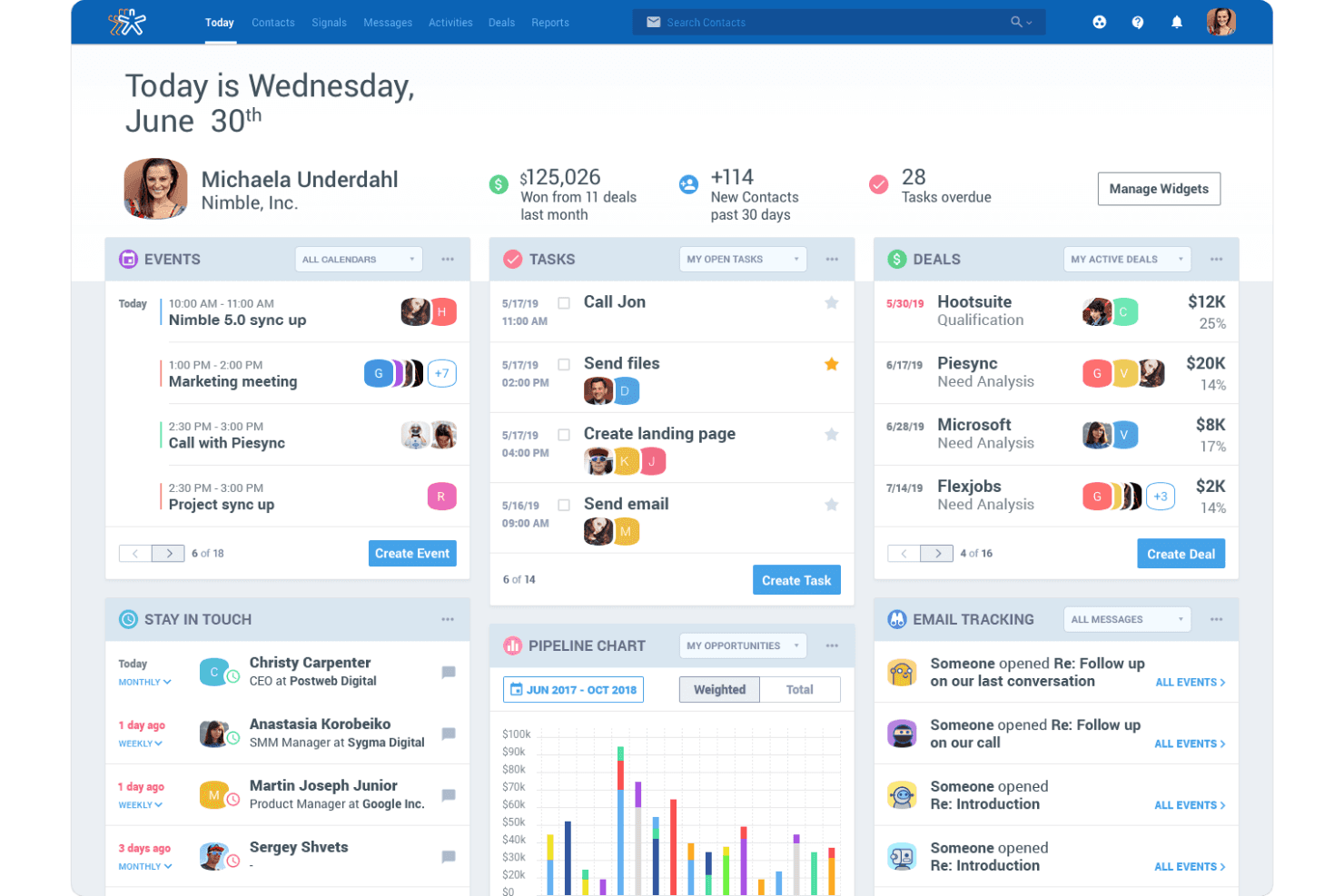
Nimble centralizes tasks, deals, and contacts in one dashboard. Nimble is a relationship-focused CRM built for small businesses that want to keep contact records, email interactions, and social profile data in one place—making it a natural fit for sales and marketing teams that spend a lot of time on outreach and follow-up.
Who Is Nimble Best For?
Nimble is a strong fit for small business sales and marketing teams that prioritize relationship management and contact enrichment over all-in-one operations.
Why I Picked Nimble
I picked Nimble as one of the best because its social profile enrichment capability is genuinely difficult to replicate elsewhere. When I'm working a contact from LinkedIn or Gmail, Nimble's Prospector browser extension pulls in job titles, company details, social profiles, and business insights directly into the contact record. I also appreciate that enrichment credits can automatically fill gaps like phone numbers, email addresses, and locations, so my contact data stays current without manual cleanup.
Nimble Key Features
- Deal pipelines: Create and manage multiple customizable deal pipelines in Kanban or list views, with deal cards that support tags, custom fields, and contact links.
- Email sequences: Set up automated, time-based email follow-ups sent directly from your own email address, with open, click, and bounce tracking.
- Web forms and web chat: Build embeddable lead-capture forms and add a live chat widget to your site, with automatic CRM contact creation from submissions.
- Workflow automation: Build custom workflows for repeatable processes using Kanban boards, stage-triggered actions, and pre-built industry templates.
Nimble Integrations
Nimble offers 120+ app integrations, including native Microsoft 365 and Google Workspace connections, plus marketplace integrations with Mailchimp, PandaDoc, and Zapier. It also provides a REST API, OAuth 2.0, and an MCP connector for custom integrations.
Pros and Cons
Pros:
- Contact discovery earns reviewer praise
- Unified histories support client follow-up
- Social profiles enrich contact records
Cons:
- No review or social publishing tools
- No client self-booking or payments
Learn more about Nimble: Best for fitness studio management
- Free demo available
- From $69/month
Visit WebsiteCustomer Rating:4.4/5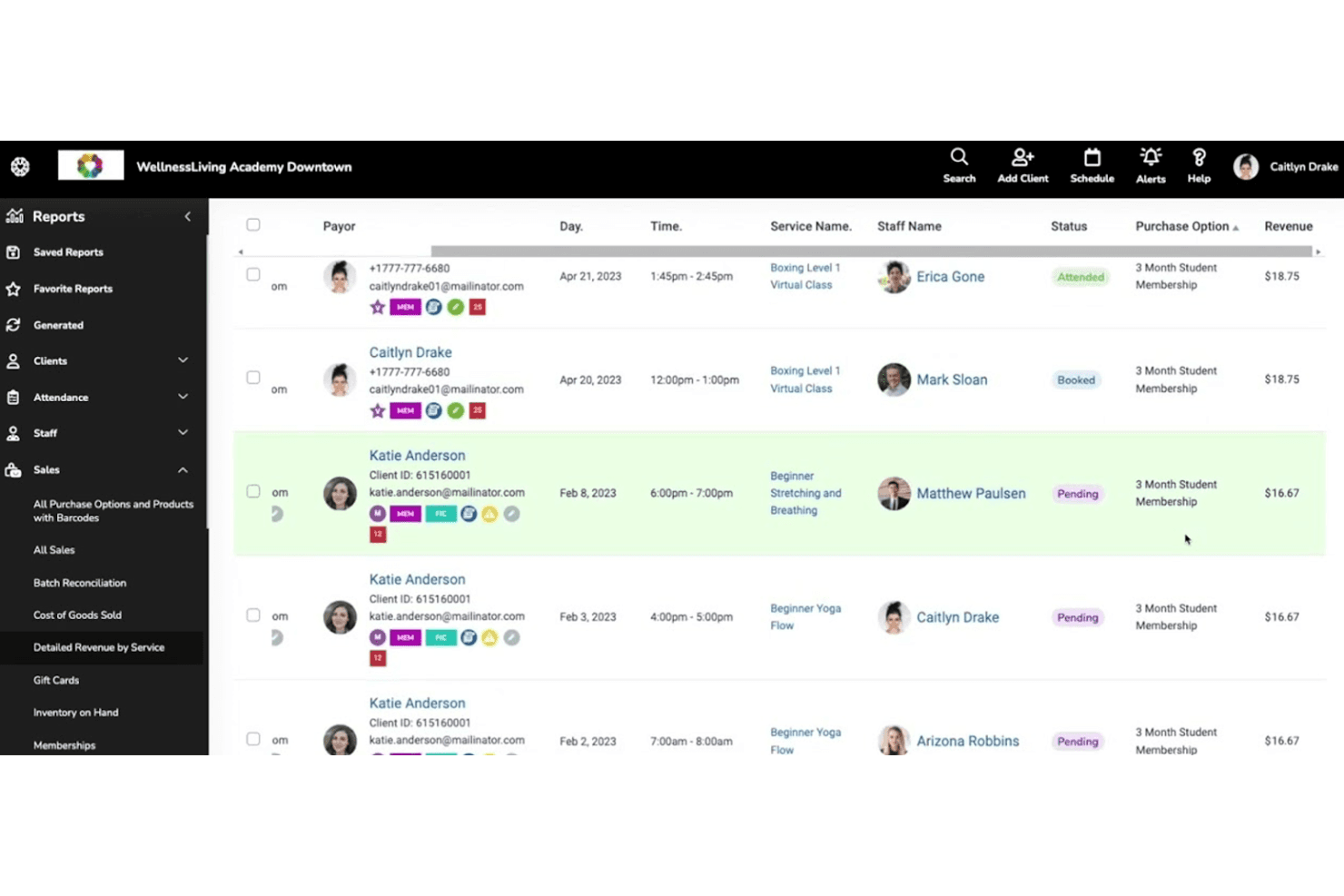
WellnessLiving tracks client attendance, booking status, and revenue in one report. WellnessLiving is an all-in-one management platform built for fitness, wellness, and beauty businesses that need to handle client booking, memberships, marketing, and payments without juggling separate tools.
Who Is WellnessLiving Best For?
WellnessLiving is a strong fit for fitness, wellness, and beauty studio owners who need scheduling, client management, and marketing tools in one place.
Why I Picked WellnessLiving
WellnessLiving earns its spot on my list because it's purpose-built for fitness and wellness studios in a way that general small-business tools simply aren't. I especially like how the booking system handles class waitlists, asset reservations like rooms and equipment, and Reserve with Google, so clients can book directly from Search or Maps without any extra steps. The CAASI AI front desk is another standout I appreciate: it handles inbound calls, texts, and chats, qualifies leads, and books sessions against your live schedule around the clock.
WellnessLiving Key Features
- Marketing Suite automations: Build trigger-based email and SMS sequences using audience filters like membership type, location, or visit history to target specific client segments.
- Client rewards and loyalty program: Let clients earn points for bookings and attendance, then redeem them for prizes to encourage repeat visits.
- Digital forms and waivers: Create customizable intake forms and collect client signatures digitally during registration or booking.
- Multi-location enterprise tools: Manage reporting, centralized configuration, regional access, and automated royalty fee distribution across multiple business locations.
WellnessLiving Integrations
WellnessLiving has documented native integrations with QuickBooks, Reserve with Google, and Brivo, plus connections with Mailchimp and Constant Contact. It offers an API for custom integrations and Zapier support.
Pros and Cons
Pros:
- CAASI captures leads and books scheduled sessions
- Client records, memberships, and payments share one system
- Studio booking includes waitlists and asset reservations
Cons:
- No social media publishing or monitoring
- No invoice or estimate workflows
Learn more about WellnessLiving: Best for an affordable all-in-one CRM
- Free plan available
- From $8.99/user/month
Visit WebsiteCustomer Rating:4.3/5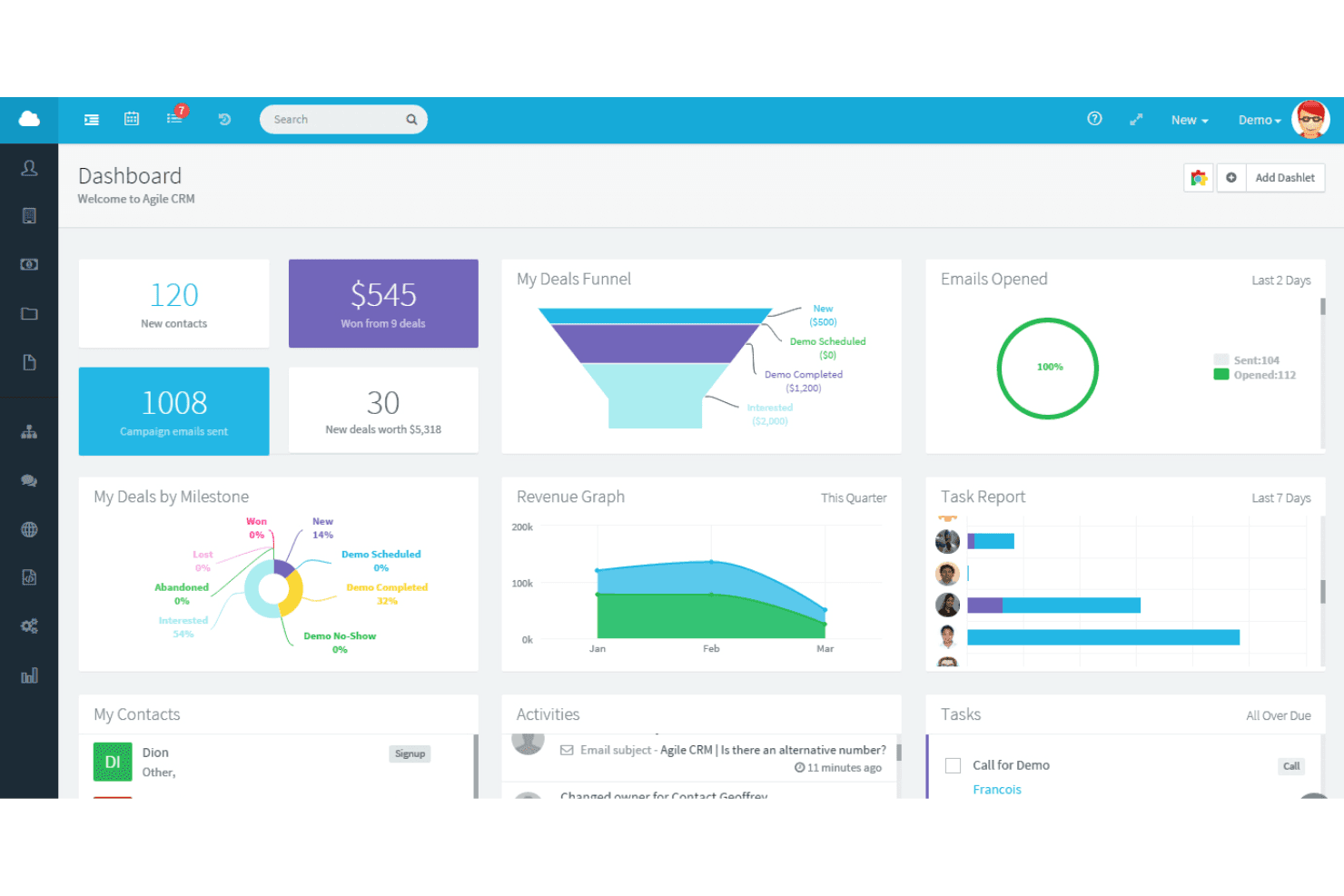
Agile CRM centralizes sales, contacts, and tasks in one dashboard. Agile CRM is a budget-friendly platform that bundles sales, marketing automation, and customer service tools into one system, making it a practical fit for small businesses that want to manage contacts, run email campaigns, and handle support without juggling multiple apps.
Who Is Agile CRM Best For?
Agile CRM is a strong fit for small business owners and marketing-focused teams that want sales, marketing automation, and helpdesk tools in one low-cost platform.
Why I Picked Agile CRM
I picked Agile CRM as one of the best because it packs CRM, marketing automation, and helpdesk tools into a single platform at a price that won't strain a small business budget. I especially like how contact timelines pull together call notes, emails, and web activity in one view, so nothing slips through the cracks. The drag-and-drop campaign builder also lets me set up triggered email workflows without needing a separate marketing tool.
Agile CRM Key Features
- Lead scoring: Automatically scores and qualifies leads based on activity and attributes, with real-time alerts when a contact hits a threshold.
- Helpdesk ticketing: Manages customer support tickets with group routing, labels, canned responses, and dashboard reporting on ticket status and response times.
- Landing page builder: Creates mobile-responsive landing pages using templates and a visual designer, without needing a separate tool.
- QuickBooks integration: Displays invoices and payment history on contact pages and lets you create, send, and track payments directly from the CRM.
Agile CRM Integrations
Agile CRM lists 50+ integrations, including QuickBooks, Stripe, Google Calendar, Shopify, Office 365, and Twilio. It also supports API-based custom integrations and Zapier.
Pros and Cons
Pros:
- Appointment calendar receives positive reviewer feedback
- Automated email follow-ups support lead nurturing
- Contact timelines keep customer context together
Cons:
- Users report slow loads and automation glitches
- No review monitoring or response workflows
Learn more about Agile CRM: Best for small business client management
- 14-day free trial + free demo available
- From $29/month (billed annually)
Visit WebsiteCustomer Rating:4.5/5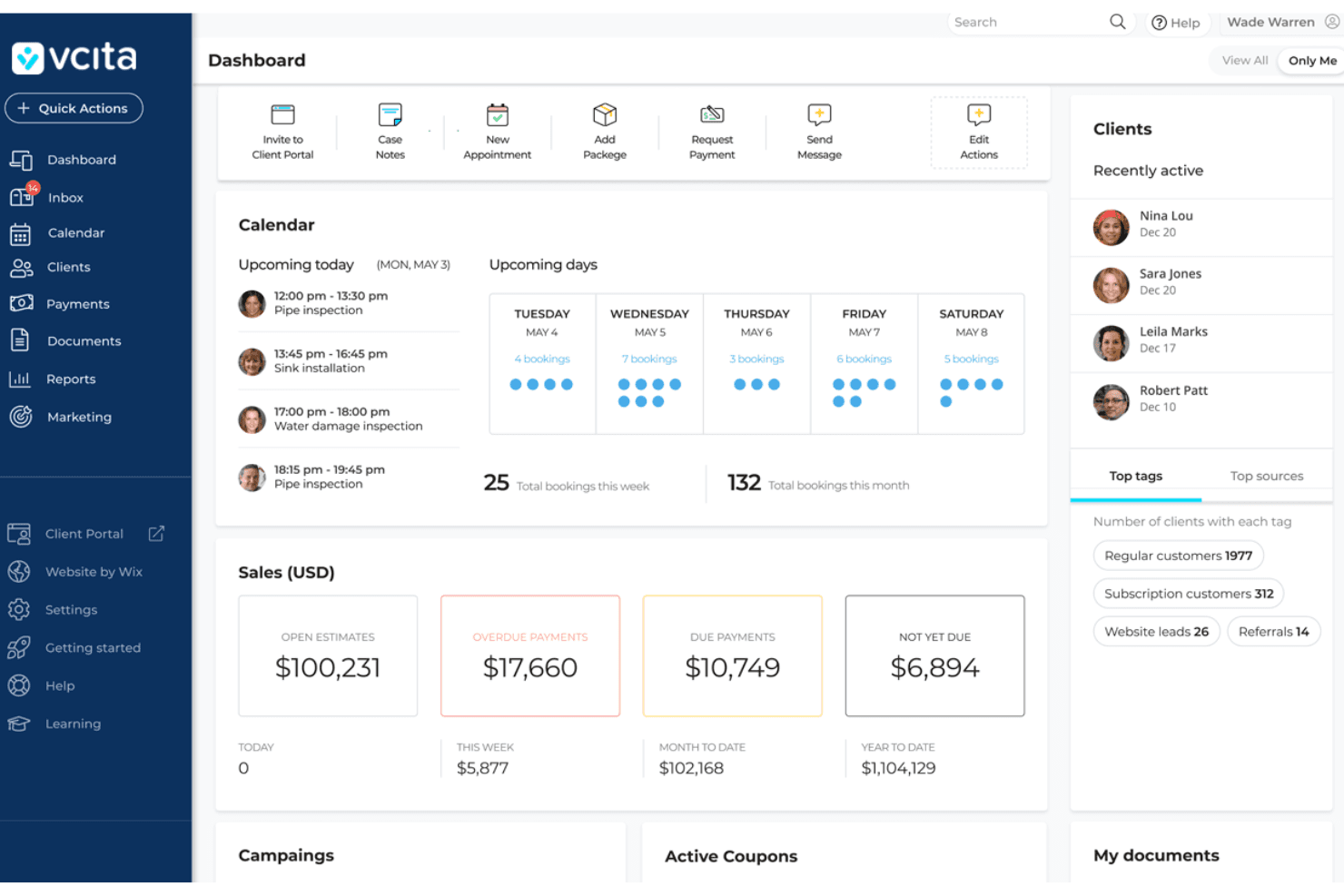
vCita centralizes scheduling, sales, and client activity in one dashboard. vcita is an AI-powered business management platform built for service-based small businesses that need to handle client records, appointment scheduling, invoicing, payments, and marketing campaigns without juggling multiple tools.
Who Is vcita Best For?
vcita works best for solo operators and small service-based businesses that need to manage clients, bookings, and billing without piecing together a stack of separate tools.
Why I Picked vcita
I picked vcita as one of the best because it brings client records, appointment scheduling, invoicing, and payments into a single place, which is exactly what small service businesses need when leaving Thryv. I especially like the client portal, where clients can book, pay outstanding invoices, and message you without a back-and-forth email chain. The AI chat receptionist also captures and qualifies leads directly from your website, turning site visitors into booked appointments automatically.
vcita Key Features
- Automated marketing campaigns: Trigger-based email and SMS campaigns that activate automatically on events like a first appointment, first payment, or birthday.
- Staff roles and permissions: Assign one of five predefined permission levels to each team member, controlling access to settings, marketing, payments, and bulk operations.
- QuickBooks integration: Syncs invoices, payments, and expenses between vcita and QuickBooks to keep financial records consistent across both platforms.
- Business performance reports: Built-in reporting dashboards that cover bookings, payments, clients, marketing, and staff activity in one place.
vcita Integrations
vcita offers native integrations with QuickBooks, Stripe, Zoom, Google Calendar, and Outlook Calendar, plus PayPal and Square payment gateways. It also supports a REST API and Zapier.
Pros and Cons
Pros:
- One hub replaces several service-business tools
- Automated reminders help clients remember appointments
- Client portal combines booking, billing, and messaging
Cons:
- Payment processing can feel restrictive
- Technical glitches can disrupt daily workflows
Learn more about vCita: Best for a free forever plan with unlimited users
- Free plan + 15-day trial + demo available
- From €69/month
Visit WebsiteCustomer Rating:4.2/5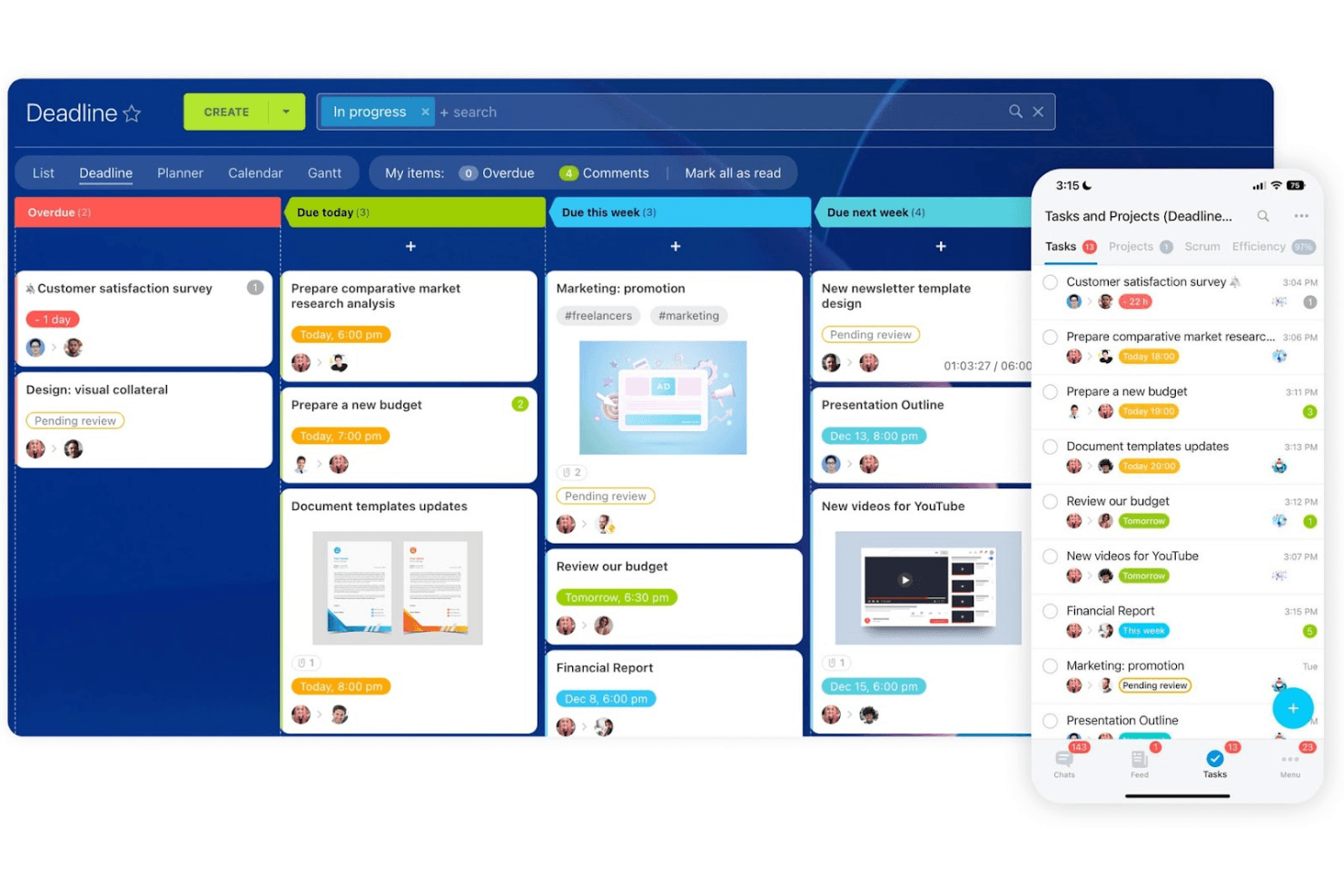
Bitrix24 organizes tasks by deadline across board and mobile views. Bitrix24 is an all-in-one online workspace that bundles CRM, appointment booking, invoicing, project management, and team collaboration into a single platform—making it a practical fit for small businesses that want to replace multiple disconnected tools without paying per seat.
Who Is Bitrix24 Best For?
Small businesses and growing teams that want a free, unlimited-user workspace with CRM, booking, and project tools built in—without paying per seat.
Why I Picked Bitrix24
I picked Bitrix24 as one of the best because its free plan supports unlimited users, which is genuinely rare and removes the per-seat pressure that makes most Thryv alternatives expensive at scale. I love that CRM, client self-booking, and invoicing all live in one workspace: a customer can book a specialist, get a confirmation reminder, and receive an invoice without you touching three separate tools. The unlimited CRM records and pipeline management make it a strong operational hub for small teams running lean.
Bitrix24 Key Features
- Multi-channel marketing campaigns: Send email, SMS, and messenger campaigns from within the CRM, with support for voice broadcasts and advertising audiences for Google Ads and Facebook.
- Branch network management: Set up a primary account with unlimited connected branch accounts, each with its own CRM, tasks, and integrations, managed from a centralized Enterprise account.
- Built-in e-signature: Send documents for signing by SMS or email directly from the Standard plan, with the company signer completing their signature before the document routes automatically to the recipient.
- Kanban, Gantt, and Scrum task views: Organize and track work across multiple project views with subtasks, checklists, time tracking, and task automation rules built into the same workspace as your CRM.
Bitrix24 Integrations
Bitrix24 has native integrations with Google Calendar, Apple Calendar, Google Analytics, and WhatsApp, plus 840+ marketplace apps, including QuickBooks, FreshBooks, WooCommerce, and Wazzup. Its REST API supports custom integrations.
Pros and Cons
Pros:
- Reviewers value consolidated CRM and project work
- Self-booking links appointments to CRM records
- Free plan accommodates unlimited team members
Cons:
- Social tools handle messages, not publishing
- No built-in review monitoring or responses
Learn more about Bitrix24:
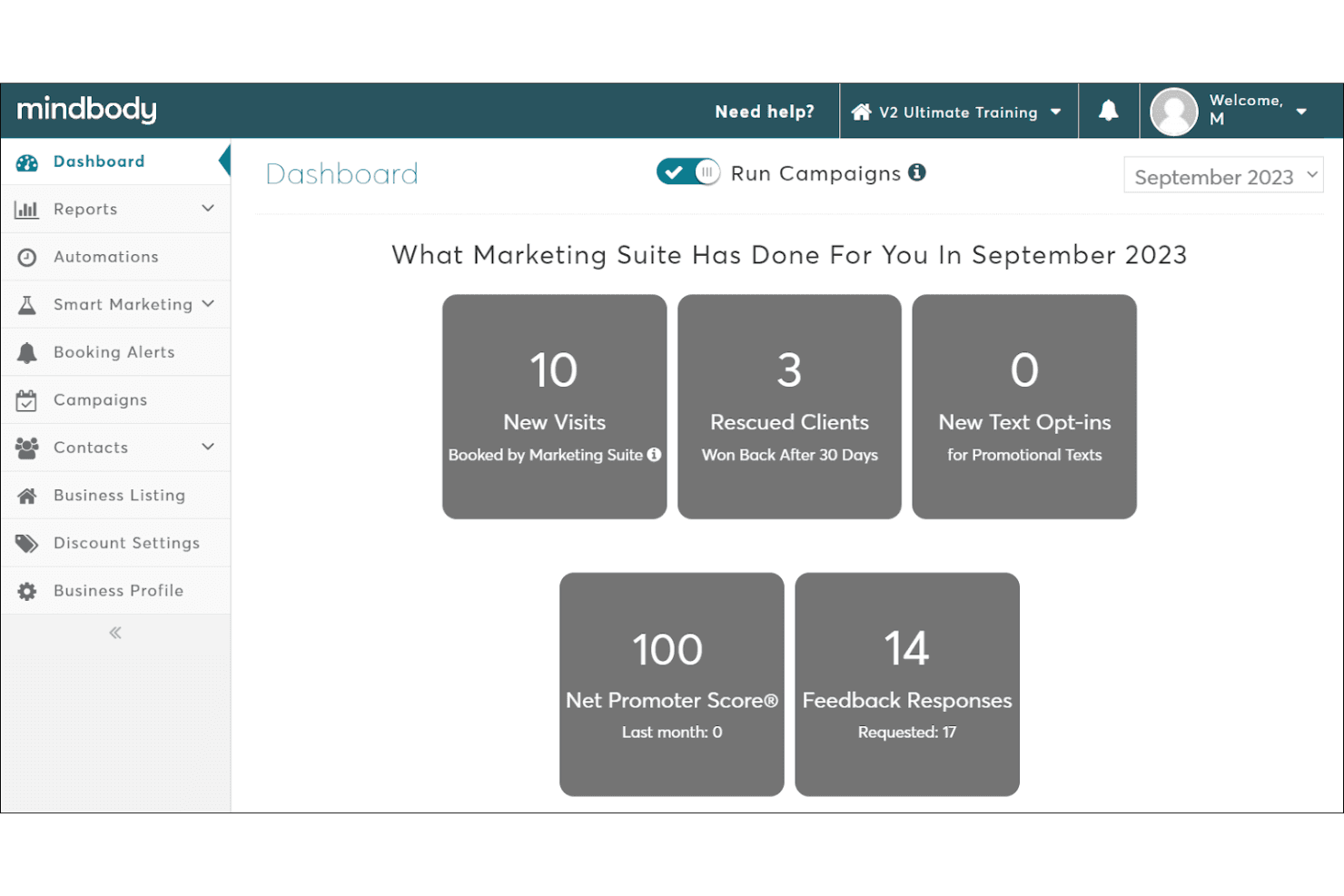
Booker by MINDBODY tracks visits, rescued clients, and NPS scores. Booker by MINDBODY is salon and spa management software that brings appointment scheduling, client records, staff coordination, payments, and marketing automation into one platform for beauty and wellness businesses.
Who Is Booker by MINDBODY Best For?
Booker is a strong fit for salon and spa owners who need appointment scheduling, staff coordination, and client marketing managed in one vertical-specific platform.
Why I Picked Booker by MINDBODY
I picked Booker by MINDBODY because it's purpose-built for spa and salon businesses in a way that general-purpose tools simply aren't. I particularly like how client profiles tie appointment history, staff preferences, and membership details together so front-desk staff can personalize every visit without digging through separate systems. The scheduling engine handles couples bookings, service deposits, and processing time between treatments natively, which covers the operational complexity that salons and spas actually deal with daily.
Booker by MINDBODY Key Features
- Smart contact lists: Segment your client base into targeted groups to send tailored email and text campaigns to the right audience.
- Back-bar inventory tracking: Automatically deducts professional product usage during services to monitor stock levels and reduce waste.
- Staff performance and compensation management: Track individual employee performance metrics and configure custom commission structures and payout combinations.
- Mindbody app marketplace listing: Gives your business visibility to over 3 million monthly shoppers actively searching for wellness and beauty services.
Booker Integrations
Native integrations are not clearly documented. Booker supports an API for custom integrations with BI dashboards, CRM, inventory, and custom workflows.
Pros and Cons
Pros:
- Scheduling, POS, and marketing share one system
- Clients can book appointments online
- Salon-specific booking and client-history tools
Cons:
- No social media publishing or monitoring
- Users report payment and checkout glitches
Learn more about Booker by MINDBODY: Best for all-in-one marketing automation
- Free plan + free demo available
- Pricing upon request
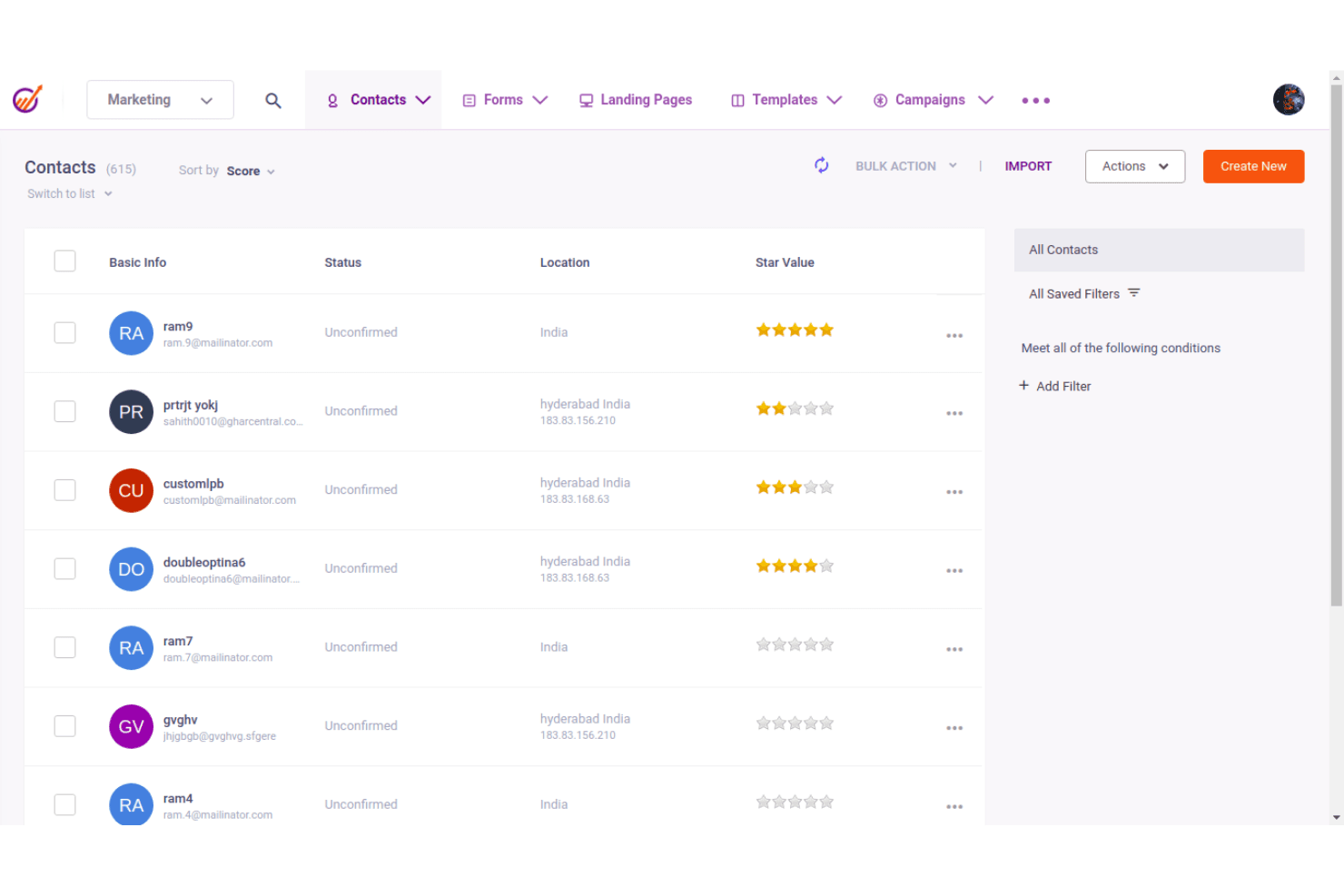
EngageBay CRM displays contacts with scores, status, and location filters. EngageBay is an all-in-one platform for small businesses and startups that bundles CRM, marketing automation, appointment scheduling, and customer support tools into a single system—making it a practical option for teams looking to replace a fragmented stack of point solutions.
Who Is EngageBay CRM Best For?
EngageBay is a strong fit for small business owners and startups that want CRM, marketing automation, and customer support in one affordable platform instead of juggling separate tools.
Why I Picked EngageBay CRM
I've included EngageBay in my top picks because it bundles marketing automation, CRM, and customer support into one platform in a way that actually replaces multiple tools at once. I particularly like how its automation triggers cover real customer actions like abandoned carts, email clicks, and web-page visits, so you can run multi-channel sequences across email, SMS, and push notifications without stitching together separate systems. The built-in appointment scheduler with automated reminders and self-booking URLs adds another layer that most standalone CRMs skip entirely.
EngageBay CRM Key Features
- Contact segmentation: Tag, filter, and group contacts using custom fields and lists to target the right people with the right message.
- Social post scheduling: Schedule and publish posts across Facebook, Twitter, and LinkedIn directly from your EngageBay account.
- Help desk ticketing: Track, manage, and resolve customer support requests through a built-in ticket management system.
- Proposal creation and tracking: Build proposals from templates, send them to contacts, collect signatures, and monitor opens and engagement.
EngageBay CRM Integrations
EngageBay claims integrations with 250+ business tools, including Google Contacts and Google Calendar, Stripe, QuickBooks, Xero, PayPal, Zoom, Twilio, HubSpot, and Salesforce. It also offers a REST API, MCP server, and Zapier.
Pros and Cons
Pros:
- Self-booking appointments with automated reminders
- Triggered email, SMS, and push campaigns
- Centralized customer records and interaction history
Cons:
- No native invoicing or payment collection
- No review monitoring or response tools
Learn more about EngageBay CRM: Best for project and resource management
- 14-day free trial + demo available
- Pricing upon request
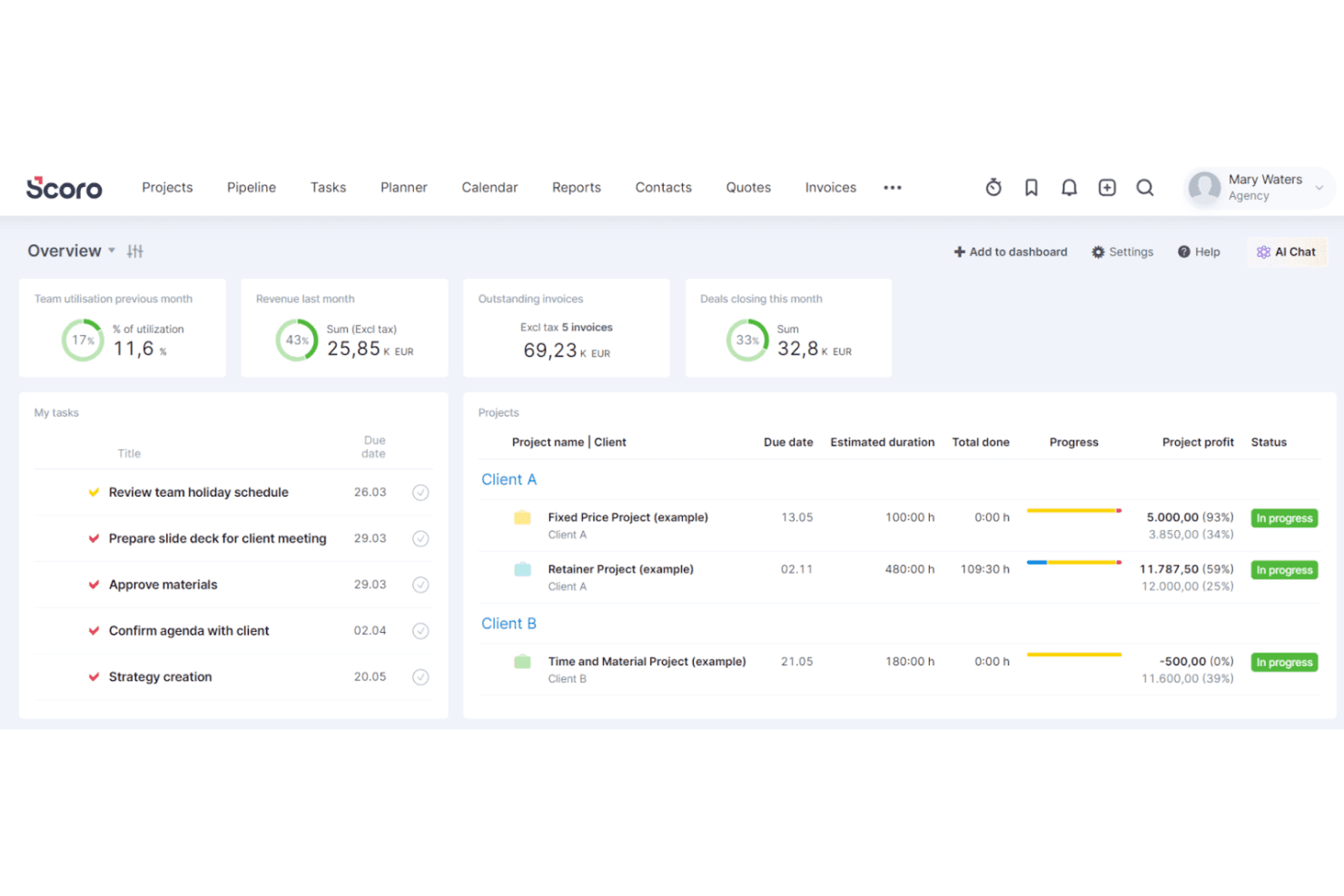
Scoro's dashboard gives teams a live overview of projects and tasks. Scoro is a professional services automation platform built for operations-focused teams that need to connect project delivery, resource planning, time tracking, and invoicing in a single workflow.
Who Is Scoro Best For?
Scoro is a strong fit for operations managers and professional services teams that need project delivery, resource planning, time tracking, and invoicing connected in one place.
Why I Picked Scoro
I picked Scoro as one of the best because it's the only tool on this list built specifically around project and resource management as a connected workflow, not an afterthought. I love how capacity planning and project delivery sit side by side: I can see team availability through heatmap views, drag work directly into schedules, and track whether a project is running over budget, all without leaving the platform. Scoro's Gantt charts and retainer tracking make it especially practical for service teams juggling multiple client engagements at once.
Scoro Key Features
- Quote-to-project conversion: Approved quotes automatically convert into projects and tasks, keeping your sales and delivery workflows connected without manual re-entry.
- Customer portal: Invite clients to a permission-based portal where they can view invoices, quotes, projects, tasks, files, and comments based on their assigned access level.
- ELI AI assistant: Ask questions about your operational data in natural language, generate reports, and trigger routine actions like assembling project teams or sending reminders.
- Supplier bill and purchase order tracking: Record and monitor supplier bills and purchase orders against project budgets to track external costs alongside internal labor costs.
Scoro Integrations
Scoro connects to 40+ tools, including native integrations with HubSpot, Salesforce, Google Calendar, Stripe, Xero, and QuickBooks. It also supports Zapier, REST APIs, webhooks, and an MCP server for custom integrations.
Pros and Cons
Pros:
- Dashboards clarify workload and project progress
- Capacity views help prevent team overbooking
- Connects project work, time, and invoicing
Cons:
- No marketing, review, or social tools
- No client-facing booking or appointment reminders
Learn more about Scoro: 10Best for home service job management
Jobber
- 14-day free trial
- From $49/month
Visit WebsiteCustomer Rating:4.6/5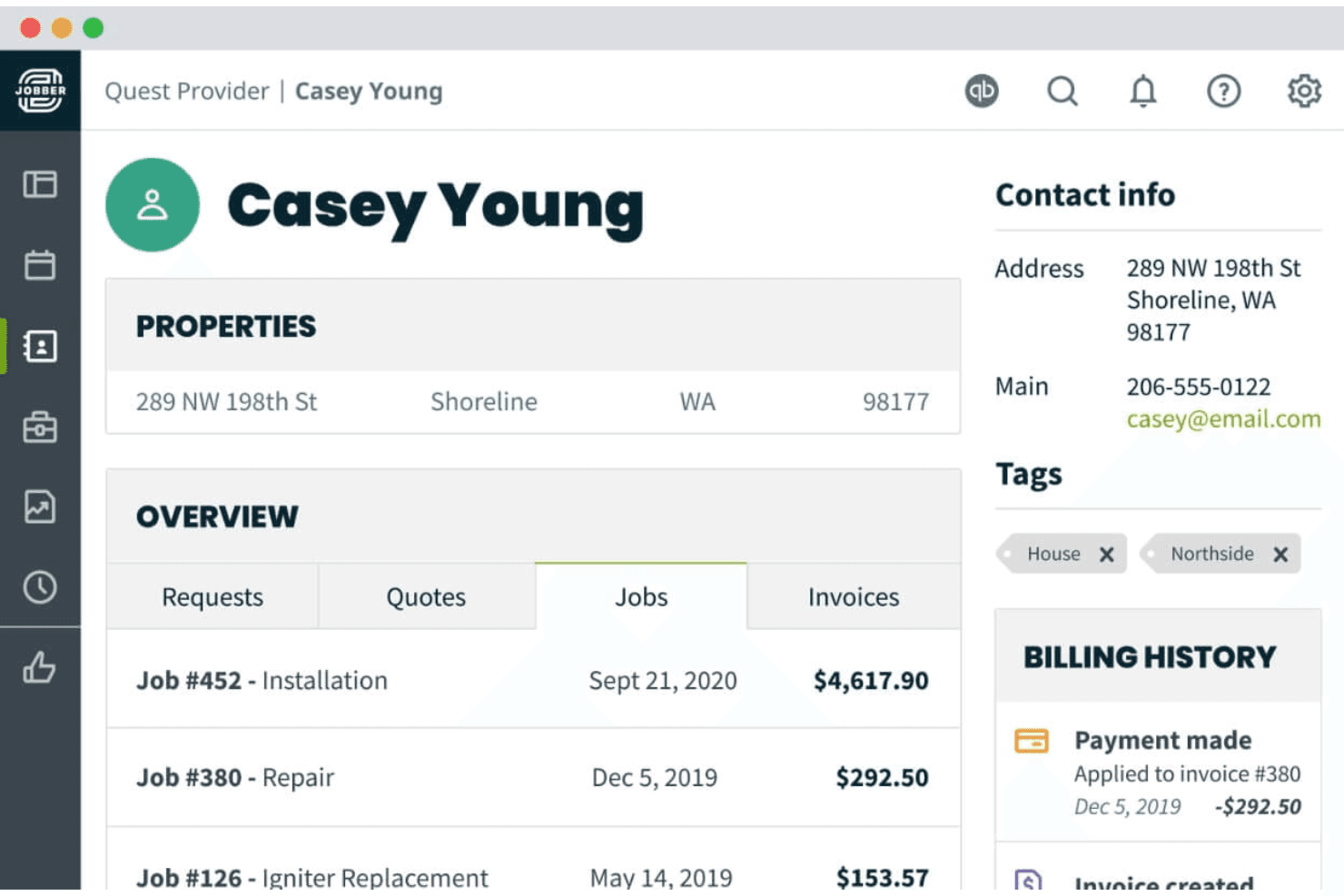
Jobber centralizes client details, job history, and billing in one place. Jobber is a field service management platform built for home and commercial service businesses that need to handle scheduling, quoting, invoicing, and client communications without juggling multiple tools.
Who Is Jobber Best For?
Jobber is a strong fit for home and commercial service businesses that need scheduling, quoting, invoicing, and client management handled in one place.
Why I Picked Jobber
I picked Jobber as one of the best Thryv alternatives because it handles the full job lifecycle—quoting, scheduling, dispatching, and invoicing—in a single connected workflow that's genuinely built for home service businesses. I particularly like how online booking lets customers self-schedule directly into your calendar, while automated reminders and on-my-way texts keep clients informed without any manual follow-up. The Client Hub ties it all together, giving customers one place to approve quotes, track appointments, and pay invoices.
Jobber Key Features
- Job costing: Tracks materials, labor, and expenses against each job to calculate real-time profitability.
- Two-way SMS: Lets you and your clients exchange text messages directly within the platform on Grow and above.
- Custom workflow automations: Builds triggered email or text sequences for client and internal communications on the Grow plan.
- GPS tracking: Monitors team locations and records waypoints so you can see where field staff are throughout the day.
Jobber Integrations
Jobber offers marketplace integrations with 100+ tools, including QuickBooks Online, Xero, Gusto, Mailchimp, CompanyCam, The Home Depot, and Thryv. It supports GraphQL queries, mutations, and webhooks for custom integrations, plus Zapier.
Pros and Cons
Pros:
- Automated campaigns reconnect with past clients
- Customers self-book and track appointments
- Quotes flow directly into jobs and invoices
Cons:
- Social posting offers no engagement analytics
- Reviews cover Google Business Profile only
Learn more about Jobber:
Outras alternativas ao Thryv
Segue-se uma lista de alternativas adicionais ao Thryv que avaliámos, mas que não chegaram à lista principal. Ainda assim, vale certamente a pena conhecê-las!
- 11Housecall ProBest for home service scheduling
- 12HoneyBookBest for creative business project management
- 13monday AI WorkspaceBest for project management and team collaboration
- 14Constant ContactBest for email marketing campaigns
- 15Marketing 360Best for integrated marketing solutions
- 16Microsoft Dynamics 365Best for enterprise resource planning
- 17Zoho OneBest for an all-in-one business suite
- 18Salesforce EssentialsBest for small business CRM needs
Análises relacionadas de software de operações de receita
Se ainda não encontrou o que procura, consulte estas ferramentas relacionadas que testámos e avaliámos.
- Software de CRM
- Software de vendas
- Software de gestão de potenciais clientes
- Software de inteligência empresarial
- Software de gestão de contratos
- Sistema de gestão de receitas
How I Evaluate Thryv Alternatives
When a service business needs one platform to handle bookings, invoices, and follow-ups, I evaluate each tool against baseline must-haves first, then weigh the differentiators that matter most.
Core Functionality (Table Stakes For This List)
When I'm selecting tools for my list, I rank each one on a scale from 0 (does not offer the functionality) to 5 (excels in this area) for each core functionality listed below. Then, I calculate the tool's total score into a percentage. Each tool needs to achieve a minimum total score of 75% to be considered for inclusion.
- Integrated CRM: I check whether a platform lets you track contacts through deal stages, log interactions, and segment your customer base for targeted outreach.
- Appointment & Scheduling: Each tool should offer online booking with calendar sync and reminders so clients can self-schedule without back-and-forth messages.
- Multi-Channel Communication: I look for a unified inbox that pulls in email, SMS, and social messages, like responding to a Facebook inquiry and a text quote request in one view.
- Invoicing & Payments: Generating estimates, converting them to invoices, and collecting payment within the same platform keeps the revenue loop closed for service teams.
- Marketing Automation: I evaluate whether a tool supports automated follow-up sequences, like sending a review request after a job is marked complete or a re-engagement email to dormant leads.
- Reputation & Reviews Management: I look at how each platform handles review generation and monitoring across sites like Google and Yelp from a single dashboard.
Once I have a list of tools that meet this criteria, I consider what sets each platform apart.
Differentiating Factors (What Sets Vendors Apart)
Here's how I compare and contrast different vendors:
Standout Features
A full-featured mobile app matters when your team works in the field. Technicians confirming appointments or sending invoices from a job site shouldn't need a laptop. I also look for a branded client portal where customers can book, pay, and message on their own. Industry-specific templates are another differentiator; a plumber and a salon have very different booking flows and intake forms, so prebuilt workflows for those verticals signal a platform that actually understands its users.
Beyond Features
Pricing transparency matters here. I check whether a platform publishes its tiers and discloses fees for add-ons like SMS credits upfront. Integration depth is just as important—a tool that syncs natively with QuickBooks, Google Workspace, and your ad platforms saves you from stitching together workarounds in Zapier. I also evaluate onboarding support, since lean teams without dedicated IT staff need guided setup and data migration help to get running quickly.
Por que procurar uma alternativa ao Thryv
Pode estar à procura de uma alternativa ao Thryv devido a:
- Custo: o preço do Thryv pode ser demasiado elevado para pequenas empresas.
- Complexidade: a plataforma pode ser demasiado complicada para utilizadores que necessitam de uma solução mais simples.
- Personalização: o Thryv pode não ter as funcionalidades ou integrações específicas de que necessita.
- Atendimento ao cliente: pode considerar o serviço de apoio ao cliente do Thryv insuficiente ou pouco responsivo.
- Escalabilidade: o Thryv pode não acompanhar adequadamente o crescimento das necessidades da sua empresa.
As alternativas ao Thryv oferecem funcionalidades e benefícios exclusivos que o Thryv pode não disponibilizar, como preços mais acessíveis, interfaces mais simples e um melhor apoio ao cliente. Estas alternativas podem adaptar-se melhor às necessidades específicas da sua empresa e aos seus planos de crescimento.
Principais funcionalidades do Thryv
Aqui estão algumas das principais funcionalidades do Thryv que o seu software alternativo deve replicar ou melhorar para ser uma boa opção.
- Caixa de entrada centralizada: Gira as comunicações através de vários canais num só lugar.
- Chat de equipa: Facilite a comunicação interna da equipa através da funcionalidade de chat.
- Chamadas telefónicas e de vídeo: Realize chamadas profissionais e reuniões de vídeo diretamente através da plataforma.
- Chat web: Interaja com os visitantes do website em tempo real.
- Agendamento e marcações: Gira marcações e reservas de forma eficiente.
- Gestão da Relação com o Cliente (CRM): Acompanhe as interações e os dados dos clientes.
- Orçamentos e faturas: Crie e envie orçamentos e faturas aos clientes.
- Automação de marketing: Automatize tarefas de marketing para poupar tempo e melhorar a eficiência.
- Gestão das redes sociais: Agende e gira publicações nas redes sociais a partir de um único painel.
- Gestão de avaliações: Recolha e gira as avaliações dos clientes para melhorar a reputação.