

Som advokat kan det være utfordrende å håndtere klientforhold effektivt og strømlinjeforme prosesser når du har en rekke andre saker og oppgaver som tar opp tiden din. Ved å finne en pålitelig CRM-programvare for advokatfirmaer kan du holde oversikt over sakene dine og automatisere driften, men med så mange alternativer på markedet kan det være enda mer krevende å vite hvor du skal begynne.
For å hjelpe advokater med å komme i gang med søket brukte jeg min erfaring med digital programvare til å teste og vurdere flere av de beste løsningene på markedet. Enten du driver et lite firma eller et stort firma som er resultatet av en fusjon, er jeg sikker på at mine grundige vurderinger vil hjelpe deg med å finne din neste CRM-programvare og effektivt øke den generelle produktiviteten og kvaliteten på relasjonsprosessene.
Hvorfor du kan stole på våre programvareanbefalinger
6,700+
Reviews
20
Industry experts
16+
Evaluation factors
14
Years
Anmeldelsene våre bygger på vår uavhengige vurdering, ikke på salgsargumenter. Les hvordan vi sørger for åpenhet.
I denne guiden har vi vurdert verktøyene gjennom praktisk testing og uavhengig research og gitt dem poeng ut fra våre utvelgelseskriterier.
Anmeldelsene våre bygger på vår egen redaksjonelle vurdering. De er ikke et salgsargument.
Sammenligningstabell: CRM-programvare for advokatfirmaer
| Tool | Best For | Trial Info | Price | ||
|---|---|---|---|---|---|
| 1 | Best for practice management-native CRM | Free trial available | From $49/user/month (billed annually) | Website | |
| 2 | Best for AI-powered sales insights | 21-day free trial | From $9/user/month (billed annually) | Website | |
| 3 | Best for client intake automation | 7-day free trial | From $49/user/month (billed annually) | Website | |
| 4 | Best for all-in-one case management | 10-day free trial | From $50/user/month (billed annually) | Website | |
| 5 | Best for workflow development | Free demo available | Pricing upon request | Website | |
| 6 | Best for visual sales pipeline development | 14-day free trial | From $14/user/month (billed annually) | Website | |
| 7 | Best for advanced practice management | 10-day free trial | From $59/user/month (billed annually) | Website | |
| 8 | Best for AI-driven sales tools | 30-day free trial | From $25/user/month (billed annually) | Website | |
| 9 | Best for marketing processes | Free demo available | Pricing upon request | Website | |
| 10 | Best for relationship management | Free demo available | Pricing upon request | Website |


Anmeldelser av den beste CRM-programvaren for advokatfirmaer
Denne grundige analysen gir en oversikt over ulike CRM-programvareløsninger som er skreddersydd for advokatfirmaer. Den dekker fordeler og ulemper, funksjonene deres og de beste bruksområdene deres.
 Best for practice management-native CRM
- Free trial available
- From $49/user/month (billed annually)
Visit WebsiteCustomer Rating:4.3/5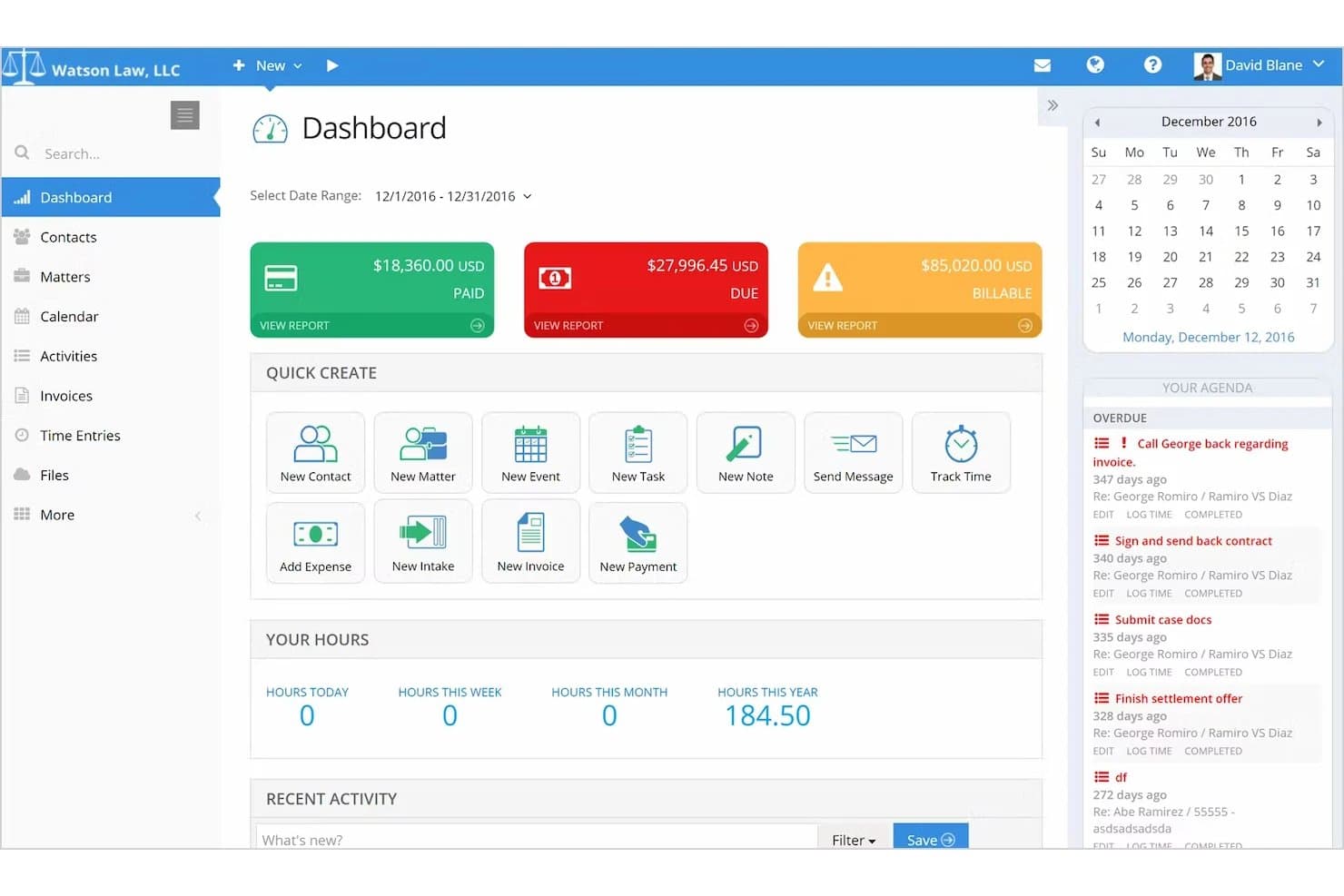
PracticePanther covers legal matters, client intake, billing, documents, and client portals. PracticePanther is a legal practice management platform that combines CRM, client intake, matter tracking, billing, document management, and trust accounting in a single system built specifically for law firms.
Who Is PracticePanther Best For?
PracticePanther is a strong fit for small to mid-sized law firms that want CRM, billing, and matter management in one place rather than stitching together separate tools.
Why I Picked PracticePanther
I picked PracticePanther as one of the best because it treats CRM as a native layer inside a full practice management system rather than a bolt-on. Client intake forms populate contact records automatically, case-stage tracking shows where each prospect sits in the workflow, and the Originating Attorney Report ties collected revenue back to the attorney who brought in the matter—all without leaving the platform. I think that kind of built-in visibility is genuinely hard to replicate when you're stitching a standalone CRM onto separate billing software.
PracticePanther Key Features
- Conflict check search: Searches across contacts, matters, notes, tasks, events, and custom fields to surface potential conflicts before taking on a new client.
- Client portal: Gives clients a dedicated space to view documents, send messages, check invoice balances, and make payments online.
- Two-way business texting: Sends and receives client texts from a business number, with all messages stored alongside related case information.
- Trust account ledger and reconciliation: Tracks trust-account payments and generates three-way reconciliation reports to support compliance.
PracticePanther Integrations
PracticePanther offers marketplace integrations with Lawmatics, QuickBooks Online, Mailchimp, LawToolBox, Docketwise, Google Calendar, Microsoft Exchange, Google Drive, OneDrive, Box, and Dropbox. It also provides an OAuth 2 API with OData query endpoints for custom integrations and supports Zapier.
Pros and Cons
Pros:
- Attorney revenue reports link originations to collections
- Matter workflows organize tasks and deadlines
- Client and matter records stay together
Cons:
- Manual conflict searches; no documented ethical walls
- Business development reporting offers limited customization
Learn more about PracticePanther: Best for AI-powered sales insights
- 21-day free trial
- From $9/user/month (billed annually)
Visit WebsiteCustomer Rating:4.6/5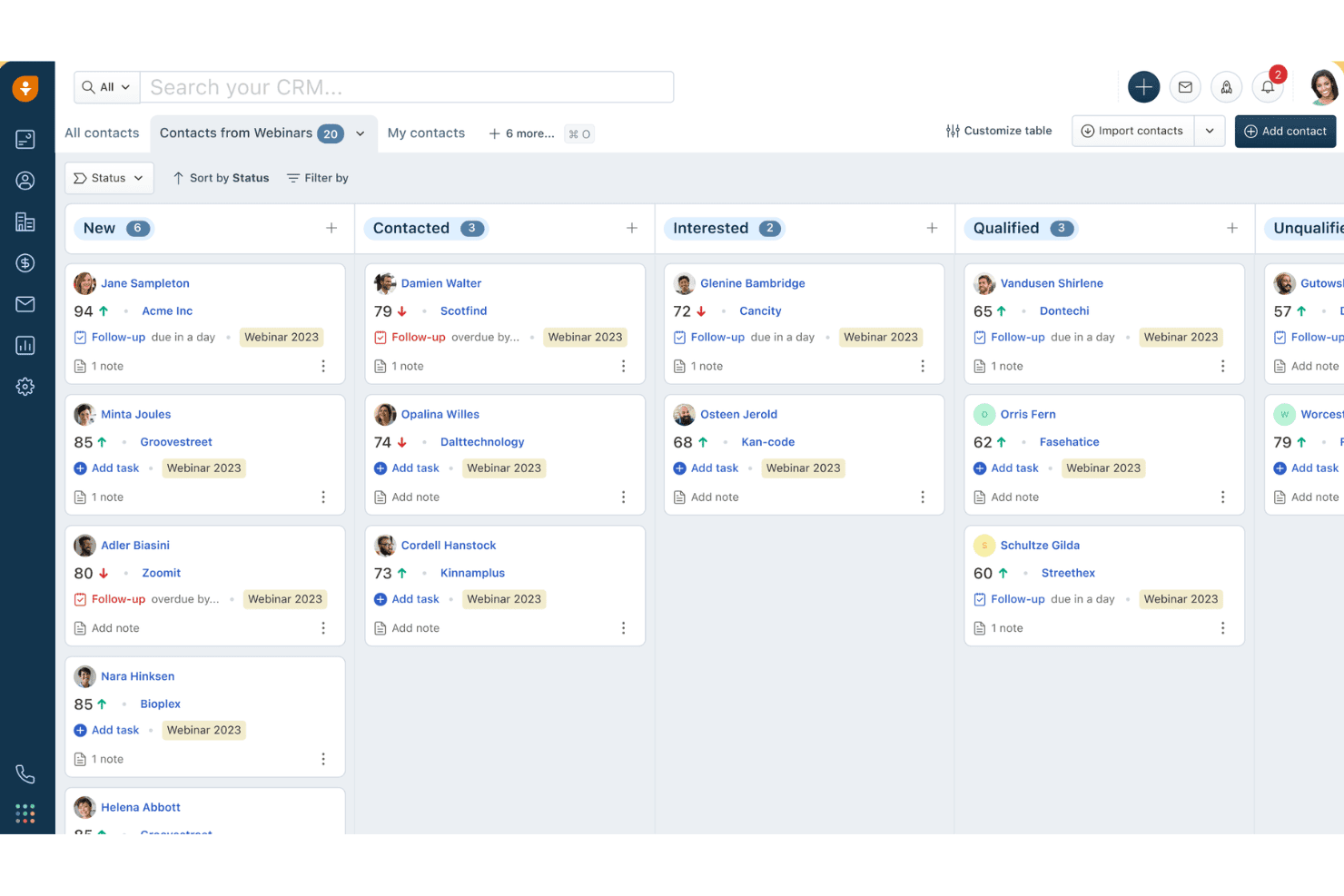
Freshsales organizes webinar contacts by status in a kanban board view. Freshsales is a sales CRM platform that offers AI-powered lead scoring, multi-channel communication, pipeline management, workflow automation, and built-in marketing tools that law firms can configure for client intake and business development.
Who Is Freshsales Best For?
Freshsales fits law firms that prioritize AI-driven lead prioritization and marketing automation over legal-native features like conflict checks or matter management.
Why I Picked Freshsales
Freshsales earns its spot on my shortlist because Freddy AI does something most legal CRMs can't: it scores incoming leads based on real behavioral signals like email opens and site visits, so your intake team knows exactly which prospects to call first. I also like that Freddy flags stalled deals and drafts personalized follow-up emails automatically, which keeps BD pipelines moving without manual oversight. Pair that with a 24/7 AI chatbot for after-hours lead capture, and you've got a genuinely intelligent intake qualification layer.
Freshsales Key Features
- Custom lifecycle stages: Configure contact stages to mirror your firm's intake pipeline steps, from initial inquiry through to retained client.
- Marketing journey builder: Build automated drip campaigns with conditional logic across email and SMS to nurture prospects and past clients.
- Built-in VoIP dialer: Make and receive calls directly in the CRM with click-to-call, call logging, and call recording included natively.
- Attribution reporting: Trace which channels and campaigns generated leads and closed business using built-in source-to-revenue attribution reports.
Freshsales Integrations
Freshsales offers native integrations across Google Workspace, Microsoft 365, Slack, Zoom, QuickBooks, WhatsApp Business, and Apple Business Chat. Marketplace integrations include PandaDoc, DocuSign, and Calendly; API access and webhooks support custom connections to legal practice management systems.
Pros and Cons
Pros:
- Multi-channel outreach via chat, SMS, WhatsApp
- Built-in marketing automation for client nurture
- AI scores leads and flags deal risks
Cons:
- Lacks conflict check and legal templates
- No native matter management workflow support
Learn more about Freshsales: Best for client intake automation
- 7-day free trial
- From $49/user/month (billed annually)
Visit WebsiteCustomer Rating:4.7/5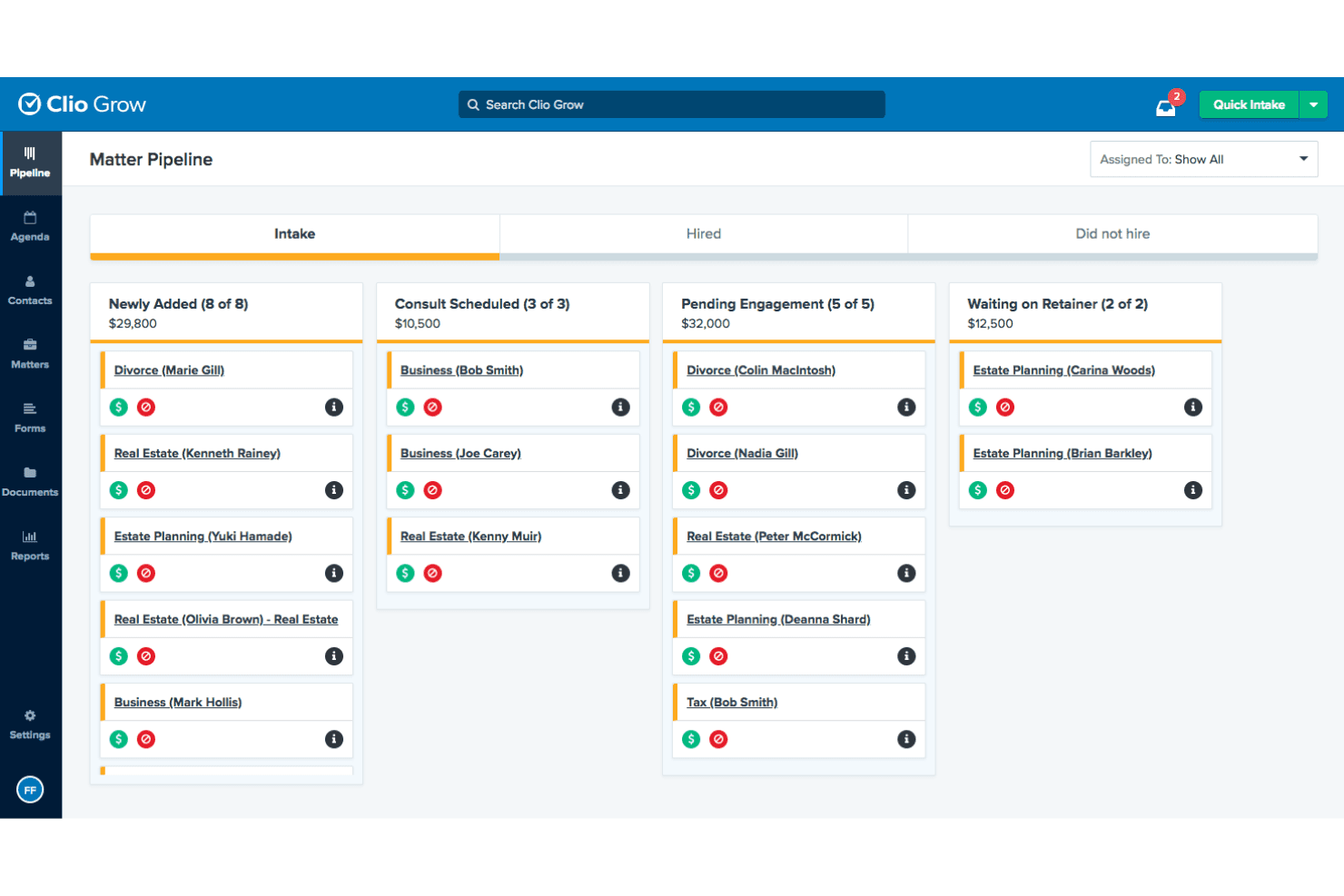
Clio Grow's Matter Pipeline tracks leads across intake stages. Clio Grow is a legal-specific CRM built for law firms that combines a Kanban intake pipeline, customizable intake forms, conflict-of-interest checking, referral source tracking, and automated client follow-up workflows.
Who Is Clio Grow Best For?
Clio Grow is a strong fit for small to mid-sized law firms that need a structured, legal-specific intake pipeline rather than a general-purpose CRM.
Why I Picked Clio Grow
Clio Grow earns its spot on my shortlist because no other tool I've reviewed handles legal client intake with this level of purpose-built specificity. I'm particularly drawn to its Kanban Matter Pipeline, where staff can move prospective clients through fully customizable intake stages, from first contact through signed retainer, without ever leaving the platform. The native conflict-of-interest search runs directly within the intake workflow, so coordinators catch issues before they become liability problems. Add Clio Grow AI's after-hours lead screening and booking, and the intake process essentially runs itself.
Clio Grow Key Features
- Referral source tracking: A dedicated Referral Report captures each referring contact's total matters referred, hired counts, average value, and conversion rates.
- Lead source revenue reporting: The Lead Source Revenue Report combines pipeline estimates and actual collected revenue by marketing channel, including Google LSA spend and ROI.
- Native two-way SMS messaging: Firms can send intake forms, agreements, and appointment reminders via text and receive replies through a firm-assigned toll-free number.
- CallRail integration: Inbound calls are tracked, recorded, and matched to existing Clio Grow contacts for accurate phone-based lead-source attribution.
Clio Grow Integrations
Native integrations include Clio Manage, Dropbox Sign, CallRail, and Google Local Services Ads; Clio Grow also supports Ruby Receptionists, QuickBooks, Xero, Google Drive, Dropbox, Gmail, Outlook, and Zapier, plus an API for custom integrations.
Pros and Cons
Pros:
- Matter and referral tracking purpose-built for law firms
- AI assistant screens and books leads after hours
- Built-in conflict checking at intake
Cons:
- Advanced revenue forecasting features are missing
- No dedicated mobile app for intake
Learn more about Clio Grow: Best for all-in-one case management
- 10-day free trial
- From $50/user/month (billed annually)
Visit WebsiteCustomer Rating:4.6/5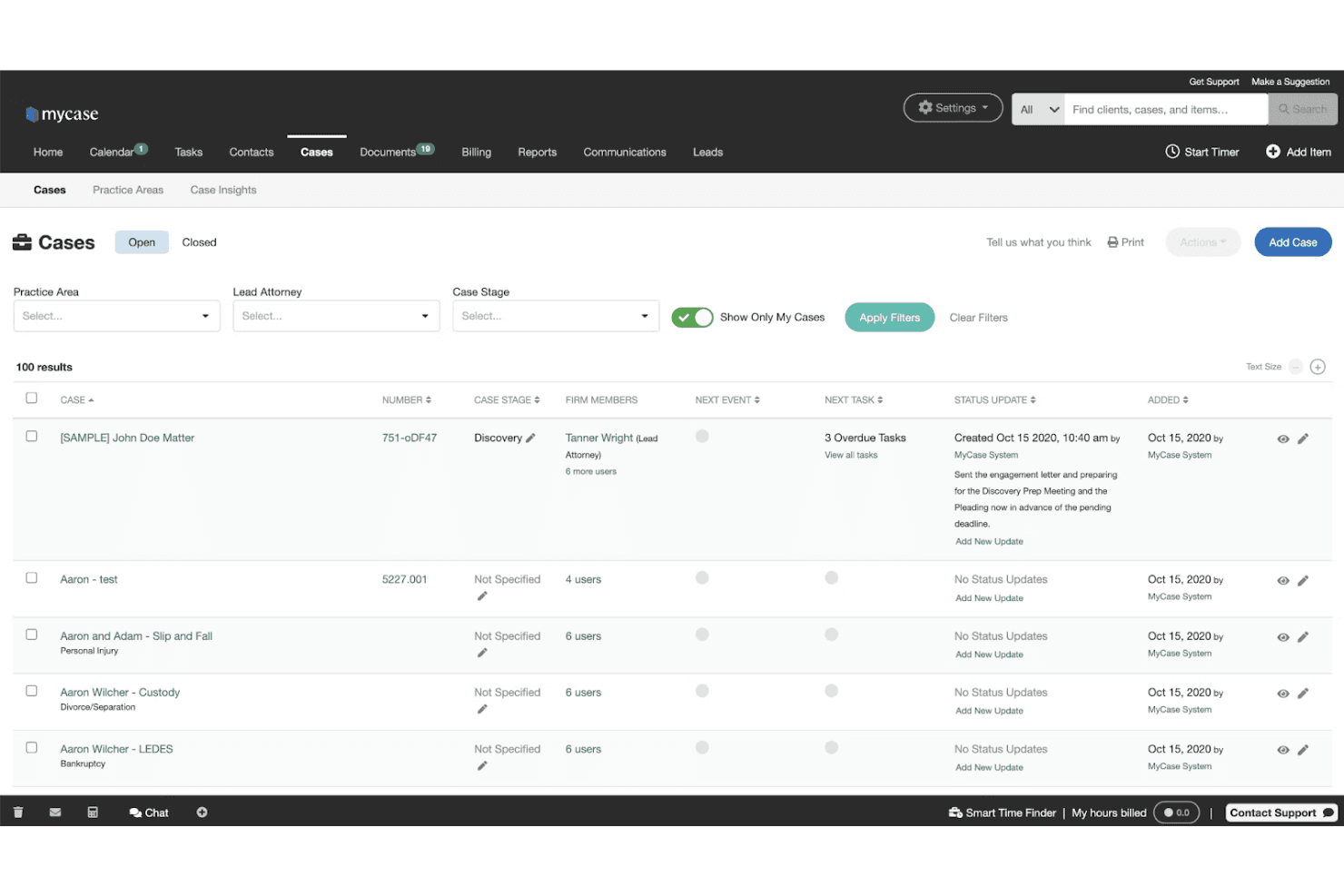
MyCase lets users manage and track all open cases in one view. MyCase is a legal practice management platform that combines client intake, CRM, case management, billing, document automation, eSignature, and client communication tools in a single subscription.
Who Is MyCase Best For?
MyCase is a strong fit for small to mid-sized law firms that want case management, client intake, billing, and communications in one subscription instead of stitching together separate tools.
Why I Picked MyCase
MyCase earns its spot on my shortlist because it's the rare legal platform that keeps case management, client intake, billing, and communications inside one subscription rather than splitting them across separate products. I particularly like how intake forms with conditional logic auto-populate case files directly, cutting out duplicate data entry the moment a lead converts. The built-in unlimited eSignature and two-way SMS (both included on Pro) mean firms can move a prospect from inquiry to signed retainer without leaving the platform.
MyCase Key Features
- Two-way SMS messaging: Send and receive text messages with clients from a dedicated firm number, with all conversations automatically saved to the case record.
- LawPay payment processing: Accept IOLTA-compliant online payments, set up payment plans, and offer client financing directly within the platform.
- 50-state court rules calendaring: Automatically calculate filing deadlines based on a built-in database of court rules across all U.S. states.
- 8am IQ AI suite: Access case, document, writing, and discovery AI assistants natively on the Advanced plan, with no separate subscription required.
MyCase Integrations
MyCase offers 70+ integrations, including LawPay, QuickBooks, Microsoft Outlook, Gmail, Lawmatics, CallRail, Mailchimp, Attorney Share, and LawKPIs, plus Zapier. Advanced includes an Open API for custom integrations.
Pros and Cons
Pros:
- Built-in unlimited eSignature and two-way SMS
- Legal intake forms auto-populate case files
- Combines intake, CRM, billing, and communication
Cons:
- No native email drip or nurture campaigns
- Conflict check lacks automation and relationship mapping
Learn more about MyCase: Best for workflow development
- Free demo available
- Pricing upon request
Visit WebsiteCustomer Rating:4.6/5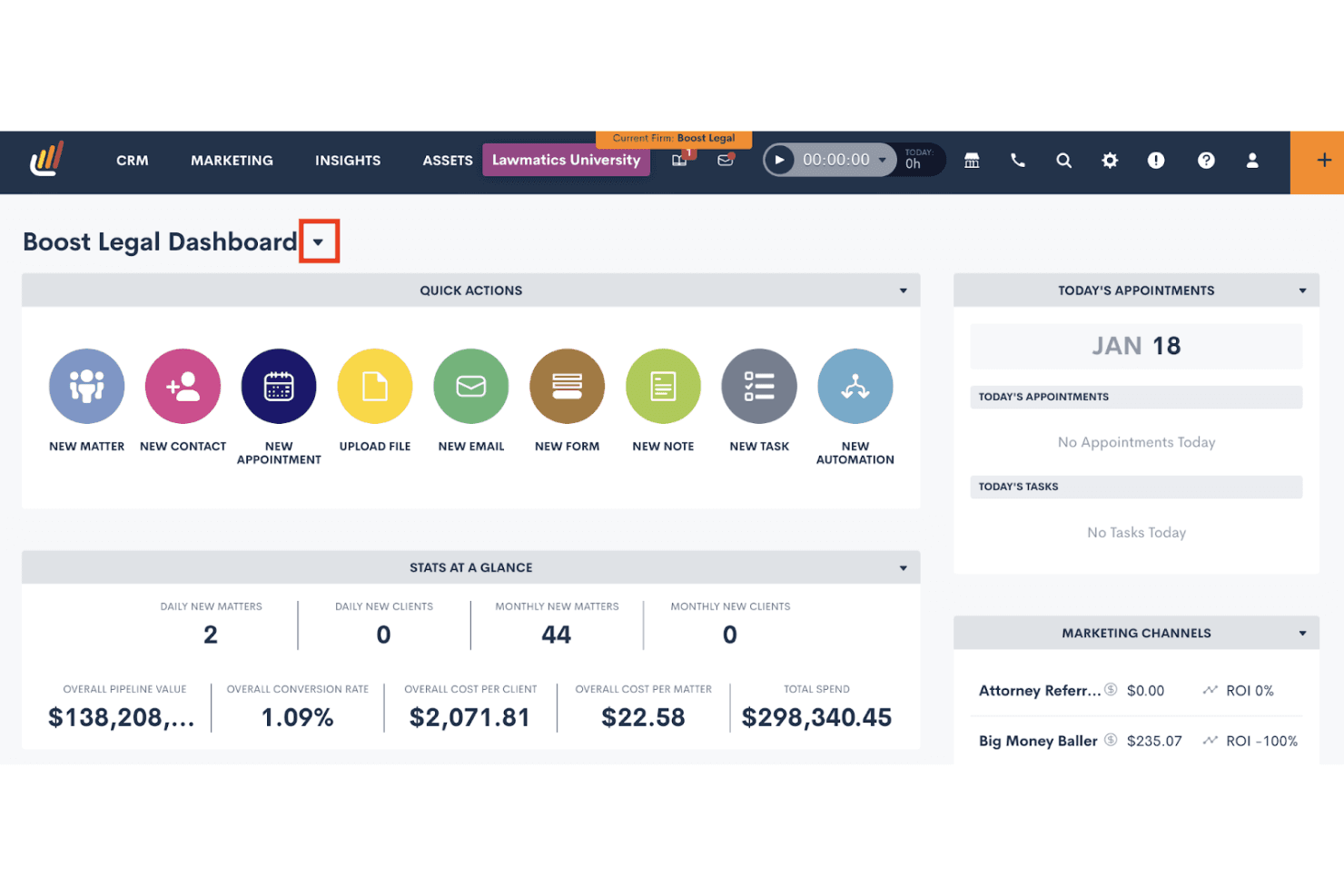
Lawmatics centralizes client intake, tasks, and marketing ROI in one dashboard. Lawmatics is a legal-specific CRM built for law firms that combines client intake management, workflow automation, conflict checking, referral source tracking, pipeline reporting, and marketing campaign tools.
Who Is Lawmatics Best For?
Lawmatics is a strong fit for mid-size law firms that want to automate intake-to-onboarding workflows across multiple practice areas without building everything from scratch.
Why I Picked Lawmatics
Lawmatics earns its spot on my shortlist because its workflow automation engine is genuinely built for law firms, not retrofitted from a generic CRM. I love that you can build conditional, multi-step automations that fire the moment a lead submits an intake form, routing them through follow-ups, conflict checks, and e-signature requests without any manual handholding. Merlin Copilot lets you generate those automations using plain-language prompts, which cuts setup time considerably.
Lawmatics Key Features
- Referral source tracking: Pulls referrers directly from existing CRM contacts and logs each referrer's total matter count and hire count in one place.
- Native e-signature with deadline enforcement: Sends, tracks, and enforces signing deadlines on retainer agreements and intake documents without a third-party tool.
- Merlin Qualify AI lead scoring: Scores incoming leads against firm-defined criteria and triggers next steps—like scheduling or retainer sends—based on each score.
- Multi-channel lead capture: Captures leads from web forms, virtual receptionists, chatbots, and legal directories and routes them into the intake pipeline automatically.
Lawmatics Integrations
Lawmatics offers native integrations with Clio, 8am™ MyCase, PracticePanther, Filevine, Smokeball, LEAP, CARET Legal, CallRail, Google Calendar, and Microsoft Outlook. Its REST API, OAuth2, and webhooks support custom integrations.
Pros and Cons
Pros:
- Native e-signature and branded client portal included
- Customizable workflow automation for any practice area
- Built-in legal intake automation with Kanban pipeline
Cons:
- Specific report types missing for some firms
- No built-in post-case review requests
Learn more about Lawmatics: Best for visual sales pipeline development
- 14-day free trial
- From $14/user/month (billed annually)
Visit WebsiteCustomer Rating:4.4/5
Pipedrive organizes deals across pipeline stages in a kanban view. Pipedrive is a sales-focused CRM platform that offers visual pipeline management, lead capture tools, workflow automation, and email outreach for tracking prospective clients from first contact through intake and retainer signing.
Who Is Pipedrive Best For?
Pipedrive is a strong fit for small and boutique law firms that already use a separate practice management system and need a dedicated tool for tracking prospective clients through a visual intake pipeline.
Why I Picked Pipedrive
Pipedrive earns its spot on my shortlist because its visual Kanban pipeline makes it genuinely easy to see where every prospective client sits, from first contact through retainer signing, without digging through records. I like how intake stages are fully customizable, so you can map your exact process: consultation booked, conflict check pending, retainer sent. The LeadBooster add-on adds a 24/7 chatbot and embeddable web forms that capture leads directly into that pipeline automatically.
Pipedrive Key Features
- Campaigns add-on: A built-in email marketing tool for sending segmented nurture campaigns to prospects and past clients directly from CRM contact data.
- DocuSign integration: Lets you generate, auto-fill, and send retainer agreements or engagement letters from within a deal record and track signature status.
- Meeting Scheduler: A self-booking tool that lets prospects schedule consultations directly on an attorney's calendar without back-and-forth emails.
- Leads Inbox: A staging area for unqualified leads where you can assign warm, hot, or cold labels and schedule follow-up activities before moving contacts into your main pipeline.
Pipedrive Integrations
Pipedrive offers Marketplace integrations with DocuSign, PandaDoc, and QuickBooks, plus native Google Workspace and Microsoft Outlook/Teams connectivity. Its API supports custom links to practice management systems, and it also integrates with Clio through Zapier.
Pros and Cons
Pros:
- AI-driven email and reporting features
- Deep intake workflow customization options
- Visual Kanban pipeline for intake tracking
Cons:
- Lacks matter-centric legal data structure
- No native legal conflict check capability
Learn more about Pipedrive: Best for advanced practice management
- 10-day free trial
- From $59/user/month (billed annually)
Visit WebsiteCustomer Rating:4.4/5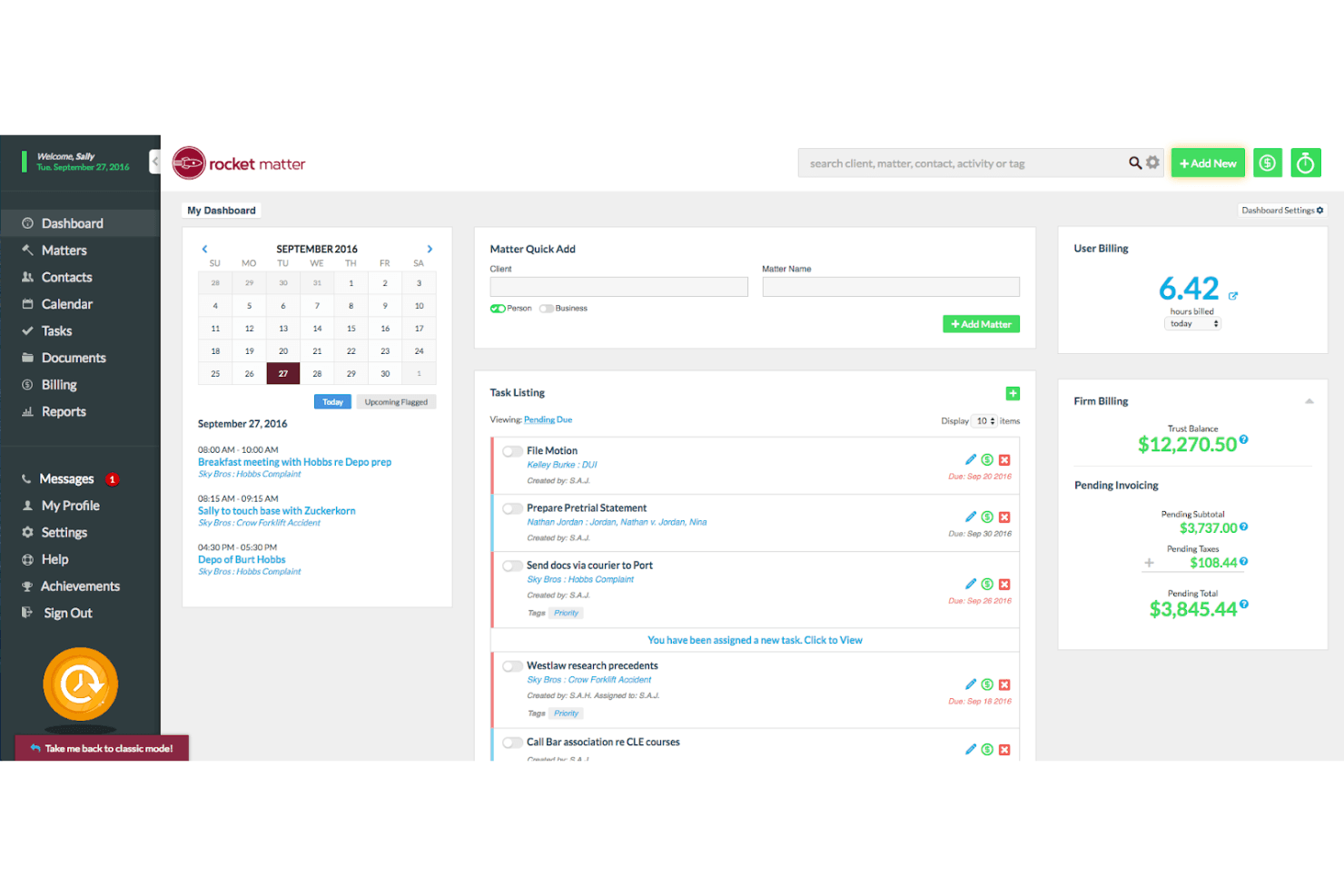
Rocket Matter centralizes billing, tasks, and scheduling in one dashboard. Rocket Matter is a legal practice management platform that combines matter-centric contact management, client intake workflows, billing, trust accounting, document automation, and a CRM add-on for lead pipeline tracking and marketing campaigns.
Who Is Rocket Matter Best For?
Rocket Matter is a strong fit for mid-sized law firms that want billing, trust accounting, matter management, and client intake under one roof.
Why I Picked Rocket Matter
Rocket Matter earns its spot on my shortlist because its matter-centric architecture goes deeper than most practice management platforms. I particularly like how every contact, document, billing record, and calendar event ties directly to a matter, which keeps multi-attorney firms from losing context across a busy caseload. The built-in Data Views Workbench lets me build custom revenue and realization-rate reports by attorney or practice area without exporting to a spreadsheet. Pair that with native AI-assisted document drafting and automated SMS campaigns, and you get a genuinely advanced practice management setup.
Rocket Matter Key Features
- Conflict check tool: Search by name across matters, contacts, clients, and custom fields to identify potential conflicts before opening a new matter.
- Trust accounting: Manage multiple trust accounts per client with built-in bar compliance safeguards and bank statement reconciliation.
- Automated SMS campaigns: Send text message campaigns to multiple contacts at once directly from the desktop, including payment reminders and overdue retainer alerts.
- Client portal: Share documents, deliver invoices, collect e-signatures, and exchange messages with clients through a built-in secure portal.
Rocket Matter Integrations
Rocket Matter offers native integrations with QuickBooks Online, Microsoft Outlook, Microsoft OneDrive, Google Calendar, Dropbox, Box, and NetDocuments. It also supports Kenect and Zapier integrations.
Pros and Cons
Pros:
- Client portal with secure document sharing
- Automated intake forms with conditional logic
- Native conflict check on all plans
Cons:
- No dedicated referral source tracking
- CRM features only available as add-on
Learn more about Rocket Matter: Best for AI-driven sales tools
- 30-day free trial
- From $25/user/month (billed annually)
Visit WebsiteCustomer Rating:4.3/5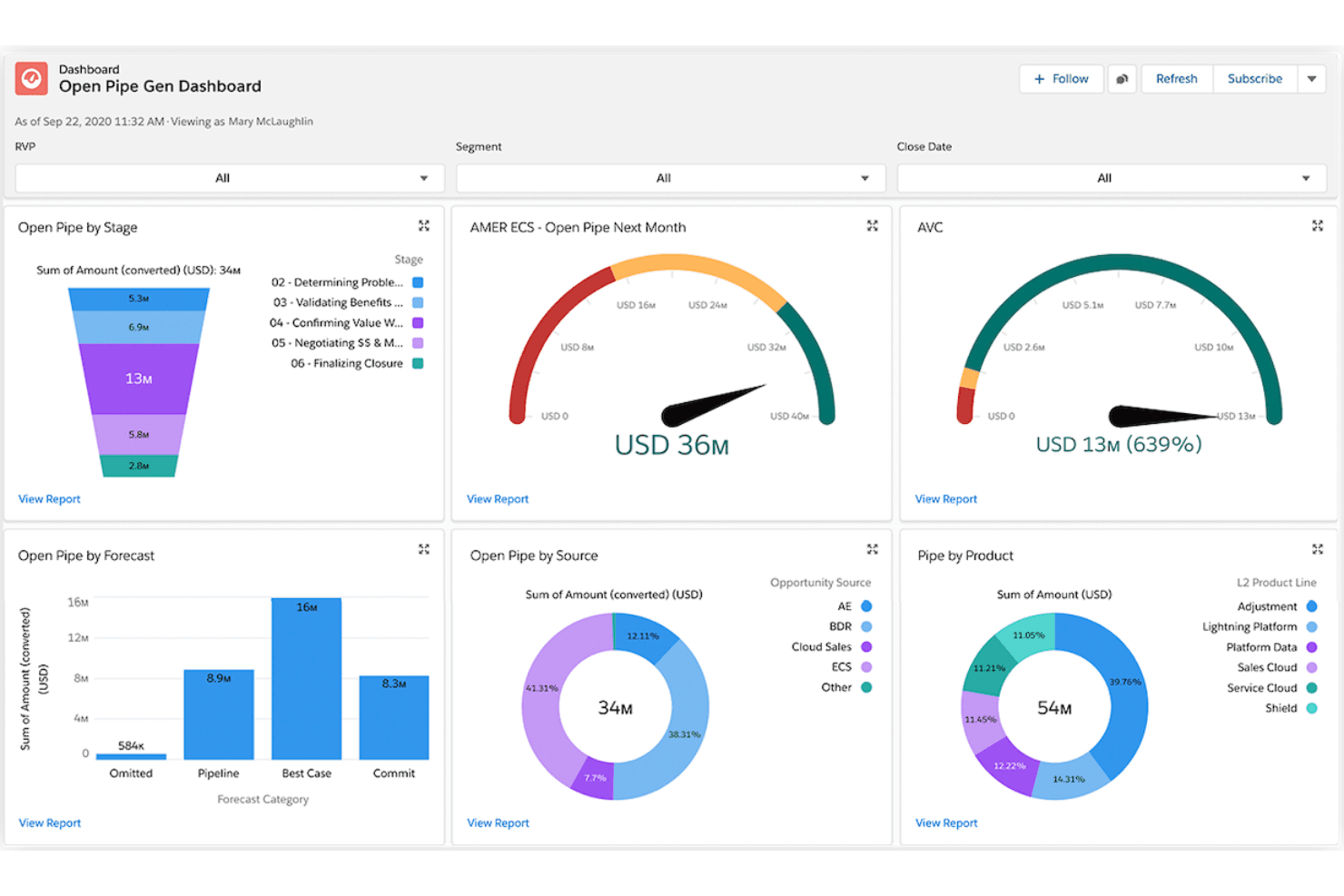
Salesforce tracks open pipeline by stage, source, and product in one view. Salesforce Financial Services Cloud is an enterprise CRM platform built on Sales Cloud that delivers referral tracking, AI-driven pipeline forecasting, client relationship mapping, and marketing automation for law firms focused on business development.
Who Is Salesforce Financial Services Cloud Best For?
Salesforce Financial Services Cloud is a strong fit for mid-to-large law firms with dedicated revenue operations or business development teams that prioritize AI-driven pipeline forecasting, referral tracking, and client relationship management over turnkey legal intake tools.
Why I Picked Salesforce Financial Services Cloud
I've included Salesforce Financial Services Cloud in my top picks because its AI suite is genuinely unmatched for law firm business development. Einstein forecasting gives BD teams attorney- and practice-area-level pipeline visibility, while Agentforce can handle intake routing and prospect follow-up autonomously. Referral tracking is also a first-class feature here: firms can log referral sources, monitor conversion rates, and attribute revenue back to originating partners with precision.
Salesforce Financial Services Cloud Key Features
- Agentforce AI agents: Autonomous AI agents that screen intake inquiries, route prospects to the right attorney, and update records without manual input.
- Flow Builder automation: A no-code workflow builder that automates task assignment, follow-up sequences, and document delivery via DocuSign integration.
- Client portal via Experience Cloud: A branded, secure self-service portal where clients can share documents, check status updates, and complete onboarding steps.
- Tableau analytics integration: Native Tableau connectivity that lets BD teams build custom revenue forecasts and matter-value dashboards beyond standard reporting.
Salesforce Financial Services Cloud Integrations
Salesforce Financial Services Cloud supports native integrations with DocuSign, Tableau, and Slack, plus integration with Salesforce Marketing Cloud. AppExchange marketplace integrations, MuleSoft, and APIs support custom connectivity; legal platforms such as Clio and PracticePanther require third-party connections.
Pros and Cons
Pros:
- Tableau dashboards enable attorney-level pipeline reporting
- Native referral tracking links revenue to sources
- AI agents automate referral and intake workflows
Cons:
- Matter management requires extensive customization work
- No built-in legal intake or conflict checks
Learn more about Salesforce Financial Services Cloud: Best for marketing processes
- Free demo available
- Pricing upon request
Visit WebsiteCustomer Rating:4.6/5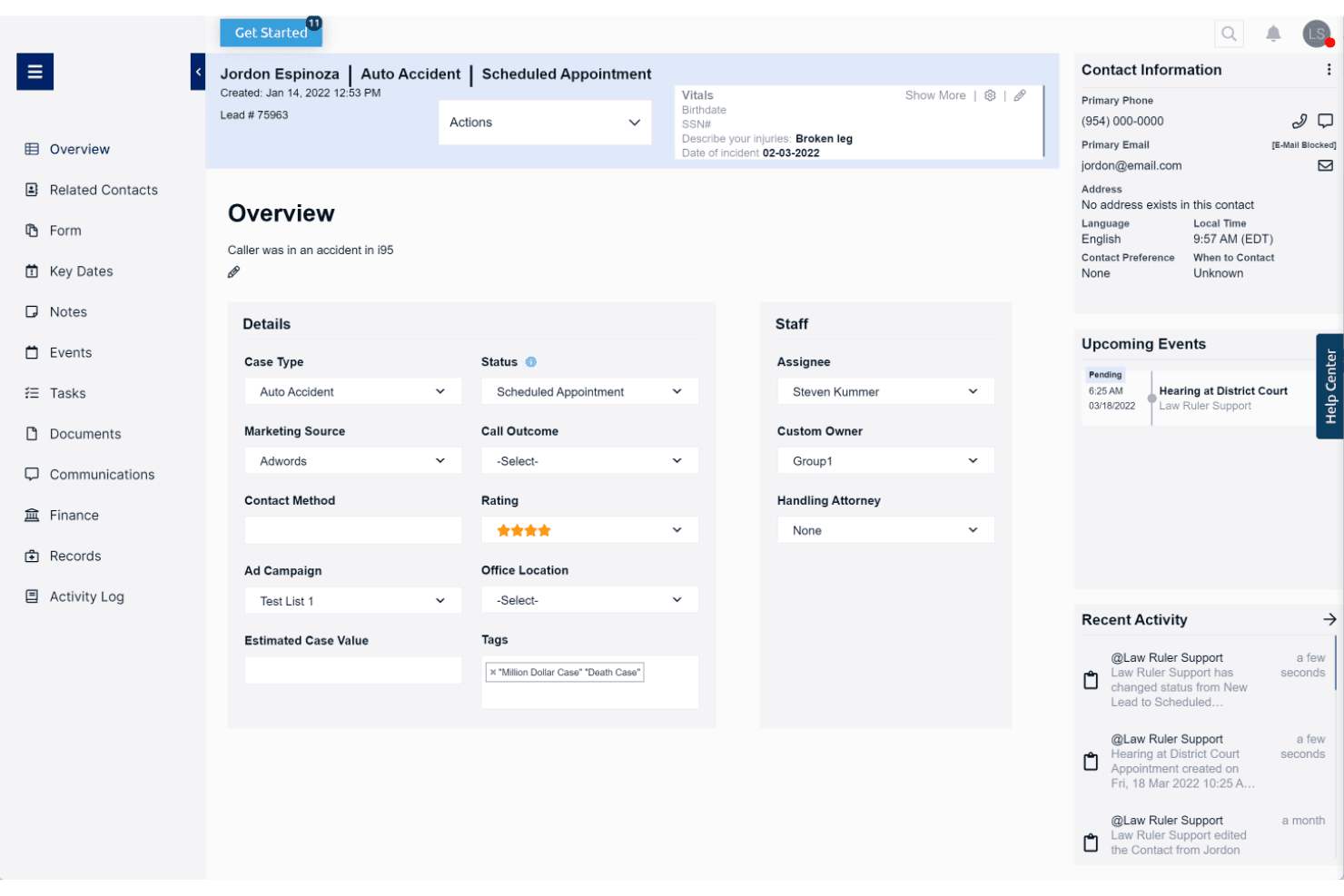
Law Ruler centralizes lead details, case status, and upcoming events in one view. Law Ruler is a legal CRM and client intake platform built exclusively for law firms, combining Smart Forms, multi-channel marketing automation, a built-in softphone dialer, pipeline tracking, and AI-assisted email tools.
Who Is Law Ruler Best For?
Law Ruler is a strong fit for high-volume B2C law firms—think personal injury, mass tort, or criminal defense—that need to run multi-channel marketing campaigns alongside client intake.
Why I Picked Law Ruler
Law Ruler earns its spot on my shortlist because its marketing automation goes deeper than any other legal CRM I've reviewed. I'm particularly impressed by its multi-channel campaign engine: automated email drip sequences, two-way SMS, and pre-recorded voice call campaigns all run in parallel from a single platform. Its Local Presence Dialing matches your outbound caller ID to the lead's area code, which meaningfully improves pickup rates for personal injury and mass tort intake teams chasing high volumes of inbound leads.
Law Ruler Key Features
- Smart Forms: Branching, logic-based intake forms that automatically qualify or disqualify leads based on respondent answers before staff get involved.
- Built-in softphone dialer: A click-to-call dialer with call recording, inbound/outbound call tracking, and call monitoring for managers to listen in on live calls.
- AI Email Assistant: A ChatGPT-powered tool included on all paid plans that drafts marketing emails, client replies, and intake templates with tone and length adjustments.
- Custom report builder: A no-code report builder that lets firms track pipeline health, staff productivity, and conversion rates, with scheduled recurring delivery.
Law Ruler Integrations
Law Ruler offers documented integrations with Clio Manage, Rocket Matter, TimeSolv, CosmoLex, Dropbox Sign, CallRail, LawPay, and Smith.AI. Every paid plan includes API access, and Zapier is also supported.
Pros and Cons
Pros:
- Customizable intake forms with lead qualification
- Built-in softphone with local presence dialing
- Multichannel intake automation with email, SMS, voice
Cons:
- Lacks built-in appointment scheduling tool
- No native conflict-of-interest screening workflow
Learn more about Law Ruler:
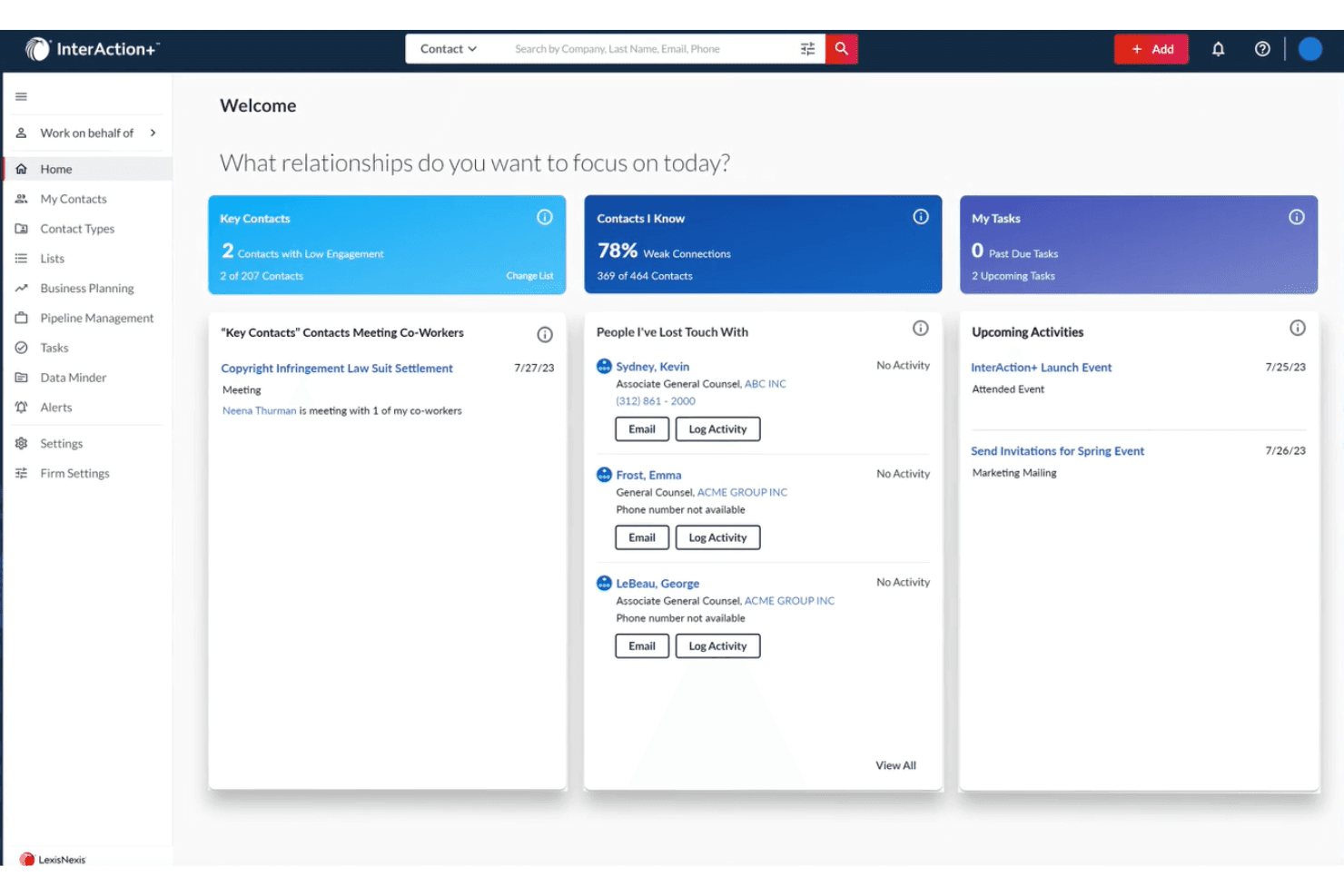
InterAction+ helps users prioritize relationships and track key contacts daily. InterAction+ is a legal-specific CRM built by LexisNexis that combines relationship intelligence, business development pipeline tracking, AI-driven client scoring, and BD reporting across clients, referral sources, and practice areas.
Who Is InterAction+ Best For?
InterAction+ is a strong fit for mid-to-large law firms where business development directors and BD teams own client relationship strategy across multiple practice areas.
Why I Picked InterAction+
InterAction+ earns its spot on my shortlist because no other legal CRM matches its depth of relationship intelligence. I'm particularly impressed by the AI-powered Relationship Score, which continuously evaluates client engagement health and flags at-risk relationships before they slip. Pair that with Key Client Radar for a firm-wide view of your most important accounts, and BD teams have a real edge in protecting and growing revenue across practice areas.
InterAction+ Key Features
- Daily Digest: A configurable daily email that surfaces prioritized BD tasks and relationship follow-ups without disrupting your workflow.
- LexisNexis Context integration: Embeds litigation event analytics by firm, practice area, and jurisdiction directly into client and prospect records.
- Revenue reporting by practice area: Tracks pipeline progress, client acquisition rates, and marketing ROI broken down by client and practice area.
- Microsoft 365 embedding: Surfaces client relationship data inside Outlook, Excel, and Word so attorneys can act on CRM insights without switching tools.
InterAction+ Integrations
InterAction+ has native integrations across the Microsoft ecosystem, including Microsoft 365 and Power Automate, plus LexisNexis Context. Its Cloud API supports custom connections, while specific practice management integrations aren't publicly named.
Pros and Cons
Pros:
- Deep legal industry adoption and trust
- AI-powered client relationship health scoring
- Exclusive LexisNexis litigation analytics integration
Cons:
- No automated conflict check engine
- No legal-specific client intake forms
Learn more about InterAction+:
Annen CRM-programvare for advokatfirmaer
Nedenfor finner du en liste over ytterligere CRM-programvare for advokatfirmaer som jeg valgte ut. Selv om de ikke kom med blant de 10 beste, er de fortsatt verdifulle og verdt å undersøke nærmere.
- 11CosmoLex CRMBest for integrated legal accounting
- 12Creatio CRMBest for no-code CRM workflow automation
- 13CopperBest for Google Workspace ontegration
- 14Zoho CRMBest for customizable CRM solutions
- 15RingCentralBest for communication tools
- 16SugarAIBest for customization options
- 17monday AI WorkspaceBest for project management integration
- 18FilevineBest for document automation
- 19ActionstepBest for mid-sized law firms
- 20CobblestoneBest for contract management
Relaterte CRM-anmeldelser
Hvis du fortsatt ikke har funnet det du leter etter her, kan du se nærmere på disse verktøyene som er nært beslektet med alt-i-ett-CRM-systemer, og som vi har testet og vurdert.
- CRM-programvare
- Salgsprogramvare
- Programvare for kundeemnehåndtering
- Programvare for forretningsanalyse
- Programvare for kontraktshåndtering
- System for inntektsstyring
- CPQ-programvare
How I Evaluate CRM Software for Law Firms
I split my evaluation into two layers: the baseline every legal CRM must hit—intake management, conflict checks, matter records—and the differentiators that set the best options apart.
Core Functionality (Table Stakes For This List)
When I'm selecting tools for my list, I rank each one on a scale from 0 (does not offer the functionality) to 5 (excels in this area) for each core functionality listed below. Then, I calculate the tool's total score into a percentage. Each tool needs to achieve a minimum total score of 55% to be considered for inclusion.
- Legal Intake Management: I check whether the CRM offers structured intake forms and pipeline stages built for converting leads into retained clients, not just generic sales funnels.
- Conflict Check Support: Before a firm can engage a prospect, conflicts need to be screened. I look for native conflict searches or direct integrations with practice management tools.
- Matter-Centric Contact Model: A legal CRM should organize data around matters and parties—clients, opposing counsel, referral sources—rather than forcing firms into a standard deals-and-accounts structure.
- Legal Workflow Automation: I evaluate whether the platform automates intake-specific steps like sending engagement letters, triggering e-signature requests, or assigning onboarding tasks to paralegals.
- Referral Source Tracking: Referral relationships drive most law firm growth. I look for the ability to attribute new matters and revenue back to the originating source or attorney.
- Revenue & Pipeline Reporting: I check for reporting that breaks down pipeline value, conversion rates, and forecasts by attorney, practice area, or matter type—not just generic sales dashboards.
Once I have a list of tools that meet this criteria, I consider what sets each platform apart.
Differentiating Factors (What Sets Vendors Apart)
Here's how I compare and contrast different vendors:
Standout Features
Speed to lead matters in legal intake, so I look for built-in SMS messaging that lets intake teams send appointment reminders and follow-up nudges without leaving the CRM. Call tracking with source attribution is another differentiator—it connects inbound calls to specific campaigns or directories, giving RevOps teams real data on which channels drive retained matters. I also evaluate whether a platform offers an AI intake assistant that can qualify leads after hours and route urgent consultations to the right attorney.
Beyond Features
Integration with the firm's existing legal tech stack is one of the first things I check—whether the CRM connects to practice management tools like Clio or MyCase determines how smoothly intake data flows into active matters. Practice area fit also matters. A personal injury firm processing hundreds of leads monthly needs a very different setup than a boutique corporate practice managing a handful of relationships. I also evaluate how pricing scales as firms grow, since add-ons for SMS, storage, or extra users can quietly inflate the total cost of ownership.
Slik velger du CRM-programvare for advokatfirmaer
Mens du arbeider deg gjennom din unike prosess for programvarevalg, bør du ha følgende punkter i bakhodet:
- Brukervennlighet og tilgjengelighet: CRM-systemet du velger, bør være brukervennlig, tilgjengelig overalt og kunne åpnes raskt og sikkert. Et skybasert CRM-system gjør det mulig for advokater og ansatte å få tilgang til klientinformasjon og administrere oppgaver eksternt, slik at de kan arbeide effektivt på kontoret, i retten eller hjemmefra.
- Integrasjon med eksisterende verktøy: Når du ser etter CRM-programvare, bør du se etter alternativer som integreres sømløst med andre verktøy og systemer. Dette omfatter e-postklienter, dokumenthåndteringsprogramvare, kalenderverktøy og annen programvare for administrasjon av juridisk praksis, noe som bidrar til å effektivisere arbeidsflyten.
- Automatiseringsfunksjoner: Automatisering er en verdifull funksjon i CRM-programvare, ettersom den effektiviserer repetitive oppgaver som avtalepåminnelser, oppfølging av frister og dokumentgenerering. Dette hjelper advokater med å holde orden, reduserer menneskelige feil og forbedrer effektiviteten.
- Tilpasning og skalerbarhet: Når du ser etter et nytt CRM-system, bør du sørge for å finne et som kan tilpasses, slik at du kan skreddersy løsningen etter dine spesifikke behov. Programvaren bør dessuten kunne skaleres i takt med virksomheten din og håndtere økende mengder data, brukere og kundeinteraksjoner.
- Sikkerhet og samsvar: Ettersom juridisk arbeid er av sensitiv karakter, må CRM-programvaren tilby kraftige sikkerhetsfunksjoner som beskytter konfidensiell klientinformasjon. Dette omfatter kryptering, tofaktorautentisering og autoriserte IP-adresser. Programvaren bør dessuten være i samsvar med bransjestandarder og regelverk.
Trender innen CRM-programvare for advokatfirmaer
Her er noen trender jeg har lagt merke til innen CRM-programvare for advokatfirmaer, samt hva de kan bety for fremtiden. Jeg har gjennomgått utallige produktoppdateringer, pressemeldinger og lanseringslogger for å trekke frem de viktigste innsiktene.
- Klientinnsikt drevet av AI: AI brukes til å analysere klientdata og gi handlingsrettet innsikt. Dette kan føre til mer personlig tilpassede klientinteraksjoner, slik at advokatfirmaer bedre kan forstå klientenes behov og forbedre tjenesteleveransen.
- Integrasjon med juridiske forskningsverktøy: CRM-programvare integreres nå med verktøy for juridisk forskning. Dette gjør det mulig for advokater å få tilgang til rettspraksis og lovbestemmelser direkte fra CRM-systemet, noe som sparer tid og forbedrer nøyaktigheten i den juridiske forskningen.
- Mobil tilgjengelighet: Mobilvennlige CRM-løsninger blir stadig viktigere. Advokater kan nå få tilgang til klientinformasjon og saksdetaljer på farten, noe som øker produktiviteten og forbedrer klientservicen.
- Forbedret datasikkerhet: Advokatfirmaer håndterer sensitiv informasjon, noe som gjør kraftige sikkerhetstiltak viktige. Derfor prioriteres datasikkerhetsfunksjoner i CRM-programvare, og sikkerhetsprotokollene forbedres for å bidra til å beskytte klientenes konfidensialitet.
- Automatisering av rutineoppgaver: Automatisering brukes til å håndtere rutinemessige administrative oppgaver, blant annet planlegging, fakturering og dokumenthåndtering. Disse funksjonene frigjør tid slik at advokater kan konsentrere seg om mer komplekst juridisk arbeid.
Etter hvert som advokatfirmaer i økende grad prioriterer klientrelasjonsstyring, utvikles CRM-programvare tilpasset juridiske fagfolk for å møte bransjens unike behov. Denne utviklingen effektiviserer ikke bare klientinteraksjonene, men forbedrer også firmaets samlede effektivitet og tjenesteleveranse.
Hva er CRM-programvare for advokatfirmaer?
CRM-programvare for advokatfirmaer er et verktøy som hjelper juridiske virksomheter med å administrere klientrelasjoner og forretningsutvikling. Den brukes av advokater, administrativt personale og eiere av advokatfirmaer til å effektivisere klientinntak, planlegging, oppfølging og inntektsrapportering.
De viktigste komponentene i CRM-programvare for advokatfirmaer omfatter verktøy for klientinntak, funksjoner for saksbehandling, dokumenthåndtering, datasikkerhet på høyt nivå og markedsføringsautomatisering.
Funksjoner i CRM-programvare for advokatfirmaer
Det er viktig å velge riktig CRM-programvare for advokatfirmaer for å effektivisere driften, styrke klientrelasjonene og øke den samlede effektiviteten. Nedenfor beskriver jeg de viktigste funksjonene du bør se etter når du skal finne ny CRM-programvare.
- Automatisert e-post- og tekstmarkedsføring: Gjør det mulig for advokatfirmaer å svare raskt på potensielle klienter og opprettholde engasjementet hos eksisterende klienter gjennom automatiserte meldinger. Dette er avgjørende for å generere potensielle kunder og beholde klienter.
- E-signatur med ett klikk: Forenkler innhentingen av klientsignaturer, sparer tid og sikrer at dokumenter signeres raskt. Denne funksjonen er avgjørende for å føre saker effektivt videre.
- Tekst- og videomeldinger: Gjør det mulig for advokatfirmaer å kommunisere med klienter gjennom deres foretrukne kanaler, noe som øker engasjement og tillit.
- Analyseoversikt: Gir en sentralisert oversikt over viktige måltall, som sakens fremdrift, engasjement blant potensielle kunder og avkastning på markedsføringen. Denne funksjonen hjelper firmaer med å ta datadrevne beslutninger og følge med på resultater.
- Administrasjon av markedsføringsoppgaver: Hjelper med å administrere komplekse markedsføringskampanjer og juridiske oppgaver ved å sette opp automatiserte arbeidsflyter og interne varsler. Dette sikrer at tidsfrister overholdes og at oppgaver fullføres effektivt.
- Programvarestøtte: Tilbyr god støtte og opplæring for å hjelpe advokatfirmaer med å gå smidig over til ny CRM-programvare, redusere frustrasjon og øke sannsynligheten for en vellykket implementering.
- Administrasjon av potensielle kunder: Gjør det enklere å følge opp og pleie potensielle klienter, slik at ingen potensielle kunder blir oversett. Integrasjon med markedsføringsverktøy kan ytterligere styrke arbeidet med å generere potensielle kunder.
- Kontaktadministrasjon: Opprettholder detaljerte opplysninger om klienter, inkludert kontaktinformasjon, sakshistorikk og kommunikasjonslogger. Denne funksjonen er avgjørende for personlig klientservice.
- Tidsregistrering og fakturering: Registrerer fakturerbare timer og genererer fakturaer i CRM-systemet, noe som effektiviserer faktureringsprosessen og sikrer nøyaktig sporing av betalinger.
- Dokumentadministrasjon: Lagrer og organiserer juridiske dokumenter på en sikker måte, slik at teammedlemmer enkelt kan få tilgang til og dele dem. Denne funksjonen er viktig for å opprettholde en organisert og effektiv saksbehandling.
Ved å integrere disse funksjonene i CRM-programvaren kan advokatfirmaet ditt i betydelig grad forbedre evnen til å administrere klientforhold, effektivisere driften og til syvende og sist øke lønnsomheten.
Fordeler med CRM-programvare for advokatfirmaer
CRM-programvare gir advokatfirmaer en effektiv måte å administrere klientforhold, forbedre kommunikasjonen og øke effektiviteten på. I tillegg til disse fordelene gir CRM-programvare for advokatfirmaer følgende fordeler:
- Sentralisert klientinformasjon: CRM-programvare samler alle klientopplysninger på én lett tilgjengelig plattform, slik at advokatfirmaer kan følge med på engasjement, administrere potensielle kunder og tilby personlig service i hvert trinn.
- Økt klientengasjement: Ved å tilby personlig kommunikasjon, tilpassede anbefalinger og proaktiv oppfølging hjelper CRM-programvare advokatfirmaer med å bygge meningsfulle relasjoner med klienter og forbedre klientenes resultater.
- Effektivisert kommunikasjon: Riktig CRM-programvare tilbyr verktøy for å følge opp klientinteraksjoner og kommunikasjon, slik at kommunikasjonshistorikken loggføres på ett sted. Denne sentraliserte oversikten over klientinteraksjoner hjelper advokatfirmaer med å bygge tillit, forutse klientenes behov og forbedre klienttilfredsheten.
- Forbedret effektivitet og produktivitet: Juridisk CRM-programvare automatiserer rutineoppgaver som klientinntak, timebestilling og dokumentadministrasjon, slik at advokatfirmaer kan fokusere på viktigere oppgaver. Denne automatiseringen reduserer den administrative belastningen og sikrer at teammedlemmene er samkjørte.
- Datasikkerhet og samsvar: Et solid CRM-system for advokatfirmaer prioriterer funksjoner som kryptering og tilgangskontroller for å beskytte sensitive klientopplysninger. Samsvar med bransjereguleringer, som GDPR eller HIPAA, er også avgjørende for å sikre at advokatfirmaer opprettholder en tydelig oversikt over endringer og handlinger som er utført i CRM-systemet.
CRM-programvare gir advokatfirmaer en rekke fordeler, blant annet bedre klientadministrasjon, effektivisert kommunikasjon og mer effektive arbeidsflyter. Ved å implementere et CRM-system kan advokatfirmaer administrere klientforholdene bedre, øke effektiviteten og tilby klientene bedre service.
Kostnader og priser for CRM-programvare for advokatfirmaer
Når man vurderer kostnadene og prisene for CRM-programvare for advokatfirmaer, er det viktig å veie funksjonene og fordelene opp mot budsjettet og de spesifikke behovene. Mens enkelte CRM-systemer tilbyr omfattende funksjonalitet til en høyere pris, tilbyr andre viktige verktøy til en rimeligere pris.
Denne delen gir et estimat over gjennomsnittlige CRM-programvareplaner og kostnader for advokatfirmaer. Dataene er basert på ulike kilder og gjenspeiler vanlige prisnivåer og funksjoner.
Sammenligningstabell for CRM-programvareplaner for advokatfirmaer
| Plantype | Gjennomsnittspris | Vanlige funksjoner |
| Gratisabonnement | $0 | Grunnleggende kontaktadministrasjon, begrenset antall brukere, grunnleggende rapportering og e-postintegrasjon |
| Personlig abonnement | $12 - $39/bruker/måned | Utvidet kontaktadministrasjon, e-postmarkedsføring, grunnleggende automatisering og begrensede integrasjoner |
| Bedriftsabonnement | $40 - $129/bruker/måned | Avansert automatisering, dokumentadministrasjon, tidsregistrering, fakturering og integrasjoner med andre verktøy |
| Foretaksabonnement | Tilpasset prising | Full tilpasning, avansert analyse, dedikert brukerstøtte, forbedret sikkerhet og ubegrensede integrasjoner |
En oversikt over prisplaner, kostnader og funksjoner i CRM-programvare for advokatfirmaer.
Til syvende og sist krever valg av riktig CRM en balansering av kostnadseffektivitet og evnen til å forbedre klientrelasjoner og effektivisere driften av firmaet. Før kjøp bør du nøye vurdere firmaets behov opp mot de tilgjengelige alternativene for å sikre at du velger en løsning som gir best mulig verdi for investeringen.
Vanlige spørsmål om CRM-programvare for advokatfirmaer
Her er noen vanlige spørsmål jeg har fått om CRM-programvare for advokatfirmaer.
Hvordan forbedrer CRM-programvare datasikkerheten og samsvaret med regelverket for advokatfirmaer?
CRM-programvare forbedrer datasikkerheten og samsvaret med regelverket ved å gi bedre kontroll over og overvåking av sensitiv klientinformasjon. Juridiske CRM-systemer er utviklet for å redusere risikoen for datainnbrudd og sikre samsvar med juridiske bestemmelser. Funksjoner som sikkerhet på banknivå, sikker lagring av dokumenter og tilgangskontroller bidrar til å beskytte klientdata.
Hvordan kan CRM-programvare forbedre klientkommunikasjonen for advokatfirmaer?
CRM-programvare forbedrer klientkommunikasjonen ved å tilby flere kanaler for samhandling og sikre oppfølging i tide. Funksjoner som innebygd tekstmeldingsfunksjon, e-postmaler og klientportaler legger til rette for konsekvent og effektiv kommunikasjon. Denne åpne kommunikasjonslinjen bidrar til å bygge sterkere klientrelasjoner og øke klienttilfredsheten.
Hvilke utfordringer innebærer implementering av CRM-programvare i et advokatfirma?
Implementering av CRM-programvare i et advokatfirma kan medføre utfordringer som førstegangsoppsett, datamigrering og at brukerne tar systemet i bruk. Selv om mange CRM-løsninger er utviklet for å være brukervennlige, kan førstegangsoppsettet kreve tid og innsats for å konfigurere systemet i henhold til firmaets spesifikke behov.
Datamigrering fra eksisterende systemer til det nye CRM-systemet kan også være komplisert og kan kreve nøye planlegging. I tillegg er det avgjørende for en vellykket implementering å sørge for at alle medarbeiderne får tilstrekkelig opplæring og blir trygge på å bruke det nye systemet.
Kan CRM-programvare hjelpe med fakturering og fakturaer?
Ja, CRM-programvare kan effektivisere fakturering og fakturautstedelse ved å registrere fakturerbare timer, generere fakturaer og administrere betalinger. Automatiserte faktureringsprosesser reduserer feil og sikrer at fakturaer sendes ut i tide, noe som bidrar til å opprettholde nøyaktige økonomiske registre og forbedre kontantstrømmen.