

Siamo realistici: passare in rassegna gli strumenti per vendite e marketing che promettono di fare tutto non è un compito da poco. Uno promette un monitoraggio migliore dei lead, l'altro giura che farà schizzare alle stelle il ROI della tua campagna. Nel frattempo, ti ritrovi a cercare di gestire tutto: gestire i lead, condurre le campagne e tenere d'occhio i ricavi. Ti suona familiare? Lo strumento giusto potrebbe farti risparmiare ore, ma quello sbagliato potrebbe solo aggiungere caos. Quindi, come fai a decidere quale risolverà davvero i tuoi problemi?
Ed è qui che entro in gioco io. Ho dedicato tempo alla configurazione, alla gestione e alla verifica di software sufficienti per sapere cosa vale il tuo tempo (e cosa no).
In questo articolo analizzerò le migliori soluzioni software per affrontare le tue sfide di vendita e marketing. Troverai informazioni chiare, i casi d'uso migliori e confronti dei prezzi per aiutarti a fare la scelta giusta. Ecco le mie scelte migliori tra le soluzioni software per vendite e marketing.
Perché fidarsi dei nostri consigli sui software
6,700+
Reviews
20
Industry experts
16+
Evaluation factors
14
Years
Le nostre recensioni riflettono il nostro giudizio indipendente, non un discorso di vendita. Scopri come manteniamo la trasparenza.
Per questa guida, abbiamo valutato gli strumenti attraverso test pratici e ricerche indipendenti, assegnando un punteggio agli strumenti in base ai nostri criteri di selezione.
Le nostre recensioni riflettono il nostro giudizio editoriale umano, non un discorso di vendita.
Tabella comparativa dei software per vendite e marketing
Questa tabella comparativa riassume i dettagli dei prezzi delle mie migliori selezioni di software per vendite e marketing:
| Tool | Best For | Trial Info | Price | ||
|---|---|---|---|---|---|
| 1 | Ideale per l'arricchimento dei dati B2B in tempo reale | Prova gratuita di 14 giorni + piano gratuito + demo gratuita disponibili | A partire da 49/postazione/mese (con fatturazione annuale) | Website | |
| 2 | Ideale per l’outreach commerciale supportato dall’IA | Prova gratuita di 14 giorni | Da $25/utente/mese (fatturazione annuale) | Website | |
| 3 | Ideale per l'accessibilità economica delle piccole imprese | Piano gratuito + demo gratuita disponibile | Da $11.04/utente/mese (fatturazione biennale) | Website | |
| 4 | Ideale per strategie go-to-market | Demo gratuita disponibile | Prezzo su richiesta | Website | |
| 5 | Ideale per automatizzare i percorsi cliente | Prova gratuita disponibile | Prezzo su richiesta | Website | |
| 6 | Ideale per l'automazione dell'email marketing | Prova gratuita di 14 giorni + demo gratuita disponibile | Da $15/mese (fatturato annualmente) | Website | |
| 7 | Ideale per strumenti di marketing di eventi | Prova gratuita di 14 giorni + demo gratuita disponibile | Da $12/mese | Website | |
| 8 | Ideale per l'integrazione della gestione progetti | Prova gratuita di 14 giorni + demo gratuita disponibile | Da $29/utente/mese (fatturato annualmente) | Website | |
| 9 | Ideale per i grandi team aziendali | Prova gratuita di 30 giorni + piano gratuito disponibile | Da $25/utente/mese (fatturato annualmente) | Website | |
| 10 | Ideale per analisi avanzate | Demo gratuita disponibile | Prezzo su richiesta | Website |


Recensioni dei migliori software per vendite e marketing
Di seguito trovi i miei riepiloghi dettagliati dei migliori strumenti di marketing e vendita entrati nella mia selezione. Le mie recensioni offrono una panoramica dettagliata delle funzionalità principali, dei pro & contro, delle integrazioni e dei casi d’uso ideali di ciascuno strumento, per aiutarti a trovare quello più adatto a te.
 Ideale per l'arricchimento dei dati B2B in tempo reale
- Prova gratuita di 14 giorni + piano gratuito + demo gratuita disponibili
- A partire da 49/postazione/mese (con fatturazione annuale)
Visit WebsiteCustomer Rating:4.5/5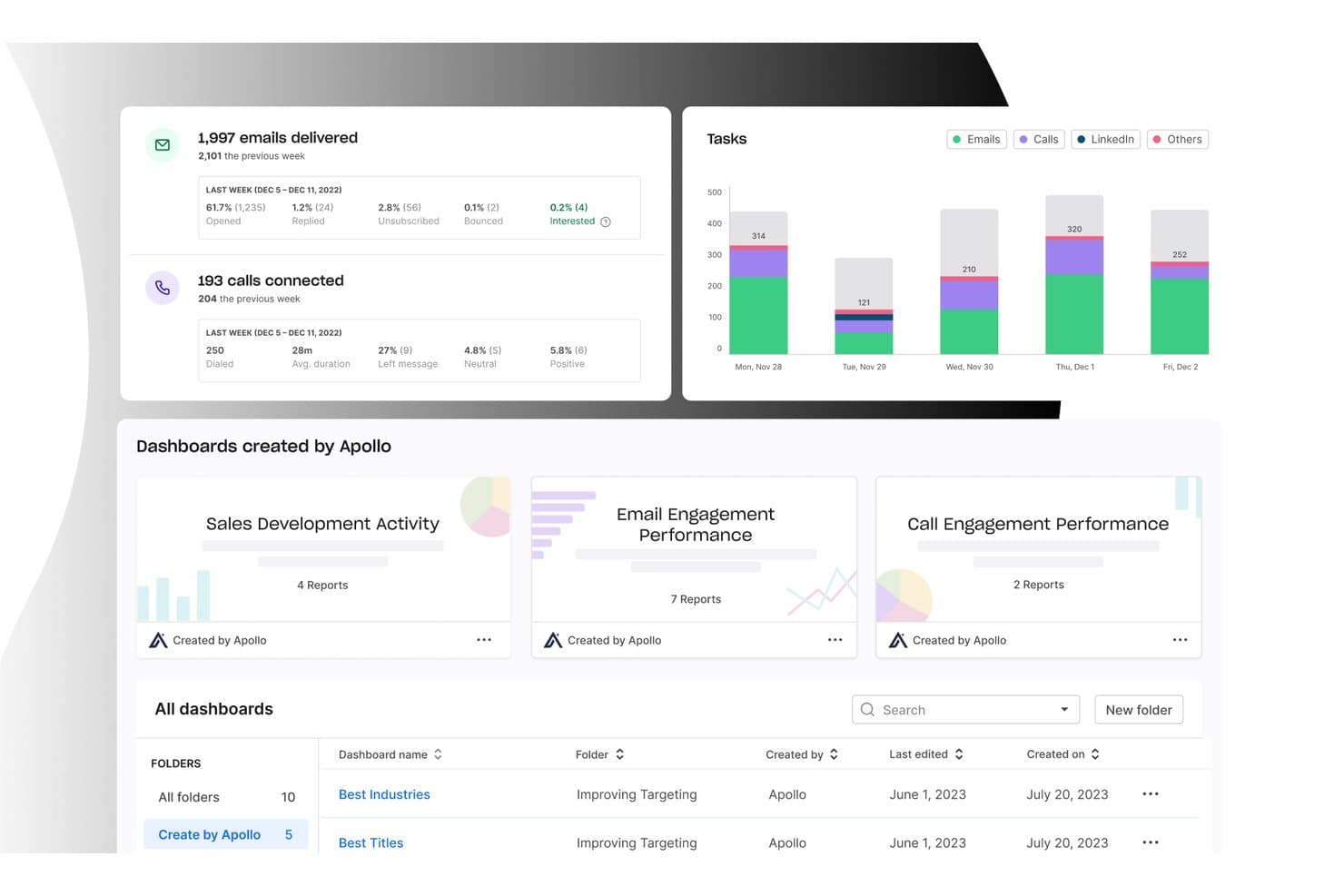
Apollo.io offre una dashboard di analisi dettagliata che mostra le statistiche di consegna delle e-mail, le metriche di connessione delle chiamate, la suddivisione delle attività per canale e dashboard predefinite per le prestazioni delle vendite e del marketing. Apollo.io è una piattaforma di vendita basata sull'intelligenza artificiale che combina un database B2B con oltre 265 milioni di contatti, sequenze di contatto commerciale, arricchimento dei dati, instradamento dei lead e un dialer integrato.
Per chi è più adatto Apollo.io?
Apollo.io è adatto ai team di vendita di piccole e medie dimensioni e alle organizzazioni con una forte presenza di SDR che gestiscono attività di prospezione in uscita ad alto volume da un'unica piattaforma.
Perché ho scelto Apollo.io
Apollo.io è entrato nella mia rosa di candidati perché il suo arricchimento a cascata attinge in sequenza a più fornitori di dati, colmando lacune che uno strumento basato su un'unica fonte non riuscirebbe a colmare. Apprezzo il fatto che l'arricchimento venga eseguito secondo una pianificazione, così i record dei contatti nel mio CRM si aggiornano automaticamente senza esportazioni manuali o caricamenti di file CSV. La funzione Ricerca IA mi consente di definire campi personalizzati, ad esempio se un'azienda utilizza una tecnologia specifica, e Apollo li compila contemporaneamente per migliaia di record.
Caratteristiche principali di Apollo.io
- Sincronizzazione bidirezionale con il CRM: Mantieni aggiornati contatti e attività tra Apollo, Salesforce e HubSpot grazie alla mappatura dei campi e alla sincronizzazione automatica.
- Sequenze di vendita multicanale: Automatizza le attività di contatto utilizzando e-mail, chiamate, attività su LinkedIn e passaggi manuali in flussi di lavoro personalizzati.
- Gestione di trattative e pipeline: Monitora trattative, fasi e progressi con dashboard della pipeline personalizzabili e record delle opportunità.
- Strumenti di prospezione basati sugli account: Crea elenchi dinamici di account, identifica i comitati d'acquisto e organizza le attività in uscita per account.
Integrazioni di Apollo.io
Apollo.io offre integrazioni native con Salesforce, HubSpot, Outreach, Airtable, Amplitude, Asana e Gmail, oltre a fornire un'API per integrazioni personalizzate.
Pros and Cons
Pros:
- Ampio database di contatti B2B aggiornato continuamente
- Dialer, sequenze e arricchimento in un'unica piattaforma
- Il punteggio basato sull'IA individua automaticamente gli account che si trovano nel mercato
Cons:
- La precisione dei dati diminuisce per i contatti non statunitensi
- I limiti di invio delle e-mail frustrano i team ad alto volume
Learn more about Apollo.io: Ideale per l’outreach commerciale supportato dall’IA
- Prova gratuita di 14 giorni
- Da $25/utente/mese (fatturazione annuale)
Visit WebsiteCustomer Rating:4.4/5
Dashboard CloudTalk che mostra metriche di chiamata in tempo reale e analisi delle prestazioni per team di vendita. Per le aziende che desiderano potenziare i propri sforzi di vendita e marketing, CloudTalk offre una sofisticata soluzione di call center in cloud che si distingue per la capacità di migliorare la comunicazione e l'efficienza operativa. Progettato per settori che si affidano a solide interazioni con i clienti, CloudTalk è ideale per i team che vogliono superare le sfide legate alla gestione delle chiamate e al coinvolgimento dei clienti. Con funzionalità pensate per snellire i processi e migliorare l’esperienza cliente, risponde alle esigenze delle organizzazioni che mirano a ottimizzare i flussi di lavoro nelle vendite e nel marketing.
Perché ho scelto CloudTalk
Ho scelto CloudTalk per i suoi strumenti basati sull'intelligenza artificiale che potenziano sensibilmente l’outreach commerciale e il coinvolgimento dei clienti. L'AI Dialer della piattaforma non solo automatizza le chiamate, ma include anche la funzionalità di rilascio della segreteria telefonica e il rilevamento delle segreterie, aiutando il team a massimizzare il tempo speso in chiamate produttive. Inoltre, l’AI Conversation Intelligence fornisce riassunti automatici delle chiamate e analisi del sentiment, permettendo al team di ottenere insight utili e migliorare le interazioni con la clientela. Queste funzionalità rispondono alle esigenze principali dei team di vendita e marketing, offrendo dati fruibili e rafforzando le capacità comunicative.
Funzionalità principali di CloudTalk
Oltre alle funzionalità alimentate dall’IA, CloudTalk offre anche diversi altri vantaggi:
- Numeri locali: Fornisce accesso a numeri locali in oltre 160 Paesi, consentendo alla tua azienda di mantenere una presenza locale a livello globale.
- Monitoraggio in tempo reale: Permette l’ascolto delle chiamate in diretta e l’analisi delle prestazioni, fornendoti gli strumenti per monitorare e migliorare l’efficacia del team.
- Instradamento delle chiamate personalizzabile: Consente di adattare i flussi di chiamata alle specifiche esigenze aziendali, assicurando che le chiamate vengano indirizzate agli agenti più indicati.
- Messaggistica WhatsApp: Supporta la comunicazione tramite WhatsApp, espandendo la possibilità per il team di relazionarsi con i clienti attraverso la loro piattaforma preferita.
Integrazioni di CloudTalk
Le integrazioni includono HubSpot, Salesforce, Zoho, Freshdesk, Pipedrive, Zendesk, Microsoft Dynamics 365, Intercom, Slack e Shopify.
Pros and Cons
Pros:
- Ampie opzioni di integrazione con CRM
- Modalità multiple di composizione automatica delle chiamate in uscita
- Strumenti di conversazione basati sull’intelligenza artificiale
Cons:
- Disponibilità dei numeri internazionali a volte non omogenea
- Problemi di stabilità con il dialer parallelo
Learn more about CloudTalk: Ideale per l'accessibilità economica delle piccole imprese
- Piano gratuito + demo gratuita disponibile
- Da $11.04/utente/mese (fatturazione biennale)
Visit WebsiteCustomer Rating:4.7/5
EngageBay semplifica la gestione clienti, l'automazione del marketing e le vendite. EngageBay è una piattaforma tutto-in-uno per marketing, vendite e assistenza, rivolta alle piccole imprese. Aiuta a gestire le interazioni con i clienti, automatizzare le campagne di marketing e semplificare i processi di vendita.
Perché ho scelto EngageBay: È ideale per le piccole imprese grazie alla sua convenienza e all'ampia gamma di funzionalità. EngageBay combina strumenti di CRM, automazione del marketing e assistenza clienti in un unico pacchetto, offrendo un ottimo rapporto qualità-prezzo. Puoi automatizzare facilmente le campagne di marketing, risparmiando tempo e fatica. La capacità della piattaforma di gestire le interazioni con i clienti la rende una scelta pratica per piccoli team.
Funzionalità e integrazioni principali:
Funzionalità includono un builder di landing page che consente di creare e personalizzare pagine senza bisogno di programmare. Il componente CRM offre la gestione dei contatti e il tracciamento delle trattative per mantenere organizzate le vendite. Gli strumenti di automazione del marketing permettono di coltivare i lead attraverso sequenze di email.
Integrazioni includono Mailchimp, Zapier, Xero, Shopify, QuickBooks, Stripe, Twilio, Mandrill, SendGrid e Docusign.
Pros and Cons
Pros:
- Landing page personalizzabili
- Tracciamento efficace delle trattative
- Conveniente per le piccole imprese
Cons:
- Funzionalità avanzate limitate
- Curva di apprendimento più ripida per i nuovi utenti
Learn more about EngageBay: Ideale per strategie go-to-market
- Demo gratuita disponibile
- Prezzo su richiesta
Visit WebsiteCustomer Rating:4.7/5
La dashboard Odin AI di HockeyStack visualizza le prestazioni del funnel completo e i lead qualificati per le vendite per canale. Per le aziende che desiderano perfezionare le proprie strategie di vendita e marketing, HockeyStack offre una combinazione unica di approfondimenti e analisi guidate dall'intelligenza artificiale, progettate per migliorare le attività di go-to-market. Che tu sia un professionista delle vendite intenzionato a recuperare accordi chiusi o un marketer focalizzato sull'ottimizzazione dei budget, HockeyStack mette a disposizione gli strumenti necessari per migliorare l'acquisizione e la fidelizzazione dei clienti. La sua integrazione fluida con diversi software di vendita e marketing lo rende una scelta interessante per i team che desiderano unificare i propri dati e ottenere insight attuabili.
Perché ho scelto HockeyStack
Ho scelto HockeyStack perché offre un approccio distintivo alle sfide di vendita e marketing, proponendo analisi guidate dall'IA pensate specificamente per migliorare le strategie di go-to-market. Con funzionalità come report di attribuzione personalizzabili e tracciamento del percorso dell'acquirente, puoi ottenere una panoramica completa delle interazioni dei clienti, permettendo al tuo team di prendere decisioni informate. Inoltre, la valutazione degli account aiuta a dare priorità agli sforzi sui lead più promettenti, assicurando che le risorse siano indirizzate dove possono avere il massimo impatto.
Caratteristiche principali di HockeyStack
Oltre alle eccezionali capacità di analisi, ho trovato anche diverse altre funzionalità che migliorano la sua utilità per i team di vendita e marketing.
- Visibilità su tutto il funnel: Questa funzione offre una visione completa dell'intero percorso del cliente, consentendo al tuo team di individuare e affrontare eventuali colli di bottiglia nel processo di vendita.
- Recupero trattative: Aiuta il tuo team di vendita a rivisitare e potenzialmente recuperare trattative perse analizzando le interazioni precedenti e suggerendo azioni concrete.
- Ottimizzazione del budget marketing: Offre approfondimenti sulla distribuzione dei budget per massimizzare il ritorno sull'investimento e migliorare le prestazioni delle campagne.
- Generatore di prossime migliori azioni: Fornisce raccomandazioni operative per far progredire le trattative aperte, assicurando che la pipeline delle vendite resti attiva e produttiva.
Integrazioni di HockeyStack
Le integrazioni includono Salesforce, HubSpot, Marketo, Google Analytics, Slack, Microsoft Teams, Intercom, Drift, Pendo e Zendesk.
Pros and Cons
Pros:
- Approfondimenti AI che supportano le decisioni di go-to-market
- Report di attribuzione personalizzabili lungo i percorsi d'acquisto
- Unifica dati di marketing, prodotto e vendite
Cons:
- Prezzi non disponibili pubblicamente
- Le funzionalità avanzate potrebbero richiedere tempo per l'onboarding
Learn more about HockeyStack: Ideale per automatizzare i percorsi cliente
- Prova gratuita disponibile
- Prezzo su richiesta
Visit WebsiteCustomer Rating:4.5/5
Ortto automatizza il coinvolgimento dei clienti, personalizza i percorsi e integra i dati. Ortto è uno strumento di automazione del marketing progettato per le aziende che desiderano automatizzare il coinvolgimento dei clienti. I suoi principali utenti includono professionisti del marketing e team di vendita focalizzati sulla creazione di percorsi cliente personalizzati. La piattaforma eccelle nell'integrazione dei dati dei clienti e nell'automazione dei processi di marketing.
Perché ho scelto Ortto: Ortto è specializzato nell'automatizzare i percorsi cliente con funzionalità come messaggi e notifiche personalizzate. La sua piattaforma di dati consente di integrare e segmentare i dati dei clienti in modo efficiente. Gli strumenti basati su intelligenza artificiale aiutano a creare messaggi ed email ottimizzati. Le analisi della piattaforma offrono insight utili per visualizzare i dati, supportando i professionisti del marketing nei processi decisionali.
Caratteristiche e integrazioni principali:
Caratteristiche includono l'integrazione dei dati dei clienti, la messaggistica personalizzata e la creazione di email tramite AI. Le analisi di Ortto aiutano a visualizzare i dati dei clienti, facilitando la comprensione di tendenze e comportamenti. La piattaforma supporta integrazioni no-code, migliorando l'usabilità in diverse applicazioni.
Le integrazioni includono Shopify, Salesforce, HubSpot, Mailchimp, Zapier, Google Analytics, Slack, WordPress, Zendesk e Intercom.
Pros and Cons
Pros:
- Facile da configurare
- Si adatta bene alla crescita
- Assistenza clienti eccellente
Cons:
- Opzioni di personalizzazione limitate
- L'integrazione con l'infrastruttura tecnologica esistente può essere complessa
Learn more about Ortto: Ideale per l'automazione dell'email marketing
- Prova gratuita di 14 giorni + demo gratuita disponibile
- Da $15/mese (fatturato annualmente)
Visit WebsiteCustomer Rating:4.4/5
ActiveCampaign supporta email marketing, automazioni e il tracciamento dei clienti. ActiveCampaign è una piattaforma software per l'email marketing e l'automazione delle vendite progettata per le piccole e medie imprese. Aiuta il tuo team a gestire campagne email, tracciare le interazioni con i clienti e automatizzare diverse attività di marketing.
Perché ho scelto ActiveCampaign: Eccelle nell'automazione dell'email marketing, rendendolo ideale per le aziende che si affidano fortemente al coinvolgimento tramite email. I suoi flussi di lavoro automatici permettono di inviare messaggi mirati in base al comportamento del cliente. Puoi creare campagne personalizzate senza bisogno di competenze di programmazione. Le funzionalità di segmentazione della piattaforma aiutano a personalizzare le comunicazioni per segmenti specifici del pubblico, migliorando l'efficacia delle tue campagne email.
Funzionalità e integrazioni principali:
Funzionalità includono un builder visivo per automazioni, che semplifica la creazione di flussi di lavoro complessi. Le capacità CRM consentono di gestire le relazioni con i clienti insieme alle attività di marketing. Gli strumenti per il design delle email rendono semplice la creazione di email professionali anche senza esperienza di design.
Integrazioni includono Shopify, Salesforce, WordPress, Zapier, WooCommerce, Facebook, Stripe, PayPal, Google Analytics ed Eventbrite.
Pros and Cons
Pros:
- Flussi di lavoro automatici flessibili
- Segmentazione efficace dei clienti
- Monitoraggio avanzato delle email
Cons:
- Può essere inizialmente complesso
- Richiede tempo per imparare le funzionalità
Learn more about ActiveCampaign: Ideale per strumenti di marketing di eventi
- Prova gratuita di 14 giorni + demo gratuita disponibile
- Da $12/mese
Visit WebsiteCustomer Rating:4.2/5
ConstantContact è una piattaforma email per la gestione di campagne e marketing di eventi. ConstantContact è una piattaforma di email marketing utilizzata principalmente da piccole imprese e organizzazioni non profit. Offre strumenti per creare e gestire campagne email e marketing di eventi.
Perché ho scelto ConstantContact: È ideale per aziende focalizzate sul marketing di eventi. Lo strumento offre funzionalità per creare e promuovere eventi, monitorare le registrazioni e gestire i partecipanti. Puoi facilmente progettare email personalizzate con il suo editor drag-and-drop. Le funzionalità di reportistica offrono approfondimenti sulle prestazioni delle campagne, aiutandoti a perfezionare le tue strategie.
Funzionalità principali & integrazioni:
Funzionalità includono un editor email drag-and-drop per una facile personalizzazione. Gli strumenti di gestione eventi ti permettono di creare, promuovere e monitorare eventi. Hai anche accesso alla pubblicazione e al monitoraggio dei social media direttamente dalla piattaforma.
Integrazioni includono Shopify, WooCommerce, Eventbrite, Facebook, Salesforce, WordPress, QuickBooks, Zapier, Google Analytics e Outlook.
Pros and Cons
Pros:
- Forte attenzione al marketing di eventi
- Personalizzazione email semplice
- Strumenti per i social media inclusi
Cons:
- Funzionalità avanzate limitate
- Può essere costoso su larga scala
Learn more about Constant Contact: Ideale per l'integrazione della gestione progetti
- Prova gratuita di 14 giorni + demo gratuita disponibile
- Da $29/utente/mese (fatturato annualmente)
Visit WebsiteCustomer Rating:4.1/5
Insightly integra CRM, monitoraggio delle vendite e gestione progetti in un'unica piattaforma per le PMI. Insightly è uno strumento CRM e di gestione progetti progettato per le piccole e medie imprese. Aiuta i team a gestire le relazioni con i clienti, monitorare le vendite e supervisionare i progetti dall'inizio alla fine.
Perché ho scelto Insightly: Combina CRM e gestione progetti, rendendolo ideale per le aziende che necessitano di entrambe le funzionalità in un'unica piattaforma. Puoi tracciare le opportunità di vendita e gestire in modo efficace dettagliati cronoprogrammi di progetto. Lo strumento offre funzionalità di reportistica approfondite per analizzare le prestazioni aziendali. La gestione delle pipeline aiuta a dare priorità alle attività e a migliorare l'efficienza dei flussi di lavoro.
Caratteristiche e integrazioni principali:
Funzionalità includono una dashboard personalizzabile che consente al tuo team di concentrarsi sulle metriche più importanti. Lo strumento di automazione dei flussi di lavoro aiuta ad automatizzare le attività ripetitive, facendoti risparmiare tempo. Insightly offre anche modelli di email per ottimizzare la comunicazione con i clienti.
Integrazioni includono QuickBooks, Mailchimp, Microsoft Outlook, Google Workspace, Slack, Dropbox, Evernote, Xero, Zapier e PieSync.
Pros and Cons
Pros:
- Combina CRM e gestione progetti
- Cronoprogrammi di progetto dettagliati
- Capacità di automazione dei flussi di lavoro
Cons:
- Richiede configurazione tecnica
- Curva di apprendimento iniziale ripida
 Ideale per i grandi team aziendali
- Prova gratuita di 30 giorni + piano gratuito disponibile
- Da $25/utente/mese (fatturato annualmente)
Visit WebsiteCustomer Rating:4.4/5
Salesforce è uno strumento CRM per la gestione delle relazioni, l'automazione delle attività e l'analisi dei dati. Salesforce è una soluzione CRM e uno strumento di marketing completo progettato per grandi aziende. Aiuta i venditori a gestire le relazioni con i clienti, automatizzare le attività di marketing e analizzare i dati per una previsione più accurata.
Perché ho scelto Salesforce: La sua vasta suite di strumenti si adatta alle esigenze di grandi team aziendali, offrendo una scalabilità e personalizzazione senza eguali. Salesforce fornisce approfondite informazioni sui clienti, consentendo di personalizzare efficacemente le strategie di marketing. È possibile automatizzare flussi di lavoro complessi, riducendo le attività manuali e aumentando l'efficienza. Le sue funzionalità avanzate di analisi offrono una profonda comprensione del comportamento dei clienti, rendendolo ideale per i grandi team che desiderano maggiori opportunità di concludere trattative.
Funzionalità e integrazioni principali:
Funzionalità includono strumenti avanzati di reportistica, dashboard personalizzabili e analisi basate sull'intelligenza artificiale. Le capacità di automazione del marketing di Salesforce permettono di creare percorsi personalizzati per i clienti. Gli strumenti di collaborazione della piattaforma supportano il lavoro di squadra.
Integrazioni includono Slack, Tableau, Mailchimp, Marketo, LinkedIn, Zoom, Google Workspace, QuickBooks, Docusign e Dropbox.
Pros and Cons
Pros:
- Flussi di lavoro altamente personalizzabili
- Gestisce grandi volumi di dati
- Aggiornamenti e miglioramenti frequenti
Cons:
- Curva di apprendimento ripida
- Può risultare complesso per i piccoli team
Learn more about Salesforce : Ideale per analisi avanzate
- Demo gratuita disponibile
- Prezzo su richiesta
Visit WebsiteCustomer Rating:4.1/5
Adobe Marketo Engage è una piattaforma per marketer B2B per gestire lead e analisi. Adobe Marketo Engage è una piattaforma di automazione del marketing progettata per grandi aziende e marketer B2B. Aiuta a gestire l'engagement dei clienti, la coltivazione dei lead e le analisi per strategie di marketing efficaci.
Perché ho scelto Adobe Marketo Engage: È pensato per chi ha bisogno di analisi avanzate per prendere decisioni di marketing. La piattaforma offre report dettagliati e approfondimenti per ottimizzare le tue campagne. Le sue capacità di lead nurturing permettono di creare percorsi personalizzati per i clienti. Puoi analizzare in profondità il comportamento dei clienti per affinare costantemente le strategie di marketing.
Funzionalità principali e integrazioni:
Funzionalità includono uno strumento avanzato di email marketing che ti aiuta a offrire campagne personalizzate. Il sistema di gestione dei lead della piattaforma garantisce la possibilità di valutare e prioritizzare efficacemente i lead. Hai anche accesso a uno strumento robusto per il marketing di eventi per gestire webinar ed eventi in presenza.
Integrazioni includono Salesforce, Microsoft Dynamics 365, LinkedIn, Facebook, Zoom, GoToWebinar, Slack, Eventbrite, Optimizely e ON24.
Pros and Cons
Pros:
- Ampie opzioni di gestione dei lead
- Analisi e report dettagliati
- Si adatta bene alle esigenze delle grandi aziende
Cons:
- Curva di apprendimento ripida
- Richiede competenze tecniche
Learn more about Adobe Marketo Engage:
Altri software per vendite e marketing
Ecco alcune ulteriori opzioni di software per vendite e marketing che non sono entrate nella mia selezione, ma che vale comunque la pena prendere in considerazione:
- 11BrevoIdeale per la messaggistica multicanale
- 12NutshellIdeale per la facilità d'uso
- 13PitchMonsterIdeale per accelerare l’onboarding dei nuovi venditori
- 14Bitrix24Ideale per le funzionalità di collaborazione tra team
- 15FreshsalesIdeale per approfondimenti sulle vendite basati sull’IA
- 16SugarAIIdeale per opzioni di personalizzazione
Come valuto il software di vendita e marketing
Divido la mia valutazione in requisiti di base — come la sincronizzazione con il CRM, la qualificazione dei lead e i report sulla pipeline — e fattori distintivi che differenziano una piattaforma dall’altra.
Funzionalità principali (requisiti fondamentali per questa lista)
Quando seleziono gli strumenti per la mia lista, valuto ciascuno su una scala da 0 (non offre la funzionalità) a 5 (eccelle in quest'area) per ogni funzionalità principale indicata di seguito. Successivamente, trasformo il punteggio complessivo dello strumento in una percentuale. Ogni strumento deve raggiungere un punteggio totale minimo del 75% per essere preso in considerazione.
- Integrazione CRM & sincronizzazione dei dati: Verifico se la piattaforma sincronizza contatti, account ed opportunità in modo bidirezionale con i principali CRM o se funziona come CRM nativo.
- Gestione & qualificazione lead: Il modo in cui i lead vengono acquisiti, qualificati e instradati è fondamentale — cerco regole configurabili che riflettano flussi di lavoro reali di passaggio da MQL a SQL.
- Automazione di campagne & attività di outreach: L’automazione multicanale attivata da comportamenti è essenziale, come l’iscrizione automatica di un potenziale cliente a una sequenza di vendita dopo la partecipazione a un webinar.
- Analisi pipeline & ricavi: Valuto se le dashboard includono tassi di conversione, velocità nelle fasi e previsioni, invece di limitarsi al conteggio delle attività superficiali.
- Segmentazione & targeting del pubblico: Liste dinamiche che si aggiornano in base a dati firmografici e di engagement aiutano i team a indirizzare gli account giusti al momento giusto.
- Strumenti di allineamento vendite & marketing: Workflow condivisi, viste account unificate o azioni coordinate tra i team dimostrano se la piattaforma colma le lacune tra le funzioni GTM.
Quando ho una lista di strumenti che soddisfano i criteri, considero cosa distingue ciascuna piattaforma dalle altre.
Fattori differenzianti (cosa distingue i vendor)
Questo è come metto a confronto i diversi vendor:
Funzionalità di spicco
Cerco insight basati su IA che vadano oltre le dashboard: avvisi su rischi di contratti, raccomandazioni per la prossima azione migliore e intelligenza conversazionale che segnala cambiamenti di sentiment dei buyer. I dati di intento e di arricchimento sono un altro elemento distintivo; le piattaforme che evidenziano quali account stanno attivamente ricercando la tua categoria aiutano i team a dare priorità all’attività di outreach. L'orchestrazione basata sugli account è rilevante quando coordina le azioni tra i team, ad esempio attivando un’attività per un commerciale quando un account target supera una soglia di coinvolgimento.
Oltre le funzionalità
L’ecosistema di integrazione è una delle prime cose che valuto. Una piattaforma di vendita e marketing che non può collegarsi al tuo CRM, data warehouse o strumenti BI crea proprio quei silos che i team RevOps sono incaricati di eliminare. Anche la scalabilità è importante — verifico se la piattaforma supporta setup multi-brand, gerarchie di team complesse e grandi volumi di dati man mano che la tua organizzazione GTM cresce. La trasparenza dei prezzi completa la mia valutazione; considero come i costi crescano con i contatti, le postazioni o i livelli di utilizzo per evitare sorprese al momento del rinnovo.
Come scegliere un software per vendite e marketing
È facile perdersi in lunghi elenchi di funzionalità e strutture tariffarie complesse. Per aiutarti a rimanere concentrato mentre affronti il tuo processo di selezione software unico, ecco una lista di fattori da tenere a mente:
| Fattore | Cosa considerare |
| Scalabilità | Assicurati che il software possa crescere insieme alla tua attività. Cerca strumenti in grado di gestire una maggiore quantità di dati e utenti senza problemi di prestazioni. |
| Integrazioni | Verifica che si integri con gli strumenti che già utilizzi, come CRM, piattaforme email e piattaforme di analisi, per garantire un flusso di dati fluido ed efficienza. |
| Personalizzazione | Cerca un software che ti permetta di adattare le funzionalità ai tuoi processi aziendali. Dashboard e report personalizzati sono un vantaggio. |
| Facilità d'uso | Scegli un'interfaccia intuitiva che il tuo team possa adottare rapidamente senza una formazione approfondita. |
| Budget | Considera sia i costi iniziali sia le spese ricorrenti. Assicurati che il software rientri nel tuo budget senza rinunciare alle funzionalità essenziali. |
| Misure di sicurezza | Dai priorità agli strumenti dotati di solide misure di protezione dei dati, soprattutto se gestisci informazioni sensibili sui clienti. |
Tendenze nei software per vendite e marketing
Durante la mia ricerca, ho analizzato innumerevoli aggiornamenti dei prodotti, comunicati stampa e registri delle versioni di diversi fornitori di software per vendite e marketing. Ecco alcune delle tendenze emergenti che sto tenendo d'occhio:
- Personalizzazione basata sull'IA: sempre più strumenti utilizzano l'IA per adattare i messaggi di marketing in base al comportamento degli utenti. Questo rende le campagne più efficaci, raggiungendo il pubblico giusto con il messaggio giusto.
- Ottimizzazione per la ricerca vocale: con la diffusione dei dispositivi ad attivazione vocale, ottimizzare i contenuti per la ricerca vocale è diventata una tattica sempre più comune. Questa tendenza aiuta le aziende ad acquisire potenziali clienti dalle ricerche vocali. Alcuni sistemi CRM stanno iniziando a integrare funzionalità che supportano l'inserimento e il recupero dei dati tramite voce.
- Miglioramenti della privacy dei dati: con normative più rigide in tutto il mondo, i fornitori stanno migliorando le funzionalità per la privacy dei dati. Questo garantisce la conformità e consolida la fiducia degli utenti. Molte aziende offrono ora opzioni sicure per la gestione dei dati e informative sulla privacy trasparenti.
- Profili cliente unificati: combinare i dati provenienti da canali diversi in un unico profilo sta prendendo piede. Questa tendenza aiuta le aziende a ottenere una visione olistica delle interazioni con i clienti. Fornitori come HubSpot stanno lavorando alla creazione di profili più integrati per migliorare l'esperienza degli utenti.
- Integrazione del marketing video: poiché i contenuti video diventano sempre più popolari, incorporarli nelle strategie di marketing è fondamentale. I software per le vendite e il marketing stanno aggiungendo funzionalità per la creazione e la gestione dei video.
Che cos'è il software per le vendite e il marketing?
Il software per le vendite e il marketing è un insieme di strumenti che aiutano le aziende a gestire le relazioni con i clienti, le campagne di marketing e i processi di vendita. Questi strumenti sono generalmente utilizzati dai team di vendita, dagli esperti di marketing e dai professionisti del servizio clienti per aumentare l'efficienza e migliorare le interazioni con i clienti. Funzionalità come la gestione dei potenziali clienti, il marketing via email e l'analisi supportano la costruzione delle relazioni con i clienti e la realizzazione di campagne efficaci. Nel complesso, questi strumenti aiutano le aziende a crescere ottimizzando le attività di vendita e marketing.
Funzionalità del software per le vendite e il marketing
Quando scegli un software per le vendite e il marketing, presta attenzione alle seguenti funzionalità principali:
- Gestione dei potenziali clienti: monitora e organizza i potenziali clienti per garantire azioni di ricontatto tempestive ed efficaci, supportando al contempo una generazione efficiente di potenziali clienti e la fidelizzazione dei potenziali clienti di alta qualità.
- Marketing via email: automatizza l'invio di email personalizzate per coinvolgere i clienti nelle varie fasi dell'imbuto di vendita, migliorando l'esperienza complessiva del cliente.
- Analisi e reportistica: fornisce informazioni sui dati utilizzando strumenti di analisi avanzati per monitorare le attività di vendita e marketing, garantendo decisioni informate e l'ottimizzazione del ciclo di vendita.
- Integrazione CRM: si collega efficacemente al software CRM per mantenere un database clienti centralizzato e unificato, semplificando i flussi di lavoro e l'accesso ai dati.
- Gestione dei progetti: aiuta a gestire attività e tempistiche per realizzare senza intoppi le campagne di marketing, garantendo l'allineamento con gli obiettivi più ampi del team.
- Comunicazione multicanale: consente di interagire con i clienti su diverse piattaforme per migliorare il coinvolgimento durante tutto l'imbuto di vendita.
- Dashboard personalizzabili: consente agli utenti di adattare la propria interfaccia per concentrarsi sulle metriche e sui dati più rilevanti, migliorando visibilità e usabilità.
- Automazione dei flussi di lavoro: semplifica i processi utilizzando software di automazione, riducendo le attività manuali e aumentando la produttività del team con un'automazione efficace delle vendite.
- Strumenti per la gestione degli eventi: supporta la pianificazione e la realizzazione sia di webinar sia di eventi in presenza, migliorando la portata e il coordinamento delle campagne.
- Funzionalità di collaborazione: facilita la comunicazione e il coordinamento del team, garantendo che tutti i portatori di interesse siano allineati per una maggiore efficienza e risultati migliori.
Vantaggi del software per le vendite e il marketing
L'implementazione di un software per le vendite e il marketing offre diversi vantaggi al tuo team e alla tua azienda. Eccone alcuni:
- Maggiore coinvolgimento dei clienti: le funzionalità di comunicazione multicanale aiutano a raggiungere i clienti dove si trovano, favorendo relazioni migliori.
- Maggiore efficienza: l'automazione dei flussi di lavoro riduce le attività manuali, lasciando più tempo per iniziative strategiche.
- Processo decisionale migliore: analisi e reportistica forniscono informazioni utili per orientare le strategie di marketing e le attività di vendita.
- Collaborazione migliorata: gli strumenti di collaborazione del team mantengono tutti allineati e impegnati verso obiettivi comuni.
- Marketing personalizzato: il marketing via email e la gestione dei potenziali clienti consentono comunicazioni mirate, aumentando i tassi di conversione.
- Processi semplificati: l'integrazione CRM garantisce che i dati dei clienti siano organizzati e accessibili, migliorando le operazioni complessive.
- Pianificazione efficace degli eventi: gli strumenti per la gestione degli eventi semplificano l'organizzazione e la realizzazione di eventi di marketing, sia online sia in presenza.
Costi e prezzi del software per le vendite e il marketing
La selezione di software per vendite e marketing richiede la comprensione dei vari modelli e piani tariffari disponibili. I costi variano in base alle funzionalità, alle dimensioni del team, ai componenti aggiuntivi e ad altri fattori. La tabella seguente riassume i piani più comuni, i relativi prezzi medi e le funzionalità tipicamente incluse nelle soluzioni software per vendite e marketing:
Tabella di confronto dei piani per software di vendite e marketing
| Tipo di piano | Prezzo medio | Funzionalità comuni |
|---|---|---|
| Tipo di pianoPiano gratuito | Prezzo medio$0 | Funzionalità comuniMarketing via email di base, CRM limitato e analisi di base. |
| Tipo di pianoPiano personale | Prezzo medio$10-$30/user/month | Funzionalità comuniAutomazione delle email, gestione dei contatti e reportistica di base. |
| Tipo di pianoPiano aziendale | Prezzo medio$50-$100/user/month | Funzionalità comuniComunicazione multicanale, reportistica avanzata e gestione dei progetti. |
| Tipo di pianoPiano per grandi aziende | Prezzo medio$100-$300/user/month | Funzionalità comuniDashboard personalizzabili, automazione dei flussi di lavoro e assistenza dedicata. |
Domande frequenti sul software per vendite e marketing
Ecco alcune risposte alle domande comuni sul software per vendite e marketing:
Cosa richiede al team vendite un SLA per vendite e marketing?
Un SLA per vendite e marketing, ovvero un accordo sul livello di servizio, richiede al team vendite di seguire linee guida specifiche stabilite dal marketing. In genere, ciò significa contattare i lead generati dal marketing entro un determinato periodo di tempo. Potrebbe inoltre richiedere la conclusione di un numero prestabilito di trattative derivanti da tali lead. In questo modo si garantisce l’allineamento tra i team vendite e marketing, ottimizzando il processo di conversione dei lead.
Quale sistema viene utilizzato per supportare le attività di vendite e marketing?
I sistemi di gestione delle relazioni con i clienti (CRM) vengono comunemente utilizzati per supportare le attività di vendite e marketing. Questi sistemi gestiscono le interazioni aziendali e la pipeline di vendita per i clienti attuali e futuri. I CRM aiutano il team a tenere traccia dei dati e delle interazioni dei clienti, garantendo un processo di vendita più personalizzato ed efficiente.
In che modo i sistemi di vendite e marketing favoriscono la crescita dei guadagni?
I sistemi di vendite e marketing favoriscono la crescita dei guadagni creando un processo ripetibile per raggiungere, coinvolgere e acquisire clienti. Questi sistemi sono progettati per produrre risultati specifici in linea con gli obiettivi aziendali. Mantenendo sotto controllo i vincoli finanziari e operativi, aiutano il team ad aumentare i ricavi in modo efficiente.
Quali sono gli aspetti importanti da considerare nella scelta del software per vendite e marketing?
Nella scelta del software per vendite e marketing, considera fattori come le capacità di integrazione, la facilità d’uso e la scalabilità. Cerca strumenti in linea con i processi aziendali e in grado di crescere insieme al team. Valuta l’assistenza clienti e le risorse di formazione per garantire una transizione fluida e un successo duraturo.
In che modo il software per vendite e marketing può migliorare la collaborazione del team?
Il software per vendite e marketing può migliorare la collaborazione del team fornendo accesso condiviso ai dati dei clienti e agli strumenti di comunicazione. Funzionalità come dashboard condivise e gestione delle attività favoriscono trasparenza e responsabilità. In questo modo il team può lavorare insieme in modo efficiente, garantendo messaggi e attività di follow-up coerenti.
Quale ruolo svolge la privacy dei dati nel software per vendite e marketing?
La privacy dei dati è fondamentale nel software per vendite e marketing, poiché contribuisce a proteggere le informazioni dei clienti e a mantenere la fiducia. La conformità a normative come il GDPR garantisce che le pratiche di gestione dei dati siano sicure. Ciò tutela l’azienda e rassicura i clienti sul fatto che le loro informazioni siano al sicuro.