

Le 10 Migliori Soluzioni per la Verifica delle Email nel 2026

10 Migliori software di verifica email - Shortlist


Stanco di vedere le tue email di marketing rimbalzare o finire nella cartella spam? Non sei l’unico. Validare le email è fondamentale per migliorare la tua attività di outreach, e siamo qui per renderti le cose più semplici. In questa guida analizzeremo i 20 migliori software di verifica email, aiutandoti a trovare lo strumento perfetto per ottimizzare le tue campagne email e aumentare il coinvolgimento.
Perché fidarsi dei nostri consigli sui software
Le nostre recensioni riflettono il nostro giudizio indipendente, non un discorso di vendita. Scopri come manteniamo la trasparenza.
Per questa guida, abbiamo valutato gli strumenti attraverso test pratici e ricerche indipendenti, assegnando un punteggio agli strumenti in base ai nostri criteri di selezione.
Le nostre recensioni riflettono il nostro giudizio editoriale umano, non un discorso di vendita.
Riepilogo dei migliori software di verifica email
Questa tabella comparativa riassume i dettagli sui prezzi delle mie migliori scelte di software di verifica email per aiutarti a trovare quello più adatto al tuo budget e alle esigenze della tua azienda.
| Tool | Best For | Trial Info | Price | ||
|---|---|---|---|---|---|
| 1 | Ideale per la verifica delle email in tempo reale e in più passaggi | Piano gratuito disponibile | A partire da $49/utente/mese (con fatturazione annuale) | Website | |
| 2 | Ideale per la verifica email in tempo reale | Prova gratuita disponibile | A partire da $99/mese | Website | |
| 3 | Ideale per la verifica massiva di grandi volumi di email | Prova gratuita disponibile | Da $40/mese per un massimo di 10.000 verifiche | Website | |
| 4 | Migliore piattaforma web-based per la validazione delle email con un tasso di accuratezza del 99% | Demo gratuita disponibile | Da $15/2.000 crediti | Website | |
| 5 | Ideale per la gestione completa di campagne di marketing | Piano gratuito disponibile | Da $9/mese | Website | |
| 6 | Il miglior CRM con enfasi sulla verifica delle email | Prova gratuita disponibile | Da $39/mese | Website | |
| 7 | Ideale per risultati precisi nella verifica delle email | 100 verifiche gratuite + demo gratuita disponibile | A partire da $5/500 verifiche | Website | |
| 8 | Ideale per esigenze di verifica email in cloud e on-premise | Prova gratuita di 30 giorni | Da $39.95/mese | Website | |
| 9 | Ideale per la protezione continua dei tuoi domini | Piano gratuito disponibile | Prezzo su richiesta | Website | |
| 10 | Ideale per il prospecting B2B che ti mette in contatto con i decisori | Piano gratuito disponibile | A partire da $50/mese | Website |

Recensioni dei migliori software di verifica email
Di seguito trovi i miei approfondimenti sui migliori software di verifica email che sono presenti nella mia shortlist. Le mie recensioni offrono una panoramica dettagliata delle funzionalità principali, vantaggi e svantaggi, integrazioni e casi d’uso ideali di ogni strumento, per aiutarti a trovare quello più adatto a te.

Ideale per la verifica delle email in tempo reale e in più passaggi
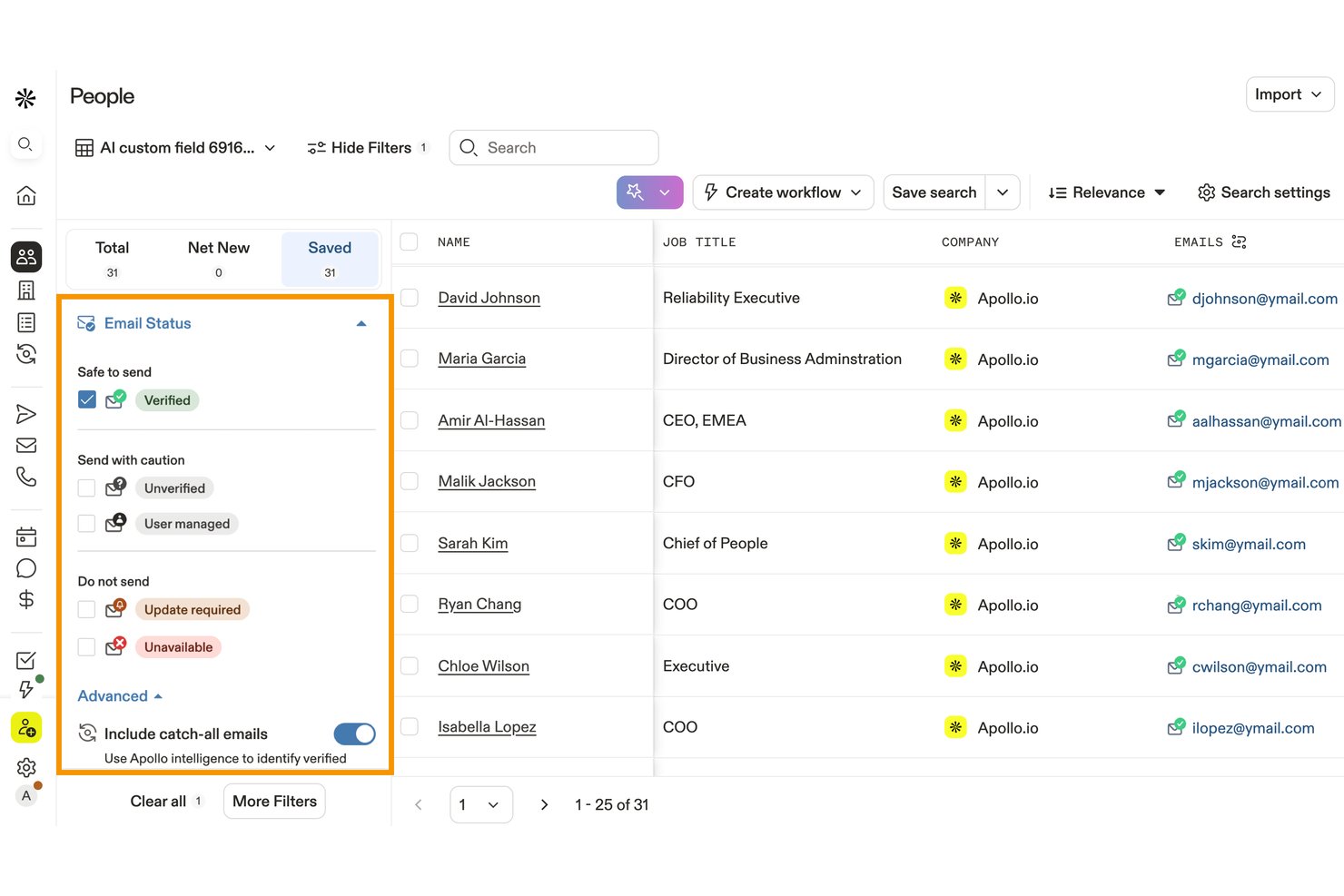
Apollo.io è una piattaforma di intelligence commerciale e coinvolgimento che include un motore proprietario di verifica delle email in 7 passaggi, la convalida di elenchi in blocco, il rilevamento dei domini che accettano tutti gli indirizzi e l'arricchimento dei dati connesso al CRM.
Per chi è più adatto Apollo.io?
Apollo.io è ideale per i team di sviluppo commerciale che desiderano prospezione, sequenze e verifica delle email in un'unica piattaforma, invece di combinare strumenti separati.
Perché ho scelto Apollo.io
Apollo.io si è guadagnato un posto nella mia lista ristretta perché il suo processo di verifica in 7 passaggi va ben oltre i semplici controlli SMTP, utilizzando una rete di collaboratori per rilevare se un'email su un dominio che accetta tutti gli indirizzi ha ricevuto traffico reale di recente. Questa distinzione è importante quando si convalidano grandi elenchi per l'invio in uscita, nei quali gli strumenti di terze parti si limiterebbero a segnalare un intero dominio come rischioso. Apprezzo anche il fatto che i messaggi respinti vengano rilevati e propagati automaticamente a tutta la rete, con il riaccredito dei crediti, così il mio team non paga due volte per dati errati.
Funzionalità principali di Apollo.io
- Verifica CSV in blocco: Carica e convalida in blocco gli elenchi di prospezione o del CRM.
- Classificazione del rischio: Segnala indirizzi usa e getta, basati su ruoli, appartenenti a domini che accettano tutti gli indirizzi e non validi.
- Verifica API in tempo reale: Verifica singoli indirizzi tramite l'API REST di Apollo.
- Integrazioni CRM: Sincronizza i dati di contatto verificati con Salesforce, HubSpot e altre piattaforme.
Integrazioni di Apollo.io
Apollo offre integrazioni native con Salesforce, HubSpot, Pipedrive, Outreach, Salesloft, Marketo, SendGrid e LinkedIn. Si collega inoltre a Zapier e fornisce un'API REST per integrazioni personalizzate.
Pros and Cons
Pros:
- Verifica le email sui domini che accettano tutti gli indirizzi, che altri strumenti segnalano come non verificabili
- I messaggi respinti vengono rilevati e i crediti riaccreditati automaticamente
- La verifica in 7 passaggi va oltre i controlli SMTP standard
Cons:
- La precisione dei dati internazionali scende al 60–73%
- Il sistema a crediti rende i costi imprevedibili su larga scala

Ideale per la verifica email in tempo reale
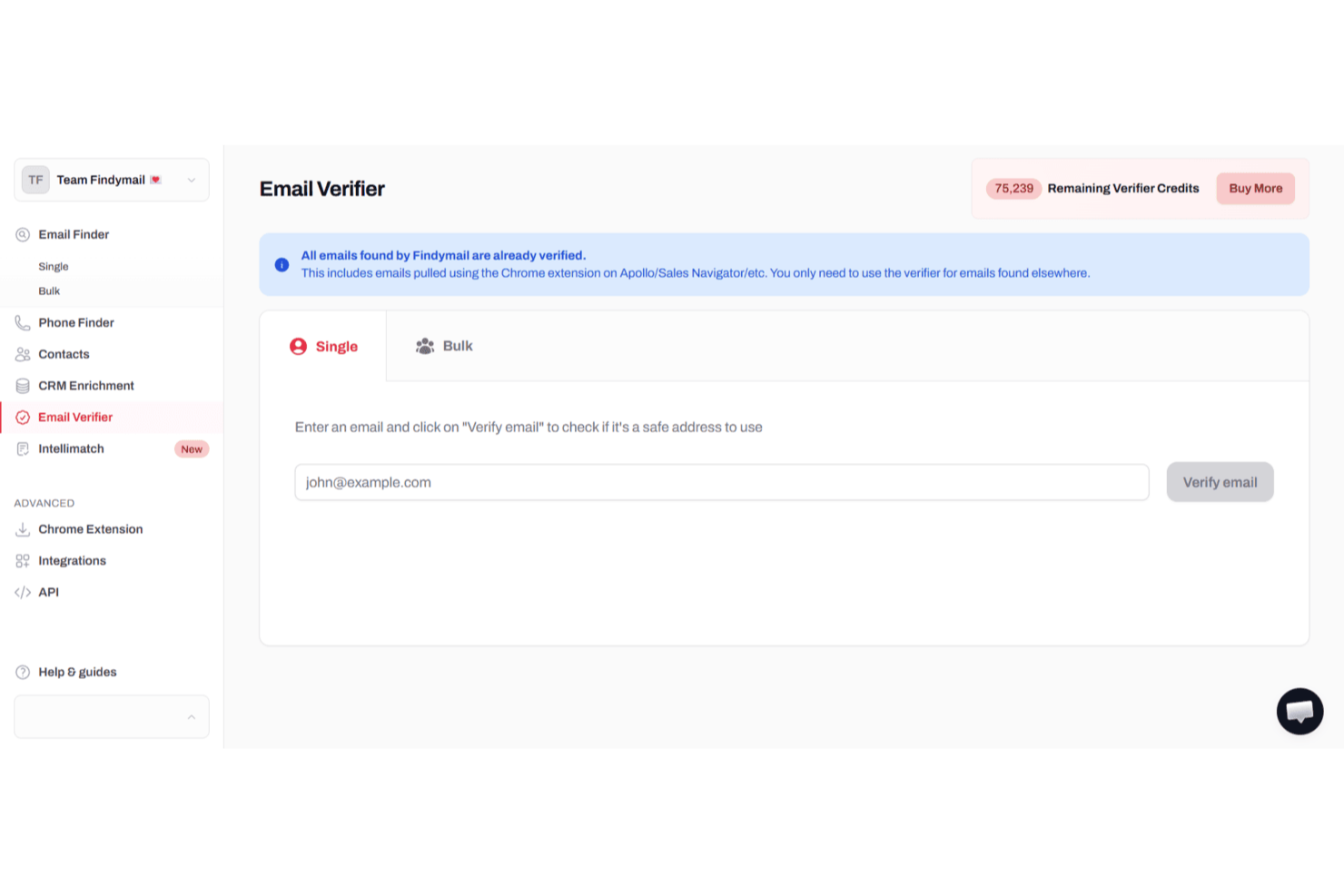
Per professionisti e team che cercano di migliorare la loro attività di outreach via email e garantire un'elevata deliverability, Findymail offre una soluzione sofisticata su misura per queste esigenze. Questa piattaforma è particolarmente interessante per team di vendita, marketer e agenzie che comprendono l'importanza cruciale di una verifica accurata delle email per mantenere una buona reputazione di mittente e ridurre il tasso di bounce. Sfruttando gli avanzati algoritmi di verifica e l'interfaccia intuitiva di Findymail, puoi ottimizzare le tue campagne email e concentrarti sul contatto con veri potenziali clienti, riducendo il tempo speso nella gestione di contatti non validi o rischiosi.
Perché ho scelto Findymail
Ho scelto Findymail perché eccelle nell'offrire una verifica delle email ad alta accuratezza, un aspetto fondamentale per chiunque prenda sul serio l'email marketing. Gli avanzati algoritmi del software garantiscono che tu comunichi solo con indirizzi email validi, riducendo significativamente il rischio di bounce. Inoltre, le esportazioni automatizzate dei dati e le funzionalità di arricchimento CRM di Findymail lo rendono uno strumento prezioso per ottimizzare il flusso di lavoro e migliorare la deliverability delle email. Queste capacità sono supportate da un'assistenza clienti reattiva, assicurando il supporto necessario in caso di bisogno.
Funzionalità principali di Findymail
Oltre alla verifica email in tempo reale, Findymail offre:
- Elaborazione massiva di file: Questa funzione consente di processare grandi quantità di email in modo efficiente, risparmiando tempo e fatica.
- Estensione Chrome: Findymail mette a disposizione un'estensione per il browser per la verifica in tempo reale delle email, rendendo comoda la verifica mentre navighi.
- Algoritmo di verifica proprietario: Findymail verifica ogni indirizzo email in tempo reale utilizzando molteplici controlli, tra cui validazione della sintassi, record DNS, verifica server SMTP, rilevamento catch-all e filtraggio delle email temporanee. Solo gli indirizzi validi e consegnabili passano il controllo.
- Verifica di dati email e telefono: Verifica sia gli indirizzi email B2B che i numeri di telefono in un'unica piattaforma, così il tuo team raggiunge sempre i giusti potenziali clienti con dati di contatto accurati.
Integrazioni Findymail
Le integrazioni includono Google Sheets, Close CRM, Super Send, Instantly, Attio, Apollo, Zoho Forms e Typeform. Inoltre, è disponibile un'API per integrazioni personalizzate.
Pros and Cons
Pros:
- Elevata precisione nella verifica delle email riduce il tasso di bounce nelle campagne di outreach
- Ottima copertura di dati B2B che migliora la ricerca di potenziali clienti e i risultati di arricchimento lead
- Il team di supporto risolve rapidamente problemi di verifica e arricchimento dati
Cons:
- Forte dipendenza da LinkedIn per il reperimento delle informazioni di contatto
- Dati di contatto limitati oltre all'email rispetto a piattaforme di arricchimento più complete

Bouncer
Ideale per la verifica massiva di grandi volumi di email
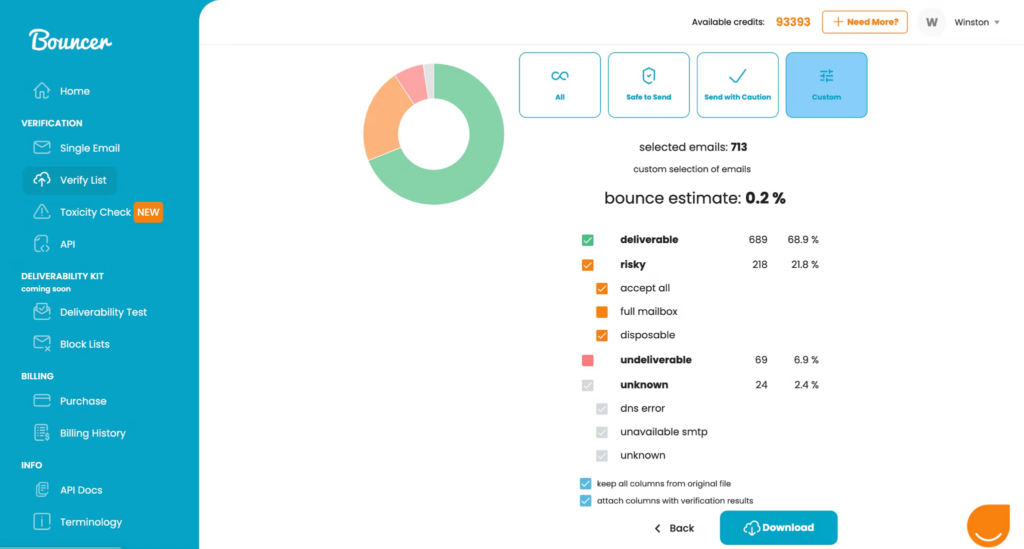
Bouncer è un'applicazione facile da usare che ti consente di trascinare e rilasciare le tue liste di email direttamente nel verificatore di email per una verifica istantanea. Puoi aggiungere fino a 250.000 indirizzi contemporaneamente e la piattaforma determinerà quali indirizzi sono sicuri, temporanei o accetta-tutto.
Perché ho scelto Bouncer: questo strumento di email marketing è entrato nella mia lista grazie alla funzione gratuita di campionamento di verifica. Puoi testare la qualità della tua lista senza doverla effettivamente verificare e senza utilizzare alcun credito. Bouncer ti farà sapere se la tua lista funzionerà oppure se sarà necessario sottoporla a verifica per eliminare gli indirizzi email non validi.
Caratteristiche e integrazioni distintive di Bouncer
Caratteristiche distintive includono una stima del tasso di rimbalzo che indica cosa aspettarsi da ogni lista di email, compreso il numero di email consegnabili, rischiose o sconosciute, conformità al GDPR per una maggiore sicurezza dei dati e un processo di validazione a otto livelli.
Integrazioni includono Aweber, Constant Contact, Convertkit, GetResponse, HubSpot, Integrately, Klaviyo, LemList, Mailchimp e Moosend.
Pros and Cons
Pros:
- Interfaccia molto leggibile e facile da usare
- Opzioni dashboard personalizzabili
- Molteplici livelli di verifica per individuare indirizzi non validi
Cons:
- Le anteprime delle aspettative di rimbalzo possono essere lente a caricarsi
- Alcune verifiche restituiscono un risultato sconosciuto

Migliore piattaforma web-based per la validazione delle email con un tasso di accuratezza del 99%
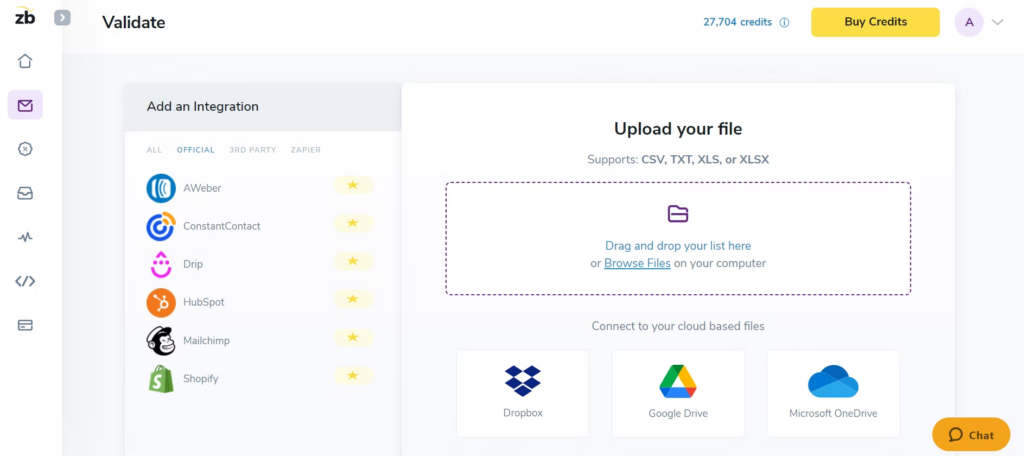
Questo servizio di verifica email ti offre una piattaforma web che si integra con tutti i tuoi principali strumenti di marketing e di outreach per semplificare l'importazione e l'esportazione dei dati email. Il loro validatore di email elimina automaticamente spam trap, bot e segnalazioni di spam dalle tue liste per riconnetterti con gli iscritti, raggiungere nuovi potenziali clienti e migliorare i tassi di clic.
Perché ho scelto ZeroBounce: Mi piace la piattaforma ZeroBounce per due motivi: offre tassi di accuratezza superiori e una velocità di verifica più rapida. Mentre la maggior parte dei migliori strumenti di verifica email vanta un tasso di accuratezza del 95%, ZeroBounce offre un tasso di accuratezza del 99%. Inoltre, garantiscono la pulizia di circa 100.000 indirizzi email in 45 minuti sulla loro piattaforma e una validazione in circa tre secondi tramite la loro API.
Caratteristiche distintive e integrazioni di ZeroBounce
Caratteristiche distintive includono crittografia dei dati di livello militare per mantenere indirizzi email e informazioni aziendali protetti durante la verifica, verifica email in tempo reale al momento dell'inserimento tramite la loro API e assistenza clienti 24/7 via chat, telefono ed email.
Integrazioni includono ActiveCampaign, Asana, CapSumo, Constant Contact, Drip, easysendy, Gmail, JotForm, Make e MassMailer. Sono disponibili integrazioni native, di terze parti e tramite Zapier.
Pros and Cons
Pros:
- Capacità di verifica email in tempo reale
- Assistenza clienti molto efficace
- Accuratezza molto elevata rispetto ad altri strumenti
Cons:
- Nessuna opzione di abbonamento mensile
- Dashboard e navigazione leggermente datati

Ideale per la gestione completa di campagne di marketing
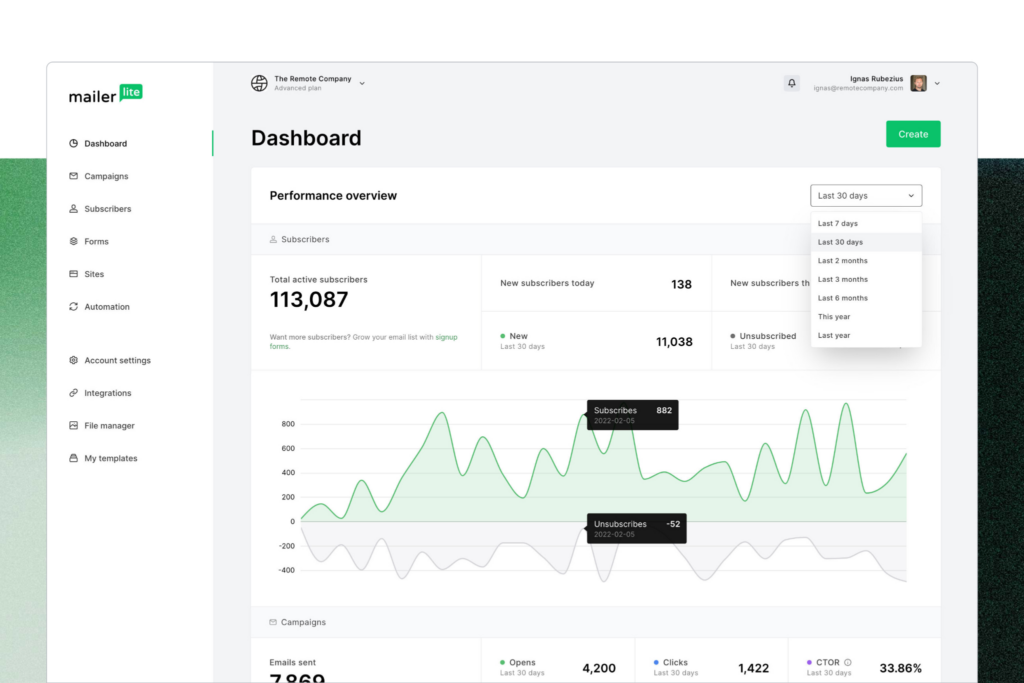
MailerLite è una piattaforma completa di email marketing con una varietà di strumenti per ottimizzare la tua attività di comunicazione. La funzione integrata MailerCheck ti permette di verificare gli indirizzi email mediante il controllo della sintassi e il rilevamento delle email temporanee. Ottieni inoltre report sull’utilizzo delle verifiche e un’analisi dettagliata degli indirizzi email non validi.
Perché ho scelto MailerLite: Ho scelto la piattaforma MailerLite perché offre una funzionalità più olistica per le tue campagne di email marketing rispetto a molti altri software di verifica email presenti in questa lista. Oltre alla verifica delle email, hai anche la possibilità di modificare newsletter, automatizzare le email e creare siti web, tutto in un unico posto.
Funzionalità distintive e integrazioni di MailerLite
Le funzionalità distintive includono email transazionali automatizzate per confermare acquisti e ordini ai clienti, moduli di email marketing per incrementare nuove registrazioni e abbonamenti, e una vasta selezione di template email con moduli per ogni occasione.
Le integrazioni includono BigCommerce, Facebook Audiences, JotForm Sign, MailerCheck, Make, Shopify, Stripe, WooCommerce e WordPress. Le integrazioni sono disponibili anche tramite Zapier.
Pros and Cons
Pros:
- Piano base gratuito disponibile
- Piattaforma di marketing completa con verifica integrata
- Facile da navigare e da imparare
Cons:
- Capacità di reporting per le email limitate
- Alcune integrazioni sono ancora in fase di test

Snovio
Il miglior CRM con enfasi sulla verifica delle email
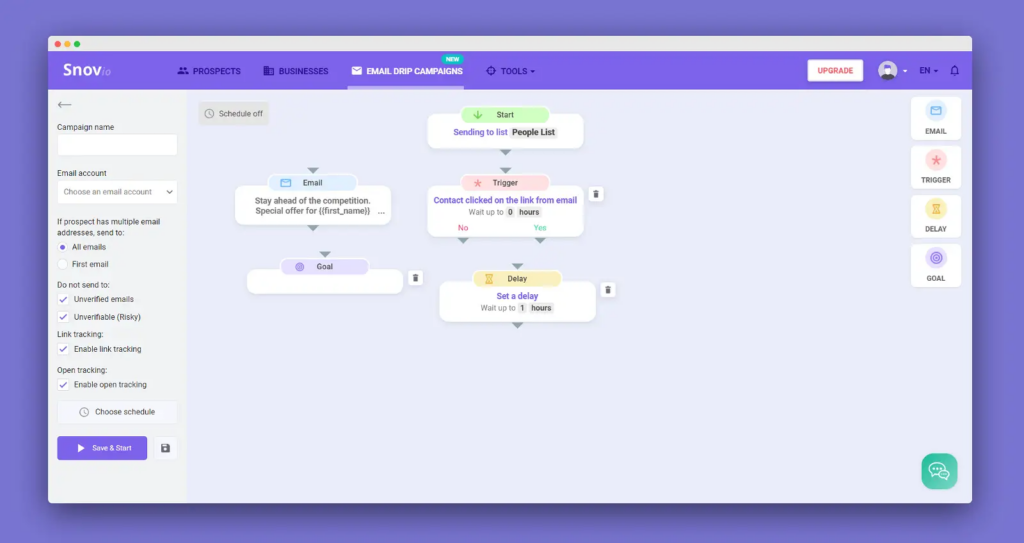
Come piattaforma CRM focalizzata sull'email, Snov.io offre una gestione efficiente dei contatti e un'attività di outreach a freddo con una serie di funzionalità per la ricerca e la verifica delle email. Puoi utilizzare Snov.io per trovare, monitorare e convertire lead in un unico posto grazie alla verifica email sia singola che di massa, riducendo i bounce e migliorando la recapitabilità.
Perché ho scelto Snov.io: Questa piattaforma è entrata nella mia lista dei migliori strumenti di verifica email grazie alla sua capacità di integrazione. Attualmente, Snov.io offre oltre 5.000 integrazioni con i tuoi strumenti e app preferiti. Puoi completare quasi ogni combinazione di stack tecnologico con questo strumento per garantire una migliore comunicazione tra tutte le tue piattaforme di vendita e marketing.
Caratteristiche distintive e integrazioni di Snov.io
Caratteristiche distintive includono un verificatore di indirizzi email tramite API in tempo reale, integrato direttamente nella piattaforma per l'iscrizione tramite form di lead integrati e la validazione delle email in fase di registrazione, oltre a un processo di validazione in sette fasi che comprende controlli tramite ping SMTP e verifica dei record MX.
Le integrazioni includono Google Forms, Hippo Video, HubSpot, Intercom, LinkedIn Lead Gen Forms, Pipedrive, Phantombuster, Salesforce, Slack e Trello.
Pros and Cons
Pros:
- Interfaccia molto intuitiva
- Set di funzionalità di marketing robuste
- Piano gratuito disponibile per i principianti
Cons:
- Nessuna opzione pay as you go
- Tempi di caricamento lenti con alcune funzionalità
Kickbox
Ideale per risultati precisi nella verifica delle email
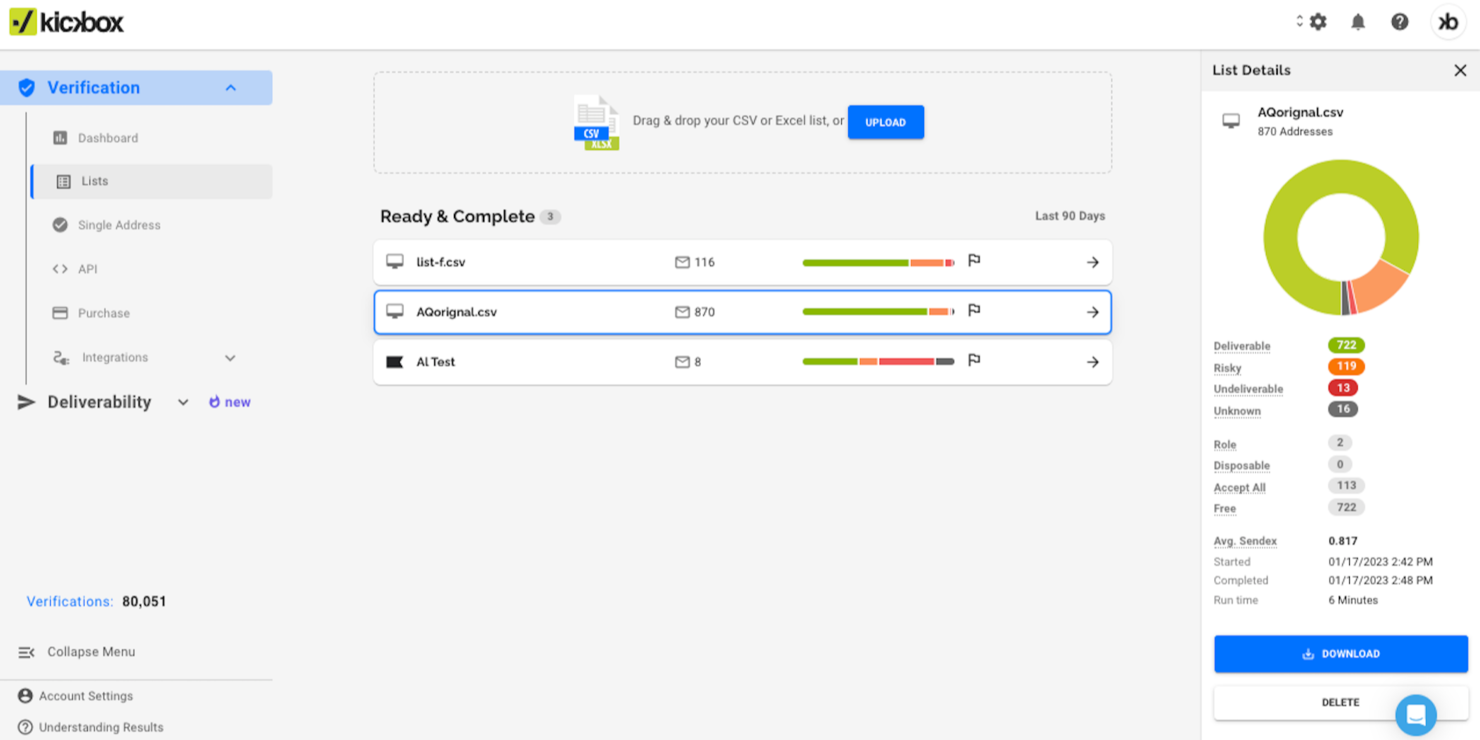
Kickbox si rivolge alle aziende che desiderano migliorare le proprie strategie di email marketing garantendo l'accuratezza delle liste email e riducendo le email non recapitabili. Che tu sia uno sviluppatore, un'agenzia, un'impresa o un'organizzazione senza scopo di lucro, Kickbox risponde all'esigenza di una comunicazione email affidabile in settori come tecnologia, e-commerce e servizi finanziari. Affrontando sfide come alti tassi di rimbalzo e reclami di spam, Kickbox aiuta a proteggere la reputazione del mittente e a migliorare il coinvolgimento complessivo.
Perché ho scelto Kickbox
Ho scelto Kickbox per la sua capacità di fornire risultati precisi di verifica email grazie alle funzionalità Verifica Lista Email e API di Verifica. La Verifica Lista Email permette di pulire le tue liste eliminando indirizzi invalidi o a rischio, un passaggio fondamentale per mantenere una reputazione di mittente sana. L'API di Verifica offre l'integrazione nei sistemi esistenti, consentendo la verifica in tempo reale per prevenire l'ingresso di email non valide nel tuo database. Queste funzionalità rispondono direttamente all'esigenza di una comunicazione email accurata, rendendo Kickbox uno strumento prezioso per qualsiasi organizzazione desideri affinare la propria strategia di email marketing.
Funzionalità principali di Kickbox
Oltre alle sue principali capacità di verifica, Kickbox offre diverse altre funzionalità e servizi per migliorare la gestione delle email:
- Consulenza sulla Deliverability: Fornisce consulenza esperta per aumentare i tassi di recapitabilità delle email e risolvere eventuali problemi.
- Spam Checker: Identifica possibili trigger di spam nelle tue email per aiutarti a evitare problemi di recapitabilità.
- Controllo email temporanee: Rileva indirizzi email temporanei per impedirne l'inserimento nelle tue liste.
- Conformità GDPR e CCPA: Garantisce che il processo di verifica email sia conforme alle normative sulla protezione dei dati.
Funzionalità principali di Kickbox
Le integrazioni includono HubSpot, Mailchimp, Klaviyo, SendGrid, Zapier, ActiveCampaign, Constant Contact, Brevo, GetResponse e molte altre.
Pros and Cons
Pros:
- Elaborazione rapida delle liste email migliora l'efficienza degli utenti
- Prezzi flessibili pay-as-you-go vantaggiosi per le piccole imprese
- Verifiche iniziali gratuite disponibili per i nuovi utenti
Cons:
- Lo strumento può occasionalmente segnalare indirizzi email validi come rischiosi o non validi
- Meno certificazioni di sicurezza dei dati rispetto ai concorrenti

Ideale per esigenze di verifica email in cloud e on-premise
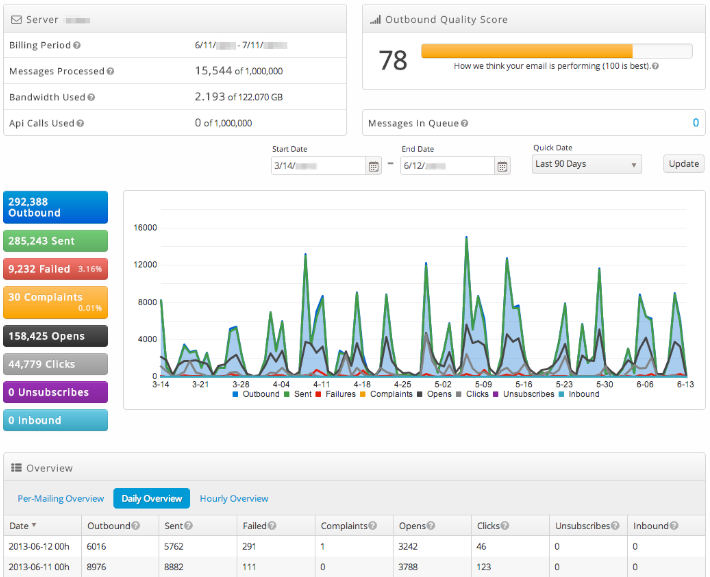
SocketLabs utilizza una tecnologia proprietaria di server di posta elettronica, un supporto clienti personalizzato e analisi avanzate per garantire la consegna di email transazionali e di marketing essenziali nelle caselle di posta dei clienti, offrire una panoramica delle prestazioni con analisi visive e acquisire e archiviare nuovi indirizzi email nel loro sistema di gestione della posta elettronica altamente sicuro.
Perché ho scelto SocketLabs: Ho inserito questa piattaforma nella mia lista grazie alla sua funzione StreamScore, che utilizza un semplice sistema di colori per aiutarti a monitorare la reputazione del tuo dominio. Con questo strumento unico a portata di mano, non dovrai più trascorrere ore a cercare e controllare manualmente.
Caratteristiche principali e integrazioni di SocketLabs
Le caratteristiche principali includono la funzionalità di ricerca dei destinatari che ti mostra l'ID di invio e la data, così come una cronologia degli eventi di ricezione, apertura e clic per ogni email. SocketLabs offre anche crittografia SSL con un clic e crittografia TLS forzata MTA-STS per le email in transito.
Le integrazioni includono EmailDelivery.com, Limo Anywhere, Okta, Ongage, Qualtrics CoreXM, Qualtrics CustomerXM, Qualtrics EmployeeXM, Storage Commander Cloud e WordPress.
Pros and Cons
Pros:
- Facile da apprendere e utilizzare
- Configurazione semplice e intuitiva
- Supporto molto affidabile e reattivo
Cons:
- Dettagli limitati nei report e nelle analisi
- Non è possibile avere più credenziali SMTP

Valimail
Ideale per la protezione continua dei tuoi domini
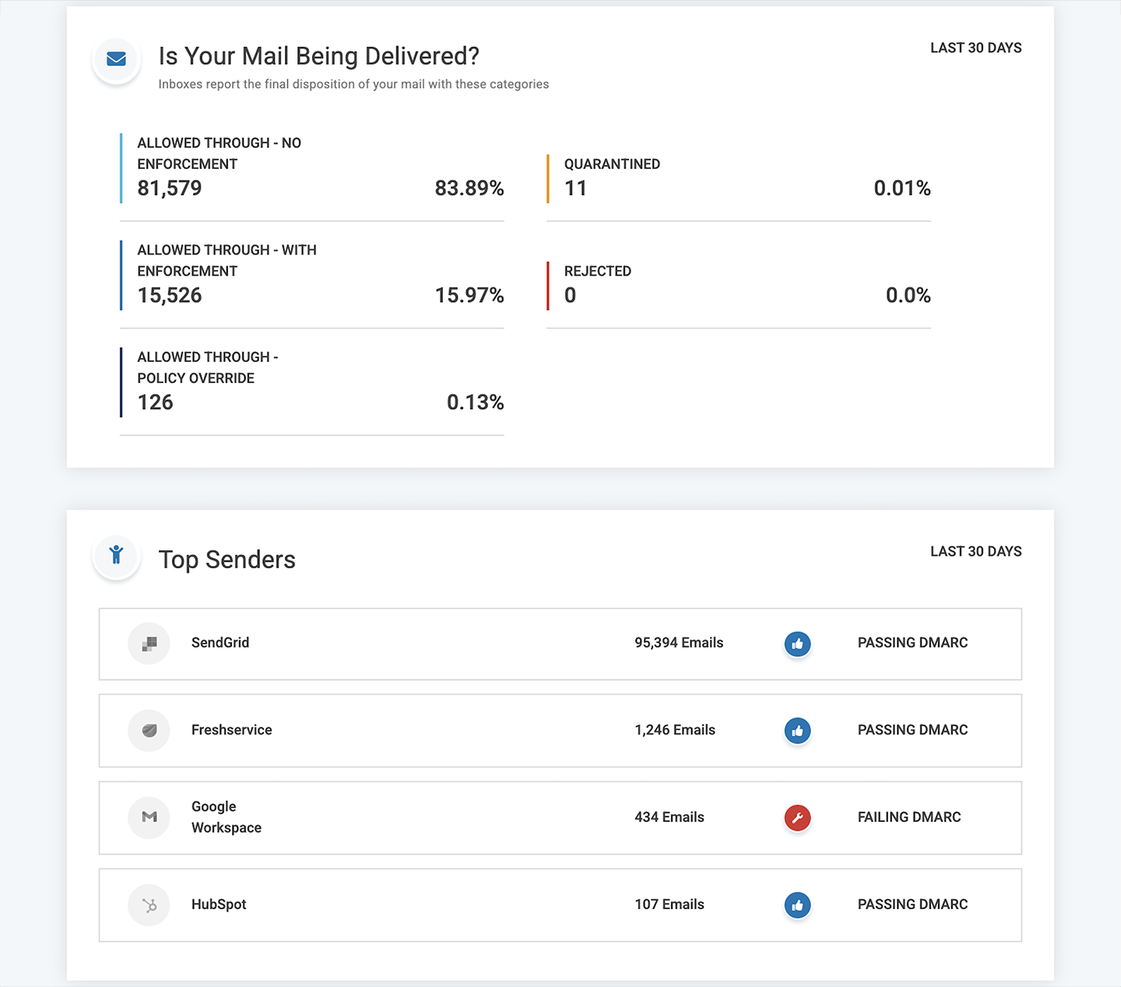
Questa piattaforma non è esattamente uguale agli altri servizi di validazione delle email presenti in questo elenco. Invece di verificare gli indirizzi nella tua lista, tiene traccia del numero di email e domini che inviano messaggi per tuo conto. Valimail offre DMARC come servizio per fermare tentativi di impersonificazione e proteggere la reputazione del mittente, così che i tuoi messaggi più importanti non finiscano mai nella posta indesiderata.
Perché ho scelto Valimail: Questa piattaforma è nella mia lista dei migliori servizi di verifica email perché promuove costantemente fiducia e sicurezza nell'ecosistema delle email. Mi piace anche Valimail perché è un partner verificato di Microsoft 365 e Twilio SendGrid e occupa posizioni di rilievo in tutte le organizzazioni più importanti per gli standard di autenticazione delle email.
Caratteristiche distintive e integrazioni di Valimail
Funzionalità distintive includono il monitoraggio DMARC per identificare ogni servizio di invio nell'ecosistema delle tue email, prevenire email duplicate e inserire nella blacklist domini non affidabili e l'accesso a ricerche SPF illimitate così da non rischiare mai di bloccare una buona email.
Integrazioni includono ActiveDirectory, IBM Cloud, Microsoft 365, Okta, SendGrid e Twilio.
Pros and Cons
Pros:
- Interfaccia intuitiva e integrazione senza problemi
- Facile da integrare nel tuo flusso di lavoro
- Ottimo servizio di assistenza clienti
Cons:
- La configurazione iniziale può essere complessa
- Nessuna opzione di avviso o notifica

RocketReach
Ideale per il prospecting B2B che ti mette in contatto con i decisori
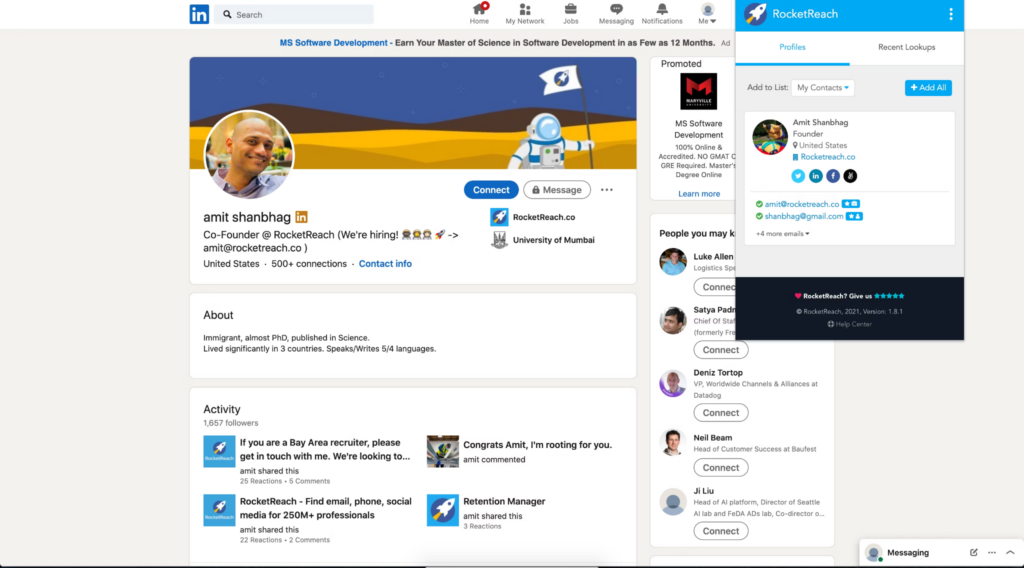
Questo strumento di validazione delle email aiuta le organizzazioni a trovare e coinvolgere il proprio pubblico per aumentare gli sforzi di marketing e vendita automatizzando il processo di generazione dei lead. RocketReach dispone di un enorme database di numeri di telefono verificati ed email che ti permette di entrare in contatto con i decisori di startup, università, ospedali e grandi aziende.
Perché ho scelto RocketReach: Mi piace RocketReach perché va oltre la semplice verifica delle email per il marketing: questa piattaforma ha già aggregato per te un database utilizzando oltre 100 banche dati pubbliche, inclusi elenchi governativi, social network e elenchi telefonici. Puoi cercare tra oltre 700 milioni di profili e 35 milioni di aziende con filtri come posizione, settore e dettagli aziendali.
Caratteristiche principali e integrazioni di RocketReach
Le caratteristiche principali comprendono un'estensione del browser che consente di fare prospecting sui social media più popolari, ricerche in modalità bulk che permettono di scaricare enormi elenchi di chiunque soddisfi i tuoi criteri specifici, ed esportazione dei dati in formato CSV per portare con te tutti i dettagli essenziali ovunque tu vada.
Le integrazioni includono elay, Gmail, HubSpot, Salesforce, SalesLoft, Slack, Outreach, Tracker e Zapier. Puoi anche creare integrazioni personalizzate o utilizzare le API di RocketReach.
Pros and Cons
Pros:
- Molti crediti gratuiti
- Dashboard semplice da usare
- Organizzazione e navigazione intuitive
Cons:
- Leggero ritardo negli aggiornamenti in tempo reale
- Nessuna funzione di copia; ogni contatto si apre automaticamente nella tua email
Altri software di verifica email
Ecco alcune altre opzioni di software di verifica email che non sono nella mia shortlist, ma che meritano comunque di essere considerate:
- Elastic Email
Ideale per verifica e invio integrati
- Clearout.io
Ideale per la verifica sia di liste acquistate che di liste email personalizzate
- DeBounce
Ideale per la validazione delle email con tecnologia anti-greylisting
- Proofy.io
Ideale per proteggere il punteggio di reputazione del tuo dominio
- Interseller
Ideale per combinare ricerca email affidabile e attività di outreach
- Listclean
Ideale per comunicazioni email basate sui ruoli


Come Valuto il Software di Verifica Email
Divido la valutazione in due livelli: le capacità di base che uno strumento deve possedere—verifica SMTP, elaborazione di liste in blocco, classificazione del rischio—e i fattori distintivi che differenziano le migliori opzioni.
Funzionalità Principali (Requisiti di Base per Questa Lista)
Quando seleziono gli strumenti per la mia lista, assegno a ciascuno un punteggio da 0 (non offre la funzionalità) a 5 (eccelle in questo ambito) per ogni funzionalità principale elencata di seguito. Poi calcolo il punteggio totale dello strumento come percentuale. Ogni strumento deve raggiungere un punteggio totale minimo del 65% per essere preso in considerazione.
- Validazione di Sintassi & Formato: Verifico se lo strumento rileva indirizzi mal formati, domini con errori di battitura e violazioni RFC ancor prima che vengano effettuati controlli più approfonditi—come "gmial.com" o domini di primo livello mancanti.
- Verifica SMTP & della Casella di Posta: Qui valuto quanto bene uno strumento confermi l'esistenza reale di una casella tramite handshake SMTP senza inviare una mail reale.
- Elaborazione di Liste in Blocco: Cerco la capacità di caricare grandi file CSV di prospect o dati CRM e di ricevere rapidamente risultati segmentati—specialmente per la pulizia delle liste pre-campagna.
- Verifica API in Tempo Reale: Una REST API ben documentata con tempi di risposta inferiori al secondo è essenziale qui, in particolare per validare email all'atto della raccolta nei moduli.
- Classificazione del Rischio & Deliverability: Oltre al valido/non valido, valuto se lo strumento segnala domini catch-all, indirizzi temporanei, email di ruolo e spam trap con etichette chiare.
- Integrazioni con CRM & MAP: Le connessioni native a piattaforme come Salesforce, HubSpot e Marketo mi dicono quanto bene lo strumento si integri con i flussi di lavoro esistenti dei team RevOps.
Una volta che dispongo di una lista di strumenti che soddisfano questi criteri, considero cosa distingue ciascuna piattaforma.
Fattori Differenzianti (Cosa Distingue i Fornitori)
Ecco come metto a confronto i diversi fornitori:
Funzionalità di Spicco
L'igiene automatizzata delle liste nel CRM è un grande fattore distintivo—cerco strumenti che ri-verifichino i record su base ricorrente così che il database Salesforce o HubSpot rimanga pulito senza esportazioni manuali. Anche il rilevamento dei domini catch-all è importante, poiché questi domini restituiscono falsi positivi che aumentano il rischio di bounce nelle campagne di outreach a freddo. Valuto quanto bene ogni strumento classifichi o segnali gli indirizzi catch-all anziché etichettarli solo come "sconosciuti." Una dashboard di analisi della deliverability che monitora nel tempo l'andamento della salute delle liste aiuta i team RevOps a rendicontare i miglioramenti della qualità dei dati ai dirigenti.
Oltre le Funzionalità
La flessibilità del modello di prezzo è una delle prime cose che valuto. I team RevOps spesso effettuano grandi pulizie occasionali di liste in abbinamento a una verifica API costante, quindi verifico se un fornitore supporta sia i crediti pay-as-you-go sia i piani in abbonamento con rollover. Anche la sicurezza dei dati è fondamentale—quando si caricano liste di prospect con PII, cerco la conformità SOC 2 e politiche chiare di eliminazione dati. Accuratezza e garanzie sui bounce completano la mia valutazione, poiché i fornitori che sostengono i propri risultati con tassi di accuratezza pubblicati offrono fiducia prima dell'invio di una grande campagna outbound.
Come scegliere un software di verifica email
È facile perdersi tra lunghe liste di funzionalità e strutture di prezzo complesse. Per aiutarti a restare concentrato durante il tuo processo di scelta del software, ecco una checklist di fattori a cui prestare attenzione:
| Fattore | Cosa considerare |
|---|---|
| Scalabilità | Il software può gestire le tue liste email in crescita? Controlla se supporta grossi volumi senza problemi di prestazioni. |
| Integrazioni | Si integra con il tuo CRM o strumenti di marketing attuali? Assicurati che funzioni senza problemi con i tuoi sistemi già in uso. |
| Personalizzazione | Puoi adattare il software ai tuoi flussi di lavoro? Cerca opzioni che permettono la regolazione delle impostazioni o dei report. |
| Facilità d'uso | L’interfaccia è intuitiva per il tuo team? Prova la demo per vedere se è facile da usare e navigare. |
| Implementazione e onboarding | Quanto velocemente può iniziare a usarlo il tuo team? Valuta la disponibilità di risorse formative e supporto durante la configurazione. |
| Costo | La tariffa è adatta al tuo budget? Confronta i costi tra i vari fornitori, considerando sia le spese iniziali che quelle ricorrenti. |
| Sicurezza | Ci sono misure a tutela dei tuoi dati? Cerca crittografia, politiche sulla privacy dei dati e conformità agli standard. |
| Disponibilità del supporto | Quali opzioni di supporto sono previste? Controlla se c’è assistenza 24/7 e quanto sono rapidi nelle risposte. |
Cos’è un software di verifica email?
Un software di verifica email è uno strumento che controlla se gli indirizzi email presenti nelle tue liste sono reali, sicuri e pronti a ricevere messaggi. Marketer, team di vendita e chiunque gestisca campagne email lo utilizza per evitare di inviare messaggi a indirizzi falsi, errati o rischiosi. Avrai meno bounce, risparmierai evitando di contattare indirizzi inutili e proteggerai la tua reputazione di mittente, concentrandoti su chi potenzialmente risponderà davvero.
Funzionalità
Quando scegli un software di verifica delle email, fai attenzione alle seguenti caratteristiche chiave:
- Validazione in tempo reale: Controlla istantaneamente gli indirizzi email mentre vengono inseriti per assicurarsi che siano validi e attivi, riducendo il tasso di rimbalzo.
- Rimozione dei duplicati: Identifica ed elimina le voci duplicate nella tua lista email, mantenendo i dati puliti e organizzati.
- Rilevamento errori di sintassi: Individua e corregge i comuni errori di formattazione negli indirizzi email, garantendo l'accuratezza del tuo database.
- Verifica in blocco: Permette di verificare grandi elenchi di indirizzi email in una sola volta, risparmiando tempo ed energie nella gestione delle liste.
- Punteggio email: Valuta la qualità degli indirizzi email, aiutandoti a dare priorità ai contatti di maggior valore per le tue campagne.
- Arricchimento dei dati: Arricchisce gli indirizzi email con informazioni aggiuntive, fornendo maggiori informazioni per attività di marketing mirate.
- Integrazione relay SMTP: Garantisce una consegna affidabile integrandosi con i sistemi email esistenti per invii senza intoppi.
- Conformità GDPR: Offre funzionalità che ti aiutano a rispettare le normative sulla protezione dei dati, garantendo la conformità legale.
- Tracciamento dei dati di attività: Monitora i livelli di coinvolgimento dei tuoi indirizzi email, permettendoti di affinare le tue strategie di comunicazione.
- Reportistica avanzata: Offre analisi dettagliate e report sui processi di verifica delle email, aiutando a ottimizzare le performance.
Benefici
L'implementazione di un software di verifica delle email offre numerosi vantaggi per il tuo team e la tua azienda. Eccone alcuni a cui puoi guardare con interesse:
- Migliore recapito: Con la validazione degli indirizzi email, più messaggi raggiungeranno i destinatari previsti, riducendo il tasso di rimbalzo.
- Maggiore qualità dei dati: La rimozione dei duplicati e il rilevamento degli errori di sintassi mantengono le tue liste email precise e organizzate, portando a una migliore gestione dei dati.
- Risparmio sui costi: Verificare le email prima dell'invio riduce lo spreco di risorse su indirizzi non validi, ottimizzando il budget di marketing.
- Maggior coinvolgimento: Il punteggio delle email aiuta a identificare i contatti di maggior valore, permettendoti di concentrare gli sforzi sui lead più promettenti.
- Conformità legale: Funzionalità come la conformità GDPR garantiscono che le tue pratiche email rispettino le normative sulla protezione dei dati, evitando problemi legali.
- Migliori decisioni: La reportistica avanzata offre approfondimenti sui processi di verifica delle email, aiutandoti a prendere decisioni di marketing più informate.
- Efficienza nel tempo: La verifica in blocco ti consente di processare grandi elenchi velocemente, liberando tempo per altri compiti.
Costi e prezzi
La scelta di un software di verifica delle email richiede la comprensione dei vari modelli e piani tariffari disponibili. I costi variano in base alle funzionalità, alle dimensioni del team, agli extra e altro ancora. La tabella seguente riassume i piani più comuni, i loro prezzi medi e le caratteristiche tipiche incluse nelle soluzioni di verifica delle email:
Tabella di confronto dei piani per il software di verifica delle email
| Tipo di piano | Prezzo medio | Funzionalità comuni |
|---|---|---|
| Piano gratuito | $0 | Verifica di base, controlli email limitati e accesso all'assistenza. |
| Piano personale | $5-$25/user/month | Validazione in tempo reale, rilevamento errori di sintassi e rimozione dei duplicati. |
| Piano business | $30-$100/user/month | Verifica in blocco, punteggio email, conformità GDPR e tracciamento dei dati di attività. |
| Piano enterprise | $150-$500/user/month | Reportistica avanzata, integrazioni personalizzabili, assistenza prioritaria e accesso API. |
Domande frequenti sul software di verifica email
Ecco alcune risposte alle domande più comuni sul software di verifica email:
Ogni quanto dovresti verificare la tua lista email?
Dovresti verificare la tua lista email ogni pochi mesi se aggiungi nuovi contatti regolarmente. Farlo ti aiuta a mantenere la lista pulita ed evitare di inviare messaggi a indirizzi che potrebbero essere diventati inattivi. Per i nuovi iscritti, verifica le email già al momento della registrazione per impedire a dati errati di entrare nel tuo sistema fin dall’inizio.
Cosa succede se non verifichi regolarmente la tua lista email?
Se salti la verifica per troppo tempo, rischi di inviare email a indirizzi non validi o inattivi. Questo può comportare tassi di rimbalzo più alti e, col tempo, peggiorare la tua reputazione come mittente. Inoltre, i dati delle campagne saranno meno affidabili e ciò potrebbe portarti a prendere decisioni sbagliate sulla tua strategia di email marketing.
Quali tipi di email vengono comunemente segnalati durante la verifica?
Gli indirizzi più frequentemente segnalati includono email temporanee, account di ruoli come “info@” o “support@”, e domini che non possono ricevere posta. Alcuni indirizzi possono anche essere indicati come rischiosi se hanno già generato rimbalzi o appartengono a utenti inattivi. È consigliabile esaminare queste categorie e decidere quali eliminare o monitorare.
In che modo la verifica delle email aiuta nel monitoraggio delle performance di una campagna?
Verificando la tua lista puoi essere certo che metriche come apertura e clic arrivino da persone reali. Questo ti permette di adattare i messaggi e i target basandoti su dati affidabili. Senza verifica, dati imprecisi da indirizzi falsi o inattivi possono alterare i risultati e far sprecare tempo ed energie al tuo team.
Cosa fare dopo:
Se stai cercando un software per database clienti, collegati con un consulente SoftwareSelect per ricevere raccomandazioni gratuite.
Compila un modulo e fai una breve chiacchierata per definire le tue esigenze specifiche. Riceverai poi una lista ristretta di software da valutare. Ti supporteranno anche in tutte le fasi dell'acquisto, incluse eventuali negoziazioni di prezzo.