

Los 10 mejores programas de ventas B2B reseñados para 2026

Lista de los mejores programas de ventas B2B


Con tantos programas de ventas B2B diferentes disponibles, es difícil determinar cuál es el adecuado para ti. Sabes que quieres respaldar y optimizar tu proceso de ventas entre empresas, pero necesitas descubrir qué herramienta es la mejor. ¡Yo te ayudo! En esta publicación te ayudaré a tomar una decisión sencilla, compartiendo mis experiencias personales al utilizar decenas de herramientas de ventas B2B diferentes con diversos equipos y cuentas, junto con mis selecciones de los mejores programas de ventas B2B.
Por qué confiar en nuestras recomendaciones de software
Nuestras reseñas reflejan nuestro criterio independiente, no un discurso de ventas. Descubra cómo mantenemos la transparencia.
Para esta guía, evaluamos las herramientas mediante pruebas prácticas e investigación independiente, puntuando las herramientas según nuestros criterios de selección.
Nuestras reseñas reflejan nuestro criterio editorial humano, no un discurso de ventas.
Resumen de los mejores programas de ventas B2B
Esta tabla comparativa resume los detalles de precios de mis principales selecciones de programas de ventas B2B para ayudarte a encontrar la mejor opción según tu presupuesto y las necesidades de tu empresa.
| Tool | Best For | Trial Info | Price | ||
|---|---|---|---|---|---|
| 1 | Mejor con un creador automatizado de flujos de trabajo de ventas | Prueba gratuita de 14 días + plan gratuito + demostración gratuita disponible | Desde 49/usuario/mes (con facturación anual) | Website | |
| 2 | Ideal para mapeo de territorios y optimización de rutas | Demostración gratuita disponible | Precio a consultar | Website | |
| 3 | Mejor para plantillas de cotización personalizables | Demo gratuita disponible | Desde $39/usuario/mes | Website | |
| 4 | Mejor para sugerencias de leads impulsadas por IA | Prueba gratuita de 30 días + demo gratis disponible | Desde $29/usuario/mes (facturado anualmente) | Website | |
| 5 | Ideal para la optimización de cotizaciones guiada por IA | Demo gratuita disponible | Precio a consultar | Website | |
| 6 | Ideal para obtener insights conversacionales impulsados por IA | Prueba gratuita de 14 días | Desde $25/usuario/mes (facturado anualmente) | Website | |
| 7 | Ideal para el seguimiento de pedidos | Prueba gratuita de 60 días disponible | Precio a consultar | Website | |
| 8 | Mejor para la planificación de acciones en salas de ventas digitales | Plan gratuito + demo gratis disponible | Desde $350/mes (facturado anualmente) | Website | |
| 9 | Ideal para la verificación y calificación de leads | Prueba gratuita de 7 días | Desde $74/mes | Website | |
| 10 | Mejor para empresas que utilizan Salesforce o Salesforce Industry Clouds | Demostración gratuita disponible | Precio bajo solicitud | Website |

Análisis de los mejores programas de ventas B2B
Con esta información en mente, es hora de analizar con más detalle mis resúmenes de herramientas para determinar qué herramienta de generación de clientes potenciales o captura de datos es adecuada para tu caso de uso. Descubre funciones destacadas y una vista general de cada interfaz para obtener una breve descripción general.

Mejor con un creador automatizado de flujos de trabajo de ventas
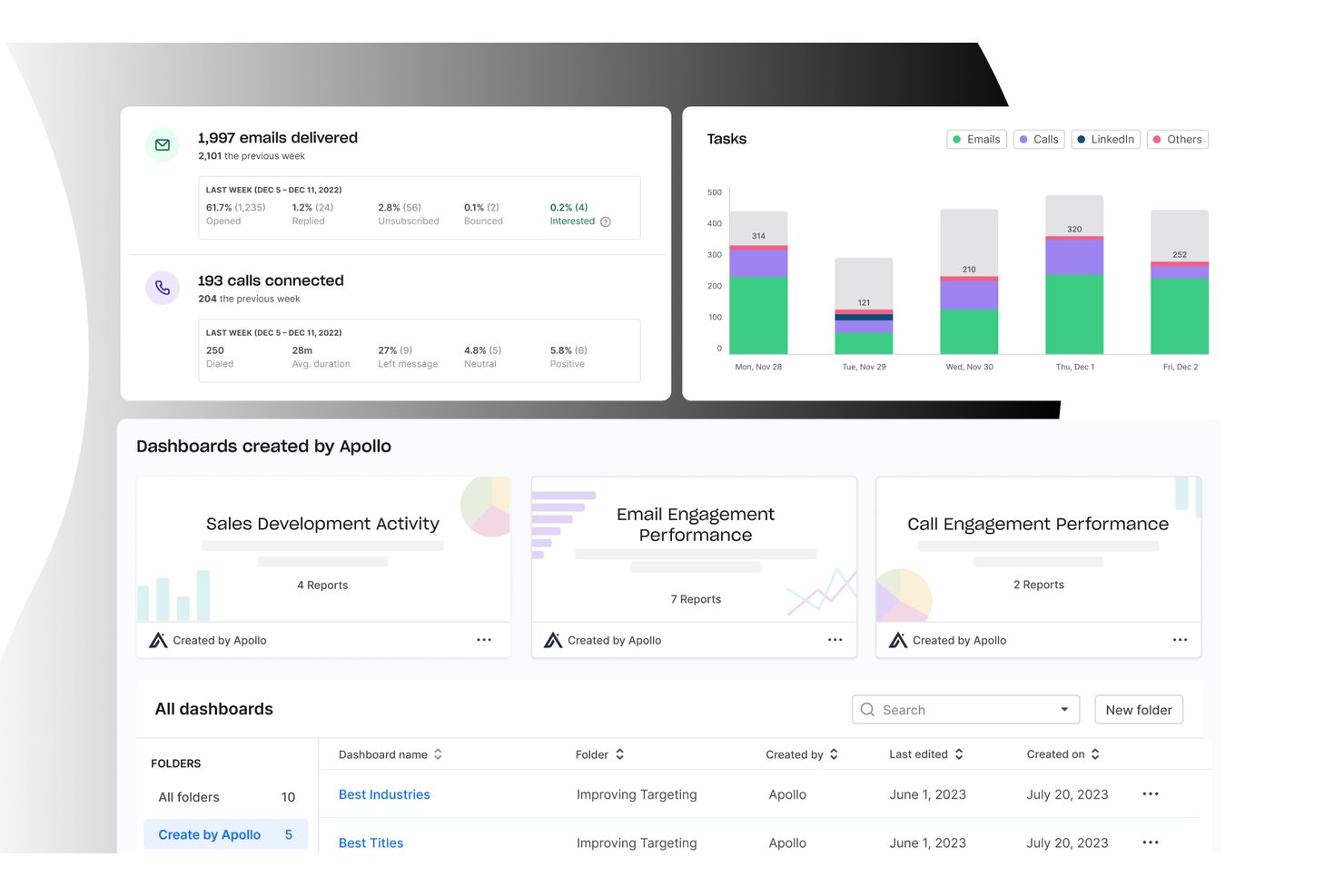
Apollo.io es una plataforma de inteligencia y participación de ventas B2B que combina una base de datos de más de 210 millones de contactos con secuencias multicanal, un marcador integrado, automatización de flujos de trabajo y gestión de acuerdos en un solo espacio de trabajo.
¿Para quién es más adecuado Apollo.io?
Apollo.io es una opción ideal para equipos de ventas salientes de pequeñas y medianas empresas y compañías B2B del mercado intermedio que necesitan consolidar la prospección, el contacto y la gestión del embudo de ventas sin integrar varias herramientas.
Por qué elegí Apollo.io
Elegí Apollo.io como una de las mejores opciones porque su motor de automatización de flujos de trabajo realmente sustituye la necesidad de contar con herramientas independientes de secuencias y asignación. Me gusta cómo gestiona automáticamente las secuencias multicanal a través del correo electrónico, el teléfono y LinkedIn, con inscripción basada en activadores y registro automático en el CRM. Su IA agéntica puede crear una lista de prospectos y redactar una secuencia completa de contacto a partir de una sola instrucción en lenguaje natural, lo que reduce horas del proceso de configuración que antes se realizaba manualmente.
Características principales de Apollo.io
- Inteligencia de conversaciones: Graba y analiza llamadas de ventas para destacar momentos clave para la capacitación y los riesgos de los acuerdos.
- Motor de enriquecimiento: Añade automáticamente datos empresariales y de contacto faltantes a los registros del CRM en tiempo real.
- Puntuación de prospectos: Utiliza IA para calificar y priorizar prospectos para las estrategias de ventas salientes y entrantes.
- Integración con varios CRM: Sincroniza contactos, cuentas y datos de interacción con Salesforce, HubSpot, Marketo y otras plataformas.
Integraciones de Apollo.io
Apollo.io ofrece integraciones nativas con Salesforce, HubSpot, Outreach, Airtable, Amplitude, Asana y Gmail, además de proporcionar una API para integraciones personalizadas.
Pros and Cons
Pros:
- Base de datos, marcador y secuencias en un solo lugar
- La IA crea listas de prospectos a partir de una instrucción
- La inscripción basada en activadores automatiza el contacto multicanal
Cons:
- La precisión de los datos de contacto es irregular fuera de Norteamérica
- Los análisis del embudo carecen de profundidad para la previsión de ingresos

SPOTIO
Ideal para mapeo de territorios y optimización de rutas
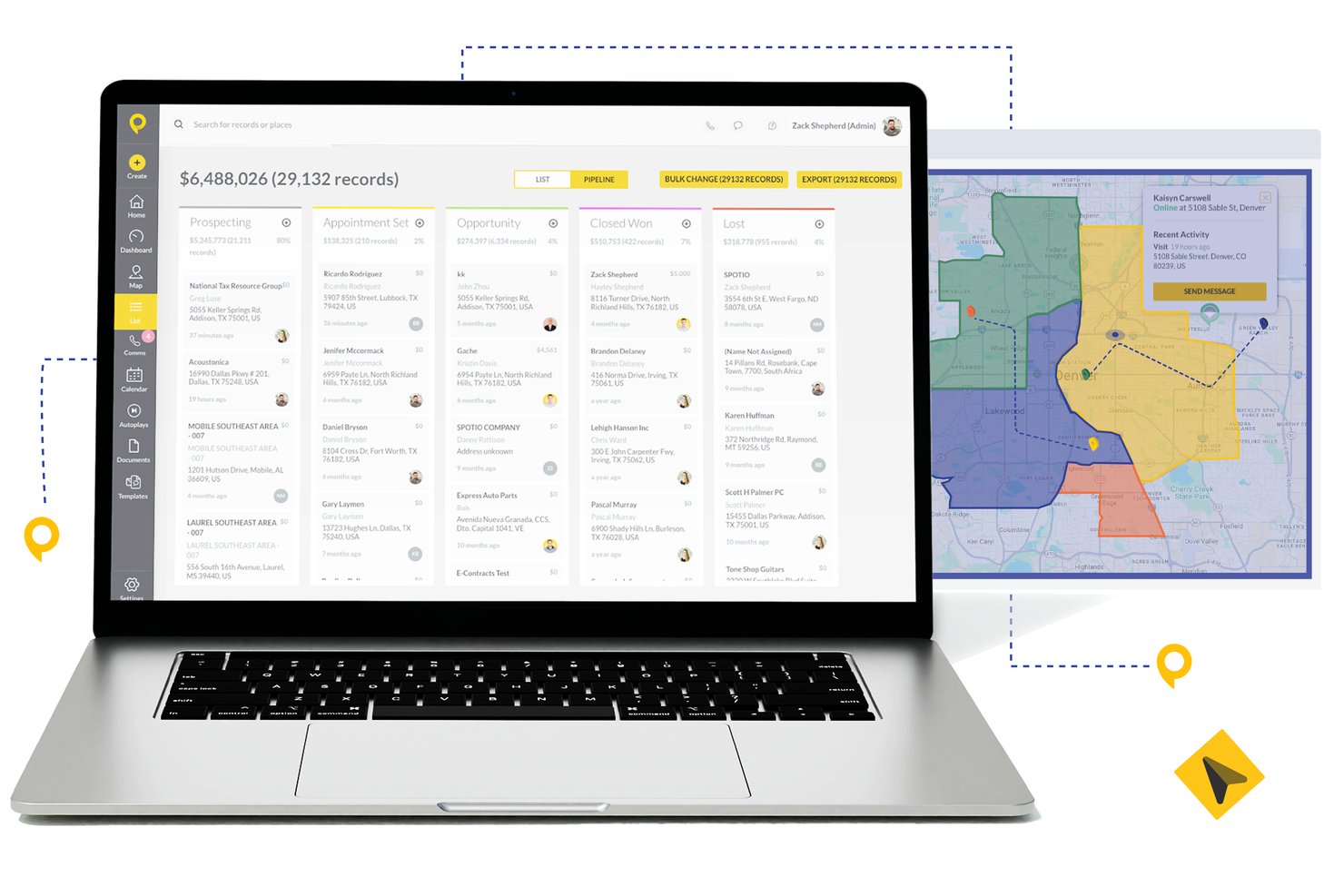
SPOTIO es una plataforma de ejecución de ventas en campo que combina gestión de territorios, optimización de rutas, seguimiento de clientes potenciales, gestión de canalizaciones y monitoreo de la actividad de los representantes en una solución móvil desde el principio.
¿Para quién es mejor SPOTIO?
SPOTIO es una excelente opción para equipos de ventas externas y puerta a puerta en industrias como telecomunicaciones, energía solar, techado y servicios comerciales que gestionan grandes territorios geográficos.
Por qué elegí SPOTIO
Elegí SPOTIO como uno de los mejores porque su mapeo de territorios va mucho más allá de dibujar límites. Me encanta que puedas construir territorios por código postal, condado o forma personalizada y superponer más de 200 puntos de datos demográficos para priorizar las áreas de mayor valor. El motor de optimización de rutas luego organiza las paradas para reducir el tiempo de manejo y aumentar la cantidad de visitas cara a cara que puede realizar cada representante en su día, algo que no he visto ejecutado con tanta precisión en otras herramientas de ventas en campo.
Características clave de SPOTIO
- Comunicaciones multicanal: Llama, envía correos electrónicos y mensajes de texto a prospectos y clientes directamente desde la plataforma.
- Panel de seguimiento de actividades: Monitorea la actividad de los representantes y los registros de entrada verificados por ubicación en tiempo real.
- Integraciones CRM nativas: Sincroniza cuentas, contactos y datos de oportunidades con Salesforce, HubSpot y Microsoft Dynamics 365.
- DASH AI co-pilot: Usa IA para capturar datos de campo, redactar correos electrónicos y sugerir próximos pasos durante las visitas de ventas.
Integraciones de SPOTIO
SPOTIO ofrece integraciones nativas con Salesforce, HubSpot, Microsoft Dynamics 365, Zoho CRM y Pipedrive. Zapier y una API abierta también están disponibles para mayor conectividad e integraciones personalizadas.
Pros and Cons
Pros:
- Potente mapeo de territorios para equipos de ventas externas
- Seguimiento de la actividad y registros de entrada en tiempo real
- Diseño móvil ideal para representantes en movimiento
Cons:
- Capacidad de previsión limitada para equipos de ventas internas
- Profundidad de informes limitada para canalizaciones B2B complejas

Mejor para plantillas de cotización personalizables
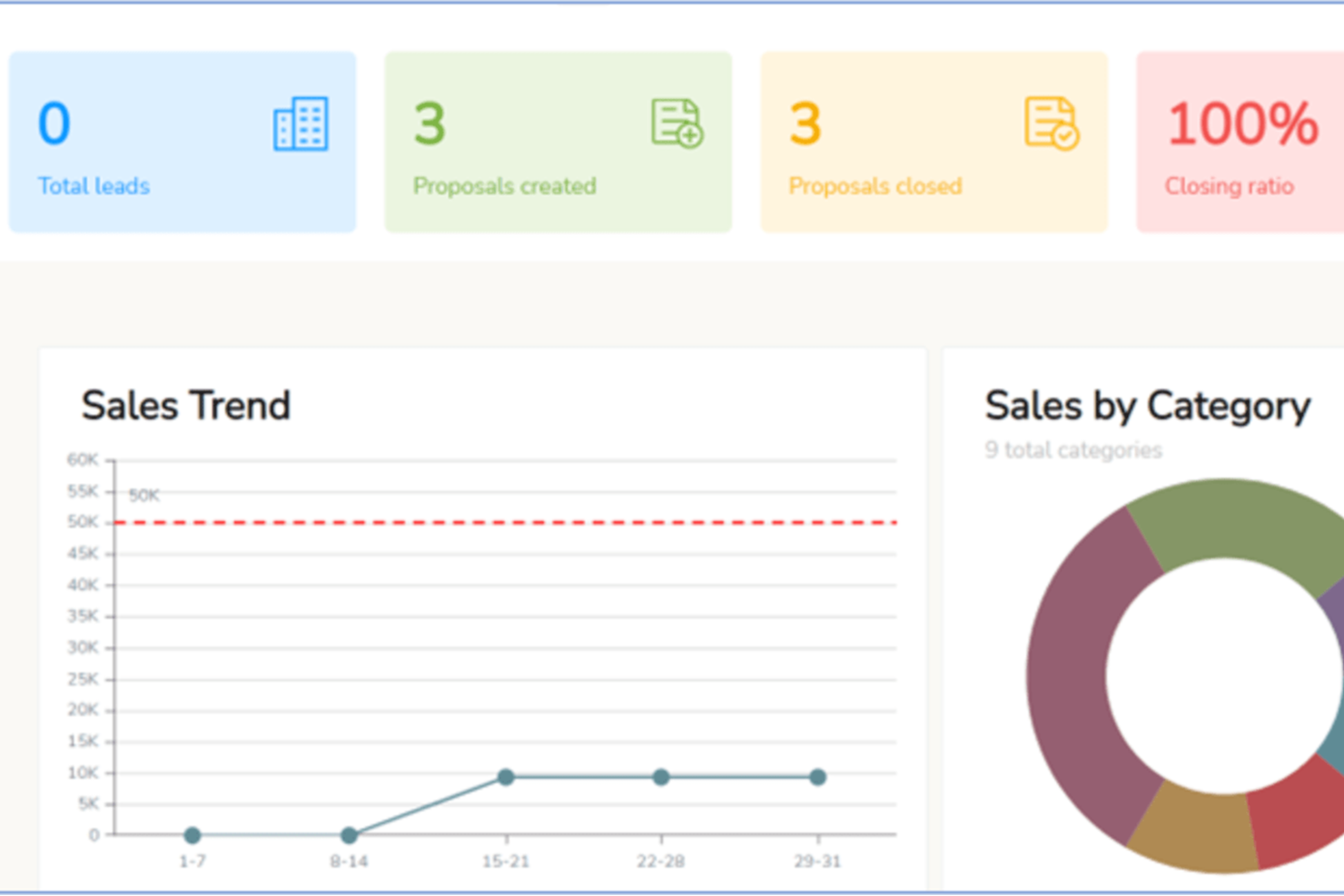
iQuoteXpress es una plataforma de configuración, precio y cotización (CPQ) que ofrece a los equipos de ventas B2B herramientas para la configuración de productos, creación de propuestas con marca, seguimiento de cotizaciones y gestión de precios en múltiples monedas.
¿Para quién es mejor iQuoteXpress?
iQuoteXpress es ideal para equipos de ventas B2B en industrias con muchos productos que necesitan generar cotizaciones precisas y profesionales sin un proceso manual largo.
Por qué elegí iQuoteXpress
He incluido iQuoteXpress en mis mejores elecciones porque su sistema de plantillas para cotizaciones va mucho más allá de elegir un diseño. Los administradores definen categorías de plantillas por segmento, región o línea de producto, y los representantes obtienen automáticamente la plantilla correcta, con logotipos, fuentes, colores y lenguaje legal ya configurados. También destaco que los T&C se gestionan en un panel dedicado, por lo que cualquier actualización se aplica instantáneamente en la próxima propuesta generada sin necesidad de copiar y pegar. La función de biblioteca de documentos permite adjuntar portadas, hojas de especificaciones y contratos con un solo clic, y iQuoteXpress lo ensambla todo en un solo paquete de propuesta.
Características clave de iQuoteXpress
- Gestión de catálogo de productos: Crea y organiza un catálogo de productos y servicios con precios, descripciones e imágenes que los representantes pueden añadir directamente a las cotizaciones.
- Seguimiento de cotizaciones y analíticas: Supervisa el estado de las cotizaciones, tasas de apertura y datos de éxito/fracaso desde un panel centralizado para identificar dónde se retrasan los acuerdos.
- Precios en divisas múltiples: Establece y muestra precios en varias monedas para apoyar las ventas en diferentes mercados.
- Soporte de firma electrónica: Recoge las firmas de los clientes directamente en la plataforma sin enviar los documentos a una herramienta de firma separada.
Integraciones de iQuoteXpress
iQuoteXpress funciona como solución independiente o se integra con plataformas CRM y ERP a través de conexiones listas para usar y con inicio de sesión único. Las integraciones nativas incluyen Salesforce, Microsoft Dynamics 365, Zoho CRM, Zoho Books, Oracle y HubSpot CRM, así como QuickBooks Online Advanced y DocuSign. También se conecta con Acumatica y Shopify para flujos de trabajo de ERP y comercio electrónico. Hay disponible una REST API para crear integraciones personalizadas con aplicaciones de terceros.
Pros and Cons
Pros:
- Configuradores de productos multinivel para cotizaciones complejas
- Reduce significativamente el tiempo de incorporación de nuevos representantes
- Los representantes generan cotizaciones sin intervención del gerente
Cons:
- Sin aplicación móvil para cotizar en movimiento
- La configuración del configurador requiere asistencia del proveedor

Mejor para sugerencias de leads impulsadas por IA
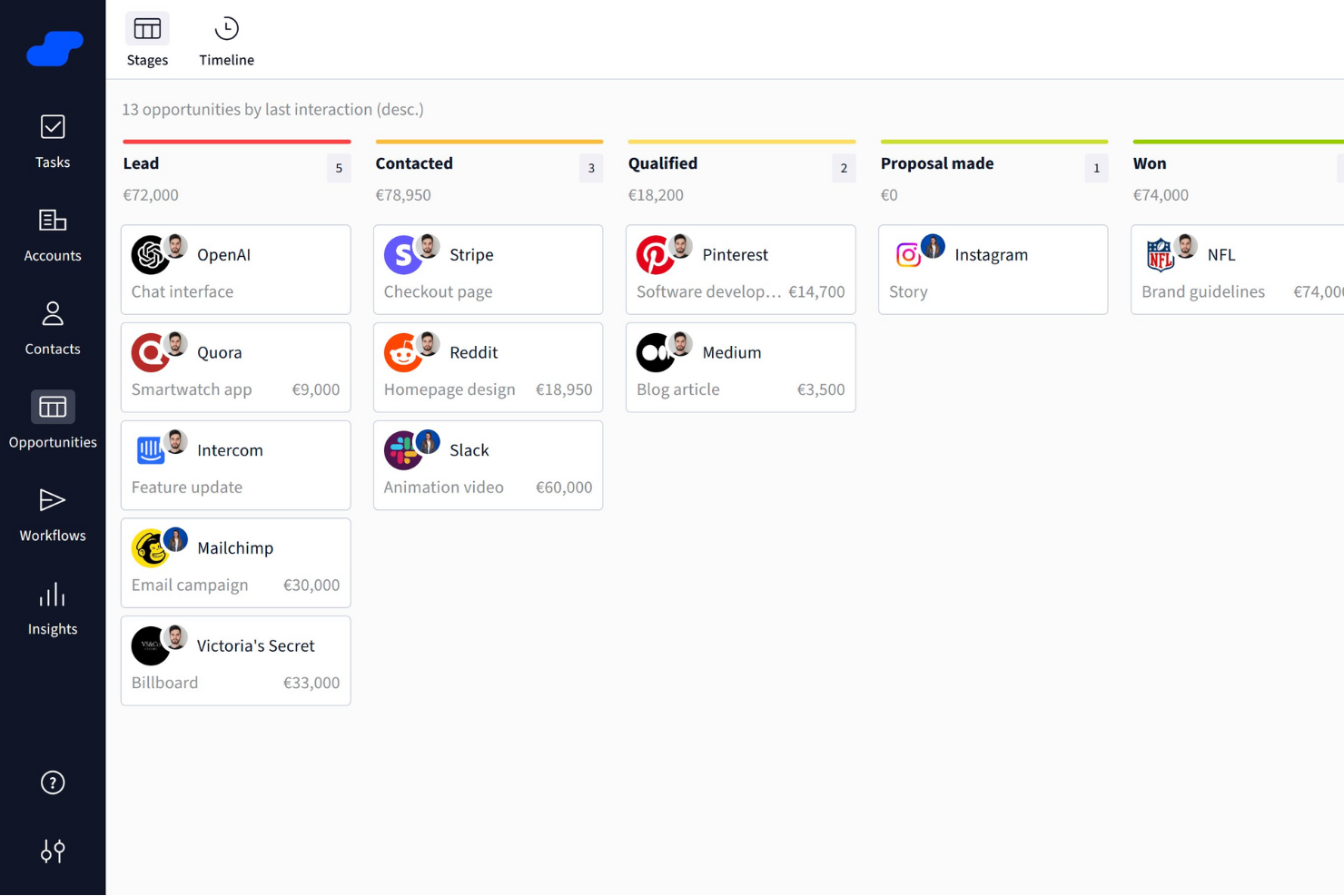
Salesflare es un CRM inteligente diseñado específicamente para pequeñas y medianas empresas B2B. Ofrece un conjunto de funciones que mejoran los procesos de ventas, facilitando la gestión de clientes potenciales y aumentando el éxito comercial.
Por qué elegí Salesflare: Elegí Salesflare como software de ventas B2B por su gran enfoque en la inteligencia comercial, ofreciendo funciones como perspectivas de relaciones, sugerencias de clientes potenciales impulsadas por IA, integración con LinkedIn y un buscador de prospectos incorporado para mantener llena tu cartera de ventas. Sus embudos de ventas visuales, recordatorios automáticos y herramientas de colaboración optimizan el seguimiento de oportunidades, reducen el trabajo administrativo y ayudan a los equipos a centrarse en cerrar más negocios de manera eficiente.
Funciones destacadas e integraciones de Salesflare
Las funciones incluyen secuencias de emails automatizadas que permiten una interacción personalizada con tus clientes potenciales, mejorando tus esfuerzos en la generación de relaciones. La plataforma también ofrece un buscador de prospectos que ayuda a agilizar la generación de leads, asegurando que tu embudo de ventas se mantenga sólido. Además, la función de inteligencia sobre relaciones de Salesflare mejora la colaboración en equipo proporcionando información útil para priorizar clientes potenciales y mejorar la toma de decisiones.
Las integraciones incluyen QuickBooks Online, Slack, KrispCall, Nectar Desk, Typeform, Facebook Lead Ads, Google Contacts, CalendarHero, Bit Integrations, Google Sheets, Intercom y MailChimp.
Pros and Cons
Pros:
- Contactos y usuarios ilimitados con filtrado avanzado
- Funciones de automatización eficaces que aumentan la productividad al reducir tareas manuales
- Fuertes capacidades de integración con herramientas populares como Outlook y LinkedIn
Cons:
- La configuración inicial de los flujos de trabajo automatizados puede ser desafiante para algunos usuarios
- Cantidad limitada de plantillas de correo electrónico disponibles

Ideal para la optimización de cotizaciones guiada por IA
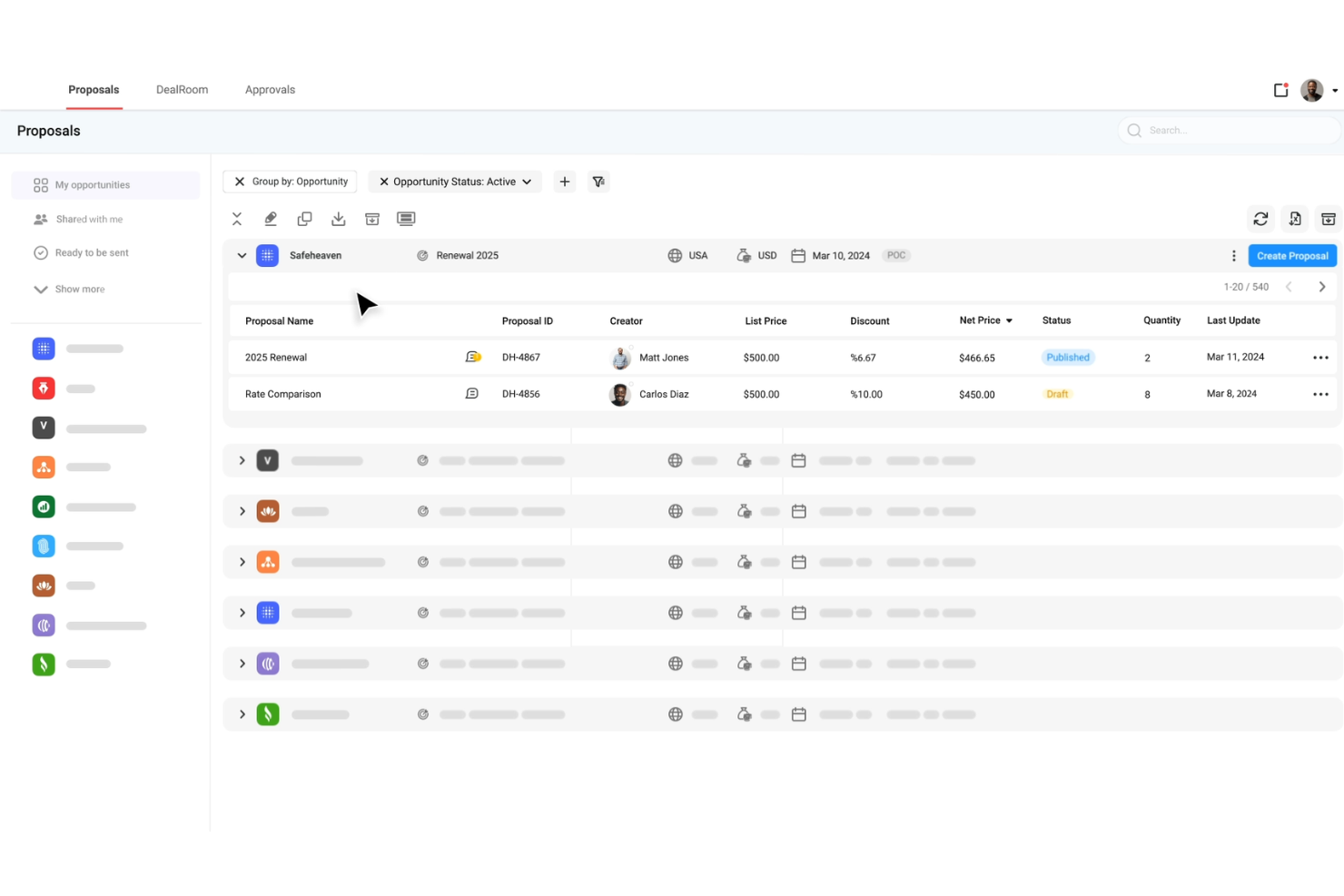
DealHub AI es una plataforma de cotización hasta ingresos creada para equipos de ventas B2B, que combina CPQ, gestión del ciclo de vida de contratos, facturación por suscripción y salas digitales de negociación en un solo sistema.
Por qué elegí DealHub AI: Elegí DealHub AI por la manera en que destaca el comportamiento del comprador y permite actuar en consecuencia. Su función 'dealstream' rastrea la participación del comprador dentro de las propuestas y muestra señales de intención—para que tu equipo pueda hacer un seguimiento en el momento adecuado. Además, sus agentes de IA integrados ofrecen sugerencias de precios y combinación de productos basadas en historiales de éxito, ayudando a los representantes a optimizar sus cotizaciones. Y sus modelos de precios adaptativos admiten tarifas basadas en uso, por niveles y fijas, permitiendo gestionar acuerdos complejos y prevenir errores de precio manuales.
Características destacadas e integraciones de DealHub AI
Características destacadas incluyen la sala de ventas digital o dealroom, que centraliza todos los activos, contenidos, comunicaciones y notificaciones en tiempo real del acuerdo, permitiendo que compradores y vendedores colaboren en un solo espacio de marca. También incluye herramientas de gestión de contratos como la creación dinámica de contratos, bibliotecas de cláusulas y flujos de trabajo de negociación para agilizar las aprobaciones.
Las integraciones incluyen Salesforce, HubSpot, Microsoft Dynamics 365, Slack, Gong, DocuSign, Google, LinkedIn, Optimizely, Solarwinds, SalesLoft y Meta Platforms.
Pros and Cons
Pros:
- Acelera los ciclos de venta mediante salas de negociación digitales
- Agentes de IA guían a los representantes sobre precios y combinaciones de productos
- Permite facturación por suscripción y renovaciones
Cons:
- Carga o respuesta lenta con acuerdos grandes o páginas de propuestas complejas
- La configuración de funciones avanzadas requiere más tiempo, esfuerzo y soporte de lo esperado
New Product Updates from DealHub AI

DealHub AI Expands Bundle Attribute Automation
DealHub AI introduces Assignment Rules for child proposal attributes and numeric aggregation for bundles. These updates give admins more control over bundle attribute automation and configuration. For more information, visit DealHub’s official site.
 .
.
Ideal para obtener insights conversacionales impulsados por IA
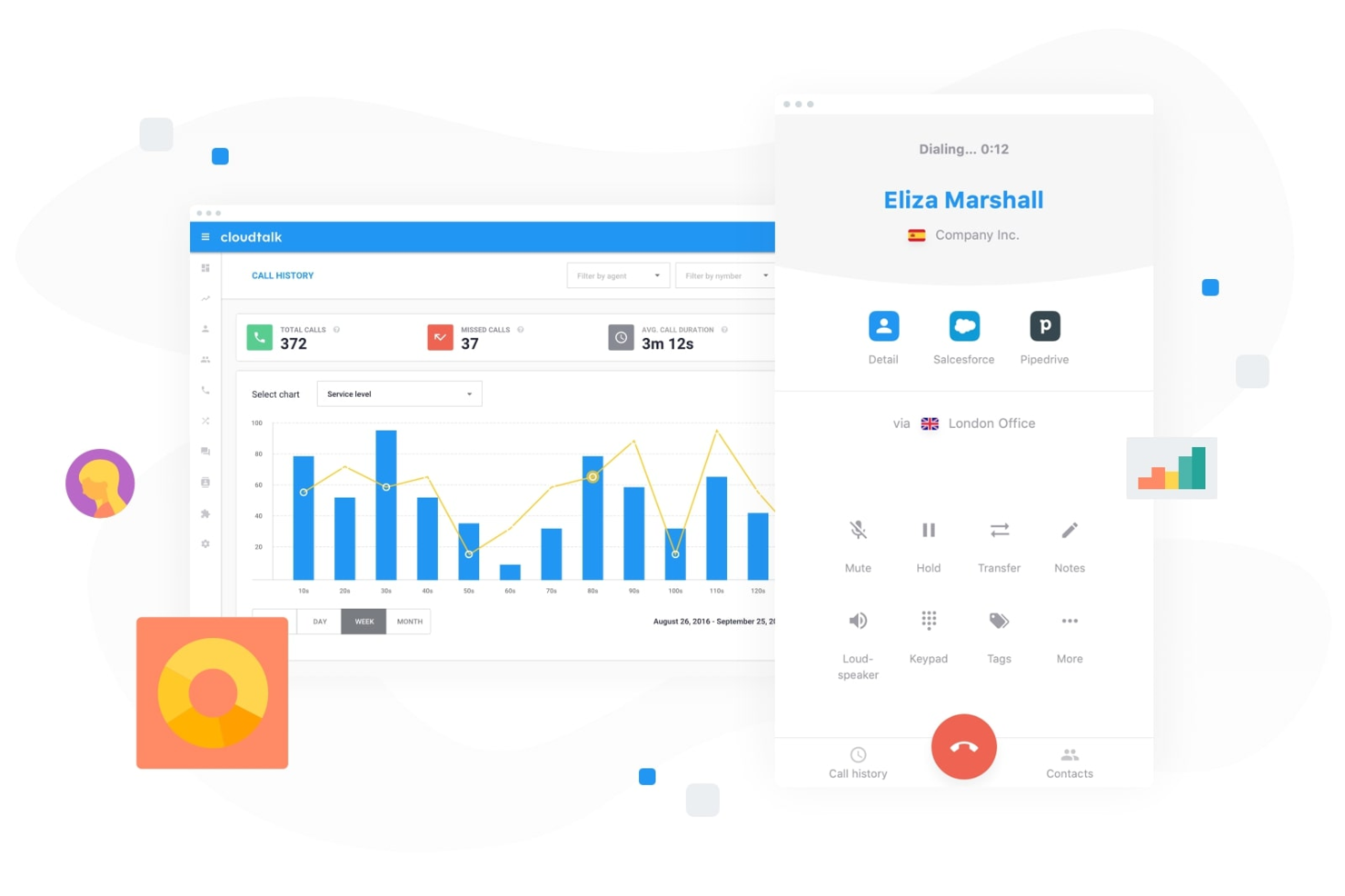
Para las empresas que buscan mejorar sus esfuerzos de ventas B2B, CloudTalk ofrece una solución de centro de llamadas basada en la nube y dinámica, diseñada para satisfacer las necesidades de los equipos de ventas en diversos sectores. Con funciones orientadas a optimizar la comunicación y mejorar el rendimiento de las ventas, CloudTalk atrae a profesionales y organizaciones que desean optimizar sus interacciones con clientes y lograr mejores resultados. Ya sea que necesite una gestión avanzada de llamadas, alcance global o análisis robustos, CloudTalk responde a los desafíos de gestionar llamadas de ventas de manera eficiente y eficaz.
Por qué elegí CloudTalk
Elegí CloudTalk por su capacidad única para potenciar el rendimiento de ventas mediante inteligencia conversacional impulsada por IA. Esta función proporciona resúmenes automáticos de llamadas, puntuaciones y análisis de sentimiento, permitiendo que su equipo se enfoque en interacciones significativas. Además, su marcador de ventas con IA, que incluye opciones como marcación en paralelo y envío automático de mensajes de voz, maximiza el potencial de alcance de su equipo priorizando las conversaciones de alto valor. Estas funcionalidades son especialmente beneficiosas para equipos que buscan aumentar su eficiencia en ventas y obtener mejores resultados.
Características Clave de CloudTalk
Además de sus herramientas impulsadas por IA, también encontré útiles las siguientes:
- Enrutamiento Personalizado de Llamadas: Dirige las llamadas a los miembros adecuados del equipo según criterios predefinidos, garantizando una gestión eficiente y la satisfacción del cliente.
- Respuesta de Voz Interactiva (IVR): Automatiza la gestión de llamadas con un sistema de menú que guía a los clientes al departamento o servicio apropiado.
- Análisis en Tiempo Real: Ofrece información sobre el rendimiento de las llamadas y la productividad del equipo, ayudándole a tomar decisiones informadas.
- Soporte Global para SMS y WhatsApp: Habilita la comunicación multicanal, permitiendo a su equipo llegar a los clientes a través de sus plataformas preferidas.
Integraciones de CloudTalk
Las integraciones incluyen Salesforce, HubSpot, Zoho, Pipedrive, Zendesk, Shopify, Intercom, Freshdesk, Aircall y Microsoft Dynamics.
Pros and Cons
Pros:
- Herramientas de inteligencia conversacional con IA
- Varios modos de marcador saliente
- Amplias opciones de integración con CRM
Cons:
- Problemas de estabilidad con el marcador en paralelo
- La disponibilidad de números internacionales puede ser inconsistente
Ideal para el seguimiento de pedidos

SimplyDepo ofrece una solución personalizada para marcas, distribuidores y encargados de mercadería que buscan mejorar sus operaciones de ventas B2B. Diseñado pensando en startups y empresas en crecimiento, aborda los desafíos en la ejecución en tienda, la gestión de pedidos y la gestión de relaciones con clientes. Al integrar funciones esenciales como planificación de rutas y herramientas para ventas en campo, SimplyDepo busca optimizar procesos y fomentar el crecimiento.
Por qué elegí SimplyDepo
Elegí SimplyDepo por su enfoque especializado en mejorar la eficiencia de las ventas B2B mediante su combinación única de herramientas para la ejecución en tienda y ventas en campo. Su sistema de gestión de pedidos B2B resulta especialmente atractivo para quienes desean agilizar sus procesos de ventas y mejorar las relaciones con los clientes. La inclusión de capacidades de CRM refuerza aún más su posición como una solución integral para gestionar las interacciones con los clientes empresariales y optimizar las rutas de ventas.
Características clave de SimplyDepo
Además de sus fortalezas en la gestión de pedidos y CRM, también encontré útiles las siguientes características:
- Planificación de rutas: Optimiza las rutas de entrega y ventas para mejorar la eficiencia y reducir los costos operativos.
- App para representantes de ventas: Proporciona a tu equipo de ventas una aplicación móvil para gestionar tareas e interacciones con clientes en movimiento.
- Gestión de prospectos: Haz seguimiento y administra clientes potenciales para asegurar que no se pierda ninguna oportunidad.
- Gestión de tareas: Organiza y prioriza tareas para mantener el enfoque y la productividad en tu equipo.
Integraciones de SimplyDepo
Las integraciones incluyen Stripe, Twilio SendGrid, ShipStation y QuickBooks.
Pros and Cons
Pros:
- Sistema integrado de gestión de pedidos B2B
- CRM integrado para seguimiento de cuentas
- Planificación de rutas y asignación de territorios
Cons:
- Personalización limitada de reportes avanzados
- No dispone de documentación API transparente

Dock
Mejor para la planificación de acciones en salas de ventas digitales
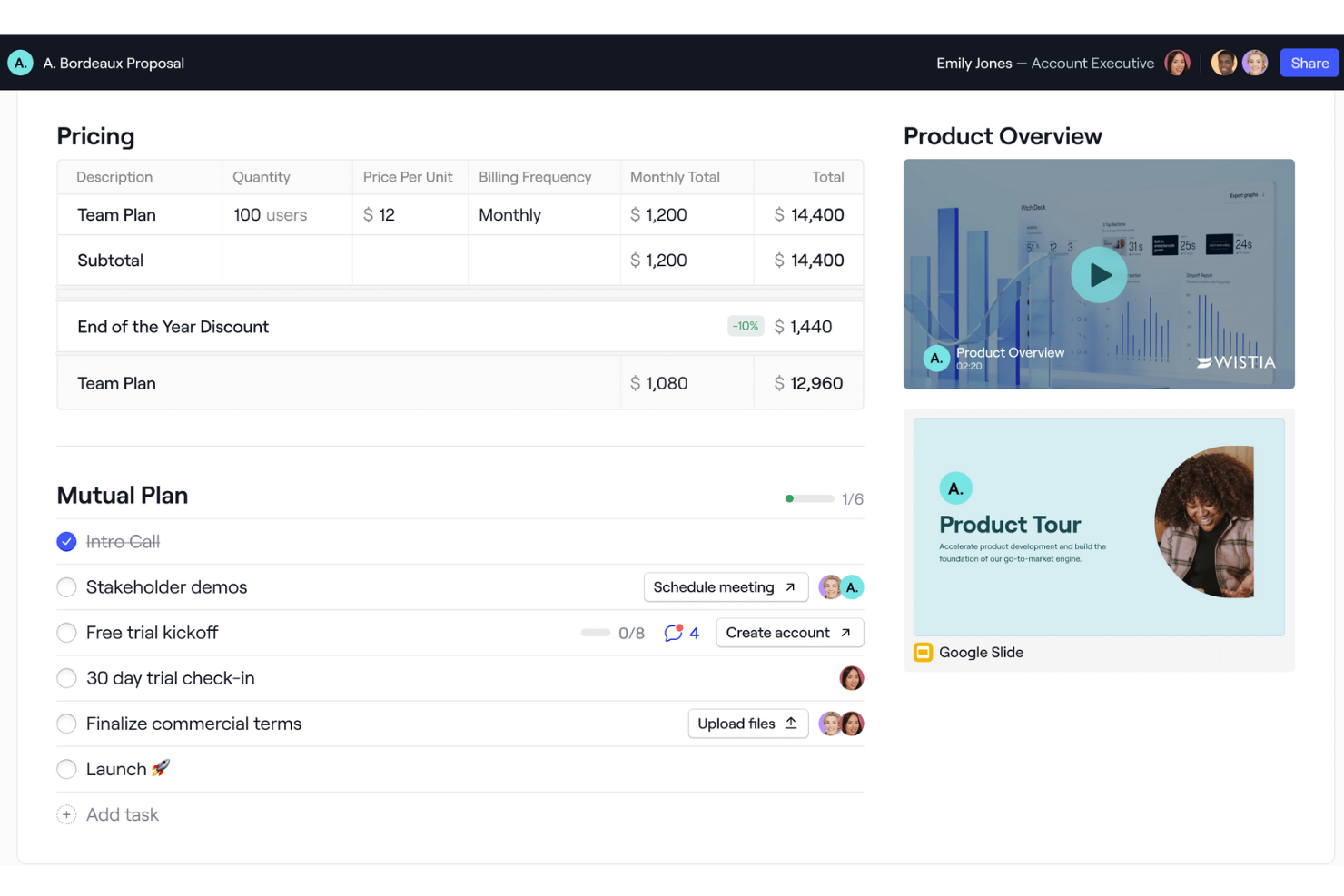
Dock es un software de ventas B2B que proporciona una plataforma integral para gestionar ventas, incorporación de clientes e interacciones con clientes. Ofrece funciones como salas de ventas digitales, portales de incorporación y espacios de trabajo orientados al cliente, que ayudan a las empresas a organizar y compartir contenidos con los clientes en un entorno personalizado con su marca.
Por qué elegí Dock: Me gusta que Dock ofrezca un espacio centralizado para que los equipos de ventas gestionen contenido orientado al cliente, además de proporcionar herramientas y plantillas para estandarizar los procesos de ventas. Su sala de ventas digital destaca especialmente con características como planes de acción mutuos que guían a los compradores a través de las diferentes etapas del proceso. Además, la experiencia del cliente centrada en analíticas de Dock rastrea interacciones y el progreso, ayudando a los equipos de ventas a recopilar métricas y hacer seguimiento efectivo de los prospectos.
Características y integraciones destacadas de Dock
Características destacadas incluyen señales de compra, planes de acción dinámicos, editor flexible de espacios de trabajo, personalización de marca, formularios de precios y pedidos, uso compartido seguro, recopilación de firmas digitales y plantillas personalizables.
Integraciones incluyen Airtable, Pandadoc, Typeform, HubSpot, Salesforce, Slack, Zoom y más.
Pros and Cons
Pros:
- Plantillas para estandarizar procesos
- Planes de acción mutuos
- Analíticas para el compromiso del cliente
Cons:
- La integración con HubSpot y Salesforce solo está disponible en los planes superiores
- Curva de aprendizaje para los nuevos usuarios que desean aprovechar todas las funciones

UpLead
Ideal para la verificación y calificación de leads
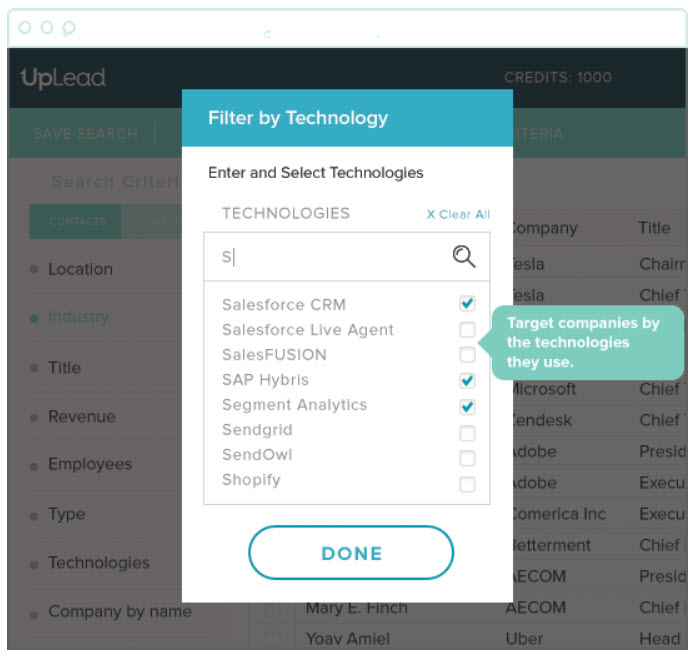
Este software de generación de oportunidades de venta fue creado para ayudar tanto a PYMES como a grandes organizaciones a gestionar su flujo de ventas mediante marketing basado en cuentas, generación de ventas dirigida, verificación de correos electrónicos en tiempo real y compromiso con oportunidades. Puedes crear listas B2B personalizables con criterios para la calificación de leads que eliminan compradores y prospectos de baja calidad.
Por qué elegí UpLead: Elegí UpLead debido a sus herramientas integrales de filtrado de leads. No basta con encontrar prospectos de alta calidad; también deben ser adecuados para tu producto o servicio. Usando su herramienta de filtrado, puedes dirigir los leads por tecnología, cantidad de empleados, ingresos y más de 50 otros filtros de búsqueda.
Características y integraciones destacadas de UpLead
Características destacadas incluyen acceso a más de 100 millones de contactos con un 95% de precisión en los datos, incorporación de datos clave de contacto a partir de listas desorganizadas, extensión de Chrome para captar leads directamente desde el navegador y una herramienta de verificación de correos electrónicos que ayuda a comprobar direcciones válidas.
Las integraciones incluyen Close, Copper, Dynamics 365, Insightly, Mailshake, Nimble, Outreach, Pipedrive, Salesforce Sales Cloud y Zapier.
Pros and Cons
Pros:
- Bajo porcentaje de rebote en correos electrónicos
- Puede generar listas rápidamente
- Funcionalidad de carga de archivos CSV para CRMs sin integración
Cons:
- El precio no es tan flexible
- Cobertura de leads limitada
Groove
Mejor para empresas que utilizan Salesforce o Salesforce Industry Clouds
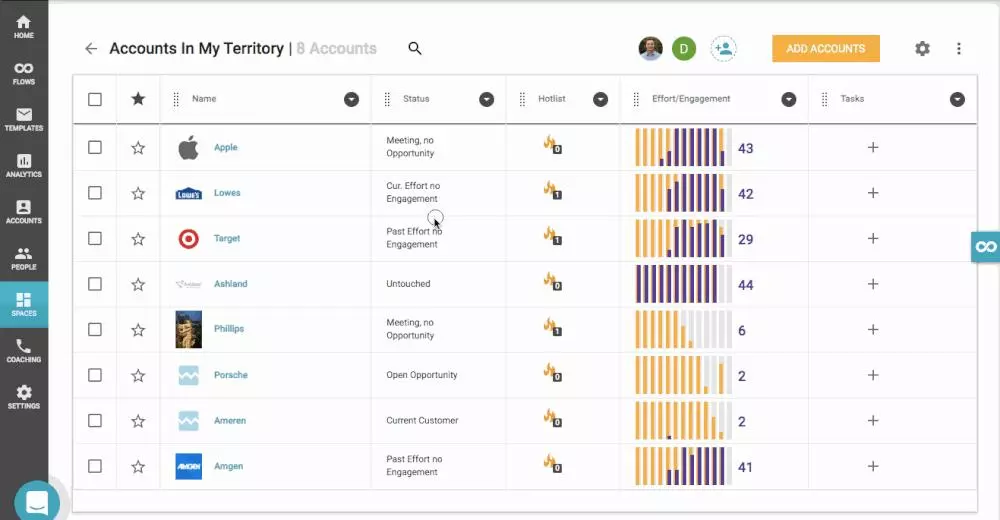
Esta plataforma de productividad de ventas está diseñada para permitir que los líderes de ventas aumenten el ingreso por representante en toda la organización automatizando tareas administrativas, facilitando la actualización y el acceso a Salesforce, y generando manuales de buenas prácticas repetibles al aprovechar la IA para transformar datos complejos en información práctica.
Por qué elegí Groove: Elegí Groove para esta lista porque es el único líder de mercado nativo de Salesforce en la actualidad. Con Groove, no tendrás problemas de latencia o sincronización de datos, obtienes seguridad y cumplimiento de estándares líderes en la industria, y funciona incluso con las versiones más personalizadas de Salesforce.
Características destacadas e integraciones de Groove
Características destacadas incluyen automatización de campañas mediante correo electrónico, SMS y llamadas; visibilidad en llamadas de ventas para mejor capacitación; información en tiempo real sobre la actividad de ventas; y especialistas dedicados para la implementación y capacitación inicial.
Integraciones incluyen CloudTalk, Constant Contact, ExecVision, Gmail, Gong, LinkedIn Sales Navigator, Microsoft Outlook, Seismic, Spinify y Vidyard.
Pros and Cons
Pros:
- Interfaz de usuario amigable
- Excelente soporte al cliente
- Potente hoja de ruta para la ejecución
Cons:
- Capacidades limitadas de mensajes masivos
- No hay suficientes tutoriales para combinar con Zoom Phone, etc.
Otras opciones
Elegí algunas herramientas más que tenía en mente, pero que no llegaron a formar parte de la lista final, para ofrecerte una selección verdaderamente completa de programas de ventas B2B que puedas explorar.
- Cognism
Mejor para acceso sin restricciones a la información, sin límites de crédito ni restricciones geográficas
- Hunter
Mejor plataforma integral para la difusión por correo electrónico
- Pipedrive CRM
Ideal para embudos de ventas personalizados
- Lusha
Ideal para contactar con los responsables de la toma de decisiones de una empresa y cerrar acuerdos más rápido
- InSitu Sales
La mejor con ventas de campo integradas y comercio electrónico B2B
- Forecastio
Mejor para previsión y planificación de ventas
- Leadinfo
Ideal para rastrear qué empresas visitan tu sitio web
- Enlyft
La mejor para descubrir qué tecnologías utilizan ya tus prospectos
- BookYourData
Ideal para la prospección B2B con pago por uso
- LeadIQ
Ideal para mejorar la prospección de equipos de ventas SaaS


Cómo evalúo el software de ventas B2B
Divido mi evaluación en dos capas: los criterios básicos que una herramienta debe cumplir—como la gestión del pipeline y la sincronización con el CRM—y los diferenciadores que separan las mejores opciones para los equipos de RevOps.
Funcionalidad principal (requisitos imprescindibles para esta lista)
Cuando selecciono herramientas para mi lista, califico cada una en una escala del 0 (no ofrece la funcionalidad) al 5 (sobresale en esta área) para cada funcionalidad principal que se enumera a continuación. Luego, convierto la puntuación total de la herramienta en un porcentaje. Cada herramienta necesita alcanzar una puntuación mínima total del 65% para ser considerada para inclusión.
- Gestión del pipeline y de oportunidades: Evalúo qué tan bien una herramienta gestiona ciclos de ventas con múltiples etapas y partes interesadas—como pipelines separados para nuevos negocios frente a expansión y la asignación de partes interesadas dentro de las oportunidades.
- Herramientas de interacción comercial: Aquí es importante la multiplicidad de canales, así que busco secuencias a través de correo electrónico, teléfono y LinkedIn, en lugar de simples plantillas de correo sin lógica de seguimiento.
- Integración CRM o CRM nativo: Tanto si la plataforma es un CRM como si se sincroniza con uno como Salesforce o HubSpot, compruebo que exista un flujo bidireccional de datos que mantenga coherentes los registros de cuentas y oportunidades.
- Pronóstico de ingresos y analítica: Observo cómo la herramienta muestra la salud del pipeline y los resultados previstos—previsiones ponderadas, seguimiento de la velocidad de oportunidades y reporte de conversión por etapa, entre otros.
- Gestión de leads y cuentas: Las ventas B2B raramente involucran a un único comprador, así que evalúo el soporte para jerarquías de cuentas, comités de compra y la distribución estructurada de leads según territorios o segmentos.
- Automatización de flujos de trabajo comercial: Tareas repetitivas como el registro de actividades, actualización de etapas de oportunidades y asignación de tareas restan tiempo de venta, así que compruebo la existencia de disparadores basados en reglas que gestionen todo esto de forma automática.
Una vez tengo una lista de herramientas que cumplen estos criterios, considero qué hace que cada plataforma sea única.
Factores diferenciadores (qué distingue a los proveedores)
Así comparo y contrasto a los diferentes proveedores:
Características destacadas
La inteligencia conversacional es un diferenciador clave—busco herramientas que transcriban y analicen llamadas de ventas para identificar riesgos en los acuerdos o menciones de la competencia sin revisión manual. El scoring de oportunidades mediante IA suma otra capa, ayudando a los equipos de RevOps a priorizar el pipeline según la probabilidad de cierre y no solo la intuición. También evalúo las capacidades de planificación de territorios y cuotas, especialmente para organizaciones que gestionan múltiples segmentos, donde una cobertura equilibrada por representante impacta directamente en la precisión de las previsiones.
Más allá de las características
La profundidad de integración es clave aquí—compruebo si una plataforma se conecta de forma nativa con CRMs, herramientas de automatización de marketing y sistemas BI para evitar que los equipos de RevOps tengan que crear integraciones personalizadas. La escalabilidad es igualmente importante, sobre todo para organizaciones en crecimiento que necesitan añadir unidades de negocio o territorios sin rehacer sus flujos de trabajo. También evalúo la transparencia en los precios, ya que los costes ocultos por módulos adicionales como previsión o analítica pueden disparar el presupuesto de RevOps rápidamente.
Cómo elegir un programa de ventas B2B
Es fácil perderse entre largas listas de funciones y estructuras de precios complejas. Para ayudarte a mantener la atención mientras avanzas en tu proceso único de selección de software, aquí tienes una lista de factores que debes tener en cuenta:
| Criterio | Qué tener en cuenta |
|---|---|
| Escalabilidad | ¿Puede el software crecer junto con tu empresa? Busca herramientas que admitan usuarios adicionales y un mayor volumen de datos sin reducir el rendimiento. |
| Integraciones | ¿Se conecta con tus sistemas actuales, como el CRM, el correo electrónico y las herramientas de análisis? Asegúrate de que sea compatible para evitar silos de datos. |
| Capacidad de personalización | ¿Puedes adaptar la herramienta para que se ajuste a tus flujos de trabajo específicos? Comprueba si ofrece opciones para personalizar campos, paneles e informes. |
| Facilidad de uso | ¿Qué tan intuitiva es la interfaz? Una curva de aprendizaje pronunciada puede ralentizar la adopción. Busca una navegación sencilla y procesos claros. |
| Implementación e incorporación | ¿Qué recursos se necesitan para comenzar? Ten en cuenta el tiempo y el soporte necesarios para la configuración y la capacitación. |
| Coste | ¿Los precios son claros y se ajustan al presupuesto? Compara las estructuras de costes, incluidas las tarifas ocultas o los cargos adicionales por funciones esenciales. |
| Medidas de seguridad | ¿Cumple la herramienta con los estándares de seguridad del sector? Busca cifrado, protección de datos y actualizaciones de seguridad periódicas para proteger tus datos. |
| Disponibilidad del soporte | ¿Qué opciones de soporte están disponibles? Asegúrate de recibir asistencia oportuna a través de canales como el teléfono, el correo electrónico o el chat, especialmente durante el horario laboral crítico. |
¿Qué es el software de ventas B2B?
El software de ventas B2B es una herramienta que ayuda a las empresas a gestionar y mejorar sus procesos de ventas con otras empresas. Los profesionales de ventas, los gestores de cuentas y los equipos de desarrollo empresarial suelen utilizar estas herramientas para aumentar la eficiencia y cerrar acuerdos más rápidamente.
Funciones como la gestión de clientes potenciales, el seguimiento de ventas y la generación de informes ayudan a organizar las actividades de ventas y a obtener información sobre los clientes. En general, estas herramientas proporcionan una forma estructurada de gestionar los esfuerzos de ventas e impulsar el crecimiento empresarial.
Funciones
Al seleccionar un software de ventas B2B, presta atención a las siguientes funciones clave:
- Gestión de clientes potenciales: Ayuda a organizar y hacer seguimiento de los clientes potenciales, garantizando que no se pierda ninguna oportunidad.
- Seguimiento del embudo de ventas: Proporciona una visión general visual de las etapas de ventas, ayudando a los equipos a gestionar y priorizar los acuerdos.
- Informes y análisis: Ofrece información sobre el rendimiento de las ventas, facilitando la toma de decisiones basada en datos.
- Paneles personalizables: Permite a los usuarios adaptar las vistas a sus necesidades específicas, mejorando la facilidad de uso.
- Capacidades de integración: Se conecta con herramientas existentes como CRM y el correo electrónico, garantizando un flujo de trabajo fluido.
- Acceso móvil: Permite a los equipos de ventas gestionar tareas desde cualquier lugar, aumentando la flexibilidad.
- Tareas automatizadas: Reduce el trabajo manual al automatizar tareas repetitivas, ahorrando tiempo y esfuerzo.
- Medidas de seguridad: Protege los datos confidenciales mediante cifrado y el cumplimiento de las normas del sector.
- Interfaz fácil de usar: Garantiza la facilidad de uso mediante una navegación intuitiva y un diseño sencillo.
- Información sobre los clientes: Proporciona información detallada sobre el comportamiento de los clientes, ayudando a desarrollar estrategias de ventas personalizadas.
Beneficios
La implementación de un software de ventas B2B proporciona varios beneficios para tu equipo y tu empresa. Estos son algunos de los que puedes esperar:
- Mejor organización: Las funciones de gestión de clientes potenciales ayudan a realizar un seguimiento de los clientes potenciales, reduciendo el caos.
- Mayor eficiencia: Las tareas automatizadas ahorran tiempo al encargarse del trabajo repetitivo y permiten que tu equipo se centre en actividades más estratégicas.
- Mejor toma de decisiones: Los informes y análisis proporcionan información sobre el rendimiento de las ventas, respaldando decisiones fundamentadas.
- Mayor flexibilidad: El acceso móvil permite a tu equipo gestionar las actividades de ventas desde cualquier lugar, garantizando que no esté atado a un escritorio.
- Relaciones más sólidas con los clientes: La información sobre los clientes ofrece datos detallados sobre su comportamiento, lo que ayuda a adaptar los enfoques de ventas.
- Flujos de trabajo simplificados: Las capacidades de integración garantizan que el software funcione correctamente con las herramientas existentes, reduciendo las interrupciones.
- Mayor seguridad de los datos: Las medidas de seguridad protegen la información confidencial y proporcionan tranquilidad.
Costes y precios
Seleccionar un software de ventas B2B requiere comprender los diversos modelos de precios y planes disponibles. Los costes varían según las funciones, el tamaño del equipo, los complementos y otros factores.
La tabla siguiente resume los planes habituales, sus precios medios y las funciones típicas incluidas en las soluciones de software de ventas B2B:
Tabla comparativa de planes de software de ventas B2B
| Tipo de plan | Precio medio | Funciones habituales |
|---|---|---|
| Plan gratuito | $0 | Gestión básica de clientes potenciales, informes limitados e integración del correo electrónico. |
| Plan personal | $5-$25/usuario/mes | Gestión avanzada de clientes potenciales, seguimiento de ventas y análisis básicos. |
| Plan empresarial | $30-$60/usuario/mes | Integración completa con CRM, paneles personalizables y funciones de automatización. |
| Plan para empresas | $70-$150/usuario/mes | Seguridad avanzada, integraciones personalizadas y asistencia especializada. |
Preguntas frecuentes sobre software de ventas B2B
¿Tienes más preguntas? Aquí encontrarás respuestas a algunas preguntas frecuentes.
¿Cuál es el propósito principal del software de ventas B2B?
El propósito principal del software de ventas B2B es ayudar a las empresas a gestionar sus procesos de ventas de forma más eficiente. Organiza la información de los clientes, realiza un seguimiento de las actividades de ventas y proporciona información sobre el rendimiento de las ventas. Al centralizar los datos, tu equipo puede acceder a todo lo que necesita desde un solo lugar, lo que facilita la gestión de clientes potenciales y el cierre de acuerdos.
¿Cómo funciona el software B2B?
La mayor parte del software que aparece aquí está relacionado con la generación de clientes potenciales, por lo que el método depende de la herramienta. Algunas de estas herramientas te ayudan a recopilar la información de los visitantes del sitio web, otras agregan datos de las redes sociales y otros perfiles públicos, y algunas proporcionan listas ya preparadas por una tarifa fija.
La mayoría de las opciones también funcionan con una garantía de precisión de los datos que te ayuda a comprobar la validez de los números de teléfono, las direcciones de correo electrónico y otra información disponible públicamente antes de contactar con nuevos contactos, para que no pierdas tiempo con clientes potenciales inaccesibles.
¿Cómo sé si mi equipo está preparado para utilizar software de ventas B2B?
Tu equipo está preparado para utilizar software de ventas B2B si gestionar manualmente un número cada vez mayor de clientes potenciales y acuerdos se vuelve complicado. Si los datos están dispersos entre hojas de cálculo y correos electrónicos, es hora de centralizarlos.
Evalúa si tu equipo tiene dificultades para hacer un seguimiento de las actividades de ventas o generar informes. Busca señales de ineficiencia u oportunidades desaprovechadas. Involucra a tu equipo en el proceso de toma de decisiones para asegurarte de que todos estén de acuerdo y preparados para aprovechar las capacidades del software.
¿Qué sigue?
Si estás investigando software de ventas B2B, contacta gratis con un asesor de SoftwareSelect para recibir recomendaciones.
Rellenas un formulario y tienes una breve conversación en la que profundizan en los detalles de tus necesidades. Después, recibirás una lista reducida de programas que podrás revisar. Incluso te ayudarán durante todo el proceso de compra, incluidas las negociaciones de precios.