

Una buena alternativa a monday CRM ofrece a tu equipo una gestión flexible del embudo de ventas, automatización personalizable e integraciones fiables en tus flujos de trabajo de ventas, marketing y éxito del cliente. Si estás buscando opciones más allá de monday CRM, probablemente quieras una plataforma todo en uno que admita la gestión de tareas y el trabajo en equipo, y que gestione proyectos complejos de forma más eficaz. Muchas alternativas combinan capacidades de CRM con una herramienta de gestión de proyectos, y ofrecen funciones avanzadas, informes avanzados e incluso facturación para ayudar a las empresas en crecimiento. Estas herramientas suelen ser adecuadas para equipos pequeños que necesitan flexibilidad sin sacrificar funcionalidades. Esta lista te ayudará a comparar las mejores alternativas a monday CRM para 2026, para que puedas encontrar una plataforma que se ajuste a tus necesidades operativas y respalde tus objetivos de ingresos.
¿Qué es monday CRM?
monday CRM es una plataforma de gestión de relaciones con los clientes diseñada para ayudar a los equipos a organizar los embudos de ventas, gestionar contactos y automatizar tareas rutinarias. Ofrece flujos de trabajo personalizables, paneles visuales e integración con herramientas empresariales populares. Los equipos utilizan monday CRM para hacer un seguimiento de los clientes potenciales, supervisar las oportunidades y centralizar la comunicación, lo que facilita la gestión de las relaciones con los clientes y las actividades de ventas en un solo lugar.
Tabla comparativa de alternativas a monday CRM
Esta tabla comparativa resume los detalles de precios de mis principales alternativas seleccionadas a monday.com.
| Tool | Best For | Trial Info | Price | ||
|---|---|---|---|---|---|
| 1 | Ideal para personalizar sin código los embudos y las previsiones | Prueba gratuita de 14 días | Desde $40/usuario/mes (facturado anualmente) | Website | |
| 2 | Ideal para funciones de telefonía integradas | Plan gratuito disponible | Desde $9/usuario/mes (facturado anualmente) | Website | |
| 3 | Mejor con automatización de email marketing | Prueba gratuita de 14 días + demo gratis disponible | Desde $15/mes (facturación anual) | Website | |
| 4 | Ideal para una incorporación sencilla del equipo | Demo gratuita + prueba gratuita de 14 días disponible | Desde $13/usuario/mes (facturación anual) | Website | |
| 5 | La mejor opción para análisis avanzados e informes | Prueba gratuita de 30 días + plan gratuito disponible | Desde $25/usuario/mes (facturación anual) | Website | |
| 6 | Ideal para la gestión visual de embudos de ventas | Prueba gratuita de 14 días disponible | Desde $14/usuario/mes (facturado anualmente) | Website | |
| 7 | Ideal para equipos de ventas internas | Prueba gratuita de 14 días + demo gratis disponible | Desde $35/usuario/mes (facturado anualmente) | Website | |
| 8 | Ideal para capacidades de gestión de proyectos | Prueba gratuita disponible | Desde $29/usuario/mes (facturado anualmente) | Website | |
| 9 | Ideal para herramientas integradas de marketing y ventas | Prueba gratuita de 28 días + plan gratuito disponible | Desde $20/asiento/mes | Website | |
| 10 | Ideal para integración con Google Workspace | Prueba gratuita de 14 días disponible | Desde $29/usuario/mes | Website |


Por qué confiar en nuestras recomendaciones de software
6,700+
Reviews
20
Industry experts
16+
Evaluation factors
14
Years
Nuestras reseñas reflejan nuestro criterio independiente, no un discurso de ventas. Descubra cómo mantenemos la transparencia.
Para esta guía, evaluamos las herramientas mediante pruebas prácticas e investigación independiente, puntuando las herramientas según nuestros criterios de selección.
Nuestras reseñas reflejan nuestro criterio editorial humano, no un discurso de ventas.
Opiniones sobre alternativas a monday CRM
A continuación encontrarás mis resúmenes detallados de las alternativas a monday CRM que llegaron a mi lista de finalistas. Mis análisis ofrecen una visión detallada de las funciones, las integraciones y los mejores casos de uso de cada plataforma para ayudarte a encontrar la mejor opción para ti.
 Ideal para personalizar sin código los embudos y las previsiones
- Prueba gratuita de 14 días
- Desde $40/usuario/mes (facturado anualmente)
Visit WebsiteCustomer Rating:4.7/5This rating combines scores from multiple user review sites to reflect overall customer sentiment about the product.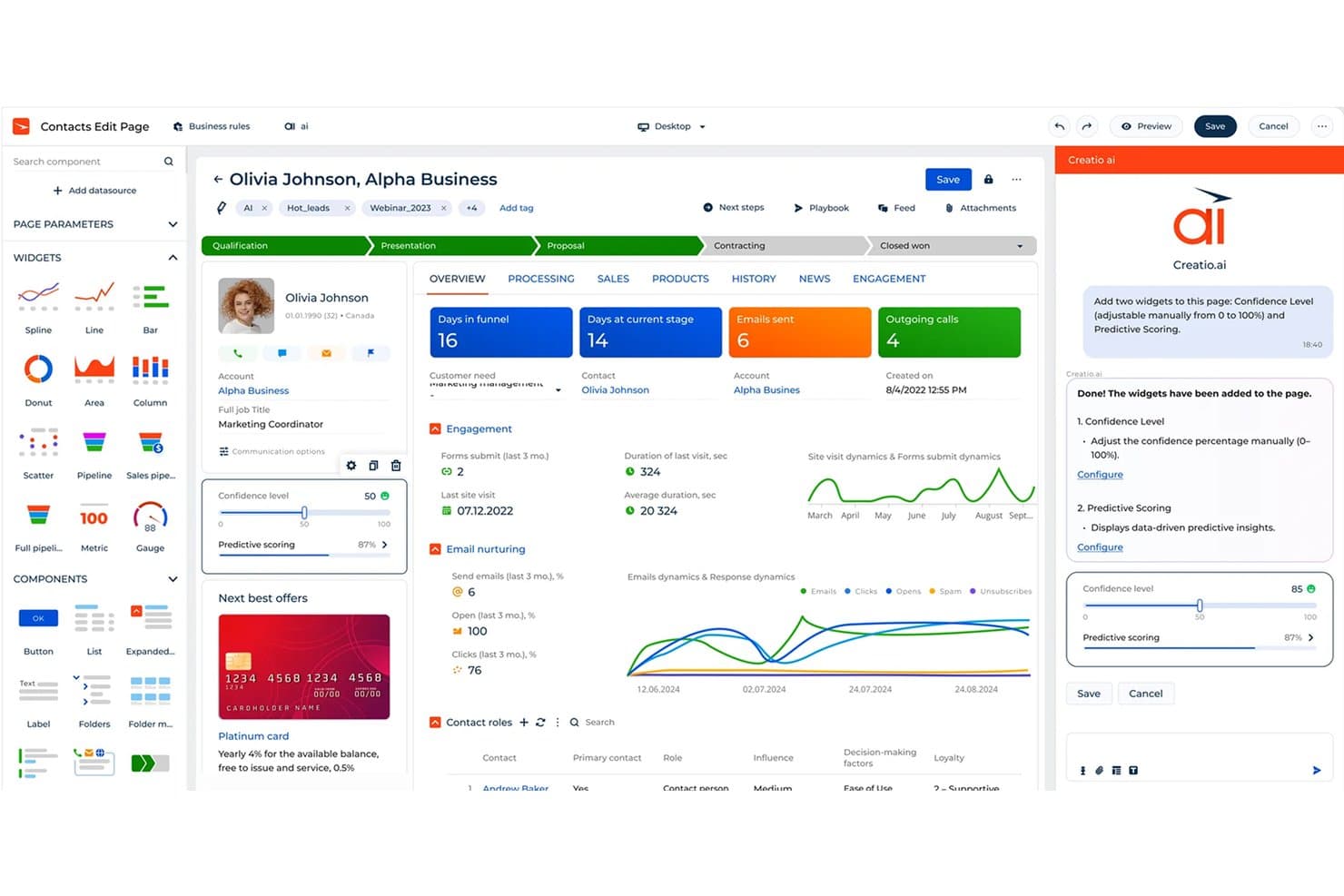
Creatio CRM utiliza IA para añadir automáticamente widgets como Nivel de confianza y Puntuación predictiva. Creatio es una plataforma de CRM para equipos de ventas, marketing y servicio que necesitan datos de clientes conectados, flujos de trabajo automatizados y procesos adaptables sin depender demasiado de los desarrolladores.
¿Para quién es más adecuado Creatio CRM?
Equipos de operaciones de ingresos que necesitan adaptar las etapas de ventas, las reglas de previsión y los flujos de trabajo sin depender de los desarrolladores.
Por qué Creatio CRM es una buena alternativa a monday CRM
Elegí Creatio CRM porque admite la personalización sin código de los embudos y las previsiones. Utilizo sus herramientas visuales para ajustar las etapas de ventas, las reglas de previsión y los flujos de trabajo de aprobación sin el apoyo de desarrolladores. Esto ayuda a mi equipo a adaptar los procesos del CRM cuando cambian los territorios, los criterios de cualificación o los modelos de ingresos.
Funciones principales de Creatio CRM
- Gestión de clientes potenciales: Captura, cualificación y distribución de clientes potenciales entre los equipos de ventas.
- Gestión de cuentas y contactos: Mantén perfiles de clientes, relaciones e historiales de actividad.
- Integración de correo electrónico: Sincroniza mensajes y realiza un seguimiento de la correspondencia dentro de los registros de clientes.
- Paneles de ventas: Supervisa actividades, tasas de conversión y métricas de ingresos en vistas configurables.
Integraciones de Creatio CRM
Creatio ofrece más de 700 aplicaciones, conectores e integraciones en su mercado, incluidos DocuSign y Zapier. También proporciona API para integraciones personalizadas.
Pros and Cons
Pros:
- Las herramientas sin código permiten modificar etapas y aprobaciones
- Los flujos de trabajo interfuncionales conectan ventas y servicio
- La previsión configurable permite adaptarse a los cambios en los modelos de ingresos
Cons:
- La configuración avanzada suele necesitar el apoyo de especialistas
- Algunas funciones estándar de CRM requieren soluciones alternativas
Learn more about Creatio CRM: Ideal para funciones de telefonía integradas
- Plan gratuito disponible
- Desde $9/usuario/mes (facturado anualmente)
Visit WebsiteCustomer Rating:4.6/5This rating combines scores from multiple user review sites to reflect overall customer sentiment about the product.
Freshsales utiliza IA para priorizar leads y automatizar flujos de trabajo de ventas. Freshsales está diseñado para equipos de ventas que desean una telefonía incorporada junto con sus flujos de trabajo CRM. Es especialmente útil para empresas que dependen de llamadas salientes, seguimientos y el seguimiento de conversaciones en tiempo real dentro de la misma plataforma. Si necesitas un CRM que combine la gestión de contactos con funciones de llamadas nativas, Freshsales ofrece un enfoque más integrado y rentable que monday CRM y herramientas similares. Con soporte para usuarios ilimitados, integraciones fluidas y una sólida visualización del pipeline, también es adecuado para equipos que requieren gestión de trabajo flexible y capacidades escalables a nivel empresarial.
Por qué Freshsales es una buena alternativa a monday CRM
A diferencia de monday CRM, Freshsales incluye funciones de telefonía integradas que te permiten hacer llamadas directamente desde el CRM. He elegido Freshsales porque ofrece grabación de llamadas, notas de llamadas y registro automático de llamadas, todo dentro de la misma plataforma donde gestionas tus leads y negociaciones. La herramienta también proporciona enrutamiento de llamadas y ocultación de números, funciones valiosas para equipos que manejan grandes volúmenes de llamadas o información sensible de clientes. Si tu proceso de ventas depende de conversaciones en tiempo real y su seguimiento, Freshsales te brinda un nivel de integración telefónica que monday CRM no iguala.
Características clave de Freshsales
Otras funciones de Freshsales que pueden interesarte incluyen:
- Pipeline de ventas visual: Permite seguir las negociaciones a través de etapas personalizables usando una interfaz de arrastrar y soltar.
- Análisis de negociaciones basado en IA: Ofrece recomendaciones y próximos pasos para las negociaciones utilizando IA integrada.
- Seguimiento de emails: Notifica cuando los leads abren o hacen clic en tus correos enviados desde el CRM.
- Automatización de flujos de trabajo: Automatiza tareas repetitivas como asignación de leads y recordatorios de seguimiento.
Integraciones de Freshsales
Las integraciones incluyen Freshdesk, PandaDoc, QuickBooks, Xero, Stripe y más.
Pros and Cons
Pros:
- Telefonía integrada con grabación de llamadas incluida
- Análisis de negociaciones basado en IA para priorización de ventas
- Pipeline visual con etapas de arrastrar y soltar
Cons:
- Las secuencias de emails carecen de flexibilidad multirama
- El modelo de datos limita la personalización de relaciones
Learn more about Freshsales: Mejor con automatización de email marketing
- Prueba gratuita de 14 días + demo gratis disponible
- Desde $15/mes (facturación anual)
Visit WebsiteCustomer Rating:4.4/5This rating combines scores from multiple user review sites to reflect overall customer sentiment about the product.
ActiveCampaign automatiza el marketing y las ventas con recorridos avanzados para clientes. Si tu equipo depende del email marketing como parte central de tu estrategia de interacción con clientes, ActiveCampaign merece una mirada cercana. Esta plataforma combina funciones de CRM con automatización avanzada de correos electrónicos, lo que la hace ideal para equipos de ventas impulsados por marketing y negocios de comercio electrónico. A diferencia de monday CRM, ActiveCampaign te permite crear complejos recorridos de correo electrónico automatizados que se conectan directamente con tu canal de ventas y la gestión de contactos, al mismo tiempo que ofrece flujos de trabajo visuales similares a tableros Kanban y funciones de planificación temporal como los diagramas de Gantt.
Por qué ActiveCampaign es una buena alternativa a monday CRM
Para los equipos que desean conectar ventas y marketing en una sola plataforma, ActiveCampaign destaca por sus capacidades de automatización de email marketing. Elegí ActiveCampaign porque te permite diseñar flujos de trabajo de correo electrónico de varios pasos que se activan según el comportamiento del contacto, la etapa del trato o campos personalizados. El creador visual de automatizaciones de la plataforma y las herramientas de contenido dinámico te ayudan a personalizar el alcance y nutrir prospectos de forma automática. Este nivel de automatización es especialmente valioso para las empresas que necesitan coordinar campañas de marketing con el seguimiento de ventas, algo que monday CRM no ofrece de forma nativa.
Funciones clave de ActiveCampaign
Otras funciones de ActiveCampaign que pueden interesarte incluyen:
- Puntuación de leads: Asigna puntuaciones a los contactos según su nivel de interacción y criterios personalizados.
- Gestión de canal de ventas: Te permite crear y administrar múltiples canales de venta con etapas personalizables.
- Seguimiento de sitio y eventos: Realiza el seguimiento de visitas web y acciones de usuarios para informar las actividades de ventas y marketing.
- Automatización de tareas: Automatiza la creación y asignación de tareas para los equipos de ventas y soporte.
Integraciones de ActiveCampaign
Las integraciones incluyen Shopify, Salesforce, WordPress, Facebook, Slack, Google Sheets, WooCommerce, Calendly, Zendesk y más.
Pros and Cons
Pros:
- Constructor visual de automatizaciones para flujos de trabajo complejos
- Puntuación de leads nativa para priorización de contactos
- Mensajería SMS integrada junto a campañas de correo electrónico
Cons:
- Los paneles de informes carecen de opciones avanzadas de filtrado
- El editor de plantillas de correo puede tardar en cargar
Learn more about ActiveCampaign: Ideal para una incorporación sencilla del equipo
- Demo gratuita + prueba gratuita de 14 días disponible
- Desde $13/usuario/mes (facturación anual)
Visit WebsiteCustomer Rating:4.3/5This rating combines scores from multiple user review sites to reflect overall customer sentiment about the product.
Nutshell simplifica los procesos de ventas para equipos que necesitan una configuración rápida. Incorporar rápidamente a nuevos miembros del equipo es donde Nutshell destaca. Este CRM es una opción sólida para pequeñas empresas y equipos de ventas que desean una configuración sencilla y una incorporación sin fricciones. A diferencia de monday CRM, Nutshell mantiene su interfaz y flujos de trabajo simples, de modo que los equipos pueden empezar a rastrear clientes potenciales y gestionar contactos con muy poca capacitación.
Por Qué Nutshell Es una Buena Alternativa a monday CRM
Para equipos que desean comenzar sin una curva de aprendizaje pronunciada, Nutshell es una opción sólida. Elegí Nutshell porque sus herramientas de incorporación guiada y tutoriales integrados ayudan a que los nuevos usuarios se sientan cómodos con la plataforma de inmediato. La sencilla configuración del embudo y las etapas de ventas personalizables hacen que sea fácil para los equipos empezar a rastrear tratos y contactos desde el primer día. Este enfoque en la incorporación directa ayuda a las empresas a evitar los retrasos y la confusión que pueden surgir con soluciones CRM más complejas como monday CRM.
Características Clave de Nutshell
Otras funciones de Nutshell que pueden interesarte incluyen:
- Secuencias de Email Integradas: Te permite automatizar emails de seguimiento a clientes potenciales y contactos directamente desde el CRM.
- Panel de Reportes de Ventas: Ofrece reportes visuales de ventas y el seguimiento de actividades para individuos y equipos.
- Herramientas de Colaboración en Equipo: Incluye calendarios compartidos, notas y feeds de actividad para mantener a todos alineados.
- Integración con Formularios Web: Captura clientes potenciales desde tu sitio web y los añade directamente a tu embudo.
Integraciones de Nutshell
Las integraciones incluyen Gmail y Google Calendar, Google Sheets, Google Meet, Facebook Messenger, Dropbox Sign, Dropbox DocSend, Dialpad, Calendly y más.
Pros and Cons
Pros:
- Incorporación guiada con listas de verificación en la aplicación
- Secuencias de email integradas para actividades de ventas
- Integración con formularios web para capturar clientes potenciales directamente
Cons:
- Automatización de flujos de trabajo limitada en comparación con monday CRM
- Carece de permisos avanzados para estructuras de equipo complejas
Learn more about Nutshell: La mejor opción para análisis avanzados e informes
- Prueba gratuita de 30 días + plan gratuito disponible
- Desde $25/usuario/mes (facturación anual)
Visit WebsiteCustomer Rating:4.4/5This rating combines scores from multiple user review sites to reflect overall customer sentiment about the product.
Salesforce ofrece un CRM empresarial con perspectivas de ventas avanzadas impulsadas por IA. Salesforce es una plataforma CRM diseñada para equipos que necesitan análisis avanzados e informes personalizables. Es una opción sólida para organizaciones grandes o aquellas con procesos de ventas complejos que requieren una visión profunda de los datos y paneles personalizados. Si buscas un CRM que vaya más allá del seguimiento básico y ofrezca control detallado sobre los análisis, Salesforce destaca frente a monday CRM y herramientas similares.
Por qué Salesforce es una buena alternativa a monday CRM
Para los equipos que necesitan algo más que informes básicos, Salesforce ofrece capacidades analíticas avanzadas que lo distinguen de monday CRM. Elegí Salesforce porque sus paneles personalizables y herramientas de pronóstico en profundidad te permiten analizar el estado del pipeline y el desempeño de ventas a un nivel detallado. El generador de informes de la plataforma te permite crear informes a medida usando una amplia variedad de filtros y fuentes de datos. Si tu negocio depende de la toma de decisiones basada en datos, Salesforce te brinda la flexibilidad y profundidad que monday CRM no ofrece.
Características clave de Salesforce
Otras características de Salesforce que pueden interesarte incluyen:
- Gestión de oportunidades: Realiza un seguimiento de los acuerdos en cada etapa de tu proceso de ventas.
- Reglas de asignación de leads: Asigna automáticamente los leads a los representantes de ventas adecuados según criterios definidos.
- Gestión de casos: Administra solicitudes de servicio y tickets de soporte al cliente dentro del CRM.
- AppExchange Marketplace: Ofrece miles de aplicaciones e integraciones preconstruidas para ampliar la funcionalidad de la plataforma.
Integraciones de Salesforce
Las integraciones nativas incluyen Outlook, Gmail, QuickBooks, Mailchimp, DocuSign, LinkedIn, Slack, Dropbox, Google Drive y más.
Pros and Cons
Pros:
- Herramientas avanzadas de pronóstico para equipos de ventas
- El generador de informes personalizados soporta consultas complejas
- AppExchange ofrece miles de complementos
Cons:
- Los límites de almacenamiento de datos pueden generar tarifas adicionales
- La configuración de la automatización de flujos de trabajo no es intuitiva
Learn more about Salesforce : Ideal para la gestión visual de embudos de ventas
- Prueba gratuita de 14 días disponible
- Desde $14/usuario/mes (facturado anualmente)

Pipedrive ayuda a los equipos de ventas a automatizar embudos y cerrar acuerdos más rápido. Pipedrive es una plataforma CRM diseñada para equipos que buscan un enfoque muy visual para gestionar los embudos de ventas. Los gerentes y representantes de ventas que necesitan un seguimiento claro de acuerdos y etapas personalizables encontrarán especialmente útil su interfaz de arrastrar y soltar. Si tu equipo tiene dificultades con la visibilidad del embudo de ventas o desea una forma más intuitiva de organizar acuerdos, Pipedrive ofrece una solución enfocada con gran facilidad de uso, capacidad para rastrear tareas y funciones de colaboración integradas.
Por qué Pipedrive es una buena alternativa a monday CRM
Lo que distingue a Pipedrive como alternativa a monday CRM es su enfoque en la gestión visual del embudo de ventas. Elegí Pipedrive para equipos que desean ver el estado de cada acuerdo de un vistazo usando flujos personalizados y arrastrar y soltar. Las barras de progreso codificadas por colores y los recordatorios de actividades de la plataforma ayudan a los representantes de ventas a priorizar seguimientos y mantener los acuerdos avanzando. Si necesitas un CRM que haga de la visibilidad del embudo el centro de tu flujo de trabajo, Pipedrive ofrece una clara ventaja.
Características clave de Pipedrive
Otras características de Pipedrive que pueden interesar a los compradores de CRM incluyen:
- Integración de correo electrónico: Se conecta con tu proveedor de correo electrónico para que puedas enviar, recibir y rastrear correos directamente desde el CRM.
- Formularios de captación de leads: Te permite crear formularios web para captar clientes potenciales y agregarlos automáticamente a tu embudo.
- Informes de ventas: Ofrece informes y paneles personalizables para rastrear el rendimiento de ventas y las actividades del equipo.
- Aplicación móvil: Proporciona una aplicación móvil dedicada para gestionar acuerdos, contactos y actividades en movimiento.
Integraciones de Pipedrive
Las integraciones incluyen Gmail, Slack, QuickBooks, Zoom, Trello, Microsoft Teams, PandaDoc, Leadfeeder, JustCall y más.
Pros and Cons
Pros:
- Embudo visual que simplifica el seguimiento de acuerdos
- Etapas de ventas personalizables para flujos de trabajo únicos
- Seguimiento de correo electrónico y plantillas integradas
Cons:
- Funciones limitadas de gestión de proyectos
- La automatización de flujos de trabajo es básica en comparación con otros
Learn more about Pipedrive : Ideal para equipos de ventas internas
- Prueba gratuita de 14 días + demo gratis disponible
- Desde $35/usuario/mes (facturado anualmente)

Close se centra en llamadas y correos electrónicos integrados para pequeños equipos de ventas. Los equipos de ventas que dependen de llamadas y prospección en grandes volúmenes encontrarán que Close está diseñado para su flujo de trabajo. Este CRM está construido específicamente para equipos de ventas internas que necesitan herramientas integradas de llamadas, SMS y correo electrónico para gestionar clientes potenciales y seguimientos. A diferencia de monday CRM, Close ofrece un marcador automático y registro automático de llamadas para ayudar a los representantes a avanzar rápidamente por las listas de llamadas y rastrear cada interacción.
Por Qué Close Es Una Buena Alternativa a monday CRM
Si el proceso de ventas de tu equipo se centra en llamadas salientes y seguimiento rápido, Close está especialmente diseñado para ese entorno. Elegí Close porque incluye un marcador automático integrado, registro automático de llamadas y capacidades de SMS, todo dentro del CRM. Estas funciones permiten a los representantes de ventas internas gestionar listas de llamadas, rastrear conversaciones y enviar mensajes de seguimiento sin cambiar de herramienta. Para los equipos que necesitan maximizar el número de llamadas y mantener registros detallados de cada interacción, Close ofrece una alternativa enfocada frente al enfoque más general y basado en proyectos de monday CRM.
Funciones Clave de Close
Otras funciones de Close que pueden interesarte incluyen:
- Embudos de ventas personalizables: Permiten construir y ajustar varios embudos para adaptar el proceso de ventas.
- Automatización de secuencias de correo electrónico: Envía secuencias de correos electrónicos programados y de varios pasos a clientes potenciales directamente desde el CRM.
- Herramientas de informes integradas: Ofrece paneles e informes de actividad en tiempo real para rastrear el desempeño del equipo.
- Importación y deduplicación de clientes potenciales: Permite importar clientes potenciales en bloque y detecta y combina automáticamente los duplicados.
Integraciones de Close
Incluye integraciones con Calendly, Gmail, Google Calendar, HubSpot, Microsoft 365, Segment, SavvyCal, Fivetran, Zoom y más.
Pros and Cons
Pros:
- Marcador automático integrado para llamadas salientes
- Registro automático de llamadas y SMS
- Secuencias de correos electrónicos de varios pasos para nutrir clientes potenciales
Cons:
- Capacidades limitadas de automatización de marketing
- Soporte limitado para múltiples canales
Learn more about Close: Ideal para capacidades de gestión de proyectos
- Prueba gratuita disponible
- Desde $29/usuario/mes (facturado anualmente)

Insightly combina CRM y gestión de proyectos para equipos eficientes en el tiempo. Los equipos que necesitan tanto CRM como gestión de proyectos en una sola plataforma suelen recurrir a Insightly. Esta solución es ideal para empresas de servicios y agencias que desean gestionar los embudos de ventas y la entrega de proyectos postventa juntos. A diferencia de monday CRM, Insightly conecta oportunidades, tareas y proyectos en un solo flujo de trabajo, facilitando el seguimiento del trabajo con clientes desde el primer contacto hasta la finalización.
Por qué Insightly es una buena alternativa a monday CRM
Si tu equipo necesita gestión de proyectos integrada en tu CRM, vale la pena considerar Insightly. Elegí Insightly porque permite convertir oportunidades ganadas directamente en proyectos, vinculando ventas y entrega en un solo lugar. Puedes asignar tareas, establecer hitos y hacer un seguimiento del progreso del proyecto junto con los registros de tus clientes. Este enfoque ayuda a los equipos a gestionar tanto las relaciones con los clientes como la ejecución de los proyectos sin cambiar de herramienta.
Funciones clave de Insightly
Otras funciones de Insightly que pueden interesarte incluyen:
- Campos personalizados y diseños de página: Te permite adaptar los registros y diseños para que se ajusten a los procesos de tu negocio.
- Automatización de flujos de trabajo: Automatiza acciones repetitivas como enviar correos electrónicos o actualizar registros según disparadores que definas.
- Seguimiento de correos electrónicos: Rastrear cuándo se abren los correos y los vincula a los contactos y oportunidades correctos.
- Reglas de asignación de leads: Deriva nuevos leads a los miembros correctos del equipo según los criterios que establezcas.
Integraciones de Insightly
Las integraciones incluyen QuickBooks Online, Workday, Unbounce, ZoomInfo, WordPress, Slack, Jira, Shopify, Xero y más.
Pros and Cons
Pros:
- Gestión de proyectos integrada con vinculación de tareas
- Los registros de oportunidades se convierten directamente en proyectos
- Automatización de flujos de trabajo para ventas y entrega
Cons:
- Sin herramientas integradas de cotización o propuestas
- Personalización limitada de tableros para informes
Learn more about Insightly: Ideal para herramientas integradas de marketing y ventas
- Prueba gratuita de 28 días + plan gratuito disponible
- Desde $20/asiento/mes

HubSpot CRM ofrece un CRM fácil de usar para startups que quieren escalar sus ventas. Para equipos que desean herramientas de marketing y ventas en un solo lugar, HubSpot CRM reúne todo en una sola plataforma. Es especialmente útil para equipos pequeños que necesitan gestionar contactos, automatizar campañas y dar seguimiento a acuerdos sin tener que alternar entre varios sistemas. Si buscas un CRM que conecte de forma nativa los datos de marketing, ventas y clientes, HubSpot CRM ofrece una interfaz fácil de usar y puede integrarse con software de gestión de proyectos y herramientas de control de tiempo para respaldar flujos de trabajo más amplios.
Por qué HubSpot CRM es una buena alternativa a monday CRM
Si deseas un CRM que combine herramientas de marketing y ventas en una plataforma, HubSpot CRM es una excelente elección. Elegí HubSpot CRM porque ofrece automatización de marketing incorporada, gestión de campañas de correo electrónico y seguimiento del embudo de ventas, todo dentro del mismo sistema. Las funciones de gestión de contactos y nutrición de leads están totalmente integradas, por lo que tus equipos de marketing y ventas pueden trabajar desde una única base de datos confiable. Para las empresas que necesitan herramientas unificadas para ambas funciones, HubSpot CRM brinda un nivel de integración que monday CRM no iguala.
Características clave de HubSpot CRM
Otras funciones de HubSpot CRM que pueden interesarte incluyen:
- Chat en vivo: Permite que tu equipo se comunique en tiempo real con los visitantes del sitio web.
- Programador de reuniones: Permite a los prospectos agendar reuniones directamente con tu equipo de ventas.
- Propiedades personalizadas: Te permite crear y hacer seguimiento de campos únicos para tu negocio.
- Guías de ventas: Ofrece contenido guiado y plantillas para que tus representantes de ventas utilicen durante llamadas y reuniones.
Integraciones de HubSpot CRM
Las integraciones incluyen Gmail, Outlook, Google Calendar, Slack, Zoom, Salesforce, Microsoft Teams, Google Meet, WordPress y más.
Pros and Cons
Pros:
- Los datos de marketing y ventas se sincronizan automáticamente
- El programador de reuniones integrado se vincula a los calendarios
- El seguimiento de correos electrónicos muestra tasas de apertura y clics
Cons:
- El almacenamiento de contactos está limitado en el plan gratuito
- Las opciones de exportación de datos están restringidas según el plan
Learn more about HubSpot CRM: 10Ideal para integración con Google Workspace
Copper
- Prueba gratuita de 14 días disponible
- Desde $29/usuario/mes
Visit WebsiteCustomer Rating:4.5/5This rating combines scores from multiple user review sites to reflect overall customer sentiment about the product.
Copper integra el CRM directamente en las herramientas de Google Workspace. Si tu equipo depende de Google Workspace para las operaciones diarias, Copper está diseñado para integrarse perfectamente en tu flujo de trabajo. Este CRM resulta especialmente atractivo para pequeñas y medianas empresas que desean una integración profunda con Gmail, Calendar y Drive sin complementos adicionales. A diferencia de monday CRM, Copper sincroniza automáticamente los correos electrónicos, contactos y archivos desde Google Workspace, reduciendo la introducción manual de datos y el cambio de contexto. También permite gestionar proyectos sencillos, organizar datos con una vista tipo hoja de cálculo y manejar subtareas con dependencias básicas. Con acceso a la API para personalizar, Copper ayuda a los equipos a ampliar funcionalidad mientras mantiene los flujos de trabajo simples.
Por qué Copper es una buena alternativa a monday CRM
Para equipos que trabajan en Google Workspace, Copper ofrece un nivel de integración que monday CRM no proporciona. Elegí Copper porque sincroniza automáticamente las conversaciones de Gmail, los eventos de Google Calendar y los archivos de Drive directamente en los registros de tu CRM. Puedes gestionar contactos, seguir oportunidades y registrar actividades sin salir de las aplicaciones de Google. Esta conexión estrecha ayuda a reducir la introducción manual de datos y mantiene tu información de ventas actualizada en tiempo real, con soporte para vistas de calendario y listas de tareas para organizar el trabajo diario.
Características principales de Copper
Otras funciones de Copper que podrían interesarte incluyen:
- Gestión de pipeline: Te permite visualizar y gestionar oportunidades de venta mediante etapas de pipeline personalizables.
- Automatización de tareas: Automatiza acciones repetitivas como seguimientos y recordatorios basados en los disparadores que configures.
- Informes y análisis: Ofrece paneles integrados e informes personalizados para seguir el desempeño de ventas.
- Aplicación móvil: Cuenta con una app móvil dedicada para gestionar contactos, oportunidades y tareas dondequiera que estés.
Integraciones de Copper
Las integraciones incluyen Gmail, Google Calendar, Google Drive, Mailchimp, Google Sheets, LinkedIn, RingCentral, DocuSign, QuickBooks y más.
Pros and Cons
Pros:
- Sincronización automática de contactos y correos electrónicos
- Extensión de Chrome para acceso al CRM desde la bandeja de entrada
- Automatización de flujos de trabajo integrada para tareas de ventas
Cons:
- Opciones limitadas de personalización del pipeline
- No dispone de herramientas avanzadas para automatización de marketing
Learn more about Copper:
Otras alternativas a monday CRM
Estas son algunas alternativas adicionales a monday CRM que no llegaron a mi lista de finalistas, pero que merece la pena conocer:
- 11Zoho CRMIdeal para flujos de trabajo de automatización personalizables
- 12KeapLa mejor opción para la gestión de clientes de pequeñas empresas
- 13Zendesk SellIdeale per la collaborazione nella posta condivisa
- 14BIGContactsIdeal para gestionar líneas de tiempo del historial de contactos
Cómo evalúo las alternativas a monday CRM
Divido cada evaluación en dos capas: la base mínima que todo CRM debe cumplir—canales de ventas, automatización, previsión—y los diferenciadores que importan para los equipos de operaciones de ingresos.
Funcionalidad principal (Requisitos básicos para esta lista)
Al seleccionar herramientas para mi lista, califico cada una en una escala de 0 (no ofrece la funcionalidad) a 5 (destaca en esta área) por cada funcionalidad principal que se indica a continuación. Luego, calculo la puntuación total de la herramienta en un porcentaje. Cada herramienta debe alcanzar una puntuación mínima total del 65% para ser considerada para su inclusión.
- Canales de ventas personalizables: Verifico si puedes crear múltiples canales con etapas y vistas editables, por ejemplo, separando nuevos negocios de acuerdos de expansión en tableros distintos.
- Gestión de contactos y cuentas: Cada herramienta debe vincular contactos, empresas y acuerdos en una jerarquía clara para que los representantes puedan rastrear un acuerdo hacia cada parte involucrada.
- Automatización de flujos de trabajo: Busco generadores de automatización sin código que gestionen tareas reales de operaciones de ingresos, como asignación por turnos de prospectos, notificaciones por cambio de etapa y creación automática de tareas.
- Informes y previsión: Aquí importan la previsión de canales y los paneles personalizados—evaluó si puedes construir una vista de previsión ponderada sin exportar datos a una hoja de cálculo.
- Integraciones nativas y API: La herramienta debe conectarse con tu pila tecnológica existente. Reviso los conectores nativos para herramientas de automatización de marketing e inteligencia de negocios, además del acceso a la API REST para sincronizaciones personalizadas.
- Objetos y campos personalizados: Los equipos de operaciones de ingresos a menudo necesitan modelos de datos más allá de los objetos estándar de los CRM. Reviso si puedes crear objetos personalizados—como registros de socios o seguimientos de renovaciones—con vinculación relacional.
Una vez tengo una lista de herramientas que cumplen estos criterios, considero qué hace única a cada plataforma.
Factores diferenciadores (Qué distingue a los proveedores)
Así es como comparo y contrasto a los diferentes proveedores:
Funciones destacadas
La valoración de oportunidades impulsada por IA es un gran diferenciador—busco herramientas que señalen acuerdos en riesgo según la actividad en el canal para que los equipos de operaciones de ingresos puedan intervenir antes de que el trimestre se descarrile. La inteligencia de ingresos va más allá cuando un CRM incluye grabación de llamadas y análisis de conversaciones nativos, proporcionando señales de coaching a los gerentes sin necesidad de una herramienta adicional. También evalúo las secuencias de interacción comercial integradas, ya que los flujos multicanal dentro del CRM significan menos integraciones que mantener y datos de atribución más limpios.
Más allá de las funciones
Las integraciones con la pila de ingresos son clave aquí. Reviso cuán bien cada CRM se sincroniza con herramientas de automatización de marketing, inteligencia de negocios y almacenes de datos—porque un CRM que no puede proporcionar datos limpios a tu instancia de Snowflake o a los paneles de Tableau genera más trabajo del que resuelve. La transparencia en la fijación de precios es otro factor que valoro, especialmente los costos ocultos por límites de automatización o llamadas a la API que aumentan a medida que tu equipo crece. También evalúo la escalabilidad: si la plataforma admite permisos basados en roles, entornos de pruebas (sandbox) y estructuras para varias unidades de negocio, que requieren las organizaciones de operaciones de ingresos en expansión.
¿Por qué buscar una alternativa a monday CRM?
Aunque monday CRM es una buena opción como plataforma de gestión de relaciones con los clientes, hay varios motivos por los que algunos usuarios buscan soluciones alternativas. Es posible que estés buscando una alternativa a monday CRM porque…
- Necesitas herramientas integradas de llamadas o SMS
- Tu equipo necesita una automatización avanzada de ventas
- Quieres una personalización más detallada del embudo de ventas
- Necesitas informes y análisis más exhaustivos
- Tu empresa opera fuera de las regiones compatibles con monday CRM
- Prefieres un CRM centrado en las ventas en lugar de en la gestión de proyectos
Si alguno de estos puntos refleja tu situación, has llegado al lugar adecuado. Mi lista incluye varias opciones de plataformas de gestión de relaciones con los clientes más adecuadas para equipos que se enfrentan a estos desafíos con monday CRM y buscan soluciones alternativas.
Funciones principales de monday CRM
Estas son algunas de las funciones principales de monday CRM, que te ayudarán a contrastar y comparar lo que ofrecen las soluciones alternativas:
- Procesos de ventas personalizables
- Gestión de contactos y cuentas
- Automatización de flujos de trabajo
- Integración y seguimiento del correo electrónico
- Seguimiento de actividades y acuerdos
- Asignación de tareas y recordatorios
- Paneles y generación de informes personalizados
- Formularios de captación de clientes potenciales
- Acceso a la aplicación móvil
- Permisos y controles de acceso basados en roles