

Profesyonel hizmetler için CRM yazılımı, ekibinizin müşteri ilişkilerini yönetmesine, projeleri takip etmesine ve satış, teslimat ve destek süreçleri arasında sorunsuz koordinasyon sağlamasına yardımcı olur. En iyi seçenekleri arıyorsanız muhtemelen müşteri iletişimini, karmaşık teklifleri, faturalandırmayı ve devam eden hizmetleri tek bir yerde yönetebilen bir çözüm istiyorsunuz.
Doğru CRM'yi seçmek iş akışınızı olumlu veya olumsuz yönde etkileyebilir; yeni işler kazanma, müşterileri memnun etme ve firmanızı büyütme başarınızı belirleyebilir. En iyi seçenekleri ayrıntılı olarak inceleyerek özellikleri kolayca karşılaştırmanızı ve ekibinizin ihtiyaçlarına en uygun çözümü bulmanızı sağlayacağım.
Why Trust Our Software Recommendations
6,700+
Reviews
20
Industry experts
16+
Evaluation factors
14
Years
Our reviews reflect our independent judgment—not a sales pitch. Learn how we stay transparent.
For this guide, we evaluated tools using hands-on testing and independent research, scoring tools using our selection criteria.
Our reviews reflect our human editorial judgment, not a sales pitch.
Profesyonel Hizmetler İçin CRM Yazılımları Karşılaştırma Tablosu
Bu karşılaştırma tablosu, profesyonel hizmetler için CRM yazılımlarına ilişkin fiyatlandırma ayrıntılarını özetlemektedir:
Sorted by: Default
| Tool | Starting Price | Website | |
|---|---|---|---|
Best project onboarding for client services | 4.8 out of 5 | $49/user/month 14-day free trial | Website |
Best client activity tracking for small firms | 4.4 out of 5 | $7/user/month Free plan available | Website |
Best workflow automation for large teams | Not rated | $25/user/month 30-day free trial + free demo available | Website |
Best no-code process customization for services | 4.7 out of 5 | $40/user/month Not available | Book Demo |
Best profitability tracking for consultancies | 4.6 out of 5 | $10/user/month 14-day free trial | Book Demo |
Best integrated sales and support | 4.4 out of 5 | $19/month Free demo available | Website |
Best visual pipeline management for project teams | 4.4 out of 5 | $14/user/month 14-day free trial | Website |
Best resource planning for professional firms | 3.9 out of 5 | Pricing upon request Free demo available | Website |
Best deal insights for growing firms | Not rated | $14/user/month Free plan available | Website |
Best financial integrations for service providers | Not rated | Pricing upon request Free demo available | Website |


Profesyonel Hizmetler İçin En İyi CRM Yazılımları İncelemeleri
Aşağıda, kısa listeme giren profesyonel hizmetler için en iyi CRM yazılımlarına ilişkin ayrıntılı özetlerimi bulabilirsiniz. İncelemelerim, size en uygun seçeneği bulmanıza yardımcı olmak için her platformun özelliklerini, en uygun kullanım alanlarını ve entegrasyonlarını ayrıntılı şekilde ele almaktadır.
 Best project onboarding for client services
- 14-day free trial
- From $49/user/month (billed annually)
Visit WebsiteCustomer Rating:4.8/5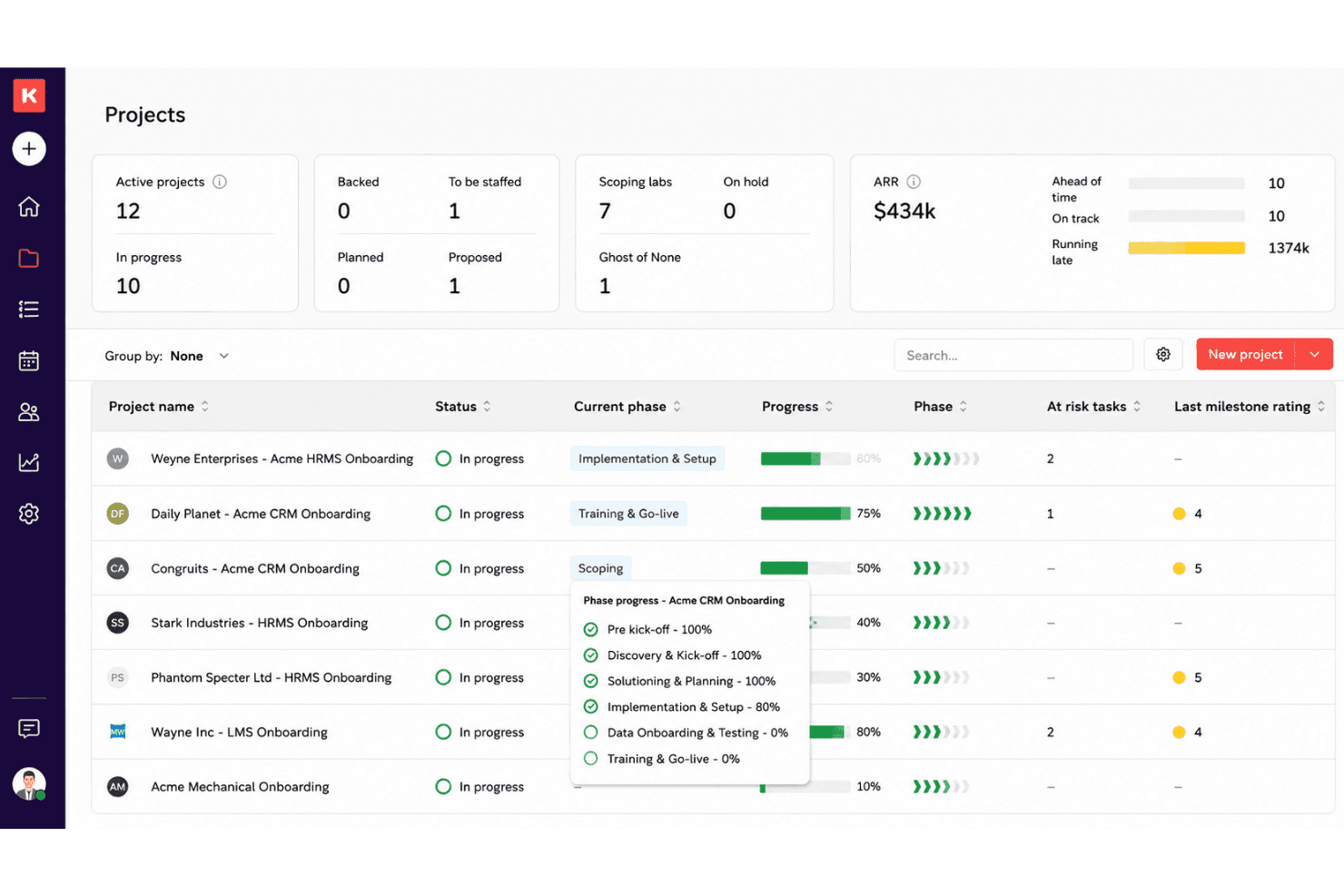
Rocketlane directs client onboarding, projects, resources, billing, and reports. Rocketlane is a professional services CRM and project delivery platform that connects client management, project onboarding, resource planning, time tracking, billing, and advanced reporting for services-driven teams.
Who Is Rocketlane Best For?
Mid-size to large professional services firms needing unified client onboarding, project delivery, and resource management in one system.
Why I Picked Rocketlane
I picked Rocketlane as one of the best because my team can link project onboarding directly to client services, using SOW-to-project conversion, real-time delivery tracking, and a collaborative client portal that keeps every engagement on track.
Rocketlane Key Features
- Role-based access controls: Manage project visibility and permissions for internal teams and clients.
- Time tracking module: Log billable and non-billable hours directly within project workspaces.
- Resource planning dashboard: Allocate team members to projects based on real-time capacity and skill sets.
- Customizable reporting and analytics: Build dashboards on project profitability, utilization, and account health.
Rocketlane Integrations
Rocketlane offers native integrations with Salesforce, Jira, Slack, HubSpot, Google Workspace, and Zendesk. An API is available for custom integrations.
Pros and Cons
Pros:
- Client-facing project portals for onboarding visibility
- Built-in resource allocation and utilization dashboard
- SOW-to-project conversion with full audit trail
Cons:
- Initial setup complexity for custom workflows
- Limited out-of-the-box reporting templates
Learn more about Rocketlane: Best client activity tracking for small firms
- Free plan available
- From $7/user/month
Visit WebsiteCustomer Rating:4.4/5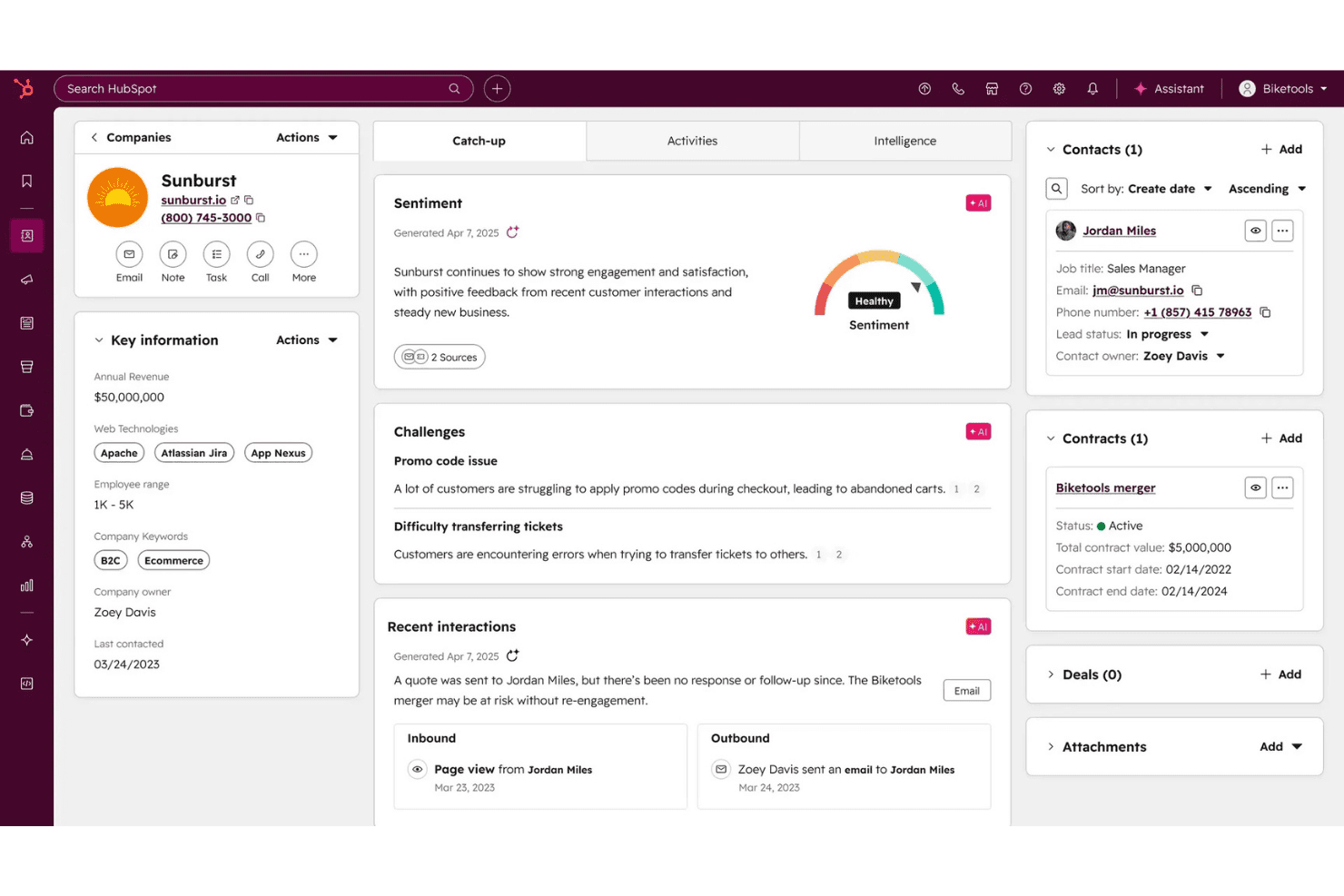
HubSpot CRM manages contacts, deals, workflows, proposals, projects and billing. HubSpot CRM is a cloud-based CRM for professional services that brings together contact management, sales pipeline tracking, customizable workflows, proposal generation, and integrations for project and billing systems.
Who Is HubSpot CRM Best For?
Small professional services firms and agencies that want a central place to manage client relationships, sales activities, and communications.
Why I Picked HubSpot CRM
I picked HubSpot CRM as one of the best because I can track every client interaction—emails, meetings, calls, notes—in a single timeline. I rely on its activity feed and logging to give my team context across sales and service without hunting through multiple tools.
HubSpot CRM Key Features
- Custom pipelines: Build and manage multiple sales or service pipelines with customizable stages for different engagement types.
- Proposal and quote generation: Create, send, and track digital proposals and quotes directly from client records.
- Integrated document management: Store, access, and share contracts, SOWs, and service agreements within each account.
- Role-based permissions: Set team and user access controls to protect sensitive project and client information.
HubSpot CRM Integrations
HubSpot CRM offers 1,000+ native integrations, including QuickBooks, Xero, Asana, Slack, Zoom, Google Workspace, Microsoft 365, DocuSign, PandaDoc, and Salesforce. Zapier and an API are also available for custom integrations.
Pros and Cons
Pros:
- Customizable sales and service pipelines
- Built-in proposal and quote generation tools
- Unified timeline for all client interactions
Cons:
- Advanced reporting requires higher tier plans
- Limited project and capacity management features
Learn more about HubSpot CRM: Best workflow automation for large teams
- 30-day free trial + free demo available
- From $25/user/month
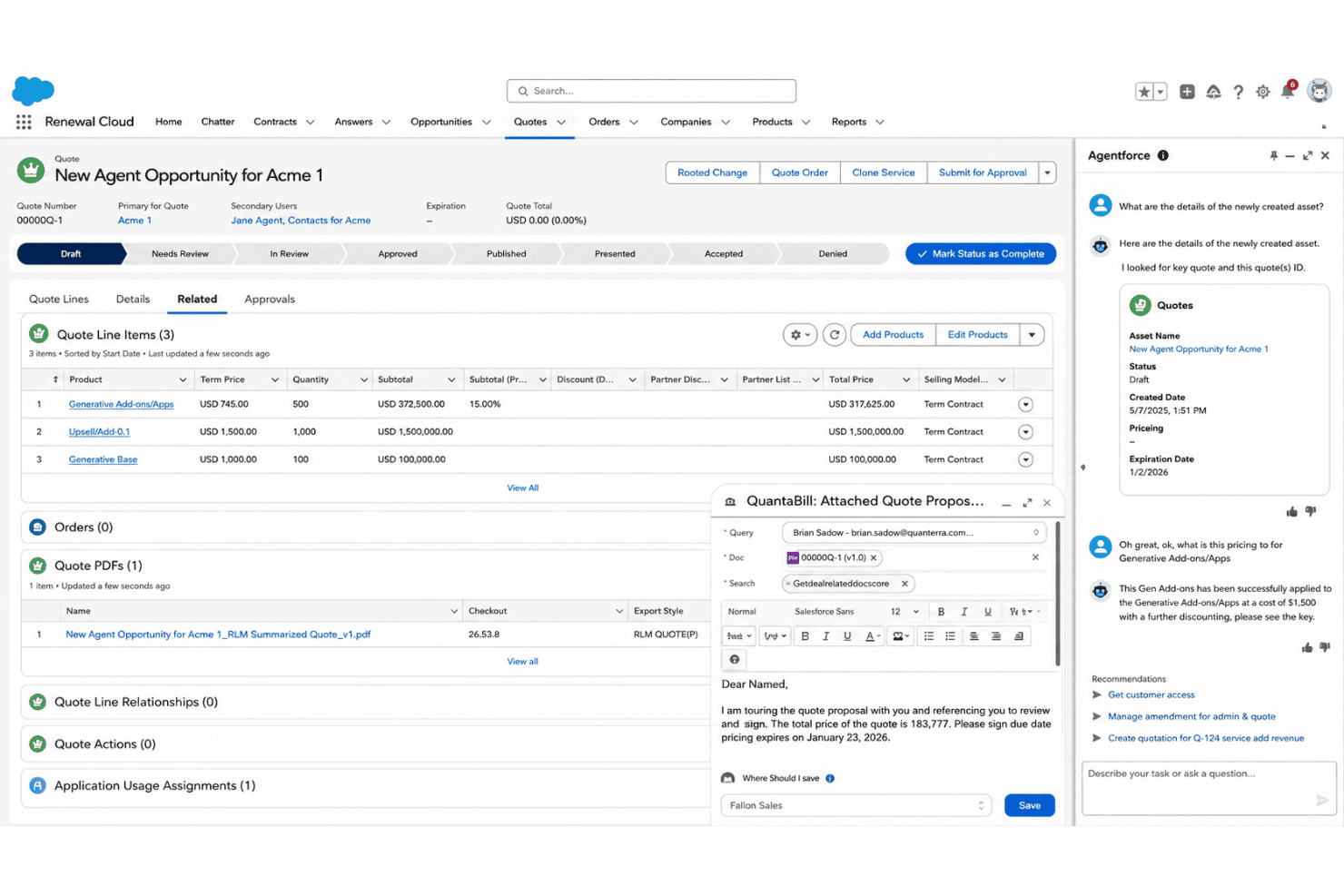
Agentforce Sales organizes contacts, deals, projects, and business applications. Agentforce Sales is an enterprise CRM platform designed for professional services teams, offering customizable contact management, deal tracking, project linking, and deep integration with essential business applications.
Who Is Agentforce Sales Best For?
Large professional services organizations with dedicated sales, RevOps, or client operations teams managing complex client and engagement lifecycles.
Why I Picked Agentforce Sales
I picked Agentforce Sales because workflow automation at scale is unmatched for complex sales and delivery teams. I use its process builder to handle multi-step approvals and automate SOW and contract workflows across global client accounts.
Agentforce Sales Key Features
- Hierarchical account management: Organize client records with firm, department, and contact hierarchies tailored to professional services structures.
- Opportunity split tracking: Allocate deal credit by team member or practice group for complex service engagements.
- Resource forecasting dashboards: Visualize staff capacity and utilization linked to sales pipeline stages and projected engagements.
- Native document generation: Create proposals, SOWs, and contracts from templates directly within the CRM environment.
Agentforce Sales Integrations
Agentforce Sales provides hundreds of native integrations through Salesforce AppExchange, including DocuSign, Slack, Mailchimp, HubSpot, Microsoft 365, QuickBooks, Asana, Smartsheet, SAP, and NetSuite. An API is available for custom integrations.
Pros and Cons
Pros:
- Offers advanced pipeline and resource forecasting
- Handles multi-entity and global account structures
- Automates complex multi-step sales workflows
Cons:
- Professional services reporting needs customization
- Time and billing features require add-ons
Learn more about Agentforce Sales: Best no-code process customization for services
- Not available
- From $40/user/month
Visit WebsiteCustomer Rating:4.7/5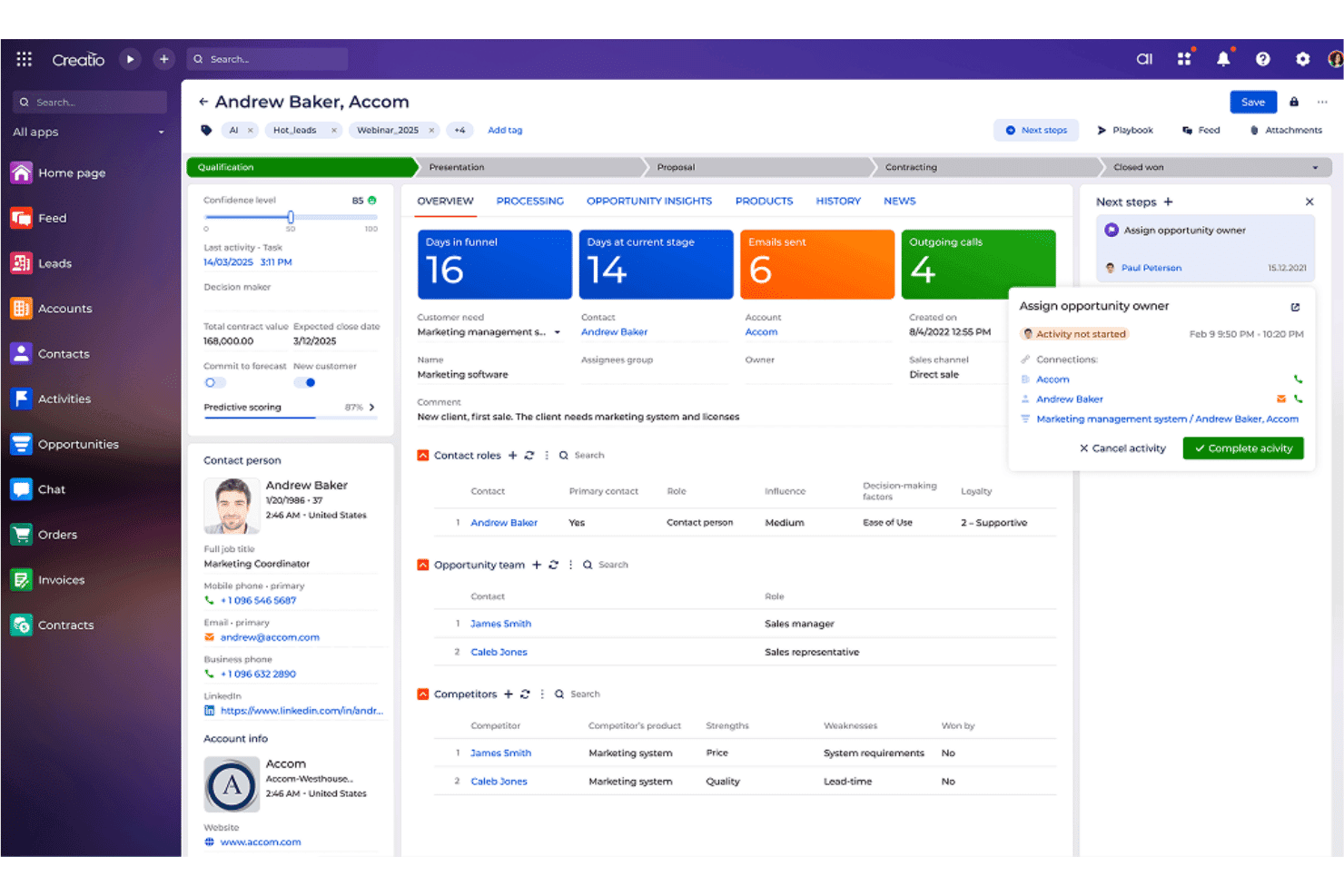
Creatio CRM connects client data, opportunities, projects, and custom workflows. Creatio CRM is a process-centric CRM platform designed for professional services teams that need customizable client management, opportunity tracking, project linking, and workflow automation in one system.
Who Is Creatio CRM Best For?
Professional services firms that need flexible CRM and workflow automation to manage complex client and project relationships.
Why I Picked Creatio CRM
I picked Creatio CRM as one of the best because I can build and adjust entire services workflows using its no-code editor, connecting project stages, SOW approvals, and account structures without writing code. This saves my team setup time every time our process changes.
Creatio CRM Key Features
- Hierarchical account management: Organize clients into firm, division, and subsidiary structures.
- Multi-pipeline opportunity tracking: Set up distinct pipelines for different types of service engagements.
- Integrated time tracking: Log billable hours directly on projects and activities.
- Advanced reporting dashboards: Visualize pipeline, revenue, and utilization metrics using customizable widgets.
Creatio CRM Integrations
Creatio CRM offers native integrations with Jira, DocuSign, Microsoft 365, Google Workspace, QuickBooks, and Xero, and connects with Zapier. An API is available for custom integrations.
Pros and Cons
Pros:
- Supports custom pipelines for varying engagement types
- Hierarchical account management for complex firms
- No-code workflow builder for project processes
Cons:
- Project resource allocation features are limited
- Billing module is less robust than PSA tools
Learn more about Creatio AI CRM: Best profitability tracking for consultancies
- 14-day free trial
- From $10/user/month (billed annually)
Visit WebsiteCustomer Rating:4.6/5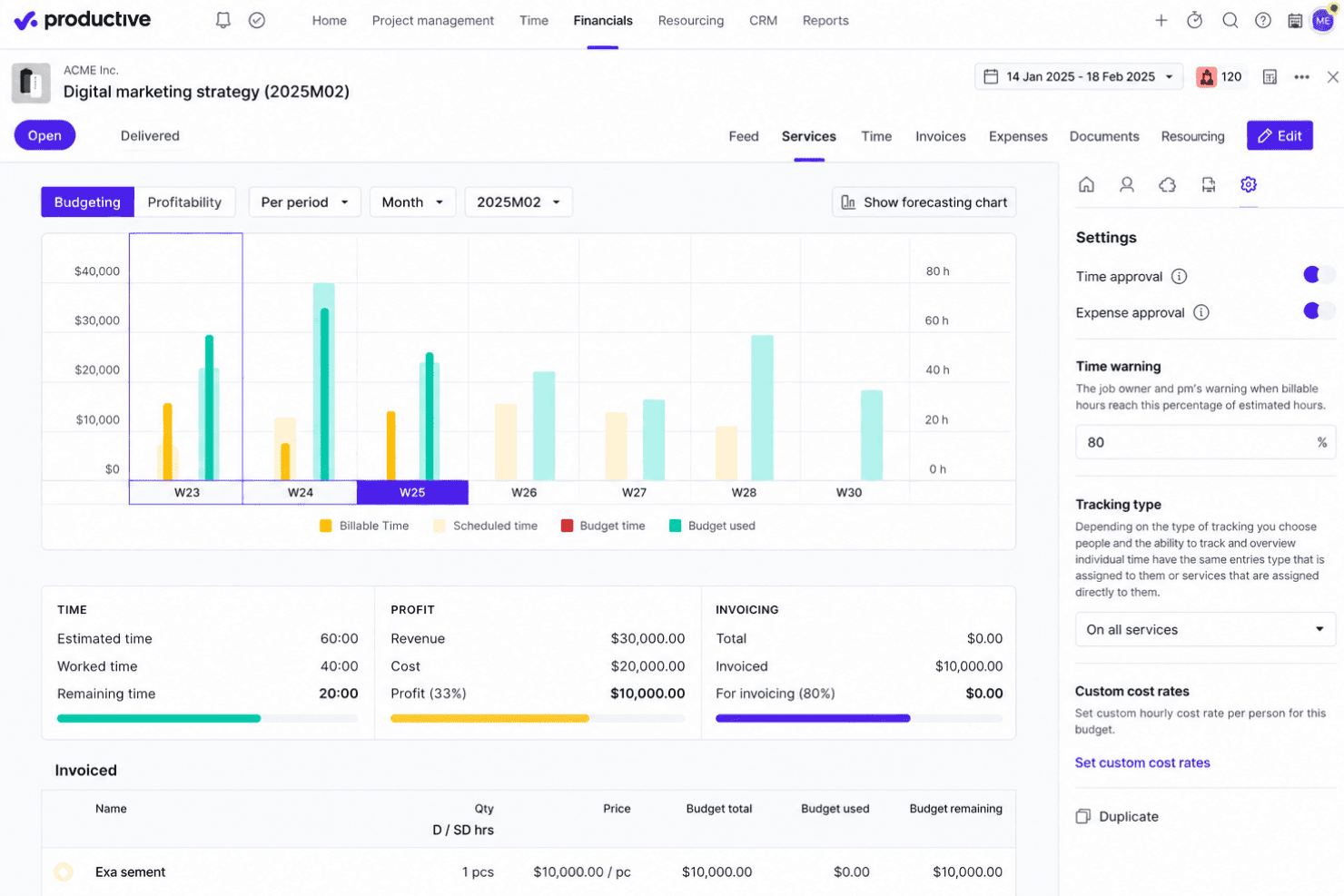
Productive handles deals, projects, time, budgets, invoices, and team resources. Productive is a CRM and professional services automation platform designed for consultancies that brings together deal tracking, project delivery, time management, budgeting, invoicing, and resource planning in a single system tailored for services firms.
Who Is Productive Best For?
Consultancies and agencies with project-based teams that need unified CRM, project management, and financial tracking in one platform.
Why I Picked Productive
I picked Productive as one of the best because I can drill into client, project, and service line profitability in real time. My team tracks billable hours, revenue, and costs side by side, making it simple to compare client margins across our entire portfolio.
Productive Key Features
- Custom deal pipeline: Configure deal stages and manage proposals or SOWs for multiple service lines.
- Resource planning module: Schedule staff on projects and view real-time capacity across your organization.
- Integrated document management: Store and organize project files, contracts, and engagement records within each client profile.
- Automated invoicing workflows: Generate invoices from tracked time, expenses, and retainers linked to each project or client.
Productive Integrations
Productive offers native integrations with Xero, QuickBooks, Exact, Fortnox, Twinfield, Visma, BambooHR, BreatheHR, Rippling, HiBob, Personio, Slack, Google Calendar, JIRA, and HubSpot. Zapier and an API are available for custom integrations.
Pros and Cons
Pros:
- Built-in resource planning and utilization views
- Smooth transition from pipeline to project delivery
- Real-time project and client profitability tracking
Cons:
- Setup can be complex for first-time users
- Limited advanced business intelligence options
Learn more about Productive: Best integrated sales and support
- Free demo available
- From $19/month
Visit WebsiteCustomer Rating:4.4/5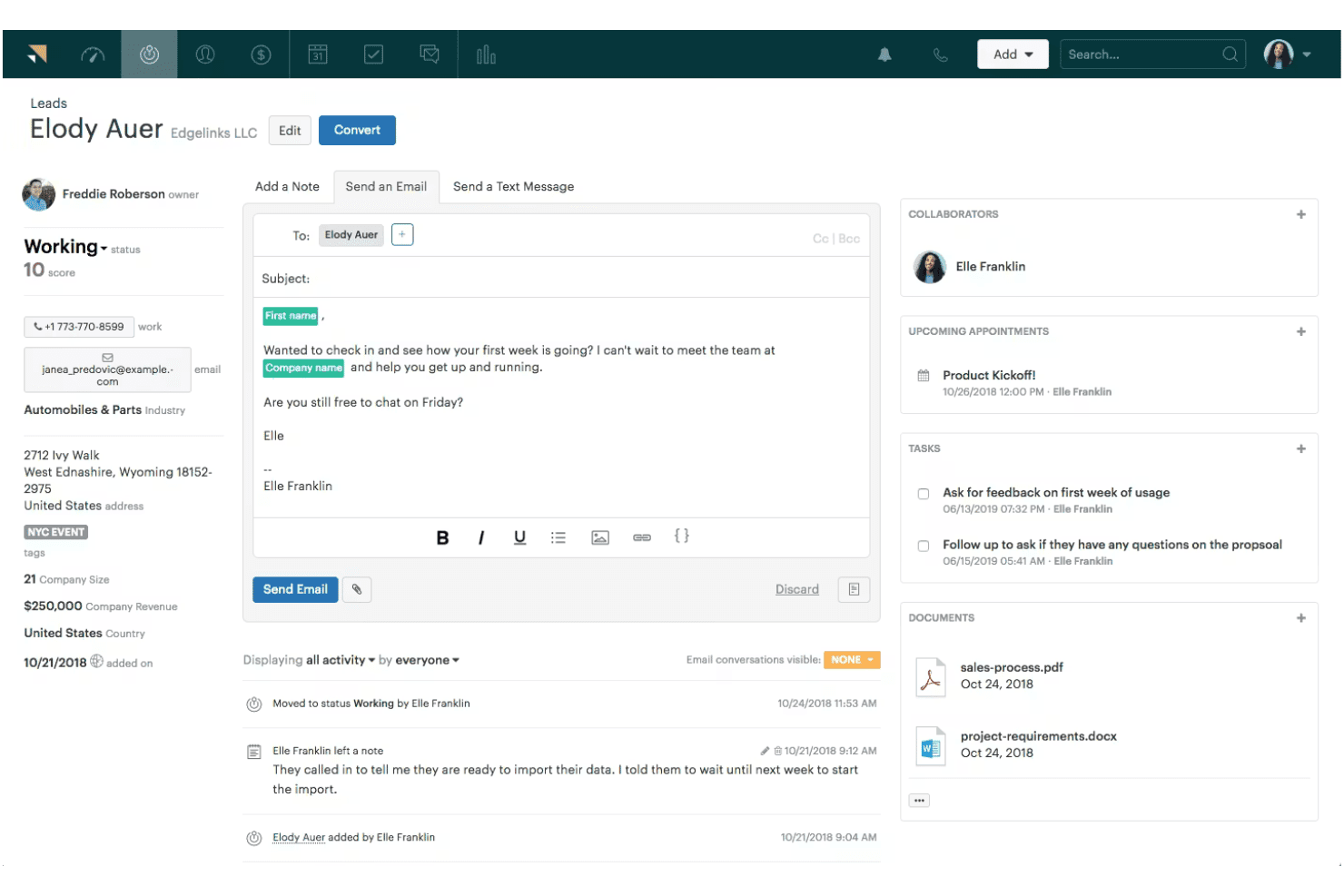
Zendesk Sell unifies leads, deals, contacts, pipelines, and support workflows. Zendesk Sell is a sales-focused CRM designed for professional services teams that want integrated lead management, deal tracking, contact organization, sales pipeline customization, and close ties to support workflows.
Who Is Zendesk Sell Best For?
Sales and client services teams in professional services firms that want a CRM tightly connected with customer support tools.
Why I Picked Zendesk Sell
I picked Zendesk Sell for how my team can track sales and support conversations in one place, and link deals directly to support tickets. I like being able to monitor account statuses while collaborating between sales and support teams through shared record views.
Zendesk Sell Key Features
- Customizable sales pipelines: Set up multiple pipelines tailored to different client services and engagement types.
- Email integration: Sync client communication directly into deal records with automatic email tracking.
- Mobile app access: Manage contacts, deals, and tasks from iOS or Android devices on the go.
- Custom fields and tags: Organize client and engagement data using customizable fields and labeling.
Zendesk Sell Integrations
Zendesk Sell offers native integrations with Zendesk Support, Slack, Mailchimp, Google Workspace, Dropbox, Asana, Trello, HubSpot, QuickBooks, and Xero. Zapier and an API are available for additional custom integrations.
Pros and Cons
Pros:
- Quick access to client communication history
- Pipeline stages configurable for client engagements
- Combines sales CRM with customer support tickets
Cons:
- Lacks native project or billable tracking
- No built-in resource or utilization tracking
Learn more about Zendesk Sell: Best visual pipeline management for project teams
- 14-day free trial
- From $14/user/month (billed annually)
Visit WebsiteCustomer Rating:4.4/5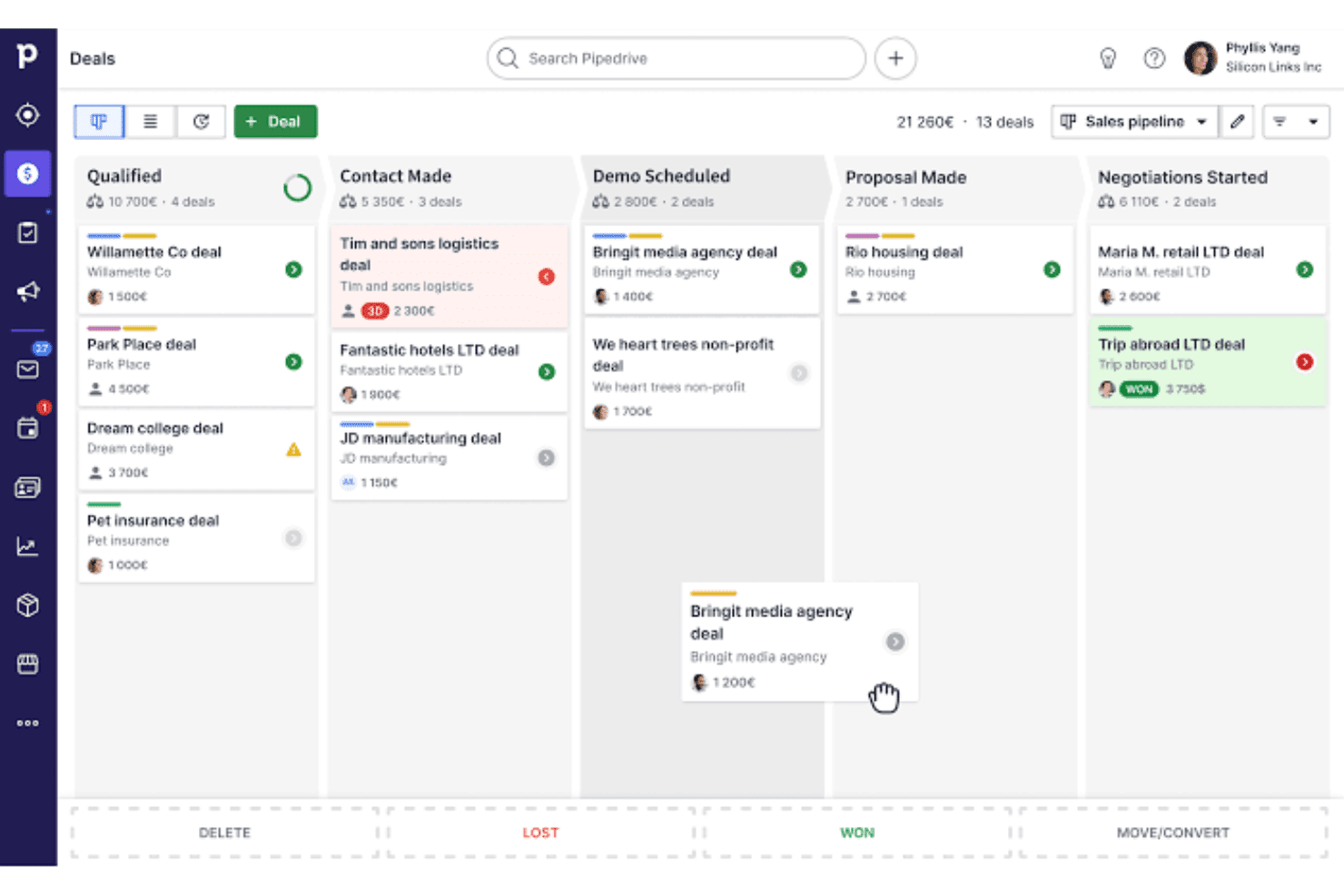
Pipedrive tracks client data, deals, pipelines, projects, billing and workflows. Pipedrive is a CRM platform for professional services teams that centralizes client management, opportunity tracking, customizable sales pipelines, and integrations with project and billing tools.
Who Is Pipedrive Best For?
Sales-focused professional services teams at small to midsize firms that need straightforward CRM and deal pipeline visibility.
Why I Picked Pipedrive
I picked Pipedrive as one of the best because its visual pipelines make it easy to manage deals, proposals, and SOWs. I like having customizable stages and drag-and-drop features that help my team quickly track opportunities and forecast project workflows.
Pipedrive Key Features
- Customizable data fields: Add, edit, and organize fields to tailor client and project information for your workflow.
- Activity scheduling tools: Log meetings, calls, and deadlines with automated reminders linked to deal records.
- Email integration: Sync email accounts so messages and communication history appear inside contact profiles.
- Marketplace integrations: Connect with tools like DocuSign, Xero, and Trello for additional project delivery and billing functions.
Pipedrive Integrations
Pipedrive offers native integrations with Trello, Asana, QuickBooks, Xero, DocuSign, Google Workspace, Microsoft 365, Slack, Mailchimp, Zoom, and Zapier. It also provides a REST API for building custom integrations.
Pros and Cons
Pros:
- Quickly organize tasks by deal stage
- Custom fields support unique client data
- Visual drag-and-drop sales pipelines
Cons:
- Project management features are very basic
- No native time tracking or billing
Learn more about Pipedrive: Best resource planning for professional firms
- Free demo available
- Pricing upon request
Visit WebsiteCustomer Rating:3.9/5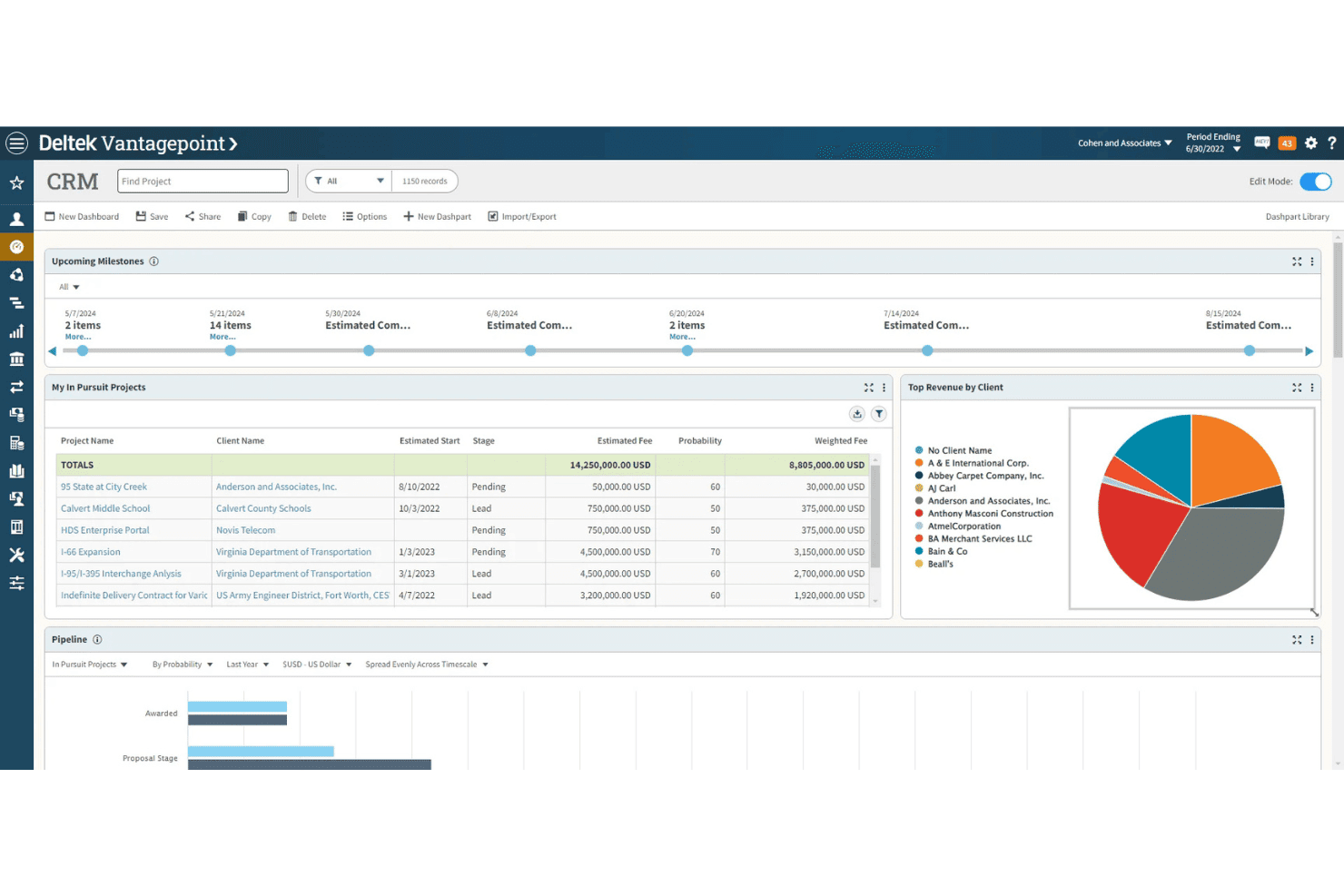
Deltek Vantagepoint links clients, deals, projects, billing, and team resources. Deltek Vantagepoint is a CRM and resource planning platform for professional services firms that centralizes client management, opportunity tracking, project delivery, billing, and resource allocation in a single integrated system.
Who Is Deltek Vantagepoint Best For?
Project-based professional services firms in architecture, engineering, and consulting that need unified client, project, and resource management.
Why I Picked Deltek Vantagepoint
I picked Deltek Vantagepoint as one of the best because I can link resource plans directly to client projects and see staff workload in real time. I use its integrated dashboards to allocate people by role and skill, keeping billable assignments fully aligned with pipeline changes.
Deltek Vantagepoint Key Features
- Customizable pipeline stages: Set up deal workflows tailored to professional services sales cycles.
- Project-to-cash workflow: Manage opportunities, projects, billing, and revenue in one system.
- Native proposal generation: Build and store standardized proposals and SOWs linked to clients and projects.
- Integrated time and expense entry: Log project hours and expenses directly within each client engagement record.
Deltek Vantagepoint Integrations
Deltek Vantagepoint offers native integrations with Microsoft 365, Deltek ArchiSnapper, Deltek PIM, and GovWin IQ. An API is available for custom integrations.
Pros and Cons
Pros:
- Built-in proposal and SOW automation
- Advanced resource allocation for project teams
- Deep project and financial management integration
Cons:
- Reporting customization is somewhat limited
- Interface can feel dated in places
Learn more about Deltek Vantagepoint: Best deal insights for growing firms
- Free plan available
- From $14/user/month (billed annually)
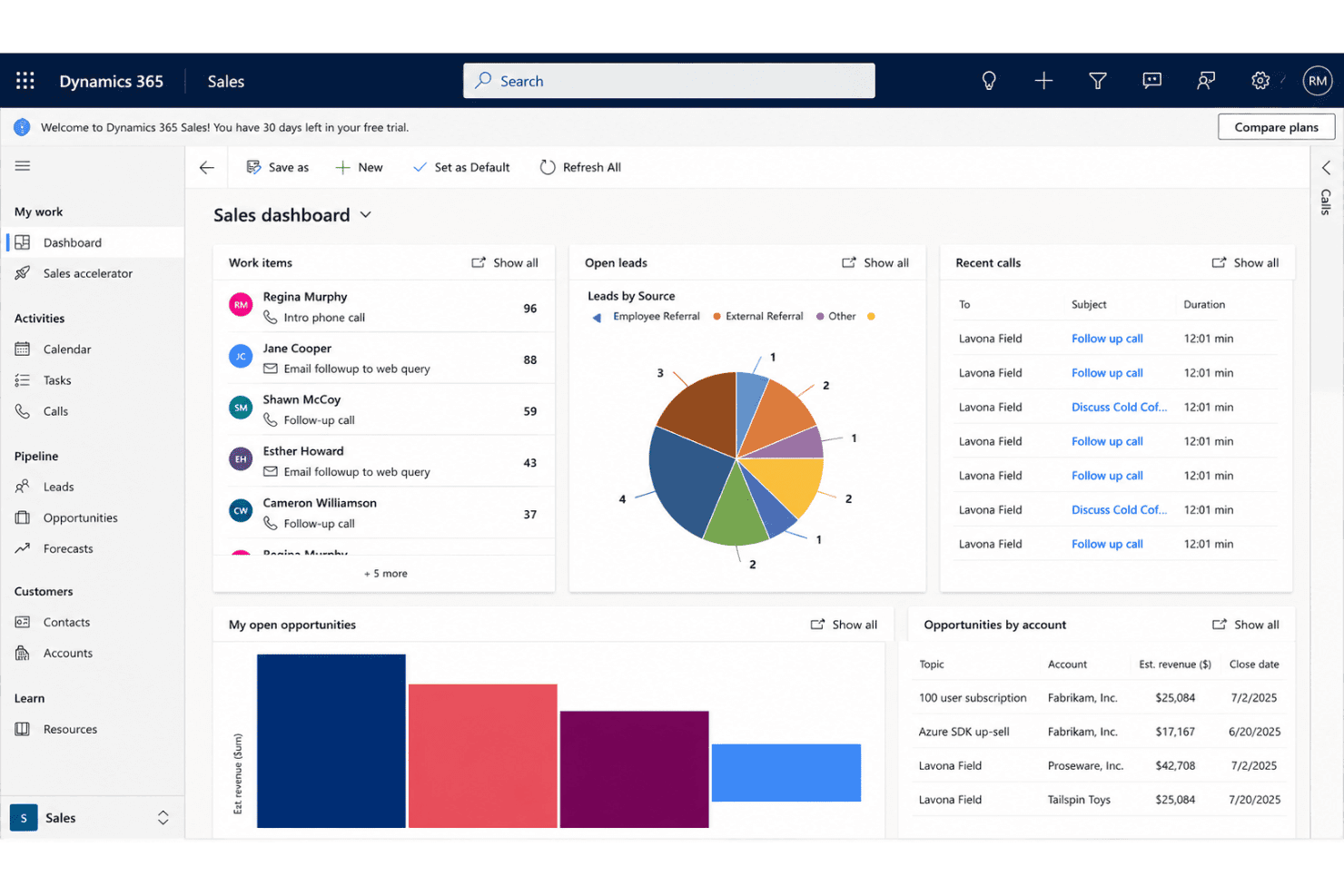
Microsoft Dynamics 365 Sales supports client pipelines, resources, and projects. Microsoft Dynamics 365 Sales is a CRM platform built for professional services teams that need sales pipeline management, client relationship tools, resource tracking, and strong connections to project delivery systems.
Who Is Microsoft Dynamics 365 Sales Best For?
Growing professional services firms that use the Microsoft 365 ecosystem and want connected client management, sales, and delivery processes.
Why I Picked Microsoft Dynamics 365 Sales
I picked Microsoft Dynamics 365 Sales because I like how deeply it connects opportunity management with project delivery through Project Operations. I rely on its multi-pipeline support for retainers and fixed-fee contracts, plus native tools for proposal and SOW workflows. The best deal insights for growing firms are right in the platform.
Microsoft Dynamics 365 Sales Key Features
- Hierarchical account structure: Organize client records using parent-child relationships for complex firm structures.
- Integrated email and calendar sync: Connect Outlook to automatically track communications and schedule client meetings.
- Custom entity and field creation: Build fields and modules tailored to professional services processes and data needs.
- Role-based access control: Set permissions for sensitive client, deal, and financial data by team function or job role.
Microsoft Dynamics 365 Sales Integrations
Microsoft Dynamics 365 Sales has native integrations across the Microsoft ecosystem, including Microsoft 365 and Azure, plus native connections with DocuSign, Adobe Sign, and LinkedIn Sales Navigator. It also provides the Dataverse Web API for building custom integrations.
Pros and Cons
Pros:
- Automated SOW and contract generation workflows
- Deep visibility into client account history
- Customizable pipeline for retainer or project sales
Cons:
- Initial configuration setup is time intensive
- Full project tracking requires additional modules
Learn more about Microsoft Dynamics 365 Sales: Best financial integrations for service providers
- Free demo available
- Pricing upon request
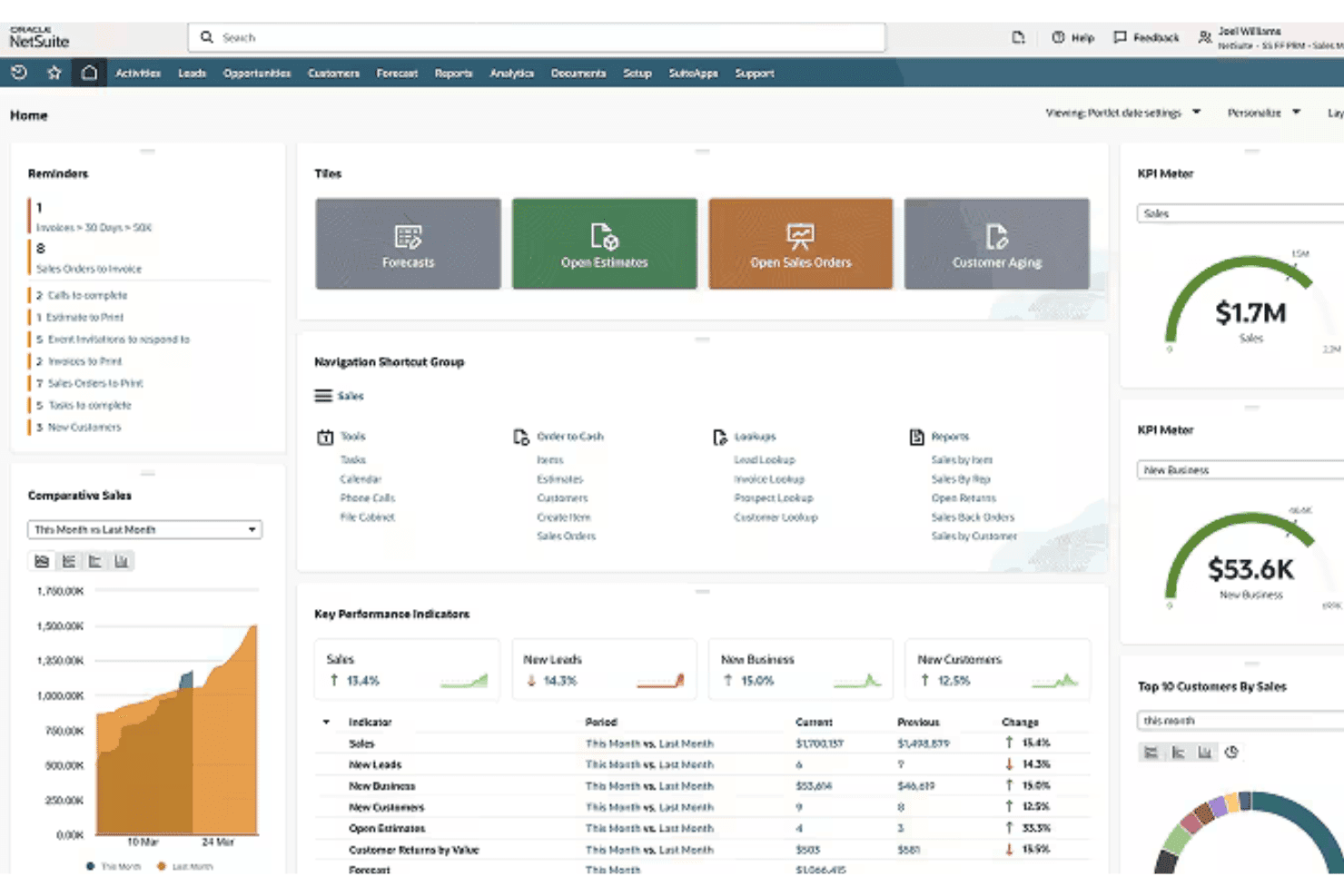
Oracle NetSuite CRM aligns clients, projects, billing, and resource planning. Oracle NetSuite CRM is a professional services-focused CRM system that unifies client management, project tracking, billing, and resource planning in a cloud-based platform.
Who Is Oracle NetSuite CRM Best For?
Large professional services firms and multi-office consultancies that need unified client, engagement, and financial management across their operations.
Why I Picked Oracle NetSuite CRM
I picked Oracle NetSuite CRM as one of the best because I can link client lifecycle data directly to financial operations. My team handles project billing, retainer management, and revenue recognition using its best financial integrations for service providers.
Oracle NetSuite CRM Key Features
- Customizable sales pipeline stages: Configure unique sales and delivery milestones to fit professional services workflows.
- Integrated resource planning: See staff availability, capacity, and allocation within the CRM for accurate engagement staffing.
- Firm hierarchy management: Organize and manage complex client relationships with parent-child account structures.
- Project-to-CRM linking: Tie project progress, timelines, and deliverables directly to client and opportunity records.
Oracle NetSuite CRM Integrations
Oracle NetSuite CRM offers native integrations across the Oracle and NetSuite ecosystem, including NetSuite ERP, SuiteProjects, SuiteBilling, and Oracle CX applications. It also provides SuiteTalk REST and SOAP APIs for building custom integrations.
Pros and Cons
Pros:
- Deep project billing and revenue recognition
- Advanced resource and engagement tracking
- Unified CRM, PSA, and financials platform
Cons:
- Interface can feel dated and slow
- Complex setup for new implementations
Learn more about Oracle NetSuite CRM:
Profesyonel Hizmetler İçin Diğer CRM Yazılımları
Aşağıda, kısa listeme giremeyen ancak yine de göz atmaya değer bazı profesyonel hizmetler için ek CRM yazılımı seçeneklerini bulabilirsiniz:
- 11ScoroBest all-in-one work management for agencies
- 12AcceloBest for client work tracking
- 13InsightlyBest for relationship linking for client projects
- 14BQE CoreBest for time and billing for service pros
- 15Zoho CRMBest for multi-channel client communications
- 16SuiteDashBest for built-in client portal features
- 17Copper CRMBest for Google Workspace integration
- 18Capsule CRMBest for contact segregation for niche services
How I Evaluate CRM Software for Professional Services
I split my evaluation into two layers: baseline capabilities a services CRM must have—like pipeline-to-project handoff and billing visibility—and differentiators that set the best options apart.
Core Functionality (Table Stakes For This List)
When I'm selecting tools for my list, I rank each one on a scale from 0 (does not offer the functionality) to 5 (excels in this area) for each core functionality listed below. Then, I calculate the tool's total score into a percentage. Each tool needs to achieve a minimum total score of 65% to be considered for inclusion.
- Contact & Account Management: I check for hierarchical client structures and full engagement history, like tracking multiple stakeholders across a consulting firm's subsidiaries.
- Opportunity & Pipeline Management: Services revenue is messy. I look for pipelines that handle retainers, fixed-fee, and T&M deals with forecasting that reflects those models.
- Project & Engagement Linking: I evaluate how well a CRM connects a closed deal to delivery, whether that's a native handoff or a tight integration with a PSA tool.
- Time, Billing & Revenue Tracking: Billable hours need to tie back to client records. I look for native time tracking or deep integrations with tools like QuickBooks or Xero.
- Resource & Utilization Visibility: Winning work you can't staff is a real problem. I look for capacity views or utilization dashboards tied to pipeline forecasts.
- Reporting & Revenue Analytics: I evaluate dashboards for services-specific metrics like client profitability, backlog, and forecast-vs.-actual comparisons that RevOps teams rely on.
Once I have a list of tools that meet the criteria, I consider what sets each platform apart.
Differentiating Factors (What Sets Vendors Apart)
Here's how I compare and contrast different vendors:
Standout Features
Proposal and SOW automation is a big differentiator—I look for tools that let your team generate engagement letters or change orders directly from a deal record without switching to a separate document tool. Resource and capacity planning matters just as much, especially when your pipeline forecast needs to map to consultant availability and skills. I also check for client portal access, where clients can review project status and deliverables on their own, reducing back-and-forth status emails.
Beyond Features
Integration with your existing tech stack is a major factor. I check for native connectors to PSA tools like Kantata or Certinia, plus two-way sync with accounting and document platforms your delivery team already uses. Fit for services business models matters too—your CRM should support retainer, fixed-fee, and T&M engagements without clunky workarounds. For firms in legal or accounting, I evaluate granular permissions and audit trails that let you segregate client data across practice areas to meet confidentiality requirements.
Profesyonel Hizmetler İçin CRM Yazılımı Nasıl Seçilir?
Uzun özellik listeleri ve karmaşık fiyatlandırma yapıları içinde kaybolmak kolaydır. Kendinize özgü yazılım seçim sürecinizi yürütürken odağınızı korumanıza yardımcı olmak için göz önünde bulundurmanız gereken faktörleri aşağıda bir kontrol listesi halinde bulabilirsiniz:
| Faktör | Dikkat Edilmesi Gerekenler |
|---|---|
| FaktörÖlçeklenebilirlik | Dikkat Edilmesi GerekenlerÇalışan sayısı, hizmet alanları ve müşteri tabanınız büyürken CRM firmanızı destekleyebilir mi? Yeni hizmet alanları ekledikçe lisanslama ve yapılandırma esnekliğini koruyacak mı? |
| FaktörEntegrasyonlar | Dikkat Edilmesi GerekenlerPlatform, mevcut PSA, faturalandırma, belge ve proje yönetimi sistemlerinize bağlanabiliyor mu? Temel araçlarınızı listeleyin ve kolay, kesintisiz senkronizasyonu doğrulayın. |
| FaktörÖzelleştirilebilirlik | Dikkat Edilmesi GerekenlerAğır BT desteği olmadan alanları, iş akışlarını ve raporlamayı SOW'lar, teklifler veya kapasite planlamasına ilişkin benzersiz süreçlerinize uyarlayabilir misiniz? |
| FaktörKullanım kolaylığı | Dikkat Edilmesi GerekenlerSatış, teslimat, yönetim ve liderlik ekipleriniz sistemi hızlı bir şekilde benimseyecek mi? Öğrenme eğrisi dik veya arayüzü güncelliğini yitirmiş araçlardan kaçının. |
| FaktörUygulama ve işe alıştırma | Dikkat Edilmesi GerekenlerKurum içi BT ekibi olmayan firmalar için kullanıma geçiş süreci nasıl işliyor? Zaman çizelgelerini, veri aktarımı desteğini ve sektöre özel şablonlara erişimi sorun. |
| FaktörMaliyet | Dikkat Edilmesi GerekenlerTüm kullanıcı türleri (teslimat, yönetim, liderlik) makul bir fiyatlandırma modeline dahil mi? Hem devam eden kullanım hem de gerekli ek özellikler için bütçe ayırın. |
| FaktörGüvenlik önlemleri | Dikkat Edilmesi GerekenlerMüşteriler arası görünürlüğü önlemek için veri erişimi müşteri, hizmet alanı veya projeye göre bölümlendiriliyor mu? Denetim kayıtlarını, izinleri ve verilerin barındırıldığı konumu inceleyin. |
| FaktörDestek hizmetinin kullanılabilirliği | Dikkat Edilmesi GerekenlerBüyük kullanıma geçişler veya değişiklikler sırasında hangi hizmet düzeylerine güvenebilirsiniz? Yapılandırma ve sorun giderme için açık SLA'lar ve özel destek sunan çözümleri arayın. |
Profesyonel Hizmetler İçin CRM Yazılımı Nedir?
Profesyonel hizmetler için CRM yazılımı, potansiyel müşterilerin yakalanması ve puanlanmasından proje teslimatına ve yenilemeye kadar müşteri yaşam döngüsünün her aşamasını yönetmek için tasarlanmış bir müşteri ilişkileri yönetimi yazılım platformudur. Bu araçlar müşteri verilerini merkezileştirir, CRM uygulamasını destekler ve ekiplerin müşteri iletişimini ve sözleşme yönetimini geliştirmesine yardımcı olur.
Birçok platform ayrıca pazarlama otomasyonu, toplantı planlama araçları, veri taşıma desteği ve çapraz satış özellikleri de sunar. Bu yetenekleri bir araya getirerek operasyonel verimliliği artırır ve profesyonel hizmet firmalarının iş geliştirme faaliyetlerini desteklerler.
Özellikler
Profesyonel hizmetler için CRM yazılımı seçerken aşağıdaki temel özelliklere dikkat edin:
- Kişi ve hesap yönetimi: Ayrıntılı müşteri ve firma kayıtlarını düzenler; ilişki geçmişini, notları ve hesaplar genelindeki birden fazla ilgili kişiyi kaydeder.
- Fırsat ve satış hunisi yönetimi: Hizmet temelli satışlar için tasarlanmış tahmin araçlarıyla özelleştirilebilir satış hunilerinde anlaşmaları, teklifleri ve geliri izler.
- Proje ve çalışma ilişkilendirme: Tamamlanan anlaşmaları, sorunsuz bir satıştan teslimata geçiş için doğrudan proje teslim modüllerine veya üçüncü taraf araçlara bağlar.
- Zaman ve faturalandırma takibi: Müşteri kayıtlarıyla ilişkilendirilen faturalandırılabilir saatleri ve giderleri kaydederek doğru faturalandırma, gelir takibi ve performans analizi sağlar.
- Kaynak ve kullanım planlaması: Ekip kapasitesi ve dağılımı hakkında görünürlük sağlayarak personel iş yüklerinin ve uygunluğunun proje gereksinimleriyle eşleşmesini güvence altına alır.
- Belge otomasyonu: Yerleşik şablonları, sürümlemeyi ve elektronik imza iş akışlarını kullanarak teklifler, iş kapsamı bildirimleri ve diğer önemli belgeler oluşturur.
- Müşteri portalı erişimi: Müşterilere proje durumunu, faturaları, teslimatları ve paylaşılan dosyaları tek bir konumda görüntüleyebilecekleri güvenli bir alan sunar.
- Hizmetlere özgü raporlama: Profesyonel hizmetlerle ilgili birikmiş iş, müşteri kârlılığı, kullanım ve gelir eğilimleri gibi KPI'lar için panolar ve özel raporlar sunar.
- Entegrasyon olanakları: Kuruluşunuz genelinde birleşik bir iş akışı oluşturmak için verileri muhasebe, proje yönetimi, PSA ve belge platformlarıyla senkronize eder.
- Ayrıntılı izinler: Gizliliği korumak ve veri yönetişimi gereksinimlerine uymak için kullanıcı erişimini çalışma alanına, müşteriye veya çalışmaya göre denetler.
Faydalar
Profesyonel hizmetler için CRM yazılımını uygulamak, ekibiniz ve işletmeniz açısından çeşitli faydalar sağlar. Yararlanabileceğiniz bazı faydalar şunlardır:
- Müşteri yaşam döngüsünün tamamında görünürlük: Müşteri etkileşimlerini, belgeleri ve proje geçmişini merkezileştirerek ekibinizin hesap durumu veya çalışma ayrıntılarıyla ilgili bağlamı asla kaybetmemesini sağlar.
- Daha sorunsuz satıştan teslimata geçiş: Satış hunisi yönetimini doğrudan proje teslimine bağlayarak boşlukları azaltır ve çalışmaların net beklentiler ve kaynak planlarıyla başlamasını sağlar.
- Doğru faturalandırma ve gelir takibi: Faturalandırılabilir zamanı ve giderleri müşteri hesaplarıyla ve fırsatlarla ilişkilendirerek faturalandırmayı ve kârlılık analizini daha kolay ve doğru hale getirir.
- Daha güçlü tahmin ve kaynak planlaması: Liderlerin kapasite planlamasına ve kullanım darboğazlarından kaçınmasına yardımcı olmak için satış hunisi verilerini, teslimat takvimlerini ve personel içgörülerini bir araya getirir.
- Geliştirilmiş müşteri deneyimi: Müşterilerinize proje durumuna, faturalara ve belgelere portal üzerinden erişme olanağı sunarak çalışma boyunca şeffaflığı ve güveni artırır.
- Daha iyi uyumluluk ve veri kontrolü: Erişimi denetleyebilmeniz, hassas bilgileri koruyabilmeniz ve müşteri gizliliği gereksinimlerini karşılayabilmeniz için ayrıntılı kullanıcı izinleri ve denetim izleri sunar.
- Daha kolay raporlama ve içgörüler: Kârlılık, birikmiş iş ve kullanım gibi KPI'lar için hizmetlere özgü panolar sunarak RevOps ekiplerine iş büyümesini yönlendirmek için ihtiyaç duydukları verileri sağlar.
Maliyetler ve Fiyatlandırma
Profesyonel hizmetler için CRM yazılımı seçmek, mevcut çeşitli fiyatlandırma modellerinin ve planların anlaşılmasını gerektirir. Maliyetler özelliklere, ekip büyüklüğüne, eklentilere ve daha fazlasına göre değişir. Aşağıdaki tablo, profesyonel hizmetler için CRM yazılımı çözümlerinde yaygın planları, ortalama fiyatlarını ve genellikle sunulan özellikleri özetlemektedir:
Profesyonel Hizmetler için CRM Yazılımı Plan Karşılaştırma Tablosu
| Plan Türü | Ortalama Fiyat | Yaygın Özellikler |
|---|---|---|
| Plan TürüÜcretsiz Plan | Ortalama Fiyat$0 | Yaygın ÖzelliklerTemel kişi ve fırsat takibi, basit raporlama, sınırlı kullanıcı sayısı ve topluluk desteği. |
| Plan TürüKişisel Plan | Ortalama Fiyat$10–$30/user/month | Yaygın ÖzelliklerTek satış hunisi yönetimi, özel alanlar, e-posta entegrasyonu, etkinlik takibi ve standart kullanıcı izinleri. |
| Plan Türüİşletme Planı | Ortalama Fiyat$30–$65/user/month | Yaygın ÖzelliklerBirden fazla satış hunisi desteği, proje ilişkilendirme, zaman ve faturalandırma araçları, otomasyon özellikleri, entegrasyonlar ve analiz. |
| Plan TürüKurumsal Plan | Ortalama Fiyat$65–$120/user/month | Yaygın ÖzelliklerGelişmiş izinler, özel iş akışları, kaynak planlama, müşteri portalları, API erişimi ve özel destek. |
Profesyonel Hizmetler için CRM Yazılımı SSS
Profesyonel hizmetler için CRM yazılımı hakkında sık sorulan bazı soruların yanıtları aşağıda yer almaktadır:
Profesyonel hizmetler için CRM yazılımını genel CRM'lerden farklı kılan nedir?
Profesyonel hizmetlere yönelik CRM’ler karmaşık satış döngülerini, proje teslimi devrini, zaman takibini ve kaynak planlamayı destekler. Ürün satışları için tasarlanmış genel CRM’lerde bu özelliklere nadiren rastlanır.
CRM yazılımı PSA, muhasebe ve proje yönetimi sistemleriyle entegre olabilir mi?
Evet, çoğu platform yerel entegrasyonları destekler veya birleşik veri akışları sağlamak üzere PSA araçlarına, muhasebe platformlarına ve proje yönetimi yazılımlarına bağlanmak için API’ler sunar.
Müşteri portalları müşteri deneyimini nasıl iyileştirir?
Müşteri portalları, müşterilerin tekliflere, proje güncellemelerine, teslimatlara ve faturalara tek bir yerden güvenli şekilde erişmesini sağlar; durum güncellemesi taleplerini azaltır ve güven oluşturur.
Faturalandırılabilir saatleri ve giderleri CRM içinde takip etmek mümkün mü?
Evet, bazı CRM’ler projelere ve müşteri kayıtlarına bağlı yerel zaman ve gider takibi sunarken, diğerleri faturalandırma doğruluğu için üçüncü taraf araçlara bağlanır.
Profesyonel hizmet firmaları için hangi güvenlik özellikleri önemlidir?
Müşteri gizliliğini korumak için ayrıntılı izinlere, denetim izlerine, veri yerleşimi seçeneklerine ve SOC 2 veya GDPR gibi çerçevelere uygunluğa sahip çözümleri tercih edin.
Uygulama genellikle ne kadar sürer?
Uygulama süreleri değişiklik gösterir, ancak birçok sağlayıcı kullanıma hazır şablonlar ve işe alıştırma desteği sunarak küçük ve orta ölçekli firmaların aylar yerine haftalar içinde kullanıma geçmesini sağlar.