

Doğru CRM’yi bulmak yeterince zordur; ancak Mailchimp ile iyi bir şekilde entegre olan bir CRM’ye ihtiyacınız olduğunda seçenekleriniz daha da sınırlı görünebilir. Gelir operasyonları ve CRM yazılımları konusundaki deneyimimi kullanarak, ekiplerin kendilerine özgü iş ihtiyaçlarına uygun çözümü seçmelerine yardımcı olmak için Mailchimp ile entegre olan en iyi CRM yazılımlarını test edip inceledim.
Ardından, her seçenek için temel özellikleri, artıları, eksileri ve entegrasyonları açıklayan kapsamlı incelemeler hazırladım. Şirketinizin büyüklüğü veya faaliyet alanı ne olursa olsun, bu makalede bir sonraki CRM’nizi bulabileceğinizden eminim.
Why Trust Our Software Recommendations
6,700+
Reviews
20
Industry experts
16+
Evaluation factors
14
Years
Our reviews reflect our independent judgment—not a sales pitch. Learn how we stay transparent.
For this guide, we evaluated tools using hands-on testing and independent research, scoring tools using our selection criteria.
Our reviews reflect our human editorial judgment, not a sales pitch.
Mailchimp ile Entegre Olan CRM Yazılımları Karşılaştırma Tablosu
Bu karşılaştırma tablosu, Mailchimp ile entegre olan en iyi CRM yazılımları seçimlerim için fiyatlandırma ayrıntılarını özetlemektedir:
Score legend (out of 5)
- Excellent4.5–5
- Good4–4.4
- Average3–3.9
- Below average2–2.9
- Poor1–1.9
Sorted by: Default
| Tool | Starting Price | Website | |||||||
|---|---|---|---|---|---|---|---|---|---|
Best for SMB sales teams on a tight stack | 4.2 out of 5 | 5 | 2 | 5 | 4 | 5 | 4 | $23/user/month 15-day free trial | Website |
Best for contact-based pricing with Mailchimp sync | 4.0 out of 5 | 4 | 4 | 4 | 4 | 4 | 4 | $19.99/month per 1,000 contacts 15-day free trial | Website |
Best for sales pipeline management | 3.7 out of 5 | 5 | 3 | 4 | 1 | 5 | 4 | $29/user/month 14-day free trial + free demo available | Website |
Best for customizable CRM solutions | 4.0 out of 5 | 5 | 4 | 4 | 3 | 4 | 4 | $65/month Free trial available | Website |
Best for simple and effective contact management | 3.8 out of 5 | 5 | 4 | 3 | 3 | 4 | 4 | $18/user/month 14-day free trial + free plan available | Website |
Best for inbound marketing and sales teams | 4.3 out of 5 | 5 | 4 | 5 | 3 | 5 | 4 | $20/user/month Free plan + 14-day free trial + demo available | Website |
Best for Google Workspace integration | 4.2 out of 5 | 5 | 3 | 5 | 3 | 4 | 5 | $29/user/month 14-day free trial + demo available | Website |
Best for small to medium-sized businesses | 4.5 out of 5 | 5 | 4 | 5 | 4 | 5 | 4 | $14/user/month Free plan + 15-day free trial+ free demo available | Website |
Best for revenue attribution across email and pipeline | 4.7 out of 5 | 5 | 5 | 5 | 4 | 5 | 4 | $25/user/month Free plan + 30-day free trial available | Website |
Best for ERP-connected revenue and Mailchimp sync | 4.3 out of 5 | 5 | 4 | 4 | 5 | 5 | 3 | $59/user/month 30-day free trial | Website |


Mailchimp ile Entegre Olan En İyi CRM Yazılımları İncelemeleri
Bu kapsamlı analiz, Mailchimp ile entegre olan her CRM yazılımına genel bir bakış sunmaktadır. Her aracın artılarını ve eksilerini, özelliklerini ve en uygun kullanım alanlarını ele almaktadır.
 Best for SMB sales teams on a tight stack
- 15-day free trial
- From $23/user/month (billed annually)
Visit WebsiteCustomer Rating:4.7/5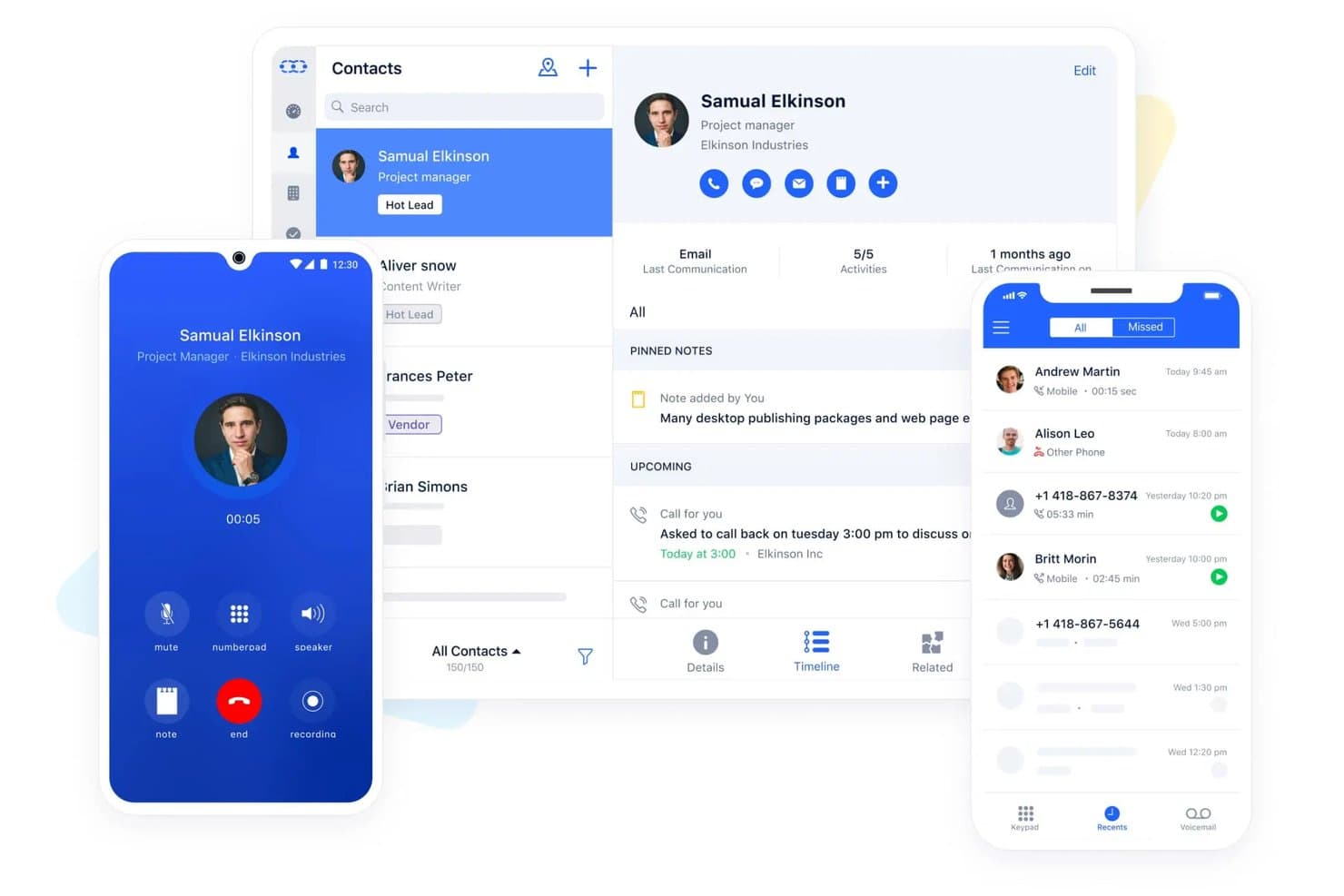
Salesmate centralizes contact management, calls, and activity tracking. Salesmate is a CRM platform built for SMB sales teams that combines pipeline management, built-in VoIP calling, SMS, lead scoring, and a native Mailchimp integration for contact sync and audience management.
Who Is Salesmate Best For?
Salesmate fits SMB sales teams that want calling, SMS, and Mailchimp contact sync built into one affordable CRM without stitching together a separate tool for each.
Why I Picked Salesmate
I've included Salesmate in my top picks because it's one of the few SMB CRMs that bundles calling, SMS, and a native Mailchimp integration into a single platform without requiring a patchwork of separate tools. I particularly like its lead scoring engine, which lets you auto-route high-scoring contacts into specific Mailchimp audiences based on CRM field updates and tags. Pair that with Smart Flow automation triggering list changes off deal stage updates, and you get a tighter sales-to-marketing loop than most tools at this price point can offer.
Salesmate Key Features
- Two-way email sync: Connects Gmail, Outlook, Exchange, Yahoo, and IMAP accounts to automatically log emails against the correct contact, company, or deal record.
- Smart Flow automation builder: A no-code visual workflow tool that triggers actions across contacts, deals, and subscription preferences based on CRM field changes or deal stage updates.
- Built-in revenue attribution: Links closed revenue to specific campaigns and touchpoints using multi-touch attribution models, including first-touch, last-touch, linear, and time-decay.
- Automation Journeys add-on: A drag-and-drop email campaign builder with A/B testing, audience segmentation, and recipient-level performance analytics, available as an add-on on any plan.
Salesmate Integrations
Salesmate lists 40+ native integrations, including Mailchimp, ActiveCampaign, AWeber, Brevo, and HubSpot Operations Hub. It also supports Sync with Sales for bidirectional Mailchimp connectivity and Zapier.
Pros and Cons
Pros:
- Power Dialer and AI tools for sales teams
- Lead scoring and pipeline automation included
- Bundles built-in calling, SMS, and Mailchimp sync
Cons:
- Automation executions limited by monthly credits
- Mailchimp engagement data sync unproven
Learn more about Salesmate: Best for contact-based pricing with Mailchimp sync
- 15-day free trial
- From $19.99/month per 1,000 contacts
Visit WebsiteCustomer Rating:4.4/5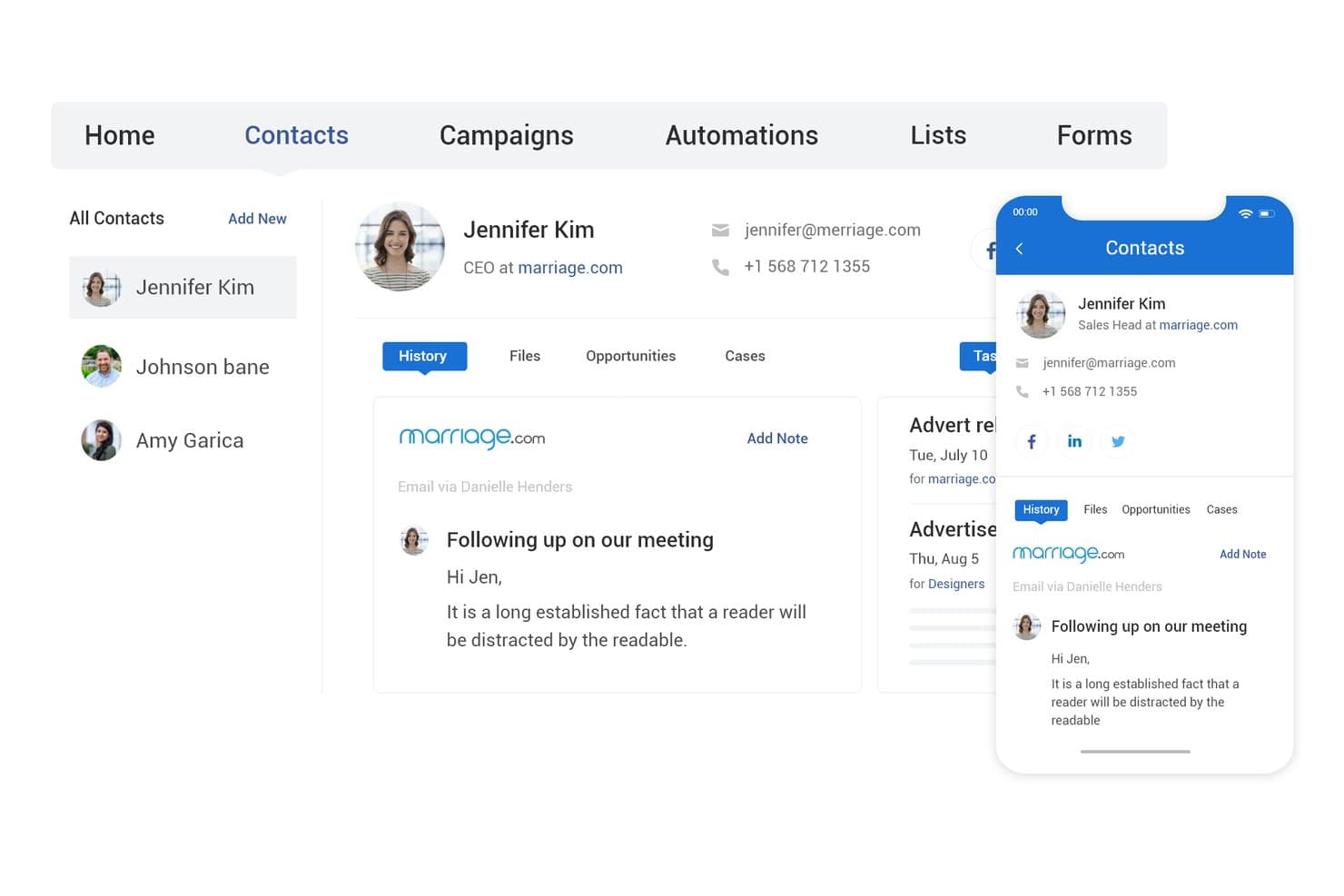
BIGContacts centralizes contact details, history, and email activity in one view. BIGContacts is a contact-based CRM with built-in email marketing, visual pipeline tracking, workflow automation, and a native Mailchimp integration that syncs contacts, tags, and campaign engagement data bidirectionally.
Who Is BIGContacts Best For?
BIGContacts is a strong fit for SMB teams that need an easy-to-use CRM with built-in email marketing and a direct Mailchimp sync, without paying per seat.
Why I Picked BIGContacts
BIGContacts earns its spot on my list because its contact-based pricing model means you can add your entire sales and marketing team without watching costs balloon. I especially like how Mailchimp campaign data, including opens, clicks, and bounces, flows directly into each contact's activity timeline, so I can trigger drip sequences based on real engagement. The AI pipeline tracker flags stalled deals and surfaces missed opportunities, which ties CRM activity back to marketing performance in a way that's actually actionable.
BIGContacts Key Features
- Contact-based pricing: All paid plans charge per contact stored, not per user, so your entire team can access the CRM without incremental seat costs.
- AI Campaign Designer: Generates email campaigns from your stated goals and audience inputs directly inside the platform.
- Workflow automation engine: Triggers tasks, reminders, and email sequences based on pipeline stage, contact tags, or activity events.
- 100+ built-in reports: Pre-built sales and campaign reports with on-demand AI summaries, plus a custom report builder for tailored views.
BIGContacts Integrations
BIGContacts offers documented native integrations with Mailchimp, Microsoft Outlook, Google Workspace, QuickBooks, HubSpot, and Shopify. It also supports API-based custom integrations and Zapier.
Pros and Cons
Pros:
- AI-powered tools for pipeline and reporting
- Two-way Mailchimp sync with campaign activity triggers
- Unlimited users with no per-seat fees
Cons:
- Mailchimp connector not officially Mailchimp-certified
- No automated contact deduplication feature
Learn more about BIGContacts: Best for sales pipeline management
- 14-day free trial + free demo available
- From $29/user/month
Visit WebsiteCustomer Rating:4.4/5
Pipeline CRM is a user-friendly customer relationship management software focused on simplifying sales processes and enhancing team productivity. Pipeline CRM is a sales CRM platform designed to help sales teams manage their sales pipelines effectively. It excels in sales pipeline management by offering customizable list views, deal profiles, and email campaign tracking.
Why I picked Pipeline CRM: Pipeline CRM’s sales pipeline management capabilities help it to stand out from other CRM tools. Its intuitive interface and customizable features make it ideal for sales teams looking to streamline their processes. Additionally, the software provides detailed insights and easy-to-use tools that help sales teams track and close deals efficiently.
Standout features & integrations:
Features include customizable deal stages, sales forecasting, and email campaign tracking. The platform also provides unlimited file storage and user permissions to manage team access.
Integrations include popular tools such as Gmail, QuickBooks, Mailchimp, Zapier, Google Calendar, Outlook, Slack, Xero, HubSpot, and Asana.
Pros and Cons
Pros:
- Unlimited file storage
- Detailed sales forecasting
- Customizable deal stages
Cons:
- Limited mobile app features
- Manual updates for unsubscribed contacts
Learn more about Pipeline CRM: Best for customizable CRM solutions
- Free trial available
- From $65/month (billed annually)
Visit WebsiteCustomer Rating:4/5
Maximizer is a strong customer relationship management tool offering advanced features for contact management, sales automation, and customer support. Maximizer is a CRM software designed to help businesses monitor and coach their sales teams, using leading indicators to drive sales performance. It’s best for customizable CRM solutions due to its ability to tailor the CRM to specific business needs, ensuring a personalized and effective customer relationship management experience.
Why I picked Maximizer: Maximizer stands out with its high level of customization, allowing businesses to configure the CRM to their unique requirements without needing development skills. This flexibility makes it different from other CRMs that often require extensive customization efforts. Additionally, the software offers a range of industry-specific editions and features that can be tailored to fit various business processes and goals.
Standout features & integrations:
Features include customizable profile views, detailed activity timeline, task and notification management, lead handling and separation, dynamic sales pipeline, an AI-powered sales playbook, reporting and analytics, and mobile app for CRM access.
Integrations include Mailchimp, Zapier, Microsoft Outlook, QuickBooks, Microsoft 365, Google Workspace, Slack, Dropbox, PandaDoc, and LinkedIn.
Pros and Cons
Pros:
- Comprehensive reporting and analytics
- Industry-specific editions
- Highly customizable
Cons:
- Potential user interface lag
- Mobile application limitations
Learn more about Maximizer: Best for simple and effective contact management
- 14-day free trial + free plan available
- From $18/user/month (billed annually)

Capsule is a user-friendly customer relationship management tool designed for managing contacts, sales pipelines, and customer interactions efficiently. Capsule is a versatile software designed to streamline contact management and enhance business efficiency. It’s best for simple and effective contact management due to its user-friendly interface and comprehensive features that allow businesses to manage contacts, sales pipelines, and tasks efficiently.
Why I picked Capsule: Capsule provides a certain simplicity and effectiveness in managing contacts, which makes it stand out from other CRM tools. Its intuitive design and essential features make it ideal for businesses looking to organize their contacts and streamline their sales processes. Overall, the software offers a straightforward approach to CRM without overwhelming users with unnecessary complexity.
Standout features & integrations:
Features include contact management, email marketing, task and calendar management, sales pipeline tracking, sales analytics, project management, workflow automation, and AI content assistance.
Integrations include Mailchimp, QuickBooks, Gmail, Outlook, Xero, Zapier, FreshBooks, WhatsApp, FreeAgent, and Microsoft 365.
Pros and Cons
Pros:
- Extensive integrations
- Comprehensive contact management
- User-friendly interface
Cons:
- Limited customization options
- Infrequent software updates
Learn more about Capsule: Best for inbound marketing and sales teams
- Free plan + 14-day free trial + demo available
- From $20/user/month
Visit WebsiteCustomer Rating:4.4/5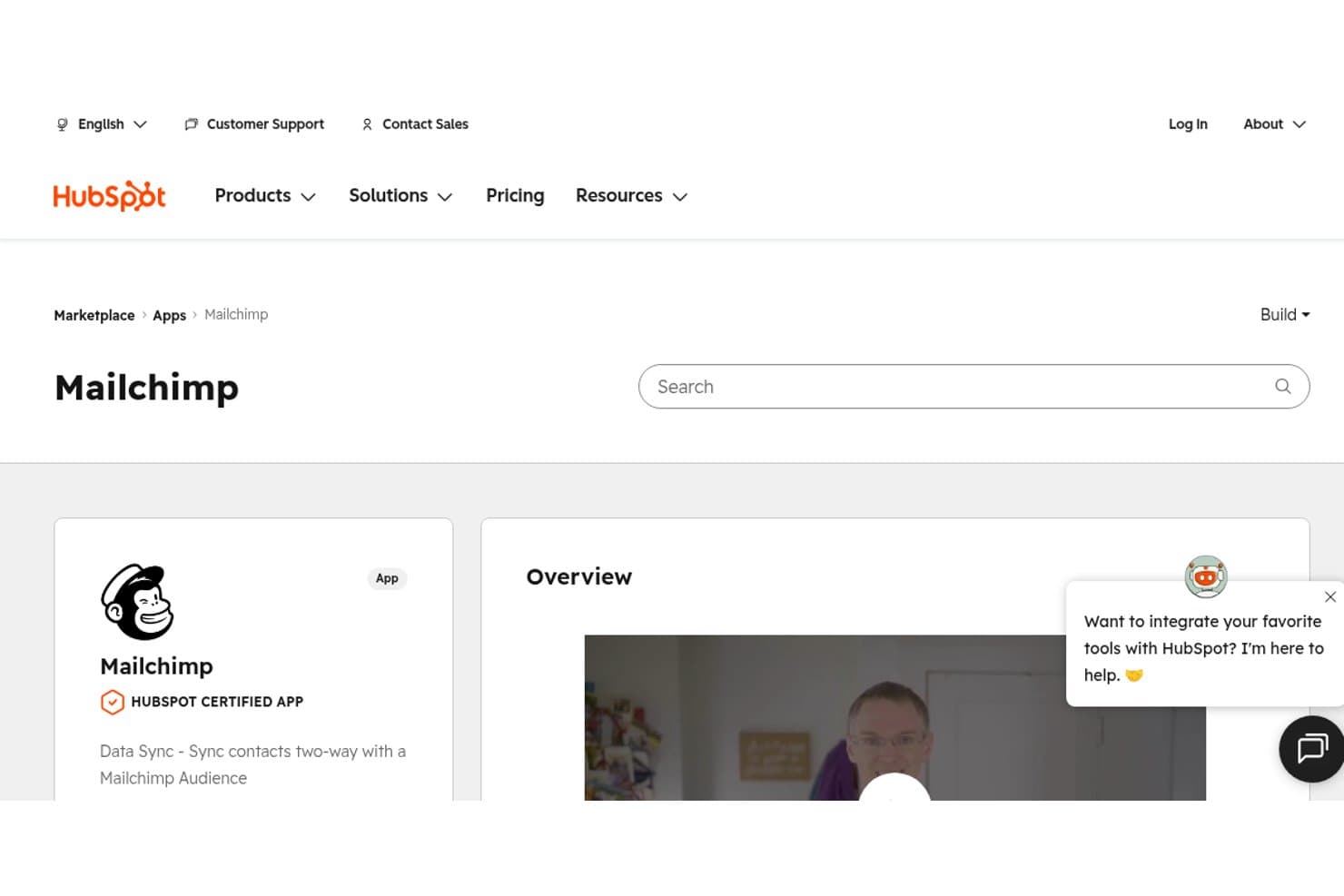
HubSpot's Marketplace shows Mailchimp as a certified app for two-way contact sync. HubSpot is a CRM platform that connects contact management, sales pipeline tracking, deal automation, and marketing tools—with two native Mailchimp connectors for contact sync and campaign activity logging.
Who Is HubSpot Best For?
HubSpot works best for inbound-focused sales and marketing teams that want contact management, pipeline tracking, and Mailchimp engagement data in one place.
Why I Picked HubSpot
HubSpot earns its spot on my shortlist because it's the only CRM here that ships two vendor-maintained Mailchimp connectors out of the box: one for contact sync and one that pulls campaign activity directly onto the contact timeline. I love that a sales rep can open a contact record and immediately see which Mailchimp emails that person opened or clicked, without leaving HubSpot. Pair that with lifecycle stage tracking and customizable pipelines, and inbound marketing and sales teams get a genuinely unified view of how contacts move from subscriber to closed deal.
HubSpot Key Features
- Lifecycle stage tracking: Automatically moves contacts through predefined stages—from Subscriber to Evangelist—based on CRM activity and engagement signals.
- Customizable deal pipelines: Build and manage up to 15 pipelines on Starter (unlimited on Professional and Enterprise) with drag-and-drop deal cards and stage-based automation.
- Rule-based contact scoring: Assign positive and negative scores to contacts based on properties and behaviors to help sales teams prioritize outreach.
- Workflow automation: Trigger automated actions—such as task creation, deal updates, or contact property changes—based on CRM events or data conditions.
HubSpot Integrations
HubSpot offers 2,000+ marketplace integrations, including Mailchimp Data Sync, Mailchimp Campaign Sync, Salesforce, Google Ads, Shopify, Gmail, and Outlook. It also supports custom integrations through its API and connects with Zapier.
Pros and Cons
Pros:
- Handles both inbound marketing and sales workflows
- Offers two native Mailchimp sync connectors
- Shows Mailchimp campaign engagement on contact timelines
Cons:
- No native revenue attribution for Mailchimp emails
- Mailchimp custom field sync requires paid upgrade
Learn more about HubSpot: Best for Google Workspace integration
- 14-day free trial + demo available
- From $29/user/month
Visit WebsiteCustomer Rating:4.5/5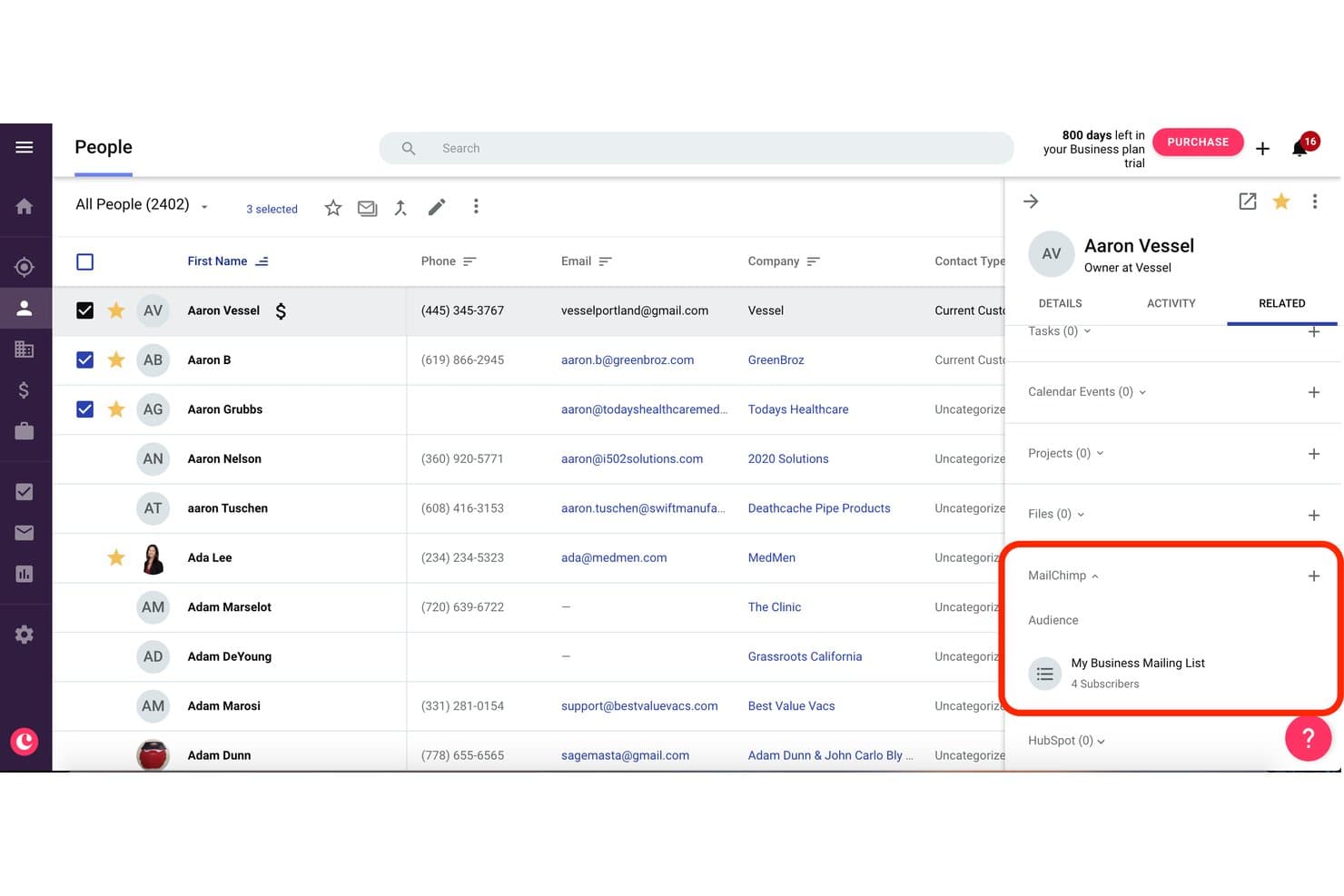
Copper displays Mailchimp audience subscribers linked to a contact record. Copper is a CRM built specifically for Google Workspace users, offering contact management, pipeline tracking, and a native two-way Mailchimp integration that syncs contacts, tags, and campaign engagement data directly into CRM records.
Who Is Copper Best For?
Copper is a strong fit for SMB sales teams running entirely on Google Workspace who want Mailchimp engagement data visible directly inside their CRM without a complex setup.
Why I Picked Copper
Copper earns its spot on my shortlist because it's the only CRM built natively around Google Workspace, and that distinction matters when your team lives in Gmail. I like how Mailchimp campaign activity, including opens, clicks, and bounces, surfaces directly on each contact record in Copper so sales reps can act on email engagement without switching tools. The two-way contact sync with configurable field and tag mapping also means your Mailchimp audience stays current with what's in your CRM automatically.
Copper Key Features
- Gmail auto-capture: Automatically logs emails sent and received in Gmail to the corresponding contact or deal record without manual entry.
- Custom field mapping: Lets you configure which CRM fields sync to Mailchimp, including default and custom fields, so your data stays consistent across both tools.
- Multiple customizable pipelines: Supports drag-and-drop visual pipelines with configurable stages and deal fields across different sales processes.
- Workflow automation: Triggers task creation, stage advancement, or follow-up actions automatically based on deal or contact activity on Professional and above.
Copper Integrations
Copper offers native integrations with Mailchimp, Gmail, Google Calendar, Google Contacts, Google Drive, Google Sheets, Looker Studio, Slack, QuickBooks, and DocuSign. It also provides a developer API for custom integrations and supports Zapier.
Pros and Cons
Pros:
- Gmail email activity auto-logged to records
- Two-way contact and field sync supported
- Mailchimp engagement visible on CRM contact records
Cons:
- Mailchimp data not linked to pipeline reporting
- Only one Mailchimp audience syncs at once
Learn more about Copper: Best for small to medium-sized businesses
- Free plan + 15-day free trial+ free demo available
- From $14/user/month (billed annually)
Visit WebsiteCustomer Rating:4.2/5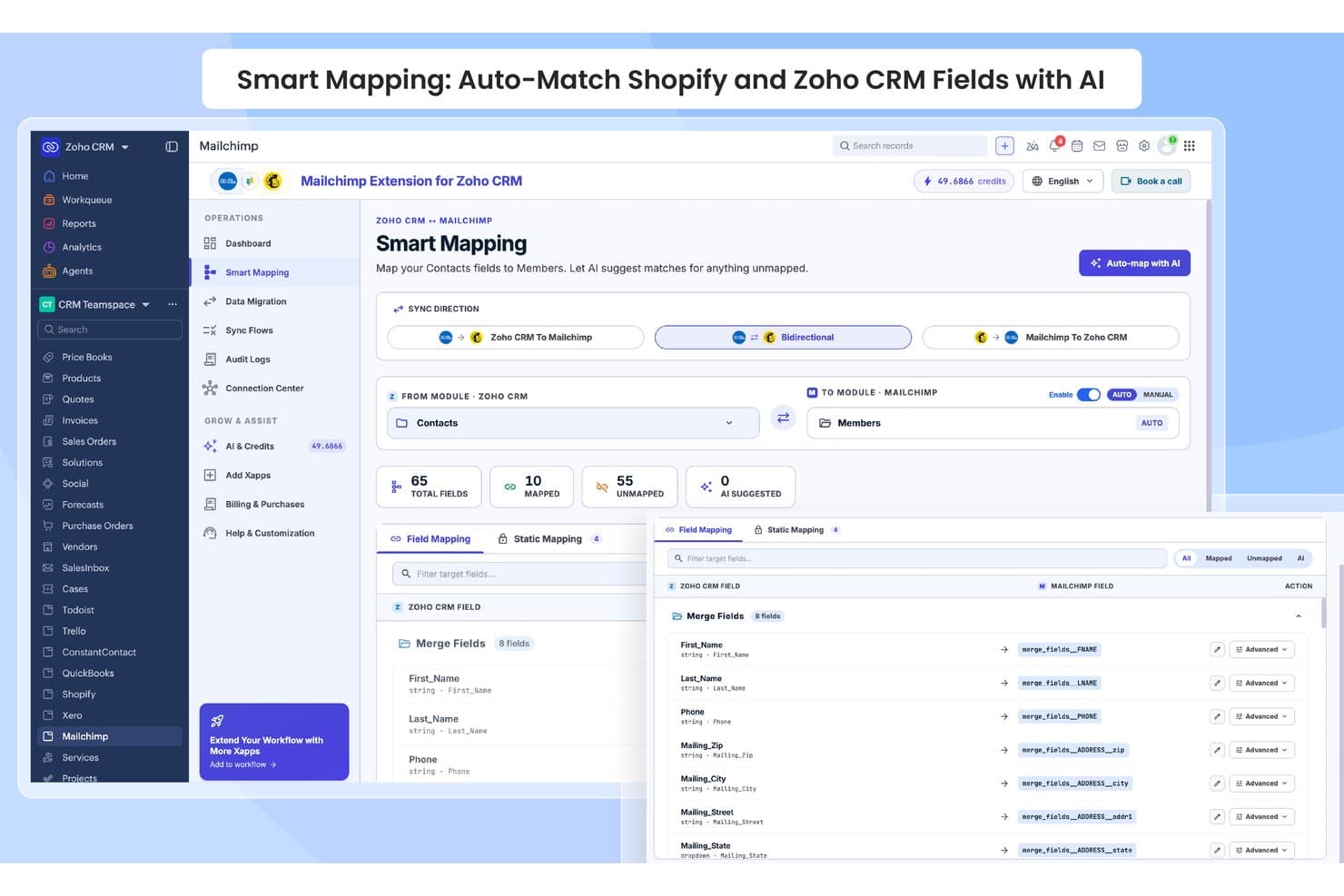
Zoho CRM auto-maps contact fields to Mailchimp members using AI. Zoho CRM is a sales-focused CRM platform with customizable pipelines, AI-powered lead scoring via Zia, contact and deal management, and a native vendor-built Mailchimp integration that syncs contacts bidirectionally and surfaces campaign engagement data directly on CRM records.
Who Is Zoho CRM Best For?
Zoho CRM is a strong fit for SMB sales teams that want Mailchimp campaign data surfaced directly on contact records without stitching together third-party middleware.
Why I Picked Zoho CRM
I picked Zoho CRM as one of the best because its native, vendor-built Mailchimp extension creates three dedicated modules directly inside the CRM: MailChimp, MailChimp Audiences, and MailChimp Segments/Tags. That structure means Mailchimp campaign data lives where your sales team already works. I also like how SalesSignals fires real-time alerts when a contact opens an email or updates their subscriber status, so reps can follow up while engagement is still fresh.
Zoho CRM Key Features
- Zia AI lead scoring: Zia analyzes CRM activity data to rank leads by conversion likelihood, helping reps prioritize outreach.
- Multi-pipeline management: Create separate pipelines for different products, regions, or teams, each with custom deal stages and weighted forecasting.
- Blueprint process automation: Map and enforce structured sales processes with stage-by-stage rules, required fields, and approval gates.
- SalesSignals alerts: Get real-time in-CRM notifications triggered by contact activity across connected channels, including Mailchimp subscriber updates.
Zoho CRM Integrations
Zoho CRM offers 45+ native Zoho integrations, including Zoho Campaigns, Zoho Analytics, Zoho Desk, Slack, Zoom, Shopify, and QuickBooks. It also supports 1,000+ Marketplace integrations plus REST APIs, webhooks, and other developer APIs for custom connections.
Pros and Cons
Pros:
- Dedicated Mailchimp modules for targeted workflows
- Real-time alerts for Mailchimp subscriber actions
- Mailchimp data surfaced directly on CRM records
Cons:
- No built-in revenue attribution for Mailchimp campaigns
- Mailchimp integration gated to Enterprise edition
 Best for revenue attribution across email and pipeline
- Free plan + 30-day free trial available
- From $25/user/month
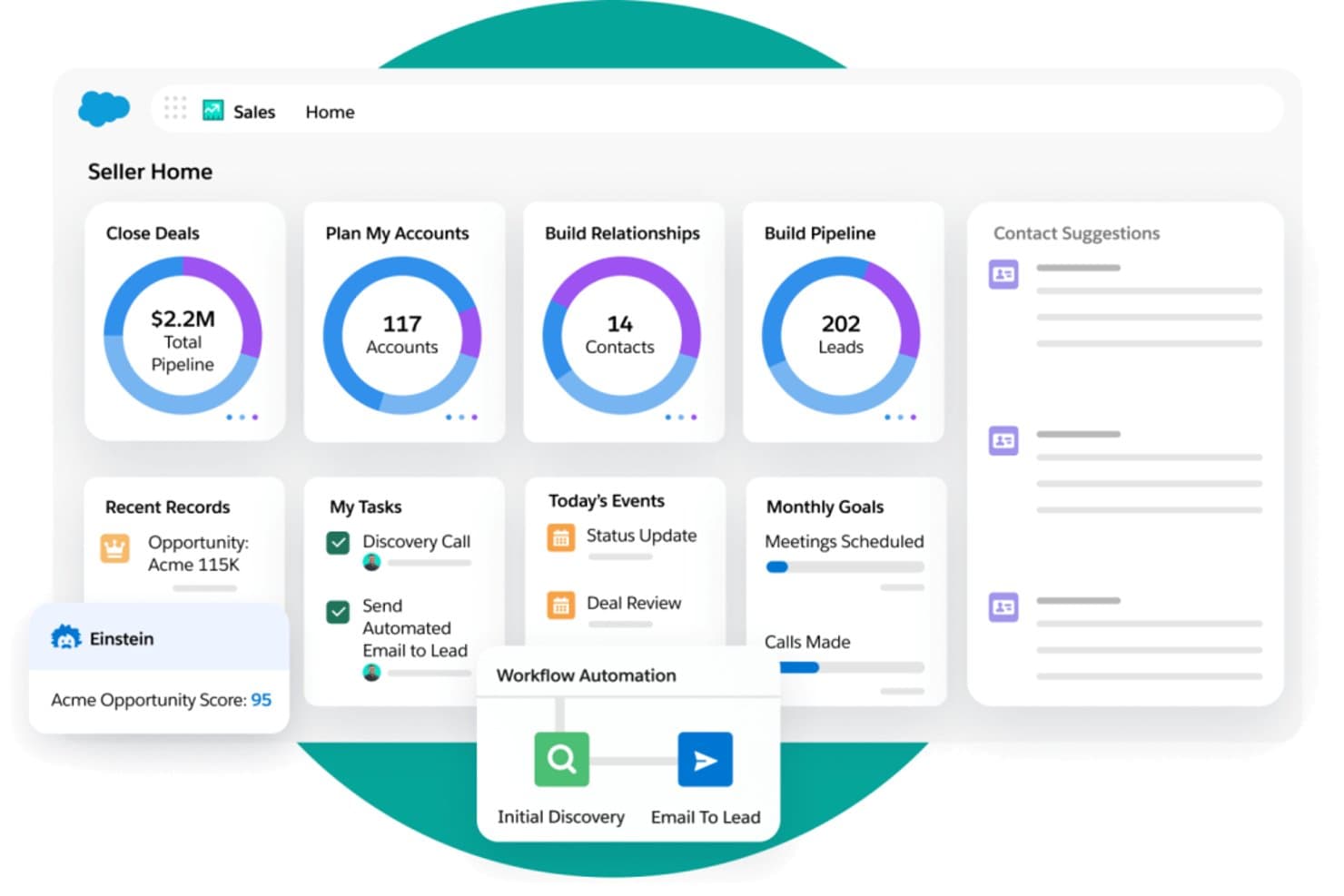
Salesforce Sales Cloud centralizes pipeline, leads, and tasks in one seller dashboard. Salesforce Sales Cloud is an enterprise CRM platform that combines pipeline management, contact and account tracking, AI-driven forecasting, and bi-directional Mailchimp integration to connect email engagement data directly to sales activity and revenue reporting.
Who Is Salesforce Sales Cloud Best For?
Salesforce Sales Cloud is the right fit for revenue operations teams at mid-market and enterprise companies that need to tie Mailchimp email engagement directly to pipeline activity and closed revenue.
Why I Picked Salesforce Sales Cloud
Salesforce Sales Cloud earns its spot on my shortlist because no other CRM closes the loop between Mailchimp engagement and closed revenue the way it does. Once the Beaufort 12 connector syncs opens, clicks, and unsubscribes back into Contact and Lead records, I can build native reports that trace a prospect's email engagement directly to an Opportunity and a closed-won amount. Einstein Lead Scoring can ingest those engagement signals to prioritize follow-up, and Revenue Intelligence surfaces the pipeline impact of specific campaigns.
Salesforce Sales Cloud Key Features
- Einstein Activity Capture: Automatically syncs emails and calendar events from Gmail or Outlook to the relevant Salesforce records, so reps spend less time on manual data entry.
- Bi-directional Mailchimp sync: The Beaufort 12 connector maps opens, clicks, bounces, and unsubscribes to Contact and Lead records in both directions.
- Salesforce Flow automation: Triggers updates based on pipeline stage changes, contact field edits, or engagement data to push contacts into the right Mailchimp audiences.
- Custom object field mapping: Maps any Salesforce field—including custom fields—to Mailchimp merge fields for precise audience segmentation.
Salesforce Sales Cloud Integrations
Salesforce Sales Cloud integrates with Mailchimp through Beaufort 12, plus Gmail, Outlook, Slack, Tableau, Snowflake, BigQuery, and Google Analytics. It also supports marketplace integrations through AppExchange and custom integrations through REST and SOAP APIs.
Pros and Cons
Pros:
- Supports rich audience segmentation with CRM data
- Bi-directional sync of contacts and activity
- Enables revenue attribution from Mailchimp campaigns
Cons:
- Sync is periodic, not real time
- Integration requires higher-priced Salesforce editions
Learn more about Salesforce Sales Cloud: 10Best for ERP-connected revenue and Mailchimp sync
SugarAI
- 30-day free trial (SugarChimp only)
- From $59/user/month (billed annually)
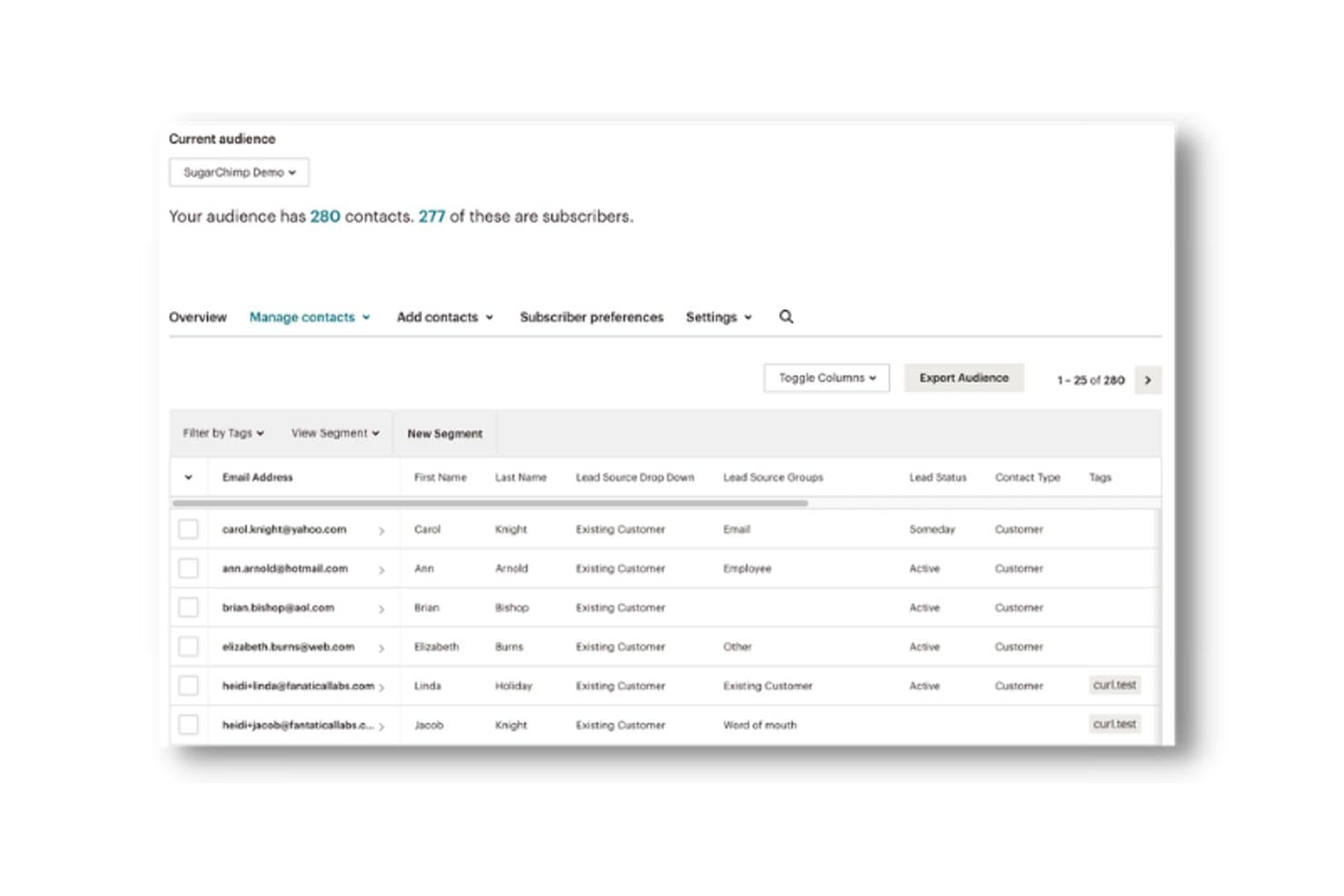
SugarAI syncs CRM contacts with Mailchimp audience subscriber data. SugarAI is a mid-market and enterprise CRM platform that combines pipeline management, AI-powered revenue intelligence, ERP connectivity, and Mailchimp sync via the SugarChimp integration.
Who Is SugarAI Best For?
SugarAI fits mid-market and enterprise B2B teams in manufacturing, distribution, or wholesale that need ERP-connected revenue intelligence alongside Mailchimp marketing workflows.
Why I Picked SugarAI
SugarAI earns its spot on my shortlist because of how its Sugar sales-i module connects directly with 180+ ERP systems to surface churn signals, cross-sell alerts, and reorder gaps alongside Mailchimp campaign data. I like that SugarChimp syncs contact engagement (opens, clicks, subscriber status) back into CRM records in real time, so sales reps see Mailchimp activity without leaving the platform. That combination of ERP-sourced buying intelligence and Mailchimp engagement context in one place is genuinely hard to replicate with most CRMs.
SugarAI Key Features
- SugarBPM workflow engine: A no-code automation tool that routes tasks, triggers alerts, and enforces stage-based actions across your sales process.
- Sugar Predict lead scoring: An AI-powered scoring model that ranks leads by conversion likelihood directly within your CRM records.
- Unlimited custom reporting: A report wizard that lets you build and save any number of custom reports and real-time pipeline dashboards.
- Custom module and field builder: A no-code configuration layer that lets you add custom modules, layouts, and fields to match your specific sales process.
SugarAI Integrations
SugarChimp by Fanatical Labs is a paid marketplace integration for bidirectional Mailchimp sync, campaign activity, and field mapping. Sugar sales-i connects to 180+ ERP systems, including SAP, Oracle, Epicor, and Sage, while SugarCRM also supports Gmail and Microsoft Outlook sync.
Pros and Cons
Pros:
- Unlimited custom sales and lifecycle reporting
- ERP-linked deal data visible alongside campaign stats
- Bi-directional Mailchimp sync with real-time updates
Cons:
- Minimum user requirement excludes smaller teams
- Mailchimp integration relies on third-party add-on
Learn more about SugarAI:
Mailchimp ile Entegre Olan Diğer CRM Yazılımları
Aşağıda, kısa listeme aldığım Mailchimp ile entegre olan ek CRM yazılımlarının bir listesi yer almaktadır. İlk 10’a girememiş olsalar da yine de değerlidir ve daha fazla araştırmaya değerdir.
- 11BiginBest for SMB Mailchimp sync on a budget
- 12FreshsalesBest for AI-guided sales with Mailchimp list sync
- 13InsightlyBest for post-sale project handoff with Mailchimp sync
- 14monday AI WorkspaceBest for project management integration
- 15Creatio AI CRMBest for no-code workflow automation
- 16AttioBest for relationship-driven CRM
- 17PipedriveBest for visual Kanban-style pipelines
- 18TeamgateBest for data-driven sales insights
- 19ZendeskBest for customer support and ticketing
- 20Less Annoying CRMBest for small business simplicity
İlgili CRM Yazılımı İncelemeleri
Aradığınızı hâlâ burada bulamadıysanız, test edip değerlendirdiğimiz ve hepsi bir arada CRM’lerle yakından ilişkili olan bu araçlara göz atın.
- CRM Yazılımları
- Satış Yazılımları
- Potansiyel Müşteri Yönetimi Yazılımları
- İş Zekâsı Yazılımları
- Sözleşme Yönetimi Yazılımları
- Gelir Yönetimi Sistemi
How I Evaluate CRM Software Mailchimp Integration
I split my evaluation into baseline criteria every tool must meet—like true bi-directional sync and native integration—and differentiators like revenue attribution and audience routing logic.
Core Functionality (Table Stakes For This List)
When I'm selecting tools for my list, I rank each one on a scale from 0 (does not offer the functionality) to 5 (excels in this area) for each core functionality listed below. I then calculate the tool's total score into a percentage, using 65% as a benchmark to help assess its overall fit for the list.
- Contact Management: I need a centralized contact and account database with custom fields, lifecycle stages, and detailed activity history that goes beyond a simple name/email list.
- Pipeline & Deal Tracking: I look for visual sales pipelines with customizable stages, deal values, and opportunity management to effectively track revenue-generating activities.
- Sales Activity Logging: I require the platform to capture emails, calls, meetings, and tasks linked to contacts and deals to support sales workflows and reporting, preferably with automated logging.
- Native Mailchimp Integration: I prefer a pre-built integration maintained by the CRM vendor or Mailchimp itself, rather than relying on Zapier or generic middleware.
- Bi-Directional Data Sync: It’s essential that the sync moves contacts, list memberships, tags, and subscriber statuses in both directions, with configurable field mapping.
- Campaign Activity Sync: I want Mailchimp campaign engagement data—opens, clicks, bounces, unsubscribes—to be pulled into the CRM contact records and used for segmentation, automation, and revenue attribution.
Once I have a list of tools that meet the criteria, I consider what sets each platform apart.
Differentiating Factors (What Sets Vendors Apart)
Here's how I compare and contrast different vendors:
Standout Features
Revenue attribution reporting is the feature I weight most heavily—I want to see Mailchimp campaign engagement tied directly to closed-won deals, not just contact activity. Suppression and consent management matters just as much: I look for platforms where unsubscribes and bounce flags propagate automatically between systems, so compliance isn't a manual process. I also evaluate multi-audience routing logic, particularly for teams running separate nurture tracks across product lines or regions.
Beyond Features
Integration depth matters, but so does what surrounds it. I check whether the Mailchimp connector is included in the base plan or locked behind a higher tier—because that changes the real cost significantly. I also look at how each platform handles deduplication and conflict resolution when a contact exists across multiple Mailchimp audiences and CRM records simultaneously. For teams managing large GTM systems, audit logs and sync history visibility are just as important as the sync itself.
Mailchimp ile Entegre Olan CRM Yazılımı Nasıl Seçilir?
Kendinize özgü yazılım seçme sürecinizi yürütürken aşağıdaki noktaları göz önünde bulundurun:
- Entegrasyon Yetenekleri: Bir CRM seçerken Mailchimp ile güçlü entegrasyon yeteneklerine sahip olduğundan emin olun. Bu, iki platform arasında veri aktarımı ve senkronizasyon için önemlidir; müşteri ilişkileri yönetiminizi ve e-posta pazarlama uygulamalarınızı merkezileştirmenize olanak tanır.
- Özellikler ve İşlevler: İşletmenizin ihtiyaçlarını karşıladığından emin olmak için CRM yazılımının özelliklerini ve işlevlerini değerlendirin. Müşteri etkileşimlerini yönetmek ve pazarlama kampanyalarınızı geliştirmek için gerekli olan kişi yönetimi, potansiyel müşteri puanlama, iş akışı otomasyonu, raporlama ve analiz gibi özellikleri arayın.
- Kullanım Kolaylığı: Kullanıcı dostu ve kolay uygulanabilir bir CRM seçin. Karmaşık bir CRM, düşük kullanıcı benimsemesine ve verimsizliklere yol açabilirken basitlik, ekibinizin CRM'yi hızlıca öğrenip etkili bir şekilde kullanabilmesini sağlar; böylece eğitime harcanan süre azalır ve genel üretkenlik artar.
- Fiyatlandırma ve Ölçeklenebilirlik: Bütçenize uygun olduğundan ve işletmenizle birlikte büyüyebileceğinden emin olmak için CRM yazılımının maliyetini ve ölçeklenebilirliğini göz önünde bulundurun. Ayrıca, bir yazılımın ölçeklenebilmesi önemlidir; çünkü bu, gelecekte tüm sistemin baştan yapılandırılması gerekliliğini ortadan kaldırır.
Mailchimp ile Entegre Olan CRM Yazılımlarındaki Trendler
Mailchimp ile entegre olan CRM yazılımlarında fark ettiğim bazı trendleri ve bunların gelecek için ne anlama gelebileceğini burada bulabilirsiniz. En önemli içgörüleri ortaya çıkarmak için sayısız ürün güncellemesini, basın bültenini ve sürüm kaydını inceledim.
- Yapay Zekâ Destekli Müşteri İçgörüleri: Mailchimp'ten alınan müşteri verilerini analiz etmek ve daha derin içgörüler sunmak için yapay zekâ kullanılıyor. Bu, işletmelerin pazarlama stratejilerini daha etkili bir şekilde uyarlamasına ve karar alma süreçlerini geliştirmesine yardımcı oluyor.
- Otomatik İş Akışı Tetikleyicileri: Otomatik tetikleyiciler giderek daha gelişmiş hâle geliyor ve artık Mailchimp'te izlenen müşteri davranışlarına dayalı olarak karmaşık iş akışlarını başlatabiliyor. Bu trend, verimliliği artırmak açısından büyük önem taşıyor.
- Gelişmiş Veri Gizliliği Özellikleri: Küresel düzenlemelere uyum sağlamak için yeni gizlilik özellikleri entegre ediliyor. Bu özellikler, Mailchimp'ten alınan müşteri verilerinin güvenli bir şekilde işlenmesini sağlar; bu da güveni ve uyumluluğu korumak açısından önemlidir.
- Çok Kanallı Kampanya Yönetimi: CRM sistemleri artık kampanyaları yalnızca e-posta üzerinden değil, birden fazla kanal üzerinden yönetiyor. Mailchimp ile yapılan bu entegrasyon, daha bütünlüklü bir pazarlama stratejisine olanak tanıyarak pazarlama çalışmalarının erişimini genişletiyor.
- Gerçek Zamanlı Analiz Panoları: Gerçek zamanlı analizler CRM yazılımlarında standart hâle geliyor. Bu panolar, güncel içgörüler sunmak için Mailchimp'ten veri çekiyor; bu da zamanında kararlar almak açısından önem taşıyor.
Bu trendleri takip etmek, günümüzün dijital ortamında rekabet avantajını korumayı hedefleyen işletmeler için büyük önem taşır. İşletmeler bu entegrasyonlardan yararlanarak pazarlama çalışmalarını kolaylaştırabilir, müşteri etkileşimini geliştirebilir ve daha hedefli kampanyalar yürütebilir; bu da nihayetinde müşteri elde tutma oranlarının artmasını ve daha yüksek gelir elde edilmesini sağlar.
Mailchimp ile Entegre Olan CRM Yazılımı Nedir?
Müşteri ilişkileri yönetimi (CRM) yazılımı, işletmeler tarafından müşteri yaşam döngüsü boyunca müşteri etkileşimlerini ve verilerini yönetmek ve analiz etmek için sıklıkla kullanılır. Mailchimp ile entegre edildiğinde işletmeler müşteri verilerini başarıyla senkronize edebilir, e-posta pazarlama kampanyalarını otomatikleştirebilir ve müşteri segmentasyonunu geliştirebilir.
Mailchimp ile Entegre Olan CRM Yazılımının Özellikleri
Mailchimp ile entegre olan CRM yazılımını seçerken pazarlama ve müşteri ilişkileri yönetimi çalışmalarınızı en iyi şekilde destekleyecek özellikleri anlamak önemlidir. Mailchimp ile entegre olan CRM yazılımında aranması gereken en önemli özellikler şunlardır:
- Pazarlama Otomasyonu: Pazarlama faaliyetlerini otomatikleştirmek zamandan tasarruf sağlayabilir ve hataları azaltabilir. Bu özellik, kampanyaları planlamanıza ve yönetmenize olanak tanıyarak pazarlama çalışmalarınızın tutarlı ve zamanında olmasını sağlar.
- Kitle Segmentasyonu: Kitlenizi çeşitli kriterlere göre segmentlere ayırmak, hedeflenmiş pazarlama kampanyaları oluşturmanıza yardımcı olur. Bu, mesajlarınızın farklı müşteri gruplarıyla alakalı olmasını sağlayarak etkileşim ve dönüşüm oranlarını artırır.
- Kişi Yönetimi: Güncel müşteri bilgilerini korumak için etkili kişi yönetimi büyük önem taşır. Bu özellik, müşteri verilerini düzenlemeye ve bunlara erişmeye yardımcı olarak etkileşimleri kişiselleştirmeyi ve müşteri ilişkilerini geliştirmeyi kolaylaştırır.
- Raporlama & Analiz: Güçlü raporlama ve analiz özellikleri, pazarlama kampanyalarınızın performansını izlemenize olanak tanır. Bu özellik, müşteri davranışlarını anlamanıza ve gelecekteki kampanyaları optimize etmek için veriye dayalı kararlar almanıza yardımcı olur.
- Entegrasyon Olanakları: Diğer yazılım araçlarıyla entegre olabilme yeteneği, sorunsuz bir iş akışı için kritik öneme sahiptir. Bu özellik, CRM'nizi çeşitli üçüncü taraf uygulamalarına bağlayabilmenizi sağlayarak genel iş verimliliğini artırır.
- Özelleştirme: Her işletmenin kendine özgü ihtiyaçları vardır ve özelleştirme seçenekleri CRM'yi özel gereksinimlerinize uyacak şekilde yapılandırmanıza olanak tanır. Bu özellik, müşteri verilerinizi daha iyi yönetebilmeniz için özelleştirilebilir alanları, formları ve iş akışlarını içerir.
- Mobil Erişim: CRM'nize mobil erişiminizin olması, müşteri ilişkilerini hareket hâlindeyken yönetebilmenizi sağlar. Bu özellik, seyahat ederken müşteri bilgilerine erişmesi gereken satış ekipleri için özellikle kullanışlıdır.
- Müşteri Hizmetleri Otomasyonu: Sohbet botları veya bilet sistemleri kurmak gibi müşteri hizmetleri görevlerini otomatikleştirmek, yüksek müşteri memnuniyeti seviyelerinin korunmasına yardımcı olur. Bu özellik, müşteri sorularının hızlı ve verimli bir şekilde yanıtlanmasını sağlar.
- Veri Güvenliği: Müşteri verilerinin güvenliğini sağlamak son derece önemlidir. Bu özellik, hassas bilgileri korumak için şifreleme, erişim kontrolleri ve veri koruma düzenlemelerine uyumluluğu içerir.
- Kullanım Kolaylığı: Kullanıcı dostu bir arayüz, yüksek kullanıcı benimseme oranları için gereklidir. Bu özellik, CRM'nin kolayca gezinilebilir ve kullanılabilir olmasını sağlayarak öğrenme eğrisini azaltır ve verimliliği artırır.
Mailchimp ile entegre olan doğru CRM yazılımını seçmek, pazarlama ve müşteri ilişkileri yönetimi çalışmalarınızı önemli ölçüde geliştirebilir. Pazarlama otomasyonu, kitle segmentasyonu, kişi yönetimi ve güçlü raporlama ve analiz gibi özelliklere odaklanarak CRM'nizin işletme hedeflerinizi etkili bir şekilde desteklemesini sağlayabilirsiniz.
Mailchimp ile Entegre Olan CRM Yazılımının Faydaları
Günümüzün rekabetçi iş ortamında doğru araçlardan yararlanmak, kuruluşların müşteri ilişkilerini ve pazarlama çalışmalarını ne kadar etkili yönettiği konusunda önemli bir fark yaratabilir. Mailchimp ile entegre olan CRM yazılımını kullanırken deneyimleyebileceğiniz başlıca faydalardan bazıları şunlardır:
- Geliştirilmiş Müşteri Segmentasyonu: CRM'yi Mailchimp ile entegre ederek işletmeler, ayrıntılı CRM verilerine dayalı olarak daha kesin müşteri segmentleri oluşturabilir ve böylece daha hedefli ve etkili pazarlama kampanyaları yürütebilir.
- Otomatik Pazarlama İş Akışları: Entegrasyon, pazarlama otomasyonu araçlarının kullanılmasına olanak tanıyarak manuel görevleri azaltır ve müşterilerle zamanında ve tutarlı iletişim kurulmasını sağlar; bu da etkileşim ve dönüşüm oranlarını artırabilir.
- Merkezi Veri Yönetimi: CRM ve Mailchimp'in birleştirilmesi, müşteri verilerini merkezileştirerek veri doğruluğunu artıran ve bilinçli iş kararları alınmasına yardımcı olan tek bir güvenilir bilgi kaynağı sağlar.
- Geliştirilmiş Müşteri İçgörüleri: Entegrasyon, CRM verilerini Mailchimp'in analizleriyle birleştirerek müşteri davranışları ve tercihleri hakkında daha derin içgörüler sunar ve işletmelerin stratejilerini müşteri ihtiyaçlarını daha iyi karşılayacak şekilde uyarlamasına olanak tanır.
- Kolaylaştırılmış Satış ve Pazarlama Uyumu: Bu araçların entegre edilmesi, satış ve pazarlama ekiplerinin müşteri verilerine ve kampanya performansı ölçümlerine ortak erişimle uyum içinde çalışmasını sağlar; böylece daha iyi iş birliği ve daha bütünlüklü stratejiler teşvik edilir.
CRM yazılımını Mailchimp ile entegre etmek, işletmelerin müşteri ilişkilerini ve pazarlama çalışmalarını yönetme biçimini önemli ölçüde geliştirebilecek pek çok fayda sunar. Kuruluşlar bu araçlardan birlikte yararlanarak daha yüksek verimlilik, geliştirilmiş müşteri etkileşimi ve nihayetinde daha iyi iş sonuçları elde edebilir.
Mailchimp ile Entegre Olan CRM Yazılımının Maliyetleri ve Fiyatlandırması
Aşağıda, bilinçli bir karar vermenize yardımcı olmak amacıyla Mailchimp ile entegre olan CRM yazılımının fiyatlandırma planlarını ve yaygın özelliklerini gösteren bir tablo yer almaktadır.
Mailchimp ile Entegre Olan CRM Yazılımı İçin Plan Karşılaştırma Tablosu
| Plan Türü | Ortalama Fiyat | Yaygın Özellikler |
| Ücretsiz Plan | $0 | Temel kişi yönetimi, e-posta izleme, sınırlı entegrasyonlar ve görev yönetimi |
| Temel Plan | $5 - $20/user/month | Satış hunisi yönetimi, e-posta şablonları, raporlama & analiz ve potansiyel müşteri yönetimi |
| Standart Plan | $14 - $29/user/month | İş akışı otomasyonu, yapay zekâ asistanı, özel panolar ve satış tahmini |
| Profesyonel Plan | $39 - $55/user/month | Gelişmiş otomasyon, birden fazla satış hunisi, satış dizileri ve özel raporlar |
| Kurumsal Plan | $69 - $175/user/month | Sınırsız satış hunisi, yapay zekâ içgörüleri, gelişmiş analiz ve proje yönetimi |
Mailchimp ile entegre olan CRM yazılımları için plan türlerinin, maliyetlerin ve özelliklerin dökümü.
Mailchimp ile entegre olan bir CRM seçerken işletmenizin büyüklüğünü, bütçenizi ve özel ihtiyaçlarınızı göz önünde bulundurun. CRM'nin uzun vadeli iş hedeflerinizle uyumlu olduğundan emin olmak için ölçeklenebilirliğini ve kullanım kolaylığını her zaman değerlendirmeniz de önemlidir.
Mailchimp ile Entegre Olan CRM Yazılımları Hakkında SSS
Mailchimp ile entegre olan CRM yazılımları hakkında bana yöneltilen sık sorulan sorulardan bazılarını burada bulabilirsiniz.
Bir CRM ile Mailchimp arasındaki entegrasyonu kurmak ne kadar kolaydır?
Bir CRM ile Mailchimp arasındaki entegrasyonu kurmanın kolaylığı, seçtiğiniz CRM yazılımına bağlı olarak değişir. Modern CRM’lerin çoğu, genellikle iki platformu birbirine bağlamak için yalnızca birkaç adım gerektiren basit entegrasyon süreçleri sunar. Örneğin HubSpot ve Mailchimp entegrasyonu, basit bir adım adım kılavuz izlenerek doğrudan HubSpot arayüzü üzerinden kurulabilir. Benzer şekilde Zoho CRM, Mailchimp için yerleşik bir entegrasyon modülü sunarak süreci hızlı ve zahmetsiz hâle getirir.
CRM ve Mailchimp entegrasyonu üzerinden e-posta kampanyalarını otomatikleştirebilir miyim?
Evet, bir CRM’yi Mailchimp ile entegre etmenin en önemli avantajlarından biri e-posta kampanyalarını otomatikleştirebilmenizdir. Bu entegrasyon, CRM’nizde izlenen müşteri verilerine ve davranışlarına göre otomatik iş akışları oluşturmanıza olanak tanır. Örneğin belirli koşullar karşılandığında hoş geldin e-postalarını, takip dizilerini veya yeniden etkileşim kampanyalarını otomatik olarak tetikleyebilirsiniz. Bu otomasyon, manuel müdahale olmadan hedef kitlenizle tutarlı iletişimi sürdürmenize yardımcı olur.
Bir CRM ile Mailchimp arasında ne tür veriler senkronize edilebilir?
Bir CRM ile Mailchimp arasında senkronize edilebilen veri türleri genellikle iletişim bilgilerini (adlar, e-posta adresleri ve telefon numaraları gibi), demografik ayrıntıları, satın alma geçmişini ve etkileşim ölçümlerini (e-posta açma ve tıklama oranları gibi) içerir. Bu senkronizasyon, her iki platformun da en güncel ve doğru verilere sahip olmasını sağlayarak daha etkili pazarlama ve satış stratejileri geliştirilmesine olanak tanır. Bazı entegrasyonlar özel alanların ve etiketlerin senkronizasyonuna da izin vererek verileriniz üzerinde daha ayrıntılı kontrol sağlar.
CRM ve Mailchimp entegrasyonu müşteri ilişkileri yönetimini nasıl iyileştirir?
Bir CRM’yi Mailchimp ile entegre etmek, müşteri etkileşimleri ve davranışlarına dair daha kapsamlı bir görünüm sağlayarak müşteri ilişkileri yönetimini geliştirir. Bu entegrasyon, daha iyi segmentasyon ve hedefleme olanağı sunarak daha kişiselleştirilmiş ve alakalı iletişim kurulmasını sağlar. Ayrıca e-posta kampanyalarının etkinliğini izlemenize ve müşteri tercihlerini anlamanıza yardımcı olur; bu bilgiler gelecekteki pazarlama stratejilerine yön verebilir. Genel olarak iletişimlerin zamanında, alakalı ve kişiselleştirilmiş olmasını sağlayarak müşteri memnuniyetinin ve sadakatinin artmasına katkıda bulunur.