

Başarılı bir satış operasyonu yürütmek, özellikle bütçeler kısıtlı olduğunda zor olabilir. Ekibinizin potansiyel müşterileri yönetmesine, performansı izlemesine ve bütçeyi aşmadan anlaşmaları sonuçlandırmasına yardımcı olacak araçlara ihtiyacınız vardır. İster küçük bir işletme sahibi olun ister büyüyen bir ekibin parçası olun, doğru ücretsiz çözümü bulmak büyük fark yaratabilir. Ücretsiz satış yönetimi yazılımları tam da bu noktada devreye girer.
Bu makalede, ücretsiz satış yönetimi yazılımları arasından en iyi seçimlerimi paylaşacağım. Her aracın sunduklarını ve ekibinizin kendine özgü zorluklarını nasıl ele alabileceğini inceleyeceğim. Satış ihtiyaçlarınıza en uygun çözümü birlikte bulalım.
Why Trust Our Software Recommendations
6,700+
Reviews
20
Industry experts
16+
Evaluation factors
14
Years
Our reviews reflect our independent judgment—not a sales pitch. Learn how we stay transparent.
For this guide, we evaluated tools using hands-on testing and independent research, scoring tools using our selection criteria.
Our reviews reflect our human editorial judgment, not a sales pitch.
Ücretsiz Satış Yönetimi Yazılımları Karşılaştırma Tablosu
Kısa listeme giren araçların her biri için temel maliyetler aşağıda yer alıyor:
Sorted by: Default
| Tool | Starting Price | Website | |
|---|---|---|---|
Best with multi-channel workflow automation | 4.5 out of 5 | $49/user/month Free plan + 14-day trial + demo available | Book Demo |
Best for marketing automation tools | 4.6 out of 5 | Pricing upon request Free plan + free demo available | Website |
Best for small business CRM needs | 4.4 out of 5 | $20/user/month Free plan + 14-day free trial + demo available | Website |
Best for Gmail integration | 4.5 out of 5 | $59/user/month Free plan + 14-day free trial available | Website |
Best for extensive app integrations | 4.4 out of 5 | $25/user/month 30-day free trial | Website |
Best for team collaboration tools | 4.2 out of 5 | €69/month Free plan + 15-day free trial + free demo available | Website |
Best for Outlook integration | 4.0 out of 5 | $20/user/month Free plan available | Website |
Best for SMB sales pipeline management | 4.5 out of 5 | $39.99/user/month Free demo + free plan available | Website |
Best for Microsoft ecosystem users | Not rated | $14/user/month Free plan available | Website |
Best for basic CRM with no per-user cost | Not rated | $10/month Free plan available | Website |


En İyi Ücretsiz Satış Yönetimi Yazılımları İncelemesi
Aşağıda, kısa listeme giren en iyi ücretsiz satış yönetimi yazılımlarının ayrıntılı özetlerini bulabilirsiniz. İncelemelerim, size en uygun olanı bulmanıza yardımcı olmak için her aracın temel özelliklerine, artılarına ve eksilerine, entegrasyonlarına ve ideal kullanım alanlarına ayrıntılı bir bakış sunuyor. Bu araçlardan bazıları tamamen ücretsiz bir sürüm sunarken bazıları ücretsiz deneme süresi sunuyor. İncelemelerimin her birine ücretsiz olarak nelerin sunulduğuna dair bir not ekledim.
 Best with multi-channel workflow automation
- Free plan + 14-day trial + demo available
- From $49/user/month (billed annually)
Visit WebsiteCustomer Rating:4.5/5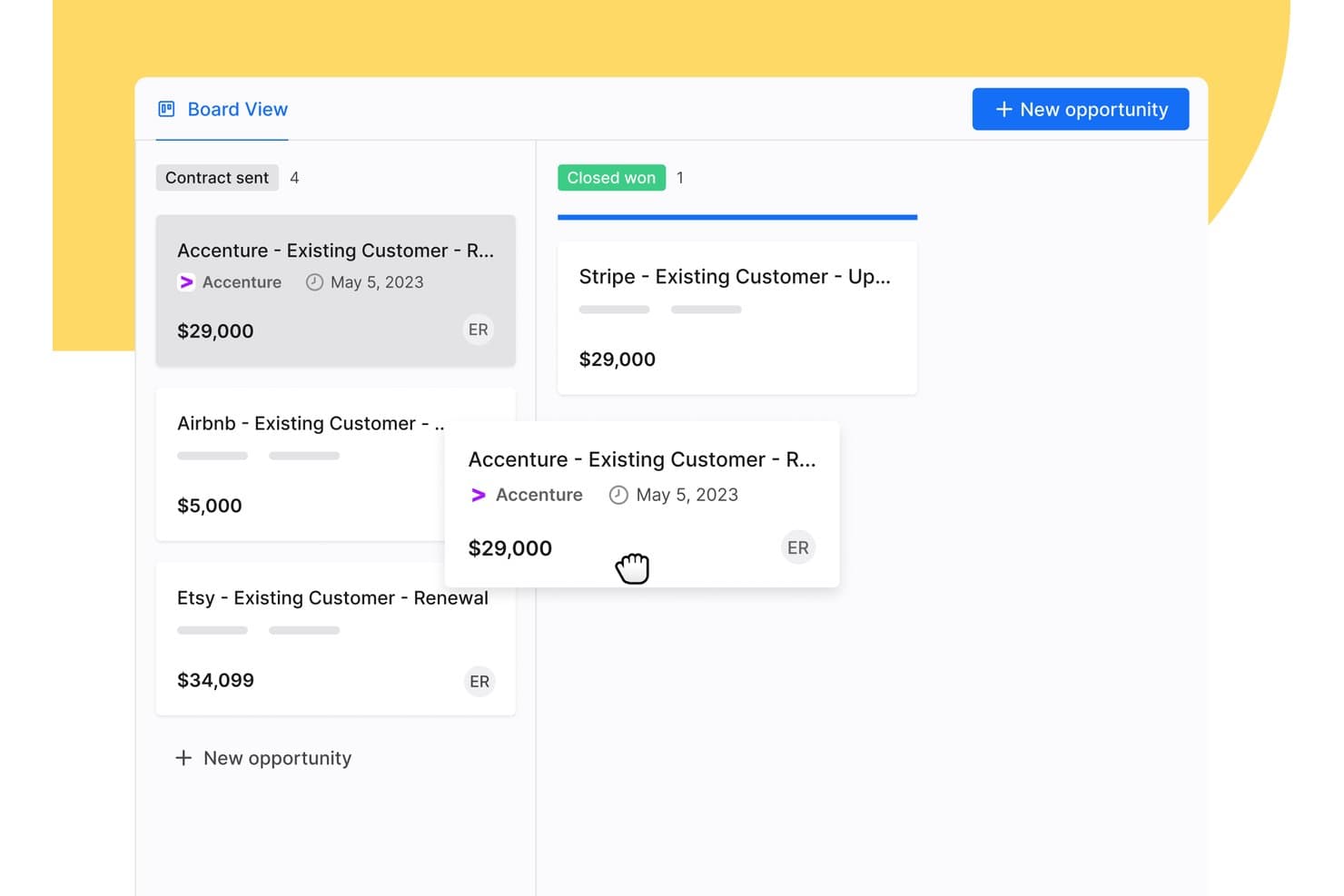
Apollo.io offers a drag-and-drop Board View for managing sales opportunities across pipeline stages like Contract Sent and Closed Won. Apollo.io is a B2B sales intelligence and engagement platform that combines a large contact database, deal pipeline management, multi-channel outreach sequencing, and workflow automation in a single free-to-start workspace.
Who Is Apollo.io Best For?
Apollo.io suits early-stage startup founders and SMB sales teams running outbound-heavy pipelines who need prospecting, sequencing, and basic deal management in one free-to-start tool.
Why I Picked Apollo.io
I picked Apollo.io as one of the best because its multi-channel sequence builder lets my team run coordinated outreach across email, phone, and LinkedIn from a single workflow. I can set trigger-based steps so a missed call automatically queues a follow-up email or LinkedIn touch, keeping deals moving without manual intervention. The AI Sequence Builder also drafts personalized step copy based on contact data, which cuts the time I spend building new outbound plays.
Apollo.io Key Features
- Chrome extension: Prospect on LinkedIn, Gmail, Salesforce, or company websites and add contacts directly to Apollo.
- Lead and account scoring: Score and prioritize leads or accounts using built-in ranking models and custom attributes.
- Deal management: Track opportunities with a pipeline view and customizable deal stages to monitor sales progress.
- Basic CRM enrichment: Enrich contact and company records via CSV uploads or data sync with Salesforce and HubSpot.
Apollo.io Integrations
Apollo.io offers native integrations with Salesforce, HubSpot, Gmail, Outlook, LinkedIn, and Slack. It connects with Zapier and also provides an API for custom integrations.
What's Free?
Apollo.io offers a free-forever plan with access to core features like email sequences, basic filters, and the contact database. The free plan caps your monthly export and email credits and restricts access to advanced analytics, AI features, and certain automation steps, which are reserved for paid tiers.
Pros and Cons
Pros:
- Chrome extension pulls prospect data automatically
- Multi-step email sequences included on free plan
- Built-in contact database with millions of records
Cons:
- Deal pipeline is shallow for complex sales
- Monthly export credits run out quickly
Learn more about Apollo.io: Best for marketing automation tools
- Free plan + free demo available
- Pricing upon request
Visit WebsiteCustomer Rating:4.6/5
EngageBay merges sales, marketing, and support in one hub. EngageBay is designed for small and medium-sized businesses, offering tools for marketing automation, CRM, and customer support. It aims to help businesses manage their sales and marketing efforts in one unified platform.
Why I picked EngageBay: EngageBay's free offering includes essential CRM and marketing automation tools, such as email marketing, lead management, and contact segmentation.
Your team can also access basic helpdesk tools and landing page builders. Its all-in-one approach makes it a versatile choice for businesses aiming to simplify their operations.
Standout features and integrations:
Features include a landing page builder that helps create professional pages without coding, a helpdesk that supports customer inquiries, and a form builder for capturing leads. These features ensure your team can manage sales and marketing tasks efficiently.
Integrations include Zapier, Mailchimp, Shopify, HubSpot, Stripe, PayPal, QuickBooks, Xero, Twilio, SendGrid, and more.
What's free? EngageBay offers a free-forever plan with limitations on emails sent, contacts stored, and the number of users, making it ideal for small teams.
Pros and Cons
Pros:
- Form builder for lead capture
- Landing page builder available
- Includes basic helpdesk tools
Cons:
- Learning curve for new users
- Restrictions on email sends
Learn more about EngageBay: Best for small business CRM needs
- Free plan + 14-day free trial + demo available
- From $20/user/month
Visit WebsiteCustomer Rating:4.4/5
HubSpot offers customizable dashboards for visual lead-generation tracking. HubSpot is one of the best free CRM platforms designed for businesses of all sizes, offering tools for marketing, sales, and customer service. It helps teams manage leads, automate marketing efforts, and support customers efficiently.
Why I picked HubSpot: The tool’s free offering includes essential functionalities like contact management and deal pipelines. What sets HubSpot CRM apart is the extensive range of free marketing tools, such as email marketing and ad management.
Your team can also benefit from live chat and basic reporting features. Its vast array of features makes it a good option for small businesses looking to reinforce their sales efforts.
Standout features and integrations:
Features include customizable dashboards that provide insights into sales performance, email templates that save time on outreach, and task automation that boosts productivity. The ability to track customer interactions in one place ensures your team stays informed and aligned.
Integrations include Gmail, Outlook, Shopify, Zapier, Slack, Meta Ads, LinkedIn, WordPress, Mailchimp, Zoom, Salesforce, and more.
What's free? HubSpot offers a free-forever plan with limitations on advanced features and user seats. Users can access basic CRM tools and certain marketing functionalities without a time limit.
Pros and Cons
Pros:
- Task automation included
- Email tracking available
- User-friendly interface
Cons:
- Restricted reporting capabilities
- Advanced features require upgrades
Learn more about HubSpot: Best for Gmail integration
- Free plan + 14-day free trial available
- From $59/user/month
Visit WebsiteCustomer Rating:4.5/5
Streak organizes pipelines and automates tasks inside your Gmail inbox. Streak is a CRM tool within Gmail, ideal for small to medium-sized businesses looking to manage sales directly from their inbox. It helps users track leads, manage customer relationships, and automate workflows without leaving their email.
Why I picked Streak: Streak emphasizes its integration with Gmail, allowing your team to manage sales processes within the familiar email environment. The tool’s free version includes features like pipeline management, email tracking, and task reminders.
Your team can also utilize customizable fields to tailor the CRM to their specific needs. This native integration with Gmail makes it a convenient choice for teams that rely heavily on email communication.
Standout features and integrations:
Features include email tracking that provides insights on when emails are opened, task reminders that keep your team on schedule, and mail merge for sending personalized emails in bulk. These features enhance your team's ability to manage communications.
Integrations include Google Workspace, Mailchimp, Zapier, Slack, Calendly, LinkedIn, and more.
What's free? Streak offers a 14-day free trial with basic CRM functionalities, suitable for personal use or small teams with limited needs.
Pros and Cons
Pros:
- Prioritize follow-ups easily
- Customizable pipeline fields
- Direct Gmail integration
Cons:
- Less competitive than other tools
- Restricted to Gmail users
Learn more about Streak: Best for extensive app integrations
- 30-day free trial
- From $25/user/month
Visit WebsiteCustomer Rating:4.4/5
Salesforce offers customizable sales dashboards with visualizations. Salesforce is a cloud-based customer relationship management platform used by businesses of all sizes across many industries. It supports sales, service, marketing, and ecommerce teams by giving them tools to manage customer interactions, track leads, and automate processes.
Why I picked Salesforce: Salesforce's free trial gives your team access to Sales Cloud, which has features such as contact and account management, lead generation tracking, and mobile access. You can also use customizable dashboards and reports to monitor your pipeline. The built-in AI-powered tools let you set up task reminders and sales workflows.
Standout features and integrations:
Features include lead scoring and assignment rules, territory management, and forecasting tools. You can set up sales processes that match your team’s workflow and use Einstein Activity Capture to sync emails and calendar events. Sales paths guide reps through each stage, so they know what to do next.
Integrations include Slack, Google Workspace, Mailchimp, QuickBooks, Docusign, Dropbox, LinkedIn, and more.
What's free? Salesforce offers a 30-day free trial with access to Sales Cloud features for one user, with no long-term access after the trial expires.
Pros and Cons
Pros:
- Easy to add third-party apps
- Built-in AI sales tools
- Flexible reporting tools
Cons:
- Mobile features are more limited
- Hard to use without training
Learn more about Salesforce : Best for team collaboration tools
- Free plan + 15-day free trial + free demo available
- From €69/month
Visit WebsiteCustomer Rating:4.2/5
Bitrix24 offers a detailed lead management dashboard with Kanban-style columns. Bitrix24 is an all-in-one sales management platform designed for businesses of all sizes, offering tools for lead management, sales automation, and performance tracking. It helps teams manage the entire sales cycle, from lead generation to customer retention, using a single platform.
Why I picked Bitrix24: Bitrix24's free account provides 35 tools, including lead and deal management, omnichannel communication, and collaboration tools. Your team can use the platform's analytics, mobile CRM capabilities, and task management tools without any cost. Its versatility and variety of features make it a valuable tool for enhancing sales performance.
Standout features and integrations:
Features include task and project management that helps streamline your team's efforts, employee performance tracking that provides insights into team productivity, and website creation features that support marketing initiatives. These features ensure your team can manage sales and marketing effectively.
Integrations include Google Workspace, Microsoft Office 365, Zoho CRM, Mailchimp, QuickBooks, Zoom, Trello, WordPress, Asana, and more.
What's free? Bitrix24 offers a free-forever plan with essential sales management features, making it accessible for businesses of all sizes.
Pros and Cons
Pros:
- Supports the entire sales cycle
- Available in cloud and self-hosted
- Over 35 free tools
Cons:
- Some integrations require additional setup
- Inconsistent customer support
Learn more about Bitrix24:

eWay-CRM’s visual sales pipeline for customizable deal management. eWay-CRM is integrated with Microsoft Outlook, aimed at small to medium-sized businesses. It helps teams manage customer relationships, sales, and marketing campaigns directly from their email client.
Why I picked eWay-CRM: eWay-CRM offers free CRM functionalities that integrate with Outlook, making it highly accessible for teams already using this platform. Features like contact management, sales tracking, and project management are available on the free plan.
Your team can also enjoy task and communication management, and the ability to integrate with Outlook. This is ideal for businesses seeking a CRM that fits naturally into their existing workflow.
Standout features and integrations:
Features include project management tools that help organize tasks and timelines, document management that stores important files in one place, and marketing automation to organize campaigns. These features ensure your team can easily manage their sales and marketing efforts.
Integrations include Microsoft Outlook, Microsoft Office 365, Microsoft Teams, SharePoint, Zapier, QuickBooks, WordPress, LinkedIn, and more.
What's free? eWay-CRM offers a free-forever plan with limitations on storage and some advanced features, making it suitable for small teams.
Pros and Cons
Pros:
- Unlimited users
- Document management capabilities
- Includes project management tools
Cons:
- Performance issues
- Slow loading in Outlook
Learn more about eWay-CRM: Best for SMB sales pipeline management
- Free demo + free plan available
- From $39.99/user/month (billed annually)
Visit WebsiteCustomer Rating:4.5/5
Teamgate supports guided selling with pipeline visibility tools. Teamgate is a sales CRM designed for small to medium-sized businesses, focusing on sales pipeline management and lead tracking. It helps teams manage leads, track sales activities, and improve their sales processes.
Why I picked Teamgate: Teamgate's free offering highlights its customizable sales pipeline management, supporting teams looking to strategically improve their sales processes. Its free version includes features like lead scoring, sales forecasting, and contact management. Its user-friendly interface makes it easy for sales teams to adopt and utilize.
Standout features and integrations:
Features include forecasting tools that help predict future sales, lead scoring to prioritize potential customers, and reporting features that provide insights into sales performance. These features enhance your team's ability to manage sales activities efficiently.
Integrations include Mailchimp, Google Workspace, Slack, Zapier, Xero, QuickBooks, LinkedIn, Microsoft Office 365, Dropbox, Trello, and more.
What's free? Teamgate offers a free plan for up to two users, allowing teams to explore the platform's basic contact and communication tools before committing.
Pros and Cons
Pros:
- Responsive customer support
- Lead scoring for prioritization
- Sales forecasting tools included
Cons:
- Limited integrations
- Initial setup can be complex
Learn more about Teamgate: Best for Microsoft ecosystem users
- Free plan available
- From $14/user/month (billed annually)

Dynamics 365 Sales helps teams manage leads, opportunities, and pipelines within the Microsoft ecosystem. Dynamics 365 Sales is a CRM solution designed for organizations that already rely on Microsoft tools like Office 365, Teams, and Power BI. It supports sales teams that want tighter integration between customer data, collaboration tools, and reporting—without adopting a completely separate platform.
Why I picked Dynamics 365 Sales:
Dynamics 365 Sales stands out for teams embedded in Microsoft’s ecosystem. It connects sales data directly to Outlook, Teams, and Excel, reducing the need to switch between tools. Built on the Power Platform, it offers strong customization options for workflows, dashboards, and automation, making it a flexible choice for growing sales teams that need tailored processes rather than an off-the-shelf CRM.
While setup and configuration still require planning, it’s a solid option if your organization already uses Microsoft products and wants CRM data to live in the same environment.
Standout features and integrations:
Features include lead and opportunity management, customizable dashboards for sales forecasting, and automation through Power Automate to reduce manual tasks. Sales insights can be extended using Power BI for deeper reporting and pipeline visibility.
Integrations include Microsoft Outlook, Teams, Excel, Power BI, SharePoint, OneDrive, LinkedIn Sales Navigator, Azure, and the broader Dynamics 365 suite.
What's Free? Microsoft Dynamics 365 Sales does not offer a free-forever plan. However, you can try Dynamics 365 Sales at no cost with a 30-day free trial, which lets you explore its core CRM features, pipeline tools, and AI-driven insights before committing to a paid license.
Pros and Cons
Pros:
- Strong reporting with Power BI
- Highly customizable via Power Platform
- Deep integration with Microsoft 365 and Teams
Cons:
- No free plan
- Configuration and customization require Power Platform knowledge
Learn more about Microsoft Dynamics 365 Sales:

FreeCRM tracks contacts, sales, and campaigns in one place. FreeCRM is designed for businesses of all sizes, particularly small businesses in industries such as automotive, real estate, and professional services. It offers tools for tracking sales activities, managing customer interactions, and executing marketing campaigns.
Why I picked FreeCRM: FreeCRM's offering includes sales pipeline tracking, allowing your team to manage deals and customer interactions effectively. Key features like contact management and marketing automation are also available.
The platform supports task tracking and targeted marketing campaigns, supporting your team's productivity efforts. Its customizable dashboard provides real-time insights, making it a valuable tool for improving sales performance.
Standout features and integrations:
Features include a customizable dashboard that lets you monitor tasks and events in real time, deal and sales pipeline management tools that keep your team organized, and call-tracking software that helps manage customer interactions.
Integrations include Zapier, WhatsApp, Facebook, Twitter, Google Workspace, QuickBooks, Amazon AWS, and more.
What's free? FreeCRM offers a free-forever plan with essential CRM features, making it accessible for businesses of all sizes.
Pros and Cons
Pros:
- Secure cloud services
- Marketing automation features
- Real-time task monitoring
Cons:
- Limited customization
- Low storage on the free plan
Learn more about FreeCRM:
Diğer Satış Yönetimi Yazılımları
Ücretsiz planlar veya deneme sürümleri de sunan bazı ek satış yönetimi yazılımı seçenekleri burada yer alıyor. Bu araçlar kısa listeme girmemiş olsa da göz atmaya değer:
- 11monday AI WorkspaceBest for visual project tracking
- 12CapsuleBest for simple contact management
- 13EspoCRMBest for open-source flexibility
- 14FreshsalesBest for AI-driven free CRM for sales teams
- 15ClickUpBest for customizable workflows
How I Evaluate Free Sales Management Software
When a RevOps team needs to track deals and log activity without a paid license, I split my evaluation into two layers: baseline qualifiers and the differentiators that set options apart.
Core Functionality (Table Stakes For This List)
When I'm selecting tools for my list, I rank each one on a scale from 0 (does not offer the functionality) to 5 (excels in this area) for each core functionality listed below. Then, I calculate the tool's total score into a percentage. Each tool needs to achieve a minimum total score of 65% to be considered for inclusion.
- Pipeline & Deal Stage Management: I look for visual pipelines where reps can drag deals across custom stages, like moving a prospect from "demo scheduled" to "proposal sent" without switching views.
- Contact & Lead Management: A centralized database for leads, contacts, and accounts matters here. I check whether you can tag records, add custom fields, and segment by criteria like deal size or source.
- Free Plan Availability: Each tool must offer a genuinely free, non-expiring plan. I evaluate whether core sales management features remain accessible or get locked behind a paywall after signup.
- Sales Reporting & Dashboards: Dashboards that surface pipeline value, deal velocity, and rep activity give RevOps teams the visibility they need. I look for filtering, exports, and at least basic customization.
- Task & Activity Tracking: Reps need to log calls, schedule follow-ups, and assign tasks with due dates. I check whether activities tie directly to deal and contact records for a clear timeline.
- Sales Workflow Automation: Even basic automations add value, like auto-assigning a task when a deal hits a new stage or sending a notification when a lead goes cold. I evaluate what's available without upgrading.
Once I have a list of tools that meet this criteria, I consider what sets each platform apart.
Differentiating Factors (What Sets Vendors Apart)
Here's how I compare and contrast different vendors:
Standout Features
Email integration and tracking is a big differentiator. I look for two-way sync with Gmail or Outlook so reps can send and track opens directly from deal records, keeping activity data clean for reporting. Built-in communication tools like native calling or live chat reduce the need to bolt on separate apps, which matters on a zero-budget stack. A full-featured mobile app also makes a real difference for reps who update deals and log calls between meetings rather than back at a desk.
Beyond Features
Free plan generosity matters just as much as features. I evaluate how many user seats and contact records come included, because a three-person sales team that hits the record cap within a quarter will face an unplanned upgrade. The integration ecosystem is equally important. I check for native connections to tools like Google Workspace, Mailchimp, or QuickBooks, plus open API or Zapier access for custom workflows. I also consider time-to-value, looking for self-serve onboarding, CSV imports, and pre-built pipeline templates that get a team selling the same week.
Ücretsiz Satış Yönetimi Yazılımı Nasıl Seçilir?
Karmaşık özellik listeleri ve fiyatlandırma yapıları, ücretsiz satış yönetimi yazılımından aslında ne elde ettiğinizi anlamanızı zorlaştırabilir. Yazılım seçimi sürecinde ilerlerken odağınızı korumanıza yardımcı olmak için göz önünde bulundurmanız gereken bazı faktörler şunlardır:
| Faktör | Dikkat Edilmesi Gerekenler |
| Ücretsiz Teklifin Kapsamı | Ücretsiz plana nelerin dahil olduğunu kontrol edin. Kişi yönetimi ve satış takibi gibi temel özellikleri kapsıyor mu? Temel ihtiyaçlarınızı karşıladığından emin olun. |
| Ölçeklenebilirlik | Yazılımın ekibinizle birlikte büyüyüp büyüyemeyeceğini değerlendirin. İşletmeniz büyüdükçe daha fazla kullanıcıyı veya gelişmiş özellikleri destekleyecek mi? |
| Entegrasyonlar | E-posta istemcileri veya muhasebe yazılımları gibi hâlihazırda kullandığınız araçlarla uyumluluk arayın. Bu, iş akışınızı kolaylaştırmaya yardımcı olur. |
| Kullanım Kolaylığı | Kullanıcı arayüzünü değerlendirin. Ekibiniz için sezgisel ve kullanımı kolay mı? Kullanıcı dostu bir tasarım zamandan tasarruf sağlar ve eğitim ihtiyacını azaltır. |
| Müşteri Desteği | Destek seçeneklerinin kullanılabilirliğini kontrol edin. Sağlayıcı sohbet, e-posta veya telefon desteği sunuyor mu? İyi bir destek, sorunların hızlıca çözülmesine yardımcı olabilir. |
| Güvenlik | Yazılımın veri koruma düzenlemelerine uyduğundan emin olun. Ekibinizin verileri güvende olmalı ve yalnızca yetkili kullanıcılar tarafından erişilebilmelidir. |
| Özelleştirme | Yazılımı süreçlerinize uyarlama olanağını değerlendirin. Alanları veya panoları ekibinizin iş akışına uyacak şekilde özelleştirebilir misiniz? |
Ücretsiz Satış Yönetimi Yazılımı Nedir?
Satış yönetimi yazılımı, işletmelerin satış süreçlerini yönetmesine, müşteri etkileşimlerini takip etmesine ve potansiyel müşterileri düzenlemesine yardımcı olmak için tasarlanmıştır. Ücretsiz teklifler genellikle bu araçların sınırlı sürümlerini ve çoğu zaman daha az özellik veya kullanıcı sınırı içerir. Bu araçlar, satış verimliliğini maliyete katlanmadan artırmak isteyen satış profesyonelleri, küçük işletme sahipleri ve ekipler tarafından yaygın olarak kullanılır. Satış faaliyetlerini düzenleyerek, müşteri ilişkileri yönetimini iyileştirerek ve üretkenliği artırarak değer sağlarlar. Kişi yönetimi, satış takibi ve görev otomasyonu gibi özellikler iş akışlarını düzenlemeye, üretkenliği artırmaya ve müşteri ilişkilerini etkili bir şekilde yönetmeye yardımcı olur.
Özellikler
Satış yönetimi yazılımlarında yaygın olarak bulunan özellikleri ve bunlardan hangilerinin genellikle ücretsiz ve ücretli planlara dahil edildiğini inceleyelim.
Genellikle Ücretsiz Satış Yönetimi Yazılımı Özellikleri
- Kişi yönetimi: Kişi bilgilerini düzenlemeye ve depolamaya yardımcı olarak müşteri etkileşimlerini takip etmeyi ve ilişkileri sürdürmeyi kolaylaştırır.
- Satış takibi: Kullanıcıların satış ilerlemesini ve performansını izlemesine olanak tanıyarak ekiplerin satış hedeflerini takip etmesine yardımcı olur.
- Görev otomasyonu: Tekrarlanan görevleri otomatikleştirerek satış ekiplerinin daha önemli faaliyetlere odaklanması için zaman kazandırır.
- E-posta entegrasyonu: İletişimi geliştirmek ve CRM içindeki etkileşimleri takip etmek için e-posta platformlarına bağlanır.
- Potansiyel müşteri yönetimi: Potansiyel müşterileri yakalamak, takip etmek ve yönetmek için araçlar sunarak satış ekiplerinin potansiyel müşterileri müşterilere dönüştürmesini destekler.
- Temel raporlama: Satış faaliyetleri ve performansı hakkında içgörüler sağlamak için basit raporlar sunarak karar alma süreçlerine yardımcı olur.
- Satış hunisi yönetimi: Ekiplerin anlaşmaları etkili bir şekilde yönetmesine ve önceliklendirmesine yardımcı olmak için satış hunilerini görselleştirir.
- Mobil erişim: Kullanıcıların CRM'e mobil cihazlardan erişmesine olanak tanıyarak satış faaliyetlerini hareket hâlindeyken yönetebilmelerini sağlar.
Genellikle Ücretli Satış Yönetimi Yazılımı Özellikleri
- Gelişmiş analizler: Satış verilerinin derinlemesine analizini sunarak stratejik karar alma süreçleri için değerli içgörüler sağlar.
- Özelleştirilebilir panolar: Kullanıcıların panoları kendi özel ihtiyaçlarıyla ilgili temel ölçümleri ve verileri gösterecek şekilde uyarlamasına olanak tanır.
- Pazarlama otomasyonu: Potansiyel müşteri geliştirme ve müşteri etkileşimini iyileştirmek için e-posta kampanyaları gibi pazarlama görevlerini otomatikleştirir.
- Müşteri destek araçları: Müşteri hizmetlerini iyileştirmek için destek talebi sistemleri ve canlı sohbet gibi gelişmiş destek özellikleri içerir.
- Gelişmiş araçlarla entegrasyon: Muhasebe yazılımları ve gelişmiş pazarlama platformları gibi özel araçlarla bağlantılar sunar.
- Gelişmiş güvenlik özellikleri: Hassas müşteri verilerini korumak ve düzenlemelere uyumu sağlamak için gelişmiş güvenlik seçenekleri sunar.
- API erişimi: Kullanıcıların CRM'i diğer yazılım çözümleriyle entegre etmesine ve işlevlerini özelleştirmesine olanak tanır.
- İş birliği araçları: Paylaşılan takvimler ve belge paylaşımı gibi özelliklerle ekip içi iş birliğini kolaylaştırarak ekip çalışmasını geliştirir.
Avantajlar
Ücretsiz satış yönetimi yazılımını uygulamak ekibiniz ve işletmeniz için çeşitli avantajlar sağlar. Yararlanabileceğiniz avantajlardan bazıları şunlardır:
- Maliyet tasarrufu: Temel satış yönetimi araçlarını ücretsiz sunarak işletmenizin satış faaliyetlerini yönetirken tasarruf etmesine yardımcı olur.
- Gelişmiş organizasyon: Kişi yönetimi ve satış takibi gibi özellikler sunarak ekibinizin düzenli kalmasına ve satış hedeflerine odaklanmasına yardımcı olur.
- Artan üretkenlik: Tekrarlanan görevleri otomatikleştirir ve e-posta platformlarıyla entegre olarak ekibinizin anlaşmaları sonuçlandırmaya odaklanması için zaman kazandırır.
- Erişilebilirlik: Mobil cihazlardan erişim sağlayarak ekibinizin satış faaliyetlerini hareket hâlindeyken yönetmesine ve bağlantıda kalmasına olanak tanır.
- Gelişmiş iletişim: E-posta ve iletişim araçlarıyla entegre olarak iş birliğini ve müşteri etkileşimlerini iyileştirir.
- Ölçeklenebilirlik: Küçük ekipler için bir başlangıç noktası sunar ve işletmeniz büyüdükçe yükseltme seçeneği sağlar.
- Veri içgörüleri: Satış performansı hakkında içgörüler sağlayan temel raporlama özellikleri sunarak bilinçli karar alma süreçlerini destekler.
Maliyetler ve Fiyatlandırma
Bu makaleye, ücretsiz olarak sunulan en iyi satış yönetimi yazılımı seçeneklerini aradığınız için geldiğinizi biliyorum. Ancak ücretsiz planlar yalnızca sınırlı özellikler sunduğundan, gelecekte planınızı yükseltmeniz gerekme ihtimali oldukça yüksektir.
Aşağıdaki tablo, satış yönetimi yazılımı çözümlerinde yaygın planları, ortalama fiyatlarını ve genellikle sunulan özellikleri özetlemektedir:
Satış Yönetimi Yazılımı İçin Plan Karşılaştırma Tablosu
| Plan Türü | Ortalama Fiyat | Yaygın Özellikler |
| Ücretsiz Plan | $0 | Temel kişi yönetimi, satış takibi ve sınırlı raporlama. |
| Bireysel Plan | $5-$25/kullanıcı/ay | Gelişmiş kişi yönetimi, e-posta entegrasyonu ve temel otomasyon. |
| İşletme Planı | $30-$60/kullanıcı/ay | Gelişmiş raporlama, pazarlama otomasyonu ve birden fazla kullanıcı desteği. |
| Kurumsal Plan | $70-$150/kullanıcı/ay | Özelleştirilebilir panolar, gelişmiş güvenlik özellikleri ve özel müşteri desteği. |
Ücretsiz Satış Yönetimi Yazılımı SSS
Ücretsiz satış yönetimi yazılımı hakkında sık sorulan bazı soruların yanıtlarını burada bulabilirsiniz:
Ücretsiz satış yönetimi yazılımı işletmemle birlikte büyüyebilir mi?
Ücretsiz satış yönetimi yazılımı harika bir başlangıç noktası olabilir, ancak işletmeniz büyüdükçe bazı sınırlamaları olabilir. Yazılımın ölçeklenebilir seçenekler veya daha gelişmiş özelliklere sahip ücretli planlar sunup sunmadığını kontrol edin. Böylece ekibiniz daha fazla işlevselliğe ihtiyaç duyduğunda sistem değiştirmek zorunda kalmadan planınızı yükseltebilirsiniz.
Ücretsiz satış yönetimi yazılımının yaygın sınırlamaları nelerdir?
Ücretsiz sürümler genellikle kullanıcı sayısında üst sınır, sınırlı depolama alanı ve kısıtlı özellikler gibi sınırlamalarla birlikte gelir. Bu planlar genellikle küçük ekipler veya yeni girişimler için yeterli olabilecek temel işlevleri içerir. Nelerin dahil olduğunu ve olası sınırlamaları anlamak için ücretsiz planın ayrıntılarını inceleyin.
Ücretsiz satış yönetimi yazılımıyla verilerim ne kadar güvende?
Ücretsiz yazılımlarda bile veri güvenliği çok önemlidir. Sağlayıcının veri koruma düzenlemelerine uyduğundan ve şifreleme ile düzenli yedeklemeler gibi özellikler sunduğundan emin olun. Verilerinizin güvende kaldığını ve yalnızca yetkili kullanıcılar tarafından erişilebildiğini doğrulamanız önemlidir.
Ücretsiz satış yönetimi yazılımı çözümleri müşteri desteği sunuyor mu?
Ücretsiz planlar için müşteri desteği değişiklik gösterebilir. Bazı sağlayıcılar SSS ve topluluk forumları gibi temel destek seçenekleri sunarken, diğerleri e-posta veya sohbet desteği de sunabilir. Ekibinizin ihtiyaç duyduğunda yardım alabilmesini sağlamak için ücretsiz planda bulunan destek seçeneklerini kontrol edin.
Ücretsiz satış yönetimi yazılımıyla ilişkili gizli maliyetler var mı?
Yazılımın kendisi ücretsiz olsa da ek özellikler, entegrasyonlar veya daha fazla depolama alanı için ücretler gibi gizli maliyetler olabilir. Ücretsiz sürümü kullanmayla ilişkili olası maliyetleri anlamak için sağlayıcının fiyatlandırma ayrıntılarını dikkatlice inceleyin.