

Komisyonları yönetmek baş ağrıtıcı olabilir. Elektronik tablolarla uğraşıyor, hataları takip ediyor ve satış ekibinizden gelen bitmek bilmeyen soruları yanıtlıyorsunuz. Benim deneyimime göre komisyon takip yazılımı adeta hayat kurtarıyor. Manuel iş yükünü azaltmanıza, doğruluğu artırmanıza ve ekibinizin motivasyonunu korumanıza yardımcı olur.
Size mevcut en iyi seçenekleri sunmak için bu araçları test edip incelemeye zaman ayırdım. Sizin ve ekibiniz için gerçekten önemli olan noktalara odaklanarak önde gelen komisyon takip çözümleri hakkında tarafsız bilgiler bulacaksınız.
İhtiyaçlarınıza uygun, bilinçli bir karar verebilmeniz için özellikleri, avantajları ve dezavantajları inceleyeceğim; bu nedenle yazıyı okumaya devam edin.
Why Trust Our Software Recommendations
6,700+
Reviews
20
Industry experts
16+
Evaluation factors
14
Years
Our reviews reflect our independent judgment—not a sales pitch. Learn how we stay transparent.
For this guide, we evaluated tools using hands-on testing and independent research, scoring tools using our selection criteria.
Our reviews reflect our human editorial judgment, not a sales pitch.
Karşılaştırma Tablosu: Komisyon Takip Yazılımları
Bu karşılaştırma tablosu, en iyi komisyon takip yazılımı seçimlerim için fiyatlandırma ayrıntılarını özetlemektedir.
Sorted by: Default
| Tool | Starting Price | Website | |
|---|---|---|---|
Best for user-friendly interfaces | 4.8 out of 5 | Pricing upon request Free demo available | Website |
Best for real-time visibility into earnings | 4.8 out of 5 | Pricing upon request Free demo available | Website |
Best for ASC 606-compliant commission accounting | 4.3 out of 5 | Pricing upon request Free demo available | Website |
Best for AI-driven commission automation | 4.9 out of 5 | Pricing upon request Free demo available | Website |
Best for integration with QuickBooks | 4.5 out of 5 | $17/user/month Free demo available | Website |
Best for enterprise-level scalability | 4.3 out of 5 | Pricing upon request Free demo available | Website |
Best for sales team motivation | 3.7 out of 5 | $25/user/month Free demo available | Website |
Best for flexibility in commission plans | 4.7 out of 5 | Pricing upon request Free demo available | Website |
Best for real-time commission tracking | Not rated | $75/user/month Free demo available | Website |
Best for Finance-owned plan administration | 5.0 out of 5 | $30/user/month Free demo available | Website |


En İyi Komisyon Takip Yazılımları İncelemeleri
Aşağıda, kısa listeme giren en iyi komisyon takip yazılımlarına ilişkin ayrıntılı özetlerimi bulabilirsiniz. İncelemelerim; size en uygun aracı bulmanıza yardımcı olmak için her aracın temel özelliklerine, artılarına ve eksilerine, entegrasyonlarına ve ideal kullanım alanlarına ayrıntılı bir bakış sunuyor.
 Best for user-friendly interfaces
- Free demo available
- Pricing upon request
Visit WebsiteCustomer Rating:4.8/5
Qobra shows teams their payment history and commission breakdowns. Qobra is a commission management tool designed for sales teams looking for simplicity and efficiency in managing commissions. It helps you automate calculations and provides clear insights into sales performance and compensation.
Why I picked Qobra: Qobra’s user-friendly interface makes it easy for your stakeholders to manage their commissions. Its intuitive design simplifies complex commission calculations and offers clear visualizations of sales data, making it easier to track performance and payouts. In my experience, Qobra’s focus on usability allows your team to adapt to its features without extensive training.
Standout features and integrations:
Features include intuitive dashboards, automated commission calculations, and clear sales data visualizations. These tools help you manage your sales compensation strategies and keep your team informed. Use QobrAI Agents such asThe Architect, The Analyst, and The Sales Coach to instantly build plans, detect calculation anomalies, and push proactive insights to your sales team.
Integrations include Salesforce, HubSpot, Slack, Microsoft Dynamics, Workday, and more.
Pros and Cons
Pros:
- Minimal training needed
- Quick team adaptation
- Intuitive design
Cons:
- CRM and data limitations
- Limited advanced features
Learn more about Qobra: Best for real-time visibility into earnings
- Free demo available
- Pricing upon request
Visit WebsiteCustomer Rating:4.8/5
Everstage helps sales and finance teams see transparent, real-time commissions. Everstage is a commission management platform designed for sales and finance teams who need transparency and real-time tracking of sales commissions. It offers tools that help manage and automate commission calculations, providing clear insights into earnings.
Why I picked Everstage: Everstage provides real-time visibility into your team’s earnings, helping you make informed decisions. Its intuitive dashboards display up-to-date commission data. The platform’s automated commission calculations improve accuracy and efficiency. In my experience, Everstage’s focus on transparency and real-time updates keeps your team motivated and informed.
Standout features and integrations:
Features include intuitive dashboards, automated commission calculations, and real-time data updates. These features help your team stay informed about their earnings and support accuracy in payouts.
Integrations include Salesforce, HubSpot, Slack, Microsoft Dynamics, QuickBooks, Xero, NetSuite, Workday, and more.
Pros and Cons
Pros:
- Automates sales compensation plans
- Accurate and efficient
- Real-time earnings visibility
Cons:
- Advanced customization may require significant setup and training
- Performance can slow with large teams or complex commission structures
Learn more about Everstage: Best for ASC 606-compliant commission accounting
- Free demo available
- Pricing upon request
Visit WebsiteCustomer Rating:4.3/5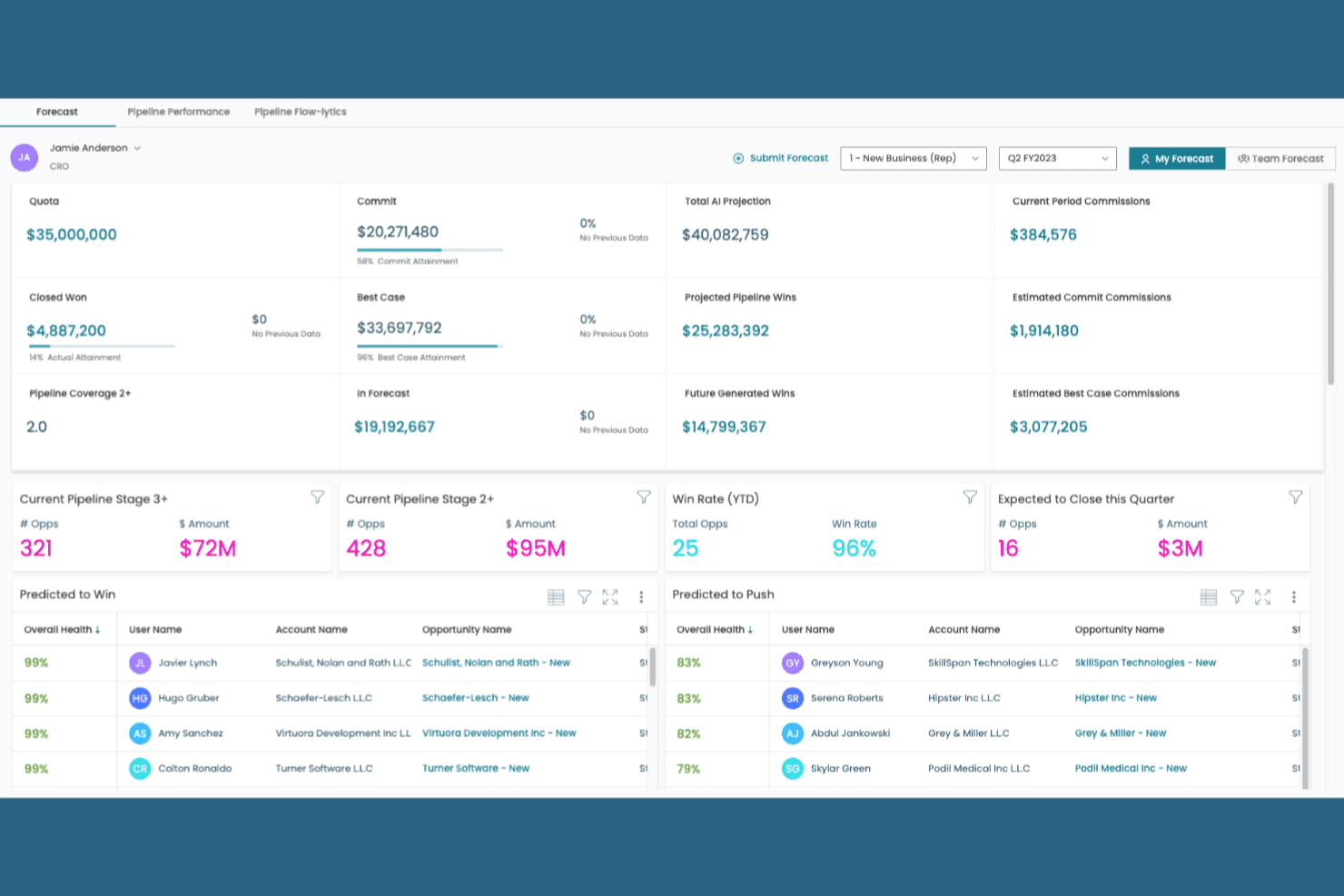
Xactly tracks current and projected commissions alongside quotas, pipeline performance, and sales forecasts. Xactly is a sales commission tracking and incentive compensation management platform that handles commission calculations, plan design, quota management, and ASC 606 commission expense accounting.
Who Is Xactly Best For?
Xactly is a strong fit for finance and RevOps teams at mid-market to enterprise companies that need to automate commission calculations while staying compliant with ASC 606 expense recognition standards.
Why I Picked Xactly
Xactly earns its spot on my shortlist because of how seriously it handles ASC 606 commission expense accounting, which is where most commission tools fall short. I like that it automates the amortization of commission costs over the contract period, so finance teams aren't manually splitting capitalized costs in spreadsheets at quarter-end. Its audit-ready reporting also maps directly to disclosure requirements, which I've found invaluable when supporting external audits.
Xactly Key Features
- Incentive compensation plan designer: Build and configure commission plan structures, including tiered rates, accelerators, and split arrangements, directly within the platform.
- Quota management: Set, adjust, and track quota assignments across your sales team with territory-level visibility.
- Real-time commission dashboards: Give reps and managers live visibility into earned commissions, attainment progress, and payout estimates.
- CRM and ERP integrations: Connect Xactly to your existing sales and finance systems to pull in deal data and push commission outputs automatically.
Xactly Integrations
Xactly offers native integrations with Salesforce, Microsoft Dynamics, NetSuite, Workday, SAP, and Oracle, powered by the Xactly Connect data integration platform. It also provides an API and a SQL-based JDBC driver for custom integrations with other CRM, ERP, and HCM systems.
Pros and Cons
Pros:
- Enables complex commission plan design
- Supports detailed audit-ready expense reporting
- Handles ASC 606 commission amortization
Cons:
- Reporting interface requires configuration expertise
- Implementation process can be time-consuming
Learn more about Xactly: Best for AI-driven commission automation
- Free demo available
- Pricing upon request
Visit WebsiteCustomer Rating:4.9/5
Forma.ai uses AI to improve complex enterprise commission management. Forma.ai is a commission and incentive compensation management platform designed for large enterprises looking to automate and optimize their sales compensation processes. It leverages AI to improve commission tracking for accuracy and efficiency in managing complex compensation plans.
Why I picked Forma.ai: It uses AI-driven automation to handle complex commission structures, making it a standout choice for large organizations. It can adapt to your business needs using its predictive analytics. The platform provides real-time insights to help you make informed decisions. In my experience, Forma.ai’s AI capabilities simplify the management of intricate compensation models, saving time and reducing errors.
Standout features and integrations:
Features include predictive analytics for compensation planning, real-time insights into sales performance, and automated commission calculations. These tools help you manage your compensation strategies and adapt to changing business conditions.
Integrations are not publicly listed.
Pros and Cons
Pros:
- Predictive analytics capabilities
- Adapts to complex structures
- AI-driven automation
Cons:
- Requires clean, well-structured data to perform accurately
- Limited support for small teams
Learn more about Forma.ai: Best for integration with QuickBooks
- Free demo available
- From $17/user/month
Visit WebsiteCustomer Rating:4.5/5
QCommission helps businesses of all sizes to automate commission calculations. QCommission is a versatile commission calculation software designed for businesses of all sizes, particularly those using accounting software such as QuickBooks. It automates commission calculations and provides detailed reporting to help manage sales compensation.
Why I picked QCommission: QCommission integrates with QuickBooks, making it ideal for businesses already using this accounting software. Its ability to pull data directly from QuickBooks is valuable for accurate commission calculations. In my experience, QCommission’s integration capabilities simplify the commission management process for businesses relying on QuickBooks.
Standout features and integrations:
Features include support for complex commission structures, detailed reporting capabilities, and automated payment processing. These features help you manage sales compensation and reduce manual errors.
Integrations include QuickBooks, Salesforce, Microsoft Dynamics, Oracle Fusion, NetSuite, Xero, Sage, Zoho CRM, and more.
Pros and Cons
Pros:
- Automated payment processing
- Supports complex commission structures
- Integrates well with QuickBooks
Cons:
- UI design may feel dated
- Requires ongoing data maintenance
Learn more about QCommission: Best for enterprise-level scalability
- Free demo available
- Pricing upon request
Visit WebsiteCustomer Rating:4.3/5
Performio helps teams forecast total revenue metrics, costs, and ACV revenue. Performio is a commission tracking software designed for large enterprises seeking to manage complex compensation plans. It caters to sales operations and finance teams, offering features that support detailed compensation management and reporting.
Why I picked Performio: Performio excels in handling enterprise-level scalability, making it ideal for large organizations with complex needs. It has flexible commission plan structures and in-depth reporting capabilities. The software supports a variety of compensation models for accurate payouts across your team. In my experience, Performio’s architecture supports the scalability needed for growing enterprises.
Standout features and integrations:
Features include detailed reporting capabilities, flexible commission plan structures, and support for multiple compensation models. These features help you manage sales compensation and adjust strategies to meet your business needs.
Integrations include Salesforce, NetSuite, SAP, Microsoft Dynamics, QuickBooks, HubSpot, Xero, Workday, and more.
Pros and Cons
Pros:
- In-depth reporting capabilities
- Supports enterprise-level scalability
- Handles complex compensation structures
Cons:
- Mobile and UX constraints
- Limited reporting
Learn more about Performio: Best for sales team motivation
- Free demo available
- From $25/user/month
Visit WebsiteCustomer Rating:3.7/5
ElevateHQ automates complex commission tracking for modern sales teams. ElevateHQ is a sales commission software designed for modern sales reps across industries such as pharmaceuticals, SaaS, and financial services. It automates commission tracking, offering flexibility and scalability to manage complex commission plans.
Why I picked ElevateHQ: ElevateHQ motivates your sales team with its intuitive sales incentive designer and data-driven insights. You’ll benefit from the platform’s ability to provide transparent commission statements and behavioral nudges that keep your team engaged. Fast implementation lets you start tracking commissions quickly. ElevateHQ’s centralized query system helps maintain clear communication.
Standout features and integrations:
Features include a powerful rule engine for customizing incentive plans, accurate compensation management, and audit trails for overrides. The platform also offers payout reconciliation and team management capabilities.
Integrations include Salesforce, HubSpot, QuickBooks, Xero, Slack, Microsoft Dynamics, NetSuite, and more.
Pros and Cons
Pros:
- Transparent payouts for motivation
- Versatile for various industries
- Fast implementation under four weeks
Cons:
- Feature gaps in niche areas
- Less mature ecosystem
Learn more about ElevateHQ: Best for flexibility in commission plans
- Free demo available
- Pricing upon request
Visit WebsiteCustomer Rating:4.7/5
CaptivateIQ's dashboard helps users keep track of their commissions. CaptivateIQ is commission management software for finance and sales teams, allowing flexible commission plans and automated, accurate payout calculations.
Why I picked CaptivateIQ: CaptivateIQ provides unparalleled flexibility in designing commission plans, which is important for teams with varying needs. You’ll find the drag-and-drop interface easy to use for creating and adjusting plans on the go. The platform supports custom calculations and real-time updates for your sales representatives to stay informed. In my experience, CaptivateIQ’s flexibility helps you adapt quickly to changing business needs.
Standout features and integrations:
Features include a drag-and-drop plan builder, real-time commission updates, and detailed reporting capabilities. It also offers audit trails for transparency and a user-friendly interface for straightforward plan management.
Integrations include Salesforce, NetSuite, QuickBooks, Xero, Workday, Microsoft Dynamics, Oracle Database, HubSpot, and more.
Pros and Cons
Pros:
- Supports custom calculations
- Intuitive drag-and-drop interface
- Real-time updates
Cons:
- Advanced features require configuration and training
- Performance may lag with very large or complex commission plans
Learn more about CaptivateIQ: Best for real-time commission tracking
- Free demo available
- From $75/user/month (billed annually)

Spiff supports formula-based commission calculations. Spiff is a sales commission management software tailored for finance, operations, sales, and HR professionals. It simplifies commission calculations and improves visibility, making it easier for teams to manage and motivate sales performance.
Why I picked Spiff: Spiff offers real-time commission tracking, which sets it apart from other tools. The automated complex commission plans reduce manual effort and errors. Spiff integrates with existing tools to maintain accurate data in real time. Its transparency helps build trust and motivation within your team.
Standout features and integrations:
Features include real-time visibility into commission data, automation of complex commission plans, and an intuitive interface for easy plan adjustments.
Integrations include Salesforce, NetSuite, Slack, Microsoft Dynamics, and more.
Pros and Cons
Pros:
- Motivates sales teams
- Easy plan adjustments
- Real-time commission tracking
Cons:
- Occasional calculation or performance issues
- Support and onboarding can be slow
Learn more about Spiff: 10Best for Finance-owned plan administration
EasyComp
- Free demo available
- From $30/user/month
Visit WebsiteCustomer Rating:5/5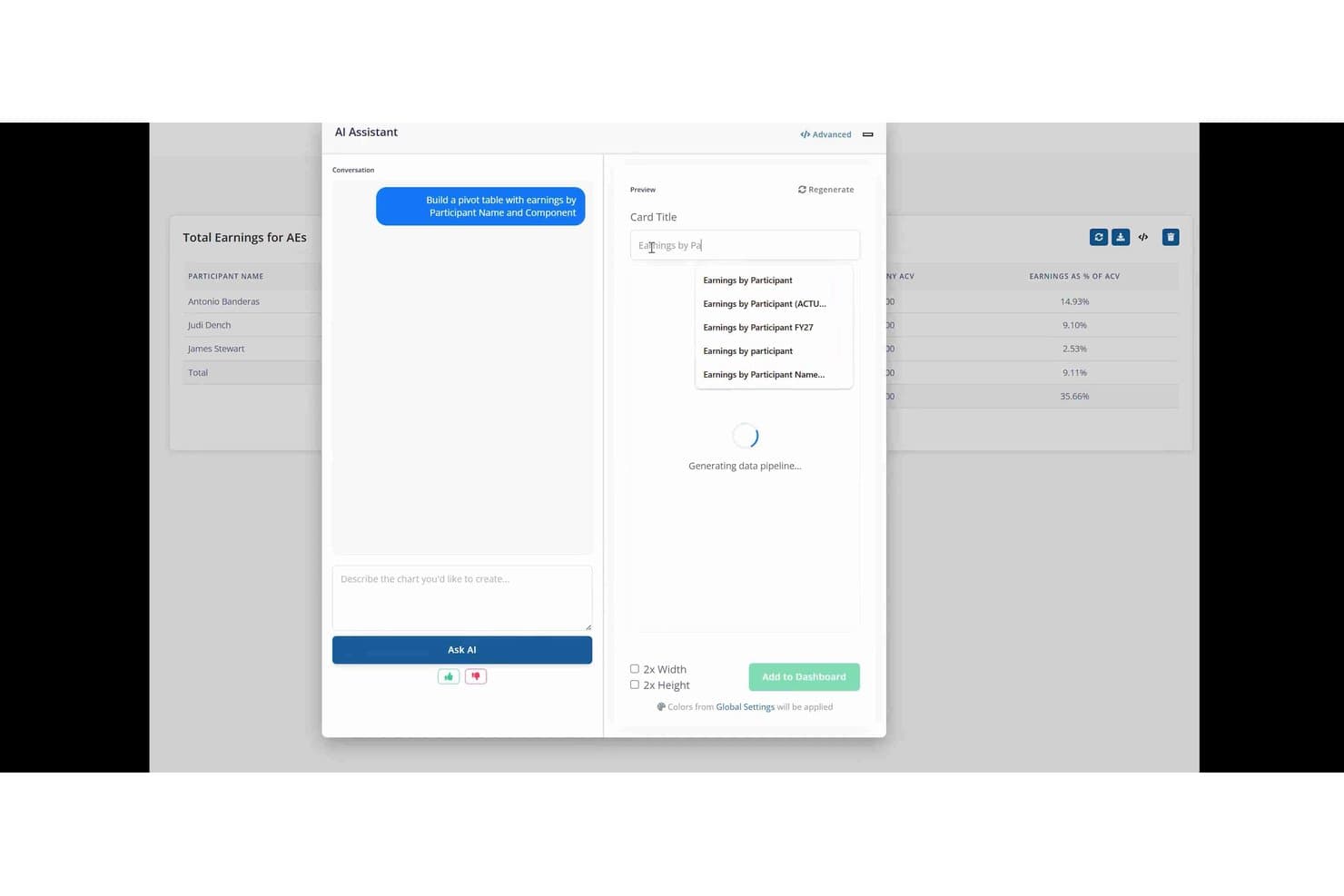
EasyComp lets users build pivot tables via an AI assistant. EasyComp is a sales compensation platform built around a real-time commission calculation engine, offering plan administration, rep-facing earnings dashboards, dispute workflows, and ASC 606-ready reporting.
Who Is EasyComp Best For?
EasyComp is a strong fit for finance and RevOps teams at SMB and mid-market companies that need to own plan administration without leaning on IT or outside consultants.
Why I Picked EasyComp
I picked EasyComp as one of the best because it's purpose-built for Finance and RevOps teams to own plan administration outright, with no IT tickets or vendor-side customization required. The no-code plan builder supports complex structures like ramps, clawbacks, and SPIFs as native components, and the AI Copilot lets admins make plan changes or move participants using plain-language queries. Every calculation is traceable line-by-line from source data to payout, which cuts down on rep disputes before they start.
EasyComp Key Features
- Rep earnings dashboard: Personalized real-time dashboards show reps their current earnings, quota attainment, deal-level credit, pending payouts, and projected future commissions.
- Dispute workflow: Built-in dispute management routes rep challenges through structured approval gates, with a full audit trail showing every change and its payout impact.
- ASC 606-ready reporting: Finance teams get accrual reporting, commission expense tracking, and payroll-ready exports built to support ASC 606 compliance and reconciliation-free closes.
- SOC 2 Type II certification: EasyComp is SOC 2 Type II audited, with role-based access controls restricting visibility of sensitive compensation data.
EasyComp Integrations
EasyComp offers seven native integrations, including Salesforce, HubSpot, Microsoft Dynamics, Google Sheets, NetSuite, Stripe, and Chargebee. A REST API supports custom data submissions, queries, exports, and data warehouse integrations.
Pros and Cons
Pros:
- Audit-ready, ASC 606-compliant reporting built in
- Complex plan changes require no IT involvement
- Real-time commission calculations with line-by-line traceability
Cons:
- Direct payroll integrations not currently available
- No native territory design or quota planning
Learn more about EasyComp:
Diğer Komisyon Takip Yazılımları
İşte kısa listeme giremeyen ancak yine de göz atmaya değer bazı ek komisyon takip yazılımı seçenekleri:
- 11Sircon CompensationBest for insurance industry compliance
- 12Commission TrackerBest for small businesses
- 13QuotaPathBest for sales performance insights
- 14VisdumBest for transparent commission reporting
- 15Sales CookieBest for customizable commission plans
- 16ZencentivBest for small sales teams
How I Evaluate Commission Tracking Software
I split my evaluation into two layers: the baseline a tool must clear to make the list, and the differentiators that separate a plan modeling tool from a basic payout tracker.
Core Functionality (Table Stakes For This List)
When I'm selecting tools for my list, I rank each one on a scale from 0 (does not offer the functionality) to 5 (excels in this area) for each core functionality listed below. Then, I calculate the tool's total score into a percentage. Each tool needs to achieve a minimum total score of 65% to be considered for inclusion.
- Automated Commission Calculations: I check whether the engine handles tiered rates, multi-rep splits, accelerators, and clawbacks—not just flat percentages on closed deals.
- Compensation Plan Design: Each tool should let comp designers build and modify plans without filing support tickets or writing custom code to push changes live.
- Rep-Facing Earnings Visibility: Reps need real-time dashboards showing deal-level earnings and quota attainment, not month-end PDF statements sent over email.
- CRM & ERP Integrations: I look for native connectors to platforms like Salesforce, HubSpot, and NetSuite that sync deal and payment data bi-directionally.
- Dispute & Approval Workflows: The tool should give reps a way to flag discrepancies and route them through structured approval chains with full audit trails.
- Compliance & Commission Reporting: I evaluate whether the platform supports ASC 606 expense amortization and provides audit-ready reports for finance teams at quarter close.
Once I have a list of tools that meet this criteria, I consider what sets each platform apart.
Differentiating Factors (What Sets Vendors Apart)
Here's how I compare and contrast different vendors:
Standout Features
What-if plan modeling is a big differentiator. I look for sandbox environments where comp designers can test a new accelerator structure against last quarter's closed deals before rolling it live. AI-powered forecasting adds another layer, projecting commission expenses against pipeline so finance can plan accruals with confidence. I also evaluate how each tool handles clawbacks when deals churn or contracts get amended, since manual recovery tracking is where most spreadsheet-based systems break down.
Beyond Features
Implementation speed matters a lot here. Migrating from spreadsheets or a legacy system mid-quarter can stall payroll, so I evaluate how quickly each vendor gets teams from signed contract to first accurate payout. Scalability is another consideration—a tool that works for a 20-rep team can buckle under multi-entity, multi-currency plans as headcount grows. I also check post-launch support quality, especially during end-of-quarter close when a miscalculated payout can erode rep trust overnight.
Komisyon Takip Yazılımı Nasıl Seçilir?
Uzun özellik listeleri ve karmaşık fiyatlandırma yapıları içinde kaybolmak kolaydır. Kendinize özgü yazılım seçim sürecinizde ilerlerken odağınızı korumanıza yardımcı olmak için göz önünde bulundurmanız gereken faktörleri içeren bir kontrol listesi hazırladım:
| Faktör | Dikkat Edilmesi Gerekenler |
| Ölçeklenebilirlik | Yazılım işletmenizle birlikte büyüyebilir mi? Kullanıcı sayısını, veri hacmini ve işleyebileceği işlem sınırlarını göz önünde bulundurun. Tamamen yeniden yapılandırma gerektirmeden gelecekteki büyüme planlarınızı desteklediğini kontrol edin. |
| Entegrasyonlar | Mevcut araçlarınıza bağlanabiliyor mu? CRM, ERP ve muhasebe yazılımlarınızla uyumluluğunu kontrol edin. Karmaşık geçici çözümler veya ek ara yazılımlar gerektiren araçlardan kaçının. |
| Özelleştirilebilirlik | İhtiyaçlarınıza özel olarak uyarlayabilir misiniz? Ayarlanabilir seçenekler ve esnek raporlama özellikleri arayın. Sizi önceden tanımlanmış süreçlere zorlayan katı sistemlere dikkat edin. |
| Kullanım kolaylığı | Ekibiniz için kullanıcı dostu mu? Öğrenme sürecini ve ekibinizin araca kolayca uyum sağlayıp sağlayamayacağını göz önünde bulundurun. Kapsamlı eğitim gerektiren aşırı karmaşık sistemlerden kaçının. |
| Uygulama ve kullanıma alıştırma | Çalışmaya başlamanız ne kadar sürecek? Sağlayıcının kullanıma alıştırma desteğini ve eğitim materyalleri ile ürün tanıtımları gibi kaynakların kullanılabilirliğini değerlendirin. Ekibinizin zamanı ve üretkenliği üzerindeki etkisini göz önünde bulundurun. |
| Maliyet | Bütçenize uygun mu? Fiyatlandırma planlarını karşılaştırın ve gizli ücretler ile uzun vadeli sözleşmeler de dahil olmak üzere toplam sahip olma maliyetini göz önünde bulundurun. Özelliklerin maliyeti haklı çıkardığını doğrulayın. |
| Güvenlik önlemleri | Verilerinizi nasıl koruyor? Şifreleme, düzenli denetimler ve sektör standartlarına uyumluluk özelliklerini arayın. Veri ihlallerini önlemek için güvenlik gereksinimlerinizi karşıladığını kontrol edin. |
| Destek erişilebilirliği | Ne tür bir destek bekleyebilirsiniz? 7/24 erişilebilirlik, yanıt süreleri ve sohbet, telefon ve e-posta gibi destek kanallarının kalitesini kontrol edin. Özellikle kritik zamanlarda ihtiyaç duyduğunuzda yardım alabileceğinizi doğrulayın. |
Komisyon Takip Yazılımı Nedir?
Komisyon takip yazılımı, satış komisyonlarını otomatik olarak hesaplamak ve yönetmek için kullanılan bir araçtır. Satış yöneticileri, finans ekipleri ve operasyon uzmanları, doğru ve zamanında ödemeleri desteklemek, manuel hataları azaltmak ve zamandan tasarruf etmek için genellikle bu araçları kullanır. Otomatik hesaplamalar, gerçek zamanlı raporlama ve entegrasyon özellikleri; performansın izlenmesine, ücretlendirme planlarının yönetilmesine ve mevcut sistemlere bağlanılmasına yardımcı olur. Genel olarak bu araçlar, komisyon süreçlerinin yönetiminde netlik ve verimlilik sağlar.
Özellikler
Komisyon takip yazılımı seçerken aşağıdaki temel özelliklere dikkat edin:
- Otomatik hesaplamalar: Komisyonları önceden tanımlanmış kurallara göre otomatik olarak hesaplayarak zamandan tasarruf sağlar ve manuel hataları azaltır.
- Gerçek zamanlı raporlama: Satış performansı ve komisyon ödemeleri hakkında güncel bilgiler sunarak ekiplerin bilinçli kararlar almasına yardımcı olur.
- Entegrasyon özellikleri: Veri akışını yönetmek ve doğruluğu teyit etmek için mevcut CRM, ERP ve muhasebe sistemlerine bağlanır.
- Özelleştirilebilir panolar: Kullanıcıların, kendileri için en önemli metrikleri ve performans göstergelerini izlemek üzere görsel ekranları ihtiyaçlarına göre uyarlamasına olanak tanır.
- Esnek komisyon yapıları: Farklı satış stratejilerine ve ekip ihtiyaçlarına uyum sağlayarak çeşitli ücretlendirme modellerini destekler.
- Güvenlik önlemleri: Hassas finansal ve kişisel verileri şifreleme ve sektör standartlarına uyumluluk yoluyla korur.
- Kullanıcı dostu arayüz: Ekip üyelerinin kolayca kullanmasını ve hızlı bir şekilde uyum sağlamasını mümkün kılarak eğitim gereksinimlerini en aza indirir.
- Ayrıntılı raporlama: Eğilimleri analiz etmeye ve satış stratejilerini optimize etmeye yardımcı olan ayrıntılı raporlar sunar.
- Mobil erişim: Kullanıcıların komisyon verilerini hareket hâlindeyken yönetmesine ve görüntülemesine olanak tanıyarak esneklik ve kesintisiz erişim sağlar.
- Eğitim ve kullanıma alıştırma kaynakları: Hızlı ve etkili bir kullanıma alıştırma sürecini kolaylaştırmak için eğitimler ve ürün tanıtımları gibi kaynaklar sunar.
Faydalar
Komisyon takip yazılımını uygulamak, ekibiniz ve işletmeniz için çeşitli faydalar sağlar. Yararlanabileceğiniz faydalardan bazıları şunlardır:
- Hesaplamalarda doğruluk: Otomatik hesaplamalar, komisyon ödemelerinin doğru yapılmasını destekleyerek manuel hataları ve anlaşmazlıkları azaltır.
- Zamandan tasarruf: Komisyon süreçlerini otomatikleştirerek ekibinizin idari görevlere daha az, stratejik faaliyetlere ise daha fazla zaman ayırmasını sağlar.
- Artan motivasyon: Gerçek zamanlı raporlama, satış ekibinizi kazançları hakkında bilgilendirerek motivasyonu ve performansı artırır.
- Artan şeffaflık: Ayrıntılı raporlama ve özelleştirilebilir panolar, komisyon yapıları ve ödemeleri hakkında net bilgiler sağlar.
- Doğrudan veri entegrasyonu: Entegrasyon özellikleri, mevcut sistemleriniz arasındaki veri akışını kolaylaştırarak tutarlılığı ve doğruluğu korur.
- Ölçeklenebilirlik: Esnek komisyon yapıları büyümeyi destekler ve değişen işletme ihtiyaçlarınıza uyum sağlar.
- Veri güvenliği: Güvenlik önlemleri hassas bilgileri koruyarak veri gizliliği ve uyumluluk konusunda içinizin rahat olmasını sağlar.
Maliyetler ve Fiyatlandırma
Komisyon takip yazılımı seçmek, mevcut çeşitli fiyatlandırma modelleri ve planlarının anlaşılmasını gerektirir. Maliyetler; özelliklere, ekip büyüklüğüne, eklentilere ve daha fazlasına bağlı olarak değişir. Aşağıdaki tablo, komisyon takip yazılımı çözümlerinde yaygın olarak sunulan planları, ortalama fiyatlarını ve genellikle dahil edilen özellikleri özetlemektedir:
Komisyon Takip Yazılımı İçin Plan Karşılaştırma Tablosu
| Plan Türü | Ortalama Fiyat | Yaygın Özellikler |
| Ücretsiz Plan | $0 | Temel komisyon takibi, sınırlı raporlama ve temel entegrasyonlar. |
| Kişisel Plan | $17-$50/kullanıcı/ay | Özelleştirilebilir panolar, otomatik hesaplamalar ve temel destek. |
| İşletme Planı | $100-$300/kullanıcı/ay | Ayrıntılı raporlama, gelişmiş entegrasyonlar ve iyileştirilmiş güvenlik önlemleri. |
| Kurumsal Plan | $200-$1000/kullanıcı/ay | Büyük ekipler için ölçeklenebilirlik, destek seçenekleri ve tamamen özelleştirilebilirlik. |
Komisyon Takip Yazılımı Hakkında Sıkça Sorulan Sorular
Komisyon takip yazılımı hakkında sık sorulan bazı soruların yanıtları şunlardır:
Yazılımla komisyon sonuçlarını nasıl denetler veya doğrularsınız?
Ayrıntılı raporlar çalıştırıp bunları CRM ve bordro verilerinizle karşılaştırarak komisyon sonuçlarını denetleyebilirsiniz. Çoğu araç, geçmiş işlemleri incelemenize, düzeltmeleri takip etmenize ve tutarsızlıkları işaretlemenize olanak tanır. Düzenli kontroller oluşturmak, ödemelerin gerçek performans ve politikayla uyumlu olmasına yardımcı olur.
Komisyon takip yazılımı, komisyon yapılarındaki sık değişiklikleri yönetebilir mi?
Evet, modern komisyon takip sistemleri sık yapısal değişiklikleri etkili bir şekilde yönetir. Hesaplama kurallarını güncelleyebilir, ödeme kriterlerini değiştirebilir ve farklı plan sürümlerine uyum sağlayabilirsiniz. Bu, manuel yeniden hesaplama yapmadan değişen satış stratejilerine uyum sağlamanıza yardımcı olur.
Komisyon ödemelerinin gecikmesine veya hatalı olmasına ne sebep olur ve yazılım sorunları azaltmaya nasıl yardımcı olabilir?
Manuel veri girişi, tutarsız satış verileri veya belirsiz plan kuralları çoğunlukla ödeme hatalarına neden olur. Komisyon takip yazılımı hesaplamaları otomatikleştirir ve gerçek zamanlı bilgileri doğrudan kaynak sistemlerinizden alır. Bu, gecikmeleri en aza indirir ve doğruluğu artırır.
Satış ekipleri komisyonlarıyla ilgili gerçek zamanlı güncellemelere erişebilir mi?
Evet, satış ekipleri genellikle kendi kendine hizmet panoları üzerinden komisyon güncellemelerine gerçek zamanlı olarak erişir. Satış temsilcileri kazançlarını takip edebilir, bekleyen ödemeleri görüntüleyebilir ve anlaşma güncellemelerinin toplamlarını nasıl etkilediğini anlayabilir; ayrıntılar için RevOps veya finans ekibine e-posta göndermelerine gerek kalmaz.