

Recension av Zendesk Sell: fördelar, nackdelar, funktioner och priser – förklarat
Zendesk Sell utmärker sig genom sitt intuitiva gränssnitt och sin sömlösa integration med Zendeks supportverktyg, vilket gör det idealiskt för serviceinriktade team, men det kan sakna avancerade anpassningsmöjligheter för komplexa säljbehov.

We review tools independently, and commissions help fund our testing. See our transparency policy, our methodology, or suggest a tool.
Zendesk Sell is a CRM software built for sales teams that need pipeline management, lead tracking, and activity reporting in one place. It's worth considering if your team already runs on Zendesk for customer support—the native connection between support tickets and sales records gives you a unified view of the customer that HubSpot CRM doesn't offer out of the box, making it a stronger fit for teams that want sales and support data working together without a custom integration.
Zendesk Sell Evaluation Summary

4.4/5
- From $19/user/month (billed annually)
- 14-day free trial
Varför du kan lita på våra programvarurekommendationer
6,700+
Reviews
20
Industry experts
16+
Evaluation factors
14
Years
Våra recensioner speglar vårt oberoende omdöme — inte ett säljbudskap. Läs mer om hur vi förblir transparenta.
För den här guiden utvärderade vi verktyg genom praktisk testning och oberoende research, och betygsatte verktygen enligt våra urvalskriterier.
Våra recensioner speglar vårt mänskliga redaktionella omdöme, inte ett säljbudskap.
Zendesk Sell Overview
I think Zendesk Sell is a smart pick if you want a CRM that’s easy to set up, simple to use, and tightly connected to support tools. Its clean interface and guided onboarding make it less intimidating than many options, and the pricing is straightforward. You’ll get the most value if you need strong sales-support alignment and don’t require deep customization or advanced reporting.
Compared to others, it’s less flexible for complex sales orgs, but for fast-moving teams who want quick wins and reliable integrations, Zendesk Sell is a solid choice.
Pros
- Mobile app offers full CRM functionality on the go.
- Sales and support data are unified in one platform.
- Pipeline and deal tracking is clear and visually organized.
Cons
- Workflow automation options are basic for complex sales processes.
- Pricing increases quickly at higher plan tiers.
- Advanced reporting features are limited compared to peers.
Is Zendesk Sell Right For Your Needs?
Who Would be a Good Fit for Zendesk Sell?
Zendesk Sell is a strong choice for teams that need a straightforward CRM with tight sales-support integration, especially if you value mobile access and want to avoid complex setup. It’s best for businesses that prioritize pipeline visibility and need to keep sales and support data in sync. I think you’ll see the most value in industries or roles where fast onboarding, clear deal tracking, and unified customer records are more important than deep customization or advanced analytics.
- SaaS StartupsZendesk Sell’s quick setup and mobile app help fast-moving SaaS teams stay organized.
- Small RetailersRetailers benefit from unified sales and support data for customer management.
- Customer Support TeamsSupport teams can access sales context directly within the Zendesk platform.
- Field Sales RepsMobile CRM features let field reps update deals and contacts on the go.
- SMB Sales DepartmentsSmall sales teams get clear pipeline views without heavy admin overhead.
- AgenciesAgencies can track deals and client communications in one place with minimal setup.
Who Would be a Bad Fit for Zendesk Sell?
Zendesk Sell isn’t ideal for organizations that need highly customizable workflows, deep analytics, or advanced automation. If your business relies on complex sales processes, detailed reporting, or industry-specific compliance, you’ll likely find Zendesk Sell’s feature set limiting. Larger enterprises or teams with unique CRM requirements may struggle to adapt Zendesk Sell to their needs.
- Enterprise Sales TeamsLarge teams need more advanced reporting and workflow automation than Zendesk Sell offers.
- Financial ServicesFinancial firms often require industry-specific compliance and customization not available here.
- ManufacturingManufacturers with complex, multi-stage sales processes may outgrow Zendesk Sell’s workflow tools.
- Real Estate BrokeragesReal estate teams need property-specific tracking and integrations not supported by Zendesk Sell.
- Healthcare ProvidersHealthcare organizations require HIPAA compliance and specialized data fields not present in Zendesk Sell.
- Marketing OperationsMarketing teams needing advanced campaign tracking and attribution will find Zendesk Sell’s features too basic.
How We Test & Score Tools
We’ve spent years building, refining, and improving our software testing and scoring system. The rubric is designed to capture the nuances of software selection and what makes a tool effective, focusing on critical aspects of the decision-making process.
Below, you can see exactly how our testing and scoring works across seven criteria. It allows us to provide an unbiased evaluation of the software based on core functionality, standout features, ease of use, onboarding, customer support, integrations, customer reviews, and value for money.
Core Functionality (25% of final scoring)
The starting point of our evaluation is always the core functionality of the tool. Does it have the basic features and functions that a user would expect to see? Are any of those core features locked to higher-tiered pricing plans? At its core, we expect a tool to stand up against the baseline capabilities of its competitors.
Standout Features (25% of final scoring)
Next, we evaluate uncommon standout features that go above and beyond the core functionality typically found in tools of its kind. A high score reflects specialized or unique features that make the product faster, more efficient, or offer additional value to the user.
We also evaluate how easy it is to integrate with other tools typically found in the tech stack to expand the functionality and utility of the software. Tools offering plentiful native integrations, 3rd party connections, and API access to build custom integrations score best.
Ease of Use (10% of final scoring)
We consider how quick and easy it is to execute the tasks defined in the core functionality using the tool. High scoring software is well designed, intuitive to use, offers mobile apps, provides templates, and makes relatively complex tasks seem simple.
Onboarding (10% of final scoring)
We know how important rapid team adoption is for a new platform, so we evaluate how easy it is to learn and use a tool with minimal training. We evaluate how quickly a team member can get set up and start using the tool with no experience. High scoring solutions indicate little or no support is required.
Customer Support (10% of final scoring)
We review how quick and easy it is to get unstuck and find help by phone, live chat, or knowledge base. Tools and companies that provide real-time support score best, while chatbots score worst.
Customer Reviews (10% of final scoring)
Beyond our own testing and evaluation, we consider the net promoter score from current and past customers. We review their likelihood, given the option, to choose the tool again for the core functionality. A high scoring software reflects a high net promoter score from current or past customers.
Value for Money (10% of final scoring)
Lastly, in consideration of all the other criteria, we review the average price of entry level plans against the core features and consider the value of the other evaluation criteria. Software that delivers more, for less, will score higher.
Core Features
Pipeline Management
Track deals visually through customizable sales stages and get a clear overview of your pipeline. Drag-and-drop functionality makes updating deal status quick and intuitive.
Activity Tracking
Log calls, emails, and meetings directly in each contact or deal record. This keeps your team aligned and ensures no touchpoint is missed.
Task and Appointment Scheduling
Set reminders, schedule follow-ups, and sync calendars to stay on top of sales activities. Automated notifications help reps prioritize daily tasks.
Lead and Contact Management
Store, segment, and update leads and contacts with detailed profiles. Easily assign leads to reps and track their progress from prospect to customer.
Sales Reporting
Access pre-built dashboards for pipeline, activity, and performance metrics. Reports are easy to generate and share, but focus on essential sales data.
Mobile CRM App
Manage deals, contacts, and tasks from anywhere using the full-featured mobile app. Field reps can update records and access customer info on the go.
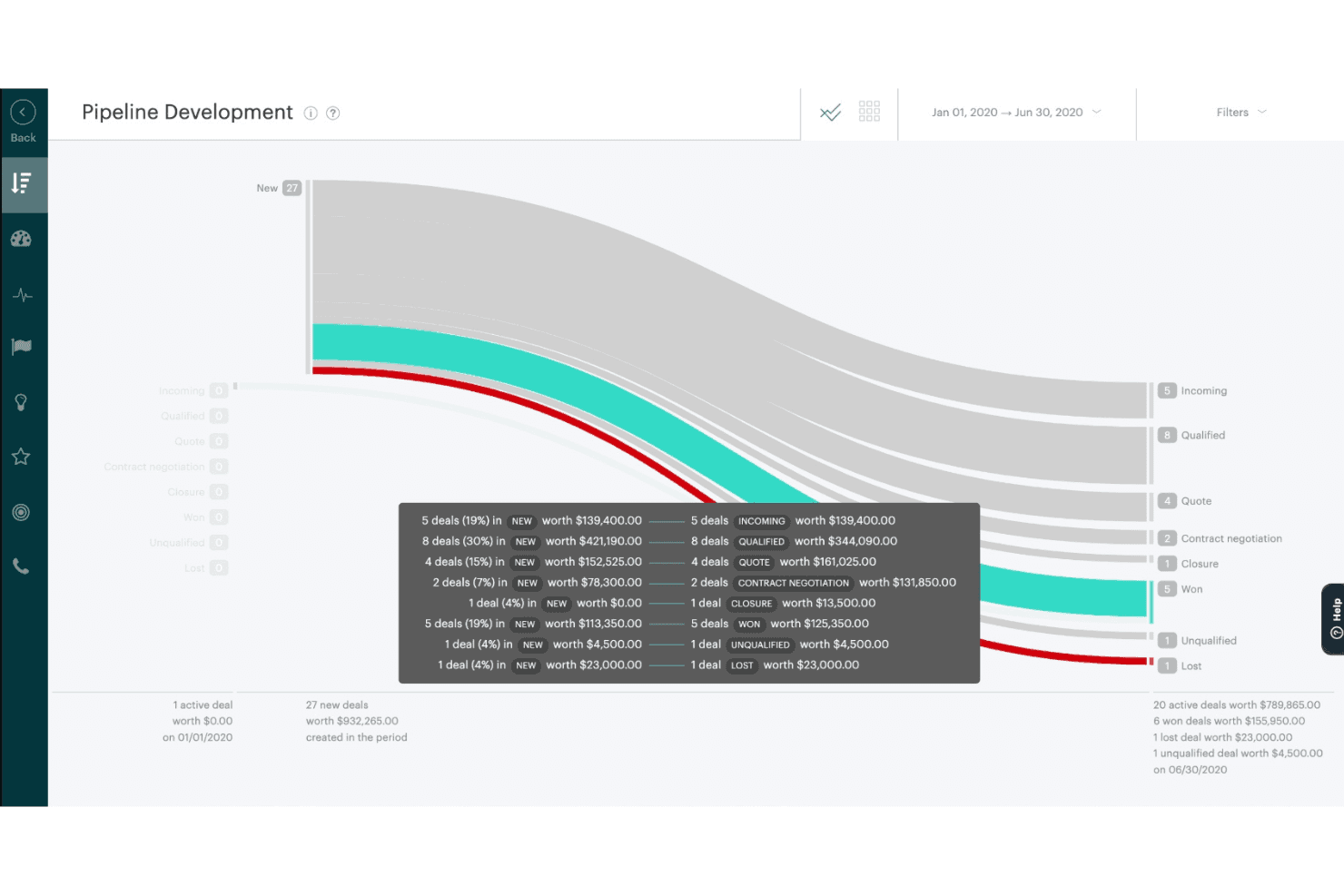
Ease of Use
Zendesk Sell is one of the more approachable CRM platforms, with a clean interface and logical navigation that new users pick up quickly. The onboarding process is guided and straightforward, and most features are accessible without digging through menus.
Users often mention that updating deals, logging activities, and managing contacts feels intuitive. I think teams who want to avoid a steep learning curve or heavy admin work will appreciate how quickly they can get productive with Zendesk Sell.
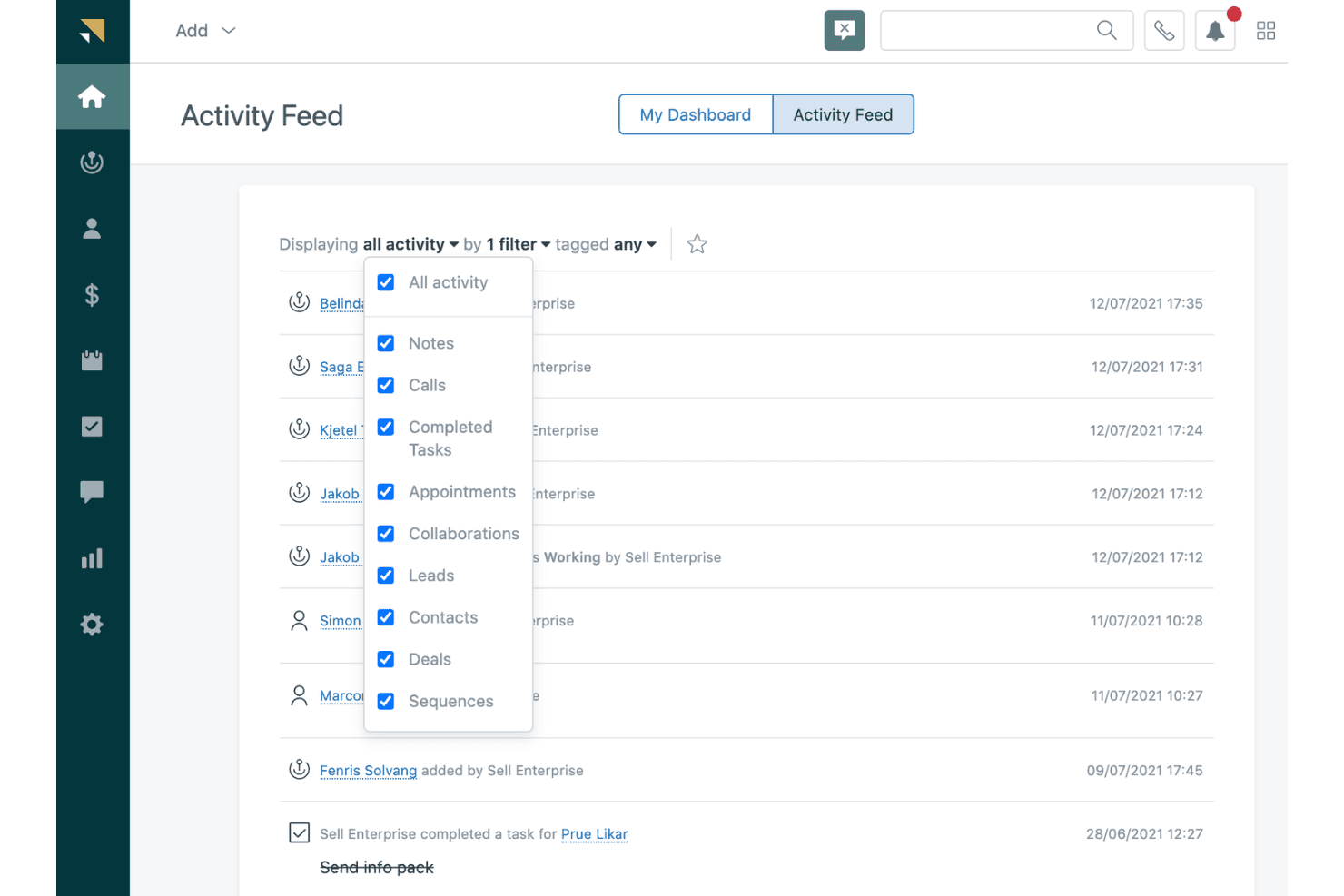
Integrations
Zendesk Sell integrates with Slack, Shopify, Harvest, Google Workspace, Mailchimp, Tables, Pipedrive, Trustpilot, ChannelReply, and Sprout Social, among others.
Zendesk Sell also offers a public API and connects with third-party integration tools for expanded functionality.

Zendesk Sell Specs
- 2-Factor Authentication: Yes
- API: Yes
- Calendar Management: Yes
- Call Tracking: Yes
- Campaign Management: Yes
- Click-to-Dial: Yes
- Contact Management: Yes
- Contact Sharing: Yes
- Custom Data Forms: Yes
- Customer Management: Yes
- Dashboard: Yes
- Data Export: Yes
- Data Import: Yes
- Data Visualization: Yes
- Email Integration: Yes
- External Integrations: Yes
- File Sharing: Yes
- File Transfer: Yes
- Google Apps Integration: Yes
- Lead Management: Yes
- Lead Scoring: Yes
- Marketing Automation: Yes
- Mobile App: Yes
- Multi-User: Yes
- Notifications: Yes
- Pipeline Management: Yes
- Sales Automation: Yes
- Scheduling: Yes
- Social-Media Integration: Yes
- Task Scheduling/Tracking: Yes
- Third-Party Plugins/Add-Ons: Yes


