Choosing contract lifecycle management software is harder than it looks. Every vendor promises the same things—AI drafting, approval workflows, integrations—and the demos are always impressive. But I've found that what separates a good fit from a costly mistake is understanding your own workflows before you evaluate anyone else's.
The wrong choice creates bottlenecks across sales, legal, and customer success that are painful to untangle. This guide cuts through the noise with a practical checklist to help you compare what actually matters: features, integrations, security, and vendor support.
5 Things to Look for When Choosing Contract Lifecycle Management Software
Before comparing advanced features, make sure each CLM software option covers the essentials of the contract lifecycle, from contract creation and review to approvals, e-signatures, and renewals. A searchable repository, version control, and audit trails should also be standard.
Once those fundamentals are covered, I focus on five areas that reveal how well a platform fits your workflows, reporting needs, and controls:
1. CRM and Tech Stack Integration
CRM and tech-stack integration connects contract records and events with CRM software such as Salesforce, enterprise resource planning (ERP) systems, billing platforms, and e-signature tools. Look for native connectors, field mapping, and configurable sync rules; vague API claims don’t confirm that your workflows will work.
Before demos, list the CRM objects and contract fields your team needs, then ask vendors to show a live workflow from contract creation through renewal.
2. Contract Analytics and Reporting Depth
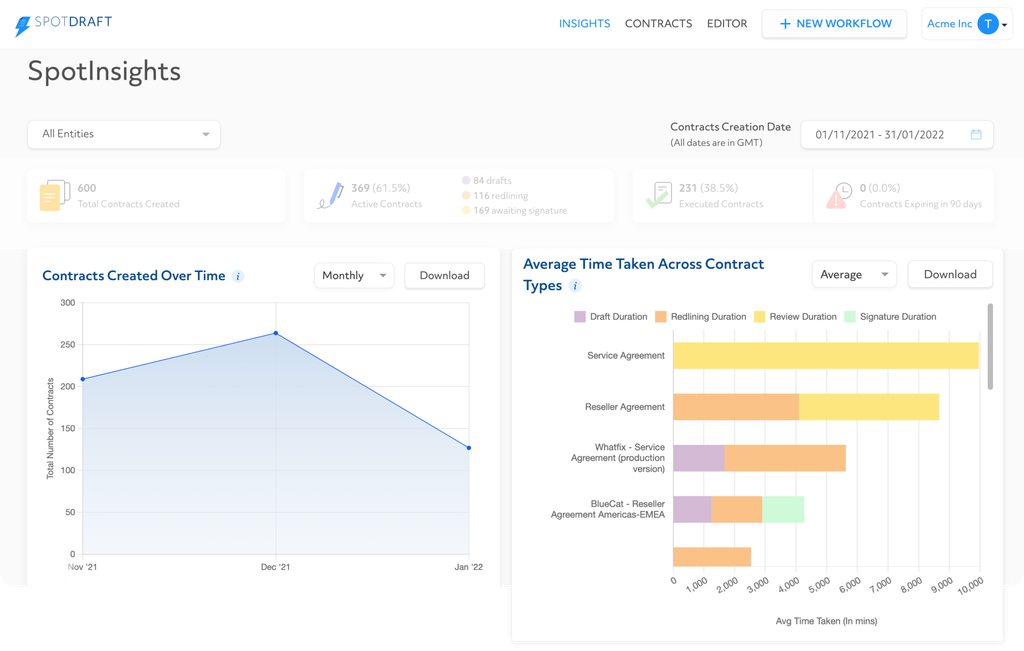
Contract analytics turn contract records into metrics on renewal dates, cycle times, obligations, and value. This matters because revenue teams need visibility into renewals and bottlenecks; look for configurable dashboards, filters, and exportable reports, not static charts.
Before a demo, ask whether you can report on the fields your team uses and trace each metric to its source contract.
Have an account? Log In
3. Automated Renewal and Alert Workflows
Automated renewal and alert workflows track contract dates, send notices before deadlines, and route renewal decisions to the right owners. They matter because missed notice windows can trigger unwanted renewals or leave sales and customer success teams without time to review terms.
Ask vendors to demonstrate configurable alert timing and escalation rules using your contract data, and avoid workflows that rely on a single email reminder.
4. Compliance and Audit Trail Support
Compliance and audit trail support records contract access, edits, approvals, and timestamps so you can reconstruct decisions during audits or disputes. Look for searchable, exportable logs tied to document versions and user identities, plus retention controls that match your policies; don’t rely on a generic compliance claim.
Ask vendors to show how you’d trace a contract from draft through signature, including permission changes and approval history.
5. Customizable Templates and Clause Libraries
Customizable templates and clause libraries let teams build contracts from approved language while adapting terms to deal needs. They help keep sales and legal teams consistent, so look for version control, permissions, and conditional clauses rather than a static document repository.
Ask vendors to show how you can update a clause and verify where that change appears across templates.
How to Choose Contract Lifecycle Management Software: A 5-Step Framework
Use these five steps to define your requirements, test workflows, and compare vendors against your team’s needs:
Step 1: Identify Your Needs
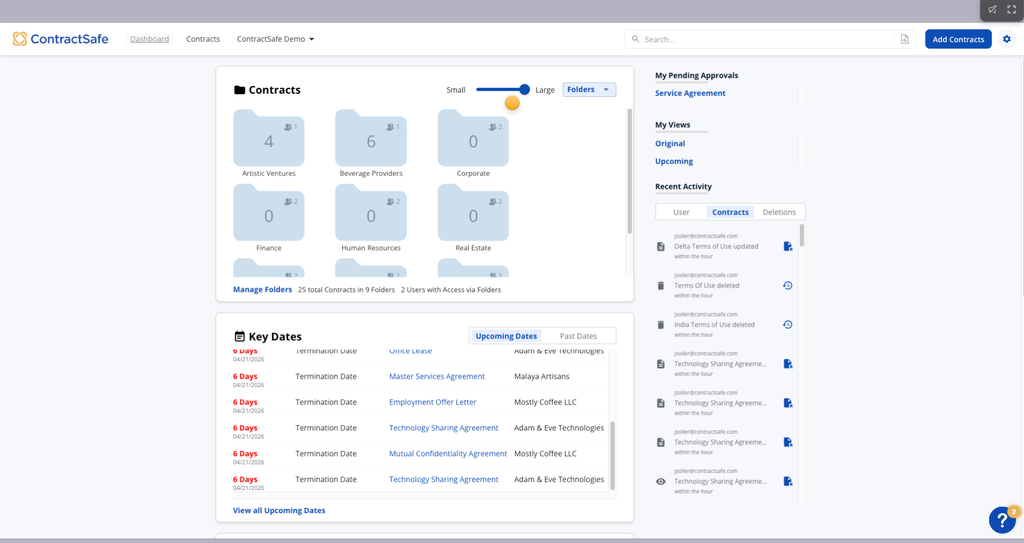
Before you look at a single vendor, get clear on what's actually broken. In my experience, teams that skip this step end up impressed by demo features they'll never use—and blind to gaps that will cause real problems six months in.
Start by mapping your current contract process from request to signature to renewal. Talk to the people who actually touch contracts every day, not just the ones who approve the budget. Here's who I'd prioritize:
- Sales reps and account executives: They know where deals slow down and which contract steps create friction with customers.
- Legal and contracts teams: They'll surface compliance risks, template inconsistencies, and the approval bottlenecks that don't show up in process docs.
- Customer success managers: They own renewals and often have no visibility into notice windows or term changes until it's too late.
- Revenue operations: They'll flag the CRM and reporting gaps that make contract data unreliable at the portfolio level.
Use these questions to turn stakeholder input into clear, testable requirements:
- Volume and complexity: How many contracts does your team create, manage, or renew each month? Are they mostly standard agreements or heavily negotiated?
- Current bottlenecks: Where do contracts stall? Is it approvals, redlining, or just finding the right template?
- Renewal visibility: Do your CSMs and sales teams have reliable notice of upcoming renewals, or are they reacting to dates they missed?
- System dependencies: Which tools does a CLM need to connect with—your CRM, billing platform, or e-signature provider?
- Compliance requirements: What audit, retention, or access-control requirements apply to your contracts?
- Template and clause consistency: Are teams drafting from scratch, or do you have approved language they're supposed to use?
The output of this step isn't a wishlist—it's a prioritized requirements list. I'd sort it into three buckets: must-have (non-negotiable for your workflows), nice-to-have (valuable but not blocking), and out of scope (features you'd pay for but never use). That distinction will keep vendor demos honest and give you a clear basis for comparison in the steps that follow.
Step 2: Research Contract Lifecycle Management Software Vendors
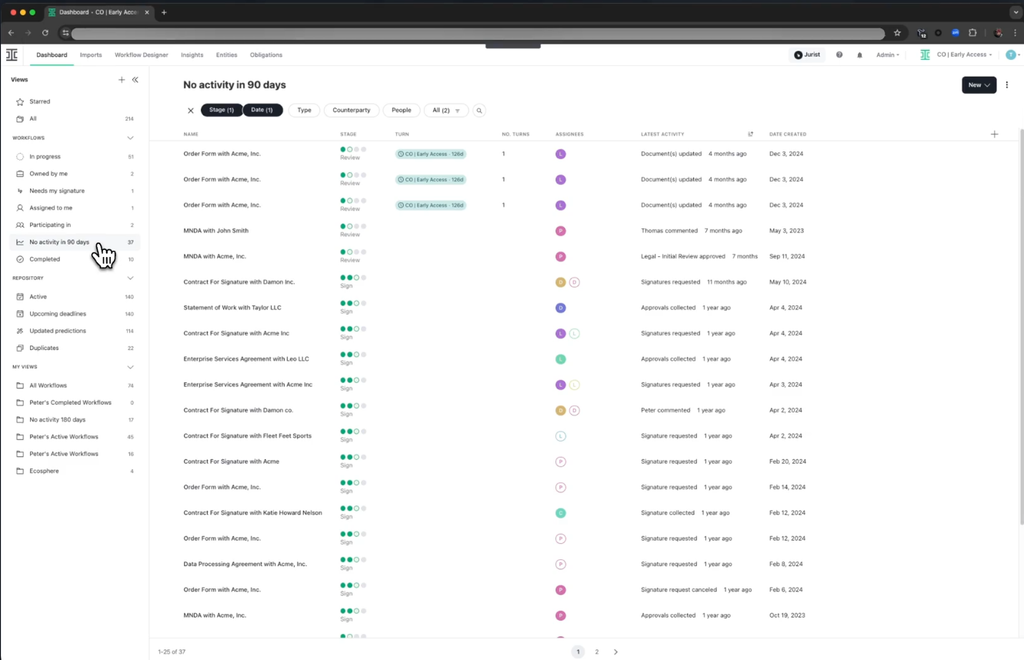
Once you have your requirements list, resist the urge to go straight to vendor websites. I've seen teams get pulled into polished marketing pages and come out more confused than when they started. Better research sources give you unfiltered signal before vendors get a chance to frame the conversation.
Here's where I'd actually spend your research time:
- Peer review platforms: Sites that aggregate verified user reviews are the most useful starting point. Filter by company size and industry to find reviewers whose contracts look like yours. Pay attention to complaints, not just praise scores.
- Your professional network: Ask RevOps and legal ops peers what they're running and what they'd do differently. A 10-minute conversation surfaces things no review site captures.
- Industry analyst reports: These won't tell you what to buy, but they'll orient you on which vendors are considered established versus emerging in the CLM category.
- Job postings: Search for roles that list CLM tools in the requirements. This can help you see which CLM platforms employers are seeking experience with.
- Vendor documentation and changelogs: Before a demo, check whether a vendor publishes release notes or a public roadmap. It tells you how actively the product is developed and whether they respond to user feedback.
Use this table to track what you learn about each vendor during your research phase:
| Research Source | What to Look For | Red Flags |
|---|---|---|
| Research SourceUser reviews | What to Look ForPatterns in complaints, implementation feedback | Red FlagsRecurring mentions of poor support or missing features |
| Research SourcePeer conversations | What to Look ForReal workflow fit, post-sale experience | Red FlagsRegret about switching, hidden complexity |
| Research SourceAnalyst reports | What to Look ForMarket positioning, maturity | Red FlagsVendors absent from established categories |
| Research SourceDocumentation | What to Look ForUpdate frequency, feature depth | Red FlagsSparse docs, no changelog, vague roadmap |
The goal here isn't to build your shortlist yet. It's to walk into vendor conversations already knowing what questions to ask and what trade-offs to probe. In my experience, the teams that do this research first are the ones who catch deal-breakers before they sign a contract—not after.
Top Contract Lifecycle Management Software to Consider
Here's my shortlist of the best contract lifecycle management software solutions:
Step 3: Make a Contract Lifecycle Management Software Shortlist
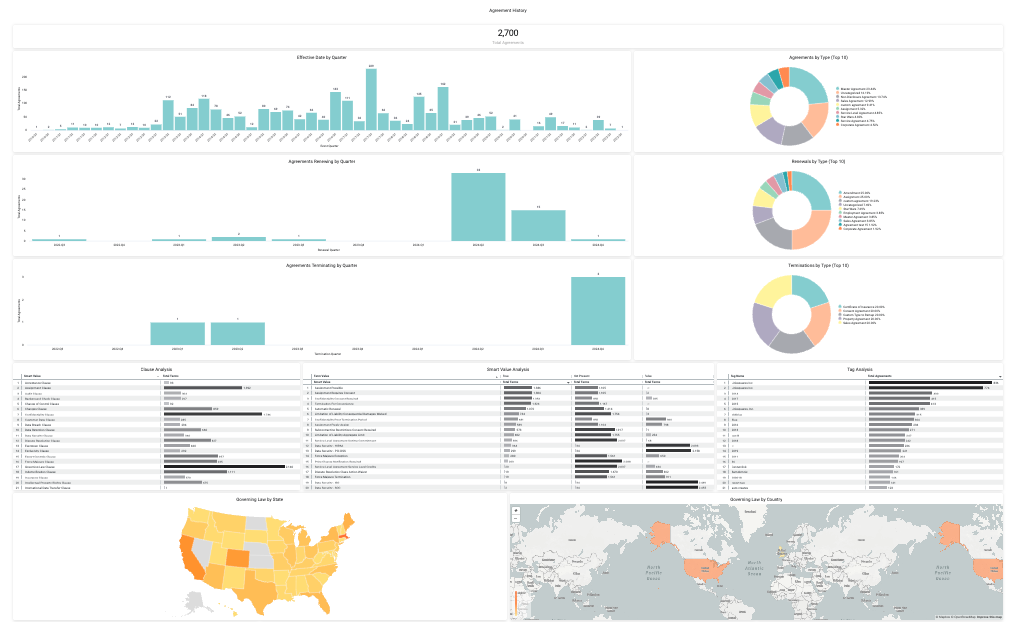
By this point, you have a prioritized requirements list and research notes from real users and peers. Now it's time to cut the field down to the vendors worth your actual time.
I'd aim for three to five vendors on your shortlist. Any more than that and your evaluation loses focus—you end up comparing demos instead of comparing fit.
Here's how I'd build that shortlist:
- Filter by must-haves first: Go back to your requirements list and eliminate any vendor that clearly can't meet your non-negotiables. Don't give them the benefit of the doubt. If a vendor's documentation doesn't address a core requirement, that's already a signal.
- Weight peer feedback heavily: A pattern of complaints from users in companies similar to yours carries more weight than a high average score. I've learned to trust the one-star reviews more than the marketing pages.
- Deprioritize feature volume: The vendor with the longest feature list isn't the right vendor. The right vendor covers your workflows. Strip out any option that seems built for a use case meaningfully different from yours.
- Check implementation reality: Look for how reviewers describe onboarding and time to value. A CLM that takes six months to configure isn't a bargain, regardless of price.
Once you've filtered down, use this table to score your remaining candidates before you reach out:
| Evaluation Criterion | Why It Matters |
|---|---|
| Evaluation CriterionMust-have requirements coverage | Why It MattersNon-negotiable; gaps here disqualify a vendor |
| Evaluation CriterionPeer and user review patterns | Why It MattersReflects real post-sale experience |
| Evaluation CriterionIntegration fit with your tech stack | Why It MattersDetermines whether your workflows will actually connect |
| Evaluation CriterionImplementation complexity | Why It MattersAffects how quickly you see value |
| Evaluation CriterionVendor responsiveness to documentation | Why It MattersSignals how they'll treat you as a customer |
Once you've scored your candidates and landed on three to five, that's when I'd contact vendors to book a demo. Don't do it before—every demo call takes real time from your team, and vendors will push you toward their timeline, not yours.
When you reach out, be specific. Tell them your company size, contract volume, and the two or three workflows you want to see demonstrated. If they send you a generic overview deck instead of preparing for your use case, that tells you something worth knowing before you go further.
To compare workflow automation fairly, give each vendor the same anonymized contract review scenario and ask them to demonstrate how approvals, exceptions, and handoffs work.
More Articles
Step 4: Build the Business Case
A solid business case is what separates a CLM purchase that gets approved from one that stalls in a committee. In my experience, the teams that skip this step end up either buying the wrong tool or losing budget approval because they couldn't connect the software to a business outcome leadership cared about.
Your business case doesn't need to be a formal document—but it does need to answer three questions clearly: What does this cost? What do we get back? What could go wrong?
Here's how I'd build it:
- Quantify your current losses: Start with what broken contract processes are costing you today. Look at missed renewal windows, deals slowed by approval bottlenecks, and legal hours spent on manual redlines. Even rough numbers make the case real.
- Estimate expected ROI: Tie your requirements list to specific outcomes. If faster approvals shave two days off your sales cycle, calculate what that's worth across your contract volume. If better renewal visibility recovers one upsell conversation per quarter, put a number on it.
- Build a realistic cost estimate: Factor in licensing, implementation, integrations, data migration, and internal time to configure and train. Include a contingency for unexpected setup or migration costs so your business case reflects the total investment, not just the vendor's initial quote.
- Set a timeline with milestones: Break implementation into phases—initial setup, integrations, template migration, team training—and assign realistic durations. Leadership wants to know when they'll see value, not just when the tool goes live.
- Name the risks upfront: Identify what could slow adoption or delay ROI. Common ones include data migration complexity, CRM integration gaps, and change management for legal and sales teams.
Use this table to structure the core of your business case before presenting it:
| Business Case Component | What to Include |
|---|---|
| Business Case ComponentCurrent-state costs | What to IncludeTime lost, missed renewals, manual work estimates |
| Business Case ComponentExpected ROI | What to IncludeCycle time savings, renewal recovery, risk reduction |
| Business Case ComponentTotal cost of ownership | What to IncludeLicensing, implementation, internal resources, training |
| Business Case ComponentImplementation timeline | What to IncludePhases, milestones, time-to-value estimate |
| Business Case ComponentKey risks and mitigations | What to IncludeIntegration complexity, adoption gaps, data migration |
The output of this step is a one-page summary you can put in front of a CFO or revenue leader without needing to explain yourself. I'd keep the ROI estimates conservative—it's better to underpromise and deliver than to inflate numbers that will get scrutinized when results come in.
Step 5: Implement Your Contract Lifecycle Management Software and Onboard Your Users
Implementation is where CLM projects most often go sideways. In my experience, the teams that struggle aren't the ones that chose the wrong software—they're the ones that treated go-live as the finish line instead of the starting point. A thoughtful rollout determines whether your team actually uses the tool or quietly reverts to email threads and shared drives.
The goal of this step is to get your team using the system in real workflows as quickly as possible, then refine from there. Don't wait until everything is perfect to launch. A phased rollout with a small group of engaged users will surface more real problems in two weeks than any testing environment.
Before you go live, focus on these rollout fundamentals:
- Communicate before you launch: Tell affected teams what's changing, why, and what it means for their day-to-day work. People resist tools they feel were chosen without them.
- Assign a clear system owner: Someone needs to own configuration decisions, handle user questions, and escalate issues to the vendor. Without a named owner, accountability disappears fast.
- Migrate only what you need first: Resist the urge to import every historical contract on day one. Start with active agreements and templates your team uses now.
- Train by role, not by feature: Sales reps need to know how to initiate and track a contract. Legal needs to know how to manage redlines and approvals. Show each group only what's relevant to them.
- Build a feedback loop from the start: Set a recurring check-in for the first 90 days. Ask users what's slowing them down, not just whether they like the tool.
Use this table to track ownership and timing across your rollout phases:
| Rollout Phase | Key Actions | Owner |
|---|---|---|
| Rollout PhasePre-launch | Key ActionsCommunicate change, configure templates, migrate active contracts | OwnerSystem owner + IT |
| Rollout PhaseWeek 1–2 | Key ActionsTrain pilot users by role, run live walkthroughs | OwnerSystem owner |
| Rollout PhaseWeek 3–4 | Key ActionsExpand access, monitor adoption, collect feedback | OwnerSystem owner + team leads |
| Rollout PhaseDay 30–90 | Key ActionsReview usage data, adjust workflows, address drop-off | OwnerSystem owner + RevOps |
The honest reality is that adoption is a change management problem, not a training problem. I've seen teams complete full onboarding sessions and still default to the old process because no one reinforced the new one. Make the CLM the path of least resistance—if it's easier to go around the system than through it, users will.
By the end of this step, your team should be running live contracts through the system, your renewal and approval workflows should be active, and you should have a clear picture of where friction still exists. That feedback is what turns a CLM implementation into a CLM that your team actually trusts.
Ready to Find Your Best-Fit CLM?
Choosing the right CLM software means finding a platform that fits your requirements, budget, and long-term workflows. If you're still comparing vendors, explore our guide to the best contract management software for product reviews, feature comparisons, and available pricing information to help narrow down your options.