

Gerir contratos pode ser difícil para qualquer equipa, especialmente quando tem de gerir vários acordos e prazos. Precisa de uma solução que o ajude a manter-se organizado, reduza os erros e mantenha todos informados.
Com base na minha experiência, o software de gestão de contratos baseado na nuvem pode ser uma verdadeira ajuda. Oferece uma forma eficiente de gerir contratos, garantindo que nunca perde uma renovação ou uma condição importante.
Ao longo deste artigo, partilharei as minhas avaliações imparciais das melhores soluções de software nesta área. Encontrará informações sobre funcionalidades, facilidade de utilização e os aspetos que tornam cada ferramenta única. O meu objetivo é ajudá-lo a encontrar a ferramenta certa para as necessidades da sua equipa, para que se possa concentrar no que realmente importa.
Why Trust Our Software Recommendations
6,700+
Reviews
20
Industry experts
16+
Evaluation factors
14
Years
Our reviews reflect our independent judgment—not a sales pitch. Learn how we stay transparent.
For this guide, we evaluated tools using hands-on testing and independent research, scoring tools using our selection criteria.
Our reviews reflect our human editorial judgment, not a sales pitch.
Tabela de comparação: software de gestão de contratos baseado na nuvem
Esta tabela de comparação resume os detalhes de preços das minhas principais escolhas de software de gestão de contratos baseado na nuvem.
| Tool | Best For | Trial Info | Price | ||
|---|---|---|---|---|---|
| 1 | Best for fast-growing teams | Free demo available | Pricing upon request | Website | |
| 2 | Best for electronic signatures | Free demo available | Pricing upon request | Website | |
| 3 | Best for customization | Free plan available | Pricing upon request | Website | |
| 4 | Best for contract analytics | Free demo available | Pricing upon request | Website | |
| 5 | Best for cost optimization | Free demo available | Pricing upon request | Website | |
| 6 | Best for small businesses | Free demo available | From $499/month (billed annually) | Website | |
| 7 | Best for legal teams | Free demo available | Pricing upon request | Website | |
| 8 | Best for enterprise compliance | Free demo available | Pricing upon request | Website | |
| 9 | Best for AI-driven insights | Free demo available | Pricing upon request | Website | |
| 10 | Best for procurement integration | Free demo available | Pricing upon request | Website |


Avaliação do melhor software de gestão de contratos baseado na nuvem
Segue-se um resumo detalhado do melhor software de gestão de contratos baseado na nuvem que integrou a minha lista restrita. As minhas avaliações apresentam uma análise detalhada das principais funcionalidades, vantagens e desvantagens, integrações e casos de utilização ideais de cada ferramenta, para o ajudar a encontrar a melhor opção para si.
 1Best for fast-growing teams
Juro
- Free demo available
- Pricing upon request
Visit WebsiteCustomer Rating:4.8/5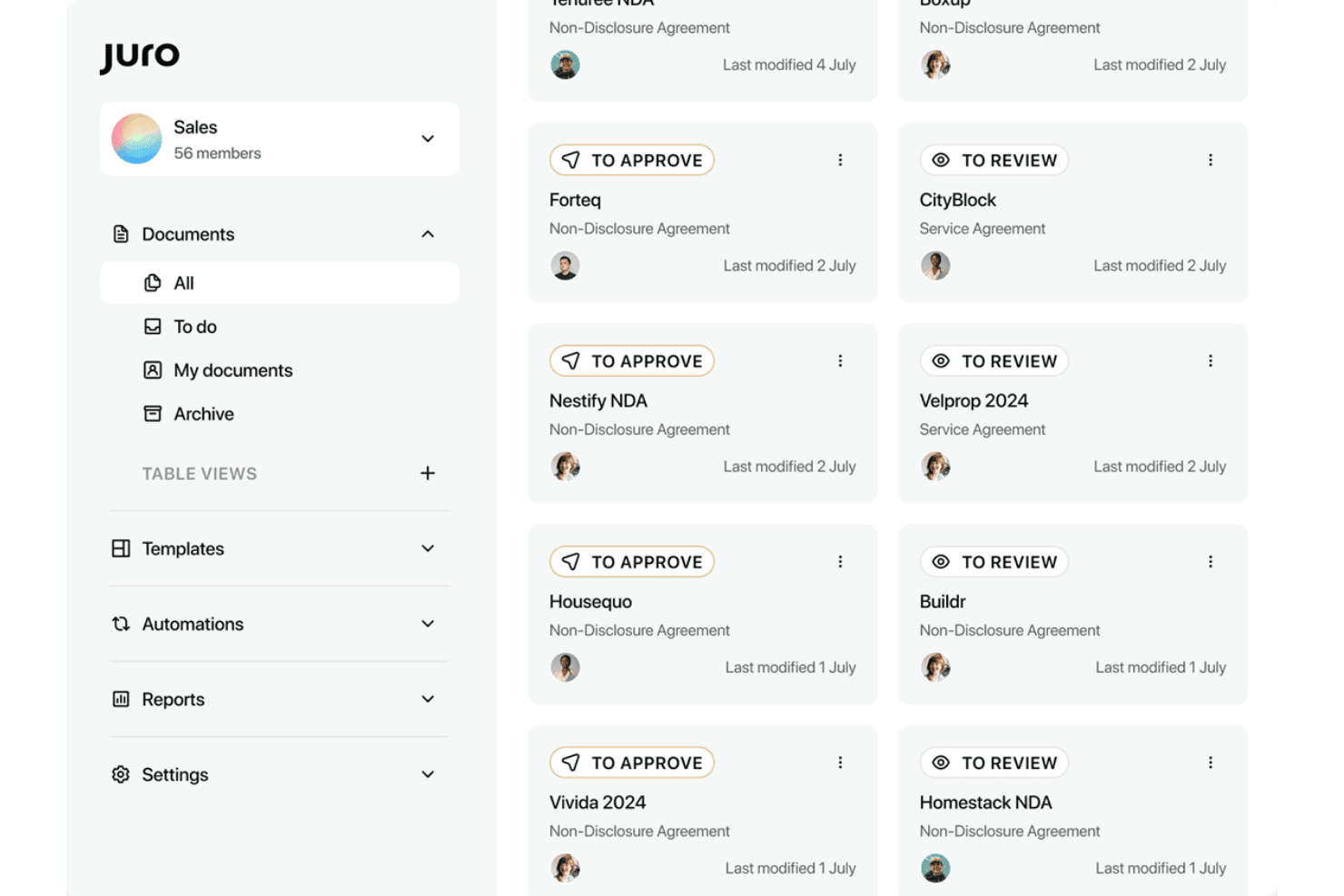
Juro lets users track contract approvals and reviews from a central dashboard. Juro is a browser-native contract lifecycle management platform that handles contract creation, collaborative redlining, approval workflows, native e-signature, and an AI-powered repository—all within a single workspace.
Who Is Juro Best For?
Juro is a strong fit for scaling companies where sales, legal, and RevOps teams need to move fast on contracts without creating bottlenecks.
Why I Picked Juro
I picked Juro as one of the best because it's purpose-built for the pace that fast-growing teams actually operate at. Legal teams lock down approved templates with conditional logic and guardrails, then sales reps generate contracts directly inside Salesforce or HubSpot in four clicks, no legal handoff required. Juro's AI Review agent runs incoming third-party contracts against configured playbooks automatically, cutting the manual first-pass review that bogs down scaling teams.
Juro Key Features
- Native e-signature: Built-in, legally binding e-signature compliant with ESIGN, UETA, and eIDAS—no third-party signing tool required.
- Browser-based redlining: Real-time collaborative negotiation and version comparison inside the platform, with full audit trails maintained throughout.
- Unlimited user licensing: All plans include unlimited users, workflows, and templates—pricing scales with contract volume, not headcount.
- AI-powered metadata extraction: AI Extract automatically tags, summarizes, and extracts key data from uploaded PDFs and DOCX contracts across your repository.
Juro Integrations
Juro offers native integrations with Salesforce, HubSpot, Slack, Microsoft Word, Google Drive, DocuSign, Greenhouse, and Ashby. Enterprise plans add REST API and webhooks for custom integrations; Zapier is also supported.
Pros and Cons
Pros:
- Fast implementation with high adoption rates
- Unlimited users on all pricing plans
- AI agents handle redlining and review
Cons:
- Salesforce requires highest tier plan
- No mobile apps or offline access
Learn more about Juro: Best for electronic signatures
- Free demo available
- Pricing upon request
Visit WebsiteCustomer Rating:4.7/5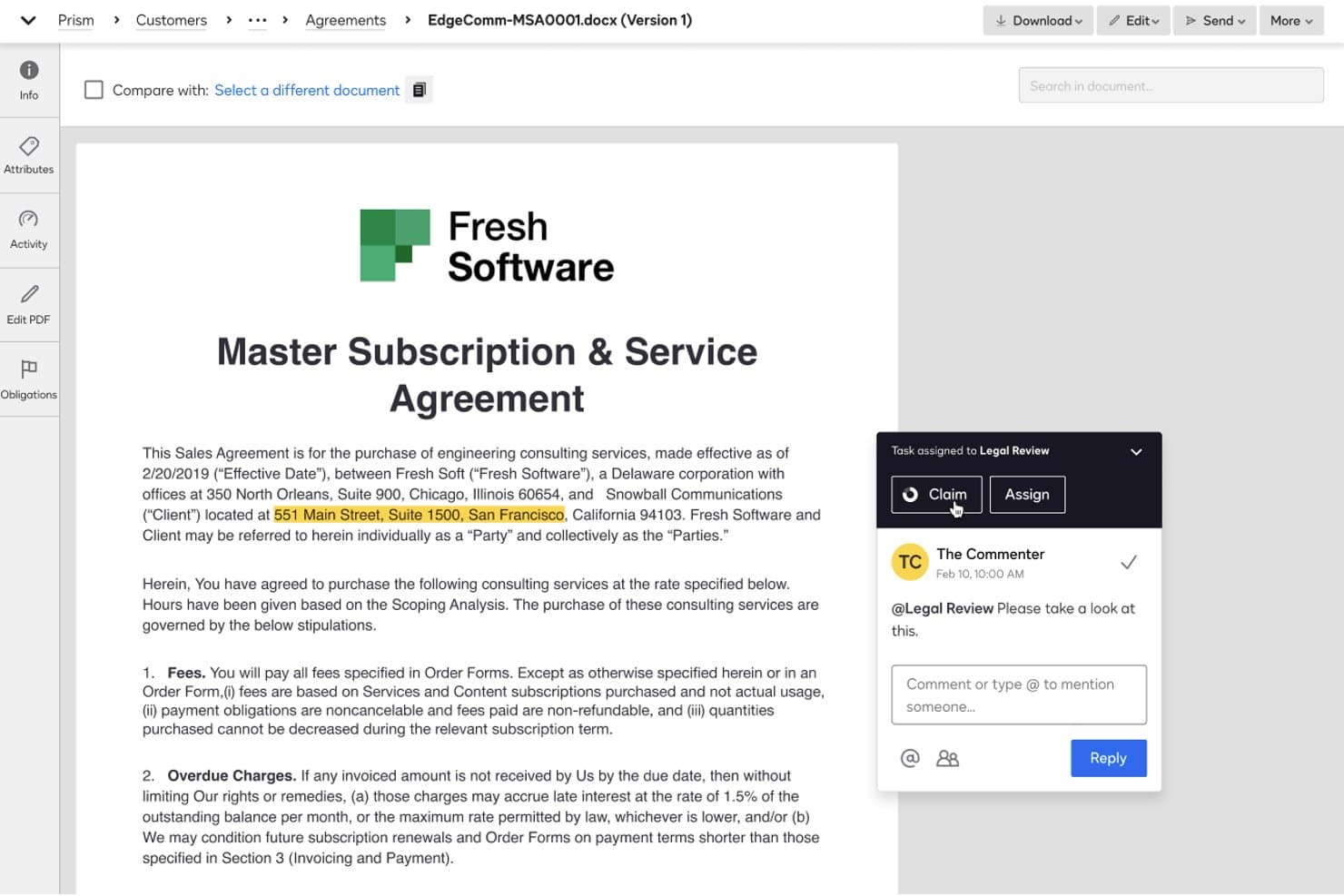
DocuSign CLM lets users assign tasks and collaborate via comments on contracts. Docusign CLM is a cloud-based contract lifecycle management platform that handles contract generation, negotiation, approval routing, e-signature, and repository management with AI-powered automation built across every stage.
Who Is Docusign CLM Best For?
Docusign CLM is a strong fit for enterprise sales and revenue operations teams that need a single platform to handle the full contract lifecycle—from CRM-generated drafts to executed, stored agreements—without stitching together separate e-signature and CLM tools.
Why I Picked Docusign CLM
Docusign CLM earns its spot on my shortlist because no other CLM platform has native e-signature built in at this level—Docusign eSignature is the industry standard, and having it embedded directly into the contract lifecycle means zero handoff friction at execution. I also like that approval routing is genuinely conditional: the workflow engine can redirect a contract based on detected clause language or risk score, so non-standard deals automatically escalate without anyone manually triaging them. It's a named Gartner Magic Quadrant Leader for six consecutive years, which reflects the consistency I'd expect from a platform running contracts for 95% of the Fortune 500.
Docusign CLM Key Features
- Iris AI auto-extraction: Automatically pulls 100+ metadata fields—like renewal dates, payment terms, and governing law—from executed agreements using pre-trained AI models.
- Drag-and-drop workflow editor: A no-code editor with 100+ pre-built steps lets you build multi-stage contract workflows without writing a single line of code.
- Pre-approved clause library: A centralized library of standardized, legal-approved clauses that sales and deal desk users can insert during negotiation without looping in legal.
- Agreement 360 and Party 360 views: Consolidated dashboards that surface both in-flight and executed agreements by deal or counterparty, with portfolio-level risk scoring.
Docusign CLM Integrations
Docusign CLM offers native integrations with Salesforce Sales Cloud, Salesforce CPQ, SAP Ariba, Coupa, NetSuite, Workday, and Slack, plus an open REST API and webhooks. Its partner ecosystem includes 1,000+ marketplace integrations.
Pros and Cons
Pros:
- Native eSignature is built into every workflow
- Drag-and-drop workflow setup for contracts
- AI auto-extracts 100+ contract data fields
Cons:
- No self-serve CLM pricing or instant trial
- Requires lengthy, costly implementation for most
Learn more about Docusign CLM:
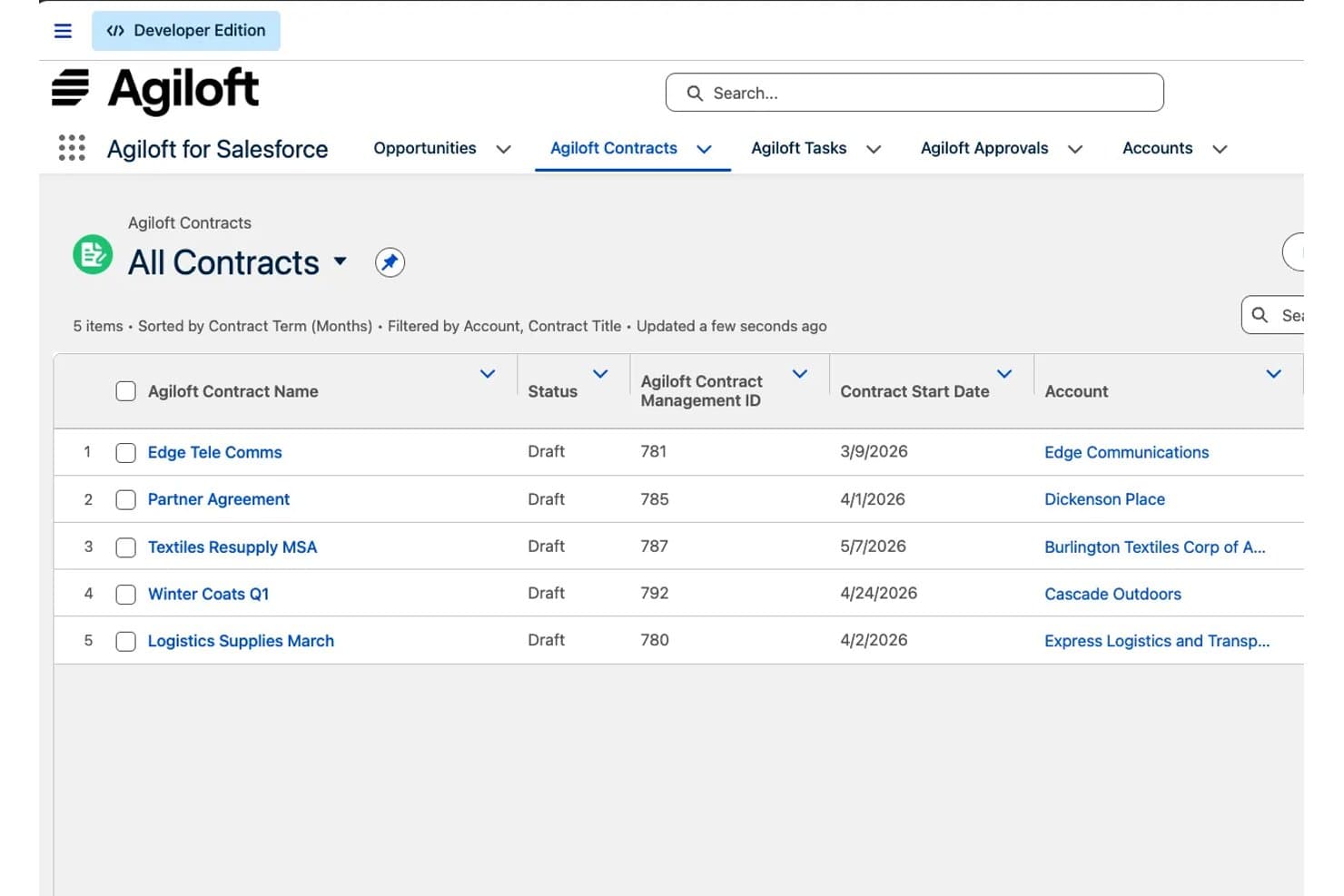
Agiloft displays all contracts with status and start dates in Salesforce. Agiloft is a cloud-based contract lifecycle management platform that handles everything from contract requests and AI-assisted drafting to redlining, multi-stakeholder approvals, e-signature, obligation tracking, and renewal automation.
Who Is Agiloft Best For?
Agiloft is a strong fit for enterprise legal and operations teams that need a CLM platform they can shape around complex, org-specific workflows without relying on engineering resources.
Why I Picked Agiloft
Agiloft earns its spot on my shortlist because no other CLM platform gives you this level of workflow control without touching a line of code. I'm specifically drawn to how deeply you can reshape the platform around your org's actual processes: approval chains, data models, contract request forms, and automated routing rules are all configurable by business users. If your legal team needs non-standard terms to auto-route to deal desk reviewers, or your sales ops team wants one-click MSA generation from Salesforce records, Agiloft handles both without custom development.
Agiloft Key Features
- AI-assisted redlining in Microsoft Word: Astra embeds AI-suggested redlines and clause comparisons directly inside the MS Word interface, so reviewers can negotiate without switching platforms.
- Astra Assistant (ConvoAI): A natural language querying tool that lets you ask questions across your entire contract portfolio to surface risks, obligations, and revenue commitments.
- Automated renewal and obligation alerts: The platform tracks post-signature deadlines and sends configurable notifications for renewals, expirations, and outstanding obligations.
- 1,000+ pre-built integration connectors: The Integration Hub connects Agiloft to external systems—including SAP, NetSuite, Oracle Fusion, and Workday—without custom development.
Agiloft Integrations
Agiloft’s Integration Hub provides 1,000+ pre-built app connectors, including Salesforce, NetSuite, SAP, Oracle Fusion Cloud, Workday, DocuSign, Adobe Sign, Microsoft Word, Google Workspace, and Slack. Its REST API supports custom integrations.
Pros and Cons
Pros:
- End-to-end lifecycle management with audit trails
- AI redlines and playbooks in Microsoft Word
- Deep no-code customization for unique workflows
Cons:
- Complex implementations can delay speed-to-value
- No free trial or instant access
Learn more about Agiloft: Best for contract analytics
- Free demo available
- Pricing upon request
Visit WebsiteCustomer Rating:4.7/5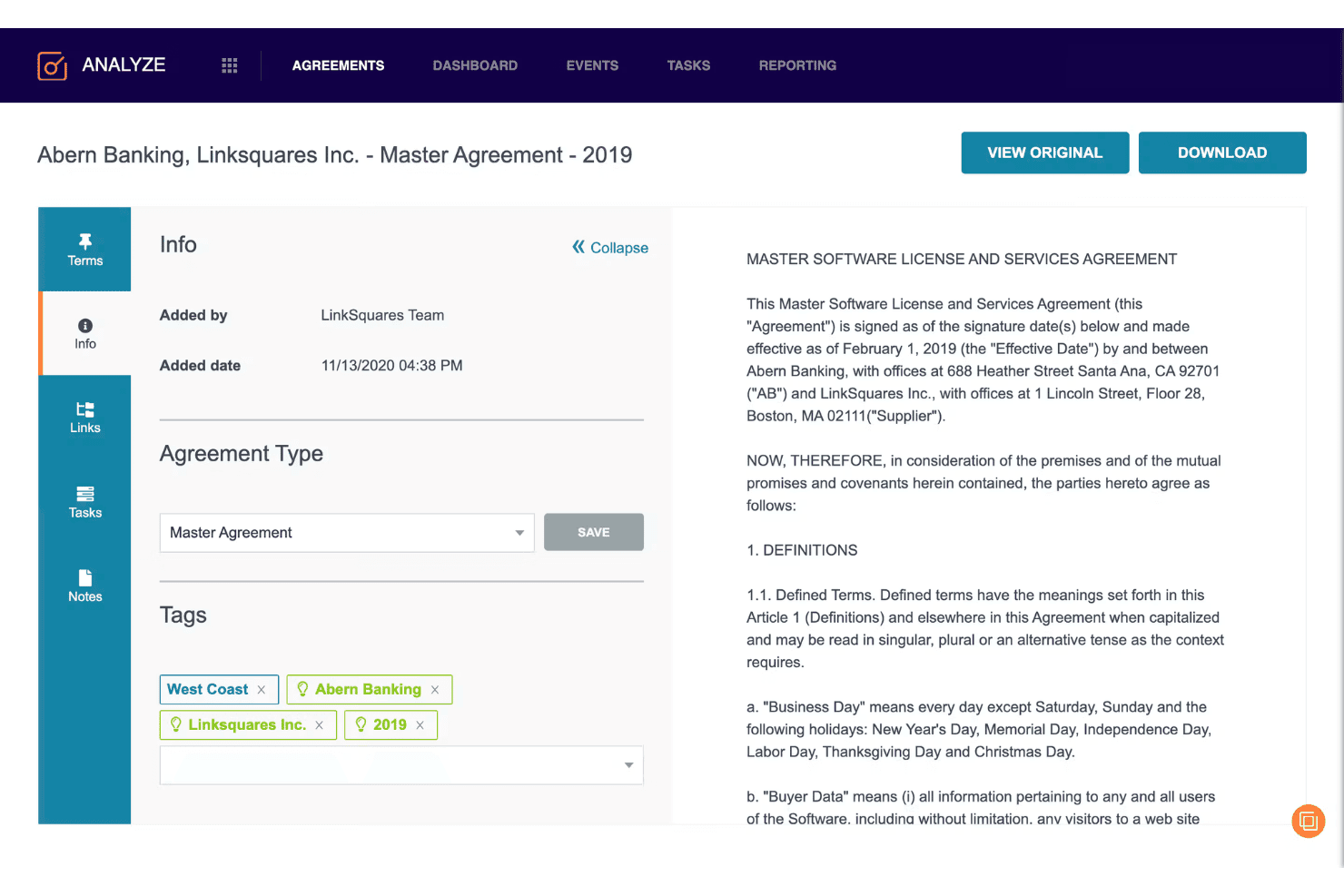
LinkSquares lets users tag and review contract details in one view. LinkSquares is a cloud-based contract lifecycle management platform that combines AI-powered contract drafting, redlining, approval workflows, e-signature, and a post-signature analytics repository into a single system.
Who Is LinkSquares Best For?
LinkSquares is a strong fit for mid-market and enterprise legal and RevOps teams that need deep post-signature contract intelligence alongside full pre-signature workflow automation.
Why I Picked LinkSquares
LinkSquares earns its spot on my shortlist because its post-signature contract intelligence goes deeper than almost any other CLM I've reviewed. LinkAI extracts 120+ structured data points per contract, so renewal dates, liability caps, and cancellation windows surface automatically rather than sitting buried in PDFs. I also like how Analyze pairs NLP-powered portfolio search with proactive AI agents that flag non-compliant clauses before they become problems, turning a passive repository into something that actively protects revenue.
LinkSquares Key Features
- Native e-signature: LinkSquares Sign lets you send, track, and execute agreements without leaving the platform, with full UETA, ESIGN, and eIDAS compliance.
- Microsoft Word add-in: Review, redline, and generate clauses directly inside Word using LinkAI without switching between tools.
- Conditional approval routing: Workflows automatically route contracts to the right approvers based on contract type, value, or custom criteria.
- Salesforce bi-directional sync: Contract data flows between LinkSquares and Salesforce in both directions, giving sales teams live visibility into renewal dates and cancellation terms from within their CRM.
LinkSquares Integrations
LinkSquares integrates with Salesforce, Salesforce CPQ, HubSpot, Microsoft Dynamics 365, NetSuite, DocuSign, Adobe Sign, Microsoft Word, SharePoint, and Google Drive. An open REST API supports custom integrations and data warehouse syncing.
Pros and Cons
Pros:
- Native approval workflow builder with AI agent
- Salesforce bi-directional sync for RevOps visibility
- AI extracts 120+ contract data points
Cons:
- Reported AI extraction inconsistencies in reviews
- Quote-based pricing lacks public transparency
Learn more about LinkSquares:
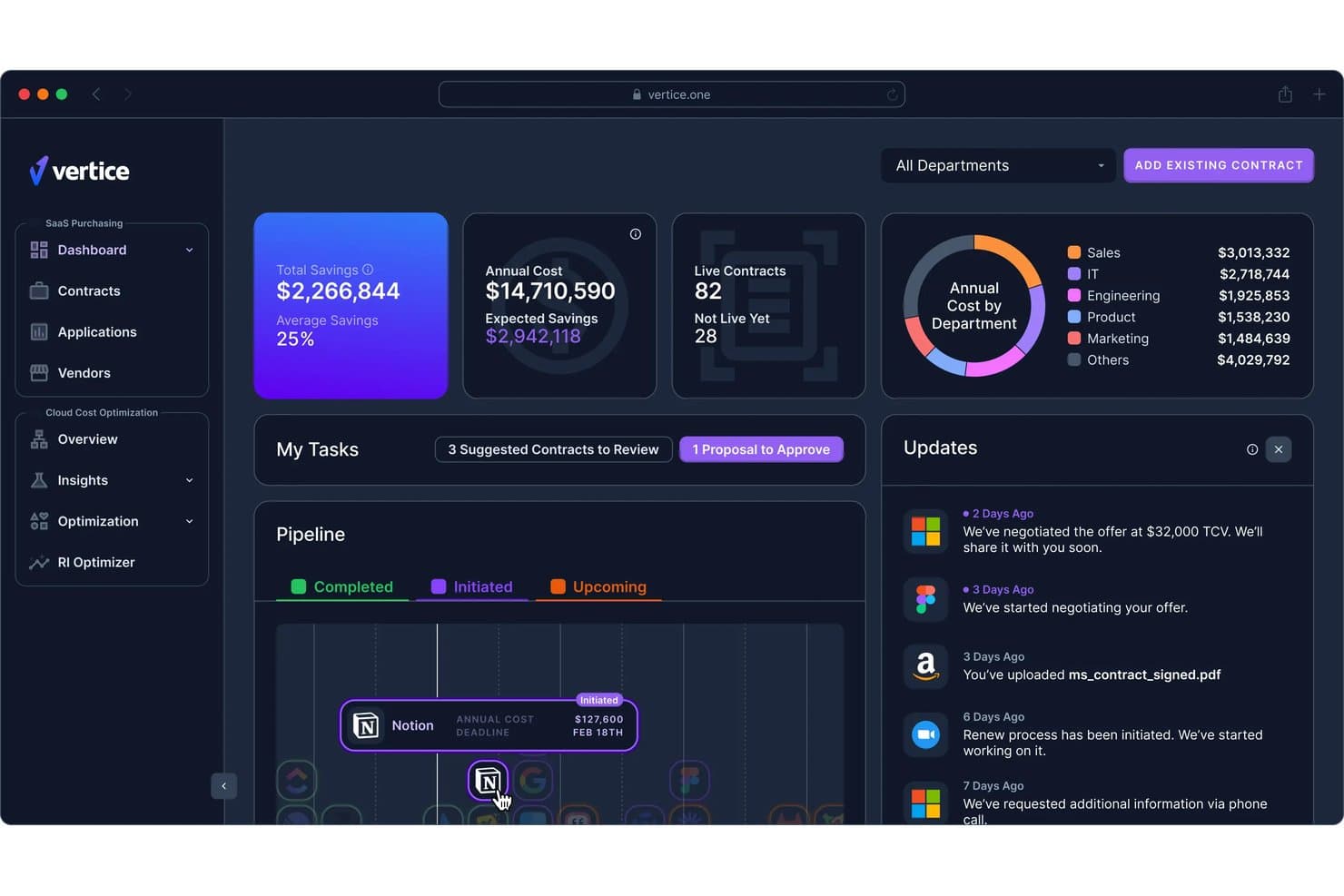
Vertice centralizes SaaS spend tracking, savings, and contract renewals in one dashboard. Vertice is a cloud-based procurement and SaaS spend management platform that centralizes vendor contracts, automates renewal tracking, and uses AI to extract contract data, flag compliance risks, and benchmark pricing across a proprietary dataset of 32,000+ vendors.
Who Is Vertice Best For?
Vertice is a strong fit for finance and procurement teams at mid-market to enterprise companies that need to control SaaS vendor spend and prevent costly auto-renewals.
Why I Picked Vertice
I picked Vertice as one of the best because its cost optimization focus is backed by something genuinely rare: a proprietary pricing benchmark dataset covering 32,000+ vendors, built from 35,000+ negotiated contracts. That means when a renewal is approaching, you're not guessing at fair market value. I also love the renewal pipeline view, which surfaces live deadlines and routes alerts through Slack or Teams so costly auto-renewals don't slip through.
Vertice Key Features
- AI-powered contract data extraction: Automatically pulls key metadata—pricing terms, notice periods, SLA obligations, and clause flags—from uploaded contracts without manual input.
- No-code workflow builder: Drag-and-drop approval flows with conditional logic route purchase requests to finance, legal, IT, or security based on configurable rules.
- Supplier risk management: Embeds continuous AI-driven vendor risk scoring into procurement workflows, with support for security questionnaires and TPRM tool integrations.
- SaaS usage analytics: Tracks license utilization and login trends via SSO integrations to surface underused software and identify shadow IT across your vendor portfolio.
Vertice Integrations
Vertice lists integrations with Ironclad, Juro, Conga, DocuSign, Adobe Sign, SharePoint, Google Docs, Microsoft 365, Slack, and Microsoft Teams. It does not list Salesforce, HubSpot, or CPQ integrations.
Pros and Cons
Pros:
- AI surfaces compliance risks in contract terms
- Proprietary vendor pricing benchmark data included
- Renewal tracking with automated multi-channel alerts
Cons:
- Lacks CRM or CPQ integration options
- No native tools for contract authoring
Learn more about Vertice: Best for small businesses
- Free demo available
- From $499/month (billed annually)
Visit WebsiteCustomer Rating:4.5/5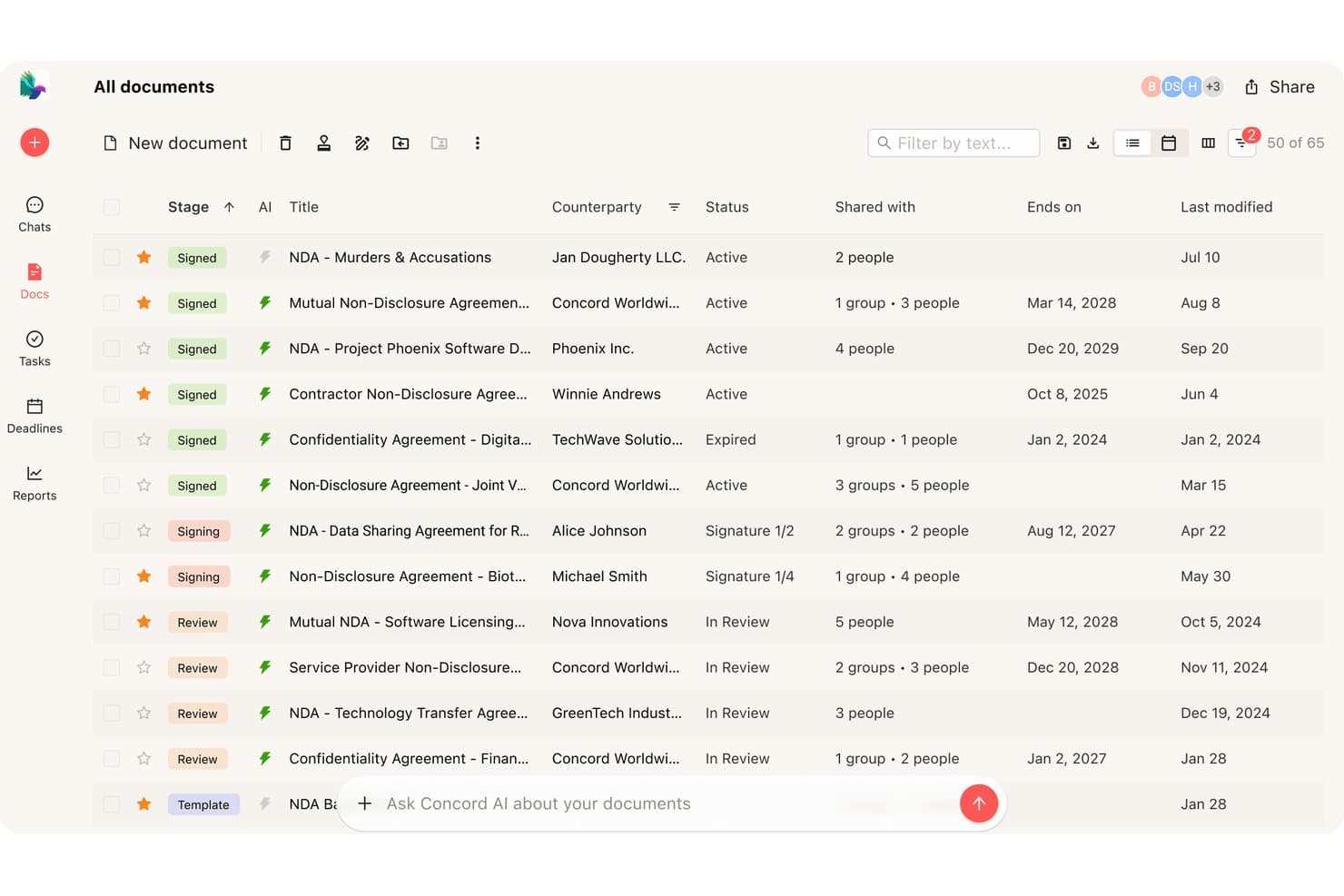
Concord offers an AI-powered contract management dashboard that displays all documents with stage, counterparty, status, and expiration details in a single view. Concord is a cloud-based contract lifecycle management platform that covers authoring, negotiation, e-signature, and renewal tracking within a single browser-based system, with AI-assisted clause drafting and native Salesforce and HubSpot integrations.
Who Is Concord Best For?
Concord suits small businesses that need a full contract lifecycle system—authoring, negotiation, e-signature, and renewals—without enterprise-level complexity or cost.
Why I Picked Concord
I picked Concord as one of the best because it delivers a full contract lifecycle in a single system without the overhead that typically comes with it. Small businesses don't need to patch together separate tools for drafting, redlining, signing, and tracking renewals. I especially like that AI Copilot, which flags risks, extracts obligations, and auto-summarizes contracts, is included at every pricing tier, not locked behind an enterprise upgrade. The unlimited free guest access also means external counterparties can collaborate and sign without your business absorbing extra per-seat costs.
Concord Key Features
- In-browser redlining: Tracked changes, inline comments, and real-time collaborative editing let internal teams and external counterparties negotiate contracts without leaving the browser.
- Automated renewal reminders: Concord sends email alerts for upcoming renewals, terminations, and key contract dates, with sync to Google, Outlook, and Apple Calendar.
- Bi-directional Salesforce and HubSpot sync: Contract data flows both ways between Concord and your CRM, auto-populating templates from deal records and writing updates back to the source.
- Role-based access controls: Granular, document-level permissions let you assign custom roles and teams, with unlimited free guest seats for external signers and viewers.
Concord Integrations
Concord offers native integrations with Salesforce, HubSpot, Google Drive, Box, Dropbox, Google Calendar, Outlook, DocuSign, and Slack (beta). It also supports Zapier, webhooks, and an Open REST API for custom integrations.
Pros and Cons
Pros:
- Centralized repository with full-text OCR search
- Unlimited free guest access for signers
- AI Copilot included on every plan
Cons:
- No dedicated mobile app or offline signing
- Clause library restricted to enterprise plan
Learn more about Concord:
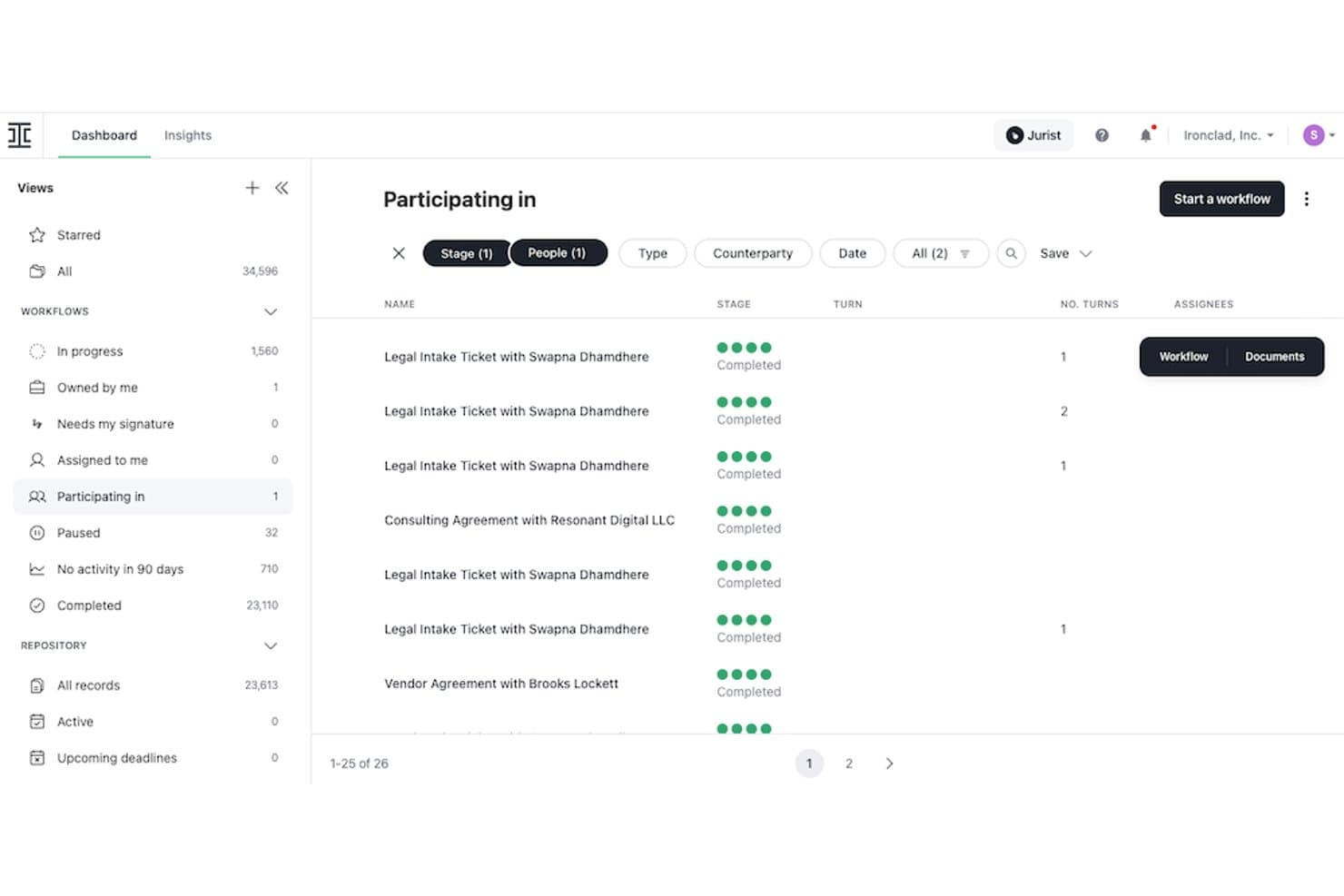
Ironclad tracks contract workflows and participation status in one dashboard. Ironclad is a cloud-native contract lifecycle management platform that covers the full contract process—from template-based authoring and AI-assisted redlining to multi-stage approval workflows, native e-signature, and a centralized post-signature repository with renewal tracking and analytics.
Who Is Ironclad Best For?
Ironclad is a strong fit for legal and revenue operations teams at mid-market to enterprise companies that need deep Salesforce integration and AI-governed contract workflows.
Why I Picked Ironclad
Ironclad earns its spot on my shortlist because legal teams get a genuinely end-to-end CLM, not a patchwork of tools. I'm particularly impressed by AI Playbooks, which flag non-standard clauses and enforce pre-approved language automatically during negotiation. The Jurist AI assistant also runs inline inside the document editor, so reviewing, redlining, and summarizing contracts happens in one place without tab-switching.
Ironclad Key Features
- Workflow Designer: A no-code drag-and-drop tool for building multi-stage conditional and parallel approval workflows across legal, finance, IT, and security teams.
- Smart Import: An OCR-powered bulk import tool that pulls legacy contracts into the repository and extracts metadata automatically.
- Native e-signature: A built-in e-signature solution embedded directly in the platform, with full approval history and contract context captured at signing.
- Ironclad Insights: A contract analytics dashboard that surfaces deal velocity metrics, bottlenecks, and risk trends across your contract portfolio.
Ironclad Integrations
Ironclad offers native integrations with Salesforce, Salesforce CPQ, DocuSign, Adobe Acrobat Sign, Dropbox Sign, Microsoft Word, NetSuite, SAP, Slack, and Microsoft Teams. It also provides a public REST API and Zapier support for custom connectivity.
Pros and Cons
Pros:
- AI Playbooks enforce approved language during negotiation
- No-code workflow builder for approvals and routing
- Bi-directional contract workflows inside Salesforce
Cons:
- Public pricing unavailable without a sales call
- Search accuracy in contract repository lags peers
Learn more about Ironclad: Best for enterprise compliance
- Free demo available
- Pricing upon request
Visit WebsiteCustomer Rating:4.3/5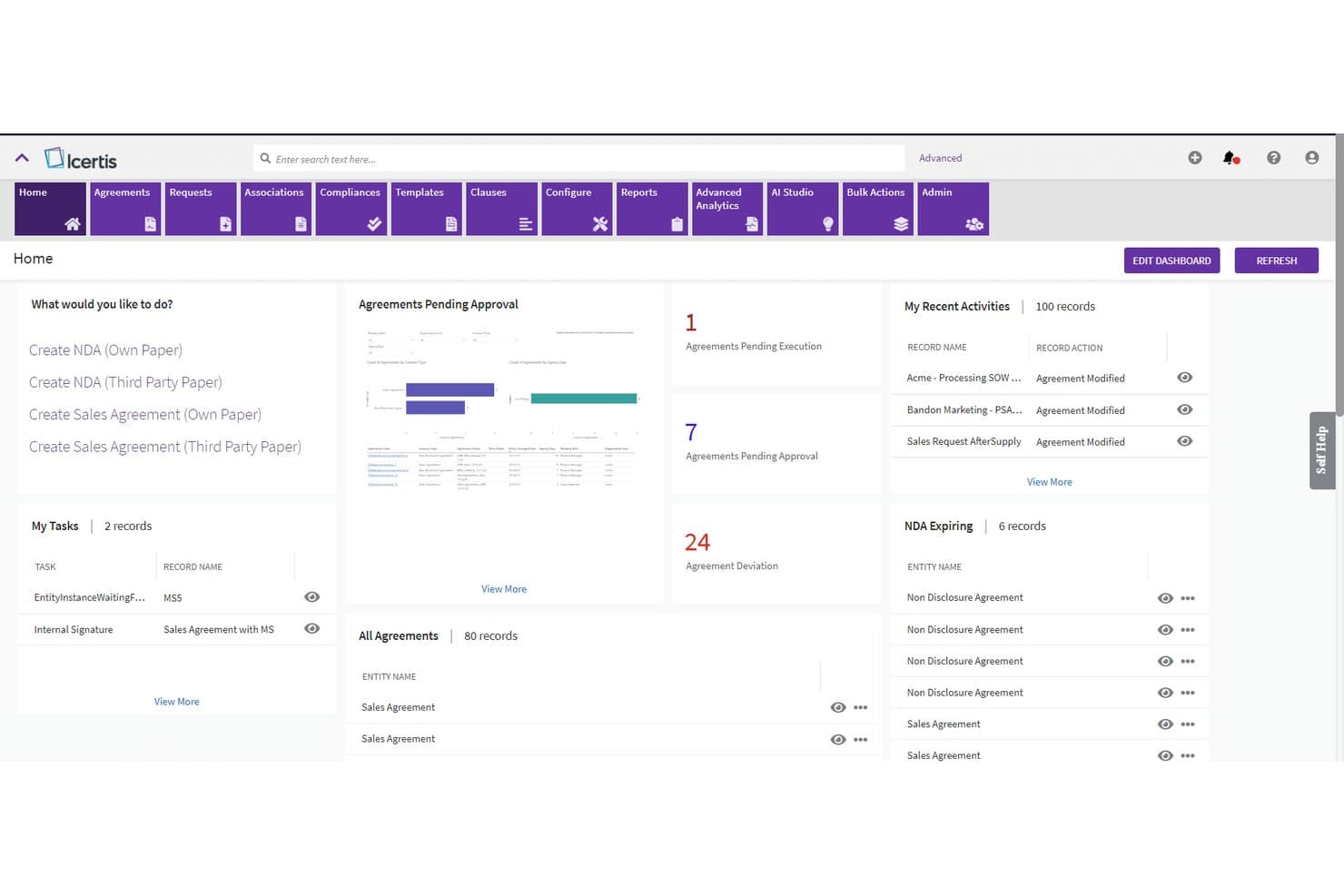
Icertis centralizes contract tracking, approvals, and tasks in one dashboard. Icertis is a cloud-native contract lifecycle management platform that covers the full contract process—from AI-assisted drafting and negotiation to obligation tracking, renewal management, and portfolio-level contract analytics.
Who Is Icertis Best For?
Icertis is built for large enterprises that need contract compliance at scale—particularly legal, procurement, and revenue operations teams managing high-volume, high-stakes agreements across global operations.
Why I Picked Icertis
Icertis earns its spot on my shortlist because no other CLM platform takes compliance as seriously at scale. Its Vera AI engine is trained on over 10 million contracts, which means clause deviation flagging and risk scoring aren't generic alerts—they're grounded in real contract precedent. I'm also a fan of Vera Obligations, which automatically extracts renewal dates and compliance commitments, assigns owners, and sends reminders, so nothing slips through during high-volume periods. The certifications alone (FedRAMP High, ITAR, TISAX, SOC 2 Type 2) set it apart for enterprises operating under serious regulatory scrutiny.
Icertis Key Features
- Vera Compose Agent: Generates first contract drafts from natural language prompts, supporting routine agreements like NDAs and SOWs.
- Vera Redline Agent: Embeds AI-powered redlining directly in Microsoft Word, applying playbook-aligned, risk-scored edits to counterparty paper.
- Salesforce CRM & CPQ adapter: Bidirectional native integration that auto-populates contracts from accounts, opportunities, and approved quotes, with status synced back to CRM.
- Vera Analytics Advanced: Surfaces portfolio-level financial commitments, ACV/TCV data, and revenue risks across the full contract portfolio.
Icertis Integrations
Icertis has native integrations with Salesforce CRM and CPQ, Microsoft Dynamics 365 Sales, SAP CPQ, SAP Ariba, Workday Financials, Adobe Sign, DocuSign, and Microsoft 365. Public APIs support custom integrations and data warehouse connections.
Pros and Cons
Pros:
- Robust obligation and renewal tracking
- Self-service deal desk for sales users
- Advanced AI contract analytics and risk scoring
Cons:
- No proprietary e-signature, only integrations
- Implementation requires significant time and support
Learn more about Icertis: Best for AI-driven insights
- Free demo available
- Pricing upon request
Visit WebsiteCustomer Rating:4.5/5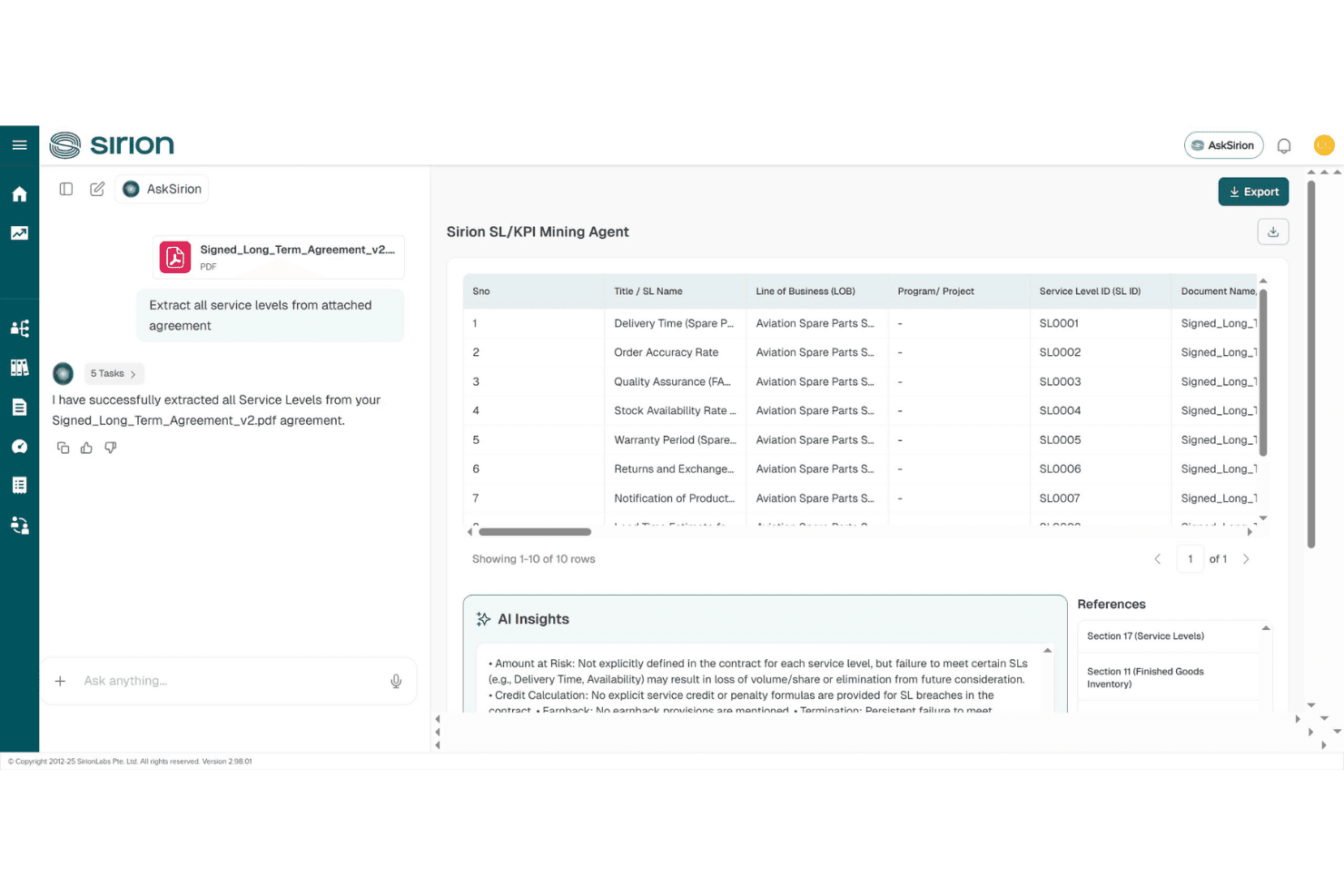
Sirion automatically extracts and structures service levels from contracts. Sirion is an AI-native contract lifecycle management platform that handles contract authoring, negotiation, obligation tracking, and post-signature management through a suite of specialized AI agents.
Who Is Sirion Best For?
Sirion is built for large enterprise legal, procurement, and deal desk teams managing high-volume, complex contract portfolios across multiple jurisdictions.
Why I Picked Sirion
I picked Sirion as one of the best because its agentOS™ architecture genuinely sets it apart on AI-driven contract intelligence. Rather than surface-level AI tagging, it deploys purpose-built agents like the Obligations Agent and Issue Detection Agent to track every commitment across a portfolio and flag risky clauses with source-linked explanations. I find the post-signature depth especially compelling: invoice reconciliation, SLA performance validation, and smart renewal alerts with renegotiation recommendations all run automatically.
Sirion Key Features
- AskSirion natural language search: Query your entire contract repository in plain language, across any language, to surface specific clause terms, obligations, or data points instantly.
- Secure counterparty collaboration portal: Negotiate and share contract drafts with external parties directly in-platform, without routing documents through email.
- Configurable approval routing: Route contracts through legal, finance, or commercial reviewers in any sequence before execution, with full audit trails captured automatically.
- 1,200+ field AI extraction: Automatically pull structured data from ingested contracts—including tables and complex clauses—to populate downstream systems without manual data entry.
Sirion Integrations
Sirion offers native integrations with Salesforce, DocuSign, and Adobe Sign, plus integrations with SAP CPQ, SAP Ariba, SAP S/4HANA Cloud, Oracle, Coupa, ServiceNow, and Microsoft Word. It supports 25+ pre-built connectors, an open API, and webhooks for custom integrations.
Pros and Cons
Pros:
- Automates renewal alerts with recommendations
- Tracks every obligation with source-cited AI
- Advanced AI agents deliver contract insights
Cons:
- Best suited to large enterprise-scale contracts
- Complex features require heavy onboarding investment
Learn more about Sirion: 10Best for procurement integration
Coupa
- Free demo available
- Pricing upon request
Visit WebsiteCustomer Rating:4.2/5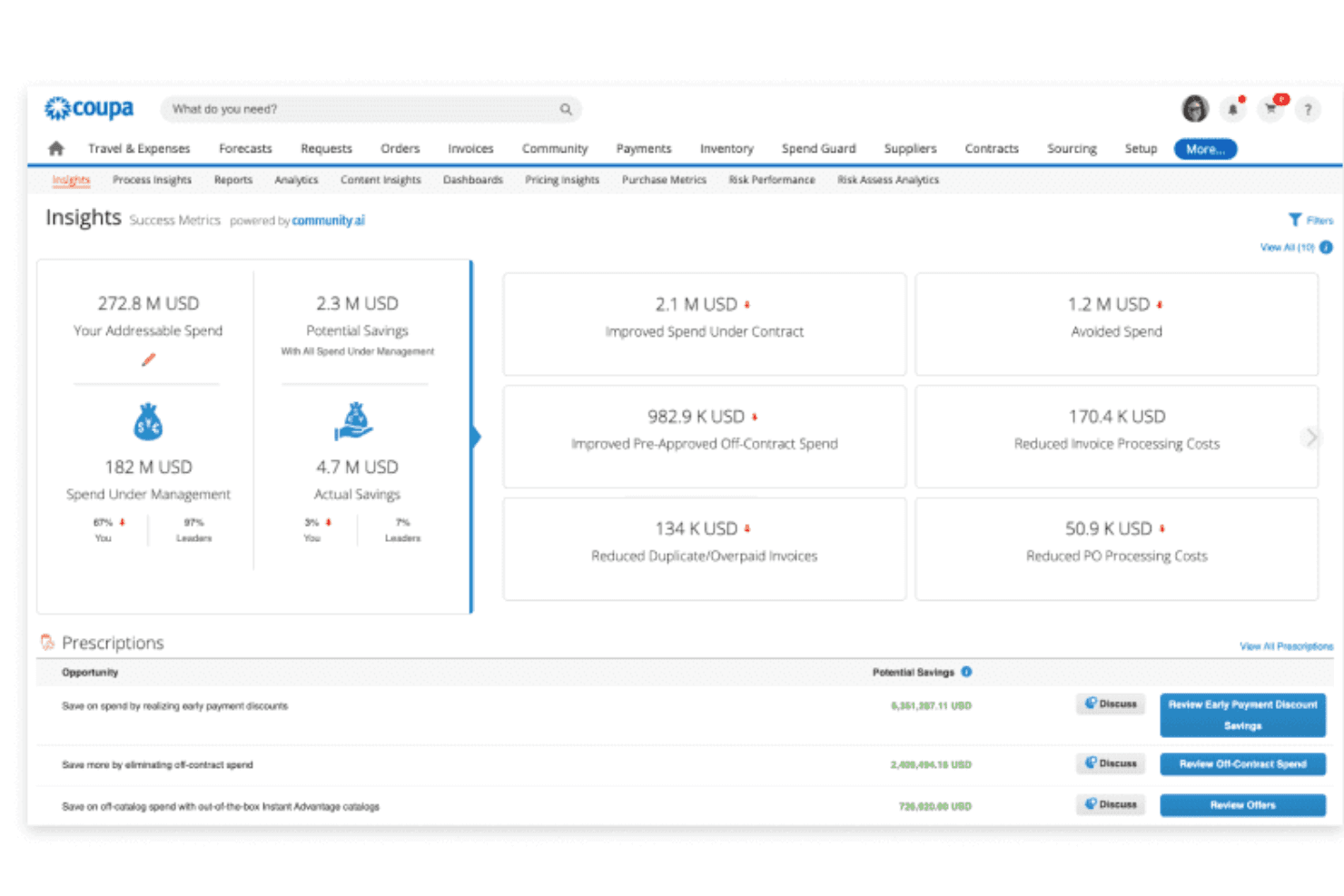
Coupa surfaces AI-powered spend insights and savings prescriptions. Coupa is a cloud-based contract lifecycle management solution built within a broader procurement suite, covering contract authoring, negotiation, approval workflows, repository management, and renewal tracking with AI-powered metadata extraction.
Who Is Coupa Best For?
Coupa is a strong fit for large enterprises that want to manage procurement and sales-side contracts within a single spend management platform.
Why I Picked Coupa
I picked Coupa as one of the best because no other CLM on this list connects contract management this deeply to procurement operations. If your organization runs sourcing awards and supplier agreements at scale, Coupa automatically transfers negotiated terms from sourcing decisions directly into contracts, closing the gap where pricing errors typically slip through. Its OCR-based repository search and AI metadata extraction also make it easier to track obligations across a large contract portfolio.
Coupa Key Features
- Sell-side contract support: The Advanced tier extends CLM coverage beyond procurement to include sales, confidentiality, employment, and partnership agreements.
- Coupa Contracts for Agentforce: A Salesforce AppExchange integration that lets you create contracts directly from opportunity records with AI-powered data auto-fill.
- Contract collaboration module: A dedicated add-on supporting multi-party redlining, side-by-side version comparison, comment threading, and full audit trails.
- Perfect Fit Insights reporting: Visual dashboards that track spend against contract volume and value, flagging savings goal performance with Red/Yellow/Green indicators.
Coupa Integrations
Coupa integrates with Salesforce through Coupa Contracts for Agentforce, DocuSign, and Microsoft Word, with Adobe Acrobat Sign available through the Coupa App Marketplace. It also supports open APIs and native connections across the Coupa Source-to-Contract suite.
Pros and Cons
Pros:
- Advanced audit trails and compliance certifications
- AI-powered contract metadata and obligation extraction
- Deep integration with procurement and sourcing data
Cons:
- Core collaboration tools are paid add-ons
- Sell-side contracts require advanced tier upgrade
Learn more about Coupa:
Outro software de gestão de contratos baseado na nuvem
Eis algumas opções adicionais de software de gestão de contratos baseado na nuvem que não foram incluídas na minha lista restrita, mas que ainda vale a pena consultar:
- 11OnitBest for workflow automation
- 12SAP Ariba ContractsBest for global supply chains
- 13ZycusBest for spend management
- 14CongaBest for Salesforce users
- 15Contract HoundBest for nonprofits
- 16ContractSafeBest for easy searching
- 17GatekeeperBest for vendor management
- 18PandaDocBest for document automation
- 19HyperStart CLMBest for startup scalability
- 20Contracts 365Best for Microsoft 365 users
How I Evaluate Cloud-Based Contract Management Software
I evaluate every tool on two levels: baseline functionality a deal desk can depend on—like CRM-synced contract generation—and differentiators that make one platform the right fit for RevOps teams.
Core Functionality (Table Stakes For This List)
When I'm selecting tools for my list, I rank each one on a scale from 0 (does not offer the functionality) to 5 (excels in this area) for each core functionality listed below. Then, I calculate the tool's total score into a percentage. Each tool needs to achieve a minimum total score of 65% to be considered for inclusion.
- Cloud-Based Deployment: I check that the platform is fully browser-based SaaS so distributed sales and legal teams can collaborate on contracts without VPN dependencies or desktop installs.
- Contract Lifecycle Management: Every tool I evaluate should cover the full journey from authoring through negotiation, execution, and renewal—not just act as a document vault.
- CRM & CPQ Integration: I look for native, bi-directional sync with CRMs like Salesforce or HubSpot so reps can generate contracts from closed-won opportunities without re-keying deal data.
- Templates & Clause Library: A governed clause library and dynamic templates with merge fields matter here—sales teams need to spin up NDAs or order forms using pre-approved language fast.
- E-Signature & Approval Workflows: Whether built-in or embedded through providers like DocuSign, I evaluate how configurable the approval routing is for multi-stakeholder deals with legal, finance, and VP sign-off.
- Searchable Repository & Renewal Tracking: I look at how well each platform indexes stored contracts and surfaces upcoming renewals, since missed renewal dates are where RevOps teams lose recoverable revenue.
Once I have a list of tools that meet the criteria, I consider what sets each platform apart.
Differentiating Factors (What Sets Vendors Apart)
Here's how I compare and contrast different vendors:
Standout Features
AI contract analytics is a big differentiator. I look for tools that auto-extract terms like payment schedules, liability caps, and renewal triggers. This gives RevOps teams obligation-level visibility without reading every page. Self-service deal desk workflows also matter, since they let reps generate compliant contracts while routing non-standard terms to legal. Conditional playbooks take this further by recommending pre-approved fallback language during negotiation, keeping deals moving without bottlenecking at legal review.
Beyond Features
Integration depth matters as much as features. I evaluate whether a platform connects bi-directionally with CRMs, CPQ tools, and billing systems like NetSuite or Zuora so signed contract terms flow straight into revenue recognition. Pricing structure is another factor I weigh carefully—RevOps teams typically have a mix of power users at deal desk and occasional users on the sales floor, so flexible licensing that accommodates both keeps costs predictable. I also consider implementation timelines, since a tool that takes six months to deploy can miss two full quarterly planning cycles.
Como escolher software de gestão de contratos baseado na nuvem
É fácil ficar sobrecarregado com listas extensas de funcionalidades e estruturas de preços complexas. Para o ajudar a manter-se concentrado enquanto percorre o seu processo específico de seleção de software CLM, eis uma lista de verificação dos fatores a ter em conta:
| Fator | O que deve considerar |
| Escalabilidade | O software consegue acompanhar o crescimento da sua empresa? Considere se consegue lidar com um aumento do número de utilizadores ou contratos sem reduzir o desempenho. |
| Integrações | Consegue ligar-se às suas ferramentas existentes? Procure integração com o seu CRM, ERP e outros sistemas essenciais para evitar silos de dados. |
| Personalização | O software pode ser adaptado aos seus fluxos de trabalho? Avalie a possibilidade de modificar modelos, painéis e processos para corresponder às necessidades específicas da sua equipa. |
| Facilidade de utilização | A interface é intuitiva? Avalie se a sua equipa consegue aprender rapidamente a utilizar o sistema sem formação extensa. Um design desorganizado pode atrasar a adoção. |
| Implementação e integração inicial | O processo de configuração é simples? Verifique se o fornecedor disponibiliza recursos, como vídeos de formação e apoio em direto, para ajudar a sua equipa a fazer uma transição tranquila. |
| Custo | O preço está dentro do seu orçamento? Compare o custo com as funcionalidades oferecidas e tenha em conta eventuais taxas ocultas ou compromissos de longa duração. |
| Medidas de segurança | Os seus contratos estão seguros? Certifique-se de que o software cumpre as normas do setor e oferece encriptação, controlos de acesso e atualizações de segurança regulares para proteger os seus dados. |
| Requisitos de conformidade | O software satisfaz as suas necessidades regulamentares? Verifique se cumpre as leis relevantes e os regulamentos do setor específicos da sua área. |
O que é um software de gestão de contratos baseado na nuvem?
O software de gestão de contratos baseado na nuvem é uma ferramenta que ajuda as empresas a criar, armazenar e gerir contratos online. Os profissionais das áreas jurídica, de aprovisionamento e de vendas utilizam habitualmente estas ferramentas para melhorar a eficiência e reduzir os erros no tratamento de contratos. Os fluxos de trabalho automatizados, as assinaturas eletrónicas e o acompanhamento da conformidade ajudam a organizar os contratos e a cumprir os requisitos regulamentares. De um modo geral, estas ferramentas simplificam a gestão de contratos, poupando tempo e reduzindo os riscos.
Funcionalidades
Ao selecionar um software de gestão de contratos baseado na nuvem, tenha em atenção as seguintes funcionalidades principais:
- Fluxos de trabalho automatizados: Simplificam as aprovações e os processos contratuais ao automatizar tarefas repetitivas, poupando tempo e reduzindo os erros manuais.
- Capacidade de assinatura eletrónica: Facilita a assinatura segura e rápida de contratos online, tornando mais fácil para as partes formalizarem acordos sem reuniões presenciais.
- Acompanhamento da conformidade: Garante que os contratos cumprem os regulamentos e as normas do setor, ajudando as empresas a evitar problemas jurídicos.
- Repositório centralizado: Armazena todos os contratos num único local acessível, melhorando a organização e facilitando uma recuperação rápida e eficiente.
- Modelos personalizáveis: Permitem criar contratos consistentes e com a identidade da marca, utilizando modelos que podem ser adaptados às necessidades específicas da empresa.
- Funcionalidade de pesquisa avançada: Localiza rapidamente contratos ou cláusulas específicos através da pesquisa por palavras-chave, reduzindo o tempo despendido em revisões manuais.
- Ferramentas de elaboração de relatórios: Geram informações sobre o desempenho dos contratos e os estrangulamentos, ajudando as equipas a tomar decisões fundamentadas.
- Capacidades de integração: Permitem a ligação a software existente, como sistemas CRM e ERP, para garantir um fluxo de dados contínuo entre plataformas.
- Medidas de segurança: Protegem informações contratuais sensíveis através de encriptação e controlos de acesso, garantindo a segurança dos dados.
- Alertas e notificações: Mantêm a equipa informada sobre datas e prazos contratuais importantes, evitando a perda de renovações ou expirações.
Vantagens
A implementação de um software de gestão de contratos baseado na nuvem proporciona várias vantagens à sua equipa e à sua empresa. Eis algumas das vantagens que pode esperar:
- Maior eficiência: Automatize os fluxos de trabalho e reduza as tarefas manuais para permitir que a sua equipa se concentre em atividades mais estratégicas.
- Maior conformidade: Acompanhe e gira a conformidade com as normas do setor, minimizando o risco de problemas jurídicos.
- Melhor acessibilidade: Armazene todos os contratos num repositório centralizado, facilitando o acesso e a recuperação de documentos pela sua equipa a partir de qualquer local.
- Poupança de custos: Reduza a necessidade de papel e de armazenamento físico, diminuindo as despesas associadas à gestão tradicional de contratos.
- Melhor colaboração: Utilize as funcionalidades de assinatura eletrónica e partilha de documentos para facilitar a colaboração entre os membros da equipa e as partes externas.
- Informações baseadas em dados: Tire partido das ferramentas de elaboração de relatórios para obter informações sobre o desempenho dos contratos, ajudando-o a tomar decisões empresariais fundamentadas.
- Garantia de segurança: Proteja as informações sensíveis com medidas de segurança robustas, garantindo que os seus contratos permanecem confidenciais e seguros.
Custos & preços
A seleção de um software de gestão de contratos baseado na nuvem exige uma compreensão dos vários modelos de preços e planos disponíveis. Os custos variam consoante as funcionalidades, a dimensão da equipa, os complementos e outros fatores. A tabela abaixo resume os planos comuns, os respetivos preços médios e as funcionalidades normalmente incluídas nas soluções de software de gestão de contratos baseado na nuvem:
Tabela de comparação de planos para software de gestão de contratos baseado na nuvem
| Tipo de plano | Preço médio | Funcionalidades comuns |
| Plano gratuito | $0/user/month | Armazenamento básico de contratos, capacidades limitadas de assinatura eletrónica e pesquisa básica. |
| Plano pessoal | $5-$25/user/month | Acesso para um único utilizador, modelos básicos, assinaturas eletrónicas e armazenamento de documentos. |
| Plano empresarial | $30-$60/user/month | Acesso multiutilizador, modelos avançados, automatização de fluxos de trabalho e acompanhamento da conformidade. |
| Plano empresarial avançado | $75-$150/user/month | Integrações personalizadas, elaboração avançada de relatórios, suporte dedicado e segurança reforçada. |
Perguntas frequentes sobre software de gestão de contratos baseado na nuvem
Eis algumas respostas a perguntas comuns sobre software de gestão de contratos baseado na nuvem:
Como saber se uma ferramenta de contratos na nuvem se adequa aos seus fluxos de trabalho existentes?
Deverá verificar se a ferramenta é compatível com a forma como a sua equipa trabalha atualmente. Analise a forma como gere aprovações, controlo de versões e negociações. Se a sua equipa passar demasiado tempo a adaptar-se ao software, este poderá atrasar a sua atividade. Uma solução adequada permitir-lhe-á utilizar os seus fluxos de trabalho atuais com apenas pequenas alterações.
Quão seguros são os contratos armazenados numa plataforma na nuvem?
A maioria dos fornecedores utiliza encriptação, controlos de acesso e registos de auditoria para manter os seus dados seguros. Ainda assim, deverá analisar as práticas de segurança de cada fornecedor para garantir que cumprem os padrões da sua empresa. Pergunte ao potencial fornecedor sobre a localização dos dados, a monitorização do acesso e a forma como gere os incidentes. A sua equipa de segurança deverá confirmar que a configuração do fornecedor está alinhada com as suas políticas internas.
As ferramentas de contratos na nuvem conseguem gerir processos de aprovação complexos?
Muitas ferramentas suportam aprovações em várias etapas, encaminhamento condicional e acesso baseado em funções. Se a sua equipa lidar com ciclos longos ou vários departamentos, verifique a flexibilidade destas definições. Deverá testar se consegue configurar exceções ou percursos pontuais sem o apoio das TI, para que a sua equipa possa gerir as aprovações sem criar trabalho adicional.
Qual é o nível de integração destas plataformas com outros sistemas empresariais?
A maioria das ferramentas na nuvem liga-se a CRMs, ERPs, aplicações de assinatura eletrónica e plataformas de armazenamento. Deverá confirmar se as integrações de que a sua equipa depende funcionam imediatamente ou exigem uma configuração personalizada. Testar um fluxo de trabalho real permitir-lhe-á perceber como os dados circulam entre sistemas. Integrações robustas reduzem a introdução duplicada de dados e mantêm os dados dos contratos consistentes.
O que deve considerar ao migrar contratos existentes para uma plataforma na nuvem?
Comece por verificar a forma como a ferramenta gere importações em massa e a etiquetagem de metadados. A sua equipa poderá ter de limpar ou reorganizar ficheiros antigos antes da migração. Procure funcionalidades que permitam extrair termos-chave ou etiquetar documentos automaticamente, evitando o trabalho manual. Um plano de migração detalhado pode ajudá-lo a evitar perder o controlo sobre acordos importantes.
Como é que as ferramentas de contratos na nuvem apoiam a preparação para auditorias?
Normalmente, estas ferramentas mantêm registos detalhados de edições, aprovações e acessos. Pode obter relatórios que mostram quem consultou ou alterou um contrato e quando. Isto facilita a resposta da sua equipa a auditorias e ajuda a evitar a procura exaustiva em cadeias de correio eletrónico. Registos claros podem poupar-lhe tempo e reduzir a probabilidade de deixar passar algo importante.