

O software de CRM para centros de atendimento é um recurso valioso para qualquer empresa. Com o software certo, as equipas podem melhorar as interações com os clientes e reforçar a comunicação. No entanto, encontrar o software de CRM para centros de atendimento adequado pode ser um desafio, especialmente com tantas opções disponíveis.
Com base na minha experiência com software de operações de receita, testei e comparei vários dos principais programas de software de CRM para centros de atendimento disponíveis. De seguida, compilei os meus resultados em análises detalhadas para ajudar a encontrar o melhor software para as suas necessidades.
Why Trust Our Software Recommendations
6,700+
Reviews
20
Industry experts
16+
Evaluation factors
14
Years
Our reviews reflect our independent judgment—not a sales pitch. Learn how we stay transparent.
For this guide, we evaluated tools using hands-on testing and independent research, scoring tools using our selection criteria.
Our reviews reflect our human editorial judgment, not a sales pitch.
Tabela comparativa de software de CRM para centros de atendimento
Esta tabela comparativa resume os detalhes de preços do melhor software de CRM para centros de atendimento:
| Tool | Best For | Trial Info | Price | ||
|---|---|---|---|---|---|
| 1 | Best for AI-assisted agent workflows | Free trial available | From $15/user/month (billed annually) | Website | |
| 2 | Best for AI voice integration | Free demo available | From $25/month (billed annually) | Website | |
| 3 | Best for call analytics | Free plan + 14-day trial + free demo available | From $25/user/month (billed annually) | Website | |
| 4 | 14-day free trial | From $35/user/month (billed annually) | Website | ||
| 5 | Best for cost-effective CRM | Free plan + free demo available | From $11.04/user/month (billed annually) | Website | |
| 6 | Best for small sales teams | Free demo available | Pricing upon request | Website | |
| 7 | Best for efficient call routing | 7-day free trial | From $19/month | Website | |
| 8 | Best for marketing automation | Free demo available | Pricing upon request | Website | |
| 9 | Best for predictive dialing | Free demo available | From $199/user/month | Website | |
| 10 | Best for international calling | 14-day free trial | From $29/user/month (billed annually) | Website |


Análises do melhor software de CRM para centros de atendimento
Abaixo encontram-se os meus resumos detalhados do melhor software de CRM para centros de atendimento incluído na minha lista restrita. As minhas análises abrangem as principais funcionalidades, vantagens e desvantagens, integrações e casos de utilização ideais de cada ferramenta, para ajudar a encontrar a melhor opção.
 Best for AI-assisted agent workflows
- Free trial available
- From $15/user/month (billed annually)
Visit WebsiteCustomer Rating:4.5/5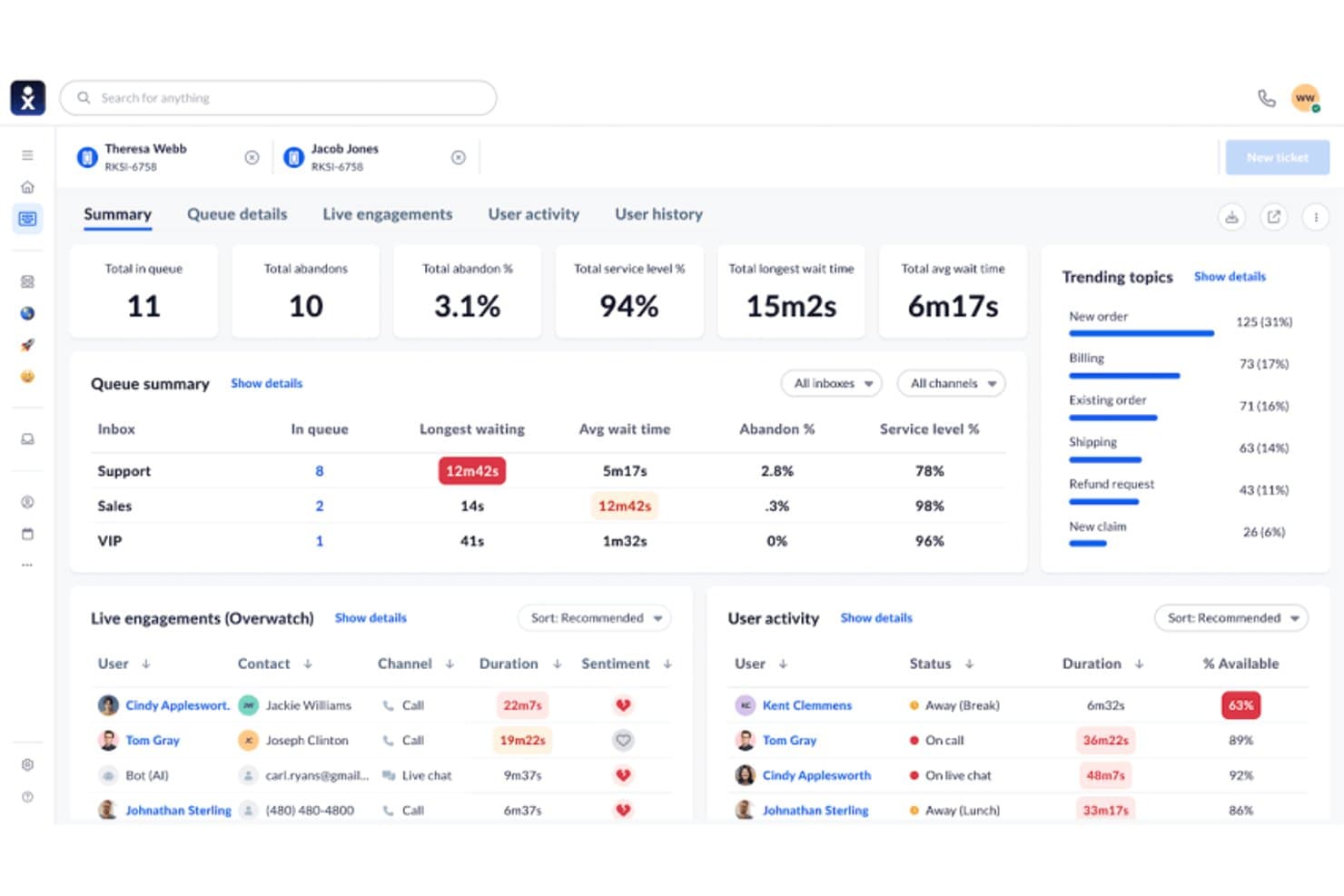
Nextiva displays real-time queue metrics and agent activity in one dashboard. Nextiva is a contact center platform that combines AI-assisted agent workflows, omnichannel routing, outbound dialing, and CRM integrations to manage inbound and outbound call operations.
Who Is Nextiva Best For?
Nextiva suits contact center directors and operations teams who want AI-driven agent workflows—including real-time assist, transcription, and predictive analytics—layered on top of their existing CRM.
Why I Picked Nextiva
I picked Nextiva as one of the best because its AI-assisted agent workflows go well beyond basic call handling. XBert delivers real-time agent assist with next-best-action suggestions and sentiment flagging mid-conversation, while AI transcription and post-call summaries with action items remove manual note-taking entirely. I also like that predictive analytics surface upsell and churn signals, giving contact center teams forward-looking insight, not just call logs.
Nextiva Key Features
- Omnichannel routing: Routes inbound contacts across voice, SMS, chat, email, and social channels within a single conversation thread.
- Outbound dialer modes: Supports predictive, power, progressive, and preview dialing modes for outbound call campaigns.
- CRM screen pops: Surfaces customer records from Salesforce or HubSpot automatically when a call connects, without agents switching applications.
- AI quality management: Scores agent interactions using AI-generated scorecards to support performance reviews and coaching.
Nextiva Integrations
Nextiva lists 32+ integrations, including Salesforce, HubSpot, Zoho CRM, Pipedrive, Microsoft Dynamics, Zendesk, Marketo, Power BI, and Zapier. It also describes a REST API for custom integrations.
Pros and Cons
Pros:
- Omnichannel context follows customers across conversations
- Predictive signals expose upsell and churn risk
- AI summaries reduce manual after-call work
Cons:
- Reporting gaps limit contact center visibility
- Native customer records remain unavailable
Learn more about Nextiva: Best for AI voice integration
- Free demo available
- From $25/month (billed annually)
Visit WebsiteCustomer Rating:4.8/5
Squaretalk's dashboard for managing call center operations effectively. Running a call center out of your CRM means every conversation needs to be logged, visible, and easy for your team to act on without bouncing between tabs. Squaretalk gives sales and support teams a contact-center layer that sits on top of tools like Zoho, Salesforce, Freshworks, and Pipedrive, so calls, notes, and follow-ups live right next to deal and customer data.
Why I Picked Squaretalk
The platform’s centralized contact management brings key customer details, history, and notes into a single view for quicker, more relevant conversations. I also like its unique ability to integrate AI voice agents with predictive dialers, providing a sophisticated approach to automating customer interactions. This combination enhances communication efficiency while offering valuable insights through AI-powered conversation analytics. Additionally, the platform's global HD voice SIP trunking ensures high-quality voice communication, making it ideal for businesses aiming to maintain excellent customer service standards.
Squaretalk Key Features
In addition to its AI voice agents and predictive dialers, Squaretalk offers other valuable features for call center CRM software users:
- WhatsApp Messaging: Facilitates direct communication with customers through a popular messaging platform.
- Spam Checker: Protects your communication channels by filtering out unwanted and potentially harmful calls.
- Unlimited Free Call Recording: Allows for comprehensive call monitoring and quality assurance without additional costs.
- Interactive Voice Response (IVR): Automates call routing and enhances customer self-service options.
Squaretalk Integrations
Integrations include Zoho, Salesforce, Freshworks, Pipedrive, Zendesk, HubSpot, Microsoft Dynamics, and SugarCRM.
Pros and Cons
Pros:
- Comprehensive analytics tools provide valuable insights for decision-making.
- Reliable call management with minimal downtime ensures continuous operation.
- AI integration enhances productivity and customer interaction efficiency.
Cons:
- Limited dashboard customization options compared to competitors.
- Lack of mobile optimization may hinder on-the-go accessibility.
Learn more about Squaretalk: Best for call analytics
- Free plan + 14-day trial + free demo available
- From $25/user/month (billed annually)
Visit WebsiteCustomer Rating:4.2/5
CloudTalk delivers flexible call routing, real-time tracking, and call management for remote and international teams. CloudTalk is a call center solution primarily for sales and support teams. It offers advanced call analytics to improve communication strategies and helps businesses monitor and optimize their call operations.
Why I picked CloudTalk: It provides detailed call analytics that allows your team to gain insights into call performance and customer interactions. The platform's custom reporting can be tailored to your specific needs, offering flexibility in how data is viewed. If you want to enhance your team's communication efficiency, CloudTalk's analytics capabilities aim to help.
Standout features & integrations:
Features include call monitoring, which allows you to listen in on calls and provide real-time feedback. Call recording helps ensure quality and compliance by storing conversations for review.
Integrations include Salesforce, HubSpot, Zendesk, Pipedrive, Intercom, Freshdesk, Zoho CRM, Slack, Shopify, and Google Workspace.
Pros and Cons
Pros:
- Effective call monitoring
- Customizable reporting options
- Detailed call analytics
Cons:
- Call waiting times aren't easily trackable
- Delays in call connection initialization
Learn more about CloudTalk:
 Learn more about Close CRM:
 Best for cost-effective CRM
- Free plan + free demo available
- From $11.04/user/month (billed annually)
Visit WebsiteCustomer Rating:4.6/5
EngageBay integrates marketing and call management, automating tasks while offering detailed reporting for efficient team operations. EngageBay is an all-in-one CRM solution for small to medium businesses looking for a cost-effective way to manage customer interactions. It offers marketing, sales, and service automation, making it a versatile tool for various business functions.
Why I picked EngageBay: It provides a budget-friendly CRM option that combines marketing, sales, and support features into one platform. Your team can benefit from email marketing, lead management, and customer support tools without breaking the bank. The simple interface makes navigating and utilizing its features easy for your team.
Standout features & integrations:
Features include email marketing, which allows you to create and send campaigns to engage your audience effectively. Lead management helps you track and nurture potential customers through the sales funnel. Customer support tools ensure your team can handle inquiries and issues efficiently, keeping your clients satisfied.
Integrations include Salesforce, HubSpot, Mailchimp, Shopify, Zapier, QuickBooks, Stripe, Xero, Slack, and Google Workspace.
Pros and Cons
Pros:
- Easy email marketing tools
- All-in-one platform
- Cost-effective for small teams
Cons:
- Inconsistent call connection stability
- Limited call queue management features
Learn more about EngageBay:

CallTools handles high call volumes with customizable routing, real-time tracking, and reporting for call centers. CallTools is a call center CRM designed for small sales teams. It focuses on outbound calling and lead management. This customer relationship management tool enhances sales efficiency by automating dialing processes and providing real-time data analytics.
Why I picked CallTools: It efficiently caters to small sales teams by offering auto-dialing and call-monitoring features that maximize your team's or helpdesk’s productivity. The predictive dialer reduces downtime between calls, allowing your team to follow up on more leads. Real-time analytics offer insights to refine your sales strategy. This contact center CRM solution is suitable for boosting your team's reps' call efficiency without added complexity.
Standout features & integrations:
Features include auto-dialing, which reduces manual dialing time and increases your team's efficiency. Real-time analytics provide insights into call performance, helping refine your sales strategies and avoid customer issues. Call monitoring allows for quality assurance and training opportunities, ensuring your team consistently improves.
Integrations include Salesforce, Zoho CRM, HubSpot, Pipedrive, Infusionsoft, Freshsales, SugarCRM, Microsoft Dynamics, Zendesk, and Slack.
Pros and Cons
Pros:
- Detailed real-time analytics
- Effective call monitoring
- Easy setup process
Cons:
- Call quality can fluctuate
- Requires regular manual updates
Learn more about CallTools:

TalkRoute allows your call centre to set up rules for call distribution based on criteria like time of day or specific departments, navigating unnecessary delays. TalkRoute is a virtual phone system designed for businesses to enhance communication by integrating talking, messaging, and meeting functionalities within a single application. It offers features such as call forwarding, text messaging, video conferencing, voicemail management, and customizable settings. The platform supports different phone number types, including toll-free and local numbers, and is accessible via desktop, mobile, and web applications.
Why I picked TalkRoute: One reason TalkRoute stood out to me in regards to call center CRM needs is its call forwarding and routing feature. This function lets you manage incoming calls efficiently, ensuring they reach the right team members without unnecessary delays. You can set up rules for call distribution based on criteria like time of day or specific departments. This means your customers won't be left waiting, and your team can handle calls more effectively, improving overall customer satisfaction. Plus, the ability to customize these routing options allows you to tailor the system to your specific business needs.
TalkRoute Standout Features and Integrations
Features include call forwarding, call recording, custom greetings, various phone number options (toll-free, vanity, local), voicemail access through apps, customizable greetings, unlimited voicemail storage, SMS and MMS messaging, video conferencing for up to 100 participants, screen sharing, whiteboard feature, call routing adjustments.
Integrations include Zapier, Google Sheets, HubSpot, Slack, Gmail, Facebook Leads, Mailchimp, Shopify, Trello, WooCommerce, ActiveCampaign, and Pipedrive
Pros and Cons
Pros:
- Multi-level auto-attendant enhances customer experience by reducing wait times
- Customizable greetings create a professional image
- Call stacking feature prevents busy tones, ensuring no calls are missed
Cons:
- Supports a maximum of 100 participants in meetings
- Absence of a virtual fax feature may limit some businesses
Learn more about TalkRoute: Best for marketing automation
- Free demo available
- Pricing upon request
Visit WebsiteCustomer Rating:4.4/5
LeadSquared offers customizable call workflows, detailed reporting, and scalable solutions for high-volume call handling and campaign management. LeadSquared is a marketing automation and CRM tool for sales and marketing teams. It aims to enhance lead management by supporting key functions like lead scoring, nurturing, and tracking to optimize sales efforts.
I picked LeadSquared: It provides marketing automation features that allow your team to automate lead capturing. With tools for nurturing leads through custom workflows, your team can focus on converting prospects into customers. The platform's analytics offer insights into lead behavior, helping you refine marketing strategies.
Standout features & integrations:
Features include lead capture and scoring, which helps businesses automatically track and prioritize leads from multiple sources such as websites, social media, and email. Additionally, it provides workflow automation and detailed analytics to optimize sales and marketing strategies, improving overall efficiency and revenue growthlead scoring, which helps your team prioritize high-value prospects.
Integrations include Salesforce, HubSpot, Microsoft Dynamics, Mailchimp, Zapier, Google Analytics, WordPress, Shopify, Zoho CRM, and QuickBooks.
Pros and Cons
Pros:
- Detailed lead analytics
- Customizable lead workflows
- Effective marketing automation
Cons:
- Requires manual setup for call workflows
- Difficult to track call bounce rates
Learn more about LeadSquared: Best for predictive dialing
- Free demo available
- From $199/user/month
Visit WebsiteCustomer Rating:4.5/5
Readymode provides scalable solutions for high-volume calls with real-time monitoring, automation, and workflow customization. Readymode is a call center CRM for sales teams seeking predictive dialing solutions. It helps streamline outbound call processes, making it ideal for sales-focused environments.
Why I picked Readymode: This contact center solution offers predictive dialing, enabling your team to maximize call efficiency by minimizing wait times. It also provides advanced call routing to ensure calls are directed to suitable agents. Real-time monitoring allows you to track performance and make necessary customer journey adjustments.
Standout features & integrations:
Features include predictive dialing that significantly reduces idle time between calls, making your team's outreach more efficient. Advanced call routing ensures that calls go to the most suitable agents, improving response quality. Real-time monitoring lets you keep track of performance metrics, allowing you to make informed adjustments to your strategy.
Integrations include Salesforce, HubSpot, Zendesk, Pipedrive, Freshdesk, Zoho CRM, Intercom, Slack, Microsoft Teams, and Google Workspace.
Pros and Cons
Pros:
- Real-time performance monitoring
- Advanced call routing
- Effective predictive dialing
Cons:
- Needs frequent updates for optimal use
- Limited call recording storage options
Learn more about Readymode: 10Best for international calling
JustCall
- 14-day free trial
- From $29/user/month (billed annually)
Visit WebsiteCustomer Rating:4.1/5
JustCall manages international calls, automates workflows, and provides real-time tracking for growing teams. JustCall is a cloud-based phone system that improves businesses' international calling capabilities. It serves sales and support teams by providing features that facilitate global communication and collaboration.
Why I picked JustCall: It offers features like international phone numbers and call forwarding, which makes it a strong choice for teams managing global clients. Your team can leverage its contact center software capabilities to enhance communication with clients worldwide. The real-time call monitoring feature allows for quality assurance and training.
Standout features & integrations:
Features include international phone numbers, allowing your team to connect with clients globally. Call forwarding ensures that calls are directed to the right person regardless of location. Real-time call monitoring helps you maintain quality and provides opportunities for training and improvement.
Integrations include Salesforce, HubSpot, Zoho CRM, Pipedrive, Slack, Intercom, Freshdesk, Zapier, Help Scout, and Microsoft Dynamics.
Pros and Cons
Pros:
- Real-time call monitoring
- Effective call forwarding
- Supports international numbers
Cons:
- Voicemail transcription is unreliable
- Difficult to manage agent call queues
Learn more about JustCall:
Outro software de CRM para centros de atendimento
Eis algumas opções adicionais de software de CRM para centros de atendimento que não entraram na minha lista restrita, mas que vale a pena conhecer.
- 11NUACOMBest for remote workforces
- 12
- 13Keona HealthBest for healthcare teams
- 14Ricochet360 Best for lead management
- 15ICTContactBest for broadcasting campaigns
- 16Bitrix24Best for free collaboration
- 17Creatio AI CRMBest for 360 customer views
- 18LiveAgentBest for automatic call distribution
- 19RingCentralBest for unified communications
- 20Agile CRMBest for small businesses
How I Evaluate Call Center CRM Software
I look at these tools in two layers—baseline requirements like embedded telephony and auto-logged call records, and differentiators like AI coaching and dialer modes that determine the right fit.
Core Functionality (Table Stakes For This List)
When I'm selecting tools for my list, I rank each one on a scale from 0 (does not offer the functionality) to 5 (excels in this area) for each core functionality listed below. Then, I calculate the tool's total score into a percentage. Each tool needs to achieve a minimum total score of 65% to be considered for inclusion.
- Integrated Telephony & CRM: I check whether agents can place, receive, and manage calls from within the CRM itself rather than toggling between a standalone dialer and a separate contact database.
- Unified Customer Profiles: Each tool should surface a complete view of a contact's call history, deal stage, support tickets, and notes so agents aren't asking callers to repeat information.
- Automatic Call Logging: I look for platforms that capture call recordings, duration, disposition codes, and outcomes against the right contact or deal record without manual agent input.
- Screen Pops & Call Routing: When an inbound call arrives, agents should see account context instantly and the system should route calls using CRM data like account tier or assigned rep.
- Call Analytics & Reporting: Dashboards should cover more than basic call counts. I evaluate whether the tool can break down metrics like conversion rates, talk time by rep, and pipeline sourced from calls.
- Revenue Stack Integrations: The platform needs to connect with the tools RevOps teams already rely on, such as Salesforce, HubSpot, marketing automation platforms, and helpdesk systems.
Once I have a list of tools that meet the criteria, I consider what sets each platform apart.
Differentiating Factors (What Sets Vendors Apart)
Here's how I compare and contrast different vendors:
Standout Features
AI conversation intelligence is a big differentiator—I look for tools that can flag deal risk or coaching moments from recorded calls without a manager listening to every one. Predictive and power dialers also matter for outbound teams running high-volume campaigns, where connect rates directly impact pipeline generation. Omnichannel support is worth evaluating too, since many revenue teams now handle follow-ups over SMS or chat alongside voice.
Beyond Features
Compliance is a major consideration—I check whether a platform supports call recording consent workflows, data redaction, and standards like PCI-DSS and GDPR, especially for teams handling payment information over the phone. Pricing structure matters too, since some vendors bundle voice minutes into seat licenses while others charge usage-based fees that can spike with high call volumes. I also evaluate scalability, looking at how easily you can add or remove agent seats during seasonal peaks without long-term contract penalties.
Como escolher software de CRM para centros de atendimento
É fácil perder-se em listas extensas de funcionalidades e estruturas de preços complexas. Eis uma lista de verificação dos fatores a ter em conta para se manter concentrado enquanto percorre o seu processo único de seleção de software.
| Fator | O que considerar |
| Escalabilidade | O software acompanhará o crescimento da sua equipa? |
| Integrações | Permite ligar-se às ferramentas que já utiliza? |
| Personalização | Pode adaptá-lo às suas necessidades específicas? |
| Facilidade de utilização | O software é intuitivo para a sua equipa? |
| Orçamento | Enquadra-se nas suas limitações financeiras? |
| Medidas de segurança | Os seus dados e as informações dos clientes estão protegidos? |
| Suporte | O apoio ao cliente está facilmente disponível quando necessário? |
| Relatórios | Fornece informações úteis para as suas operações? |
Tendências no software de CRM para centros de atendimento
Durante a minha pesquisa, recolhi inúmeras atualizações de produtos, comunicados de imprensa e registos de lançamento de diferentes fornecedores de software de CRM para centros de atendimento. Eis algumas das tendências emergentes que tenho acompanhado.
- Informações sobre clientes orientadas por IA: Mais fornecedores integram a IA para analisar as interações com os clientes e fornecer informações úteis. Isto ajuda as empresas a compreender as preferências dos clientes e a melhorar a qualidade do serviço. Por exemplo, algumas ferramentas oferecem agora análise de sentimentos em tempo real para avaliar a satisfação dos clientes durante as chamadas.
- Comunicação omnicanal: Existe um foco crescente em oferecer uma visão unificada das interações com os clientes através de diferentes canais. Esta tendência permite aos centros de atendimento tratar facilmente os pedidos por telefone, e-mail ou redes sociais. Os fornecedores estão a melhorar as suas plataformas para suportar esta abordagem abrangente ao serviço de apoio ao cliente.
- Biometria de voz para segurança: Alguns programas de CRM para centros de atendimento incluem agora biometria de voz para reforçar a segurança. Esta tecnologia verifica a identidade do interlocutor com base em padrões de voz únicos, reduzindo o risco de fraude. Está a tornar-se uma funcionalidade essencial para os setores que lidam com informações sensíveis.
- Opções de autosserviço: Os clientes preferem cada vez mais resolver os problemas de forma autónoma antes de contactarem o apoio. Os fornecedores de programas de CRM para centros de atendimento estão a integrar portais de autosserviço que permitem aos utilizadores encontrar soluções ou acompanhar problemas de forma autónoma. Esta tendência não só dá mais autonomia aos clientes, como também reduz a carga de trabalho dos centros de atendimento.
- Suporte a equipas remotas: Com mais equipas a trabalhar remotamente, as soluções de CRM para centros de atendimento estão a adaptar-se para suportar operações remotas. Funcionalidades como o acesso baseado na nuvem e os centros de atendimento virtuais estão a tornar-se padrão. Os fornecedores estão a apostar em ferramentas que permitem aos agentes ligar-se e colaborar a partir de qualquer lugar, garantindo um apoio ao cliente ininterrupto.
O que é um programa de CRM para centros de atendimento?
O programa de CRM para centros de atendimento foi concebido para gerir as interações com os clientes e melhorar a eficiência do serviço nos centros de atendimento. É geralmente utilizado por representantes do serviço de apoio ao cliente, equipas de vendas e pessoal de suporte para melhorar o envolvimento dos clientes e simplificar a comunicação.
Funcionalidades como informações orientadas por IA, comunicação omnicanal e opções de autosserviço ajudam a compreender as necessidades dos clientes, prestar um serviço consistente e reduzir a carga de trabalho. Estas ferramentas oferecem um valor significativo ao melhorar a satisfação dos clientes e aumentar a produtividade operacional.
Funcionalidades dos programas de CRM para centros de atendimento
Ao escolher um programa de CRM para centros de atendimento, procure as seguintes funcionalidades principais:
- Análise de chamadas: Fornece informações sobre o desempenho das chamadas e as interações com os clientes, ajudando a otimizar as estratégias de comunicação.
- Comunicação omnicanal: Oferece uma visão unificada das interações através de vários canais, garantindo um serviço consistente ao cliente.
- Informações orientadas por IA: Analisa as interações com os clientes para fornecer informações úteis, melhorando a qualidade do serviço e a compreensão dos clientes.
- Opções de autosserviço: Permitem aos clientes resolver problemas de forma autónoma, reduzindo a carga de trabalho dos centros de atendimento.
- Biometria de voz: Reforça a segurança ao verificar a identidade do interlocutor através de padrões de voz únicos, minimizando o risco de fraude.
- Marcação preditiva: Minimiza o tempo de inatividade entre chamadas, aumentando a produtividade da equipa através da automatização do processo de marcação. Algumas equipas de vendas também optam por marcadores automáticos ou por programas de marcação para vendas dedicados com capacidades semelhantes.
- Painéis personalizáveis: Permitem aos utilizadores adaptar as vistas e os relatórios às suas necessidades específicas, melhorando a facilidade de utilização.
- Gravação de chamadas: Armazena as conversas para garantir a qualidade e a conformidade, assegurando o cumprimento dos padrões de serviço.
- Gestão de potenciais clientes: Acompanha e desenvolve potenciais clientes ao longo do funil de vendas, apoiando os esforços comerciais.
- Monitorização em tempo real: Permite aos supervisores ouvir as chamadas e fornecer feedback durante as mesmas, melhorando o desempenho dos agentes.
Benefícios dos programas de CRM para centros de atendimento
A implementação de um programa de CRM para centros de atendimento proporciona vários benefícios à sua equipa e à sua empresa. Eis alguns dos benefícios que pode esperar.
- Maior satisfação do cliente: Os conhecimentos baseados em IA e a comunicação omnicanal melhoram a qualidade e a consistência das interações, resultando em clientes mais satisfeitos.
- Maior eficiência: Funcionalidades como a marcação preditiva e as opções de autosserviço reduzem as tarefas manuais e aceleram os processos, aumentando a produtividade.
- Maior segurança: A biometria de voz acrescenta uma camada de proteção ao verificar as identidades, ajudando a prevenir fraudes e a proteger os dados dos clientes.
- Melhor tomada de decisões: A análise de chamadas e a monitorização em tempo real fornecem dados valiosos, permitindo tomar decisões informadas para melhorar o serviço e o desempenho.
- Poupança de custos: A automatização de tarefas de rotina e a otimização dos fluxos de trabalho através de painéis personalizáveis poupam tempo e recursos, reduzindo os custos operacionais.
- Maior conversão de potenciais clientes: As funcionalidades de gestão de potenciais clientes ajudam a acompanhar e a desenvolver os contactos, aumentando a probabilidade de os converter em clientes.
Custos e preços do software CRM para centros de atendimento
A seleção de software CRM para centros de atendimento exige compreender os vários modelos de preços e planos disponíveis. Os custos variam consoante as funcionalidades, a dimensão da equipa, os complementos e outros fatores. A tabela abaixo resume os planos padrão, os preços médios e as funcionalidades típicas das soluções de software CRM para centros de atendimento.
Tabela de comparação de planos de software CRM para centros de atendimento
| Tipo de plano | Preço médio | Funcionalidades comuns |
| Plano gratuito | $0 | Gestão básica de chamadas, análises limitadas e ferramentas essenciais de interação com os clientes. |
| Plano pessoal | $5-$25/utilizador/mês | Encaminhamento avançado de chamadas, relatórios básicos e integração com serviços de correio eletrónico. |
| Plano empresarial | $30-$60/user/month | Análises avançadas, suporte omnicanal e painéis personalizáveis. |
| Plano empresarial de grande dimensão | $70-$150/user/month | Conhecimentos completos baseados em IA, funcionalidades de segurança abrangentes e suporte prioritário. |
Análise dos tipos de planos, custos e funcionalidades do software CRM para centros de atendimento.
Perguntas frequentes sobre software CRM para centros de atendimento
Eis algumas respostas a perguntas frequentes sobre software CRM para centros de atendimento.
Qual é a importância da gestão de centros de atendimento na implementação de software CRM para centros de atendimento?
Integrada no software CRM, a gestão de centros de atendimento permite aos agentes gerir os dados dos clientes de forma eficiente e automatizar os fluxos de trabalho. Isto permite à sua equipa resolver as necessidades e os problemas dos clientes de forma mais eficaz, melhorando as relações com os clientes. Esta integração garante o bom funcionamento dos centros de atendimento, o que resulta em clientes mais satisfeitos e melhores resultados empresariais.
Como utilizar software CRM para centros de atendimento no serviço ao cliente?
Para utilizar software CRM no serviço ao cliente, selecione um sistema CRM que se adeque às suas necessidades. Adicione utilizadores, defina as respetivas funções e crie processos automatizados. Integre o CRM com ferramentas de terceiros para melhorar a funcionalidade. À medida que gere os dados dos clientes, acompanhe o desempenho para melhorar continuamente as operações.
Qual é a diferença entre software CRM para centros de atendimento e um centro de contacto?
Um CRM centraliza os dados das interações com os clientes e de marketing, com foco na gestão das relações e dos processos de vendas. Em contrapartida, um centro de contacto foi concebido para centralizar e apoiar as operações de serviço ao cliente, tratando de pedidos de informação e questões de apoio. Ambos desempenham funções distintas, mas podem trabalhar em conjunto para melhorar a experiência do cliente.
Como pode o software CRM para centros de atendimento melhorar a eficiência?
O software CRM melhora a eficiência dos centros de atendimento ao automatizar tarefas de rotina e fornecer informações valiosas sobre os clientes. Funcionalidades como a marcação preditiva reduzem o trabalho manual, enquanto as análises fornecem dados para aperfeiçoar as estratégias. Isto resulta em tempos de resposta mais rápidos e numa melhor qualidade do serviço, beneficiando a sua equipa e os seus clientes.
Que papel desempenha a IA no software CRM para centros de atendimento?
A IA no software CRM para centros de atendimento fornece informações através da análise das interações com os clientes, ajudando a sua equipa a compreender preferências e tendências. Pode automatizar processos de rotina, libertando tempo para tarefas mais complexas. As ferramentas baseadas em IA, como a análise de sentimentos, oferecem feedback em tempo real, permitindo aos agentes ajustar a sua abordagem durante as chamadas.