

Gerir uma operação de vendas bem-sucedida pode ser difícil, especialmente quando os orçamentos são limitados. Precisa de ferramentas que ajudem a sua equipa a gerir potenciais clientes, acompanhar o desempenho e fechar negócios sem exceder o orçamento. Quer seja proprietário de uma pequena empresa ou faça parte de uma equipa em crescimento, encontrar a solução gratuita certa pode fazer toda a diferença. É aqui que entra o software gratuito de gestão de vendas.
Neste artigo, partilharei as minhas principais escolhas de software gratuito de gestão de vendas. Analisarei o que cada ferramenta oferece e como pode responder aos desafios específicos da sua equipa. Vamos encontrar a solução ideal para as suas necessidades de vendas.
Why Trust Our Software Recommendations
6,700+
Reviews
20
Industry experts
16+
Evaluation factors
14
Years
Our reviews reflect our independent judgment—not a sales pitch. Learn how we stay transparent.
For this guide, we evaluated tools using hands-on testing and independent research, scoring tools using our selection criteria.
Our reviews reflect our human editorial judgment, not a sales pitch.
Tabela comparativa de software gratuito de gestão de vendas
Eis os custos base de cada uma das ferramentas que entraram na minha seleção:
| Tool | Best For | Trial Info | Price | ||
|---|---|---|---|---|---|
| 1 | Best with multi-channel workflow automation | Free plan + 14-day free trial + free demo available | From $49/user/month (billed annually) | Website | |
| 2 | Best for marketing automation tools | Free plan + free demo available | From $11.04/user/month (billed annually) | Website | |
| 3 | Best for small business CRM needs | Free plan available | From $45/user/month (billed annually) | Website | |
| 4 | Best for Gmail integration | 14-day free trial | From $59/user/month | Website | |
| 5 | Best for extensive app integrations | 30-day free trial | From $25/user/month | Website | |
| 6 | Best for team collaboration tools | Free plan + 15-day trial + demo available | From €69/month | Website | |
| 7 | Best for Outlook integration | Free plan available | From $20/user/month | Website | |
| 8 | Best for SMB sales pipeline management | Free demo + free plan available | From $39.99/user/month (billed annually) | Website | |
| 9 | Best for Microsoft ecosystem users | Free plan available | From $14/user/month (billed annually) | Website | |
| 10 | Best for basic CRM with no per-user cost | Free plan available | From $10/month | Website |


Análise do melhor software gratuito de gestão de vendas
Abaixo encontrará os meus resumos detalhados do melhor software gratuito de gestão de vendas que entrou na minha seleção. As minhas análises apresentam uma visão detalhada das principais funcionalidades, vantagens e desvantagens, integrações e casos de utilização ideais de cada ferramenta, para o ajudar a encontrar a melhor opção para si. Embora algumas destas ferramentas ofereçam uma versão totalmente gratuita, outras disponibilizam um período de avaliação gratuito. Adicionei uma nota sobre o que é gratuito em cada uma das minhas análises.
 Best with multi-channel workflow automation
- Free plan + 14-day free trial + free demo available
- From $49/user/month (billed annually)
Visit WebsiteCustomer Rating:4.5/5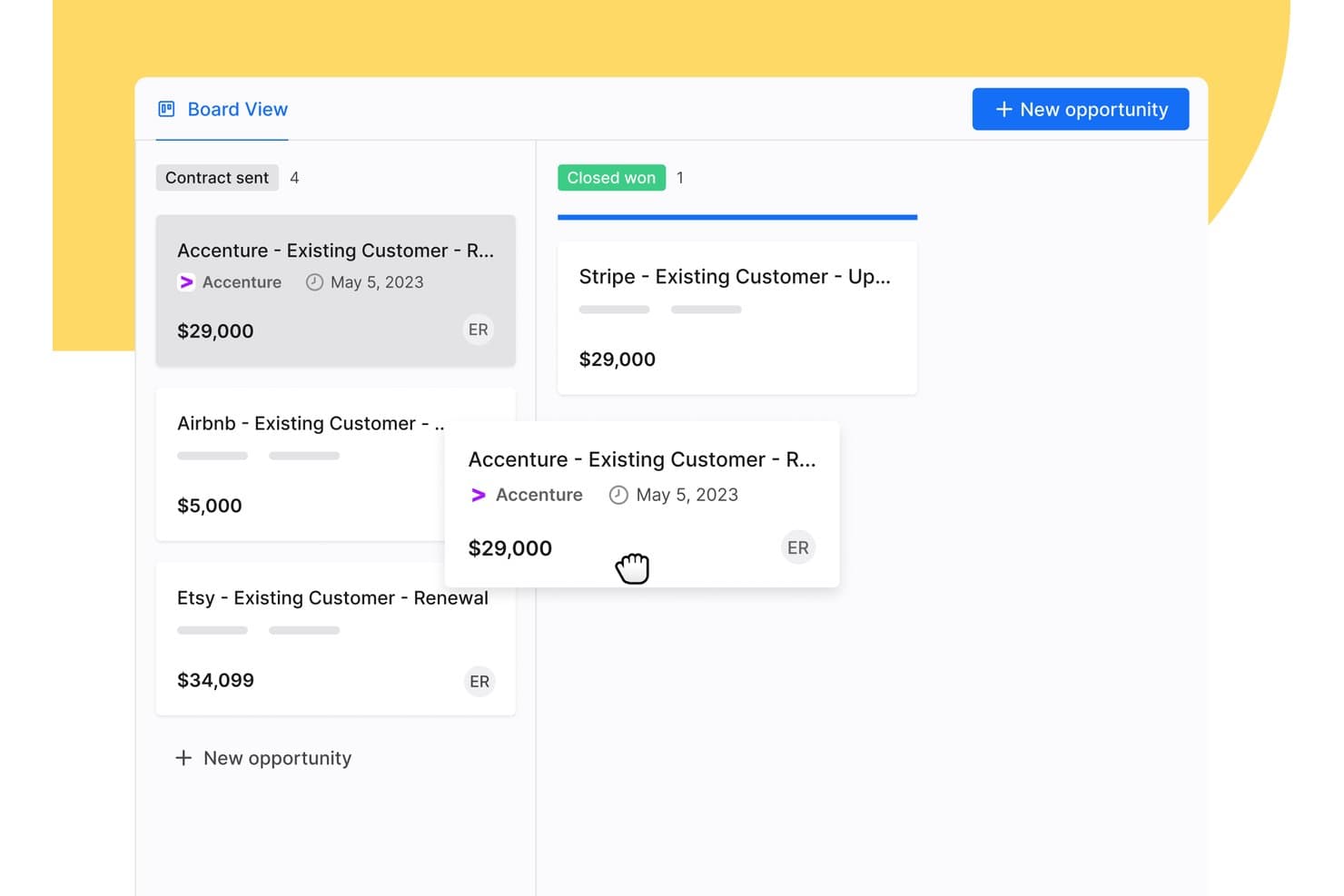
Apollo.io offers a drag-and-drop Board View for managing sales opportunities across pipeline stages like Contract Sent and Closed Won. Apollo.io is a B2B sales intelligence and engagement platform that combines a large contact database, deal pipeline management, multi-channel outreach sequencing, and workflow automation in a single free-to-start workspace.
Who Is Apollo.io Best For?
Apollo.io suits early-stage startup founders and SMB sales teams running outbound-heavy pipelines who need prospecting, sequencing, and basic deal management in one free-to-start tool.
Why I Picked Apollo.io
I picked Apollo.io as one of the best because its multi-channel sequence builder lets my team run coordinated outreach across email, phone, and LinkedIn from a single workflow. I can set trigger-based steps so a missed call automatically queues a follow-up email or LinkedIn touch, keeping deals moving without manual intervention. The AI Sequence Builder also drafts personalized step copy based on contact data, which cuts the time I spend building new outbound plays.
Apollo.io Key Features
- Chrome extension: Prospect on LinkedIn, Gmail, Salesforce, or company websites and add contacts directly to Apollo.
- Lead and account scoring: Score and prioritize leads or accounts using built-in ranking models and custom attributes.
- Deal management: Track opportunities with a pipeline view and customizable deal stages to monitor sales progress.
- Basic CRM enrichment: Enrich contact and company records via CSV uploads or data sync with Salesforce and HubSpot.
Apollo.io Integrations
Apollo.io offers native integrations with Salesforce, HubSpot, Gmail, Outlook, LinkedIn, and Slack. It connects with Zapier and also provides an API for custom integrations.
What's Free?
Apollo.io offers a free-forever plan with access to core features like email sequences, basic filters, and the contact database. The free plan caps your monthly export and email credits and restricts access to advanced analytics, AI features, and certain automation steps, which are reserved for paid tiers.
Pros and Cons
Pros:
- Chrome extension pulls prospect data automatically
- Multi-step email sequences included on free plan
- Built-in contact database with millions of records
Cons:
- Deal pipeline is shallow for complex sales
- Monthly export credits run out quickly
Learn more about Apollo.io: Best for marketing automation tools
- Free plan + free demo available
- From $11.04/user/month (billed annually)
Visit WebsiteCustomer Rating:4.6/5
EngageBay merges sales, marketing, and support in one hub. EngageBay is designed for small and medium-sized businesses, offering tools for marketing automation, CRM, and customer support. It aims to help businesses manage their sales and marketing efforts in one unified platform.
Why I picked EngageBay: EngageBay's free offering includes essential CRM and marketing automation tools, such as email marketing, lead management, and contact segmentation.
Your team can also access basic helpdesk tools and landing page builders. Its all-in-one approach makes it a versatile choice for businesses aiming to simplify their operations.
Standout features and integrations:
Features include a landing page builder that helps create professional pages without coding, a helpdesk that supports customer inquiries, and a form builder for capturing leads. These features ensure your team can manage sales and marketing tasks efficiently.
Integrations include Zapier, Mailchimp, Shopify, HubSpot, Stripe, PayPal, QuickBooks, Xero, Twilio, SendGrid, and more.
What's free? EngageBay offers a free-forever plan with limitations on emails sent, contacts stored, and the number of users, making it ideal for small teams.
Pros and Cons
Pros:
- Form builder for lead capture
- Landing page builder available
- Includes basic helpdesk tools
Cons:
- Learning curve for new users
- Restrictions on email sends
Learn more about EngageBay: Best for small business CRM needs
- Free plan available
- From $45/user/month (billed annually)
Visit WebsiteCustomer Rating:4.4/5
HubSpot offers customizable dashboards for visual lead-generation tracking. HubSpot is one of the best free CRM platforms designed for businesses of all sizes, offering tools for marketing, sales, and customer service. It helps teams manage leads, automate marketing efforts, and support customers efficiently.
Why I picked HubSpot: The tool’s free offering includes essential functionalities like contact management and deal pipelines. What sets HubSpot CRM apart is the extensive range of free marketing tools, such as email marketing and ad management.
Your team can also benefit from live chat and basic reporting features. Its vast array of features makes it a good option for small businesses looking to reinforce their sales efforts.
Standout features and integrations:
Features include customizable dashboards that provide insights into sales performance, email templates that save time on outreach, and task automation that boosts productivity. The ability to track customer interactions in one place ensures your team stays informed and aligned.
Integrations include Gmail, Outlook, Shopify, Zapier, Slack, Meta Ads, LinkedIn, WordPress, Mailchimp, Zoom, Salesforce, and more.
What's free? HubSpot offers a free-forever plan with limitations on advanced features and user seats. Users can access basic CRM tools and certain marketing functionalities without a time limit.
Pros and Cons
Pros:
- Task automation included
- Email tracking available
- User-friendly interface
Cons:
- Restricted reporting capabilities
- Advanced features require upgrades
Learn more about HubSpot:

Streak organizes pipelines and automates tasks inside your Gmail inbox. Streak is a CRM tool within Gmail, ideal for small to medium-sized businesses looking to manage sales directly from their inbox. It helps users track leads, manage customer relationships, and automate workflows without leaving their email.
Why I picked Streak: Streak emphasizes its integration with Gmail, allowing your team to manage sales processes within the familiar email environment. The tool’s free version includes features like pipeline management, email tracking, and task reminders.
Your team can also utilize customizable fields to tailor the CRM to their specific needs. This native integration with Gmail makes it a convenient choice for teams that rely heavily on email communication.
Standout features and integrations:
Features include email tracking that provides insights on when emails are opened, task reminders that keep your team on schedule, and mail merge for sending personalized emails in bulk. These features enhance your team's ability to manage communications.
Integrations include Google Workspace, Mailchimp, Zapier, Slack, Calendly, LinkedIn, and more.
What's free? Streak offers a 14-day free trial with basic CRM functionalities, suitable for personal use or small teams with limited needs.
Pros and Cons
Pros:
- Prioritize follow-ups easily
- Customizable pipeline fields
- Direct Gmail integration
Cons:
- Less competitive than other tools
- Restricted to Gmail users
Learn more about Streak: Best for extensive app integrations
- 30-day free trial
- From $25/user/month
Visit WebsiteCustomer Rating:4.4/5
Salesforce offers customizable sales dashboards with visualizations. Salesforce is a cloud-based customer relationship management platform used by businesses of all sizes across many industries. It supports sales, service, marketing, and ecommerce teams by giving them tools to manage customer interactions, track leads, and automate processes.
Why I picked Salesforce: Salesforce's free trial gives your team access to Sales Cloud, which has features such as contact and account management, lead generation tracking, and mobile access. You can also use customizable dashboards and reports to monitor your pipeline. The built-in AI-powered tools let you set up task reminders and sales workflows.
Standout features and integrations:
Features include lead scoring and assignment rules, territory management, and forecasting tools. You can set up sales processes that match your team’s workflow and use Einstein Activity Capture to sync emails and calendar events. Sales paths guide reps through each stage, so they know what to do next.
Integrations include Slack, Google Workspace, Mailchimp, QuickBooks, Docusign, Dropbox, LinkedIn, and more.
What's free? Salesforce offers a 30-day free trial with access to Sales Cloud features for one user, with no long-term access after the trial expires.
Pros and Cons
Pros:
- Easy to add third-party apps
- Built-in AI sales tools
- Flexible reporting tools
Cons:
- Mobile features are more limited
- Hard to use without training
Learn more about Salesforce : Best for team collaboration tools
- Free plan + 15-day trial + demo available
- From €69/month
Visit WebsiteCustomer Rating:4.2/5
Bitrix24 offers a detailed lead management dashboard with Kanban-style columns. Bitrix24 is an all-in-one sales management platform designed for businesses of all sizes, offering tools for lead management, sales automation, and performance tracking. It helps teams manage the entire sales cycle, from lead generation to customer retention, using a single platform.
Why I picked Bitrix24: Bitrix24's free account provides 35 tools, including lead and deal management, omnichannel communication, and collaboration tools. Your team can use the platform's analytics, mobile CRM capabilities, and task management tools without any cost. Its versatility and variety of features make it a valuable tool for enhancing sales performance.
Standout features and integrations:
Features include task and project management that helps streamline your team's efforts, employee performance tracking that provides insights into team productivity, and website creation features that support marketing initiatives. These features ensure your team can manage sales and marketing effectively.
Integrations include Google Workspace, Microsoft Office 365, Zoho CRM, Mailchimp, QuickBooks, Zoom, Trello, WordPress, Asana, and more.
What's free? Bitrix24 offers a free-forever plan with essential sales management features, making it accessible for businesses of all sizes.
Pros and Cons
Pros:
- Supports the entire sales cycle
- Available in cloud and self-hosted
- Over 35 free tools
Cons:
- Some integrations require additional setup
- Inconsistent customer support
Learn more about Bitrix24:

eWay-CRM’s visual sales pipeline for customizable deal management. eWay-CRM is integrated with Microsoft Outlook, aimed at small to medium-sized businesses. It helps teams manage customer relationships, sales, and marketing campaigns directly from their email client.
Why I picked eWay-CRM: eWay-CRM offers free CRM functionalities that integrate with Outlook, making it highly accessible for teams already using this platform. Features like contact management, sales tracking, and project management are available on the free plan.
Your team can also enjoy task and communication management, and the ability to integrate with Outlook. This is ideal for businesses seeking a CRM that fits naturally into their existing workflow.
Standout features and integrations:
Features include project management tools that help organize tasks and timelines, document management that stores important files in one place, and marketing automation to organize campaigns. These features ensure your team can easily manage their sales and marketing efforts.
Integrations include Microsoft Outlook, Microsoft Office 365, Microsoft Teams, SharePoint, Zapier, QuickBooks, WordPress, LinkedIn, and more.
What's free? eWay-CRM offers a free-forever plan with limitations on storage and some advanced features, making it suitable for small teams.
Pros and Cons
Pros:
- Unlimited users
- Document management capabilities
- Includes project management tools
Cons:
- Performance issues
- Slow loading in Outlook
Learn more about eWay-CRM: Best for SMB sales pipeline management
- Free demo + free plan available
- From $39.99/user/month (billed annually)
Visit WebsiteCustomer Rating:4.5/5
Teamgate supports guided selling with pipeline visibility tools. Teamgate is a sales CRM designed for small to medium-sized businesses, focusing on sales pipeline management and lead tracking. It helps teams manage leads, track sales activities, and improve their sales processes.
Why I picked Teamgate: Teamgate's free offering highlights its customizable sales pipeline management, supporting teams looking to strategically improve their sales processes. Its free version includes features like lead scoring, sales forecasting, and contact management. Its user-friendly interface makes it easy for sales teams to adopt and utilize.
Standout features and integrations:
Features include forecasting tools that help predict future sales, lead scoring to prioritize potential customers, and reporting features that provide insights into sales performance. These features enhance your team's ability to manage sales activities efficiently.
Integrations include Mailchimp, Google Workspace, Slack, Zapier, Xero, QuickBooks, LinkedIn, Microsoft Office 365, Dropbox, Trello, and more.
What's free? Teamgate offers a free plan for up to two users, allowing teams to explore the platform's basic contact and communication tools before committing.
Pros and Cons
Pros:
- Responsive customer support
- Lead scoring for prioritization
- Sales forecasting tools included
Cons:
- Limited integrations
- Initial setup can be complex
Learn more about Teamgate: Best for Microsoft ecosystem users
- Free plan available
- From $14/user/month (billed annually)

Dynamics 365 Sales helps teams manage leads, opportunities, and pipelines within the Microsoft ecosystem. Dynamics 365 Sales is a CRM solution designed for organizations that already rely on Microsoft tools like Office 365, Teams, and Power BI. It supports sales teams that want tighter integration between customer data, collaboration tools, and reporting—without adopting a completely separate platform.
Why I picked Dynamics 365 Sales:
Dynamics 365 Sales stands out for teams embedded in Microsoft’s ecosystem. It connects sales data directly to Outlook, Teams, and Excel, reducing the need to switch between tools. Built on the Power Platform, it offers strong customization options for workflows, dashboards, and automation, making it a flexible choice for growing sales teams that need tailored processes rather than an off-the-shelf CRM.
While setup and configuration still require planning, it’s a solid option if your organization already uses Microsoft products and wants CRM data to live in the same environment.
Standout features and integrations:
Features include lead and opportunity management, customizable dashboards for sales forecasting, and automation through Power Automate to reduce manual tasks. Sales insights can be extended using Power BI for deeper reporting and pipeline visibility.
Integrations include Microsoft Outlook, Teams, Excel, Power BI, SharePoint, OneDrive, LinkedIn Sales Navigator, Azure, and the broader Dynamics 365 suite.
What's Free? Microsoft Dynamics 365 Sales does not offer a free-forever plan. However, you can try Dynamics 365 Sales at no cost with a 30-day free trial, which lets you explore its core CRM features, pipeline tools, and AI-driven insights before committing to a paid license.
Pros and Cons
Pros:
- Strong reporting with Power BI
- Highly customizable via Power Platform
- Deep integration with Microsoft 365 and Teams
Cons:
- No free plan
- Configuration and customization require Power Platform knowledge
Learn more about Microsoft Dynamics 365 Sales:

FreeCRM tracks contacts, sales, and campaigns in one place. FreeCRM is designed for businesses of all sizes, particularly small businesses in industries such as automotive, real estate, and professional services. It offers tools for tracking sales activities, managing customer interactions, and executing marketing campaigns.
Why I picked FreeCRM: FreeCRM's offering includes sales pipeline tracking, allowing your team to manage deals and customer interactions effectively. Key features like contact management and marketing automation are also available.
The platform supports task tracking and targeted marketing campaigns, supporting your team's productivity efforts. Its customizable dashboard provides real-time insights, making it a valuable tool for improving sales performance.
Standout features and integrations:
Features include a customizable dashboard that lets you monitor tasks and events in real time, deal and sales pipeline management tools that keep your team organized, and call-tracking software that helps manage customer interactions.
Integrations include Zapier, WhatsApp, Facebook, Twitter, Google Workspace, QuickBooks, Amazon AWS, and more.
What's free? FreeCRM offers a free-forever plan with essential CRM features, making it accessible for businesses of all sizes.
Pros and Cons
Pros:
- Secure cloud services
- Marketing automation features
- Real-time task monitoring
Cons:
- Limited customization
- Low storage on the free plan
Learn more about FreeCRM:
Outro software de gestão de vendas
Eis algumas opções adicionais de software de gestão de vendas que também disponibilizam planos ou períodos de avaliação gratuitos. Embora estas ferramentas não tenham entrado na minha seleção, vale a pena conhecê-las:
- 11monday AI WorkspaceBest for visual project tracking
- 12CapsuleBest for simple contact management
- 13EspoCRMBest for open-source flexibility
- 14FreshsalesBest for AI-driven free CRM for sales teams
- 15ClickUpBest for customizable workflows
How I Evaluate Free Sales Management Software
When a RevOps team needs to track deals and log activity without a paid license, I split my evaluation into two layers: baseline qualifiers and the differentiators that set options apart.
Core Functionality (Table Stakes For This List)
When I'm selecting tools for my list, I rank each one on a scale from 0 (does not offer the functionality) to 5 (excels in this area) for each core functionality listed below. Then, I calculate the tool's total score into a percentage. Each tool needs to achieve a minimum total score of 65% to be considered for inclusion.
- Pipeline & Deal Stage Management: I look for visual pipelines where reps can drag deals across custom stages, like moving a prospect from "demo scheduled" to "proposal sent" without switching views.
- Contact & Lead Management: A centralized database for leads, contacts, and accounts matters here. I check whether you can tag records, add custom fields, and segment by criteria like deal size or source.
- Free Plan Availability: Each tool must offer a genuinely free, non-expiring plan. I evaluate whether core sales management features remain accessible or get locked behind a paywall after signup.
- Sales Reporting & Dashboards: Dashboards that surface pipeline value, deal velocity, and rep activity give RevOps teams the visibility they need. I look for filtering, exports, and at least basic customization.
- Task & Activity Tracking: Reps need to log calls, schedule follow-ups, and assign tasks with due dates. I check whether activities tie directly to deal and contact records for a clear timeline.
- Sales Workflow Automation: Even basic automations add value, like auto-assigning a task when a deal hits a new stage or sending a notification when a lead goes cold. I evaluate what's available without upgrading.
Once I have a list of tools that meet this criteria, I consider what sets each platform apart.
Differentiating Factors (What Sets Vendors Apart)
Here's how I compare and contrast different vendors:
Standout Features
Email integration and tracking is a big differentiator. I look for two-way sync with Gmail or Outlook so reps can send and track opens directly from deal records, keeping activity data clean for reporting. Built-in communication tools like native calling or live chat reduce the need to bolt on separate apps, which matters on a zero-budget stack. A full-featured mobile app also makes a real difference for reps who update deals and log calls between meetings rather than back at a desk.
Beyond Features
Free plan generosity matters just as much as features. I evaluate how many user seats and contact records come included, because a three-person sales team that hits the record cap within a quarter will face an unplanned upgrade. The integration ecosystem is equally important. I check for native connections to tools like Google Workspace, Mailchimp, or QuickBooks, plus open API or Zapier access for custom workflows. I also consider time-to-value, looking for self-serve onboarding, CSV imports, and pre-built pipeline templates that get a team selling the same week.
Como escolher software gratuito de gestão de vendas
Listas complexas de funcionalidades e estruturas de preços podem dificultar a compreensão do que está realmente a obter com um software gratuito de gestão de vendas. Para o ajudar a manter o foco enquanto avalia as opções de software, eis alguns fatores a ter em conta:
| Fator | O que considerar |
| Âmbito da oferta gratuita | Verifique o que está incluído no plano gratuito. Abrange funcionalidades essenciais, como a gestão de contactos e o acompanhamento de vendas? Certifique-se de que responde às suas necessidades básicas. |
| Escalabilidade | Considere se o software pode crescer com a sua equipa. Irá suportar mais utilizadores ou funcionalidades avançadas à medida que a sua empresa se expande? |
| Integrações | Procure compatibilidade com as ferramentas que já utiliza, como clientes de e-mail ou software de contabilidade. Isto ajudará a simplificar o seu fluxo de trabalho. |
| Facilidade de utilização | Avalie a interface do utilizador. É intuitiva e fácil de utilizar pela sua equipa? Um design simples e acessível poupa tempo e reduz as necessidades de formação. |
| Suporte ao cliente | Verifique a disponibilidade das opções de suporte. O fornecedor disponibiliza suporte por chat, e-mail ou telefone? Um bom suporte pode ajudar a resolver problemas rapidamente. |
| Segurança | Certifique-se de que o software cumpre os regulamentos de proteção de dados. Os dados da sua equipa devem estar seguros e acessíveis apenas a utilizadores autorizados. |
| Personalização | Avalie a possibilidade de adaptar o software aos seus processos. Pode personalizar campos ou painéis de controlo para se ajustarem ao fluxo de trabalho da sua equipa? |
O que é um software gratuito de gestão de vendas?
O software de gestão de vendas foi concebido para ajudar as empresas a gerir os seus processos de vendas, acompanhar as interações com os clientes e organizar potenciais clientes. Normalmente, as ofertas gratuitas incluem versões limitadas destas ferramentas, muitas vezes com menos funcionalidades ou limites de utilizadores. Estas ferramentas são habitualmente utilizadas por profissionais de vendas, proprietários de pequenas empresas e equipas que procuram melhorar a eficiência das suas vendas sem incorrer em custos. Proporcionam valor ao organizar as atividades de vendas, melhorar a gestão das relações com os clientes e aumentar a produtividade. Funcionalidades como a gestão de contactos, o acompanhamento de vendas e a automatização de tarefas ajudam a organizar os fluxos de trabalho, a aumentar a produtividade e a gerir eficazmente as relações com os clientes.
Funcionalidades
Vejamos as funcionalidades habitualmente encontradas no software de gestão de vendas e quais são normalmente incluídas nos planos gratuitos e pagos.
Funcionalidades normalmente gratuitas do software de gestão de vendas
- Gestão de contactos: Ajuda a organizar e armazenar informações de contacto, facilitando o acompanhamento das interações com os clientes e a manutenção das relações.
- Acompanhamento de vendas: Permite aos utilizadores monitorizar o progresso e o desempenho das vendas, ajudando as equipas a manterem-se focadas nos seus objetivos de vendas.
- Automatização de tarefas: Automatiza tarefas repetitivas, libertando tempo para que as equipas de vendas se concentrem em atividades mais importantes.
- Integração de e-mail: Estabelece ligação com plataformas de e-mail para melhorar a comunicação e acompanhar as interações no CRM.
- Gestão de potenciais clientes: Disponibiliza ferramentas para captar, acompanhar e gerir potenciais clientes, apoiando as equipas de vendas na conversão de potenciais clientes em clientes.
- Relatórios básicos: Disponibiliza relatórios simples para fornecer informações sobre as atividades e o desempenho das vendas, apoiando a tomada de decisões.
- Gestão do funil de vendas: Permite visualizar os funis de vendas para ajudar as equipas a gerir e priorizar negócios de forma eficaz.
- Acesso móvel: Permite aos utilizadores aceder ao CRM a partir de dispositivos móveis, garantindo que podem gerir as atividades de vendas em qualquer lugar.
Funcionalidades normalmente pagas do software de gestão de vendas
- Análise avançada: Fornece uma análise aprofundada dos dados de vendas, oferecendo informações valiosas para a tomada de decisões estratégicas.
- Painéis de controlo personalizáveis: Permite aos utilizadores adaptar os painéis de controlo para apresentarem métricas e dados importantes relevantes para as suas necessidades específicas.
- Automatização de marketing: Automatiza tarefas de marketing, como campanhas de e-mail, para melhorar a nutrição de potenciais clientes e o envolvimento dos clientes.
- Ferramentas de apoio ao cliente: Incluem funcionalidades avançadas de apoio, como sistemas de emissão de bilhetes e chat em direto, para melhorar o serviço ao cliente.
- Integração com ferramentas avançadas: Disponibiliza ligações a ferramentas especializadas, como software de contabilidade e plataformas de marketing avançadas.
- Funcionalidades de segurança reforçadas: Fornecem opções de segurança avançadas para proteger dados sensíveis dos clientes e garantir a conformidade com os regulamentos.
- Acesso à API: Permite aos utilizadores integrar o CRM com outras soluções de software e personalizar a sua funcionalidade.
- Ferramentas de colaboração: Facilitam a colaboração entre equipas com funcionalidades como calendários partilhados e partilha de documentos, reforçando o trabalho em equipa.
Vantagens
A implementação de software gratuito de gestão de vendas proporciona várias vantagens para a sua equipa e para a sua empresa. Eis algumas das que pode esperar:
- Poupança de custos: Fornece ferramentas essenciais de gestão de vendas sem custos, ajudando a sua empresa a poupar dinheiro enquanto gere as atividades de vendas.
- Melhor organização: Disponibiliza funcionalidades como a gestão de contactos e o acompanhamento de vendas, que ajudam a sua equipa a manter-se organizada e focada nos objetivos de vendas.
- Aumento da produtividade: Automatiza tarefas repetitivas e integra-se com plataformas de e-mail, libertando tempo para que a sua equipa se concentre no fecho de negócios.
- Acessibilidade: Permite o acesso a partir de dispositivos móveis, possibilitando que a sua equipa gira as atividades de vendas em qualquer lugar e se mantenha ligada.
- Comunicação melhorada: Integra-se com ferramentas de e-mail e comunicação, melhorando a colaboração e as interações com os clientes.
- Escalabilidade: Oferece um ponto de partida para equipas pequenas, com a opção de fazer uma atualização à medida que a sua empresa cresce.
- Informações baseadas em dados: Fornece funcionalidades básicas de elaboração de relatórios que disponibilizam informações sobre o desempenho das vendas, apoiando a tomada de decisões informadas.
Custos e preços
Compreendo que veio a este artigo à procura das melhores opções de software de gestão de vendas disponíveis gratuitamente. No entanto, uma vez que os planos gratuitos oferecem apenas funcionalidades limitadas, é bastante provável que precise de atualizar o seu plano no futuro.
A tabela abaixo resume os planos comuns, os respetivos preços médios e as funcionalidades normalmente incluídas nas soluções de software de gestão de vendas:
Tabela de comparação de planos de software de gestão de vendas
| Tipo de plano | Preço médio | Funcionalidades comuns |
| Plano gratuito | $0 | Gestão básica de contactos, acompanhamento de vendas e relatórios limitados. |
| Plano pessoal | $5-$25/utilizador/mês | Gestão melhorada de contactos, integração de e-mail e automatização básica. |
| Plano empresarial | $30-$60/utilizador/mês | Relatórios avançados, automatização de marketing e suporte para vários utilizadores. |
| Plano empresarial de grande escala | $70-$150/utilizador/mês | Painéis personalizáveis, funcionalidades de segurança avançadas e suporte dedicado ao cliente. |
Perguntas frequentes sobre software gratuito de gestão de vendas
Eis algumas respostas a perguntas comuns sobre software gratuito de gestão de vendas:
O software gratuito de gestão de vendas pode acompanhar o crescimento da minha empresa?
O software gratuito de gestão de vendas pode ser um excelente ponto de partida, mas poderá ter limitações à medida que a sua empresa cresce. Verifique se o software oferece opções escaláveis ou planos pagos com funcionalidades mais avançadas. Desta forma, poderá fazer uma atualização quando a sua equipa precisar de mais funcionalidades, sem ter de mudar de sistema.
Quais são as limitações comuns do software gratuito de gestão de vendas?
As versões gratuitas apresentam frequentemente limitações, como um limite ao número de utilizadores, armazenamento limitado e funcionalidades restritas. Estes planos incluem normalmente funcionalidades básicas, que podem ser suficientes para pequenas equipas ou empresas em fase de arranque. Consulte os detalhes do plano gratuito para compreender o que está incluído e conhecer eventuais limitações.
Quão seguros estão os meus dados com um software gratuito de gestão de vendas?
A segurança dos dados é essencial, mesmo quando se utiliza software gratuito. Certifique-se de que o fornecedor cumpre os regulamentos de proteção de dados e oferece funcionalidades como encriptação e cópias de segurança regulares. É importante verificar se os seus dados permanecem seguros e acessíveis apenas a utilizadores autorizados.
As soluções de software gratuito de gestão de vendas oferecem apoio ao cliente?
O apoio ao cliente nos planos gratuitos pode variar. Alguns fornecedores oferecem apoio básico, como perguntas frequentes e fóruns da comunidade, enquanto outros poderão incluir apoio por e-mail ou chat. Verifique as opções de apoio disponíveis no plano gratuito para garantir que a sua equipa consegue obter ajuda quando necessário.
Existem custos ocultos associados ao software gratuito de gestão de vendas?
Embora o software em si possa ser gratuito, poderão existir custos ocultos, como cobranças por funcionalidades adicionais, integrações ou mais espaço de armazenamento. Consulte cuidadosamente os detalhes de preços do fornecedor para compreender quaisquer custos potenciais associados à utilização da versão gratuita.