What's the biggest barrier sales teams face to growing revenue? One serious contender for that title is busywork.
It might seem harmless, but over time, tiny repetitive tasks suck the life out of your sales team and distract them from the main way they make an impact—actually selling.
A study by Gangly found that revenue teams spend 72% of their week on tasks other than selling, such as data entry, updating pipelines, writing meeting notes, creating reports, researching leads, and sending follow-up emails.
In a 40-hour workweek, that's only 11 hours actually selling and 29 hours not directly contributing to revenue. On a team of 10 people, that's equivalent to seven of them not actually selling to potential customers.
Your CRM should help you generate more revenue by eliminating this busywork. However, most don't actually do this. Instead, they give your team more tasks because things aren't automated, and they steal more time because the features aren't easy to use.
The cost isn't just lost time. It's longer sales cycles, deals slipping through the cracks, and a burnt-out team.
At Nutshell, we do things differently. Every feature we build is designed with ease of use and time savings in mind. We aim to eliminate as much of the busywork for your team as possible so they can focus on doing what they do best—actually selling and generating revenue.
The result is that teams close deals 14.9% faster while winning 13.4% more leads and growing new sales revenue by 26.4%. That's what we found when we analyzed real Nutshell customer data across more than a decade, comparing teams' activity in their second year with Nutshell to their first.
Below, we'll go over seven concrete examples of how you can use Nutshell to save your sales reps 10+ hours per week, freeing them up to drive real business growth.
Curious how Nutshell can help your team save time and close more deals? {{deeplink:151956:[Try it for free today.]}}
7 ways Nutshell helps revenue teams reclaim 10+ hours weekly per rep
1. AI timeline and call summarization turn hours of note-taking into seconds
Time saved: 3–5 hours/week
CRMs store valuable information about your interactions with customers, but often it isn't easily accessible.
That means before every call, sales reps need to go digging through past interactions to have the context they need for a productive conversation.
After a call, they then need to spend time typing up notes, assigning action items, and updating contact records.
Using a manual process, sorting through notes to prepare for a call might take five minutes, and typing up notes afterward might take another 10. At 15 calls per week, that's nearly four hours per sales rep.
With Nutshell's AI features, this all happens automatically.
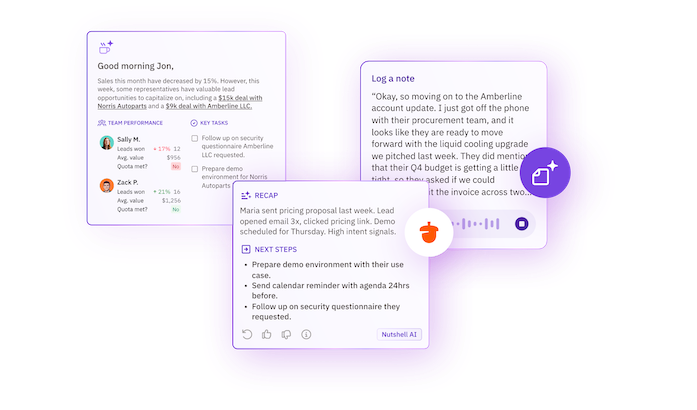
Before a call, reps can click a button to summarize a contact's timeline. Nutshell will then sort through notes, emails, activities, and more to provide an easy-to-read summary of the relationship, complete with need-to-know context for the call.
After each call, Nutshell's AI-powered meeting and call summarization feature adds a summary of the call with key takeaways and action items to the contact's timeline. This feature works with popular tools like Zoom, Google Meet, click-to-call, and more.
2. AI lead research reduces manual research time
Time saved: 2–3 hours per week
Another important but time-consuming task that falls to sales reps is researching leads before reaching out.
Typically, this requires spending at least 15 minutes scanning LinkedIn, company websites, recent news, and various other online sources. Reps need this information to get to know someone and why they're a good lead, but they don't need to find it manually.
Nutshell features an AI-powered lead research agent that collects this information for you. It provides you with a briefing that includes company overviews, talking points, personalized outreach ideas, and even an automatically generated lead score. You can then optionally save the briefing to the lead's timeline.
Now, instead of spending time manually sorting through multiple browser tabs, lead research runs in the background. This enables reps to start conversations confidently while spending their time on actually building the relationship.
3. Automated lead capture eliminates manual data entry
Time saved: 2–3 hours per week
Manual data entry is one of the biggest time thieves for sales teams. Whenever someone fills out a form or calls in, a salesperson needs to copy over their information to the CRM and create a new lead record.
Not only does this take time from sales reps, but it also means there's a delay in your outreach to new leads, which can hurt your conversion rate.
One of the ways Nutshell solves this is by enabling teams to automatically capture leads using web forms. You can easily build custom forms right in Nutshell without touching a line of code. We also make it easy to link your existing forms to Nutshell with our connected forms tool.
Whichever method you choose, whenever someone fills out a form, their information is automatically added to your CRM. You can customize how information populates, choose pipelines to add new leads to, and get notified when someone completes a form so your team can engage with new leads right away.
4. Smart pipeline automation keeps deals moving without manual updates
Time saved: 2–3 hours per week
Keeping pipelines up to date can become like a second job for salespeople. There are stages to update, reminders to set, and tasks to create. The list goes on.
At Nutshell, we believe that pipelines should eliminate manual work for sales reps, not add to it. That's why we focus on easy-to-use pipeline automation.
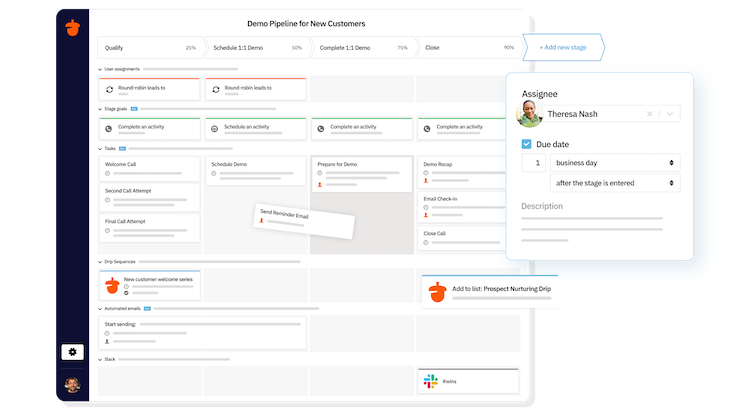
Creating custom pipelines in Nutshell is easy. You can even use our sales pipeline designer AI agent to help you create effective pipelines.
When reps are working a lead, the pipeline automates work for them. For example, when a lead hits a preset goal, it automatically advances to the next stage. This might automatically create tasks for the sales rep so they know exactly what to do next, or trigger another automation, such as an email sequence.
This automated process eliminates manual work on multiple fronts. Salespeople no longer have to manually move leads through pipelines and figure out what their next task is. Sales team leaders no longer have to chase down reps to get them to update their leads in the pipeline. That's hours saved every week.
5. Personal email sequences run on autopilot
Time saved: 1–2 hours per week
Follow-up is where deals are won or lost. Manual follow-up, however, doesn't scale.
It takes an average of eight touch points to make a B2B sale. If you need to manually type up and send follow-ups for each of those touch points, that's a huge time commitment. Plus, if you have to remember all those follow-ups yourself, chances are something's going to slip through the cracks.
Robotic, generic follow-ups aren't ideal either, as they're less likely to convert.
Nutshell solves this with personal email sequences—a series of emails that send automatically but still have a personal feel. You can create a sequence that sends automatically based on the pipeline stage or the actions a lead takes. Sequences can also contain automatic personalization based on CRM fields, or sales reps can manually add personalization for an extra personal touch.
When a lead responds to an automated email, the sequence stops sending, allowing the sales rep to take over and do what they do best. They can write up a personal response and even use Nutshell's AI-generated email replies to help draft their response.
With personal email sequences, sales teams no longer need to spend hours writing and manually sending follow-ups, and they only have to get involved when the prospect actually engages. This saves hours and helps your team focus on the best opportunities.
6. One-click reporting replaces hours of spreadsheet work
Time saved: 2–4 hours per week
One of the biggest time-saving opportunities for sales leaders is reporting. Manually creating reports requires exporting data from the CRM, adding it to a spreadsheet, and creating charts. This can take hours. Often, sales leaders need to produce reports monthly or even weekly. And in the fast-moving world of sales, reports can quickly become outdated.
Nutshell solves this with built-in reports that are continually updated. In addition to the pre-built reports, which include funnel, forecast, and activity reports, you can easily build your own custom reports.
The real game-changer is the AI report generator. All you need to do is describe the report you want in plain English, and Nutshell will build it for you. For example, type in "Show me closed-won deals by source from Q1," and you'll get a ready-to-share report showing exactly that.

7. Lead assignment automation distributes leads instantly
Time saved: 1–2 hours per week for managers
Another task that can take sales managers away from more impactful work is lead assignment. If taking care of this manually, it requires looking through the lead's information, checking which sales team members have availability, and sending notifications.
It's not complicated, but time spent on it adds up, especially as your lead volume grows. Even more damaging is the delay it causes in reaching out to new leads.
With Nutshell, lead assignment happens automatically, saving sales leaders time and enabling teams to reach out to leads more quickly.
That doesn't mean you lose control either. You can set custom rules to assign leads based on territory, source, product, or any other field. And you can opt for round-robin assignment to ensure fair distribution. Setting up exception rules for cases where you want specialists to handle specific types of leads is just as easily done.
Automating this lead assignment process saves time for sales leaders. It can also impact your win rate since studies show that responding to a new lead within five minutes increases the qualification rate by 21 times compared to reaching out after 20 minutes.
Want to try these features for yourself? {{deeplink:151956:[Start your free trial of Nutshell today.]}}
The cumulative effect: From hours saved to revenue gained
Let's add it up. These are estimates, but it's still a realistic look at what automation can save your sales team:
- AI timeline and call summarization: 3–5 hours per week
- AI lead research: 2–3 hours per week
- Automated lead capture: 2–3 hours per week
- Pipeline automation: 2–3 hours per week
- Email sequences: 1–2 hours per week
- One-click reporting: 2–4 hours per week
- Lead routing automation: 1–2 hours per week
In total, that's 13–22 hours saved per sales rep per week.
That's not a negligible difference. That's the difference between sales reps spending 28% of their time actually selling and 50%. It's the difference between managing 15 active deals and managing 25.
The biggest impact, though, is what those time savings turn into. Not spending those hours on admin work means teams can spend more time on activities that directly contribute to revenue, like demos, calls, strategic planning, and other things that build relationships and move deals forward.
As we saw when we {{deeplink:151956:[compared Nutshell customers' activity]:customers}} in their first year with Nutshell and their second year, this translates to faster close times and increased new sales revenue. It's a major reason businesses see $3.10 in return for every dollar invested in CRM.
That's the power of automation and giving teams back time for what matters most.
How to get started
If you're reading this and wondering how to get started, here's a practical path forward.
First, get your team into the right tool—one that saves them time with easy-to-use features instead of draining it with manual admin tasks.
Once you're in the tool, you don't need to automate everything at once. Instead, start with what will save you the most time. For many teams, that's lead capture or pipeline automation, but it varies. Once you have that first automation set up, move on to the next most impactful thing and watch your processes become more automated and efficient as you go.
At Nutshell, we make this easy with pre-built pipeline templates, simple form-building tools, onboarding support, and integration with the tools your team uses, like Google Workspace, Office 365, Zoom, QuickBooks, and much more.
Nutshell is designed to make automating your processes easy with user-friendly features and an intuitive feel. You don't need months to get set up. You can start seeing improvements from day one.
Revenue teams don't have time to waste
Revenue teams have enough to do. They don't need a CRM that requires them to spend hours on admin work. They need a tool that does the repetitive stuff for them so they can focus on building relationships and closing deals.
If your team is still manually updating pipeline stages, building reports, and sending email follow-ups, they're spending time on things that could be automated or at least made much more efficient.
At Nutshell, we design every feature to save time, not create more work. Through ease of use and automation, your team can spend less time in their CRM and more time in conversations that move deals forward and generate revenue.
Want to try it for yourself? {{deeplink:151956:[Start your free trial of Nutshell today.]}}