

En B2B-kontaktdatabase er en programvareplattform som gir tilgang til verifiserte forretningskontakter og selskapsinformasjon for salgs-, markedsførings- og inntektsdriftsteam. Hvis du leter etter den beste B2B-kontaktdatabasen, ønsker du sannsynligvis å forbedre kvaliteten på potensielle kunder, berike CRM-systemet ditt og støtte strategien din for markedsintroduksjon med nøyaktige og oppdaterte data. Denne listen hjelper deg med å sammenligne de beste verktøyene for 2026, forstå hva som skiller dem fra hverandre og velge den riktige løsningen for å støtte teamets mål for prospektering, oppsøkende arbeid og inntekter.
Hvorfor du kan stole på våre programvareanbefalinger
6,700+
Reviews
20
Industry experts
16+
Evaluation factors
14
Years
Anmeldelsene våre bygger på vår uavhengige vurdering, ikke på salgsargumenter. Les hvordan vi sørger for åpenhet.
I denne guiden har vi vurdert verktøyene gjennom praktisk testing og uavhengig research og gitt dem poeng ut fra våre utvelgelseskriterier.
Anmeldelsene våre bygger på vår egen redaksjonelle vurdering. De er ikke et salgsargument.
Sammenligningstabell for B2B-kontaktdatabaser
Denne sammenligningstabellen oppsummerer prisopplysningene for mine beste utvalgte B2B-kontaktdatabaser:
| Tool | Best For | Trial Info | Price | ||
|---|---|---|---|---|---|
| 1 | Best for real-time email verification | 7-day free trial + free demo available | From $74/month (billed annually) | Website | |
| 2 | Best for GDPR-compliant data sourcing | Free demo available | Pricing upon request | Website | |
| 3 | Best for advanced company insights | Free trial available | Pricing upon request | Website | |
| 4 | Best for multi-channel contact discovery | Free plan available | From $27/month (billed annually) | Website | |
| 5 | Best for human-verified contact accuracy | Free trial available | Pricing upon request | Website | |
| 6 | Best for quick contact enrichment | Free plan available | From $37.45/month (billed annually) | Website | |
| 7 | Best with integrated sales engagement | 14-day free trial + free plan available | From $49/user/month (billed annually) | Website | |
| 8 | Best for real-time contact search at scale | Free plan available | Pricing upon request | Website | |
| 9 | Best with LinkedIn prospecting tools | Free plan available | From $15/month | Website | |
| 10 | Best for browser-based lead capture | Free plan + free demo available | From $65/user/month | Website |


Anmeldelser av de beste verktøyene for B2B-kontaktdatabaser
Nedenfor finner du mine detaljerte sammendrag av de beste verktøyene for B2B-kontaktdatabaser som kom med på kortlisten min. Anmeldelsene mine gir et detaljert innblikk i funksjonene, de beste bruksområdene og integrasjonene til hver plattform, slik at du kan finne den beste løsningen for teamet ditt.
 Best for real-time email verification
- 7-day free trial + free demo available
- From $74/month (billed annually)
Visit WebsiteCustomer Rating:4.7/5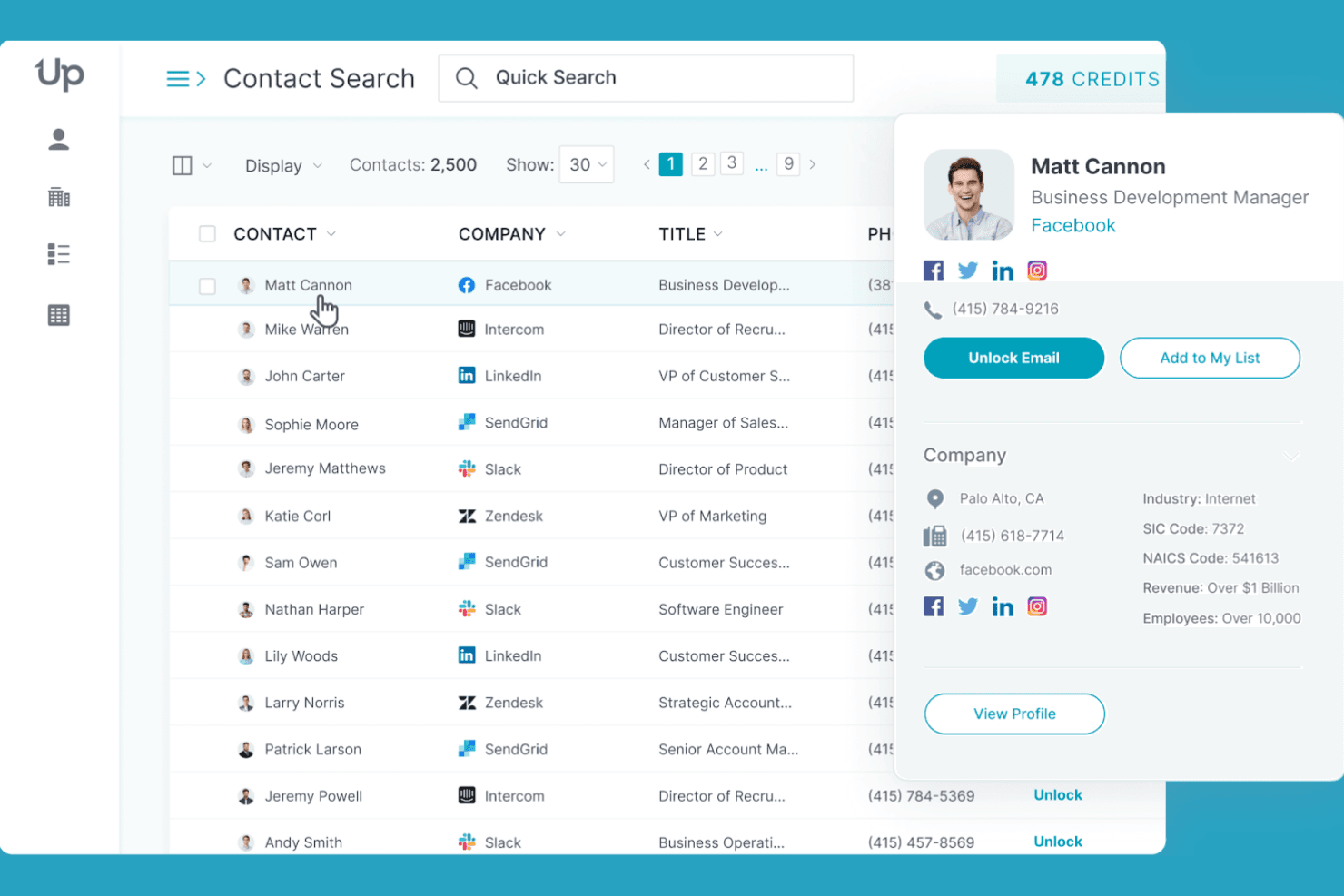
UpLead lets users search and preview detailed contact profiles at scale. UpLead is a B2B contact database platform that gives you access to 200M+ verified contacts with real-time email verification, firmographic and technographic filtering, CRM enrichment, and a multi-endpoint API for prospecting and data append workflows.
Who Is UpLead Best For?
UpLead is a strong fit for sales and RevOps teams that prioritize email deliverability and need verified contact data before pushing records into their outreach sequences or CRM.
Why I Picked UpLead
I picked UpLead as one of the best because its real-time email verification sets it apart from nearly every other B2B contact database I've evaluated. Unlike tools that verify emails at ingestion and call it done, UpLead re-verifies at the moment of export, which is what actually keeps bounce rates in check. I've seen teams cut bounce rates from 25% down to 3–5% after making the switch. The "Friendly Credits" refund policy backs that up: if a contact bounces, you get the credit back.
UpLead Key Features
- Technographic filtering: Search and filter prospects by the specific technologies they use, drawing from a library of 16,000+ tracked tools and platforms.
- Suppression list uploads: Upload existing contact lists to exclude records you already own, so you're only pulling net-new prospects.
- Chrome extension: Surface verified contact data and technographics directly on LinkedIn profiles and company websites while you browse.
- Multi-endpoint enrichment API: Append contact and company data at scale via dedicated API endpoints for person, company, and combined lookups.
UpLead Integrations
UpLead offers 15 native integrations, including Salesforce, HubSpot, Zoho CRM, Pipedrive, Microsoft Dynamics 365, Outreach, Salesloft, Reply.io, Lemlist, and Close. It also supports custom workflows through its API and Zapier.
Pros and Cons
Pros:
- Refunds credits for invalid or bounced emails
- Technographic filters enable targeted prospect lists
- Real-time email verification reduces bounce rates
Cons:
- Limited data for international small businesses
- Phone number accuracy not guaranteed
Learn more about UpLead: Best for GDPR-compliant data sourcing
- Free demo available
- Pricing upon request
Visit WebsiteCustomer Rating:4.6/5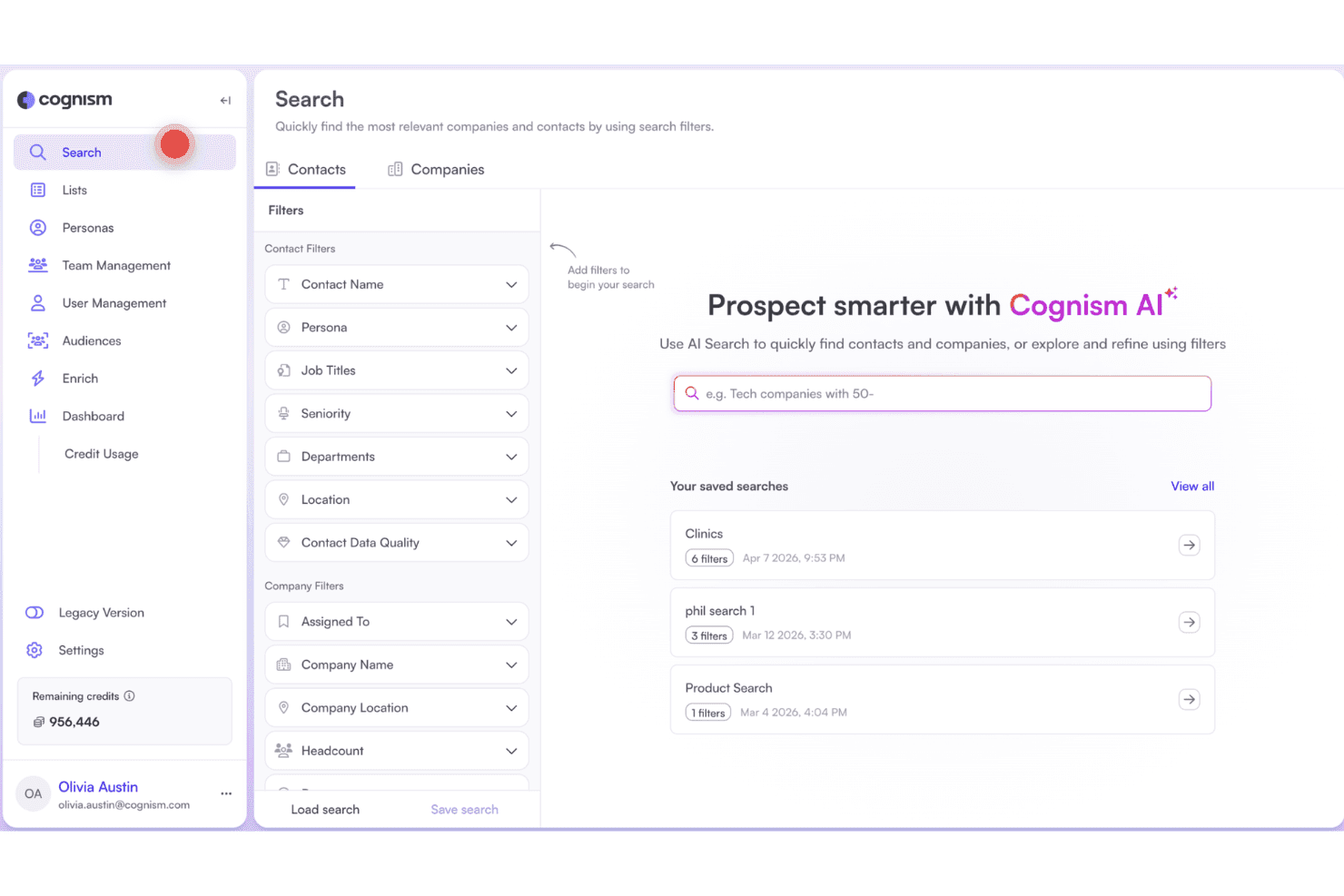
Cognism lets users search and filter contacts using AI-powered prospecting. Cognism is a B2B contact database and sales intelligence platform that combines a global contact and company database with phone-verified mobile data, firmographic and technographic filters, buyer intent signals, and AI-assisted prospecting tools.
Who Is Cognism Best For?
Cognism is a strong fit for GTM teams running outbound into European markets who need phone-verified contact data that holds up under GDPR scrutiny.
Why I Picked Cognism
Cognism earns its spot on my shortlist because no other B2B contact database takes GDPR compliance as seriously at the data level. I'm particularly impressed by Diamond Data, where Cognism's team manually calls mobile numbers to verify they reach the right person, then re-verifies every 18 months. On top of that, every phone number is screened against 16 global DNC registries, including country-specific lists across the UK, France, Germany, and Australia, so outreach into European markets stays clean by default.
Cognism Key Features
- Diamond Data® mobile database: A curated set of 10M+ phone-verified mobile numbers, each manually confirmed to reach the right contact and re-verified every 18 months.
- Bombora intent data integration: Filters accounts by in-market behavior across up to 12 topics using Bombora's Company Surge® signals, available on the Pro plan.
- Smart Personas: An AI feature that generates structured buyer personas—including recommended titles, seniority, department, and region—directly inside the search interface and Chrome Extension.
- Data-as-a-Service (DaaS): API and bulk flat-file delivery of Cognism data to S3 buckets or custom destinations, designed for RevOps enrichment pipelines, predictive scoring models, and TAM analysis.
Cognism Integrations
Cognism offers seven native integrations, including Salesforce, HubSpot, Pipedrive, Microsoft Dynamics, Bullhorn, Outreach, and Salesloft. It also supports API-based custom integrations and Zapier.
Pros and Cons
Pros:
- Strongest European market data depth
- Manually phone-verified contacts for higher accuracy
- Highest GDPR compliance coverage for B2B data
Cons:
- Annual contracts require advanced cancellation notice
- US data quality lags behind competitors
Learn more about Cognism: Best for advanced company insights
- Free trial available
- Pricing upon request
Visit WebsiteCustomer Rating:4.4/5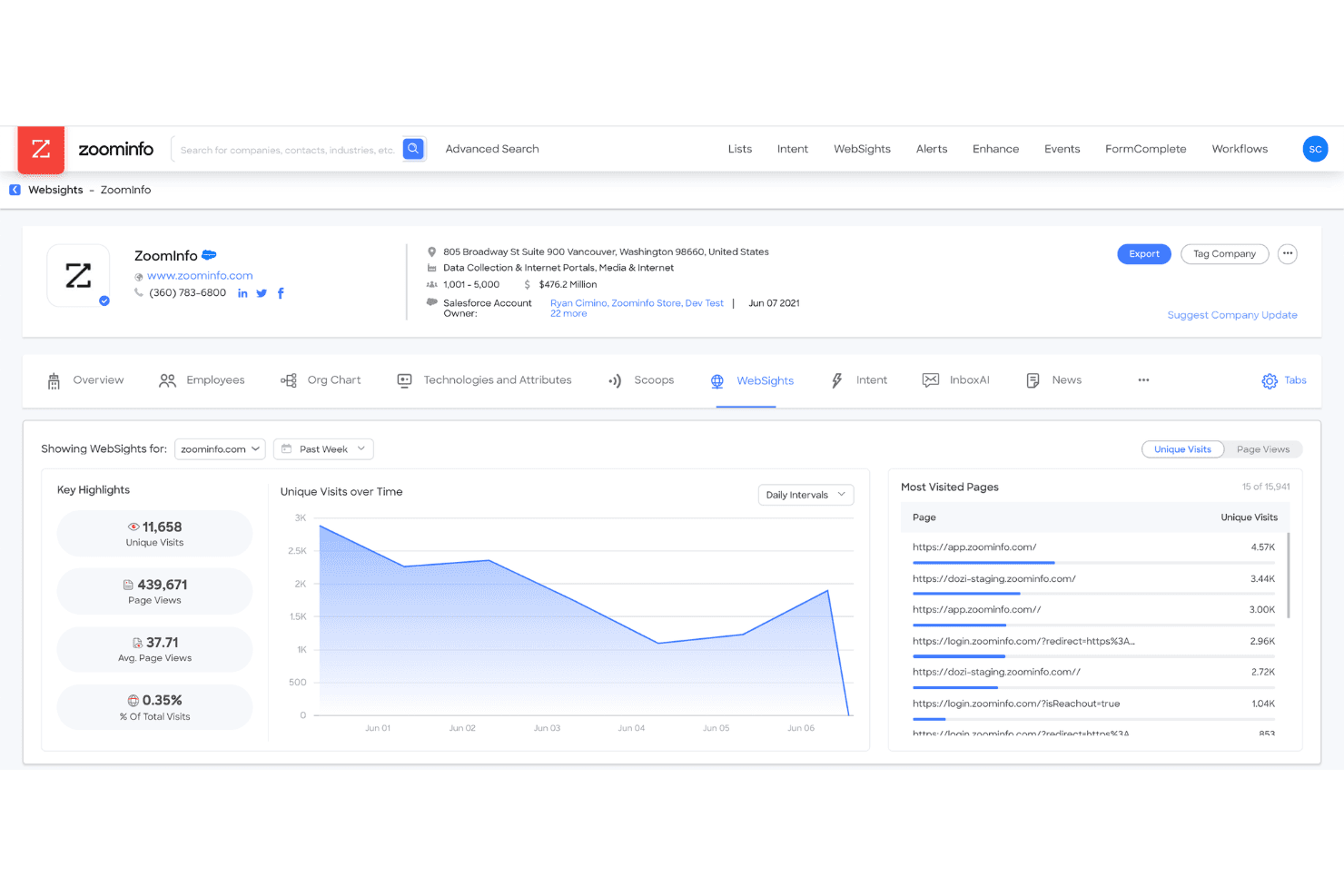
ZoomInfo tracks website visitor behavior with WebSights analytics. ZoomInfo is a B2B contact database platform that combines a 500M+ contact database with firmographic and technographic data, buyer intent signals, org charts, and CRM enrichment to support prospecting, territory planning, and pipeline workflows.
Who Is ZoomInfo Best For?
ZoomInfo is a strong fit for mid-market and enterprise revenue teams that need deep company intelligence—org charts, intent signals, and technographics—to prioritize accounts and orchestrate multi-threaded outreach.
Why I Picked ZoomInfo
ZoomInfo earns its spot on my shortlist because the depth of company intelligence it surfaces goes well beyond standard firmographics. I'm particularly impressed by its GTM Context Graph, which layers org charts, buyer intent signals, and technographic data into a single account view—so my team can identify not just who to target but when they're actively researching. Person-Level Intent takes that further by pinpointing specific stakeholders within an in-market account, not just the company.
ZoomInfo Key Features
- 500M+ contact database: Access verified records for over 500 million global B2B professionals, filterable by 300+ attributes including job title, seniority, industry, and tech stack.
- CRM enrichment automation: Automatically refresh Salesforce, HubSpot, and Dynamics 365 records on creation or a scheduled cadence using native bi-directional connectors.
- WebSights visitor identification: De-anonymize website traffic by mapping IP addresses to company and contact records, surfacing inbound interest as actionable leads.
- Compliance API: Manage privacy workflows and opt-out requests programmatically to support GDPR and CCPA obligations across your contact database.
ZoomInfo Integrations
ZoomInfo offers 70+ native integrations, including Salesforce, HubSpot, Microsoft Dynamics 365, Outreach, Salesloft, Marketo Engage, Slack, and Microsoft Teams. It also supports custom integrations through Standard, Scaling, WebSights, and Compliance APIs, plus Zapier.
Pros and Cons
Pros:
- Continuous CRM record enrichment automation
- Person-level buyer intent surfacing
- Largest global contact database available
Cons:
- Data accuracy weaker outside North America
- Pricing is opaque and contract-heavy
Learn more about ZoomInfo: Best for multi-channel contact discovery
- Free plan available
- From $27/month (billed annually)
Visit WebsiteCustomer Rating:4.3/5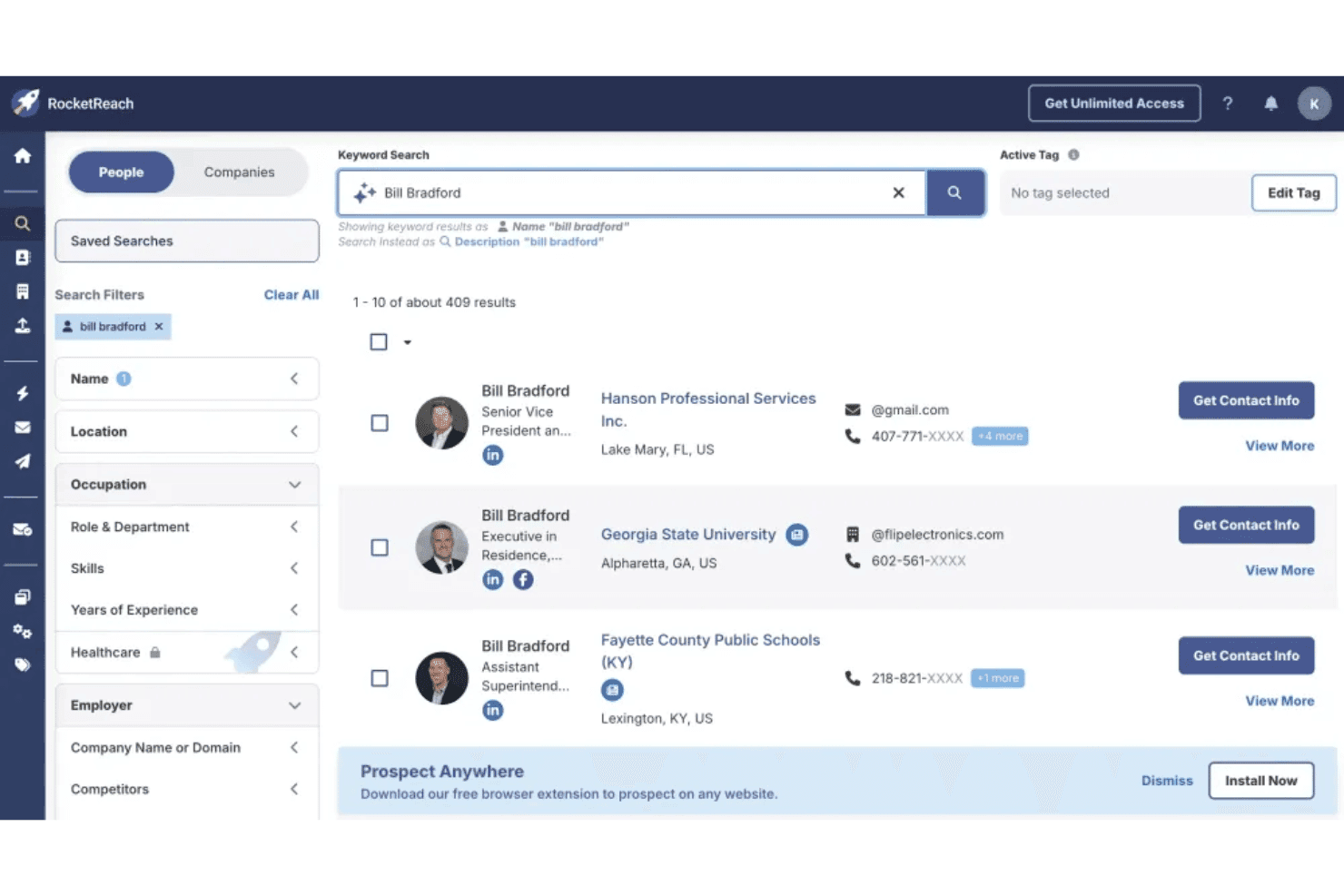
RocketReach lets users search and filter contacts by name, role, and employer. RocketReach is a B2B contact database platform with a 700M+ profile database, offering verified email and phone lookup, advanced search filtering, intent data, and built-in outreach automation.
Who Is RocketReach Best For?
RocketReach is a strong fit for outbound sales and RevOps teams that need broad global contact coverage across email, phone, and intent signals in one platform.
Why I Picked RocketReach
RocketReach earns its spot on my shortlist because no other tool in this category matches its breadth across email, phone, and intent signals in a single platform. I love that the 700M+ profile database pairs directly with 35,000+ intent topics via Intentsify, so I can filter for accounts already showing buying behavior rather than just blasting a cold list. The Autopilot feature takes it further by letting me automate the entire search-to-outreach sequence, including multi-step email follow-ups, without leaving the platform.
RocketReach Key Features
- Advanced search filtering: Search across 700M+ profiles using filters for seniority, department, technographics, skills, and recently switched roles, with Boolean logic and exact/not-match modifiers.
- Saved dynamic searches: Build searches that auto-refresh as new matching profiles are added to the database, keeping your prospect lists current without manual updates.
- Chrome browser extension: Look up verified emails and phone numbers directly while browsing LinkedIn, Crunchbase, or AngelList without switching between tabs.
- REST API with bulk enrichment: Access 4.5 billion records via structured API endpoints for people, companies, email finder, and firmographics to power CRM enrichment workflows at scale.
RocketReach Integrations
RocketReach offers native integrations with Salesforce, HubSpot, Outreach, Salesloft, and Bullhorn. It also supports custom integrations through its REST API and Zapier.
Pros and Cons
Pros:
- Built-in prospecting and outreach automation
- High deliverability rates for verified emails
- Massive global database with niche verticals
Cons:
- Intent data reserved for highest tier plans
- Billing and cancellation complaints are common
Learn more about RocketReach: Best for human-verified contact accuracy
- Free trial available
- Pricing upon request
Visit WebsiteCustomer Rating:4.3/5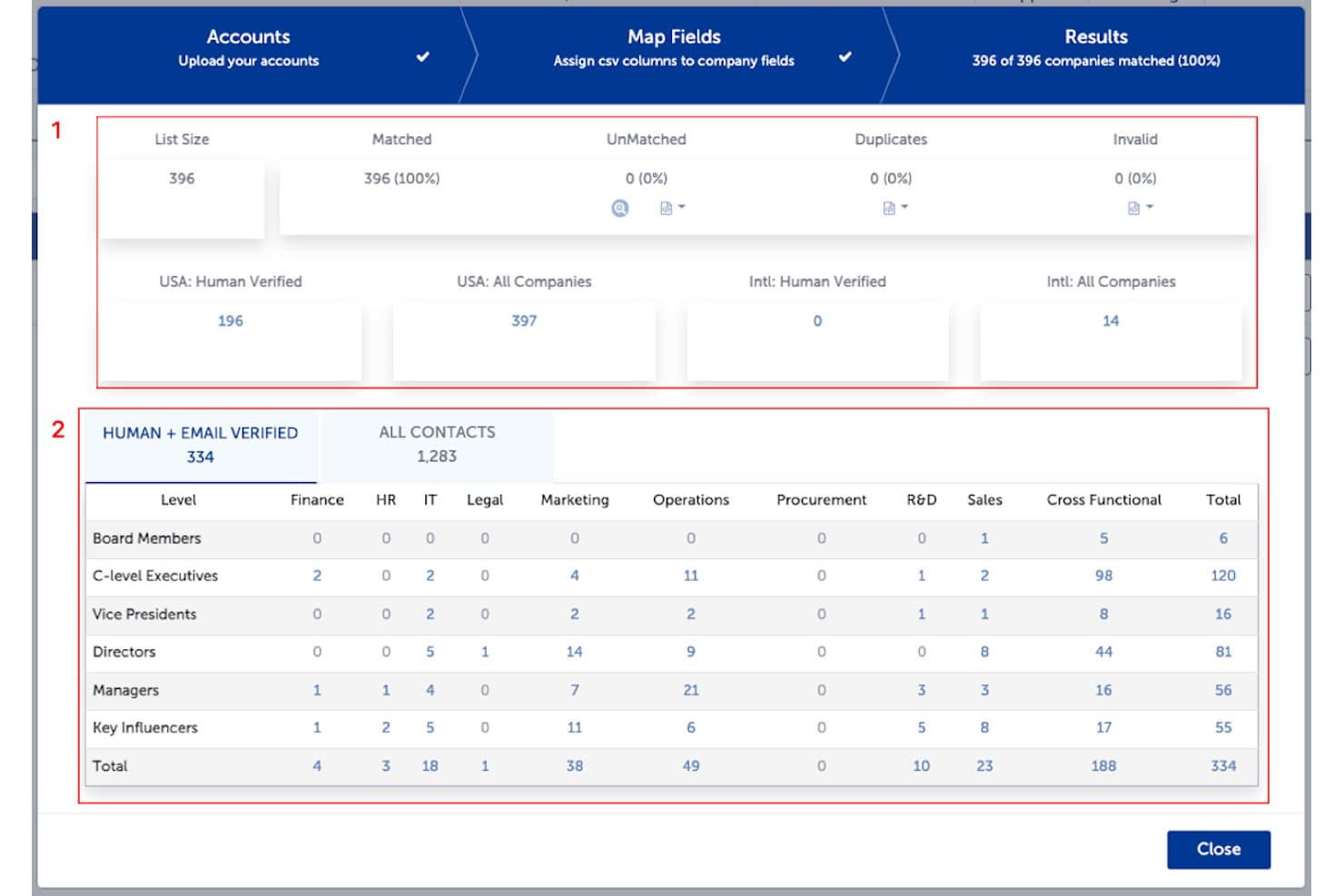
SalesIntel matches uploaded accounts and segments verified contacts by role. SalesIntel is a B2B contact database platform that combines human-verified contact data, firmographic and technographic intelligence, buyer intent signals, and CRM enrichment into a single prospecting and account research tool.
Who Is SalesIntel Best For?
SalesIntel is a strong fit for revenue teams that prioritize data accuracy over database size and need verified contact records they can trust before reaching out.
Why I Picked SalesIntel
SalesIntel earns its spot on my shortlist because no other platform in this category backs its contact data with 2,000+ human researchers re-verifying every record on a 90-day cycle. I love that if a contact isn't already in the database, Research on Demand lets me submit a request and get verified results back within 24 hours. The 54M+ verified mobile numbers also stand out, with documented phone connection rates that outpace larger competitors by a wide margin.
SalesIntel Key Features
- Buying committee mapping: Identifies and maps economic buyers, technical evaluators, champions, and influencers within target accounts to support multi-stakeholder outreach.
- GTMCanvas workflow builder: A no-code drag-and-drop tool for building automated GTM plays triggered by signal categories, with AI-generated role-aware messaging for each stakeholder.
- VisitorIntel: De-anonymizes anonymous website traffic at the company and contact level, surfacing which accounts are actively researching your product.
- ICPIntel scoring: Analyzes 100,000+ data points per account to generate ICP Fit Scores, helping you filter and prioritize accounts that match your ideal customer profile.
SalesIntel Integrations
SalesIntel advertises 50+ integrations, including native connections with Salesforce, HubSpot, Microsoft Dynamics, Zoho CRM, Marketo, Outreach, and Salesloft. Its RESTful API, webhooks, and CSV exports support custom data workflows.
Pros and Cons
Pros:
- Fast research-on-demand for missing contacts
- Unlimited data exports on all plans
- Human-verified contacts with 95% claimed accuracy
Cons:
- Advanced features require paid add-ons
- Data for niche industries sometimes outdated
Learn more about SalesIntel: Best for quick contact enrichment
- Free plan available
- From $37.45/month (billed annually)
Visit WebsiteCustomer Rating:4.2/5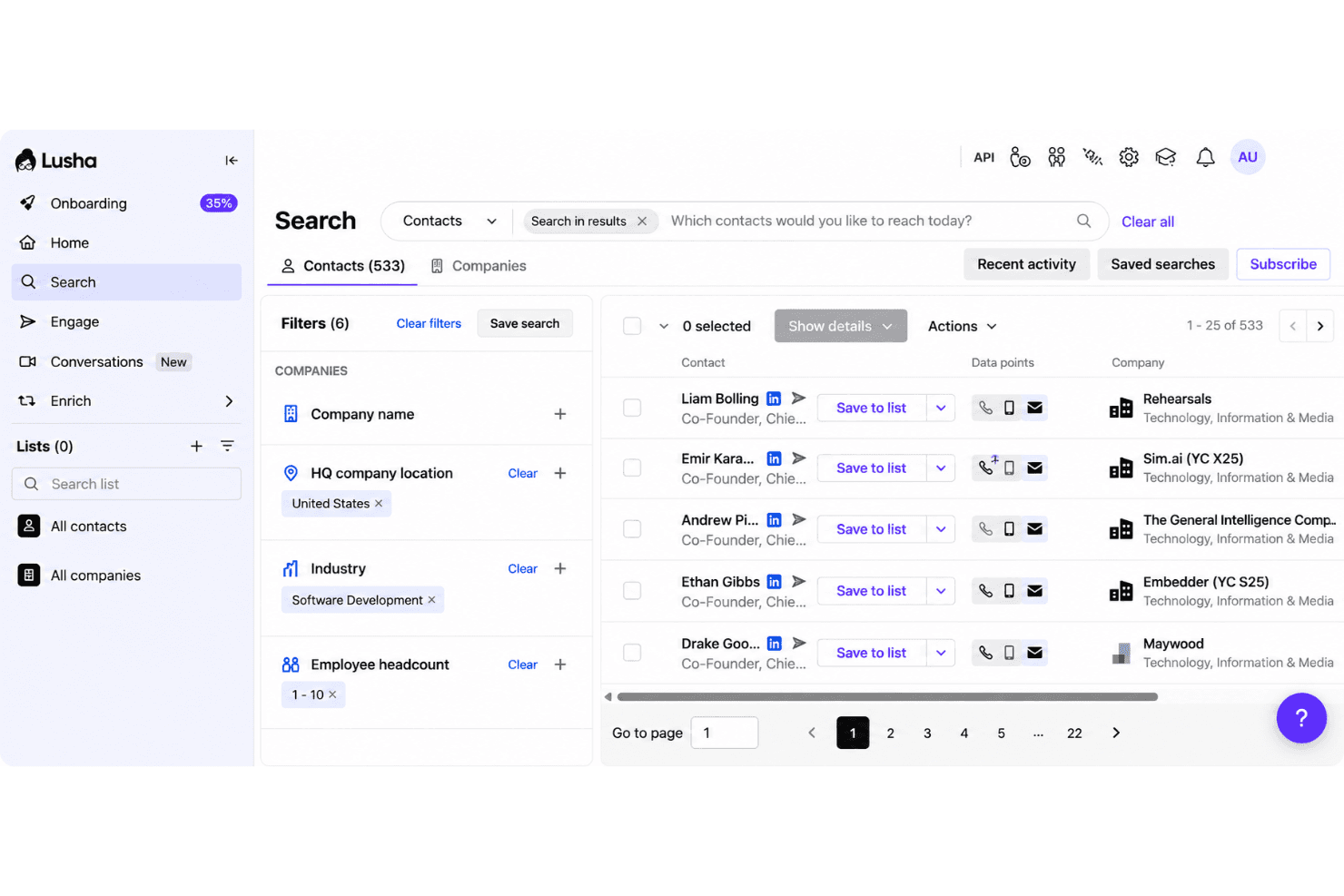
Lusha provides direct phone numbers for faster prospect outreach. Lusha is a B2B contact database and sales intelligence platform that gives you access to 290M+ verified contacts, direct dials, firmographic data, technographics, and event-based buying signals.
Who Is Lusha Best For?
Lusha is a strong fit for sales and RevOps teams that need fast, reliable contact data without a lengthy onboarding process.
Why I Picked Lusha
Lusha earns its spot on my shortlist because the Chrome extension alone makes it one of the fastest ways to pull verified contact data in the category: open a LinkedIn profile, and you have a direct dial and work email without ever leaving your browser. I also like the ICP Hub, which scores and ranks accounts as Warm, Hot, or Very Hot using seven predictive models, so my team isn't just collecting contacts but prioritizing them. The 98% email accuracy and 86% phone accuracy are backed by continuous re-verification, which holds up in practice.
Lusha Key Features
- Buying signals: Tracks 26 event-based signals—including funding rounds, hiring surges, and leadership changes—refreshed weekly to surface timely outreach opportunities.
- WebSights visitor identification: Matches anonymous website visitors to company profiles and surfaces verified contact details from visiting organizations.
- REST API suite: Provides Enrichment, Search, Signals, Lookalike, and Companies endpoints for programmatic list-building, real-time enrichment, and CRM automation.
- Lusha Conversations: Records and transcribes sales meetings, then generates AI summaries, action items, and engagement metrics that sync directly to your CRM.
Lusha Integrations
Lusha offers 27+ marketplace integrations, including Salesforce, HubSpot, Zoho CRM, Pipedrive, monday CRM, Bullhorn, Outreach, Salesloft, Clay, and Zapier. Its REST API suite supports custom CRM enrichment, list building, signals, lookalike matching, and company data workflows.
Pros and Cons
Pros:
- AI-driven ICP scoring and lookalike matching
- Database has granular regional coverage statistics
- Chrome extension reveals contact info instantly
Cons:
- No visual org chart or committee mapping
- Credit-based model limits high-volume users
Learn more about Lusha: Best with integrated sales engagement
- 14-day free trial + free plan available
- From $49/user/month (billed annually)
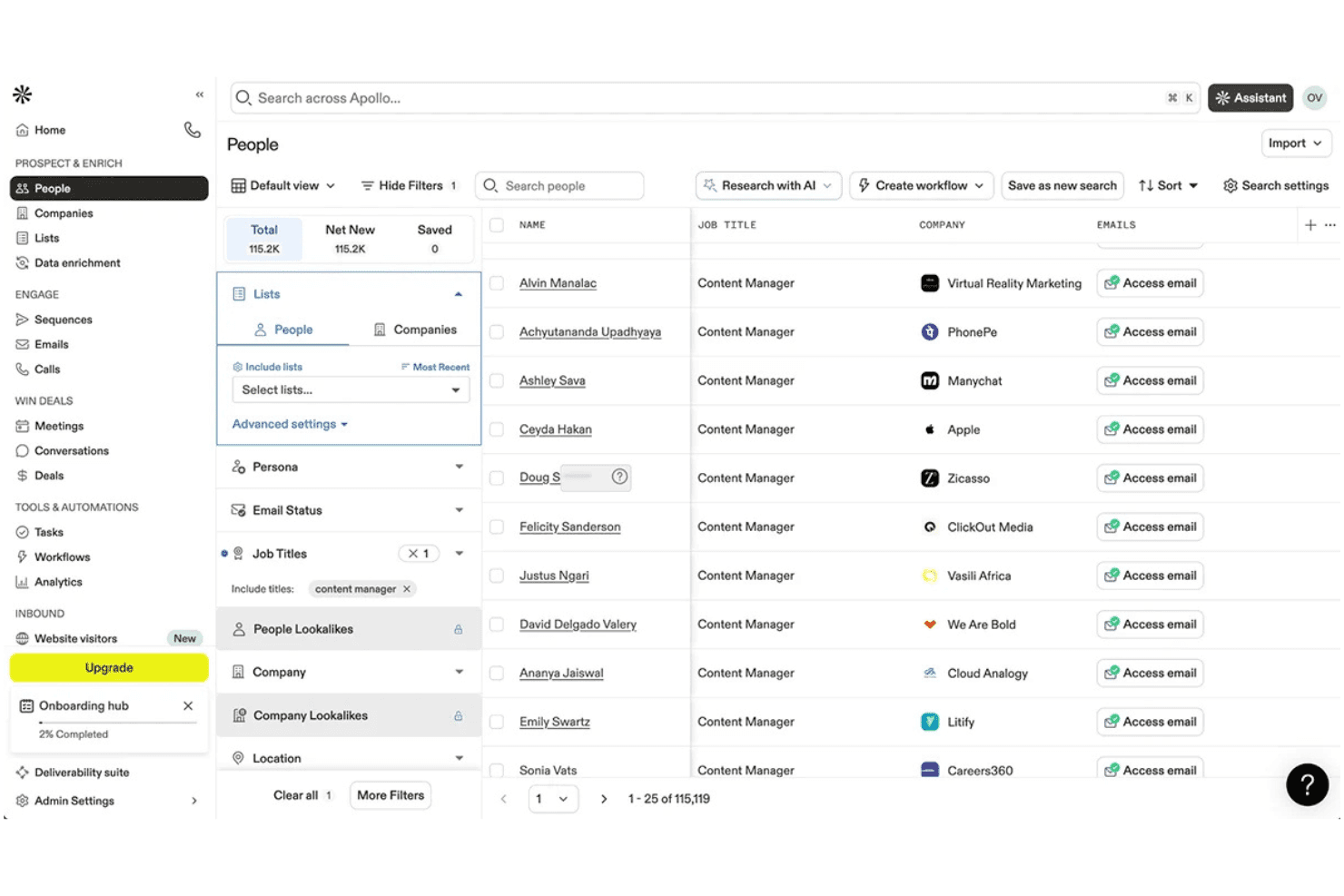
Apollo.io lets users filter and prospect leads by job title at scale. Apollo.io is a B2B contact database and sales engagement platform that combines a 240M+ contact database with built-in sequencing, prospecting filters, CRM enrichment, and AI-assisted list building.
Who Is Apollo.io Best For?
Apollo.io suits revenue operations and sales teams that want a single platform for prospecting, contact enrichment, and outbound engagement without stitching together separate database and sequencing tools.
Why I Picked Apollo.io
Apollo.io earns its spot on my shortlist because it's the only B2B contact database that bundles a 240M+ contact database with native sequencing, a built-in dialer, and A/B testing in a single platform. I love that you don't need a separate sales engagement tool: you can pull a list using 65+ filters, build a Persona for your ICP, and launch a sequence without ever leaving Apollo. The Waterfall Enrichment feature, which cascades through 20+ data providers to fill gaps, is what sets the data quality apart from single-source alternatives.
Apollo.io Key Features
- Buyer intent filtering: Surfaces accounts actively researching relevant topics using Bombora-powered intent data, available on Professional and Organization plans.
- Data Health Center: Monitors CRM record quality and surfaces total addressable market insights to support territory planning and pipeline analysis.
- Saved searches and alerts: Lets you save prospect search criteria and receive email notifications when new contacts match your defined ICP filters.
- CSV enrichment: Accepts external contact lists and enriches them against Apollo's database, filling missing firmographic and contact fields automatically.
Apollo.io Integrations
Apollo.io offers 200+ integrations, including native connections with Salesforce, HubSpot, Pipedrive, Outreach, Salesloft, Marketo, SendGrid, and Chili Piper. It also provides REST API access, Apollo CLI, Apollo MCP, and Zapier for custom integrations.
Pros and Cons
Pros:
- AI assistant boosts meeting booking success
- Waterfall enrichment improves data fill rates
- Combines database, sequencing, and dialer in one
Cons:
- Credits expire monthly with no rollover
- Real-world email accuracy is inconsistent
Learn more about Apollo.io: Best for real-time contact search at scale
- Free plan available
- Pricing upon request
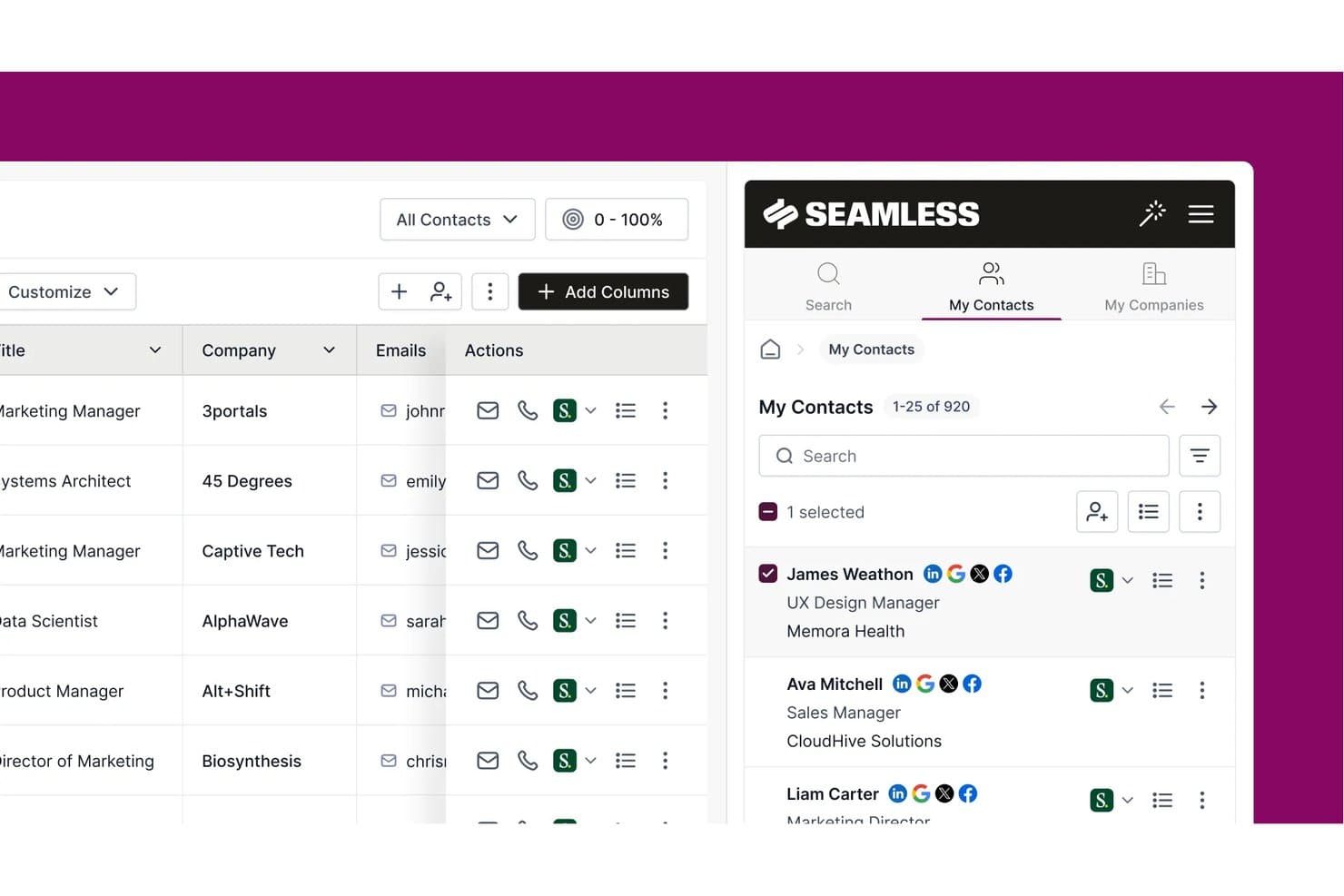
Seamless.AI lets users manage and browse saved B2B contacts in one place. Seamless.AI is a real-time B2B contact search engine that combines a database of over 1.3 billion verified contacts with AI-powered prospecting, CRM enrichment, buyer intent signals, and built-in sales engagement tools.
Who Is Seamless.AI Best For?
Seamless.AI is a strong fit for sales and revenue teams that need to build large outbound prospect lists fast, without the enterprise price tag of tools like ZoomInfo.
Why I Picked Seamless.AI
Seamless.AI earns its spot on my shortlist because of how it handles contact discovery at scale: instead of pulling from a static database, it searches and verifies data in real time, which means you're not working from records that were accurate six months ago. I especially like the Prospector's look-alike ICP targeting, which identifies net-new accounts that match your best customers without manual list-building. The CRM Enrich product also continuously audits your existing records and auto-refreshes stale fields, so your pipeline data stays current without a cleanup project.
Seamless.AI Key Features
- Buyer intent signals: Surfaces in-market accounts by monitoring 16.4 billion monthly interactions across 5,000+ sites using NLP with 12,000+ industry categories.
- Job changes tracking: Detects when contacts change roles, earn promotions, or move companies, with date filters spanning up to one year.
- REST API access: Provides bulk and singular endpoints for programmatic contact search and enrichment, available on all plan tiers including free.
- Built-in sales engagement hub: Lets you send emails, make calls via a built-in dialer, and manage follow-up tasks directly within the platform.
Seamless.AI Integrations
Seamless.AI offers native integrations with Salesforce, HubSpot, Microsoft Dynamics 365, Zoho CRM, Pipedrive, Outreach, and Salesloft. It also supports integrations through n8n and Zapier, plus REST API access for custom CRM and data workflows.
Pros and Cons
Pros:
- Buyer intent signals from consent-based cooperative
- Automated CRM enrichment with continuous data refresh
- Real-time contact verification at search time
Cons:
- Subscription cancellation process often causes disputes
- Email and phone accuracy lower than claimed
Learn more about Seamless.AI:
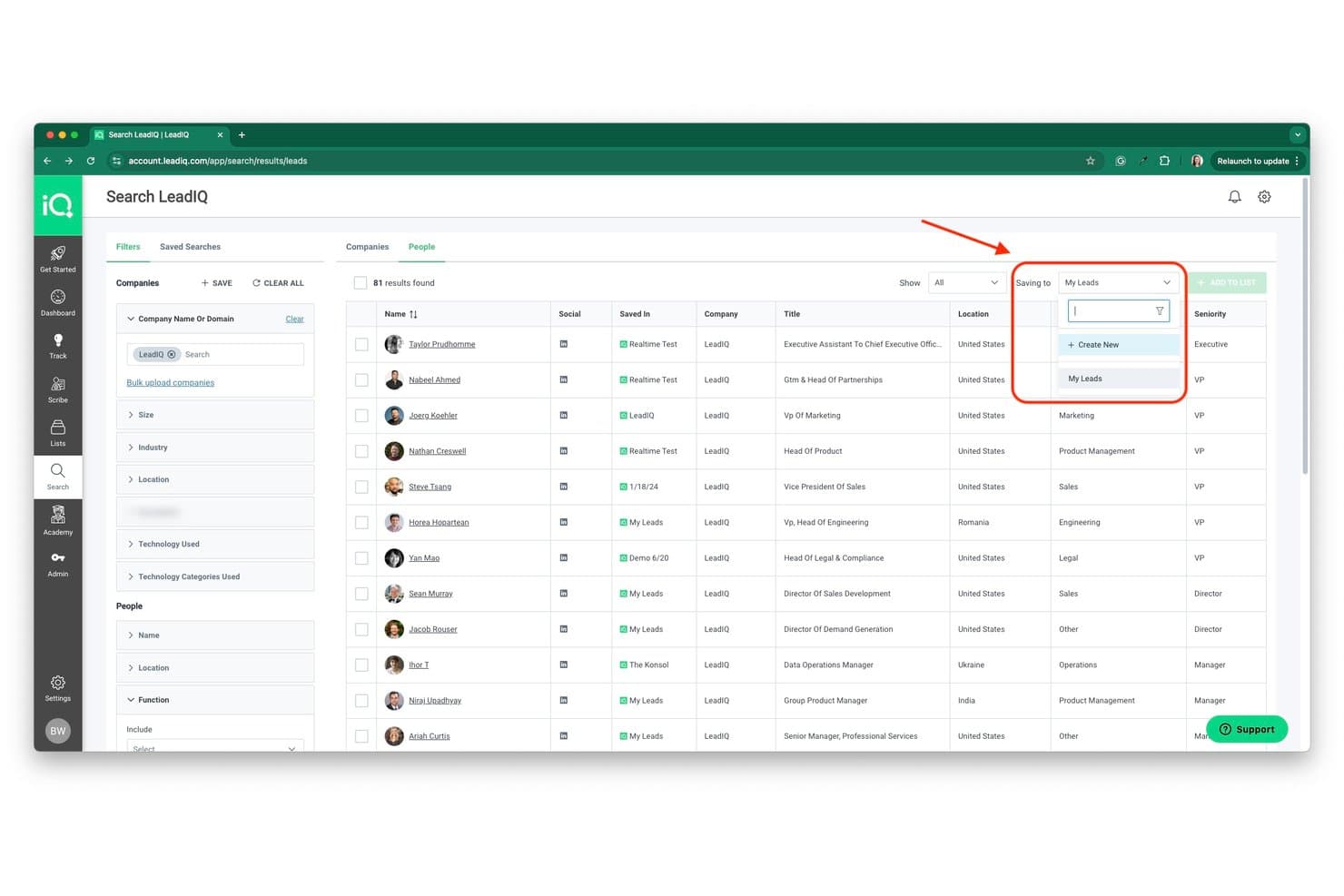
LeadIQ lets users save contacts directly to named lists from search results. LeadIQ is a B2B contact database and prospecting platform built around a 750M+ profile database, offering verified email and phone data, CRM enrichment, champion tracking, and AI-powered outreach tools.
Who Is LeadIQ Best For?
LeadIQ is a strong fit for sales teams that source most of their pipeline directly from LinkedIn and need verified contact data synced to their CRM in one click.
Why I Picked LeadIQ
LeadIQ earns its spot on my shortlist because its Chrome extension turns LinkedIn and Sales Navigator into a live prospecting layer, letting you capture verified emails, mobile numbers, and firmographics in one click and push them straight to your CRM. I especially like the batch capture from Sales Navigator search results, which means you're not clicking through profiles one by one. Champion tracking adds another layer I find genuinely useful: when a saved contact changes jobs, LeadIQ flags it with updated contact info so warm pipeline doesn't go cold.
LeadIQ Key Features
- Scribe AI email writer: Generates three personalized email drafts per recipient using LeadIQ contact data, persona definitions, and case studies, with support for five languages.
- Signals feed: Surfaces buying signals—including 10-K filings, hiring activity, and podcast mentions—to help you time outreach to key accounts.
- Salesforce Managed Package: A native bi-directional Salesforce integration that supports duplicate detection, custom field mapping, and enrichment across 40+ firmographic fields.
- REST API access: Available on every plan, including the free tier, enabling custom data pipelines and RevOps automation workflows.
LeadIQ Integrations
LeadIQ offers a native Salesforce Managed Package plus connections to HubSpot via Workato, Pipedrive, Outreach, Salesloft, Groove, Gong, Clay, Chili Piper, and Nooks. It also provides a REST API from the Free plan and supports Zapier.
Pros and Cons
Pros:
- Real-time job-change tracking for warm pipeline
- Industry-leading verified email deliverability rates
- Best one-click LinkedIn-to-CRM capture
Cons:
- Limited advanced buying intent signals
- Phone data sometimes outdated or missing
Learn more about LeadIQ:
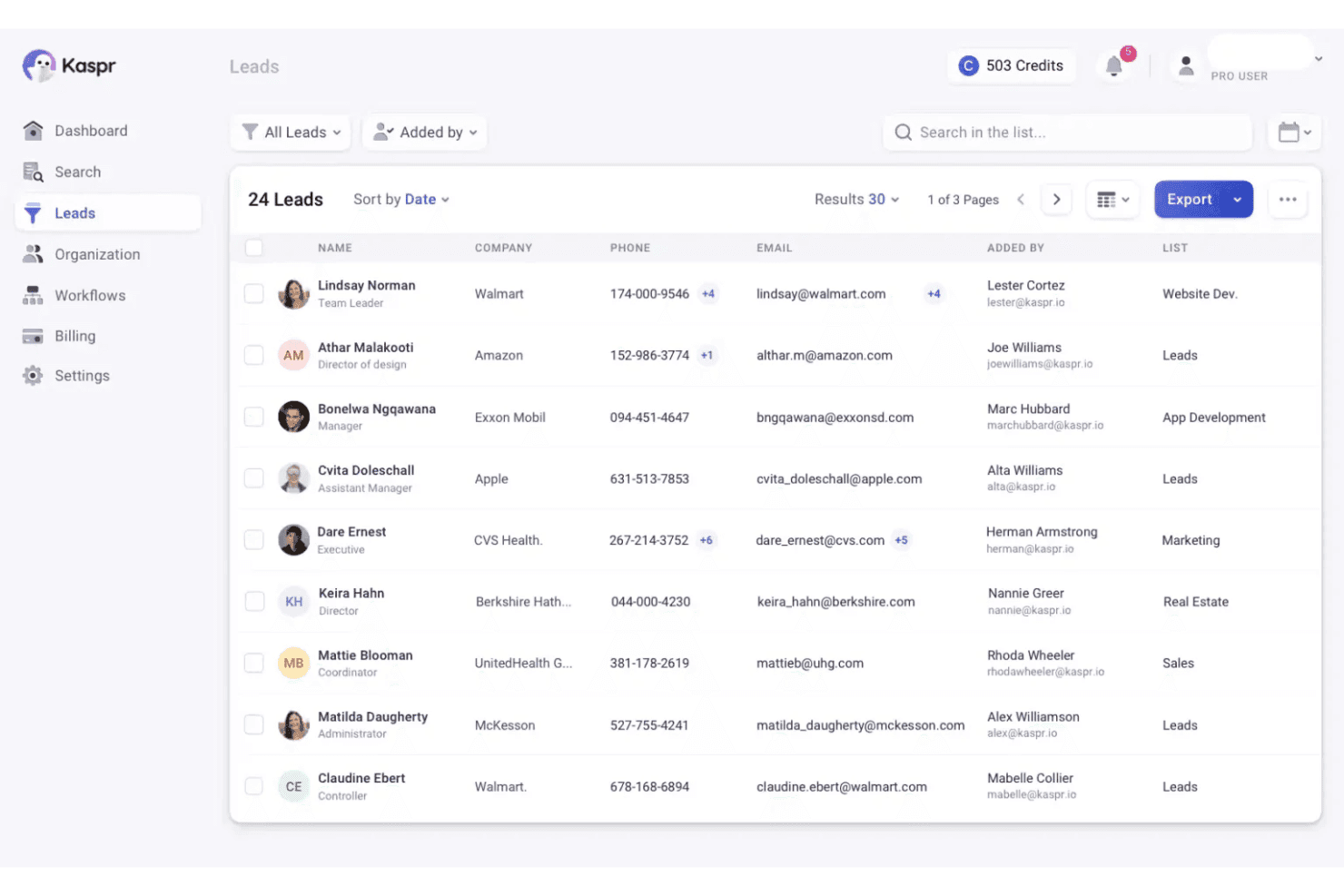
Kaspr organizes and displays lead contact details in a centralized list view. Kaspr is a B2B contact database tool built around a LinkedIn Chrome Extension that lets you capture verified emails and phone numbers directly from LinkedIn profiles, search results, Sales Navigator, and Recruiter Lite.
Who Is Kaspr Best For?
Kaspr is a strong fit for SDRs and individual sellers who do most of their prospecting directly on LinkedIn, especially those targeting European markets.
Why I Picked Kaspr
Kaspr earns its spot on my shortlist because of how naturally it fits into a LinkedIn-first prospecting workflow. I love that the Chrome Extension overlays directly onto LinkedIn profiles, Sales Navigator, and even LinkedIn Events, letting you preview whether a contact has a mobile number versus a landline before spending a single credit. That credit-preview feature alone saves real time. Kaspr also shines for European B2B data, with 200M+ verified European contacts re-validated every two months.
Kaspr Key Features
- Bulk LinkedIn enrichment: Extract and enrich contact lists from LinkedIn search results, Sales Navigator, or LinkedIn Events in a single batch action.
- CSV enrichment upload: Upload a CSV file of LinkedIn profile URLs to enrich multiple contacts with verified email and phone data outside of the Chrome Extension.
- Native CRM push: Send contact data directly to Salesforce, HubSpot, Pipedrive, or Zoho CRM from the Kaspr dashboard or Chrome Extension without manual export.
- LinkedIn Cadences: Build and run automated LinkedIn outreach sequences directly within the Kaspr dashboard, available on all paid plans.
Kaspr Integrations
Kaspr offers eight native integrations, including Salesforce, HubSpot, Pipedrive, Zoho CRM, Lemlist, Brevo, Aircall, and Ringover. It also provides an enrichment API for custom integrations and Zapier from the Starter plan onward.
Pros and Cons
Pros:
- Chrome extension previews phone type before reveal
- Unlimited B2B emails included on all plans
- Excels at verified European B2B contact data
Cons:
- Dependent on LinkedIn for list building
- No advanced firmographic or technographic data
Learn more about Kaspr:
Andre verktøy for B2B-kontaktdatabaser
Her er noen flere alternativer for B2B-kontaktdatabaser som ikke kom med på kortlisten min, men som fortsatt er verdt å undersøke:
How I Evaluate B2B Contact Databases
I evaluate B2B contact databases in two layers: the baseline requirements a tool must meet—verified data, CRM sync, filtering depth—and the differentiators that determine which tool fits your GTM motion.
Core Functionality (Table Stakes For This List)
When I'm selecting tools for my list, I rank each one on a scale from 0 (does not offer the functionality) to 5 (excels in this area) for each core functionality listed below. Then, I calculate the tool's total score into a percentage. Each tool needs to achieve a minimum total score of 65% to be considered for inclusion.
- Contact Database Size & Coverage: I look for platforms with broad global reach across industries, seniority levels, and company sizes—not just deep coverage in one region or vertical.
- Firmographic & Technographic Data: Each tool should give me company-level attributes like employee count, revenue range, and tech stack so I can segment by ICP criteria during list builds.
- Verified Emails & Phone Numbers: I check whether the platform provides validated business emails and direct dials, since bad data tanks deliverability and wastes reps' time on dead numbers.
- Search & Filtering Depth: The filters need to go beyond basic title and location—I evaluate whether I can layer criteria like seniority, department function, and company technographics to build precise prospect lists.
- CRM & Sales Tool Integrations: I look at how each tool syncs with CRMs like Salesforce and HubSpot, including whether it supports bi-directional sync, field mapping, and duplicate management on import.
- Data Export & Enrichment APIs: RevOps teams need bulk export and API access to power enrichment workflows, so I evaluate API coverage and whether the platform supports use cases like CRM enrichment at scale.
Once I have a list of tools that meet the criteria, I consider what sets each platform apart.
Differentiating Factors (What Sets Vendors Apart)
Here's how I compare and contrast different vendors:
Standout Features
Buyer intent signals are a big differentiator—I look for platforms that surface in-market accounts so reps focus on prospects who are actively researching, not just cold lists. Data health monitoring matters just as much, especially for RevOps teams managing large CRM instances where records decay fast. I also evaluate whether a tool offers org chart or relationship mapping, which helps sellers identify buying committees and multi-thread into enterprise accounts instead of relying on a single contact.
Beyond Features
Data accuracy is the first thing I evaluate beyond features—I check whether a vendor publishes accuracy rates and how often they re-verify records, since stale data erodes CRM trust fast. Compliance also matters; I look for SOC 2 Type II certification and clear GDPR handling, especially for teams prospecting across multiple regions. Pricing structure is another key factor, because credit-based models can get expensive quickly if your RevOps team runs large enrichment jobs or supports multiple outbound reps pulling lists daily.
Slik velger du et verktøy for en B2B-kontaktdatabase
Det er lett å gå seg vill i lange funksjonslister og komplekse prisstrukturer. For å hjelpe deg med å holde fokus mens du går gjennom den unike prosessen din for valg av programvare, har jeg satt sammen en sjekkliste over faktorer du bør ha i mente:
| Faktor | Hva du bør vurdere |
|---|---|
| FaktorSkalerbarhet | Hva du bør vurdereVil databasen støtte teamets vekst og endrede behov for prospektering over tid? Se etter brukerbegrensninger, datagrenser og muligheter for oppgradering. |
| FaktorIntegrasjoner | Hva du bør vurdereKan verktøyet kobles direkte til CRM-, salgsengasjements- eller markedsføringsautomatiseringsplattformene dine? Bekreft kompatibilitet med den eksisterende teknologistakken din. |
| FaktorTilpasningsmuligheter | Hva du bør vurdereKan du tilpasse felt, filtre og eksporter slik at de passer til teamets arbeidsflyter og rapporteringsbehov? Unngå rigide systemer som tvinger deg til å bruke omveier. |
| FaktorBrukervennlighet | Hva du bør vurdereHvor raskt kan nye brukere begynne å finne og eksportere kontakter? Se etter tydelig navigasjon og minimale opplæringskrav. |
| FaktorImplementering og innføring | Hva du bør vurdereHvilke ressurser trengs for å komme i gang? Vurder datamigrering, brukeropplæring og tilgjengeligheten av støtte ved innføringen. |
| FaktorKostnad | Hva du bør vurdereEr prisnivåene tilpasset bruken og teamstørrelsen din? Vær oppmerksom på skjulte gebyrer, kredittsystemer eller obligatoriske tillegg som kan øke kostnadene. |
| FaktorSikkerhetstiltak | Hva du bør vurdereTilbyr leverandøren kryptering, tilgangskontroller og samsvar med personvernlover? Spør om GDPR, CCPA og revisjonsspor. |
| FaktorTilgjengelig kundestøtte | Hva du bør vurdereHvilke støttekanaler tilbys, og i hvilke tidsrom? Vurder om du trenger hjelp døgnet rundt eller en dedikert kundeansvarlig for hastesaker. |
Hva er et verktøy for en B2B-kontaktdatabase?
En B2B-kontaktdatabase er en programvareplattform som lagrer, organiserer og gir tilgang til bedriftskontaktinformasjon som navn, stillingstitler, e-postadresser, telefonnumre og selskapsdetaljer. Disse kundeemnedatabasene hjelper salgs- og markedsføringsteam med å identifisere potensielle kunder, definere sin ICP og komme i kontakt med de riktige personene for aktiviteter som kald e-post og B2B-e-postkampanjer. Mange leverandører av B2B-kontaktdatabaser fungerer som dataleverandører og tilbyr berikede selskapsprofiler, innsikt i en prospekts teknologistakk og verktøy for salgsinnsikt. Med fokus på datakvalitet og segmentering støtter disse plattformene mer effektive B2B-markedsføringsstrategier og tilbyr ofte tilpassede priser basert på bruk og behov for datatilgang.
Funksjoner
Når du velger en B2B-kontaktdatabase, bør du se etter følgende viktige funksjoner:
- Avansert søk og filtrering: Finn kontakter ved hjelp av kriterier som selskapsstørrelse, bransje, sted eller stillingstittel for å bygge målrettede lister for oppsøkende arbeid.
- Alternativer for masseeksport: Last ned store mengder kontaktdata i formater som CSV, eller send dem direkte til CRM-systemet ditt for gjennomføring av kampanjer.
- Databerikelse: Legg til manglende opplysninger som selskapsinntekter, antall ansatte eller sosiale profiler i eksisterende poster for å få et mer komplett kontaktbilde.
- Kontaktsegmentering: Organiser kontakter i grupper basert på egenskaper eller atferd for å støtte personlig tilpasset markedsføring og salgsarbeid.
- Dataoppdateringer i sanntid: Sørg for at kontaktinformasjonen holdes oppdatert ved å automatisk oppdatere poster når personer bytter stilling eller selskap.
- CRM-integrasjon: Synkroniser kontaktdata direkte med salgs- eller markedsføringsplattformene dine for å opprettholde én pålitelig datakilde og redusere manuell registrering.
- Håndtering av samsvar: Støtte for GDPR, CCPA og andre personvernregler for å hjelpe teamet ditt med å håndtere kontaktdata på en ansvarlig måte.
- Tilgangskontroller for brukere: Angi tillatelser og roller for å styre hvem som kan vise, redigere eller eksportere kontaktdata i organisasjonen din.
- Aktivitetssporing: Overvåk når kontakter legges til, oppdateres eller eksporteres for å opprettholde dataintegritet og revisjonsspor.
Vanlige AI-funksjoner
I tillegg til standardfunksjonene i B2B-kontaktdatabaser som er nevnt ovenfor, tar mange av disse løsningene i bruk AI med funksjoner som:
- Prediktiv poengberegning av kundeemner: AI analyserer historisk engasjement og firmografiske data for automatisk å rangere kontakter etter hvor sannsynlig det er at de konverterer, slik at teamene kan prioritere oppsøkende arbeid.
- Automatisk datarensing: AI oppdager og fjerner utdaterte, dupliserte eller unøyaktige kontaktposter, og opprettholder en renere og mer pålitelig database med minimal manuell innsats.
- Identifisering av kjøpssignaler: AI overvåker digital atferd og aktivitet på nettet for å identifisere kontakter eller selskaper som viser kjøpsintensjon, og synliggjør prospekter som aktivt undersøker løsninger.
- Smarte kontaktanbefalinger: AI foreslår nye kontakter eller kontoer som samsvarer med den ideelle kundeprofilen din, basert på mønstre i eksisterende data og vellykkede avtaler.
- Søk på naturlig språk: AI gjør det mulig for brukere å finne kontakter eller selskaper ved hjelp av samtalebaserte søk, slik at det blir enklere å finne relevante poster uten komplekse filtre.
Fordeler
Implementering av en B2B-kontaktdatabase gir flere fordeler for teamet og virksomheten din. Her er noen av fordelene du kan se frem til:
- Raskere prospektering: Avansert søk, filtrering og AI-anbefalinger hjelper teamet ditt med raskt å identifisere og prioritere kundeemner med høyt potensial.
- Forbedret datanøyaktighet: Sanntidsoppdateringer, automatisk rensing og berikelsesfunksjoner holder kontaktinformasjonen oppdatert og pålitelig.
- Bedre segmentering: Kontaktgruppering og detaljert filtrering muliggjør mer målrettet oppsøkende arbeid og personlig tilpassede kampanjer.
- Forenklede arbeidsflyter: CRM-integrasjoner og alternativer for masseeksport reduserer manuell registrering av data og støtter effektiv gjennomføring av kampanjer.
- Forbedret samsvar: Innebygde personvernkontroller og funksjoner for håndtering av samsvar hjelper teamet ditt med å håndtere sensitive data på en ansvarlig måte.
- Bedre oversikt: Funksjoner for aktivitetssporing og rapportering gir innsikt i prospekteringsarbeid og databruk på tvers av teamet.
- Skalerbar vekst: Fleksible tilgangskontroller for brukere og skalerbare datagrenser sørger for at databasen kan vokse i takt med virksomhetens behov.
Kostnader og priser
Valg av en B2B-kontaktdatabase krever en forståelse av de ulike prismodellene og abonnementene som er tilgjengelige. Kostnadene varierer basert på funksjoner, teamstørrelse, tillegg og mer. Tabellen nedenfor oppsummerer vanlige abonnementer, gjennomsnittsprisene deres og typiske funksjoner som er inkludert i B2B-kontaktdatabaseløsninger:
Sammenligningstabell for abonnementer
| Abonnementstype | Gjennomsnittlig pris | Vanlige funksjoner |
|---|---|---|
| AbonnementstypeGratisabonnement | Gjennomsnittlig pris$0 | Vanlige funksjonerBegrensede kontaktsøk, grunnleggende filtrering, begrenset eksport og tilgang til et lite datautvalg. |
| AbonnementstypePersonlig abonnement | Gjennomsnittlig pris$25–$50 per bruker per måned | Vanlige funksjonerUtvidede søkefiltre, moderate eksportgrenser, grunnleggende CRM-integrasjon og e-poststøtte. |
| AbonnementstypeBedriftsabonnement | Gjennomsnittlig pris$50–$100 per bruker per måned | Vanlige funksjonerMasseeksport, avansert segmentering, dataoppdateringer i sanntid, teamsamarbeid og verktøy for samsvar. |
| AbonnementstypeVirksomhetsabonnement | Gjennomsnittlig pris$100–$200+ per bruker per måned | Vanlige funksjonerUbegrenset eksport, tilpassede integrasjoner, dedikert kontoadministrasjon, avansert sikkerhet og SLA-er. |
Vanlige spørsmål om B2B-kontaktdatabaser
Her er noen svar på vanlige spørsmål om B2B-kontaktdatabaser:
Hvordan holder B2B-kontaktdatabaser dataene sine nøyaktige?
De fleste B2B-kontaktdatabaser bruker en kombinasjon av automatisert datavalidering, manuell verifisering og regelmessige oppdateringer fra offentlige og proprietære kilder. Spør leverandørene hvor ofte de oppdaterer dataene sine, og hvilke prosesser de bruker for å fjerne utdatert eller feilaktig informasjon.
Kan jeg integrere en B2B-kontaktdatabase med CRM-systemet mitt?
Ja, de fleste B2B-kontaktdatabaser tilbyr integrasjoner med populære CRM-plattformer. Sjekk om databasen støtter direkte synkronisering, tilpasset feltkobling og automatiske oppdateringer for å sikre en smidig arbeidsflyt for teamet ditt.
Hva bør jeg vurdere når det gjelder GDPR og personvern?
Du bør bekrefte at databaseleverandøren følger GDPR, CCPA og andre relevante forskrifter. Se etter funksjoner som sporing av samtykke, forespørsler om fjerning av data og tydelig dokumentasjon av hvordan personopplysninger innhentes og behandles.
Finnes det begrensninger på hvor mange kontakter jeg kan eksportere?
Ja, de fleste abonnementer har grenser for hvor mange kontakter du kan eksportere per måned eller per bruker. Abonnementer på høyere nivåer tilbyr vanligvis større eller ubegrensede eksportkvoter, så se gjennom abonnementsdetaljene for å tilpasse dem til teamets prospekteringsvolum.
Hvilke støttealternativer er tilgjengelige hvis jeg får problemer?
Støttealternativene varierer etter leverandør og abonnement. Vanlige kanaler omfatter livechat, e-post, telefon og kunnskapsbaser. Noen enterprise-abonnementer tilbyr dedikerte kundeansvarlige eller prioritert støtte ved hastesaker.