

Dashbordprogramvare hjelper deg med å gjøre komplekse data om til tydelig, visuell innsikt, slik at du kan ta bedre beslutninger raskere. Ved å samle de viktigste nøkkeltallene og rapportene dine på ett sted får du et sanntidsbilde av virksomheten din – ikke mer leting gjennom regneark eller gjetting på hva som er viktigst.
Jeg har testet den beste dashbordprogramvaren for fagfolk innen inntektsdrift, så la oss gå gjennom de beste alternativene for å hjelpe deg med å velge den rette løsningen for teamets behov.
Why Trust Our Software Recommendations
6,700+
Reviews
20
Industry experts
16+
Evaluation factors
14
Years
Our reviews reflect our independent judgment—not a sales pitch. Learn how we stay transparent.
For this guide, we evaluated tools using hands-on testing and independent research, scoring tools using our selection criteria.
Our reviews reflect our human editorial judgment, not a sales pitch.
Sammenligningstabell for dashbordprogramvare
Denne sammenligningstabellen oppsummerer prisopplysningene for mine beste utvalg av dashbordprogramvare:
| Tool | Best For | Trial Info | Price | ||
|---|---|---|---|---|---|
| 1 | Best for marketing agencies | 14-day free trial + free demo available | From $44/month (billed annually) | Website | |
| 2 | Best for low-code dashboard creation | Free plan available | From $25/user/month | Website | |
| 3 | Best for analyst-free automated reporting | Free plan available | From $29/month | Website | |
| 4 | Best for small businesses | 14-day free trial | From $120/month (billed annually) | Website | |
| 5 | Best for visual data analysis | 14-day free trial | Pricing upon request | Website | |
| 6 | Best for all-in-one business dashboards | 14-day free trial available | From $29/month | Website | |
| 7 | Best for unified security and observability | 60-day free trial | Pricing upon request | Website | |
| 8 | Best for SQL-based analysis | Free trial + free demo available | From $25/user/month (billed annually) | Website | |
| 9 | Best for mobile access | Free plan + 14-day free trial + free demo available | From $71/month (billed annually) | Website | |
| 10 | Best for embedded analytics | 7-day free trial | Pricing upon request | Website |


Anmeldelser av den beste dashbordprogramvaren
Nedenfor finner du mine detaljerte sammendrag av den beste dashbordprogramvaren som kom med på kortlisten. Anmeldelsene mine gir et detaljert innblikk i de viktigste funksjonene, fordelene & ulempene, integrasjonene og ideelle bruksområdene for hvert verktøy, slik at du kan finne det beste alternativet for deg.
 Best for marketing agencies
- 14-day free trial + free demo available
- From $44/month (billed annually)
Visit WebsiteCustomer Rating:4.8/5
DashThis helps marketing agencies consolidate data and simplify client reporting. DashThis is a reporting dashboard tool designed for marketing agencies to consolidate data from various sources into one platform. It simplifies the process of creating and sharing reports with clients, saving time and effort.
Why I picked DashThis: DashThis provides an intuitive platform specifically tailored for marketing agencies. Its automated reporting feature allows you to generate reports quickly without manual data entry, while its customizable templates help your team create visually appealing reports. Overall, DashThis is ideal for agencies looking to streamline their reporting processes.
Standout features & integrations:
Features include automated reporting that reduces the time spent on manual tasks, customizable templates that allow you to create professional-looking reports suited to your agency's style and an intuitive interface.
Integrations include Google Analytics, Facebook Ads, Instagram Insights, LinkedIn Ads, Twitter, Mailchimp, Moz, HubSpot, YouTube, and Shopify.
Pros and Cons
Pros:
- Tailored for marketing metrics
- Quick automated reporting
- Customizable report templates
Cons:
- Limited advanced customization
- Basic data visualization options
Learn more about DashThis: Best for low-code dashboard creation
- Free plan available
- From $25/user/month
Visit WebsiteCustomer Rating:4.9/5
UI Bakery lets you create custom dashboards that visualize various records, values, and status insights at a glance. UI Bakery empowers businesses to create dynamic dashboards and internal tools without extensive coding knowledge. Ideal for companies aiming to streamline operations and enhance customer engagement, this platform offers a user-friendly interface to integrate data and automate workflows seamlessly.
Why I Picked UI Bakery
I picked UI Bakery because it blends low-code ease with real control over data and logic, helping you build dashboards that connect directly to your databases (SQL, NoSQL or APIs) and let you visualize real-time data and analytics. Its drag-and-drop UI builder, combined with data-source integration, makes it straightforward to get a working dashboard or internal tool up quickly. I appreciate that you can add custom logic — using SQL or JavaScript — so if your data needs transformation or filtering before display, you’re not limited by the visual builder.
For teams managing complex or evolving datasets, this mix of ease and flexibility means you don’t have to choose between speed and power.
UI Bakery Key Features
Aside from the features tied to data connection and logic control that I mentioned above, you’ll also get:
- Pre-built components library: a wide variety of components (tables, charts, forms, modals, etc.) you can drag into your UI to build dashboards or internal tools.
- Visual workflow/automation builder: build automations or CRUD workflows to fetch, insert, update or delete data — useful for dashboards that double as management tools.
- Responsive design & theming: create interfaces that adapt to different screen sizes, and apply custom branding, styles, and formatting to match your organization’s look.
- Version control & deployment options: manage app versions, track history, and deploy either on UI Bakery’s cloud or self-hosted infrastructure, giving flexibility on hosting and release management.
UI Bakery Integrations
Integrations include MySQL, PostgreSQL, Salesforce, Twilio, AWS, Google Sheets, HubSpot, MongoDB, Firebase, and REST API.
Pros and Cons
Pros:
- Templates and prebuilt dashboards reduce time to launch dashboard apps
- Supports many data sources including SQL, NoSQL, APIs and sheets
- Allows building dashboards and internal tools without full-stack developers
Cons:
- Template variety and visual styling options can feel limited for highly specialized dashboard designs
- Customization beyond built-in components can require coding knowledge
Learn more about UI Bakery: Best for analyst-free automated reporting
- Free plan available
- From $29/month
Visit WebsiteCustomer Rating:5/5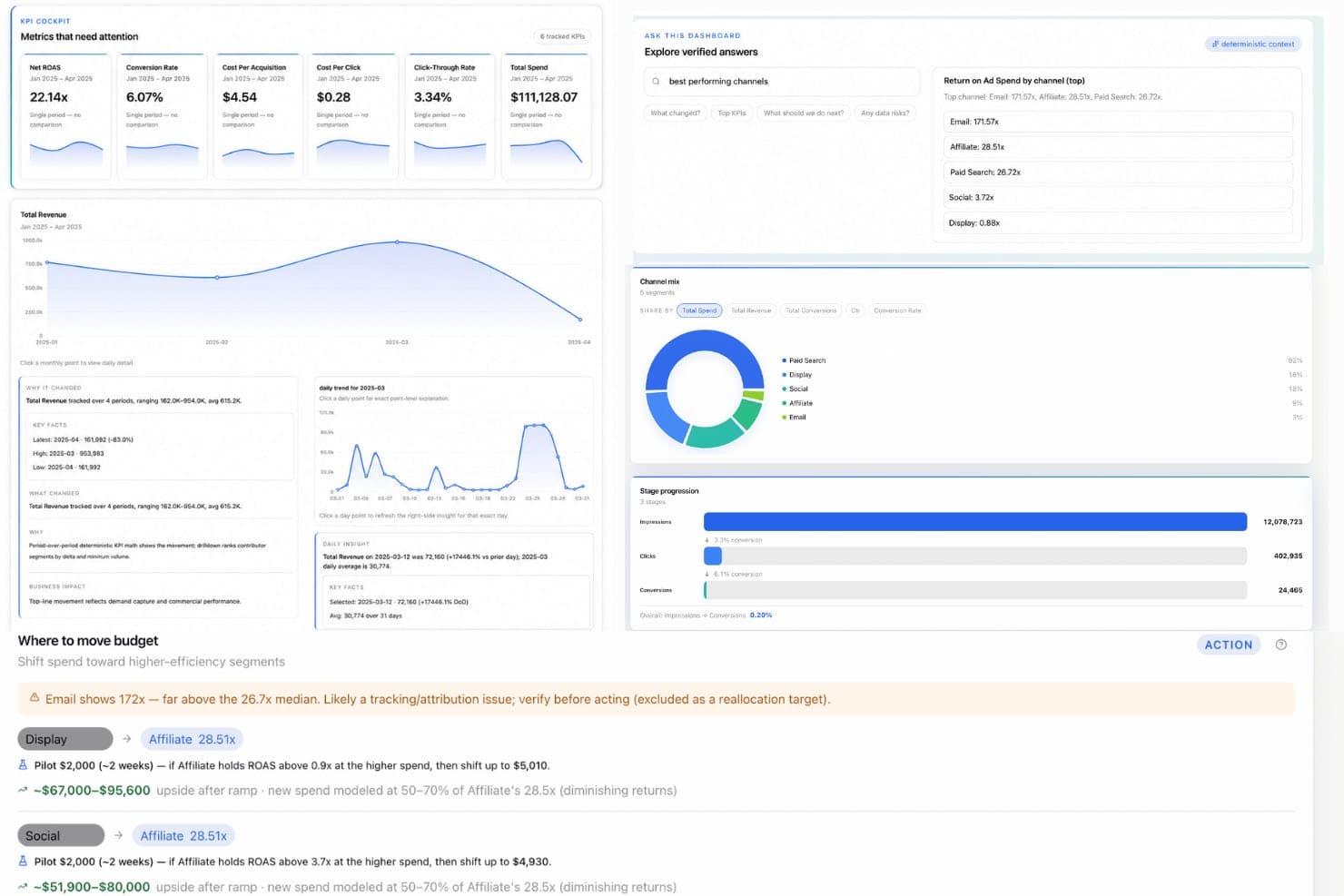
Signara offers a KPI cockpit dashboard with revenue charts, channel mix analysis, ROAS metrics, and AI-powered budget reallocation recommendations. Signara is an agentic analytics platform that auto-generates KPI dashboards, AI-written executive narratives, and board-ready reports from connected data sources using a deterministic, hallucination-free calculation engine.
Who Is Signara Best For?
Signara is a strong fit for SMB and lean teams that need reliable, recurring KPI reporting but don't have a dedicated data analyst or BI engineer on staff.
Why I Picked Signara
Signara earns its spot on my shortlist because of how it closes the gap between raw data and a decision-ready report. I love that every dashboard it generates comes with a ranked recommendation, not just a chart, so you instantly know what changed, why it changed, and what to act on next. Its deterministic KPI engine computes every metric in auditable code, which means the numbers in your board deck are always consistent and traceable, never estimated by an AI.
Signara Key Features
- MCP integration with Claude: Run reports and dashboards directly inside the Claude AI chat interface using Model Context Protocol.
- Multi-agent data processing: Specialized agents analyze your data in sequence, ensuring every dataset receives in-depth analysis before reporting.
- Deterministic math engine: All KPIs are calculated by transparent formulas in code, never estimated or inferred by AI.
- Data connectors for BI and warehouse tools: Connectors include Snowflake, Databricks, BigQuery, HubSpot, Google Sheets, and CSV/Excel file uploads.
Signara Integrations
Signara offers native integrations with HubSpot, Snowflake, BigQuery, Databricks, PostgreSQL, MySQL, Google Sheets, and GA4, and supports CSV and Excel file uploads. An API is available for custom integrations.
Pros and Cons
Pros:
- KPI calculations are fully auditable in code
- Reports include AI-written executive narratives
- Auto-generates ranked recommendations per dashboard
Cons:
- No self-serve drill-down or ad hoc exploration
- Limited chart customization compared to BI platforms
Learn more about Signara: Best for small businesses
- 14-day free trial
- From $120/month (billed annually)
Visit WebsiteCustomer Rating:4.7/5
Klipfolio lets small businesses create real-time dashboards to track metrics. Klipfolio is a cloud-based dashboard platform designed for small businesses and startups. It allows users to create real-time business dashboards to visualize and track key performance metrics.
Why I picked Klipfolio: Klipfolio offers an intuitive dashboard experience tailored to small businesses. It provides pre-built templates that simplify the creation of dashboards, making it accessible even if your team isn't technically inclined, while the software’s focus on real-time data ensures you're always up-to-date with your business metrics. All in all, its affordability and ease of use make it a practical choice for startups and small teams.
Standout features & integrations:
Features include pre-built templates that help you set up dashboards quickly, real-time data visualization to keep your team informed with the latest metrics, and customization options that let you tailor dashboards to specific business needs.
Integrations include Google Analytics, Salesforce, Facebook Ads, HubSpot, Twitter, Stripe, Shopify, LinkedIn Ads, Xero, and QuickBooks.
Pros and Cons
Pros:
- Affordable for small teams
- Quick setup with templates
- Cloud-based accessibility
Cons:
- Limited advanced features
- Can be slow with big data
Learn more about Klipfolio: Best for visual data analysis
- 14-day free trial
- Pricing upon request
Visit WebsiteCustomer Rating:4.5/5
Tableau turns raw data into interactive, shareable dashboards for insights. Tableau is a data visualization tool used primarily by analysts and business intelligence professionals. It helps users turn raw data into interactive and shareable dashboards that facilitate insightful decision-making.
Why I picked Tableau: Tableau excels at visualizing complex data sets into easy-to-understand formats. Its drag-and-drop interface allows you to create interactive charts and graphs quickly, and its ability to handle large volumes of data without performance issues is noteworthy. The software also offers extensive customization options, making it ideal for detailed data analysis.
Standout features & integrations:
Features include intuitive drag-and-drop functionality, interactive dashboards, sophisticated data visualization capabilities, chart and graph customization, and visual data analysis.
Integrations include Salesforce, Google Analytics, Microsoft Excel, Amazon Redshift, Oracle NetSuite, SAP HANA, Teradata, Snowflake, Google BigQuery, and Splunk.
Pros and Cons
Pros:
- Handles large data sets
- Extensive customization options
- Interactive data visualizations
Cons:
- Requires training for complex tasks
- Steep learning curve for beginners
Learn more about Tableau: 6Best for all-in-one business dashboards
Cyfe
- 14-day free trial available
- From $29/month
Visit WebsiteCustomer Rating:4.5/5
Cyfe consolidates data into a single view for monitoring business performance. Cyfe is a business dashboard solution designed for companies looking to consolidate data from multiple sources into a single view. It allows businesses to monitor and analyze performance metrics across different departments.
Why I picked Cyfe: Cyfe offers an advanced platform for monitoring various business metrics in one place. It provides pre-built widgets that make setting up dashboards quick and easy for your team. Plus, the tool's all-in-one approach helps you track marketing, sales, finance, and more without switching platforms. With its focus on holistic business views, Cyfe simplifies the process of data consolidation while improving user experience.
Standout features & integrations:
Features include an array of pre-built widgets that let you start tracking data right away, all-in-one business dashboards to help you keep an eye on metrics across different departments, and a user-friendly interface.
Integrations include Google Analytics, Salesforce, Facebook, Twitter, Mailchimp, QuickBooks, Shopify, Wordpress, Instagram, and LinkedIn.
Pros and Cons
Pros:
- Comprehensive data consolidation
- Easy setup with widgets
- Tracks multiple business metrics
Cons:
- Limited advanced analytics
- Basic visualization options
Learn more about Cyfe: Best for unified security and observability
- 60-day free trial
- Pricing upon request
Visit WebsiteCustomer Rating:4.4/5
Splunk Enterprise provides real-time operational intelligence with centralized monitoring, analytics, and anomaly detection across IT infrastructure and datacenter environments. Splunk Enterprise brings together data ingestion, search-based analytics, and a visual dashboard builder for monitoring logs, metrics, and events across IT, security, and operational environments.
Who is Splunk Enterprise Best For?
Splunk Enterprise is well suited for enterprise IT, security, and DevOps teams that need to monitor and analyze high volumes of machine-generated data.
Why I Picked Splunk Enterprise
I've included Splunk Enterprise in my top picks because it's one of the few dashboard platforms that genuinely unifies security and observability data in a single view. Using Dashboard Studio, I can build real-time dashboards that pull from both security event logs and infrastructure metrics simultaneously, without switching tools. I also like that it supports pre-built dashboards for threat detection and service health side by side, so my team can correlate a spike in failed logins with a surge in CPU usage on the same screen.
Splunk Enterprise Key Features
- SPL-based data querying: Use Splunk's Search Processing Language to write custom queries for individual dashboard panels with precise, filtered data.
- Trellis layout: Split a single visualization into multiple panels, each scoped to a different field value, within the same dashboard view.
- Dynamic drilldowns: Configure dashboard panels to link to searches, other dashboards, or external URLs when a data point is clicked.
- Role-based dashboard permissions: Control which users or groups can view, edit, or publish specific dashboards across your Splunk environment.
Splunk Enterprise Integrations
Splunk Enterprise offers more than 2,300 marketplace integrations through Splunkbase, including add-ons for AWS, ServiceNow, Jira, Slack, PagerDuty, Microsoft Azure, Google Cloud Platform, and Kubernetes. It also provides SDKs, APIs, and developer tools for building custom integrations.
Pros and Cons
Pros:
- Free machine learning toolkit is included
- Dashboards provide a single source of truth during incidents
- SPL query language handles complex cross-source correlations
Cons:
- On-premise deployments require substantial infrastructure resources
- Creating polished dashboards requires significant time
Learn more about Splunk Enterprise: 8Best for SQL-based analysis
Mode
- Free trial + free demo available
- From $25/user/month (billed annually)
Visit WebsiteCustomer Rating:4.6/5
Mode is an analytics platform for SQL-based data exploration and collaboration. Mode is an advanced analytics platform tailored for data scientists and analysts who rely heavily on SQL for data exploration. It enables users to query data, create visualizations, and collaborate on data projects.
Why I picked Mode: Mode is designed for teams that need strong SQL integration, making data analysis more efficient. It allows you to run complex queries and visualize the results without switching between tools. The platform's collaboration features also let your team work together on data projects seamlessly. As a result, Mode is ideal for data-driven teams looking to derive insights from raw data.
Standout features & integrations:
Features include a SQL editor that supports complex queries, making data analysis straightforward and efficient. Mode also provides visualization tools that let you turn query results into interactive charts, and deep collaboration features to allow your team to share insights and work on data projects together.
Integrations include Salesforce, Google Analytics, Amazon Redshift, PostgreSQL, MySQL, BigQuery, Snowflake, Oracle NetSuite, SAP HANA, and Microsoft SQL Server.
Pros and Cons
Pros:
- Strong SQL capabilities
- Supports complex data queries
- Facilitates team collaboration
Cons:
- Basic visualization options
- May require technical support
Learn more about Mode: Best for mobile access
- Free plan + 14-day free trial + free demo available
- From $71/month (billed annually)
Visit WebsiteCustomer Rating:4.5/5
Databox helps marketing and sales teams track metrics via mobile dashboards. Databox is a business analytics tool designed for marketing and sales teams to track performance metrics. It allows users to access data and insights on-the-go through its mobile-friendly dashboards.
Why I picked Databox: Databox offers a unique mobile experience, allowing your team to monitor KPIs from anywhere. Its pre-built templates make it easy to set up dashboards quickly, while its customizable alerts help you stay updated with real-time data. Additionally, the software’s mobile-first approach ensures you have access to critical metrics at all times, making data analysis simple and efficient.
Standout features & integrations:
Features include mobile-friendly dashboards to keep you connected to your data on-the-go, customizable alerts to ensure you never miss important updates, and pre-built templates to help your team set up and visualize data effortlessly.
Integrations include Google Analytics, HubSpot, Salesforce, Facebook Ads, QuickBooks, Shopify, Stripe, LinkedIn Ads, Instagram Insights, and Mailchimp.
Pros and Cons
Pros:
- Mobile-first design
- Quick setup with templates
- Real-time customizable alerts
Cons:
- Limited desktop functionalities
- Requires consistent internet access
Learn more about Databox: 10Best for embedded analytics
Sisense
- 7-day free trial
- Pricing upon request
Visit WebsiteCustomer Rating:4.4/5
Sisense is an analytics platform for embedding data insights into applications. Sisense is an analytics platform designed for data analysts and business teams looking to embed analytics into their applications. It provides tools for integrating analytics into your workflows, enabling data-driven decisions.
Why I picked Sisense: Sisense offers advanced embedded analytics capabilities, allowing your team to integrate data insights directly into your applications. Its unique architecture supports handling large data sets efficiently. The platform also provides customizable dashboards, which makes embedding analytics into your existing tools straightforward.
Standout features & integrations:
Features include customizable dashboards, which allow you to tailor data views to your team's needs, strong data integration capabilities, and in-chip technology to accelerate data processing.
Integrations include Salesforce, Google Analytics, Amazon Redshift, Oracle, SAP, Snowflake, Microsoft SQL Server, Google BigQuery, Zendesk, and HubSpot.
Pros and Cons
Pros:
- Handles large data volumes
- Customizable dashboards
- Efficient data processing
Cons:
- Requires technical expertise
- Complex initial setup
Learn more about Sisense:
Annen dashbordprogramvare
Her er noen flere alternativer for dashbordprogramvare som ikke kom med på kortlisten min, men som likevel er verdt å undersøke:
- 11Adobe Customer Journey AnalyticsBest with omnichannel identity stitching
- 12AthenicBest for AI-powered dashboards
- 13Microsoft Power BIBest for integrating with Microsoft tools
- 14Grafana CloudBest for open-source monitoring
- 15Qlik SenseBest for interactive dashboards
- 16CoefficientBest for spreadsheet-native live dashboards
- 17FineBI 6.1Best for self-service BI
- 18GeckoboardBest for real-time KPI tracking
- 19DomoBest for large enterprises
- 20AdverityBest for marketing data integration
- 21SupermetricsBest for data extraction
- 22Zoho AnalyticsBest for cross-functional teams
- 23Insight Software Best for embedded analytics solutions
How I Evaluate Dashboard Software
I split my evaluation into two layers: the baseline capabilities a tool needs—like CRM connectivity and real-time KPI tracking—and the differentiators that set the best options apart for RevOps teams.
Core Functionality (Table Stakes For This List)
When I'm selecting tools for my list, I rank each one on a scale from 0 (does not offer the functionality) to 5 (excels in this area) for each core functionality listed below. Then, I calculate the tool's total score into a percentage. Each tool needs to achieve a minimum total score of 65% to be considered for inclusion.
- Data Source Integrations: I check for native connectors to the systems RevOps teams actually live in—CRMs like Salesforce and HubSpot, warehouses like Snowflake, and billing platforms.
- Customizable Visualizations: Chart types, layout builders, and widget options matter here. I look for the ability to build views like pipeline waterfall charts or ARR trend lines without code.
- Real-Time Data Refresh: Stale data kills trust in dashboards. I evaluate each tool's refresh cadence, from scheduled syncs to live connections, and how configurable those intervals are.
- Pre-Built RevOps Metrics: Templates for pipeline velocity, MRR/ARR tracking, and quota attainment save significant setup time. I look for starter dashboards built for go-to-market teams.
- Sharing & Collaboration: RevOps dashboards serve sales leaders, marketing, finance, and the C-suite. I evaluate role-based access, scheduled report delivery, and embed options for broad distribution.
- Drill-Down & Filtering: The ability to move from a high-level revenue summary down to rep-level or segment-level detail is essential. I check for cross-filtering and multi-level drill-down support.
Once I have a list of tools that meet this criteria, I consider what sets each platform apart.
Differentiating Factors (What Sets Vendors Apart)
Here's how I compare and contrast different vendors:
Standout Features
AI-powered insights are a major differentiator. I look for tools that surface anomalies like a sudden drop in pipeline coverage or flag at-risk deals without manual digging. Forecasting capabilities matter just as much, especially when a tool can model scenarios like "what happens to Q4 if win rates decline by five points." I also evaluate goal and quota tracking—seeing real-time pacing against targets at the rep and team level beats waiting on a weekly spreadsheet every time.
Beyond Features
Tech stack compatibility is the first thing I check. A dashboard tool needs to connect to your actual revenue stack—CRM, marketing automation, billing, and your data warehouse—without relying on workarounds. Pricing models also deserve close attention. I evaluate whether viewer-only seats are affordable enough for the sales leaders and executives who need access but won't build dashboards themselves. Time-to-value rounds out my evaluation: pre-built RevOps templates and self-serve setup mean your team ships its first live dashboard in days, not months.
Slik velger du dashbordprogramvare
Det er lett å gå seg vill i lange funksjonslister og kompliserte prismodeller. For å hjelpe deg med å holde fokus mens du går gjennom den unike prosessen med å velge programvare, får du her en sjekkliste over faktorer du bør ha i mente:
| Faktor | Hva du bør vurdere |
| Skalerbarhet | Vil denne programvaren vokse sammen med teamet ditt? |
| Integrasjoner | Kan den kobles til de eksisterende verktøyene dine? |
| Tilpasningsmuligheter | Kan du tilpasse den etter dine spesifikke behov? |
| Brukervennlighet | Er det enkelt for teamet ditt å lære og bruke den? |
| Budsjett | Passer den innenfor de økonomiske rammene dine? |
| Sikkerhetstiltak | Oppfyller den kravene dine til sikkerhet og samsvar? |
| Kundestøtte | Er det tilstrekkelig kundestøtte tilgjengelig? |
| Mobiltilgang | Kan du enkelt få tilgang til den på mobile enheter? |
Trender innen dashbordprogramvare
I undersøkelsesarbeidet mitt hentet jeg inn utallige produktoppdateringer, pressemeldinger og lanseringslogger fra ulike leverandører av dashbordprogramvare. Her er noen av trendene som er på fremmarsj, og som jeg følger med på:
- AI-drevne innsikter: Flere verktøy bruker AI for å gi dypere datainnsikter. Dette hjelper brukere med å ta informerte beslutninger raskere ved å analysere mønstre og forutsi fremtidige trender.
- Tilpassbare visualiseringer: Brukere ønsker mer personlig tilpasning i instrumentpanelene sine. Verktøy tilbyr nå avanserte tilpasningsmuligheter, slik at virksomheter kan tilpasse visualiseringene etter sine spesifikke behov. Denne trenden gjør det enklere for team å fokusere på de målingene som betyr mest for dem.
- Innebygd analyse: Virksomheter ønsker analysefunksjoner i de eksisterende verktøyene og arbeidsflytene sine. Mange leverandører tilbyr nå løsninger for innebygd analyse, slik at brukere kan få tilgang til innsikter uten å bytte plattform.
- Fokus på personvern: Etter hvert som datareguleringene blir strengere, forbedrer verktøy for instrumentpaneler personvernfunksjonene sine. Det blir stadig viktigere å sikre samsvar med regelverk som GDPR, og selskaper integrerer mer avanserte personvernkontroller. Denne trenden imøtekommer økende bekymringer knyttet til datasikkerhet.
- Utvidet analyse: Denne trenden innebærer bruk av maskinlæring for å automatisere dataforberedelse og generering av innsikter. Den forenkler kompleks analyse og gjør den tilgjengelig for brukere uten teknisk bakgrunn.
Hva er programvare for instrumentpaneler?
Programvare for instrumentpaneler gjør det mulig for CRO-er og RevOps-eksperter å samle data fra flere kilder i én enkelt, interaktiv visning. Ved å samle viktige inntektsmålinger og resultatindikatorer gjør disse plattformene det mulig for ledere å overvåke tilstanden til salgspipelinen, følge fremdriften mot mål og ta informerte, datadrevne beslutninger. Med funksjoner som tilpassbare visualiseringer, AI-drevne innsikter og sømløs integrasjon av analysefunksjoner effektiviserer programvare for instrumentpaneler rapporteringen og hjelper team med raskt å identifisere muligheter og håndtere utfordringer på tvers av inntektsoperasjonen.
Funksjoner i programvare for instrumentpaneler
Når du velger programvare for instrumentpaneler, bør du se etter følgende nøkkelfunksjoner:
- Datavisualisering: Gjør rådata om til visuelle formater som diagrammer og grafer, slik at det blir enklere å forstå innsikter med et blikk.
- Dataoppdateringer i sanntid: Gir oppdatert informasjon ned på minuttet, slik at brukere kan ta tidsriktige og informerte beslutninger.
- Tilpassbare instrumentpaneler: Gjør det mulig for brukere å tilpasse instrumentpanelene sine slik at de fokuserer på målingene som er viktigst for deres spesifikke behov.
- Dataintegrasjon fra flere kilder: Kombinerer data fra ulike plattformer og gir en helhetlig oversikt over virksomhetens resultater på ett sted.
- AI-drevne innsikter: Bruker kunstig intelligens til å analysere datamønstre og forutsi fremtidige trender, noe som styrker beslutningstakingen.
- Innebygd analyse: Integrerer analysefunksjoner direkte i eksisterende verktøy, slik at brukere får tilgang til innsikter i arbeidsflyten sin.
- Interaktive instrumentpaneler: Tilbyr interaktivitet som lar brukere utforske data i dybden og avdekke detaljerte innsikter gjennom dynamiske visualiseringer.
- Kontroller for personvern: Sikrer samsvar med personvernregelverk og beskytter sensitiv informasjon, slik at sikkerhetsbekymringer håndteres.
- Samarbeidsfunksjoner: Gjør det mulig for team å dele innsikter og arbeide sammen med dataprosjekter, noe som fremmer et samarbeidsorientert miljø.
- Utvidet analyse: Automatiserer dataforberedelse og generering av innsikter, slik at kompleks analyse blir tilgjengelig for brukere uten teknisk bakgrunn.
Fordeler med programvare for instrumentpaneler
Implementering av programvare for instrumentpaneler gir flere fordeler for teamet og virksomheten din. Her er noen av fordelene du kan se frem til:
- Bedre beslutningstaking: Dataoppdateringer i sanntid og AI-drevne innsikter hjelper teamet ditt med å ta informerte beslutninger raskt.
- Bedre dataforståelse: Datavisualisering gjør komplekse datasett om til lettfattelige visuelle fremstillinger, slik at innsiktene blir tydeligere.
- Økt effektivitet: Tilpassbare instrumentpaneler lar brukere fokusere på viktige målinger og reduserer tiden som brukes på å lete etter informasjon.
- Bedre samarbeid: Samarbeidsfunksjoner gjør det enkelt for team å dele innsikter og arbeide sammen med datadrevne prosjekter.
- Bedre datatilgjengelighet: Dataintegrasjon fra flere kilder samler alle dataene dine på ett sted og gir en helhetlig oversikt over virksomheten din.
- Samsvar og sikkerhet: Kontroller for personvern sørger for at dataene dine oppfyller regulatoriske krav og forblir sikre.
- Styrkede brukere uten teknisk bakgrunn: Utvidet analyse gjør kompleks dataanalyse tilgjengelig, slik at flere teammedlemmer kan arbeide med data.
Kostnader og priser for programvare for instrumentpaneler
Valg av dashbordprogramvare krever en forståelse av de ulike prismodellene og tilgjengelige abonnementene. Kostnadene varierer basert på funksjoner, teamstørrelse, tillegg og mer. Tabellen nedenfor oppsummerer vanlige abonnementer, gjennomsnittsprisene deres og typiske funksjoner som er inkludert i dashbordprogramvareløsninger:
Sammenligningstabell for abonnementer for dashbordprogramvare
| Abonnementstype | Gjennomsnittspris | Vanlige funksjoner |
| Gratisabonnement | $0 | Grunnleggende datavisualisering, begrenset antall dashbord og brukerstøtte fra fellesskapet. |
| Personlig abonnement | $5-$25/bruker/måned | Tilpassbare dashbord, integrasjon med flere datakilder og brukerstøtte via e-post. |
| Bedriftsabonnement | $30-$70/bruker/måned | Dataoppdateringer i sanntid, samarbeidsverktøy og forbedrede sikkerhetsfunksjoner. |
| Virksomhetsabonnement | $75-$150/bruker/måned | Avansert analyse, dedikert brukerstøtte og omfattende tilpasningsmuligheter. |
Vanlige spørsmål om dashbordprogramvare
Her er noen svar på vanlige spørsmål om dashbordprogramvare:
Hva er noen av ulempene ved å bruke dashbord?
Dashbord kan noen ganger mangle sanntidsdeteksjon av avvik, noe som kan hindre proaktiv hendelseshåndtering. De kan også være for sterkt avhengige av historiske data, slik at mindre hendelser som kan påvirke virksomheten negativt, blir oversett. Overdreven avhengighet kan føre til overfylte dashbord med falske positive resultater og manglende intelligent prioritering.
Hvorfor mislykkes de fleste dashbord?
Mange dashbord mislykkes fordi de inneholder feiltilpassede måleverdier som fyller grensesnittet med irrelevante data. Dette kan distrahere brukerne fra viktig innsikt og føre til beslutningsvegring. Når beslutningstakere blir overveldet av informasjon, kan de få problemer med å trekke konklusjoner som kan omsettes til handling.
Hvordan kan dashbord forbedre virksomhetens resultater?
Dashbord forbedrer virksomhetens resultater ved å gi en tydelig oversikt over viktige måleverdier i sanntid. De hjelper teamet ditt med å ta informerte beslutninger raskt og effektivt. Ved å samle data fra flere kilder sørger dashbord for at alle har tilgang til den samme oppdaterte informasjonen.
Kan dashbord tilpasses ulike forretningsbehov?
Ja, de fleste dashbordprogrammer kan tilpasses for å møte ulike forretningsbehov. Du kan tilpasse oppsettet, velge hvilke måleverdier som skal vises, og konfigurere varsler for bestemte datapunkter. Denne fleksibiliteten sikrer at du får den mest relevante innsikten for virksomheten din.
Hvordan forbedrer dashbord teamsamarbeidet?
Dashbord forbedrer teamsamarbeidet ved å tilby en sentralisert plattform der alle kan få tilgang til de samme dataene. De gjør det mulig å dele innsikt og funn i sanntid, noe som gjør det enklere for team å diskutere og samordne strategier. Med delte dashbord kan teammedlemmer bidra mer effektivt i datadrevne prosjekter.