

Å velge riktig integrasjonsplattform med lite kode kan føles overveldende. Hvis du håndterer flere verktøy og apper, sliter med frakoblede data eller bare trenger en mer strømlinjeformet arbeidsflyt, kan en løsning med lite kode være akkurat det du trenger. Disse plattformene gjør det mulig for team å automatisere prosesser, koble sammen ulike systemer og øke produktiviteten uten behov for avanserte programmeringsferdigheter.
Men med så mange alternativer på markedet, hvordan vet du hvilken som passer best til virksomhetens unike behov? Med utgangspunkt i min erfaring med programvare for inntektsoperasjoner har jeg testet og sammenlignet noen av de beste integrasjonsplattformene med lite kode. Nedenfor finner du detaljerte anmeldelser som hjelper deg med å velge den beste løsningen for teamet ditt.
Why Trust Our Software Recommendations
6,700+
Reviews
20
Industry experts
16+
Evaluation factors
14
Years
Our reviews reflect our independent judgment—not a sales pitch. Learn how we stay transparent.
For this guide, we evaluated tools using hands-on testing and independent research, scoring tools using our selection criteria.
Our reviews reflect our human editorial judgment, not a sales pitch.
Sammenligningstabell: Integrasjonsplattform med lite kode
Denne sammenligningstabellen oppsummerer prisopplysninger for mine beste utvalgte integrasjonsplattformer med lite kode.
| Tool | Best For | Trial Info | Price | ||
|---|---|---|---|---|---|
| 1 | Best for supply chain orchestration | Free demo available | Pricing upon request | Website | |
| 2 | Best for AI-guided NetSuite and CRM sync | 30-day free trial | Pricing upon request | Website | |
| 3 | Best for managed IT service integrations | Not available | Pricing upon request | Website | |
| 4 | Best for connecting apps and automating simple workflows | 14-day free trial and free plan available | From $19.99/month (billed annually) | Website | |
| 5 | Best for IT teams | Free plan available | From $100/month | Website | |
| 6 | Best for low-code process automation | 14-day free trial | From $40/user/month (platform only; CRM products extra) | Website | |
| 7 | Best for building scalable database-driven apps | Free trial available | From $100/month | Website | |
| 8 | Best for automating processes | Free plan available | Pricing upon request | Website | |
| 9 | Best for enterprise scalability | Free plan available | From $1,090/month | Website | |
| 10 | Best for small businesses | 15-day free trial | From $8/user/month (billed annually) | Website |


Anmeldelser av de beste integrasjonsplattformene med lite kode
Nedenfor finner du mine detaljerte sammendrag av de beste integrasjonsplattformene med lite kode som kom med på kortlisten. Anmeldelsene mine gir en detaljert gjennomgang av de viktigste funksjonene, fordeler & ulemper, integrasjoner og ideelle bruksområder for hvert verktøy, slik at du kan finne det som passer best for deg.
 Best for supply chain orchestration
- Free demo available
- Pricing upon request
Visit WebsiteCustomer Rating:4.3/5
Cleo Integration Cloud tracks EDI issues and resolutions across supply chain workflows. For businesses looking to streamline their operations and enhance connectivity, Cleo Integration Cloud offers a dynamic solution. It addresses the needs of industries such as logistics, manufacturing, and healthcare by providing automated order intake, trading partner onboarding, and comprehensive integration capabilities. This platform meets the demand for efficient, low-code integration, helping companies achieve end-to-end visibility and predictive control across their processes.
Why I Picked Cleo Integration Cloud
I picked Cleo Integration Cloud for its strong emphasis on supply chain orchestration and the ability to automate EDI and API transactions. Its automated order intake and trading partner onboarding features make it particularly appealing to businesses aiming to reduce manual processes and improve integration efficiency. The platform's focus on providing end-to-end visibility and predictive control aligns well with the needs of companies seeking to optimize their data flow and integration strategies in a low-code environment.
Cleo Integration Cloud Key Features
In addition to its robust orchestration capabilities, I also found:
- No-Code Trading Partner Onboarding: Enables quick, efficient integration of new trading partners without extensive coding knowledge.
- AI-Powered Error Resolution: Uses artificial intelligence to identify and resolve errors, enhancing the reliability of integration processes.
- Automated EDI and API Transactions: Streamlines transaction handling, reducing manual intervention and improving accuracy.
- End-to-End Visibility: Provides comprehensive insights into data flows across systems, aiding in better decision-making and operational efficiency.
Cleo Integration Cloud Integrations
Cleo Integration Cloud integrations include Dynamics 365, NetSuite, SAP, FedEx, UPS, and connectors for ecommerce platforms, CRM/ERP systems, TMS/WMS platforms, databases, and cloud storage solutions.
Pros and Cons
Pros:
- Reduces processing time with automated data transformation and integration flows
- Strong EDI mapping tools support fast integrations across multiple systems
- Quick setup for EDI mappings compared to traditional integration platforms
Cons:
- Some integrations require troubleshooting due to terminology and configuration complexity
- Complex integration features require training and deeper technical understanding
Learn more about Cleo Integration Cloud:
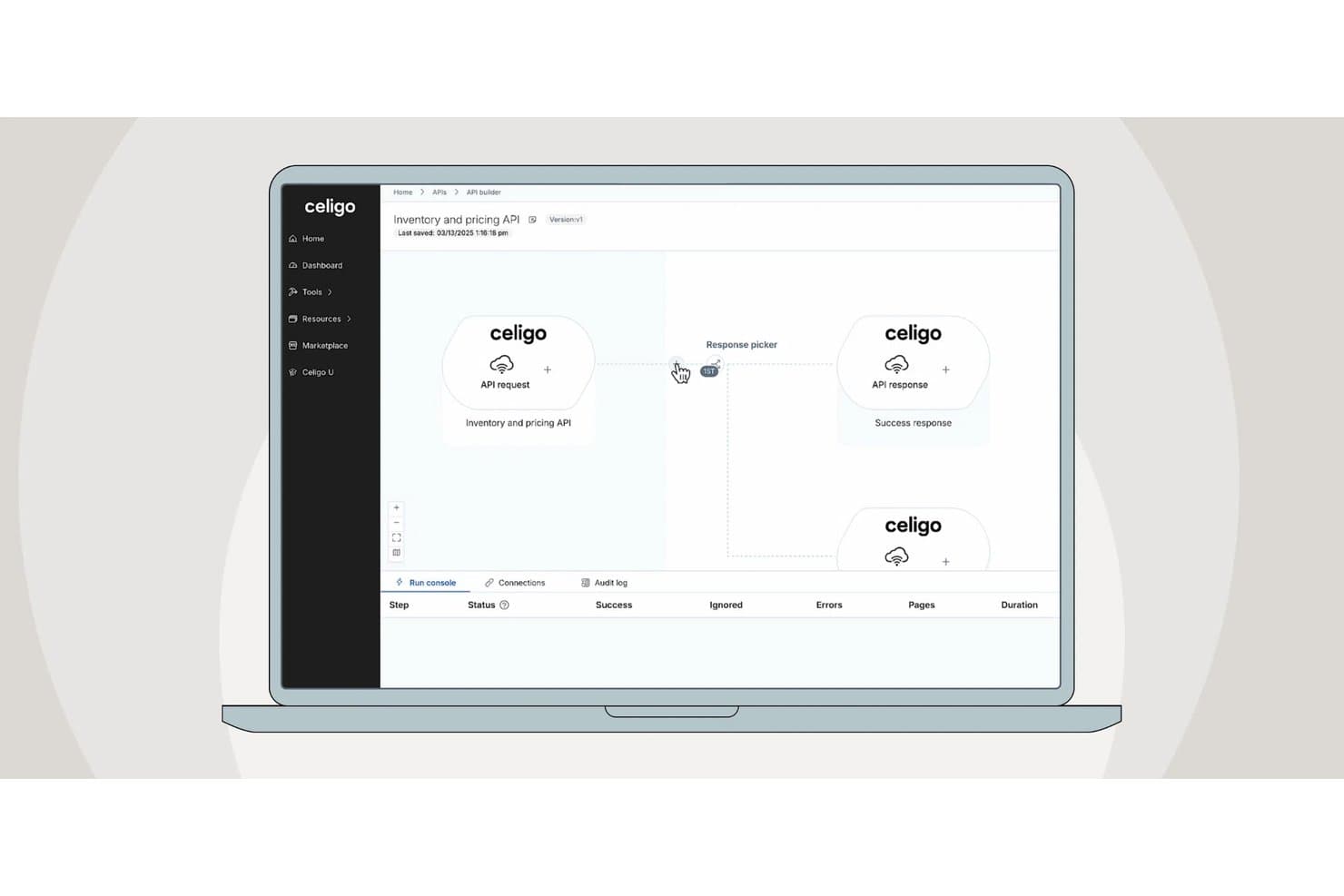
Celigo's API builder lets users visually design API workflows. Celigo is a low-code iPaaS that connects ERP, CRM, and marketing automation systems through a visual workflow builder, 300+ prebuilt connectors, and an AI-native assistant that generates and troubleshoots integration flows from natural language prompts.
Who Is Celigo Best For?
Celigo is a strong fit for RevOps and operations teams running NetSuite alongside a CRM like Salesforce or HubSpot who need AI-assisted integration without leaning on engineering.
Why I Picked Celigo
Celigo earns its spot on my shortlist because of how deeply it handles NetSuite-to-CRM sync, particularly when AI is doing the heavy lifting. I love that Celigo Ora lets you describe a workflow in plain language, like syncing Salesforce opportunities to NetSuite sales orders, and it generates the mappings, connections, and logic automatically. On top of that, the AI error engine resolves over 95% of integration errors monthly without manual intervention, which is a real operational edge when you're running bidirectional flows across your revenue stack.
Celigo Key Features
- Celigo Ora natural language builder: Describe a workflow in plain English and Ora generates the connections, mappings, and logic automatically, with a "walk me through it" mode that explains the plan before making any changes.
- Flat-rate pricing model: Plans are priced by endpoints and flows, not by tasks or data volume, so you won't face overage fees as your integration usage scales.
- API Builder: Available on Professional and Enterprise tiers, this feature lets you publish integration flows as secure, governed API endpoints you can share with internal teams or external partners.
- Data Ingestion module: A native ETL/ELT capability that pipes high-volume data directly into warehouses like Snowflake and Google BigQuery, extending Celigo beyond point-to-point sync into your broader data stack.
Celigo Integrations
Celigo offers 300+ prebuilt connectors, including NetSuite, Salesforce, HubSpot, Microsoft Dynamics 365, Snowflake, Google BigQuery, Slack, Zendesk, and Shopify. Universal connectors, APIs, and webhooks support custom integrations.
Pros and Cons
Pros:
- Flat-rate pricing avoids unexpected overage fees
- Error engine auto-resolves most integration issues
- AI assistant builds flows from plain English
Cons:
- Advanced data transformations are somewhat limited
- Pricing transparency is limited
Learn more about Celigo:
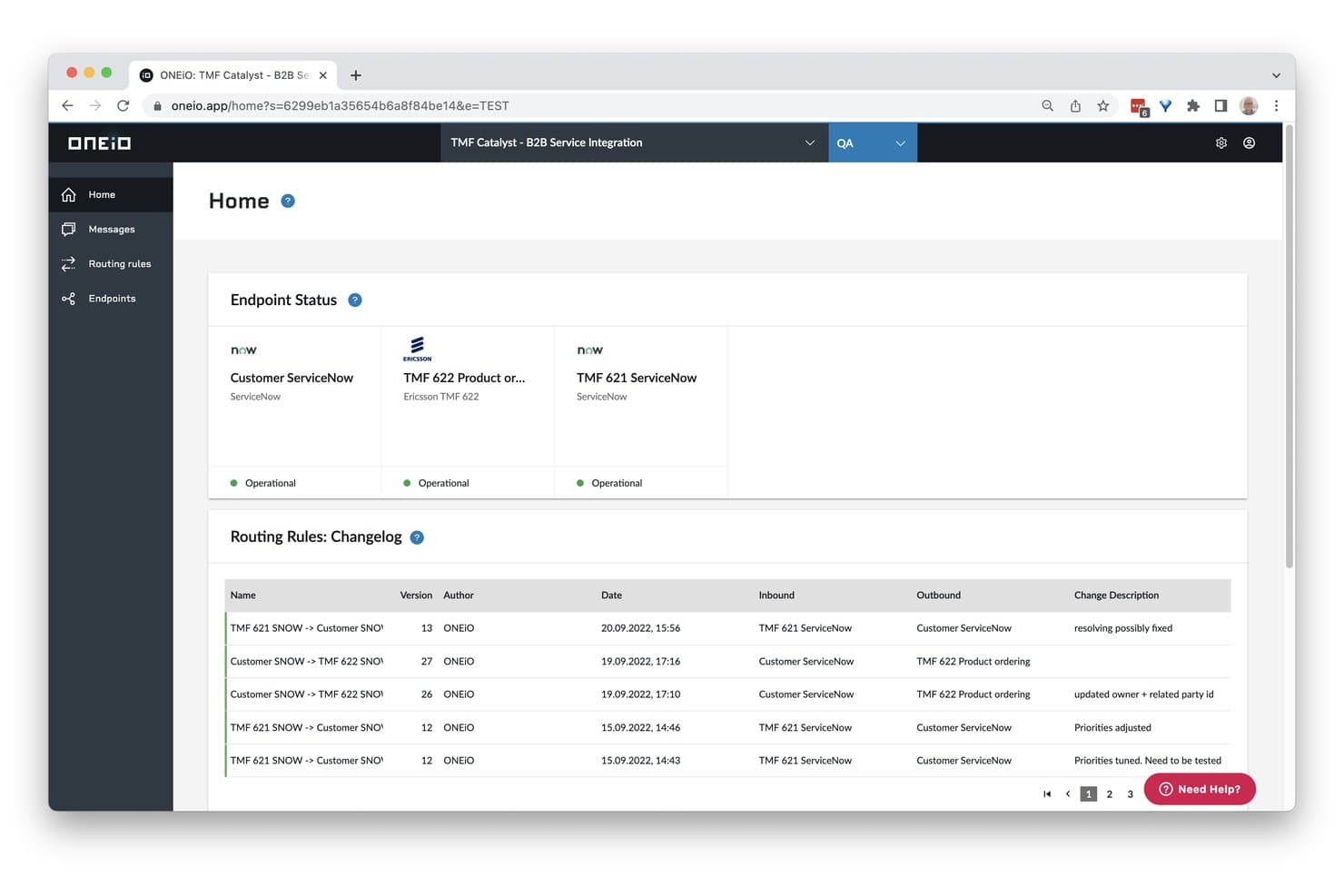
ONEiO displays endpoint status and routing rule changelogs in one view. ONEiO is a managed integration platform that connects IT service management, CRM, and enterprise tools through a hub-and-spoke architecture, with rule-based configuration, bidirectional data sync, and fully managed or self-managed service tiers.
Who Is ONEiO Best For?
ONEiO is a strong fit for IT and managed service teams that need to connect ITSM platforms like ServiceNow, Jira, or Zendesk without building or maintaining integrations in-house.
Why I Picked ONEiO
I've included ONEiO in my top picks because it's purpose-built for managed IT service integrations, which sets it apart from general-purpose iPaaS tools. I particularly like its fully managed service tier, where ONEiO's team handles the entire integration lifecycle, including monitoring, recovery, and incident response under SLAs. Its persistent message queues and automatic recovery mean that if ServiceNow or Zendesk goes offline, no data is lost and processing resumes without manual intervention.
ONEiO Key Features
- Hub-and-spoke architecture: Each connected system links to ONEiO once, so a single message flow can push data to multiple endpoints simultaneously.
- Routing rule engine: A tabbed form editor lets you build conditional rules with priority settings, version control, and bulk enable/disable actions.
- Persistent message queuing: Inbound messages are held in queue during outages and automatically re-processed in order once the target system comes back online.
- Multi-environment support: Enterprise and Service Provider plans include separate Production and QA environments with role-based access and audit logging.
ONEiO Integrations
ONEiO offers native integrations with Salesforce, HubSpot, Pipedrive, NetSuite, ServiceNow, Jira, Zendesk, Freshservice, BMC Remedy, and Azure DevOps. It supports custom REST and SOAP endpoints for additional connections.
Pros and Cons
Pros:
- Rule versioning supports safer changes
- Persistent queues recover during outages
- Fully managed lifecycle under SLAs
Cons:
- No drag-and-drop workflow canvas
- Form-based configuration can feel tricky
Learn more about ONEiO: Best for connecting apps and automating simple workflows
- 14-day free trial and free plan available
- From $19.99/month (billed annually)
Visit WebsiteCustomer Rating:4.7/5
Zapier automates tasks by connecting apps, offering pre-built workflows without coding. Zapier is a low-code automation platform designed for businesses looking to connect various applications and automate workflows. Its primary users are small to medium-sized businesses that want to integrate and automate tasks across multiple applications. Zapier facilitates task automation, process integration, and workflow enhancement.
Why I picked Zapier: Zapier excels in connecting a vast array of apps, making it a versatile choice for integrating different tools your team uses daily. It allows you to automate repetitive tasks without needing coding skills. The platform offers pre-built templates called "Zaps" that simplify setting up automated workflows. Zapier's flexibility in connecting diverse applications makes it an ideal choice for teams looking to enhance efficiency and productivity.
Standout features & integrations:
Features include the ability to automate tasks across multiple applications without coding expertise. You can use pre-built Zaps to quickly set up workflows and save time. The platform offers extensive flexibility, allowing your team to connect a wide variety of applications.
Integrations include Google Workspace, Slack, Microsoft Teams, Salesforce, Trello, Dropbox, Mailchimp, HubSpot, Shopify, and QuickBooks.
Pros and Cons
Pros:
- Connects multiple applications
- Automates repetitive tasks
- Pre-built workflow templates
Cons:
- Limited complex automation capabilities
- Slight learning curve
Learn more about Zapier:

Workato simplifies app integration with scalable automation and strong security tools. Workato is an enterprise automation platform designed for IT teams looking to integrate applications and automate workflows. Its main users are organizations seeking to enhance operational efficiency through process automation and app integration. Workato supports process automation, data synchronization, and workflow optimization.
Why I picked Workato: Workato offers powerful automation tools that enable IT teams to integrate applications with ease. It includes pre-built connectors that simplify the setup of automated workflows. The platform's focus on scalability makes it suitable for businesses of all sizes. Workato also provides enterprise-grade security features, ensuring your team can automate processes safely.
Standout features & integrations:
Features include powerful automation tools that help your team integrate applications efficiently. You can use pre-built connectors to set up workflows quickly and effectively. The platform supports scalability, making it ideal for businesses of different sizes.
Integrations include Salesforce, Slack, ServiceNow, Jira, Google Workspace, Microsoft Dynamics 365, SAP, Oracle, NetSuite, and QuickBooks.
Pros and Cons
Pros:
- Enterprise-grade security features
- Supports large-scale automation
- Quick workflow setup
Cons:
- Limited customization options
- Performance tied to infrastructure
Learn more about Workato: Best for low-code process automation
- 14-day free trial
- From $40/user/month (platform only; CRM products extra)
Visit WebsiteCustomer Rating:4.7/5
Creatio integrates CRM and automation with no-code tools, supporting business workflows. Creatio is a low-code platform designed to unify CRM and process automation for enterprises. It caters to a wide range of industries, including financial services, healthcare, and telecommunications. Creatio excels in enabling businesses to manage customer relationships and automate workflows with a single, flexible platform.
Why I picked Creatio: Creatio stands out for its ability to integrate customer relationship management (CRM) with process automation, allowing teams to streamline sales, marketing, and service processes. The platform is user-friendly, offering a no-code/low-code approach that empowers business users to design and manage workflows without heavy IT involvement. Creatio’s intelligent process automation, powered by AI and machine learning, helps organizations rapidly adjust to changing business needs while driving efficiency.
Standout features & integrations:
Features include low-code tools for process modeling, case management, and workflow automation, allowing quick customization of business processes. Its CRM covers the full customer journey, from lead generation to support, ensuring a seamless experience across sales, marketing, and service. AI-driven insights and process analysis tools further enhance decision-making and performance.
Integrations include Microsoft Dynamics 365, Google Workspace, AWS, SAP, Oracle, Slack, and more.
Pros and Cons
Pros:
- Unified CRM and process automation platform
- Easy-to-use low-code/no-code environment
- AI and machine learning capabilities
Cons:
- Customization may require some technical expertise
- May require additional configuration for complex workflows
Learn more about Creatio: Best for building scalable database-driven apps
- Free trial available
- From $100/month
Visit WebsiteCustomer Rating:4.5/5
Caspio enables fast, no-code app creation with strong data security and templates. Caspio is a low-code platform primarily used to build custom database applications without complex coding. Its main user base includes small to medium sized businesses looking to manage data efficiently and create web-based applications. Caspio offers solutions for data management, reporting, and application development. Caspio excels at creating detailed, data-centric applications that require powerful database management, ideal for businesses with complex data needs
Why I picked Caspio: Caspio provides an intuitive platform for creating database applications, making it accessible for users with minimal coding knowledge. It features a drag-and-drop interface, allowing your team to build apps quickly. The platform includes a variety of templates and customization options to tailor apps to specific business needs. Caspio also offers strong support for data security and compliance, ensuring your data remains protected.
Standout features & integrations:
Features include a user-friendly drag-and-drop interface that simplifies app building for your team. You can access numerous templates to kickstart your projects and customize them to fit your business needs. The platform also emphasizes data security, providing compliance features to protect your information.
Integrations include Salesforce, Microsoft SharePoint, Google Workspace, Dropbox, Microsoft Office 365, QuickBooks, Mailchimp, PayPal, Stripe, and Twilio.
Pros and Cons
Pros:
- Easy and fast app customization and deployment
- Drag-and-drop interface
- Suitable for small businesses
Cons:
- Basic design limitations
- Learning curve for beginners
Learn more about Caspio: Best for automating processes
- Free plan available
- Pricing upon request
Visit WebsiteCustomer Rating:4.4/5
Appian unifies CRM and automation with easy-to-use low-code tools for businesses. Appian is a low-code platform designed for enterprises seeking to automate their business processes. Its main user base includes organizations in various industries, such as financial services and government. Appian excels in business process management, mobile app development, and process intelligence.
Why I picked Appian: Appian offers a comprehensive suite of tools for end-to-end process automation, integrating AI, RPA, and IDP. The platform supports case management and delivers packaged applications tailored to industry needs. Its strong customer support and educational resources further enhance its appeal for process automation.
Standout features & integrations:
Features include tools for business process management that allow your team to automate workflows effectively. Mobile app development capabilities enable your team to create applications that support on-the-go access. Additionally, process intelligence tools help your team analyze and optimize business operations.
Integrations include Salesforce, Microsoft Dynamics 365, Google Workspace, AWS, SAP, Oracle, IBM, ServiceNow, Box, and Slack.
Pros and Cons
Pros:
- Strong customer support
- Industry-specific applications
- Integration with AI and RPA
Cons:
- Complex implementation
- Requires user training
Learn more about Appian: Best for enterprise scalability
- Free plan available
- From $1,090/month
Visit WebsiteCustomer Rating:4.4/5
Mendix simplifies large-scale app development with collaborative, cloud-native tools. Mendix is a low-code application development platform that targets enterprises needing scalable and flexible app development solutions. Its main user base includes large organizations looking to digitize operations and improve business processes through custom applications. Mendix excels in facilitating rapid application development and enabling cross-functional collaboration.
Why I picked Mendix: Mendix is designed to accommodate the complex needs of enterprises, offering features that support large-scale app deployment and management. It includes tools for collaborative development, allowing multiple team members to work on projects simultaneously. The platform's visual development tools simplify the creation of complex applications. Mendix also provides extensive support for cloud-native development, ensuring your applications can scale effectively.
Standout features & integrations:
Features include visual development tools that enable your team to build applications without deep coding expertise. Collaborative tools support teamwork and allow simultaneous project contributions. Cloud-native support ensures that your applications can scale efficiently as your business grows.
Integrations include SAP, Salesforce, IBM Cloud, AWS, Microsoft Azure, Google Cloud Platform, Slack, Twilio, Docusign, and ServiceNow.
Pros and Cons
Pros:
- Supports large-scale deployment
- Strong cloud-native capabilities
- Facilitates team collaboration
Cons:
- Complex customization processes
- Initial setup can be lengthy
Learn more about Mendix: Best for small businesses
- 15-day free trial
- From $8/user/month (billed annually)
Visit WebsiteCustomer Rating:4.3/5
Zoho Creator simplifies app creation with drag-and-drop tools and 800+ integrations. Zoho Creator is a low-code application development platform designed for small businesses looking to build custom web and mobile applications. Its main user base includes entrepreneurs and small teams needing efficient app development and data management. The platform facilitates business process automation and data-driven decision-making.
Why I picked Zoho Creator: Zoho Creator offers an intuitive drag-and-drop interface ideal for users with minimal coding experience. It provides over 800 prebuilt integrations, making it versatile for various business operations. The platform's multi-device app creation ensures your applications are accessible on any device. Its AI capabilities enhance analytics and automation, aligning well with the needs of small businesses.
Standout features & integrations:
Features include a drag-and-drop interface that simplifies app creation for your team. AI-powered tools provide analytics and automation, aiding in data-driven decisions. Multi-device app creation ensures your apps are accessible on any device.
Integrations include Salesforce, QuickBooks, Zapier, PayPal, Google Workspace, Dropbox, Slack, Mailchimp, Twilio, and Zoho CRM.
Pros and Cons
Pros:
- Easy drag-and-drop interface
- Extensive prebuilt integrations
- Supports multi-device apps
Cons:
- Limited advanced coding options
- Performance varies with complexity
Learn more about Zoho Creator:
Andre integrasjonsplattformer med lite kode
Her er noen andre alternativer for integrasjonsplattformer med lite kode som ikke kom med på kortlisten min, men som likevel er verdt å undersøke:
- 11FileMakerBest for tailored, custom-built business solutions
- 12Microsoft Power AppsBest for Microsoft-centric users
- 13CoefficientBest for spreadsheet data automation
- 14Neptune DXPBest for SAP users
- 15KissflowBest for workflow automation
- 16KnackBest for database-driven apps
- 17ProcessMakerBest for business process management
- 18NinoxBest for user-friendly customization without code
- 19WaveMakerBest for building cross-platform, multi-device apps
- 20OutSystemsBest for rapid app development
- 21AirtableBest for project tracking
- 22DronaHQBest for enterprise app builders
- 23KintoneBest for team collaboration
- 24AppSheetBest for mobile data collection
- 25JitterbitBest for API integration
- 26LANSABest for legacy system integration
- 27Oracle APEXBest for Oracle database users
- 28Quick BaseBest for complex workflows
How I Evaluate Low Code Integration Platforms
I evaluate every platform on two layers: whether it can sync data across a RevOps stack without code, and what sets it apart for non-technical operators building lead-to-cash workflows.
Core Functionality (Table Stakes For This List)
When I'm selecting tools for my list, I rank each one on a scale from 0 (does not offer the functionality) to 5 (excels in this area) for each core functionality listed below. Then, I calculate the tool's total score into a percentage. Each tool needs to achieve a minimum total score of 65% to be considered for inclusion.
- Visual Workflow Builder: I look for a drag-and-drop canvas where you can map out multi-step flows with branching logic, not just a basic form-based setup screen.
- Prebuilt RevOps Connectors: The platform should ship with native connectors for tools like Salesforce, HubSpot, Marketo, and NetSuite so you're not building every connection from scratch.
- Bidirectional Data Sync: I check whether the platform supports two-way, real-time sync with field-level mapping—like keeping contact ownership aligned between your CRM and sales engagement tool.
- Data Transformation Logic: Each tool needs to offer conditional logic, filters, and formulas so you can normalize data mid-flow, such as standardizing lead source values across systems.
- API & Webhook Support: I evaluate whether you can build custom connectors via REST or SOAP APIs for tools that lack a native integration, plus trigger workflows from inbound webhooks.
- Monitoring & Error Handling: Run logs, failure alerts, and retry mechanisms matter—especially when a broken sync between your CRM and billing platform can stall deal-to-cash handoffs.
Once I have a list of tools that meet the criteria, I consider what sets each platform apart.
Differentiating Factors (What Sets Vendors Apart)
Here's how I compare and contrast different vendors:
Standout Features
Prebuilt workflow templates are a big differentiator. Platforms that ship ready-made recipes for lead routing or opportunity-to-invoice handoffs let RevOps teams deploy integrations in hours instead of days. I also evaluate governance features like role-based access and sandbox environments, which matter once multiple ops teams are building flows in the same workspace. AI-assisted automation is worth watching too; some platforms can auto-suggest field mappings or generate workflows from plain-language descriptions, which speeds up builds considerably.
Beyond Features
RevOps ecosystem fit is where I spend the most time. I check whether a platform offers deep, certified integrations with major CRMs—not just surface-level connectors that only sync standard objects. Implementation speed matters too; if your first production integration takes months of professional services, the "low-code" promise falls flat. I also look at security posture, especially SOC 2 Type II and GDPR compliance, since these platforms handle sensitive pipeline and customer data flowing between systems.
Slik velger du en integrasjonsplattform med lite kode
Det er lett å gå seg vill i lange funksjonslister og komplekse prisstrukturer. For å hjelpe deg med å holde fokus mens du går gjennom den unike programvarevalgsprosessen din, får du her en sjekkliste over faktorer du bør ha i tankene:
| Faktor | Hva bør du vurdere? |
| Skalerbarhet | Vil plattformen vokse i takt med virksomhetens behov? |
| Integrasjoner | Kan den kobles til de eksisterende verktøyene dine? |
| Tilpasningsmuligheter | Kan du tilpasse den til teamets arbeidsflyter? |
| Brukervennlighet | Er plattformen brukervennlig for teamet ditt? |
| Budsjett | Passer den innenfor de økonomiske rammene dine? |
| Sikkerhetstiltak | Finnes det robuste sikkerhetstiltak? |
Bruk denne sjekklisten for å holde programvarevalgsprosessen organisert og målrettet.
Trender for integrasjonsplattformer med lite kode
I researcharbeidet mitt har jeg hentet inn utallige produktoppdateringer, pressemeldinger og lanseringslogger fra ulike leverandører av integrasjonsplattformer med lite kode. Her er noen av trendene som er på vei frem, og som jeg følger med på:
- AI-assistert utvikling: Flere plattformer introduserer AI-verktøy for å hjelpe utviklere med å opprette og forbedre applikasjoner raskt. Denne trenden er nyttig for team som ønsker å utnytte AI til smartere, datadrevet beslutningstaking. Noen leverandører integrerer AI for å foreslå forbedringer og optimalisere arbeidsflyter.
- Styrking av utviklere uten teknisk bakgrunn: Leverandører fokuserer på funksjoner som gjør det mulig for brukere uten teknisk bakgrunn å bygge og administrere applikasjoner. Denne trenden er viktig for virksomheter som ønsker å demokratisere apputvikling. Leverandører tilbyr intuitive grensesnitt og forhåndsbygde maler for å senke terskelen for å komme i gang.
- Forbedrede samarbeidsverktøy: Plattformene legger til funksjoner som støtter bedre samarbeid og kommunikasjon i utviklingsprosjekter. Denne trenden er avgjørende for eksterne team og team med medlemmer fra ulike fagområder. Eksempler omfatter delte arbeidsområder og funksjoner for redigering i sanntid.
- Fokus på sikkerhet og samsvar: Ettersom databeskyttelse blir stadig viktigere, forbedrer leverandørene sikkerhetsfunksjonene og støtten for samsvar. Denne trenden er avgjørende for bransjer med strenge regulatoriske krav. Noen plattformer tilbyr innebygde samsvarskontroller og forbedret kryptering.
- Integrering av IoT-funksjoner: Noen leverandører begynner å integrere IoT-funksjoner, slik at virksomheter kan administrere IoT-enheter og data gjennom plattformene sine. Denne trenden er bemerkelsesverdig for bransjer som bruker IoT-enheter til drift og overvåking. Leverandørene tilbyr verktøy for å koble sammen og kontrollere IoT-komponenter på en sømløs måte.
Hva er en lavkodeintegrasjonsplattform?
En lavkodeintegrasjonsplattform er et verktøy som gjør det mulig for brukere å koble sammen ulike programvareapplikasjoner og automatisere arbeidsflyter med minimal koding. Disse verktøyene brukes vanligvis av IT-fagfolk, forretningsanalytikere og noen ganger brukere uten teknisk bakgrunn som trenger å integrere systemer og prosesser effektivt. Automatisering, dra-og-slipp-grensesnitt og forhåndsbygde maler bidrar til å forenkle komplekse integrasjoner og fremskynde utviklingen. Alt i alt gir disse verktøyene virksomheter en måte å øke produktiviteten og fleksibiliteten på ved raskt å tilpasse seg endrede teknologiske behov.
Funksjoner i en lavkodeintegrasjonsplattform
Når du velger en lavkodeintegrasjonsplattform, bør du se etter følgende nøkkelfunksjoner:
- Dra-og-slipp-grensesnitt: Forenkler prosessen med å bygge og administrere arbeidsflyter uten omfattende kunnskap om koding.
- Forhåndsbygde maler: Tilbyr ferdige arbeidsflytmaler som sparer tid og gir et utgangspunkt for tilpasning.
- Samarbeid i sanntid: Gjør det mulig for teammedlemmer å arbeide sammen med prosjekter samtidig, noe som forbedrer samarbeid og produktivitet.
- AI-assistert utvikling: Bruker AI til å foreslå forbedringer og optimalisere arbeidsflyter, slik at utviklingen blir mer effektiv.
- Verktøy for sikkerhet og samsvar: Sikrer databeskyttelse og bidrar til å oppfylle bransjereguleringer med innebygde sikkerhetsfunksjoner.
- Kompatibilitet med flere enheter: Gir tilgang til applikasjoner og arbeidsflyter fra alle enheter, noe som øker fleksibiliteten og mobiliteten.
- Avansert analyse: Gir innsikt i arbeidsflytens ytelse og datatrender, slik at brukerne kan ta informerte beslutninger.
- Tilpassbare brukergrensesnitt: Gjør det mulig for brukerne å tilpasse grensesnittet til sine spesifikke behov og preferanser.
- Integrering med IoT: Gjør det mulig å administrere og kontrollere IoT-enheter og data, noe som er nyttig for bransjer som bruker IoT-teknologi.
- Styrking av utviklere uten teknisk bakgrunn: Utstyrer brukere uten teknisk bakgrunn med verktøyene de trenger for å bygge og administrere applikasjoner, og demokratiserer dermed utviklingen.
Fordeler med lavkodeintegrasjonsplattformer
Implementering av en lavkodeintegrasjonsplattform gir flere fordeler for teamet og virksomheten din. Her er noen av fordelene du kan se frem til:
- Raskere utviklingssykluser: Dra-og-slipp-grensesnitt og forhåndsbygde maler kan fremskynde apputviklingsprosessen, slik at teamet ditt kan lansere løsninger raskere.
- Forbedret samarbeid: Verktøy for samarbeid i sanntid gjør det mulig for teamet ditt å jobbe mer effektivt sammen, noe som forbedrer kommunikasjonen og prosjektresultatene.
- Økt smidighet: KI-assistert utvikling og tilpassbare grensesnitt gjør det mulig for teamet ditt å tilpasse arbeidsflyter raskt til endrede forretningsbehov.
- Forbedret sikkerhet: Innebygde verktøy for sikkerhet og samsvar bidrar til å beskytte dataene dine og oppfylle bransjereguleringer, slik at du kan føle deg trygg.
- Myndiggjorte ikke-tekniske brukere: Funksjoner for innbyggerutviklere gjør det mulig for ikke-eksperter å opprette og administrere applikasjoner, slik at utvikling blir tilgjengelig for et bredere publikum.
- Skalerbarhet: Kompatibilitet med flere enheter og IoT-integrasjon sørger for at løsningene dine kan vokse med virksomheten din og møte ulike teknologiske behov.
- Datadrevne innsikter: Avansert analyse gir verdifull innsikt i arbeidsflytens ytelse og støtter informerte beslutninger.
Kostnader og priser for lavkodeintegrasjonsplattformer
Ved valg av en lavkodeintegrasjonsplattform er det nødvendig å forstå de ulike prismodellene og abonnementene som er tilgjengelige. Kostnadene varierer basert på funksjoner, teamstørrelse, tillegg og mer. Tabellen nedenfor oppsummerer vanlige abonnementer, gjennomsnittsprisene deres og typiske funksjoner som er inkludert i løsninger for lavkodeintegrasjonsplattformer:
Sammenligningstabell for abonnementer for lavkodeintegrasjonsplattformer
| Abonnementstype | Gjennomsnittspris | Vanlige funksjoner |
| Gratisabonnement | $0 | Grunnleggende integrasjoner, begrensede maler og brukerstøtte fra fellesskapet. |
| Personlig abonnement | $5-$25/bruker /måned | Forbedrede integrasjoner, egendefinerte maler og brukerstøtte via e-post. |
| Bedriftsabonnement | $26-$50 /bruker/måned | Avansert analyse, prioritert brukerstøtte og tilgang for flere brukere. |
| Virksomhetsabonnement | $51-$100 /bruker/måned | Dedikert brukerstøtte, full tilpasning og sikkerhet på virksomhetsnivå. |
En oversikt over abonnementstyper, kostnader og funksjoner for lavkodeintegrasjonsplattformer.
Vanlige spørsmål om integrasjonsplattformer med lite kode
Her er noen svar på vanlige spørsmål om integrasjonsplattformer med lite kode:
Hvordan passer integrasjonsplattformer med lite kode inn i eksisterende teknologistakker?
Integrasjonsplattformer med lite kode er utviklet for å fungere sammen med verktøyene og systemene du allerede bruker. De kobler sammen ulike applikasjoner, slik at data kan flyte sømløst mellom dem. Denne integrasjonen hjelper teamet ditt med å automatisere prosesser uten å forstyrre eksisterende arbeidsflyter. Du kan ofte tilpasse disse koblingene etter virksomhetens spesifikke behov.
Kan plattformer med lite kode håndtere komplekse forretningskrav?
Ja, mange plattformer med lite kode kan håndtere komplekse forretningsbehov. De tilbyr avanserte funksjoner som betinget logikk, API-integrasjoner og prosessautomatisering. Disse funksjonene støtter sofistikerte arbeidsflyter, noe som gjør dem egnet for større organisasjoner. Teamet ditt kan skalere løsningene etter hvert som virksomheten vokser, slik at de fortsatt samsvarer med målene deres.
Er integrasjonsplattformer med lite kode sikre?
De fleste plattformer med lite kode prioriterer sikkerhet for å beskytte dataene dine. De leveres ofte med innebygde verktøy for samsvar og krypteringsmetoder. Disse funksjonene bidrar til å sikre at informasjonen din forblir trygg og oppfyller bransjestandardene. Det er avgjørende å vurdere sikkerhetstilbudet til hver plattform for å sikre at det samsvarer med organisasjonens krav.
Hvilken type brukerstøtte er tilgjengelig for brukere av plattformer med lite kode?
Brukerstøtten varierer fra plattform til plattform, men omfatter vanligvis ressurser som veiledninger, forum og kundeservice. Noen plattformer tilbyr dedikerte brukerstøtteteam som kan hjelpe med implementering og feilsøking. Du kan også finne webinarer og opplæringsøkter som hjelper teamet ditt med å få mest mulig ut av plattformen. Sjekk alltid hvilke alternativer for brukerstøtte som er inkludert i abonnementet ditt.
Hvor mye kan integrasjonsplattformer med lite kode tilpasses?
Plattformer med lite kode kan i stor grad tilpasses for å dekke virksomhetens unike behov. De tilbyr dra-og-slipp-grensesnitt og forhåndsbygde maler for rask konfigurering. Du kan tilpasse arbeidsflyter og prosesser uten å skrive omfattende kode. Denne fleksibiliteten gjør det mulig for teamet ditt å tilpasse plattformen til de spesifikke kravene deres.
Krever plattformer med lite kode kunnskap om programmering?
Selv om det er en fordel å ha grunnleggende kunnskap om programmering, er det ikke alltid nødvendig. Plattformer med lite kode er utviklet for å være enkle å bruke, med intuitive grensesnitt som gjør det mulig for brukere uten teknisk bakgrunn å opprette applikasjoner. Noe programmeringskunnskap kan imidlertid forbedre evnen din til å tilpasse og optimalisere plattformen. Dette gjør dem tilgjengelige for et bredt spekter av brukere i en organisasjon.