

Det er utfordrende nok å finne riktig CRM, men når du trenger et som integreres godt med Mailchimp, kan alternativene dine virke enda færre. Ved å bruke min erfaring innen inntektsoperasjoner og CRM-programvare testet og vurderte jeg den beste CRM-programvaren som integreres med Mailchimp, for å hjelpe team med å velge løsningen som passer deres unike forretningsbehov.
Deretter samlet jeg innsiktene mine i grundige vurderinger som beskriver de viktigste funksjonene, fordelene, ulempene og integrasjonene for hvert alternativ. Uansett størrelsen på eller nisjen til selskapet ditt er jeg sikker på at du vil kunne finne ditt neste CRM i denne artikkelen.
Hvorfor du kan stole på våre programvareanbefalinger
6,700+
Reviews
20
Industry experts
16+
Evaluation factors
14
Years
Anmeldelsene våre bygger på vår uavhengige vurdering, ikke på salgsargumenter. Les hvordan vi sørger for åpenhet.
I denne guiden har vi vurdert verktøyene gjennom praktisk testing og uavhengig research og gitt dem poeng ut fra våre utvelgelseskriterier.
Anmeldelsene våre bygger på vår egen redaksjonelle vurdering. De er ikke et salgsargument.
Sammenligningstabell for CRM-programvare som integreres med Mailchimp
Denne sammenligningstabellen oppsummerer prisdetaljene for mine utvalgte CRM-programmer som integreres med Mailchimp:
| Tool | Best For | Trial Info | Price | ||
|---|---|---|---|---|---|
| 1 | Best for SMB sales teams on a tight stack | 15-day free trial | From $23/user/month (billed annually) | Website | |
| 2 | Best for contact-based pricing with Mailchimp sync | 15-day free trial | From $19.99/month per 1,000 contacts | Website | |
| 3 | Best for sales pipeline management | Free 14-day trial + free demo available | From $25/user/month (billed annually) | Website | |
| 4 | Best for customizable CRM solutions | Free trial available | From $65/month (billed annually) | Website | |
| 5 | Best for simple and effective contact management | 14-day free trial + free plan available | From $18/user/month (billed annually) | Website | |
| 6 | Best for inbound marketing and sales teams | Free plan available | From $20/user/month | Website | |
| 7 | Best for Google Workspace integration | Free trial + demo available | From $23/user/month (billed annually) | Website | |
| 8 | Best for small to medium-sized businesses | Free plan + 15-day free trial+ free demo available | From $14/user/month (billed annually) | Website | |
| 9 | Best for revenue attribution across email and pipeline | Free plan + 30-day free trial available | From $25/user/month | Website | |
| 10 | Best for ERP-connected revenue and Mailchimp sync | 30-day free trial (SugarChimp only) | From $59/user/month (billed annually) | Website |


Vurderinger av den beste CRM-programvaren som integreres med Mailchimp
Denne grundige analysen gir en oversikt over hvert CRM-program som integreres med Mailchimp. Den går gjennom fordelene og ulempene ved hvert verktøy, funksjonene deres og de beste bruksområdene.
 Best for SMB sales teams on a tight stack
- 15-day free trial
- From $23/user/month (billed annually)
Visit WebsiteCustomer Rating:4.7/5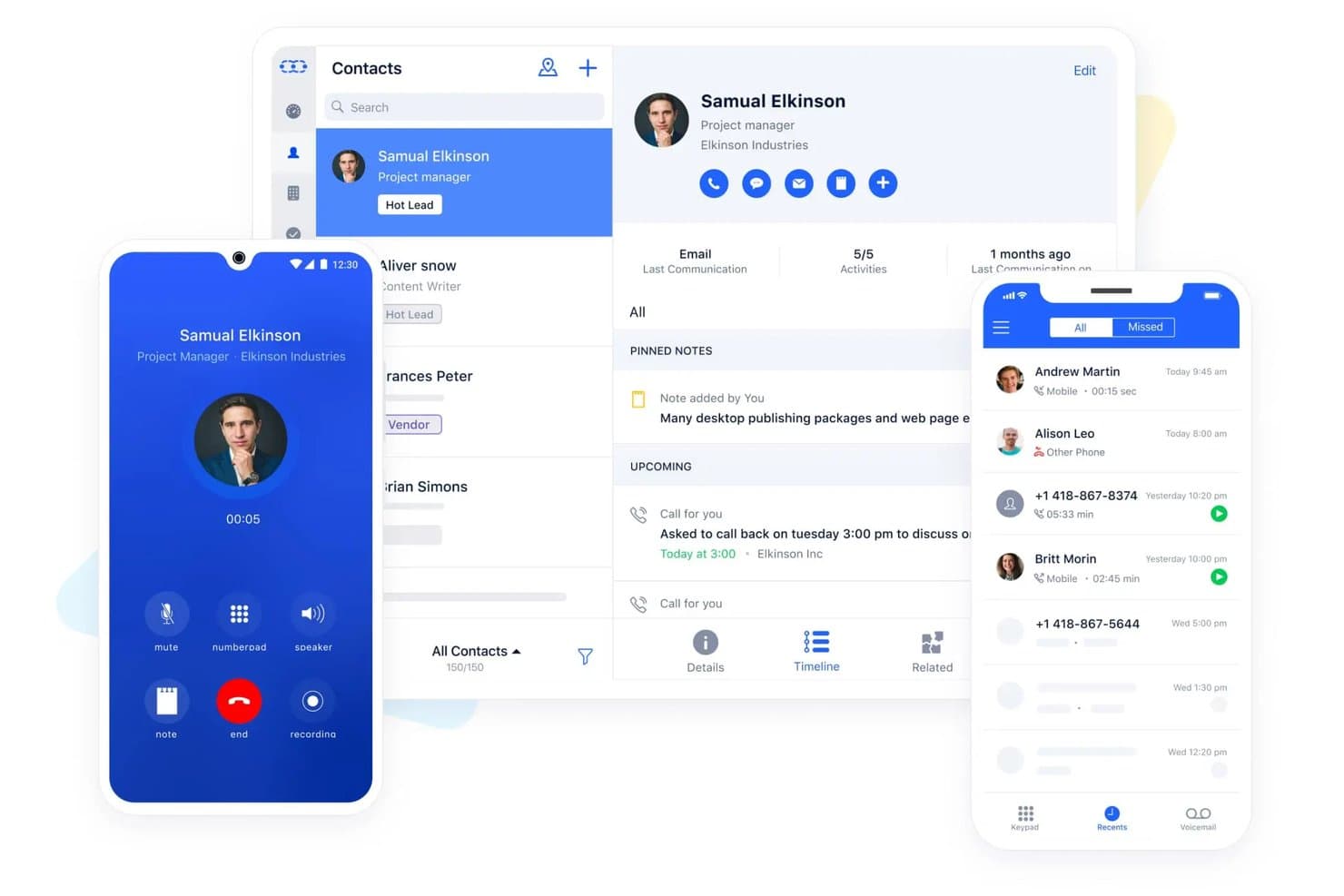
Salesmate centralizes contact management, calls, and activity tracking. Salesmate is a CRM platform built for SMB sales teams that combines pipeline management, built-in VoIP calling, SMS, lead scoring, and a native Mailchimp integration for contact sync and audience management.
Who Is Salesmate Best For?
Salesmate fits SMB sales teams that want calling, SMS, and Mailchimp contact sync built into one affordable CRM without stitching together a separate tool for each.
Why I Picked Salesmate
I've included Salesmate in my top picks because it's one of the few SMB CRMs that bundles calling, SMS, and a native Mailchimp integration into a single platform without requiring a patchwork of separate tools. I particularly like its lead scoring engine, which lets you auto-route high-scoring contacts into specific Mailchimp audiences based on CRM field updates and tags. Pair that with Smart Flow automation triggering list changes off deal stage updates, and you get a tighter sales-to-marketing loop than most tools at this price point can offer.
Salesmate Key Features
- Two-way email sync: Connects Gmail, Outlook, Exchange, Yahoo, and IMAP accounts to automatically log emails against the correct contact, company, or deal record.
- Smart Flow automation builder: A no-code visual workflow tool that triggers actions across contacts, deals, and subscription preferences based on CRM field changes or deal stage updates.
- Built-in revenue attribution: Links closed revenue to specific campaigns and touchpoints using multi-touch attribution models, including first-touch, last-touch, linear, and time-decay.
- Automation Journeys add-on: A drag-and-drop email campaign builder with A/B testing, audience segmentation, and recipient-level performance analytics, available as an add-on on any plan.
Salesmate Integrations
Salesmate lists 40+ native integrations, including Mailchimp, ActiveCampaign, AWeber, Brevo, and HubSpot Operations Hub. It also supports Sync with Sales for bidirectional Mailchimp connectivity and Zapier.
Pros and Cons
Pros:
- Power Dialer and AI tools for sales teams
- Lead scoring and pipeline automation included
- Bundles built-in calling, SMS, and Mailchimp sync
Cons:
- Automation executions limited by monthly credits
- Mailchimp engagement data sync unproven
Learn more about Salesmate: Best for contact-based pricing with Mailchimp sync
- 15-day free trial
- From $19.99/month per 1,000 contacts
Visit WebsiteCustomer Rating:4.4/5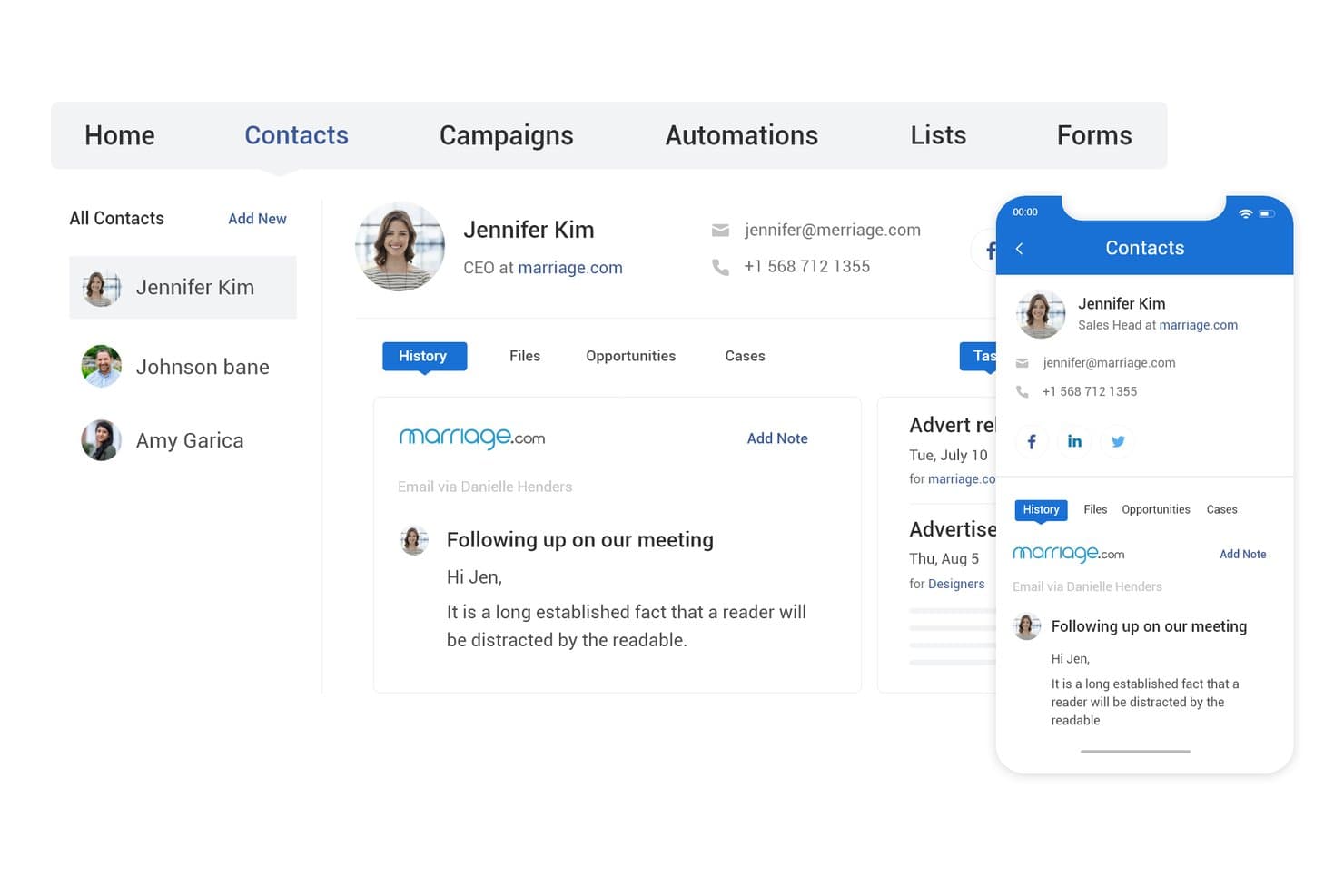
BIGContacts centralizes contact details, history, and email activity in one view. BIGContacts is a contact-based CRM with built-in email marketing, visual pipeline tracking, workflow automation, and a native Mailchimp integration that syncs contacts, tags, and campaign engagement data bidirectionally.
Who Is BIGContacts Best For?
BIGContacts is a strong fit for SMB teams that need an easy-to-use CRM with built-in email marketing and a direct Mailchimp sync, without paying per seat.
Why I Picked BIGContacts
BIGContacts earns its spot on my list because its contact-based pricing model means you can add your entire sales and marketing team without watching costs balloon. I especially like how Mailchimp campaign data, including opens, clicks, and bounces, flows directly into each contact's activity timeline, so I can trigger drip sequences based on real engagement. The AI pipeline tracker flags stalled deals and surfaces missed opportunities, which ties CRM activity back to marketing performance in a way that's actually actionable.
BIGContacts Key Features
- Contact-based pricing: All paid plans charge per contact stored, not per user, so your entire team can access the CRM without incremental seat costs.
- AI Campaign Designer: Generates email campaigns from your stated goals and audience inputs directly inside the platform.
- Workflow automation engine: Triggers tasks, reminders, and email sequences based on pipeline stage, contact tags, or activity events.
- 100+ built-in reports: Pre-built sales and campaign reports with on-demand AI summaries, plus a custom report builder for tailored views.
BIGContacts Integrations
BIGContacts offers documented native integrations with Mailchimp, Microsoft Outlook, Google Workspace, QuickBooks, HubSpot, and Shopify. It also supports API-based custom integrations and Zapier.
Pros and Cons
Pros:
- AI-powered tools for pipeline and reporting
- Two-way Mailchimp sync with campaign activity triggers
- Unlimited users with no per-seat fees
Cons:
- Mailchimp connector not officially Mailchimp-certified
- No automated contact deduplication feature
Learn more about BIGContacts: Best for sales pipeline management
- Free 14-day trial + free demo available
- From $25/user/month (billed annually)
Visit WebsiteCustomer Rating:4.4/5
Pipeline CRM is a user-friendly customer relationship management software focused on simplifying sales processes and enhancing team productivity. Pipeline CRM is a sales CRM platform designed to help sales teams manage their sales pipelines effectively. It excels in sales pipeline management by offering customizable list views, deal profiles, and email campaign tracking.
Why I picked Pipeline CRM: Pipeline CRM’s sales pipeline management capabilities help it to stand out from other CRM tools. Its intuitive interface and customizable features make it ideal for sales teams looking to streamline their processes. Additionally, the software provides detailed insights and easy-to-use tools that help sales teams track and close deals efficiently.
Standout features & integrations:
Features include customizable deal stages, sales forecasting, and email campaign tracking. The platform also provides unlimited file storage and user permissions to manage team access.
Integrations include popular tools such as Gmail, QuickBooks, Mailchimp, Zapier, Google Calendar, Outlook, Slack, Xero, HubSpot, and Asana.
Pros and Cons
Pros:
- Unlimited file storage
- Detailed sales forecasting
- Customizable deal stages
Cons:
- Limited mobile app features
- Manual updates for unsubscribed contacts
Learn more about Pipeline CRM: Best for customizable CRM solutions
- Free trial available
- From $65/month (billed annually)
Visit WebsiteCustomer Rating:4/5
Maximizer is a strong customer relationship management tool offering advanced features for contact management, sales automation, and customer support. Maximizer is a CRM software designed to help businesses monitor and coach their sales teams, using leading indicators to drive sales performance. It’s best for customizable CRM solutions due to its ability to tailor the CRM to specific business needs, ensuring a personalized and effective customer relationship management experience.
Why I picked Maximizer: Maximizer stands out with its high level of customization, allowing businesses to configure the CRM to their unique requirements without needing development skills. This flexibility makes it different from other CRMs that often require extensive customization efforts. Additionally, the software offers a range of industry-specific editions and features that can be tailored to fit various business processes and goals.
Standout features & integrations:
Features include customizable profile views, detailed activity timeline, task and notification management, lead handling and separation, dynamic sales pipeline, an AI-powered sales playbook, reporting and analytics, and mobile app for CRM access.
Integrations include Mailchimp, Zapier, Microsoft Outlook, QuickBooks, Microsoft 365, Google Workspace, Slack, Dropbox, PandaDoc, and LinkedIn.
Pros and Cons
Pros:
- Comprehensive reporting and analytics
- Industry-specific editions
- Highly customizable
Cons:
- Potential user interface lag
- Mobile application limitations
Learn more about Maximizer: Best for simple and effective contact management
- 14-day free trial + free plan available
- From $18/user/month (billed annually)

Capsule is a user-friendly customer relationship management tool designed for managing contacts, sales pipelines, and customer interactions efficiently. Capsule is a versatile software designed to streamline contact management and enhance business efficiency. It’s best for simple and effective contact management due to its user-friendly interface and comprehensive features that allow businesses to manage contacts, sales pipelines, and tasks efficiently.
Why I picked Capsule: Capsule provides a certain simplicity and effectiveness in managing contacts, which makes it stand out from other CRM tools. Its intuitive design and essential features make it ideal for businesses looking to organize their contacts and streamline their sales processes. Overall, the software offers a straightforward approach to CRM without overwhelming users with unnecessary complexity.
Standout features & integrations:
Features include contact management, email marketing, task and calendar management, sales pipeline tracking, sales analytics, project management, workflow automation, and AI content assistance.
Integrations include Mailchimp, QuickBooks, Gmail, Outlook, Xero, Zapier, FreshBooks, WhatsApp, FreeAgent, and Microsoft 365.
Pros and Cons
Pros:
- Extensive integrations
- Comprehensive contact management
- User-friendly interface
Cons:
- Limited customization options
- Infrequent software updates
Learn more about Capsule: Best for inbound marketing and sales teams
- Free plan available
- From $20/user/month
Visit WebsiteCustomer Rating:4.4/5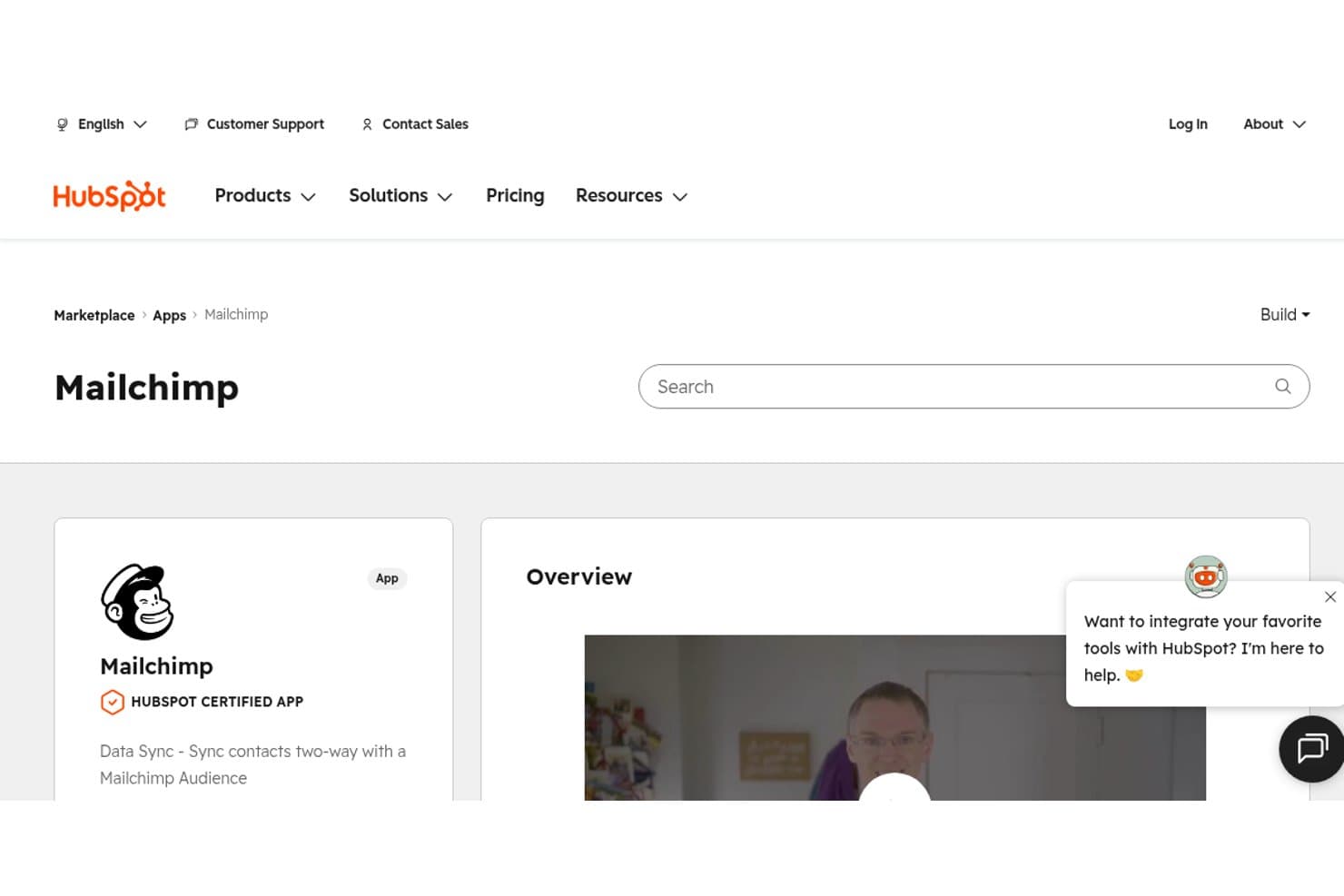
HubSpot's Marketplace shows Mailchimp as a certified app for two-way contact sync. HubSpot is a CRM platform that connects contact management, sales pipeline tracking, deal automation, and marketing tools—with two native Mailchimp connectors for contact sync and campaign activity logging.
Who Is HubSpot Best For?
HubSpot works best for inbound-focused sales and marketing teams that want contact management, pipeline tracking, and Mailchimp engagement data in one place.
Why I Picked HubSpot
HubSpot earns its spot on my shortlist because it's the only CRM here that ships two vendor-maintained Mailchimp connectors out of the box: one for contact sync and one that pulls campaign activity directly onto the contact timeline. I love that a sales rep can open a contact record and immediately see which Mailchimp emails that person opened or clicked, without leaving HubSpot. Pair that with lifecycle stage tracking and customizable pipelines, and inbound marketing and sales teams get a genuinely unified view of how contacts move from subscriber to closed deal.
HubSpot Key Features
- Lifecycle stage tracking: Automatically moves contacts through predefined stages—from Subscriber to Evangelist—based on CRM activity and engagement signals.
- Customizable deal pipelines: Build and manage up to 15 pipelines on Starter (unlimited on Professional and Enterprise) with drag-and-drop deal cards and stage-based automation.
- Rule-based contact scoring: Assign positive and negative scores to contacts based on properties and behaviors to help sales teams prioritize outreach.
- Workflow automation: Trigger automated actions—such as task creation, deal updates, or contact property changes—based on CRM events or data conditions.
HubSpot Integrations
HubSpot offers 2,000+ marketplace integrations, including Mailchimp Data Sync, Mailchimp Campaign Sync, Salesforce, Google Ads, Shopify, Gmail, and Outlook. It also supports custom integrations through its API and connects with Zapier.
Pros and Cons
Pros:
- Handles both inbound marketing and sales workflows
- Offers two native Mailchimp sync connectors
- Shows Mailchimp campaign engagement on contact timelines
Cons:
- No native revenue attribution for Mailchimp emails
- Mailchimp custom field sync requires paid upgrade
Learn more about HubSpot: Best for Google Workspace integration
- Free trial + demo available
- From $23/user/month (billed annually)
Visit WebsiteCustomer Rating:4.5/5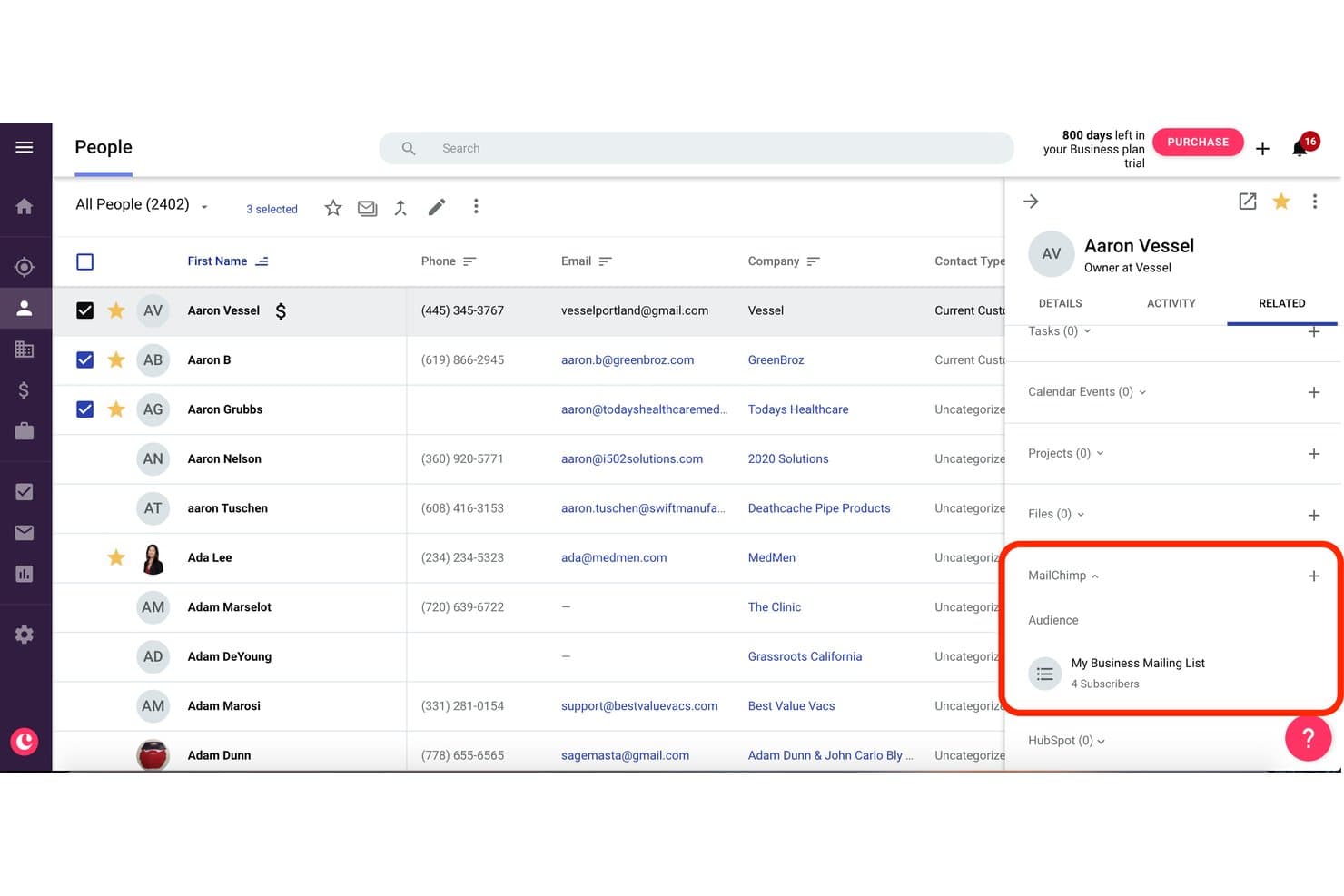
Copper displays Mailchimp audience subscribers linked to a contact record. Copper is a CRM built specifically for Google Workspace users, offering contact management, pipeline tracking, and a native two-way Mailchimp integration that syncs contacts, tags, and campaign engagement data directly into CRM records.
Who Is Copper Best For?
Copper is a strong fit for SMB sales teams running entirely on Google Workspace who want Mailchimp engagement data visible directly inside their CRM without a complex setup.
Why I Picked Copper
Copper earns its spot on my shortlist because it's the only CRM built natively around Google Workspace, and that distinction matters when your team lives in Gmail. I like how Mailchimp campaign activity, including opens, clicks, and bounces, surfaces directly on each contact record in Copper so sales reps can act on email engagement without switching tools. The two-way contact sync with configurable field and tag mapping also means your Mailchimp audience stays current with what's in your CRM automatically.
Copper Key Features
- Gmail auto-capture: Automatically logs emails sent and received in Gmail to the corresponding contact or deal record without manual entry.
- Custom field mapping: Lets you configure which CRM fields sync to Mailchimp, including default and custom fields, so your data stays consistent across both tools.
- Multiple customizable pipelines: Supports drag-and-drop visual pipelines with configurable stages and deal fields across different sales processes.
- Workflow automation: Triggers task creation, stage advancement, or follow-up actions automatically based on deal or contact activity on Professional and above.
Copper Integrations
Copper offers native integrations with Mailchimp, Gmail, Google Calendar, Google Contacts, Google Drive, Google Sheets, Looker Studio, Slack, QuickBooks, and DocuSign. It also provides a developer API for custom integrations and supports Zapier.
Pros and Cons
Pros:
- Gmail email activity auto-logged to records
- Two-way contact and field sync supported
- Mailchimp engagement visible on CRM contact records
Cons:
- Mailchimp data not linked to pipeline reporting
- Only one Mailchimp audience syncs at once
Learn more about Copper: Best for small to medium-sized businesses
- Free plan + 15-day free trial+ free demo available
- From $14/user/month (billed annually)
Visit WebsiteCustomer Rating:4.2/5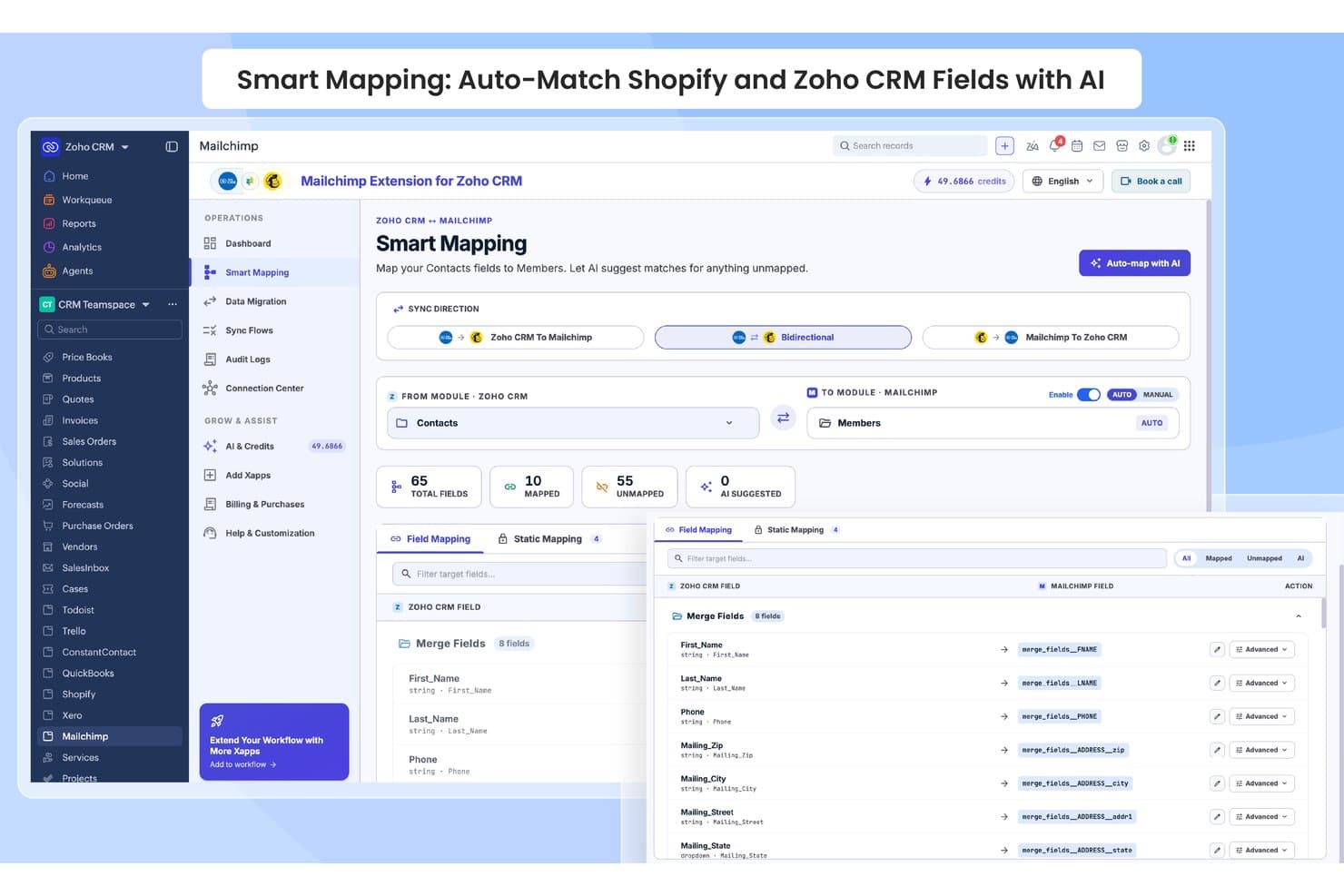
Zoho CRM auto-maps contact fields to Mailchimp members using AI. Zoho CRM is a sales-focused CRM platform with customizable pipelines, AI-powered lead scoring via Zia, contact and deal management, and a native vendor-built Mailchimp integration that syncs contacts bidirectionally and surfaces campaign engagement data directly on CRM records.
Who Is Zoho CRM Best For?
Zoho CRM is a strong fit for SMB sales teams that want Mailchimp campaign data surfaced directly on contact records without stitching together third-party middleware.
Why I Picked Zoho CRM
I picked Zoho CRM as one of the best because its native, vendor-built Mailchimp extension creates three dedicated modules directly inside the CRM: MailChimp, MailChimp Audiences, and MailChimp Segments/Tags. That structure means Mailchimp campaign data lives where your sales team already works. I also like how SalesSignals fires real-time alerts when a contact opens an email or updates their subscriber status, so reps can follow up while engagement is still fresh.
Zoho CRM Key Features
- Zia AI lead scoring: Zia analyzes CRM activity data to rank leads by conversion likelihood, helping reps prioritize outreach.
- Multi-pipeline management: Create separate pipelines for different products, regions, or teams, each with custom deal stages and weighted forecasting.
- Blueprint process automation: Map and enforce structured sales processes with stage-by-stage rules, required fields, and approval gates.
- SalesSignals alerts: Get real-time in-CRM notifications triggered by contact activity across connected channels, including Mailchimp subscriber updates.
Zoho CRM Integrations
Zoho CRM offers 45+ native Zoho integrations, including Zoho Campaigns, Zoho Analytics, Zoho Desk, Slack, Zoom, Shopify, and QuickBooks. It also supports 1,000+ Marketplace integrations plus REST APIs, webhooks, and other developer APIs for custom connections.
Pros and Cons
Pros:
- Dedicated Mailchimp modules for targeted workflows
- Real-time alerts for Mailchimp subscriber actions
- Mailchimp data surfaced directly on CRM records
Cons:
- No built-in revenue attribution for Mailchimp campaigns
- Mailchimp integration gated to Enterprise edition
 Best for revenue attribution across email and pipeline
- Free plan + 30-day free trial available
- From $25/user/month
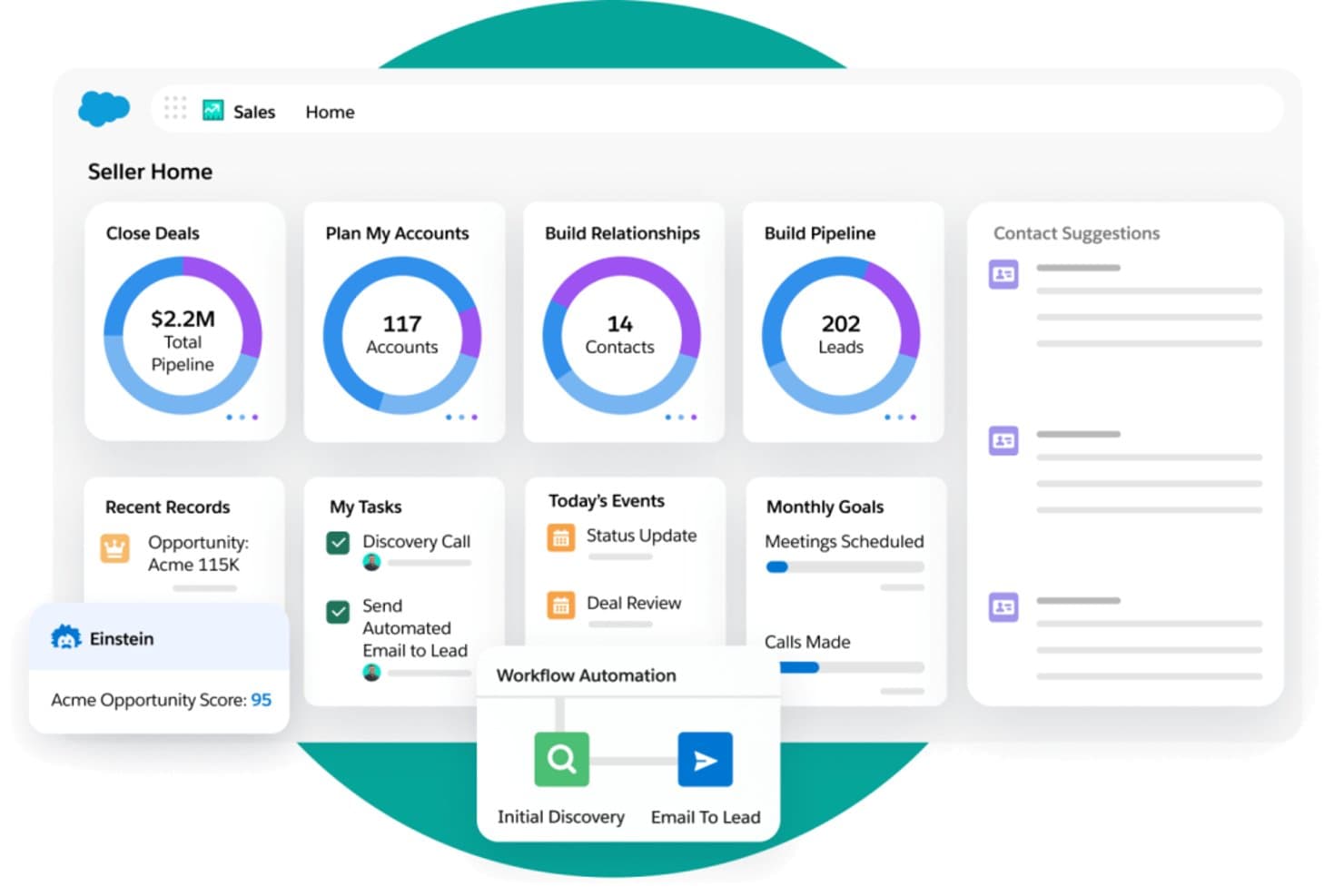
Salesforce Sales Cloud centralizes pipeline, leads, and tasks in one seller dashboard. Salesforce Sales Cloud is an enterprise CRM platform that combines pipeline management, contact and account tracking, AI-driven forecasting, and bi-directional Mailchimp integration to connect email engagement data directly to sales activity and revenue reporting.
Who Is Salesforce Sales Cloud Best For?
Salesforce Sales Cloud is the right fit for revenue operations teams at mid-market and enterprise companies that need to tie Mailchimp email engagement directly to pipeline activity and closed revenue.
Why I Picked Salesforce Sales Cloud
Salesforce Sales Cloud earns its spot on my shortlist because no other CRM closes the loop between Mailchimp engagement and closed revenue the way it does. Once the Beaufort 12 connector syncs opens, clicks, and unsubscribes back into Contact and Lead records, I can build native reports that trace a prospect's email engagement directly to an Opportunity and a closed-won amount. Einstein Lead Scoring can ingest those engagement signals to prioritize follow-up, and Revenue Intelligence surfaces the pipeline impact of specific campaigns.
Salesforce Sales Cloud Key Features
- Einstein Activity Capture: Automatically syncs emails and calendar events from Gmail or Outlook to the relevant Salesforce records, so reps spend less time on manual data entry.
- Bi-directional Mailchimp sync: The Beaufort 12 connector maps opens, clicks, bounces, and unsubscribes to Contact and Lead records in both directions.
- Salesforce Flow automation: Triggers updates based on pipeline stage changes, contact field edits, or engagement data to push contacts into the right Mailchimp audiences.
- Custom object field mapping: Maps any Salesforce field—including custom fields—to Mailchimp merge fields for precise audience segmentation.
Salesforce Sales Cloud Integrations
Salesforce Sales Cloud integrates with Mailchimp through Beaufort 12, plus Gmail, Outlook, Slack, Tableau, Snowflake, BigQuery, and Google Analytics. It also supports marketplace integrations through AppExchange and custom integrations through REST and SOAP APIs.
Pros and Cons
Pros:
- Supports rich audience segmentation with CRM data
- Bi-directional sync of contacts and activity
- Enables revenue attribution from Mailchimp campaigns
Cons:
- Sync is periodic, not real time
- Integration requires higher-priced Salesforce editions
Learn more about Salesforce Sales Cloud: 10Best for ERP-connected revenue and Mailchimp sync
SugarAI
- 30-day free trial (SugarChimp only)
- From $59/user/month (billed annually)
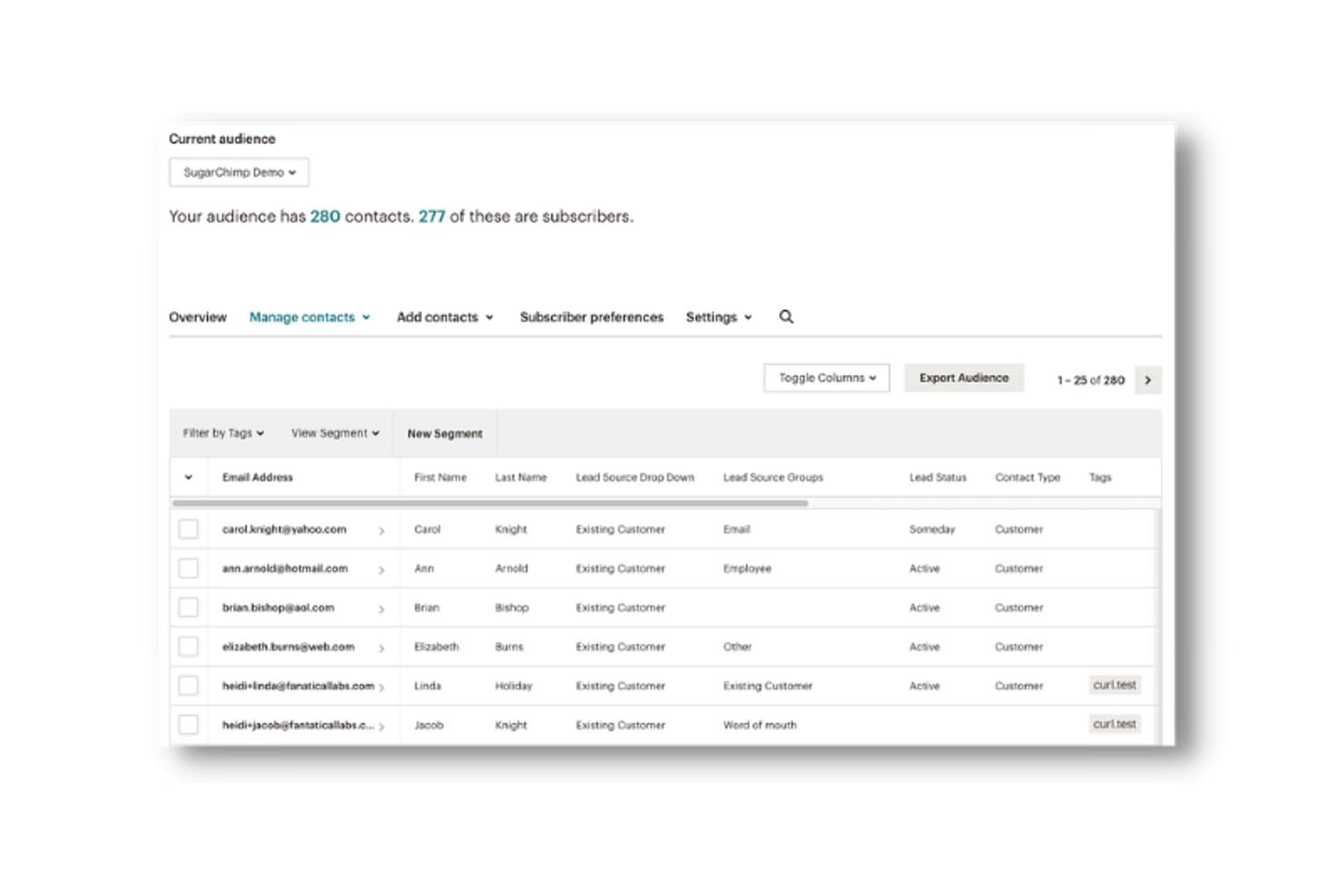
SugarAI syncs CRM contacts with Mailchimp audience subscriber data. SugarAI is a mid-market and enterprise CRM platform that combines pipeline management, AI-powered revenue intelligence, ERP connectivity, and Mailchimp sync via the SugarChimp integration.
Who Is SugarAI Best For?
SugarAI fits mid-market and enterprise B2B teams in manufacturing, distribution, or wholesale that need ERP-connected revenue intelligence alongside Mailchimp marketing workflows.
Why I Picked SugarAI
SugarAI earns its spot on my shortlist because of how its Sugar sales-i module connects directly with 180+ ERP systems to surface churn signals, cross-sell alerts, and reorder gaps alongside Mailchimp campaign data. I like that SugarChimp syncs contact engagement (opens, clicks, subscriber status) back into CRM records in real time, so sales reps see Mailchimp activity without leaving the platform. That combination of ERP-sourced buying intelligence and Mailchimp engagement context in one place is genuinely hard to replicate with most CRMs.
SugarAI Key Features
- SugarBPM workflow engine: A no-code automation tool that routes tasks, triggers alerts, and enforces stage-based actions across your sales process.
- Sugar Predict lead scoring: An AI-powered scoring model that ranks leads by conversion likelihood directly within your CRM records.
- Unlimited custom reporting: A report wizard that lets you build and save any number of custom reports and real-time pipeline dashboards.
- Custom module and field builder: A no-code configuration layer that lets you add custom modules, layouts, and fields to match your specific sales process.
SugarAI Integrations
SugarChimp by Fanatical Labs is a paid marketplace integration for bidirectional Mailchimp sync, campaign activity, and field mapping. Sugar sales-i connects to 180+ ERP systems, including SAP, Oracle, Epicor, and Sage, while SugarCRM also supports Gmail and Microsoft Outlook sync.
Pros and Cons
Pros:
- Unlimited custom sales and lifecycle reporting
- ERP-linked deal data visible alongside campaign stats
- Bi-directional Mailchimp sync with real-time updates
Cons:
- Minimum user requirement excludes smaller teams
- Mailchimp integration relies on third-party add-on
Learn more about SugarAI:
Annen CRM-programvare som integreres med Mailchimp
Nedenfor finner du en liste over ytterligere CRM-programmer som integreres med Mailchimp, og som jeg valgte ut. Selv om de ikke kom med blant de ti beste, er de fortsatt verdifulle og verdt å undersøke nærmere.
- 11BiginBest for SMB Mailchimp sync on a budget
- 12FreshsalesBest for AI-guided sales with Mailchimp list sync
- 13InsightlyBest for post-sale project handoff with Mailchimp sync
- 14monday AI WorkspaceBest for project management integration
- 15Creatio CRMBest for no-code workflow automation
- 16AttioBest for relationship-driven CRM
- 17PipedriveBest for visual Kanban-style pipelines
- 18TeamgateBest for data-driven sales insights
- 19ZendeskBest for customer support and ticketing
- 20Less Annoying CRMBest for small business simplicity
Relaterte vurderinger av CRM-programvare
Hvis du fortsatt ikke har funnet det du leter etter her, kan du se nærmere på disse verktøyene som er nært knyttet til alt-i-ett-CRM-systemer, og som vi har testet og vurdert.
- CRM-programvare
- Salgsprogramvare
- Programvare for kundeemnehåndtering
- Programvare for forretningsanalyse
- Programvare for kontraktshåndtering
- Inntektshåndteringssystem
How I Evaluate CRM Software Mailchimp Integration
I split my evaluation into baseline criteria every tool must meet—like true bi-directional sync and native integration—and differentiators like revenue attribution and audience routing logic.
Core Functionality (Table Stakes For This List)
When I'm selecting tools for my list, I rank each one on a scale from 0 (does not offer the functionality) to 5 (excels in this area) for each core functionality listed below. I then calculate the tool's total score into a percentage, using 65% as a benchmark to help assess its overall fit for the list.
- Contact Management: I need a centralized contact and account database with custom fields, lifecycle stages, and detailed activity history that goes beyond a simple name/email list.
- Pipeline & Deal Tracking: I look for visual sales pipelines with customizable stages, deal values, and opportunity management to effectively track revenue-generating activities.
- Sales Activity Logging: I require the platform to capture emails, calls, meetings, and tasks linked to contacts and deals to support sales workflows and reporting, preferably with automated logging.
- Native Mailchimp Integration: I prefer a pre-built integration maintained by the CRM vendor or Mailchimp itself, rather than relying on Zapier or generic middleware.
- Bi-Directional Data Sync: It’s essential that the sync moves contacts, list memberships, tags, and subscriber statuses in both directions, with configurable field mapping.
- Campaign Activity Sync: I want Mailchimp campaign engagement data—opens, clicks, bounces, unsubscribes—to be pulled into the CRM contact records and used for segmentation, automation, and revenue attribution.
Once I have a list of tools that meet the criteria, I consider what sets each platform apart.
Differentiating Factors (What Sets Vendors Apart)
Here's how I compare and contrast different vendors:
Standout Features
Revenue attribution reporting is the feature I weight most heavily—I want to see Mailchimp campaign engagement tied directly to closed-won deals, not just contact activity. Suppression and consent management matters just as much: I look for platforms where unsubscribes and bounce flags propagate automatically between systems, so compliance isn't a manual process. I also evaluate multi-audience routing logic, particularly for teams running separate nurture tracks across product lines or regions.
Beyond Features
Integration depth matters, but so does what surrounds it. I check whether the Mailchimp connector is included in the base plan or locked behind a higher tier—because that changes the real cost significantly. I also look at how each platform handles deduplication and conflict resolution when a contact exists across multiple Mailchimp audiences and CRM records simultaneously. For teams managing large GTM systems, audit logs and sync history visibility are just as important as the sync itself.
Slik velger du CRM-programvare som integreres med Mailchimp
Mens du går gjennom din egen unike prosess for valg av programvare, bør du ha følgende punkter i bakhodet:
- Integrasjonsmuligheter: Når du velger et CRM-system, må du sørge for at det har gode integrasjonsmuligheter med Mailchimp. Dette er viktig for dataoverføring og synkronisering mellom de to plattformene, slik at du kan sentralisere arbeidet med kunderelasjonshåndtering og e-postmarkedsføring.
- Funksjoner og funksjonalitet: Vurder funksjonene og funksjonaliteten i CRM-programvaren for å sikre at den oppfyller virksomhetens behov. Se etter funksjoner som kontaktadministrasjon, poengsetting av potensielle kunder, automatisering av arbeidsflyter samt rapportering og analyse, som er avgjørende for å håndtere kundeinteraksjoner og forbedre markedsføringskampanjene dine.
- Brukervennlighet: Velg et CRM-system som er brukervennlig og enkelt å implementere. Et komplekst CRM-system kan føre til lav brukeradopsjon og ineffektivitet, mens enkelhet sikrer at teamet ditt raskt kan lære seg og bruke CRM-systemet effektivt. Dette reduserer tiden som brukes på opplæring og øker den samlede produktiviteten.
- Prissetting og skalerbarhet: Vurder kostnadene for CRM-programvaren og hvor skalerbar den er, for å sikre at den passer innenfor budsjettet ditt og kan vokse med virksomheten. I tillegg er programvarens evne til å skalere viktig, siden den gjør det unødvendig å gjennomføre en fullstendig systemoverhaling i fremtiden.
Trender innen CRM-programvare som integreres med Mailchimp
Her er noen trender jeg har lagt merke til innen CRM-programvare som integreres med Mailchimp, samt hva de kan bety for fremtiden. Jeg har gått gjennom utallige produktoppdateringer, pressemeldinger og utgivelseslogger for å trekke frem de viktigste innsiktene.
- AI-drevet kundeinnsikt: AI brukes til å analysere kundedata fra Mailchimp og gi dypere innsikt. Dette hjelper virksomheter med å tilpasse markedsføringsstrategiene sine mer effektivt og forbedre beslutningstakingen.
- Automatiserte utløsere for arbeidsflyter: Automatiserte utløsere blir stadig mer avanserte og kan nå starte komplekse arbeidsflyter basert på kundeatferd som spores i Mailchimp. Denne trenden er viktig for å forbedre effektiviteten.
- Forbedrede personvernfunksjoner: Nye personvernfunksjoner integreres for å overholde globale regelverk. Disse funksjonene sikrer at kundedata fra Mailchimp håndteres på en sikker måte, noe som er viktig for å opprettholde tillit og etterlevelse.
- Flerkanals kampanjehåndtering: CRM-systemer håndterer nå kampanjer på tvers av flere kanaler, ikke bare e-post. Denne integrasjonen med Mailchimp legger til rette for en mer helhetlig markedsføringsstrategi og utvider rekkevidden til markedsføringsinnsatsen.
- Analysepaneler i sanntid: Sanntidsanalyse blir stadig mer vanlig i CRM-programvare. Disse panelene henter data fra Mailchimp for å gi oppdatert innsikt, noe som er viktig for å kunne ta beslutninger i tide.
Det er viktig for virksomheter som ønsker å opprettholde et konkurransefortrinn i dagens digitale landskap, å holde seg oppdatert på disse trendene. Ved å utnytte disse integrasjonene kan virksomheter effektivisere markedsføringsinnsatsen, forbedre kundeengasjementet og gjennomføre mer målrettede kampanjer. Dette fører til bedre kundebevaring og økte inntekter.
Hva er CRM-programvare som integreres med Mailchimp?
Programvare for kunderelasjonshåndtering (CRM) brukes ofte av virksomheter til å administrere og analysere kundeinteraksjoner og kundedata gjennom hele kundelivssyklusen. Når den integreres med Mailchimp, kan virksomheter synkronisere kundedata, automatisere e-postmarkedsføringskampanjer og forbedre kundegrupperingen.
Funksjoner i CRM-programvare som integreres med Mailchimp
Når du velger CRM-programvare som integreres med Mailchimp, er det viktig å forstå hvilke funksjoner som best støtter markedsføringen og arbeidet med kunderelasjonshåndtering. Her er de viktigste funksjonene du bør se etter i CRM-programvare som integreres med Mailchimp:
- Markedsautomatisering: Automatisering av markedsføringsaktiviteter kan spare tid og redusere feil. Denne funksjonen lar deg planlegge og administrere kampanjer, slik at markedsføringsarbeidet ditt blir konsekvent og skjer til rett tid.
- Målgruppesegmentering: Segmentering av målgruppen basert på ulike kriterier bidrar til å lage målrettede markedsføringskampanjer. Dette sikrer at budskapene dine er relevante for ulike kundegrupper, noe som forbedrer engasjementet og konverteringsratene.
- Kontaktadministrasjon: Effektiv kontaktadministrasjon er avgjørende for å holde kundeinformasjonen oppdatert. Denne funksjonen hjelper deg med å organisere og få tilgang til kundedata, noe som gjør det enklere å tilpasse interaksjoner og forbedre kunderelasjonene.
- Rapportering & analyse: Gode rapporterings- og analysefunksjoner lar deg følge med på resultatene til markedsføringskampanjene dine. Denne funksjonen bidrar til å forstå kundeatferd og ta datadrevne beslutninger for å optimalisere fremtidige kampanjer.
- Integrasjonsmuligheter: Muligheten til å integrere med andre programvareverktøy er avgjørende for en sømløs arbeidsflyt. Denne funksjonen sikrer at du kan koble CRM-systemet ditt til ulike tredjepartsapplikasjoner, noe som forbedrer virksomhetens samlede effektivitet.
- Tilpasning: Alle virksomheter har unike behov, og tilpasningsmuligheter lar deg skreddersy CRM-systemet etter dine spesifikke krav. Denne funksjonen omfatter tilpassbare felt, skjemaer og arbeidsflyter for bedre håndtering av kundedataene dine.
- Mobiltilgang: Mobiltilgang til CRM-systemet sikrer at du kan administrere kunderelasjoner mens du er på farten. Denne funksjonen er spesielt nyttig for salgsteam som trenger tilgang til kundeinformasjon mens de er ute og reiser.
- Automatisering av kundeservice: Automatisering av kundeserviceoppgaver, som oppsett av chatboter eller supportsystemer, bidrar til å opprettholde høy kundetilfredshet. Denne funksjonen sikrer at kundehenvendelser håndteres raskt og effektivt.
- Datasikkerhet: Det er avgjørende å sikre kundedata. Denne funksjonen omfatter kryptering, tilgangskontroller og samsvar med personvernregler for å beskytte sensitiv informasjon.
- Brukervennlighet: Et brukervennlig grensesnitt er avgjørende for høy brukeradopsjon. Denne funksjonen sikrer at CRM-systemet er enkelt å navigere i og bruke, noe som reduserer læringskurven og øker produktiviteten.
Ved å velge riktig CRM-programvare som integreres med Mailchimp, kan du forbedre markedsføringen og arbeidet med kunderelasjoner betydelig. Ved å fokusere på funksjoner som markedsføringsautomatisering, målgruppesegmentering, kontaktadministrasjon samt gode rapporterings- og analysefunksjoner kan du sikre at CRM-systemet støtter virksomhetens mål på en effektiv måte.
Fordeler med CRM-programvare som integreres med Mailchimp
I dagens konkurransepregede forretningsmiljø kan bruk av de riktige verktøyene ha stor betydning for hvor effektivt virksomheter administrerer kunderelasjoner og markedsføringsarbeid. Her er noen av de viktigste fordelene du kan oppleve ved å bruke CRM-programvare som integreres med Mailchimp:
- Forbedret kundesegmentering: Ved å integrere CRM med Mailchimp kan virksomheter opprette mer presise kundesegmenter basert på detaljerte CRM-data, noe som fører til mer målrettede og effektive markedsføringskampanjer.
- Automatiserte markedsføringsarbeidsflyter: Integrasjonen muliggjør verktøy for markedsføringsautomatisering, reduserer manuelle oppgaver og sikrer rettidig og konsekvent kommunikasjon med kundene, noe som kan forbedre engasjementet og konverteringsratene.
- Sentralisert databehandling: Når CRM og Mailchimp kombineres, samles kundedataene på ett sted. Dette gir én pålitelig kilde til informasjon, forbedrer datanøyaktigheten og bidrar til bedre informerte forretningsbeslutninger.
- Bedre kundeinnsikt: Integrasjonen gir dypere innsikt i kundeatferd og preferanser ved å kombinere CRM-data med analysene i Mailchimp, slik at virksomheter kan tilpasse strategiene sine bedre til kundenes behov.
- Bedre samordning mellom salg og markedsføring: Integrering av disse verktøyene sikrer at salgs- og markedsføringsteamene er samkjørte, med felles tilgang til kundedata og nøkkeltall for kampanjeresultater. Dette legger til rette for bedre samarbeid og mer helhetlige strategier.
Integrering av CRM-programvare med Mailchimp gir en rekke fordeler som kan forbedre måten virksomheter administrerer kunderelasjoner og markedsføringsarbeid på, betydelig. Ved å utnytte disse verktøyene sammen kan virksomheter oppnå større effektivitet, bedre kundeengasjement og til syvende og sist bedre forretningsresultater.
Kostnader & priser for CRM-programvare som integreres med Mailchimp
Nedenfor finner du en tabell med prisplaner og vanlige funksjoner for CRM-programvare som integreres med Mailchimp, slik at du kan ta en velinformert beslutning.
Sammenligningstabell for prisplaner for CRM-programvare som integreres med Mailchimp
| Plantype | Gjennomsnittspris | Vanlige funksjoner |
| Gratisabonnement | $0 | Grunnleggende kontaktadministrasjon, e-postsporing, begrensede integrasjoner og oppgavehåndtering |
| Grunnleggende abonnement | $5 - $20/bruker/måned | Håndtering av salgspipeline, e-postmaler, rapportering & analyse og kundeemnehåndtering |
| Standardabonnement | $14 - $29/bruker/måned | Automatisering av arbeidsflyter, AI-assistent, tilpassede kontrollpaneler og salgsprognoser |
| Profesjonelt abonnement | $39 - $55/bruker/måned | Avansert automatisering, flere salgspipeliner, salgssekvenser og tilpassede rapporter |
| Bedriftsabonnement | $69 - $175/bruker/måned | Ubegrensede salgspipeliner, AI-innsikt, avansert analyse og prosjektstyring |
En oversikt over plantyper, kostnader og funksjoner for CRM-programvare som integreres med Mailchimp.
Når du velger et CRM-system som integreres med Mailchimp, bør du ta hensyn til virksomhetens størrelse, budsjett og spesifikke behov. Det er også viktig å alltid vurdere hvor skalerbart og brukervennlig CRM-systemet er, for å sikre at det samsvarer med virksomhetens langsiktige mål.
Vanlige spørsmål om CRM-programvare som integreres med Mailchimp
Her er noen vanlige spørsmål jeg har fått om CRM-programvare som integreres med Mailchimp.
Hvor enkelt er det å sette opp integrasjonen mellom et CRM-system og Mailchimp?
Hvor enkelt det er å sette opp integrasjonen mellom et CRM-system og Mailchimp, varierer avhengig av hvilken CRM-programvare du velger. De fleste moderne CRM-systemer tilbyr en enkel integrasjonsprosess, som ofte bare innebærer noen få trinn for å koble sammen de to plattformene. Integrasjonen mellom HubSpot og Mailchimp kan for eksempel settes opp direkte i HubSpot-grensesnittet ved å følge en enkel trinnvis veiledning. Zoho CRM har på samme måte en innebygd integrasjonsmodul for Mailchimp, noe som gjør prosessen rask og problemfri.
Kan jeg automatisere e-postkampanjer gjennom integrasjonen mellom CRM-systemet og Mailchimp?
Ja, en av de viktigste fordelene ved å integrere et CRM-system med Mailchimp er muligheten til å automatisere e-postkampanjer. Denne integrasjonen lar deg sette opp automatiserte arbeidsflyter basert på kundedata og kundeadferd som spores i CRM-systemet. Du kan for eksempel automatisk utløse velkomstmeldinger, oppfølgingssekvenser eller kampanjer for å engasjere kunder på nytt når bestemte betingelser er oppfylt. Denne automatiseringen bidrar til å opprettholde jevn kommunikasjon med målgruppen uten manuell inngripen.
Hvilken type data kan synkroniseres mellom et CRM-system og Mailchimp?
Typen data som vanligvis kan synkroniseres mellom et CRM-system og Mailchimp, omfatter kontaktinformasjon (som navn, e-postadresser og telefonnumre), demografiske opplysninger, kjøpshistorikk og engasjementsmålinger (som åpninger og klikk på e-post). Denne synkroniseringen sikrer at begge plattformene har de mest oppdaterte og nøyaktige dataene, noe som muliggjør mer effektive markedsførings- og salgsstrategier. Noen integrasjoner tillater også synkronisering av egendefinerte felt og tagger, noe som gir enda mer detaljert kontroll over dataene dine.
Hvordan forbedrer integrasjonen mellom CRM-systemet og Mailchimp håndteringen av kunderelasjoner?
Integrasjon av et CRM-system med Mailchimp forbedrer håndteringen av kunderelasjoner ved å gi en mer helhetlig oversikt over kundeinteraksjoner og -atferd. Denne integrasjonen gir bedre segmentering og målretting, noe som fører til mer personlig og relevant kommunikasjon. Den bidrar også til å spore hvor effektive e-postkampanjene er og forstå kundenes preferanser, noe som kan danne grunnlag for fremtidige markedsføringsstrategier. Samlet sett fører dette til økt kundetilfredshet og lojalitet ved å sikre at kommunikasjonen er tidsriktig, relevant og personlig.