

CRM-programvare med tekstmeldinger er en verdifull ressurs for alle virksomheter. Med riktig programvare kan team forbedre kommunikasjonseffektiviteten og håndtere kunderelasjoner mer effektivt. Det kan imidlertid være utfordrende å finne riktig CRM-programvare for tekstmeldinger, særlig fordi det finnes mange tilgjengelige alternativer.
Med utgangspunkt i min erfaring med programvare for virksomhets- og prosjektstyring testet og sammenlignet jeg flere av de beste tilgjengelige CRM-programvarene med tekstmeldinger. Deretter samlet jeg resultatene i grundige anmeldelser for å hjelpe deg med å finne den beste programvaren for dine unike behov.
Why Trust Our Software Recommendations
6,700+
Reviews
20
Industry experts
16+
Evaluation factors
14
Years
Our reviews reflect our independent judgment—not a sales pitch. Learn how we stay transparent.
For this guide, we evaluated tools using hands-on testing and independent research, scoring tools using our selection criteria.
Our reviews reflect our human editorial judgment, not a sales pitch.
Sammenligningstabell: CRM-programvare med tekstmeldinger
| Tool | Best For | Trial Info | Price | ||
|---|---|---|---|---|---|
| 1 | Best for enterprise SMS across sales and marketing | Free trial available | From $65/user/month (billed annually) | Website | |
| 2 | Best for AI-drafted SMS across lifecycle journeys | 14-day free trial + free demo available | From $15/month (billed annually) | Website | |
| 3 | Best for automating SMS client follow-up sequences | 14-day free trial | From $299/month | Website | |
| 4 | Best for multi-cloud SMS automation at scale | 30-day free trial | From $25/user/month | Website | |
| 5 | Best for financial services texting and dialing | Free demo available | Pricing upon request | Website | |
| 6 | Best for pipeline-triggered SMS automation | 15-day free trial | From $23/user/month (billed annually) | Website | |
| 7 | Best for omnichannel lifecycle marketing SMS | Free plan available | From $20/user/month | Website | |
| 8 | Best for marketing agency client texting | 14-day free trial | From $97/month | Website | |
| 9 | Best for outbound SMS and call teams | 14-day free trial + free demo available | From $9/user/month (billed annually) | Website | |
| 10 | Best for property management team texting | Free demo available | From $65/user/month (billed annually) | Website |


Anmeldelser av den beste CRM-programvaren med tekstmeldinger
Nedenfor finner du mine detaljerte sammendrag av den beste CRM-programvaren med tekstmeldinger som kom med på kortlisten min. Anmeldelsene mine undersøker grundig de viktigste funksjonene, fordelene og ulempene, integrasjonene og de ideelle bruksområdene for hvert verktøy, slik at du kan finne det beste alternativet.
 Best for enterprise SMS across sales and marketing
- Free trial available
- From $65/user/month (billed annually)
Visit WebsiteCustomer Rating:4.6/5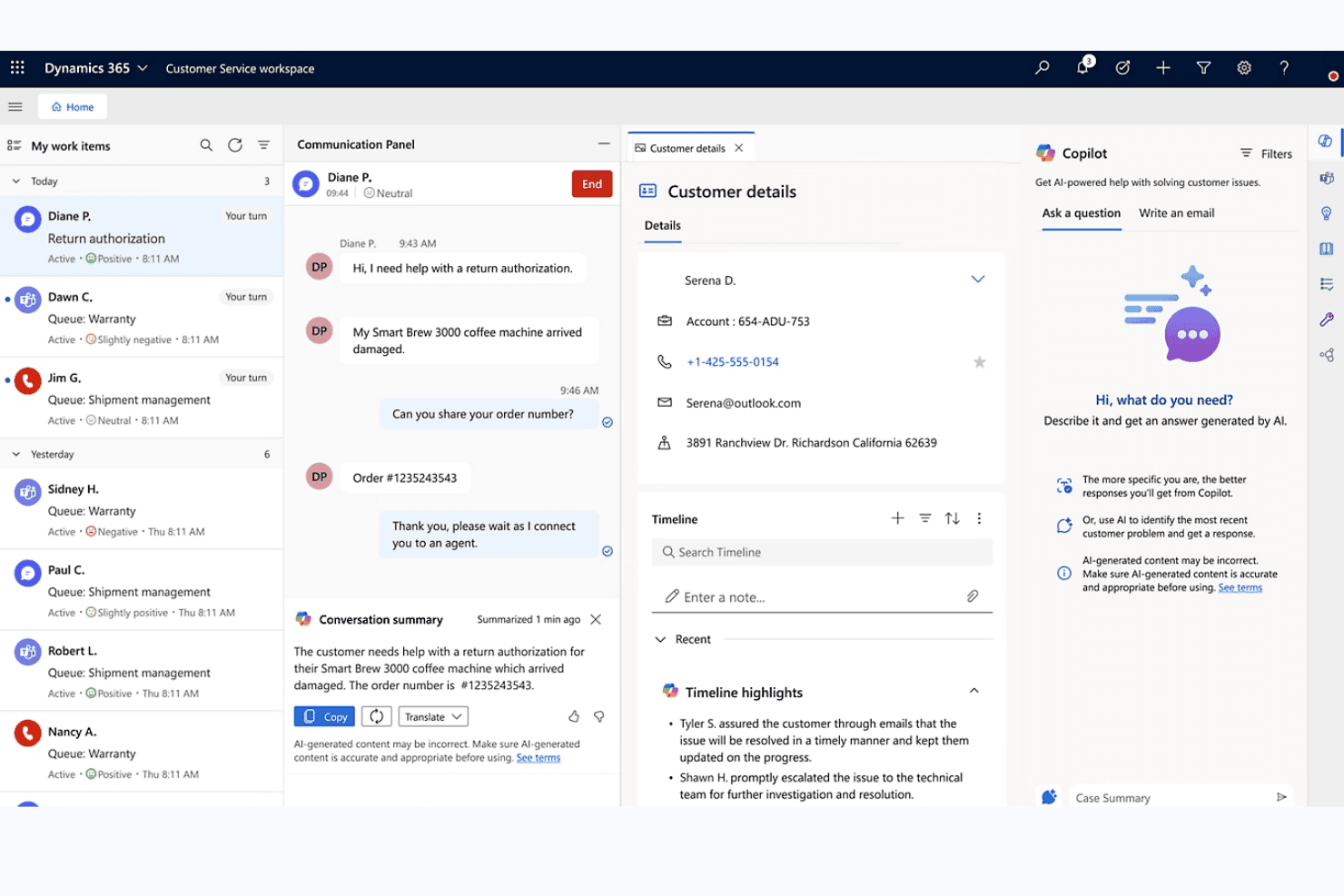
Microsoft Dynamics 365 unifies chat, customer details, and AI Copilot for agents. Microsoft Dynamics 365 is an enterprise CRM platform that spans sales, customer service, contact center, and marketing modules, each with native SMS capabilities for two-way messaging, automated text journeys, and conversation logging across contact and pipeline records.
Who Is Microsoft Dynamics 365 Best For?
Microsoft Dynamics 365 is a strong fit for enterprise organizations that need SMS woven across sales, marketing, and service teams within a single, deeply integrated Microsoft ecosystem.
Why I Picked Microsoft Dynamics 365
I picked Microsoft Dynamics 365 because no other platform on this list spans enterprise SMS across sales, marketing, and service with this level of depth. I'm particularly impressed by Customer Insights – Journeys, which lets you build SMS workflows with keyword-triggered branching (think: a contact replies "YES" and immediately enters a different journey path), conditional content logic, and per-contact-point consent enforcement. Paired with Sales sequences that support SMS steps alongside calls and emails, your reps and marketers are working from the same CRM without duplicating pipeline data.
Microsoft Dynamics 365 Key Features
- Compliance profile enforcement: Applies restrictive, nonrestrictive, or disabled consent models per contact point to control who receives SMS messages.
- Power Automate SMS triggers: Fires text messages automatically based on CRM events like form fills, deal stage changes, or case creation.
- Conversation reassignment: Moves SMS threads between record types—such as from an Account to a Contact—directly within the conversation pane.
- A/B testing in journeys: Tests SMS message variants within Customer Insights – Journeys to compare performance across audience segments.
Microsoft Dynamics 365 Integrations
Microsoft Dynamics 365 offers native integrations across the Microsoft ecosystem, including Microsoft 365, Azure Communication Services, Power Automate, Power BI, Teams, Outlook, and LinkedIn Sales Navigator. It also supports Twilio, Infobip, and AppSource marketplace integrations, plus APIs and custom connectors.
Pros and Cons
Pros:
- Unified sales, service, and marketing texting
- Advanced SMS automation in marketing journeys
- Logs SMS to CRM across all record types
Cons:
- No shared team SMS inbox
- SMS requires third-party provider configuration
Learn more about Microsoft Dynamics 365: Best for AI-drafted SMS across lifecycle journeys
- 14-day free trial + free demo available
- From $15/month (billed annually)
Visit WebsiteCustomer Rating:4.4/5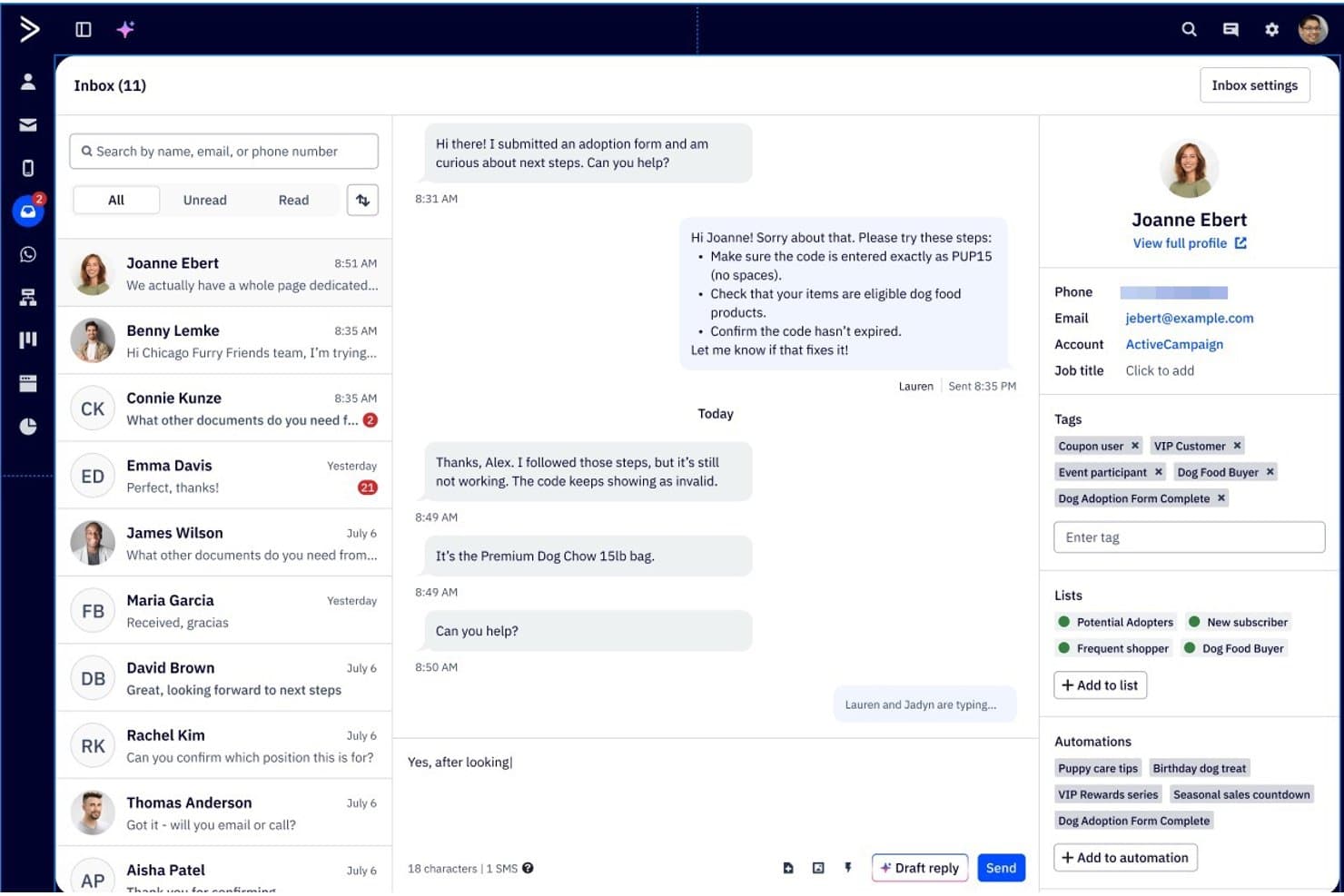
ActiveCampaign lets users manage SMS conversations with full contact details. ActiveCampaign is a marketing automation and CRM platform that combines email, SMS, and WhatsApp messaging with a visual automation builder, two-way SMS inbox, AI-assisted message drafting, and lifecycle journey workflows.
Who Is ActiveCampaign Best For?
ActiveCampaign is a strong fit for lifecycle marketing teams that need AI-assisted SMS built into multi-step, cross-channel automation journeys.
Why I Picked ActiveCampaign
ActiveCampaign earns its spot on my shortlist because its Active Intelligence AI layer does something I haven't seen matched elsewhere: it drafts SMS replies based on your brand kit and FAQs, summarizes ongoing conversations, and builds full multi-step lifecycle journeys from a plain-language prompt. I love that SMS reply triggers let automations branch mid-sequence based on what a contact actually responds, keeping lifecycle flows dynamic rather than linear. The two-way SMS inbox also supports team access with group permissions, so multiple people can manage conversations without stepping on each other.
ActiveCampaign Key Features
- Broadcast SMS campaigns: Send bulk SMS messages to segmented contact lists, with merge fields for personalization and link tracking to measure clicks.
- A2P 10DLC registration: Complete in-platform phone number registration for US senders, with automatic opt-out keyword processing and quiet hours controls.
- 950+ automation templates: Pre-built, SMS-enabled workflow templates covering lifecycle stages, with support for branching logic and multi-step sequences.
- Cross-channel journey builder: Build multi-step automations that combine email, SMS, and WhatsApp in a single visual workflow triggered by CRM events.
ActiveCampaign Integrations
ActiveCampaign offers 1,000+ marketplace integrations, including Salesforce, HubSpot, Microsoft Dynamics, Salesmsg, Sakari, and Sinch. It also supports REST API, webhooks, MCP Server, and Zapier for custom connectivity.
Pros and Cons
Pros:
- Shared SMS inbox with team permissions
- Multi-step automations branch on SMS replies
- AI drafts SMS replies and campaign messages
Cons:
- MMS and broadcasts restricted by geography
- SMS and pipelines require paid add-ons
Learn more about ActiveCampaign: 3Best for automating SMS client follow-up sequences
Keap
- 14-day free trial
- From $299/month
Visit WebsiteCustomer Rating:4.2/5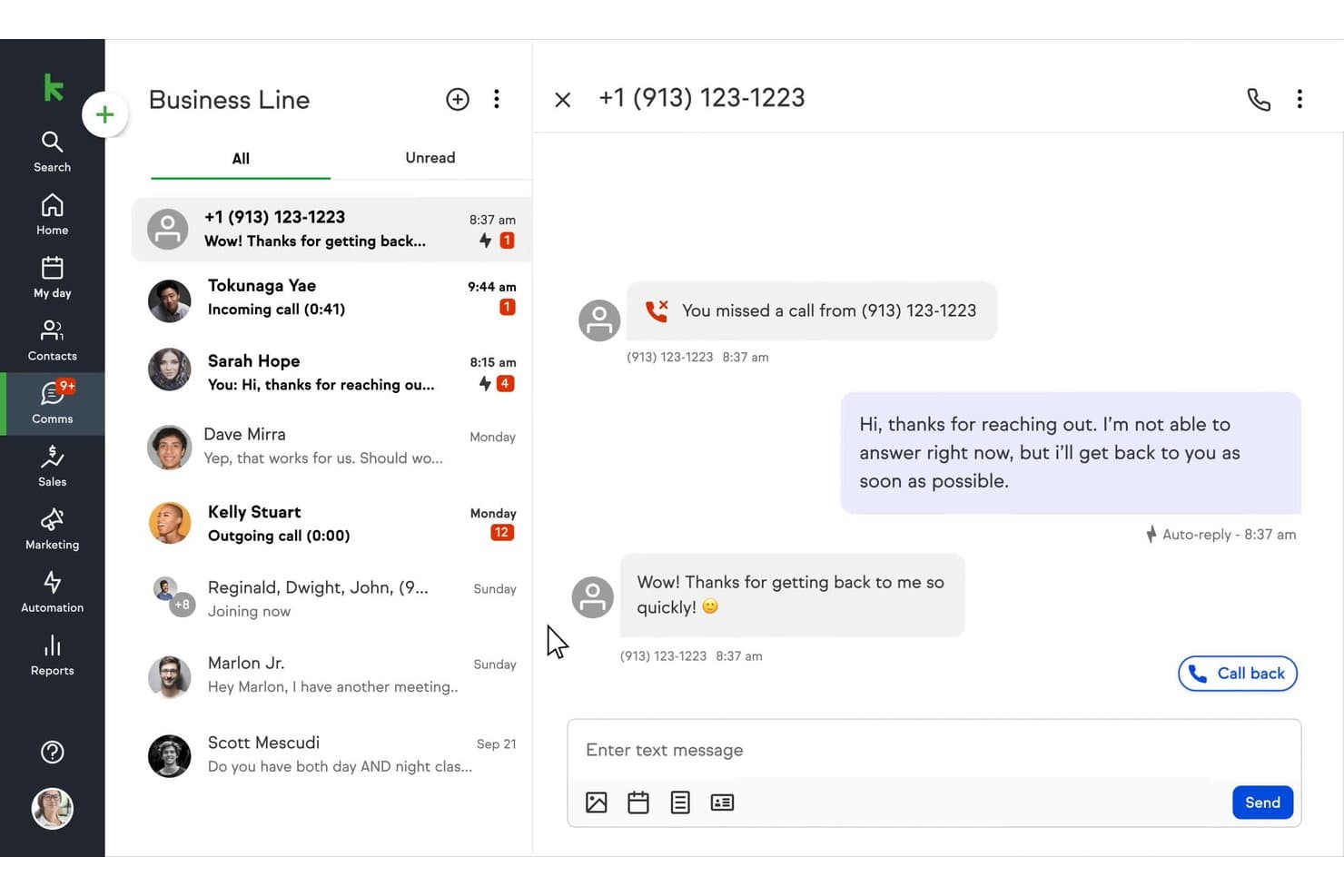
Keap auto-replies to missed calls via SMS on its business line. Keap is a small business CRM and marketing automation platform that combines contact management, sales pipelines, SMS and email marketing, appointment scheduling, invoicing, and payment processing in one system.
Who Is Keap Best For?
Keap is a strong fit for small business owners and lifecycle marketing managers who need to automate multi-step SMS and email follow-up sequences without stitching together separate tools.
Why I Picked Keap
I picked Keap as one of the best because its Campaign Builder makes automating multi-step SMS follow-up sequences genuinely straightforward. I love that you can trigger texts based on pipeline stage changes, purchase completions, or tag applications, then layer in if/then branching logic to personalize the path each contact takes. The AI Automation Assistant lets you build those sequences from a plain-language prompt, which cuts setup time significantly.
Keap Key Features
- Tag-based audience segmentation: Organize contacts into dynamic groups using tags to target broadcast texts and automations at the right people.
- AI Content Assistant: Generate and refine SMS copy directly from a plain-language prompt without leaving the platform.
- Built-in TCPA compliance tools: Manage opt-ins, opt-outs, and STOP keywords automatically, with quiet hours enforced across broadcast texts.
- Keap Business Line: Each user gets a dedicated local business number for one-to-one texting and calls via desktop or mobile app.
Keap Integrations
Native integrations include Google Workspace, Microsoft Outlook, Zoom, QuickBooks, Mailchimp, PayPal, Stripe, Eway, WePay, and Shopify on the Max plan. Keap also offers marketplace integrations, a REST API with webhooks, and Zapier.
Pros and Cons
Pros:
- AI-assisted campaign and SMS creation
- Built-in compliance controls for text marketing
- Advanced automation triggers for SMS follow-ups
Cons:
- SMS and MMS limited to U.S. and Canada
- No shared team SMS inbox available
 Best for multi-cloud SMS automation at scale
- 30-day free trial
- From $25/user/month
Visit WebsiteCustomer Rating:4.4/5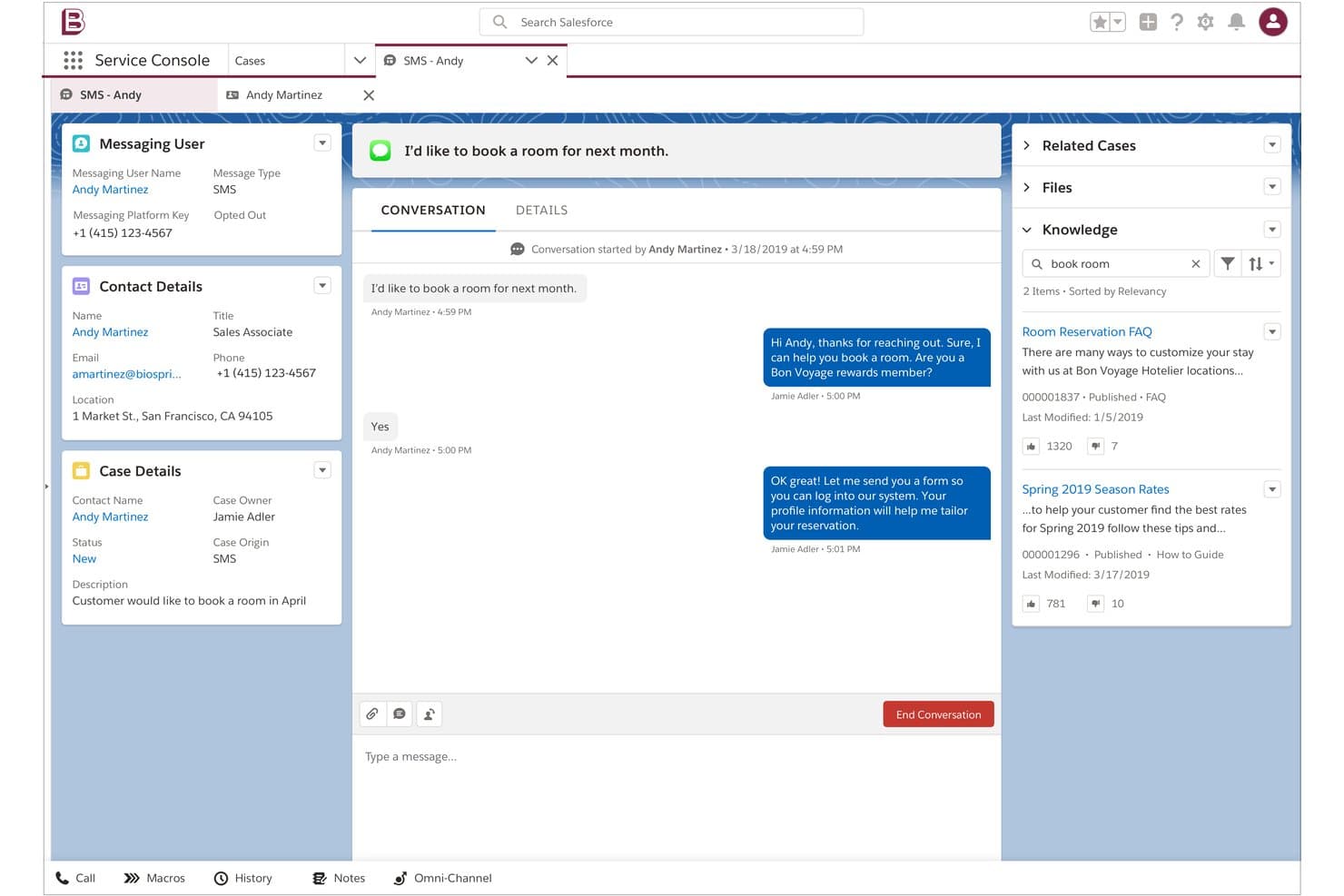
Salesforce lets agents handle SMS conversations alongside knowledge articles. Salesforce Sales Cloud is a CRM platform that combines contact and pipeline management with SMS, MMS, and WhatsApp messaging across its Sales, Service, and Marketing Clouds—spanning two-way conversations, bulk campaigns, automated journeys, and AI-powered agent routing.
Who Is Salesforce Sales Cloud Best For?
Salesforce Sales Cloud is the right fit for enterprise teams already running multiple Salesforce clouds who need SMS, MMS, and WhatsApp woven into their existing CRM, service, and marketing workflows.
Why I Picked Salesforce Sales Cloud
I picked Salesforce Sales Cloud as one of the best because no other CRM matches its ability to run SMS across multiple clouds simultaneously: Marketing Cloud Journey Builder handles bulk campaign sends with AI-driven send time optimization, while Digital Engagement routes two-way conversations to agents via omnichannel queues. I love that Agentforce can autonomously handle SMS interactions across service and sales channels without human handoff. That kind of multi-cloud SMS coordination is what makes Salesforce the right call for enterprise teams scaling complex messaging operations.
Salesforce Sales Cloud Key Features
- Digital Engagement add-on: Adds two-way SMS, WhatsApp, and MMS messaging directly inside the Service Cloud console with omnichannel routing to agents or bots.
- Einstein Bot automation: Handles inbound SMS inquiries automatically, qualifying questions and collecting information before handing off to a live agent.
- MobileConnect bulk SMS: Sends mass SMS and MMS campaigns with dynamic merge fields, A/B testing, and segmentation tools inside Marketing Cloud.
- Omnichannel routing: Distributes incoming SMS conversations to available agents based on skill, capacity, and availability alongside other channel workloads.
Salesforce Integrations
Salesforce offers documented integrations with Slack, Tableau, and MuleSoft. Its AppExchange includes 200+ SMS messaging apps, including Twilio for Salesforce, while REST and SOAP APIs support custom connections.
Pros and Cons
Pros:
- Advanced compliance and consent management tools
- Omnichannel routing across SMS and other channels
- Multi-cloud SMS automations for complex workflows
Cons:
- SMS logging varies across different Salesforce clouds
- SMS requires additional products or third-party apps
Learn more about Salesforce : Best for financial services texting and dialing
- Free demo available
- Pricing upon request
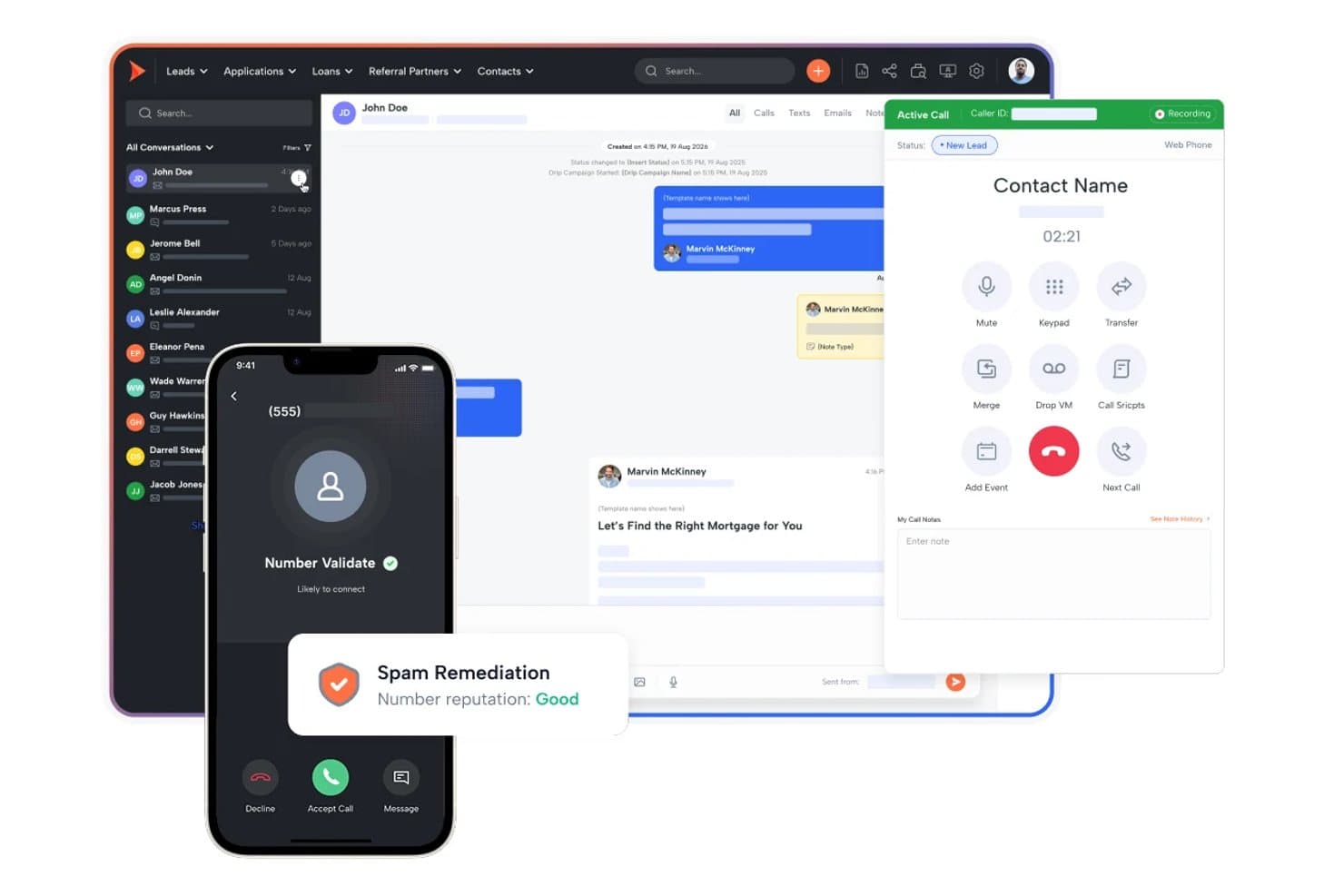
Shape unifies calls, texts, and lead management in one CRM. Shape is an all-in-one CRM built for financial services teams that natively combines pipeline management, two-way SMS/MMS texting, a power dialer, AI lead scoring, and marketing automation in a single platform.
Who Is Shape Best For?
Shape fits financial services teams—mortgage lenders, loan officers, and insurance brokers—that need texting, dialling, and CRM pipeline management in one place.
Why I Picked Shape
Shape earns its spot on my shortlist because it's purpose-built for financial services teams that need texting and dialling in the same place as their CRM pipeline. I particularly like its Local Presence feature, which automatically matches outbound texts and calls to a local area code based on the contact's location, improving response rates without any manual setup. Its IF–THEN trigger logic fires SMS messages directly off pipeline stage changes, so a loan officer's leads get timely follow-ups tied to real deal events.
Shape Key Features
- Shared team inbox: All inbound SMS and MMS replies from leads surface in a single shared inbox visible across your team.
- ShapeIQ AI lead scoring: An ML-driven scoring engine that ranks leads based on behavioural signals and engagement patterns over time.
- A2P 10DLC registration: Brand and campaign registration for A2P 10DLC messaging is managed directly inside the platform.
- Drip campaign builder: Multi-step sequences combine timed SMS and email actions tied to lead lifecycle stages.
Shape Integrations
Shape offers native integrations with Encompass, LendingPad, LendingDox, and DNC.com. It also supports an open API, webhooks, and Zapier.
Pros and Cons
Pros:
- IF–THEN triggers send texts from pipeline changes
- Shared inbox for SMS, MMS, and calls
- Financial services SMS compliance controls built in
Cons:
- Demo required to view full pricing
- Custom field limits restrict advanced workflows
Learn more about Shape: Best for pipeline-triggered SMS automation
- 15-day free trial
- From $23/user/month (billed annually)
Visit WebsiteCustomer Rating:4.7/5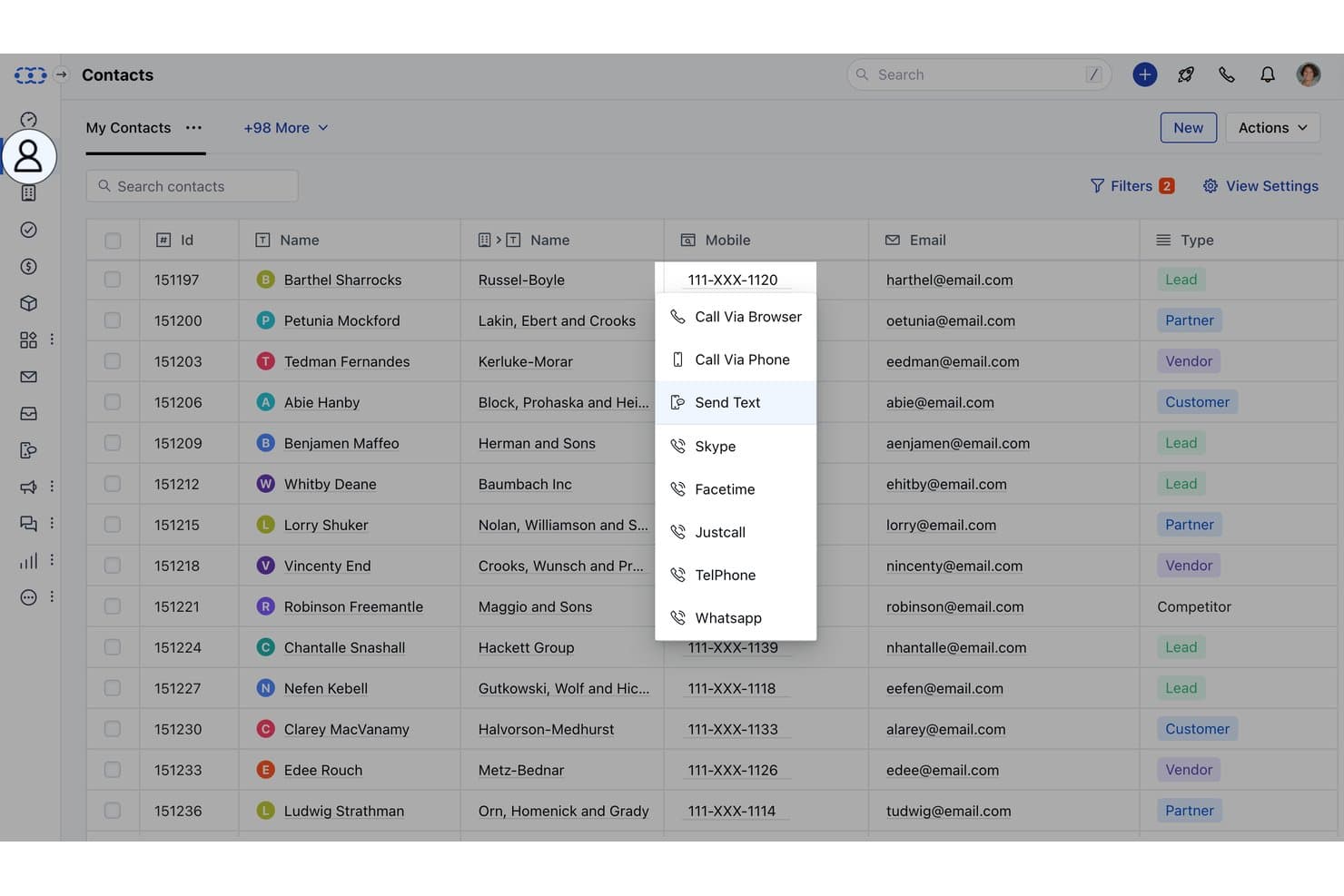
Salesmate lets users text contacts directly from the CRM contact list. Salesmate is a CRM platform with native SMS/MMS texting, two-way messaging, pipeline-event-driven automation via Smart Flows, multi-channel sequences, and AI-assisted conversation tools built directly into contact and deal records.
Who Is Salesmate Best For?
Salesmate is a strong fit for sales teams that want text messaging to trigger automatically as deals move through pipeline stages.
Why I Picked Salesmate
I picked Salesmate as one of the best because its Smart Flows builder lets you trigger SMS actions directly from pipeline events, like sending a text the moment a deal moves to a new stage or a form is submitted. I love that Text Pilot adds local presence routing on top of that, matching the outbound number's area code to the contact's location to improve reply rates. Sequences then let you layer SMS into multi-step cadences alongside email, all from the same CRM record.
Salesmate Key Features
- Bulk SMS with merge tokens: Send personalized text campaigns to segmented contact lists using CRM field data as merge variables, with tag- and list-based targeting.
- Sandy AI conversation summaries: AI assistant that summarizes lengthy text threads, surfacing key points, action items, and deadlines directly within the contact record.
- Team Inbox for inbound SMS: A shared, assignable inbox (Pro plan) where multiple reps can manage and respond to incoming text conversations collaboratively.
- A2P 10DLC in-platform registration: Complete US carrier compliance registration for brand and campaign types directly inside Salesmate via its Regulatory Compliance setup section.
Salesmate Integrations
Salesmate offers native integrations with HubSpot OperationsHub, Mailchimp, ActiveCampaign, Brevo, Shopify, QuickBooks Online, Google Calendar, Microsoft Calendar, Slack, and Zoom. It also supports Make, a RESTful API, webhooks, and Zapier.
Pros and Cons
Pros:
- Text Pilot offers local presence routing
- Opt-out keywords enforced with automatic suppression
- Pipeline stage movement can auto-trigger SMS
Cons:
- Sandy AI and sequences only on higher plans
- SMS and calls require additional usage credits
Learn more about Salesmate: Best for omnichannel lifecycle marketing SMS
- Free plan available
- From $20/user/month
Visit WebsiteCustomer Rating:4.4/5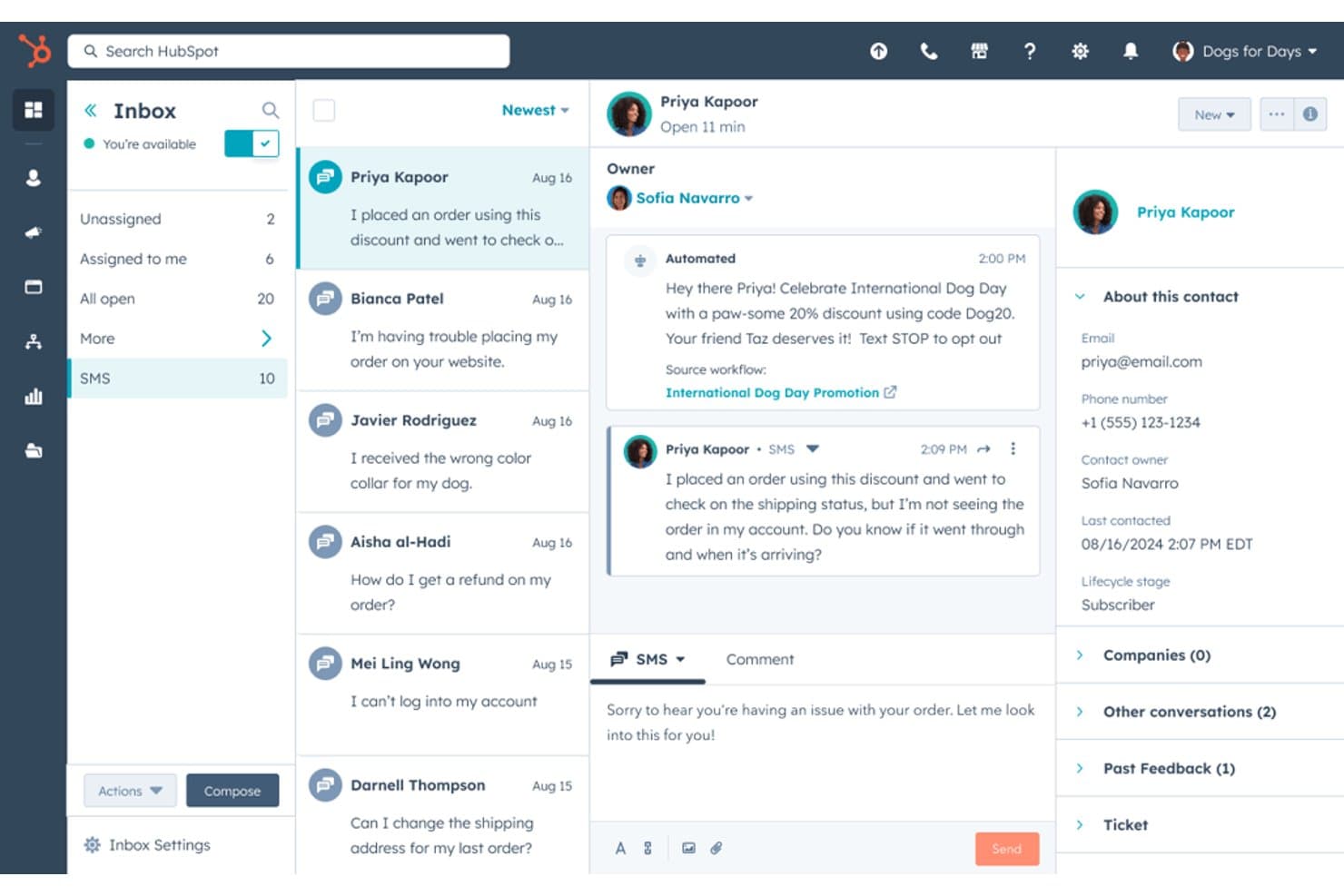
HubSpot lets users manage SMS conversations with customers in one inbox. HubSpot is a CRM platform that combines contact management, pipeline tracking, and marketing automation with native SMS campaigns, a shared omnichannel inbox, and workflow-triggered texting across email, SMS, WhatsApp, and chat.
Who Is HubSpot Best For?
HubSpot is a strong fit for marketing teams that need to orchestrate SMS campaigns across a full customer lifecycle within a unified CRM.
Why I Picked HubSpot
HubSpot earns its spot on my shortlist because it's the only CRM here that ties SMS directly into a full omnichannel lifecycle, running alongside email, WhatsApp, and chat in a single workflow. I particularly like how its workflow builder lets you trigger SMS at any contact journey stage, from a form fill to a re-engagement sequence, without stitching together separate tools. Breeze AI inside the SMS composer also lets my team generate and refine message copy on the fly, which speeds up campaign execution considerably.
HubSpot Key Features
- Conversations shared inbox: Consolidates SMS, email, WhatsApp, Facebook Messenger, and live chat into one interface tied to CRM contact records.
- A2P 10DLC compliance registration: Handles brand and campaign registration through Twilio, with automatic opt-out keyword processing and consent timestamping per contact.
- Contact list segmentation: Lets you build active or static lists using CRM properties to target bulk SMS sends at the right audience.
- WhatsApp Business messaging: Includes up to 1,000 WhatsApp messages per month on Professional and Enterprise plans, managed through the same inbox and workflow automation as SMS.
HubSpot Integrations
HubSpot offers native integrations with Salesforce, Slack, Google Workspace, Microsoft 365, LinkedIn Sales Navigator, Stripe, and ZoomInfo, plus 2,000+ marketplace apps including Sakari, Salesmsg, and Twilio. Its open API, webhooks, Zapier, and Make support custom connectivity.
Pros and Cons
Pros:
- AI-assisted message writing for campaigns
- Workflow-triggered texts across multiple channels
- Bulk SMS campaigns with CRM segmentation
Cons:
- SMS only available with marketing-focused plans
- No native sales rep 1-to-1 texting
Learn more about HubSpot:
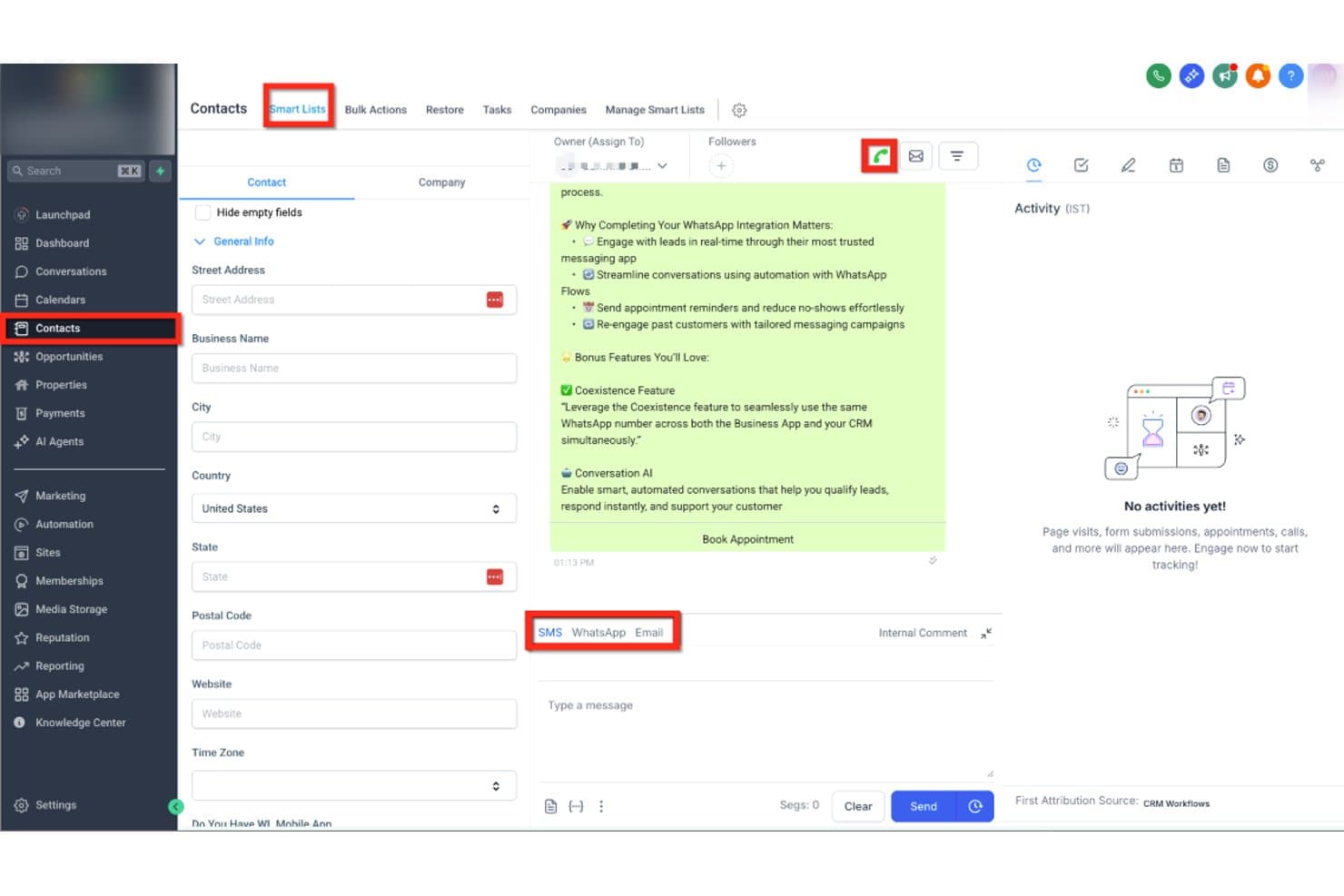
HighLevel lets users text contacts via SMS, WhatsApp, or Email in one place. HighLevel is an all-in-one CRM and marketing platform that combines contact management, pipeline tracking, and native SMS/MMS messaging with multi-channel automation, a shared team inbox, AI-powered conversation handling, and bulk texting tools—all without requiring a third-party texting integration.
Who Is HighLevel Best For?
HighLevel is built for marketing agencies that manage SMS outreach across multiple clients from a single platform.
Why I Picked HighLevel
HighLevel earns its spot on my shortlist because it's purpose-built for marketing agencies running SMS outreach across multiple clients from one platform. I love how the sub-account architecture lets you manage each client's contacts, pipelines, and text conversations completely separately, without switching tools. The Missed Call Text-Back feature automatically converts a missed call into a live SMS conversation, which I've found is a genuine lead-saver in agency client campaigns. Conversation AI can then handle those inbound replies autonomously, qualifying leads and booking appointments around the clock.
HighLevel Key Features
- Bulk SMS broadcasting: Send mass text campaigns to segmented contact lists using Smart Lists and CRM-based filters.
- Text-2-Pay: Send payment links directly through SMS conversations to collect invoices or deposits without leaving the platform.
- Local presence dialling: Automatically display a local area code number matching a contact's location when sending texts or making calls.
- A2P 10DLC Trust Center: Built-in brand and campaign registration tool that guides you through carrier compliance directly inside the platform.
HighLevel Integrations
HighLevel has native integrations with Facebook Messenger, Instagram DMs, WhatsApp, Stripe, PayPal, Google Calendar, and Outlook. It also supports REST API, webhooks, Make, and Zapier for custom connectivity.
Pros and Cons
Pros:
- Bulk texting with CRM-based segmentation
- AI-powered SMS replies and lead qualification
- Missed call text-back saves lost leads
Cons:
- Usage-based texting costs spike with volume
- Complex A2P 10DLC registration frustrates users
Learn more about GoHighLevel: Best for outbound SMS and call teams
- 14-day free trial + free demo available
- From $9/user/month (billed annually)
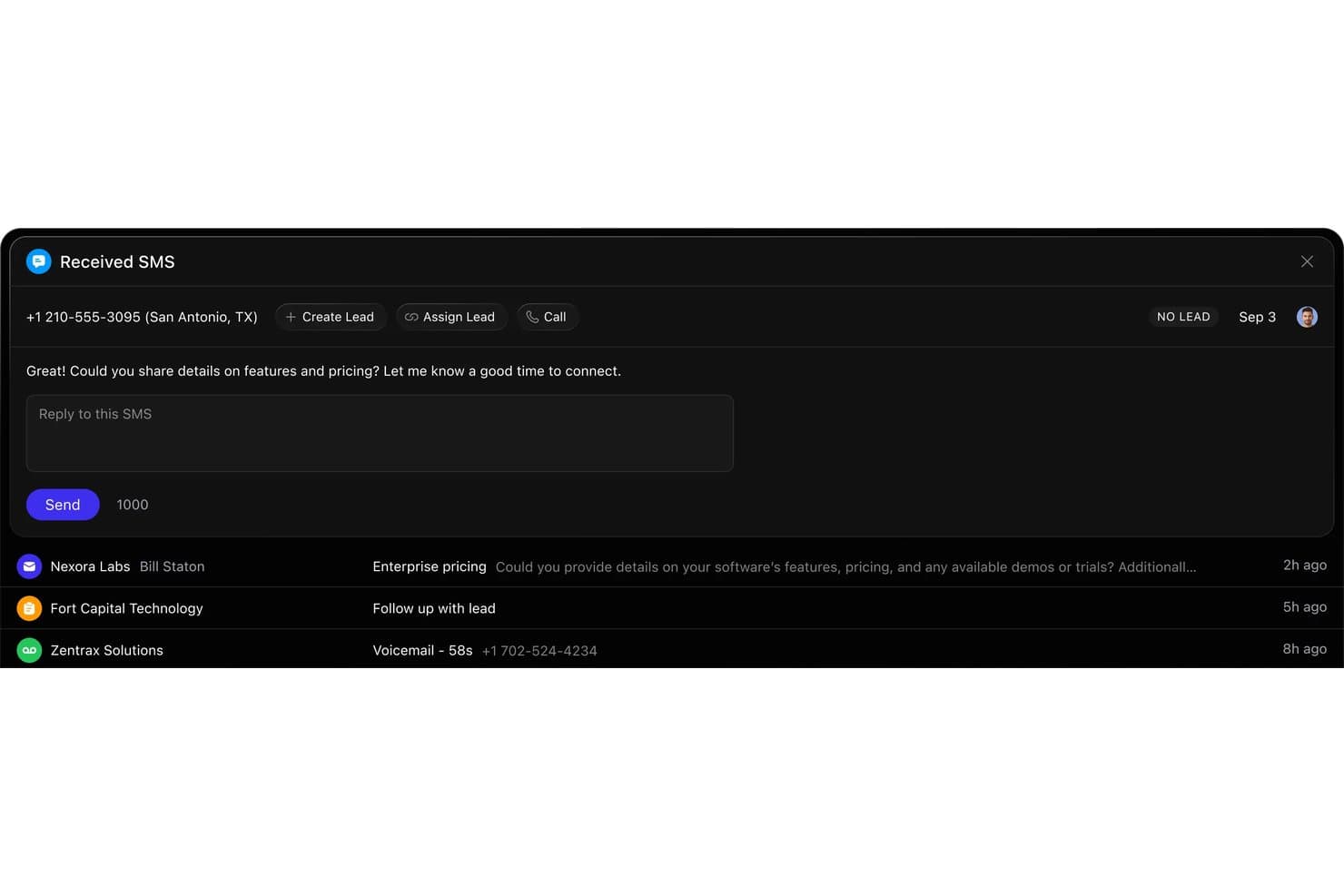
Close lets users reply to inbound SMS leads directly from the CRM. Close is a sales CRM with native SMS/MMS, two-way texting, automated multi-channel sequences, built-in calling, and A2P 10DLC compliance tools—all in one platform.
Who Is Close Best For?
Close is a strong fit for sales teams running high-volume outbound motions who need calling, SMS, and email in one place—without piecing together multiple tools.
Why I Picked Close
Close earns its spot on my shortlist because SMS and calling aren't bolted on—they're core to how the platform works. I love that outbound teams can run multi-step sequences combining SMS, email, and call tasks from a single workflow builder, with Workflow Goals that automatically pause outreach the moment a prospect replies. The in-platform A2P 10DLC registration and AI compliance monitoring also remove a real operational headache, letting teams text at volume without managing compliance through a separate tool.
Close Key Features
- Smart Views bulk SMS: Send personalized text campaigns to dynamically filtered lead segments using CRM merge tokens, without exporting lists or switching tools.
- Power Dialer and Predictive Dialer: Automatically queue and connect outbound calls in sequence, with the Predictive Dialer available on the Scale plan for high-volume teams.
- In-platform A2P 10DLC registration: Register your brand and SMS campaigns directly inside Close via Twilio, including automated opt-out keyword handling.
- Workflow Goals: Automatically pause active multi-step sequences the moment a prospect replies or books a meeting, preventing over-messaging.
Close Integrations
Close offers 100+ native integrations, including Gmail, Microsoft 365, Google Calendar, Zoom, Calendly, Segment, Gong, and Help Scout. It also supports custom integrations through its REST API, webhooks, MCP server, and Zapier.
Pros and Cons
Pros:
- A2P 10DLC compliance tools built in
- Outbound texting automation with workflow goals
- SMS and CRM fully unified in one platform
Cons:
- Workflow SMS automation locked behind higher tiers
- No shared team SMS inbox feature
Learn more about Close: Best for property management team texting
- Free demo available
- From $65/user/month (billed annually)

LeadSimple streamlines real estate operations with lead tracking and automation. LeadSimple is software designed to help users manage lead tracking, sales, and customer relationships. It is primarily for real estate professionals and offers tools that support property management and lead conversion.
Why I Picked LeadSimple:
It offers specific features that make it a great fit for real estate teams. The built-in pipeline management lets you track deals from start to finish, helping you stay on top of each hiring process stage. Automated follow-ups ensure you never miss a lead; task reminders keep your team organized. With its focus on real estate workflows, it’s well-suited for handling property listings and communication.
Standout Features & Integrations:
Features include automated follow-ups, deal tracking, and task management. You can easily assign tasks to team members and set reminders for important deadlines. The software also provides real-time notifications to help you stay updated on lead progress.
Integrations include Gmail, Outlook, Zapier, Google Calendar, Slack, RingCentral, CallRail, Twilio, HelloSign, and QuickBooks.
Pros and Cons
Pros:
- Strong task automation capabilities
- Highly customizable workflows
- Scalable for growing teams
Cons:
- Limited flexibility outside real estate
- Time-consuming setup process
- Steep learning curve
Learn more about LeadSimple:
Annen CRM-programvare med tekstmeldinger
Her er noen flere alternativer for CRM-programvare med tekstmeldinger som ikke kom med på kortlisten min, men som likevel er verdt å undersøke.
- 11Bitrix24Best for all-in-one CRM with free collaboration texting
- 12KixieBest for call-outcome SMS automation in your CRM
- 13PodiumBest for local business SMS and reputation growth
- 14Zoho CRMBest for CRM texting via ecosystem add-ons
- 15NutshellBest for omni-channel team SMS inbox
- 16SalesmsgBest for texting layered into HubSpot or Salesforce
- 17TextlineBest for HIPAA-compliant team SMS texting
- 18GoCRMBest for multi-channel drip SMS in one platform
- 19HeymarketBest for AI agent texting on shared inbox
How I Evaluate CRM Software With Texting
I split my evaluation into two layers: the baseline each tool must meet—like two-way SMS logging to deal records—and differentiators like A2P compliance and AI-assisted messaging.
Core Functionality (Table Stakes For This List)
When I'm selecting tools for my list, I rank each one on a scale from 0 (does not offer the functionality) to 5 (excels in this area) for each core functionality listed below. Then, I calculate the tool's total score into a percentage. Each tool needs to achieve a minimum total score of 65% to be considered for inclusion.
- Native CRM + Texting: I check whether the platform combines contact and deal management with built-in texting, rather than requiring a third-party SMS plugin to send a single message.
- Two-Way SMS Messaging: Reps need to hold real conversations with prospects, so I evaluate whether replies land in a CRM inbox with routing and assignment capabilities.
- Conversation Logging & Sync: Every text should auto-attach to the right contact and deal record—I look for full timeline sync so managers can audit rep activity without chasing screenshots.
- Automated Text Workflows: I evaluate whether CRM events like deal stage changes or form fills can trigger SMS sequences with branching logic, delays, and conditional steps.
- Bulk & Personalized Texting: Sending a campaign to a segmented list with merge tokens pulled from CRM fields is table stakes—I look for list targeting and dynamic personalization options.
- Compliance Controls: Opt-in/opt-out handling, consent tracking, and A2P 10DLC registration support all factor into my evaluation, especially for teams running high-volume outreach.
Once I have a list of tools that meet this criteria, I consider what sets each platform apart.
Differentiating Factors (What Sets Vendors Apart)
Here's how I compare and contrast different vendors:
Standout Features
A shared team inbox matters when SDRs hand off leads mid-conversation—I look for assignment rules, internal notes, and visibility into who last messaged a contact. AI message assistance is another differentiator I evaluate, especially tools that draft contextual replies using CRM data like deal stage or recent activity. I also consider conversation intelligence features that surface pipeline signals from text threads, giving RevOps leaders reporting on rep responsiveness and engagement trends.
Beyond Features
Deliverability is a factor I weigh heavily—carrier registration support and reputation monitoring determine whether your messages actually reach prospects. Integration depth also matters, particularly bi-directional sync with marketing automation and revenue intelligence tools already in your RevOps stack. I evaluate pricing structures for transparency, looking at how vendors handle per-message costs and seat scaling as outbound volume grows across your sales team.
Slik velger du CRM-programvare med tekstmeldinger
Det er lett å gå seg vill i lange lister over funksjoner og kompliserte prismodeller. Her er en sjekkliste over faktorer du bør huske på, slik at du kan holde fokus mens du går gjennom den unike prosessen med å velge programvare.
| Faktor | Hva du bør vurdere |
| Skalerbarhet | Vil denne løsningen vokse i takt med teamets behov? |
| Integrasjoner | Kobler den seg til de andre verktøyene du allerede bruker? |
| Tilpasningsmuligheter | Kan du tilpasse programvaren til arbeidsflytene dine? |
| Brukervennlighet | Er plattformen enkel nok til at teamet raskt kan ta den i bruk? |
| Budsjett | Passer kostnaden innenfor teamets budsjett og gir den god verdi? |
| Sikkerhetstiltak | Finnes det tilstrekkelige tiltak for å beskytte dataene dine? |
| Støtte | Vil du ha tilgang til rask og nyttig kundestøtte? |
| Mobil tilgang | Kan du få tilgang til programvaren på farten fra mobile enheter? |
Bruk denne sjekklisten for å holde prosessen med å velge programvare organisert og målrettet.
Trender innen CRM-programvare med tekstmeldinger
I undersøkelsen min hentet jeg inn utallige produktoppdateringer, pressemeldinger og lanseringslogger fra ulike leverandører av CRM-programvare med tekstmeldinger. Her er noen av de fremvoksende trendene jeg følger med på.
- AI-drevet meldingtilpasning: Flere verktøy bruker AI til å foreslå eller automatisk generere tilpasset SMS-innhold basert på kundedata og tidligere interaksjoner. Dette hjelper bedrifter med å sende mer relevante meldinger uten manuelt arbeid.
- Omnikanal-kommunikasjon: Leverandører beveger seg mot å integrere SMS med andre kommunikasjonskanaler som e-post, chat og sosiale medier på én plattform. Dette gjør det mulig for bedrifter å opprettholde konsekvente samtaler på tvers av flere kontaktpunkter.
- Funksjoner for SMS-samsvar: Med stadig strengere regler for tekstmeldinger legger flere leverandører til innebygde verktøy for å sikre samsvar med GDPR, TCPA og andre personvernlover. Denne trenden er viktig for bedrifter som opererer i regulerte bransjer.
- Avansert SMS-analyse: Grunnleggende SMS-sporing utvikler seg til mer avansert analyse, slik at bedrifter kan måle åpningsrater, svartider og kundeengasjement. Dette hjelper team med å forbedre meldingsstrategiene sine.
- Integrasjon av tale til tekst: Enkelte CRM-verktøy legger til tale-til-tekst-funksjonalitet, noe som gjør det enklere for brukere å konvertere muntlig kommunikasjon til tekstmeldinger. Denne trenden får stadig større utbredelse blant feltserviceteam og fjernarbeidere.
Hva er CRM-programvare med tekstmeldinger?
CRM-programvare med tekstmeldinger er et verktøy som hjelper bedrifter med å administrere kunderelasjoner samtidig som de sender og mottar SMS-meldinger direkte fra plattformen. Disse verktøyene brukes vanligvis av salgsteam, kundestøtte og tjenestebaserte fagfolk som må kommunisere raskt og effektivt med kunder.
Automatiserte oppfølginger, meldingsmaler og SMS-sporing hjelper bedrifter med å administrere kundekommunikasjon og forbedre svartidene. CRM-programvare med tekstmeldinger tilfører verdi ved å gjøre det enklere for bedrifter å opprettholde sterk og tidsriktig kommunikasjon med kundene sine.
Funksjoner i CRM-programvare med tekstmeldinger
Når du velger CRM-programvare med tekstmeldinger, bør du se etter følgende viktige funksjoner.
- Toveis tekstmeldinger: Send og motta SMS direkte på plattformen, og oppretthold kommunikasjon i sanntid med kunder eller kandidater.
- Automatiserte SMS-arbeidsflyter: Send oppfølgingsmeldinger eller påminnelser basert på utløsere, spar tid og sørg for konsekvent kommunikasjon.
- Meldingsmaler: Bruk ferdiglagde maler for vanlige svar for å kommunisere raskt med kunder og samtidig opprettholde en profesjonell tone.
- Planlegging av SMS: Planlegg at tekstmeldinger skal sendes på bestemte tidspunkter, slik at meldingene leveres på optimale tidspunkter for engasjement.
- Sporing og rapportering av tekstmeldinger: Spor åpningsrater for SMS, svartider og resultater for å evaluere og forbedre meldingsstrategiene dine.
- Personlig tilpassede meldinger: Tilpass tekstmeldinger med opplysninger om kunder eller kandidater for å gjøre kommunikasjonen mer relevant og styrke relasjonene.
- Gruppemeldinger: Send masseutsendelser til grupper av kunder samtidig, slik at det blir enklere å dele oppdateringer eller kampanjetilbud.
- Verktøy for samsvar: Administrer samtykker, reservasjoner og sporing av samtykke for å sikre at tekstmeldinger overholder regelverk som TCPA.
- Mobil tilgang: Ved å bruke CRM-funksjoner for tekstmeldinger fra en mobilenhet kan du kommunisere med kunder mens du er på farten.
- Loggføring av tekstmeldinger i CRM: Loggfør automatisk tekstsamtaler i kundeprofiler, slik at all kommunikasjonshistorikk er samlet på ett sted.
- Brukervennlig grensesnitt: En intuitiv og lettnavigert plattform som reduserer læringskurven for teamet ditt.
- Tilpassbare arbeidsflyter: Du kan tilpasse programvaren slik at den passer til de spesifikke forretningsprosessene dine, og dermed forbedre kompatibiliteten med teamets behov.
- Integrasjon med CRM-systemet: Sørg for at tekstmeldingsfunksjonene er sømløst integrert i CRM-systemet ditt for effektiv kommunikasjon og datahåndtering.
- Oppgavelister og deloppgaver: Organiser prosjekter effektivt ved å opprette detaljerte oppgavelister og dele oppgaver opp i håndterbare deloppgaver.
- Oppgavetildelinger og avhengigheter: Tildel oppgaver til teammedlemmer, angi avhengigheter og effektiviser arbeidsflyter for å overholde prosjektfrister på en effektiv måte.
- Forfallsdatoer og milepæler: Angi og følg opp forfallsdatoer og milepæler for å holde prosjektet på rett spor.
- Varsler: Motta sanntidsvarsler om oppdateringer av oppgaver, frister og kommunikasjon i teamet.
- Fildeling: Legg til rette for samarbeid ved å dele filer på plattformen, slik at alle prosjektressurser holdes samlet.
- Integrasjoner med HR- og rekrutteringsverktøy: Koble til HR-programvare eller systemer for sporing av søkere for å effektivisere prosesser for teamutvidelse eller ressursfordeling.
- Målinger og analyse: Bruk datadrevet innsikt til å overvåke prosjektfremdrift og teamets resultater og ta velinformerte beslutninger.
- Kunstig intelligens og maskinlæring: Dra nytte av funksjoner for kunstig intelligens og maskinlæring til prediktiv analyse, intelligent oppgavetildeling eller automatisering av rutineoppgaver.
- Samarbeidsverktøy: Forbedre kommunikasjonen i teamet med chattefunksjoner, kommentarfelt og samarbeidsdokumenter.
- Automatiseringer: Spar tid på repetitive oppgaver med automatiseringer som effektiviserer rutineprosesser.
- Tilgang via mobilapp: Mobilappen for iOS- og Android-enheter gjør det mulig for brukere å få tilgang til prosjekter og CRM-funksjoner mens de er på farten.
- Skalerbarhet: Støtte for et ubegrenset antall brukere eller muligheten til å skalere opp etter hvert som teamet vokser.
- Ressursstyring: Administrer teamets arbeidsmengde og tilgjengelighet for å optimalisere produktiviteten og fordele oppgaver på riktig måte.
- Planleggingsfunksjoner: Planlegg møter, frister og viktige hendelser effektivt innenfor prosjektets tidslinje.
- Sikkerhet og samsvar: Beskytt sensitive data med robuste sikkerhetsfunksjoner og sørg for samsvar med bransjestandarder, for eksempel TCPA for tekstmeldinger.
- Tilpassede felt: Registrer spesifikk informasjon som er relevant for prosjektene dine, ved å legge til tilpassede felt i oppgaver eller prosjekter.
- Masseutsendelse av tekstmeldinger: Send masseutsendelser av tekstmeldinger for å nå et bredt publikum, noe som er ideelt for markedsføring eller viktige oppdateringer.
- Tekstmeldinger for bedrifter: Bruk profesjonelle funksjoner for tekstmeldinger til bedrifter for å opprettholde engasjementet hos kunder og kandidater.
- Kommunikasjon i flere kanaler: Administrer flere kommunikasjonskanaler, inkludert SMS, e-post og telefon, på én enkelt CRM-plattform.
- Dryppkampanjer: Sett opp automatiserte dryppkampanjer for å sende meldinger over tid, pleie potensielle kunder og engasjere kunder.
- Telefoniintegrasjon: Kombiner tekstmeldinger med telefonifunksjoner for å muliggjøre samtaler og SMS fra samme plattform, og forbedre kommunikasjonen.
- Administrasjon av telefonnumre: Administrer dedikerte bedriftsnumre for å sende meldinger og spore kommunikasjon effektivt.
- Integrasjon med SEO- og markedsføringsplattformer: Koble CRM-systemet til markedsføringsplattformen din og optimaliser kontakten med målgruppen for bedre engasjement og synlighet.
- Støtte for SMS i Canada og internasjonalt: Sørg for at programvaren kan håndtere internasjonale tekstmeldinger, inkludert støtte for kanadiske regler og krav til samsvar.
Fordeler med CRM-programvare med tekstmeldinger
Implementering av CRM-programvare med tekstmeldinger er en fordel for teamet og virksomheten din. Her er noen av fordelene du kan se frem til.
- Raskere kommunikasjon: Tekstmeldinger gjør det mulig for teamet ditt å nå kunder, noe som forbedrer responstidene og den generelle kommunikasjonen.
- Mer konsekvent oppfølging: Automatiserte SMS-arbeidsflyter bidrar til å sikre at ingen potensielle kunder eller klienter faller mellom stolene, og øker oppfølgingsfrekvensen.
- Større kundeengasjement: Personlige meldinger gjør interaksjonene mer relevante, noe som fører til sterkere kunderelasjoner og høyere engasjement.
- Bedre teameffektivitet: Ferdiglagde maler og automatisering reduserer tiden som brukes på manuell teksting, slik at teamet får mer tid til andre oppgaver.
- Sentralisert kommunikasjonshistorikk: Logging av tekstmeldinger i CRM-systemet samler all kundekommunikasjon på ett sted, noe som gjør det enklere å følge tidligere samtaler.
- Bedre konvertering av potensielle kunder: Rettidig og effektiv kommunikasjon gjennom tekstmeldinger kan bidra til å konvertere flere potensielle kunder til betalende kunder.
- Overholdelse av regelverk: Innebygde verktøy for regelverksetterlevelse sikrer at tekstmeldingsstrategien oppfyller juridiske krav, og reduserer risikoen for sanksjoner.
Kostnader og priser for CRM-programvare med tekstmeldinger
Valg av CRM-programvare med tekstmeldinger krever at du forstår de ulike prismodellene og abonnementene. Kostnadene varierer basert på funksjoner, teamstørrelse, tillegg og mer. Tabellen nedenfor oppsummerer standardabonnementer, gjennomsnittspriser og typiske funksjoner i løsninger for CRM-programvare med tekstmeldinger.
Sammenligningstabell for CRM-programvare med tekstmeldinger
| Abonnementstype | Gjennomsnittlig pris | Vanlige funksjoner |
| Gratisabonnement | $0 | Grunnleggende tekstmeldinger, begrenset antall kontakter og standardmaler. |
| Personlig abonnement | $10-$25/bruker/måned | Automatisering av tekstmeldinger, flere kontakter, analyse og kundestøtte. |
| Bedriftsabonnement | $30-$60/bruker/måned | Ubegrensede tekstmeldinger, avansert automatisering, masseutsendelser og integrasjoner. |
| Virksomhetsabonnement | $75-$150/bruker/måned | Tilpassede arbeidsflyter, API-tilgang, verktøy for regelverksetterlevelse og dedikert kontostøtte. |
En oversikt over abonnementstyper for CRM-programvare med tekstmeldinger, samt kostnadene og funksjonene deres.
CRM-programvare med tekstmeldinger – vanlige spørsmål
Her er noen svar på vanlige spørsmål om CRM-programvare med tekstmeldinger.
Kan CRM-programvare med tekstmeldinger brukes til masseutsendelser?
Ja, mange CRM-plattformer med tekstmeldinger lar deg sende masseutsendelser til flere kontakter samtidig. Denne funksjonen er nyttig for markedsføringskampanjer, avtalepåminnelser eller andre situasjoner der du trenger å kommunisere raskt med en stor gruppe mennesker. Vær imidlertid oppmerksom på reglene for tekstmeldinger for å sikre at du overholder dem.
Hvordan hjelper CRM-programvare med tekstmeldinger med å overholde SMS-reglene?
CRM-programvare inneholder ofte innebygde verktøy for regeloverholdelse som hjelper deg med å holde deg innenfor rammene av markedsføringsreglene for SMS, som TCPA og GDPR. Disse verktøyene håndterer vanligvis samtykker, reservasjoner og oppbevarer dokumentasjon på kundens samtykke. Du kan også konfigurere automatiske meldinger for regeloverholdelse, slik at kommunikasjonen din forblir lovlig.
Er automatiserte tekstmeldinger mulig med CRM-programvare med tekstmeldinger?
Ja, automatiserte tekstmeldinger er en av kjernefunksjonene i CRM-programvare med tekstmeldinger. Du kan konfigurere arbeidsflyter som automatisk sender tekstmeldinger på bestemte tidspunkter, for eksempel etter at et potensielt kundeemne har fylt ut et skjema, eller når det er tid for en oppfølgingspåminnelse. Dette bidrar til å holde kommunikasjonen konsekvent og sparer teamet ditt for tid.
Kan jeg spore resultatene av meldingene mine når jeg bruker CRM-programvare med tekstmeldinger?
De fleste CRM-plattformer med tekstmeldinger tilbyr analyse- og rapporteringsverktøy for å spore resultatene av SMS-kampanjene dine. Du kan følge med på leveringsgrad, åpningsgrad og svartider. Denne innsikten hjelper deg med å justere strategien for å øke engasjementet hos målgruppen.
Kan CRM-programvare med tekstmeldinger loggføre meldinger automatisk?
Ja, mange CRM-verktøy loggfører automatisk tekstmeldinger i klientens profil. Denne funksjonen hjelper teamet ditt med å opprettholde en fullstendig oversikt over alle interaksjoner, noe som gjør det enklere å følge opp eller yte kundestøtte. Du kan når som helst se gjennom tidligere samtaler.
Fungerer CRM-programvare med tekstmeldinger internasjonalt?
Noen CRM-plattformer med tekstmeldinger støtter internasjonale tekstmeldinger, men dette kan avhenge av leverandøren og landet. Hvis internasjonal kommunikasjon er avgjørende for virksomheten din, bør du sjekke med programvareleverandøren. Det kan påløpe ekstra kostnader for å sende tekstmeldinger på tvers av landegrenser.