

CRM-programvare for familierett hjelper deg med å organisere klientinformasjon, følge opp saker effektivt og kommunisere bedre med klientene – slik at du sparer tid og reduserer feil. Med riktig verktøy kan du forenkle praksisen din og ha alle detaljer lett tilgjengelig.
Men med så mange alternativer kan det føles overveldende å velge den beste CRM-løsningen. Basert på min erfaring med juridiske CRM-verktøy vil jeg hjelpe deg med å finne den beste CRM-programvaren for familierett for dine behov.
Why Trust Our Software Recommendations
6,700+
Reviews
20
Industry experts
16+
Evaluation factors
14
Years
Our reviews reflect our independent judgment—not a sales pitch. Learn how we stay transparent.
For this guide, we evaluated tools using hands-on testing and independent research, scoring tools using our selection criteria.
Our reviews reflect our human editorial judgment, not a sales pitch.
Sammenligningstabell for CRM-programvare for familierett
Denne sammenligningstabellen oppsummerer prisdetaljene for mine beste utvalgte CRM-programmer for familierett:
| Tool | Best For | Trial Info | Price | ||
|---|---|---|---|---|---|
| 1 | Best for automatic time tracking | Not available | Pricing upon request | Website | |
| 2 | Best for family law–specific intake workflows | Free demo available | Pricing upon request | Website | |
| 3 | Best for all-in-one intake-to-trust billing | 14-day free trial | From $39/user/month (billed annually) | Website | |
| 4 | Best for AI-powered family law intake | Free plan available; Free demo available | Pricing upon request | Website | |
| 5 | Best for split billing in divorce matters | 10-day free trial | From $49/user/month (billed annually) | Website | |
| 6 | Best for integrated legal practice management | Free trial available | From £79/user/month | Website | |
| 7 | Best for legal intake with bar-approved compliance | 7-day free trial | From $49/user/month (billed annually) | Website | |
| 8 | Best for all-in-one family law client management | 10-day free trial | From $60/user/month | Website | |
| 9 | Best for AI-powered family law intake scoring | Free demo available | Pricing upon request | Website | |
| 10 | Best for automated document assembly | Free demo available | Pricing upon request | Website |


Anmeldelser av den beste CRM-programvaren for familierett
Denne grundige analysen gir en oversikt over ulike CRM-programmer som er tilpasset praksiser innen familierett. Jeg vil gjennomgå fordeler og ulemper ved hvert verktøy, funksjonene og de beste bruksområdene for å hjelpe deg med å ta en informert beslutning.

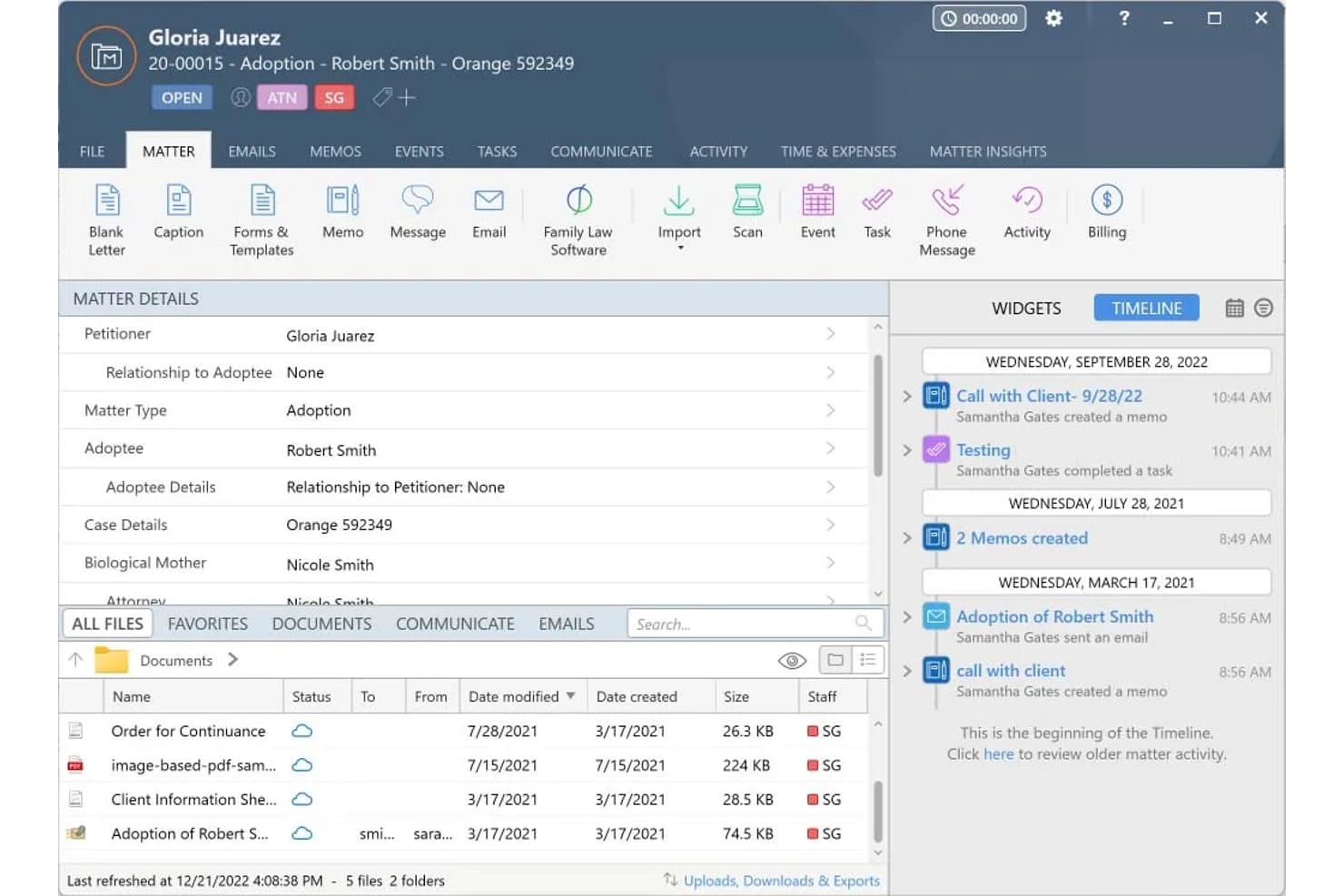
Smokeball organizes family law case details, files, and activity in one view. Smokeball is a legal practice management platform built for law firms that combines matter-centric case management, document automation, trust accounting, time tracking, and client intake in one system.
Who Is Smokeball Best For?
Smokeball is a strong fit for family law firms that bill hourly and want to capture more of their billable time without relying on attorneys to manually log every minute.
Why I Picked Smokeball
I've included Smokeball in my top picks because its AutoTime feature does something no other tool on this list does: it silently records every billable minute spent in Word, Outlook, and Smokeball itself, then assigns each activity to the correct matter automatically. Firms report billing up to 30% more as a result. I also rate its FamilyPro module highly, which auto-populates Financial Affidavits directly from matter data, cutting out the manual re-entry that slows down high-volume divorce caseloads.
Smokeball Key Features
- Encrypted client portal: A secure messaging and document-sharing space where clients can exchange sensitive case information without using unsecured email.
- Three-way trust reconciliation: Automatically matches every trust transaction to its matter and bank statement, keeping IOLTA accounts audit-ready at all times.
- Lead intake dashboard: A centralized view of all incoming leads captured through embeddable web forms, letting your team action and route prospects into matters.
- Jurisdiction-specific court forms: Pre-built divorce, custody, and support forms that auto-populate with matter data, so your team isn't re-entering client details by hand.
Smokeball Integrations
Smokeball offers native integrations with Microsoft 365, QuickBooks Online, LawPay, InfoTrack, and LawToolBox, supporting document workflows, trust accounting, payments, eSignatures, eFiling, and court deadlines. It also supports Zoom and Zapier.
Pros and Cons
Pros:
- Pre-built court forms for family law
- FamilyPro auto-populates financial affidavits
- AutoTime captures billable hours automatically
Cons:
- No native conflict-of-interest checking
- Intake automation requires highest plan tier
Learn more about Smokeball: Best for family law–specific intake workflows
- Free demo available
- Pricing upon request
Visit WebsiteCustomer Rating:4.7/5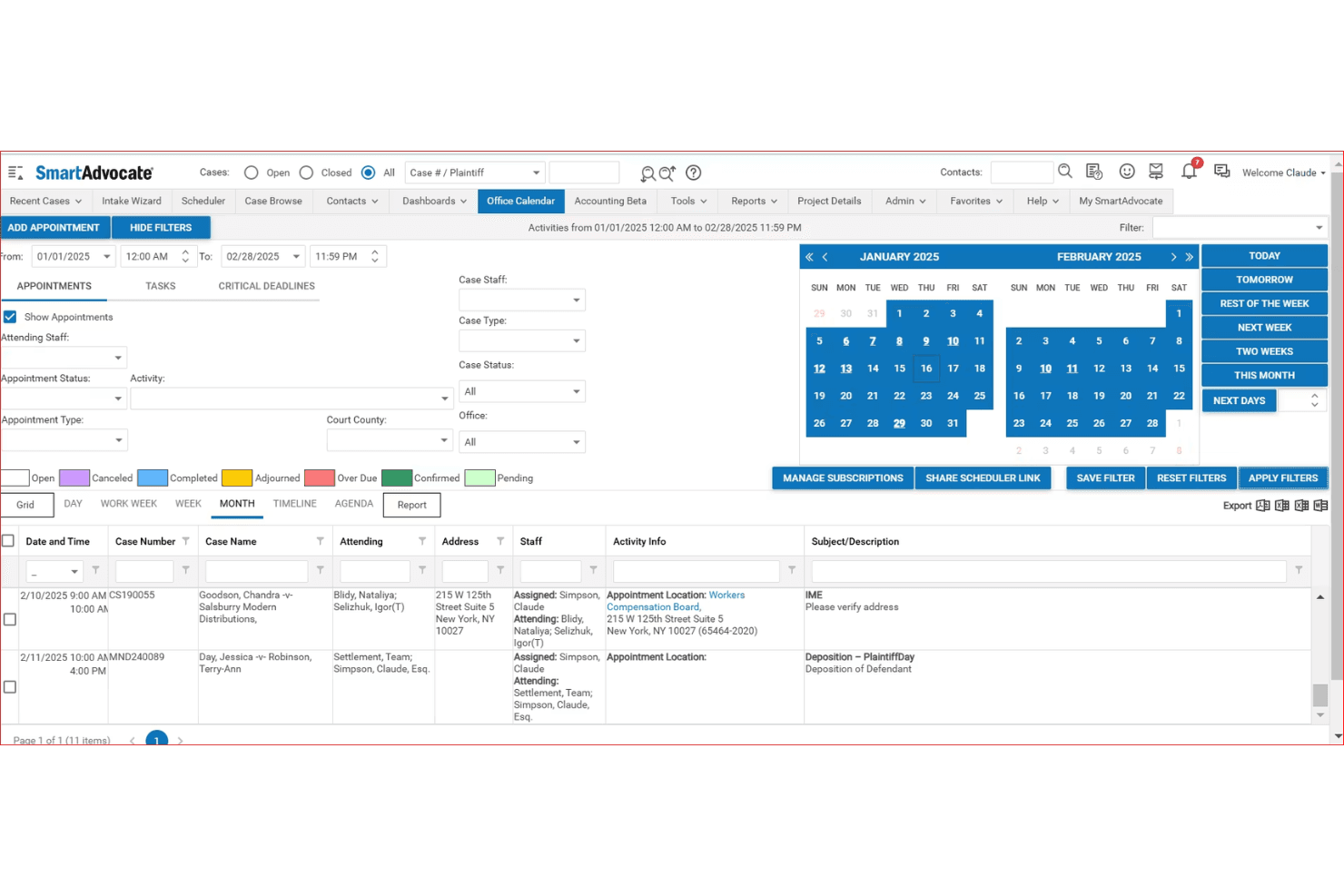
SmartAdvocate centralizes case appointments and deadlines in one calendar view. SmartAdvocate is a legal case management CRM built for law firms, offering family law–specific workflows for intake automation, matter pipeline tracking, client communication, document automation, and billing.
Who Is SmartAdvocate Best For?
SmartAdvocate is a strong fit for family law firms that handle high intake volumes and need structured, automated workflows to move prospects from first contact to retained client.
Why I Picked SmartAdvocate
SmartAdvocate earns its spot on my shortlist because its intake automation is built specifically for the complexity family law firms deal with every day. I particularly like the New Case Intake Wizard, which uses conditional questioning and real-time conflict checks to qualify leads before they reach an attorney. The AI Voice Agent (SmartIntelligence™) handles initial prospect contact autonomously, logs case details, and triggers follow-up workflows without staff involvement.
SmartAdvocate Key Features
- Shared custody calendar: Tracks visitation schedules, holiday rotations, and parenting time with automated client reminders and client portal access.
- Domestic violence order tracking: Monitors active orders, expiration dates, and violations, and automates renewal workflows and compliance reporting.
- Marketing ROI dashboard: Attributes leads to referral sources and campaigns so you can measure which channels drive retained clients.
- Document automation with merge codes: Generates family law documents using 4,000+ merge codes pulled directly from case data, including custody worksheets and asset division scenarios.
SmartAdvocate Integrations
SmartAdvocate advertises 175+ integrations, including Confido Legal, QuickBooks, DocuSign, Docubee, Nintex eSign, Lawmatics, CallRail, Microsoft Outlook, and Case Status. These connections support billing, eSignatures, intake, lead tracking, communications, and client portals.
Pros and Cons
Pros:
- Measures marketing ROI by campaign and referral
- Tracks custody, support, and DV matters natively
- Automates family law intake with AI coaching
Cons:
- Some workflows heavily tailored to personal injury
- No built-in IOLTA trust accounting ledger
Learn more about SmartAdvocate: Best for all-in-one intake-to-trust billing
- 14-day free trial
- From $39/user/month (billed annually)
Visit WebsiteCustomer Rating:4.8/5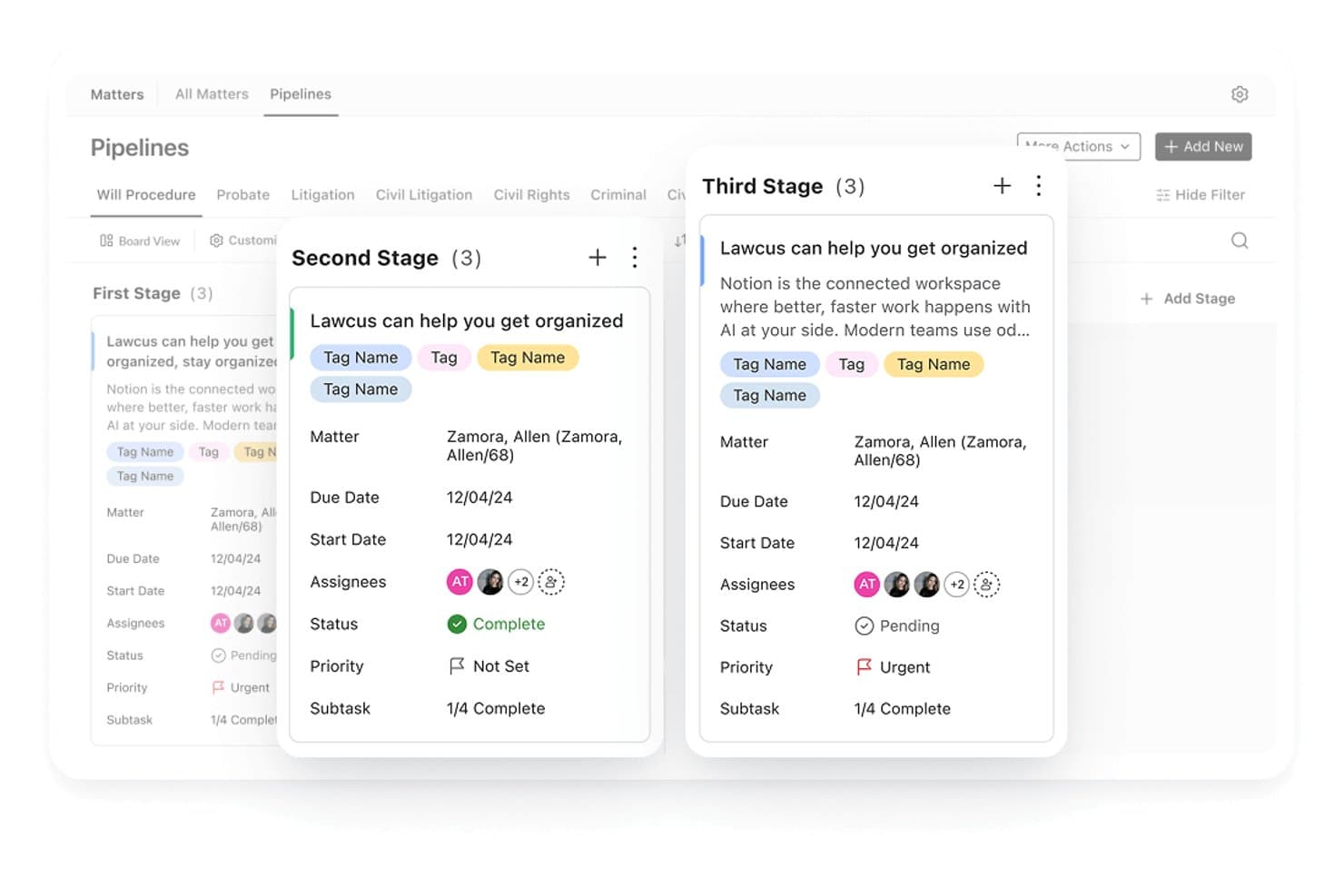
Lawcus organizes family law matters across pipeline stages with task details. Lawcus is a legal CRM and practice management platform that combines client intake, matter pipeline tracking, document automation, billing, and native trust accounting in a single system.
Who Is Lawcus Best For?
Lawcus is a strong fit for small to mid-sized family law firms that want to manage intake, matters, billing, and trust accounting without juggling multiple platforms.
Why I Picked Lawcus
Lawcus earns its spot on my shortlist because it's the only tool here that connects intake, matter tracking, billing, and trust accounting in one place, with no separate CRM bolted on. I especially like the native trust accounting, which is included on every plan starting at $39/user/month, since most family law firms need to manage retainers and IOLTA-adjacent accounts from day one. The dual Kanban pipelines, one for leads and one for active matters, let you track a prospective client from that first consultation call all the way through to an active case without switching systems.
Lawcus Key Features
- Conflict search: Scans all standard and custom fields to flag potential conflicts of interest during client intake.
- Nova AI drafting: Generates personalized emails, SMS messages, notes, and matter summaries directly within the platform.
- Practice area-specific field configuration: Customizes which fields appear at the top of matter and lead records based on practice area, such as family law.
- Referral source tracking: Reports on top referrers, conversion rates by channel, and reasons for lost leads across 115+ customizable reports.
Lawcus Integrations
Lawcus offers integrations with LawPay, Confido Legal, Gravity Legal, QuickBooks, Xero, Google Calendar, Microsoft 365, Google Drive, Smith.ai, and Lead Autopilot. It also supports Zapier, Pabbly, and a public API for custom integrations.
Pros and Cons
Pros:
- Built-in conflict search across all fields
- Offers dual Kanban boards for cases
- Includes native trust accounting for retainers
Cons:
- Two-way text messaging costs extra
- E-signature limits on entry-tier plans
Learn more about Lawcus: Best for AI-powered family law intake
- Free plan available; Free demo available
- Pricing upon request
Visit WebsiteCustomer Rating:4.5/5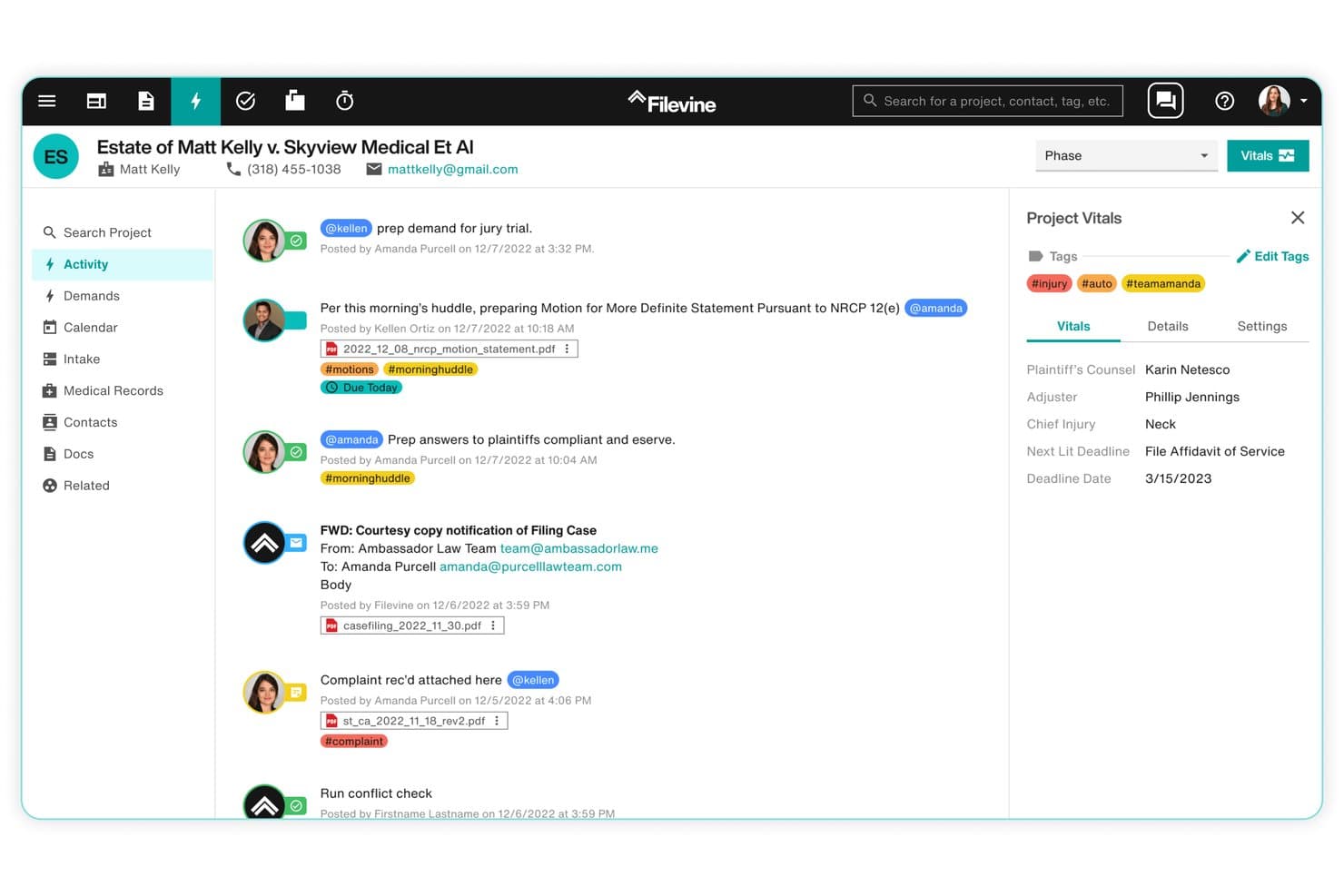
Filevine centralizes case activity, tasks, and deadlines in one view. Filevine is a legal practice management platform that combines AI-powered intake automation, matter-centric case pipeline management, document assembly, conflict checking, trust billing, and a secure client portal.
Who Is Filevine Best For?
Filevine is a strong fit for mid-size to large family law firms that want AI-driven intake automation and a fully integrated practice management platform under one roof.
Why I Picked Filevine
I've included Filevine in my top picks because its Lead Docket intake module does something most CRMs can't: it triggers SMS and email follow-ups within 60 seconds of a lead coming in, then uses LeadsAI to score, summarize, and prioritize that lead based on case type and conversion likelihood. I also like that LeadsAI runs sentiment analysis on every intake communication, which gives intake coordinators a real signal on which family law prospects to act on first. The Conflict Checker layers on top with fuzzy-match searching across all firm contacts and generates an auditable PDF report, covering a step that family law practices can't afford to skip.
Filevine Key Features
- LOIS AI document drafting: An AI layer that generates context-driven document drafts grounded in matter-level data, including family law-specific documents like sworn financial statements and domestic relations case information sheets.
- Client portal: A secure, 24/7 client-accessible hub where clients can view case timelines, exchange documents, complete custom forms, and message their attorney with all data encrypted end-to-end.
- Batch billing and invoicing: Attorneys can enter multiple time entries at once, bulk-edit invoices, and download hundreds of invoices simultaneously from within the platform.
- Periscope analytics: A firm-level reporting extension that tracks pipeline conversion metrics, marketing attribution, and revenue performance across all active matters.
Filevine Integrations
Filevine has native QuickBooks integration and partner integrations with Lawmatics, InfoTrack, and Foundation AI. It also supports API connectivity and Zapier.
Pros and Cons
Pros:
- Client portal offers 24/7 encrypted access
- Conflict checker exports audit-ready PDF reports
- AI-powered intake with lead prioritization
Cons:
- Key AI features require separate upgrade packages
- Custom configuration needed for family law workflows
Learn more about Filevine: Best for split billing in divorce matters
- 10-day free trial
- From $49/user/month (billed annually)
Visit WebsiteCustomer Rating:4.4/5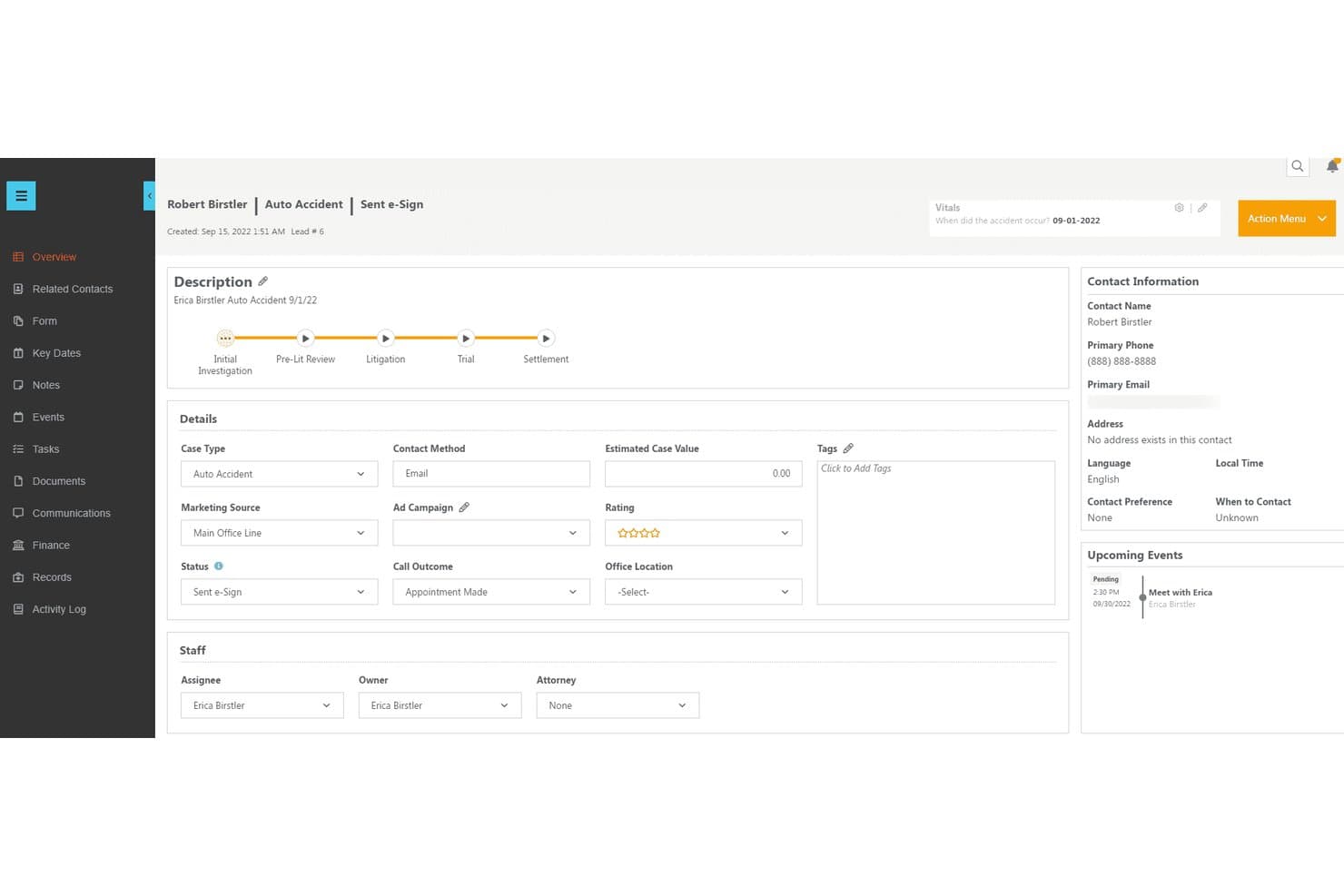
CosmoLex centralizes lead details, status, and upcoming events in one view. CosmoLex is an all-in-one legal practice management and CRM platform that combines client intake, matter management, trust accounting, billing, document automation, and a secure client portal in a single system purpose-built for law firms.
Who Is CosmoLex Best For?
CosmoLex is a strong fit for solo and small family law firms that want billing, trust accounting, and client intake managed in one platform.
Why I Picked CosmoLex
I picked CosmoLex as one of the best because its native split billing feature solves a genuinely tricky problem in divorce cases: splitting invoices between two parties with configurable percentage splits for fees versus expenses, all without workarounds. I also love that conflict checks extend to CRM leads, not just active matters, so you catch potential conflicts before a consultation is ever booked. On top of that, built-in IOLTA-compliant trust accounting handles retainer transfers and 3-way reconciliation automatically.
CosmoLex Key Features
- AI intake form builder: Generates custom intake forms from a written prompt or converts existing PDFs and Word docs into digital forms, with data auto-mapped to the correct contact record.
- In-platform SMS texting: Attorneys send and receive text messages directly within CosmoLex, with every exchange automatically logged to the relevant matter record.
- Lead-to-matter conversion: CRM leads convert directly into active matters without re-entering data, moving prospects through the pipeline in a single system.
- Money Finder: Scans unassigned meetings and tasks to flag unbilled time, surfacing potential revenue that would otherwise go uncaptured.
CosmoLex Integrations
CosmoLex has documented integrations with LawPay, Microsoft 365, Google Workspace, QuickBooks Online, Dropbox, OneDrive, Box, NetDocuments, and Zapier. QuickBooks Online syncs one way from CosmoLex.
Pros and Cons
Pros:
- AI intake forms automate complex family workflows
- Conflict checks cover CRM leads and matters
- Built-in split billing for divorcing spouses
Cons:
- No native client-facing consultation booking portal
- CRM and AI intake require add-on purchase
Learn more about CosmoLex: 6Best for integrated legal practice management
Clio
- Free trial available
- From £79/user/month
Visit WebsiteCustomer Rating:4.7/5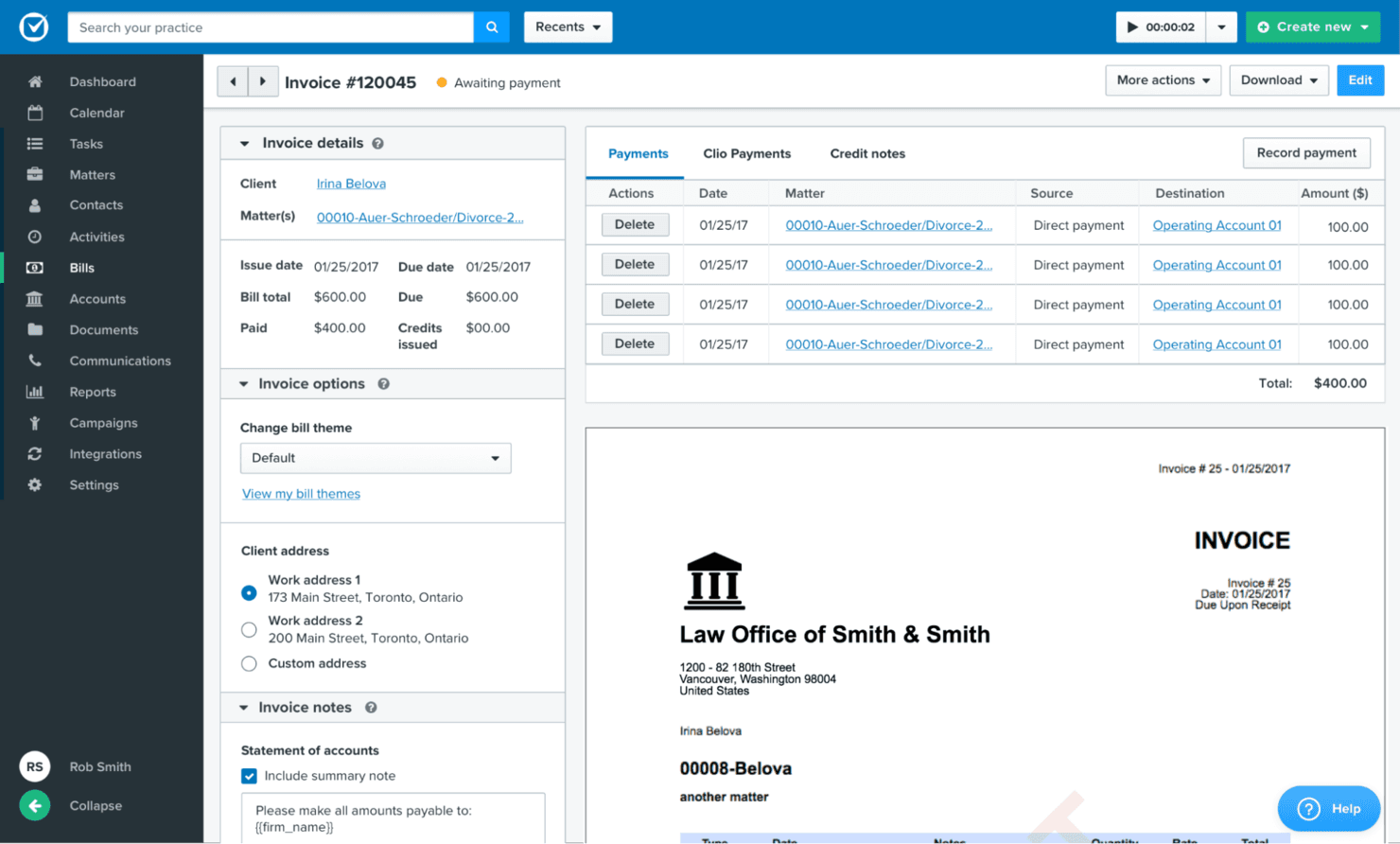
Clio is a law practice management software and CRM used by family law practices for intuitive case management, client communication, and document organization in one platform. Clio is a legal practice management and CRM platform that covers client intake, matter pipeline tracking, trust accounting, document management, and secure client communication—with family law-specific features like divorce and custody intake templates and conflict-of-interest checks built in.
Who Is Clio Best For?
Clio is a strong fit for solo and small-to-mid-sized family law firms that want intake, matter management, trust accounting, and client communication in one place.
Why I Picked Clio
Clio earns its spot on my shortlist because it's the only platform here that handles the full client journey, from intake to matter closure, without stitching together separate tools. I particularly like its family law-specific intake forms for divorce, custody, and paternity matters, which include automated conflict-of-interest checks run across both its CRM and case management databases the moment a lead submits their details. Native trust accounting is included on every plan, so retainer tracking and three-way reconciliation are available without upgrading.
Clio Key Features
- Clio Scheduler: Lets prospective clients self-book paid or free consultations directly from your website, with automated reminders and payment collection at booking.
- Lead source tracking: Records where each new client originated—referrals, directories, or marketing channels—so you can see which sources bring in the most retained matters.
- Evergreen trust alerts: Automatically notifies clients when their trust account balance drops below a set threshold, prompting replenishment before funds run out.
- Automated review requests: Sends clients a review request after matter closure to help build your firm's online reputation without any manual follow-up.
Clio Integrations
Clio offers 300+ integrations globally, including QuickBooks Online, Xero, LawPay, Dropbox Sign, Microsoft 365, Google Workspace, NetDocuments, iManage, and the UK Legal Aid Agency’s CWA portal. Zapier is also supported.
Pros and Cons
Pros:
- Customizable divorce and custody intake forms
- IOLTA and SRA trust accounting on all plans
- Built-in conflict checks for family law intake
Cons:
- Client portal document search is limited
- Intake module requires higher-tier or addon
Learn more about Clio: Best for legal intake with bar-approved compliance
- 7-day free trial
- From $49/user/month (billed annually)
Visit WebsiteCustomer Rating:4.7/5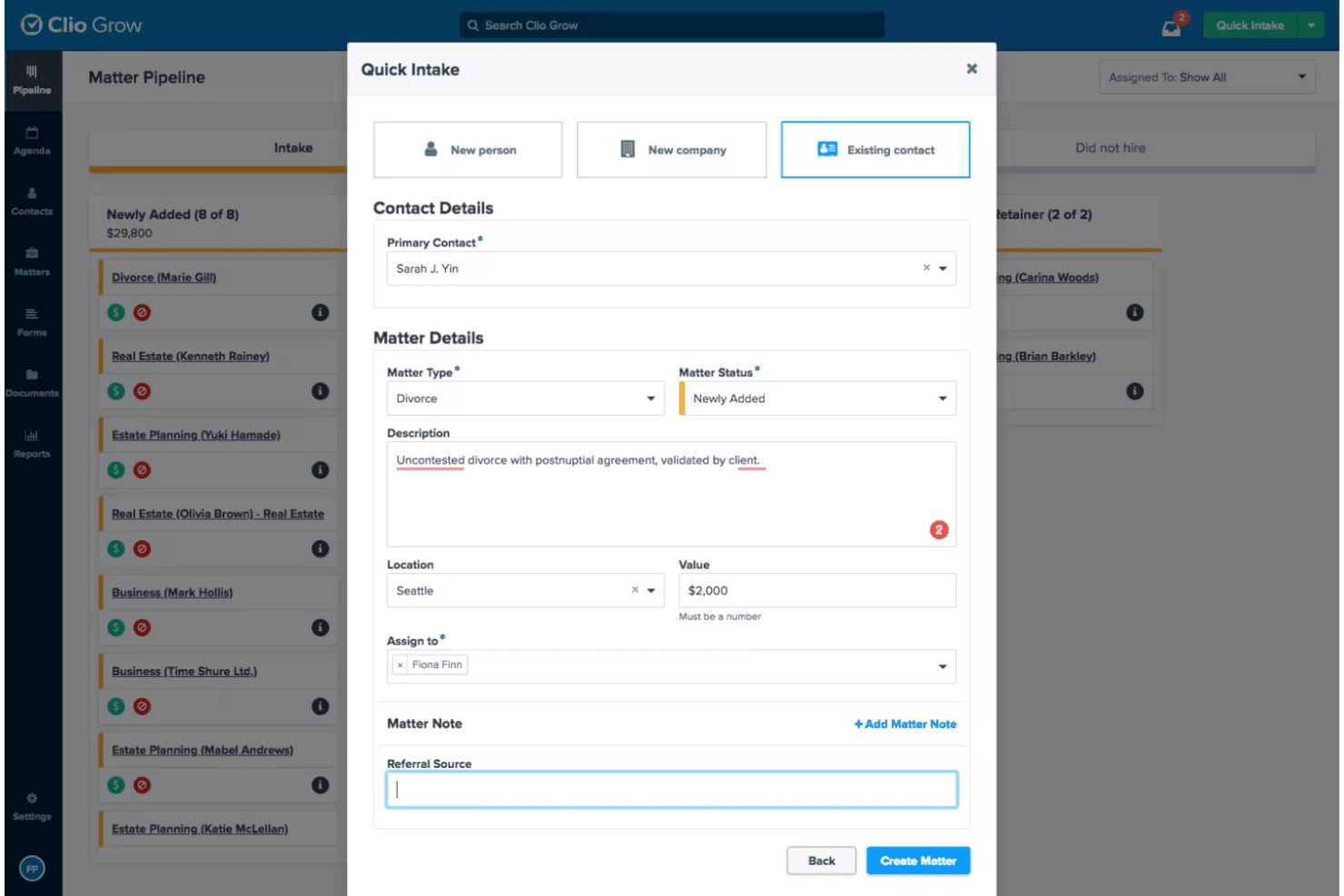
Clio Grow lets users quickly intake new matters via a guided form. Clio Grow is a legal-specific CRM that combines client intake management, visual matter pipeline tracking, automated conflict-of-interest checks, consultation scheduling, and document automation with e-signature for family law firms.
Who Is Clio Grow Best For?
Clio Grow fits family law firms that need ethically compliant intake workflows, from conflict checks to retainer e-signatures, within a single legal-specific platform.
Why I Picked Clio Grow
Clio Grow earns its spot on my shortlist because it's the only CRM here built specifically around bar-approved compliance at every intake stage. I like that automated conflict-of-interest checks run before a prospect ever signs a retainer, which matters enormously in family law where opposing-party conflicts are common. Clio Grow AI handles after-hours intake calls, screens leads, and books consultations autonomously, so no qualified divorce or custody prospect slips through overnight.
Clio Grow Key Features
- Visual matter pipeline: A Kanban-style board lets you drag prospects through customizable intake stages and syncs automatically to Clio Manage when a client converts.
- Self-serve consultation scheduler: Prospective clients book their own appointments based on attorney availability, with automated reminders and payment collection at the time of booking.
- Referral source attribution reporting: Built-in analytics track where leads originate—referring attorneys, Google LSA, past clients, or campaigns—so you can assess which channels drive retained matters.
- Multi-language intake forms: Customizable intake forms are available in English, Spanish, French, German, and Portuguese, with conditional logic to qualify leads by matter type.
Clio Grow Integrations
Clio Grow offers 250+ marketplace integrations, including Clio Manage, QuickBooks, Xero, Google Drive, Dropbox, Microsoft Outlook, Google Calendar, and Google Local Services Ads. It also supports Zapier and a public API for custom integrations.
Pros and Cons
Pros:
- Referral source reporting tracks lead origins
- AI handles after-hours lead intake calls
- Automated conflict checks built into intake
Cons:
- Family law-specific templates are not included
- Marketing automation is basic compared to peers
Learn more about Clio Grow: Best for all-in-one family law client management
- 10-day free trial
- From $60/user/month
Visit WebsiteCustomer Rating:4.6/5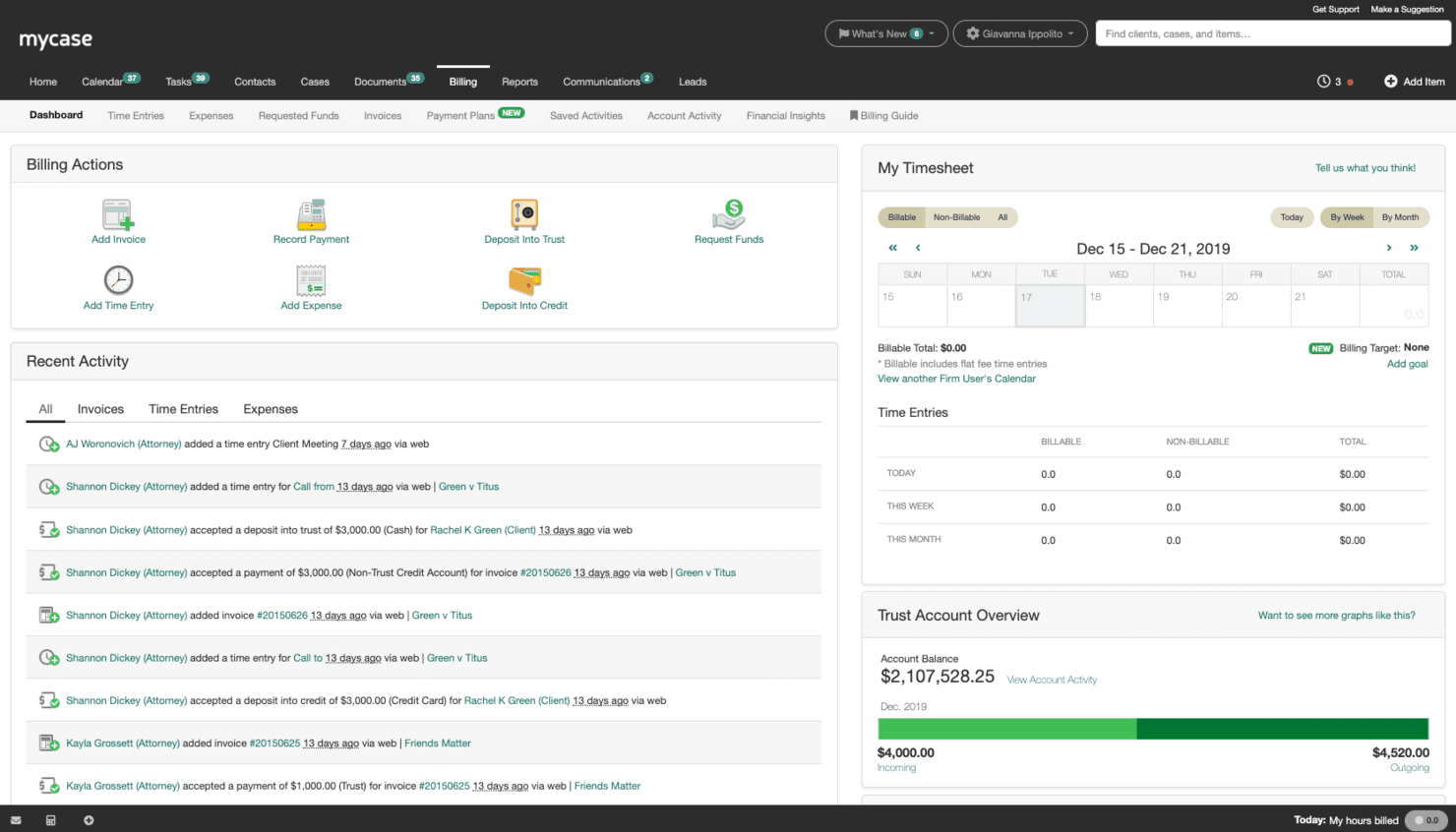
MyCase is a CRM for family law that provides in-depth client management, case tracking, and communication tools for legal professionals. MyCase is a legal practice management platform that combines client intake, CRM, case management, trust accounting, document automation, and a secure client portal in one system built specifically for law firms.
Who Is MyCase Best For?
MyCase fits family law firms that want intake, case management, billing, and client communication handled in one platform rather than stitched together from separate tools.
Why I Picked MyCase
MyCase earns its spot on my shortlist because no other tool pulls intake, case management, and client communication into one this cohesively. I love how the Lead Status Board tracks a prospect from first contact through signed retainer, with intake data flowing directly into the matter file on conversion. The secure client portal handles documents, invoices, and encrypted messaging in one place, which is especially useful in family law where cases run long and clients need consistent access to updates.
MyCase Key Features
- Lead Status Board: A visual pipeline that tracks prospects through each stage, from first contact to signed retainer, with customizable stages tied to intake forms and case records.
- IOLTA-compliant trust accounting: Native three-way trust reconciliation with low balance alerts, multiple bank account management, and deep LawPay integration built directly into the billing module.
- Conflict check tracking: A full content search tool that scans PDFs, images, and text across the platform to surface potential conflicts before a matter is opened.
- 8am IQ Discovery Assistant: An AI-powered OCR tool that processes up to 5,000 pages per user per month to extract key information from discovery documents.
MyCase Integrations
MyCase offers 75+ native integrations, including LawPay, QuickBooks Online, Google Calendar, Microsoft Outlook, InfoTrack, LawToolBox, Lawmatics, Hona, and CallRail. Advanced includes open API access, and Zapier is also supported.
Pros and Cons
Pros:
- Secure client portal replaces most email communication
- IOLTA trust accounting with automated compliance alerts
- Dedicated intake pipeline for family law matters
Cons:
- Data migration can be delayed and error-prone
- Document automation struggles with court PDF forms
Learn more about MyCase: Best for AI-powered family law intake scoring
- Free demo available
- Pricing upon request
Visit WebsiteCustomer Rating:4.6/5
Lawmatics offers a CRM solution for family law with features for client onboarding, case tracking, and marketing automation. Lawmatics is a legal-specific CRM built exclusively for law firms, offering client intake automation, matter-centric pipeline management, AI-powered lead qualification, document automation, and a secure client portal tailored to family law matter types like divorce, custody, and adoption.
Who Is Lawmatics Best For?
Lawmatics is a strong fit for family law firms with dedicated intake coordinators who need to automate lead qualification, consultation booking, and client follow-up across high-volume matter types like divorce and custody.
Why I Picked Lawmatics
Lawmatics earns its spot on my shortlist because no other tool I've evaluated treats legal intake as its core product the way this one does. I'm particularly impressed by Merlin Qualify, an AI lead-scoring engine that evaluates incoming family law leads on criteria like contested status, child safety concerns, and retainer fit, then tells intake staff exactly whether to reject, refer, or chase a lead. Pair that with Merlin Engage's automated SMS and email follow-up for after-hours custody inquiries, and you have a system that genuinely handles the intake workload.
Lawmatics Key Features
- Conflict checking: Automatically runs a conflict check on new leads at the point of entry, with basic checks on Essential and advanced checks on Premium and Enterprise plans.
- Client portal: Gives clients a secure, private workspace for two-way messaging, document sharing, e-signature requests, and appointment access.
- Referral source tracking: Attributes new matters to referring attorneys, past clients, or marketing channels, with ROI reporting available on Premium plans and above.
- Document automation: Merges CRM contact and matter data into pre-built templates for engagement letters, retainer agreements, and court filings, with e-signature delivery built in.
Lawmatics Integrations
Lawmatics offers native integrations with Clio, MyCase, LEAP, Smokeball, PracticePanther, LawPay, Google Calendar, Microsoft Outlook, Zoom, and Smith.ai. It also supports custom connectivity through LawLink.ai and Zapier.
Pros and Cons
Pros:
- Conflict checks auto-triggered on new leads
- Automated intake for divorce and custody pipelines
- AI lead scoring built for family law
Cons:
- E-signature actions require leaving the matter screen
- No native trust accounting functionality
Learn more about Lawmatics: Best for automated document assembly
- Free demo available
- Pricing upon request
Visit WebsiteCustomer Rating:4.2/5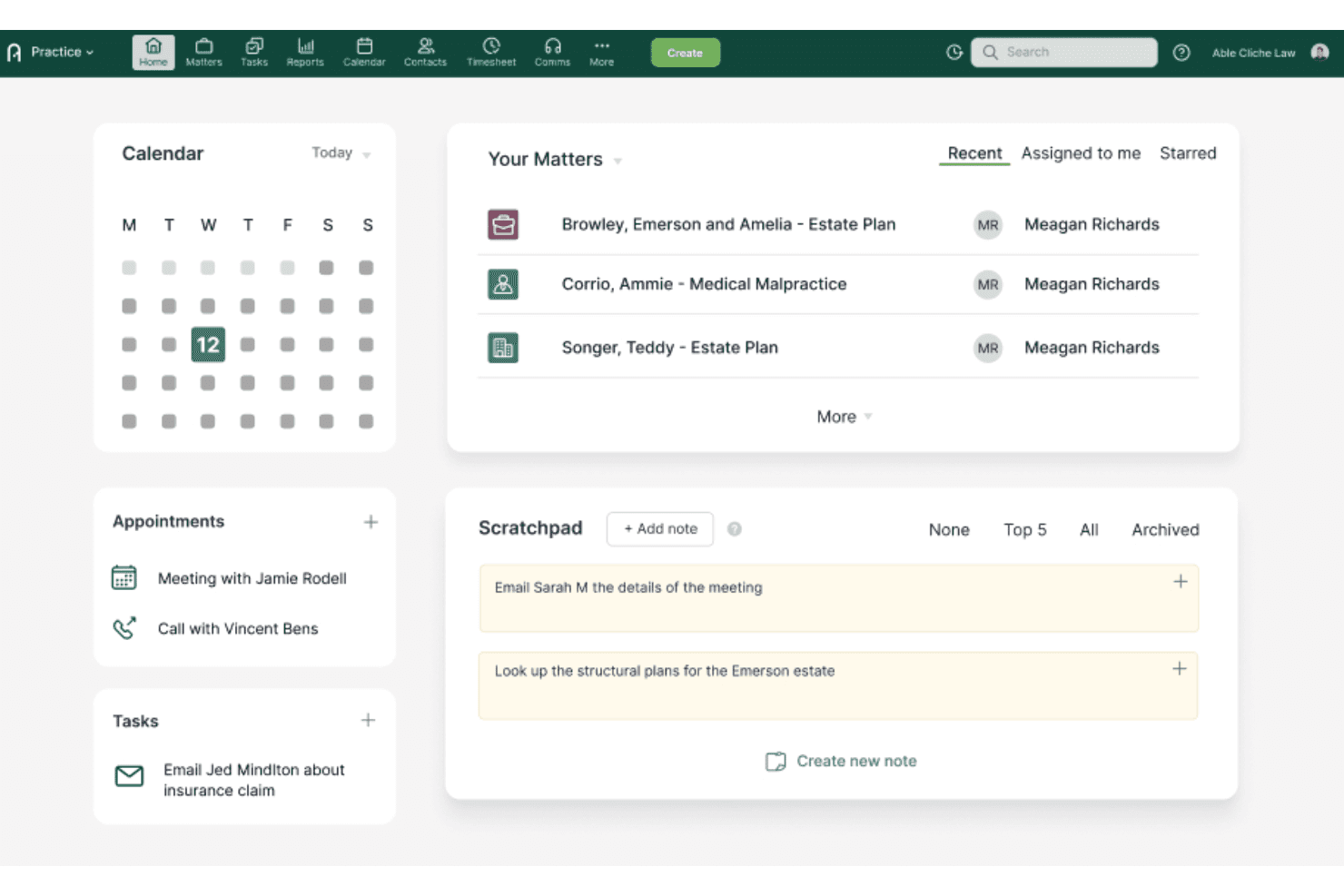
Actionstep centralizes matters, tasks, and notes on one home dashboard. Actionstep is a practice management platform built for midsize law firms that combines matter-centric case management, document automation, trust accounting, client intake, and a secure client portal.
Who Is Actionstep Best For?
Actionstep is built for midsize family law firms that need document automation, trust accounting, and matter management in a single platform.
Why I Picked Actionstep
Actionstep earns its spot on my shortlist because of its Builder module, which handles document automation in a way that's genuinely built for family law. I like that it auto-adjusts pronouns and signature blocks based on the number and gender of parties, so generating a custody agreement or divorce petition doesn't require manual cleanup. Conditional logic inside templates means the right clauses appear automatically depending on the matter details.
Actionstep Key Features
- Matter View timeline: Displays all documents, emails, file notes, and communications for a single matter in one chronological view.
- Three-way trust reconciliation: Automatically aligns the firm's records, client trust ledgers, and bank statements with a full audit trail.
- Conflict of interest checking: Runs a one-click conflict check against existing contacts and matters during or immediately after intake.
- Acumen analytics dashboards: Pre-built dashboards track matter profitability, pipeline conversion, and fee-earner performance without manual setup.
Actionstep Integrations
Actionstep has documented integrations with LawPay, Lexidesk, Microsoft 365 and Outlook, InfoTrack, and First AML. It also supports Zapier.
Pros and Cons
Pros:
- Native trust accounting with automated reconciliations
- Secure portal supports client communication and sharing
- Document automation built for family law templates
Cons:
- No single-user or solo practice support
- Initial setup requires certified consultants
Learn more about Actionstep:
Annen CRM-programvare for familierett
Nedenfor finner du en liste over annen CRM-programvare for familierett som jeg vurderte, men som ikke kom med på topplisten. Det kan likevel være verdt å se nærmere på dem.
- 11LitifyBest for AI-driven family law intake triage
- 12PracticePantherBest for matter workflow automation
- 13CARET LegalBest for iOS and Android matter access on the go
- 14Rocket MatterBest for IOLTA trust billing in family law
- 15CenterbaseBest for divorce financial calculations built in
- 16HoowlaBest for UK family law workflow customisation
- 17CosmoLex CRMBest for native trust accounting in one platform
Relaterte programvareanmeldelser
Hvis du fortsatt ikke har funnet det du leter etter her, kan du se nærmere på disse verktøyene som er nært knyttet til CRM-programvare for familierett, og som vi har testet og vurdert.
- CRM-programvare
- Salgsprogramvare
- Programvare for kundeemnehåndtering
- Programvare for kontraktsadministrasjon
- System for inntektsstyring
- CPQ-programvare
How I Evaluate CRM Software for Family Law
I evaluate each tool against two layers: the baseline capabilities it must have to qualify—like conflict checks, matter pipelines, and retainer tracking—and the differentiators that set it apart.
Core Functionality (Table Stakes For This List)
When I'm selecting tools for my list, I rank each one on a scale from 0 (does not offer the functionality) to 5 (excels in this area) for each core functionality listed below. Then, I calculate the tool's total score into a percentage. Each tool needs to achieve a minimum total score of 55% to be considered for inclusion.
- Legal Intake Management: I verify that the tool supports structured intake forms and workflows specifically designed for family law cases like divorce and custody, including built-in conflict-of-interest checks before attorney engagement.
- Matter-Centric Pipeline Tracking: I ensure the solution allows me to track clients through case-specific stages—from initial consultation, retainer signing, to active matter management—rather than generic sales pipelines.
- Retainer & Trust Billing: I assess whether the software provides native or integrated features to manage retainer agreements, IOLTA-compliant trust accounting, and billing workflows tailored for family law practices.
- Secure Client Communication: Given the sensitivity of family law matters, I look for encrypted messaging, secure client portals, and e-signature tools that uphold attorney-client confidentiality and privilege.
- Legal Document Automation: I check for the ability to automatically generate engagement letters, fee agreements, custody questionnaires, and other family law documents using CRM data merged into templates, saving time on manual intake.
- Legal Software Integrations: I evaluate how well the CRM integrates with key legal practice management and billing platforms such as Clio, MyCase, and LawPay to keep matter data synchronized and workflows seamless.
Once I have a list of tools that meet this criteria, I consider what sets each platform apart.
Differentiating Factors (What Sets Vendors Apart)
Here's how I compare and contrast different vendors:
Standout Features
Referral source tracking matters in family law, where many new matters come from attorney referrals and past clients. I look for tools that attribute leads to specific sources so firms can measure which channels actually convert. Consultation scheduling is another differentiator—prospective clients in custody or divorce situations expect to book quickly, and tools that handle self-booking with payment collection remove friction from intake. I also evaluate pipeline analytics, specifically intake-to-retainer conversion rates and matter value forecasting that inform growth decisions.
Beyond Features
Compliance and confidentiality matter deeply here. I check whether a CRM meets bar-level data handling standards, since family law records often include financial disclosures and custody details that demand strict access controls. Firm size fit is another factor I weigh—a solo practitioner handling divorce cases needs a different setup than a 20-attorney firm with a dedicated intake team. I also consider onboarding support, particularly whether a vendor provides pre-built family law pipelines and templates that reduce the time it takes to go live.
Slik velger du CRM-programvare for familierett
Mens du arbeider deg gjennom den unike prosessen med å velge programvare, bør du ha følgende punkter i mente:
- Brukervennlighet og tilgjengelighet: Som du vet, håndterer familieadvokatfirmaer ofte sensitive og komplekse saker som krever rask og enkel tilgang til klientinformasjon. Et CRM-system som er brukervennlig og tilbyr skybasert tilgang, kan hjelpe deg med å forberede deg raskere og dele viktige oppdateringer med teammedlemmer i sanntid. Et skybasert CRM-system gjør det for eksempel mulig for advokater å få tilgang til klientfiler og saksdetaljer hvor som helst, slik at du kan arbeide effektivt selv når du ikke er på kontoret.
- Integrasjon med eksisterende verktøy: Advokatfirmaer bruker vanligvis ulike programvareverktøy til saksbehandling, fakturering og dokumenthåndtering. Ved å velge et CRM-system som integreres godt med disse eksisterende verktøyene, kan du minimere både forstyrrelser og behovet for manuell dataregistrering. Et CRM-system som integreres med faktureringsprogramvaren din, kan for eksempel oppdatere klientfakturaer automatisk, noe som sparer tid og reduserer feil.
- Tilpasning og automatisering: Alle familieadvokatfirmaer har unike arbeidsflyter og prosesser. Et CRM-system som tilbyr tilpasningsmuligheter, for eksempel egendefinerte dashbord og automatiserte arbeidsflyter, kan bidra til å tilpasse programvaren til spesifikke behov. Datastyrte påminnelser om rettsdatoer og frister for dokumenter kan for eksempel sikre at ingenting blir oversett, og dermed forbedre den generelle saksbehandlingen.
- Klientkommunikasjon og relasjonsstyring: Kommunikasjon er avgjørende i de fleste familierettslige saker. Et CRM-system med detaljerte funksjoner for klientkommunikasjon, som klientportaler og innebygd meldingsfunksjon, kan styrke klientrelasjonene samtidig som profesjonaliteten opprettholdes. En klientportal gjør det for eksempel mulig for klienter å få sikker tilgang til saksinformasjonen sin, raskt komme i kontakt med og kommunisere med advokatene sine og laste opp nødvendige dokumenter, noe som forbedrer åpenheten og klienttilfredsheten.
- Sikkerhet og samsvar: Familieadvokatfirmaer håndterer konfidensiell informasjon, noe som gjør det avgjørende å prioritere sikkerhet. Et CRM-system med kryptering på banknivå og samsvar med standarder for juridisk sektor beskytter både klientdataene og firmaets omdømme. En liten, men virkningsfull funksjon, som tilgangskontroller basert på roller, kan for eksempel begrense tilgangen til sensitiv informasjon og sikre at bare autorisert personell kan se eller redigere klientdata.
Trender innen CRM-programvare for familierett
CRM-programvare for familieadvokatfirmaer utvikler seg for å imøtekomme de unike behovene til juridiske fagfolk. Disse trendene fokuserer på å forbedre klienthåndteringen, forenkle og automatisere driften samt integrere avansert teknologi for å øke effektiviteten og klienttilfredsheten.
- KI-drevet innsikt og automatisering: KI-drevet innsikt og automatisering blir stadig mer integrert i CRM-programvare for familierett. Disse verktøyene bidrar til å automatisere repetitive oppgaver, som planlegging og dokumenthåndtering, slik at advokater kan konsentrere seg om viktigere deler av virksomheten. Denne trenden er avgjørende fordi den reduserer administrative byrder betydelig og øker produktiviteten.
- Forbedrede klientportaler: Klientportaler blir stadig mer populære. De gir klienter tilgang til saksinformasjon, dokumenter og fakturaer døgnet rundt. Denne funksjonen forbedrer åpenheten og klienttilfredsheten ved å holde klientene informert og involvert gjennom hele den juridiske prosessen. Dette er interessant fordi det fremmer bedre kommunikasjon og tillit mellom klienter og deres juridiske representanter.
- Integrasjon med verktøy for juridisk søk: Integrasjon med verktøy for juridisk søk er en voksende trend innen CRM-programvare for familierett. Dette gjør det mulig for advokater å få direkte tilgang til CRM-systemets juridiske databaser og forskningsmateriale, noe som effektiviserer søkeprosessen og forbedrer saksforberedelsen. Denne trenden er viktig fordi den øker effektiviteten og nøyaktigheten i juridisk arbeid.
- Avansert dokumentautomatisering: Avansert dokumentautomatisering blir en standardfunksjon i CRM-programvare for familierett. Denne teknologien automatiserer oppretting, redigering og håndtering av juridiske dokumenter, og reduserer tiden og innsatsen som kreves for dokumenthåndtering. Dette er viktig fordi det minimerer feil og sikrer konsistens i juridisk dokumentasjon.
- Dataanalyse og rapportering: Verktøy for dataanalyse og rapportering integreres i stadig større grad i CRM-programvare for familierett. Disse verktøyene gir verdifull innsikt i klientinteraksjoner, saksfremdrift og virksomhetens resultater, og hjelper firmaer med å ta datadrevne beslutninger. Denne trenden er betydningsfull fordi den gjør det mulig for advokatfirmaer å optimalisere driften og forbedre resultatene for klientene.
Trendene innen CRM-programvare for familierett er rettet mot å forbedre effektivitet, klienttilfredshet og operasjonell effektivitet gjennom avansert teknologi og integrasjoner. Ha disse funksjonene i mente når du prioriterer kriterier for ditt neste CRM-verktøy.
Hva er CRM-programvare for familierett?
CRM-programvare for familierett er verktøy som hjelper familieadvokatfirmaer med å organisere klientdetaljer, håndtere saker og følge opp kommunikasjon på ett og samme sted. Familieadvokater og medarbeiderne deres bruker CRM-programvare til å håndtere klientinntak, administrere dokumenter, registrere fakturerbar tid og holde oversikt over avtaler og oppgaver. Du vil ha nytte av dette for å holde orden, forbedre klientservicen og redusere administrative utfordringer, slik at du kan konsentrere deg om klientene.
Funksjoner i CRM-programvare for familierett
Når man velger CRM-programvare for familierett, er det avgjørende å ta hensyn til funksjoner som forbedrer klienthåndteringen, effektiviserer driften og øker den samlede effektiviteten. Familierettspraksiser håndterer sensitive og komplekse saker, noe som gjør det nødvendig å ha et robust CRM-system for å håndtere ulike aspekter ved klientforhold og saksbehandling. Nedenfor finner du noen av de viktigste funksjonene du bør se etter i CRM-programvare for familierett:
- Klientinntak og håndtering av potensielle klienter: Effektive verktøy for håndtering av klientinntaksskjemaer, elektroniske signaturer og sporing av potensielle klienter. Denne funksjonen sikrer at nye klienter blir tatt imot på en smidig måte, og at opplysningene deres registreres korrekt.
- Saksbehandling: Funksjoner som kalenderstyring, arbeidsflytautomatisering, dokumenthåndtering og saksanalyse bidrar til å organisere saksdetaljer, planlegge viktige datoer og automatisere repetitive oppgaver, noe som øker produktiviteten.
- Fakturering og betalinger: Denne funksjonen omfatter muligheter for fakturering, utstedelse av fakturaer, tidsregistrering og økonomisk rapportering. Den forenkler de økonomiske aspektene ved saksbehandlingen og sikrer betalinger til rett tid og korrekte økonomiske opplysninger.
- Klientkommunikasjon: En klientportal og innebygd tekstmeldingsfunksjon for effektiv kommunikasjon. Dette sikrer at klientene enkelt kan kommunisere med advokatene sine og få sikker tilgang til viktige dokumenter.
- Dokumenthåndtering: Denne funksjonen gir tilgang til viktige juridiske dokumenter med tilpasningsmuligheter. Den gjør det også mulig å lagre og hente frem dokumenter på en sikker måte, slik at saksmappene håndteres effektivt.
- Automatisering: Muligheter for å automatisere anmodninger om klientmidler og innkreving av betalinger. Automatisering reduserer den administrative belastningen for de ansatte og sikrer at rutineoppgaver utføres korrekt og til rett tid.
- Datadrevet innsikt: Analyseverktøy for sporing av klientinteraksjoner og saksfremdrift, slik at strategier kan forbedres. Denne funksjonen gir verdifull innsikt i firmaets resultater og bidrar til bedre informerte beslutninger.
- Tilgjengelighet og mobilitet: En mobilapp for håndtering av klientopplysninger og kommunikasjon på farten. Dette sikrer at advokatene kan få tilgang til saksdetaljer og kommunisere med klienter fra hvor som helst, noe som gir større fleksibilitet.
- Sikkerhet og brukerstøtte: Sikkerhetstiltak på høyt nivå og pålitelig kundestøtte er avgjørende for å opprettholde tillit og effektiv drift. Det er også viktig å sikre at klientopplysningene er beskyttet, og at firmaet har tilgang til støtte ved behov.
- Integrasjoner: Kompatibilitet med andre verktøy gjennom plattformer som Zapier. Denne funksjonen gjør at CRM-systemet kan fungere sømløst sammen med firmaets øvrige programvare, noe som forbedrer den samlede arbeidsflyten.
Disse funksjonene forbedrer samlet sett klientengasjementet, effektiviserer driften og øker effektiviteten i familierettspraksiser. Ved å velge et CRM-system med disse funksjonene kan familierettsfirmaer håndtere saksmengden bedre, øke klienttilfredsheten og til syvende og sist oppnå bedre resultater for klientene.
Fordeler med CRM-programvare for familierett
Effektiv håndtering av klientforhold og saksdetaljer er avgjørende for å levere juridiske tjenester av høy kvalitet innen familierett. Programvare for kunderelasjonshåndtering (CRM) som er tilpasset familierettspraksiser, gir en rekke fordeler som kan forbedre brukeropplevelsen og virksomhetens effektivitet betydelig. Nedenfor finner du fem viktige fordeler med CRM-programvare for familierett:
- Forbedret klientinntaksprosess: CRM-programvare effektiviserer klientinntaksprosessen ved å automatisere innsamlingen av opplysninger og organisere klientinformasjon i en sentralisert database, slik at de ansatte enkelt får tilgang til den. Dette reduserer manuell registrering, minimerer feil og sikrer en smidigere introduksjon for nye klienter.
- Bedre kommunikasjonsstyring: CRM-programvare forbedrer kommunikasjonen mellom advokater og klienter ved å samle all klientkommunikasjon på ett sted og integrere med verktøy som e-post og chatboter. Dette sikrer at all kommunikasjon spores og enkelt kan hentes frem, noe som fører til bedre håndtering av klientforhold og høyere tilfredshet.
- Effektiv dokumenthåndtering: CRM-programvare muliggjør omfattende dokumenthåndtering og gir umiddelbar tilgang til viktige dokumenter som prosesskriv, notater og rettskjennelser. Advokater kan tilpasse dokumentmapper, legge til kommentarer og dele dokumenter på en sikker måte, noe som forbedrer samarbeidet og reduserer risikoen for at filer går tapt eller blir borte.
- Økonomisk sporing og integrasjon med fakturering: CRM-programvare forenkler økonomisk sporing ved å integreres med fakturerings- og regnskapssystemer for familierettslige saker som omfatter barnebidrag og underholdsbidrag. Dette sikrer nøyaktig økonomistyring og fakturering til rett tid, noe som er avgjørende for å opprettholde virksomhetens økonomiske helse.
- Oppdateringer i sanntid og saksbehandling: CRM-programvare gir oppdateringer i sanntid om saksfremdrift og frister, slik at alle teammedlemmene har samme informasjon. Dette forbedrer saksbehandlingen ved å redusere risikoen for oversette frister og forbedre den samlede koordineringen og effektiviteten i sakene.
Implementering av CRM-programvare i en familierettspraksis kan forbedre driftseffektiviteten, klienttilfredsheten og den samlede saksbehandlingen betydelig. Ved å automatisere rutineoppgaver og samle viktig informasjon på ett sted gjør CRM-programvare det mulig for advokater å fokusere mer på å levere juridiske tjenester av høy kvalitet og mindre på administrative byrder.
Kostnader og priser for CRM-programvare for familierett
Denne delen anslår gjennomsnittlige abonnementer og kostnader for CRM-programvare for familierettsfirmaer. Dataene er basert på ulike kilder og gjenspeiler standard prisnivåer og funksjoner.
Sammenligningstabell for CRM-programvare for familierett
| Abonnementstype | Gjennomsnittspris | Vanlige funksjoner |
| Gratisabonnement | $0 | Grunnleggende kontaktadministrasjon, begrenset lagringsplass, grunnleggende rapportering |
| Personlig abonnement | $12 - $30 per bruker/måned | Forbedret kontaktadministrasjon, e-postintegrasjon, grunnleggende automatisering, begrenset kundestøtte |
| Forretningsabonnement | $60 - $100 per bruker/måned | Avansert automatisering, dokumentadministrasjon, skjemaer for klientinntak, tidsregistrering |
| Virksomhetsabonnement | $200+ per bruker/måned | Tilpassede arbeidsflyter, avansert rapportering, tilgang for flere brukere, førsteklasses kundestøtte |
En oversikt over abonnementstyper, kostnader og funksjoner for CRM-programvare som brukes av familierettsfirmaer.
Når du velger et CRM-verktøy for advokatfirmaet, bør du vurdere konkurransedyktige priser, skalerbarhet og et godt forhold mellom funksjoner og kostnader. Sørg for at programvaren tilbyr verdifulle funksjoner, som integrasjoner, AI-funksjoner og solid kundestøtte, slik at den dekker behovene til virksomheten din.
Vanlige spørsmål om CRM-programvare for familierett
Her er noen vanlige spørsmål om CRM-programvare for familierett.
Hvordan kan CRM-programvare forbedre klientkommunikasjonen i familierettsfirmaer?
CRM-programvare kan forbedre klientkommunikasjonen betydelig ved å samle all klientkontakt og klientinformasjon på ett sted. Dette gjør det mulig for advokater å få rask og effektiv tilgang til klientopplysninger, oppdateringer om saker og kommunikasjonshistorikk. Funksjoner som sikre klientportaler gjør det mulig for klienter å få tilgang til saksinformasjon, dokumenter og oppdateringer når som helst, noe som reduserer behovet for kontinuerlig kommunikasjon frem og tilbake. Automatiserte påminnelser og varsler sørger for at klientene informeres om viktige datoer og frister, noe som forbedrer den generelle klienttilfredsheten og tilliten.
Hva er de vanligste utfordringene ved implementering av CRM-programvare i familierettsfirmaer?
Implementering av CRM-programvare i familierettsfirmaer kan by på flere utfordringer, blant annet problemer med datamigrering, motstand mot å ta systemet i bruk og integrasjon med eksisterende systemer. Datamigrering kan være komplisert, særlig hvis firmaet har store mengder data lagret i ulike formater. Det er avgjørende å sikre at alle data overføres nøyaktig til det nye systemet uten tap eller korrupsjon. Motstand mot å ta systemet i bruk kan oppstå hvis medarbeiderne er vant til tradisjonelle metoder og nøler med å lære ny teknologi. Omfattende opplæring og støtte kan bidra til å redusere dette problemet. Integrering av CRM med eksisterende systemer for praksisadministrasjon, fakturering og dokumenthåndtering kan være utfordrende, men er avgjørende for sømløs drift.
Hvordan sikrer man datasikkerhet og overholdelse av regelverket med CRM-programvare i familierettsfirmaer?
Datasikkerhet og overholdelse av regelverket er avgjørende for familierettsfirmaer som bruker CRM-programvare. For å sikre datasikkerheten bør firmaer velge CRM-løsninger som tilbyr robust kryptering, sikre tilgangskontroller og regelmessige sikkerhetsoppdateringer. Det er også viktig å overholde juridiske krav og forskriftskrav, som GDPR eller HIPAA. For å oppfylle disse kravene bør CRM-programvaren tilby funksjoner som revisjonsspor, retningslinjer for datalagring og sikker lagring av data. Regelmessige sikkerhetsrevisjoner og opplæring av medarbeiderne i beste praksis for databeskyttelse kan ytterligere styrke sikkerheten og overholdelsen av regelverket.
Hva er beste praksis for å tilpasse CRM-programvare til de spesifikke behovene til et familierettsfirma?
Tilpasning av CRM-programvare til de spesifikke behovene til et familierettsfirma innebærer flere anbefalte fremgangsmåter. Først bør man identifisere firmaets unike arbeidsflyter og prosesser og konfigurere CRM-systemet slik at det støtter disse. Dette kan innebære å opprette egendefinerte felt, maler og automatiseringsregler som samsvarer med firmaets drift. Ved å involvere sentrale interessenter i tilpasningsprosessen sikrer man at systemet oppfyller behovene til alle brukere. Gjennomgang og oppdatering av tilpasningsinnstillingene basert på tilbakemeldinger og endrede krav kan bidra til å opprettholde systemets effektivitet.
Hvordan kan CRM-programvare bidra til å håndtere klientinntak og konvertering av potensielle klienter i familierettsfirmaer?
CRM-programvare kan effektivisere prosessen for klientinntak ved å automatisere innsamlingen og organiseringen av klientinformasjon. Dynamiske inntaksskjemaer kan tilpasses for å samle inn relevante opplysninger, noe som reduserer manuell registrering av data og feil. Programvaren kan også følge potensielle klienter fra første kontakt til konvertering, slik at man får innsikt i hvor effektive markedsføringstiltakene og strategiene for klientanskaffelse er. Automatiserte oppfølginger og påminnelser sørger for at potensielle klienter blir fulgt opp raskt, noe som øker sannsynligheten for konvertering.
Hvordan kan CRM-programvare forbedre fakturerings- og fakturautsendelsesprosessene i familierettsfirmaer?
CRM-programvare kan forbedre fakturerings- og fakturautsendelsesprosessene ved å automatisere tidsregistrering, utgiftshåndtering og generering av fakturaer. Advokater kan enkelt registrere fakturerbare timer og utgifter direkte i CRM-systemet, noe som sikrer nøyaktig og rettidig fakturering. Programvaren kan automatisk generere detaljerte fakturaer basert på forhåndsdefinerte maler og sende dem til klientene. Integrasjon med systemer for betalingsbehandling gjør det mulig for klienter å betale fakturaer på nettet, noe som effektiviserer betalingsprosessen. Automatiske påminnelser om forfalte fakturaer kan bidra til å redusere utestående betalinger og forbedre kontantstrømmen.