

Recensione di Nutshell: Pro, Contro, Caratteristiche e Prezzi Spiegati
Ho tagliato il superfluo per mostrarti perché il CRM intelligente di Nutshell bilancia flessibilità e semplicità—così ottieni funzionalità potenti senza sopraffare il tuo team di vendita.

Recensiamo gli strumenti in modo indipendente e le commissioni aiutano a finanziare i nostri test. Consulta la nostra politica sulla trasparenza, la nostra metodologia o suggerisci uno strumento.
Businesses can quickly fall behind when customer data is scattered, follow-ups slip through the cracks, and teams rely on disconnected tools just to stay organized. Without the right CRM, even simple sales and marketing workflows become harder to manage and scale.
Nutshell is an all-in-one CRM software designed to help sales, marketing, and customer success teams stay aligned and keep data clean without getting bogged down by complexity. If you’re a revenue operations expert who’s tired of tangled systems, scattered reports, and the feeling that your CRM is working against you, Nutshell offers a refreshing alternative.
In this review, I’ll walk you through Nutshell’s features, how it fits different use cases, where it shines, where it falls short, and what you can expect to pay—so you can decide if it’s the right fit for you.
Nutshell Evaluation Summary
4.3/5
- From $13/user/month (billed annually)
- 14-day free trial + free demo available
Perché fidarsi dei nostri consigli sui software
6,700+
Reviews
20
Industry experts
16+
Evaluation factors
14
Years
Le nostre recensioni riflettono il nostro giudizio indipendente, non un discorso di vendita. Scopri come manteniamo la trasparenza.
Per questa guida, abbiamo valutato gli strumenti attraverso test pratici e ricerche indipendenti, assegnando un punteggio agli strumenti in base ai nostri criteri di selezione.
Le nostre recensioni riflettono il nostro giudizio editoriale umano, non un discorso di vendita.
Nutshell Overview
In my view, Nutshell stands out for its simple interface, solid reporting, and fast setup—making it easier to choose over clunkier competitors. I think pricing is fair for teams who want flexible pipelines and automation but don’t need deep customization or an endless list of native integrations. The support team responds quickly, which I appreciate. If you’re judging CRMs for fast-growing, mid-sized sales teams or a company new to structured sales processes, you’ll likely find Nutshell hits the right balance between power and approachability.
Pros
- Sales automation workflows handle multi-step processes effectively
- Implementation and onboarding are streamlined for rapid deployment and adoption.
- Responsive support team resolves most issues promptly
Cons
- Nutshell isn’t as customizable as other enterprise solutions
- Marketing capabilities isn’t as robust as a dedicated marketing platform
- Limited native enterprise integrations
Is Nutshell Right For Your Needs?
Who Would be a Good Fit for Nutshell?
Nutshell is ideal for growing sales teams looking for pipeline visibility, quick setup, and easy-to-use automation without requiring a dedicated CRM administrator. It's well suited for small businesses, SaaS companies, agencies, B2B sales, remote and distributed teams, and organizations prioritizing unlimited contacts and a low learning curve.
- Small Sales TeamsSetup is fast, automation reduces manual work, and unlimited contacts keep costs predictable as you scale.
- B2B ServicesCustomizable pipelines and integrations with email and scheduling tools help manage leads from discovery through close.
- SaaS StartupsEasy-to-tweak workflows and email campaign features fit short sales cycles and lean teams.
- AgenciesPipeline views, contact segmentation, and shared activity histories help handle multiple client accounts.
- Distributed TeamsCloud access, mobile app, and straightforward collaboration features suit remote and hybrid work cultures.
- NonprofitsSimple donor management, bulk emailing, and custom fields support relationship-building without CRM complexity.
Who Would be a Bad Fit for Nutshell?
Nutshell is not suitable for highly regulated industries, large enterprises, organizations with extensive outbound calling needs, or those requiring advanced territory, commission, or deep marketing/project management tools. It also lacks built-in support ticketing features for post-sale service.
- Large EnterprisesLacks the granular permission controls and deep customization demanded by large corporate CRMs.
- Marketing Automation-centric TeamsTeams focused heavily on advanced marketing automation and nurture campaigns may find Nutshell’s sales-first feature set less specialized.
- Regulated IndustriesMissing tools for compliance, audit logging, and industry-specific data controls.
- Retail ChainsHas no point-of-sale, inventory tracking, or true multi-location selling support.
- Budget-Conscious TeamsBusinesses looking for a completely free CRM may find Nutshell unsuitable, since the platform requires a paid subscription to access its features and tools.
- Construction FirmsDoesn’t include built-in quoting, job costing, or project tracking tools common in those trades.
Come Testiamo e Valutiamo gli Strumenti
Abbiamo trascorso anni a costruire, perfezionare e migliorare il nostro sistema di valutazione e test dei software. Il nostro metodo è pensato per cogliere le sfumature della selezione software e ciò che rende uno strumento efficace, concentrandosi sugli aspetti critici del processo decisionale. Qui sotto puoi vedere esattamente come funzionano i nostri test e la valutazione sui sette criteri. Ci permette di fornire una valutazione imparziale del software in base alla funzionalità principale, alle caratteristiche distintive, facilità d’uso, onboarding, assistenza clienti, integrazioni, recensioni degli utenti e rapporto qualità-prezzo.
Funzionalità Principali (25% del punteggio finale)
Il punto di partenza per la nostra valutazione è sempre la funzionalità di base dello strumento. Possiede le caratteristiche e le funzioni che un utente si aspetterebbe di trovare? Alcune di queste funzioni di base sono limitate ai piani tariffari più costosi? Per noi uno strumento deve almeno essere alla pari con le capacità minime offerte dai concorrenti.
Caratteristiche Distintive (25% del punteggio finale)
Successivamente, valutiamo le funzionalità insolite o esclusive che vanno oltre le funzioni core normalmente presenti in strumenti simili. Un punteggio elevato riflette una presenza di caratteristiche particolari o uniche che rendono il prodotto più veloce, efficace o danno un valore aggiunto all’utente. Valutiamo anche la facilità di integrazione con altri strumenti tipici del tech stack per espanderne funzionalità e utilità. Gli strumenti che offrono numerose integrazioni native, connessioni di terze parti e accesso API per costruire integrazioni personalizzate ottengono i punteggi migliori.
Facilità d’Uso (10% del punteggio finale)
Consideriamo quanto sia rapido e intuitivo svolgere le attività fondamentali tramite lo strumento. I software con i punteggi più alti hanno un design ben pensato, sono intuitivi, offrono app mobili, forniscono modelli predefiniti e semplificano anche le attività più complesse.
Onboarding (10% del punteggio finale)
Sappiamo quanto sia importante che un nuovo strumento venga rapidamente adottato dal team, quindi valutiamo la facilità di apprendimento con un minimo di formazione. Valutiamo quanto velocemente un membro del team può iniziare a usare lo strumento senza esperienza. Le soluzioni con i punteggi più alti richiedono poco o nessun supporto iniziale.
Assistenza Clienti (10% del punteggio finale)
Analizziamo quanto sia facile e veloce risolvere problemi e ricevere assistenza tramite telefono, chat dal vivo o knowledge base. Gli strumenti e le aziende che offrono supporto in tempo reale ottengono i punteggi migliori, mentre i chatbot ottengono i peggiori.
Recensioni dei Clienti (10% del punteggio finale)
Oltre ai nostri test, consideriamo il net promoter score da clienti attuali e passati. Valutiamo la probabilità che gli utenti sceglierebbero nuovamente lo strumento per le funzionalità principali. Un punteggio elevato riflette un alto net promoter score da parte dei clienti.
Rapporto Qualità-Prezzo (10% del punteggio finale)
Infine, considerando tutti gli altri criteri, esaminiamo il prezzo medio dei piani base rispetto alle funzionalità principali e agli altri fattori valutativi. I software che offrono di più a un costo inferiore ottengono un punteggio più alto.
Core Features
Pipeline Management
Customize multiple pipelines to match your sales process stages. Drag-and-drop deals between stages and use filters to manage priorities.
Reporting and Analytics
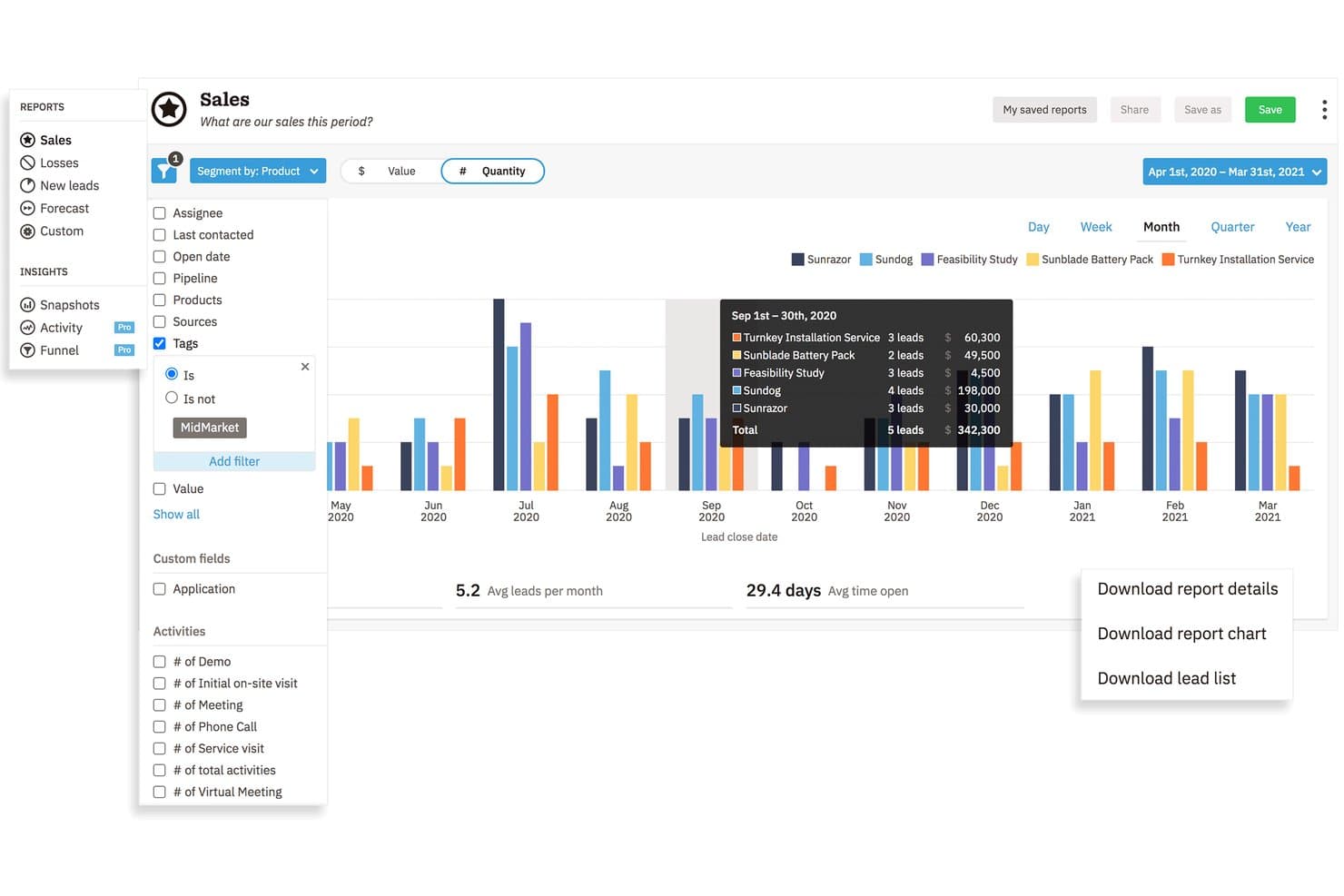
Build customizable sales and activity reports for individuals or teams. Visual dashboards make it easy to compare performance or spot bottlenecks.
Sales Automation
Automate repetitive tasks like assigning leads, sending emails, or updating deal statuses. Trigger complex workflows with simple rules that keep reps focused on selling.
Team Collaboration Tools
Log calls, emails, and meeting notes so everyone sees a full activity history. Tag teammates for follow-ups or handoffs on any lead or company record.
Contact and Lead Management
Store contacts, companies, and opportunities in a single, unified system. Import data in bulk and segment lists for targeted outreach.
Email Sync and Tracking
Connect business email accounts to auto-log conversations directly in Nutshell. Get notified when prospects open emails or click links.

Standout Features
AI Agents
Put AI-powered assistants to work inside your CRM to build pipelines, recommend next steps, and draft outreach. This allows your reps to focus on sales instead of busywork.
Web Form Builder
Create custom web forms to capture leads and automatically route them into pipelines. Use drag-and-drop tools to launch landing pages tailored to any campaign.

Ease of Use
Nutshell is one of the most intuitive CRMs you’ll find. The navigation is clean, setup is guided, and core workflows—like moving deals through pipelines or launching campaigns—take just a few clicks. Even power users note the layout makes everyday activities fast without losing track of details.

Onboarding
Nutshell’s onboarding is designed to get teams productive quickly, with guided in-app tutorials, white-glove data migration, and live support included for all customers. Small teams can typically get up and running within 5–10 business days, while larger or more complex implementations usually take just a few weeks.

Customer Support
Nutshell’s support is a standout, with users consistently praising quick replies from Nutshell’s US-based support team. The support team is hands-on with troubleshooting and proactive about follow-up, while monthly live webinars, an expansive knowledge base, walkthrough videos, and step-by-step guides make it easy for teams to learn and solve issues on their own.

Integrations
Nutshell natively integrates with Google Workspace, Microsoft 365, Calendly, Dialpad, Dropbox, Xero, Quickbooks Online, Slack, and Mailchimp, among others.
Nutshell also offers a REST API and connects with hundreds of third-party tools through Zapier.

Value for Money
Nutshell’s pricing hits a sweet spot for small and mid-sized sales teams, with optional add-ons available for expanded capabilities like advanced marketing features. Pricing is transparent, without hidden fees or mandatory multi-year contracts, and users can scale up or leave whenever they need without being locked into long-term commitments. Users also say they get strong value upfront while keeping advanced email marketing affordable compared to most alternatives.
- Foundation: Includes unlimited contacts, cloud storage, email & calendar sync, AI chatbot, and form builder.
- Growth: Adds activity reports, sales quotas, lead assignment rules, and custom stage goals.
- Pro: Offers five custom pipelines, advanced reporting, sales automation, and meeting scheduler.
- Business: Provides 10 custom pipelines, advanced meeting scheduler, auditlog and email templates.
- Enterprise: Includes unlimited pipelines, unlimited custom fields, SSO, and SQL data access.

Nutshell Specs
- 2-Factor Authentication: Yes
- API: Yes
- Calendar Management: Yes
- Call Tracking: Yes
- Campaign Management: Yes
- Click-to-Dial: Yes
- Contact Management: Yes
- Contact Sharing: Yes
- Custom Data Forms: Yes
- Customer Management: Yes
- Dashboard: Yes
- Data Export: Yes
- Data Import: Yes
- Data Visualization: Yes
- Email Integration: Yes
- External Integrations: Yes
- File Sharing: Yes
- File Transfer: Yes
- Google Apps Integration: Yes
- Lead Management: Yes
- Lead Scoring: Yes
- Marketing Automation: Yes
- Mobile App: Yes
- Multi-User: Yes
- Notifications: Yes
- Pipeline Management: Yes
- Sales Automation: Yes
- Scheduling: Yes
- Social-Media Integration: Yes
- Task Scheduling/Tracking: Yes
- Third-Party Plugins/Add-Ons: Yes
Nutshell FAQs
Nutshell Company Overview & History
Nutshell is a privately held software company headquartered in Ann Arbor, Michigan. Founded in 2009, it focuses exclusively on developing and supporting its namesake CRM platform for sales and marketing teams. The company is known for its tight-knit team and transparent approach to customer communications. Unlike many software vendors, Nutshell isn’t part of a larger holding company and does not own other products.
Nutshell Major Milestones
- 2009: Nutshell founded in Ann Arbor, Michigan by Andy Fowler and Guy Suter.
- 2010: Launch of the Nutshell CRM platform
- 2015: Major interface overhaul and launch of sales automation features
- 2020: Added integrated email marketing tools
- 2022: Achieved SOC 2 Type II certification for data security
- 2023: Rolled out Power AI features to automate sales processes