

Gestire con successo un'attività di vendita può essere difficile, soprattutto quando il budget è limitato. Servono strumenti che aiutino il team a gestire i lead, monitorare le prestazioni e concludere gli affari senza prosciugare le risorse. Che tu sia il titolare di una piccola impresa o faccia parte di un team in crescita, trovare la soluzione gratuita giusta può fare davvero la differenza. È qui che entra in gioco il software gratuito per la gestione delle vendite.
In questo articolo condividerò le mie migliori scelte tra i software gratuiti per la gestione delle vendite. Esaminerò ciò che offre ogni strumento e come può rispondere alle esigenze specifiche del tuo team. Troviamo la soluzione perfetta per le tue necessità di vendita.
Perché fidarsi dei nostri consigli sui software
6,700+
Reviews
20
Industry experts
16+
Evaluation factors
14
Years
Le nostre recensioni riflettono il nostro giudizio indipendente, non un discorso di vendita. Scopri come manteniamo la trasparenza.
Per questa guida, abbiamo valutato gli strumenti attraverso test pratici e ricerche indipendenti, assegnando un punteggio agli strumenti in base ai nostri criteri di selezione.
Le nostre recensioni riflettono il nostro giudizio editoriale umano, non un discorso di vendita.
Tabella comparativa dei software gratuiti per la gestione delle vendite
Ecco i costi di base di ciascuno degli strumenti inclusi nel mio elenco:
| Tool | Best For | Trial Info | Price | ||
|---|---|---|---|---|---|
| 1 | Ideale per l'automazione dei flussi di lavoro multicanale | Prova gratuita di 14 giorni | Da $49/utente/mese (fatturato annualmente) | Website | |
| 2 | Ideale per strumenti di automazione del marketing | Piano gratuito + demo gratuita disponibile | Da $11,04/utente/mese (fatturato biennalmente) | Website | |
| 3 | Ideale per le esigenze CRM delle piccole imprese | Piano gratuito + demo gratuita disponibile | Da $7/utente/mese (fatturato annualmente) | Website | |
| 4 | Ideale per l'integrazione con Gmail | Prova gratuita di 14 giorni + demo gratuita disponibile | Da $49/utente/mese (fatturazione annuale) | Website | |
| 5 | Ideale per le numerose integrazioni con app | Prova gratuita di 30 giorni + piano gratuito disponibile | Da $25/utente/mese (fatturazione annuale) | Website | |
| 6 | Ideale per strumenti di collaborazione in team | Prova gratuita di 15 giorni + piano gratuito + demo gratuita disponibili | Da $49/organizzazione/mese (fatturato annualmente) | Website | |
| 7 | Ideale per l'integrazione con Outlook | Prova gratuita + piano gratuito disponibile | A partire da $18/utente/mese (fatturazione annuale) | Website | |
| 8 | Ideale per la gestione del processo di vendita nelle PMI | Dimostrazione gratuita + piano gratuito disponibile | A partire da $39.99/utente/mese (con fatturazione annuale) | Website | |
| 9 | Ideale per chi usa l’ecosistema Microsoft | Piano gratuito disponibile | A partire da $14/utente/mese (fatturazione annuale) | Website | |
| 10 | Ideale per un CRM di base senza costi per utente | Piano gratuito disponibile | A partire da $10/mese | Website |


Recensione dei migliori software gratuiti per la gestione delle vendite
Di seguito trovi le mie recensioni dettagliate dei migliori software gratuiti per la gestione delle vendite inclusi nel mio elenco. Le mie recensioni offrono un’analisi approfondita delle funzionalità principali, dei pro e dei contro, delle integrazioni e dei casi d’uso ideali di ogni strumento, per aiutarti a trovare quello più adatto a te. Mentre alcuni di questi strumenti offrono una versione completamente gratuita, altri propongono un periodo di prova gratuito. In ciascuna recensione ho aggiunto una nota su ciò che è gratuito.
 Ideale per l'automazione dei flussi di lavoro multicanale
- Prova gratuita di 14 giorni
- Da $49/utente/mese (fatturato annualmente)
Visit WebsiteCustomer Rating:4.5/5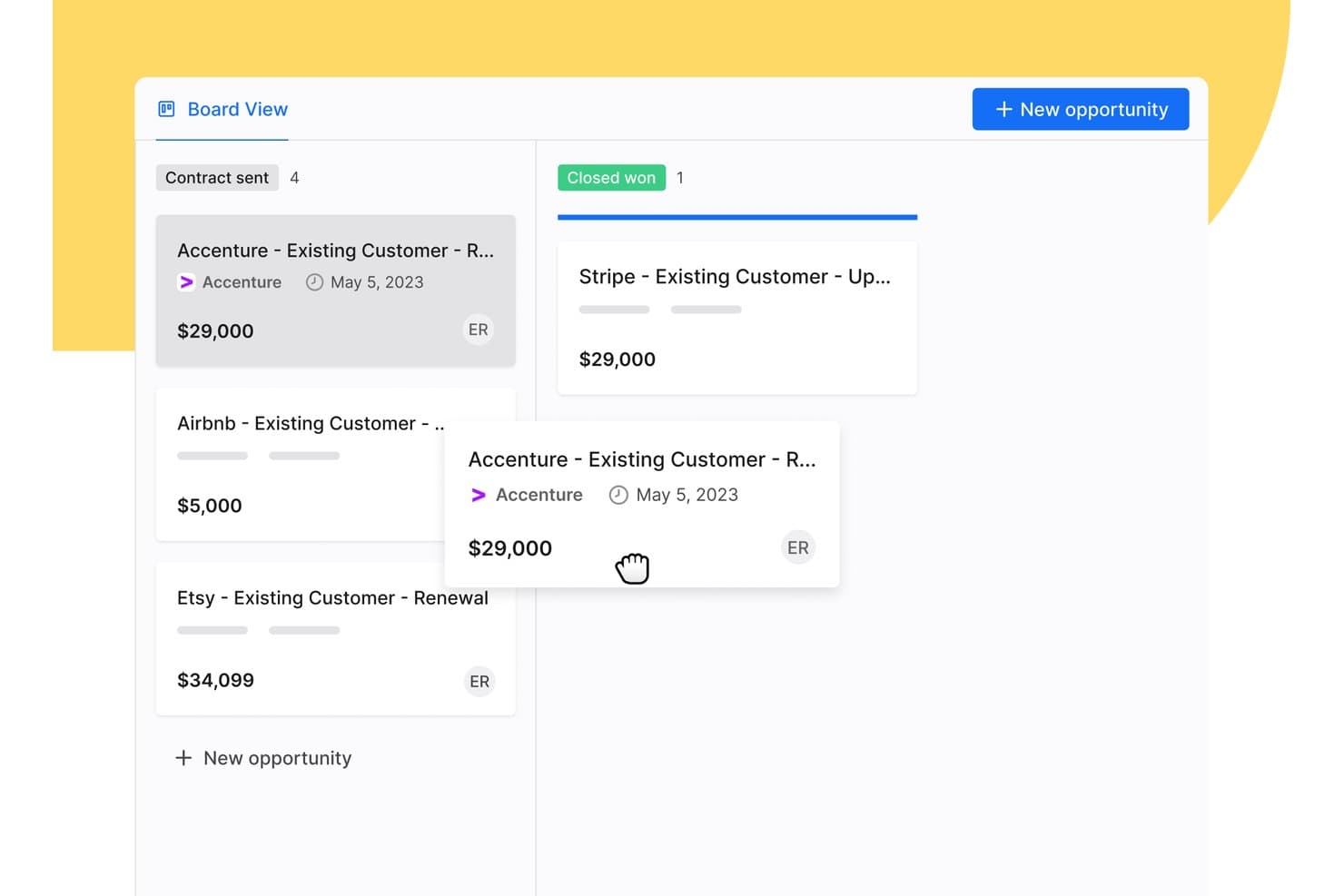
Apollo.io offre una vista a schede con funzionalità di trascinamento per gestire le opportunità di vendita nelle varie fasi del flusso delle trattative, come Contratto inviato e Chiuso vinto. Apollo.io è una piattaforma di informazioni e coinvolgimento nelle vendite B2B che combina un ampio database di contatti, la gestione del flusso delle trattative, sequenze di contatto multicanale e l'automazione dei flussi di lavoro in un unico spazio di lavoro gratuito fin dall'inizio.
Per chi è più adatto Apollo.io?
Apollo.io è adatto ai fondatori di startup nelle fasi iniziali e ai team commerciali delle PMI che gestiscono flussi di trattative fortemente orientati alla prospezione e necessitano di attività di prospezione, sequenze di contatto e gestione di base delle trattative in un unico strumento gratuito fin dall'inizio.
Perché ho scelto Apollo.io
Ho scelto Apollo.io come una delle soluzioni migliori perché il suo generatore di sequenze multicanale consente al mio team di gestire attività di contatto coordinate tramite email, telefono e LinkedIn da un unico flusso di lavoro. Posso impostare passaggi basati su attivatori, in modo che una chiamata persa inserisca automaticamente in coda un'email di follow-up o un contatto su LinkedIn, mantenendo le trattative in movimento senza interventi manuali. Anche il generatore di sequenze basato sull'IA redige bozze personalizzate per i singoli passaggi sulla base dei dati dei contatti, riducendo il tempo che impiego per creare nuove strategie di prospezione.
Funzionalità principali di Apollo.io
- Estensione per Chrome: Cerca potenziali clienti su LinkedIn, Gmail, Salesforce o sui siti web aziendali e aggiungi i contatti direttamente ad Apollo.
- Valutazione di potenziali clienti e aziende: Assegna un punteggio e assegna la priorità a potenziali clienti o aziende utilizzando modelli di classificazione integrati e attributi personalizzati.
- Gestione delle trattative: Monitora le opportunità con una vista del flusso delle trattative e fasi delle trattative personalizzabili per seguire l'avanzamento delle vendite.
- Arricchimento di base del CRM: Arricchisci i record dei contatti e delle aziende tramite caricamenti CSV o sincronizzando i dati con Salesforce e HubSpot.
Integrazioni di Apollo.io
Apollo.io offre integrazioni native con Salesforce, HubSpot, Gmail, Outlook, LinkedIn e Slack. Si collega a Zapier e fornisce anche un'API per integrazioni personalizzate.
Cosa è gratuito?
Apollo.io offre un piano gratuito per sempre con accesso a funzionalità essenziali come sequenze email, filtri di base e il database dei contatti. Il piano gratuito limita il numero di esportazioni mensili e di crediti email e restringe l'accesso all'analisi avanzata, alle funzionalità di intelligenza artificiale e ad alcuni passaggi di automazione, riservati ai piani a pagamento.
Pros and Cons
Pros:
- Database di contatti integrato con milioni di record
- Sequenze email in più passaggi incluse nel piano gratuito
- L'estensione per Chrome acquisisce automaticamente i dati dei potenziali clienti
Cons:
- I crediti mensili per le esportazioni si esauriscono rapidamente
- Il flusso delle trattative è limitato per le vendite complesse
Learn more about Apollo.io: Ideale per strumenti di automazione del marketing
- Piano gratuito + demo gratuita disponibile
- Da $11,04/utente/mese (fatturato biennalmente)
Visit WebsiteCustomer Rating:4.7/5
EngageBay unisce vendite, marketing e supporto in un unico hub. EngageBay è progettato per piccole e medie imprese, offrendo strumenti per l'automazione del marketing, CRM e assistenza clienti. L'obiettivo è aiutare le aziende a gestire vendite e marketing su un'unica piattaforma integrata.
Perché ho scelto EngageBay: L'offerta gratuita di EngageBay include strumenti essenziali di CRM e automazione del marketing, come email marketing, gestione dei lead e segmentazione dei contatti.
Il tuo team può anche accedere a strumenti base di helpdesk e a costruttori di landing page. Il suo approccio tutto-in-uno lo rende una scelta versatile per le aziende che desiderano semplificare le proprie operazioni.
Funzionalità distintive e integrazioni:
Funzionalità includono un costruttore di landing page che permette di creare pagine professionali senza bisogno di codifica, una helpdesk che gestisce le richieste dei clienti e un generatore di moduli per la raccolta dei lead. Queste funzionalità assicurano al tuo team un'efficiente gestione di vendite e attività di marketing.
Integrazioni includono Zapier, Mailchimp, Shopify, HubSpot, Stripe, PayPal, QuickBooks, Xero, Twilio, SendGrid e altri.
Cosa è gratuito? EngageBay offre un piano gratuito per sempre con limitazioni sugli invii di email, sui contatti memorizzati e sul numero di utenti, rendendolo ideale per team piccoli.
Pros and Cons
Pros:
- Include strumenti base di helpdesk
- Costruttore di landing page disponibile
- Generatore di moduli per raccolta lead
Cons:
- Limitazioni nell'invio di email
- Curva di apprendimento per nuovi utenti
Learn more about EngageBay: Ideale per le esigenze CRM delle piccole imprese
- Piano gratuito + demo gratuita disponibile
- Da $7/utente/mese (fatturato annualmente)
Visit WebsiteCustomer Rating:4.4/5
HubSpot offre dashboard personalizzabili per monitorare visivamente la generazione di lead. HubSpot è una delle migliori piattaforme CRM gratuite progettate per aziende di tutte le dimensioni, offrendo strumenti per marketing, vendite e assistenza clienti. Aiuta i team a gestire i lead, automatizzare le attività di marketing e supportare i clienti in modo efficiente.
Perché ho scelto HubSpot: L'offerta gratuita dello strumento include funzionalità essenziali come la gestione dei contatti e le pipeline delle trattative. Ciò che distingue HubSpot CRM è l'ampia gamma di strumenti di marketing gratuiti, come l'email marketing e la gestione degli annunci.
Il tuo team può anche beneficiare della chat dal vivo e di funzionalità di reportistica di base. La vasta gamma di funzionalità lo rende una buona opzione per le piccole imprese che desiderano rafforzare i propri sforzi di vendita.
Funzionalità e integrazioni principali:
Funzionalità includono dashboard personalizzabili che forniscono informazioni sulle prestazioni di vendita, modelli di email che fanno risparmiare tempo nei contatti e automazione delle attività che aumenta la produttività. La possibilità di tracciare tutte le interazioni con i clienti in un unico posto garantisce che il team rimanga aggiornato e allineato.
Integrazioni includono Gmail, Outlook, Shopify, Zapier, Slack, Meta Ads, LinkedIn, WordPress, Mailchimp, Zoom, Salesforce e altri.
Cosa è gratuito? HubSpot offre un piano gratuito per sempre con limitazioni sulle funzionalità avanzate e sui posti utente. Gli utenti possono accedere agli strumenti CRM di base e a determinate funzioni di marketing senza limiti di tempo.
Pros and Cons
Pros:
- Interfaccia intuitiva
- Tracciamento delle email disponibile
- Automazione delle attività inclusa
Cons:
- Le funzionalità avanzate richiedono l'aggiornamento
- Funzionalità di reportistica limitate
Learn more about HubSpot: Ideale per l'integrazione con Gmail
- Prova gratuita di 14 giorni + demo gratuita disponibile
- Da $49/utente/mese (fatturazione annuale)
Visit WebsiteCustomer Rating:4.5/5
Streak organizza le pipeline e automatizza le attività direttamente nella tua casella di posta Gmail. Streak è uno strumento CRM integrato in Gmail, ideale per piccole e medie imprese che desiderano gestire le vendite direttamente dalla propria casella di posta. Aiuta gli utenti a monitorare i lead, gestire le relazioni con i clienti e automatizzare i flussi di lavoro senza uscire dall'email.
Perché ho scelto Streak: Streak punta sulla sua integrazione con Gmail, consentendo al tuo team di gestire i processi di vendita in un ambiente email già familiare. La versione gratuita dello strumento include funzionalità come la gestione delle pipeline, il tracciamento delle email e i promemoria delle attività.
Il tuo team può anche utilizzare campi personalizzabili per adattare il CRM alle proprie esigenze specifiche. Questa integrazione nativa con Gmail lo rende una scelta conveniente per i team che fanno ampio uso della comunicazione via email.
Caratteristiche distintive e integrazioni:
Funzionalità includono il tracciamento delle email, che fornisce informazioni su quando vengono aperte, promemoria delle attività per mantenere il team organizzato e invio massivo di email personalizzate tramite mail merge. Queste funzionalità migliorano la capacità del tuo team di gestire le comunicazioni.
Integrazioni includono Google Workspace, Mailchimp, Zapier, Slack, Calendly, LinkedIn e altro ancora.
Cosa è gratuito? Streak offre una prova gratuita di 14 giorni con funzionalità CRM di base, adatta per uso personale o piccoli team con esigenze limitate.
Pros and Cons
Pros:
- Integrazione diretta con Gmail
- Campi pipeline personalizzabili
- Dà priorità ai follow-up facilmente
Cons:
- Limitato agli utenti Gmail
- Meno competitivo rispetto ad altri strumenti
Learn more about Streak: Ideale per le numerose integrazioni con app
- Prova gratuita di 30 giorni + piano gratuito disponibile
- Da $25/utente/mese (fatturazione annuale)
Visit WebsiteCustomer Rating:4.4/5
Salesforce offre dashboard di vendita personalizzabili con visualizzazioni grafiche. Salesforce è una piattaforma di gestione delle relazioni con i clienti basata su cloud, utilizzata da aziende di tutte le dimensioni e in diversi settori. Supporta i team di vendita, assistenza, marketing ed ecommerce offrendo strumenti per gestire le interazioni con i clienti, monitorare i lead e automatizzare i processi.
Perché ho scelto Salesforce: La versione di prova gratuita di Salesforce dà accesso al Sales Cloud, che include funzionalità come la gestione di contatti e account, il monitoraggio della generazione di lead e l'accesso da dispositivi mobili. Puoi anche utilizzare dashboard e report personalizzabili per monitorare il tuo pipeline. Gli strumenti integrati basati sull'intelligenza artificiale consentono di impostare promemoria di attività e flussi di lavoro di vendita.
Funzionalità e integrazioni principali:
Funzionalità includono il punteggio dei lead e regole di assegnazione, la gestione dei territori e strumenti di previsione. Puoi impostare processi di vendita che corrispondono al flusso di lavoro del tuo team e utilizzare Einstein Activity Capture per sincronizzare email ed eventi di calendario. I sales path guidano i rappresentanti in ogni fase, così sanno sempre cosa fare dopo.
Integrazioni includono Slack, Google Workspace, Mailchimp, QuickBooks, Docusign, Dropbox, LinkedIn e altri.
Cosa è gratuito? Salesforce offre una prova gratuita di 30 giorni con accesso alle funzionalità di Sales Cloud per un utente, senza accesso a lungo termine dopo la scadenza della prova.
Pros and Cons
Pros:
- Strumenti di reportistica flessibili
- Strumenti di vendita AI integrati
- Facile aggiungere app di terze parti
Cons:
- Difficile da usare senza formazione
- Le funzionalità da mobile sono più limitate
Learn more about Salesforce : Ideale per strumenti di collaborazione in team
- Prova gratuita di 15 giorni + piano gratuito + demo gratuita disponibili
- Da $49/organizzazione/mese (fatturato annualmente)
Visit WebsiteCustomer Rating:4.2/5
Bitrix24 offre una dashboard dettagliata per la gestione dei lead con colonne in stile Kanban. Bitrix24 è una piattaforma di gestione delle vendite tutto-in-uno progettata per aziende di tutte le dimensioni, che offre strumenti per la gestione dei lead, l'automazione delle vendite e il monitoraggio delle performance. Aiuta i team a gestire l'intero ciclo di vendita, dalla generazione dei lead alla fidelizzazione dei clienti, utilizzando un'unica piattaforma.
Perché ho scelto Bitrix24: L'account gratuito di Bitrix24 offre 35 strumenti, tra cui la gestione di lead e trattative, comunicazione omnicanale e strumenti di collaborazione. Il tuo team può utilizzare l'analisi della piattaforma, le funzionalità di CRM mobile e gli strumenti di gestione delle attività senza alcun costo. La sua versatilità e la varietà di funzionalità lo rendono uno strumento prezioso per migliorare le performance di vendita.
Funzionalità e integrazioni principali:
Funzionalità includono gestione di progetti e attività che aiuta a ottimizzare il lavoro del team, monitoraggio delle prestazioni dei dipendenti che offre informazioni sulla produttività, e strumenti per la creazione di siti web a supporto delle iniziative di marketing. Queste funzionalità garantiscono che il tuo team possa gestire efficacemente vendite e marketing.
Integrazioni includono Google Workspace, Microsoft Office 365, Zoho CRM, Mailchimp, QuickBooks, Zoom, Trello, WordPress, Asana e altre ancora.
Cosa è gratis? Bitrix24 offre un piano gratuito per sempre con le funzionalità essenziali di gestione delle vendite, rendendolo accessibile ad aziende di tutte le dimensioni.
Pros and Cons
Pros:
- Oltre 35 strumenti gratuiti
- Disponibile in cloud e on-premise
- Supporta l'intero ciclo di vendita
Cons:
- Assistenza clienti non sempre coerente
- Alcune integrazioni richiedono una configurazione aggiuntiva
Learn more about Bitrix24: Ideale per l'integrazione con Outlook
- Prova gratuita + piano gratuito disponibile
- A partire da $18/utente/mese (fatturazione annuale)
Visit WebsiteCustomer Rating:4/5
La pipeline di vendita visiva di eWay-CRM per una gestione personalizzabile delle trattative. eWay-CRM è integrato con Microsoft Outlook ed è pensato per piccole e medie imprese. Aiuta i team a gestire le relazioni con i clienti, le vendite e le campagne di marketing direttamente dal client di posta elettronica.
Perché ho scelto eWay-CRM: eWay-CRM offre funzionalità CRM gratuite che si integrano con Outlook, rendendolo molto accessibile ai team che già utilizzano questa piattaforma. Sono incluse nel piano gratuito funzionalità come la gestione dei contatti, il monitoraggio delle vendite e la gestione dei progetti.
Il tuo team può anche beneficiare della gestione delle attività e delle comunicazioni, oltre alla possibilità di integrare con Outlook. È l'ideale per le aziende che cercano un CRM che si inserisca perfettamente nel loro flusso di lavoro già esistente.
Funzionalità salienti e integrazioni:
Funzionalità includono strumenti di gestione dei progetti che aiutano a organizzare attività e scadenze, la gestione dei documenti che permette di archiviare file importanti in un unico posto e l'automazione del marketing per organizzare le campagne. Queste funzioni garantiscono che il tuo team possa gestire facilmente le attività di vendita e marketing.
Integrazioni disponibili con Microsoft Outlook, Microsoft Office 365, Microsoft Teams, SharePoint, Zapier, QuickBooks, WordPress, LinkedIn e altre ancora.
Cosa offre gratuitamente? eWay-CRM propone un piano gratuito per sempre con alcune limitazioni su spazio di archiviazione e alcune funzionalità avanzate, rendendolo adatto a piccoli team.
Pros and Cons
Pros:
- Include strumenti di gestione dei progetti
- Gestione documentale
- Utenti illimitati
Cons:
- Caricamento lento in Outlook
- Problemi di prestazioni
Learn more about eWay-CRM: Ideale per la gestione del processo di vendita nelle PMI
- Dimostrazione gratuita + piano gratuito disponibile
- A partire da $39.99/utente/mese (con fatturazione annuale)
Visit WebsiteCustomer Rating:4.5/5
Teamgate supporta la vendita guidata con strumenti di visibilità del processo di vendita. Teamgate è un CRM per le vendite progettato per le piccole e medie imprese, incentrato sulla gestione del processo di vendita e sul monitoraggio dei potenziali clienti. Aiuta i team a gestire i potenziali clienti, monitorare le attività di vendita e migliorare i processi commerciali.
Perché ho scelto Teamgate: l'offerta gratuita di Teamgate mette in evidenza la gestione personalizzabile del processo di vendita, supportando i team che desiderano migliorare strategicamente i propri processi commerciali. La versione gratuita include funzionalità come la valutazione dei potenziali clienti, le previsioni di vendita e la gestione dei contatti. La sua interfaccia intuitiva facilita l'adozione e l'utilizzo da parte dei team commerciali.
Funzionalità e integrazioni distintive:
Le funzionalità includono strumenti di previsione che aiutano a prevedere le vendite future, la valutazione dei potenziali clienti per dare priorità ai potenziali clienti e funzionalità di reportistica che forniscono informazioni sulle prestazioni di vendita. Queste funzionalità migliorano la capacità del team di gestire le attività commerciali in modo efficiente.
Le integrazioni includono Mailchimp, Google Workspace, Slack, Zapier, Xero, QuickBooks, LinkedIn, Microsoft Office 365, Dropbox, Trello e altro.
Cosa è gratuito? Teamgate offre un piano gratuito per un massimo di due utenti, consentendo ai team di esplorare gli strumenti di base per la gestione dei contatti e delle comunicazioni prima di sottoscrivere un abbonamento.
Pros and Cons
Pros:
- Strumenti di previsione delle vendite inclusi
- Valutazione dei potenziali clienti per la definizione delle priorità
- Assistenza clienti reattiva
Cons:
- La configurazione iniziale può essere complessa
- Integrazioni limitate
Learn more about Teamgate: Ideale per chi usa l’ecosistema Microsoft
- Piano gratuito disponibile
- A partire da $14/utente/mese (fatturazione annuale)

Dynamics 365 Sales aiuta i team a gestire lead, opportunità e pipeline all’interno dell’ecosistema Microsoft. Dynamics 365 Sales è una soluzione CRM pensata per le organizzazioni che già utilizzano strumenti Microsoft come Office 365, Teams e Power BI. Supporta i team di vendita che desiderano una maggiore integrazione tra dati dei clienti, strumenti di collaborazione e reportistica—senza dover adottare una piattaforma completamente separata.
Perché ho scelto Dynamics 365 Sales:
Dynamics 365 Sales si distingue per i team inseriti nell’ecosistema Microsoft. Collega direttamente i dati di vendita a Outlook, Teams ed Excel, riducendo la necessità di passare da uno strumento all’altro. Basato sulla Power Platform, offre ampie opzioni di personalizzazione per flussi di lavoro, dashboard e automazioni, rendendolo una scelta flessibile per team di vendita in crescita che necessitano di processi su misura invece di un CRM preconfezionato.
Sebbene l’implementazione e la configurazione richiedano comunque pianificazione, resta una solida opzione se la tua organizzazione utilizza già prodotti Microsoft e vuole che i dati CRM risiedano nello stesso ambiente.
Funzionalità e integrazioni principali:
Le funzionalità includono gestione di lead e opportunità, dashboard personalizzabili per la previsione delle vendite e automazione tramite Power Automate per ridurre le attività manuali. Le analisi di vendita possono essere approfondite con Power BI per una reportistica avanzata e una maggiore visibilità sulla pipeline.
Le integrazioni includono Microsoft Outlook, Teams, Excel, Power BI, SharePoint, OneDrive, LinkedIn Sales Navigator, Azure e l’intera suite Dynamics 365.
Cosa c’è di gratuito? Microsoft Dynamics 365 Sales non offre un piano gratuito permanente. Tuttavia, puoi provare Dynamics 365 Sales senza costi con una prova gratuita di 30 giorni, che ti permette di esplorare le sue funzionalità CRM principali, gli strumenti per la pipeline e le analisi basate su intelligenza artificiale prima di attivare una licenza a pagamento.
Pros and Cons
Pros:
- Integrazione profonda con Microsoft 365 e Teams
- Altamente personalizzabile tramite Power Platform
- Reportistica avanzata con Power BI
Cons:
- Configurazione e personalizzazione richiedono competenze su Power Platform
- Nessun piano gratuito
Learn more about Microsoft Dynamics 365 Sales: 10Ideale per un CRM di base senza costi per utente
FreeCRM
- Piano gratuito disponibile
- A partire da $10/mese

FreeCRM tiene traccia di contatti, vendite e campagne in un unico posto. FreeCRM è progettato per aziende di tutte le dimensioni, in particolare per le piccole imprese che operano in settori come l'automotive, il settore immobiliare e i servizi professionali. Offre strumenti per monitorare le attività di vendita, gestire le interazioni con i clienti ed eseguire campagne di marketing.
Perché ho scelto FreeCRM: L'offerta di FreeCRM include il monitoraggio della pipeline di vendita, consentendo al tuo team di gestire efficacemente trattative e interazioni con i clienti. Sono disponibili anche funzionalità chiave come la gestione dei contatti e l'automazione del marketing.
La piattaforma supporta il monitoraggio delle attività e campagne di marketing mirate, favorendo la produttività del tuo team. Il suo cruscotto personalizzabile offre dati in tempo reale, rendendolo uno strumento prezioso per migliorare le prestazioni di vendita.
Funzionalità principali e integrazioni:
Funzionalità includono un cruscotto personalizzabile che ti consente di monitorare attività ed eventi in tempo reale, strumenti per la gestione delle trattative e della pipeline di vendita per mantenere il team organizzato e un software di tracciamento delle chiamate per gestire le interazioni con i clienti.
Integrazioni includono Zapier, WhatsApp, Facebook, Twitter, Google Workspace, QuickBooks, Amazon AWS e altro ancora.
Cosa è gratuito? FreeCRM offre un piano gratuito per sempre con le funzionalità CRM essenziali, rendendolo accessibile ad aziende di tutte le dimensioni.
Pros and Cons
Pros:
- Monitoraggio delle attività in tempo reale
- Funzionalità di automazione del marketing
- Servizi cloud sicuri
Cons:
- Basso spazio di archiviazione nel piano gratuito
- Personalizzazione limitata
Learn more about FreeCRM:
Altri software per la gestione delle vendite
Ecco alcune opzioni aggiuntive di software per la gestione delle vendite che offrono anch’esse piani o prove gratuite. Sebbene questi strumenti non siano entrati nel mio elenco, vale comunque la pena consultarli:
- 11CapsuleIdeale per la gestione semplice dei contatti
- 12monday AI WorkspaceIdeale per il monitoraggio visivo dei progetti
- 13FreshsalesIdeale per un CRM gratuito alimentato dall'IA per team di vendita
- 14ClickUpIdeale per flussi di lavoro personalizzabili
Come Valuto il Software Gratuito per la Gestione delle Vendite
Quando un team RevOps deve monitorare trattative e registrare attività senza una licenza a pagamento, suddivido la mia valutazione in due livelli: requisiti di base e i fattori differenzianti che distinguono le diverse opzioni.
Funzionalità di Base (Requisiti Minimi per Questa Lista)
Quando seleziono gli strumenti per la mia lista, valuto ciascuno su una scala da 0 (non offre la funzionalità) a 5 (eccelle in quest'area) per ogni funzionalità di base elencata di seguito. Poi calcolo il punteggio totale dello strumento in percentuale. Ogni strumento deve raggiungere un punteggio totale minimo del 65% per essere preso in considerazione per l'inclusione.
- Gestione della Pipeline e delle Fasi di Trattativa: Cerco pipeline visive in cui i rappresentanti possono trascinare le trattative tra fasi personalizzate, come spostare un potenziale cliente da "demo programmata" a "proposta inviata" senza cambiare vista.
- Gestione di Contatti e Lead: È importante avere un database centralizzato per lead, contatti e account. Controllo se è possibile etichettare i record, aggiungere campi personalizzati e segmentare per criteri come dimensione trattativa o fonte.
- Disponibilità di un Piano Gratuito: Ogni strumento deve offrire un piano davvero gratuito e senza scadenza. Valuto se le funzionalità chiave per la gestione delle vendite rimangono accessibili o vengono bloccate dietro un paywall dopo la registrazione.
- Report e Dashboard di Vendita: Dashboard che mostrano il valore della pipeline, la velocità delle trattative e le attività dei rappresentanti danno al team RevOps la visibilità necessaria. Cerco filtri, esportazioni e almeno una personalizzazione di base.
- Monitoraggio di Attività e Task: I rappresentanti devono poter registrare chiamate, pianificare follow-up e assegnare attività con scadenze. Verifico se le attività sono collegate direttamente a trattative e contatti per una timeline chiara.
- Automazione del Flusso di Lavoro di Vendita: Anche le automazioni basilari sono utili, come l'assegnazione automatica di un'attività quando una trattativa passa a una nuova fase o l'invio di una notifica quando un lead diventa inattivo. Valuto cosa viene offerto senza dover effettuare upgrade.
Una volta individuata la lista di strumenti che rispondono a questi criteri, considero ciò che distingue ciascuna piattaforma.
Fattori Differenzianti (Cosa Distingue i Fornitori)
Ecco come confronto e distinguo i vari fornitori:
Funzionalità Distintive
L'integrazione e il tracciamento delle email sono grandi elementi di differenziazione. Cerco la sincronizzazione bidirezionale con Gmail o Outlook, così i rappresentanti possono inviare e tracciare le aperture direttamente dalle schede delle trattative, mantenendo puliti i dati di attività per i report. Strumenti di comunicazione integrati come chiamate native o chat dal vivo riducono la necessità di aggiungere app separate, cosa importante in una stack a budget zero. Una app mobile completa fa davvero la differenza per i rappresentanti che aggiornano trattative e registrano chiamate tra un incontro e l'altro invece che alla scrivania.
Oltre le Funzionalità
La generosità del piano gratuito conta tanto quanto le funzioni. Valuto quanti utenti e quanti contatti sono inclusi, perché un team di vendita di tre persone che raggiunge il limite di record in un trimestre si troverà a dover fare un upgrade non pianificato. Anche l'ecosistema di integrazioni è importante. Controllo la presenza di collegamenti nativi a strumenti come Google Workspace, Mailchimp o QuickBooks, oltre ad accesso API aperto o Zapier per flussi di lavoro personalizzati. Considero inoltre la rapidità di messa in opera, cercando onboarding self-service, importazione CSV e modelli preimpostati di pipeline che permettano a un team di iniziare a vendere già dalla prima settimana.
Come scegliere un software gratuito per la gestione delle vendite
Gli elenchi complessi di funzionalità e le strutture dei prezzi possono rendere difficile capire che cosa si ottiene davvero da un software gratuito per la gestione delle vendite. Per aiutarti a rimanere concentrato mentre valuti le diverse soluzioni, ecco alcuni fattori da tenere presenti:
| Fattore | Che cosa considerare |
| Ambito dell'offerta gratuita | Verifica che cosa è incluso nel piano gratuito. Copre funzionalità essenziali come la gestione dei contatti e il monitoraggio delle vendite? Assicurati che soddisfi le tue esigenze di base. |
| Scalabilità | Considera se il software può crescere insieme al tuo team. Supporterà un numero maggiore di utenti o funzionalità avanzate con l'espansione dell'attività? |
| Integrazioni | Cerca la compatibilità con gli strumenti che già utilizzi, come i client di posta elettronica o i software di contabilità. Questo aiuterà a semplificare il flusso di lavoro. |
| Facilità d'uso | Valuta l'interfaccia utente. È intuitiva e facile da usare per il tuo team? Un design intuitivo fa risparmiare tempo e riduce la necessità di formazione. |
| Assistenza clienti | Controlla la disponibilità delle opzioni di assistenza. Il fornitore offre supporto tramite chat, e-mail o telefono? Un buon servizio di assistenza può aiutare a risolvere rapidamente i problemi. |
| Sicurezza | Assicurati che il software sia conforme alle normative sulla protezione dei dati. I dati del tuo team devono essere sicuri e accessibili solo agli utenti autorizzati. |
| Personalizzazione | Valuta la possibilità di adattare il software ai tuoi processi. Puoi personalizzare i campi o i cruscotti per adattarli al flusso di lavoro del tuo team? |
Che cos'è un software gratuito per la gestione delle vendite?
Il software per la gestione delle vendite è progettato per aiutare le aziende a gestire i processi di vendita, monitorare le interazioni con i clienti e organizzare i potenziali clienti. In genere, le offerte gratuite includono versioni limitate di questi strumenti, spesso con meno funzionalità o limiti sul numero di utenti. Questi strumenti sono comunemente utilizzati dai professionisti delle vendite, dai titolari di piccole imprese e dai team che desiderano migliorare l'efficienza delle vendite senza sostenere costi. Offrono valore organizzando le attività di vendita, migliorando la gestione delle relazioni con i clienti e aumentando la produttività. Funzionalità come la gestione dei contatti, il monitoraggio delle vendite e l'automazione delle attività aiutano a organizzare i flussi di lavoro, migliorare la produttività e gestire efficacemente le relazioni con i clienti.
Funzionalità
Esaminiamo le funzionalità comunemente presenti nei software per la gestione delle vendite e quali sono solitamente incluse nei piani gratuiti rispetto a quelli a pagamento.
Funzionalità solitamente gratuite dei software per la gestione delle vendite
- Gestione dei contatti: Aiuta a organizzare e archiviare le informazioni di contatto, semplificando il monitoraggio delle interazioni con i clienti e il mantenimento delle relazioni.
- Monitoraggio delle vendite: Consente agli utenti di monitorare l'avanzamento e le prestazioni delle vendite, aiutando i team a raggiungere gli obiettivi di vendita.
- Automazione delle attività: Automatizza le attività ripetitive, liberando tempo per consentire ai team di vendita di concentrarsi sulle attività più importanti.
- Integrazione della posta elettronica: Si collega alle piattaforme di posta elettronica per migliorare la comunicazione e monitorare le interazioni all'interno del CRM.
- Gestione dei potenziali clienti: Offre strumenti per acquisire, monitorare e gestire i potenziali clienti, aiutando i team di vendita a trasformarli in clienti.
- Reportistica di base: Offre report semplici per fornire informazioni sulle attività e sulle prestazioni di vendita, supportando il processo decisionale.
- Gestione del flusso di vendita: Visualizza i flussi di vendita per aiutare i team a gestire e dare priorità alle trattative in modo efficace.
- Accesso da dispositivi mobili: Consente agli utenti di accedere al CRM dai dispositivi mobili, assicurando loro la possibilità di gestire le attività di vendita ovunque si trovino.
Funzionalità solitamente a pagamento dei software per la gestione delle vendite
- Analisi avanzate: Forniscono un'analisi approfondita dei dati di vendita, offrendo informazioni preziose per il processo decisionale strategico.
- Pannelli di controllo personalizzabili: Consentono agli utenti di adattare i pannelli di controllo per visualizzare le metriche chiave e i dati rilevanti per le loro esigenze specifiche.
- Automazione del marketing: Automatizza le attività di marketing, come le campagne e-mail, per migliorare la gestione dei potenziali clienti e il coinvolgimento dei clienti.
- Strumenti di assistenza clienti: Includono funzionalità avanzate di assistenza, come i sistemi di gestione dei ticket e la chat in tempo reale, per migliorare il servizio clienti.
- Integrazione con strumenti avanzati: Offre connessioni con strumenti specializzati, come i software di contabilità e le piattaforme di marketing avanzate.
- Funzionalità di sicurezza avanzate: Forniscono opzioni di sicurezza avanzate per proteggere i dati sensibili dei clienti e garantire la conformità alle normative.
- Accesso API: Consente agli utenti di integrare il CRM con altre soluzioni software e personalizzarne le funzionalità.
- Strumenti di collaborazione: Facilitano la collaborazione del team con funzionalità come calendari condivisi e condivisione di documenti, migliorando il lavoro di squadra.
Vantaggi
L'implementazione di un software gratuito per la gestione delle vendite offre diversi vantaggi al tuo team e alla tua azienda. Ecco alcuni dei vantaggi che puoi aspettarti:
- Risparmio sui costi: Fornisce strumenti essenziali per la gestione delle vendite senza costi, aiutando la tua azienda a risparmiare denaro durante la gestione delle attività di vendita.
- Maggiore organizzazione: Offre funzionalità come la gestione dei contatti e il monitoraggio delle vendite, che aiutano il tuo team a rimanere organizzato e concentrato sugli obiettivi di vendita.
- Maggiore produttività: Automatizza le attività ripetitive e si integra con le piattaforme di posta elettronica, liberando tempo per consentire al tuo team di concentrarsi sulla conclusione delle trattative.
- Accessibilità: Consente l'accesso dai dispositivi mobili, permettendo al tuo team di gestire le attività di vendita ovunque si trovi e di rimanere connesso.
- Comunicazione migliorata: Si integra con gli strumenti di posta elettronica e di comunicazione, migliorando la collaborazione e le interazioni con i clienti.
- Scalabilità: Offre un punto di partenza per i team di piccole dimensioni, con la possibilità di passare a un piano superiore quando l'azienda cresce.
- Informazioni sui dati: Fornisce funzionalità di reportistica di base che offrono informazioni sulle prestazioni di vendita, supportando decisioni consapevoli.
Costi e prezzi
Mi rendo conto che sei arrivato a questo articolo cercando le migliori opzioni di software per la gestione delle vendite disponibili gratuitamente. Tuttavia, poiché i piani gratuiti offrono solo funzionalità limitate, è molto probabile che in futuro dovrai passare a un piano superiore.
La tabella seguente riassume i piani più comuni, i loro prezzi medi e le funzionalità tipicamente incluse nelle soluzioni software per la gestione delle vendite:
Tabella comparativa dei piani per i software di gestione delle vendite
| Tipo di piano | Prezzo medio | Funzionalità comuni |
| Piano gratuito | $0 | Gestione di base dei contatti, monitoraggio delle vendite e reportistica limitata. |
| Piano personale | $5-$25/utente/mese | Gestione avanzata dei contatti, integrazione della posta elettronica e automazione di base. |
| Piano aziendale | $30-$60/utente/mese | Reportistica avanzata, automazione del marketing e supporto per più utenti. |
| Piano aziendale | $70-$150/utente/mese | Pannelli di controllo personalizzabili, funzionalità di sicurezza avanzate e assistenza clienti dedicata. |
Domande frequenti sui software gratuiti per la gestione delle vendite
Ecco alcune risposte alle domande comuni sui software gratuiti per la gestione delle vendite:
Il software gratuito per la gestione delle vendite può crescere insieme alla mia azienda?
Il software gratuito per la gestione delle vendite può essere un ottimo punto di partenza, ma potrebbe presentare dei limiti man mano che la tua azienda cresce. Verifica se il software offre opzioni scalabili o piani a pagamento con funzionalità più avanzate. In questo modo potrai passare a un piano superiore quando il tuo team avrà bisogno di maggiori funzionalità senza dover cambiare sistema.
Quali sono i limiti comuni dei software gratuiti per la gestione delle vendite?
Le versioni gratuite spesso presentano limitazioni come un numero massimo di utenti, spazio di archiviazione limitato e funzionalità ridotte. Questi piani includono generalmente funzionalità di base, che possono essere sufficienti per piccoli team o aziende in fase di avvio. Esamina i dettagli del piano gratuito per capire cosa è incluso e quali sono le eventuali limitazioni.
Quanto sono sicuri i miei dati con un software gratuito per la gestione delle vendite?
La sicurezza dei dati è fondamentale, anche quando si utilizza un software gratuito. Assicurati che il fornitore rispetti le normative sulla protezione dei dati e offra funzionalità come la crittografia e copie di sicurezza regolari. È importante verificare che i tuoi dati rimangano protetti e accessibili esclusivamente agli utenti autorizzati.
Le soluzioni software gratuite per la gestione delle vendite offrono assistenza clienti?
L’assistenza clienti per i piani gratuiti può variare. Alcuni fornitori offrono un supporto di base, come domande frequenti e forum della community, mentre altri possono includere assistenza via e-mail o chat. Verifica le opzioni di supporto disponibili nel piano gratuito per assicurarti che il tuo team possa ricevere aiuto quando necessario.
Esistono costi nascosti associati ai software gratuiti per la gestione delle vendite?
Sebbene il software possa essere gratuito, potrebbero esserci costi nascosti, come addebiti per funzionalità aggiuntive, integrazioni o maggiore spazio di archiviazione. Esamina attentamente i dettagli dei prezzi del fornitore per comprendere eventuali costi associati all’utilizzo della versione gratuita.