

Con così tanti software diversi per gestire il ciclo dal preventivo all'incasso, capire quale sia quello giusto per te è difficile. Sai di voler ottimizzare e automatizzare il ciclo di vendita dall'inizio alla fine, ma devi capire quale strumento sia il migliore.
Ci penso io! In questo articolo ti aiuterò a rendere semplice la tua scelta, condividendo la mia esperienza personale nell'utilizzo di decine di strumenti diversi per la gestione dal preventivo all'incasso con vari team e account, insieme alle mie scelte dei migliori software dal preventivo all'incasso.
Perché fidarsi dei nostri consigli sui software
6,700+
Reviews
20
Industry experts
16+
Evaluation factors
14
Years
Le nostre recensioni riflettono il nostro giudizio indipendente, non un discorso di vendita. Scopri come manteniamo la trasparenza.
Per questa guida, abbiamo valutato gli strumenti attraverso test pratici e ricerche indipendenti, assegnando un punteggio agli strumenti in base ai nostri criteri di selezione.
Le nostre recensioni riflettono il nostro giudizio editoriale umano, non un discorso di vendita.
Tabella di confronto dei software dal preventivo all'incasso
Questa tabella di confronto riassume i dettagli sui prezzi dei miei migliori software selezionati per la gestione dal preventivo all’incasso:
| Tool | Best For | Trial Info | Price | ||
|---|---|---|---|---|---|
| 1 | Ideale per una configurazione accurata delle trattative | Demo gratuita disponibile | Prezzi disponibili su richiesta | Website | |
| 2 | Ideale per ridurre del 50-75% i tempi di elaborazione delle proposte | Demo gratuita disponibile | A partire da $39/utente/mese | Website | |
| 3 | Ideale per modelli di prezzo ibridi e basati sull'utilizzo | Demo gratuita disponibile | Prezzo su richiesta | Website | |
| 4 | Ideale per software CRM e di fatturazione integrati | Prova gratuita di 14 giorni | A partire da $299/mese | Website | |
| 5 | Ideale per i processi commerciali automatizzati | Demo gratuita disponibile | Prezzi su richiesta | Website | |
| 6 | Ideale per soluzioni di gestione commerciale degli ordini | Demo gratuita disponibile | Prezzi su richiesta | Website | |
| 7 | Ideale per creare una migliore esperienza nella catena di approvvigionamento | Non disponibile | A partire da $2,800/anno | Website | |
| 8 | Il miglior software cloud per il processo dalla quotazione all'incasso per le aziende | Demo gratuita disponibile | A partire da $100,000 e basati sul fatturato sotto gestione (RUM) o sul fatturato annuo gestito (ARM) | Website | |
| 9 | Ideale per l'amministrazione low-code e no-code | Demo gratuita disponibile | Prezzi su richiesta | Website | |
| 10 | Ideale per ridurre il ciclo di vendita con regole di prezzo | Demo gratuita disponibile | Prezzi su richiesta | Website |


Recensione dei migliori software dal preventivo all'incasso
Di seguito trovi i miei riepiloghi dettagliati dei migliori software per la gestione dal preventivo all’incasso inclusi nella mia lista ristretta. Le mie recensioni offrono uno sguardo approfondito alle funzionalità principali, ai pro & contro, alle integrazioni e ai casi d’uso ideali di ogni strumento, per aiutarti a trovare quello più adatto a te.
 Ideale per una configurazione accurata delle trattative
- Demo gratuita disponibile
- Prezzi disponibili su richiesta
Visit WebsiteCustomer Rating:4.7/5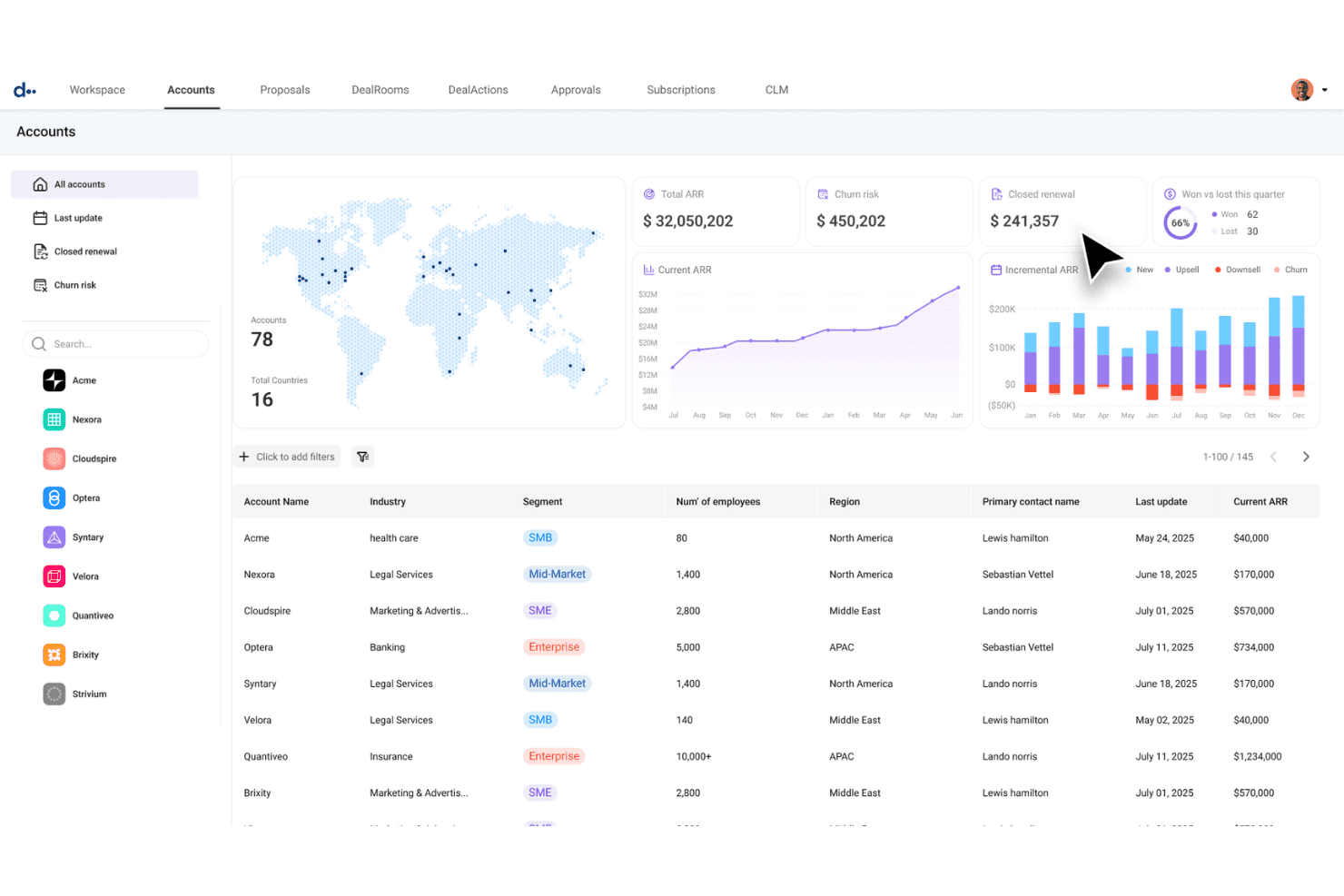
DealHub AI centralizza in un'unica vista le metriche sullo stato degli account e i dati ARR. DealHub AI è una piattaforma dalla quotazione ai ricavi che unifica CPQ, gestione del ciclo di vita dei contratti, fatturazione e riconoscimento dei ricavi su un unico modello di dati condiviso.
Per chi è più adatto DealHub AI?
DealHub AI è particolarmente adatto alle aziende SaaS B2B i cui team addetti alla gestione delle trattative, alle operazioni commerciali e alle RevOps devono gestire configurazioni complesse e multiprodotto senza dipendere dall'IT per ogni modifica ai prezzi o ai flussi di lavoro.
Perché ho scelto DealHub AI
Ho scelto DealHub AI come una delle soluzioni migliori perché i suoi manuali operativi di vendita guidata sono gli strumenti di configurazione delle trattative più precisi che abbia visto in questa categoria. Quando un commerciale crea un'offerta complessa e multiprodotto, il manuale operativo lo guida attraverso ogni decisione di configurazione in sequenza, applicando le regole di prezzo e i limiti di approvazione prima ancora che l'offerta lasci l'ufficio commerciale. In combinazione con l'ottimizzazione dei prezzi basata sull'intelligenza artificiale, che attinge ai dati storici delle trattative, DealHub individua attivamente i modelli di sconto che erodono i margini prima che diventino un problema.
Funzionalità principali di DealHub AI
- Manuali operativi di vendita guidata: Alberi decisionali interattivi che guidano i commerciali attraverso la configurazione dei prodotti in sequenza, applicando le regole di prezzo prima dell'invio dell'offerta.
- DealRoom, sala vendite digitale: Uno spazio di lavoro personalizzato con il marchio aziendale in cui i commerciali possono centralizzare proposte, contratti e contenuti delle trattative, monitorando il coinvolgimento degli acquirenti in tempo reale.
- Motore di fatturazione multi-modello: Supporta la fatturazione ricorrente, basata sull'utilizzo, a incrementi, a livelli e ibrida sullo stesso modello di dati del CPQ.
- Riconoscimento dei ricavi secondo ASC 606/IFRS 15: Programmi di riconoscimento automatizzati che si aggiornano quando i contratti vengono modificati, con monitoraggio dei ricavi differiti e sincronizzazione delle scritture contabili con l'ERP.
Integrazioni di DealHub AI
DealHub AI offre integrazioni native bidirezionali con Salesforce, Microsoft Dynamics 365, HubSpot e Freshworks, oltre a integrazioni con NetSuite, Sage Intacct, QuickBooks, Xero, Priority, Stripe, Avalara, DocuSign, Slack e Gong. La sua API aperta supporta integrazioni personalizzate.
Pros and Cons
Pros:
- I manuali operativi di vendita guidata prevengono gli errori di prezzo
- Il modello di dati unificato elimina i problemi di riconciliazione
- L'intelligenza artificiale ottimizza gli sconti e le approvazioni delle trattative
Cons:
- L'integrazione della fatturazione e del riconoscimento dei ricavi è ancora in fase di maturazione
- Nessuna opzione di prezzo trasparente o autonoma
Learn more about DealHub AI: Ideale per ridurre del 50-75% i tempi di elaborazione delle proposte
- Demo gratuita disponibile
- A partire da $39/utente/mese
Visit WebsiteCustomer Rating:4.8/5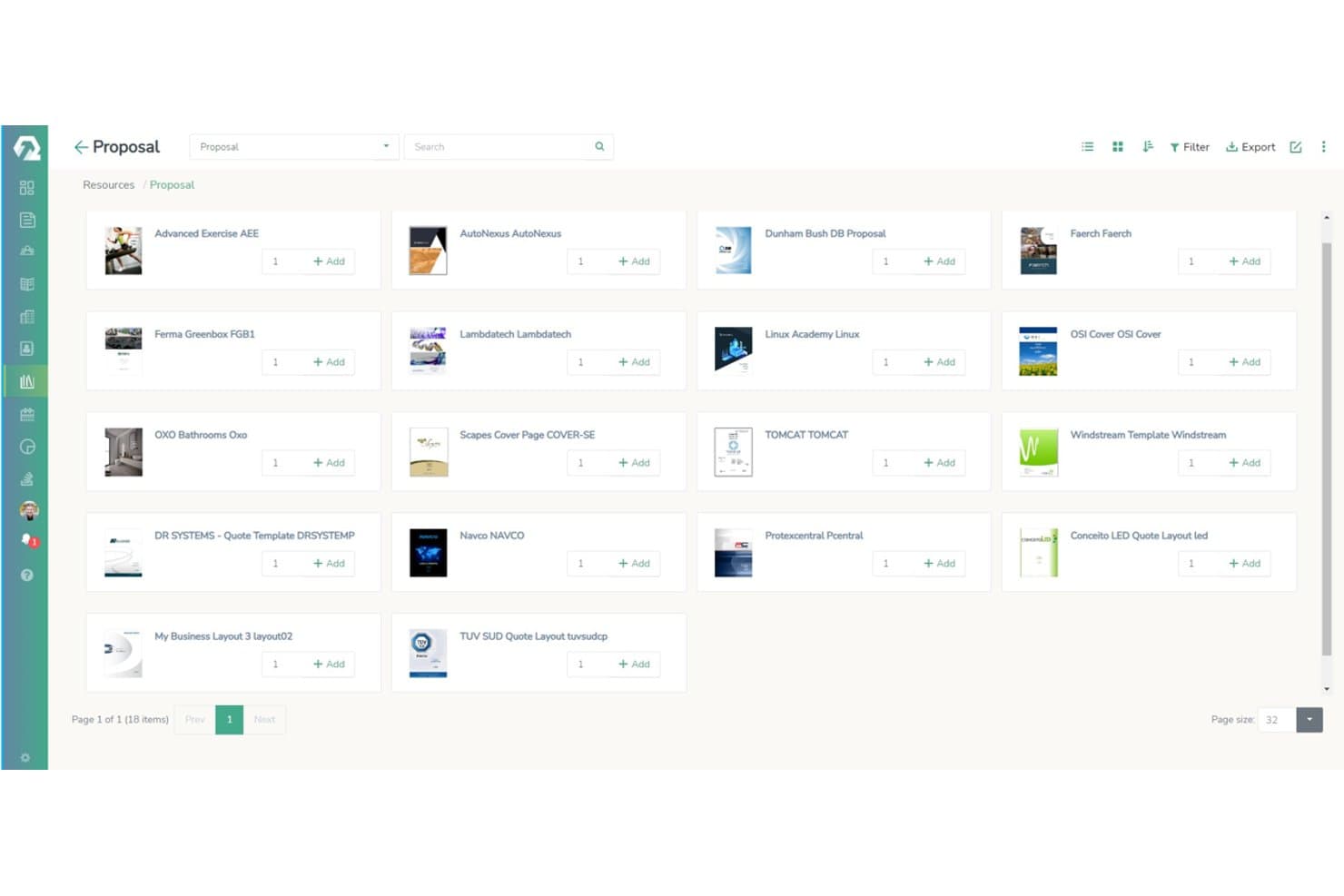
iQuoteXpress consente agli utenti di consultare e aggiungere modelli di proposta da una libreria visiva. iQuoteXpress è una piattaforma focalizzata sul CPQ che gestisce la configurazione dei prodotti, i prezzi, la vendita guidata, la generazione di proposte, i flussi di approvazione e le integrazioni CRM durante la fase di elaborazione dei preventivi del ciclo di vendita.
Per chi è più adatto iQuoteXpress?
iQuoteXpress è particolarmente adatto ai team di vendita di aziende SMB e del mercato medio che devono ridurre i tempi di elaborazione dei preventivi senza la complessità o i costi di una piattaforma completa dal preventivo all'incasso.
Perché ho scelto iQuoteXpress
Ho scelto iQuoteXpress come una delle migliori soluzioni perché i suoi configuratori di prodotto personalizzati eliminano il continuo scambio di comunicazioni che allunga i cicli di elaborazione dei preventivi. Ogni cliente riceve un configuratore realizzato in base alle proprie regole di prodotto, alla logica delle dipendenze e alle strutture di prezzo specifiche, così gli addetti alle vendite non possono combinare accidentalmente componenti incompatibili. Insieme ai modelli di proposta personalizzati con il marchio aziendale, che vengono caricati automaticamente in base alla categoria dell'affare, i team riducono regolarmente del 50–75% i tempi di elaborazione delle proposte senza sacrificare la precisione.
Funzionalità principali di iQuoteXpress
- Flussi di approvazione: Instrada i preventivi attraverso regole di approvazione configurabili con tracce di controllo complete quando vengono superate le soglie di sconto.
- Più listini prezzi: Supporta strutture di prezzo specifiche per cliente e per segmento in diversi account o tipi di affare.
- Integrazioni CRM: Si connette nativamente a Salesforce, HubSpot, Microsoft Dynamics 365, Zoho CRM e Pipedrive, oltre a offrire un'API REST per configurazioni personalizzate.
- Libreria documenti: Archivia e organizza proposte, contratti, schede tecniche e materiali di supporto, tutti allegabili ai preventivi con un solo clic.
Integrazioni di iQuoteXpress
iQuoteXpress dispone di 10 integrazioni documentate, tra cui Salesforce, HubSpot, Microsoft Dynamics 365, Zoho CRM, Pipedrive, Oracle CRM, Acumatica, SAP, Xero e QuickBooks. La sua API REST supporta le integrazioni personalizzate.
Pros and Cons
Pros:
- Cicli di elaborazione delle proposte ridotti del 50–75%
- I configuratori personalizzati prevengono gli errori nei preventivi
- La vendita guidata riduce i tempi di inserimento
Cons:
- Nessuna fatturazione degli abbonamenti o rilevazione dei ricavi
- Nessuna funzionalità di gestione completa degli ordini
Learn more about iQuoteXpress: Ideale per modelli di prezzo ibridi e basati sull'utilizzo
- Demo gratuita disponibile
- Prezzo su richiesta
Visit WebsiteCustomer Rating:4.6/5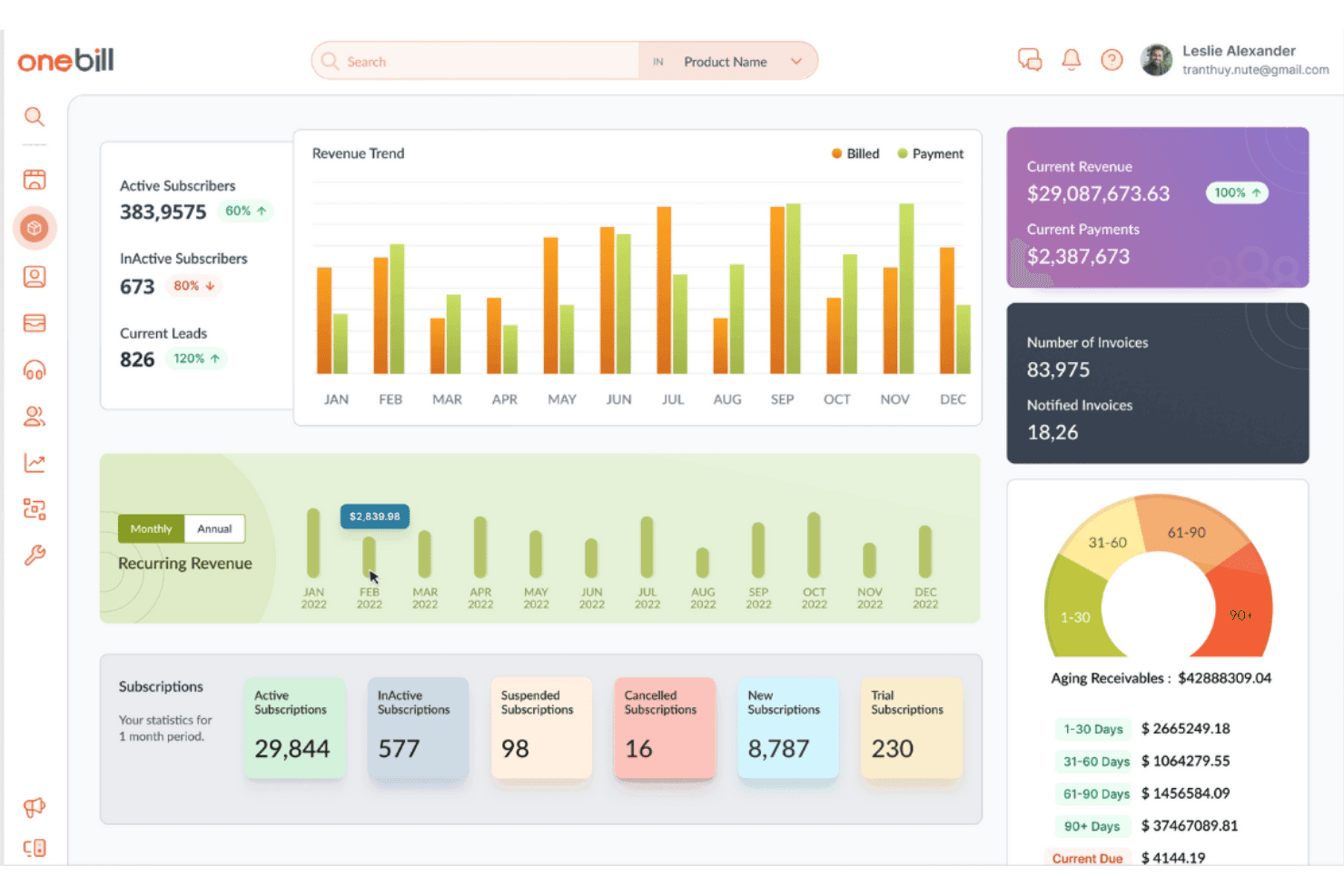
OneBill centralizza ricavi, abbonamenti e fatturazione in un'unica dashboard. OneBill è una piattaforma dalla quotazione all'incasso che unifica CPQ, fatturazione, riconoscimento dei ricavi, gestione degli ordini e gestione del ciclo di vita dei clienti in un unico sistema progettato per modelli aziendali complessi e ad alto volume basati su abbonamenti e sull'utilizzo.
Per chi è più adatto OneBill?
OneBill è particolarmente adatto alle aziende di telecomunicazioni, SaaS e IoT che devono supportare più modelli di prezzo — basati sull'utilizzo, a livelli, ibridi e basati sui risultati — all'interno di un'unica piattaforma di fatturazione e gestione dei ricavi.
Perché ho scelto OneBill
OneBill si è guadagnato un posto nella mia rosa di candidati per la sua capacità di supportare modelli di prezzo sofisticati e misti all'interno di un'unica piattaforma. Apprezzo in particolare la capacità di CPQ360™ di configurare affiancati listini specifici per contratto, volumi a livelli e prezzi basati sui risultati, così che un singolo profilo cliente possa includere un abbonamento, un utilizzo misurato e una tariffa una tantum senza riconciliazioni manuali. Billing360™ acquisisce quindi e calcola in tempo reale il prezzo di questi eventi di utilizzo, elaborando oltre 43 milioni di transazioni al giorno con il rilevamento integrato delle anomalie per individuare le perdite di ricavi prima dell'emissione delle fatture.
Funzionalità principali di OneBill
- Riconoscimento dei ricavi RevRec360™: Automatizza l'intero processo in cinque fasi ASC 606/IFRS 15, separando i programmi di fatturazione dai programmi di riconoscimento dei ricavi.
- Garanzia dei ricavi RevAssure360™: Rileva eventi di utilizzo mancanti, addebiti duplicati e anomalie di fatturazione prima dell'emissione delle fatture.
- Gestione dei partner Channel360™: Automatizza le commissioni, i regolamenti e i pagamenti dei partner su più livelli per oltre 1.300 partner tramite portali a marchio personalizzato.
- Previsione dell'abbandono Churn360™: Utilizza segnali comportamentali basati sull'intelligenza artificiale per segnalare gli abbonati a rischio e attivare flussi di lavoro automatizzati per la fidelizzazione.
Integrazioni di OneBill
OneBill offre integrazioni native con Salesforce, HubSpot, NetSuite, QuickBooks, Xero, Sage, DocuSign, Zoho Sign, Avalara e Vertex. Le API REST aperte supportano integrazioni personalizzate e la sincronizzazione dei dati in tempo reale.
Pros and Cons
Pros:
- Eccelle nei modelli di prezzo ibridi e basati sull'utilizzo
- Mediazione degli eventi di utilizzo in tempo reale su larga scala
- L'intelligenza artificiale guida la creazione dei preventivi e la riduzione dell'abbandono
Cons:
- Mancano funzionalità avanzate per la gestione del ciclo di vita dei contratti
- La configurazione e la risoluzione dei problemi possono essere complesse
Learn more about OneBill: 4Ideale per software CRM e di fatturazione integrati
Keap
- Prova gratuita di 14 giorni
- A partire da $299/mese
Visit WebsiteCustomer Rating:4.2/5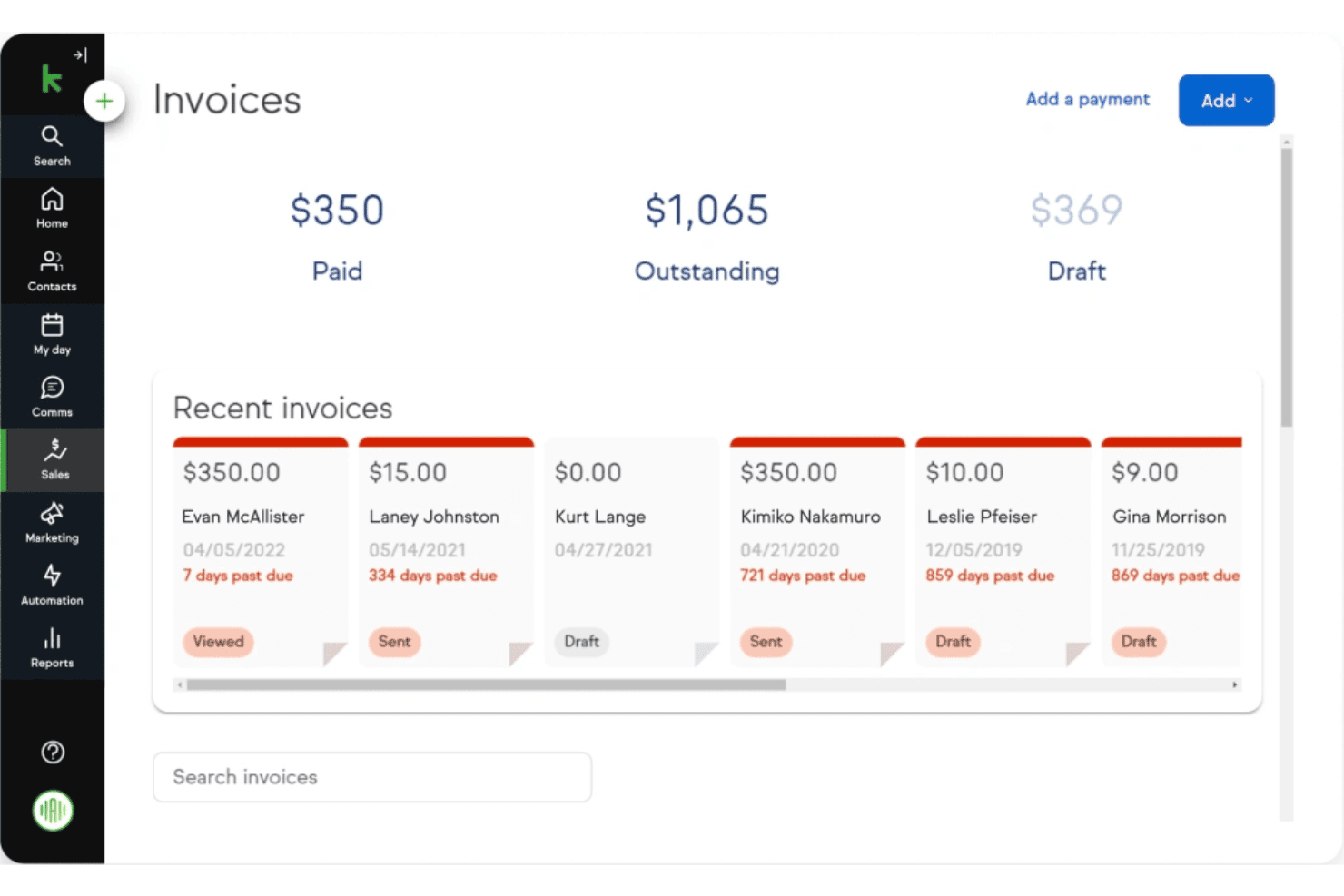
Keap consente agli utenti di monitorare in un'unica vista le fatture pagate, in sospeso e in bozza. Keap è un CRM per piccole imprese e una piattaforma di fatturazione che combina preventivi, fatture, pagamenti ricorrenti e automazione del marketing in un unico strumento.
A chi è più adatto Keap?
Keap è adatto alle piccole imprese di servizi che desiderano gestire preventivi, fatture, pagamenti ricorrenti e CRM in un unico luogo, senza dover amministrare più strumenti.
Perché ho scelto Keap
Ho scelto Keap come una delle migliori soluzioni perché è uno dei pochi strumenti che integra davvero CRM e fatturazione in un unico flusso di lavoro, senza richiedere uno strumento separato per la fatturazione. Mi piace il fatto che un preventivo accettato si trasformi in una fattura con un solo clic e che le sequenze di fatturazione ricorrente possano attivarsi automaticamente in base agli eventi del CRM. Per le piccole imprese di servizi che gestiscono abbonamenti insieme a rapporti attivi con i clienti, questo stretto collegamento tra le fasi della pipeline e la riscossione dei pagamenti è davvero utile.
Funzionalità principali di Keap
- Automazione della pipeline basata sulle fasi: Attiva flussi di lavoro automatizzati per il follow-up quando un'opportunità passa da una fase all'altra della pipeline, evitando che le trattative si raffreddino senza interventi manuali.
- Moduli di pagamento online: Incorpora direttamente nel flusso di vendita moduli con pagamento integrato, codici promozionali e offerte aggiuntive con un clic.
- Avvisi sulla scadenza delle carte di credito: Notifica automaticamente i contatti e mette in coda nuovi tentativi di pagamento prima della scadenza di una carta, riducendo le transazioni non riuscite.
- Assistente per l'automazione basato sull'IA: Suggerisce e crea sequenze di automazione in base ai tuoi obiettivi, riducendo il tempo necessario per configurare da zero i flussi di lavoro di follow-up.
Integrazioni di Keap
Keap offre circa 230 integrazioni native o supportate, tra cui QuickBooks Online, Stripe, PayPal, Eway, HelloSign, Gmail, Outlook, Zoom e Mailchimp. Offre inoltre un'API REST e integrazioni con Zapier per connettività personalizzata.
Pros and Cons
Pros:
- Combina i flussi di lavoro di CRM, preventivi e fatturazione
- Follow-up automatizzati attivati dai cambiamenti nella pipeline
- I promemoria per i pagamenti ricorrenti riducono le fatture non pagate
Cons:
- Nessuna funzionalità per la gestione del ciclo di vita dei contratti o per la rilevazione dei ricavi
- Mancano funzionalità avanzate di CPQ e gestione degli ordini
 Ideale per i processi commerciali automatizzati
- Demo gratuita disponibile
- Prezzi su richiesta
Visit WebsiteCustomer Rating:4.4/5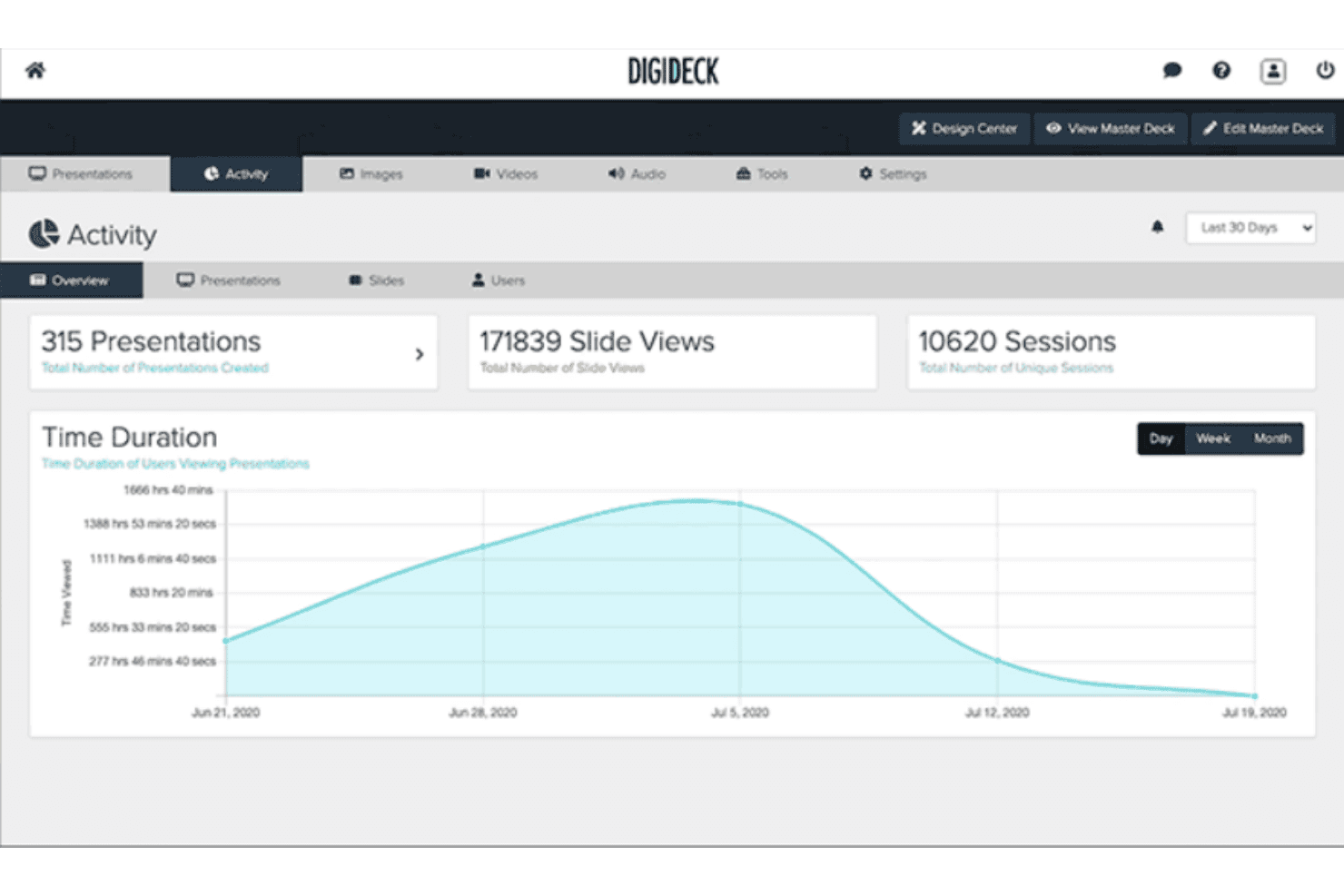
DIGIDECK monitora le visualizzazioni delle presentazioni, il coinvolgimento nelle diapositive e i dati delle sessioni. DIGIDECK è una piattaforma per presentazioni commerciali basata sull'IA che automatizza la personalizzazione delle presentazioni, garantisce la conformità al marchio tramite una libreria centralizzata di contenuti e fornisce analisi del coinvolgimento a livello di diapositiva tramite integrazioni CRM con Salesforce, HubSpot e Microsoft Dynamics 365.
Per chi è più adatto DIGIDECK?
DIGIDECK è particolarmente adatto ai team commerciali aziendali nei settori dello sport, dell'intrattenimento e delle sponsorizzazioni che devono automatizzare e gestire le presentazioni commerciali su larga scala.
Perché ho scelto DIGIDECK
Ho scelto DIGIDECK come una delle migliori soluzioni perché il suo DIGI Builder elimina concretamente una delle attività più dispendiose in termini di tempo del processo che precede la conclusione dell'accordo: capire cosa mostrare a un potenziale cliente e in quale ordine. Il questionario di vendita guidata assembla automaticamente le diapositive più adatte in base alla persona dell'acquirente, al settore e alla fase della trattativa. Abbinando questa funzione a DIGI Insights, che segnala i prezzi obsoleti nelle presentazioni attive, i rappresentanti commerciali possono anticipare le esigenze delle trattative senza dover effettuare aggiornamenti manuali.
Funzionalità principali di DIGIDECK
- Libreria principale delle presentazioni: Un archivio centralizzato di contenuti in cui gli amministratori gestiscono, bloccano e aggiornano tutte le diapositive, gli elementi e i messaggi approvati in ogni presentazione attiva.
- Date di scadenza delle presentazioni: I rappresentanti possono impostare date di scadenza automatiche per le presentazioni soggette a limiti temporali, rimuovendole dalla circolazione una volta superata la scadenza.
- DIGI Connect: Integra le funzionalità di creazione delle presentazioni di DIGIDECK in Salesforce, HubSpot, Claude, ChatGPT e Microsoft Copilot, consentendo ai rappresentanti di creare presentazioni senza cambiare strumento.
- Analisi del coinvolgimento a livello di diapositiva: Tiene traccia del comportamento degli utenti a livello di singola diapositiva, inclusi il tempo trascorso, i percorsi di navigazione e l'attività della sessione, e registra questi dati nei record delle trattative del CRM.
Integrazioni di DIGIDECK
DIGIDECK dispone di integrazioni native documentate con Salesforce, HubSpot, Microsoft Dynamics 365, Marketo, KORE Software e SponsorCX. Offre inoltre un'API REST aperta per connessioni personalizzate, ma non sono documentate integrazioni ERP native per i flussi di lavoro dall'offerta all'incasso.
Pros and Cons
Pros:
- Gestione centralizzata e coerente con il marchio dei contenuti commerciali
- Personalizzazione delle presentazioni commerciali guidata dall'IA
- Processo di creazione delle presentazioni integrato nel CRM
Cons:
- Nessuno strumento per preventivi, fatturazione o ricavi
- Non include la gestione dei contratti né flussi di lavoro per gli ordini
Learn more about DIGIDECK: Ideale per soluzioni di gestione commerciale degli ordini
- Demo gratuita disponibile
- Prezzi su richiesta
Visit WebsiteCustomer Rating:4.3/5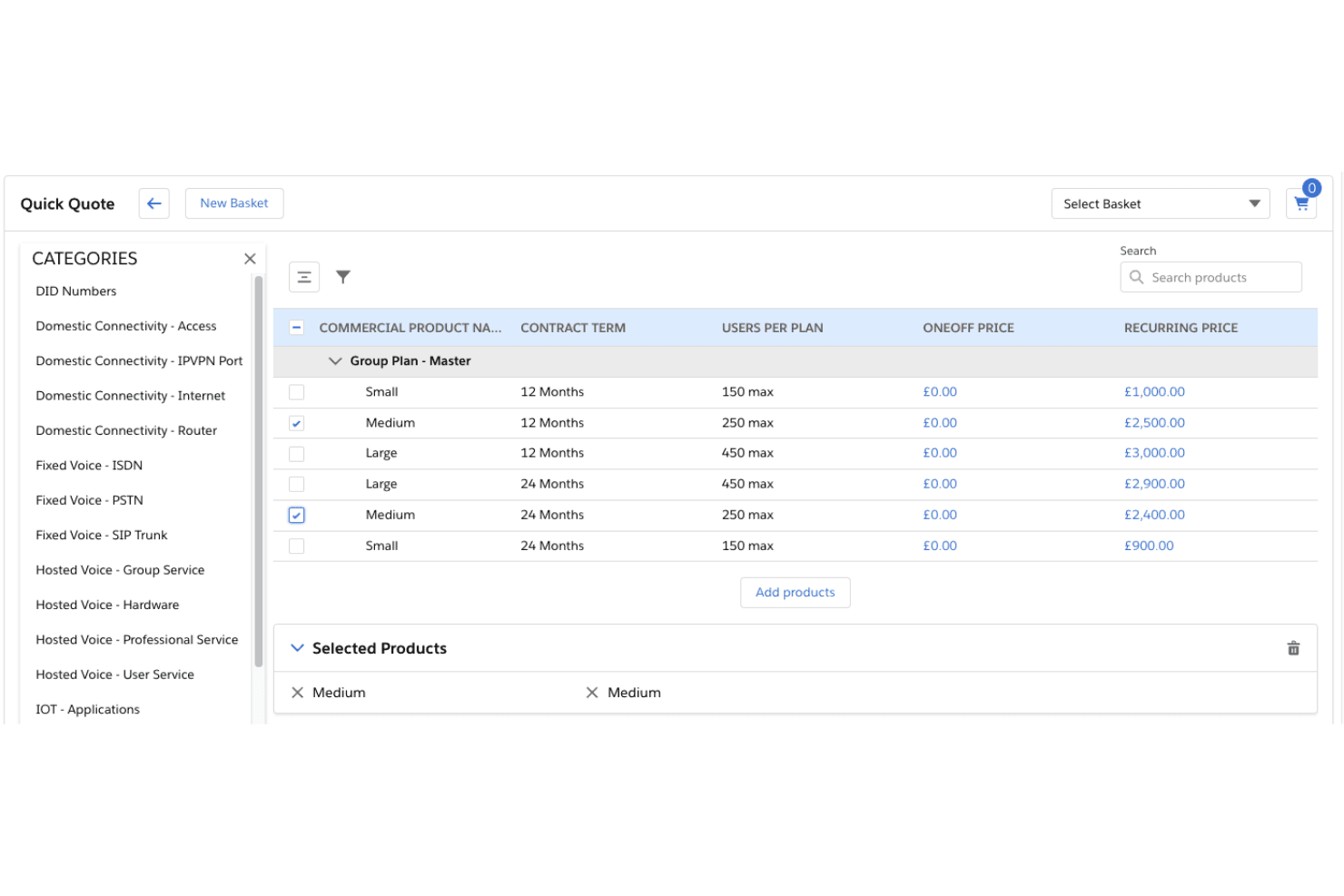
CloudSense consente agli utenti di confrontare e selezionare piani di servizi di gruppo per la generazione di preventivi. CloudSense è una piattaforma nativa Salesforce per la configurazione, i prezzi e i preventivi (CPQ) e la gestione commerciale degli ordini, progettata per aziende dei settori delle telecomunicazioni, dei media e della tecnologia, che offre generazione di preventivi basata sull'intelligenza artificiale, vendita guidata, gestione del catalogo prodotti e orchestrazione dell'evasione degli ordini.
Per chi è più adatto CloudSense?
CloudSense è progettato per aziende dei settori delle telecomunicazioni, dei media e della tecnologia che gestiscono processi di vendita B2B o all'ingrosso complessi su Salesforce e necessitano di una soluzione CPQ di livello enterprise con una gestione avanzata degli ordini integrata.
Perché ho scelto CloudSense
Ho incluso CloudSense tra le mie scelte principali perché è la soluzione di gestione commerciale degli ordini più solida che abbia visto, progettata specificamente per operatori delle telecomunicazioni, dei media e della tecnologia che gestiscono vendite B2B complesse su Salesforce. Il suo modulo di ottimizzazione delle trattative applica limiti agli sconti e flussi di approvazione, mentre il punteggio dinamico delle trattative utilizza l'intelligenza artificiale per valutare la redditività e la probabilità di conversione di ogni trattativa. Apprezzo inoltre il modo in cui il suo servizio delle regole di compatibilità convalida automaticamente le combinazioni dei pacchetti di prodotti, eliminando gli errori di configurazione prima che raggiungano l'evasione degli ordini.
Caratteristiche principali di CloudSense
- QuickQuote: Genera preventivi indicativi o previsionali per le trattative nelle fasi iniziali, senza richiedere una configurazione completa del prodotto.
- Catalogo prodotti unificato: Centralizza prodotti, servizi, regole di prezzo e logica aziendale per una distribuzione coerente su più canali.
- Gestione degli abbonamenti durante il ciclo di vita: Gestisce modifiche, aggiornamenti, riduzioni di livello e aggiornamenti massivi degli abbonati all'interno degli abbonamenti attivi.
- Conformità alle API Open di TM Forum: Fornisce 13 API Open di TM Forum certificate per una connettività immediata con i sistemi BSS/OSS.
Integrazioni di CloudSense
CloudSense dispone di un'integrazione nativa con Salesforce, 13 API Open di TM Forum certificate e integrazioni con CloudBlue Connect, Totogi Ontology, sistemi BSS e di fatturazione e server pubblicitari. Il supporto per le API REST consente connessioni personalizzate.
Pros and Cons
Pros:
- Progettato specificamente per i processi di lavoro dei settori delle telecomunicazioni e dei media
- Generazione di preventivi e valutazione delle trattative avanzate basate sull'intelligenza artificiale
- Automatizza cicli di vendita B2B e all'ingrosso complessi
Cons:
- Non dispone di funzionalità native di rilevazione dei ricavi
- Funziona esclusivamente sulla piattaforma Salesforce
Learn more about CloudSense: Ideale per creare una migliore esperienza nella catena di approvvigionamento
- Non disponibile
- A partire da $2,800/anno
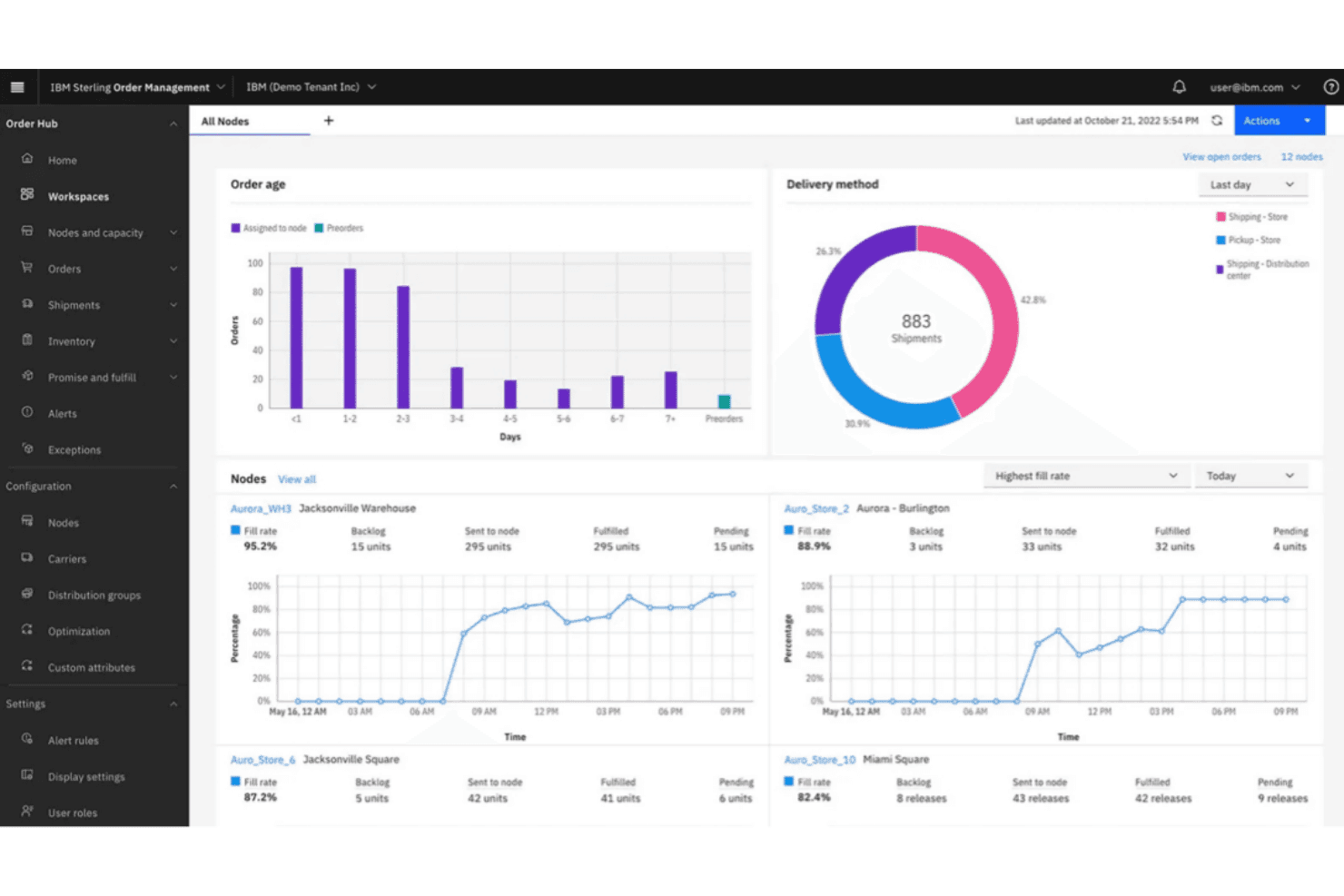
IBM Sterling offre il monitoraggio in tempo reale dell'evasione degli ordini tra i nodi. IBM Sterling è una piattaforma per la catena di approvvigionamento e la gestione degli ordini che combina CPQ, orchestrazione omnicanale degli ordini, vendita guidata, prezzi dinamici e gestione degli ordini da contratto B2B.
Per chi è più adatto IBM Sterling?
IBM Sterling è adatto ai team aziendali dei settori manifatturiero, della vendita al dettaglio o delle telecomunicazioni che necessitano di un motore CPQ efficiente e della gestione omnicanale degli ordini, ma dispongono già di strumenti separati per la fatturazione e la rilevazione dei ricavi.
Perché ho scelto IBM Sterling
IBM Sterling entra nella mia rosa ristretta perché le sue funzionalità di gestione degli ordini e CPQ sono sviluppate specificamente per le aziende con catene di approvvigionamento complesse, dove la complessità dei preventivi e l'accuratezza dell'evasione degli ordini sono strettamente collegate. Sono particolarmente colpito da Omni-Configurator, che applica in tempo reale le regole di compatibilità dei prodotti, e dal motore Intelligent Promising, che stabilisce date di consegna accurate al momento della creazione del preventivo utilizzando dati di inventario in tempo reale provenienti da ogni nodo di evasione.
Funzionalità principali di IBM Sterling
- Questionari per la vendita guidata: Alberi decisionali interattivi guidano gli addetti alle vendite attraverso le esigenze dei clienti per individuare automaticamente i prodotti e i pacchetti più adatti.
- Conversione da preventivo a ordine: I preventivi accettati vengono convertiti direttamente in ordini, trasferendo automaticamente tutte le condizioni relative a prezzi, pagamenti e spedizioni.
- Integrazione nativa con Salesforce: Sterling Field Sales funziona come applicazione Salesforce nativa, consentendo agli addetti alle vendite di gestire opportunità e preventivi senza uscire dal proprio CRM.
- Agenti di intelligenza artificiale watsonx: Gli agenti di intelligenza artificiale integrati gestiscono attività relative agli ordini, come l'applicazione dei coupon, gli annullamenti e la segmentazione dell'inventario tra Order Hub e Call Center.
Integrazioni di IBM Sterling
IBM Sterling dispone di un'integrazione nativa con Salesforce per opportunità e preventivi. Si connette inoltre tramite IBM App Connect, IBM MQ, Apache Kafka, API REST e MCP, con connettività ERP supportata tramite SOA.
Pros and Cons
Pros:
- Gestisce esigenze complesse di gestione omnicanale degli ordini
- Vendita guidata con controlli di compatibilità in tempo reale
- Accuratezza delle date di consegna e dell'inventario basata sull'intelligenza artificiale
Cons:
- Nessun modulo per contratti, fatturazione o rilevazione dei ricavi
- L'implementazione è complessa e richiede molto tempo
Learn more about IBM Sterling: Il miglior software cloud per il processo dalla quotazione all'incasso per le aziende
- Demo gratuita disponibile
- A partire da $100,000 e basati sul fatturato sotto gestione (RUM) o sul fatturato annuo gestito (ARM)
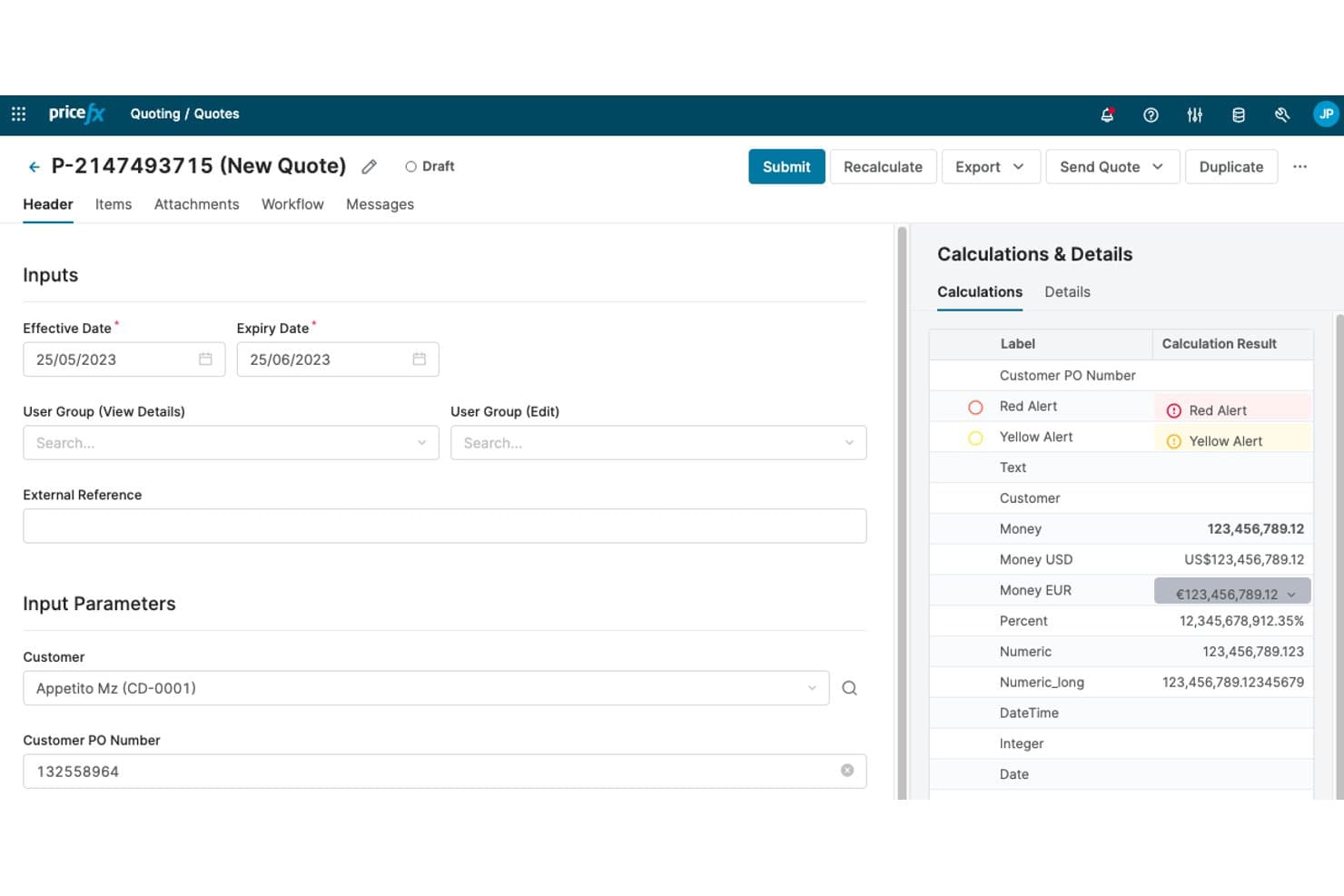
Pricefx consente agli utenti di creare e calcolare offerte con dettagli sui prezzi in tempo reale. Pricefx è una piattaforma nativa del cloud per l'intelligence sui prezzi destinata alle aziende, che combina gestione dei prezzi, quotazione correlata al CPQ, gestione dei rebate e ottimizzazione delle trattative basata sull'IA, con integrazioni approfondite con SAP e Salesforce.
Per chi è più adatto Pricefx?
Pricefx è particolarmente adatto ai team aziendali responsabili delle vendite e delle operazioni sui prezzi nei settori manifatturiero, della distribuzione o chimico, che utilizzano SAP e necessitano di una governance dei margini basata sull'IA integrata nei flussi di quotazione esistenti.
Perché ho scelto Pricefx
Ho scelto Pricefx come una delle migliori soluzioni perché la sua governance dei margini basata sull'IA è integrata direttamente nel flusso di quotazione, invece di essere aggiunta in un secondo momento. Mi piace molto il modo in cui il diagramma a cascata dei prezzi mostra il prezzo di listino, gli sconti, i rebate e il margine risultante prima ancora che un'offerta lasci l'azienda. I più di 125 agenti IA preconfigurati che segnalano in tempo reale le perdite di margine e le trattative fuori dalle linee guida sono davvero difficili da replicare con una piattaforma generalista.
Funzionalità principali di Pricefx
- Flussi di approvazione configurabili: indirizzano le offerte attraverso catene di approvazione a più livelli in base al livello di sconto, alle dimensioni della trattativa e alle soglie di margine, con registri di audit completi per ogni decisione.
- Più di 125 modelli di agenti IA: gli agenti preconfigurati monitorano continuamente le perdite di margine, il comportamento relativo agli sconti e le trattative fuori dalle linee guida, fornendo risultati classificati in base all'impatto finanziario.
- Definizione dei prezzi degli accordi basata su formule: codifica costi, indici e tassi di cambio come formule dinamiche all'interno dei contratti di definizione dei prezzi, in modo che le tariffe vengano ricalcolate automaticamente al variare degli input.
- Gestione dei programmi di rebate: automatizza i calcoli dei rebate per strutture fisse, a livelli e basate sulla crescita, utilizzando dati reali delle transazioni, quindi sincronizza accantonamenti ed erogazioni con il sistema ERP.
Integrazioni di Pricefx
Pricefx offre integrazioni native con SAP S/4HANA, SAP Cloud for Customer e Salesforce, oltre alla connettività con ServiceNow. Le API REST e Integration Manager supportano integrazioni personalizzate e flussi di dati pianificati.
Pros and Cons
Pros:
- Agenti IA integrati per il rilevamento delle perdite di margine
- Il diagramma a cascata dei prezzi offre visibilità sul margine prima della quotazione
- La più ampia libreria preconfigurata di agenti IA per la definizione dei prezzi
Cons:
- Nessuna fatturazione nativa o rilevazione dei ricavi
- La gestione del ciclo di vita dei contratti è limitata ai soli accordi sui prezzi
Learn more about Pricefx: Ideale per l'amministrazione low-code e no-code
- Demo gratuita disponibile
- Prezzi su richiesta
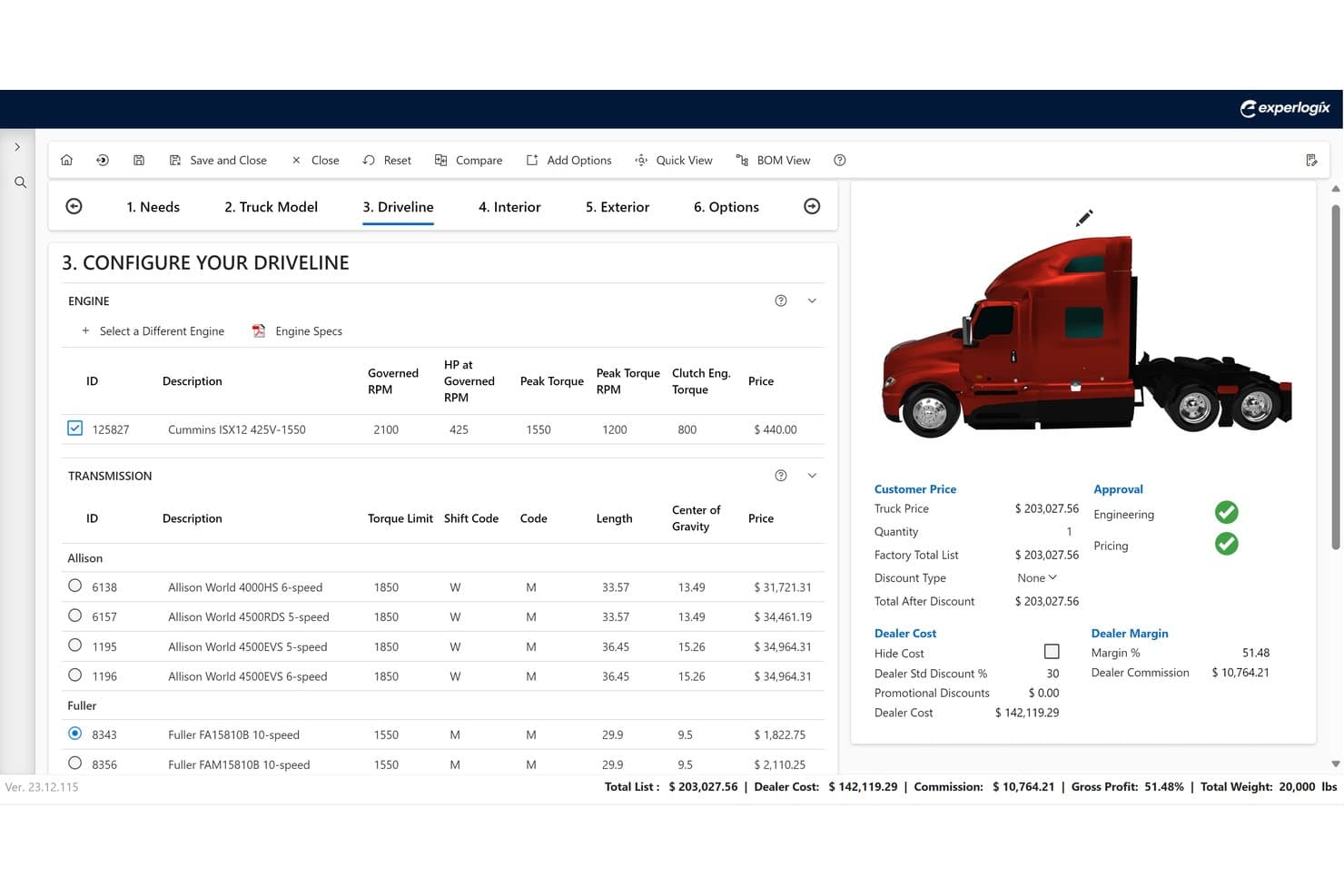
Experlogix CPQ consente agli utenti di configurare i gruppi propulsori dei camion con prezzi in tempo reale. Experlogix CPQ è una piattaforma per la configurazione, la definizione dei prezzi e la preventivazione, progettata per la vendita di prodotti e servizi complessi, che offre un motore di configurazione basato su regole, flussi di vendita guidata, definizione dei prezzi secondo più modelli, approvazioni automatizzate e output degli ordini pronti per l'ERP.
Per chi è più adatto Experlogix CPQ?
Experlogix CPQ è particolarmente adatto ai team delle operazioni di vendita e della gestione delle trattative nei settori manifatturiero o industriale, che devono gestire configurazioni di prodotti complessi senza dipendere dall'IT.
Perché ho scelto Experlogix CPQ
Ho incluso Experlogix CPQ tra le mie scelte principali perché il suo Centro di amministrazione e progettazione consente agli utenti aziendali di creare e gestire regole di configurazione complesse e flussi di approvazione senza scrivere una sola riga di codice. In pratica, ciò significa che un amministratore delle operazioni di vendita può aggiornare le soglie degli sconti o aggiungere nuovi vincoli ai prodotti lo stesso giorno in cui si rende necessaria una modifica, senza dover aprire una richiesta all'IT. Mi piace anche il modo in cui il motore delle regole genera distinte base e cicli di lavorazione pronti per l'ERP direttamente dal preventivo, mantenendo allineati il reparto vendite e quello manifatturiero senza rielaborazioni manuali.
Funzionalità principali di Experlogix CPQ
- Flussi di vendita guidata: Flussi di configurazione passo dopo passo basati su alberi decisionali, che guidano i rappresentanti commerciali nella configurazione di prodotti complessi per ridurre gli errori nei preventivi.
- Generazione di distinte base e cicli di lavorazione: Produce automaticamente distinte base e cicli di lavorazione pronti per l'ERP direttamente dai preventivi accettati, per il passaggio alla produzione.
- Supporto a più modelli di prezzo: Gestisce la logica dei prezzi una tantum, ricorrenti, basati sull'utilizzo, a scaglioni e contrattuali all'interno di un'unica riga del preventivo.
- Visualizzazione: Strumento interattivo di configurazione visiva dei prodotti per i settori in cui gli acquirenti devono vedere il prodotto configurato prima di prendere un impegno.
Integrazioni di Experlogix CPQ
Experlogix CPQ offre integrazioni native con Microsoft Dynamics 365 e NetSuite, oltre a un'integrazione con Salesforce Marketplace. SAP e Sage si collegano tramite Digital Commerce, mentre un'API REST aperta supporta le integrazioni personalizzate.
Pros and Cons
Pros:
- Gestisce configurazioni complesse di prodotti e prezzi
- Amministrazione low-code per il controllo da parte degli utenti aziendali
- Genera distinte base e cicli di lavorazione pronti per l'ERP
Cons:
- Nessuna fatturazione nativa o rilevazione dei ricavi
- Non dispone di funzionalità integrate per la gestione dei contratti
Learn more about Experlogix CPQ: 10Ideale per ridurre il ciclo di vendita con regole di prezzo
Xait CPQ
- Demo gratuita disponibile
- Prezzi su richiesta
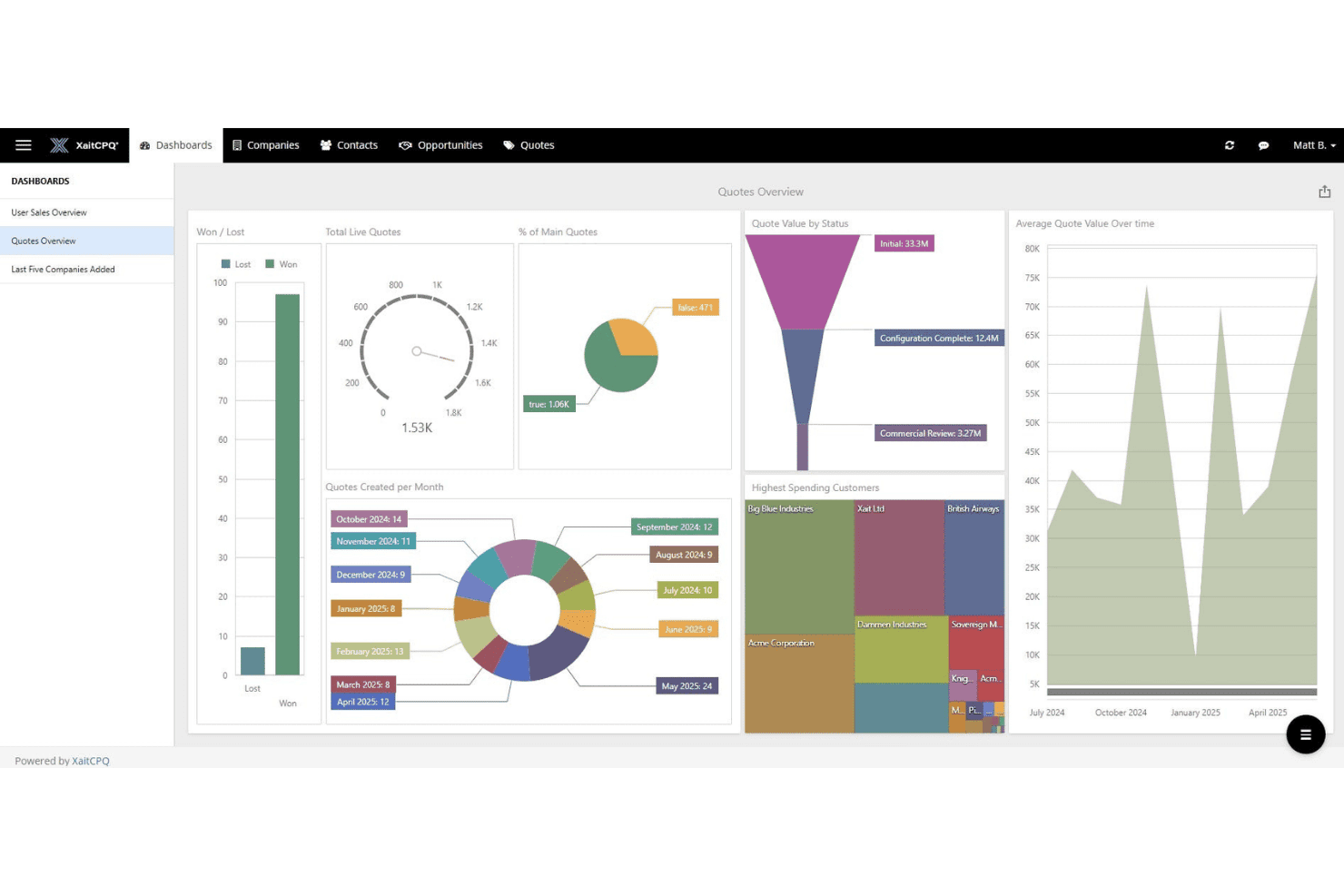
Xait CPQ mostra un pannello panoramico dei preventivi commerciali con metriche chiave. XaitCPQ è una piattaforma CPQ specializzata che gestisce la configurazione di prodotti complessi, regole di prezzo dinamiche, flussi di lavoro di vendita guidata e la generazione automatizzata di preventivi, con incorporamenti nativi in Salesforce, HubSpot e Microsoft Dynamics 365.
Per chi è più adatto Xait CPQ?
Xait CPQ è una soluzione particolarmente adatta ai team delle operazioni commerciali che gestiscono configurazioni di prodotti complessi e regole di prezzo nei settori manifatturiero, energetico o dei servizi professionali.
Perché ho scelto Xait CPQ
Ho scelto Xait CPQ come una delle migliori soluzioni perché il suo generatore di logica visiva consente ai team delle operazioni commerciali di creare e aggiornare regole di prezzo complesse senza coinvolgere l'IT, riducendo direttamente il tempo che intercorre tra la qualificazione dell'opportunità e la consegna del preventivo. Apprezzo molto anche i flussi di lavoro di vendita guidata: i rappresentanti possono configurare preventivi accurati anche per i cataloghi di prodotti più articolati senza coinvolgere il reparto di progettazione o gli specialisti dei prezzi. I clienti segnalano una creazione dei preventivi fino al 70% più rapida, ed è proprio qui che si verifica una reale riduzione del ciclo di vendita.
Caratteristiche principali di Xait CPQ
- Incorporamento nativo nel CRM: XaitCPQ funziona interamente all'interno di Salesforce, HubSpot e Microsoft Dynamics 365, così i rappresentanti non devono mai uscire dal loro CRM per creare e inviare preventivi.
- Flussi di approvazione multilivello: L'instradamento automatico delle approvazioni inoltra i preventivi in base alle soglie di sconto e alle regole sui margini, riducendo i colli di bottiglia nell'approvazione delle trattative.
- Portali self-service per clienti e partner: Rivenditori esterni e clienti possono configurare, valutare e riordinare i prodotti tramite portali personalizzati senza coinvolgere il team commerciale.
- Visualizzazione 3D dei prodotti: I rappresentanti e gli acquirenti possono interagire con modelli 3D dei prodotti in tempo reale durante la configurazione, favorendo decisioni più rapide sui prodotti fisici complessi.
Integrazioni di Xait CPQ
Xait CPQ dispone di integrazioni native con Salesforce, HubSpot e Microsoft Dynamics 365, oltre a integrazioni con SAP, Oracle NetSuite, Vertex e XaitPorter. Un'API supporta integrazioni personalizzate per collegare sistemi CRM, ERP, fiscali e di fatturazione.
Pros and Cons
Pros:
- Vendita guidata per configurazioni di prodotti complessi
- Generatore di logica visiva per regole di prezzo senza codice
- La visualizzazione 3D dei prodotti in tempo reale favorisce le vendite
Cons:
- Nessuna funzionalità nativa di fatturazione o rilevazione dei ricavi
- Gestione dei contratti limitata oltre i flussi di approvazione
Learn more about Xait CPQ:
Altri software dal preventivo all'incasso
Ecco alcune ulteriori opzioni di software per la gestione dal preventivo all’incasso che non sono entrate nella mia lista ristretta, ma che vale comunque la pena esaminare:
- 11CacheflowIdeale per supportare le trattative SaaS
- 12NueIdeale per reinventare il ciclo di vita dei ricavi
- 13ViiBE by VirtueIdeale per far crescere la tua attività con l'automazione
- 14salesbricksMigliore piattaforma commerciale completa per il SaaS B2B
- 15Expedite CommerceIdeale per gestire l'intero percorso di acquisto dall'inizio alla fine
- 16QuoteWerksIdeale per i preventivi dei VAR con prezzi dei distributori in tempo reale
- 17QuoterIdeale per l'automazione delle vendite degli MSP con prezzi dei distributori
- 18HubSpot Sales HubIdeale per un sistema gratuito di gestione dei processi dal preventivo all'incasso
- 19BlueSnap Accounts Receivable AutomationMigliore strumento QTC con automazione della contabilità clienti
- 20Conga CPQIdeale per l'accuratezza dei prezzi nelle proposte complesse
- 21Infor CPQIdeale per la configurazione visiva dei prodotti in fase di preventivazione
- 22Salesforce Revenue CloudIdeale per il processo di configurazione, definizione dei prezzi e creazione dei preventivi
Come valuto il software Quote-to-Cash
Strutturo la mia valutazione su due livelli: i requisiti fondamentali come CPQ, fatturazione e riconoscimento dei ricavi che ogni piattaforma deve coprire, e i fattori differenzianti che rivelano quale strumento si adatta meglio alle tue modalità di vendita.
Funzionalità principali (requisiti base per questa lista)
Quando seleziono gli strumenti per la mia lista, valuto ciascuno di essi su una scala da 0 (non offre la funzionalità) a 5 (eccelle in questo ambito) per ogni funzionalità principale elencata di seguito. Calcolo quindi il punteggio totale dello strumento in percentuale. Ogni strumento deve raggiungere un punteggio totale minimo del 75% per essere preso in considerazione per l'inclusione.
- Capacità CPQ: Valuto come ogni piattaforma gestisce la configurazione del prodotto, le regole di prezzo e l'approvazione degli sconti—specialmente per offerte complesse multilivello con SKU in bundle.
- Gestione del ciclo di vita dei contratti: La capacità di ogni strumento di generare contratti dai preventivi, gestire revisioni, instradare approvazioni e attivare rinnovi mi dice quanto bene chiude il ciclo.
- Fatturazione ed emissione fatture: Verifico se una piattaforma supporta i modelli di fatturazione su cui si basa il tuo fatturato, come abbonamento, a consumo, a risultato e soluzioni ibride.
- Riconoscimento dei ricavi: In questo caso, conta la conformità alle normative ASC 606 e IFRS 15, quindi verifico come ogni strumento automatizza allocazioni, rateizzazioni e modifiche di contabilizzazione sui contratti.
- Gestione degli ordini: Convertire un preventivo approvato in un ordine attivo con monitoraggio di provisioning e modifiche è spesso una difficoltà per molti strumenti, quindi presto particolare attenzione a questa fase.
- Integrazioni CRM/ERP: Cerco collegamenti nativi e bidirezionali con piattaforme come Salesforce, HubSpot, NetSuite e SAP che permettono ai dati delle trattative di fluire senza reinserimenti manuali.
Una volta che ho una lista di strumenti che soddisfano questi criteri, considero cosa distingue ogni piattaforma.
Fattori differenzianti (cosa distingue i fornitori)
Ecco come confronto e metto a fuoco i diversi fornitori:
Funzionalità distintive
L'attribuzione delle trattative tramite intelligenza artificiale è un grande fattore di differenziazione. Cerco piattaforme che identifichino preventivi a rischio e suggeriscano adeguamenti di prezzo basati sui tassi di successo storici. Anche un portale self-service per i clienti è importante, specialmente per i team che gestiscono un volume elevato di rinnovi, dove i clienti possono visualizzare preventivi, firmare contratti e aggiornare i dati di fatturazione in autonomia. Valuto anche la profondità delle dashboard di RevOps, in particolare se monitorano metriche come il tempo ciclo quote-to-cash e perdite di ricavo senza necessità di report personalizzati.
Oltre le funzionalità
I tempi di implementazione variano molto in questo settore, quindi verifico se il fornitore offre template preconfigurati, ambienti sandbox e partner certificati per accelerare l'attivazione. La struttura dei prezzi è un altro aspetto che valuto attentamente. Alcune piattaforme includono CPQ, fatturazione e riconoscimento dei ricavi in un'unica licenza, mentre altre fanno pagare ogni modulo separatamente, modificando radicalmente il costo totale di proprietà. Esamino anche le caratteristiche di conformità, in particolare la certificazione SOC 2 Type II e la profondità dei registri di audit, poiché i team finanziari hanno bisogno di rigorosi controlli sui dati di ricavo.
Come scegliere il software dal preventivo all'incasso
È facile perdersi in lunghi elenchi di funzionalità e strutture tariffarie complesse. Per aiutarti a rimanere concentrato mentre affronti il tuo esclusivo processo di selezione del software, ecco una lista di fattori da tenere a mente:
| Fattore | Cosa considerare |
|---|---|
| FattoreScalabilità | Cosa considerareIl software crescerà insieme alla tua azienda? Considera le esigenze future e se lo strumento è in grado di gestire volumi maggiori senza sacrificare le prestazioni. |
| FattoreIntegrazioni | Cosa considerareSi integra con i sistemi esistenti, come CRM o ERP? Verifica la disponibilità di un flusso di dati continuo per evitare inserimenti duplicati ed errori. |
| FattorePersonalizzazione | Cosa considerarePuoi adattare il software ai tuoi processi? Cerca opzioni flessibili per adattare i flussi di lavoro alle tue esigenze specifiche. |
| FattoreSemplicità d'uso | Cosa considerareL'interfaccia è intuitiva per il tuo team? Valuta la curva di apprendimento e se sia necessaria una formazione approfondita per iniziare. |
| FattoreImplementazione e avvio | Cosa considerareCon quale rapidità puoi iniziare a utilizzarlo? Considera i tempi di implementazione e il supporto per la formazione e la migrazione. |
| FattoreCosto | Cosa considerareI piani tariffari rientrano nel tuo budget? Confronta il costo totale di proprietà, incluse le commissioni nascoste e i contratti a lungo termine. |
| FattoreMisure di sicurezza | Cosa considerareIn che modo il software protegge i tuoi dati? Cerca crittografia, controlli degli accessi e conformità agli standard di protezione dei dati. |
| FattoreDisponibilità dell'assistenza | Cosa considerareQuali opzioni di assistenza sono disponibili? Verifica la presenza di assistenza 24/7, account manager dedicati e risorse di supporto affidabili. |
Cos'è il software dal preventivo all'incasso?
Il software dal preventivo all'incasso è una soluzione integrata che gestisce l'intero ciclo di vendita, dalla creazione dei preventivi alla ricezione dei pagamenti. Automatizza e semplifica diverse fasi, tra cui la configurazione dei preventivi, la gestione degli ordini, la fatturazione e l'elaborazione dei pagamenti.
Questo software comprende strumenti per la configurazione dei prezzi, la gestione dei contratti, la rilevazione dei ricavi e l'analisi dei dati, con l'obiettivo di ottimizzare il processo di vendita e le transazioni finanziarie.
Funzionalità
Quando scegli un software dal preventivo all'incasso, presta attenzione alle seguenti funzionalità principali:
- Creazione automatizzata di preventivi: Semplifica la creazione di preventivi accurati, facendo risparmiare tempo e riducendo gli errori manuali.
- Gestione dei contratti: Semplifica la gestione dei contratti dalla creazione all'esecuzione, garantendo conformità ed efficienza.
- Automazione della fatturazione: Automatizza l'emissione delle fatture e la riscossione dei pagamenti, migliorando il flusso di cassa e riducendo le attività amministrative.
- Integrazione CRM: Garantisce un flusso di dati continuo tra i sistemi di vendita e finanziari, migliorando la collaborazione e l'accuratezza dei dati.
- Flussi di lavoro personalizzabili: Consente di adattare i processi alle esigenze specifiche dell'azienda, offrendo flessibilità e adattabilità.
- Analisi e reportistica: Fornisce informazioni sulle prestazioni delle vendite e sulle tendenze dei ricavi, supportando il processo decisionale strategico.
- Accesso da dispositivi mobili: Offre accesso alle funzionalità principali anche in mobilità, supportando il lavoro da remoto e decisioni rapide.
- Misure di sicurezza: Protegge i dati sensibili con crittografia e controlli degli accessi, garantendo la conformità agli standard di protezione dei dati.
Vantaggi
L'implementazione di un software per il ciclo dal preventivo all'incasso offre diversi vantaggi al team e all'azienda. Ecco alcuni dei risultati che si possono ottenere:
- Maggiore efficienza: L'automazione dei processi di preventivazione e fatturazione fa risparmiare tempo e riduce gli errori manuali, consentendo al team di concentrarsi su attività più strategiche.
- Maggiore accuratezza: Grazie ai sistemi integrati e ai flussi di lavoro automatizzati, viene mantenuta la coerenza dei dati, riducendo al minimo le discrepanze nei report sulle vendite e sulla situazione finanziaria.
- Collaborazione migliorata: L'integrazione CRM garantisce che i team delle vendite e della finanza lavorino sugli stessi dati, favorendo una comunicazione e un lavoro di squadra migliori.
- Riconoscimento più rapido dei ricavi: La fatturazione automatizzata contribuisce ad accelerare il ciclo dei pagamenti, migliorando il flusso di cassa e la prevedibilità finanziaria.
- Scalabilità: I flussi di lavoro personalizzabili e le funzionalità scalabili supportano la crescita aziendale, consentendo al sistema di evolversi al variare delle esigenze.
- Processo decisionale migliore: Le funzionalità di analisi e reportistica forniscono informazioni sulle prestazioni delle vendite e sulle tendenze dei ricavi, supportando la pianificazione strategica.
- Sicurezza dei dati: Le misure di sicurezza proteggono le informazioni sensibili, garantendo la conformità agli standard di protezione dei dati e rafforzando la fiducia dei clienti.
Costi e prezzi
La scelta di un software per il ciclo dal preventivo all'incasso richiede la comprensione dei vari modelli e piani tariffari disponibili. I costi variano in base alle funzionalità, alle dimensioni del team, ai componenti aggiuntivi e ad altri fattori. La tabella seguente riassume i piani più comuni, i relativi prezzi medi e le funzionalità tipicamente incluse nelle soluzioni software per il ciclo dal preventivo all'incasso:
Tabella comparativa dei piani per il software dal preventivo all'incasso
| Tipo di piano | Prezzo medio | Funzionalità comuni |
|---|---|---|
| Tipo di pianoPiano gratuito | Prezzo medio$0 | Funzionalità comuniPreventivazione di base, gestione limitata dei contratti e supporto minimo. |
| Tipo di pianoPiano personale | Prezzo medio$10-$30/user/month | Funzionalità comuniPreventivazione avanzata, gestione dei contratti, automazione della fatturazione e integrazione CRM. |
| Tipo di pianoPiano aziendale | Prezzo medio$40-$70/user/month | Funzionalità comuniFlussi di lavoro personalizzabili, analisi, supporto avanzato e accesso da dispositivi mobili. |
| Tipo di pianoPiano per grandi aziende | Prezzo medio$100+/user/month | Funzionalità comuniSet completo di funzionalità, account manager dedicato, sicurezza avanzata e scalabilità. |
Software dal preventivo all'incasso: domande frequenti
Ecco alcune risposte alle domande comuni sul software dal preventivo all’incasso:
Quali settori traggono maggior vantaggio dal software dal preventivo all'incasso?
Sì, i settori con processi di vendita complessi traggono grande vantaggio dal software dal preventivo all’incasso. Settori come quello manifatturiero, delle telecomunicazioni e dei servizi IT hanno spesso modelli di determinazione dei prezzi articolati e cicli di vendita lunghi. Questi strumenti aiutano a semplificare la preparazione dei preventivi, la gestione dei contratti e la fatturazione, riducendo gli errori e migliorando l’efficienza. Le aziende di questi settori possono gestire meglio le proprie operazioni legate ai ricavi automatizzando le attività di routine e integrandosi con i sistemi esistenti.
Il software dal preventivo all'incasso è adatto alle piccole imprese?
Sì, il software dal preventivo all’incasso può essere adatto alle piccole imprese, soprattutto a quelle che desiderano automatizzare e semplificare i propri processi di vendita. Molte soluzioni offrono piani scalabili adatti ai budget più contenuti e in grado di crescere insieme all’azienda. I team più piccoli traggono vantaggio da funzionalità che fanno risparmiare tempo, come la preparazione automatizzata dei preventivi e la fatturazione, che liberano risorse per altre attività. Cerca soluzioni che offrano prezzi flessibili e funzionalità essenziali in linea con le esigenze della tua azienda.
Quanto tempo occorre per implementare il software dal preventivo all'incasso?
I tempi di implementazione variano in base alla complessità delle esigenze e al software scelto. Per le configurazioni di base potrebbero essere necessarie alcune settimane, mentre le integrazioni più complesse possono richiedere diversi mesi. Per accelerare il processo, assicurati che il tuo team sia preparato e destina risorse alla formazione e alla migrazione dei dati. Anche una stretta collaborazione con il team di assistenza del fornitore può contribuire a semplificare la transizione.
Il software dal preventivo all'incasso può integrarsi con gli strumenti esistenti?
Sì, la maggior parte dei software dal preventivo all’incasso può integrarsi con strumenti esistenti come i sistemi CRM ed ERP. L’integrazione è fondamentale per mantenere la coerenza dei dati tra le piattaforme e migliorare l’efficienza dei flussi di lavoro. Prima dell’acquisto, verifica la compatibilità con i sistemi attuali e valuta la facilità di integrazione. Molte soluzioni offrono API o connettori predefiniti per facilitare questo processo, ma è essenziale verificare che queste funzionalità soddisfino i tuoi requisiti specifici.