

I 10 migliori software per la governance del consiglio di amministrazione nel 2026

10 Elenco dei migliori software per la governance dei consigli di amministrazione


Con così tanti software diversi per la governance dei consigli di amministrazione, capire quale sia quello giusto per te è difficile. Sai di voler facilitare la gestione efficiente delle attività legate al consiglio di amministrazione all'interno della tua organizzazione, ma devi capire quale strumento sia il migliore. Ci penso io! In questo articolo ti aiuterò a rendere semplice la tua scelta, condividendo le mie esperienze personali nell'utilizzo di decine di diversi strumenti per la governance dei consigli di amministrazione con vari consigli e aziende, insieme alle mie scelte dei migliori software per la governance dei consigli di amministrazione.
Perché fidarsi dei nostri consigli sui software
Le nostre recensioni riflettono il nostro giudizio indipendente, non un discorso di vendita. Scopri come manteniamo la trasparenza.
Per questa guida, abbiamo valutato gli strumenti attraverso test pratici e ricerche indipendenti, assegnando un punteggio agli strumenti in base ai nostri criteri di selezione.
Le nostre recensioni riflettono il nostro giudizio editoriale umano, non un discorso di vendita.
Riepilogo dei migliori software per la governance dei consigli di amministrazione
Questa tabella comparativa riassume i dettagli dei prezzi delle mie migliori selezioni di software per la governance dei consigli di amministrazione, per aiutarti a trovare quello più adatto al tuo budget e alle esigenze della tua azienda.
| Tool | Best For | Trial Info | Price | ||
|---|---|---|---|---|---|
| 1 | Ideale per i riassunti automatici delle riunioni | Demo gratuita disponibile | Prezzi su richiesta | Website | |
| 2 | Ideale per l'intelligence del consiglio con analisi sofisticate | Prova gratuita disponibile | Prezzo su richiesta | Website | |
| 3 | Ideale per creare ordini del giorno e note di riunione dettagliati | Prova gratuita di 14 giorni disponibile | Da $17.99/utente/mese | Website | |
| 4 | Ideale per strumenti ESG che affrontano rischio, conformità e audit | Demo gratuita disponibile | Prezzo su richiesta | Website | |
| 5 | Ideale per la creazione avanzata di ordini del giorno e anche come archivio documentale | Prova gratuita di 30 giorni + demo gratuita disponibile | Da $150/consiglio/mese | Website | |
| 6 | Ideale per il reclutamento e l'onboarding di nuovi membri del consiglio | Demo gratuita disponibile | Prezzo su richiesta | Website | |
| 7 | Ideale per assistente AI integrato e guide | Prova gratuita disponibile | Da $399/250 MB/mese per utenti illimitati | Website | |
| 8 | Ideale per la trascrizione automatica delle riunioni video | Prova gratuita di 21 giorni disponibile | Prezzo su richiesta | Website | |
| 9 | Ideale per centralizzare e condividere documenti in modo sicuro | Prova gratuita di 30 giorni disponibile | Prezzo su richiesta | Website | |
| 10 | Ideale per Consigli di Amministrazione e Dirigenti C-level di organizzazioni europee | Demo gratuita disponibile | Da $39/utente/mese | Website |
Recensioni dei migliori software per la governance dei consigli di amministrazione
Di seguito trovi i miei riepiloghi dettagliati dei migliori software per la governance dei consigli di amministrazione inclusi nel mio elenco. Le mie recensioni offrono una panoramica dettagliata delle funzionalità principali, dei pro & contro, delle integrazioni e dei casi d’uso ideali di ogni strumento, per aiutarti a trovare quello più adatto a te.


Board Intelligence aiuta i consigli di amministrazione a trasformare i loro processi di governance grazie a strumenti di reportistica, analisi e valutazione delle prestazioni basati sull'IA. Combina un portale per i consigli sicuro con un'automazione intelligente per rendere le riunioni più focalizzate, i documenti più ricchi di informazioni e le decisioni più guidate dai dati.
Perché ho scelto Board Intelligence: Ho scelto Board Intelligence perché applica l'IA alle parti della governance che spesso fanno perdere tempo e concentrazione. Puoi utilizzare la redazione automatica dei verbali con IA per generare riassunti delle riunioni automaticamente, mentre lo strumento Insight Driver evidenzia dove i report del consiglio potrebbero mancare di contesto chiave. Mi piacciono anche i suoi framework di valutazione, che offrono un modo strutturato per misurare e migliorare le prestazioni del consiglio nel tempo.
Caratteristiche e integrazioni principali di Board Intelligence:
Caratteristiche principali includono strumenti di reportistica per il consiglio basati sull'IA che trasformano informazioni complesse in approfondimenti chiari, redazione automatica dei verbali che fa risparmiare ore di editing manuale, e framework di valutazione per monitorare l'allineamento strategico e le prestazioni. La pianificazione dell'ordine del giorno e il portale di collaborazione sicuro assicurano che ogni riunione sia efficiente.
Le integrazioni includono Microsoft Office, Google Workspace, Zoom, Microsoft Teams, Slack, Dropbox, DocuSign, Salesforce, SAP, Oracle, Workday e Box.
Pros and Cons
Pros:
- Redazione automatica dei verbali guidata dall'intelligenza artificiale
- Strumenti completi di valutazione delle prestazioni del consiglio
- Portale sicuro per la collaborazione digitale sui documenti
Cons:
- Visibilità limitata sulle specifiche delle integrazioni
- Curva di apprendimento per i nuovi utenti

OnBoard
Ideale per l'intelligence del consiglio con analisi sofisticate
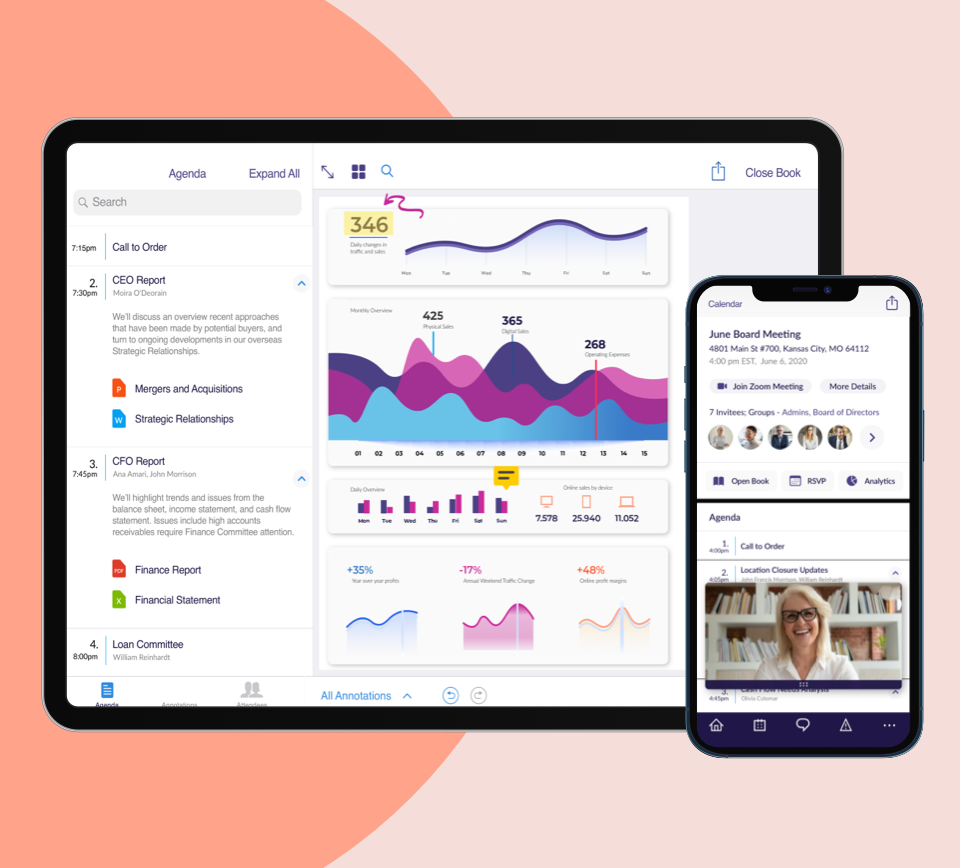
Questa piattaforma di business intelligence è stata specificamente creata per supportare le riunioni digitali del consiglio e le operazioni di governance a distanza. Con l'obiettivo di semplificare il monitoraggio delle analisi e unificare le comunicazioni, i membri del consiglio hanno accesso ai dati di cui hanno bisogno per prendere decisioni più informate.
Perché ho scelto OnBoard: Gli strumenti di intelligence di questa piattaforma, inclusa la funzione di valutazione del consiglio (Board Assessment), la fanno davvero distinguere. Con una valutazione, puoi creare una base migliore per il futuro del consiglio, assicurandoti che il tuo team sviluppi le giuste priorità che rafforzino le prestazioni e le migliori pratiche.
Caratteristiche distintive e integrazioni di OnBoard
Le caratteristiche distintive includono il reporting sulla diversità che permette di segnalare, creare grafici e pianificare aggiornamenti, oltre alla ricerca intelligente per trovare rapidamente i documenti, le riunioni, i contratti e la cronologia dei messaggi di cui hai bisogno.
Le integrazioni includono ADP, Google Drive, Govenda, Microsoft 365, Word, Excel, Outlook, PowerPoint e Zoom Meetings.
Pros and Cons
Pros:
- Facile da imparare e utilizzare
- Creazione e navigazione delle riunioni intuitiva
- Ideale per la prima transizione digitale
Cons:
- Modificando una riunione non mostra le modifiche
- Strumento di creazione dei verbali poco pratico

Ideale per creare ordini del giorno e note di riunione dettagliati
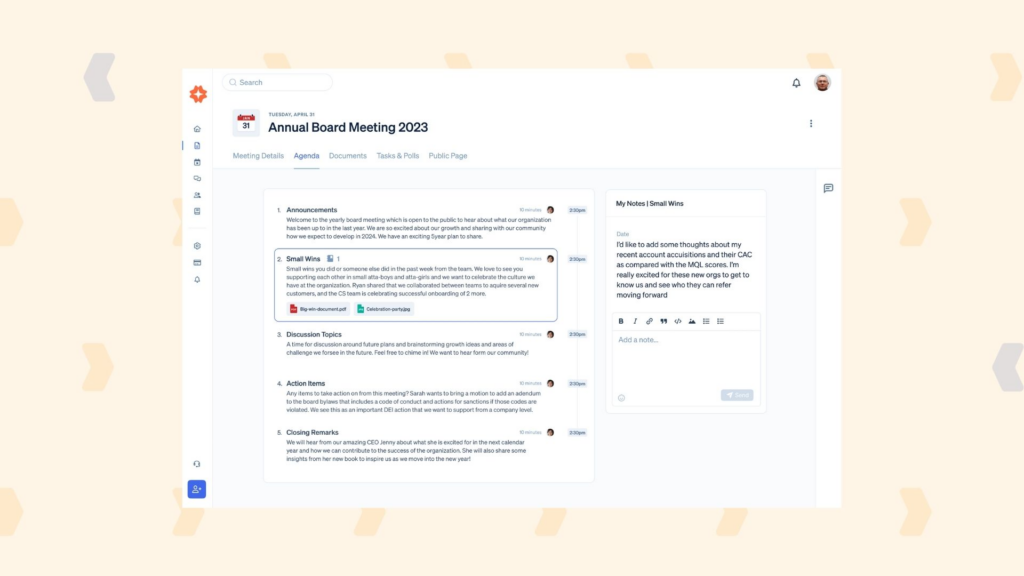
Questo software per riunioni del consiglio e governance aiuta i membri del consiglio a semplificare e ottimizzare la comunicazione per ridurre l'attrito amministrativo. Che tu sia in presenza o virtuale, hai a disposizione molti strumenti avanzati che snelliscono i compiti manuali, come la creazione dell'ordine del giorno, la stesura dei verbali e l'apertura di documenti di riferimento correlati.
Perché ho scelto Boardable: Le funzionalità di creazione dell'ordine del giorno e organizzazione delle riunioni sono i due strumenti che mi hanno davvero colpito. Puoi pianificare ogni dettaglio della riunione, assegnare le persone chiave e includere limiti di tempo per garantire che le riunioni rimangano nei tempi previsti. Puoi anche accedere alla Meeting Page, che raccoglie tutti i documenti del consiglio rilevanti, sondaggi e note in un unico posto.
Funzionalità principali e integrazioni di Boardable
Le funzionalità principali includono la creazione del board pack per consolidare tutti i materiali del consiglio, sondaggi e votazioni virtuali e un gestore di attività per consentire a singoli e team di seguire i punti discussi e monitorare le liste di cose da fare.
Le integrazioni includono Apple iCalendar, Dropbox, Gmail, Google Calendar, Google Drive, LinkedIn, Microsoft Teams, OneDrive, Yahoo Calendar e Zoom Meetings.
Pros and Cons
Pros:
- Piani gratuiti per sempre per nuovi consigli
- Notifiche automatizzate fin dall'inizio
- Crea, salva e modifica modelli
Cons:
- Funzionalità limitate dall'app mobile
- Richiede un po' di tempo per imparare ad usarlo
Ideale per strumenti ESG che affrontano rischio, conformità e audit
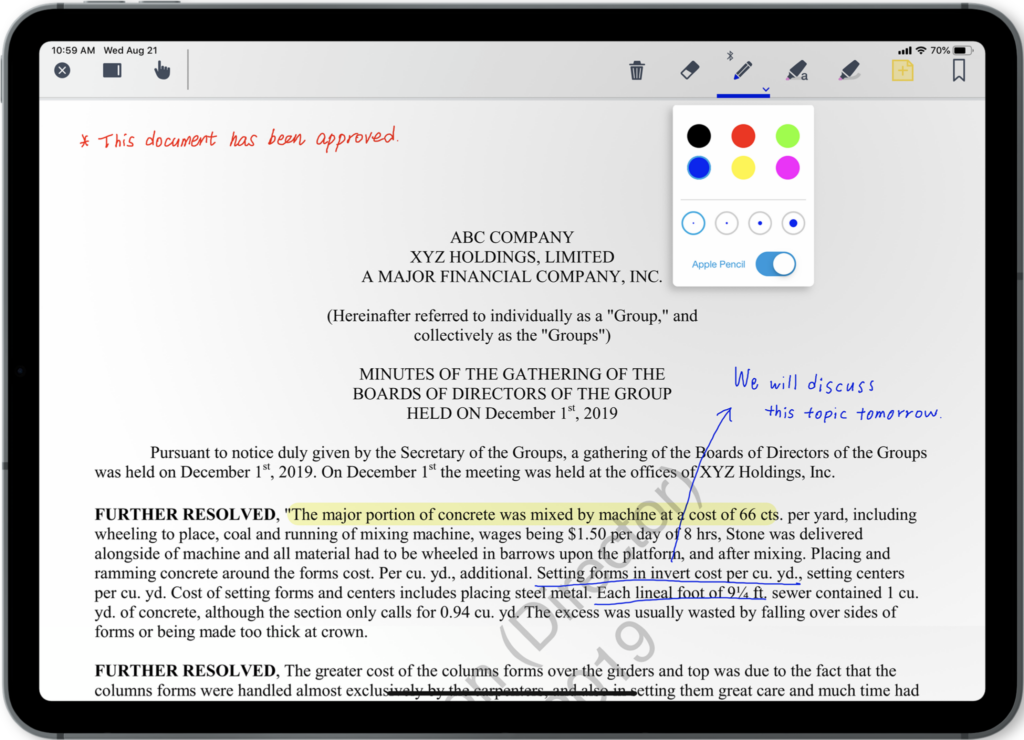
Progettato per aiutare direttori, leader e terze parti a collaborare e monitorare i dati in tutta l'organizzazione, Diligent ESG ti aiuta a prendere decisioni più informate per raggiungere i tuoi obiettivi aziendali. Puoi utilizzare questa piattaforma per la governance del consiglio per gestire riunioni di consiglio, dirigenza e comitati, comunicare in modo sicuro, automatizzare i flussi di lavoro e personalizzare le dashboard.
Perché ho scelto Diligent ESG: Questo strumento è entrato nella mia lista perché è pensato per le aziende che necessitano di analisi approfondite dei rischi per audit e conformità. Le funzionalità ESG (ambientale, sociale e governance) includono una gestione del rischio d'impresa che adotta un approccio proattivo nella valutazione del rischio, nella fornitura di soluzioni e nella possibilità di curare le proprie librerie di rischi e controlli.
Funzionalità e integrazioni di spicco di Diligent ESG
Le funzionalità di spicco includono strumenti di gestione delle riunioni del consiglio con un costruttore di agende e un registratore dei verbali delle riunioni, nonché soluzioni di audit certificate FedRamp per il monitoraggio continuo.
Le integrazioni includono Microsoft Teams, Messenger, Okta e SecurityScorecard.
Pros and Cons
Pros:
- Molto facile da usare dopo la formazione
- Strumenti focalizzati su conformità e audit
- Piani e funzionalità altamente personalizzabili
Cons:
- Presenta una certa curva di apprendimento
- La creazione dei libri non è così intuitiva

Ideale per la creazione avanzata di ordini del giorno e anche come archivio documentale
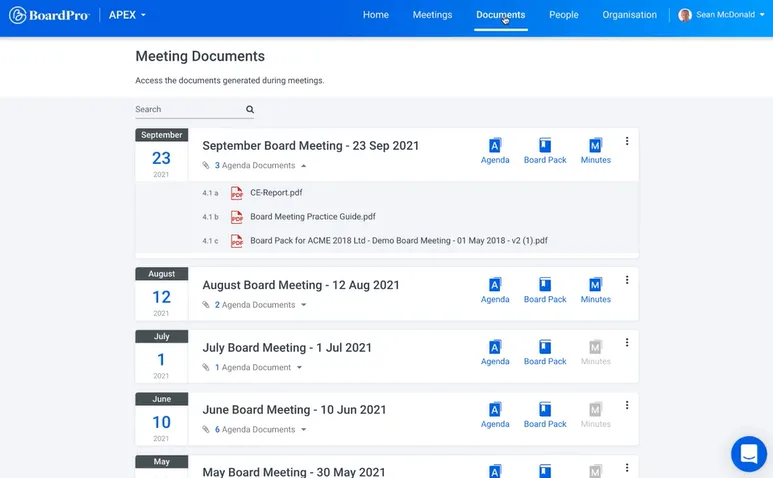
Questo software per la governance del consiglio si concentra sulla semplificazione dei processi amministrativi, tra cui la creazione dei pacchetti per il consiglio, la definizione degli ordini del giorno, la redazione dei verbali e l'assegnazione dei compiti. Con il suo strumento di creazione dell'ordine del giorno, puoi accedere a modelli pre-caricati oppure sviluppare i tuoi modelli utilizzando elementi drag-and-drop e clonarli per le riunioni future.
Perché ho scelto BoardPro: Ho inserito questa piattaforma nella mia lista perché i suoi strumenti avanzati per l'ordine del giorno permettono di fare molto di più che semplicemente costruire la scaletta. Integra automaticamente i documenti del pacchetto consiglio non appena l'ordine del giorno è pubblicato. Apri i documenti nella vista Pacchetto Consiglio e prendi note digitali con gli strumenti di annotazione in-app, oltre a assegnare promemoria automatici ai documenti per monitorare note, attività e decisioni.
Caratteristiche e integrazioni distintive di BoardPro
Le caratteristiche distintive includono notifiche automatiche che inviano le attività ai rispettivi responsabili non appena il pacchetto consiglio è pubblicato e una funzione di archiviazione dei verbali e delle note in ordine cronologico per semplificare la ricerca.
Le integrazioni non sono disponibili al momento.
Pros and Cons
Pros:
- Gli strumenti facilitano il monitoraggio delle attività
- Molto facile da apprendere e utilizzare
- Interfaccia utente intuitiva e pulita
Cons:
- Molte funzionalità possono inizialmente risultare travolgenti
- Integrazioni limitate senza piani di espansione

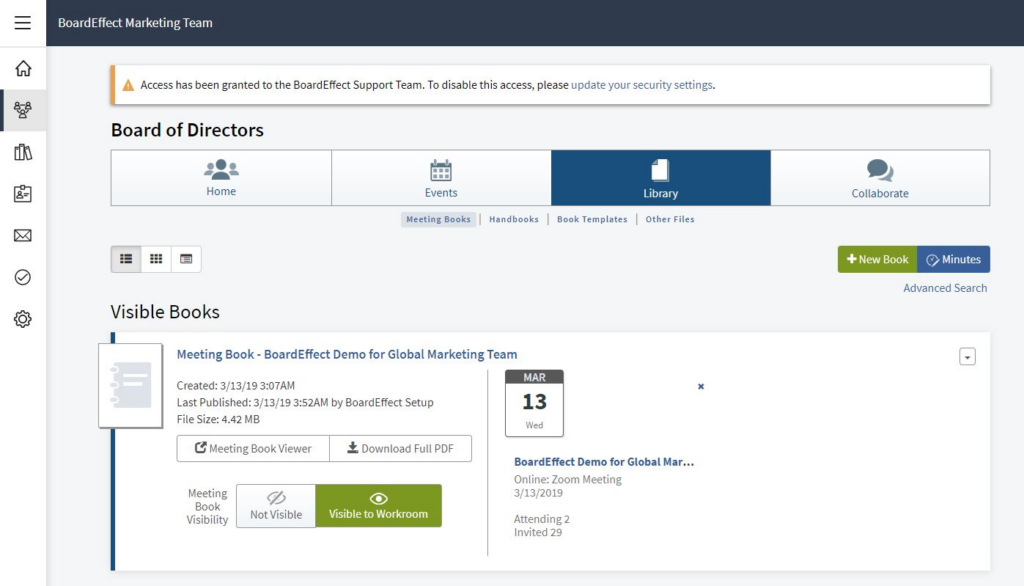
In quanto software completo per riunioni del consiglio e marchio Diligent board, BoardEffect offre una gestione agile dei consigli ottimizzata per soddisfare le esigenze di organizzazioni non profit, strutture sanitarie comunitarie e istituti di istruzione superiore. Con i loro strumenti per la gestione delle riunioni annuali, si ha accesso a strumenti di orientamento per i nuovi membri, come manuali delle politiche.
Perché ho scelto BoardEffect: Ho inserito questa piattaforma nella mia lista grazie ai suoi strumenti di orientamento per i nuovi membri. Che si tratti di un manuale delle politiche che raccoglie tutti i piani strategici, le procedure e le policy, o dell'archiviazione dei documenti riguardanti una nuova posizione, BoardEffect fornisce spazi di lavoro collaborativi e gestione documentale che semplificano il processo di onboarding.
Funzionalità distintive e integrazioni di BoardEffect
Funzionalità distintive includono la creazione e lo smantellamento ad hoc di gruppi con controlli di autorizzazione e archiviazione illimitata di documenti senza limiti di dimensione o quantità dei file.
Le integrazioni includono Go-To Meeting, Google Drive, Okta, Tableau e Zoom Meetings. BoardEffect ha introdotto di recente un pannello di integrazione per l'autenticazione unica (single sign-on).
Pros and Cons
Pros:
- Eccezionale facilità d'uso
- Navigazione semplice e intuitiva
- App mobile per lavorare ovunque
Cons:
- Flusso di lavoro per l'approvazione macchinoso
- Non è possibile condividere immagini direttamente nella messaggistica
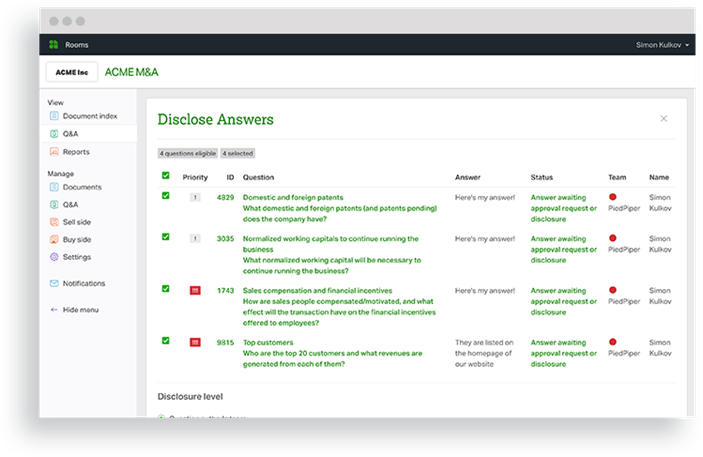
Ansarada è progettato per offrirti un software di governance del consiglio d'amministrazione potenziato dall'IA, dotato di data room virtuali, strumenti per la conclusione di affari e automazione avanzata delle Q&A. Grazie a checklist e flussi di lavoro digitalizzati, personalizzabili e costruiti su misura, questo strumento è ideale per le organizzazioni finanziarie. Goditi una gestione end-to-end delle operazioni che consente ai consigli di amministrazione di funzionare senza intoppi.
Perché ho scelto Ansarada: Ciò che mi ha davvero colpito di questa piattaforma è il modo in cui puoi sfruttare funzionalità uniche per i consigli, tra cui prendere appunti accanto a qualsiasi documento e confrontarli fianco a fianco, oltre a creare e pubblicare raccoglitori con il Binder Create Wizard che guida e assiste durante l'intero processo.
Caratteristiche distintive e integrazioni di Ansarada
Caratteristiche distintive includono solide funzionalità di sicurezza con conformità GDPR e certificazioni ISO27001 e Virtual Data Rooms che centralizzano tutte le attività di gestione delle operazioni.
Le integrazioni includono Box, DropBox Business, Google Drive e OneDrive. Ansarada offre anche integrazioni API personalizzate.
Pros and Cons
Pros:
- Semplice e facile da usare
- Interfaccia basilare con solo gli strumenti necessari
- Servizi robusti di assistenza clienti
Cons:
- Integrazioni native limitate disponibili
- Prezzi leggermente superiori alla media

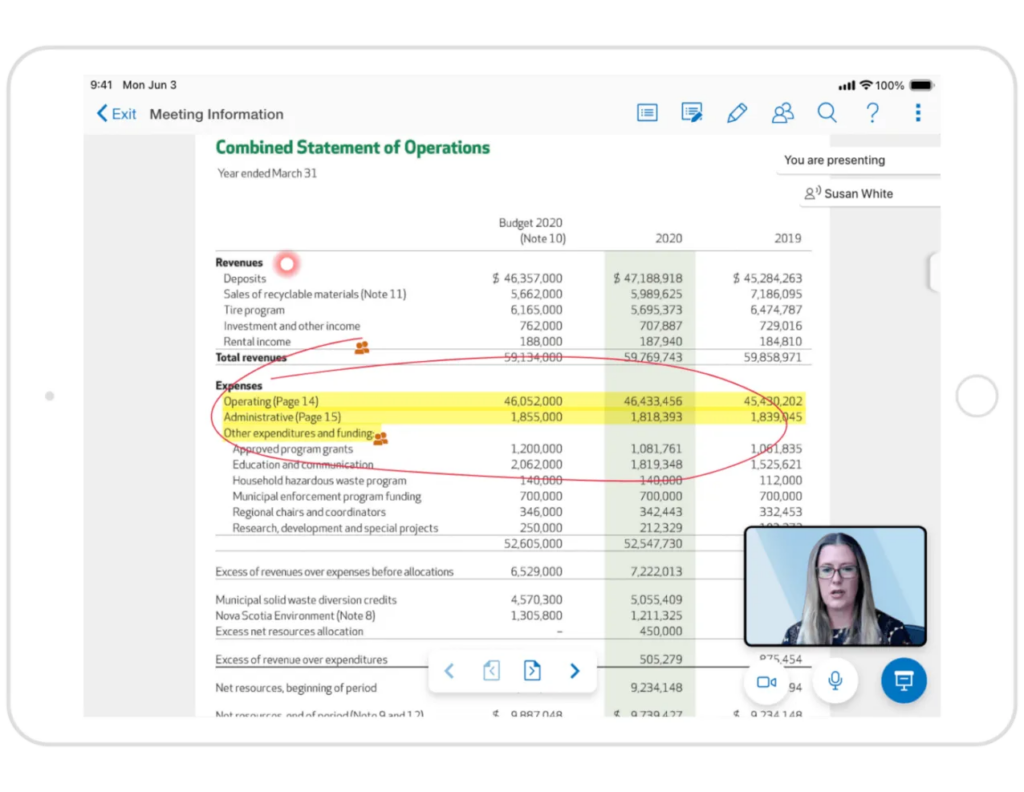
Con questa piattaforma di governance del consiglio, Convene si impegna a fornire ai dirigenti gli strumenti digitali necessari per condividere documenti, connettersi tramite videoconferenza e collaborare in tempo reale. È possibile utilizzare strumenti di collaborazione sui documenti per modificare e annotare i file durante una riunione virtuale e usufruire di funzionalità avanzate di sicurezza come la crittografia AES-256 e la funzione di cancellazione da remoto.
Perché ho scelto Convene: Una delle caratteristiche che mi ha colpito di questa piattaforma è stata la trascrizione e registrazione automatica dei video. Ogni volta che il tuo consiglio tiene una riunione con Convene, verrà generata automaticamente una registrazione post-riunione e una trascrizione che consente a chiunque di rivedere e recuperare dopo la fine dell'incontro.
Funzionalità distintive e integrazioni di Convene
Le funzionalità distintive includono un creatore di ordini del giorno e uno strumento di pubblicazione delle riunioni per organizzare più facilmente gli incontri, oltre a strumenti live che assicurano che tutti siano sulla stessa pagina, come il Puntatore Laser Virtuale e la Sincronizzazione delle Pagine.
Le integrazioni includono Blissfully, Box, Dropbox Business, Google Meet, Microsoft 365, Microsoft Teams, OneDrive, Skype, WebEx e Zoom.
Pros and Cons
Pros:
- I team di supporto forniscono formazione
- Interfaccia fluida e intuitiva
- Accesso semplice ai documenti aziendali
Cons:
- Curva di apprendimento iniziale piuttosto impegnativa
- Piattaforma più costosa rispetto a molte altre

Ideale per centralizzare e condividere documenti in modo sicuro

Questa è una delle migliori piattaforme per la gestione del consiglio di amministrazione perché è una soluzione basata su cloud che facilita tutte le forme di comunicazione digitale, dallo scambio di documenti prima delle riunioni al monitoraggio degli aggiornamenti sulle attività chiave. Con l’accesso a tutta la documentazione aziendale sia offline che online, si gode di una comunicazione bidirezionale tra i membri del consiglio in qualsiasi momento.
Perché ho scelto iDeals Virtual Boardroom: Ho inserito questa piattaforma nella mia lista finale per le sue caratteristiche di sicurezza. Questo sistema offre una sicurezza di livello militare che garantisce la conformità agli standard HIPAA, GDPR, SOC1 e 2 e ISO/IEC 27001:2013. È inoltre possibile utilizzare filigrane dinamiche sui documenti per prevenire la distribuzione non autorizzata.
Funzionalità e integrazioni principali di iDeals Virtual Boardroom
Funzionalità principali includono l’upload con drag-and-drop e la possibilità di caricare file in blocco, numerazione automatica per organizzare i documenti, e un sistema OCR per la ricerca nel testo completo.
Le integrazioni includono Active Directory, AuthAnvil, Bitium, Centrify, JumpCloud, MiniOrange, Okta, OneLogin, Ping Identity e RSA.
Pros and Cons
Pros:
- Uno dei sistemi più intuitivi
- Include un'app di supporto
- Opzioni di prezzo flessibili e competitive
Cons:
- Personalizzazione limitata dei report
- I nomi delle cartelle possono diventare molto lunghi

Sherpany
Ideale per Consigli di Amministrazione e Dirigenti C-level di organizzazioni europee
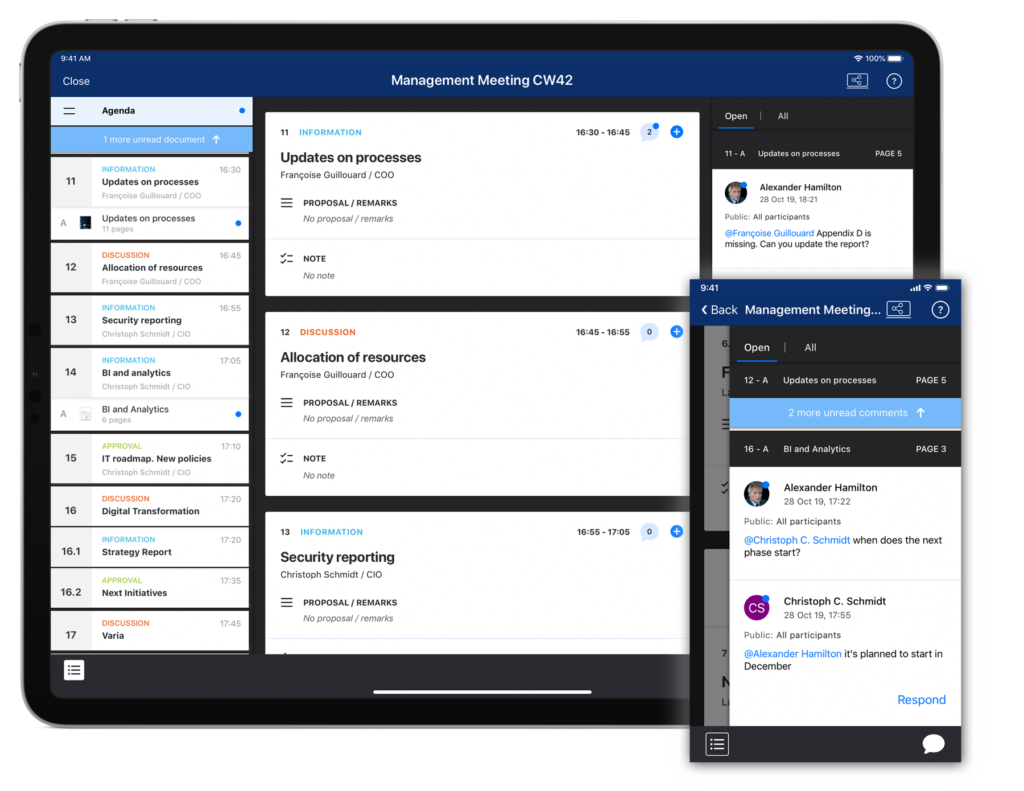
Questo software di governance del consiglio è una delle principali soluzioni europee per la gestione delle riunioni, progettata specificamente per le esigenze formali dei consigli di amministrazione e della leadership esecutiva. Questa piattaforma offre un'applicazione web, oltre ad app mobile native per Windows, iOS e Android, che ti permettono di prepararti per le riunioni sia online che offline.
Perché ho scelto Sherpany: Una delle caratteristiche che mi ha colpito di questa soluzione di gestione del consiglio è la modalità Presentatore. Usando questo strumento puoi mostrare elementi visivi durante una conferenza virtuale, presentando accompagnamenti coinvolgenti e interessanti per la tua presentazione. Puoi annotare, cerchiare ed evidenziare diversi elementi sullo schermo affinché tutti possano vederli.
Caratteristiche e integrazioni distintive di Sherpany
Caratteristiche distintive includono un modello di verbale precompilato basato sull'ordine del giorno della riunione e la Risoluzione Circolare Digitale per semplificare le votazioni digitali e le firme elettroniche.
Le integrazioni includono Box, Dropbox, Google Meet, Google Workspaces, Microsoft Outlook e Microsoft Teams.
Pros and Cons
Pros:
- Facile recupero dei documenti storici
- Design visivamente accattivante
- Semplice e facile da usare
Cons:
- Patch e miglioramenti non sono automatizzati
- Sistema di messaggistica interna limitato
Altri software per la governance dei consigli di amministrazione
Ecco alcune opzioni aggiuntive di software per la governance dei consigli di amministrazione che non sono entrate nel mio elenco, ma che vale comunque la pena valutare:


Come Valuto i Software di Governance del Consiglio
Valuto gli strumenti di governance del consiglio su due livelli: il requisito minimo che ogni piattaforma deve soddisfare e i fattori differenzianti che contano di più per i team RevOps che riportano i dati di pipeline in sala consiglio.
Funzionalità Core (Requisiti Fondamentali per Questa Lista)
Quando seleziono gli strumenti per la mia lista, valuto ciascuno su una scala da 0 (non offre la funzionalità) a 5 (eccelle in quest'area) per ogni funzionalità fondamentale elencata di seguito. Poi, calcolo il punteggio totale dello strumento in percentuale. Ogni strumento deve raggiungere un punteggio totale minimo del 65% per essere considerato per l'inclusione.
- Portale del Consiglio: Cerco uno spazio di lavoro dedicato e protetto da login in cui i membri del consiglio possano vedere le prossime riunioni, accedere ai materiali e comunicare—non solo un drive condiviso con una struttura a cartelle.
- Gestione Riunioni e Ordini del Giorno: Valuto come ogni strumento gestisce l'intero ciclo della riunione, dalla creazione di un ordine del giorno strutturato alla compilazione e distribuzione di un board book raffinato prima di una revisione trimestrale.
- Archivio Documenti Sicuro: Previsioni di fatturato riservate e materiali per fusioni e acquisizioni richiedono permessi granulari, quindi verifico se gli amministratori possono controllare l'accesso a livello di cartella, documento o pagina.
- Votazioni e Delibere: Che si tratti di approvare un piano di compensi o ratificare un'azione per consenso tra le riunioni, cerco la votazione digitale con registri chiari di chi ha votato e quando.
- Verbali e Tracciamento Azioni: Una buona governance dipende dal follow-up, quindi valuto se una piattaforma permette di acquisire verbali strutturati, assegnare responsabili alle azioni e monitorarne il completamento.
- Conformità e Audit Trail: Verifico i controlli di accesso basati sui ruoli, i registri delle attività non modificabili e il supporto alle firme elettroniche—il tipo di documentazione di cui il tuo team legale avrà bisogno durante una due diligence.
Una volta ottenuta una lista di strumenti che soddisfano questi criteri, considero cosa distingue ogni piattaforma.
Fattori Differenzianti (Cosa Distingue i Fornitori)
Ecco come confronto e metto a confronto i diversi fornitori:
Funzionalità Distintive
Cerco piattaforme che possano integrare dati di fatturato in tempo reale nei materiali del consiglio tramite dashboard native—questo evita ai team RevOps di dover ricostruire manualmente i report di pipeline ogni trimestre in un formato separato. I riepiloghi delle riunioni generati dall'intelligenza artificiale sono un altro fattore distintivo, soprattutto quando includono azioni collegate a specifici obiettivi di revenue. Per le aziende con più entità, valuto anche quanto una piattaforma supporta la governance a livello di controllata senza richiedere un'istanza separata per ciascun consiglio.
Oltre le Funzionalità
Le certificazioni di sicurezza come SOC 2 Type II e ISO 27001 sono importanti qui perché i materiali del consiglio spesso includono dati di pipeline sensibili e previsioni finanziarie—verifico che i fornitori abbiano certificazioni aggiornate e offrano opzioni di residenza dei dati. L'integrazione con il tech stack RevOps è altrettanto fondamentale; una piattaforma che si connette a Salesforce, HubSpot o Tableau significa meno esportazioni manuali prima di ogni riunione. Valuto anche la trasparenza dei prezzi, in particolare come i fornitori gestiscono la scalabilità su vari comitati e posti per osservatori man mano che l'azienda cresce.
Come scegliere un software per la governance dei consigli di amministrazione
È facile perdersi in lunghi elenchi di funzionalità e strutture tariffarie complesse. Per aiutarti a rimanere concentrato mentre affronti il tuo processo di selezione del software, ecco una checklist dei fattori da tenere a mente:
| Fattore | Cosa considerare |
|---|---|
| Scalabilità | Il software crescerà insieme alla tua organizzazione? Verifica se supporta l'aggiunta di altri utenti o l'ampliamento delle funzionalità senza un aumento significativo dei costi. |
| Integrazioni | Funziona con gli strumenti che già utilizzi? Controlla se si collega ai tuoi sistemi di posta elettronica, calendario e archiviazione dei file per evitare l'inserimento manuale dei dati. |
| Personalizzazione | Puoi adattarlo ai tuoi flussi di lavoro? Cerca opzioni per personalizzare dashboard, report e autorizzazioni degli utenti in base alle esigenze del tuo team. |
| Facilità d'uso | È intuitivo per tutti i membri del team? Assicurati che l'interfaccia sia intuitiva e richieda una formazione minima per consentire una rapida adozione da parte dei membri del consiglio. |
| Implementazione e avviamento | Quanto tempo occorrerà per iniziare a utilizzarlo? Verifica se il fornitore offre risorse per la formazione e assistenza per facilitare una transizione senza problemi. |
| Costo | Rientra nel tuo budget? Confronta i piani tariffari, comprese eventuali commissioni nascoste o i costi per funzionalità aggiuntive, per trovare una soluzione conveniente. |
| Misure di sicurezza | I tuoi dati sono protetti? Verifica se il software è conforme agli standard di settore per la crittografia dei dati e l'autenticazione degli utenti, così da proteggere le informazioni sensibili. |
| Requisiti di conformità | Soddisfa le esigenze normative? Assicurati che il software supporti la conformità alle leggi e ai regolamenti pertinenti a cui la tua organizzazione deve attenersi. |
Che cos'è un software per la governance dei consigli di amministrazione?
Il software per la governance dei consigli di amministrazione è una piattaforma digitale utilizzata dalle organizzazioni per gestire e facilitare le attività del proprio consiglio di amministrazione. Comprende strumenti per organizzare le riunioni del consiglio, gestire i documenti, garantire la conformità agli standard di governance e facilitare la comunicazione tra i membri del consiglio. Questo software fornisce un sistema centralizzato per tutte le attività e le informazioni relative alla governance del consiglio di amministrazione.
Funzionalità
Quando scegli un software per la governance dei consigli di amministrazione, presta attenzione alle seguenti funzionalità principali:
- Gestione delle riunioni: Organizza e programma le riunioni del consiglio di amministrazione, assicurandosi che tutti i partecipanti siano informati e preparati.
- Condivisione dei documenti: Consente la distribuzione sicura dei materiali e dei documenti del consiglio di amministrazione, facilitando l'accesso per tutti i membri.
- Comunicazione sicura: Fornisce opzioni di messaggistica crittografata per mantenere la riservatezza nelle discussioni del consiglio di amministrazione.
- Monitoraggio della conformità: Aiuta a monitorare e garantire il rispetto dei requisiti normativi e delle politiche organizzative.
- Dashboard personalizzabili: Offre visualizzazioni e report personalizzati per soddisfare le esigenze e le preferenze specifiche dei membri del consiglio di amministrazione.
- Funzionalità di integrazione: Si collega agli strumenti esistenti, come e-mail e calendari, per semplificare i flussi di lavoro e l'inserimento dei dati.
- Autorizzazioni degli utenti: Controlla i livelli di accesso per i diversi utenti, garantendo che le informazioni sensibili siano disponibili solo alle persone autorizzate.
- Collaborazione in tempo reale: Consente ai membri del consiglio di amministrazione di lavorare contemporaneamente su documenti e decisioni, migliorando l'efficienza.
- Risorse formative: Fornisce tutorial e assistenza per facilitare l'adozione e l'avvio all'uso da parte di tutti gli utenti.
- Analisi e report: Offre informazioni sulle attività e sulle prestazioni del consiglio di amministrazione, contribuendo a orientare le decisioni strategiche.
Vantaggi
L'implementazione di un software per la governance del consiglio di amministrazione offre diversi vantaggi al tuo team e alla tua azienda. Ecco alcuni dei vantaggi che puoi aspettarti:
- Migliore processo decisionale: L'accesso a documenti organizzati e analisi aiuta i membri del consiglio di amministrazione a prendere decisioni informate.
- Collaborazione migliorata: Le funzionalità di collaborazione in tempo reale consentono ai membri del consiglio di amministrazione di lavorare insieme in modo efficiente, indipendentemente dalla loro posizione.
- Maggiore sicurezza: La comunicazione sicura e la condivisione dei documenti proteggono le informazioni sensibili dagli accessi non autorizzati.
- Conformità normativa: Il monitoraggio della conformità garantisce il rispetto delle normative di settore e delle politiche organizzative.
- Risparmio di tempo: La programmazione automatizzata delle riunioni e la distribuzione dei documenti riducono il tempo dedicato alle attività amministrative.
- Informazioni personalizzabili: Dashboard e report personalizzati forniscono ai membri del consiglio di amministrazione le informazioni specifiche di cui hanno bisogno.
- Semplicità d'uso: Le interfacce intuitive e le risorse formative favoriscono una rapida adozione e un utilizzo efficace da parte di tutti i membri del team.
Costi e prezzi
La scelta di un software per la governance del consiglio di amministrazione richiede la comprensione dei vari modelli e piani tariffari disponibili. I costi variano in base alle funzionalità, alle dimensioni del team, ai componenti aggiuntivi e ad altri fattori. La tabella seguente riassume i piani più comuni, i relativi prezzi medi e le funzionalità tipicamente incluse nelle soluzioni software per la governance del consiglio di amministrazione:
Tabella di confronto dei piani per i software di governance del consiglio di amministrazione
| Tipo di piano | Prezzo medio | Funzionalità comuni |
|---|---|---|
| Piano gratuito | $0 | Gestione di base delle riunioni, archiviazione dei documenti e accesso limitato degli utenti. |
| Piano personale | $10-$30/utente/mese | Programmazione delle riunioni, condivisione dei documenti, messaggistica sicura e analisi di base. |
| Piano aziendale | $50-$100/utente/mese | Strumenti avanzati di collaborazione, monitoraggio della conformità, dashboard personalizzate e assistenza. |
| Piano per grandi aziende | $150-$300/utente/mese | Suite completa di funzionalità, incluse integrazioni, sicurezza avanzata e assistenza dedicata. |
Domande frequenti sul software per la governance del consiglio
Ecco alcune risposte alle domande comuni sul software per la governance del consiglio:
Come faccio a sapere se la mia organizzazione ha bisogno di un software per la governance del consiglio?
Se la tua organizzazione ha difficoltà a gestire le riunioni del consiglio, la distribuzione dei documenti o le comunicazioni sicure, probabilmente ha bisogno di un software per la governance del consiglio. Cerca segnali come difficoltà nel coordinamento degli orari, problemi di conformità o preoccupazioni relative alla sicurezza dei dati. Valuta i processi attuali e verifica se un software potrebbe semplificare le attività e migliorare l’efficienza.
Cosa occorre verificare per quanto riguarda sicurezza e conformità?
\u0026nbsp;
Scegli un software con crittografia, accesso basato sui ruoli e registri di audit. Assicurati che rispetti le leggi sulla protezione dei dati della tua regione, come il GDPR o l’HIPAA. Questi elementi mantengono i dati del consiglio al sicuro e conformi alle normative.
Come puoi assicurarti che il software sia compatibile con i sistemi esistenti?
Verifica che si integri con gli strumenti che già utilizzi, come Outlook, Google Workspace o SharePoint. Un’integrazione fluida fa risparmiare tempo e previene la duplicazione del lavoro.
È meglio scegliere un software basato sul cloud o installato in locale?
Gli strumenti basati sul cloud sono più facili da utilizzare e aggiornare, ma dipendono dalla connessione Internet. I sistemi installati in locale offrono un maggiore controllo, ma richiedono la gestione da parte del reparto IT. Scegli in base alle dimensioni del consiglio, al budget e alle politiche di sicurezza.
Cosa fare dopo:
Se stai valutando un software per la governance del consiglio, contatta gratuitamente un consulente SoftwareSelect per ricevere consigli personalizzati.
Compili un modulo e fai una breve conversazione durante la quale il consulente approfondisce le tue esigenze specifiche. In seguito riceverai una selezione ristretta di software da valutare. Ti assisterà inoltre durante l'intero processo di acquisto, comprese le negoziazioni sul prezzo.