

Un CRM mobile è uno strumento di gestione delle relazioni con i clienti che puoi utilizzare sul telefono o sul tablet, consentendoti di monitorare le trattative, gestire i contatti e accedere ai dati dei clienti ovunque lavori. Se stai cercando il miglior CRM mobile, hai bisogno di opzioni progettate per team di vendita dinamici che gestiscono riunioni di persona, follow-up e comunicazioni costanti. Le opportunità perse, gli appunti sparsi e gli aggiornamenti lenti hanno un costo reale in termini di ricavi, soprattutto quando sei fuori dall'ufficio. Questa guida ti aiuterà a scegliere una soluzione adatta al tuo flusso di lavoro, che mantenga attiva la tua pipeline e si integri con gli strumenti su cui il tuo team fa già affidamento.
Perché fidarsi dei nostri consigli sui software
6,700+
Reviews
20
Industry experts
16+
Evaluation factors
14
Years
Le nostre recensioni riflettono il nostro giudizio indipendente, non un discorso di vendita. Scopri come manteniamo la trasparenza.
Per questa guida, abbiamo valutato gli strumenti attraverso test pratici e ricerche indipendenti, assegnando un punteggio agli strumenti in base ai nostri criteri di selezione.
Le nostre recensioni riflettono il nostro giudizio editoriale umano, non un discorso di vendita.
Tabella comparativa dei CRM mobili
La tabella seguente confronta i dettagli sui prezzi delle mie migliori selezioni di CRM mobili.
| Tool | Best For | Trial Info | Price | ||
|---|---|---|---|---|---|
| 1 | Ideale per la gestione dei contatti incentrata sulle azioni | Prova gratuita di 21 giorni | A partire da $9.95/utente/mese (fatturato annualmente) | Website | |
| 2 | Ideale per visualizzare le pipeline di vendita | Prova gratuita di 14 giorni disponibile | Prezzi su richiesta | Website | |
| 3 | Ideale per collegare progetti e relazioni | Prova gratuita di 14 giorni | Da $29/utente/mese (con fatturazione annuale) | Website | |
| 4 | Ideale per l'accesso offline al database | Prova gratuita di 14 giorni + demo gratuita disponibile | A partire da $30/utente/mese (fatturato annualmente) | Website | |
| 5 | Ideale per chiamate e messaggistica integrate nell'app | Prova gratuita di 21 giorni | A partire da $9/user/month (con fatturazione annuale) | Website | |
| 6 | Ideale per allineare i dati tra i reparti | Piano gratuito disponibile | A partire da $7/utente/mese (con fatturazione annuale) | Website | |
| 7 | Ideale per la raccolta automatizzata delle e-mail | Prova gratuita di 21 giorni | A partire da $9.95/utente/mese (con fatturazione annuale) | Website | |
| 8 | Ideale per l'integrazione nativa della telefonia | Piano gratuito disponibile | Da $69/mese | Website | |
| 9 | Ideale per la classificazione dei lead basata sull'intelligenza artificiale | Prova gratuita di 21 giorni + demo gratuita disponibile | A partire da $9/utente/mese (con fatturazione annuale) | Website | |
| 10 | Ideale per le previsioni sui ricavi aziendali | Prova gratuita di 30 giorni | A partire da $25/utente/mese | Website |


Recensioni dei migliori CRM mobili
Di seguito trovi i miei riepiloghi dettagliati dei migliori CRM mobili inclusi nella mia selezione. Le mie recensioni offrono un’analisi approfondita delle funzionalità, dei casi d’uso migliori e delle integrazioni di ogni piattaforma, per aiutarti a trovare quella più adatta a te.
 Ideale per la gestione dei contatti incentrata sulle azioni
- Prova gratuita di 21 giorni
- A partire da $9.95/utente/mese (fatturato annualmente)
Visit WebsiteCustomer Rating:4.7/5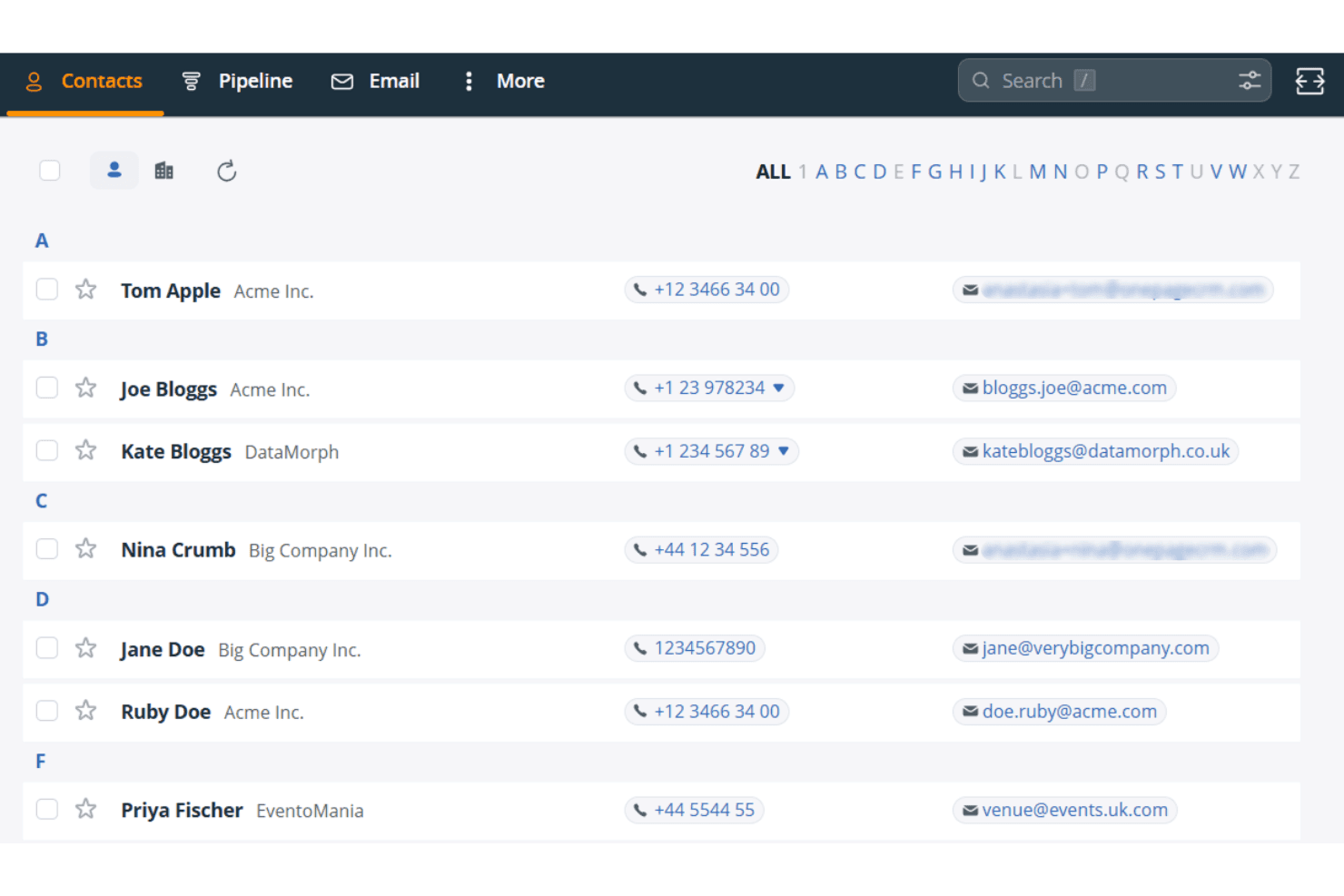
OnePageCRM organizza i contatti in ordine alfabetico con dettagli su telefono ed e-mail. OnePageCRM è un CRM mobile basato su un elenco di azioni prioritarie, che offre la gestione dei contatti, il monitoraggio della pipeline, un pianificatore di percorsi basato sull'intelligenza artificiale, uno scanner integrato per biglietti da visita e un compositore rapido di numeri per i team di vendita sul campo.
Per chi è più adatto OnePageCRM?
OnePageCRM è una soluzione ideale per i rappresentanti commerciali sul campo e i piccoli team di vendita che hanno bisogno di un CRM mobile semplice, basato sulle priorità delle attività quotidiane di ricontatto.
Perché ho scelto OnePageCRM
OnePageCRM si è guadagnato un posto nella mia lista ristretta grazie al modo in cui organizza le attività di vendita quotidiane intorno a un elenco di azioni prioritarie, invece di lasciare ai rappresentanti il compito di decidere chi chiamare successivamente. Il flusso delle azioni assegna un colore a ogni contatto in base all'urgenza e mostra il valore totale delle trattative aperte accanto a ogni ricontatto, così posso vedere immediatamente se sto seguendo una trattativa da $500 o una da $50,000. Mi affido anche al pianificatore di percorsi 'In viaggio', che utilizza dati sul traffico in tempo reale per organizzare in sequenza le visite sul campo e poi trasferisce il controllo al compositore rapido di numeri per effettuare chiamate consecutive senza dover cercare manualmente ogni contatto.
Funzionalità principali di OnePageCRM
- Scanner di biglietti da visita basato sull'intelligenza artificiale: Acquisisce istantaneamente i potenziali clienti sul campo fotografando un biglietto da visita, compilando automaticamente una nuova scheda contatto nel CRM.
- Registrazione delle note tramite dettatura vocale: Consente ai rappresentanti di dettare le note a mani libere direttamente nelle schede dei contatti dopo le interazioni sul campo.
- Modalità concentrazione: Nasconde con un solo tocco i contatti per i quali non è prevista un'attività oggi, limitando la visualizzazione ai ricontatti urgenti.
- Visualizzazione delle previsioni di vendita: Offre l'accesso mobile ai dati delle previsioni della pipeline in tutti i livelli tariffari, senza richiedere alcun passaggio a un piano superiore.
Integrazioni di OnePageCRM
OnePageCRM offre integrazioni tramite il proprio mercato delle integrazioni con Gmail, Google Calendar, Outlook Calendar, Aircall, Mailchimp, QuickBooks e Xero. Supporta inoltre l'accesso API, i webhook, Make.com e Zapier in tutti i piani.
Pros and Cons
Pros:
- Supporta la modifica completa di contatti e trattative da dispositivi mobili
- Elenco di azioni prioritarie con visualizzazione del valore delle trattative
- Scanner integrato per biglietti da visita per l'acquisizione istantanea
Cons:
- Non è disponibile l'accesso mobile senza connessione
- I messaggi di testo non vengono registrati automaticamente
Learn more about OnePageCRM: Ideale per visualizzare le pipeline di vendita
- Prova gratuita di 14 giorni disponibile
- Prezzi su richiesta
Visit WebsiteCustomer Rating:4.4/5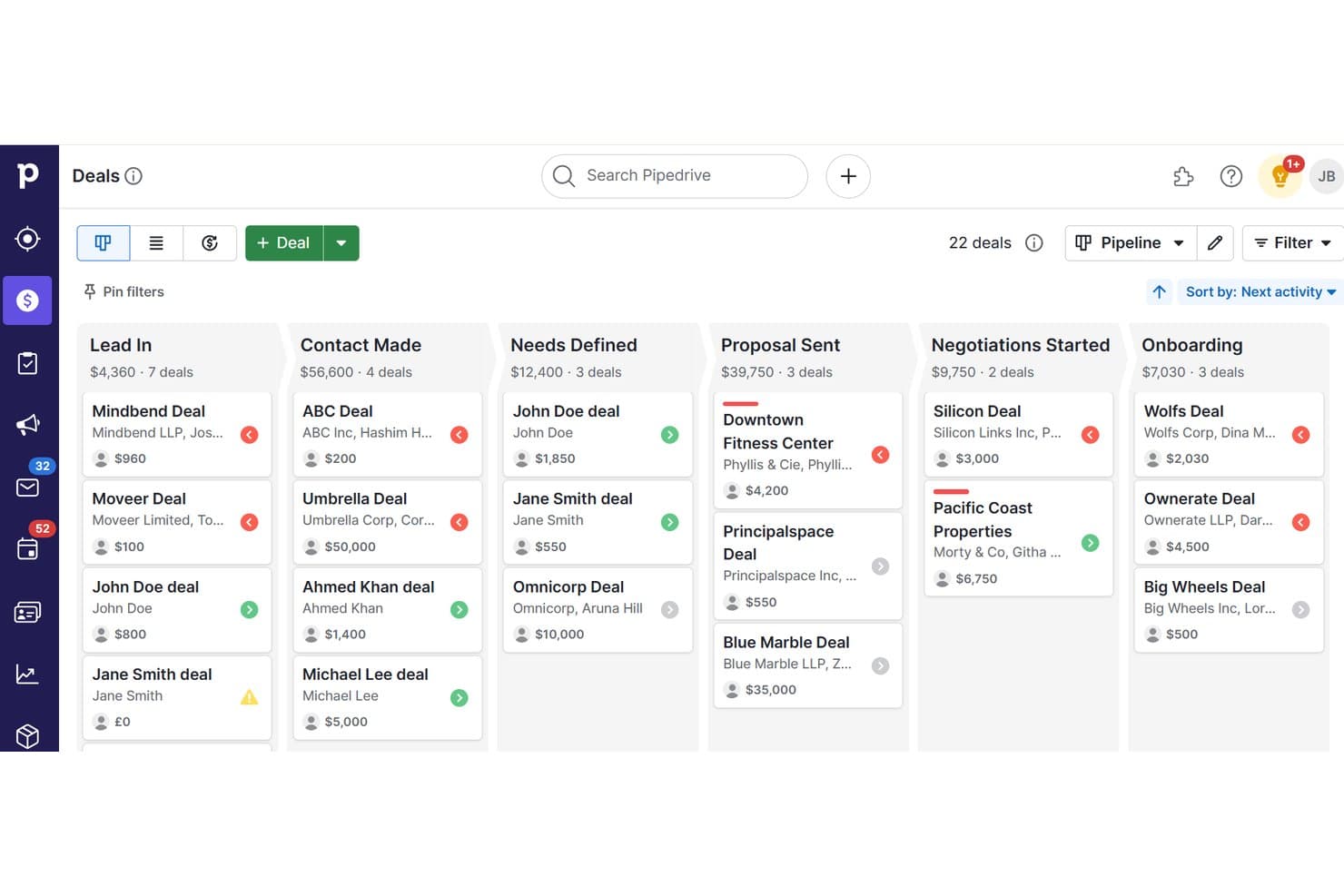
Pipedrive organizza le trattative tra le fasi della pipeline per il monitoraggio del CRM mobile. Pipedrive è un CRM per le vendite con app native per iOS e Android che offre ai team sul campo una gestione completa della pipeline, il monitoraggio offline delle trattative, la ricerca di contatti basata sulla geolocalizzazione, la scansione integrata dei biglietti da visita e la registrazione di note vocali.
Per chi è più adatto Pipedrive?
Pipedrive è una soluzione ideale per i commerciali sul campo che devono gestire le trattative, registrare le attività e trovare potenziali clienti nelle vicinanze senza essere legati a una scrivania.
Perché ho scelto Pipedrive
Pipedrive è entrato nella mia selezione perché nessun altro strumento che ho provato rende la visualizzazione della pipeline così accessibile sui dispositivi mobili come sul desktop. Apprezzo la possibilità di trascinare le trattative tra le fasi direttamente dal telefono, con la visualizzazione delle previsioni disponibile nei piani Growth e superiori. La funzionalità Nelle vicinanze è ciò che lo distingue davvero: mostra una mappa dei contatti e dei potenziali clienti entro 10 km dalla posizione attuale, così i commerciali sul campo possono colmare gli intervalli tra un incontro e l'altro senza aprire un'app separata.
Funzionalità principali di Pipedrive
- Modalità offline: Lavora senza connessione spostando le trattative, aggiungendo note e registrando attività, con sincronizzazione automatica quando ti riconnetti.
- Scanner di biglietti da visita: Acquisisci i dati dei contatti sul posto utilizzando la scansione OCR, controlla i dati estratti e salvali direttamente nel tuo CRM.
- Note audio: Registra note vocali e allegale a qualsiasi trattativa o scheda contatto direttamente dal telefono.
- Assistente alle vendite basato sull'IA: Ricevi suggerimenti per la definizione delle priorità delle trattative, indicazioni sulla migliore azione successiva e coaching sulle prestazioni tramite notifiche push sul dispositivo mobile.
Integrazioni di Pipedrive
Pipedrive offre oltre 500 integrazioni del Marketplace, tra cui Slack, Microsoft Teams, Zoom, Aircall, Gmail, Outlook, Calendly, Gong, Mailchimp e PandaDoc. Supporta inoltre integrazioni personalizzate tramite la sua API REST aperta, webhook e Zapier.
Pros and Cons
Pros:
- Modalità offline completa per gli utenti mobili
- Funzionalità di geolocalizzazione Nelle vicinanze per i commerciali sul campo
- Scanner di biglietti da visita nativo nell'app mobile
Cons:
- Dashboard di reportistica avanzata disponibili solo su desktop
- Problemi di prestazioni con grandi volumi di trattative
Learn more about Pipedrive: Ideale per collegare progetti e relazioni
- Prova gratuita di 14 giorni
- Da $29/utente/mese (con fatturazione annuale)
Visit WebsiteCustomer Rating:4.1/5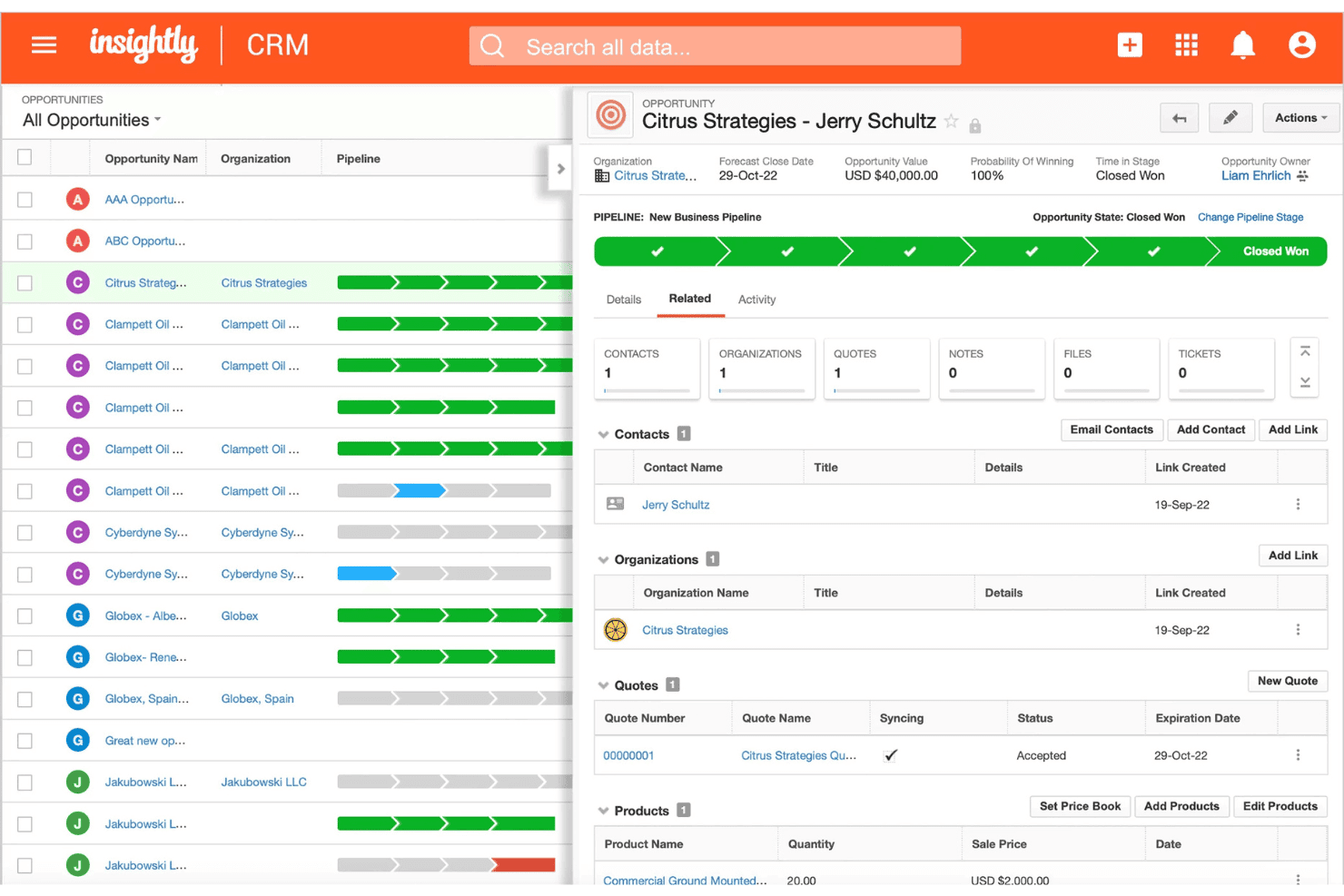
Insightly monitora le pipeline delle opportunità con il valore degli affari e lo stato dei preventivi. Insightly è un CRM mobile che collega la gestione dei contatti, il monitoraggio della pipeline, la gestione delle opportunità e il collegamento dei progetti nelle app per iOS e Android.
Per chi è più adatto Insightly?
Insightly è adatto ai team B2B che gestiscono relazioni complesse dopo la vendita, in cui collegare gli affari conclusi ai progetti in corso e monitorare i ruoli degli stakeholder fa parte del flusso di lavoro quotidiano.
Perché ho scelto Insightly
Insightly si è guadagnato un posto nella mia selezione grazie al modo in cui gestisce il passaggio da un affare concluso a un progetto attivo. Quando un'opportunità viene vinta, posso convertirla direttamente in un progetto collegato nell'app mobile, mantenendo per tutto il percorso i ruoli relazionali, come l'acquirente economico e il responsabile della consegna. Lo Scanner integrato dei biglietti da visita mi consente inoltre di acquisire nuovi contatti sul posto, mentre l'IA inserisce automaticamente i dettagli nel record.
Funzionalità principali di Insightly
- Registrazione di note vocali: Acquisisci il contesto delle riunioni a mani libere registrando note vocali direttamente nei record dei contatti o delle opportunità dall'app mobile.
- Viste della pipeline con trascinamento: Gestisci gli affari nelle viste Kanban e Milestone sul dispositivo mobile, con aggiornamenti completi delle fasi tramite trascinamento disponibili sia su iOS sia su Android.
- Coerenza dei pannelli di controllo: Qualsiasi pannello di controllo creato sul desktop appare automaticamente nell'app mobile con la stessa completezza, offrendoti una visibilità coerente sui dati ovunque ti trovi.
- Copilota IA: Usa il linguaggio naturale per cercare i record, redigere email di follow-up e aggiornare gli affari direttamente nell'interfaccia del CRM.
Integrazioni di Insightly
Insightly offre integrazioni native con Gmail, Microsoft Outlook e Slack, oltre a integrazioni AppConnect con Salesloft, DocuSign, Asana, QuickBooks Online, Calendly e ZoomInfo. La sua API REST v3.1 supporta integrazioni personalizzate in tutti i piani a pagamento.
Pros and Cons
Pros:
- Converte gli affari in progetti collegati dall'app mobile
- Pannelli di controllo mobili coerenti con le viste desktop
- Scanner di biglietti da visita con IA integrato
Cons:
- La profondità delle modifiche offline non è chiara
- Nessuna funzionalità per account o percorsi basata sulle mappe
 4Ideale per l'accesso offline al database
Act!
- Prova gratuita di 14 giorni + demo gratuita disponibile
- A partire da $30/utente/mese (fatturato annualmente)
Visit WebsiteCustomer Rating:4/5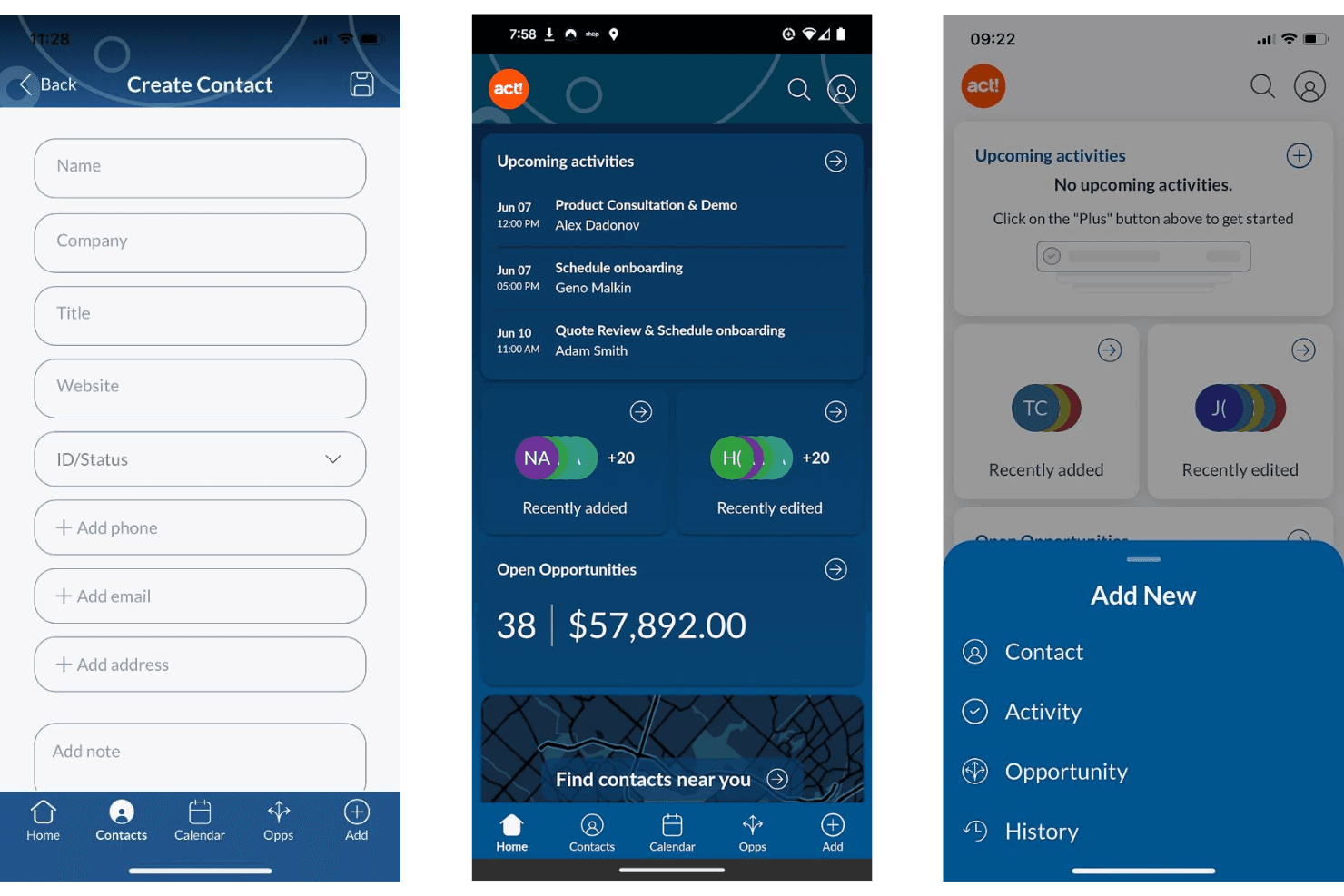
Act! consente agli utenti di gestire contatti, attività e opportunità su dispositivi mobili. Act! è un CRM mobile pensato per le piccole imprese e i team di vendita sul campo, che offre la gestione dei contatti e delle aziende, il monitoraggio della pipeline, la registrazione delle attività, la ricerca per prossimità e uno scanner per biglietti da visita su iOS e Android.
Per chi è più adatto Act!?
Act! è una soluzione particolarmente adatta ai team di vendita sul campo delle piccole imprese che necessitano di un CRM strutturato con strumenti ottimizzati per dispositivi mobili, come la ricerca per prossimità e uno scanner per biglietti da visita.
Perché ho scelto Act!
Act! si è guadagnato un posto nella mia selezione perché offre qualcosa di davvero raro nei CRM mobili: una soluzione offline per il database realmente affidabile. La versione Act! Premium Desktop consente di lavorare con un database installato localmente senza bisogno di una connessione Internet, sincronizzando le modifiche al momento della riconnessione. Apprezzo anche la ricerca per prossimità, che permette agli agenti sul campo di visualizzare i contatti entro un raggio predefinito dalla loro posizione attuale, e lo scanner integrato per biglietti da visita, che consente di registrare nuovi contatti sul posto.
Funzionalità principali di Act!
- Centro notifiche: Invia avvisi push per le attività imminenti, con opzioni per posticipare, riprogrammare e ignorare, includendo i nomi dei contatti e delle aziende collegati per fornire il contesto.
- Calendario multiutente: Consente agli utenti mobili di visualizzare e aggiungere attività direttamente ai calendari dei membri del team dall'app.
- Dashboard della pipeline: Mostra le trattative aperte con visualizzazioni ordinabili per numero, valore, anzianità e stato delle trattative, con la possibilità di modificare o chiudere le opportunità mentre si è in movimento.
- Scanner per biglietti da visita: Utilizza il riconoscimento ottico dei caratteri integrato per acquisire i dati dei contatti dai biglietti fisici e creare istantaneamente nuovi record dal dispositivo mobile.
Integrazioni di Act!
Act! offre integrazioni native con Microsoft Outlook e Google Workspace per la sincronizzazione di contatti, calendari ed e-mail, oltre alla connettività con Microsoft Office. Fornisce inoltre un'API aperta per integrazioni personalizzate e integrazioni con Zapier.
Pros and Cons
Pros:
- Scanner per biglietti da visita e codici QR incluso
- La ricerca per prossimità aiuta a pianificare le visite di vendita
- Il centro notifiche supporta i promemoria delle attività
Cons:
- Nessun accesso offline nell'app mobile
- Sono disponibili poche integrazioni moderne per le operazioni di ricavi
Learn more about Act!: Ideale per chiamate e messaggistica integrate nell'app
- Prova gratuita di 21 giorni
- A partire da $9/user/month (con fatturazione annuale)
Visit WebsiteCustomer Rating:3.7/5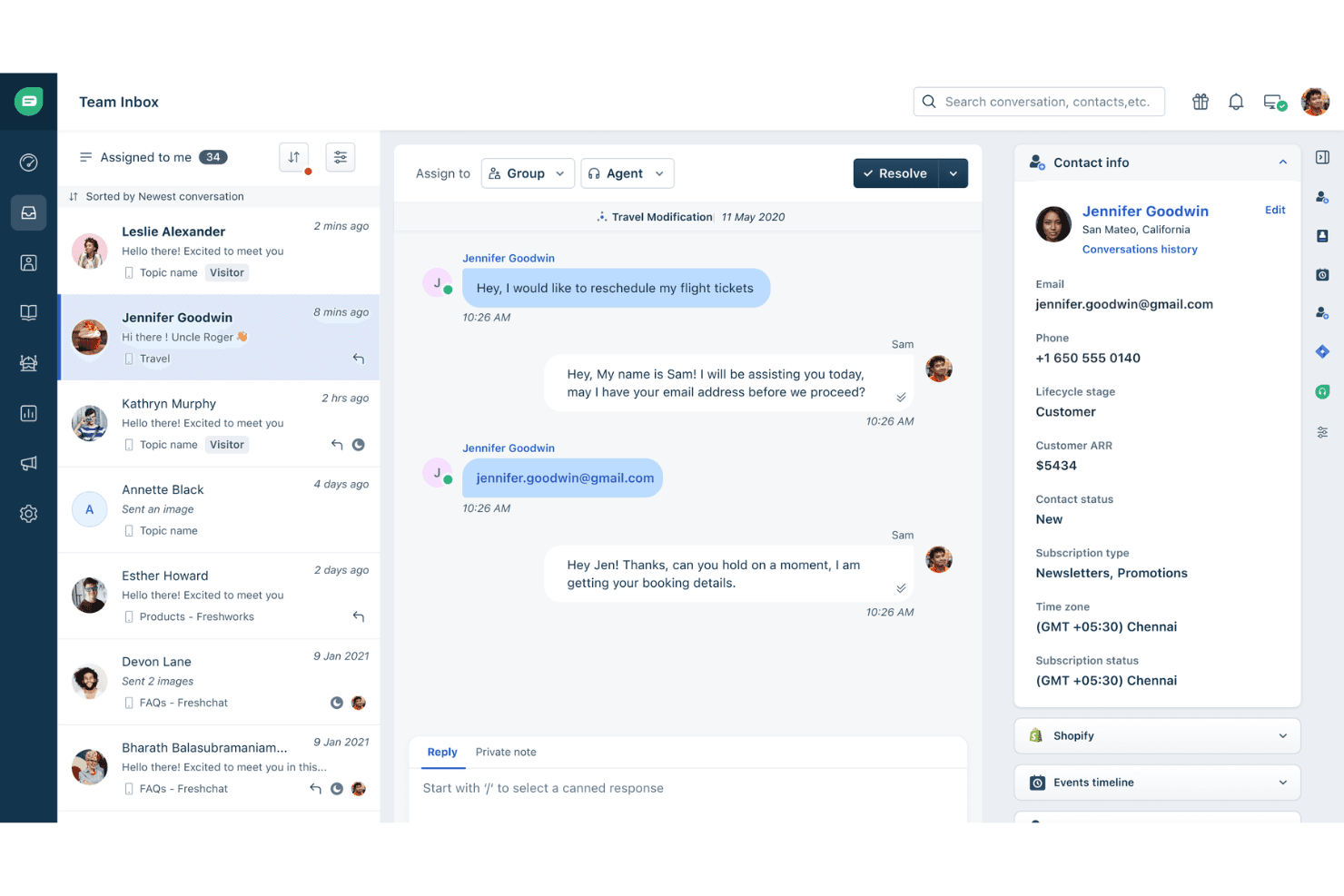
Freshworks centralizza le conversazioni con i clienti e i dettagli dei contatti in un'unica visualizzazione. Freshsales è un CRM mobile progettato per i team di vendita sul campo e da remoto, che combina la gestione dei contatti e delle trattative, visualizzazioni della pipeline basate sull'intelligenza artificiale, accesso offline, registrazione delle presenze tramite GPS, chiamate integrate e messaggistica multicanale in un'unica app.
Per chi è più adatto Freshworks?
Freshsales è particolarmente adatto ai team di vendita sul campo che si affidano a chiamate e messaggistica per portare avanti le trattative e hanno bisogno di questi strumenti direttamente integrati nel CRM.
Perché ho scelto Freshworks
Freshsales si è guadagnato un posto nella mia selezione perché nessun altro CRM mobile riunisce così tanti canali di comunicazione in un'unica app con la stessa efficacia. Mi riferisco a un dialer integrato con registrazione delle chiamate, WhatsApp Business, Apple Business Chat e SMS, con registrazione automatica di tutto nella scheda del contatto. Apprezzo particolarmente il fatto che un commerciale possa terminare una chiamata, allegare una nota vocale ed effettuare una registrazione GPS durante una visita sul posto senza mai uscire dall'app.
Funzionalità principali di Freshworks
- Visualizzazione Kanban con Freddy AI: Raggruppa le trattative in base alla probabilità di successo prevista dall'intelligenza artificiale, così puoi vedere quali opportunità richiedono attenzione prima della prossima chiamata.
- Scanner di biglietti da visita: Utilizza la fotocamera del dispositivo per acquisire i dati del biglietto e creare istantaneamente una scheda contatto tramite il pulsante Aggiunta rapida.
- Registrazione GPS: Registra la tua posizione quando visiti la sede di un cliente, associando direttamente la visita sul campo alla scheda del contatto o dell'account pertinente.
- Modalità offline: Ti consente di creare, modificare ed eliminare record di lead, contatti, trattative e attività senza connessione, sincronizzandoli automaticamente quando torni online.
Integrazioni di Freshworks
Freshsales offre oltre 100 integrazioni dal marketplace, tra cui Slack, Gmail, Outlook, Google Calendar, Freshdesk, Freshcaller, Gong, Zoom e WhatsApp Business. Supporta inoltre un'API REST aperta, webhook e Zapier.
Pros and Cons
Pros:
- Chiamate e messaggistica integrate nell'app
- Accesso offline completo ai moduli CRM principali
- Note vocali e registrazione GPS per i commerciali sul campo
Cons:
- Solo 100 record per visualizzazione possono essere sincronizzati offline
- Nessun accesso offline per i moduli personalizzati
Learn more about Freshworks: Ideale per allineare i dati tra i reparti
- Piano gratuito disponibile
- A partire da $7/utente/mese (con fatturazione annuale)
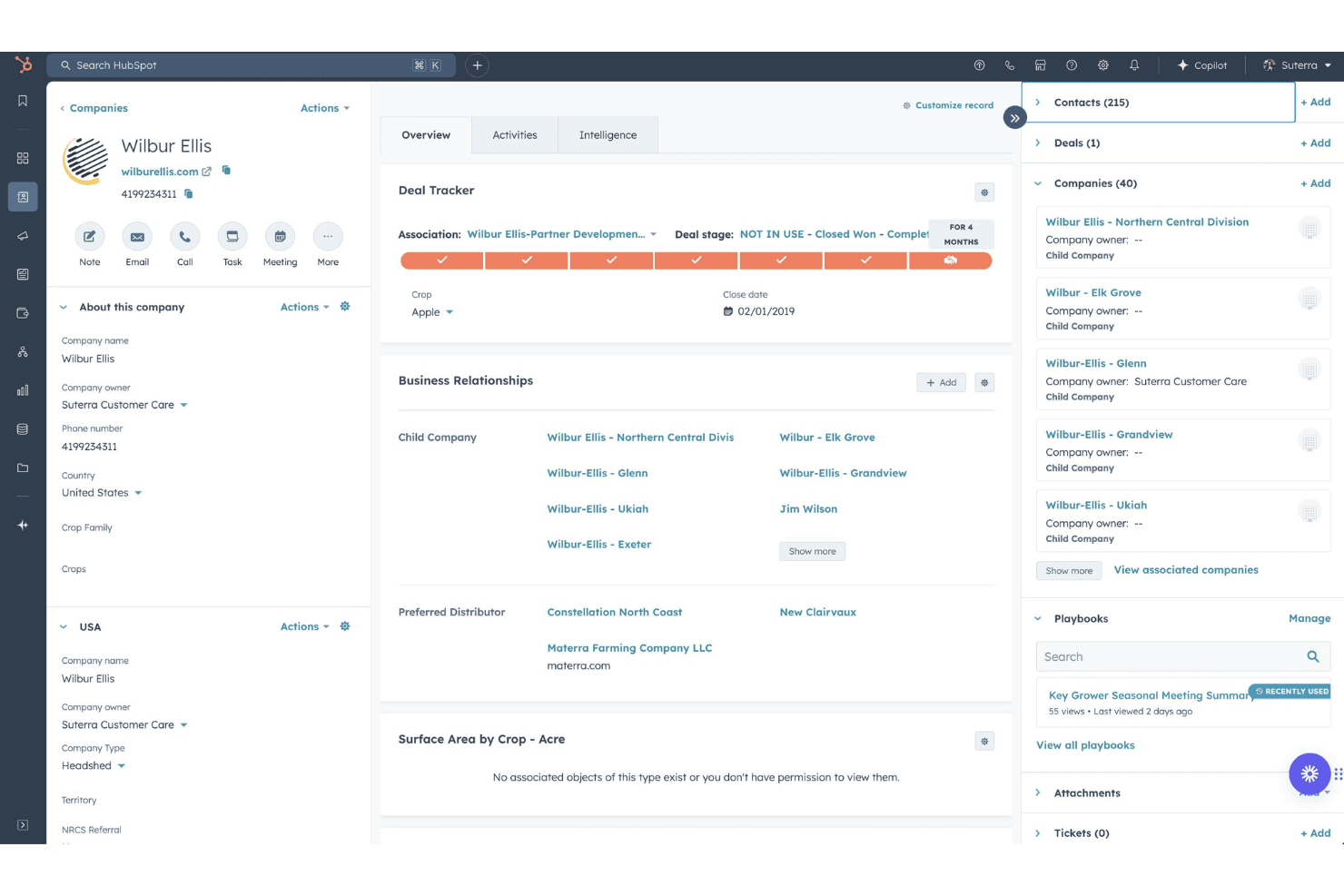
HubSpot CRM gratuito organizza i profili aziendali con affari, contatti e aziende secondarie. HubSpot CRM gratuito è una piattaforma CRM accessibile da dispositivi mobili con app native per iOS e Android, che comprende vendite, marketing e assistenza clienti, offrendo gestione dei contatti, monitoraggio della pipeline, chiamate nell'app, registrazione delle attività e assistenza basata sull'IA tramite Breeze.
Per chi è più adatto HubSpot CRM gratuito?
HubSpot CRM gratuito è adatto ai team che si occupano dei ricavi e che hanno bisogno di riunire i dati di vendite, marketing e assistenza clienti in un'unica piattaforma accessibile da dispositivi mobili.
Perché ho scelto HubSpot CRM gratuito
HubSpot CRM gratuito è presente nella mia lista perché nessun altro strumento che ho testato riunisce i dati di vendite, marketing e assistenza clienti da un'unica app mobile nel modo in cui lo fa HubSpot. Apprezzo particolarmente l'assistente Breeze, integrato in ogni schermata e in grado di recuperare il contesto aggiornato del CRM, così posso entrare a una riunione con un riepilogo completo dell'affare, dei ticket aperti e delle attività recenti senza aprire il portatile. Anche lo scanner integrato per i biglietti da visita registra e associa istantaneamente i nuovi contatti, mantenendo puliti i dati tra i reparti fin dal primo punto di contatto.
Caratteristiche principali di HubSpot CRM gratuito
- Chiamate nell'app con ID chiamante: Effettua chiamate in uscita direttamente dall'app utilizzando i numeri di telefono HubSpot, mentre le chiamate in entrata mostrano automaticamente i dati del contatto CRM collegato.
- Visualizzazione a scheda per la gestione della pipeline: Una visualizzazione della pipeline in stile Kanban consente di toccare le diverse fasi degli affari e passare da una pipeline all'altra senza uscire dall'app mobile.
- Notifiche push e avvisi sulle attività: Le notifiche push configurabili mostrano direttamente sul dispositivo promemoria delle attività, aggiornamenti sugli affari e avvisi sulle assegnazioni.
- Oltre 2.000 integrazioni del marketplace: Collega HubSpot a strumenti come Gong, Outreach, Salesloft, Gmail e Outlook tramite integrazioni native o il più ampio marketplace delle app.
Integrazioni di HubSpot CRM gratuito
HubSpot CRM gratuito offre oltre 2.000 integrazioni del marketplace, tra cui Gong, Outreach, Salesloft, Gmail, Outlook e Slack. La sua API aperta e i webhook supportano connessioni personalizzate, ed è disponibile anche Zapier.
Pros and Cons
Pros:
- Assistente basato sull'IA disponibile in ogni schermata
- Lo scanner integrato per i biglietti da visita è illimitato
- Accesso reale ai dati CRM tra i reparti
Cons:
- Le funzionalità di modifica offline sono molto limitate
- Nessuna geolocalizzazione o pianificazione dei percorsi nativa
Learn more about HubSpot Free HubSpot CRM: Ideale per la raccolta automatizzata delle e-mail
- Prova gratuita di 21 giorni
- A partire da $9.95/utente/mese (con fatturazione annuale)
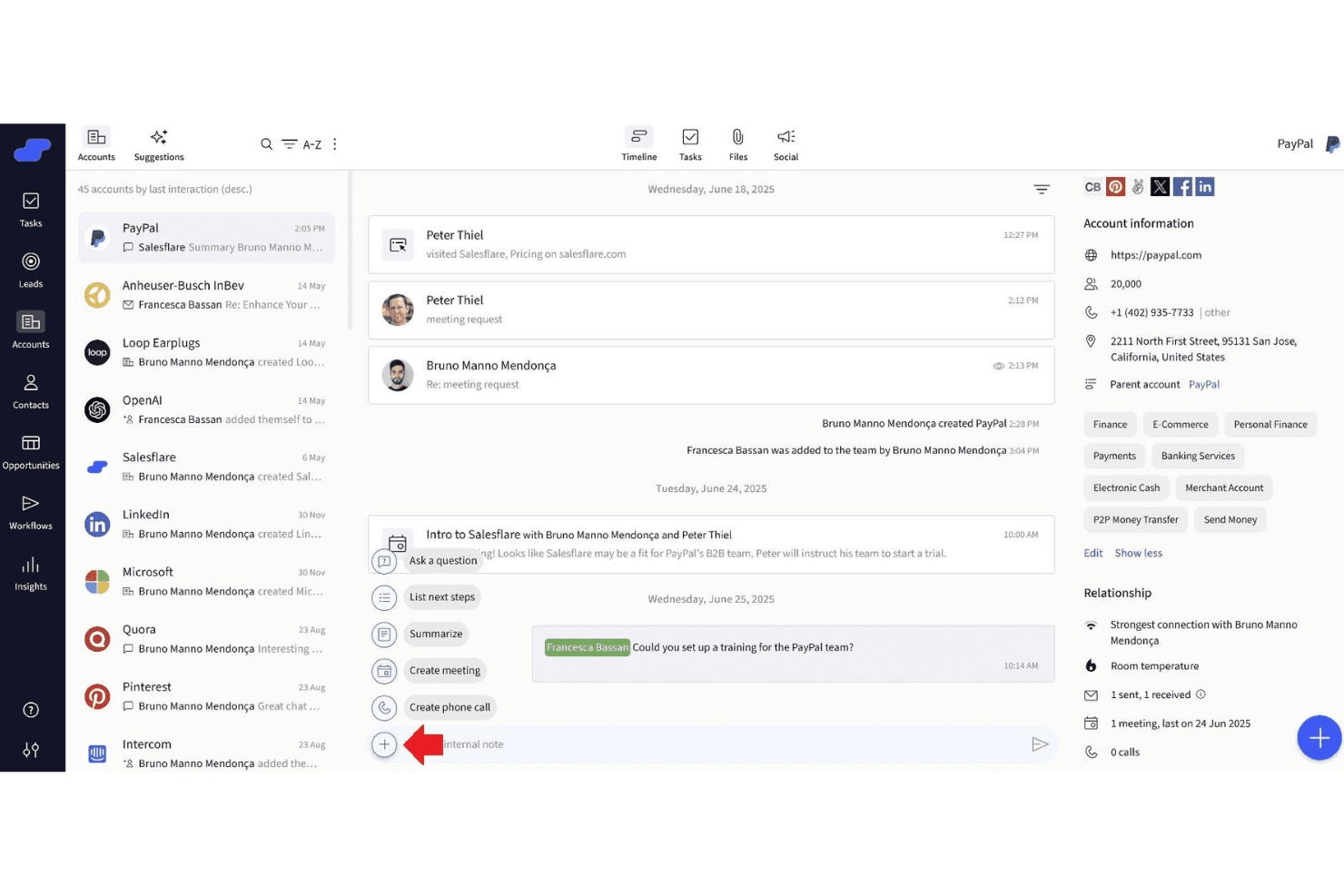
Salesflare centralizza in un'unica vista le tempistiche degli account, i contatti e le azioni dell'intelligenza artificiale. OnePageCRM è un CRM mobile progettato per i team di vendita sul campo, che offre due app native con pianificatore di itinerari basato sull'intelligenza artificiale, compositore di numeri rapidi, scanner di biglietti da visita e prioritizzazione dei contatti basata sulle azioni.
Per chi è più adatto OnePageCRM?
OnePageCRM è una soluzione ideale per i piccoli team di vendita sul campo che necessitano di un CRM pensato innanzitutto per i dispositivi mobili, con pianificazione degli itinerari, composizione rapida dei numeri e prioritizzazione dei contatti basata sulle azioni integrati.
Perché ho scelto OnePageCRM
OnePageCRM si è guadagnato un posto nella mia lista ristretta grazie al modo in cui gestisce la raccolta automatizzata delle e-mail tramite l'estensione per browser Lead Clipper e l'integrazione con Apollo.io, che acquisiscono i dati dei contatti e gli indirizzi e-mail direttamente nelle schede CRM senza inserimento manuale. Apprezzo molto anche lo scanner di biglietti da visita basato sull'intelligenza artificiale integrato nell'app mobile: basta fotografare un biglietto dopo un incontro sul campo e viene creata immediatamente una scheda contatto. Il flusso delle azioni mostra quindi il nuovo contatto come priorità codificata a colori, così nulla sfugge dopo una giornata intensa in viaggio.
Funzionalità principali di OnePageCRM
- Prioritizzazione tramite flusso delle azioni: Una coda di attività codificata a colori che segnala i follow-up in ritardo, in scadenza oggi e futuri, così sai sempre quale contatto richiede attenzione per primo.
- Compositore di numeri rapidi: Ti consente di chiamare un elenco sequenziale di contatti prioritari direttamente dall'app In viaggio, con richieste di inserimento di note dopo ogni conversazione.
- Visualizzazione delle previsioni di vendita: Una vista a livello di pipeline disponibile su tutti i piani, che mostra i ricavi previsti in base alle fasi attuali delle trattative e alle date di chiusura.
- Registrazione tramite intelligenza artificiale basata su MCP: Collega OnePageCRM ad assistenti di intelligenza artificiale come ChatGPT e Claude, consentendo di registrare chiamate, aggiornare trattative e impostare promemoria utilizzando richieste in linguaggio naturale.
Integrazioni di OnePageCRM
OnePageCRM offre oltre 40 integrazioni dal marketplace, tra cui Gmail, Outlook, Google Calendar, WhatsApp, Mailchimp, ActiveCampaign, QuickBooks, Help Scout, Lead Clipper e Apollo.io. Supporta inoltre Zapier, Make.com, un'API REST aperta e webhook per integrazioni personalizzate.
Pros and Cons
Pros:
- Raccolta automatizzata delle e-mail dal web e da Apollo
- Due app mobili native per i rappresentanti sul campo
- Scanner di biglietti da visita basato sull'intelligenza artificiale integrato
Cons:
- Nessun accesso offline su alcun dispositivo
- Mancano funzioni avanzate di reportistica e analisi
Learn more about Salesflare Mobile CRM App: Ideale per l'integrazione nativa della telefonia
- Piano gratuito disponibile
- Da $69/mese
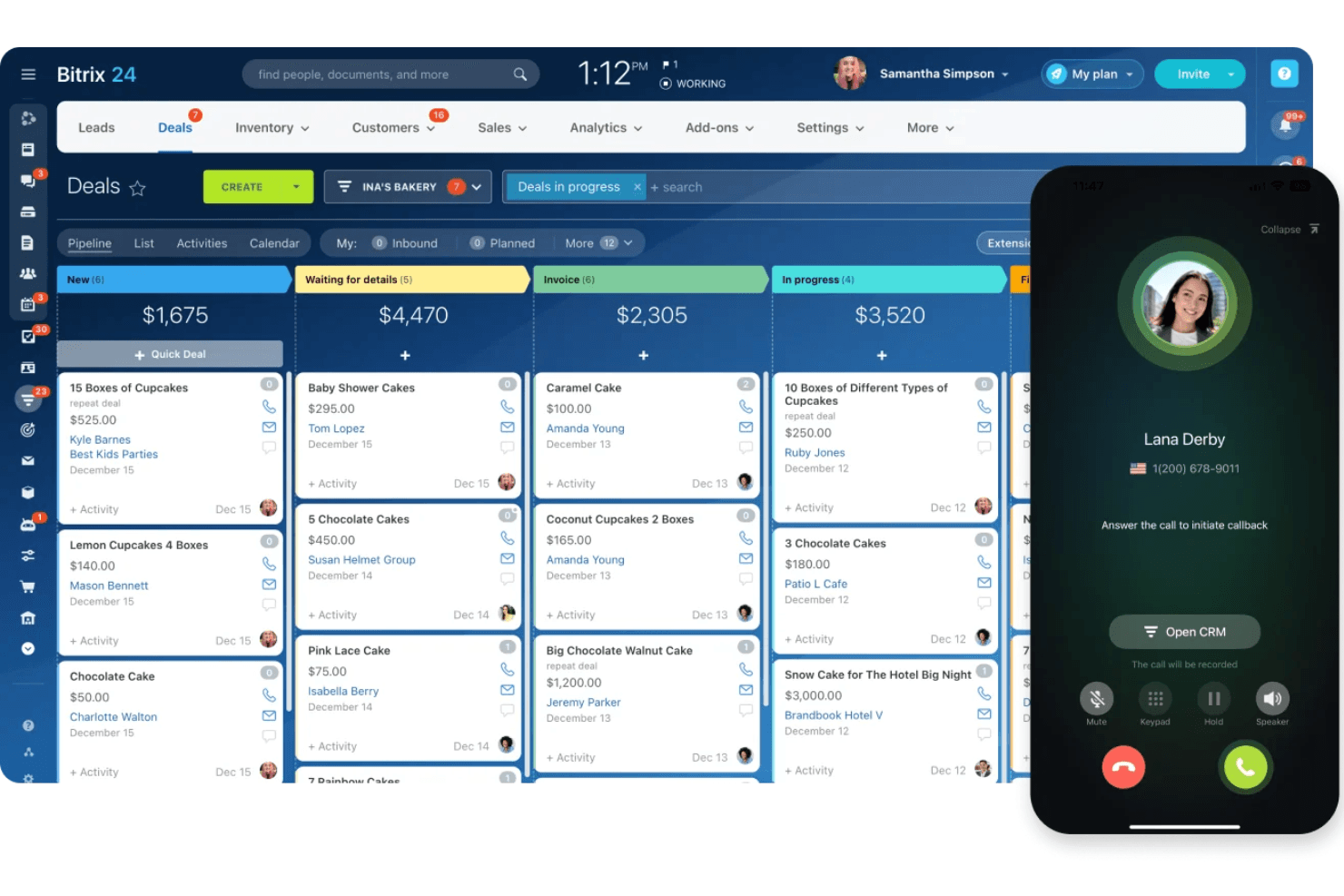
Bitrix24 gestisce le trattative e le chiamate tramite il CRM mobile. Bitrix24 Mobile CRM è un'app CRM mobile nativa per iOS, Android e Huawei che combina la gestione delle trattative e delle pipeline, la telefonia VoIP integrata, la trascrizione delle chiamate basata sull'intelligenza artificiale, il check-in GPS e la gestione omnicanale dei contatti in un'unica piattaforma.
Per chi è più adatto Bitrix24 Mobile CRM?
Bitrix24 Mobile CRM è particolarmente adatto ai team di vendita sul campo che hanno bisogno di chiamate VoIP integrate, trascrizione delle chiamate tramite intelligenza artificiale e gestione delle trattative senza un'app di composizione separata.
Perché ho scelto Bitrix24 Mobile CRM
Bitrix24 Mobile CRM si è guadagnato un posto nella mia lista ristretta perché la sua telefonia VoIP nativa è integrata direttamente in ogni scheda di trattativa e contatto, senza bisogno di un'app di composizione esterna. Posso effettuare una chiamata, farla registrare e annotare automaticamente e ottenere una trascrizione CoPilot AI collegata alla trattativa, tutto dall'app mobile. L'intelligenza artificiale confronta inoltre le chiamate registrate con i copioni di vendita e fornisce suggerimenti per il coaching, un vero elemento distintivo per i team sul campo.
Funzionalità principali di Bitrix24 Mobile CRM
- Check-in GPS: I rappresentanti sul campo possono registrare le visite ai clienti con orario, posizione e foto, il tutto annotato direttamente nella cronologia delle attività.
- Posta in arrivo omnicanale: Acquisisce e riunisce i messaggi da WhatsApp, Facebook Messenger, Instagram, e-mail e chat dal vivo in un'unica visualizzazione mobile.
- Notifiche push con le notifiche intelligenti: Avvisi in tempo reale per aggiornamenti sulle trattative, assegnazioni di attività e attivazioni dei flussi di lavoro, con disattivazione automatica quando sei attivo sul desktop.
- Prezzi a tariffa fissa: I piani coprono più utenti a un costo mensile fisso, quindi l'espansione del team sul campo non comporta aumenti dei prezzi per postazione.
Integrazioni di Bitrix24 Mobile CRM
Bitrix24 Mobile CRM offre integrazioni native con Gmail, Google Calendar, Microsoft 365, Google Drive, WhatsApp, Facebook Messenger e Instagram. Supporta inoltre integrazioni personalizzate tramite la sua API REST e Zapier.
Pros and Cons
Pros:
- Chiamate VoIP native con trascrizione tramite intelligenza artificiale
- Check-in GPS per le visite ai clienti
- Posta in arrivo omnicanale per tutti i canali
Cons:
- L'accesso offline è limitato alla visualizzazione dei dati
- La scansione dei biglietti da visita richiede un'app complementare
Learn more about Bitrix24 Mobile CRM: Ideale per la classificazione dei lead basata sull'intelligenza artificiale
- Prova gratuita di 21 giorni + demo gratuita disponibile
- A partire da $9/utente/mese (con fatturazione annuale)
Visit WebsiteCustomer Rating:4.5/5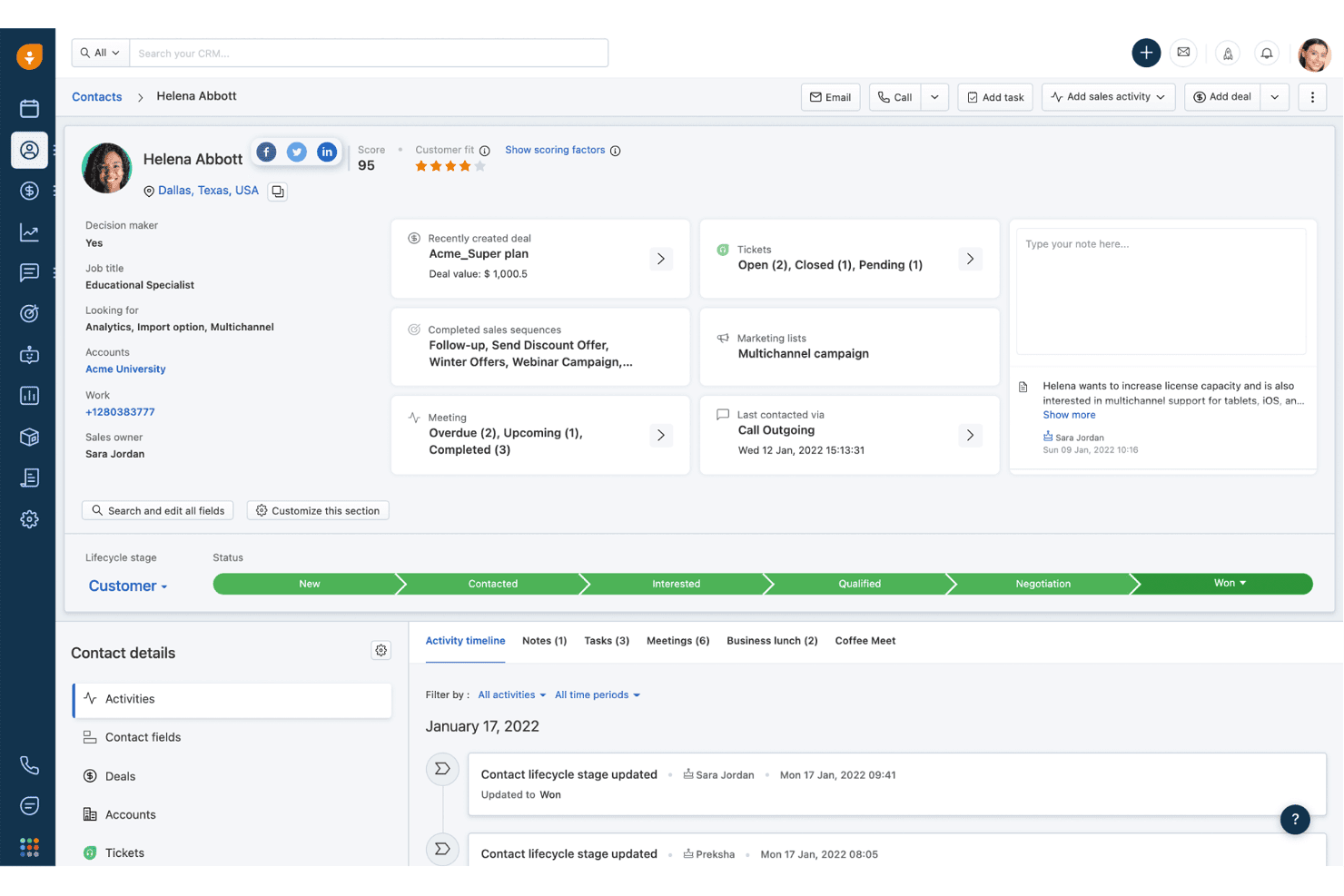
Freshsales tiene traccia delle sequenze temporali delle attività dei contatti e della cronologia delle trattative in un'unica vista. Freshsales è un CRM per le vendite con app native per iOS e Android che offre ai team sul campo accesso alla gestione dei contatti, alle pipeline delle trattative, alla registrazione delle attività, alle note vocali con trascrizione in tempo reale, ai check-in GPS e alla classificazione dei lead basata sull'intelligenza artificiale, ovunque si trovino.
Per chi è più adatto Freshsales?
Freshsales è una soluzione ideale per i team di vendita sul campo che necessitano di registrare le attività a mani libere, classificare i lead con l'intelligenza artificiale e disporre di un accesso offline affidabile tra una visita e l'altra ai clienti.
Perché ho scelto Freshsales
Freshsales si è guadagnato un posto nella mia lista ristretta perché la classificazione dei lead di Freddy AI non si limita a ordinare i contatti: attinge ai dati storici delle trattative per evidenziare quali lead vale la pena prioritizzare prima di entrare a una riunione. Apprezzo molto anche la trascrizione vocale in tempo reale su iOS, che consente ai rappresentanti sul campo di dettare le note in tempo reale subito dopo una chiamata, senza digitare nulla. Abbinata ai check-in GPS che funzionano offline, permette di mantenere accurati i dati sulle attività del team anche nelle aree con segnale debole.
Funzionalità principali di Freshsales
- Scanner di biglietti da visita: Scansiona un biglietto con la fotocamera e l'app estrae automaticamente i dati del contatto tramite OCR, creando subito un nuovo record.
- Modalità offline di lettura/scrittura: Crea e modifica lead, contatti, trattative, attività e note senza connessione, quindi sincronizza i dati quando torni online.
- Note da immagine a testo: Acquisisci fino a tre immagini per nota e lascia che l'app trascriva automaticamente il testo, senza bisogno di inserimenti manuali.
- Notifiche push configurabili: Imposta avvisi per aperture delle e-mail, clic sui link, aggiornamenti delle trattative, promemoria delle attività e assegnazioni dei lead direttamente nelle impostazioni dell'app.
Integrazioni di Freshsales
Freshsales offre integrazioni native con Freshdesk, Freshchat, Freshcaller, Freshsuccess, Gmail, Outlook, Slack e Gong, con sincronizzazione bidirezionale con Gong nel piano Enterprise. Il suo marketplace include oltre 100 app e un'API REST aperta supporta le integrazioni personalizzate.
Pros and Cons
Pros:
- Scanner OCR integrato di biglietti da visita per i contatti
- Trascrizione vocale in tempo reale per acquisire note a mani libere
- Modifica e sincronizzazione offline per l'accesso sul campo
Cons:
- Problemi di affidabilità nei report e nelle analisi
- Lo scanner di biglietti da visita supporta solo l'inglese
Learn more about Freshsales: Ideale per le previsioni sui ricavi aziendali
- Prova gratuita di 30 giorni
- A partire da $25/utente/mese
Visit WebsiteCustomer Rating:4.2/5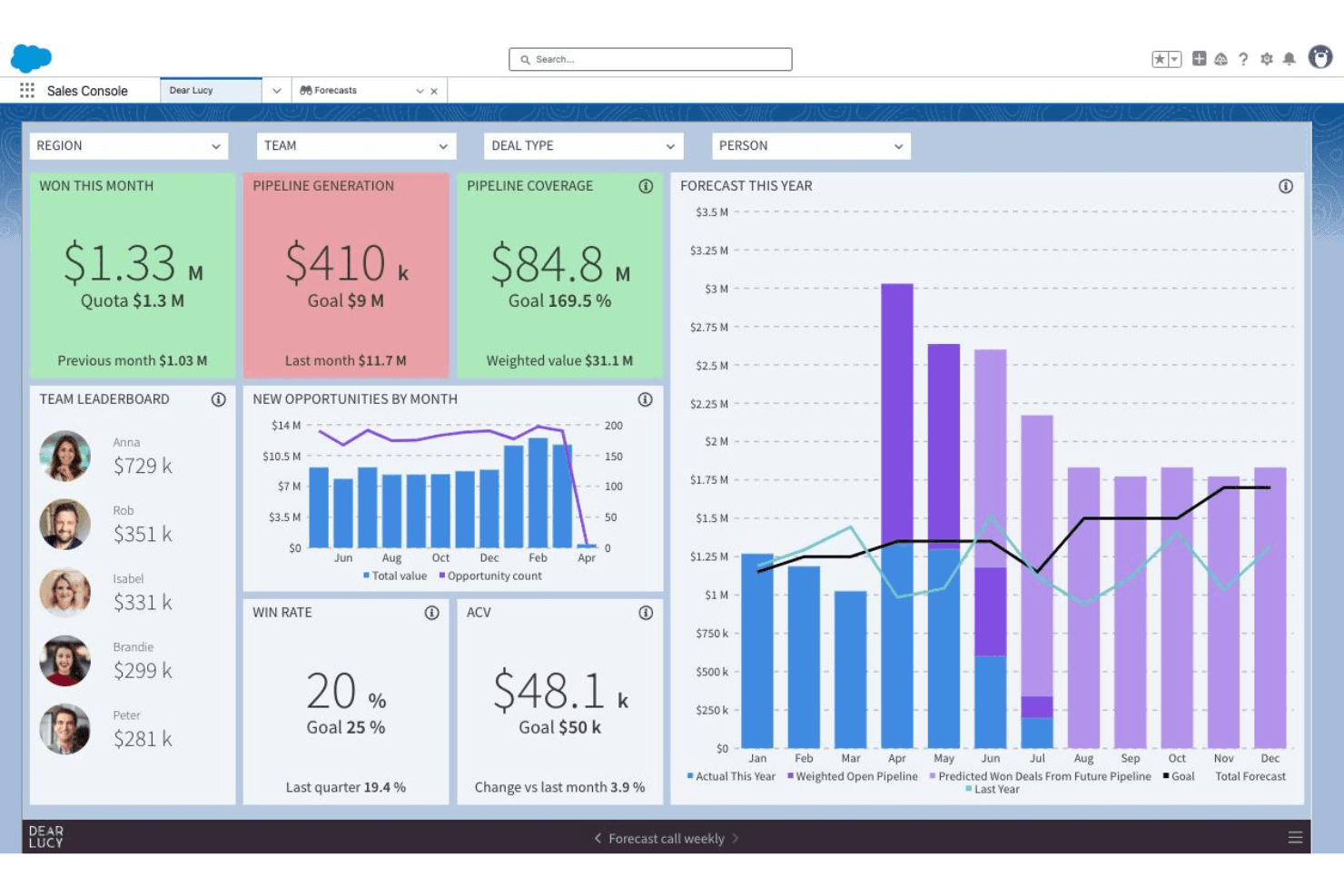
Salesforce CRM monitora previsioni di vendita, flusso delle opportunità e prestazioni del team in un unico pannello di controllo. Salesforce CRM è una piattaforma CRM aziendale con app native per iOS e Android che include la gestione dei contatti e degli account, il monitoraggio del flusso delle opportunità, informazioni basate sull'IA tramite Agentforce, pannelli di controllo mobili attraverso Tableau Next e strumenti di geolocalizzazione per le vendite sul campo.
Per chi è più adatto Salesforce CRM?
Salesforce CRM è particolarmente adatto ai team aziendali che si occupano dei ricavi e necessitano di previsioni basate sull'IA, strumenti di geolocalizzazione per le vendite sul campo e visibilità mobile sul flusso delle opportunità in operazioni commerciali complesse e multicloud.
Perché ho scelto Salesforce CRM
Salesforce CRM si è guadagnato un posto nella mia rosa ristretta perché nessun altro CRM mobile è all'altezza per le previsioni sui ricavi aziendali su larga scala. Agentforce mostra direttamente nell'app mobile i punteggi di rischio delle trattative e le azioni successive più appropriate, mentre Tableau Next invia avvisi in tempo reale sul flusso delle opportunità prima ancora che tu apra un pannello di controllo. Mi affido inoltre a Salesforce Maps per gli agenti commerciali sul campo che hanno bisogno di ottimizzare i percorsi e trovare gli account nelle vicinanze tra un incontro e l'altro.
Caratteristiche principali di Salesforce CRM
- App mobile Sales Cloud Lightning: Si apre direttamente in un'area di lavoro del flusso delle opportunità che mostra riunioni prioritarie, attività, potenziali clienti e opportunità per un accesso mobile rapido.
- Generatore di notifiche: Gli amministratori configurano notifiche push per aggiornamenti sulle trattative, promemoria delle attività, menzioni ed eventi attivati dai flussi di lavoro con un livello di dettaglio preciso.
- Generatore mobile: Uno strumento a basso codice che consente agli amministratori di creare layout personalizzati e ottimizzati per i dispositivi mobili per qualsiasi oggetto CRM senza scrivere codice.
- Integrazione con Slack: La connettività nativa con Slack mostra le notifiche CRM in tempo reale e consente di collaborare sulle trattative direttamente in Slack da dispositivi mobili.
Integrazioni di Salesforce CRM
Salesforce CRM offre integrazioni native con Slack, Microsoft Teams, Gmail e Outlook, oltre alle integrazioni del marketplace tramite AppExchange, tra cui Gong e Salesloft. Le sue API aperte e il supporto di MuleSoft consentono connessioni aziendali personalizzate.
Pros and Cons
Pros:
- L'agente IA suggerisce le azioni successive più appropriate
- Pannelli di controllo analitici approfonditi progettati per l'uso mobile
- Ottimizzazione integrata dei percorsi per le vendite sul campo
Cons:
- L'accesso offline richiede un componente aggiuntivo costoso
- Sono stati segnalati problemi di prestazioni dell'app mobile
Learn more about Salesforce CRM:
Altri CRM mobili
Ecco alcune opzioni aggiuntive di CRM mobili che non sono entrate nella mia selezione, ma che vale comunque la pena prendere in considerazione:
- 11Zoho CRMIdeale per il coinvolgimento dei clienti su più canali
- 12SPOTIOIdeale per le funzionalità di monitoraggio delle vendite sul campo
- 13SugarAIIdeale per flussi di lavoro completamente personalizzati
- 14StreakIdeale per un CRM integrato con Gmail
- 15Zendesk SellIdeale come CRM per le vendite con integrazione dell'assistenza
- 16CreatioIdeale per l'automazione personalizzabile dei flussi di lavoro
- 17monday.com CRMIdeale per la gestione delle vendite visiva in stile progetto
- 18RingyIdeale per campagne vocali automatizzate a sequenza
- 19RunoIdeale per il monitoraggio delle chiamate in uscita basato su SIM
Come valuto i Mobile CRM
La mia valutazione si divide in due livelli: quello di base che ogni strumento deve soddisfare—come l’accesso offline affidabile per agenti in aree a basso segnale—e i fattori che differenziano un fornitore dall’altro.
Funzionalità di base (Requisiti minimi per questa lista)
Quando seleziono gli strumenti per la mia lista, valuto ognuno su una scala da 0 (non offre la funzionalità) a 5 (eccelle in quest'area) per ciascuna funzionalità chiave elencata di seguito. Poi, calcolo il punteggio totale dello strumento in percentuale. Ogni strumento deve ottenere un punteggio minimo totale del 65% per essere considerato nell’elenco.
- App mobile native: Verifico la presenza di app dedicate per iOS e Android—non solo web responsive—con funzionalità quasi equivalenti all’esperienza desktop.
- Funzionalità offline: Gli agenti sul campo in parcheggi sotterranei o aree rurali devono poter modificare i dati offline, quindi valuto come ogni strumento gestisce la sincronizzazione e i conflitti.
- Gestione contatti & account: Cerco la piena possibilità di creare, modificare ed eliminare contatti, account, lead e opportunità—non solo visualizzazioni in sola lettura.
- Registrazione attività da mobile: Gli agenti tra incontri ravvicinati devono poter registrare velocemente le attività, quindi valuto se gli strumenti offrono registrazione con un tap, voce-testo o cattura chiamate.
- Gestione pipeline & trattative: Ogni strumento dovrebbe permettere agli agenti di aggiornare gli stati delle trattative e visualizzare le previsioni da mobile, non solo vedere un elenco statico di opportunità aperte.
- Notifiche push & avvisi: Avvisi in tempo reale per cambiamenti nelle trattative, assegnazioni di attività o trigger di workflow mantengono gli agenti reattivi, quindi valuto anche la configurabilità di questa funzione.
Una volta ottenuta una lista di strumenti che soddisfano questi criteri, considero ciò che distingue ulteriormente ciascuna piattaforma.
Fattori differenzianti (Cosa distingue i fornitori)
Ecco come confronto e metto a fuoco le differenze tra i diversi fornitori:
Funzionalità di spicco
La registrazione vocale nel CRM è un grande elemento distintivo per chi deve annotare note a mani libere tra un appuntamento e l’altro. Analizzo anche la localizzazione geografica e la pianificazione dei percorsi: le viste account basate su mappa e i tragitti ottimizzati possono far risparmiare ore ogni settimana ai team sul territorio. L’intelligenza artificiale conta anch’essa—valuto se lo strumento mostra indicatori di rischio trattativa o suggerimenti sulle prossime azioni migliori da mobile, fornendo indicazioni attuabili senza bisogno di passare a desktop.
Oltre alle funzioni
La sicurezza è fondamentale quando gli agenti accedono ai dati dei clienti da dispositivi personali. Valuto se la piattaforma supporta login biometrici, cancellazione da remoto e gestione centralizzata dei dispositivi (MDM), affinché gli amministratori possano far rispettare le policy su un team distribuito. L’integrazione è altrettanto importante—un CRM mobile che non si sincronizza bidirezionalmente con email, calendario e strumenti come Slack o Teams crea lacune che compromettono i report. Considero anche le prestazioni dell’app, poiché tempi di caricamento lenti o un rapido consumo della batteria possono frenare l’adozione da parte degli agenti sul campo più di qualsiasi funzione mancante.
Come scegliere un CRM mobile
È facile perdersi in lunghi elenchi di funzionalità e strutture di prezzi complesse. Per aiutarti a rimanere concentrato mentre affronti il tuo esclusivo processo di selezione del software, ecco un elenco di fattori da tenere a mente:
| Fattore | Cosa considerare |
|---|---|
| FattoreScalabilità | Cosa considerareIl CRM supporterà il tuo team man mano che cresce o supererai le funzionalità fondamentali dopo aver aggiunto utenti o nuove aree geografiche? |
| FattoreIntegrazioni | Cosa considerareChiedi quali strumenti di posta elettronica, calendario e RevOps si connettono direttamente all'app mobile e se tali integrazioni si sincronizzano in entrambe le direzioni e in tempo reale. |
| FattorePersonalizzazione | Cosa considerareValuta con quale facilità puoi adattare i campi, i layout dei dati o i flussi di lavoro alla tua attività, soprattutto se il tuo processo di vendita o assistenza non è standard. |
| FattoreFacilità d'uso | Cosa considerareL'app è intuitiva per i tuoi team distribuiti e sempre in movimento? Prova le demo su vari dispositivi e presta attenzione a curve di apprendimento ripide o menu difficili da trovare. |
| FattoreImplementazione e avviamento | Cosa considerareQuanto sarà difficile l'implementazione per gli utenti mobili? Valuta le risorse formative del fornitore, i controlli amministrativi e l'assistenza nella configurazione delle autorizzazioni. |
| FattoreCosto | Cosa considerareEsamina attentamente l'accesso mobile per utente, le condizioni che attivano gli aggiornamenti e i costi aggiuntivi. Le funzionalità essenziali sono disponibili senza dover ricorrere a prezzi aziendali? |
| FattoreMisure di sicurezza | Cosa considerareQuali opzioni di autenticazione, controlli remoti dei dispositivi e criteri amministrativi sono inclusi per proteggere i dati sensibili dei clienti sui dispositivi mobili? |
| FattoreDisponibilità dell'assistenza | Cosa considerareIl fornitore offre orari di assistenza globali, aiuto nell'app o SLA di risposta in linea con i fusi orari e i cicli operativi del tuo team? |
Che cos'è un CRM mobile?
Il CRM mobile è una piattaforma per la gestione delle relazioni con i clienti progettata per smartphone e tablet, che offre al tuo team accesso in tempo reale a contatti, trattative e dati degli account da qualsiasi luogo. Queste soluzioni consentono ai rappresentanti sul campo e ai team di vendita distribuiti di aggiornare i record, registrare le attività, gestire le pipeline e ricevere avvisi mentre sono lontani dalla scrivania, favorendo decisioni più rapide e un servizio più reattivo ovunque si trovino.
Funzionalità del CRM mobile
Quando scegli un CRM mobile, presta attenzione alle seguenti funzionalità chiave:
- App mobili native: le app dedicate per iOS e Android consentono agli utenti di accedere al CRM dai propri telefoni e tablet, con interfacce ottimizzate per il tocco e gli schermi di piccole dimensioni.
- Accesso offline: visualizza, modifica e aggiungi record senza connessione; i dati si sincronizzano automaticamente quando torni online, così i team di vendita possono lavorare in aree remote o con segnale debole.
- Gestione di contatti e account: crea, modifica e cerca i dettagli di contatti, account e opportunità da qualsiasi luogo, assicurando una visibilità completa su ogni conversazione con i clienti.
- Registrazione delle attività da mobile: registra chiamate, email, note delle riunioni e attività direttamente da mobile, spesso includendo la conversione da voce a testo o l'acquisizione con un solo tocco per maggiore rapidità e praticità.
- Notifiche push: ricevi avvisi sugli aggiornamenti delle trattative, sulle attività assegnate o sui trigger dei flussi di lavoro, così i membri del team possono rispondere tempestivamente alle novità man mano che si verificano.
- Gestione della pipeline e delle trattative: aggiorna le fasi delle trattative, i valori delle previsioni e monitora in tempo reale i progressi della pipeline per mantenere allineati responsabili e rappresentanti, anche quando lavorano sul campo.
- Geolocalizzazione e pianificazione degli itinerari: utilizza le mappe integrate per visualizzare gli account in base alla posizione, scoprire le opportunità nelle vicinanze e ottimizzare gli itinerari per gli appuntamenti sul campo.
- Approfondimenti basati sull'IA: accedi all'IA sul dispositivo per ottenere suggerimenti sulle azioni successive più efficaci, valutazioni del rischio o riepiloghi automatici, aiutando i rappresentanti a concentrarsi rapidamente sulle trattative più importanti.
- Scansione dei biglietti da visita: crea istantaneamente record di contatti acquisendo immagini dei biglietti da visita, con i dettagli analizzati automaticamente e aggiunti ai campi corretti.
- Dashboard personalizzabili: visualizza da mobile dashboard e report interattivi ottimizzati per il tocco, che offrono una panoramica immediata sullo stato della pipeline e sugli approfondimenti relativi alle vendite.
Vantaggi del CRM mobile
L'implementazione di un CRM mobile offre numerosi vantaggi al tuo team e alla tua azienda. Ecco alcuni dei benefici che puoi aspettarti:
- Accesso ai dati in tempo reale: recupera e aggiorna rapidamente le informazioni sui clienti e sulle trattative da qualsiasi luogo, mantenendo i record aggiornati anche quando sei in viaggio o tra una riunione e l'altra.
- Registrazione più rapida delle attività: registra chiamate, note e riunioni sul momento utilizzando la registrazione delle attività da mobile e la conversione da voce a testo, così nulla sfugge all'attenzione.
- Maggiore visibilità sulla pipeline: accedi alla pipeline, alle previsioni e alle dashboard e gestiscile ovunque ti trovi, rendendo più semplice monitorare i progressi delle vendite e prendere decisioni informate.
- Team più reattivi: resta aggiornato sulle modifiche alle trattative, sulle menzioni e sulle attività grazie alle notifiche push, aiutando i tuoi rappresentanti ad agire rapidamente ed evitare opportunità perse.
- Maggiore produttività sul campo: utilizza funzionalità come l'accesso offline, la pianificazione degli itinerari e la scansione dei biglietti da visita per supportare i rappresentanti che lavorano in ambienti remoti, con segnale debole o dai ritmi frenetici.
- Collaborazione più efficace: consenti ai team distribuiti di vendita, marketing e gestione del successo dei clienti di collaborare su account e trattative in tempo reale, indipendentemente da dove si trovino.
- Maggiore accuratezza dei dati: acquisisci immediatamente note e aggiornamenti, riducendo la dipendenza dalla memoria e minimizzando gli errori causati dall'inserimento ritardato dei dati.
Costi e prezzi del CRM mobile
La scelta di un CRM mobile richiede la comprensione dei diversi modelli e piani tariffari disponibili. I costi variano in base alle funzionalità, alle dimensioni del team, ai componenti aggiuntivi e ad altri fattori. La tabella seguente riassume i piani più comuni, i relativi prezzi medi e le funzionalità tipicamente incluse nelle soluzioni CRM mobili:
Tabella comparativa dei piani per il CRM mobile
| Tipo di piano | Prezzo medio | Funzionalità comuni |
|---|---|---|
| Tipo di pianoPiano gratuito | Prezzo medio$0 | Funzionalità comuniGestione di base dei contatti, monitoraggio limitato delle trattative, accesso di base all'app mobile e supporto della community. |
| Tipo di pianoPiano personale | Prezzo medio$5–$25/utente/mese | Funzionalità comuniAccesso completo all'app mobile, gestione di contatti e account, registrazione delle attività, notifiche e supporto di base. |
| Tipo di pianoPiano aziendale | Prezzo medio$30–$60/utente/mese | Funzionalità comuniGestione della pipeline, report avanzati, integrazioni con email e calendario, geolocalizzazione e controlli di amministrazione. |
| Tipo di pianoPiano aziendale avanzato | Prezzo medio$70–$150/utente/mese | Funzionalità comuniSicurezza avanzata, flussi di lavoro personalizzati, dashboard mobili, integrazione con lo stack RevOps e supporto dedicato. |
Domande frequenti sul CRM mobile
Ecco alcune risposte alle domande più comuni sul CRM mobile:
Le app CRM mobile possono funzionare offline?
Sì, molti strumenti e app CRM mobile offrono l’accesso offline. Puoi visualizzare e aggiornare le informazioni sui clienti senza una connessione Internet e le modifiche verranno sincronizzate automaticamente una volta tornato online. Questa funzionalità è uno dei principali vantaggi del CRM mobile per i team sul campo o per chiunque lavori in aree con connettività inaffidabile.
Quanto sono sicuri i dati in un CRM mobile?
Le soluzioni CRM mobile utilizzano generalmente la crittografia, accessi sicuri e la gestione dei dispositivi mobili per proteggere i tuoi dati. Che tu gestisca una grande azienda o startup agili, cerca un sistema CRM mobile che supporti la cancellazione remota, l’autenticazione a due fattori e la conformità agli standard di sicurezza della tua organizzazione per ridurre i rischi.
Quali tipi di team traggono maggior vantaggio dal CRM mobile?
I team di vendita, assistenza sul campo e servizio clienti che trascorrono del tempo lontano dalle proprie scrivanie traggono il massimo vantaggio dalla gestione delle relazioni con i clienti tramite dispositivi mobili. Per migliorare l’esperienza complessiva del cliente, questi team devono accedere ai dati dei clienti, monitorare le interazioni con i clienti, aggiornare i record e comunicare con i colleghi mentre sono in movimento.
Tutte le funzionalità sono disponibili nella versione mobile?
No, alcune funzionalità avanzate, come la modellazione dettagliata delle previsioni, l’automazione di marketing complessa o le integrazioni avanzate con i social media, potrebbero essere disponibili solo nella versione desktop del tuo sistema CRM. Esamina sempre l’elenco delle funzionalità dell’app CRM mobile, valuta l’interfaccia intuitiva e testa il software CRM mobile per assicurarti che supporti i flussi di lavoro fondamentali del tuo team.
In che modo le app CRM mobile gestiscono le notifiche?
Le app CRM mobile utilizzano le notifiche push per avvisare i venditori della presenza di nuovi lead, aggiornamenti sulle trattative, promemoria delle attività e altre attività importanti. Di solito puoi personalizzare le notifiche che ricevi per evitare interruzioni non necessarie.