

HubSpot vs. Monday CRM: Confronto Esperto Per il 2026
Fai fatica a scegliere tra monday CRM e HubSpot? Scopri i loro punti di forza e di debolezza e trova la soluzione CRM perfetta per gli obiettivi e le sfide della tua azienda.

Recensiamo gli strumenti in modo indipendente e le commissioni aiutano a finanziare i nostri test. Consulta la nostra politica sulla trasparenza, la nostra metodologia o suggerisci uno strumento.
HubSpot offre una piattaforma solida per far crescere l'engagement dei clienti e le attività di vendita. monday CRM propone una soluzione flessibile per gestire le interazioni e i flussi di lavoro del tuo team. Sebbene entrambi gli strumenti mirino a migliorare le tue capacità CRM, si differenziano per opzioni di personalizzazione e scalabilità.
In questo articolo troverai un confronto dettagliato tra gli strumenti e le loro funzionalità, vantaggi e svantaggi, prezzi e altro ancora per aiutarti a scegliere il miglior software CRM per le tue esigenze.
HubSpot CRM


4.4/5
- Free plan available
- From $7/user/month
monday CRM
4.6/5
- 14-day free trial + free demo available
- From $12/seat/month (billed annually)
Perché fidarsi dei nostri consigli sui software
6,700+
Reviews
20
Industry experts
16+
Evaluation factors
14
Years
Le nostre recensioni riflettono il nostro giudizio indipendente, non un discorso di vendita. Scopri come manteniamo la trasparenza.
Per questa guida, abbiamo valutato gli strumenti attraverso test pratici e ricerche indipendenti, assegnando un punteggio agli strumenti in base ai nostri criteri di selezione.
Le nostre recensioni riflettono il nostro giudizio editoriale umano, non un discorso di vendita.
| HubSpot CRM | monday CRM | |
|---|---|---|
| Free Trial | Free plan available | 14-day free trial + free demo available |
| Pricing | From $7/user/month | From $12/seat/month (billed annually) |
Prezzi e costi nascosti di HubSpot vs. monday CRM
Il pricing di HubSpot segue un modello freemium con piani a livelli, dove potrebbero verificarsi spese aggiuntive per funzionalità premium e componenti aggiuntivi che ne ampliano le capacità.
Il costo di monday CRM si basa su un modello di abbonamento a livelli: i prezzi variano in base al numero di utenti e alle funzioni scelte, con la possibilità di costi aggiuntivi per integrazioni avanzate.
Per scegliere lo strumento più adatto alle tue necessità, valuta la dimensione del team, le funzionalità richieste, le esigenze di integrazione, e considera di provare versioni gratuite o demo per scoprire quale struttura di prezzo si adatta meglio ai tuoi obiettivi operativi.
Con le integrazioni di monday CRM puoi collegare facilmente i tuoi strumenti per ottimizzare i flussi di lavoro, una caratteristica preziosa per un revenue operations analyst che gestisce più fonti di dati. La funzione di gestione dei contatti di HubSpot è ottima per centralizzare le interazioni con il cliente e offre una visione completa utile per la pianificazione strategica.
Sebbene monday CRM eccella per la flessibilità delle integrazioni, HubSpot fornisce una piattaforma completa per le interazioni con i clienti: ognuno risponde a diverse esigenze operative.
| HubSpot CRM | monday CRM | |
|---|---|---|
| 2-Factor Authentication | Yes | No |
| API | Yes | Yes |
| Calendar Management | Yes | Yes |
| Call Tracking | Yes | No |
| Campaign Management | Yes | No |
| Click-to-Dial | Yes | No |
| Contact Management | Yes | Yes |
| Contact Sharing | Yes | No |
| Custom Data Forms | Yes | Yes |
| Customer Management | Yes | Yes |
| Dashboard | Yes | Yes |
| Data Export | Yes | Yes |
| Data Import | Yes | Yes |
| Data Visualization | Yes | Yes |
| Email Integration | Yes | Yes |
| External Integrations | Yes | Yes |
| File Sharing | Yes | Yes |
| File Transfer | Yes | Yes |
| Google Apps Integration | Yes | Yes |
| Lead Management | Yes | Yes |
| Lead Scoring | Yes | Yes |
| Marketing Automation | Yes | Yes |
| Mobile App | Yes | No |
| Multi-User | Yes | Yes |
| Notifications | Yes | Yes |
| Pipeline Management | Yes | Yes |
| Sales Automation | Yes | Yes |
| Scheduling | Yes | Yes |
| Social-Media Integration | Yes | Yes |
| Task Scheduling/Tracking | Yes | Yes |
| Third-Party Plugins/Add-Ons | Yes | Yes |
L’integrazione di HubSpot con Shopify è ideale per le aziende e-commerce che hanno bisogno di sincronizzare senza intoppi i dati dei clienti. L’integrazione di monday CRM con LinkedIn ti consente di automatizzare l’attività di posting, perfetta per mantenere una presenza costante senza sforzi manuali.
Se monday CRM punta sull’automazione dei flussi di lavoro, HubSpot eccelle nella connessione tra piattaforme di vendita e marketing.
| Integrazione | HubSpot | monday CRM |
|---|---|---|
| IntegrazioneLinkedIn | HubSpot❌ | monday CRM✅ |
| IntegrazioneMiro | HubSpot❌ | monday CRM✅ |
| IntegrazioneSalesforce | HubSpot✅ | monday CRM✅ |
| IntegrazioneSlack | HubSpot✅ | monday CRM✅ |
| IntegrazioneGoogle Suite | HubSpot✅ | monday CRM✅ |
| IntegrazioneMicrosoft Teams | HubSpot✅ | monday CRM✅ |
| IntegrazioneQuickBooks | HubSpot✅ | monday CRM❌ |
| IntegrazioneShopify | HubSpot✅ | monday CRM❌ |
| IntegrazioneAPI | HubSpot✅ | monday CRM✅ |
| IntegrazioneZapier | HubSpot✅ | monday CRM✅ |
HubSpot e monday CRM offrono solide misure di sicurezza e conformità, ma HubSpot garantisce una disponibilità leggermente superiore che può rivelarsi più affidabile per operazioni critiche. Per valutare questi aspetti, un revenue operations analyst dovrebbe controllare le certificazioni di conformità, gli standard di crittografia e le garanzie di uptime di ciascuno strumento per assicurarsi che rispondano alle policy di sicurezza della propria organizzazione.
| Fattore | HubSpot | monday CRM |
|---|---|---|
| FattorePrivacy dei dati | HubSpotHubSpot garantisce la conformità GDPR e CCPA con controlli di accesso ai dati. | monday CRMmonday CRM offre conformità GDPR con impostazioni privacy personalizzabili. |
| FattoreCrittografia | HubSpotHubSpot impiega la crittografia TLS per la sicurezza dei dati in transito. | monday CRMmonday CRM utilizza crittografia AES-256 per dati a riposo e in transito. |
| FattoreUptime | HubSpotHubSpot offre affidabilità con un SLA di uptime del 99,95%. | monday CRMmonday CRM garantisce il 99,9% di uptime con costante monitoraggio del sistema. |
HubSpot eccelle nel fornire un'esperienza di navigazione semplice e diretta, anche se il suo setup completo potrebbe richiedere più tempo. monday CRM è ottimo per la sua interfaccia vivace e la configurazione rapida, ma potresti trovare le opzioni di personalizzazione un po' travolgenti all'inizio.
| Fattore | HubSpot | monday CRM |
|---|---|---|
| FattoreInterfaccia utente | HubSpotHubSpot offre una dashboard ordinata e pulita, facile da navigare. | monday CRMmonday CRM presenta un'interfaccia colorata e personalizzabile ed è intuitiva. |
| FattoreEsperienza di onboarding | HubSpotHubSpot propone un processo di onboarding completo con configurazione guidata. | monday CRMmonday CRM offre tutorial interattivi per aiutarti a iniziare rapidamente. |
| FattoreSupporto | HubSpotHubSpot fornisce un supporto esteso con una knowledge base, una community e corsi HubSpot per aiutarti a migliorare. | monday CRMmonday CRM garantisce supporto 24/7 via chat ed email. |
HubSpot CRM
- Fast onboarding with helpful templates and guides.
- AI features for reporting, forecasting, and content generation.
- Built-in marketing automation and sales tools in one platform.
- Pricing increases quickly as you add premium features.
- Workflow automation can be restrictive for complex processes.
- Advanced reporting features require higher-tier plans.
monday CRM
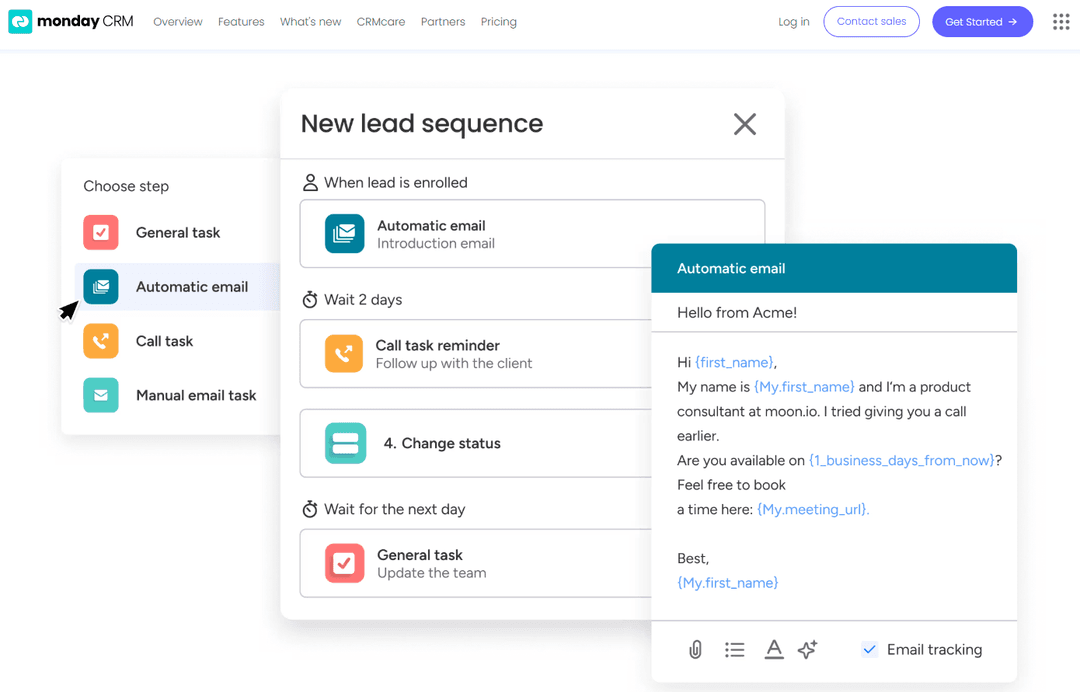
- You can easily create automations without any coding.
- Its integrated proofing feature lets you add comments to files.
- You can create forms that live within your project as a view.
- The Gantt view isn't useful for building projects.
- Subtask columns don't replicate task structure, needing extra customization.
- Training videos use the old UI, which can confuse new users.
HubSpot CRM
- SaaS StartupsHubSpot’s automation and lead tracking help SaaS teams scale quickly.
- Marketing AgenciesThe platform’s campaign management and client reporting tools are built-in.
- B2B Sales TeamsPipeline management and deal tracking are easy to set up and use.
- Small BusinessesTemplates and guided onboarding reduce the need for technical resources.
- Customer Success TeamsShared inboxes and ticketing streamline support and follow-up.
- NonprofitsFree and low-cost plans offer core CRM features for limited budgets.
monday CRM
- Tech Startupsmonday sales CRM is perfect for tech startups needing agile workflows and automation.
- Marketing AgenciesYour agency will benefit from its collaborative tools and proofing features for client work.
- Small BusinessesIf you’re a small business, you’ll find its ease of use and customization options invaluable.
- Project ManagersYou can streamline tasks and track progress easily with monday sales CRM’s visual tools.
- Sales TeamsIt helps your team manage leads and sales pipelines with integrated tracking features.
- Creative TeamsYour team can collaborate effectively using its integrated comments and file sharing.
Chi dovrebbe usare HubSpot e chi dovrebbe usare monday CRM?
Secondo me, HubSpot è l'ideale per le aziende che vogliono far crescere le proprie attività di vendita e marketing, soprattutto nei settori tecnologico o e-commerce. Se il tuo team ha bisogno di uno strumento completo che integri senza problemi marketing e vendite, HubSpot è la scelta migliore.
D'altra parte, monday CRM è perfetto per i team che danno il meglio con la personalizzazione e devono gestire flussi di lavoro complessi in diversi settori. È un'ottima soluzione per team creativi o startup che apprezzano la flessibilità e la gestione visiva dei progetti.
| HubSpot CRM | monday CRM | |
|---|---|---|
| Automation | HubSpot CRM HubSpot excels in marketing and sales automation. | monday CRM monday CRM supports workflow automation through integrations. |
| Integrations | HubSpot CRM HubSpot emphasizes integrations with e-commerce like Shopify. | monday CRM monday CRM focuses on tool integrations like LinkedIn and Miro. |
| Onboarding | HubSpot CRM HubSpot offers a comprehensive onboarding with guided setup. | monday CRM monday CRM provides interactive tutorials for a quick start. |
| Pricing Model | HubSpot CRM HubSpot uses a freemium model with add-ons for advanced features. | monday CRM monday CRM offers tiered plans based on users and features. |
| User Interface | HubSpot CRM HubSpot features a clean, organized dashboard. | monday CRM monday CRM has a colorful, customizable interface. |
| Customizable Dashboards | Both monday CRM and HubSpot let you tailor dashboards to fit your team's needs, offering visual customization options. |
|---|---|
| Data Security | monday CRM and HubSpot both prioritize data security with strong encryption and compliance measures like GDPR. |
| Integration Options | Both tools support integrations with popular apps like Slack and Google Suite, helping you connect your existing tools. |
| Scalability | Both solutions are scalable, catering to small teams and growing businesses, with features that expand with your needs. |
| User Support | Each platform provides extensive user support through resources and communities, ensuring you get help when needed. |