

Reseña de CallPage 2026: Ventajas, Desventajas, Características y Precios
Probé CallPage para ver cómo sus herramientas de seguimiento de llamadas ayudan a las empresas a captar clientes potenciales, monitorear la actividad de los llamantes y mejorar las conversaciones de ventas. Aquí te explico dónde destaca, dónde falla y si es el software de seguimiento de llamadas adecuado para tu equipo.

Analizamos las herramientas de forma independiente, y las comisiones ayudan a financiar nuestras pruebas. Consulta nuestra política de transparencia, nuestra metodología, o sugiere una herramienta.
CallPage is a call tracking software built around callback automation. It lets website visitors request an instant call from your team, typically within 28 seconds. I'd consider it when your team is losing website leads and needs a proactive way to connect with high-intent visitors. Compared to CallRail, CallPage is the stronger pick when callback conversion matters as much as call attribution.
CallPage Evaluation Summary

4.7/5
- From $31/month (billed annnually)
- 14-day free trial
Por qué confiar en nuestras recomendaciones de software
6,700+
Reviews
20
Industry experts
16+
Evaluation factors
14
Years
Nuestras reseñas reflejan nuestro criterio independiente, no un discurso de ventas. Descubra cómo mantenemos la transparencia.
Para esta guía, evaluamos las herramientas mediante pruebas prácticas e investigación independiente, puntuando las herramientas según nuestros criterios de selección.
Nuestras reseñas reflejan nuestro criterio editorial humano, no un discurso de ventas.
CallPage Overview
When judging CallPage, I find its live call tracking, callback automation, and user-friendly setup stack up well against most options. Pricing feels fair given the real-time analytics and straightforward onboarding. If having quick integrations and responsive support matter most in your selection, CallPage stands out.
I do think some advanced integrations are less flexible than others, but for sales teams wanting actionable insights without complexity, CallPage is an easy pick. You’ll get the most value if you want instant lead capture and visible rep performance, especially in fast-paced B2B sales environments.
Pros
- Real-time callback triggers increase lead engagement rates
- Call routing options help distribute inbound leads efficiently
- Tracking dashboard surfaces clear rep performance metrics
Cons
- Limited options for custom reporting beyond predefined templates
- No built-in SMS or text tracking features available
- Some users report lag on high-volume call days
Is CallPage Right For Your Needs?
Who Would be a Good Fit for CallPage?
CallPage is a strong fit for sales-driven teams that need to capture leads in real time and track every call from website visits. Companies with inside sales, agencies handling high-volume campaigns, and B2C businesses will benefit from its simple setup and rapid callback options. It’s well suited to organizations that want actionable analytics, quick implementation, and responsive support for accelerating lead response.
- Real Estate AgenciesReal estate teams can instantly engage online prospects through immediate callback, helping convert web leads when interest peaks.
- Automotive DealershipsSales departments can use CallPage’s routing and tracking features to ensure no test-drive or inquiry opportunity is missed.
- Small E-commerce StoresSmaller online retailers can enable fast customer callbacks, building trust and handling purchase questions before shoppers abandon carts.
- SaaS Trial TeamsSaaS businesses can capture inbound demo requests quickly and route them to available sales specialists for timely follow-up.
- Marketing AgenciesAgencies running campaigns for clients can showcase call conversion impact using CallPage’s analytics and dashboard tools.
- Inside Sales TeamsTeams focused on qualifying and closing web leads will see value in CallPage’s real-time lead alerts and call management.
Who Would be a Bad Fit for CallPage?
CallPage isn’t the best fit if your team needs deep phone system customization, handles complex inbound call routing scenarios, or requires advanced call scripting. It isn’t built for companies that depend on SMS, text-based engagement, or heavy outbound calling workflows. Organizations with enterprise-scale telephony demands or highly specialized requirements will likely need a more customizable call center solution.
- Large Call CentersContact centers needing detailed IVR, advanced call scripting, or multi-channel routing will find CallPage’s features too limited.
- Enterprise IT SupportIT helpdesks that rely on deep system integrations and custom telephony workflows won’t get the flexibility required.
- Healthcare ProvidersMedical practices needing HIPAA-compliant call systems and secure patient communication should seek industry-specialized solutions.
- Multilingual Support CentersTeams requiring complex, multi-language interactive voice response setup won’t have the customization tools needed in CallPage.
- Outbound Sales TeamsSales teams making high volumes of outbound cold calls will miss automated dialer or SMS outreach features.
- Field Service OrganizationsCompanies coordinating on-site teams by phone may need task scheduling and dispatching integrations beyond CallPage’s scope.
Cómo Probamos y Evaluamos Herramientas
Hemos pasado años construyendo, refinando y mejorando nuestro sistema de pruebas y evaluación de software. La rúbrica está diseñada para capturar las complejidades de la selección de software y lo que hace que una herramienta sea efectiva, centrándose en aspectos críticos del proceso de toma de decisiones. A continuación, puede ver exactamente cómo funcionan nuestras pruebas y evaluación a través de siete criterios. Esto nos permite ofrecer una evaluación imparcial del software basada en la funcionalidad principal, características destacadas, facilidad de uso, incorporación, soporte al cliente, integraciones, opiniones de los clientes y relación calidad-precio.
Funcionalidad Principal (25% de la puntuación final)
El punto de partida de nuestra evaluación es siempre la funcionalidad principal de la herramienta. ¿Tiene las características y funciones básicas que un usuario esperaría ver? ¿Alguna de esas funciones principales está restringida a planes de precios superiores? En esencia, esperamos que una herramienta cumpla con las capacidades básicas de sus competidores.
Características Destacadas (25% de la puntuación final)
A continuación, evaluamos características poco comunes que van más allá de la funcionalidad principal que suelen ofrecer herramientas similares. Una puntuación alta refleja funciones especializadas o únicas que hacen que el producto sea más rápido, eficiente o aporte un valor adicional al usuario. También evaluamos lo fácil que es integrar la herramienta con las demás del stack tecnológico para ampliar la utilidad y el alcance del software. Las herramientas que ofrecen integraciones nativas, conexiones de terceros y acceso API para crear integraciones personalizadas reciben las mejores puntuaciones.
Facilidad de Uso (10% de la puntuación final)
Consideramos qué tan rápido y fácil es realizar las tareas definidas en la funcionalidad principal usando la herramienta. El software que obtiene una alta puntuación está bien diseñado, es intuitivo de usar, ofrece aplicaciones móviles, proporciona plantillas y hace que tareas relativamente complejas parezcan sencillas.
Incorporación (10% de la puntuación final)
Sabemos lo importante que es la rápida adopción por parte del equipo de una nueva plataforma, por lo que evaluamos lo fácil que es aprender y utilizar una herramienta con una formación mínima. Evaluamos qué tan rápido un miembro del equipo puede configurarse y empezar a usar la herramienta sin experiencia previa. Las soluciones con puntuación alta indican que se requiere poco o ningún soporte.
Soporte al Cliente (10% de la puntuación final)
Revisamos cuán rápido y sencillo es encontrar ayuda y resolver problemas a través de teléfono, chat en vivo o base de conocimientos. Las herramientas y compañías que brindan soporte en tiempo real obtienen las mejores puntuaciones, mientras que los chatbots reciben las peores.
Opiniones de Clientes (10% de la puntuación final)
Además de nuestras propias pruebas y evaluaciones, consideramos el puntaje neto de promotores de los clientes actuales y anteriores. Revisamos su probabilidad, si tuvieran la opción, de volver a elegir la herramienta para la funcionalidad principal. Un software con puntuación alta refleja un puntaje neto de promotores elevado por parte de clientes actuales o anteriores.
Relación Calidad-Precio (10% de la puntuación final)
Por último, considerando todos los demás criterios, revisamos el precio promedio de los planes de nivel inicial frente a las funciones principales y consideramos el valor de los otros criterios de evaluación. El software que ofrece más, por menos, obtendrá una puntuación más alta.
Core Features
Callback Widget
Automatically prompts website visitors to schedule a phone call in seconds. This boosts immediate lead conversion right from your site.
Call Tracking Analytics
Tracks and records details of every inbound and outbound call. Users can quickly see performance data, lead sources, and conversion rates.
Call Routing
Distributes incoming leads to the most available or best-suited rep. You can configure routing rules by geography, time, or skill set.
Call Recording
Records all calls for quality assurance and training. Managers can review conversations for feedback or compliance checks.
Real-Time Notifications
Alerts your team the instant a lead requests a call or interacts with the widget. This ensures your sales reps respond right when prospects are most engaged.
Lead Management Panel
Lets you view, filter, and organize calls and leads in one dashboard. You streamline follow-ups by tracking responses and outcomes in real time.
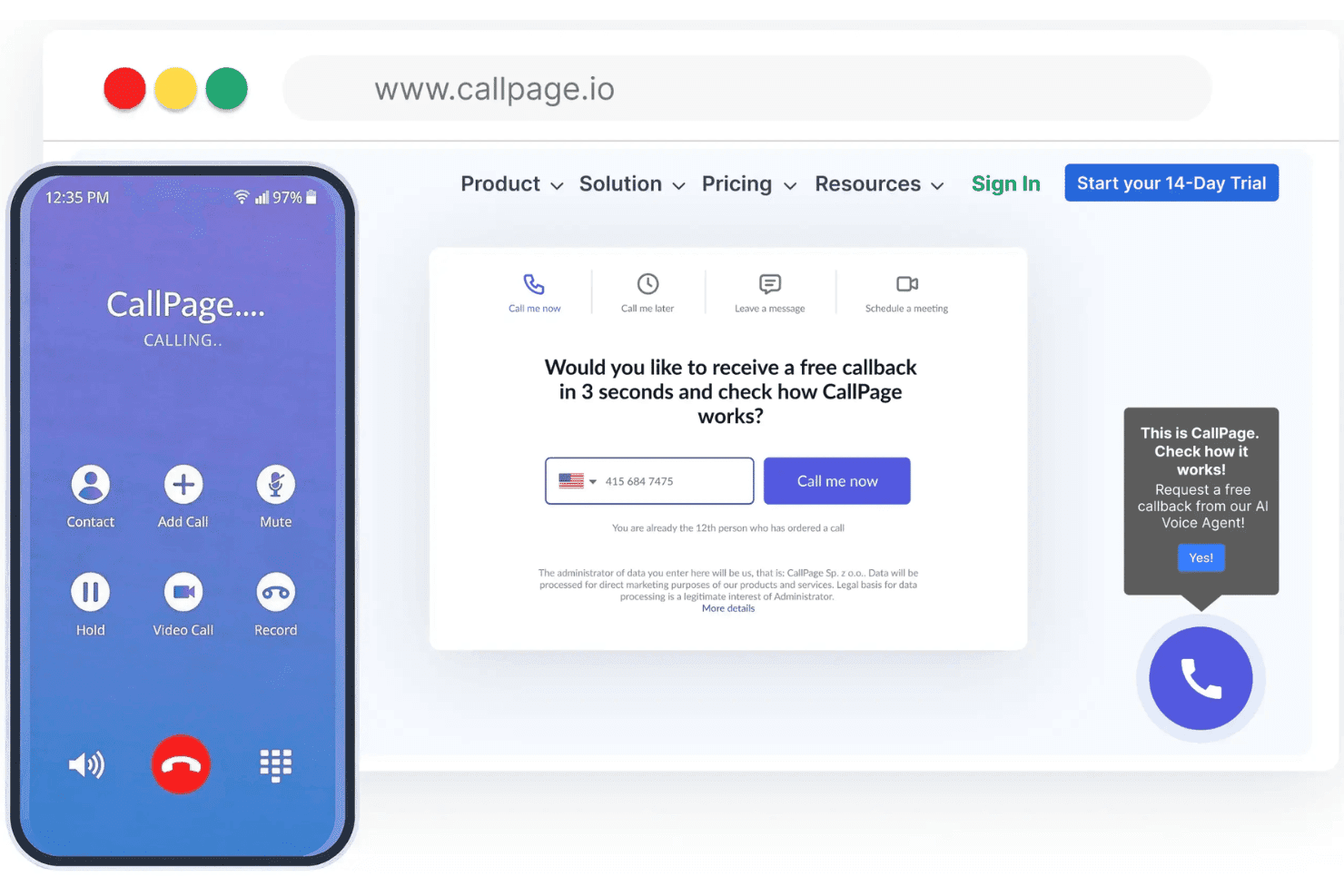
Ease of Use
I think CallPage stands out for its intuitive dashboard, quick setup, and simple call tracking workflows, making it easy for new users to get started. The visual widget editor and real-time analytics provide clear value without unnecessary clutter, and most users report a smooth onboarding experience thanks to clear in-app guidance.

Integrations
CallPage integrates with HubSpot, Google Analytics, Salesforce, Pipedrive, Zoho CRM, Slack, Bitrix24, LiveChat, Facebook, and Zapier, among others.
CallPage also offers a public API and supports third-party connections via Zapier.

CallPage Specs
- A/B Testing: No
- API: Yes
- Audience Targeting: Yes
- Calendar Management: Yes
- Call Disposition: Yes
- Call Recording: Yes
- Call Tracking: Yes
- Click-to-Dial: Yes
- Contact Management: Yes
- Contact Sharing: No
- Customer Management: No
- Dashboard: Yes
- Data Export: No
- Data Import: No
- Data Visualization: Yes
- Email Integration: No
- External Integrations: Yes
- Forecasting: No
- Google Apps Integration: Yes
- Inventory Tracking: No
- Lead Management: Yes
- Lead Scoring: Yes
- Marketing Automation: No
- Multi-User: Yes
- Notifications: Yes
- Referral Tracking: No
- Sales Motivator: No
- Scheduling: Yes
- Social-Media Integration: No
- Softphone: No
- Third-Party Plugins/Add-Ons: No
- Travel Management: No


