

10 alternativas a QuickBooks Online para contabilidad en 2026

Lista de las mejores alternativas a QuickBooks Online


Si gestionas operaciones de ingresos, sabes lo esencial que es contar con el software de contabilidad adecuado para tu equipo. Puede que te estés dando cuenta de que QuickBooks Online, desarrollado por Intuit, ya no se adapta a tus necesidades, aunque lleves años utilizándolo. Es posible que busques algo con funciones más especializadas, una mejor capacidad de ampliación o mejores opciones de cumplimiento normativo.
Según mi experiencia, encontrar la herramienta adecuada puede marcar la diferencia a la hora de gestionar cuentas bancarias, balances y otras tareas financieras de manera eficiente. He probado y analizado de forma independiente una variedad de alternativas a QuickBooks Online para ayudarte a elegir herramientas de contabilidad eficaces. El objetivo es ofrecerte una visión imparcial de las mejores opciones disponibles.
En este artículo, te guiaré por las mejores opciones de software de contabilidad que podrían adaptarse a las necesidades de tu empresa, tanto si trabajas por cuenta propia como si estás ampliando tus operaciones.
¿Qué es QuickBooks Online?
QuickBooks Online es un software de contabilidad basado en la nube diseñado para ayudar a las empresas a gestionar sus tareas financieras de manera eficiente desde cualquier ubicación. Utilizado habitualmente por contables, propietarios de pequeñas empresas y equipos financieros, ofrece valor al simplificar la contabilidad y proporcionar información financiera en tiempo real. Las funciones de facturación, seguimiento de gastos y gestión de nóminas te ayudan a organizar tus finanzas y tomar decisiones fundamentadas. QuickBooks Online es una herramienta versátil que permite automatizar la gestión y los informes financieros de empresas de distintos tamaños.
Resumen de las mejores alternativas a QuickBooks Online
Esta tabla comparativa resume los detalles de precios de mis principales alternativas a QuickBooks para ayudarte a encontrar la mejor opción según tu presupuesto y las necesidades de tu empresa.
| Tool | Best For | Trial Info | Price | ||
|---|---|---|---|---|---|
| 1 | Ideal para autónomos y facturación | Prueba gratuita de 30 días | Desde $23/mes | Website | |
| 2 | Ideal para el crecimiento de pequeñas empresas | Prueba gratuita de 30 días disponible | Desde $2.50/mes | Website | |
| 3 | Ideal para contabilidad para principiantes | Plan gratuito disponible | Desde $19/mes | Website | |
| 4 | Ideal para la contabilidad sencilla de equipos pequeños | Prueba gratuita de 30 días + plan gratuito disponible | Desde $15/mes | Website | |
| 5 | Mejor para integración con aplicaciones Zoho | Plan gratuito + demo gratuita disponible | Desde $15/mes (facturado anualmente) | Website | |
| 6 | Ideal para información financiera en tiempo real | Demostración gratuita disponible | Precio bajo consulta | Website | |
| 7 | La mejor para cumplimiento global | Demostración gratuita disponible | Precios bajo solicitud | Website | |
| 8 | Ideal para la planificación empresarial | Demostración gratuita disponible | Desde $210/usuario/mes (facturado anualmente) | Website | |
| 9 | Mejor para el control de inventario | Prueba gratuita de 30 días | Desde $708/año | Website | |
| 10 | Mejor para potencia contable de escritorio | Prueba gratuita de 30 días disponible | Desde $20/mes | Website |

Por qué confiar en nuestras recomendaciones de software
Nuestras reseñas reflejan nuestro criterio independiente, no un discurso de ventas. Descubra cómo mantenemos la transparencia.
Para esta guía, evaluamos las herramientas mediante pruebas prácticas e investigación independiente, puntuando las herramientas según nuestros criterios de selección.
Nuestras reseñas reflejan nuestro criterio editorial humano, no un discurso de ventas.
Análisis de las mejores alternativas a QuickBooks Online
A continuación encontrarás mis resúmenes detallados de las mejores alternativas a QuickBooks Online que llegaron a mi lista. Mis análisis ofrecen una visión detallada de las funciones principales, las ventajas y desventajas, las integraciones y los casos de uso ideales de cada herramienta para ayudarte a encontrar la mejor opción para ti.

Ideal para autónomos y facturación
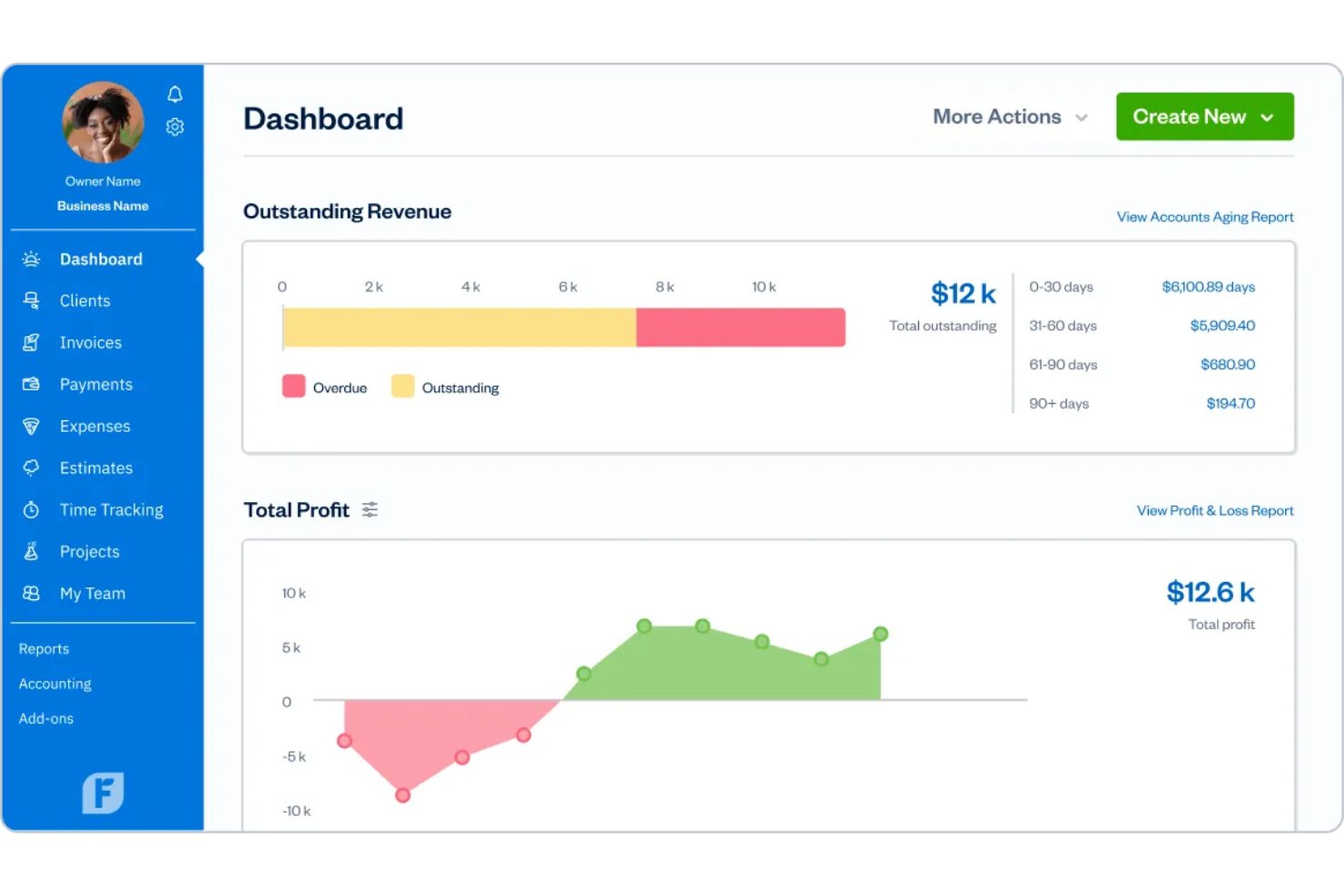
FreshBooks es un software de contabilidad diseñado para autónomos y propietarios de pequeñas empresas que necesitan gestionar sus finanzas de manera eficaz. Se centra en la facturación, el seguimiento de gastos y el control del tiempo para optimizar las operaciones comerciales.
Por qué es una buena alternativa a QuickBooks: FreshBooks es ideal para autónomos y empresarios independientes, ya que permite crear rápidamente facturas profesionales. El control del tiempo y la gestión de gastos integrados te permiten supervisar las horas facturables y los gastos, mientras que las herramientas de informes financieros te ayudan a comprender la salud financiera de tu negocio.
Características destacadas e integraciones:
Características incluyen herramientas de gestión de proyectos que te permiten organizar tareas y colaborar con clientes. La función de presupuestos permite enviar cotizaciones detalladas a los clientes antes de comenzar el trabajo. FreshBooks también ofrece un portal de clientes donde los clientes pueden ver facturas y realizar pagos directamente.
Integraciones incluyen Stripe, Shopify, Gusto, Zapier, PayPal y más.
Pros and Cons
Pros:
- Diseñado para autónomos
- Control del tiempo integrado
- Capacidades de informes financieros
Cons:
- Escalabilidad limitada para empresas más grandes
- Gestión básica de inventario
Xero
Ideal para el crecimiento de pequeñas empresas
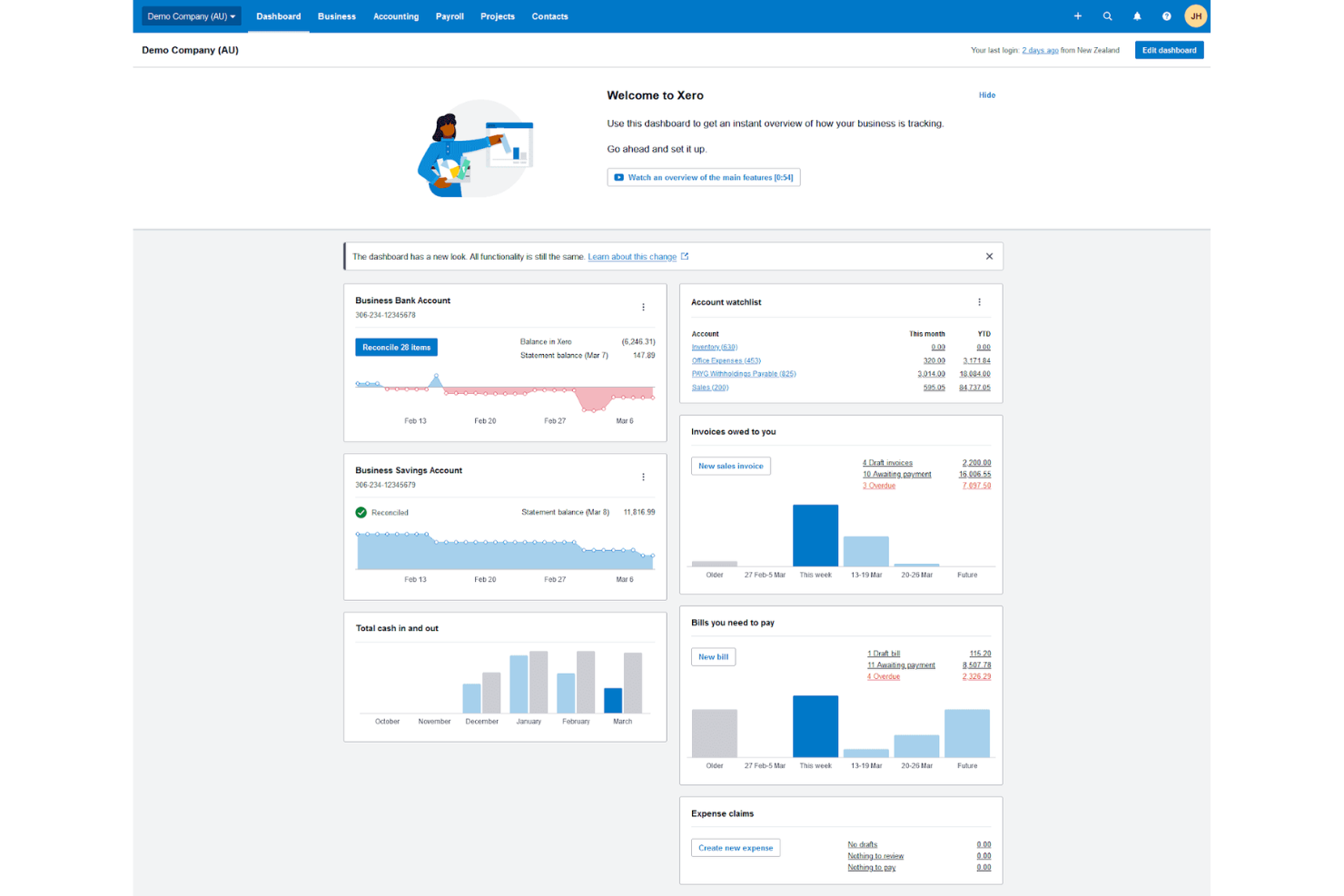
Xero es una solución de software de contabilidad diseñada para ayudar a pequeñas empresas, emprendedores y propietarios de sitios de comercio electrónico a gestionar sus finanzas de manera efectiva. Los propietarios de pequeñas empresas, contadores y equipos financieros pueden usarlo para facturación, gestión de gastos, nómina y conciliaciones de cuentas bancarias.
Por qué es una buena alternativa a QuickBooks: Xero ofrece a las pequeñas empresas herramientas innovadoras que la diferencian de QuickBooks. Proporciona balances integrados, un panel de control intuitivo, una interfaz fácil de usar y compatibilidad con Stripe, PayPal y procesamiento de pagos sin complementos significativos. Las capacidades de multi-moneda y cálculo automático de impuestos de la plataforma aumentan aún más su atractivo para operaciones comerciales globales.
Características destacadas e integraciones:
Características incluyen conciliación bancaria en tiempo real, lo que te permite rastrear tus finanzas a medida que ocurren las transacciones, y la posibilidad de personalizar informes financieros para satisfacer las necesidades específicas del negocio. Xero también ofrece cálculos automáticos de impuestos, lo que simplifica el cumplimiento.
Integraciones incluyen HubSpot, Gusto, Mailchimp, Stripe, Square, PayPal, Shopify y más.
Pros and Cons
Pros:
- Conciliación bancaria en tiempo real
- Cálculos automáticos de impuestos
- Soporte multi-moneda
Cons:
- Opciones de atención al cliente limitadas
- Acceso limitado sin conexión

Wave
Ideal para contabilidad para principiantes
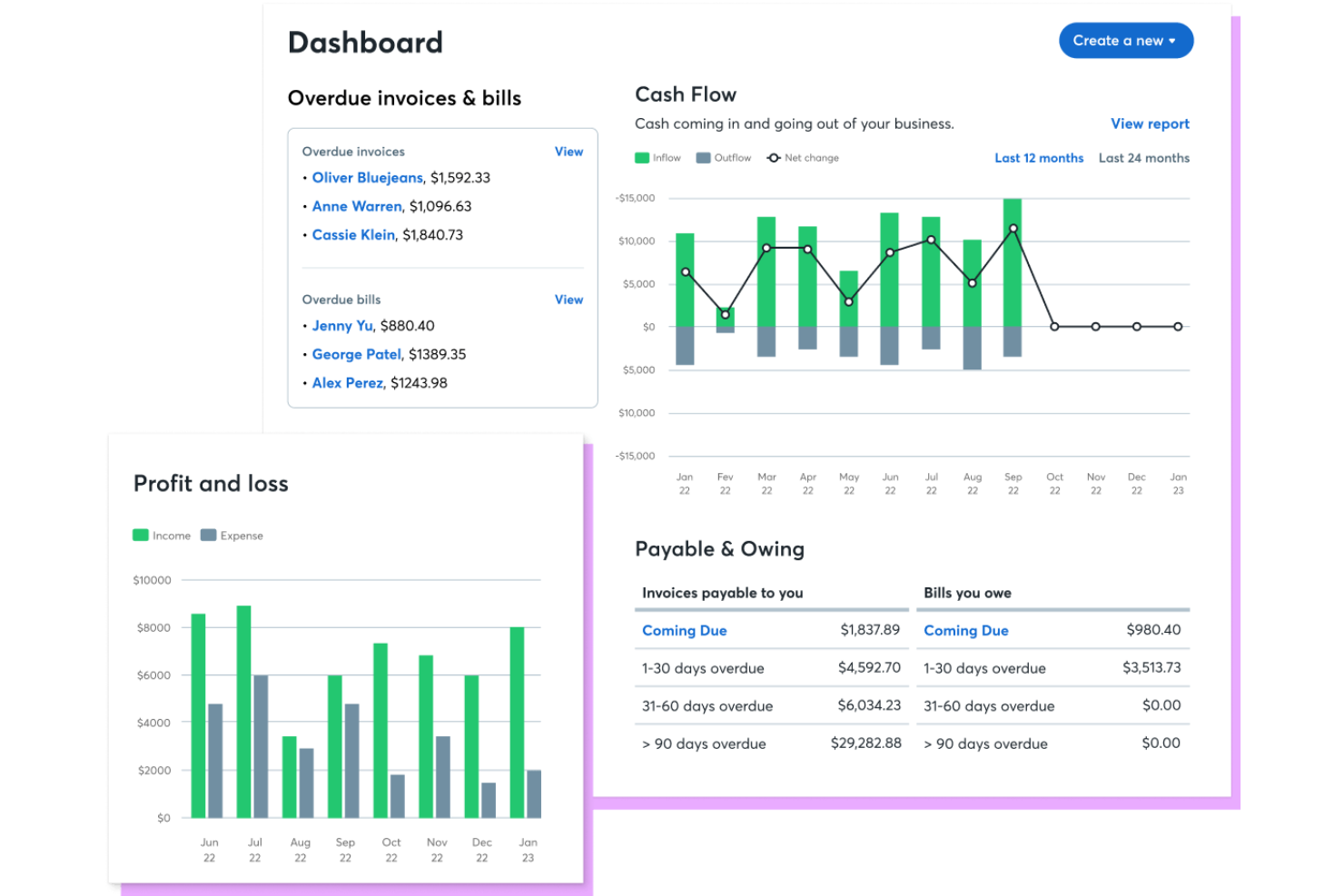
El software de contabilidad Wave es una solución todo en uno para pequeñas empresas, autónomos y trabajadores por cuenta propia que necesitan una forma sencilla de gestionar sus finanzas. Ayuda a los usuarios con la facturación, el control de gastos, los informes financieros, los pagos con tarjeta de crédito y el procesamiento básico de pagos sin sistemas ERP complejos.
Por qué es una buena alternativa a QuickBooks: Wave es especialmente adecuado para quienes no son contadores y requieren una solución de gestión empresarial fácil de usar. Su interfaz intuitiva y su sencilla facturación lo hacen accesible para usuarios con pocos conocimientos de contabilidad. Esto lo convierte en una opción atractiva para quienes desean gestionar sus finanzas sin la complejidad de QuickBooks Desktop u Online.
Funciones e integraciones destacadas:
Funciones incluyen la categorización automática de transacciones, que te ayuda a mantenerte organizado al clasificar rápidamente los gastos. El escaneo de recibos te permite capturar y almacenar recibos de manera digital, lo que simplifica el control de gastos. Wave también ofrece facturación personalizable, permitiéndote crear facturas profesionales y recurrentes que se adapten a tu marca.
Integraciones incluyen PayPal, Etsy, Zapier, Stripe y más.
Pros and Cons
Pros:
- No se requiere experiencia contable
- Categorización automática de transacciones
- Personalización profesional de facturas
Cons:
- Sin soporte telefónico en vivo
- Solo admite impuestos de entrada única

ZipBooks
Ideal para la contabilidad sencilla de equipos pequeños

ZipBooks es un software de contabilidad en línea dirigido a pequeñas empresas y autónomos. Se centra en la facturación, el seguimiento de gastos y la elaboración de informes financieros para simplificar la gestión financiera de los usuarios.
Por qué es una buena alternativa a QuickBooks: ZipBooks ofrece una interfaz fácil de usar y funciones sencillas, lo que lo hace adecuado para quienes no tienen experiencia en contabilidad. Proporciona información inteligente sobre la salud financiera de su negocio sin la complejidad de herramientas más avanzadas. Las capacidades de facturación del software son simples y eficientes, permitiéndole crear y enviar facturas rápidamente.
Funciones e integraciones destacadas:
Funciones incluyen facturación automatizada, lo que reduce el tiempo dedicado a la facturación manual. El software también ofrece un panel de control codificado por colores que le brinda una visión general visual de su situación financiera, mientras que la sencilla herramienta de seguimiento del tiempo mejora la precisión de la facturación.
Las integraciones incluyen PayPal, Square, Stripe, Slack y más.
Pros and Cons
Pros:
- Fácil de usar para quienes no son contadores
- Gestión básica de proyectos
- Funciones de facturación automatizada
Cons:
- Aplicación para Android no disponible
- Limitaciones para la conciliación bancaria

Mejor para integración con aplicaciones Zoho
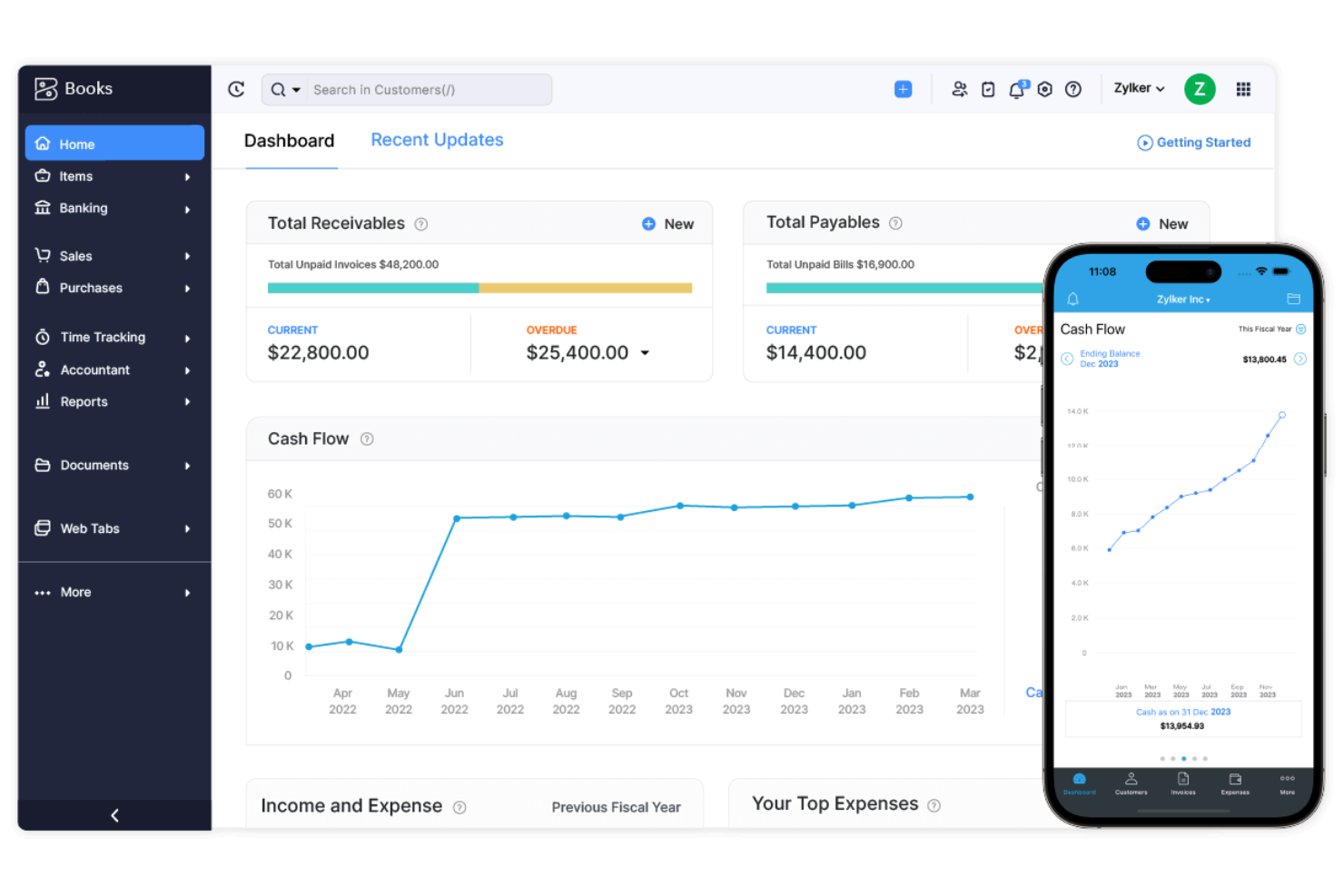
Zoho Books es un software de contabilidad en línea diseñado para pequeñas y medianas empresas. Ayuda a los usuarios a gestionar las finanzas, automatizar flujos de trabajo empresariales y colaborar entre departamentos.
Por qué es una buena alternativa a QuickBooks: Zoho Books es ideal para empresas que ya utilizan aplicaciones Zoho. Sus flujos de trabajo automatizados y plantillas personalizables facilitan una gestión financiera eficiente. Con capacidades como gestión multimoneda y seguimiento de proyectos, se adapta a diversas necesidades empresariales. Zoho Books ofrece informes financieros detallados que te ayudan a tomar decisiones informadas.
Características destacadas e integraciones:
Características incluyen gestión de inventarios, que te ayuda a monitorear los niveles de stock y gestionar pedidos de manera efectiva. El portal para clientes permite a tus clientes ver facturas y realizar pagos directamente. Zoho Books también ofrece un registro de auditoría detallado, garantizando transparencia en las transacciones financieras.
Integraciones incluyen Zoho CRM, Zoho Projects, Zoho Expense, PayPal, Stripe y más.
Pros and Cons
Pros:
- Flujos de trabajo automatizados
- Informes financieros detallados
- Plantillas personalizables
Cons:
- Integraciones externas limitadas
- El soporte al cliente puede ser lento

Ideal para información financiera en tiempo real
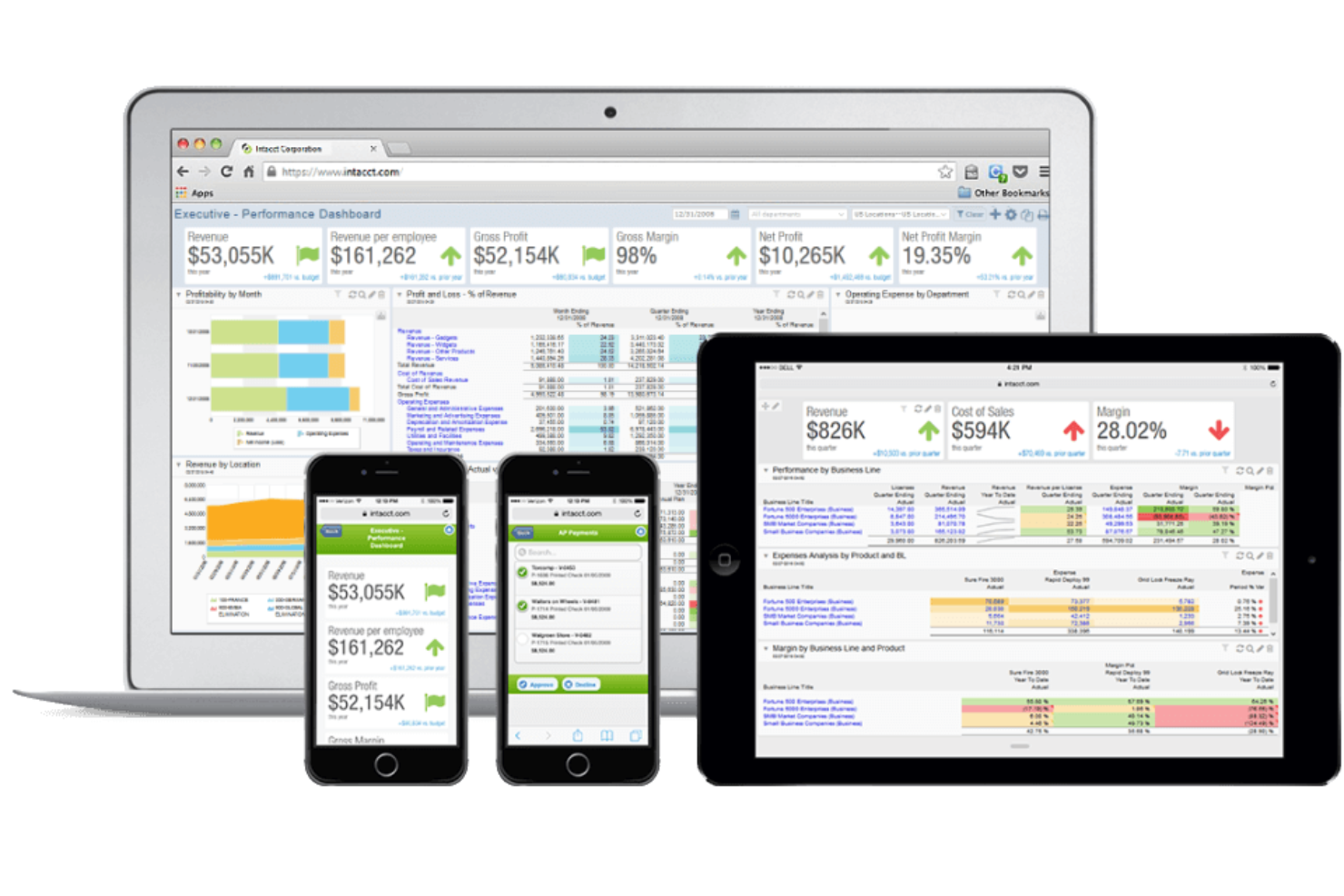
Sage Intacct es un software de gestión financiera en la nube diseñado para empresas en crecimiento y equipos financieros. Ofrece soluciones para gestión financiera central, contabilidad e informes para mejorar el rendimiento empresarial.
Por qué es una buena alternativa a QuickBooks: Sage Intacct ofrece información financiera en tiempo real que ayuda a tu equipo a tomar decisiones basadas en datos. Los informes y análisis avanzados brindan una comprensión más profunda de la salud financiera, mientras que la automatización de procesos financieros complejos reduce el esfuerzo manual y los errores. La gestión multi-entidad y las consolidaciones globales son ideales para empresas que operan en diversas ubicaciones.
Características destacadas e integraciones:
Características incluyen contabilidad de proyectos que simplifica el seguimiento de costes y de ingresos por proyecto. La función de gestión de tiempo y gastos te ayuda a monitorear el tiempo y los gastos de los empleados, mientras que la automatización de cuentas por pagar reduce el procesamiento manual de facturas.
Integraciones incluyen Salesforce, ADP, BILL, Expensify, Avalara, MineralTree y más.
Pros and Cons
Pros:
- Información financiera en tiempo real
- Gestión multi-entidad
- Automatización de procesos complejos
Cons:
- Tarifas de complementos y licencias
- Limitaciones de funciones para pequeñas empresas

Certinia
La mejor para cumplimiento global

Certinia Financial Management Cloud es una solución de gestión financiera basada en la nube dirigida a grandes empresas y organizaciones globales. Ofrece herramientas para la planificación financiera, el análisis y la gestión del cumplimiento.
Por qué es una buena alternativa a QuickBooks: Certinia Financial Management Cloud destaca por su soporte en cumplimiento global, ayudando a tu equipo a adherirse a regulaciones internacionales. El software ofrece análisis avanzados para proporcionar información sobre el rendimiento financiero. Las capacidades de automatización de Certinia reducen las tareas manuales, mejorando la eficiencia general.
Funciones y integraciones destacadas:
Funciones: incluye paneles personalizables que permiten visualizar los indicadores financieros clave, mientras que los registros de auditoría aseguran la transparencia y la responsabilidad en las transacciones financieras. Certinia también ofrece herramientas avanzadas de presupuestación para ayudarte a planificar y gestionar tus finanzas de manera efectiva.
Integraciones: incluye Salesforce, ADP, SAP Concur y más.
Pros and Cons
Pros:
- Sólido soporte de cumplimiento global
- La automatización reduce las tareas manuales
- Paneles personalizables
Cons:
- La interfaz sobrecargada puede resultar abrumadora
- Alto costo para empresas pequeñas

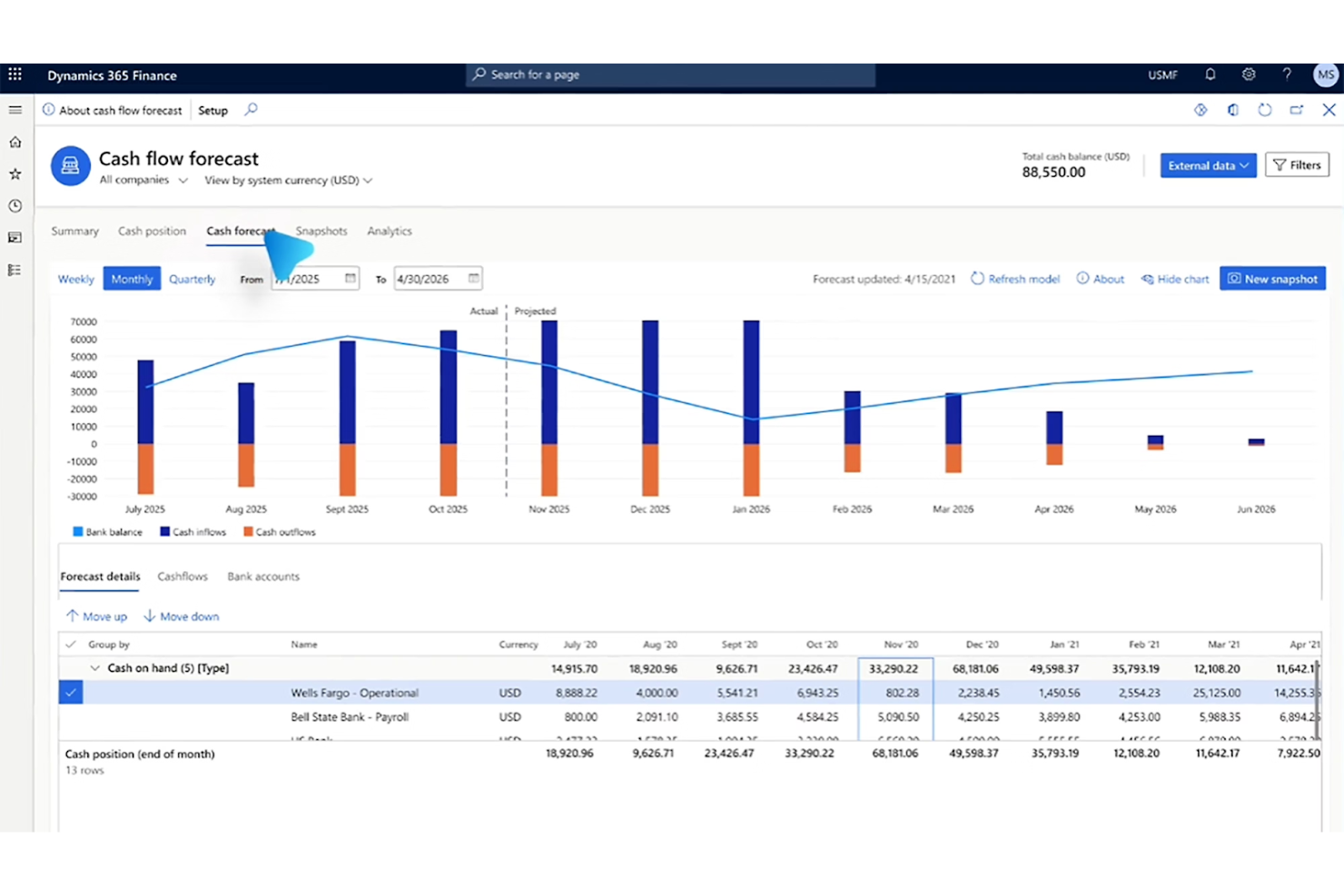
Microsoft 365 Dynamics Finance es una solución de gestión financiera basada en la nube que está dirigida a grandes empresas y organizaciones globales. Se centra en automatizar y gestionar operaciones financieras, presupuestos y cumplimiento normativo.
Por qué es una buena alternativa a QuickBooks: Microsoft 365 Dynamics Finance sobresale en la planificación de recursos empresariales, ofreciendo potentes herramientas para la gestión financiera a gran escala, incluyendo capacidades de presupuestación y previsión financiera. Las perspectivas financieras en tiempo real ayudan a tu equipo a tomar decisiones estratégicas informadas.
Funciones y integraciones destacadas:
Funciones incluyen extensas capacidades de informes financieros, que proporcionan información detallada sobre el desempeño financiero de tu empresa. El software es compatible con la gestión financiera global, ayudando a manejar operaciones en múltiples monedas e idiomas de manera eficaz. También ofrece potentes herramientas de gestión de riesgos para identificar y mitigar posibles riesgos financieros.
Integraciones incluyen Power BI, Office 365, Azure, Outlook y más.
Pros and Cons
Pros:
- Planificación detallada de recursos empresariales
- Informes financieros extensos
- Gestión financiera global
Cons:
- Los cambios de versión pueden afectar personalizaciones
- Requiere expertos para una personalización a fondo

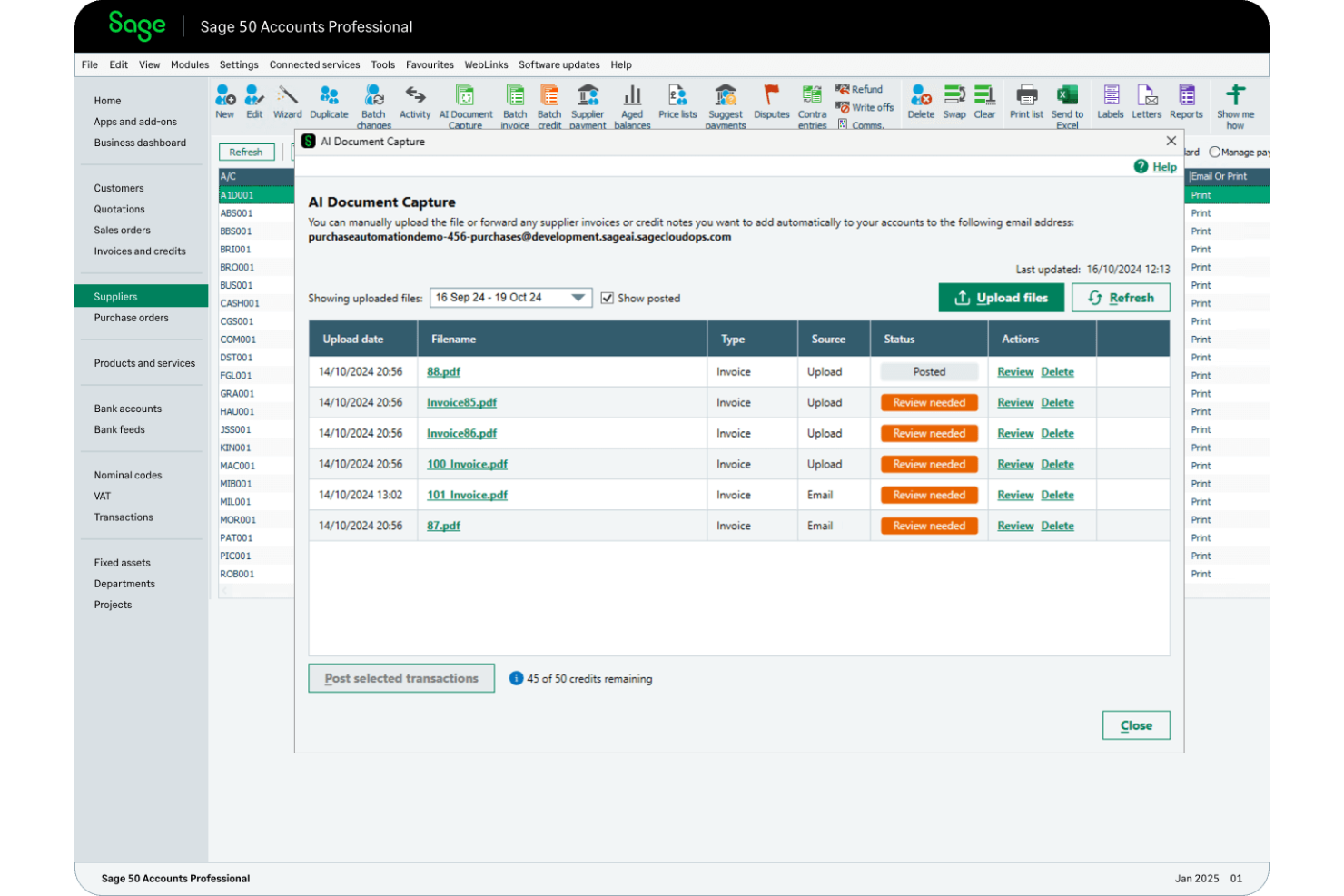
Sage 50 Accounting es un software de contabilidad diseñado para pequeñas y medianas empresas. Ofrece soluciones para la facturación, la gestión de inventario y la elaboración de informes financieros.
Por qué es una buena alternativa a QuickBooks: Sage 50 Accounting ofrece capacidades detalladas de gestión de inventario y herramientas avanzadas de informes para proporcionar información sobre tus datos financieros. El software permite el control de costes por trabajo para hacer seguimiento de los gastos y la rentabilidad de los proyectos, así como herramientas amplias de gestión de nómina.
Características e integraciones destacadas:
Características incluyen herramientas de gestión de flujo de efectivo y presupuestación para ayudarte a establecer y monitorear los objetivos financieros de tu empresa. Sage 50 Accounting también ofrece rastreo de auditoría, proporcionando transparencia y seguridad en tus transacciones financieras.
Integraciones incluyen Microsoft 365, PayPal, Stripe, AutoEntry y más.
Pros and Cons
Pros:
- Gestión detallada de inventario
- Herramientas avanzadas de informes
- Potente gestión de flujo de efectivo
Cons:
- Actualizaciones manuales y limitaciones por ser de escritorio
- Errores ocasionales

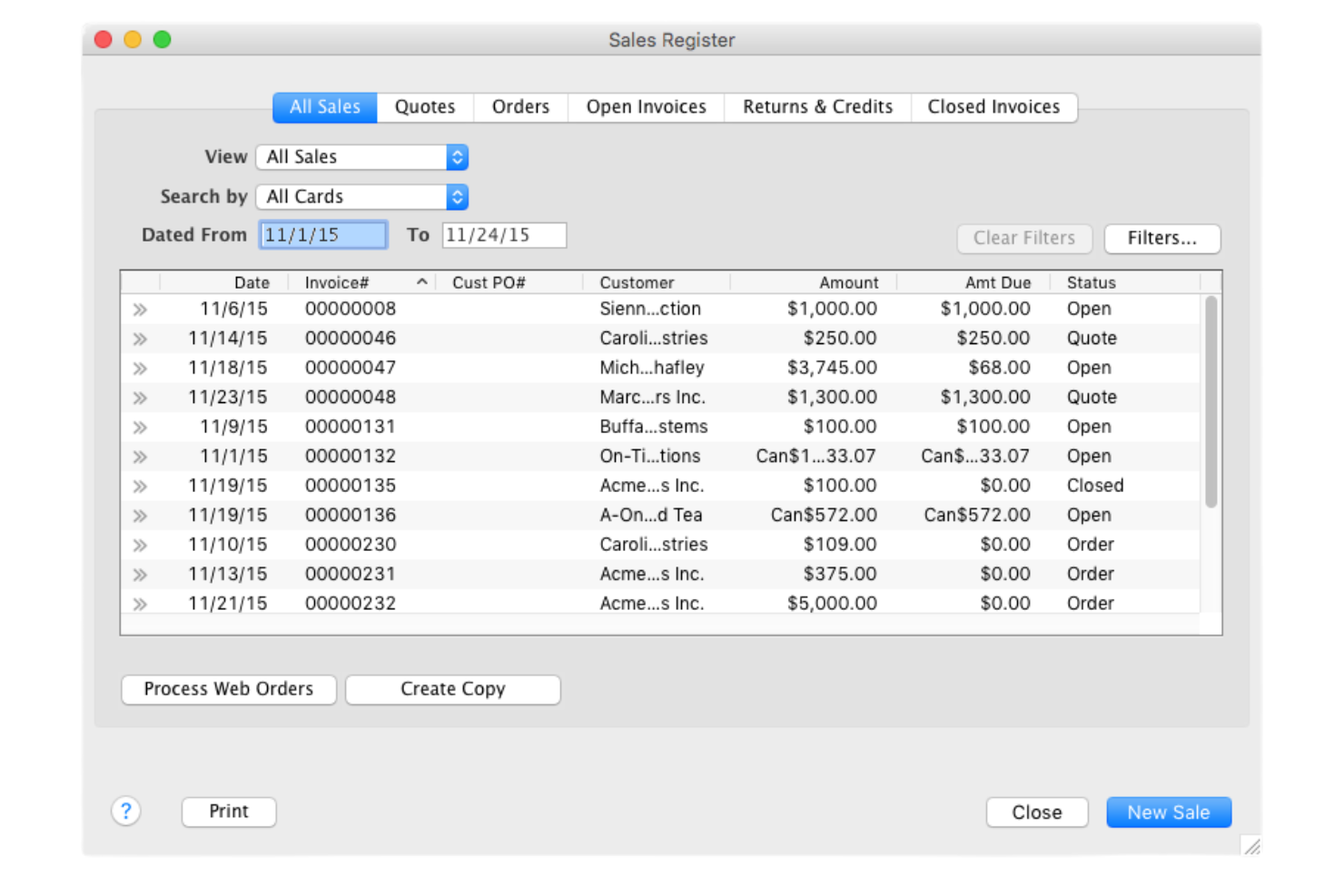
AccountEdge es un software de contabilidad de escritorio diseñado para pequeñas y medianas empresas para ayudar con tareas como la facturación, la nómina y la gestión de inventario.
Por qué es una buena alternativa a QuickBooks: AccountEdge ofrece una sólida solución de escritorio para quienes prefieren la contabilidad sin conexión. Sus potentes capacidades de nómina lo hacen ideal para empresas que necesitan una gestión detallada de la nómina. El software también admite un seguimiento de inventario extenso e informes personalizables, lo que te permite adaptar tus procesos financieros a las necesidades de tu negocio.
Funciones y integraciones destacadas:
Funciones incluyen la facturación por tiempo, que te permite rastrear las horas facturables y gestionar la facturación basada en tiempo, y soporte multimoneda para ayudarte a manejar transacciones internacionales. El software también ofrece funciones avanzadas de búsqueda, permitiendo encontrar rápidamente transacciones o registros específicos.
Integraciones incluyen UPS, Stripe, Square, Zapier y más.
Pros and Cons
Pros:
- Amplias capacidades de nómina
- Seguimiento detallado de inventario
- Solución de escritorio sin conexión
Cons:
- Funcionalidad en la nube limitada
- Requiere instalación de software
Otras alternativas a QuickBooks Online
Estas son algunas alternativas adicionales a QuickBooks Online que no llegaron a mi lista, pero que merece la pena conocer:
- Accounting Seed
Ideal para contabilidad en Salesforce
- NetSuite Cloud Accounting
Ideal para finanzas en la nube escalables
- Taxfyle
Mejor para servicios fiscales a demanda


Cómo evalúo las alternativas a QuickBooks Online
Divido mi evaluación en dos capas: las capacidades básicas que toda herramienta debe tener—como reconocimiento de ingresos, automatización de la facturación y sincronización con CRM—y los diferenciadores que determinan el ajuste.
Funcionalidad básica (lo mínimo indispensable para esta lista)
Cuando selecciono las herramientas para mi lista, califico cada una en una escala de 0 (no ofrece la funcionalidad) a 5 (destaca en esta área) para cada funcionalidad principal que se menciona a continuación. Luego, calculo la puntuación total de la herramienta en porcentaje. Cada herramienta debe lograr una puntuación total mínima del 65% para ser considerada para inclusión.
- Libro mayor y contabilidad: Busco un verdadero libro mayor de doble entrada con cuentas por pagar/cobrar, conciliación bancaria y un plan de cuentas personalizable que permita la categorización por dimensiones para departamentos o líneas de productos.
- Automatización de facturación y cobros: Aquí importa la capacidad de cada herramienta para gestionar facturación recurrente, emisión de facturas por suscripción y cobro de pagos, especialmente los flujos de trabajo automatizados de recobro.
- Reconocimiento de ingresos: Evalúo si la plataforma automatiza los calendarios ASC 606, lleva el control de ingresos diferidos y gestiona modificaciones de contratos como actualizaciones o degradaciones a mitad de periodo.
- Informes financieros y paneles: Más allá de los estados financieros estándar, reviso que existan paneles en tiempo real que destaquen métricas de operaciones de ingresos como MRR, ARR y retención neta de ingresos.
- Integraciones con CRM y ecosistema de ingresos: La herramienta debe conectarse con plataformas como Salesforce, HubSpot, Stripe o sistemas CPQ, con sincronización bidireccional para mantener alineados los datos de acuerdos y facturación.
- Soporte multiempresa y multimoneda: Verifico si la plataforma consolida la información financiera de filiales y gestiona eliminaciones intercompañía y ajustes por tipo de cambio.
Una vez tengo una lista de herramientas que cumplen con estos criterios, considero qué distingue a cada plataforma.
Factores diferenciadores (lo que distingue a los proveedores)
Así es como comparo y distingo a los diferentes proveedores:
Funciones destacadas
El seguimiento nativo de métricas SaaS es un gran diferenciador. Busco plataformas que presenten MRR, ARR, churn y LTV sin requerir una herramienta de BI aparte. Los motores de facturación por uso también son importantes para equipos que gestionan modelos híbridos de precios con componentes escalonados o de consumo. Los pagos integrados y la automatización de cuentas por cobrar cierran el círculo. Las herramientas con secuencias de recobro integradas y conciliación automática de cobros ahorran a los equipos de operaciones de ingresos el tener que unir diferentes flujos de cobro.
Más allá de las funciones
La velocidad de implementación es clave cuando se migra desde QuickBooks Online a mitad de trimestre. Verifico si una plataforma ofrece herramientas de migración e importación de datos históricos que no obliguen al equipo a semanas de reingreso manual. La escalabilidad es igual de importante: evalúo si la herramienta puede crecer contigo, de una sola entidad a múltiples subsidiarias, sin tener que cambiar todo el sistema. Cumplimiento y seguridad completan mi evaluación. Lo que busco es certificación SOC 2 Tipo II y controles de acceso según funciones para mantener los datos financieros listos para auditorías.
¿Por qué buscar una alternativa a QuickBooks Online?
Aunque QuickBooks es una buena opción de software de contabilidad, hay varios motivos por los que algunos usuarios buscan soluciones alternativas. Puede que estés buscando una alternativa a QuickBooks Online porque:
- Necesitas funciones de informes más avanzadas
- Tu empresa opera en varios países
- Necesitas funcionalidades específicas para tu sector
- Tu equipo necesita un mejor control de los permisos de usuario
- Quieres planes de precios más asequibles
- Tu empresa está creciendo y necesita capacidad de ampliación
Si alguna de estas situaciones te resulta familiar, has llegado al lugar adecuado. Mi lista incluye varias opciones de software de contabilidad más adecuadas para los equipos que se enfrentan a estos desafíos con QuickBooks y buscan soluciones alternativas.
Funciones principales de QuickBooks Online
Estas son algunas de las funciones principales de QuickBooks Online para ayudarte a compararlo con soluciones alternativas:
- Facturación: Crea y envía facturas con plantillas personalizables para cobrar más rápido.
- Seguimiento de gastos: Supervisa los ingresos y gastos, y captura recibos mediante la aplicación móvil.
- Contabilidad en la nube: Accede a tus datos contables de forma segura desde cualquier lugar mediante el almacenamiento en la nube.
- Informes financieros: Genera informes personalizados para evaluar el rendimiento de tu empresa.
- Automatización: Ahorra tiempo automatizando el seguimiento de facturas y los recordatorios de pago.
- Seguridad de los datos: Protege tus datos mediante cifrado, protección con contraseña y autenticación multifactor.
- Compatibilidad con múltiples divisas: Gestiona transacciones internacionales en varias divisas.
- Integración: Conecta con diversas aplicaciones de terceros para ampliar las funcionalidades.
- Acceso de los clientes: Permite que los clientes te inviten a consultar sus datos para obtener información en tiempo real.
- Asistencia continua: Disfruta de asistencia las 24 horas del día, los 7 días de la semana, y accede a equipos de cuentas especializados.
Qué sigue:
Si estás investigando software de contabilidad, conecta con un asesor de SoftwareSelect para obtener recomendaciones gratuitas.
Rellenas un formulario y mantienes una breve conversación en la que analizan los detalles de tus necesidades. Después recibirás una lista de opciones de software para revisar. Incluso te ayudarán durante todo el proceso de compra, incluidas las negociaciones de precios.