

Ausführlicher Testbericht zur Monday Sales CRM Software 2026

Wir bewerten Tools unabhängig, und Provisionen helfen, unsere Tests zu finanzieren. Sehen Sie unsere transparente Richtlinie, unsere Methodik oder schlagen Sie ein Tool vor.
monday CRM is a customer relationship management (CRM) software that helps you organize and manage your sales pipeline effectively. It’s ideal for small to medium-sized businesses and teams in industries like tech startups and creative agencies, where collaboration and flexibility are key. monday sales CRM offers your team a streamlined way to track sales efforts and foster strong customer relationships, enhancing your ability to close deals efficiently.
monday CRM Evaluation Summary

4.6/5
- From $12/seat/month (billed annually)
- 14-day free trial + free demo available
Warum Sie unseren Software-Empfehlungen vertrauen können
6,700+
Reviews
20
Industry experts
16+
Evaluation factors
14
Years
Unsere Bewertungen spiegeln unser unabhängiges Urteilsvermögen wider – keine Verkaufsstrategie. Erfahren Sie, wie wir transparent bleiben.
Für diesen Leitfaden haben wir Tools mithilfe von praktischen Tests und unabhängiger Recherche bewertet und dabei unsere Bewertungskriterien angewendet.
Unsere Bewertungen spiegeln unser menschliches redaktionelles Urteilsvermögen wider, keine Verkaufsstrategie.
monday CRM Overview
monday CRM is a customer relationship management (CRM) software that helps you organize and manage your sales pipeline effectively. It’s ideal for small to medium-sized businesses and teams in industries like tech startups and creative agencies, where collaboration and flexibility are key. monday sales CRM offers your team a streamlined way to track sales efforts and foster strong customer relationships, enhancing your ability to close deals efficiently.
Pros
- You can easily create automations without any coding.
- Its integrated proofing feature lets you add comments to files.
- You can create forms that live within your project as a view.
Cons
- The Gantt view isn't useful for building projects.
- Subtask columns don't replicate task structure, needing extra customization.
- Training videos use the old UI, which can confuse new users.


Is monday CRM Right For Your Needs?
Who Would be a Good Fit for monday CRM?
If you’re part of a small to medium-sized business or a creative team, monday sales CRM could be an excellent fit for you. Its flexible project management tools and customizable workflows make it ideal for tech startups and marketing agencies needing collaboration and adaptability. You can automate repetitive tasks and manage your sales pipeline effectively, which is especially beneficial for teams that prioritize efficiency and seamless communication.
- Tech Startupsmonday sales CRM is perfect for tech startups needing agile workflows and automation.
- Marketing AgenciesYour agency will benefit from its collaborative tools and proofing features for client work.
- Small BusinessesIf you’re a small business, you’ll find its ease of use and customization options invaluable.
- Project ManagersYou can streamline tasks and track progress easily with monday sales CRM’s visual tools.
- Sales TeamsIt helps your team manage leads and sales pipelines with integrated tracking features.
- Creative TeamsYour team can collaborate effectively using its integrated comments and file sharing.
Who Would be a Bad Fit for monday CRM?
If you’re part of a large enterprise with complex needs, monday sales CRM might not suit you well. Its functionality can be limited for massive data volumes and intricate reporting requirements. Manufacturing companies requiring detailed, customizable Gantt charts could find its project management features lacking. Teams relying heavily on in-depth training resources may struggle with outdated onboarding materials.
- Large EnterprisesComplex workflows and massive data handling might strain monday sales CRM’s capabilities.
- Manufacturing CompaniesYou’ll find its Gantt charts not detailed enough for intricate production schedules.
- Finance DepartmentsDetailed reporting needs may not be fully supported by monday sales CRM’s features.
- Legal FirmsThe lack of advanced document management could hinder your casework.
- Education InstitutionsIts features may not cater to the specific needs of academic administration.
- Healthcare OrganizationsRegulatory compliance and patient data management might be challenging with this CRM.
Wie wir Tools testen & bewerten
Wir haben Jahre damit verbracht, unser System zur Softwarebewertung und -prüfung aufzubauen, zu verfeinern und kontinuierlich zu verbessern. Der Bewertungsmaßstab ist darauf ausgelegt, die Feinheiten der Software-Auswahl und die Effektivität eines Tools abzubilden, wobei der Fokus auf entscheidende Aspekte des Auswahlprozesses gelegt wird. Nachfolgend können Sie genau sehen, wie unser Test- und Bewertungssystem anhand von sieben Kriterien funktioniert. Dadurch sind wir in der Lage, eine objektive Einschätzung der Software auf Basis von Kernfunktionalität, besonderen Merkmalen, Benutzerfreundlichkeit, Onboarding, Kundensupport, Integrationen, Kundenbewertungen und Preis-Leistungs-Verhältnis zu geben.
Kernfunktionalität (25% der Gesamtnote)
Unser Bewertungsprozess beginnt immer mit der Kernfunktionalität eines Tools. Verfügt es über die grundlegenden Funktionen und Merkmale, die ein Nutzer erwarten würde? Sind einige dieser Kernfunktionen nur in teureren Tarifen verfügbar? Grundsätzlich erwarten wir, dass ein Tool mit den Grundfunktionen seiner Wettbewerber mithalten kann.
Besondere Merkmale (25% der Gesamtnote)
Im nächsten Schritt bewerten wir außergewöhnliche Zusatzfunktionen, die über den üblichen Funktionsumfang hinausgehen. Eine hohe Bewertung spiegelt spezialisierte oder einzigartige Eigenschaften wider, welche das Produkt schneller, effizienter oder für den Nutzer wertvoller machen. Wir bewerten außerdem, wie einfach sich andere typische Tools zur Erweiterung der Funktionalität und des Nutzens integrieren lassen. Lösungen mit zahlreichen nativen Integrationen, Drittanbieter-Anbindungen und API-Zugängen für eigene Anpassungen schneiden am besten ab.
Benutzerfreundlichkeit (10% der Gesamtnote)
Wir berücksichtigen, wie schnell und einfach sich Aufgaben mit der Kernfunktionalität durch das Tool erledigen lassen. Hoch bewertete Software ist gut gestaltet, intuitiv bedienbar, bietet mobile Apps, Vorlagen und gestaltet sogar komplexe Aufgaben einfach.
Onboarding (10% der Gesamtnote)
Uns ist wichtig, wie schnell Teams eine neue Plattform übernehmen, daher bewerten wir, wie leicht ein Tool ohne umfangreiche Schulungen erlernbar und nutzbar ist. Wir betrachten, wie schnell Teammitglieder ohne Vorerfahrung loslegen können. Hoch bewertete Lösungen zeichnen sich dadurch aus, dass nur wenig oder keine Unterstützung notwendig ist.
Kundensupport (10% der Gesamtnote)
Wir prüfen, wie schnell und einfach es ist, Unterstützung per Telefon, Live-Chat oder Wissensdatenbank zu erhalten. Anbieter, die Echtzeit-Support bieten, erzielen die besten Noten, während Chatbots am schlechtesten abschneiden.
Kundenbewertungen (10% der Gesamtnote)
Zusätzlich zu unseren eigenen Tests berücksichtigen wir den Net Promoter Score von aktuellen und früheren Kunden. Wir prüfen, ob Nutzer das Tool für die Kernfunktionalitäten erneut wählen würden. Eine hohe Softwarebewertung spiegelt einen hohen Weiterempfehlungswert aktueller oder früherer Kunden wider.
Preis-Leistungs-Verhältnis (10% der Gesamtnote)
Abschließend bewerten wir unter Berücksichtigung aller Kriterien den durchschnittlichen Preis für Einstiegs-Tarife im Verhältnis zu den Kernfunktionen und dem Wert der übrigen Kriterien. Software, die mehr Leistung für weniger Geld bietet, erzielt eine höhere Bewertung.
Core Features
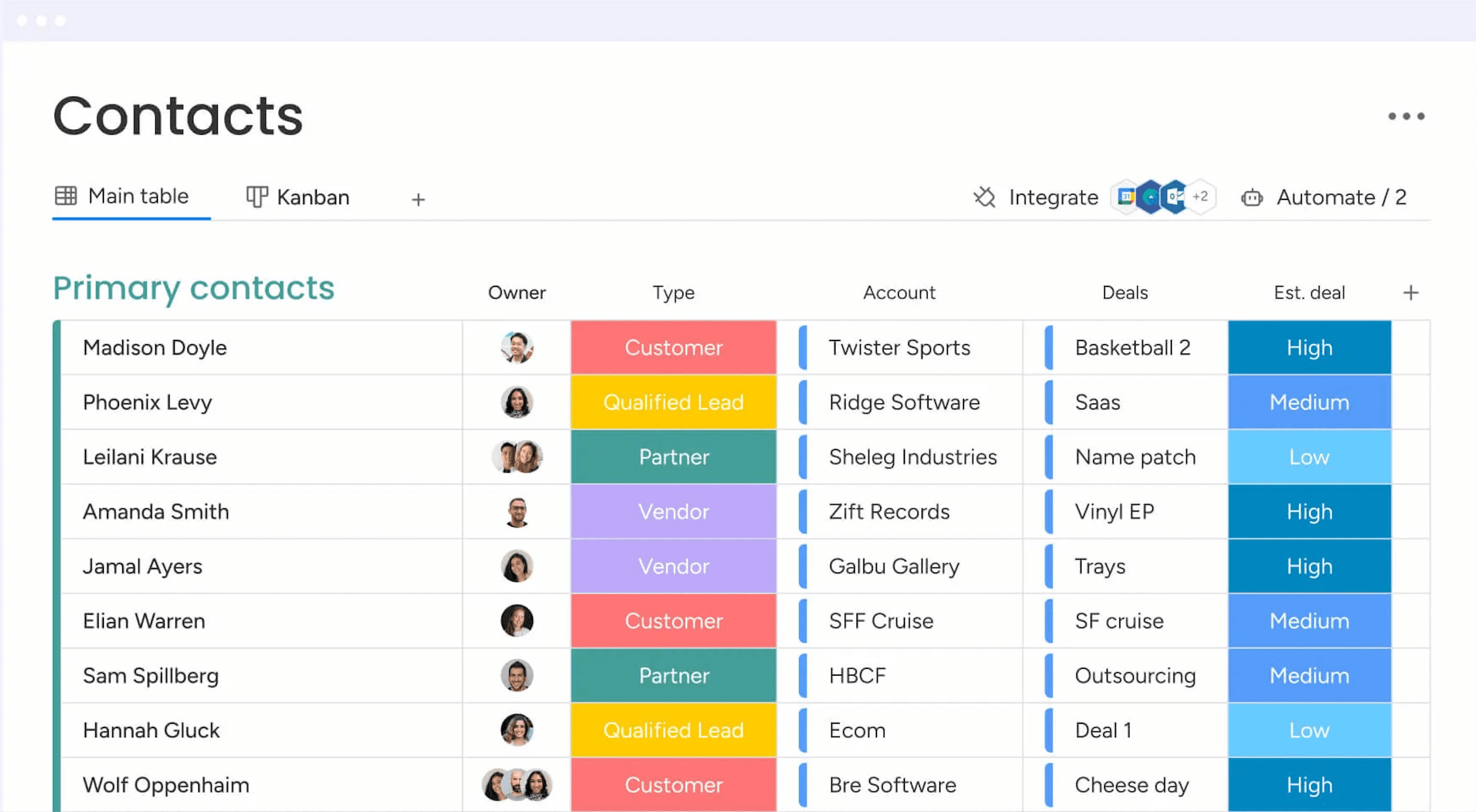
Contact Management: You get a central place to store all your contacts with details, communication histories, and linked deals. You can import them from Excel or auto-create contacts from your emails, so your team always has a clean, up-to-date list.
Lead Capturing and Pipeline Tracking: You can collect leads via forms or imports, track them through custom stages, and move deals with drag‑and‑drop. You see your entire sales funnel and can quickly spot where deals stall.
Email Sync and Tracking: You sync Gmail or Outlook to centralize email conversations, send bulk or templated emails, and get alerts when leads open or click. That way, you reach out at the right time and don’t miss follow‑up chances.
Automations: You set up no‑code rules that automate manual tasks like updating deal stages, sending reminders, or logging emails. It saves hours and keeps work consistent without extra effort.
Dashboards and Sales Forecasting: You get customizable dashboards that show pipeline status, team performance, and revenue forecasts by month or rep. These visuals help you spot trends and hit targets more reliably.
Activity Tracking And Team Goals: You track calls, meetings, and emails in one feed and monitor reps’ activity and quota progress. It gives you a clear picture of who’s doing what and where coaching might help.
Standout Features
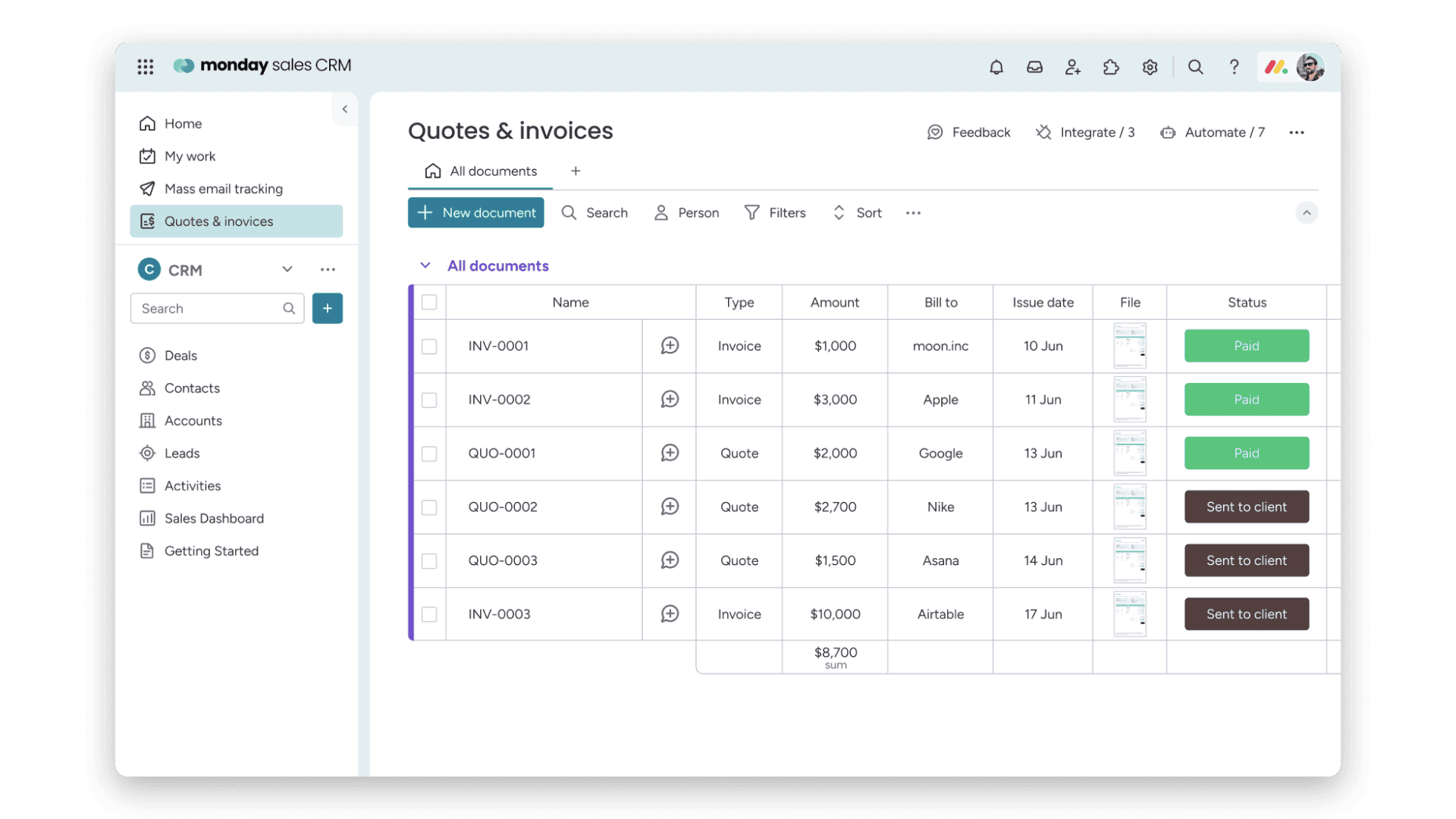
Quotes & Invoices: You can create, customize, send, and track quotes and invoices right within your CRM, pulling data from your contacts and deals. That means you skip back and forth between apps and speed up getting paid.
Sequences: You build multi‑step engagement flows (like email campaigns, reminders, task updates) that guide leads through your funnel automatically. You keep prospects moving without missing a beat or manually nudging them.
Ease of Use
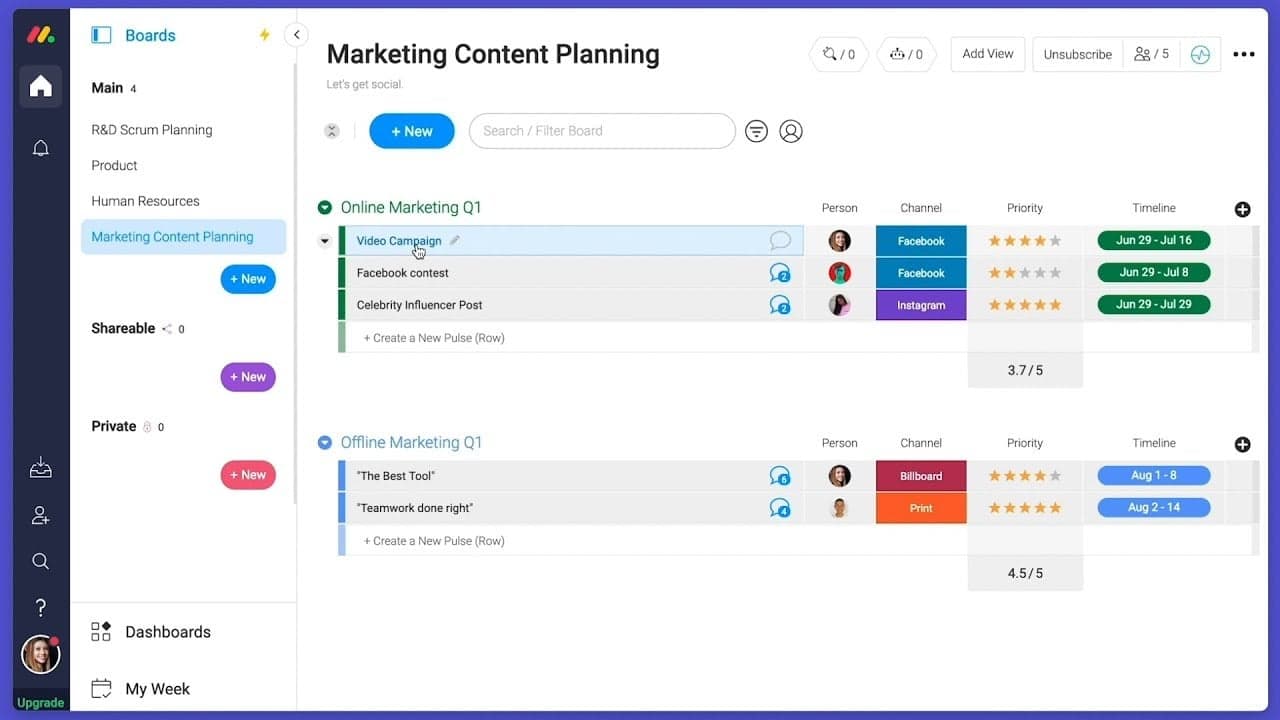
Monday CRM offers a user-friendly interface that helps your team get up to speed quickly, though some users find the multitude of features a bit overwhelming. Its drag-and-drop functionality and visual dashboards make task management intuitive. However, if your team prefers simplicity, the extensive capabilities might require a learning curve. The platform's customization options provide flexibility, but you might need time to explore and configure them to best suit your workflow.
Onboarding
Monday CRM provides a smooth onboarding experience with clear tutorials and a user-friendly setup process that helps your team get started quickly. The platform offers a range of resources, including webinars and a knowledge base, to support new users. Its step-by-step guides and personalized onboarding sessions ensure you find value quickly. However, the depth of features might require some exploration to fully utilize, but the available support makes this manageable.

Customer Support
Monday CRM offers robust customer support with multiple channels like live chat, email, and an extensive help center to assist your team. Users appreciate the prompt and knowledgeable responses they receive from the support team. The availability of 24/7 support ensures you get help whenever needed. Additionally, the platform's comprehensive documentation and community forums provide valuable insights and solutions, helping you resolve issues efficiently and keep your projects on track. Monday CRM integrates natively with Slack, Google Drive, Microsoft Teams, Zoom, Trello, Dropbox, HubSpot, Shopify, LinkedIn, and Outlook.
Monday CRM also offers an API and connects with third-party integration tools like Zapier.

Value for Money
monday CRM pricing offers strong value, especially if your team wants something easy to use without sacrificing flexibility. Although there is no free plan, monday CRM does offer a 14-day free trial.
You get a lot at the lower tiers, including automation and reporting tools that work well for small to midsize teams. Higher plans add more control, but smaller teams won’t need Enterprise to get full use out of it.
- Basic Plan: Contact management, boards, and limited automations
- Standard Plan: Activity tracking, custom pipelines, and calendar view
- Pro Plan: Sales forecasting, advanced reporting, and higher automation limits
- Enterprise Plan: Admin controls, multi-level permissions, and enterprise-grade security features

monday CRM Specs
- 2-Factor Authentication: No
- API: Yes
- Calendar Management: Yes
- Call Tracking: No
- Campaign Management: No
- Click-to-Dial: No
- Contact Management: Yes
- Contact Sharing: No
- Custom Data Forms: Yes
- Customer Management: Yes
- Dashboard: Yes
- Data Export: Yes
- Data Import: Yes
- Data Visualization: Yes
- Email Integration: Yes
- External Integrations: Yes
- File Sharing: Yes
- File Transfer: Yes
- Google Apps Integration: Yes
- Lead Management: Yes
- Lead Scoring: Yes
- Marketing Automation: Yes
- Mobile App: No
- Multi-User: Yes
- Notifications: Yes
- Pipeline Management: Yes
- Sales Automation: Yes
- Scheduling: Yes
- Social-Media Integration: Yes
- Task Scheduling/Tracking: Yes
- Third-Party Plugins/Add-Ons: Yes
5 Wege, wie monday CRM sich von dem CRM unterscheidet, das Ihr Team hasst
Es ist kein Geheimnis, dass Vertriebsteams ein kompliziertes Verhältnis zu ihren CRMs haben.Ein Bericht von monday CRM hat ergeben, dass 81 % der Vertriebsleiter einen Wechsel ihres CRMs in diesem Jahr in Erwägung ziehen. Einige der Gründe dafür sind, dass CRMs als notorisch schwer zu bedienen, zeitaufwendig und extrem unflexibel gelten. Aber es ist nicht […]

monday CRM FAQs
monday CRM Company Overview & History
Monday.com, initially named daPulse, was founded in 2012 by Roy Mann and Eran Zinman as an internal tool at Wix.com. Recognizing its potential, they spun it off as a separate company. After launching commercially in 2014, they rebranded to monday.com in 2017. The company evolved from a team management tool into a work operating system, and now offers CRM capabilities through its platform.