

Keap Test 2026: Vorteile, Nachteile, Funktionen und Preise erklärt
Dieser Keap Test untersucht die CRM-Funktionen, Stärken, Schwächen und Preise, um zu beurteilen, ob es die richtige Kundenbeziehungsmanagement-Software für Ihr Unternehmen ist.

Wir bewerten Tools unabhängig, und Provisionen helfen, unsere Tests zu finanzieren. Sehen Sie unsere transparente Richtlinie, unsere Methodik oder schlagen Sie ein Tool vor.
Keap is a CRM software built for small businesses that need contact management, email marketing, and sales pipeline tracking in one place. I'd lean toward it over something like HubSpot if your team is small and you want native marketing automation without paying for a platform sized for enterprise use cases you'll never touch.
Keap Evaluation Summary

4.2/5
- From $299/month (billed annually)
- 14-day free trial
Warum Sie unseren Software-Empfehlungen vertrauen können
6,700+
Reviews
20
Industry experts
16+
Evaluation factors
14
Years
Unsere Bewertungen spiegeln unser unabhängiges Urteilsvermögen wider – keine Verkaufsstrategie. Erfahren Sie, wie wir transparent bleiben.
Für diesen Leitfaden haben wir Tools mithilfe von praktischen Tests und unabhängiger Recherche bewertet und dabei unsere Bewertungskriterien angewendet.
Unsere Bewertungen spiegeln unser menschliches redaktionelles Urteilsvermögen wider, keine Verkaufsstrategie.
Keap Overview
When judging Keap, I think its automation tools and simple interface set it apart for small teams without IT support. The pricing, though higher than some alternatives, includes robust onboarding and responsive support, which makes a difference for new users. Its integrations are solid, but you’ll want to confirm your key apps are supported.
If you’re choosing a CRM to automate follow-up, manage a growing pipeline, and avoid technical headaches, Keap is a strong contender, especially for solo operators or small businesses who value speed over endless customization.
Pros
- Built-in appointment scheduling and invoicing for complete client management.
- Powerful workflow automation for sales and marketing follow-up.
- Robust support and free coaching for onboarding and troubleshooting.
Cons
- Reporting features are basic for advanced pipeline analysis.
- Email template designer can feel restrictive and outdated.
- Mobile app has limited functionality for managing pipeline on the go.
Is Keap Right For Your Needs?
Who Would be a Good Fit for Keap?
Keap is best suited for small businesses that need an all-in-one system for handling sales, marketing automation, and client management. Service-based companies, solo entrepreneurs, and teams that prioritize quick onboarding and high-touch customer support will appreciate Keap’s workflow automations and strong lead management. Its built-in invoicing and appointment features are valuable for professionals seeking to reduce reliance on disconnected tools.
- Small Service FirmsKeap streamlines booking, invoicing, and follow-up for firms that handle lots of appointments.
- Solo EntrepreneursEntrepreneurs can automate email, sales, and payment tasks to save time and avoid manual work.
- Sales-Driven TeamsKeap’s pipelines and task assignments let sales teams track deals and automate next steps.
- Marketing AgenciesAgencies use the campaign builder to automate multi-step client nurture sequences and track engagement.
- Health and WellnessPractitioners manage client records, send reminders, and accept payments without extra tools or systems.
- Coaches and ConsultantsScheduling, contracts, and follow-up automations help solo coaches keep client management in one system.
Who Would be a Bad Fit for Keap?
Keap isn’t ideal for large enterprises or teams that require highly customizable reporting, advanced territory management, or extensive integrations out of the box. Product-based companies that need complex inventory management, as well as organizations with rigid workflows or heavy field service needs, may find Keap too limited. If your department already uses highly integrated systems or needs broad international support, Keap’s offering will feel lacking.
- Large EnterprisesKeap lacks the advanced customization and scalability that larger organizations need for workflow and reporting.
- E-Commerce GiantsProduct and inventory management is limited, making Keap a poor fit for high-volume, product-centric businesses.
- Field Service TeamsThere’s no native field dispatch or mobile job tracking, so teams in field operations will feel restricted.
- Manufacturing CompaniesManufacturing firms need inventory, supply chain, and production tools Keap doesn’t provide.
- International TeamsSupport for multiple currencies, languages, and global workflows is basic compared to alternatives.
- IT DepartmentsIT teams looking for advanced automation, development controls, or deep platform integrations will find Keap’s limits frustrating.
Wie wir Tools testen & bewerten
Wir haben Jahre damit verbracht, unser System zur Softwarebewertung und -prüfung aufzubauen, zu verfeinern und kontinuierlich zu verbessern. Der Bewertungsmaßstab ist darauf ausgelegt, die Feinheiten der Software-Auswahl und die Effektivität eines Tools abzubilden, wobei der Fokus auf entscheidende Aspekte des Auswahlprozesses gelegt wird. Nachfolgend können Sie genau sehen, wie unser Test- und Bewertungssystem anhand von sieben Kriterien funktioniert. Dadurch sind wir in der Lage, eine objektive Einschätzung der Software auf Basis von Kernfunktionalität, besonderen Merkmalen, Benutzerfreundlichkeit, Onboarding, Kundensupport, Integrationen, Kundenbewertungen und Preis-Leistungs-Verhältnis zu geben.
Kernfunktionalität (25% der Gesamtnote)
Unser Bewertungsprozess beginnt immer mit der Kernfunktionalität eines Tools. Verfügt es über die grundlegenden Funktionen und Merkmale, die ein Nutzer erwarten würde? Sind einige dieser Kernfunktionen nur in teureren Tarifen verfügbar? Grundsätzlich erwarten wir, dass ein Tool mit den Grundfunktionen seiner Wettbewerber mithalten kann.
Besondere Merkmale (25% der Gesamtnote)
Im nächsten Schritt bewerten wir außergewöhnliche Zusatzfunktionen, die über den üblichen Funktionsumfang hinausgehen. Eine hohe Bewertung spiegelt spezialisierte oder einzigartige Eigenschaften wider, welche das Produkt schneller, effizienter oder für den Nutzer wertvoller machen. Wir bewerten außerdem, wie einfach sich andere typische Tools zur Erweiterung der Funktionalität und des Nutzens integrieren lassen. Lösungen mit zahlreichen nativen Integrationen, Drittanbieter-Anbindungen und API-Zugängen für eigene Anpassungen schneiden am besten ab.
Benutzerfreundlichkeit (10% der Gesamtnote)
Wir berücksichtigen, wie schnell und einfach sich Aufgaben mit der Kernfunktionalität durch das Tool erledigen lassen. Hoch bewertete Software ist gut gestaltet, intuitiv bedienbar, bietet mobile Apps, Vorlagen und gestaltet sogar komplexe Aufgaben einfach.
Onboarding (10% der Gesamtnote)
Uns ist wichtig, wie schnell Teams eine neue Plattform übernehmen, daher bewerten wir, wie leicht ein Tool ohne umfangreiche Schulungen erlernbar und nutzbar ist. Wir betrachten, wie schnell Teammitglieder ohne Vorerfahrung loslegen können. Hoch bewertete Lösungen zeichnen sich dadurch aus, dass nur wenig oder keine Unterstützung notwendig ist.
Kundensupport (10% der Gesamtnote)
Wir prüfen, wie schnell und einfach es ist, Unterstützung per Telefon, Live-Chat oder Wissensdatenbank zu erhalten. Anbieter, die Echtzeit-Support bieten, erzielen die besten Noten, während Chatbots am schlechtesten abschneiden.
Kundenbewertungen (10% der Gesamtnote)
Zusätzlich zu unseren eigenen Tests berücksichtigen wir den Net Promoter Score von aktuellen und früheren Kunden. Wir prüfen, ob Nutzer das Tool für die Kernfunktionalitäten erneut wählen würden. Eine hohe Softwarebewertung spiegelt einen hohen Weiterempfehlungswert aktueller oder früherer Kunden wider.
Preis-Leistungs-Verhältnis (10% der Gesamtnote)
Abschließend bewerten wir unter Berücksichtigung aller Kriterien den durchschnittlichen Preis für Einstiegs-Tarife im Verhältnis zu den Kernfunktionen und dem Wert der übrigen Kriterien. Software, die mehr Leistung für weniger Geld bietet, erzielt eine höhere Bewertung.
Core Features
Contact Management
Store, organize, and tag all your leads and clients in one searchable database. Quickly access interaction history and apply custom tags for smarter segmentation.
Automated Sales Pipelines
Visually track deals with customizable pipeline stages and automate task assignments. Drag-and-drop cards make it easy to update deal progress and trigger follow-ups.
Built-In Email Marketing
Send broadcast emails, create campaigns, and track engagement directly from Keap. Prebuilt templates help your team launch branded emails without extra tools.
Task and Appointment Scheduling
Automate appointment booking with calendar integrations, reminders, and follow-up messages. Clients book themselves and Keap adds tasks to your dashboard.
Invoicing and Payments
Create and send invoices, accept payments, and track outstanding balances from within Keap. Built-in payments speed up cash flow without needing separate billing software.
Automated Workflows
Design workflows that trigger emails, reminders, and tasks based on user actions. Keap’s automation builder makes it simple to nurture leads and clients with minimal manual input.

Ease of Use
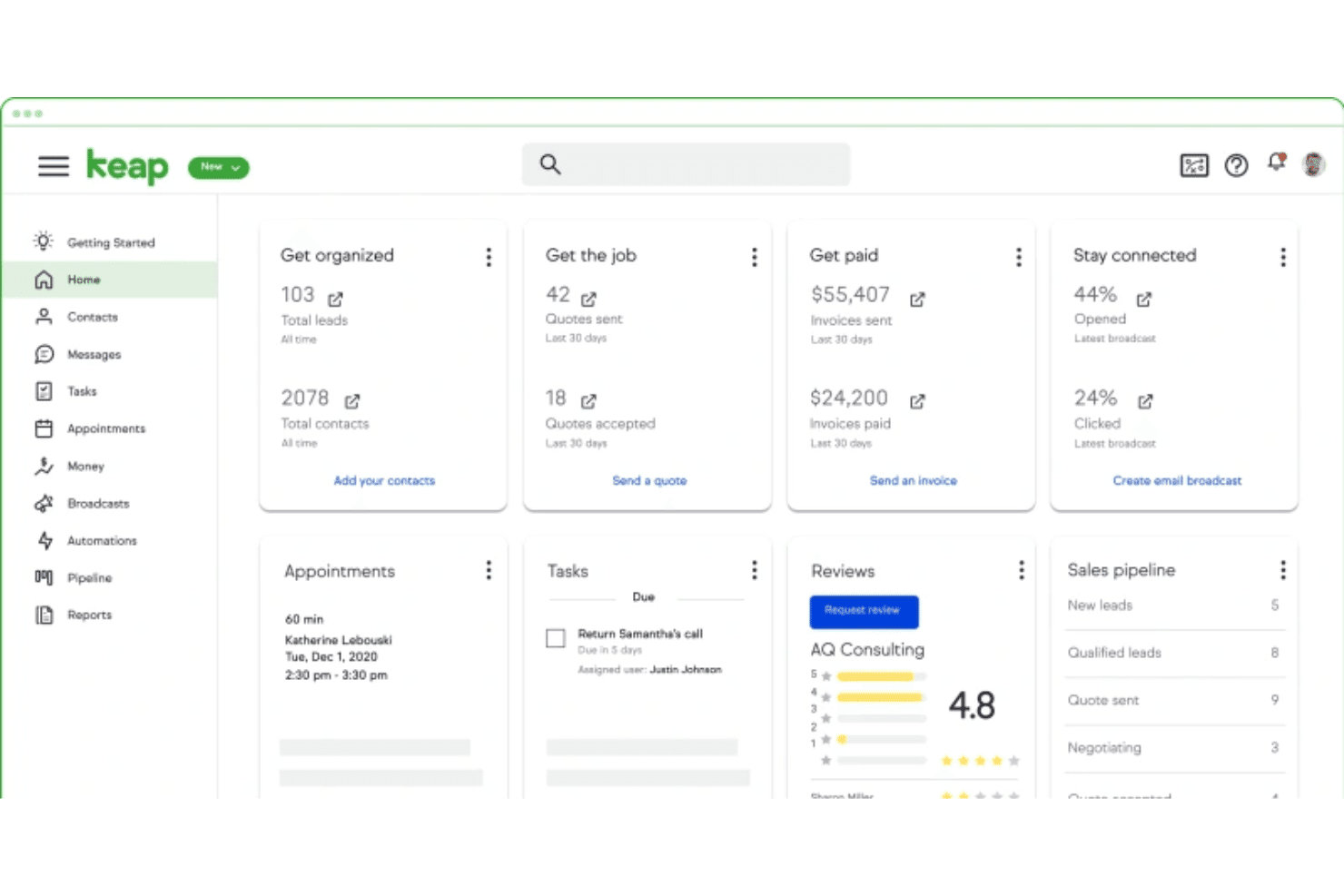
Keap stands out for its clean interface and guided setup that helps non-technical users get started fast. Drag-and-drop pipelines, easy appointment scheduling, and in-app tutorials make organizing contacts and automating tasks straightforward. Many users say onboarding support is a real differentiator, making day-to-day use less intimidating and more productive.
Integrations
Keap integrates with tools like QuickBooks, Gmail, Outlook, PayPal, and other business apps, with additional connections available through Zapier for platforms such as Shopify, Xero, BigCommerce, and more.
Keap also offers an open API, allowing businesses to build custom integrations and extend functionality.

Keap Specs
- A/B Testing: Yes
- Analytics: Yes
- API: Yes
- Audience Targeting: Yes
- Automated Conversion: Yes
- Batch Permissions & Access: No
- Behavioral Tracking: Yes
- Brand Management: No
- Campaign Management: Yes
- Contact Management: Yes
- Contact Sharing: Yes
- Conversion Tracking: Yes
- CRM Integration: Yes
- Customer Management: Yes
- Dashboards: Yes
- Data Export: Yes
- Data Import: Yes
- Email Integration: Yes
- External Integrations: Yes
- Keyword Tracking: No
- Landing Pages: Yes
- Lead Management: Yes
- Lead Scoring: Yes
- Link Tracking: Yes
- Marketing Automation: Yes
- Multi-User: Yes
- Notifications: Yes
- Password & Access Management: Yes
- Social-Media Integration: No


