

Creatio CRM vs. Salesforce CRM: Vergleich und Bewertungen für 2026
Creatio CRM und Salesforce CRM unterstützen beide komplexe Umsatzprozesse, verfolgen jedoch unterschiedliche Ansätze bei KI, Automatisierung und Anpassung. Erfahren Sie, welches CRM besser zu Ihren Teams, Workflows und Wachstumsplänen passt.

Wir bewerten Tools unabhängig, und Provisionen helfen, unsere Tests zu finanzieren. Sehen Sie unsere transparente Richtlinie, unsere Methodik oder schlagen Sie ein Tool vor.
CRM complexity tends to creep in as revenue teams grow. Sales, marketing, and service processes become harder to coordinate, automation gets more complicated, and teams need more than a system that simply stores customer data.
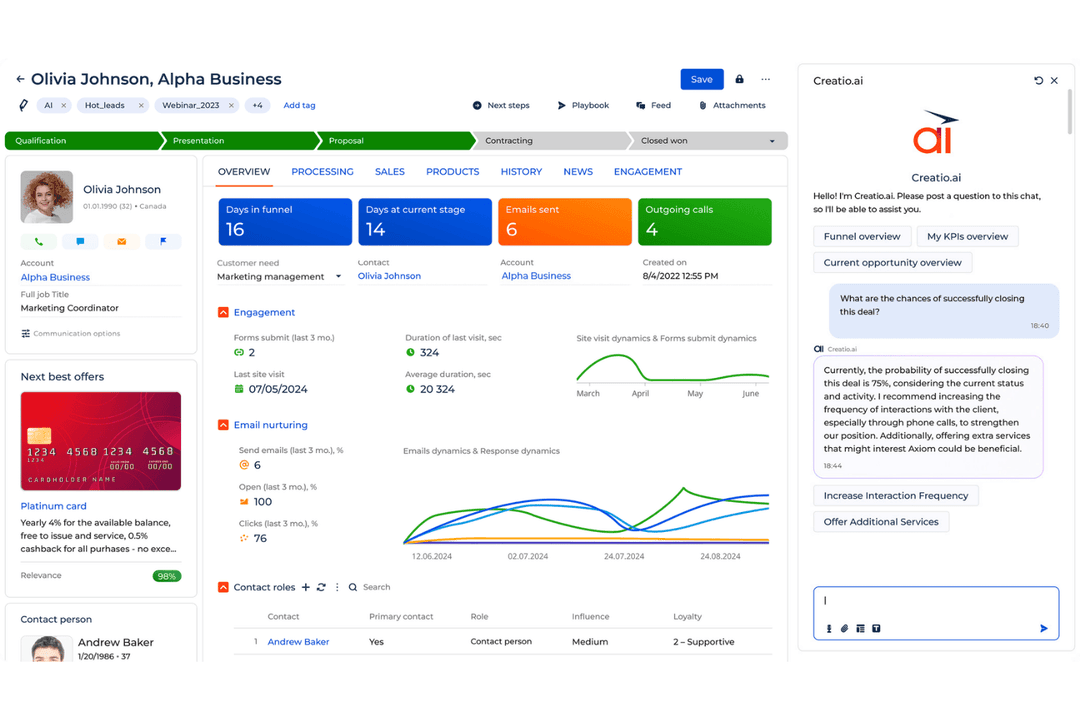
That makes choosing between Creatio CRM and Salesforce CRM less straightforward. Both are CRM software options, but Creatio positions itself as an AI CRM and workflow platform for marketing, sales, and service, while Salesforce CRM takes an Agentic CRM approach centered on AI agents, customer data, and automation.
In this comparison, I’ll break down Creatio CRM vs. Salesforce CRM across features, pricing, usability, security, and best use cases.
Creatio CRM
4.7/5
- 14-day free trial
- From $40/user/month (billed annually)
Salesforce CRM
4.2/5
- 30-day free trial
- From $25/user/month
Warum Sie unseren Software-Empfehlungen vertrauen können
6,700+
Reviews
20
Industry experts
16+
Evaluation factors
14
Years
Unsere Bewertungen spiegeln unser unabhängiges Urteilsvermögen wider – keine Verkaufsstrategie. Erfahren Sie, wie wir transparent bleiben.
Für diesen Leitfaden haben wir Tools mithilfe von praktischen Tests und unabhängiger Recherche bewertet und dabei unsere Bewertungskriterien angewendet.
Unsere Bewertungen spiegeln unser menschliches redaktionelles Urteilsvermögen wider, keine Verkaufsstrategie.
| Creatio CRM | Salesforce CRM | |
|---|---|---|
| Free Trial | 14-day free trial | 30-day free trial |
| Pricing | From $40/user/month (billed annually) | From $25/user/month |
Preise und versteckte Kosten von Creatio CRM im Vergleich zu Salesforce CRM
Creatio CRM verwendet ein modulares Preismodell, mit dem Unternehmen Plattform- und CRM-Funktionen entsprechend ihren Anforderungen kombinieren können, während Salesforce CRM einer abgestuften Struktur folgt, bei der zusätzliche Produkte, KI-Funktionen und Support hinzugefügt werden, wenn die Anforderungen steigen. Die Kosten von Creatio können durch Implementierung, Integrationen, Migration und Support steigen; außerdem gilt eine jährliche Mindestabnahme sowie ein standardmäßiger Vertrag mit einer Laufzeit von drei Jahren. Salesforce CRM kann teurer werden, wenn Teams erweiterte KI-Funktionen, Premium-Support, Integrationen und andere Funktionen für Unternehmen hinzufügen.
Die Entscheidung zwischen den beiden Lösungen hängt weitgehend davon ab, ob Sie den stärker kombinierbaren Ansatz von Creatio CRM oder das abgestufte Ökosystem von Salesforce CRM bevorzugen – und davon, wie viel Komplexität, Anpassung und KI-Nutzung Sie bei wachsender Bereitstellung erwarten.
| Creatio CRM | Salesforce CRM | |
|---|---|---|
| 2-Factor Authentication | Yes | Yes |
| API | Yes | Yes |
| Calendar Management | Yes | Yes |
| Call Tracking | Yes | Yes |
| Campaign Management | Yes | Yes |
| Click-to-Dial | Yes | Yes |
| Contact Management | Yes | Yes |
| Contact Sharing | Yes | Yes |
| Custom Data Forms | Yes | Yes |
| Customer Management | Yes | Yes |
| Dashboard | Yes | Yes |
| Data Export | Yes | Yes |
| Data Import | Yes | Yes |
| Data Visualization | Yes | Yes |
| Email Integration | Yes | Yes |
| External Integrations | Yes | Yes |
| File Sharing | Yes | Yes |
| File Transfer | Yes | Yes |
| Google Apps Integration | Yes | Yes |
| Lead Management | Yes | Yes |
| Lead Scoring | Yes | Yes |
| Marketing Automation | Yes | No |
| Mobile App | Yes | Yes |
| Multi-User | Yes | Yes |
| Notifications | Yes | Yes |
| Pipeline Management | Yes | Yes |
| Sales Automation | Yes | Yes |
| Scheduling | Yes | Yes |
| Social-Media Integration | Yes | No |
| Task Scheduling/Tracking | Yes | Yes |
| Third-Party Plugins/Add-Ons | Yes | Yes |
| Integration | Creatio CRM | Salesforce CRM |
|---|---|---|
| IntegrationMicrosoft Outlook | Creatio CRM✅ | Salesforce CRM✅ |
| IntegrationGmail | Creatio CRM✅ | Salesforce CRM✅ |
| IntegrationMailchimp | Creatio CRM✅ | Salesforce CRM✅ |
| IntegrationDocuSign | Creatio CRM✅ | Salesforce CRM✅ |
| IntegrationMicrosoft Teams | Creatio CRM✅ | Salesforce CRM✅ |
| IntegrationHubSpot | Creatio CRM✅ | Salesforce CRM✅ |
| IntegrationQuickBooks | Creatio CRM✅ | Salesforce CRM✅ |
| IntegrationShopify | Creatio CRM✅ | Salesforce CRM✅ |
| IntegrationMicrosoft Exchange | Creatio CRM✅ | Salesforce CRM✅ |
| IntegrationZoom | Creatio CRM✅ | Salesforce CRM✅ |
| IntegrationAPI | Creatio CRM✅ | Salesforce CRM✅ |
| IntegrationZapier | Creatio CRM✅ | Salesforce CRM✅ |
Sowohl Creatio CRM als auch Salesforce CRM unterstützen umfassende Integrationsökosysteme, gehen bei der Erweiterbarkeit jedoch unterschiedlich vor. Creatio legt den Schwerpunkt auf die Verbindung von CRM, Workflow-Automatisierung und externen Systemen durch native Integrationen, APIs und Marketplace-Apps, während Salesforce CRM auf sein großes AppExchange-Ökosystem und eine umfassende Plattformanbindung setzt. Insgesamt eignet sich Creatio besonders für Teams, die Integrationen eng mit konfigurierbaren Geschäfts-Workflows verknüpfen möchten, während Salesforce eine breite Kompatibilität für Unternehmen bietet, die bereits mit einem umfangreichen Technologie-Stack arbeiten.
| Faktor | Creatio CRM | Salesforce CRM |
|---|---|---|
| FaktorDatenverschlüsselung | Creatio CRMVerschlüsselt Daten während der Übertragung und im Ruhezustand und bietet Kontrollen zur Unterstützung sicherer Cloud- und lokalen Bereitstellungen. | Salesforce CRMVerschlüsselt Daten während der Übertragung und bietet erweiterte Verschlüsselungsoptionen für sensible Daten. |
| FaktorRegulatorische Compliance | Creatio CRMVerfügt über SOC-2-Typ-II- und ISO/IEC-27001-Zertifizierungen sowie Kontrollen zur Unterstützung der DSGVO-Anforderungen. | Salesforce CRMUnterstützt eine breite Palette von Compliance-Rahmenwerken und Zertifizierungen für Unternehmen. |
| FaktorZugriffskontrollen | Creatio CRMUnterstützt SAML-2.0-SSO, MFA und eine granulare rollenbasierte Zugriffskontrolle auf Objekt-, Datensatz- und Betriebsebene. | Salesforce CRMUnterstützt SSO, MFA, Rollen, Berechtigungssätze und granulare Freigabekontrollen. |
| FaktorAuditierung & Governance | Creatio CRMProtokolliert administrative Aktivitäten und Datenaktivitäten und umfasst ein KI-Vertrauens- und Governance-Rahmenwerk für Zugriff, Auditierbarkeit und Erklärbarkeit. | Salesforce CRMBietet Audit-Protokollierung und zusätzliche Überwachung durch seine Sicherheitstools für Unternehmen. |
| FaktorDatenresidenz & Zuverlässigkeit | Creatio CRMBietet mehrere AWS- und Microsoft-Azure-Regionen, lokale Bereitstellung und Cloud-SLAs auf Unternehmensniveau. | Salesforce CRMWird über die globale Cloud-Infrastruktur von Salesforce betrieben, mit Dienstüberwachung durch Salesforce Trust. |
Insgesamt legt Creatio CRM den Schwerpunkt auf granulare Zugriffskontrollen, flexible Bereitstellung und KI-Governance, unterstützt durch SOC-2-Typ-II- und ISO/IEC-27001-Zertifizierungen. Salesforce CRM hingegen konzentriert sich auf cloudbasierte Sicherheit, Compliance-Kontrollen und eine zentrale Dienstüberwachung. Beide Lösungen bieten eine solide Grundlage für die Sicherheit in Unternehmen, Creatio bietet jedoch mehr Flexibilität bei der Datenresidenz und der lokalen Bereitstellung.
| Faktor | Creatio CRM | Salesforce CRM |
|---|---|---|
| FaktorBenutzeroberfläche | Creatio CRMKonfigurierbare Benutzeroberfläche mit visuellen Werkzeugen ohne Code, mit denen Teams Seiten, Workflows und Arbeitsbereiche an verschiedene Rollen anpassen können. | Salesforce CRMFunktionsreiche Benutzeroberfläche mit umfangreichen Anpassungsmöglichkeiten, die jedoch bei wachsenden Implementierungen dichter wirken kann. |
| FaktorEinarbeitung | Creatio CRMSetzt in der Regel auf eine geführte Implementierung, wobei die Creatio Academy Dokumentation, Kurse und Lernpfade für die kontinuierliche Schulung bereitstellt. | Salesforce CRMBietet umfangreiche Möglichkeiten zum selbstständigen Lernen über Trailhead sowie Ressourcen für Implementierung und Support. |
| FaktorErsteinrichtung | Creatio CRMDie Konfiguration ohne Code reduziert den Entwicklungsaufwand, wobei komplexe Workflows, Integrationen und Migrationen weiterhin geplant werden müssen. | Salesforce CRMFür grundlegende Konfigurationen können deklarative Werkzeuge verwendet werden, während größere Implementierungen häufig speziellere Administrator- oder technische Kenntnisse erfordern. |
| FaktorLaufender Support | Creatio CRMVerbindet direkten technischen Support mit der Creatio Academy und der Benutzer-Community, wobei der Umfang je nach Supportstufe variiert. | Salesforce CRMBietet Dokumentation, Community-Ressourcen und erweiterten Support über höherwertige Success-Pläne. |
| FaktorMobiles Nutzungserlebnis | Creatio CRMBietet über konfigurierbare iOS- und Android-Apps mobilen Zugriff auf CRM-Daten und Workflows. | Salesforce CRMBietet eine voll ausgestattete mobile CRM-App mit Zugriff auf Kundendaten, Workflows und KI-Funktionen. |
Im Hinblick auf die Benutzerfreundlichkeit konzentriert sich Creatio CRM auf die Konfiguration ohne Code, visuelle Workflows und eine geführte Implementierung, um komplexe CRM-Prozesse für Geschäftsteams leichter handhabbar zu machen. Salesforce CRM bietet umfangreiche Konfigurationsmöglichkeiten, Schulungsressourcen und Verwaltungstools, die bei zunehmendem Umfang der Bereitstellungen mehr Einrichtung und laufende Verwaltung erfordern können. Teams, die Workflows mit geringerer Beteiligung von Entwicklern anpassen möchten, könnten Creatio im täglichen Management als einfacher empfinden, während Organisationen, die bereits in Salesforce investiert haben, von der Vertrautheit mit den vorhandenen Tools und Prozessen profitieren können.
Creatio CRM
- No-code tools let revenue teams adapt sales, marketing, and service workflows without relying on developers for every change.
- Predictive, generative, and agentic AI can assist with lead response, recommendations, forecasting, and routine CRM work.
- Flexible workflows, custom objects, applications, and integrations make Creatio well suited to complex enterprise CRM environments.
- Highly configurable implementations require more upfront planning around workflows, data models, integrations, and user experiences.
- Administrators and power users may need time to learn Creatio’s no-code development and process automation capabilities.
- Smaller teams with basic contact management or pipeline needs may find the platform broader than necessary.
Salesforce CRM
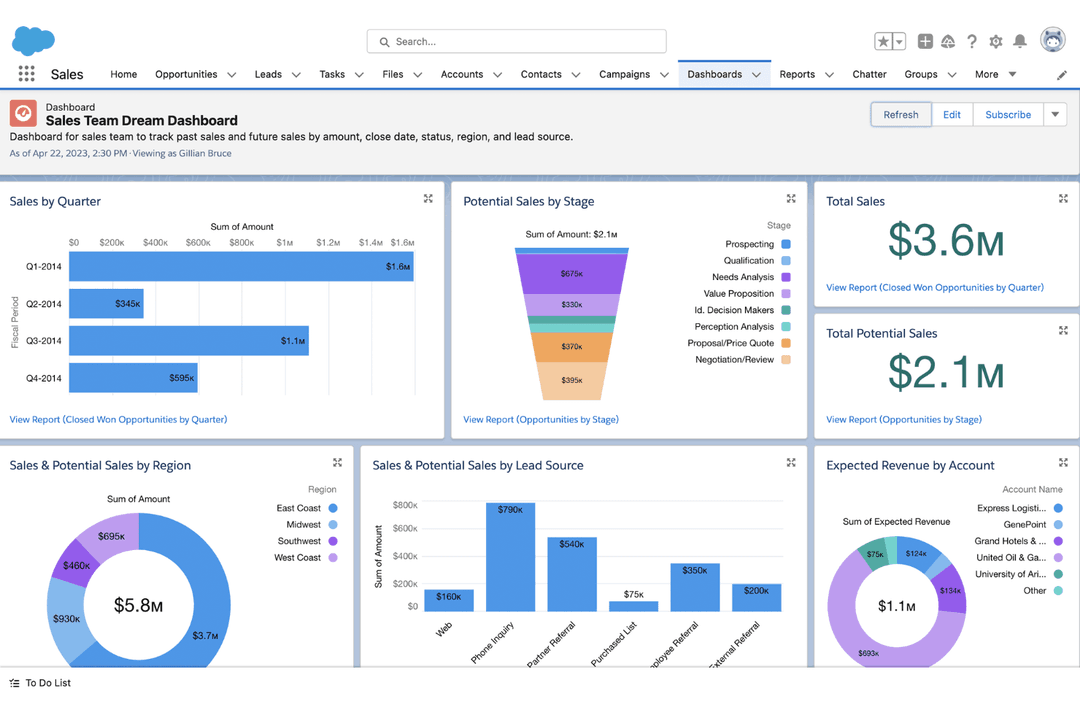
- Customizable dashboards let your team tailor views to fit specific needs.
- The advanced reporting tools help you analyze customer data and other key metrics to make informed decisions.
- Its automation features save you time by reducing repetitive tasks.
- The interface can be overwhelming for new users.
- Setup and customization have a learning curve.
- Some users find navigation less intuitive compared to other CRM systems, such as HubSpot.
Creatio CRM
- Banking and Financial ServicesBanks, credit unions, insurers, and mortgage providers can use Creatio to automate customer-facing workflows across sales, marketing, and service.
- Manufacturing and DistributionManufacturers and distributors can use Creatio to manage complex account relationships and automate sales and service processes across teams.
- Telecom CompaniesTelecom organizations can use Creatio to manage high-volume customer interactions and coordinate sales and service workflows across channels.
- Retail and Consumer GoodsRetail and CPG teams can use Creatio for customer segmentation, campaign management, engagement, and service workflows across brands and markets.
- High-Tech and Business ServicesB2B teams with longer sales cycles can use Creatio to manage opportunities, automate handoffs, and maintain visibility across revenue functions.
- Large Multi-Team EnterprisesEnterprises can use Creatio to connect sales, marketing, and service teams through shared customer data, configurable workflows, and AI automation.
Salesforce CRM
- Large EnterprisesSalesforce CRM's advanced customization and data management capabilities are ideal for large companies needing detailed analytics and reporting.
- Health Care IndustryIts ability to handle complex data and compliance needs makes Salesforce CRM a strong choice for health care organizations.
- Finance SectorWith detailed reporting tools, Salesforce CRM helps finance teams track and analyze transactions effectively.
- Sales TeamsAutomation features in Salesforce CRM save time by reducing repetitive tasks, boosting sales productivity.
- Marketing DepartmentsSalesforce CRM's analytics tools and pre-built email templates can assist teams with marketing campaigns.
- Tech StartupsFor tech startups needing flexibility and scalability, Salesforce CRM offers extensive customization options to grow with your business.
Wer sollte Creatio CRM verwenden und wer Salesforce CRM?
Creatio CRM eignet sich gut für mittelständische und große Unternehmen, die konfigurierbare Workflows für Vertrieb, Marketing und Service benötigen, ohne stark auf individuelle Entwicklung angewiesen zu sein. Die Kombination aus KI, Automatisierung ohne Code und flexibler Prozessgestaltung eignet sich gut für Teams, die komplexe oder sich weiterentwickelnde Umsatzprozesse verwalten.
Salesforce CRM eignet sich dagegen für große Unternehmen in Branchen wie Finanzwesen, Gesundheitswesen und Technologie, die erweiterte Anpassungsmöglichkeiten, Berichte und komplexe Datenintegrationen benötigen. Es ist besonders sinnvoll für Organisationen mit eigenen Salesforce-Administratoren oder technischen Ressourcen, die Einrichtung und laufende Konfiguration verwalten können.
| Creatio CRM | Salesforce CRM | |
|---|---|---|
| AI Workflow Model | Creatio CRM Orchestrates people and AI agents in the same workflows, with agents able to assist users or execute defined processes autonomously. | Salesforce CRM Uses Agentforce to connect AI agents with CRM data, workflows, and business logic. |
| Customization | Creatio CRM Combines CRM, AI, workflow automation, and no-code development, letting teams adapt apps, data models, and processes visually. | Salesforce CRM Supports extensive configuration through tools like Flow, with complex requirements sometimes involving Apex or specialist admins. |
| Deployment Options | Creatio CRM Supports cloud deployment across multiple regions as well as on-premises deployment. | Salesforce CRM Delivered as a cloud-based CRM platform. |
| Industry Approach | Creatio CRM Uses one CRM platform with industry-specific workflows and solutions that can be further customized with no-code tools. | Salesforce CRM Offers dedicated industry clouds with prebuilt data models, workflows, and specialized functionality. |
| Scaling Model | Creatio CRM Emphasizes an Unlimited model with no caps on users, agents, workflows, applications, custom objects, or API calls. | Salesforce CRM Primarily scales through product editions, user licenses, add-ons, and usage-based services. |
| Core CRM Coverage | Both support sales, marketing, and service processes, including customer data, lead and opportunity management, and service workflows. |
|---|---|
| Mobile Access | Both provide mobile CRM apps so users can access customer data and workflows away from their desks. |
| Reporting & Analytics | Both provide dashboards, reporting, forecasting, and analytics for monitoring pipeline and customer-facing performance. |
| Security & Compliance | Both include enterprise security controls such as encryption, access management, audit capabilities, and support for major compliance requirements. |
| Training & Support | Both offer documentation, learning resources, user communities, and additional support options for implementation and ongoing use. |