

Mobil CRM, telefonunuzda veya tabletinizde kullanabileceğiniz; anlaşmaları takip etmenizi, kişileri yönetmenizi ve nerede çalışırsanız çalışın müşteri verilerine erişmenizi sağlayan bir müşteri ilişkileri yönetimi aracıdır. En iyi mobil CRM’i arıyorsanız yüz yüze toplantılar, takip işlemleri ve sürekli iletişim arasında çalışan hızlı hareket eden satış ekipleri için tasarlanmış seçeneklere ihtiyacınız vardır. Kaçırılan fırsatlar, dağınık notlar ve yavaş güncellemeler, özellikle ofis dışındayken, gerçek gelir kaybına neden olur. Bu rehber, iş akışınıza uyan, satış hattınızın ilerlemesini sağlayan ve ekibinizin hâlihazırda güvendiği araçlarla entegre olan bir çözüm seçmenize yardımcı olacaktır.
Why Trust Our Software Recommendations
6,700+
Reviews
20
Industry experts
16+
Evaluation factors
14
Years
Our reviews reflect our independent judgment—not a sales pitch. Learn how we stay transparent.
For this guide, we evaluated tools using hands-on testing and independent research, scoring tools using our selection criteria.
Our reviews reflect our human editorial judgment, not a sales pitch.
Mobil CRM Karşılaştırma Tablosu
Aşağıdaki tabloda en iyi mobil CRM seçimlerimin fiyatlandırma ayrıntıları karşılaştırılmaktadır.
Score legend (out of 5)
- Excellent4.5–5
- Good4–4.4
- Average3–3.9
- Below average2–2.9
- Poor1–1.9
Sorted by: Default
| Tool | Starting Price | Website | |||||||
|---|---|---|---|---|---|---|---|---|---|
Best for action-focused contact management | Not rated | 5 | Not rated | 5 | 4 | 3 | 5 | $9.95/user/month 21-day free trial | Website |
Best for visualizing sales pipelines | 4.5 out of 5 | 4 | 5 | 5 | 4 | 5 | 4 | $14/user/month 14-day free trial | Website |
Best for project and relationship linking | 3.5 out of 5 | 4 | 2 | 4 | 4 | 3 | 4 | $29/user/month 14-day free trial | Website |
Best for offline database access | 3.2 out of 5 | 4 | 1 | 3 | 3 | 4 | 4 | $30/user/month 14-day free trial + free demo available | Website |
Best for in-app calling and messaging | 4.5 out of 5 | 4 | 4 | 5 | 5 | 4 | 5 | $9/user/month 21-day free trial | Website |
Best for cross-department data alignment | 3.8 out of 5 | 4 | 2 | 5 | 4 | 3 | 5 | $7/user/month Free plan available | Website |
Best for automated email harvesting | Not rated | 5 | Not rated | 5 | 4 | 4 | 5 | $9.95/user/month 21-day free trial | Website |
Best for native telephony integration | 4.0 out of 5 | 4 | 1 | 5 | 5 | 4 | 5 | $69/month Free plan available | Website |
Best for AI-powered lead scoring | 4.5 out of 5 | 5 | 4 | 5 | 4 | 4 | 5 | $9/user/month 21-day free trial + free demo available | Website |
Best for enterprise revenue forecasting | 4.7 out of 5 | 5 | 3 | 5 | 5 | 5 | 5 | $25/user/month 30-day free trial | Website |


En İyi Mobil CRM İncelemeleri
Aşağıda kısa listeme giren en iyi mobil CRM seçeneklerinin ayrıntılı özetlerini bulabilirsiniz. İncelemelerim, sizin için en iyi seçeneği bulmanıza yardımcı olmak amacıyla her platformun özelliklerine, en uygun kullanım alanlarına ve entegrasyonlarına ayrıntılı bir bakış sunmaktadır.
 Best for action-focused contact management
- 21-day free trial
- From $9.95/user/month (billed annually)
Visit WebsiteCustomer Rating:4.7/5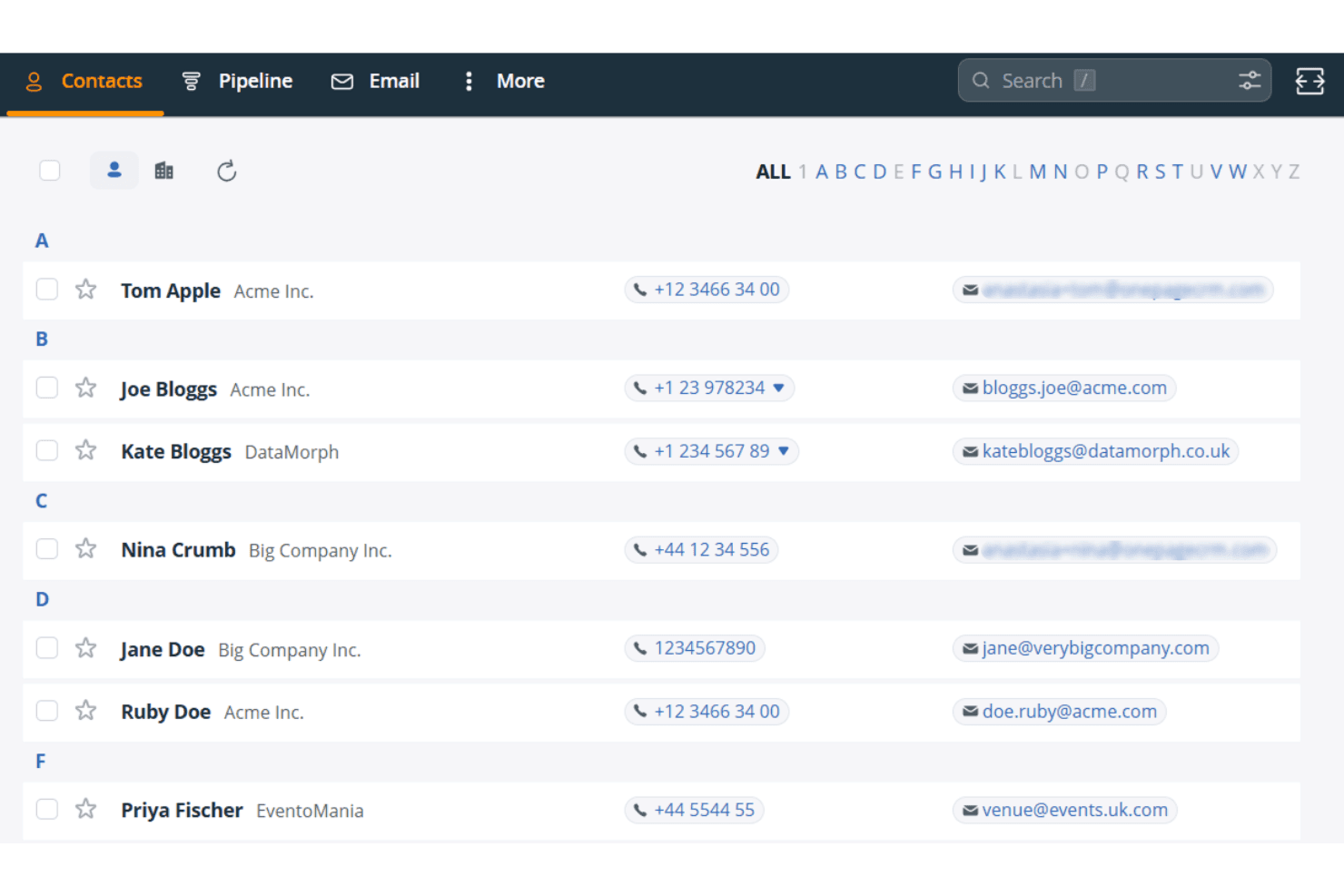
OnePageCRM organizes contacts alphabetically with phone and email details. OnePageCRM is a mobile CRM built around a prioritized action list, offering contact management, pipeline tracking, an AI-powered route planner, a built-in business card scanner, and a Speed Dialer for field sales teams.
Who Is OnePageCRM Best For?
OnePageCRM is a strong fit for field sales reps and small sales teams who need a no-fuss mobile CRM built around daily follow-up priorities.
Why I Picked OnePageCRM
OnePageCRM earns its spot on my shortlist because of how it structures daily selling around a prioritized action list rather than leaving reps to figure out who to call next. The Action Stream color-codes every contact by urgency and surfaces the total open deal value alongside each follow-up, so I can see at a glance whether I'm chasing a $500 deal or a $50,000 one. I also rely on the "On the Road" route planner, which pulls live traffic data to sequence field visits, then hands off to the Speed Dialer for back-to-back calls without manual lookup between each one.
OnePageCRM Key Features
- AI business card scanner: Captures field leads instantly by photographing a business card, which auto-populates a new CRM contact record.
- Voice-to-text note logging: Lets reps dictate notes hands-free directly into contact records after field interactions.
- Focus Mode: Hides contacts not due today with a single tap, keeping your view limited to urgent follow-ups.
- Sales Forecast View: Gives mobile access to pipeline forecasting data across all plan tiers, with no upgrade required.
OnePageCRM Integrations
OnePageCRM offers marketplace integrations with Gmail, Google Calendar, Outlook Calendar, Aircall, Mailchimp, QuickBooks, and Xero. It also supports API access, webhooks, Make.com, and Zapier on all plans.
Pros and Cons
Pros:
- Built-in business card scanner for instant capture
- Prioritized action list with deal value display
- Supports full mobile contact and deal editing
Cons:
- Text messages are not automatically logged
- No offline mobile access available
Learn more about OnePageCRM: Best for visualizing sales pipelines
- 14-day free trial
- From $14/user/month (billed annually)
Visit WebsiteCustomer Rating:4.4/5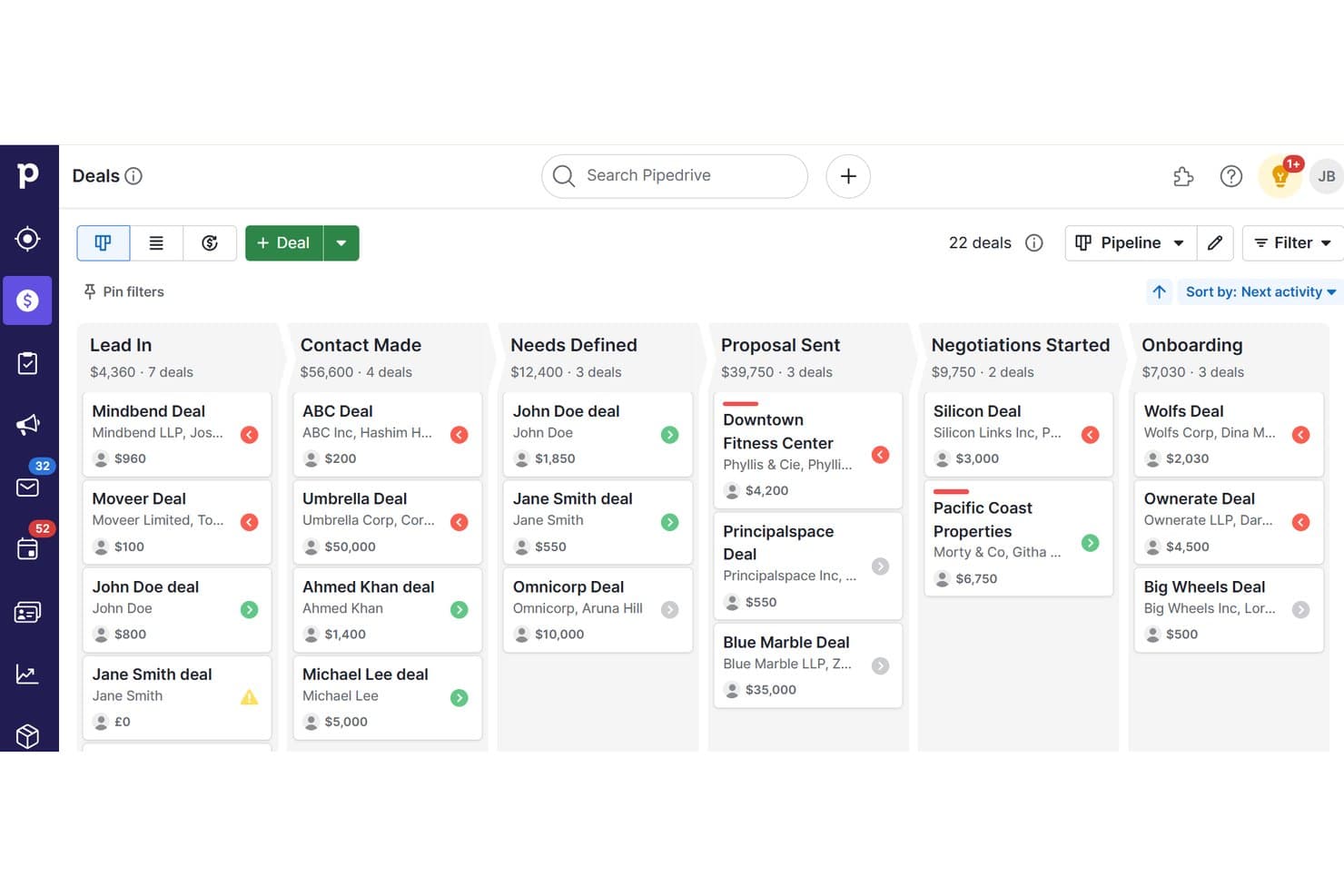
Pipedrive organizes deals across pipeline stages for mobile CRM tracking. Pipedrive is a sales CRM with native iOS and Android apps that gives field teams full pipeline management, offline deal tracking, geolocation-based contact discovery, built-in business card scanning, and voice note capture.
Who Is Pipedrive Best For?
Pipedrive is a strong fit for field sales reps who need to manage deals, log activity, and find nearby prospects without being tied to a desk.
Why I Picked Pipedrive
Pipedrive earns its spot on my shortlist because no other tool I've tested makes pipeline visualization as accessible on mobile as it does on desktop. I love that you can drag and drop deals between stages directly from your phone, with the forecast view available on Growth plans and above. The Nearby feature is what really sets it apart: it surfaces a map of contacts and prospects within 10 km of your current location, so field reps can fill gaps between meetings without opening a separate app.
Pipedrive Key Features
- Offline mode: Work without connectivity by moving deals, adding notes, and logging activities, with automatic sync when you reconnect.
- Business card scanner: Capture contact details on the spot using OCR scanning, review extracted data, and save directly to your CRM.
- Audio notes: Record voice notes and attach them to any deal or contact record directly from your phone.
- AI Sales Assistant: Receive deal prioritization tips, next-best-action suggestions, and performance coaching via push notifications on mobile.
Pipedrive Integrations
Pipedrive offers 500+ Marketplace integrations, including Slack, Microsoft Teams, Zoom, Aircall, Gmail, Outlook, Calendly, Gong, Mailchimp and PandaDoc. It also supports custom integrations through its open REST API, webhooks and Zapier.
Pros and Cons
Pros:
- Native business card scanner in mobile app
- Nearby geolocation feature for field reps
- Full-featured offline mode for mobile users
Cons:
- Performance issues with large deal volumes
- Advanced reporting dashboards desktop-only
Learn more about Pipedrive: Best for project and relationship linking
- 14-day free trial
- From $29/user/month (billed annually)
Visit WebsiteCustomer Rating:4.2/5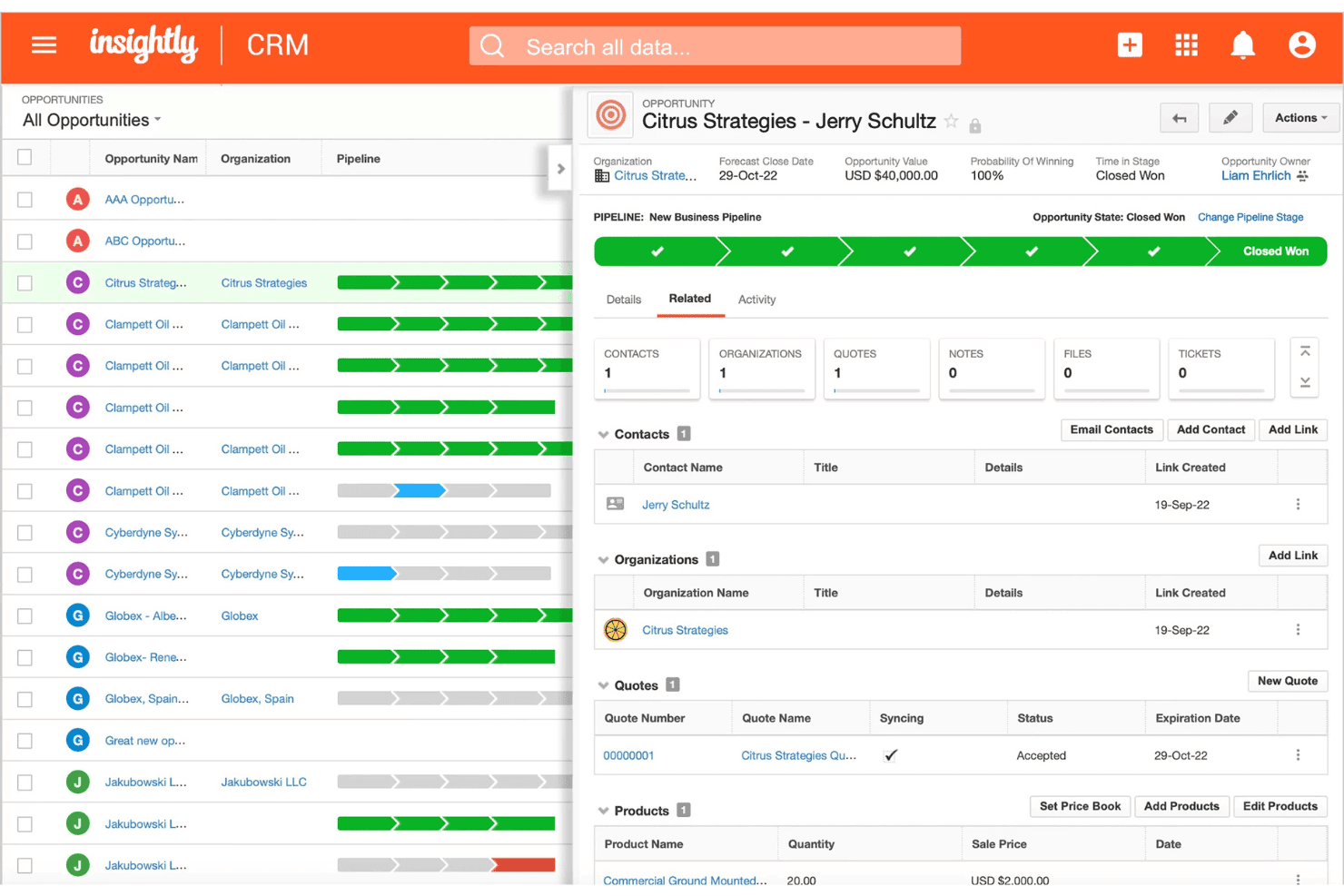
Insightly tracks opportunity pipelines with deal value and quote status. Insightly is a mobile CRM that connects contact management, pipeline tracking, opportunity management, and project linking across both iOS and Android apps.
Who Is Insightly Best For?
Insightly suits B2B teams that manage complex post-sale relationships, where connecting won deals to ongoing projects and tracking stakeholder roles is part of the everyday workflow.
Why I Picked Insightly
Insightly earns its spot on my shortlist because of how it handles the transition from closed deal to active project. When an opportunity is won, I can convert it directly into a linked project within the mobile app, with relationship roles like economic buyer and delivery owner preserved throughout. The built-in Business Card Scanner also lets me capture new contacts on the spot, with AI pulling the details into the record automatically.
Insightly Key Features
- Voice note recording: Capture meeting context hands-free by recording voice notes directly into contact or opportunity records from the mobile app.
- Drag-and-drop pipeline views: Manage deals across Kanban and Milestone views on mobile, with full drag-and-drop stage updates available on both iOS and Android.
- Dashboard parity: Any dashboard built on the desktop automatically appears in the mobile app with full fidelity, giving you consistent reporting visibility wherever you are.
- AI Copilot: Use natural language to look up records, draft follow-up emails, and update deals directly within the CRM interface.
Insightly Integrations
Insightly offers native integrations with Gmail, Microsoft Outlook, and Slack, plus AppConnect integrations with Salesloft, DocuSign, Asana, QuickBooks Online, Calendly, and ZoomInfo. Its REST API v3.1 supports custom integrations on all paid plans.
Pros and Cons
Pros:
- Built-in AI business card scanner
- Mobile dashboard parity with desktop views
- Converts deals into mobile-linked projects
Cons:
- No map-based account or route features
- Offline editing depth is unclear
 4Best for offline database access
Act!
- 14-day free trial + free demo available
- From $30/user/month (billed annually)
Visit WebsiteCustomer Rating:4/5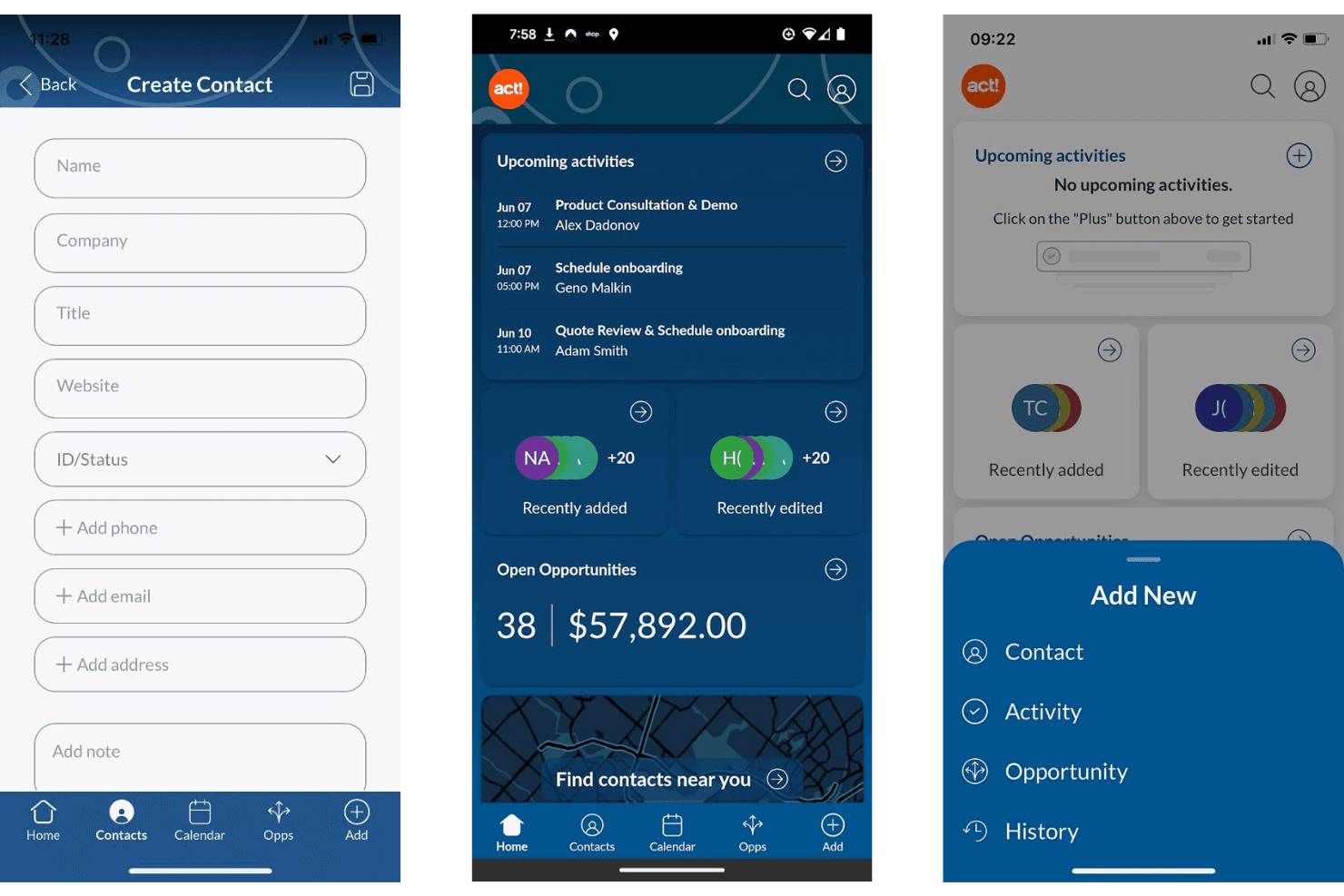
Act! lets users manage contacts, activities, and opportunities on mobile. Act! is a mobile CRM built for small businesses and field sales teams, offering contact and company management, pipeline tracking, activity logging, proximity search, and a business card scanner across iOS and Android.
Who Is Act! Best For?
Act! is a strong fit for small business field sales teams that need a structured CRM with mobile-friendly tools like proximity search and a business card scanner.
Why I Picked Act!
Act! earns its spot on my shortlist because of something genuinely rare in mobile CRM: a legitimate offline database story. The Act! Premium Desktop version lets you work from a locally installed database with no internet required, syncing changes back when you reconnect. I also like the proximity search, which lets field reps pull up contacts within a set radius of their current location, and the built-in business card scanner for logging new contacts on the spot.
Act! Key Features
- Notification center: Delivers push alerts for upcoming activities with snooze, reschedule, and dismiss options, including linked contact and company names for context.
- Multi-user calendar: Lets mobile users view and add activities to teammates' calendars directly from the app.
- Pipeline dashboard: Displays open deals with sortable views of deal count, value, age, and status, with the ability to edit or close opportunities on the go.
- Business card scanner: Uses built-in OCR to capture contact details from physical cards and create new records instantly from your mobile device.
Act! Integrations
Act! offers native integrations with Microsoft Outlook and Google Workspace for contact, calendar, and email sync, plus Microsoft Office connectivity. It also provides an open API for custom integrations and Zapier integrations.
Pros and Cons
Pros:
- Notification center supports activity reminders
- Proximity search helps plan sales visits
- Business card and QR code scanner included
Cons:
- Few modern RevOps integrations available
- No offline access in the mobile app
Learn more about Act!: Best for in-app calling and messaging
- 21-day free trial
- From $9/user/month (billed annually)
Visit WebsiteCustomer Rating:3.7/5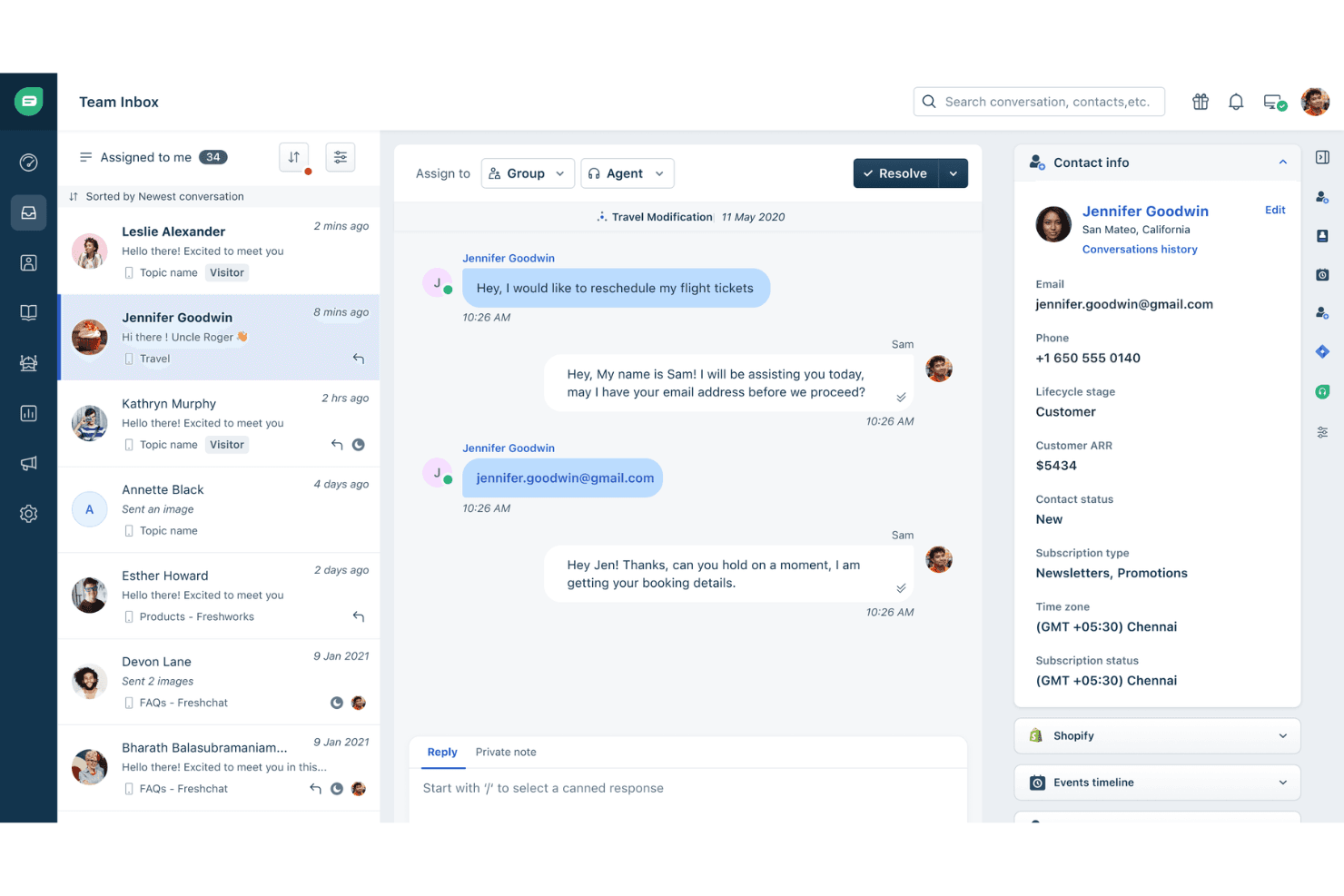
Freshworks centralizes customer conversations with contact details in one view. Freshsales is a mobile CRM built for field and remote sales teams, combining contact and deal management, AI-powered pipeline views, offline access, GPS check-ins, built-in calling, and multi-channel messaging in a single app.
Who Is Freshworks Best For?
Freshsales is a strong fit for field sales teams that rely on phone and messaging to move deals forward and need those tools built directly into their CRM.
Why I Picked Freshworks
Freshsales earns its spot on my shortlist because no other mobile CRM bundles this many communication channels into a single app as cleanly. I'm talking about a built-in dialer with call recording, WhatsApp Business, Apple Business Chat, and SMS, all logging back to the contact record automatically. What I particularly like is that a rep can finish a call, attach a voice note, and GPS check-in to a site visit without ever leaving the app.
Freshworks Key Features
- Freddy AI Kanban view: Groups deals by AI-predicted win probability so you can see which opportunities need attention before your next call.
- Business card scanner: Uses your device camera to capture card details and instantly create a contact record via the Quick Add button.
- GPS check-in: Logs your location when visiting a customer site, tagging the field visit directly to the relevant contact or account record.
- Offline mode: Lets you create, edit, and delete records across leads, contacts, deals, and tasks with no connection, then syncs automatically when you're back online.
Freshworks Integrations
Freshsales offers 100+ marketplace integrations, including Slack, Gmail, Outlook, Google Calendar, Freshdesk, Freshcaller, Gong, Zoom, and WhatsApp Business. It also supports an open REST API, webhooks, and Zapier.
Pros and Cons
Pros:
- Voice notes and GPS check-in for field reps
- Full offline access to core CRM modules
- Built-in in-app calling and messaging
Cons:
- No offline access for custom modules
- Only 100 records per view sync offline
Learn more about Freshworks: Best for cross-department data alignment
- Free plan available
- From $7/user/month (billed annually)
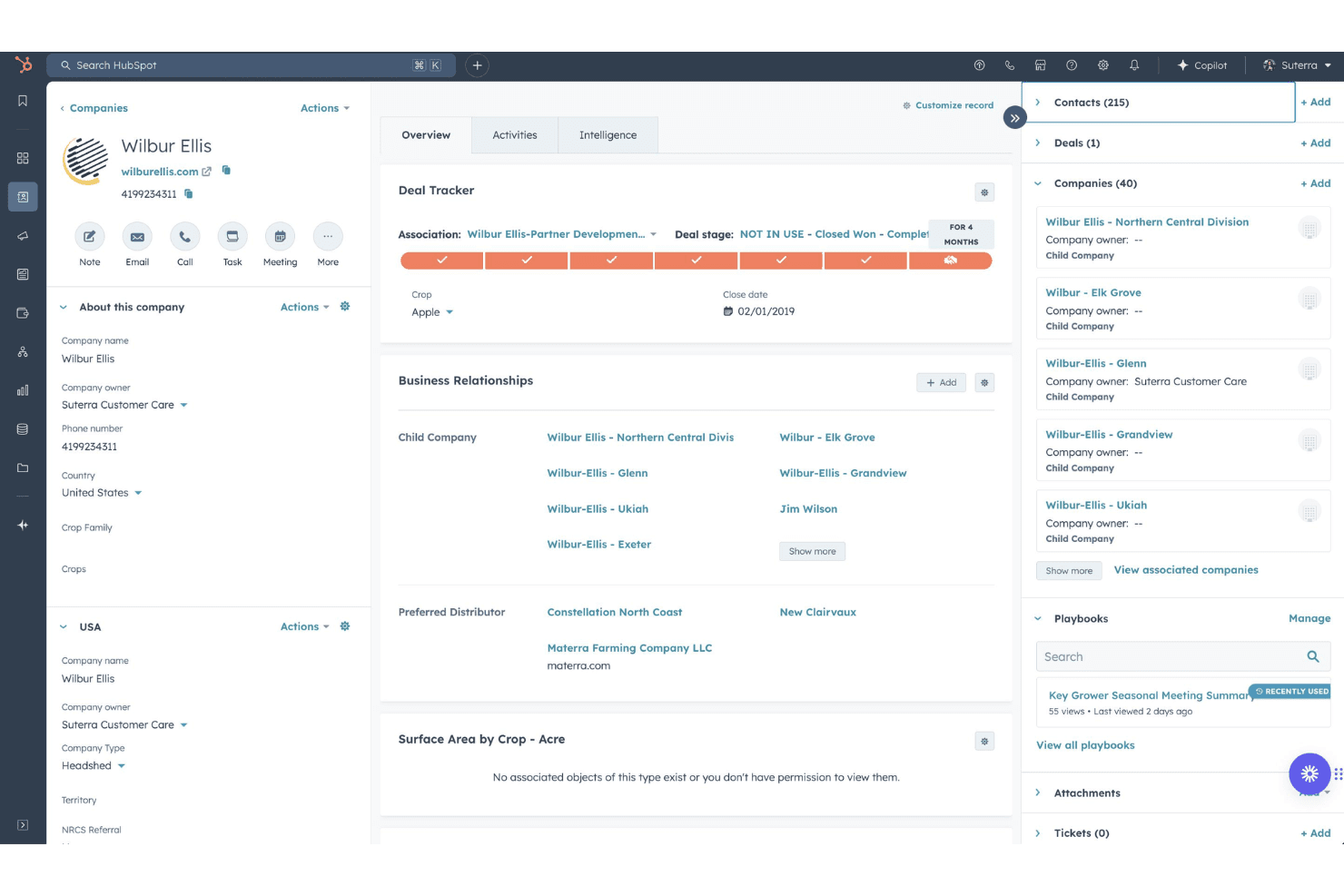
HubSpot Free CRM organizes company profiles with deals, contacts, and child companies. HubSpot Free CRM is a mobile-accessible CRM platform with native iOS and Android apps that spans sales, marketing, and customer success, offering contact management, pipeline tracking, in-app calling, activity logging, and AI-powered assistance via Breeze.
Who Is HubSpot Free CRM Best For?
HubSpot Free CRM suits revenue teams that need sales, marketing, and customer success data unified in one mobile-accessible platform.
Why I Picked HubSpot Free HubSpot CRM
HubSpot Free HubSpot CRM earns its spot on my list because no other tool I've tested spans sales, marketing, and customer success data from a single mobile app the way HubSpot does. I particularly like the Breeze Assistant, which is embedded across every screen and pulls live CRM context, so I can walk into a meeting with a full summary of the deal, open tickets, and recent activity without opening my laptop. The built-in business card scanner also logs and associates new contacts instantly, which keeps cross-department records clean from the first touchpoint.
HubSpot Free HubSpot CRM Key Features
- In-app calling with Caller ID: Make outbound calls directly from the app using HubSpot phone numbers, with incoming calls displaying linked CRM contact data automatically.
- Board view for pipeline management: A Kanban-style pipeline view lets you tap through deal stages and switch between multiple pipelines without leaving the mobile app.
- Push notifications and task alerts: Configurable push notifications surface task reminders, deal activity, and assignment alerts directly to your device.
- 2,000+ marketplace integrations: Connect HubSpot to tools like Gong, Outreach, Salesloft, Gmail, and Outlook via native integrations or the broader app marketplace.
HubSpot Free HubSpot CRM Integrations
HubSpot Free HubSpot CRM offers 2,000+ marketplace integrations, including Gong, Outreach, Salesloft, Gmail, Outlook, and Slack. Its open API and webhooks support custom connections, and Zapier is also available.
Pros and Cons
Pros:
- True cross-department CRM data access
- Built-in business card scanner is unlimited
- AI-powered assistant available on every screen
Cons:
- No native geolocation or route planning
- Offline editing capabilities are very limited
Learn more about HubSpot Free HubSpot CRM: Best for automated email harvesting
- 21-day free trial
- From $9.95/user/month (billed annually)
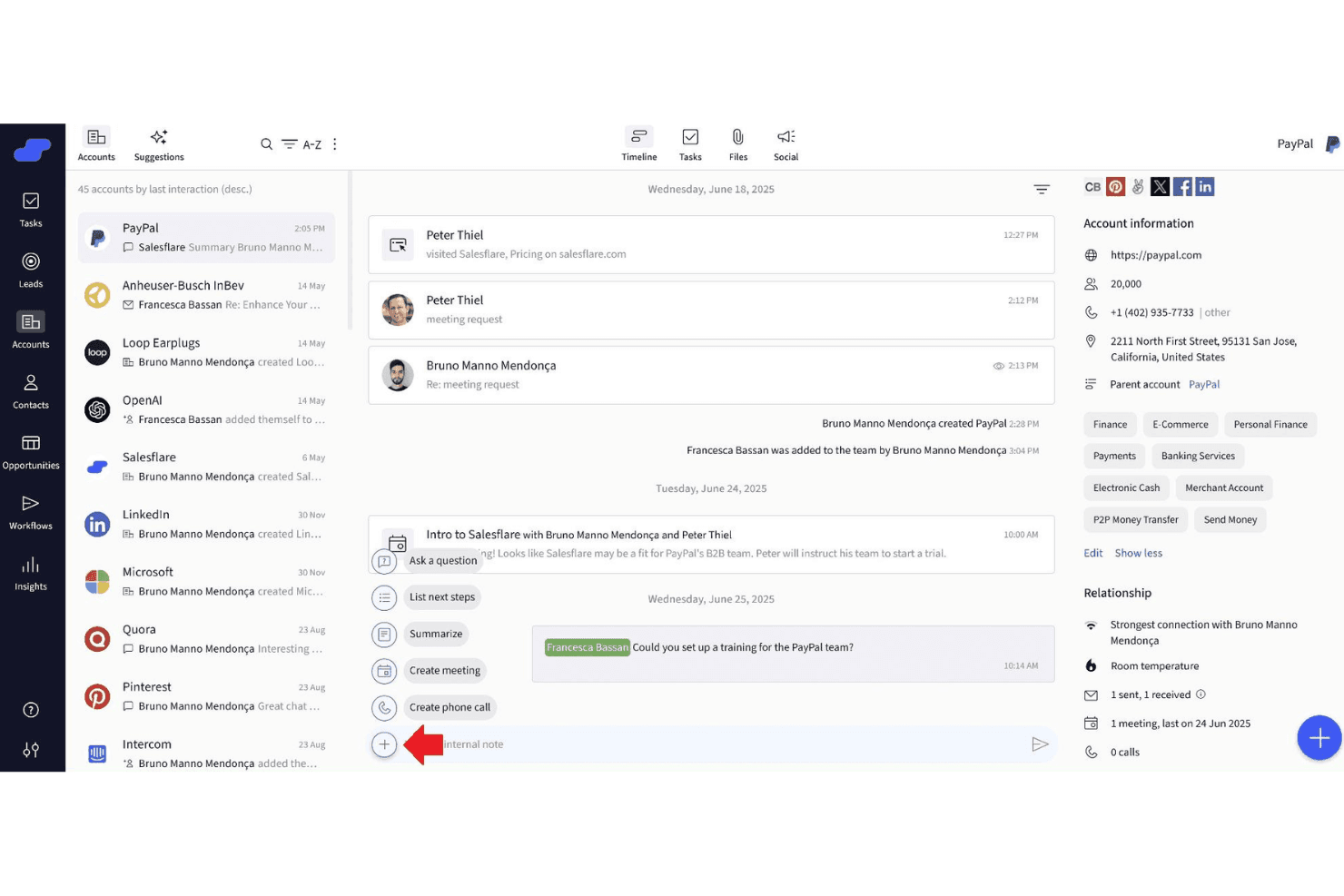
Salesflare centralizes account timelines, contacts, and AI actions in one view. OnePageCRM is a mobile CRM built for field sales teams, offering dual native apps with an AI-powered route planner, speed dialer, business card scanner, and action-based contact prioritization.
Who Is OnePageCRM Best For?
OnePageCRM is a strong fit for small field sales teams who need a mobile-first CRM with built-in route planning, speed dialing, and action-based contact prioritization.
Why I Picked OnePageCRM
OnePageCRM earns its spot on my shortlist because of how it handles automated email harvesting through its Lead Clipper browser extension and Apollo.io integration, which pull contact data and email addresses directly into CRM records without manual entry. I also love the AI Business Card Scanner built into the mobile app: snap a card after a field meeting and it instantly creates a contact record. The Action Stream then surfaces that new contact as a color-coded priority, so nothing slips after a busy day on the road.
OnePageCRM Key Features
- Action Stream prioritization: A color-coded task queue that flags overdue, due-today, and future follow-ups so you always know which contact needs attention first.
- Speed dialer: Lets you call a sequential list of prioritized contacts directly from the On the Road app, with post-call note prompts after each conversation.
- Sales Forecast View: A pipeline-level view available on all plans that shows projected revenue based on current deal stages and close dates.
- MCP-based AI logging: Connects OnePageCRM to AI assistants like ChatGPT and Claude so you can log calls, update deals, and set reminders using natural language prompts.
OnePageCRM Integrations
OnePageCRM offers 40+ marketplace integrations, including Gmail, Outlook, Google Calendar, WhatsApp, Mailchimp, ActiveCampaign, QuickBooks, Help Scout, Lead Clipper, and Apollo.io. It also supports Zapier, Make.com, an open REST API, and webhooks for custom integrations.
Pros and Cons
Pros:
- Built-in AI business card scanner
- Dual native mobile apps for field reps
- Automated email harvesting from web and Apollo
Cons:
- Lacks advanced reporting and analytics
- No offline access on any device
Learn more about Salesflare Mobile CRM App: Best for native telephony integration
- Free plan available
- From $69/month
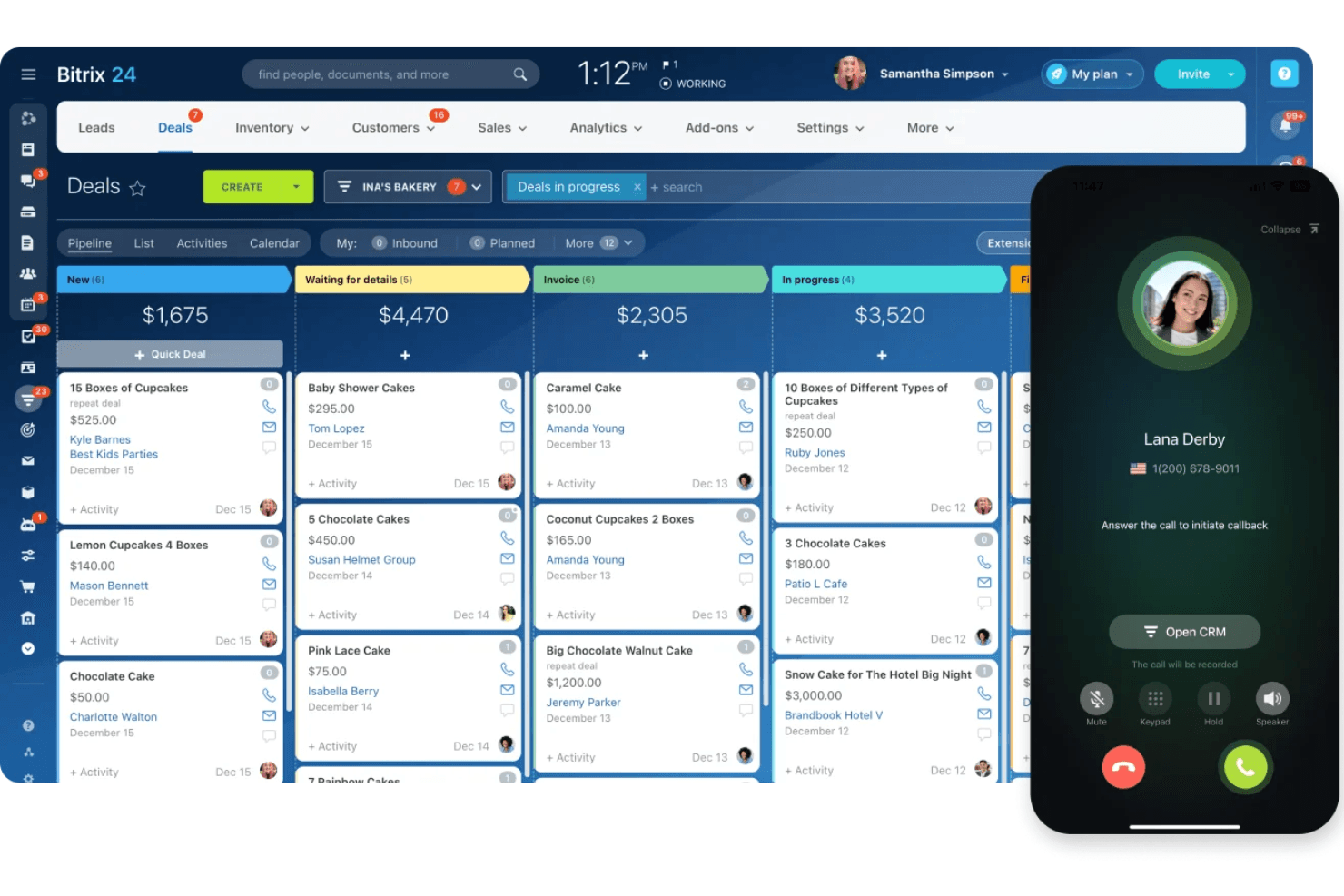
Bitrix24 manages deals and handles calls via mobile CRM. Bitrix24 Mobile CRM is a native mobile CRM app for iOS, Android, and Huawei that combines deal and pipeline management, built-in VoIP telephony, AI-powered call transcription, GPS check-ins, and omnichannel contact management in a single platform.
Who Is Bitrix24 Mobile CRM Best For?
Bitrix24 Mobile CRM is a strong fit for field sales teams that need built-in VoIP calling, AI call transcription, and deal management without a separate dialer app.
Why I Picked Bitrix24 Mobile CRM
Bitrix24 Mobile CRM earns its spot on my shortlist because its native VoIP telephony is built directly into every deal and contact record, with no external dialer needed. I can place a call, have it recorded and auto-logged, and get a CoPilot AI transcription linked to the deal, all from the mobile app. The AI also compares recorded calls against your sales scripts and surfaces coaching feedback, which is a genuine differentiator for field teams.
Bitrix24 Mobile CRM Key Features
- GPS check-in: Field reps can log client visits with time, location, and photo, all recorded directly in the activity timeline.
- Omnichannel inbox: Captures and consolidates messages from WhatsApp, Facebook Messenger, Instagram, email, and live chat in a single mobile view.
- Push notifications with Smart Notifications: Real-time alerts for deal updates, task assignments, and workflow triggers, with automatic suppression when you're active on desktop.
- Flat-rate pricing: Plans cover multiple users at a fixed monthly cost, so scaling your field team doesn't trigger per-seat pricing increases.
Bitrix24 Mobile CRM Integrations
Bitrix24 Mobile CRM offers native integrations with Gmail, Google Calendar, Microsoft 365, Google Drive, WhatsApp, Facebook Messenger, and Instagram. It also supports custom integrations through its REST API and Zapier.
Pros and Cons
Pros:
- Omnichannel inbox for all channels
- GPS check-ins for client visits
- Native VoIP calls with AI transcription
Cons:
- Business card scanning requires a companion app
- Offline access limited to viewing data
Learn more about Bitrix24 Mobile CRM: Best for AI-powered lead scoring
- 21-day free trial + free demo available
- From $9/user/month (billed annually)
Visit WebsiteCustomer Rating:4.5/5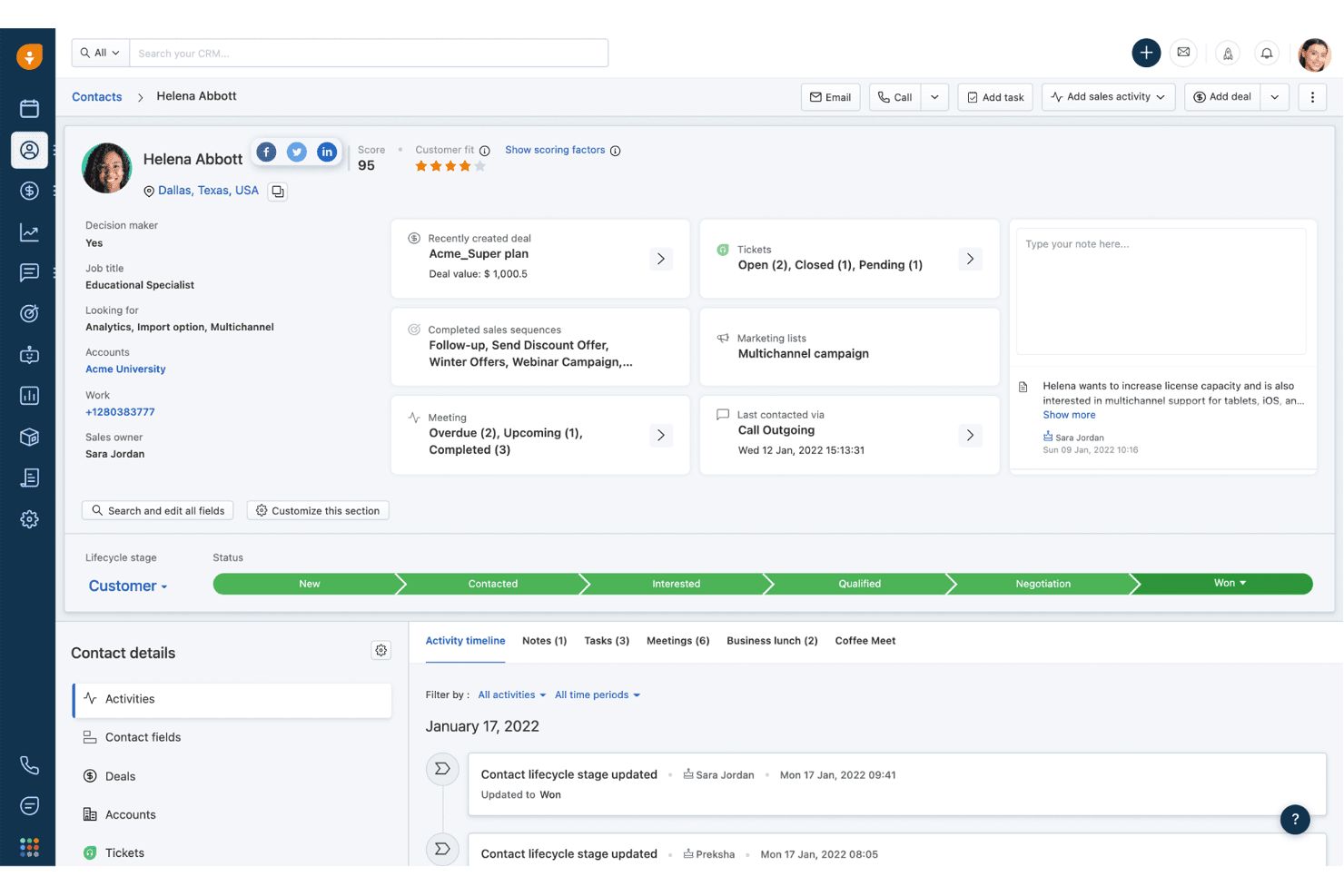
Freshsales tracks contact activity timelines and deal history in one view. Freshsales is a sales CRM with native iOS and Android apps that gives field teams access to contact management, deal pipelines, activity logging, voice notes with live transcription, GPS check-ins, and AI-powered lead scoring on the go.
Who Is Freshsales Best For?
Freshsales is a strong fit for field sales teams that need hands-free activity logging, AI lead scoring, and reliable offline access between client visits.
Why I Picked Freshsales
Freshsales earns its spot on my shortlist because Freddy AI's lead scoring doesn't just rank contacts—it pulls from your historical deal data to surface which leads are worth prioritizing before you walk into a meeting. I also love the live voice transcription on iOS, which lets field reps dictate notes in real time right after a call without typing anything. Pair that with GPS check-ins that work offline, and your team's activity data stays accurate even in low-signal areas.
Freshsales Key Features
- Business card scanner: Scan a card with your camera and the app auto-extracts contact details via OCR, creating a new record instantly.
- Offline read/write mode: Create and edit leads, contacts, deals, tasks, and notes without a connection, then sync when you're back online.
- Image-to-text notes: Capture up to three images per note and let the app transcribe the text automatically, no manual entry needed.
- Configurable push notifications: Set alerts for email opens, link clicks, deal updates, task reminders, and lead assignments directly in app settings.
Freshsales Integrations
Freshsales offers native integrations with Freshdesk, Freshchat, Freshcaller, Freshsuccess, Gmail, Outlook, Slack, and Gong, with Gong two-way sync on Enterprise. Its marketplace includes 100+ apps, and an open REST API supports custom integrations.
Pros and Cons
Pros:
- Offline editing and syncing for field access
- Live voice transcription for hands-free note capture
- Built-in OCR business card scanner for contacts
Cons:
- Business card scanner supports English only
- Reporting and analytics reliability concerns
Learn more about Freshsales: Best for enterprise revenue forecasting
- 30-day free trial
- From $25/user/month
Visit WebsiteCustomer Rating:4.2/5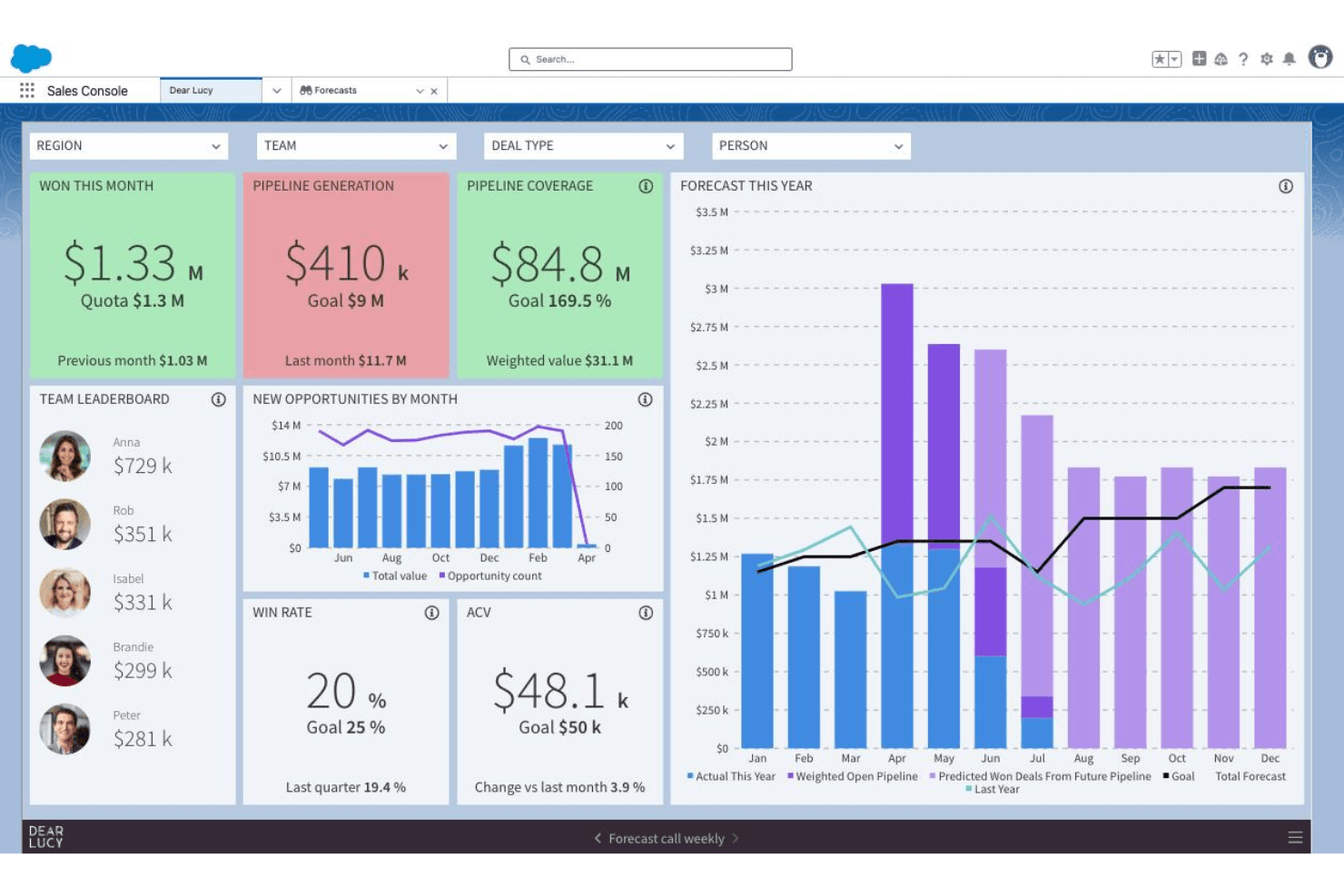
Salesforce CRM tracks sales forecasts, pipeline, and team performance in one dashboard. Salesforce CRM is an enterprise CRM platform with native iOS and Android apps that covers contact and account management, pipeline tracking, AI-driven insights via Agentforce, mobile dashboards through Tableau Next, and geolocation tools for field sales.
Who Is Salesforce CRM Best For?
Salesforce CRM is a strong fit for enterprise revenue teams that need AI-driven forecasting, field sales geolocation tools, and mobile pipeline visibility across complex, multi-cloud go-to-market operations.
Why I Picked Salesforce CRM
Salesforce CRM earns its spot on my shortlist because no other mobile CRM comes close for enterprise revenue forecasting at scale. Agentforce surfaces deal risk scores and next-best actions directly in the mobile app, while Tableau Next pushes real-time pipeline alerts before you even open a dashboard. I also rely on Salesforce Maps for field reps who need route optimization and nearby account discovery between meetings.
Salesforce CRM Key Features
- Sales Cloud Mobile Lightning App: Opens directly to a pipeline workspace showing priority meetings, tasks, leads, and opportunities for fast mobile access.
- Notification Builder: Admins configure push notifications for deal updates, task reminders, mentions, and workflow-triggered events at a granular level.
- Mobile Builder: A low-code tool that lets admins create custom, mobile-optimized layouts for any CRM object without writing code.
- Slack integration: Native Slack connectivity surfaces real-time CRM notifications and deal collaboration directly within Slack on mobile.
Salesforce CRM Integrations
Salesforce CRM offers native integrations with Slack, Microsoft Teams, Gmail, and Outlook, plus marketplace integrations through AppExchange, including Gong and Salesloft. Its open API and MuleSoft support custom enterprise connections.
Pros and Cons
Pros:
- Built-in field sales route optimization
- Deep mobile-first analytics dashboards
- AI agent suggests next-best actions
Cons:
- Mobile app has reported performance issues
- Offline access requires costly add-on
Learn more about Salesforce CRM:
Diğer Mobil CRM Seçenekleri
Kısa listeme giremeyen ancak yine de göz atmaya değer bazı ek Mobil CRM seçeneklerini burada bulabilirsiniz:
- 11Zoho CRMBest for multi-channel customer engagement
- 12SPOTIOBest for field sales tracking features
- 13SugarAIBest for fully tailored workflows
- 14StreakBest for CRM integrated with Gmail
- 15Zendesk SellBest for sales CRM with support integration
- 16CreatioBest for customizable workflow automation
- 17monday.com CRMBest for visual project-style sales management
- 18RingyBest for automated drip voice campaigns
- 19RunoBest for SIM-based outbound call tracking
How I Evaluate Mobile CRM
My evaluation splits into two layers: the baseline every tool must clear—like reliable offline access for reps in low-signal areas—and the differentiators that separate one vendor from another.
Core Functionality (Table Stakes For This List)
When I'm selecting tools for my list, I rank each one on a scale from 0 (does not offer the functionality) to 5 (excels in this area) for each core functionality listed below. Then, I calculate the tool's total score into a percentage. Each tool needs to achieve a minimum total score of 65% to be considered for inclusion.
- Native mobile apps: I check for dedicated iOS and Android apps—not just responsive web views—with feature parity close to the desktop experience.
- Offline functionality: Field reps in parking garages or rural areas need to edit records offline, so I evaluate how each tool handles sync and conflicts.
- Contact & account management: I look for full create, edit, and delete access to contacts, accounts, leads, and opportunities—not just a read-only list.
- Mobile activity logging: Reps between back-to-back meetings need fast capture, so I evaluate whether tools offer one-tap logging, voice-to-text, or call capture.
- Pipeline & deal management: Each tool should let reps update deal stages and view forecasts on mobile, not just see a static list of open opportunities.
- Push notifications & alerts: Real-time alerts for deal changes, task assignments, or workflow triggers keep reps responsive, so I evaluate configurability here.
Once I have a list of tools that meet this criteria, I consider what sets each platform apart.
Differentiating Factors (What Sets Vendors Apart)
Here's how I compare and contrast different vendors:
Standout Features
Voice-to-CRM capture is a big differentiator for reps who need to log notes hands-free between appointments. I also look at geolocation and route planning, since map-based account views and optimized routing can save field teams hours each week on territory visits. AI-powered insights matter too—I evaluate whether a tool surfaces deal risk scores or next-best actions on mobile, giving reps actionable guidance without switching to a desktop.
Beyond Features
Security matters when reps access customer data on personal devices. I evaluate whether a platform supports biometric login, remote wipe, and MDM so admins can enforce policies across a distributed team. Integration depth is equally important—a mobile CRM that doesn't sync bi-directionally with your email, calendar, and tools like Slack or Teams creates data gaps that undermine reporting. I also consider app performance, since slow load times or heavy battery drain will kill adoption with field reps faster than any missing feature.
Mobil CRM Nasıl Seçilir?
Uzun özellik listeleri ve karmaşık fiyatlandırma yapıları arasında kaybolmak kolaydır. Kendinize özgü yazılım seçim sürecinizde ilerlerken odağınızı korumanıza yardımcı olmak için göz önünde bulundurmanız gereken faktörlerin bir kontrol listesi aşağıda yer alıyor:
| Faktör | Göz Önünde Bulundurulması Gerekenler |
|---|---|
| FaktörÖlçeklenebilirlik | Göz Önünde Bulundurulması GerekenlerKullanıcılar veya yeni coğrafi bölgeler eklendikten sonra temel yeteneklerini aşmanız mı gerekecek, yoksa CRM ekibiniz büyüdükçe onu destekleyecek mi? |
| FaktörEntegrasyonlar | Göz Önünde Bulundurulması GerekenlerHangi e-posta, takvim ve RevOps araçlarının mobil uygulamaya doğrudan bağlandığını ve bu entegrasyonların iki yönlü ve gerçek zamanlı senkronizasyon sağlayıp sağlamadığını öğrenin. |
| FaktörÖzelleştirilebilirlik | Göz Önünde Bulundurulması GerekenlerAlanları, veri düzenlerini veya iş akışlarını işletmenize ne kadar kolay uyarlayabileceğinizi değerlendirin; özellikle satış veya hizmet süreciniz standart dışıysa. |
| FaktörKullanım kolaylığı | Göz Önünde Bulundurulması GerekenlerUygulama, farklı konumlarda çalışan ve hareket hâlindeki ekipleriniz için sezgisel mi? Çeşitli cihazlarda demoları deneyin ve öğrenme eğrisinin dik veya menülerin bulunmasının zor olup olmadığına dikkat edin. |
| FaktörUygulama ve işe alıştırma | Göz Önünde Bulundurulması GerekenlerMobil kullanıcılar için kullanıma sunma süreci ne kadar zor olacak? Sağlayıcının eğitim kaynaklarını, yönetici kontrollerini ve izinleri ayarlama konusundaki yardımını değerlendirin. |
| FaktörMaliyet | Göz Önünde Bulundurulması GerekenlerKullanıcı başına mobil erişimi, yükseltme gerektiren durumları ve eklenti ücretlerini dikkatlice inceleyin. Kritik özellikler, kurumsal fiyatlandırmaya zorlanmadan kullanılabiliyor mu? |
| FaktörGüvenlik önlemleri | Göz Önünde Bulundurulması GerekenlerMobil cihazlardaki hassas müşteri verilerini korumak için hangi kimlik doğrulama seçenekleri, uzaktan cihaz kontrolleri ve yönetici politikaları dâhil? |
| FaktörDestek erişilebilirliği | Göz Önünde Bulundurulması GerekenlerSağlayıcı, ekibinizin saat dilimleri ve iş döngüleriyle uyumlu küresel destek saatleri, uygulama içi yardım veya yanıt SLA’ları sunuyor mu? |
Mobil CRM Nedir?
Mobil CRM, ekibinize her yerden kişilere, fırsatlara ve hesap verilerine gerçek zamanlı erişim sağlayan, akıllı telefonlar ve tabletler için tasarlanmış bir müşteri ilişkileri yönetimi platformudur. Bu çözümler, saha temsilcilerinin ve dağıtık gelir ekiplerinin ofislerinden uzaktayken kayıtları güncellemesine, etkinlikleri kaydetmesine, satış süreçlerini yönetmesine ve uyarılar almasına olanak tanıyarak hareket hâlindeyken daha hızlı kararları ve daha duyarlı hizmeti destekler.
Mobil CRM'nin Özellikleri
Mobil CRM seçerken aşağıdaki temel özelliklere dikkat edin:
- Yerel mobil uygulamalar: Özel iOS ve Android uygulamaları, kullanıcıların CRM'e telefonlarından ve tabletlerinden erişmesine olanak tanır; arayüzler dokunmatik kullanım ve küçük ekranlar için uyarlanmıştır.
- Çevrim dışı erişim: Bağlantı olmadan kayıtları görüntüleyin, düzenleyin ve ekleyin; veriler tekrar çevrim içi olunduğunda otomatik olarak senkronize edilir. Böylece satış ekipleri uzak veya sinyalin zayıf olduğu bölgelerde çalışabilir.
- Kişi ve hesap yönetimi: Kişi, hesap ve fırsat ayrıntılarını her yerden oluşturun, düzenleyin ve arayın; böylece her müşteri görüşmesi hakkında tam görünürlük sağlayın.
- Mobil etkinlik kaydı: Aramaları, e-postaları, toplantı notlarını ve görevleri doğrudan mobil cihazdan kaydedin; hız ve kolaylık için genellikle sesten metne dönüştürme veya tek dokunuşla kayıt özellikleri de sunulur.
- Anlık bildirimler: Fırsat güncellemeleri, atanan görevler veya iş akışı tetikleyicileri için uyarılar alın; böylece ekip üyeleri yeni gelişmeler ortaya çıktıkça hızlı bir şekilde yanıt verebilir.
- Satış süreci ve fırsat yönetimi: Saha dışındayken bile yönetimin ve temsilcilerin uyum içinde kalması için fırsat aşamalarını ve tahmini değerleri güncelleyin, satış sürecinin ilerlemesini gerçek zamanlı olarak takip edin.
- Konum belirleme ve rota planlama: Hesapları konuma göre görselleştirmek, yakındaki fırsatları keşfetmek ve saha randevuları için rotaları optimize etmek üzere yerleşik haritaları kullanın.
- Yapay zekâ destekli içgörüler: Temsilcilerin yüksek öncelikli fırsatlara hızla odaklanmasına yardımcı olmak için sonraki en iyi eylemler, risk puanlaması veya otomatik özetler gibi cihaz içi yapay zekâ özelliklerine erişin.
- İş kartı tarama: İş kartı görsellerini yakalayarak anında kişi kayıtları oluşturun; ayrıntılar otomatik olarak ayrıştırılır ve doğru alanlara eklenir.
- Özelleştirilebilir panolar: Mobil cihazlardan etkileşimli, dokunmatik kullanıma uygun panoları ve raporları görüntüleyin; satış sürecinin durumu ve satış içgörüleri tek bakışta sunulur.
Mobil CRM'nin Faydaları
Mobil CRM'yi uygulamak ekibiniz ve işletmeniz için çeşitli faydalar sağlar. Yararlanabileceğiniz bazı avantajlar şunlardır:
- Gerçek zamanlı veri erişimi: Herhangi bir konumdan müşteri ve fırsat bilgilerini hızla alın ve güncelleyin; seyahat ederken veya toplantılar arasında olsanız bile kayıtları güncel tutun.
- Daha hızlı etkinlik kaydı: Mobil etkinlik kaydı ve sesten metne dönüştürme özelliklerini kullanarak aramaları, notları ve toplantıları anında kaydedin; böylece hiçbir şey gözden kaçmaz.
- Geliştirilmiş satış süreci görünürlüğü: Satış ilerlemesini takip etmeyi ve bilinçli kararlar almayı kolaylaştırmak için satış sürecinize, tahminlerinize ve panolarınıza hareket hâlindeyken erişin ve bunları yönetin.
- Daha duyarlı ekipler: Anlık bildirimlerle fırsat güncellemelerini, bahsetmeleri ve görevleri takip edin; böylece temsilcileriniz hızlı hareket edebilir ve kaçırılan fırsatların önüne geçebilir.
- Geliştirilmiş saha verimliliği: Uzak, sinyalin zayıf olduğu veya hızlı tempolu ortamlarda çalışan temsilcileri desteklemek için çevrim dışı erişim, rota planlama ve iş kartı tarama gibi özelliklerden yararlanın.
- Daha güçlü iş birliği: Dağıtık satış, pazarlama ve müşteri başarısı ekiplerinin nerede olurlarsa olsunlar hesaplar ve fırsatlar üzerinde gerçek zamanlı olarak iş birliği yapmasını sağlayın.
- Daha yüksek veri doğruluğu: Notları ve güncellemeleri anında kaydederek belleğe olan bağımlılığı azaltın ve veri girişinin gecikmesinden kaynaklanan hataları en aza indirin.
Mobil CRM Maliyetleri ve Fiyatlandırması
Mobil CRM seçimi, mevcut çeşitli fiyatlandırma modellerinin ve planların anlaşılmasını gerektirir. Maliyetler özelliklere, ekip büyüklüğüne, eklentilere ve diğer unsurlara göre değişir. Aşağıdaki tablo, mobil CRM çözümlerinde yaygın planları, bunların ortalama fiyatlarını ve genellikle sunulan özellikleri özetlemektedir:
Mobil CRM İçin Plan Karşılaştırma Tablosu
| Plan Türü | Ortalama Fiyat | Yaygın Özellikler |
|---|---|---|
| Plan TürüÜcretsiz Plan | Ortalama Fiyat$0 | Yaygın ÖzelliklerTemel kişi yönetimi, sınırlı fırsat takibi, temel mobil uygulama erişimi ve topluluk desteği. |
| Plan TürüBireysel Plan | Ortalama Fiyat$5–$25/kullanıcı/ay | Yaygın ÖzelliklerTam mobil uygulama erişimi, kişi ve hesap yönetimi, etkinlik kaydı, bildirimler ve başlangıç düzeyinde destek. |
| Plan Türüİşletme Planı | Ortalama Fiyat$30–$60/kullanıcı/ay | Yaygın ÖzelliklerSatış süreci yönetimi, gelişmiş raporlama, e-posta ve takvim entegrasyonları, konum belirleme ve yönetici denetimleri. |
| Plan TürüKurumsal Plan | Ortalama Fiyat$70–$150/kullanıcı/ay | Yaygın ÖzelliklerGelişmiş güvenlik, özel iş akışları, mobil panolar, RevOps yığınıyla entegrasyon ve özel destek. |
Mobil CRM SSS
Mobil CRM hakkında sık sorulan bazı soruların yanıtları:
Mobil CRM uygulamaları çevrimdışı çalışabilir mi?
Evet, birçok mobil CRM aracı ve uygulaması çevrimdışı erişim sunar. İnternet bağlantısı olmadan müşteri bilgilerini görüntüleyebilir ve güncelleyebilirsiniz; çevrimiçi olduğunuzda değişiklikleriniz otomatik olarak eşitlenir. Bu özellik, saha ekipleri veya bağlantının güvenilir olmadığı bölgelerde çalışan herkes için mobil CRM’in temel avantajlarından biridir.
Mobil CRM'deki veriler ne kadar güvende?
Mobil CRM çözümleri verilerinizi korumak için genellikle şifreleme, güvenli girişler ve mobil cihaz yönetimi kullanır. İster büyük bir kuruluş işletiyor ister çevik girişimleri yönetiyor olun, riski azaltmak için uzaktan silme, iki faktörlü kimlik doğrulama ve kuruluşunuzun güvenlik standartlarına uyumluluk özelliklerini destekleyen bir mobil CRM sistemi arayın.
Mobil CRM'den en çok hangi ekipler yararlanır?
Masa başlarından uzakta zaman geçiren satış, saha hizmeti ve müşteri hizmetleri ekipleri mobil müşteri ilişkileri yönetiminden en çok yararlanan ekiplerdir. Genel müşteri deneyimini iyileştirmek için bu ekiplerin hareket hâlindeyken müşteri verilerine erişmesi, müşteri etkileşimlerini takip etmesi, kayıtları güncellemesi ve iş arkadaşlarıyla iletişim kurması gerekir.
Tüm özellikler mobil sürümde kullanılabilir mi?
Hayır, ayrıntılı tahmin modelleme, karmaşık pazarlama otomasyonu veya kapsamlı sosyal medya entegrasyonları gibi bazı gelişmiş özellikler yalnızca CRM sisteminizin masaüstü sürümünde kullanılabilir. Ekibinizin temel iş akışlarını desteklediğinden emin olmak için CRM mobil uygulamasının özellik listesini her zaman inceleyin, kullanıcı dostu arayüzünü değerlendirin ve mobil CRM yazılımını test edin.
Mobil CRM uygulamaları bildirimleri nasıl yönetir?
Mobil CRM uygulamaları; satış temsilcilerini yeni potansiyel müşteriler, anlaşma güncellemeleri, görev hatırlatıcıları ve diğer önemli etkinlikler hakkında uyarmak için anlık bildirimleri kullanır. Gereksiz kesintileri önlemek için genellikle hangi bildirimleri alacağınızı özelleştirebilirsiniz.