

Pipedrive vs. monday CRM: Comparison and Expert Reviews for 2026

We review tools independently, and commissions help fund our testing. See our transparency policy, our methodology, or suggest a tool.
Choosing between Pipedrive and monday CRM often boils down to whether your team requires a sales-focused CRM software with deep pipeline management or a highly customizable, workflow-driven CRM software that adapts to broader business processes. If you’re weighing these two options, you’re likely trying to balance sales rigor with cross-team flexibility, without sacrificing data quality or ease of use. In this article, you’ll get a side-by-side look at how CRM software from both vendors compares on features, pricing, integrations, and user experience, so you can confidently decide which platform fits your revenue operations goals.
Pipedrive CRM
4.5/5
- 14-day free trial
- From $14/user/month (billed annually)
monday CRM
4.6/5
- 14-day free trial + free demo available
- From $12/user/month (billed annually)
Why Trust Our Software Recommendations
6,700+
Reviews
20
Industry experts
16+
Evaluation factors
14
Years
Our reviews reflect our independent judgment—not a sales pitch. Learn how we stay transparent.
For this guide, we evaluated tools using hands-on testing and independent research, scoring tools using our selection criteria.
Our reviews reflect our human editorial judgment, not a sales pitch.
| Pipedrive CRM | monday CRM | |
|---|---|---|
| Free Trial | 14-day free trial | 14-day free trial + free demo available |
| Pricing | From $14/user/month (billed annually) | From $12/user/month (billed annually) |
Pipedrive vs. monday CRM Pricing & Hidden Costs
Pipedrive uses a tiered subscription model based on user seats, with each plan unlocking more advanced sales and automation features. monday CRM also follows a tiered pricing structure, but its plans are built around both user seats and feature bundles, with add-ons for advanced automations, integrations, and storage. Both platforms may introduce extra costs for premium support, API access, or expanded usage limits, so it’s important to review what’s included at each tier.
To choose the right pricing model, take note of your team’s desired features and expected user count against each vendor’s plan details. Look beyond the base price factor in potential add-ons, integration needs, and any limits on automation or reporting. Request a detailed quote or use a trial to simulate your real usage, so you can spot hidden costs before you commit. This approach helps you avoid surprises and ensures your CRM investment matches your operational requirements.
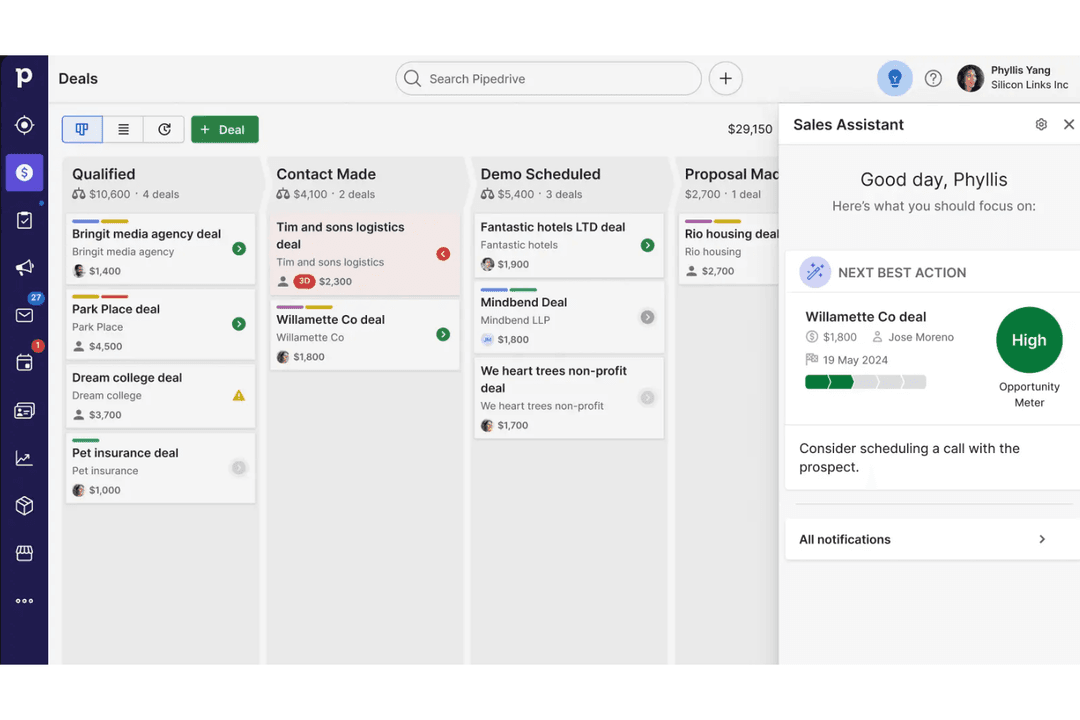
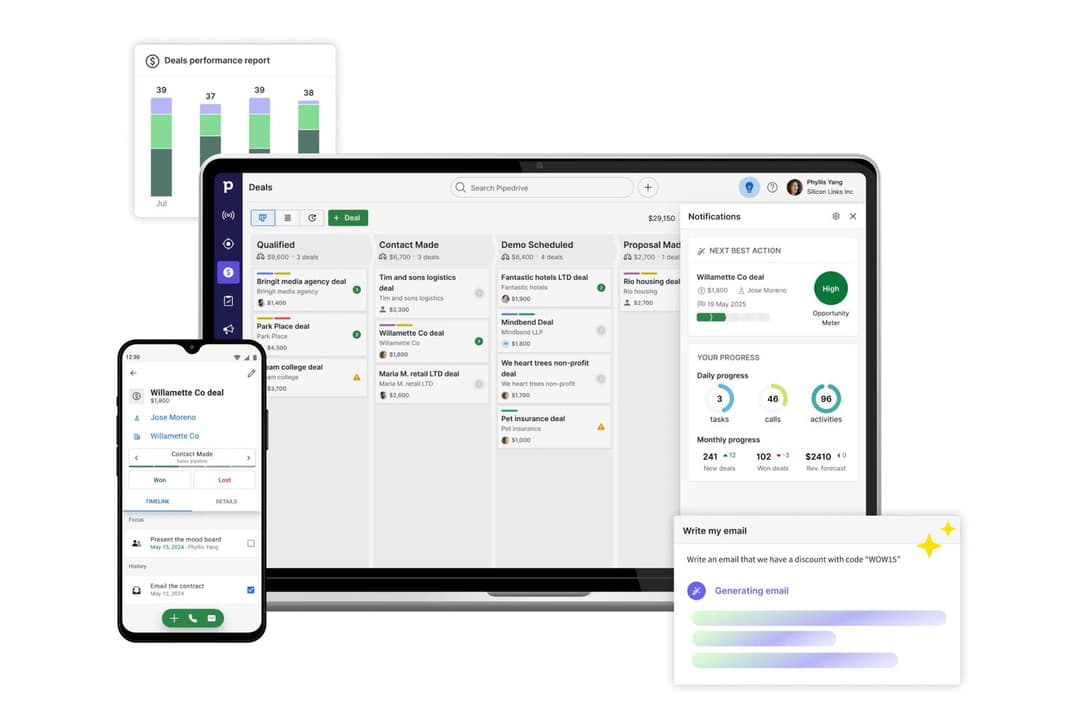
Pipedrive’s visual sales pipelines and automated activity reminders help users stay focused on deals and daily follow-ups, making it easy to track progress and prioritize tasks. In contrast, monday CRM’s customizable boards and workflow automations let users tailor their workspace to manage everything from sales to project tasks, supporting teams that need flexibility beyond traditional pipeline management.
| Pipedrive CRM | monday CRM | |
|---|---|---|
| 2-Factor Authentication | No | No |
| API | Yes | Yes |
| Calendar Management | Yes | Yes |
| Call Tracking | Yes | No |
| Campaign Management | No | No |
| Click-to-Dial | Yes | No |
| Contact Management | Yes | Yes |
| Contact Sharing | Yes | No |
| Custom Data Forms | No | Yes |
| Customer Management | Yes | Yes |
| Dashboard | Yes | Yes |
| Data Export | Yes | Yes |
| Data Import | Yes | Yes |
| Data Visualization | Yes | Yes |
| Email Integration | Yes | Yes |
| External Integrations | Yes | Yes |
| File Sharing | Yes | Yes |
| File Transfer | Yes | Yes |
| Google Apps Integration | Yes | Yes |
| Lead Management | Yes | Yes |
| Lead Scoring | Yes | Yes |
| Marketing Automation | No | Yes |
| Mobile App | Yes | No |
| Multi-User | Yes | Yes |
| Notifications | Yes | Yes |
| Pipeline Management | Yes | Yes |
| Sales Automation | Yes | Yes |
| Scheduling | Yes | Yes |
| Social-Media Integration | No | Yes |
| Task Scheduling/Tracking | Yes | Yes |
| Third-Party Plugins/Add-Ons | Yes | Yes |
| Integration | Pipedrive | monday CRM |
|---|---|---|
| IntegrationGmail | Pipedrive✅ | monday CRM✅ |
| IntegrationOutlook | Pipedrive✅ | monday CRM✅ |
| IntegrationSlack | Pipedrive✅ | monday CRM✅ |
| IntegrationMailchimp | Pipedrive✅ | monday CRM✅ |
| IntegrationQuickBooks | Pipedrive✅ | monday CRM✅ |
| IntegrationXero | Pipedrive✅ | monday CRM✅ |
| IntegrationHubSpot | Pipedrive✅ | monday CRM✅ |
| IntegrationShopify | Pipedrive✅ | monday CRM✅ |
| IntegrationAPI | Pipedrive✅ | monday CRM✅ |
| IntegrationZapier | Pipedrive✅ | monday CRM✅ |
Pipedrive and monday CRM are very similar when it comes to integrations, sharing support for key tools like Gmail, Outlook, Slack, Mailchimp, API access, and Zapier. While each platform has a few unique connections, both provide the core integrations most sales teams rely on, along with the flexibility to connect additional tools as needed.
| Factor | Pipedrive | monday CRM |
|---|---|---|
| FactorData Encryption | PipedriveUses TLS 1.2 encryption for data in transit and AES-256 for data at rest. | monday CRMUses TLS 1.2, FIPS 140-2, and AES-256 encryption for both data in transit and at rest. |
| FactorRegulatory Compliance | PipedriveGDPR and CCPA-compliant with dedicated data processing agreements and audit logs. | monday CRMGDPR, UK GDPR, CCPA and HIPAA-compliant, with advanced audit logs and data residency. |
| FactorUptime Guarantee | PipedrivePublicly reports uptime with a 99.9% SLA and real-time status page. | monday CRMOffers a high uptime and publishes real-time system status updates. |
| FactorAccess Controls | PipedriveRole-based permissions and two-factor authentication for all users. | monday CRMCustomizable permissions, SSO, and two-factor authentication available. |
Both Pipedrive and monday CRM deliver strong security and compliance, but monday CRM edges ahead with HIPAA compliance and more granular access controls. Pipedrive’s reliability and transparent uptime reporting are strengths, while monday CRM’s advanced compliance options and flexible permissions make it a solid choice for teams with strict regulatory needs.
| Factor | Pipedrive | monday CRM |
|---|---|---|
| FactorUser Interface | PipedriveClean, sales-focused interface with drag-and-drop pipelines and quick actions. | monday CRMHighly visual, customizable boards with color-coded statuses and widgets. |
| FactorOnboarding | PipedriveGuided setup with in-app tutorials and sample data for fast ramp-up. | monday CRMInteractive walkthroughs, templates, and a resource-rich help center. |
| FactorCustomization | PipedriveSimple field and pipeline customization, but limited outside sales workflows. | monday CRMDeep customization for boards, fields, and automations across workflows. |
| FactorSupport | PipedriveLive chat, email, and a searchable knowledge base. | monday CRM24/7 support, live webinars, and a large online community. |
Pipedrive is easier for sales teams to pick up quickly due to its inherent ease of use, while monday CRM offers more flexibility for teams that want to tailor their workspace. Pipedrive’s focused, user-friendly interface and fast onboarding are strengths, but monday CRM’s visual boards and deep customization make it a better fit for teams with diverse or evolving processes.
Pipedrive CRM
- You’ll find the visual sales pipeline easy to navigate and understand.
- The customization options let your team tailor the CRM to fit your workflow.
- Automated follow-up reminders help you stay on top of your sales tasks.
- You might need more advanced reporting features for detailed analytics.
- Limited email tracking could be a hurdle for teams heavily reliant on email campaigns.
- Few native options for generating new leads directly within the software.
monday CRM
- You can easily create automations without any coding.
- Its integrated proofing feature lets you add comments to files.
- You can create forms that live within your project as a view.
- The Gantt view isn't useful for building projects.
- Subtask columns don't replicate task structure, needing extra customization.
- Training videos use the old UI, which can confuse new users.
Pipedrive CRM
- Real EstatePipedrive’s visual pipeline helps you track leads and manage client interactions effectively.
- Tech StartupsYou’ll benefit from its customization options that adapt to fast-changing sales processes.
- Consulting FirmsThe CRM’s automated reminders keep your team on schedule with client follow-ups.
- Small BusinessesIts ease of use makes it accessible for teams without a dedicated IT department.
- Sales DepartmentsYou’ll find the focus on sales pipeline management boosts your team’s productivity.
- FreelancersThe straightforward interface allows you to manage client relationships without complexity.
monday CRM
- Tech Startupsmonday sales CRM is perfect for tech startups needing agile workflows and automation.
- Marketing AgenciesYour agency will benefit from its collaborative tools and proofing features for client work.
- Small BusinessesIf you’re a small business, you’ll find its ease of use and customization options invaluable.
- Project ManagersYou can streamline tasks and track progress easily with monday sales CRM’s visual tools.
- Sales TeamsIt helps your team manage leads and sales pipelines with integrated tracking features.
- Creative TeamsYour team can collaborate effectively using its integrated comments and file sharing.
Who Should Use Pipedrive, And Who Should Use monday CRM?
Pipedrive is best for sales-driven teams that want a straightforward, pipeline-centric CRM with minimal setup and a focus on closing deals. It’s a strong fit for small to midsize businesses in industries like real estate, consulting, or SaaS, where sales process consistency matters most. monday CRM is the better choice for teams that need a flexible, customizable platform to manage not just sales, but also projects, marketing, or support workflows. If your organization values cross-department collaboration, unique workflows, or plans to scale and adapt processes over time, monday CRM will likely serve you better.
| Pipedrive CRM | monday CRM | |
|---|---|---|
| Automation | Pipedrive CRM Prebuilt sales automations and activity reminders. | monday CRM Advanced, flexible automations for tasks, notifications, and more. |
| Core Focus | Pipedrive CRM Sales pipeline management with deal tracking and forecasting. | monday CRM Comprehensive workflow customization across sales, projects, and operations. |
| Customization | Pipedrive CRM Limited to sales fields, pipelines, and activities. | monday CRM Deep board, field, and automation customization for any workflow. |
| Data Compliance | Pipedrive CRM Is only GDPR and CCPA-compliant. | monday CRM Offers more regional and industry-specific data compliance like HIPAA. |
| User Interface | Pipedrive CRM Simple, sales-focused with drag-and-drop pipelines. | monday CRM Visual, modular boards with color coding and widgets. |
| Cloud-Based Access | Both are fully cloud-based, allowing users to access data and workflows from anywhere with an internet connection. |
|---|---|
| Integration Options | Each platform offers integrations with popular tools like Gmail, Outlook, Slack, Mailchimp, Zapier, and offers an API. |
| Mobile Apps | Both provide mobile apps for iOS and Android, enabling users to manage deals, tasks, and updates on the go. |
| Reporting & Analytics | Each offers customizable dashboards and reporting tools to track sales performance, pipeline health, and team activity. |
| Role-Based Permissions | Both support user roles and permissions, letting admins control access to sensitive data and features. |