



Copper vs. Pipedrive: Comparison and Expert Reviews for 2026


Finding a CRM that actually works the way you do can be a challenge, especially when every tool claims to be “simple” and “powerful.” You may be comparing Copper and Pipedrive to figure out which one better supports your sales pipeline, integrations, and day-to-day workflow. At a glance, they seem similar—but key differences can have a big impact on your team’s productivity.
In this guide, I’ll compare Copper and Pipedrive across core features, pros and cons, pricing, usability, and security. By the end, you’ll have a clearer understanding of which CRM software is the right fit for your business needs and growth plans.
Copper CRM vs. Pipedrive CRM: An Overview
Copper CRM

Pipedrive CRM
Why Trust Our Software Reviews
We’ve been testing and reviewing RevOps software since 2022. As RevOps leaders ourselves, we know how critical and difficult it is to make the right decision when selecting software.
We invest in deep research to help our audience make better software purchasing decisions. We’ve tested more than 2,000 tools for different RevOps use cases and written over 1,000 comprehensive software reviews. Learn how we stay transparent & our software review methodology.
Copper CRM vs. Pipedrive CRM Pricing Comparison
| Copper CRM | Pipedrive CRM | |
|---|---|---|
| Free Trial | 14-day free trial | 14-day free trial |
| Pricing | From $12/user/month | From $14/user/month (billed annually) |
Copper vs. Pipedrive Pricing & Hidden Costs
Copper CRM uses a tiered subscription model, with each plan unlocking more advanced features and higher usage limits. You’ll find that integrations, automation, and reporting capabilities expand as you move up the tiers. Pipedrive also follows a tiered approach, but places a strong emphasis on add-ons—such as advanced email marketing, project management, lead generation, or workflow automation—which can increase your total cost if you need more than the basics. Both platforms may charge extra for premium support, API access, or increased storage.
To choose the right vendor, map out your must-have features and estimate how your needs might grow over the next year or two. Look beyond the base price and consider the total cost of ownership, including add-ons, support, and potential user growth. Ask each vendor for a detailed quote based on your real-world use case, and check if they offer flexible plans or discounts for scaling teams. This approach helps you avoid surprises and ensures your CRM investment supports your long-term goals.
Copper CRM vs. Pipedrive CRM Feature Comparison
Both Copper and Pipedrive cover the core CRM functionality you’d expect if you’re managing a sales pipeline. They offer contact and lead management, deal tracking, pipeline views, workflow automation, and reporting tools to help you organize customer data and move deals forward efficiently. At a high level, both platforms are built to centralize your sales activities and give you visibility into your pipeline, making them strong options for teams that want a structured, repeatable sales process.
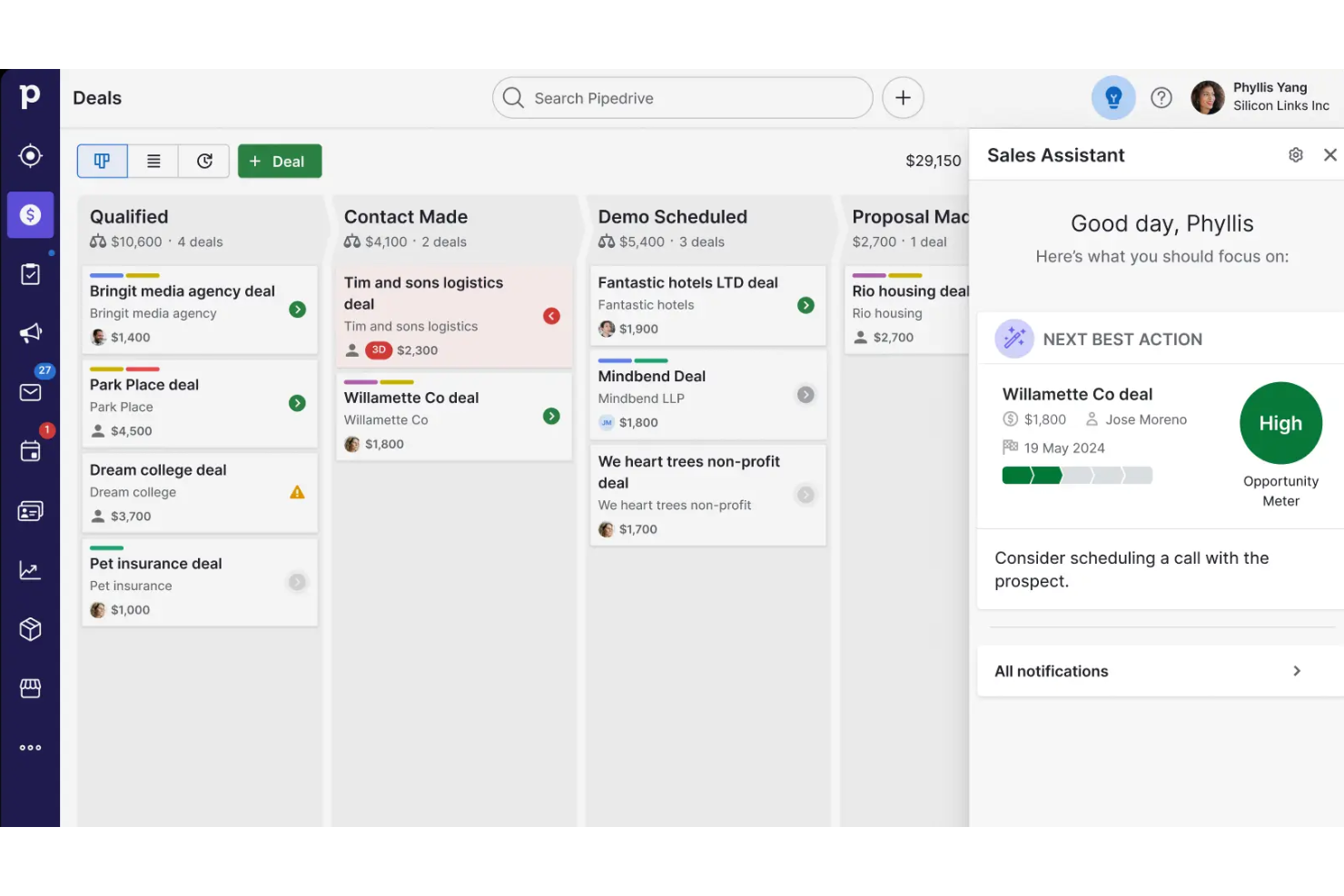
Where they really diverge is in what they prioritize. Copper stands out for its deep, native Google Workspace integration—letting you manage relationships directly inside Gmail, Calendar, and other Google apps without switching tools. Pipedrive, on the other hand, differentiates itself with its highly visual, drag-and-drop sales pipeline and advanced sales features like AI assistance and forecasting, designed specifically to optimize deal progression and sales performance.
| Copper CRM | Pipedrive CRM | |
|---|---|---|
| API | ||
| Data Export | ||
| Data Import | ||
| External Integrations | ||
| Multi-User | ||
| Notifications | ||
| Third-Party Plugins/Add-Ons |
Copper vs. Pipedrive Integrations
| Integration | Copper | Pipedrive |
| Google Workspace | ✅ | ✅ |
| Slack | ✅ | ✅ |
| Mailchimp | ✅ | ✅ |
| QuickBooks | ✅ | ✅ |
| Xero | ✅ | ✅ |
| Microsoft Teams | ❌ | ✅ |
| HubSpot | ✅ | ✅ |
| Zendesk | ✅ | ✅ |
| API | ✅ | ✅ |
| Zapier | ✅ | ✅ |
Both Copper and Pipedrive cover the most popular integrations, but Pipedrive offers a wider range, especially for users who rely on Microsoft Teams. With API and Zapier support in both platforms, you can connect to almost any tool your team needs, so most users will find their integration needs met.
Copper vs. Pipedrive Security, Compliance & Reliability
| Factor | Copper | Pipedrive |
| Data Encryption | Uses TLS encryption for data in transit and AES-256 for data at rest. | Secures data with TLS in transit and AES-256 at rest. |
| Regulatory Compliance | Supports GDPR compliance with data processing agreements and user controls. | Offers GDPR tools, audit logs, and data processing agreements. |
| Uptime Guarantee | Maintains high uptime with real-time status monitoring and incident reporting. | Provides a high uptime and public status updates. |
| Access Controls | Offers role-based permissions and Google SSO for secure access. | Includes granular user permissions and SSO options. |
| Data Backups | Performs daily automated backups with disaster recovery protocols. | Runs daily backups and supports rapid data restoration. |
Both Copper and Pipedrive deliver strong security and compliance, but Pipedrive stands out with its uptime SLA and more granular user controls. Copper’s Google SSO and disaster recovery protocols are reliable, while Pipedrive’s audit logs and public uptime reporting give extra peace of mind.
Copper vs. Pipedrive Ease of Use
| Factor | Copper | Pipedrive |
| User Interface | Clean, Google-inspired design that feels familiar to Gmail users. | Visual, drag-and-drop pipelines make navigation and updates simple. |
| Onboarding | Guided setup and in-app tips help new users get started quickly. | Step-by-step onboarding and video tutorials ease the learning curve. |
| Customization | Offers basic customization for fields and pipelines. | Highly customizable pipelines, fields, and dashboards. |
| Mobile Experience | Mobile app mirrors desktop simplicity and syncs with Google apps. | Mobile app is intuitive, with offline access and pipeline views. |
| Customer Support | Email and chat support with a helpful knowledge base. | 24/7 chat support and a large self-serve resource library. |
Pipedrive is a bit more flexible and visually intuitive, while Copper’s Google-inspired interface makes it especially user-friendly for teams already using Google Workspace. Copper shines for Gmail-centric teams, but Pipedrive’s customization and always-available support make it a favorite for users who want more control and guidance.
Copper CRM vs Pipedrive CRM: Pros & Cons
Copper CRM
- It integrates seamlessly with Google Workspace, making it easy for your team to manage communication.
- The user interface is intuitive, reducing the learning curve for your team.
- It offers strong automation features that can simplify your workflow.
- Customization options are limited compared to other CRMs.
- Reporting capabilities might not meet the needs of data-driven teams.
- It lacks some advanced features that larger organizations might require.
Pipedrive CRM
- You’ll find the visual sales pipeline easy to navigate and understand.
- The customization options let your team tailor the CRM to fit your workflow.
- Automated follow-up reminders help you stay on top of your sales tasks.
- You might need more advanced reporting features for detailed analytics.
- Limited email tracking could be a hurdle for teams heavily reliant on email campaigns.
- Few native options for generating new leads directly within the software.
Best Use Cases for Copper CRM and Pipedrive CRM
Copper CRM
- Tech Startups Copper CRM is ideal for tech startups using Google Workspace, providing seamless integration with Google tools.
- Small Businesses For small businesses, Copper CRM simplifies customer management with an easy-to-use interface and strong automation features.
- Sales Teams Sales teams benefit from Copper CRM's automation, reducing manual data entry and improving communication.
- Marketing Departments Marketing departments find value in Copper CRM's ability to integrate with Google tools, enhancing collaboration and efficiency.
- Remote Teams Remote teams thrive with Copper CRM's cloud-based access and integration with Google Workspace, enabling seamless collaboration.
- Project Management Project management teams use Copper CRM to streamline tasks with its intuitive interface and Google Drive integration.
Pipedrive CRM
- Real Estate Pipedrive’s visual pipeline helps you track leads and manage client interactions effectively.
- Tech Startups You’ll benefit from its customization options that adapt to fast-changing sales processes.
- Consulting Firms The CRM’s automated reminders keep your team on schedule with client follow-ups.
- Small Businesses Its ease of use makes it accessible for teams without a dedicated IT department.
- Sales Departments You’ll find the focus on sales pipeline management boosts your team’s productivity.
- Freelancers The straightforward interface allows you to manage client relationships without complexity.
Who Should Use Copper, and Who Should Use Pipedrive?
Copper is best suited for teams that already live inside Google Workspace and want a CRM that feels like a natural extension of Gmail and Google Calendar. It’s especially useful for small businesses, mid-sized organizations, and relationship-focused teams that prioritize ease of use, minimal setup, and keeping all communication in one place. If your sales process is relatively simple and you want to reduce manual data entry while working directly from your inbox, Copper is typically the better fit.
Pipedrive, on the other hand, is built for sales teams that need structure, visibility, and control over a more active pipeline. It works well for organizations that rely heavily on deal tracking, forecasting, and customizable workflows to optimize performance and scale their sales process. If your priority is improving conversion rates, managing multiple deals efficiently, and using a highly visual pipeline, Pipedrive is the stronger choice.
Differences Between Copper CRM and Pipedrive CRM
| Copper CRM | Pipedrive CRM | |
|---|---|---|
| Automation | Built-in workflow automation for repetitive tasks. | Advanced automation with customizable triggers and actions. |
| Customization | Basic field and pipeline customization. | Extensive customization for fields, pipelines, and dashboards. |
| Google Integration | Deep, native integration with Gmail and Google Workspace. | Basic Google sync, but not as tightly integrated. |
| Reporting | Basic reporting and less advanced analytics and forecasting. | Advanced reporting, dashboards, and revenue forecasting tools. |
| Visual Pipeline | Simple pipeline view with limited customization. | Highly visual, drag-and-drop pipelines with advanced options. |
| Read Copper CRM ReviewOpens new window | Read Pipedrive CRM ReviewOpens new window |
Similarities Between Copper CRM and Pipedrive CRM
| Contact Management | Both offer robust contact and company management, letting you track interactions, notes, and activity history. |
|---|---|
| Email Integration | Each platform syncs with email, allowing you to send, receive, and track messages directly from the CRM. |
| Lead Management | Both provide tools to capture, organize, and nurture leads throughout the sales process. |
| Mobile Apps | Both provide mobile apps for iOS and Android, supporting on-the-go access and updates. |
| Read Copper CRM ReviewOpens new window Read Pipedrive CRM ReviewOpens new window | |
| Pipeline Management | Both offer visual sales pipelines that help you track deals through different stages and manage opportunities. |
| Task Tracking | Each CRM allows you to schedule, assign, and track tasks, calls, meetings, and follow-ups tied to deals and contacts. |
| Read Copper CRM ReviewOpens new window Read Pipedrive CRM ReviewOpens new window | |