

Está cansado de ver os seus e-mails de marketing serem devolvidos ou acabarem na pasta de spam? Não é o único. Validar os endereços de e-mail é crucial para melhorar o seu alcance, e estamos aqui para lhe facilitar o processo. Neste guia, analisamos os 20 melhores softwares de verificação de e-mails, ajudando-o a encontrar a ferramenta perfeita para otimizar as suas campanhas de e-mail e aumentar o envolvimento.
Why Trust Our Software Recommendations
6,700+
Reviews
20
Industry experts
16+
Evaluation factors
14
Years
Our reviews reflect our independent judgment—not a sales pitch. Learn how we stay transparent.
For this guide, we evaluated tools using hands-on testing and independent research, scoring tools using our selection criteria.
Our reviews reflect our human editorial judgment, not a sales pitch.
Tabela comparativa de software de verificação de e-mails
Esta tabela comparativa resume os detalhes de preços das minhas principais escolhas de software de verificação de e-mails.
| Tool | Best For | Trial Info | Price | ||
|---|---|---|---|---|---|
| 1 | Best for real-time, multi-step email verification | Free plan + 14-day free trial + free demo available | From $49/user/month (billed annually) | Website | |
| 2 | Best for high-volume bulk email verification | Free trial available | From $35/month for up to 5000 verifications | Website | |
| 3 | Best web-based email validation platform with a 99% accuracy rate | Free demo available | From $15/2,000 credits | Website | |
| 4 | Best for comprehensive marketing campaign management | Free plan + 14-day free trial available | From $12/month | Website | |
| 5 | Best CRM with an emphasis on email verification | Free plan available | From $39/month | Website | |
| 6 | Best for precise email verification results | Free 100 verifications + free demo available | From $5/500 verifications | Website | |
| 7 | Best for cloud-based and on-premise email verification needs | 30-day free trial | From $39.95/month | Website | |
| 8 | Best for continuous protection of your domains | Free plan available | Pricing upon request | Website | |
| 9 | Best for B2B prospecting that connects you with decision makers | Free plan available | From $27/month (billed annually) | Website | |
| 10 | Best for built-in verification and sending | Free plan available | From $29/month | Website |


Análises do melhor software de verificação de e-mails
Apresentamos abaixo os meus resumos detalhados do melhor software de verificação de e-mails que integrou a minha seleção. As minhas análises oferecem uma visão detalhada das principais funcionalidades, vantagens & desvantagens, integrações e casos de utilização ideais de cada ferramenta, para o ajudar a encontrar a melhor opção para si.
 Best for real-time, multi-step email verification
- Free plan + 14-day free trial + free demo available
- From $49/user/month (billed annually)
Visit WebsiteCustomer Rating:4.5/5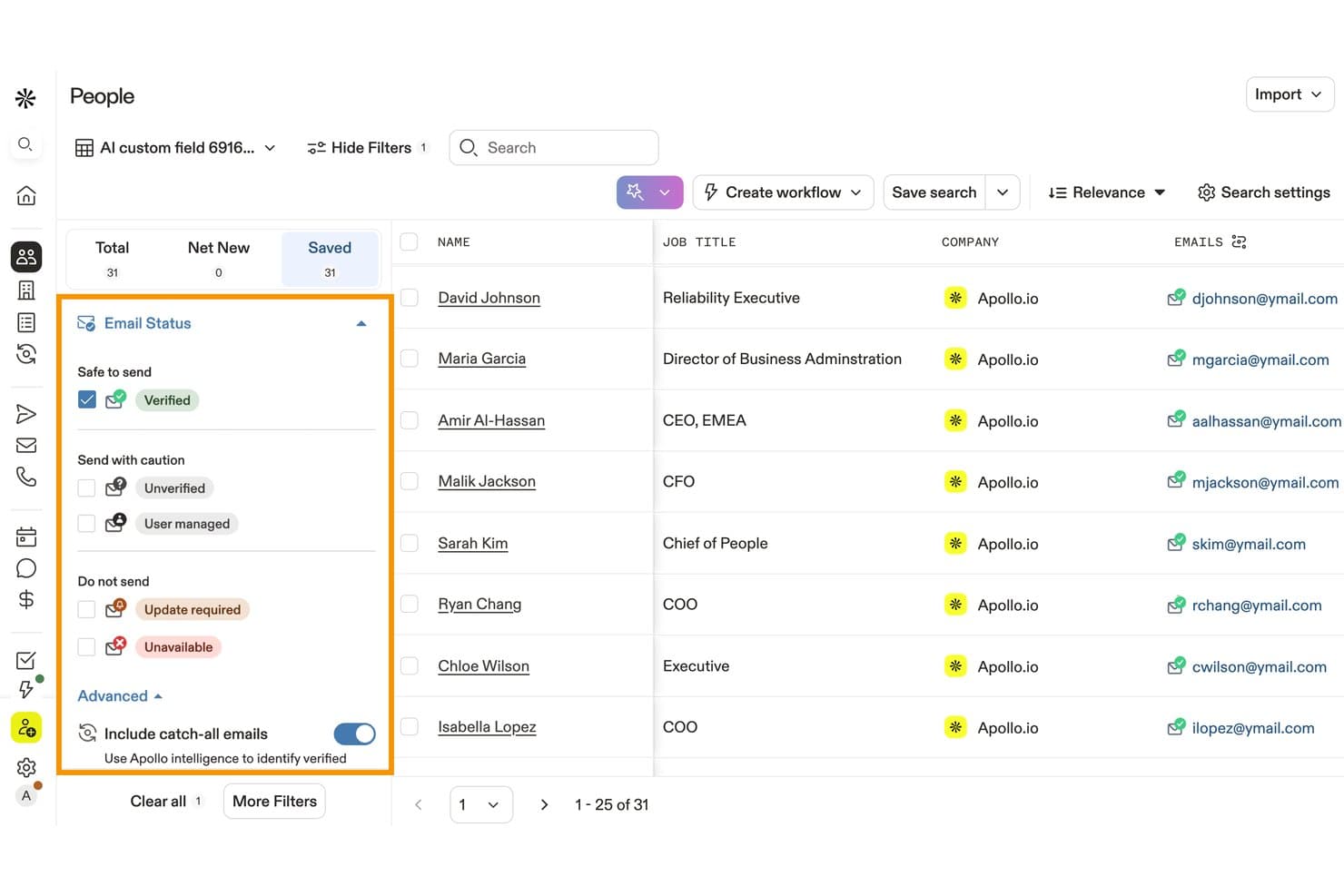
Apollo.io lets users filter contacts by verified email status. Apollo.io is a sales intelligence and engagement platform that includes a proprietary 7-step email verification engine, bulk list validation, catch-all domain detection, and CRM-connected data enrichment.
Who Is Apollo.io Best For?
Apollo.io is a strong fit for sales development teams that want prospecting, sequencing, and email verification in one platform rather than stitching together separate tools.
Why I Picked Apollo.io
Apollo.io earns its spot on my shortlist because its 7-step verification process goes well beyond SMTP tickling, using a contributor network to detect whether a catch-all email has sent real traffic recently. That distinction matters when you're validating large outbound lists where third-party tools would simply flag an entire domain as risky. I also like that bounces are detected and propagated network-wide automatically, with credits refunded, so my team isn't paying for bad data twice.
Apollo.io Key Features
- Bulk CSV verification: Upload and validate prospecting or CRM lists in batches.
- Risk classification: Flags disposable, role-based, catch-all, and invalid addresses.
- Real-time API verification: Verify individual addresses through Apollo’s REST API.
- CRM integrations: Sync verified contact data with Salesforce, HubSpot, and other platforms.
Apollo.io Integrations
Apollo offers native integrations with Salesforce, HubSpot, Pipedrive, Outreach, Salesloft, Marketo, SendGrid, and LinkedIn. It also connects with Zapier and provides a REST API for custom integrations.
Pros and Cons
Pros:
- 7-step verification goes beyond standard SMTP checks
- Bounces are detected and credits refunded automatically
- Verifies catch-all emails other tools flag as unverifiable
Cons:
- Credit system makes costs unpredictable at scale
- International data accuracy drops to 60–73%
Learn more about Apollo.io: Best for high-volume bulk email verification
- Free trial available
- From $35/month for up to 5000 verifications
Visit WebsiteCustomer Rating:4.9/5
Bouncer offers a clean user interface with simplified notes to estimate email deliverability. Bouncer is an easy to use application that allows you to drag and drop your email lists directly into the email checker for instant verification. You can add up to 250,000 addresses at once and the platform will determine safe addresses, disposable addresses, and accept all addresses.
Why I picked Bouncer: This email marketing tool made my list because of its free verification sampling feature. You can test the quality of your list without actually having to verify it, and without using any credits. Bouncer will let you know if your list will perform or if you need to buckle down and verify it to delete invalid email addresses.
Bouncer Standout Features and Integrations
Standout features include a bounce rate estimate that tells you what you can expect from every email list, including how many emails are deliverable, risky, or unknown, GDPR compliance for better data security, and an eight-tier validation process.
Integrations include Aweber, Constant Contact, Convertkit, GetResponse, HubSpot, Integrately, Klaviyo, LemList, Mailchimp, and Moosend.
Pros and Cons
Pros:
- Multiple verification tiers to catch invalid addresses
- Customizable dashboard options
- Very readable, user-friendly interface
Cons:
- Some verifications return an unknown result
- Previews of bounce expectations can be slow to load
Learn more about Bouncer: Best web-based email validation platform with a 99% accuracy rate
- Free demo available
- From $15/2,000 credits
Visit WebsiteCustomer Rating:4.7/5
ZeroBounce offers a variety of integrations for simple import into their platform. This email verification service offers you a web-based platform that integrates with all your most important marketing and outreach tools for simplified import and export of email data. Their email validator automatically removes spam traps, bots, and spam complaints from your lists to reconnect with subscribers, reach new prospects, and improve click rates.
Why I picked ZeroBounce: I like the ZeroBounce platform for two reasons: they offer higher accuracy rates and faster verification speeds. While most of the best email verification tools boast a 95% accuracy rate, ZeroBounce delivers a 99% accuracy rate. They also ensure email scrubbing of about 100,000 addresses in 45 minutes on their platform and validation in about three seconds through their API.
ZeroBounce Standout Features and Integrations
Standout features include military-grade data encryption to keep email addresses and company information secure during verification, real-time email verification at the point of entry through their API, and 24/7 customer support through chat, phone, and email.
Integrations include ActiveCampaign, Asana, CapSumo, Constant Contact, Drip, easysendy, Gmail, JotForm, Make, and MassMailer. Native, third party, and Zapier integrations are available.
Pros and Cons
Pros:
- Very high accuracy in comparison to other tools
- Very good customer support
- Real-time email verification capabilities
Cons:
- Slightly outdated dashboard and navigation
- No subscription pricing structure option
Learn more about ZeroBounce: Best for comprehensive marketing campaign management
- Free plan + 14-day free trial available
- From $12/month
Visit WebsiteCustomer Rating:4.7/5
The MailerLite dashboard shows you everything you need to see for your marketing campaign. MailerLite is a comprehensive email marketing platform with a variety of tools to streamline your outreach. Their integrated MailerCheck feature is what you use to verify email addresses with syntax check and disposable email detection. You also get verification usage reports and a breakdown of bad email addresses.
Why I picked MailerLite: I chose the MailerLite platform because it offers a more holistic functionality for your email marketing campaigns than most of the email verification software on this list. In addition to email verification, you also get newsletter editing, email automation, and website building all in one place.
MailerLite Standout Features and Integrations
Standout features include automated transactional emails to confirm purchases and orders for customers, email marketing forms to drive new sign-ups and subscriptions, and a massive selection of email templates with forms for every occasion.
Integrations include BigCommerce, Facebook Audiences, JotForm Sign, MailerCheck, Make, Shopify, Stripe, WooCommerce, and WordPress. Integrations are also available through Zapier.
Pros and Cons
Pros:
- Easy to navigate and learn
- Comprehensive marketing platform with verification addon
- Free base plan available
Cons:
- Some integrations are still in testing
- Limited reporting capabilities for emails
Learn more about MailerLite: Best CRM with an emphasis on email verification
- Free plan available
- From $39/month
Visit WebsiteCustomer Rating:4.5/5
Snov.io offers drip campaign flowcharts for simplified outreach. As an email-focused CRM platform, Snov.io offers efficient contact management and cold outreach with a number of email finding and verifying features. You can use Snov.io to find, track, and convert leads in one place with individual and bulk email verification that reduces your bounces and enhances deliverability.
Why I picked Snov.io: This platform made my list of top email verification tools because of its integration capacity. Currently, Snov.io offers over 5,000 integrations with your favorite tools and apps. You can round out nearly any tech stack combination with this tool to ensure better communication between all your sales and marketing platforms.
Snov.io Standout Features and Integrations
Standout features include a real-time API email address verifier that’s built directly into your platform for integrated lead form sign-up and email validation at registration and a seven-tier validation process that includes SMTP ping and MX record checks.
Integrations include Google Forms, Hippo Video, HubSpot, Intercom, LinkedIn Lead Gen Forms, Pipedrive, Phantombuster, Salesforce, Slack, and Trello.
Pros and Cons
Pros:
- Free plan available for beginners
- Robust set of marketing features
- Very user-friendly interface
Cons:
- Slow load times with certain features
- No pay as you go options
Learn more about Snovio: Best for precise email verification results
- Free 100 verifications + free demo available
- From $5/500 verifications
Visit WebsiteCustomer Rating:4.5/5
Kickbox displays email verification results with deliverability status and risk analysis for uploaded contact lists. Kickbox stands for businesses aiming to improve their email marketing efforts by ensuring email list accuracy and reducing undeliverable emails. Whether you're a developer, agency, enterprise, or non-profit, Kickbox caters to your need for reliable email communication across industries like tech, e-commerce, and financial services. By addressing challenges such as high bounce rates and spam complaints, Kickbox helps protect your sender reputation and improve overall engagement.
Why I Picked Kickbox
I picked Kickbox because of its ability to deliver precise email verification results through its Email List Verification and Verification API features. Email List Verification allows you to clean your lists by removing invalid or risky addresses, an important step in maintaining a healthy sender reputation. The Verification API offers integration into your existing systems, enabling real-time verification that helps prevent invalid emails from entering your database. These features directly address the need for accurate email communication, making Kickbox a valuable tool for any organization looking to refine its email marketing strategy.
Kickbox Key Features
In addition to its core verification capabilities, Kickbox offers several other features and services to improve your email management experience:
- Deliverability Consulting: Provides expert advice to improve your email deliverability rates and address any potential issues.
- Spam Checker: Identifies potential spam triggers in your emails to help you avoid deliverability problems.
- Disposable Email Checker: Detects temporary email addresses to prevent them from entering your lists.
- GDPR and CCPA Compliance: Ensures your email verification process adheres to data protection regulations.
Kickbox Key Features
Integrations include HubSpot, Mailchimp, Klaviyo, SendGrid, Zapier, ActiveCampaign, Constant Contact, Brevo, GetResponse, and more.
Pros and Cons
Pros:
- Free initial verifications are available for new users
- Flexible pay-as-you-go pricing benefits smaller businesses
- Fast processing of email lists enhances efficiency for users
Cons:
- Fewer data security certifications compared to competitors
- The tool can occasionally flag valid email addresses as risky or invalid
Learn more about Kickbox: Best for cloud-based and on-premise email verification needs
- 30-day free trial
- From $39.95/month
Visit WebsiteCustomer Rating:4.5/5
SocketLabs has an easy-to-read outbound email list quality score. SocketLabs uses proprietary email server technology, personalized customer support, and advanced analytics to ensure you can deliver essential transactional and marketing emails to customer mailboxes, gain insight into your performance with visual analytics, and capture and store new email addresses in their highly secure email management system.
Why I picked SocketLabs: This platform made my list because of its StreamScore feature, which uses a simple color-coded system to help you keep track of your domain reputation. You never have to spend hours digging and checking with this unique tool at your fingertips.
SocketLabs Standout Features and Integrations
Standout features include recipient search functionality that shows you mailing ID and date, as well as an event timeline of receipt, open, and click for every email. SocketLabs also offers one-click SSL and MTA-STS enforced TLS encryption while emails are in transit.
Integrations include EmailDelivery.com, Limo Anywhere, Okta, Ongage, Qualtrics CoreXM, Qualtrics CustomerXM, Qualtrics EmployeeXM, Storage Commander Cloud, and WordPress.
Pros and Cons
Pros:
- Very reliable and responsive support
- Straightforward setup and configuration
- Easy to learn and use
Cons:
- Cannot have multiple SMTP credentials
- Limited details on reports and analytics
Learn more about SocketLabs: Best for continuous protection of your domains
- Free plan available
- Pricing upon request
Visit WebsiteCustomer Rating:4.5/5
Valimail shows you who is sending emails on your behalf and whether they’re being delivered. This platform isn’t exactly the same as the other email validation services on this list. Instead of verifying addresses on your list, it tracks the number of emails and domains that are sending messages on your behalf. Valimail offers DMARC as a service to stop impersonation attacks and protect sender reputations so your most important messages never end up in spam email.
Why I picked Valimail: This platform is on my list of best email verification services because it champions continued trust and safety in the email ecosystem. I also like Valimail because they’re a vetted Microsoft 365 and Twilio SendGrid partner that holds high positions in every single important email authentication standards organization.
Valimail Standout Features and Integrations
Standout features include DMARC monitoring to identify every sending service in your email ecosystem to prevent duplicate emails and blacklist untrustworthy domains and access to unlimited SPF lookups so you never risk blocking a good email.
Integrations include ActiveDirectory, IBM Cloud, Microsoft 365, Okta, SendGrid, and Twilio.
Pros and Cons
Pros:
- Great customer support services
- Easy to implement into your workflow
- User-friendly interface and seamless integration
Cons:
- No alert or notification options
- Initial configuration can be complex
Learn more about Valimail: Best for B2B prospecting that connects you with decision makers
- Free plan available
- From $27/month (billed annually)
Visit WebsiteCustomer Rating:4.3/5
RocketReach has a Chrome extension that allows you to work directly on LinkedIn. This email validation tool helps organizations find and engage with audiences to increase marketing and sales efforts by automating the lead generation process. RocketReach has a massive database of verified phone numbers and emails to connect you with the decision makers at startups, universities, hospitals, and major corporations.
Why I picked RocketReach: I like RocketReach because it goes beyond simply verifying emails for marketing — this platform has already aggregated a database for you using over 100 public databases, including government listings, social networks, and phone directories. You can search over 700 million profiles and 35 million companies with filters like location, industry, and company details.
RocketReach Standout Features and Integrations
Standout features include a browser extension that allows you to prospect on the most popular social media sites, bulk lookups that allow you to download huge lists of anyone that meets your specific criteria, and CSV data export so you can take essential details with you everywhere.
Integrations include elay, Gmail, HubSpot, Salesforce, SalesLoft, Slack, Outreach, Tracker, and Zapier. You can also create custom integrations or use the RocketReach API.
Pros and Cons
Pros:
- Intuitive organization and navigation
- Simple dashboard layout
- Plenty of free credits
Cons:
- No copy function; every contact automatically opens in your email
- Slight delay in real-time updates
Learn more about RocketReach: Best for built-in verification and sending
- Free plan available
- From $29/month
Visit WebsiteCustomer Rating:4.2/5
Elastic Email's template editor lets you build branded emails with drag-and-drop blocks. Elastic Email is a good fit for teams that want to verify email lists and manage email delivery from one platform. It helps marketers, sales teams, and developers reduce bounces, clean invalid contacts, and support deliverability with bulk verification, validation tools, and API access. Its combined focus on verification and sending makes it especially useful for users who want fewer tools to manage.
Who Is Elastic Email Best For?
Elastic Email suits marketing teams, agencies, and SaaS businesses that need to manage high-volume email campaigns and maintain clean contact lists.
Why I Picked Elastic Email
I picked Elastic Email because it combines email verification and email sending in one platform, which can reduce the need to manage separate tools. You can verify individual addresses or clean larger lists, then use its API or SMTP service to send emails from the same system. I also like that it offers unlimited subaccounts, which helps you separate clients, teams, or projects and control access more clearly. This setup is useful if your team wants to keep list cleaning, verification, and sending organized in one place.
Elastic Email Key Features
Some other features in Elastic Email help you maintain cleaner lists and monitor email performance more closely:
- Reliability scoring: Scores email addresses to help you identify which contacts are safer to keep on your list.
- Single email verification: Lets you check individual email addresses before adding them to your database or campaign.
- CSV upload verification: Allows you to upload and verify larger contact lists in bulk for faster cleanup.
- Campaign reporting: Tracks key email metrics so you can review sends, bounces, and engagement results.
Elastic Email Integrations
Integrations include HubSpot, ClickUp, PayPal, WooCommerce, WordPress Sender, Make, Mautic, Shopify, Zapier, and Wix.
Pros and Cons
Pros:
- Integrates natively with Shopify and WordPress
- Includes suppression list management features
- Provides detailed verification status codes
Cons:
- API documentation can be difficult to navigate
- Support response times can be slow when urgent issues need attention
Learn more about Elastic Email:
Outro software de verificação de e-mails
Eis algumas opções adicionais de software de verificação de e-mails que não entraram na minha seleção, mas que ainda vale a pena conhecer:
- 11Clearout.ioBest for verifying both purchased lists and custom email lists
- 12DeBounceBest for email validation with anti-greylisting technology
- 13Proofy.ioBest for protecting your domain reputation score
- 14IntersellerBest for combining reliable email sourcing and outreach
- 15ListcleanBest for roles-based email communications
- 16FindymailBest for real-time email verification
- 17Email CheckerBest free email verification software for freelancers or individuals who have minimal needs.
- 18UpLeadBest email verifying software for accuracy with a 95% data accuracy rate to remove bad-fit buyers.
- 19LeadIQBest software for helping SaaS sales teams improve prospecting to book more meetings.
- 20Reoon Email VerifierBest software with a focus on identifying spam traps and complaint emails.
- 21ZoomInfo SalesOSBest for B2B sales, data-driven insights, and buying signals from your email lists.
- 22Skrapp.ioBest software that targets LinkedIn email verification to collect essential business data.
- 23DemandToolsBest for managing and verifying email lists in bulk through repeatable processes.
- 24MyEmailVerifierBest software for identifying disabled users with Yahoo and AOL domains.
How I Evaluate Email Verification Software
I split evaluation into two layers: baseline capabilities a tool must have—SMTP verification, bulk list processing, risk classification—and the differentiators that set the best options apart.
Core Functionality (Table Stakes For This List)
When I'm selecting tools for my list, I rank each one on a scale from 0 (does not offer the functionality) to 5 (excels in this area) for each core functionality listed below. Then, I calculate the tool's total score into a percentage. Each tool needs to achieve a minimum total score of 65% to be considered for inclusion.
- Syntax & Format Validation: I check whether a tool catches malformed addresses, typo domains, and RFC violations before deeper checks even run—think "gmial.com" or missing TLDs.
- SMTP & Mailbox Verification: This is where I evaluate how well a tool confirms an inbox actually exists via SMTP handshake without sending a live email.
- Bulk List Processing: I look for the ability to upload large CSV files of prospect or CRM data and get segmented results back quickly—especially for pre-campaign list cleans.
- Real-Time API Verification: A well-documented REST API with sub-second response times matters here, particularly for validating emails at the point of capture on forms.
- Risk & Deliverability Classification: Beyond valid/invalid, I evaluate whether a tool flags catch-all domains, disposable addresses, role-based emails, and spam traps with clear labels.
- CRM & MAP Integrations: Native connections to platforms like Salesforce, HubSpot, and Marketo tell me how well the tool fits into a RevOps team's existing workflow.
Once I have a list of tools that meet this criteria, I consider what sets each platform apart.
Differentiating Factors (What Sets Vendors Apart)
Here's how I compare and contrast different vendors:
Standout Features
Automated CRM list hygiene is a big differentiator—I look for tools that re-verify records on a recurring schedule so your Salesforce or HubSpot database stays clean without manual exports. Catch-all domain detection also matters, since these domains return false positives that inflate bounce risk on cold outreach. I evaluate how well each tool scores or flags catch-all addresses rather than just labeling them "unknown." A deliverability analytics dashboard that tracks list health trends over time helps RevOps teams report on data quality improvements to leadership.
Beyond Features
Pricing model flexibility is one of the first things I evaluate. RevOps teams often run large one-off list cleans alongside steady API verification, so I check whether a vendor supports both pay-as-you-go credits and subscription plans with rollover. Data security also weighs heavily—when you're uploading prospect lists with PII, I look for SOC 2 compliance and clear data deletion policies. Accuracy and bounce guarantees round out my evaluation, since vendors that back their results with published accuracy rates give you confidence before pressing send on a major outbound campaign.
Como escolher software de verificação de e-mails
É fácil perder-se em listas extensas de funcionalidades e estruturas de preços complexas. Para o ajudar a manter o foco enquanto percorre o seu processo específico de seleção de software, apresentamos uma lista de fatores a ter em conta:
| Fator | O que deve considerar |
|---|---|
| FatorEscalabilidade | O que deve considerarO software consegue lidar com as suas listas de e-mails em crescimento? Verifique se suporta grandes volumes sem problemas de desempenho. |
| FatorIntegrações | O que deve considerarIntegra-se com o seu CRM ou ferramentas de marketing atuais? Certifique-se de que funciona sem problemas com os seus sistemas existentes. |
| FatorPersonalização | O que deve considerarPode adaptar o software aos seus fluxos de trabalho? Procure opções que lhe permitam ajustar definições ou relatórios. |
| FatorFacilidade de utilização | O que deve considerarA interface é intuitiva para a sua equipa? Teste a demonstração para verificar se é fácil de utilizar e navegar. |
| FatorImplementação e integração inicial | O que deve considerarCom que rapidez pode a sua equipa começar? Considere a disponibilidade de recursos de formação e apoio durante a configuração. |
| FatorCusto | O que deve considerarO preço cabe no seu orçamento? Compare os custos entre fornecedores, considerando tanto as taxas iniciais como as despesas contínuas. |
| FatorMedidas de segurança | O que deve considerarExistem medidas para proteger os seus dados? Procure encriptação, políticas de privacidade de dados e conformidade com as normas. |
| FatorDisponibilidade do apoio | O que deve considerarQue opções de apoio estão disponíveis? Verifique se existe apoio 24 horas por dia, 7 dias por semana, e a rapidez com que respondem às perguntas. |
O que é o software de verificação de e-mails?
O software de verificação de e-mails é uma ferramenta que verifica se os endereços de e-mail da sua lista são reais, seguros e estão prontos para receber mensagens. Os profissionais de marketing, as equipas de vendas e qualquer pessoa que realize campanhas de e-mail utilizam-no para evitar o envio de mensagens para endereços falsos, escritos incorretamente ou de risco. Terá menos devoluções, poupará dinheiro ao não enviar e-mails para contactos inválidos e protegerá a reputação do seu remetente, concentrando os seus esforços nas pessoas que poderão realmente responder.
Funcionalidades
Ao selecionar software de verificação de e-mails, tenha em atenção as seguintes funcionalidades principais:
- Validação em tempo real: Verifica instantaneamente os endereços de e-mail à medida que são introduzidos, para garantir que são válidos e estão ativos, reduzindo as taxas de rejeição.
- Remoção de duplicados: Identifica e elimina entradas duplicadas na sua lista de e-mails, mantendo os seus dados limpos e organizados.
- Deteção de erros de sintaxe: Deteta e corrige erros comuns de formatação nos endereços de e-mail, garantindo a precisão da sua base de dados.
- Verificação em massa: Permite verificar grandes listas de endereços de e-mail de uma só vez, poupando tempo e esforço na gestão de listas.
- Classificação de e-mails: Avalia a qualidade dos endereços de e-mail, ajudando a dar prioridade a contactos de elevado valor para as suas campanhas.
- Enriquecimento de dados: Complementa os endereços de e-mail com informações adicionais, fornecendo mais dados para ações de marketing direcionadas.
- Integração com retransmissão SMTP: Garante uma entrega fiável através da integração com os seus sistemas de e-mail existentes, para um envio sem problemas.
- Conformidade com o RGPD: Disponibiliza funcionalidades que ajudam a cumprir os regulamentos de proteção de dados, garantindo a conformidade legal.
- Monitorização dos dados de atividade: Acompanha os níveis de interação dos seus endereços de e-mail, permitindo aperfeiçoar as suas estratégias de comunicação.
- Relatórios avançados: Disponibiliza análises e relatórios detalhados sobre os seus processos de verificação de e-mails, ajudando a otimizar o desempenho.
Vantagens
A implementação de software de verificação de e-mails proporciona várias vantagens para a sua equipa e para a sua empresa. Eis algumas das vantagens que pode esperar:
- Melhoria da capacidade de entrega: Ao validar os endereços de e-mail, garante que mais mensagens chegam aos destinatários pretendidos, reduzindo as taxas de rejeição.
- Maior qualidade dos dados: A remoção de duplicados e a deteção de erros de sintaxe mantêm as suas listas de e-mails precisas e organizadas, conduzindo a uma melhor gestão de dados.
- Poupança de custos: A verificação dos e-mails antes do envio reduz o desperdício de recursos com endereços inválidos, otimizando o seu orçamento de marketing.
- Maior interação: A classificação de e-mails ajuda a identificar contactos de elevado valor, permitindo concentrar os seus esforços nos potenciais clientes mais promissores.
- Conformidade legal: Funcionalidades como a conformidade com o RGPD garantem que as suas práticas de e-mail respeitam os regulamentos de proteção de dados, evitando problemas legais.
- Melhor tomada de decisões: Os relatórios avançados fornecem informações sobre os seus processos de verificação de e-mails, ajudando-o a tomar decisões de marketing fundamentadas.
- Eficiência de tempo: A verificação em massa permite processar rapidamente grandes listas, libertando tempo para outras tarefas.
Custos e preços
A seleção de software de verificação de e-mails requer uma compreensão dos vários modelos de preços e planos disponíveis. Os custos variam consoante as funcionalidades, o tamanho da equipa, os complementos, entre outros fatores. A tabela abaixo resume os planos comuns, os respetivos preços médios e as funcionalidades normalmente incluídas nas soluções de software de verificação de e-mails:
Tabela de comparação de planos de software de verificação de e-mails
| Tipo de plano | Preço médio | Funcionalidades comuns |
|---|---|---|
| Tipo de planoPlano gratuito | Preço médio$0 | Funcionalidades comunsVerificação básica, verificações de e-mail limitadas e acesso ao suporte. |
| Tipo de planoPlano pessoal | Preço médio$5-$25/utilizador/mês | Funcionalidades comunsValidação em tempo real, deteção de erros de sintaxe e remoção de duplicados. |
| Tipo de planoPlano empresarial | Preço médio$30-$100/utilizador/mês | Funcionalidades comunsVerificação em massa, classificação de e-mails, conformidade com o RGPD e monitorização dos dados de atividade. |
| Tipo de planoPlano empresarial avançado | Preço médio$150-$500/utilizador/mês | Funcionalidades comunsRelatórios avançados, integrações personalizáveis, suporte prioritário e acesso à API. |
Perguntas frequentes sobre software de verificação de e-mail
Eis algumas respostas a perguntas comuns sobre software de verificação de e-mail:
Com que frequência deve verificar a sua lista de e-mails?
Deve verificar a sua lista de e-mails a cada poucos meses se adicionar novos contactos regularmente. Isto ajuda a manter uma lista limpa e a evitar o envio de mensagens para endereços que possam ter ficado inativos. No caso de novos subscritores, verifique os e-mails no momento da subscrição para impedir que dados incorretos entrem no seu sistema desde o início.
O que acontece se não verificar a sua lista de e-mails regularmente?
Se adiar a verificação durante demasiado tempo, corre o risco de enviar mensagens para endereços inválidos ou inativos. Isto pode resultar em taxas de rejeição mais elevadas e numa má reputação do remetente ao longo do tempo. Também torna as métricas da sua campanha menos fiáveis, o que pode levá-lo a tomar más decisões relativamente à sua estratégia de e-mail.
Que tipos de e-mails são normalmente assinalados durante a verificação?
Os e-mails normalmente assinalados incluem endereços descartáveis, contas baseadas em funções, como “info@” ou “support@”, e domínios que não podem receber correio. Alguns endereços também podem ser marcados como de risco se tiverem sido rejeitados anteriormente ou pertencerem a utilizadores inativos. É melhor analisar estas categorias e decidir quais deve remover ou monitorizar.
De que forma a verificação de e-mails ajuda a acompanhar o desempenho das campanhas?
Ao verificar a sua lista, pode confiar que as métricas de interação, como as aberturas e os cliques, provêm de pessoas reais. Isto ajuda-o a fazer ajustes baseados em dados na sua comunicação e segmentação. Sem verificação, dados imprecisos provenientes de endereços falsos ou inativos podem distorcer os seus resultados e desperdiçar o esforço da sua equipa.