

O software de automatização de e-mails de vendas é um recurso valioso para qualquer empresa. Com o software certo, as equipas podem aumentar significativamente a eficiência e a produtividade, e impulsionar as vendas. No entanto, encontrar o software de automatização de e-mails de vendas certo pode ser um desafio, especialmente com tantas opções disponíveis.
Com base na minha experiência com software de operações de receitas, testei e comparei várias das principais soluções de software de automatização de e-mails de vendas disponíveis. Depois, compilei os meus resultados em análises aprofundadas para ajudar a encontrar o melhor software para as suas necessidades específicas. Estou confiante de que irá descobrir a sua próxima solução de software de automatização de e-mails de vendas na lista abaixo.
Why Trust Our Software Recommendations
6,700+
Reviews
20
Industry experts
16+
Evaluation factors
14
Years
Our reviews reflect our independent judgment—not a sales pitch. Learn how we stay transparent.
For this guide, we evaluated tools using hands-on testing and independent research, scoring tools using our selection criteria.
Our reviews reflect our human editorial judgment, not a sales pitch.
Tabela de comparação de software de automatização de e-mails de vendas
Esta tabela de comparação resume os detalhes de preços das minhas principais seleções de software de automatização de e-mails de vendas:
| Tool | Best For | Trial Info | Price | ||
|---|---|---|---|---|---|
| 1 | Best for integrated B2B data enrichment | Free plan + 14-day free trial + free demo available | From $49/user/month (billed annually) | Website | |
| 2 | Best for drag-and-drop automations | Free plan + 14-day free trial available | From $12/month | Website | |
| 3 | Best for native webinar engagement | Free plan + 14-day trial + demo available | From $19/month | Website | |
| 4 | Best for email and SMS marketing | Free plan + 14-day free trial + free demo available | From $13/month | Website | |
| 5 | Best for fully automated lead routing | Free trial available | From $47/month | Website | |
| 6 | Best for data-driven customer engagement | Free plan + free demo available | From $25/month | Website | |
| 7 | Best for CRM-aligned workflows | Free plan available | From $45/user/month (billed annually) | Website | |
| 8 | Best for time-saving marketing automation | 14-day free trial + free demo available | From $15/month (billed annually) | Website | |
| 9 | Best for personalized loyalty programs | Free plan available | From $9/month | Website | |
| 10 | Best for multichannel prospecting | 14-day free trial available | From $55/user/month (billed annually) | Website |


Análises do melhor software de automatização de e-mails de vendas
Abaixo encontram-se os meus resumos detalhados do melhor software de automatização de e-mails de vendas que entrou na minha seleção. As minhas análises apresentam uma análise detalhada das principais funcionalidades, vantagens & desvantagens, integrações e casos de utilização ideais de cada ferramenta, para ajudar a encontrar a melhor opção para si.
 Best for integrated B2B data enrichment
- Free plan + 14-day free trial + free demo available
- From $49/user/month (billed annually)
Visit WebsiteCustomer Rating:4.5/5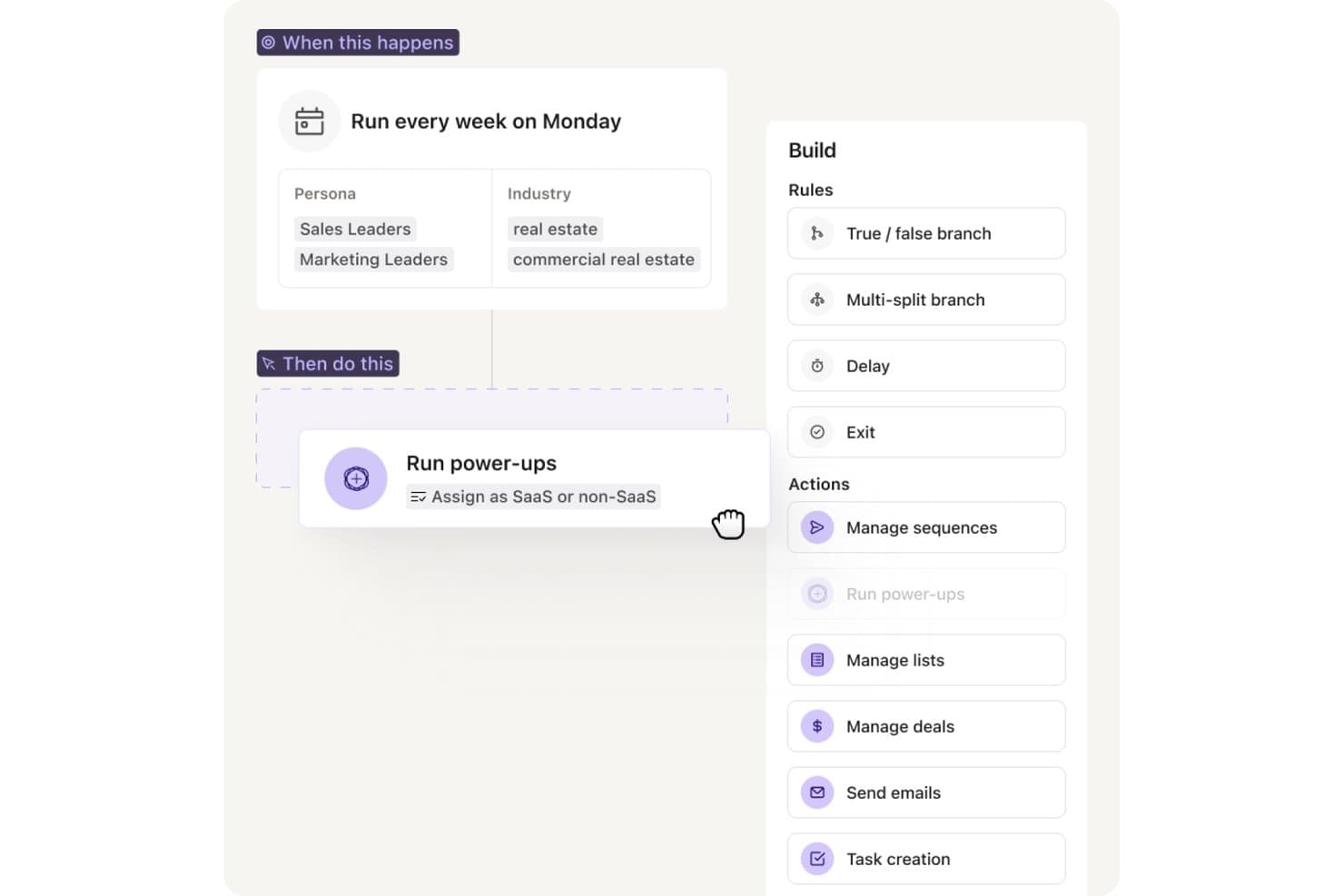
Apollo.io offers a workflow automation builder that runs weekly sequences, assigns leads as SaaS or non-SaaS, and supports actions like managing sequences, sending emails, and task creation. Apollo.io is an all-in-one outbound sales platform that combines email sequencing, multi-channel automation, and a built-in B2B contact database to support prospecting, outreach, and pipeline management in a single tool.
Who Is Apollo.io Best For?
Apollo.io suits B2B sales teams that run high-volume outbound motions and want prospecting data and email sequencing managed in one platform rather than across separate tools.
Why I Picked Apollo.io
I picked Apollo.io as one of the best because it's the only sequencing tool where the prospecting database and email automation share the same data layer. When I build a sequence, Apollo auto-enriches each contact with verified emails and firmographics from its 210M+ contact database before the first send. The waterfall enrichment model pulls from multiple providers, so gaps from one source get filled by another, keeping contact data cleaner than any single-source setup.
Apollo.io Key Features
- AI copywriting assistant: Generates and rewrites outbound emails based on each prospect’s data and role.
- Unified inbox and reply management: Centralizes all replies, auto-categorizes response sentiment, and routes leads.
- Multi-channel sequence steps: Lets you mix LinkedIn, phone, and email actions in the same outreach workflow.
- Deliverability infrastructure: Provides inbox rotation, warm-up pools, SPF/DKIM/DMARC setup, and real-time spam scoring.
Apollo.io Integrations
Apollo.io offers native integrations with Salesforce, HubSpot, Outreach, Salesloft, Pipedrive, Zoho CRM, and Slack, and it connects with Zapier. An API is available for custom integrations.
Pros and Cons
Pros:
- AI drafts email copy from prospect data
- Waterfall enrichment keeps contact data accurate
- Built-in database eliminates separate prospecting tools
Cons:
- Shared IP pools limit deliverability control
- Sequence reporting lacks deep attribution analytics
Learn more about Apollo.io: Best for drag-and-drop automations
- Free plan + 14-day free trial available
- From $12/month
Visit WebsiteCustomer Rating:4.7/5
MailerLite offers drag-and-drop email templates and content blocks. MailerLite is an email marketing automation platform with a visual workflow builder, trigger-based sequences, A/B testing, pre-built automation templates, and subscriber segmentation tools.
Who Is MailerLite Best For?
MailerLite is a natural fit for small businesses and solo operators who need to build and automate email workflows without relying on a developer.
Why I Picked MailerLite
MailerLite earns its spot on my shortlist because its drag-and-drop workflow builder makes building multi-step email sequences genuinely visual, with conditional branches, time delays, and action-based triggers all placed on a shared canvas. I also use the pre-built automation templates to spin up sequences like welcome series or post-demo follow-ups without building from scratch. Being able to see the full flow at once makes it much easier to catch logic gaps before the sequence goes live.
MailerLite Key Features
- Subscriber segmentation: Group contacts by engagement level, custom fields, or past campaign activity to target specific audiences.
- A/B split testing: Test two versions of a subject line or email body to identify which drives higher open or click rates.
- Click maps: See exactly which links inside an email are getting clicked to refine content placement in future sends.
- Campaign performance reporting: Track open rates, click rates, and unsubscribes across all active campaigns from a single dashboard.
MailerLite Integrations
MailerLite integrates with over 100 apps, including native integrations with Shopify, WooCommerce, Stripe, WordPress, Squarespace, Wix, BigCommerce, Canva, Facebook Audiences, and PrestaShop.
Pros and Cons
Pros:
- Time zone delivery and auto UTM tagging
- Free plan includes A/B testing
- Offers visual workflow builder
Cons:
- Reporting lacks depth
- No built-in CRM for sales pipelines
Learn more about MailerLite: Best for native webinar engagement
- Free plan + 14-day trial + demo available
- From $19/month
Visit WebsiteCustomer Rating:4.2/5
GetResponse offers webinar CTAs to drive attendee engagement. GetResponse is an email marketing and automation platform that combines email campaign building, list segmentation, marketing automation workflows, landing pages, and built-in webinar hosting in a single tool.
Who Is GetResponse Best For?
GetResponse is a strong fit for small to mid-sized marketing teams that run email campaigns alongside webinars, lead generation, or online course delivery.
Why I Picked GetResponse
GetResponse earns its spot on my shortlist because it's the only major email marketing platform that hosts webinars natively. That means my team can build the full funnel, registration page, automated reminder emails, live webinar, and post-event follow-up sequences, inside one platform with no Zapier connections. What I find most useful is the attendance-based segmentation: GetResponse automatically splits attendees into segments (attended, registered but no-showed, left early) and fires different email sequences to each group based on that behavior.
GetResponse Key Features
- Visual automation builder: Design multi-step email workflows triggered by user actions like clicks, purchases, or form submissions.
- A/B testing: Test subject lines, email content, and send times across campaign variants to identify top performers.
- Conversion funnel builder: Build lead generation funnels that connect landing pages, opt-in forms, and email sequences in one flow.
- AI email generator: Draft email copy and subject lines using a built-in AI writing tool directly inside the campaign editor.
GetResponse Integrations
GetResponse offers 170+ integrations through its integrations directory, including native connections with Shopify, WooCommerce, Salesforce, HubSpot, Pipedrive, Google Analytics, WordPress, PayPal, and Facebook.
Pros and Cons
Pros:
- Pairs landing pages with sequences
- Mails at each contact's peak
- Built-in webinar hosting
Cons:
- Duplicate contacts get billed twice
- Starter plan caps at one automation workflow
Learn more about GetResponse: Best for email and SMS marketing
- Free plan + 14-day free trial + free demo available
- From $13/month
Visit WebsiteCustomer Rating:4.3/5
Mailchimp helps SMBs manage email, social media, and digital marketing campaigns. Mailchimp is a marketing automation tool for small businesses to manage their email marketing, social media marketing, and other digital marketing efforts. It allows users to create marketing campaigns, manage customer lists, and track performance through analytics.
Why I picked Mailchimp: Mailchimp offers a wide array of customizable templates and a user-friendly interface that makes it easy for your team to design email campaigns. The platform’s audience management tools help you efficiently segment and target your customers. Its marketing automation features enable you to set up workflows that save time and increase engagement. Moreover, Mailchimp provides detailed analytics that helps you understand the effectiveness of your campaigns.
Standout features & integrations:
Features include customizable email templates, audience segmentation, notifications, marketing automation, social media management, and detailed analytics. You can design and send campaigns easily, manage your audience efficiently, and track your campaign's performance right from the dashboard.
Integrations include Shopify, WooCommerce, WordPress, Salesforce, HubSpot, Zapier, Slack, Google Analytics, QuickBooks, and Stripe.
Pros and Cons
Pros:
- Automated A/B testing
- Real-time campaign analytics
- AI-powered content optimization
Cons:
- Occasional deliverability issues
- Limited automation features
Learn more about Mailchimp:

Instantly.ai offers filtered lead lists for automated outreach. Instantly.ai is a cold email outreach platform built for high-volume sending, with inbox rotation across unlimited sending accounts, AI-driven sequence building, and a built-in CRM for managing leads and replies.
Who Is Instantly.ai Best For?
Instantly.ai is a strong fit for outbound lead generation agencies and growth teams that run cold email at high volume across multiple client accounts or sending domains.
Why I Picked Instantly.ai
I picked Instantly.ai as one of the best because its Automations feature handles lead routing without any manual intervention. When a lead replies, visits your pricing page, or books a meeting, Instantly automatically routes them, updates their CRM stage, and triggers the right follow-up campaign based on that signal. My team uses the trigger-based workflow builder to fire specific sequences based on real buying intent, not just static time delays, which is something most cold email tools can't do natively.
Instantly.ai Key Features
- Email warm-up: Gradually increases sending volume on new accounts to build domain reputation before launching campaigns.
- Unibox: Centralizes all replies from every connected inbox into a single view for managing responses at scale.
- AI email writer: Generates and personalizes outreach copy directly inside the sequence builder using AI.
- B2B lead finder: Searches and exports verified prospect contact data from a built-in database without leaving the platform.
Instantly.ai Integrations
Instantly.ai offers 50+ integrations through its marketplace, including native connections with HubSpot, Salesforce, and Pipedrive, as well as Slack, Clay, Trigify, and RB2B.
Pros and Cons
Pros:
- Triggers behavior-based follow-ups
- AI books meetings automatically
- Unlimited sending accounts
Cons:
- A/B testing limited to two variants
- Add-on pricing climbs fast at scale
Learn more about Instantly.ai: Best for data-driven customer engagement
- Free plan + free demo available
- From $25/month
Visit WebsiteCustomer Rating:4.6/5
Klaviyo enhances digital marketing with email, SMS, and customer data tools. Klaviyo is a marketing automation platform for email marketing, SMS, and customer data management. Its primary user base includes businesses looking to enhance digital marketing efforts through personalized customer interactions.
Why I picked Klaviyo: Klaviyo excels in segmentation and automated flows, which precisely target your audience. With its advanced reporting tools, you can track the performance of your marketing campaigns in real time. The platform supports over 350 integrations, making connecting with other tools you already use easy. Additionally, Klaviyo provides resources for onboarding and professional support, so your team can hit the ground running.
Standout features & integrations:
Features include advanced segmentation, automated flows, and reporting tools. Klaviyo also offers resources for onboarding and professional support.
Integrations include Shopify, WooCommerce, BigCommerce, Magento, Salesforce, Stripe, Zendesk, Eventbrite, Facebook, and Google Ads.
Pros and Cons
Pros:
- Custom predictive models
- Real-time revenue insights
- Advanced client lifecycle tracking
Cons:
- Limited non-retail support
- Basic CRM features
Learn more about Klaviyo: Best for CRM-aligned workflows
- Free plan available
- From $45/user/month (billed annually)
Visit WebsiteCustomer Rating:4.4/5
HubSpot offers CRM workflows that automate marketing and sales. HubSpot's Sales Hub is a sales automation platform that lets your team build timed email sequences, automate lead rotation, run A/B tests on outreach, and trigger workflow actions directly from its native CRM.
Who Is HubSpot Best For?
HubSpot Sales Hub is a strong fit for mid-market B2B sales teams that need email automation tightly connected to their CRM data.
Why I Picked HubSpot
I've included HubSpot in my top picks because its email sequences and CRM data work as one unified system, not two tools you have to sync. What I really like is how sequences can auto-enroll contacts based on intent signals pulled directly from the CRM, so reps aren't manually triaging who to follow up with. I also use the deal outcome reports tied to A/B-tested sequences to see which email variants actually generate revenue, not just opens.
HubSpot Key Features
- Email sequence enrollment from Gmail or Outlook: Enroll contacts directly from your Gmail or Outlook inbox without switching to a separate tool.
- Workflow-triggered task creation: Set up workflows to automatically create tasks and alert reps when a contact takes meaningful action.
- Predictive lead scoring: Automatically score and prioritize leads based on behavioral patterns to surface the accounts most likely to close.
- AI email writer: Generate and edit sales email copy using HubSpot's built-in AI writing tool directly within the platform.
HubSpot Integrations
HubSpot offers 1,500+ marketplace integrations, including tools like Salesforce, Gmail, Google Workspace, Outlook, Microsoft 365, Slack, LinkedIn Sales Navigator, Zoom, and Stripe. It also connects with Zapier and provides an API for custom integrations.
Pros and Cons
Pros:
- Built-in A/B testing on sequences
- Email and CRM share one database
- Sequences auto-adapt based on engagement
Cons:
- Advanced automation requires upgrade
- Starter plan caps email sends at 2,000/month
Learn more about HubSpot: Best for time-saving marketing automation
- 14-day free trial + free demo available
- From $15/month (billed annually)
Visit WebsiteCustomer Rating:4.4/5
ActiveCampaign enhances customer experience via marketing automation and CRM tools. ActiveCampaign is an all-in-one marketing automation software designed for businesses across various industries, including ecommerce, healthcare, and education. It enhances customer experiences through email marketing, CRM tools, audience segmentation, and dynamic content personalization.
Why I picked ActiveCampaign: ActiveCampaign excels in time-saving marketing automation due to its robust automation workflows that streamline tasks like email segmentation, lead generation scoring, and personalized customer journeys. Its easy-to-use drag-and-drop automation builder allows businesses to automate repetitive tasks efficiently, reducing manual efforts while improving customer engagement.
Standout features & integrations:
Features include customizable email templates, multi-channel outreach (email, SMS, ads), sales process automation, and CRM tools. The platform supports omnichannel marketing, making it easier for you and your team to engage with customers.
Integrations include Shopify, WooCommerce, WordPress, Salesforce, Facebook, Slack, Zapier, Google Analytics, Zendesk, and Mailchimp.
Pros and Cons
Pros:
- Audience segmentation
- Custom lead scoring
- Adaptive dynamic content
Cons:
- Limited native integrations
- No SMS A/B testing
Learn more about ActiveCampaign:

Brevo offers multi-channel marketing, sales, and scalable communication tools. Brevo is an email marketing automation tool that provides tools for email marketing, SMS, WhatsApp, and automation to improve customer engagement. It features a sales automation platform, multi-channel customer service, a customer data platform, and a messaging API for scalable communication.
Why I picked Brevo: Brevo offers advanced segmentation, enabling businesses to tailor campaigns based on customer behaviors, preferences, and past interactions. Its automation tools allow the creation of dynamic, personalized communication flows, ensuring targeted and engaging loyalty campaigns that strengthen customer relationships. Additionally, the platform supports up to 300 free emails per day with no required credit card.
Standout features & integrations:
Features include email marketing, SMS marketing, marketing automation, CRM integration, advanced segmentation, A/B testing, landing page builder, transactional emails, real-time reporting, contact management, multichannel campaigns, and personalized content.
Integrations include Shopify, WooCommerce, Magento, WordPress, Salesforce, HubSpot, Pipedrive, Zoho CRM, PrestaShop, and Drupal.
Pros and Cons
Pros:
- Ready-made workflows
- Advanced segmentation
- High deliverability rate
Cons:
- Limited transactional reporting
- Complex automation setup
Learn more about Brevo: 10Best for multichannel prospecting
Lemlist
- 14-day free trial available
- From $55/user/month (billed annually)

lemlist lets teams manage multichannel prospecting campaigns. lemlist is a sales engagement platform that combines cold email automation, LinkedIn outreach, and phone calling into multichannel prospecting sequences with built-in lead generation and personalization tools.
Who Is lemlist Best For?
lemlist is a strong fit for B2B sales reps and SDR teams that run outbound prospecting across email, LinkedIn, and phone from a single platform.
Why I Picked lemlist
lemlist earns its spot on my shortlist because it lets me build prospecting sequences that combine cold email, LinkedIn connection requests, and call steps in a single workflow. I particularly like the LinkedIn automation steps, where I can trigger a profile visit, a connection request, and a direct message as part of the same sequence without switching tools. The image personalization feature also lets me embed a prospect's name or company logo directly into email visuals, which my team uses to lift reply rates on cold outreach.
lemlist Key Features
- Email warm-up: Automatically warm up sending accounts through lemwarm to protect deliverability before launching cold outreach campaigns.
- Lead database: Search and import verified B2B contacts directly from lemlist's built-in lead finder without leaving the platform.
- Inbox rotation: Distribute outgoing emails across multiple sender accounts to reduce spam risk on high-volume sequences.
- A/B testing: Test multiple versions of email steps within a sequence to identify which copy drives the most replies.
lemlist Integrations
lemlist offers native integrations with HubSpot, Salesforce, Pipedrive, Attio, Zoho CRM, Aircall, Slack, Google Sheets, and Clay, among others.
Pros and Cons
Pros:
- LinkedIn automation runs inside email sequences
- Custom images embedded in emails
- Built-in email warm-up
Cons:
- Lacks attribution analytics
- Credits deplete quickly at scale
Learn more about Lemlist:
Outro software de automatização de e-mails de vendas
Eis algumas opções adicionais de software de automatização de e-mails de vendas que não entraram na minha seleção, mas que ainda vale a pena conhecer:
- 11Creatio AI CRMBest for no-code email automation
- 12OmnisendBest for ecommerce focus
- 13ReplyBest for automated reply detection
- 14Constant ContactBest for automated event follow-ups
- 15Zoho CampaignsBest for integrated email marketing
- 16BloomreachBest for AI-driven ecommerce personalization
- 17PipedriveBest for visual sales pipeline management
- 18Adobe Marketo EngageBest for complex lead nurturing
- 19Apollo.ioBest for data-backed prospecting
- 20Salesforce Marketing Cloud Account Engagement (Pardot) Best for automated prospect segmentation
How I Evaluate Sales Email Automation Software
I split my evaluation into two layers: the baseline every tool must hit—automated sequences, CRM sync, deliverability—and the differentiators that separate the best options for outbound RevOps teams.
Core Functionality (Table Stakes For This List)
When I'm selecting tools for my list, I rank each one on a scale from 0 (does not offer the functionality) to 5 (excels in this area) for each core functionality listed below. Then, I calculate the tool's total score into a percentage. Each tool needs to achieve a minimum total score of 65% to be considered for inclusion.
- Automated Email Sequences: I evaluate whether the tool supports multi-step drip sequences with reply-based stop conditions, conditional branching, and time delays between touches.
- Personalization at Scale: Dynamic merge tags and custom fields are table stakes, but I also check for conditional content blocks and enrichment-driven personalization across large lists.
- CRM & Inbox Integration: I look for native two-way sync with major CRMs like Salesforce and HubSpot, plus direct Gmail and Outlook connections that log activity without manual entry.
- Deliverability Controls: Warm-up tools, inbox rotation, sending limits, and bounce handling all factor in here—especially for teams running high-volume outbound across multiple domains.
- Engagement Tracking & Analytics: Beyond open and click tracking, I check whether the platform reports on replies, meetings booked, and sequence-level conversion metrics.
- A/B Testing: The ability to split-test subject lines and email body variants within live sequences matters, particularly for teams iterating on messaging across segments.
Once I have a list of tools that meet this criteria, I consider what sets each platform apart.
Differentiating Factors (What Sets Vendors Apart)
Here's how I compare and contrast different vendors:
Standout Features
Multi-channel orchestration is a big differentiator. I look for tools that let you weave LinkedIn, call, and SMS steps directly into email sequences rather than managing separate workflows. Intent-based triggers also matter—platforms that auto-enroll prospects based on job changes or funding events save SDRs from manually monitoring signals. A unified inbox that auto-categorizes replies by sentiment helps reps prioritize hot leads without sifting through every response.
Beyond Features
Pricing structure matters a lot here. I check whether a platform charges per seat, per inbox, or per contact, since that directly affects how costs scale when you grow from a small SDR pod to a full outbound org. Compliance tooling is another factor I evaluate—suppression list management and opt-out automation help teams stay aligned with GDPR and CAN-SPAM requirements. I also look at RevOps reporting depth, especially pipeline attribution tied to specific sequences and reps, plus native connectors to tools like Snowflake or Looker.
Como escolher um software de automatização de e-mails de vendas
É fácil ficar perdido entre listas extensas de funcionalidades e estruturas de preços complexas. Para ajudar a manter o foco enquanto analisa o seu processo específico de seleção de software, eis uma lista de verificação dos fatores a ter em conta:
| Fator | O que considerar |
| Escalabilidade | O software acompanhará o crescimento das necessidades da sua empresa? |
| Integrações | Integra-se com as ferramentas que já utiliza? |
| Personalização | O software pode ser adaptado aos seus processos? |
| Facilidade de utilização | O software é fácil de utilizar pela sua equipa? |
| Orçamento | O software cabe no seu orçamento? |
| Medidas de segurança | Estão implementadas medidas de segurança rigorosas? |
Utilize esta lista de verificação para manter o seu processo de seleção de software organizado e focado.
Tendências no software de automatização de e-mails de vendas
Durante a minha pesquisa, consultei inúmeras atualizações de produtos, comunicados de imprensa e registos de lançamentos de diferentes fornecedores de software de automatização de e-mails de vendas. Eis algumas das tendências emergentes que estou a acompanhar:
- Personalização orientada por IA: A IA está a ser utilizada para criar conteúdos de email altamente personalizados com base no comportamento e nas preferências dos utilizadores. As ferramentas utilizam IA para adaptar dinamicamente o conteúdo dos emails, garantindo que cada destinatário recebe uma mensagem única que corresponde aos seus interesses.
- Emails interativos: A incorporação de elementos interativos, como inquéritos, sondagens e vídeos, diretamente nos emails está a tornar-se popular. Alguns fornecedores estão a integrar estas funcionalidades para aumentar as taxas de interação e recolher feedback em tempo real dos destinatários.
- Análise preditiva: As plataformas de automatização de emails de vendas estão a integrar análises preditivas para prever o comportamento dos clientes e otimizar as campanhas de email. Esta funcionalidade sugere as melhores alturas para enviar emails e o tipo de conteúdo que terá melhor desempenho.
- Emails acionados pelo comportamento: A automatização de sequências de emails com base em ações específicas dos utilizadores, como o histórico de navegação ou compras anteriores, está a ganhar popularidade. Algumas ferramentas destacam a eficácia dos emails de abandono do navegador e de carrinho abandonado para voltar a envolver potenciais clientes e recuperar vendas perdidas.
- Hipersegmentação: Estão a ser utilizadas técnicas avançadas de segmentação para criar listas de emails mais direcionadas, ajudando as equipas a fechar negócios. As plataformas estão a melhorar as suas capacidades de segmentação, permitindo aos profissionais de marketing dividir o seu público em grupos mais pequenos e precisos com base em vários critérios, o que conduz a taxas de interação e conversão mais elevadas.
O que é o software de automatização de emails de vendas?
O software de automatização de emails de vendas automatiza o processo de envio de emails relacionados com vendas, ajudando as equipas de vendas a poupar tempo e a melhorar a sua eficiência. Os profissionais de vendas, como representantes de vendas e gestores de contas, utilizam estas ferramentas para gerir e nutrir potenciais clientes. Estas ferramentas ajudam a automatizar tarefas repetitivas, permitindo-lhes concentrar-se em atividades mais estratégicas.
Funcionalidades como acompanhamentos automáticos, modelos de email personalizados e integração com sistemas de CRM ajudam a gerir grandes volumes de emails, a manter a organização e a acompanhar o desempenho dos emails. Estas ferramentas proporcionam um valor significativo ao melhorar a produtividade e garantir uma comunicação consistente com potenciais clientes e clientes.
Funcionalidades do software de automatização de emails de vendas
Ao selecionar um software de automatização de emails de vendas, procure as seguintes funcionalidades principais:
- Agendamento de emails: Permite aos utilizadores agendar o envio de emails para as alturas ideais, garantindo que as mensagens chegam aos destinatários quando estes têm maior probabilidade de interagir com elas.
- Personalização: Permite personalizar os emails com detalhes específicos do destinatário, como o nome e as informações da empresa, aumentando as taxas de interação e resposta.
- Testes A/B: Permite testar diferentes versões de emails para determinar qual tem melhor desempenho, ajudando a aperfeiçoar as estratégias de email para obter melhores resultados.
- Análise e relatórios: Fornece informações detalhadas sobre métricas de desempenho dos emails, como taxas de abertura, taxas de cliques e conversões, ajudando na tomada de decisões baseada em dados.
- Integração com CRM: Estabelece uma ligação fluida com sistemas de gestão de relações com clientes para garantir que as campanhas de email estão alinhadas com os dados de vendas e dos clientes.
- Campanhas de envio gradual: Automatiza o envio de uma série de emails ao longo do tempo com base nas ações dos utilizadores ou em calendários predefinidos, nutrindo os potenciais clientes ao longo do funil de vendas.
- Pontuação de potenciais clientes: Atribui pontuações aos potenciais clientes com base nas suas interações com os emails, ajudando a dar prioridade aos acompanhamentos e a concentrar-se nos potenciais clientes com maior probabilidade de conversão.
- Biblioteca de modelos: Fornece uma coleção de modelos de email pré-concebidos que podem ser personalizados, poupando tempo e garantindo emails com um aspeto profissional.
- Respostas automáticas: Envia automaticamente respostas predefinidas aos emails recebidos, garantindo respostas atempadas e mantendo a interação com os potenciais clientes.
- Acionadores comportamentais: Inicia ações de email com base no comportamento do destinatário, como abrir um email ou clicar numa ligação, garantindo acompanhamentos atempados e relevantes.
Benefícios do software de automatização de emails de vendas
A implementação de um software de automatização de emails de vendas proporciona vários benefícios à sua equipa e à sua empresa. Eis alguns dos benefícios que pode esperar:
- Poupança de tempo: Automatiza tarefas repetitivas, como o envio de acompanhamentos, permitindo que a sua equipa se concentre em atividades mais estratégicas.
- Comunicação consistente: Garante uma comunicação atempada e regular com potenciais clientes e clientes através de emails agendados.
- Personalização: Utiliza os dados dos clientes para enviar mensagens personalizadas, aumentando o envolvimento e as taxas de resposta.
- Nutrição de potenciais clientes: Envia automaticamente conteúdo relevante para potenciais clientes com base no seu comportamento, ajudando-os a avançar no funil de vendas.
- Acompanhamento do desempenho: Fornece análises sobre campanhas de email, ajudando-o a compreender o que funciona e onde é necessário melhorar.
- Escalabilidade: Gere grandes volumes de emails sem esforço, apoiando o crescimento da empresa sem recursos adicionais.
- Maior precisão: Reduz os erros humanos no envio de emails, garantindo uma comunicação profissional e sem erros.
Custos e preços do software de automatização de emails de vendas
A escolha de um software de automatização de emails de vendas requer uma compreensão dos vários modelos de preços e planos disponíveis. Os custos variam consoante as funcionalidades, o tamanho da equipa, os complementos e outros fatores. A tabela abaixo resume os planos comuns, os seus preços médios e as funcionalidades normalmente incluídas nas soluções de software de automatização de emails de vendas:
Tabela de comparação de planos de software de automatização de emails de vendas
| Tipo de plano | Preço médio | Funcionalidades comuns |
| Plano gratuito | $0 | Modelos de email básicos, número limitado de envios de emails, relatórios básicos e regras de automatização limitadas. |
| Plano pessoal | $9-$20/utilizador/mês | Modelos de email avançados, maior número de envios de emails, segmentação básica e testes A/B básicos. |
| Plano empresarial | $25-$50/utilizador/mês | Modelos de email personalizados, número ilimitado de envios de emails, segmentação avançada e análises detalhadas. |
| Plano empresarial de grande dimensão | $100+/utilizador/mês | Suporte personalizado, IP dedicado, integrações avançadas, funcionalidades de colaboração em equipa e relatórios personalizados. |
Uma análise dos tipos de planos de software de automatização de emails de vendas, dos seus custos e das suas funcionalidades.
Perguntas frequentes sobre software de automatização de emails de vendas
Eis algumas respostas a perguntas frequentes sobre software de automatização de emails de vendas:
Quanto tempo permite poupar a automatização de emails?
A automatização de emails pode permitir poupar uma quantidade significativa de tempo. Por exemplo, tratar manualmente de pedidos relacionados com perguntas frequentes pode demorar cerca de 25 minutos, enquanto a automatização pode reduzir esse tempo para aproximadamente 5 minutos. A coordenação entre várias partes interessadas, que normalmente demora 40 minutos, pode ser reduzida para 10-15 minutos com a automatização.
Como posso otimizar a automatização de emails?
Para otimizar a automatização de emails, personalize as linhas de assunto e tire o máximo partido do preheader. Crie conteúdo valioso para o seu público e inclua imagens apelativas nos seus emails. Utilize CTAs claros e orientados para a ação e otimize o horário de envio dos seus emails.
Se não tiver a certeza quanto à qualidade dos dados, utilize um software de verificação de emails para eliminar informações de contacto incorretas antes de começar a enviar emails.
Qual é a diferença entre a automatização de emails e uma resposta automática?
Uma resposta automática consiste num conjunto de emails automatizados acionados por um evento específico, como a subscrição de um cliente a uma newsletter. A automatização, por outro lado, refere-se a qualquer tarefa automatizada, como o envio semanal de emails aos clientes ou a atualização das informações da conta de um cliente.
Como posso medir o sucesso das minhas campanhas de automatização de emails?
Meça o sucesso das suas campanhas de automatização de emails acompanhando métricas essenciais, como as taxas de abertura, as taxas de cliques e as taxas de conversão. Além disso, monitorize métricas como as taxas de rejeição e as taxas de anulação da subscrição para compreender de que forma o seu público interage com o seu conteúdo. A análise regular destas métricas pode ajudá-lo a efetuar os ajustes necessários para melhorar o desempenho.