

Uma base de dados de contactos B2B é uma plataforma de software que fornece acesso a contactos empresariais verificados e a informações sobre empresas para equipas de vendas, marketing e operações de receita. Se está à procura da melhor base de dados de contactos B2B, é provável que queira melhorar a qualidade dos potenciais clientes, enriquecer o seu CRM e apoiar a sua estratégia de entrada no mercado com dados precisos e atualizados. Esta lista vai ajudá-lo a comparar as principais ferramentas para 2026, a compreender o que distingue cada uma e a escolher a solução certa para apoiar os objetivos da sua equipa em matéria de prospeção, contacto e receitas.
Why Trust Our Software Recommendations
6,700+
Reviews
20
Industry experts
16+
Evaluation factors
14
Years
Our reviews reflect our independent judgment—not a sales pitch. Learn how we stay transparent.
For this guide, we evaluated tools using hands-on testing and independent research, scoring tools using our selection criteria.
Our reviews reflect our human editorial judgment, not a sales pitch.
Tabela de comparação de ferramentas de bases de dados de contactos B2B
Esta tabela de comparação resume os detalhes dos preços das minhas principais escolhas de bases de dados de contactos B2B:
| Tool | Best For | Trial Info | Price | ||
|---|---|---|---|---|---|
| 1 | Best for real-time email verification | 7-day free trial + free demo available | From $74/month (billed annually) | Website | |
| 2 | Best for GDPR-compliant data sourcing | Free demo available | Pricing upon request | Website | |
| 3 | Best for advanced company insights | Free trial available | Pricing upon request | Website | |
| 4 | Best for multi-channel contact discovery | Free plan available | From $27/month (billed annually) | Website | |
| 5 | Best for human-verified contact accuracy | Free trial available | Pricing upon request | Website | |
| 6 | Best for quick contact enrichment | Free plan available | From $37.45/month (billed annually) | Website | |
| 7 | Best with integrated sales engagement | 14-day free trial + free plan available | From $49/user/month (billed annually) | Website | |
| 8 | Best for real-time contact search at scale | Free plan available | Pricing upon request | Website | |
| 9 | Best with LinkedIn prospecting tools | Free plan available | From $15/month | Website | |
| 10 | Best for browser-based lead capture | Free plan + free demo available | From $65/user/month | Website |


Avaliações das melhores ferramentas de bases de dados de contactos B2B
Abaixo encontrará os meus resumos detalhados das melhores ferramentas de bases de dados de contactos B2B que entraram na minha lista restrita. As minhas avaliações apresentam uma análise detalhada das funcionalidades, dos melhores casos de utilização e das integrações de cada plataforma, para ajudá-lo a encontrar a melhor opção para a sua equipa.
 Best for real-time email verification
- 7-day free trial + free demo available
- From $74/month (billed annually)
Visit WebsiteCustomer Rating:4.7/5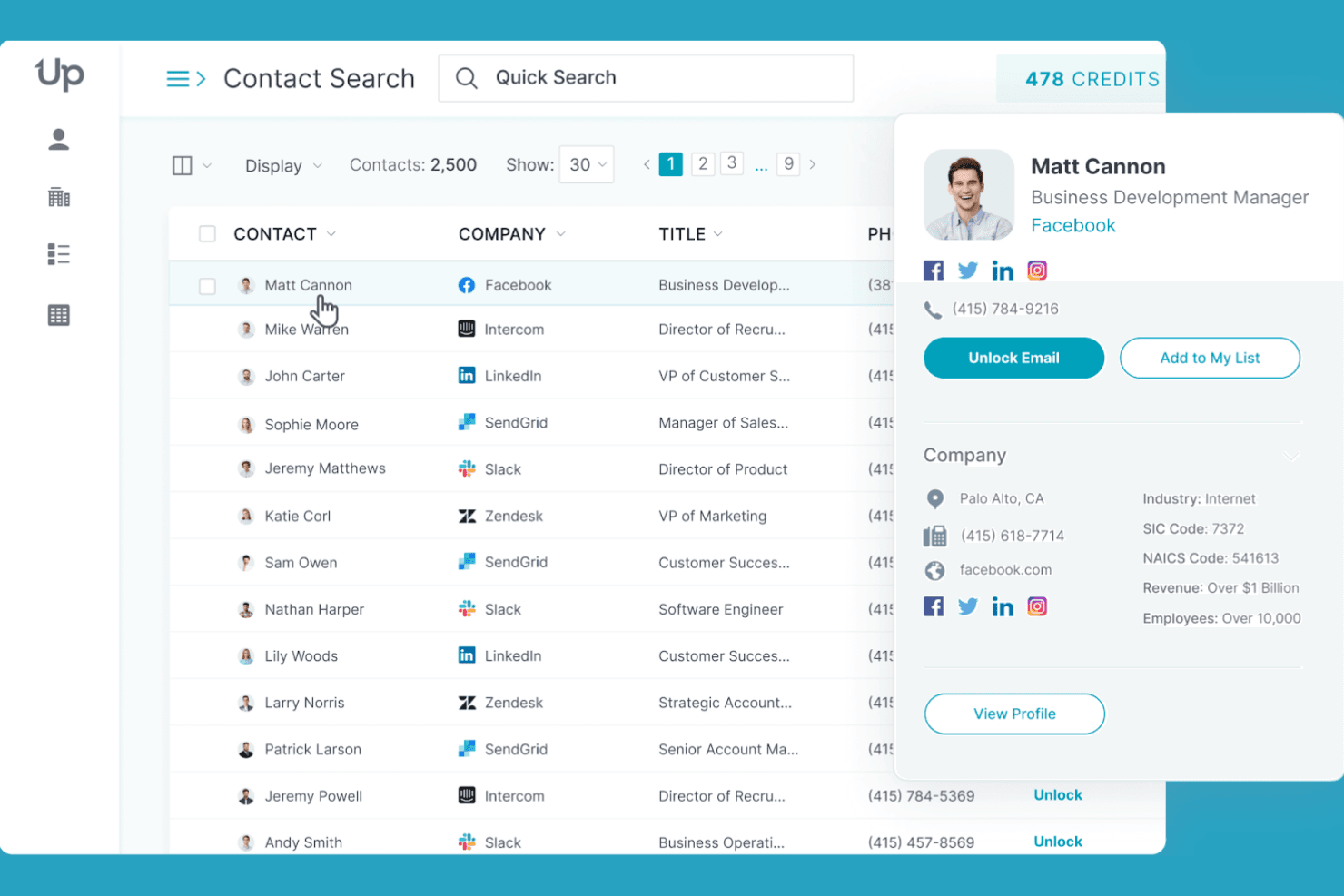
UpLead lets users search and preview detailed contact profiles at scale. UpLead is a B2B contact database platform that gives you access to 200M+ verified contacts with real-time email verification, firmographic and technographic filtering, CRM enrichment, and a multi-endpoint API for prospecting and data append workflows.
Who Is UpLead Best For?
UpLead is a strong fit for sales and RevOps teams that prioritize email deliverability and need verified contact data before pushing records into their outreach sequences or CRM.
Why I Picked UpLead
I picked UpLead as one of the best because its real-time email verification sets it apart from nearly every other B2B contact database I've evaluated. Unlike tools that verify emails at ingestion and call it done, UpLead re-verifies at the moment of export, which is what actually keeps bounce rates in check. I've seen teams cut bounce rates from 25% down to 3–5% after making the switch. The "Friendly Credits" refund policy backs that up: if a contact bounces, you get the credit back.
UpLead Key Features
- Technographic filtering: Search and filter prospects by the specific technologies they use, drawing from a library of 16,000+ tracked tools and platforms.
- Suppression list uploads: Upload existing contact lists to exclude records you already own, so you're only pulling net-new prospects.
- Chrome extension: Surface verified contact data and technographics directly on LinkedIn profiles and company websites while you browse.
- Multi-endpoint enrichment API: Append contact and company data at scale via dedicated API endpoints for person, company, and combined lookups.
UpLead Integrations
UpLead offers 15 native integrations, including Salesforce, HubSpot, Zoho CRM, Pipedrive, Microsoft Dynamics 365, Outreach, Salesloft, Reply.io, Lemlist, and Close. It also supports custom workflows through its API and Zapier.
Pros and Cons
Pros:
- Refunds credits for invalid or bounced emails
- Technographic filters enable targeted prospect lists
- Real-time email verification reduces bounce rates
Cons:
- Limited data for international small businesses
- Phone number accuracy not guaranteed
Learn more about UpLead: Best for GDPR-compliant data sourcing
- Free demo available
- Pricing upon request
Visit WebsiteCustomer Rating:4.6/5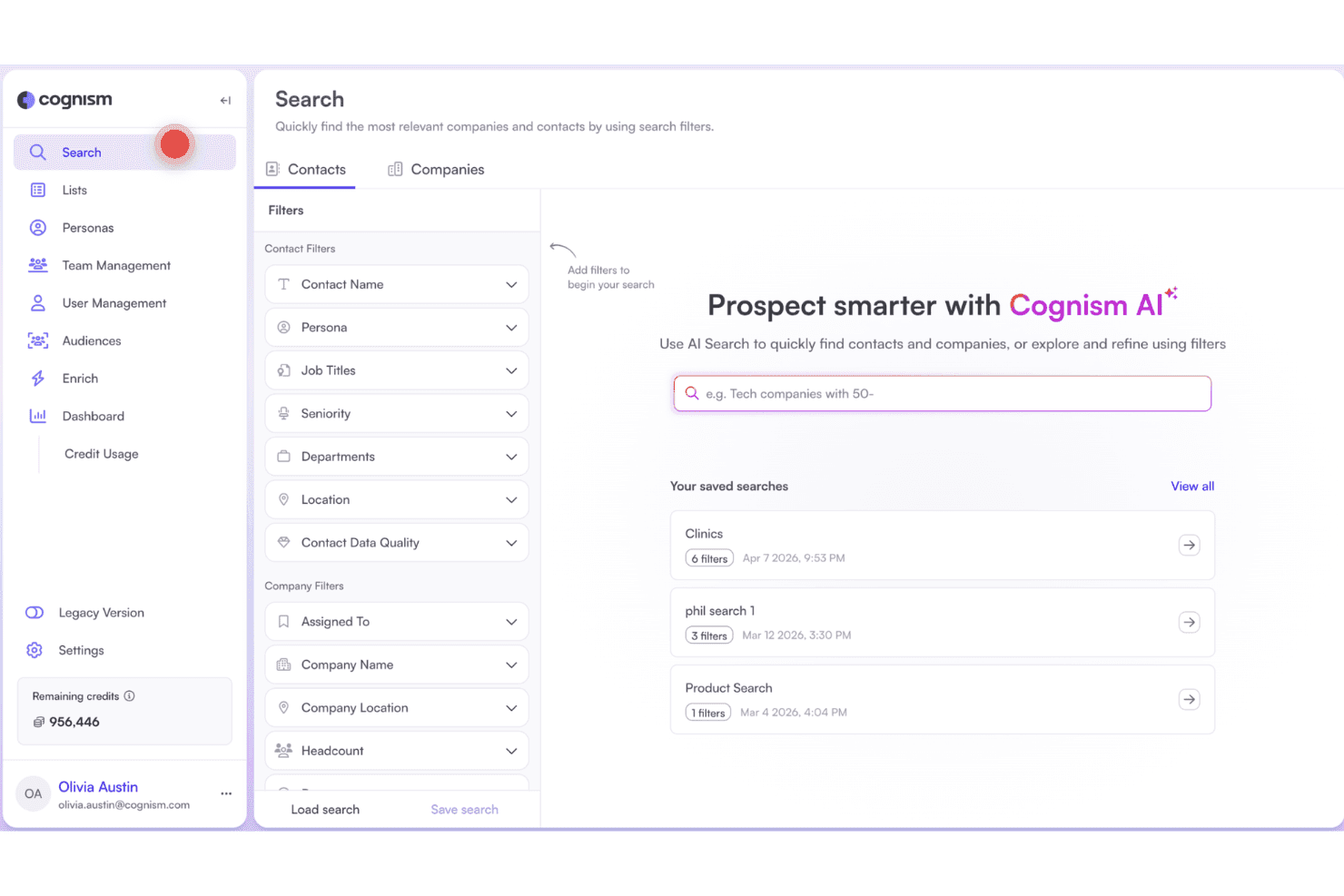
Cognism lets users search and filter contacts using AI-powered prospecting. Cognism is a B2B contact database and sales intelligence platform that combines a global contact and company database with phone-verified mobile data, firmographic and technographic filters, buyer intent signals, and AI-assisted prospecting tools.
Who Is Cognism Best For?
Cognism is a strong fit for GTM teams running outbound into European markets who need phone-verified contact data that holds up under GDPR scrutiny.
Why I Picked Cognism
Cognism earns its spot on my shortlist because no other B2B contact database takes GDPR compliance as seriously at the data level. I'm particularly impressed by Diamond Data, where Cognism's team manually calls mobile numbers to verify they reach the right person, then re-verifies every 18 months. On top of that, every phone number is screened against 16 global DNC registries, including country-specific lists across the UK, France, Germany, and Australia, so outreach into European markets stays clean by default.
Cognism Key Features
- Diamond Data® mobile database: A curated set of 10M+ phone-verified mobile numbers, each manually confirmed to reach the right contact and re-verified every 18 months.
- Bombora intent data integration: Filters accounts by in-market behavior across up to 12 topics using Bombora's Company Surge® signals, available on the Pro plan.
- Smart Personas: An AI feature that generates structured buyer personas—including recommended titles, seniority, department, and region—directly inside the search interface and Chrome Extension.
- Data-as-a-Service (DaaS): API and bulk flat-file delivery of Cognism data to S3 buckets or custom destinations, designed for RevOps enrichment pipelines, predictive scoring models, and TAM analysis.
Cognism Integrations
Cognism offers seven native integrations, including Salesforce, HubSpot, Pipedrive, Microsoft Dynamics, Bullhorn, Outreach, and Salesloft. It also supports API-based custom integrations and Zapier.
Pros and Cons
Pros:
- Strongest European market data depth
- Manually phone-verified contacts for higher accuracy
- Highest GDPR compliance coverage for B2B data
Cons:
- Annual contracts require advanced cancellation notice
- US data quality lags behind competitors
Learn more about Cognism: Best for advanced company insights
- Free trial available
- Pricing upon request
Visit WebsiteCustomer Rating:4.4/5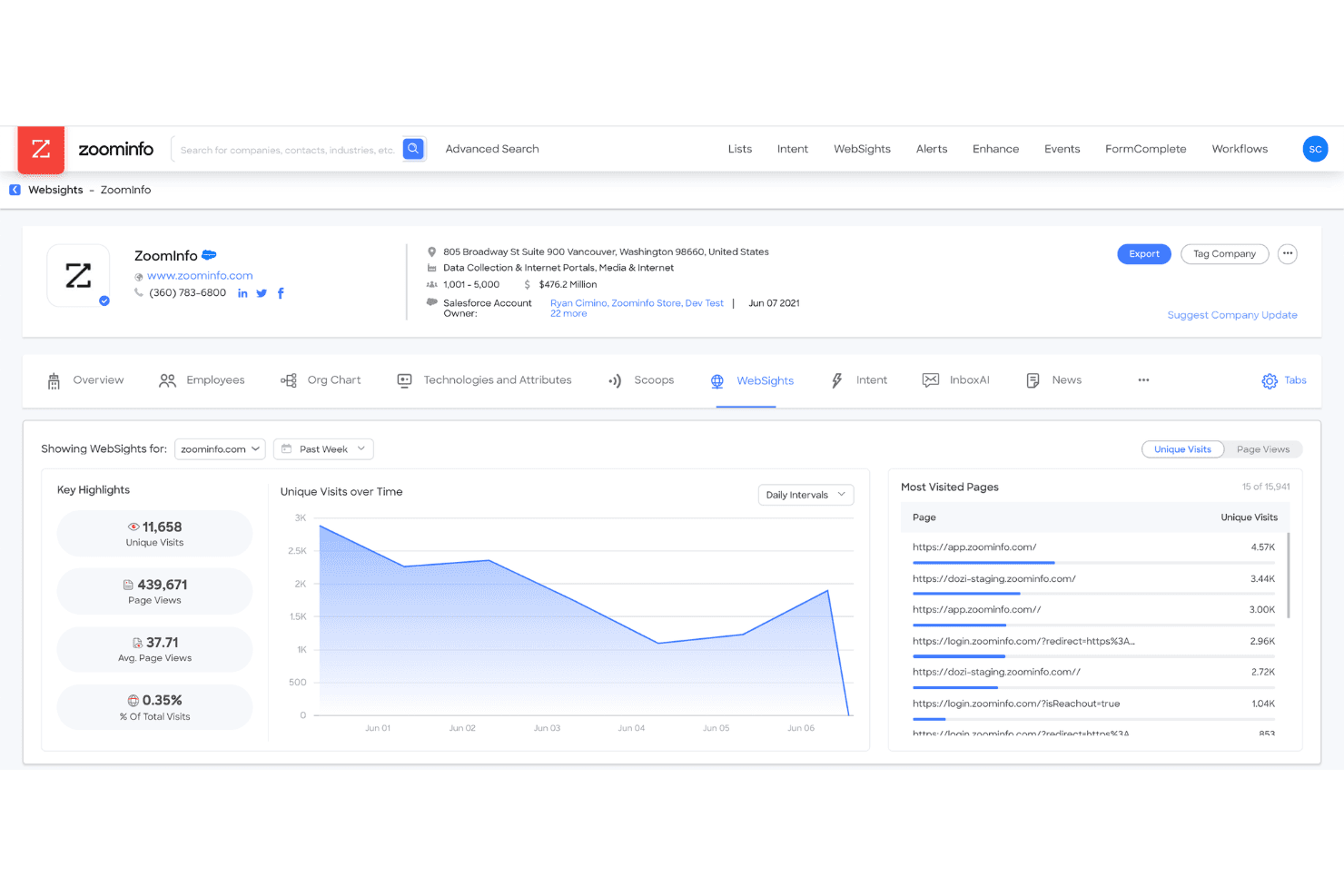
ZoomInfo tracks website visitor behavior with WebSights analytics. ZoomInfo is a B2B contact database platform that combines a 500M+ contact database with firmographic and technographic data, buyer intent signals, org charts, and CRM enrichment to support prospecting, territory planning, and pipeline workflows.
Who Is ZoomInfo Best For?
ZoomInfo is a strong fit for mid-market and enterprise revenue teams that need deep company intelligence—org charts, intent signals, and technographics—to prioritize accounts and orchestrate multi-threaded outreach.
Why I Picked ZoomInfo
ZoomInfo earns its spot on my shortlist because the depth of company intelligence it surfaces goes well beyond standard firmographics. I'm particularly impressed by its GTM Context Graph, which layers org charts, buyer intent signals, and technographic data into a single account view—so my team can identify not just who to target but when they're actively researching. Person-Level Intent takes that further by pinpointing specific stakeholders within an in-market account, not just the company.
ZoomInfo Key Features
- 500M+ contact database: Access verified records for over 500 million global B2B professionals, filterable by 300+ attributes including job title, seniority, industry, and tech stack.
- CRM enrichment automation: Automatically refresh Salesforce, HubSpot, and Dynamics 365 records on creation or a scheduled cadence using native bi-directional connectors.
- WebSights visitor identification: De-anonymize website traffic by mapping IP addresses to company and contact records, surfacing inbound interest as actionable leads.
- Compliance API: Manage privacy workflows and opt-out requests programmatically to support GDPR and CCPA obligations across your contact database.
ZoomInfo Integrations
ZoomInfo offers 70+ native integrations, including Salesforce, HubSpot, Microsoft Dynamics 365, Outreach, Salesloft, Marketo Engage, Slack, and Microsoft Teams. It also supports custom integrations through Standard, Scaling, WebSights, and Compliance APIs, plus Zapier.
Pros and Cons
Pros:
- Continuous CRM record enrichment automation
- Person-level buyer intent surfacing
- Largest global contact database available
Cons:
- Data accuracy weaker outside North America
- Pricing is opaque and contract-heavy
Learn more about ZoomInfo: Best for multi-channel contact discovery
- Free plan available
- From $27/month (billed annually)
Visit WebsiteCustomer Rating:4.3/5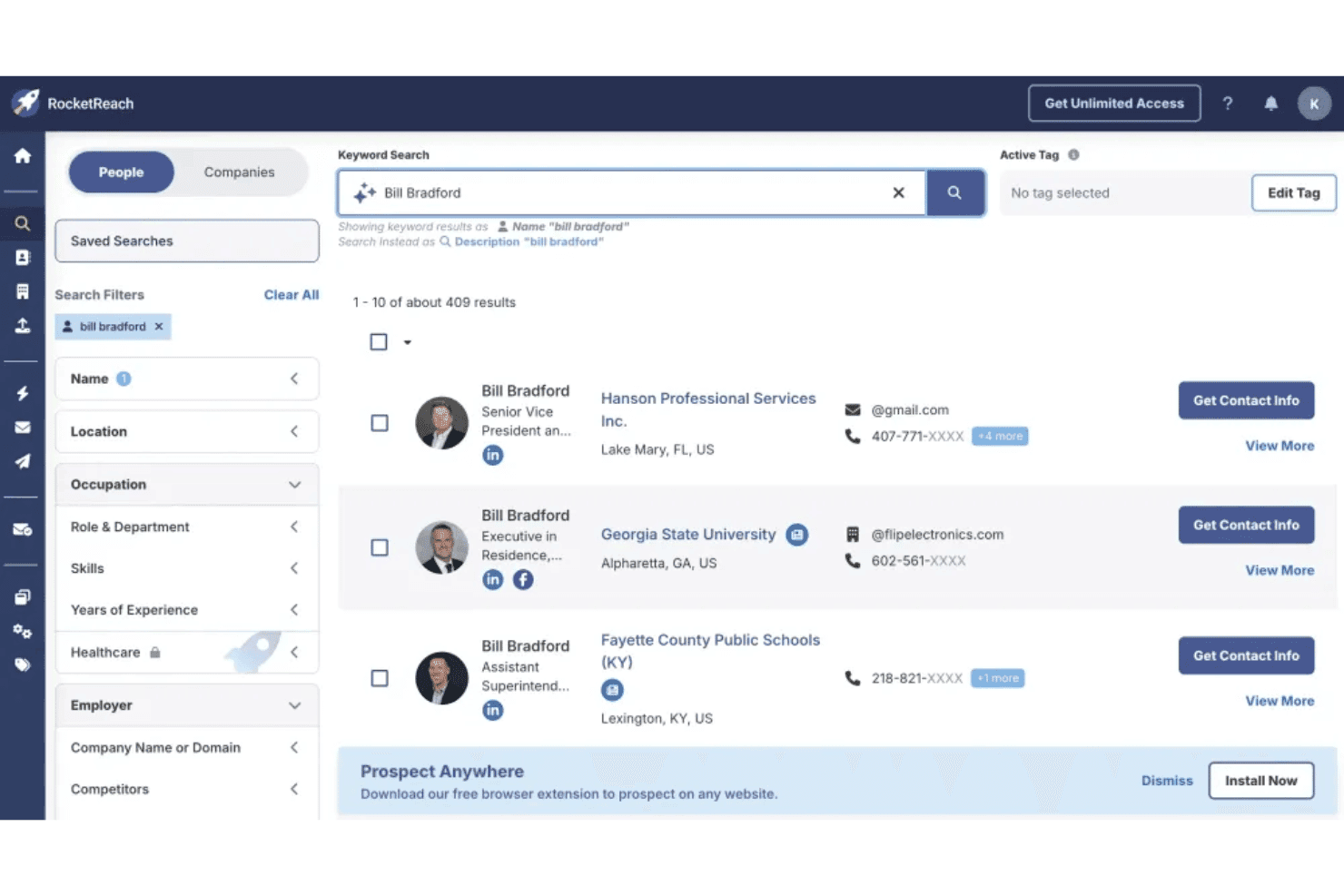
RocketReach lets users search and filter contacts by name, role, and employer. RocketReach is a B2B contact database platform with a 700M+ profile database, offering verified email and phone lookup, advanced search filtering, intent data, and built-in outreach automation.
Who Is RocketReach Best For?
RocketReach is a strong fit for outbound sales and RevOps teams that need broad global contact coverage across email, phone, and intent signals in one platform.
Why I Picked RocketReach
RocketReach earns its spot on my shortlist because no other tool in this category matches its breadth across email, phone, and intent signals in a single platform. I love that the 700M+ profile database pairs directly with 35,000+ intent topics via Intentsify, so I can filter for accounts already showing buying behavior rather than just blasting a cold list. The Autopilot feature takes it further by letting me automate the entire search-to-outreach sequence, including multi-step email follow-ups, without leaving the platform.
RocketReach Key Features
- Advanced search filtering: Search across 700M+ profiles using filters for seniority, department, technographics, skills, and recently switched roles, with Boolean logic and exact/not-match modifiers.
- Saved dynamic searches: Build searches that auto-refresh as new matching profiles are added to the database, keeping your prospect lists current without manual updates.
- Chrome browser extension: Look up verified emails and phone numbers directly while browsing LinkedIn, Crunchbase, or AngelList without switching between tabs.
- REST API with bulk enrichment: Access 4.5 billion records via structured API endpoints for people, companies, email finder, and firmographics to power CRM enrichment workflows at scale.
RocketReach Integrations
RocketReach offers native integrations with Salesforce, HubSpot, Outreach, Salesloft, and Bullhorn. It also supports custom integrations through its REST API and Zapier.
Pros and Cons
Pros:
- Built-in prospecting and outreach automation
- High deliverability rates for verified emails
- Massive global database with niche verticals
Cons:
- Intent data reserved for highest tier plans
- Billing and cancellation complaints are common
Learn more about RocketReach: Best for human-verified contact accuracy
- Free trial available
- Pricing upon request
Visit WebsiteCustomer Rating:4.3/5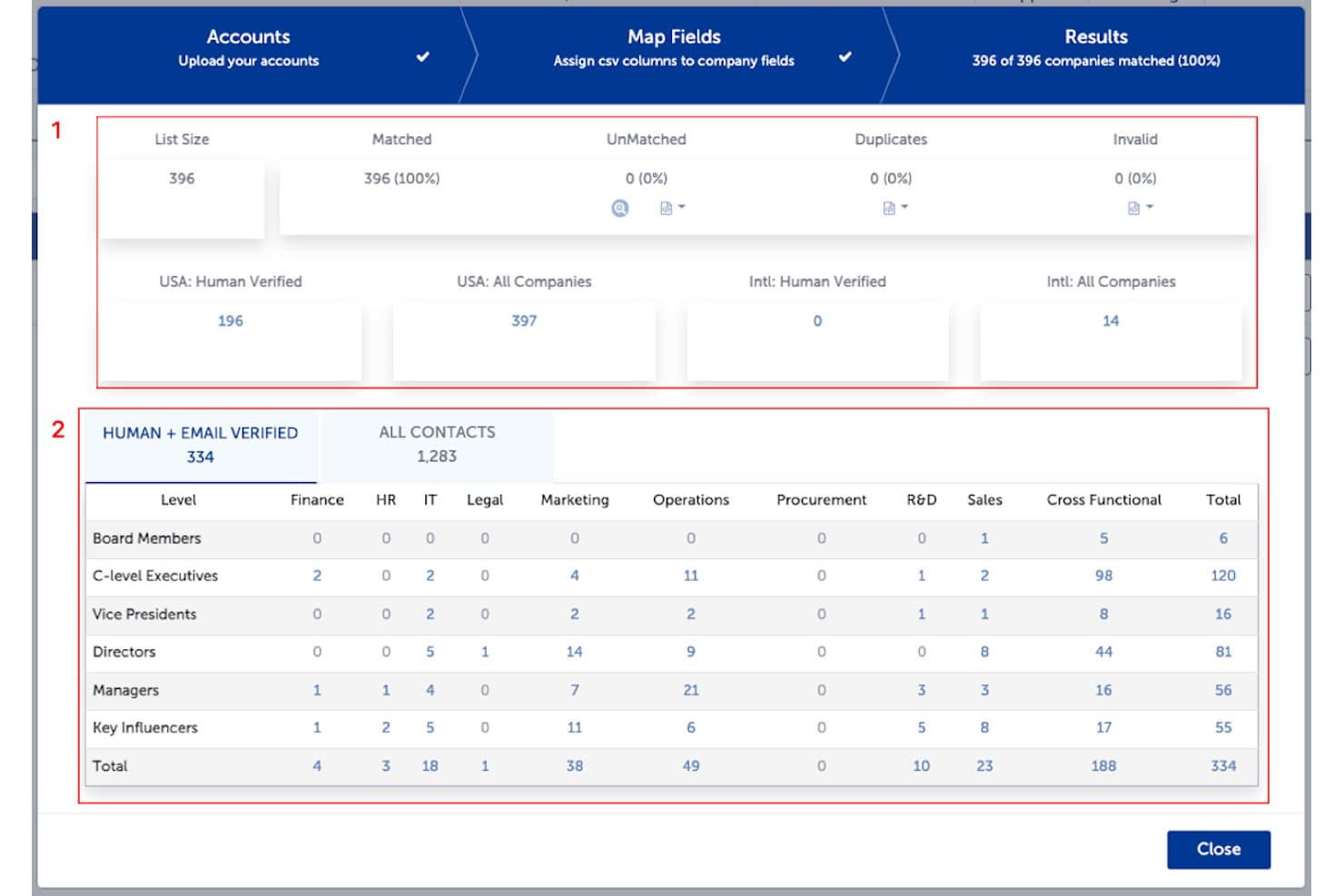
SalesIntel matches uploaded accounts and segments verified contacts by role. SalesIntel is a B2B contact database platform that combines human-verified contact data, firmographic and technographic intelligence, buyer intent signals, and CRM enrichment into a single prospecting and account research tool.
Who Is SalesIntel Best For?
SalesIntel is a strong fit for revenue teams that prioritize data accuracy over database size and need verified contact records they can trust before reaching out.
Why I Picked SalesIntel
SalesIntel earns its spot on my shortlist because no other platform in this category backs its contact data with 2,000+ human researchers re-verifying every record on a 90-day cycle. I love that if a contact isn't already in the database, Research on Demand lets me submit a request and get verified results back within 24 hours. The 54M+ verified mobile numbers also stand out, with documented phone connection rates that outpace larger competitors by a wide margin.
SalesIntel Key Features
- Buying committee mapping: Identifies and maps economic buyers, technical evaluators, champions, and influencers within target accounts to support multi-stakeholder outreach.
- GTMCanvas workflow builder: A no-code drag-and-drop tool for building automated GTM plays triggered by signal categories, with AI-generated role-aware messaging for each stakeholder.
- VisitorIntel: De-anonymizes anonymous website traffic at the company and contact level, surfacing which accounts are actively researching your product.
- ICPIntel scoring: Analyzes 100,000+ data points per account to generate ICP Fit Scores, helping you filter and prioritize accounts that match your ideal customer profile.
SalesIntel Integrations
SalesIntel advertises 50+ integrations, including native connections with Salesforce, HubSpot, Microsoft Dynamics, Zoho CRM, Marketo, Outreach, and Salesloft. Its RESTful API, webhooks, and CSV exports support custom data workflows.
Pros and Cons
Pros:
- Fast research-on-demand for missing contacts
- Unlimited data exports on all plans
- Human-verified contacts with 95% claimed accuracy
Cons:
- Advanced features require paid add-ons
- Data for niche industries sometimes outdated
Learn more about SalesIntel: Best for quick contact enrichment
- Free plan available
- From $37.45/month (billed annually)
Visit WebsiteCustomer Rating:4.2/5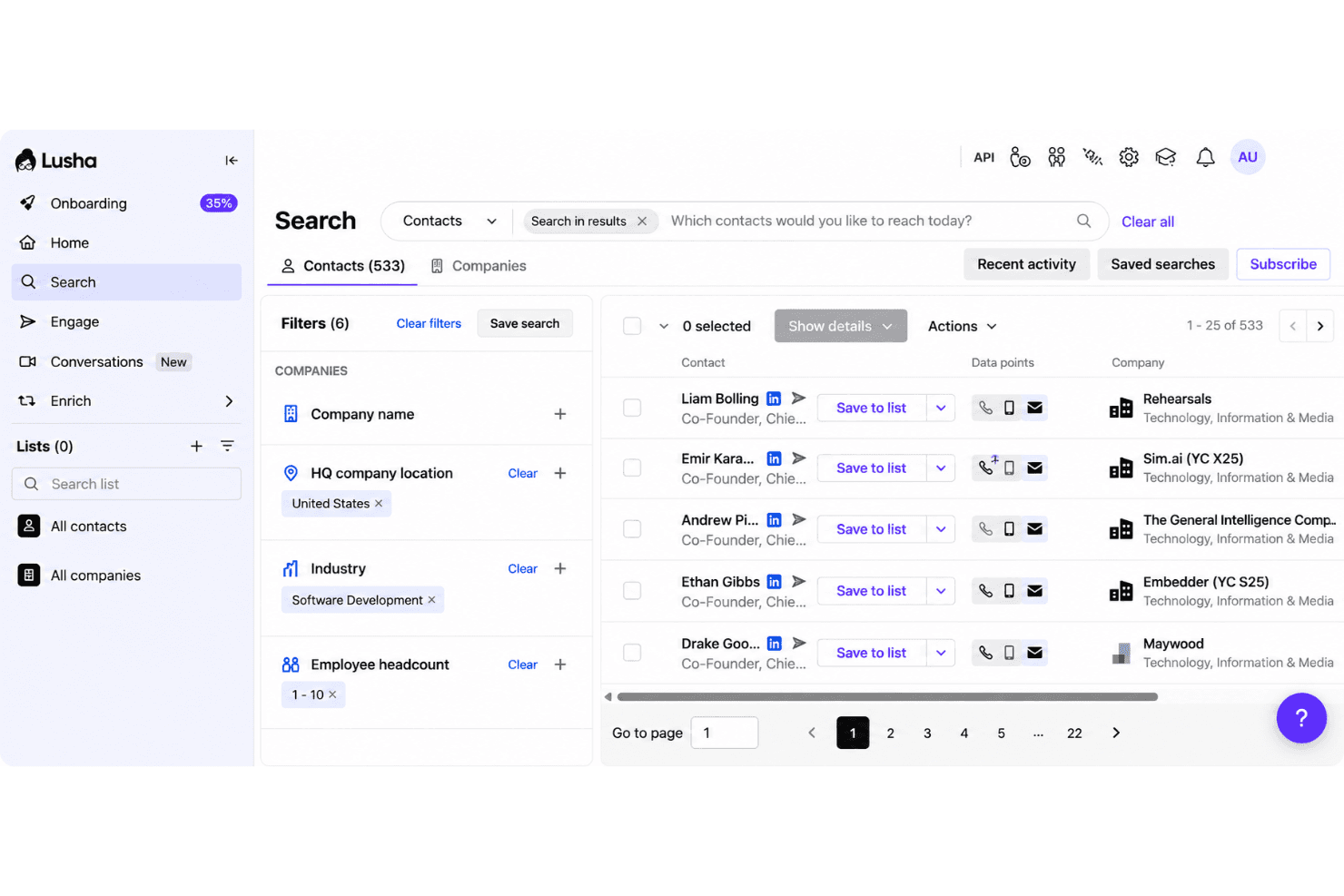
Lusha provides direct phone numbers for faster prospect outreach. Lusha is a B2B contact database and sales intelligence platform that gives you access to 290M+ verified contacts, direct dials, firmographic data, technographics, and event-based buying signals.
Who Is Lusha Best For?
Lusha is a strong fit for sales and RevOps teams that need fast, reliable contact data without a lengthy onboarding process.
Why I Picked Lusha
Lusha earns its spot on my shortlist because the Chrome extension alone makes it one of the fastest ways to pull verified contact data in the category: open a LinkedIn profile, and you have a direct dial and work email without ever leaving your browser. I also like the ICP Hub, which scores and ranks accounts as Warm, Hot, or Very Hot using seven predictive models, so my team isn't just collecting contacts but prioritizing them. The 98% email accuracy and 86% phone accuracy are backed by continuous re-verification, which holds up in practice.
Lusha Key Features
- Buying signals: Tracks 26 event-based signals—including funding rounds, hiring surges, and leadership changes—refreshed weekly to surface timely outreach opportunities.
- WebSights visitor identification: Matches anonymous website visitors to company profiles and surfaces verified contact details from visiting organizations.
- REST API suite: Provides Enrichment, Search, Signals, Lookalike, and Companies endpoints for programmatic list-building, real-time enrichment, and CRM automation.
- Lusha Conversations: Records and transcribes sales meetings, then generates AI summaries, action items, and engagement metrics that sync directly to your CRM.
Lusha Integrations
Lusha offers 27+ marketplace integrations, including Salesforce, HubSpot, Zoho CRM, Pipedrive, monday CRM, Bullhorn, Outreach, Salesloft, Clay, and Zapier. Its REST API suite supports custom CRM enrichment, list building, signals, lookalike matching, and company data workflows.
Pros and Cons
Pros:
- AI-driven ICP scoring and lookalike matching
- Database has granular regional coverage statistics
- Chrome extension reveals contact info instantly
Cons:
- No visual org chart or committee mapping
- Credit-based model limits high-volume users
Learn more about Lusha: Best with integrated sales engagement
- 14-day free trial + free plan available
- From $49/user/month (billed annually)
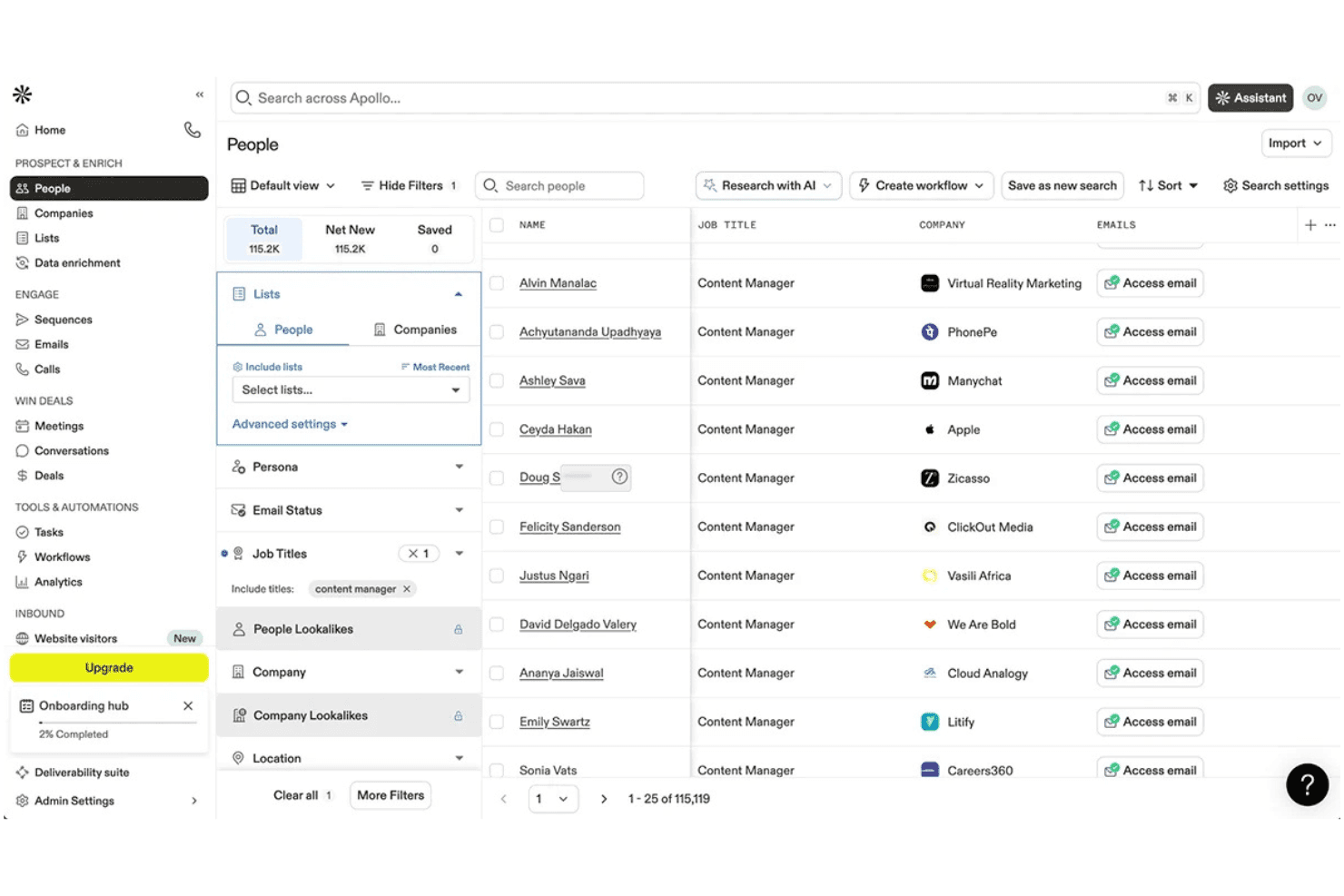
Apollo.io lets users filter and prospect leads by job title at scale. Apollo.io is a B2B contact database and sales engagement platform that combines a 240M+ contact database with built-in sequencing, prospecting filters, CRM enrichment, and AI-assisted list building.
Who Is Apollo.io Best For?
Apollo.io suits revenue operations and sales teams that want a single platform for prospecting, contact enrichment, and outbound engagement without stitching together separate database and sequencing tools.
Why I Picked Apollo.io
Apollo.io earns its spot on my shortlist because it's the only B2B contact database that bundles a 240M+ contact database with native sequencing, a built-in dialer, and A/B testing in a single platform. I love that you don't need a separate sales engagement tool: you can pull a list using 65+ filters, build a Persona for your ICP, and launch a sequence without ever leaving Apollo. The Waterfall Enrichment feature, which cascades through 20+ data providers to fill gaps, is what sets the data quality apart from single-source alternatives.
Apollo.io Key Features
- Buyer intent filtering: Surfaces accounts actively researching relevant topics using Bombora-powered intent data, available on Professional and Organization plans.
- Data Health Center: Monitors CRM record quality and surfaces total addressable market insights to support territory planning and pipeline analysis.
- Saved searches and alerts: Lets you save prospect search criteria and receive email notifications when new contacts match your defined ICP filters.
- CSV enrichment: Accepts external contact lists and enriches them against Apollo's database, filling missing firmographic and contact fields automatically.
Apollo.io Integrations
Apollo.io offers 200+ integrations, including native connections with Salesforce, HubSpot, Pipedrive, Outreach, Salesloft, Marketo, SendGrid, and Chili Piper. It also provides REST API access, Apollo CLI, Apollo MCP, and Zapier for custom integrations.
Pros and Cons
Pros:
- AI assistant boosts meeting booking success
- Waterfall enrichment improves data fill rates
- Combines database, sequencing, and dialer in one
Cons:
- Credits expire monthly with no rollover
- Real-world email accuracy is inconsistent
Learn more about Apollo.io: Best for real-time contact search at scale
- Free plan available
- Pricing upon request
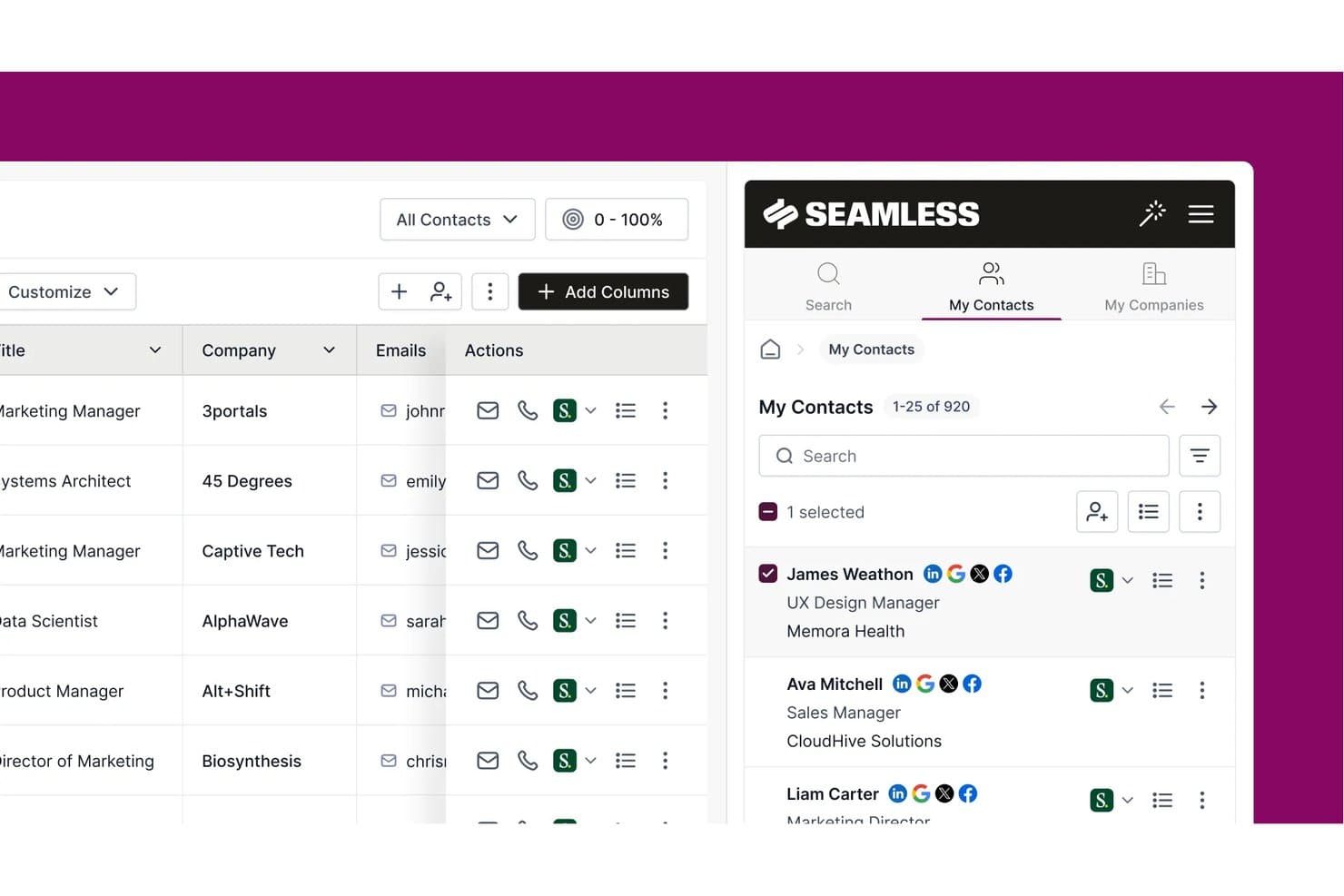
Seamless.AI lets users manage and browse saved B2B contacts in one place. Seamless.AI is a real-time B2B contact search engine that combines a database of over 1.3 billion verified contacts with AI-powered prospecting, CRM enrichment, buyer intent signals, and built-in sales engagement tools.
Who Is Seamless.AI Best For?
Seamless.AI is a strong fit for sales and revenue teams that need to build large outbound prospect lists fast, without the enterprise price tag of tools like ZoomInfo.
Why I Picked Seamless.AI
Seamless.AI earns its spot on my shortlist because of how it handles contact discovery at scale: instead of pulling from a static database, it searches and verifies data in real time, which means you're not working from records that were accurate six months ago. I especially like the Prospector's look-alike ICP targeting, which identifies net-new accounts that match your best customers without manual list-building. The CRM Enrich product also continuously audits your existing records and auto-refreshes stale fields, so your pipeline data stays current without a cleanup project.
Seamless.AI Key Features
- Buyer intent signals: Surfaces in-market accounts by monitoring 16.4 billion monthly interactions across 5,000+ sites using NLP with 12,000+ industry categories.
- Job changes tracking: Detects when contacts change roles, earn promotions, or move companies, with date filters spanning up to one year.
- REST API access: Provides bulk and singular endpoints for programmatic contact search and enrichment, available on all plan tiers including free.
- Built-in sales engagement hub: Lets you send emails, make calls via a built-in dialer, and manage follow-up tasks directly within the platform.
Seamless.AI Integrations
Seamless.AI offers native integrations with Salesforce, HubSpot, Microsoft Dynamics 365, Zoho CRM, Pipedrive, Outreach, and Salesloft. It also supports integrations through n8n and Zapier, plus REST API access for custom CRM and data workflows.
Pros and Cons
Pros:
- Buyer intent signals from consent-based cooperative
- Automated CRM enrichment with continuous data refresh
- Real-time contact verification at search time
Cons:
- Subscription cancellation process often causes disputes
- Email and phone accuracy lower than claimed
Learn more about Seamless.AI:
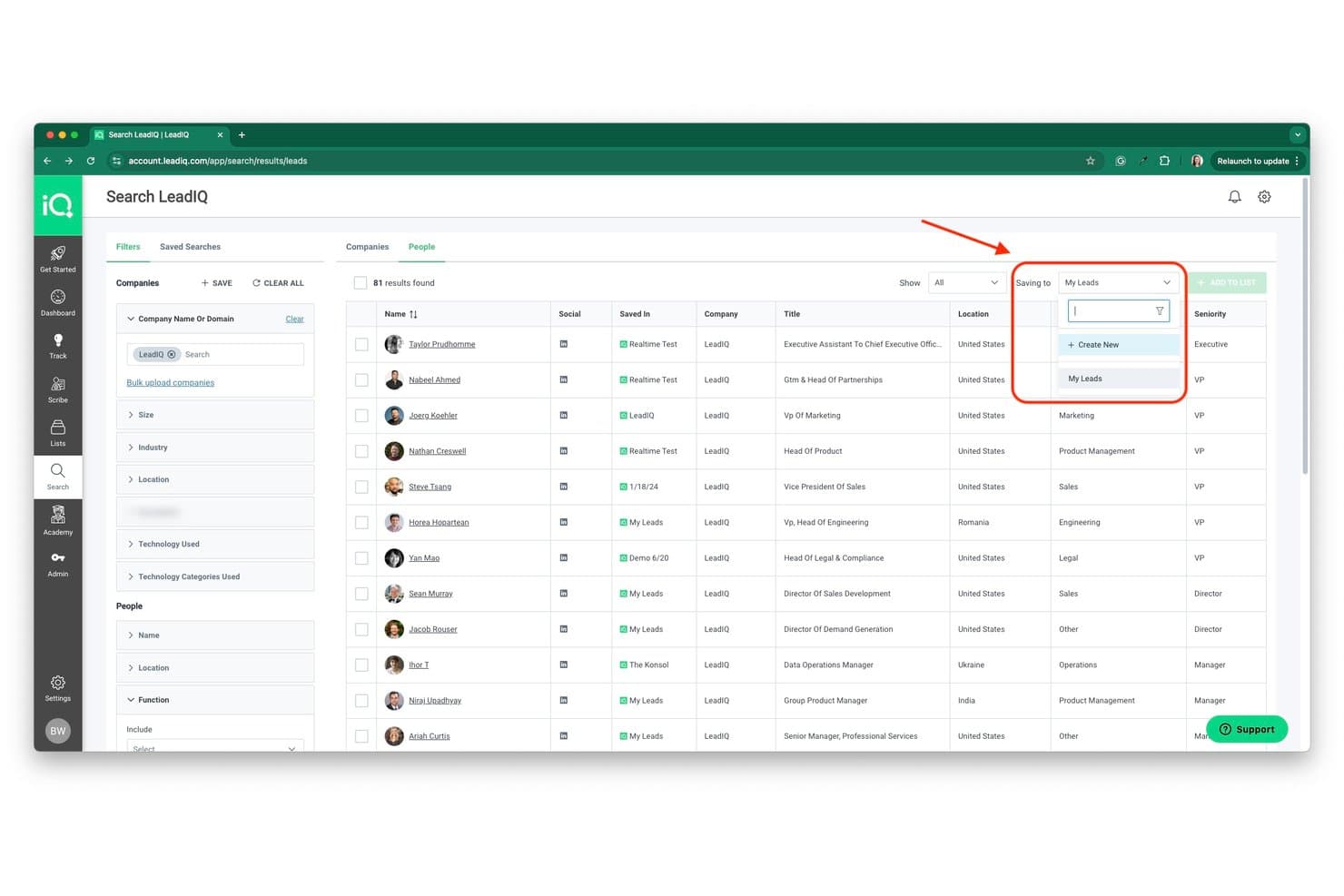
LeadIQ lets users save contacts directly to named lists from search results. LeadIQ is a B2B contact database and prospecting platform built around a 750M+ profile database, offering verified email and phone data, CRM enrichment, champion tracking, and AI-powered outreach tools.
Who Is LeadIQ Best For?
LeadIQ is a strong fit for sales teams that source most of their pipeline directly from LinkedIn and need verified contact data synced to their CRM in one click.
Why I Picked LeadIQ
LeadIQ earns its spot on my shortlist because its Chrome extension turns LinkedIn and Sales Navigator into a live prospecting layer, letting you capture verified emails, mobile numbers, and firmographics in one click and push them straight to your CRM. I especially like the batch capture from Sales Navigator search results, which means you're not clicking through profiles one by one. Champion tracking adds another layer I find genuinely useful: when a saved contact changes jobs, LeadIQ flags it with updated contact info so warm pipeline doesn't go cold.
LeadIQ Key Features
- Scribe AI email writer: Generates three personalized email drafts per recipient using LeadIQ contact data, persona definitions, and case studies, with support for five languages.
- Signals feed: Surfaces buying signals—including 10-K filings, hiring activity, and podcast mentions—to help you time outreach to key accounts.
- Salesforce Managed Package: A native bi-directional Salesforce integration that supports duplicate detection, custom field mapping, and enrichment across 40+ firmographic fields.
- REST API access: Available on every plan, including the free tier, enabling custom data pipelines and RevOps automation workflows.
LeadIQ Integrations
LeadIQ offers a native Salesforce Managed Package plus connections to HubSpot via Workato, Pipedrive, Outreach, Salesloft, Groove, Gong, Clay, Chili Piper, and Nooks. It also provides a REST API from the Free plan and supports Zapier.
Pros and Cons
Pros:
- Real-time job-change tracking for warm pipeline
- Industry-leading verified email deliverability rates
- Best one-click LinkedIn-to-CRM capture
Cons:
- Limited advanced buying intent signals
- Phone data sometimes outdated or missing
Learn more about LeadIQ:
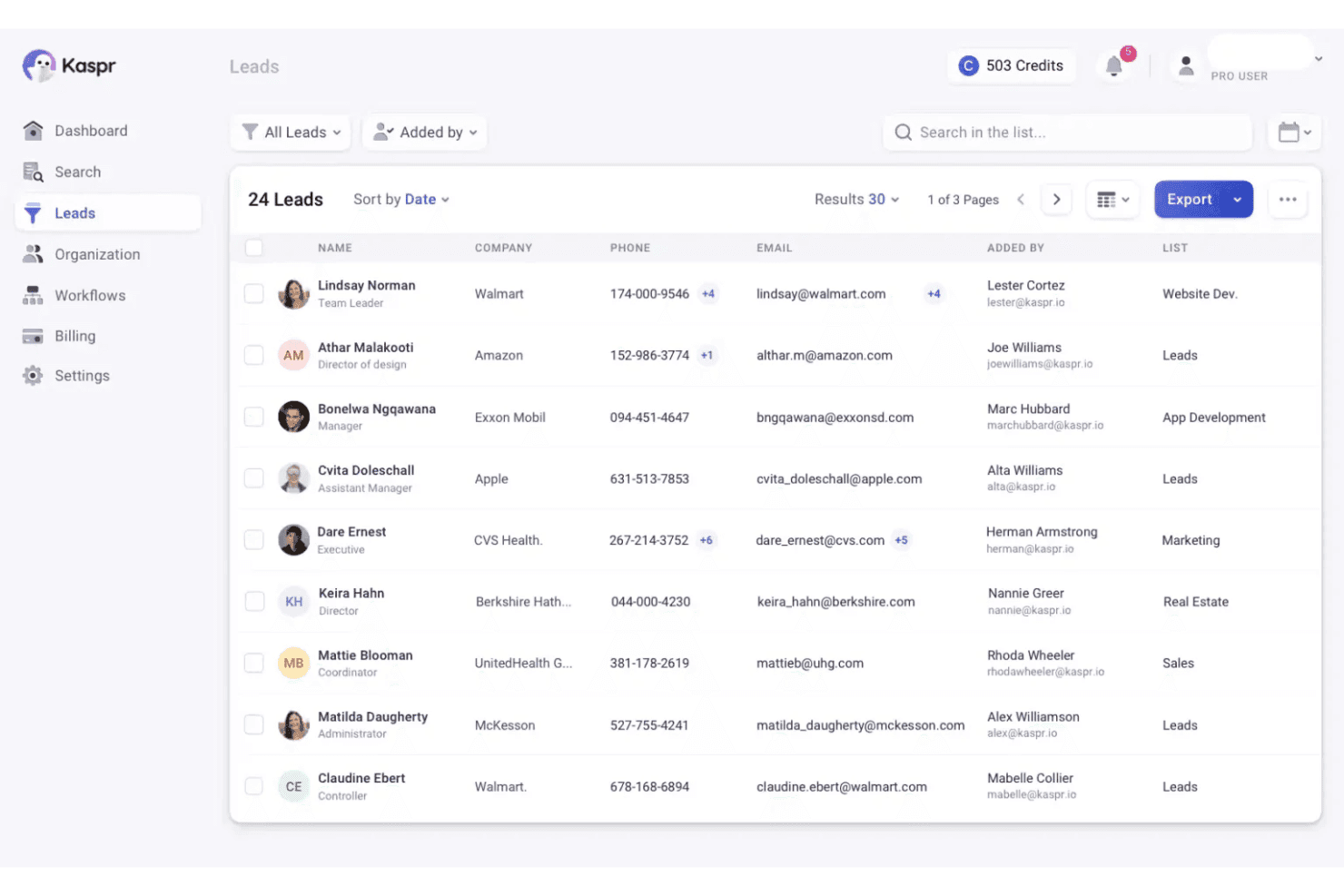
Kaspr organizes and displays lead contact details in a centralized list view. Kaspr is a B2B contact database tool built around a LinkedIn Chrome Extension that lets you capture verified emails and phone numbers directly from LinkedIn profiles, search results, Sales Navigator, and Recruiter Lite.
Who Is Kaspr Best For?
Kaspr is a strong fit for SDRs and individual sellers who do most of their prospecting directly on LinkedIn, especially those targeting European markets.
Why I Picked Kaspr
Kaspr earns its spot on my shortlist because of how naturally it fits into a LinkedIn-first prospecting workflow. I love that the Chrome Extension overlays directly onto LinkedIn profiles, Sales Navigator, and even LinkedIn Events, letting you preview whether a contact has a mobile number versus a landline before spending a single credit. That credit-preview feature alone saves real time. Kaspr also shines for European B2B data, with 200M+ verified European contacts re-validated every two months.
Kaspr Key Features
- Bulk LinkedIn enrichment: Extract and enrich contact lists from LinkedIn search results, Sales Navigator, or LinkedIn Events in a single batch action.
- CSV enrichment upload: Upload a CSV file of LinkedIn profile URLs to enrich multiple contacts with verified email and phone data outside of the Chrome Extension.
- Native CRM push: Send contact data directly to Salesforce, HubSpot, Pipedrive, or Zoho CRM from the Kaspr dashboard or Chrome Extension without manual export.
- LinkedIn Cadences: Build and run automated LinkedIn outreach sequences directly within the Kaspr dashboard, available on all paid plans.
Kaspr Integrations
Kaspr offers eight native integrations, including Salesforce, HubSpot, Pipedrive, Zoho CRM, Lemlist, Brevo, Aircall, and Ringover. It also provides an enrichment API for custom integrations and Zapier from the Starter plan onward.
Pros and Cons
Pros:
- Chrome extension previews phone type before reveal
- Unlimited B2B emails included on all plans
- Excels at verified European B2B contact data
Cons:
- Dependent on LinkedIn for list building
- No advanced firmographic or technographic data
Learn more about Kaspr:
Outras ferramentas de bases de dados de contactos B2B
Eis algumas opções adicionais de bases de dados de contactos B2B que não entraram na minha lista restrita, mas que vale a pena conhecer:
How I Evaluate B2B Contact Databases
I evaluate B2B contact databases in two layers: the baseline requirements a tool must meet—verified data, CRM sync, filtering depth—and the differentiators that determine which tool fits your GTM motion.
Core Functionality (Table Stakes For This List)
When I'm selecting tools for my list, I rank each one on a scale from 0 (does not offer the functionality) to 5 (excels in this area) for each core functionality listed below. Then, I calculate the tool's total score into a percentage. Each tool needs to achieve a minimum total score of 65% to be considered for inclusion.
- Contact Database Size & Coverage: I look for platforms with broad global reach across industries, seniority levels, and company sizes—not just deep coverage in one region or vertical.
- Firmographic & Technographic Data: Each tool should give me company-level attributes like employee count, revenue range, and tech stack so I can segment by ICP criteria during list builds.
- Verified Emails & Phone Numbers: I check whether the platform provides validated business emails and direct dials, since bad data tanks deliverability and wastes reps' time on dead numbers.
- Search & Filtering Depth: The filters need to go beyond basic title and location—I evaluate whether I can layer criteria like seniority, department function, and company technographics to build precise prospect lists.
- CRM & Sales Tool Integrations: I look at how each tool syncs with CRMs like Salesforce and HubSpot, including whether it supports bi-directional sync, field mapping, and duplicate management on import.
- Data Export & Enrichment APIs: RevOps teams need bulk export and API access to power enrichment workflows, so I evaluate API coverage and whether the platform supports use cases like CRM enrichment at scale.
Once I have a list of tools that meet the criteria, I consider what sets each platform apart.
Differentiating Factors (What Sets Vendors Apart)
Here's how I compare and contrast different vendors:
Standout Features
Buyer intent signals are a big differentiator—I look for platforms that surface in-market accounts so reps focus on prospects who are actively researching, not just cold lists. Data health monitoring matters just as much, especially for RevOps teams managing large CRM instances where records decay fast. I also evaluate whether a tool offers org chart or relationship mapping, which helps sellers identify buying committees and multi-thread into enterprise accounts instead of relying on a single contact.
Beyond Features
Data accuracy is the first thing I evaluate beyond features—I check whether a vendor publishes accuracy rates and how often they re-verify records, since stale data erodes CRM trust fast. Compliance also matters; I look for SOC 2 Type II certification and clear GDPR handling, especially for teams prospecting across multiple regions. Pricing structure is another key factor, because credit-based models can get expensive quickly if your RevOps team runs large enrichment jobs or supports multiple outbound reps pulling lists daily.
Como escolher uma ferramenta de base de dados de contactos B2B
É fácil perder-se em listas extensas de funcionalidades e estruturas de preços complexas. Para ajudá-lo a manter o foco enquanto analisa o seu processo específico de seleção de software, eis uma lista de verificação dos fatores a ter em conta:
| Fator | O que deve considerar |
|---|---|
| FatorEscalabilidade | O que deve considerarA base de dados acompanhará o crescimento da sua equipa e a evolução das necessidades de prospeção ao longo do tempo? Verifique os limites de utilizadores, os limites de dados e as opções de atualização. |
| FatorIntegrações | O que deve considerarA ferramenta liga-se de forma nativa ao seu CRM, às plataformas de envolvimento de vendas ou às plataformas de automatização de marketing? Confirme a compatibilidade com o seu conjunto de ferramentas existente. |
| FatorPersonalização | O que deve considerarPode adaptar campos, filtros e exportações aos fluxos de trabalho e às necessidades de elaboração de relatórios da sua equipa? Evite sistemas rígidos que obriguem a soluções alternativas. |
| FatorFacilidade de utilização | O que deve considerarCom que rapidez podem os novos utilizadores começar a encontrar e a exportar contactos? Procure uma navegação clara e requisitos mínimos de formação. |
| FatorImplementação e integração inicial | O que deve considerarQue recursos são necessários para começar a trabalhar? Considere a migração de dados, a formação dos utilizadores e a disponibilidade de apoio durante a integração inicial. |
| FatorCusto | O que deve considerarOs escalões de preços estão alinhados com a sua utilização e com a dimensão da equipa? Esteja atento a taxas ocultas, sistemas de créditos ou complementos obrigatórios que possam aumentar os custos. |
| FatorMedidas de segurança | O que deve considerarO fornecedor disponibiliza encriptação, controlos de acesso e conformidade com as leis de privacidade dos dados? Informe-se sobre o RGPD, a CCPA e os registos de auditoria. |
| FatorDisponibilidade do apoio | O que deve considerarQue canais de apoio são disponibilizados e durante que horas? Considere se precisa de ajuda 24 horas por dia, 7 dias por semana, ou de um gestor de conta dedicado para questões urgentes. |
O que é uma ferramenta de base de dados de contactos B2B?
Uma base de dados de contactos B2B é uma plataforma de software que armazena, organiza e fornece acesso a informações de contacto profissionais, tais como nomes, cargos, endereços de e-mail, números de telefone e dados das empresas. Estas bases de dados de potenciais clientes ajudam as equipas de vendas e marketing a identificar potenciais clientes, definir o seu ICP e estabelecer ligação com as pessoas certas para atividades de contacto, como o envio de e-mails não solicitados e campanhas de e-mail B2B. Muitos fornecedores de bases de dados de contactos B2B atuam como fornecedores de dados, disponibilizando perfis de empresas enriquecidos, informações sobre a pilha tecnológica de um potencial cliente e ferramentas de inteligência de vendas. Com foco na qualidade e segmentação dos dados, estas plataformas apoiam estratégias de marketing B2B mais eficazes e oferecem frequentemente preços personalizados com base na utilização e nas necessidades de acesso aos dados.
Funcionalidades
Ao selecionar uma base de dados de contactos B2B, tenha em atenção as seguintes funcionalidades essenciais:
- Pesquisa e filtragem avançadas: Localize contactos utilizando critérios como a dimensão da empresa, o setor, a localização ou o cargo, para criar listas direcionadas para ações de contacto.
- Opções de exportação em massa: Transfira grandes conjuntos de dados de contactos em formatos como CSV ou envie-os diretamente para o seu CRM para executar campanhas.
- Enriquecimento de dados: Adicione detalhes em falta, como a receita da empresa, o número de colaboradores ou os perfis nas redes sociais, aos registos existentes, para obter uma visão mais completa dos contactos.
- Segmentação de contactos: Organize os contactos em grupos com base em atributos ou comportamentos, para apoiar ações de marketing e vendas personalizadas.
- Atualizações de dados em tempo real: Garanta que as informações de contacto se mantêm atualizadas, renovando automaticamente os registos à medida que as pessoas mudam de função ou de empresa.
- Integração com CRM: Sincronize os dados de contactos diretamente com as suas plataformas de vendas ou marketing, para manter uma única fonte de informação fiável e reduzir a introdução manual de dados.
- Gestão da conformidade: Suporte para o RGPD, a CCPA e outras regulamentações de privacidade de dados, para ajudar a sua equipa a gerir os dados de contactos de forma responsável.
- Controlos de acesso dos utilizadores: Defina permissões e funções para gerir quem pode consultar, editar ou exportar dados de contactos na sua organização.
- Monitorização da atividade: Acompanhe quando os contactos são adicionados, atualizados ou exportados, para manter a integridade dos dados e os registos de auditoria.
Funcionalidades comuns de IA
Para além das funcionalidades padrão das bases de dados de contactos B2B acima mencionadas, muitas destas soluções estão a incorporar IA com funcionalidades como:
- Classificação preditiva de potenciais clientes: A IA analisa dados históricos de interação e dados firmográficos para classificar automaticamente os contactos de acordo com a probabilidade de conversão, ajudando as equipas a dar prioridade às ações de contacto.
- Limpeza automatizada de dados: A IA deteta e remove registos de contactos desatualizados, duplicados ou incorretos, mantendo uma base de dados mais limpa e fiável com o mínimo de esforço manual.
- Deteção de sinais de intenção: A IA monitoriza comportamentos digitais e atividade online para identificar contactos ou empresas que demonstram intenção de compra, dando visibilidade a potenciais clientes que estão a pesquisar soluções ativamente.
- Recomendações inteligentes de contactos: A IA sugere novos contactos ou contas que correspondem ao seu perfil de cliente ideal, com base em padrões dos seus dados existentes e em negócios bem-sucedidos.
- Pesquisa em linguagem natural: A IA permite aos utilizadores encontrar contactos ou empresas através de consultas conversacionais, facilitando a identificação de registos relevantes sem filtros complexos.
Benefícios
A implementação de uma base de dados de contactos B2B proporciona vários benefícios à sua equipa e à sua empresa. Eis alguns dos benefícios que pode esperar:
- Prospetação mais rápida: A pesquisa avançada, a filtragem e as recomendações de IA ajudam a sua equipa a identificar e priorizar rapidamente potenciais clientes com elevado potencial.
- Maior precisão dos dados: As atualizações em tempo real, a limpeza automatizada e as funcionalidades de enriquecimento mantêm as suas informações de contacto atuais e fiáveis.
- Melhor segmentação: O agrupamento de contactos e a filtragem detalhada permitem ações de contacto mais direcionadas e campanhas personalizadas.
- Processos de trabalho simplificados: As integrações com CRM e as opções de exportação em massa reduzem a introdução manual de dados e apoiam a execução eficiente de campanhas.
- Maior conformidade: Os controlos de privacidade integrados e as funcionalidades de gestão da conformidade ajudam a sua equipa a gerir dados sensíveis de forma responsável.
- Maior visibilidade: As funcionalidades de monitorização da atividade e de elaboração de relatórios fornecem informações sobre os esforços de prospeção e a utilização dos dados em toda a equipa.
- Crescimento escalável: Os controlos flexíveis de acesso dos utilizadores e os limites de dados escaláveis garantem que a base de dados pode acompanhar as necessidades da sua empresa.
Custos e preços
A seleção de uma base de dados de contactos B2B requer uma compreensão dos vários modelos de preços e planos disponíveis. Os custos variam consoante as funcionalidades, a dimensão da equipa, os complementos e outros fatores. A tabela abaixo resume os planos comuns, os respetivos preços médios e as funcionalidades normalmente incluídas nas soluções de bases de dados de contactos B2B:
Tabela de comparação de planos
| Tipo de plano | Preço médio | Funcionalidades comuns |
|---|---|---|
| Tipo de planoPlano gratuito | Preço médio$0 | Funcionalidades comunsPesquisas de contactos limitadas, filtragem básica, exportações restritas e acesso a uma pequena amostra de dados. |
| Tipo de planoPlano pessoal | Preço médio$25–$50/utilizador/mês | Funcionalidades comunsFiltros de pesquisa alargados, limites de exportação moderados, integração básica com CRM e suporte por e-mail. |
| Tipo de planoPlano empresarial | Preço médio$50–$100/utilizador/mês | Funcionalidades comunsExportações em massa, segmentação avançada, atualizações de dados em tempo real, colaboração em equipa e ferramentas de conformidade. |
| Tipo de planoPlano para empresas | Preço médio$100–$200+/utilizador/mês | Funcionalidades comunsExportações ilimitadas, integrações personalizadas, gestão de conta dedicada, segurança avançada e SLAs. |
Perguntas frequentes sobre bases de dados de contactos B2B
Eis algumas respostas a perguntas comuns sobre bases de dados de contactos B2B:
Como é que as bases de dados de contactos B2B mantêm os seus dados precisos?
A maioria das bases de dados de contactos B2B utiliza uma combinação de validação automática de dados, verificação manual e atualizações regulares provenientes de fontes públicas e proprietárias. Pergunte aos fornecedores com que frequência atualizam os dados e que processos utilizam para remover informações desatualizadas ou incorretas.
Posso integrar uma base de dados de contactos B2B com o meu CRM?
Sim, a maioria das bases de dados de contactos B2B oferece integrações com plataformas CRM populares. Verifique se a base de dados é compatível com sincronização direta, mapeamento de campos personalizados e atualizações automáticas, para garantir um fluxo de trabalho eficiente para a sua equipa.
O que devo considerar relativamente ao RGPD e à conformidade com a privacidade dos dados?
Deve confirmar que o fornecedor da base de dados cumpre o RGPD, a CCPA e outros regulamentos relevantes. Procure funcionalidades como o registo de consentimentos, pedidos de remoção de dados e documentação clara sobre a forma como os dados pessoais são obtidos e tratados.
Existem limites relativamente ao número de contactos que posso exportar?
Sim, a maioria dos planos estabelece limites para o número de contactos que pode exportar por mês ou por utilizador. Os planos de nível superior oferecem normalmente quotas de exportação maiores ou ilimitadas, por isso consulte os detalhes do plano para os adequar ao volume de prospeção da sua equipa.
Que opções de suporte estão disponíveis se encontrar problemas?
As opções de suporte variam consoante o fornecedor e o plano. Os canais comuns incluem chat em direto, e-mail, telefone e bases de conhecimento. Alguns planos empresariais oferecem gestores de conta dedicados ou suporte prioritário para problemas urgentes.