

Um CRM móvel é uma ferramenta de gestão das relações com os clientes que pode utilizar no telemóvel ou tablet, permitindo-lhe acompanhar negócios, gerir contactos e aceder aos dados dos clientes onde quer que trabalhe. Se está à procura do melhor CRM móvel, precisa de opções concebidas para equipas de vendas dinâmicas que conciliam reuniões presenciais, acompanhamentos e comunicação constante. Oportunidades perdidas, notas dispersas e atualizações lentas custam receitas reais — especialmente quando está fora do escritório. Este guia irá ajudá-lo a escolher uma solução que se adapte ao seu fluxo de trabalho, mantenha o seu pipeline em movimento e se integre com as ferramentas de que a sua equipa já depende.
Why Trust Our Software Recommendations
6,700+
Reviews
20
Industry experts
16+
Evaluation factors
14
Years
Our reviews reflect our independent judgment—not a sales pitch. Learn how we stay transparent.
For this guide, we evaluated tools using hands-on testing and independent research, scoring tools using our selection criteria.
Our reviews reflect our human editorial judgment, not a sales pitch.
Tabela comparativa de CRM móveis
A tabela abaixo compara os detalhes dos preços das minhas principais escolhas de CRM móveis.
| Tool | Best For | Trial Info | Price | ||
|---|---|---|---|---|---|
| 1 | Best for action-focused contact management | 21-day free trial | From $9.95/user/month (billed annually) | Website | |
| 2 | Best for visualizing sales pipelines | 14-day free trial | From $14/user/month (billed annually) | Website | |
| 3 | Best for project and relationship linking | 14-day free trial | From $29/user/month (billed annually) | Website | |
| 4 | Best for offline database access | 14-day free trial + free demo available | From $30/user/month (billed annually) | Website | |
| 5 | Best for in-app calling and messaging | 21-day free trial | From $9/user/month (billed annually) | Website | |
| 6 | Best for cross-department data alignment | Free plan available | From $7/user/month (billed annually) | Website | |
| 7 | Best for automated email harvesting | 21-day free trial | From $9.95/user/month (billed annually) | Website | |
| 8 | Best for native telephony integration | Free plan available | From $69/month | Website | |
| 9 | Best for AI-powered lead scoring | 21-day free trial + free demo available | From $9/user/month (billed annually) | Website | |
| 10 | Best for enterprise revenue forecasting | 30-day free trial | From $25/user/month | Website |


Análises dos melhores CRM móveis
Seguem-se os meus resumos detalhados dos melhores CRM móveis que entraram na minha lista restrita. As minhas análises apresentam uma visão detalhada das funcionalidades, dos melhores casos de utilização e das integrações de cada plataforma, para o ajudar a encontrar a melhor opção para si.
 Best for action-focused contact management
- 21-day free trial
- From $9.95/user/month (billed annually)
Visit WebsiteCustomer Rating:4.7/5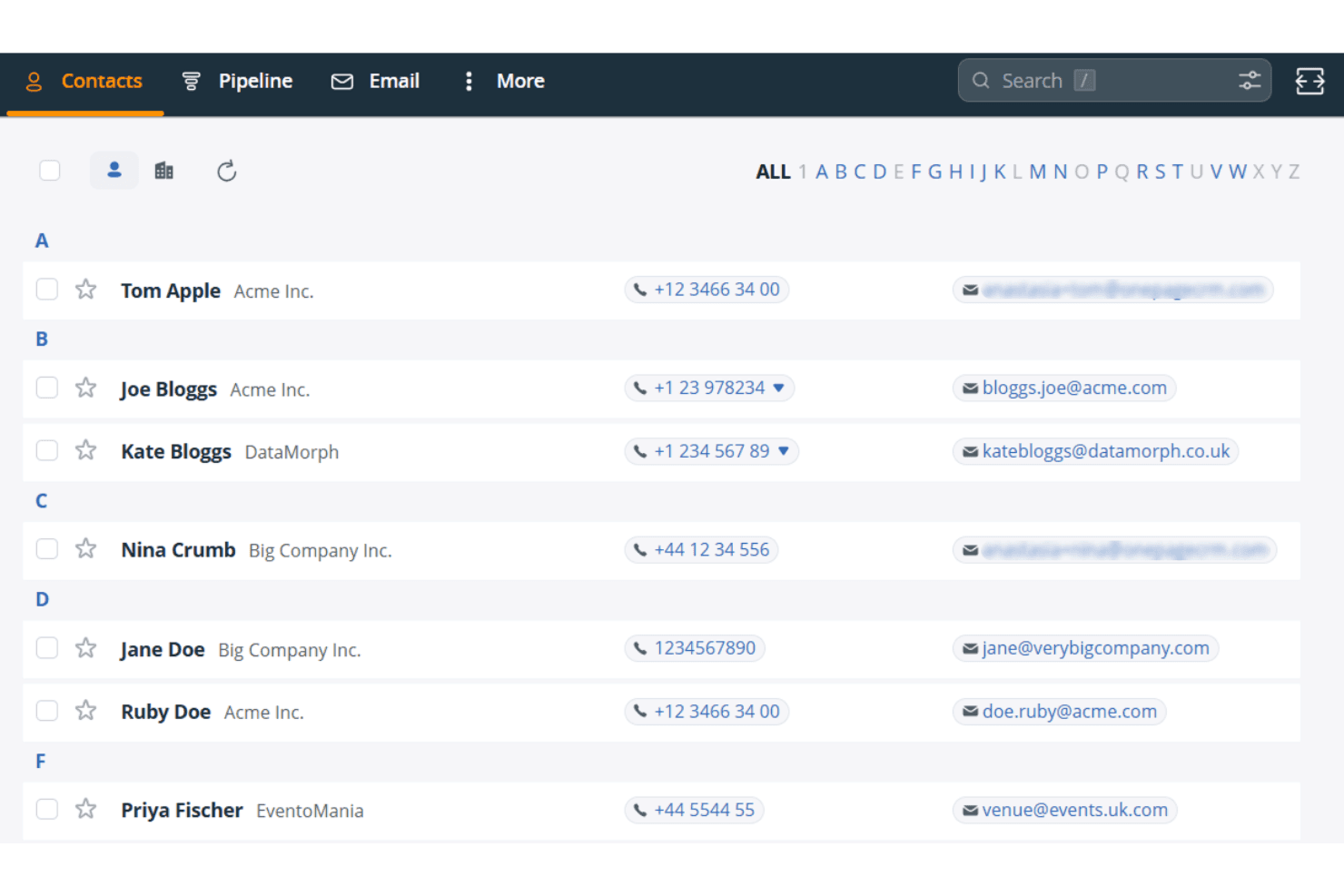
OnePageCRM organizes contacts alphabetically with phone and email details. OnePageCRM is a mobile CRM built around a prioritized action list, offering contact management, pipeline tracking, an AI-powered route planner, a built-in business card scanner, and a Speed Dialer for field sales teams.
Who Is OnePageCRM Best For?
OnePageCRM is a strong fit for field sales reps and small sales teams who need a no-fuss mobile CRM built around daily follow-up priorities.
Why I Picked OnePageCRM
OnePageCRM earns its spot on my shortlist because of how it structures daily selling around a prioritized action list rather than leaving reps to figure out who to call next. The Action Stream color-codes every contact by urgency and surfaces the total open deal value alongside each follow-up, so I can see at a glance whether I'm chasing a $500 deal or a $50,000 one. I also rely on the "On the Road" route planner, which pulls live traffic data to sequence field visits, then hands off to the Speed Dialer for back-to-back calls without manual lookup between each one.
OnePageCRM Key Features
- AI business card scanner: Captures field leads instantly by photographing a business card, which auto-populates a new CRM contact record.
- Voice-to-text note logging: Lets reps dictate notes hands-free directly into contact records after field interactions.
- Focus Mode: Hides contacts not due today with a single tap, keeping your view limited to urgent follow-ups.
- Sales Forecast View: Gives mobile access to pipeline forecasting data across all plan tiers, with no upgrade required.
OnePageCRM Integrations
OnePageCRM offers marketplace integrations with Gmail, Google Calendar, Outlook Calendar, Aircall, Mailchimp, QuickBooks, and Xero. It also supports API access, webhooks, Make.com, and Zapier on all plans.
Pros and Cons
Pros:
- Built-in business card scanner for instant capture
- Prioritized action list with deal value display
- Supports full mobile contact and deal editing
Cons:
- Text messages are not automatically logged
- No offline mobile access available
Learn more about OnePageCRM: Best for visualizing sales pipelines
- 14-day free trial
- From $14/user/month (billed annually)
Visit WebsiteCustomer Rating:4.4/5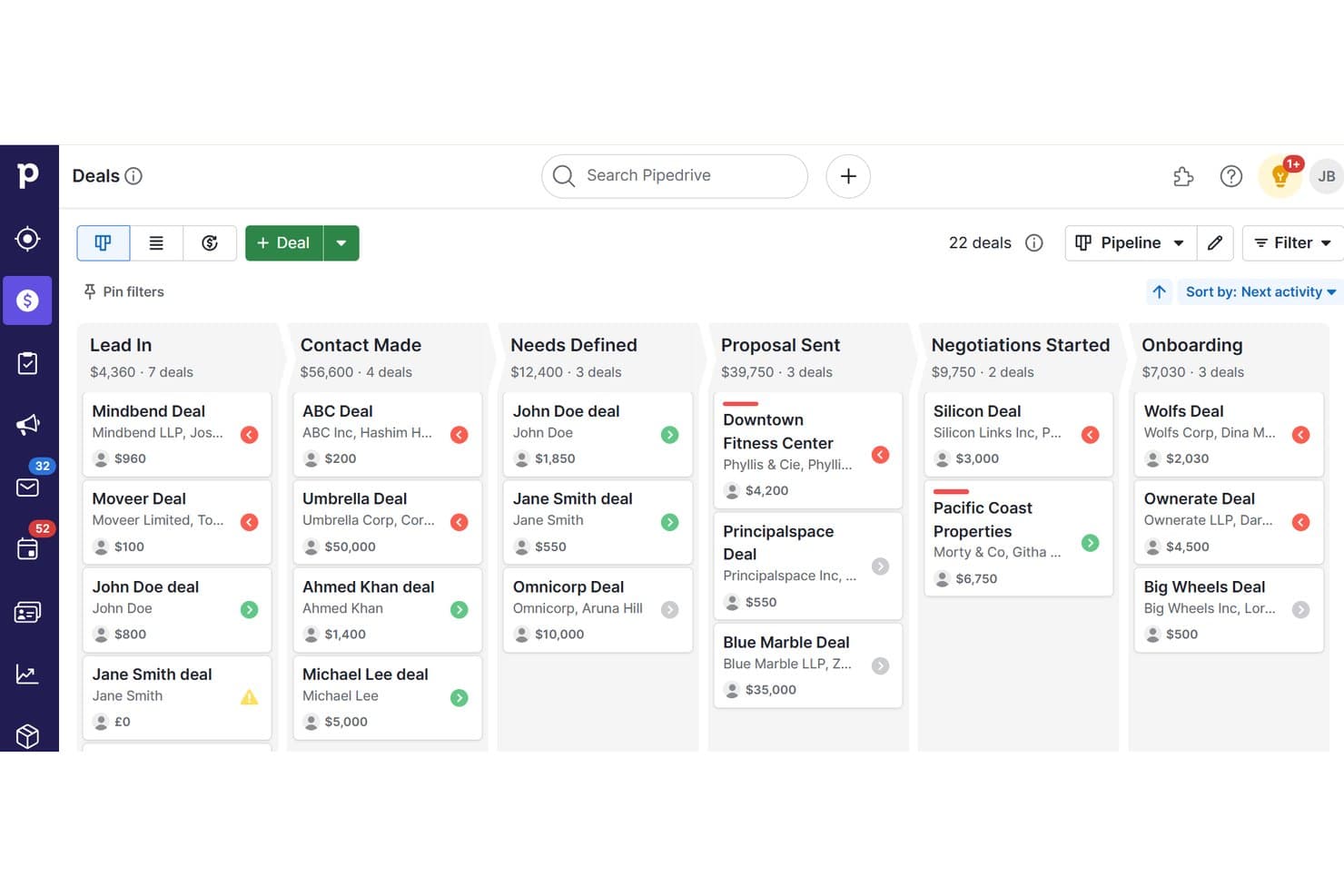
Pipedrive organizes deals across pipeline stages for mobile CRM tracking. Pipedrive is a sales CRM with native iOS and Android apps that gives field teams full pipeline management, offline deal tracking, geolocation-based contact discovery, built-in business card scanning, and voice note capture.
Who Is Pipedrive Best For?
Pipedrive is a strong fit for field sales reps who need to manage deals, log activity, and find nearby prospects without being tied to a desk.
Why I Picked Pipedrive
Pipedrive earns its spot on my shortlist because no other tool I've tested makes pipeline visualization as accessible on mobile as it does on desktop. I love that you can drag and drop deals between stages directly from your phone, with the forecast view available on Growth plans and above. The Nearby feature is what really sets it apart: it surfaces a map of contacts and prospects within 10 km of your current location, so field reps can fill gaps between meetings without opening a separate app.
Pipedrive Key Features
- Offline mode: Work without connectivity by moving deals, adding notes, and logging activities, with automatic sync when you reconnect.
- Business card scanner: Capture contact details on the spot using OCR scanning, review extracted data, and save directly to your CRM.
- Audio notes: Record voice notes and attach them to any deal or contact record directly from your phone.
- AI Sales Assistant: Receive deal prioritization tips, next-best-action suggestions, and performance coaching via push notifications on mobile.
Pipedrive Integrations
Pipedrive offers 500+ Marketplace integrations, including Slack, Microsoft Teams, Zoom, Aircall, Gmail, Outlook, Calendly, Gong, Mailchimp and PandaDoc. It also supports custom integrations through its open REST API, webhooks and Zapier.
Pros and Cons
Pros:
- Native business card scanner in mobile app
- Nearby geolocation feature for field reps
- Full-featured offline mode for mobile users
Cons:
- Performance issues with large deal volumes
- Advanced reporting dashboards desktop-only
Learn more about Pipedrive: Best for project and relationship linking
- 14-day free trial
- From $29/user/month (billed annually)
Visit WebsiteCustomer Rating:4.2/5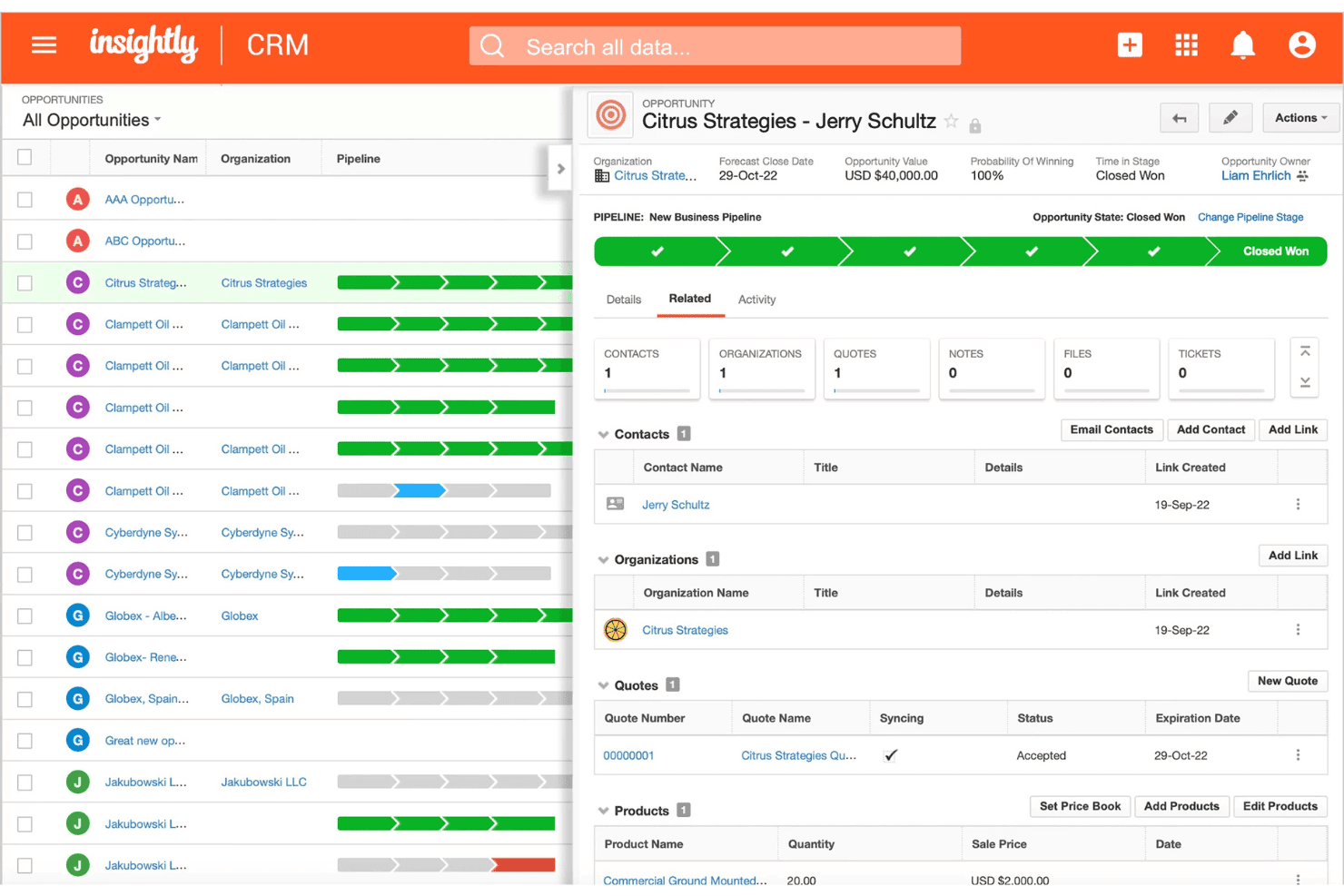
Insightly tracks opportunity pipelines with deal value and quote status. Insightly is a mobile CRM that connects contact management, pipeline tracking, opportunity management, and project linking across both iOS and Android apps.
Who Is Insightly Best For?
Insightly suits B2B teams that manage complex post-sale relationships, where connecting won deals to ongoing projects and tracking stakeholder roles is part of the everyday workflow.
Why I Picked Insightly
Insightly earns its spot on my shortlist because of how it handles the transition from closed deal to active project. When an opportunity is won, I can convert it directly into a linked project within the mobile app, with relationship roles like economic buyer and delivery owner preserved throughout. The built-in Business Card Scanner also lets me capture new contacts on the spot, with AI pulling the details into the record automatically.
Insightly Key Features
- Voice note recording: Capture meeting context hands-free by recording voice notes directly into contact or opportunity records from the mobile app.
- Drag-and-drop pipeline views: Manage deals across Kanban and Milestone views on mobile, with full drag-and-drop stage updates available on both iOS and Android.
- Dashboard parity: Any dashboard built on the desktop automatically appears in the mobile app with full fidelity, giving you consistent reporting visibility wherever you are.
- AI Copilot: Use natural language to look up records, draft follow-up emails, and update deals directly within the CRM interface.
Insightly Integrations
Insightly offers native integrations with Gmail, Microsoft Outlook, and Slack, plus AppConnect integrations with Salesloft, DocuSign, Asana, QuickBooks Online, Calendly, and ZoomInfo. Its REST API v3.1 supports custom integrations on all paid plans.
Pros and Cons
Pros:
- Built-in AI business card scanner
- Mobile dashboard parity with desktop views
- Converts deals into mobile-linked projects
Cons:
- No map-based account or route features
- Offline editing depth is unclear
 4Best for offline database access
Act!
- 14-day free trial + free demo available
- From $30/user/month (billed annually)
Visit WebsiteCustomer Rating:4/5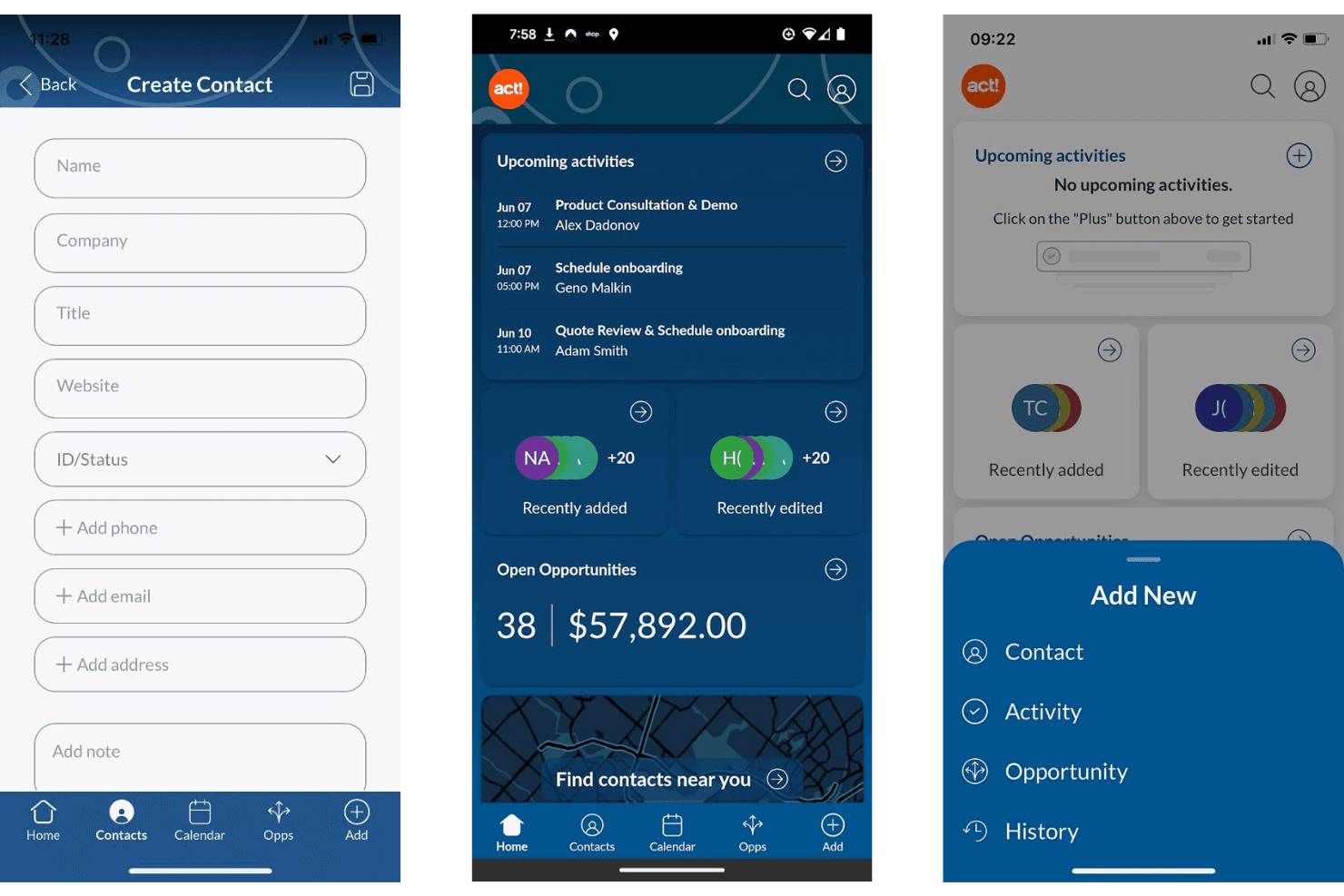
Act! lets users manage contacts, activities, and opportunities on mobile. Act! is a mobile CRM built for small businesses and field sales teams, offering contact and company management, pipeline tracking, activity logging, proximity search, and a business card scanner across iOS and Android.
Who Is Act! Best For?
Act! is a strong fit for small business field sales teams that need a structured CRM with mobile-friendly tools like proximity search and a business card scanner.
Why I Picked Act!
Act! earns its spot on my shortlist because of something genuinely rare in mobile CRM: a legitimate offline database story. The Act! Premium Desktop version lets you work from a locally installed database with no internet required, syncing changes back when you reconnect. I also like the proximity search, which lets field reps pull up contacts within a set radius of their current location, and the built-in business card scanner for logging new contacts on the spot.
Act! Key Features
- Notification center: Delivers push alerts for upcoming activities with snooze, reschedule, and dismiss options, including linked contact and company names for context.
- Multi-user calendar: Lets mobile users view and add activities to teammates' calendars directly from the app.
- Pipeline dashboard: Displays open deals with sortable views of deal count, value, age, and status, with the ability to edit or close opportunities on the go.
- Business card scanner: Uses built-in OCR to capture contact details from physical cards and create new records instantly from your mobile device.
Act! Integrations
Act! offers native integrations with Microsoft Outlook and Google Workspace for contact, calendar, and email sync, plus Microsoft Office connectivity. It also provides an open API for custom integrations and Zapier integrations.
Pros and Cons
Pros:
- Notification center supports activity reminders
- Proximity search helps plan sales visits
- Business card and QR code scanner included
Cons:
- Few modern RevOps integrations available
- No offline access in the mobile app
Learn more about Act!: Best for in-app calling and messaging
- 21-day free trial
- From $9/user/month (billed annually)
Visit WebsiteCustomer Rating:3.7/5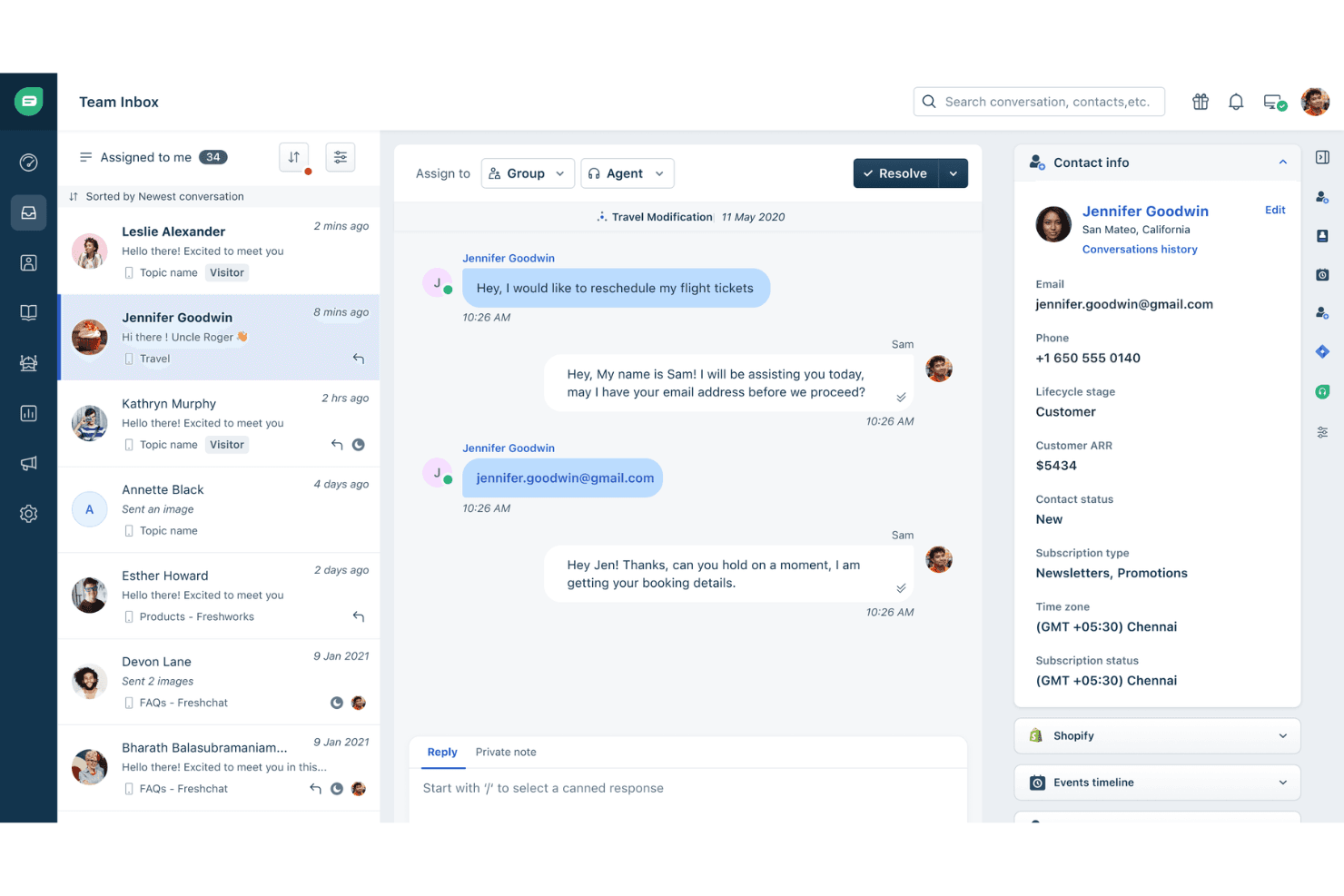
Freshworks centralizes customer conversations with contact details in one view. Freshsales is a mobile CRM built for field and remote sales teams, combining contact and deal management, AI-powered pipeline views, offline access, GPS check-ins, built-in calling, and multi-channel messaging in a single app.
Who Is Freshworks Best For?
Freshsales is a strong fit for field sales teams that rely on phone and messaging to move deals forward and need those tools built directly into their CRM.
Why I Picked Freshworks
Freshsales earns its spot on my shortlist because no other mobile CRM bundles this many communication channels into a single app as cleanly. I'm talking about a built-in dialer with call recording, WhatsApp Business, Apple Business Chat, and SMS, all logging back to the contact record automatically. What I particularly like is that a rep can finish a call, attach a voice note, and GPS check-in to a site visit without ever leaving the app.
Freshworks Key Features
- Freddy AI Kanban view: Groups deals by AI-predicted win probability so you can see which opportunities need attention before your next call.
- Business card scanner: Uses your device camera to capture card details and instantly create a contact record via the Quick Add button.
- GPS check-in: Logs your location when visiting a customer site, tagging the field visit directly to the relevant contact or account record.
- Offline mode: Lets you create, edit, and delete records across leads, contacts, deals, and tasks with no connection, then syncs automatically when you're back online.
Freshworks Integrations
Freshsales offers 100+ marketplace integrations, including Slack, Gmail, Outlook, Google Calendar, Freshdesk, Freshcaller, Gong, Zoom, and WhatsApp Business. It also supports an open REST API, webhooks, and Zapier.
Pros and Cons
Pros:
- Voice notes and GPS check-in for field reps
- Full offline access to core CRM modules
- Built-in in-app calling and messaging
Cons:
- No offline access for custom modules
- Only 100 records per view sync offline
Learn more about Freshworks: Best for cross-department data alignment
- Free plan available
- From $7/user/month (billed annually)
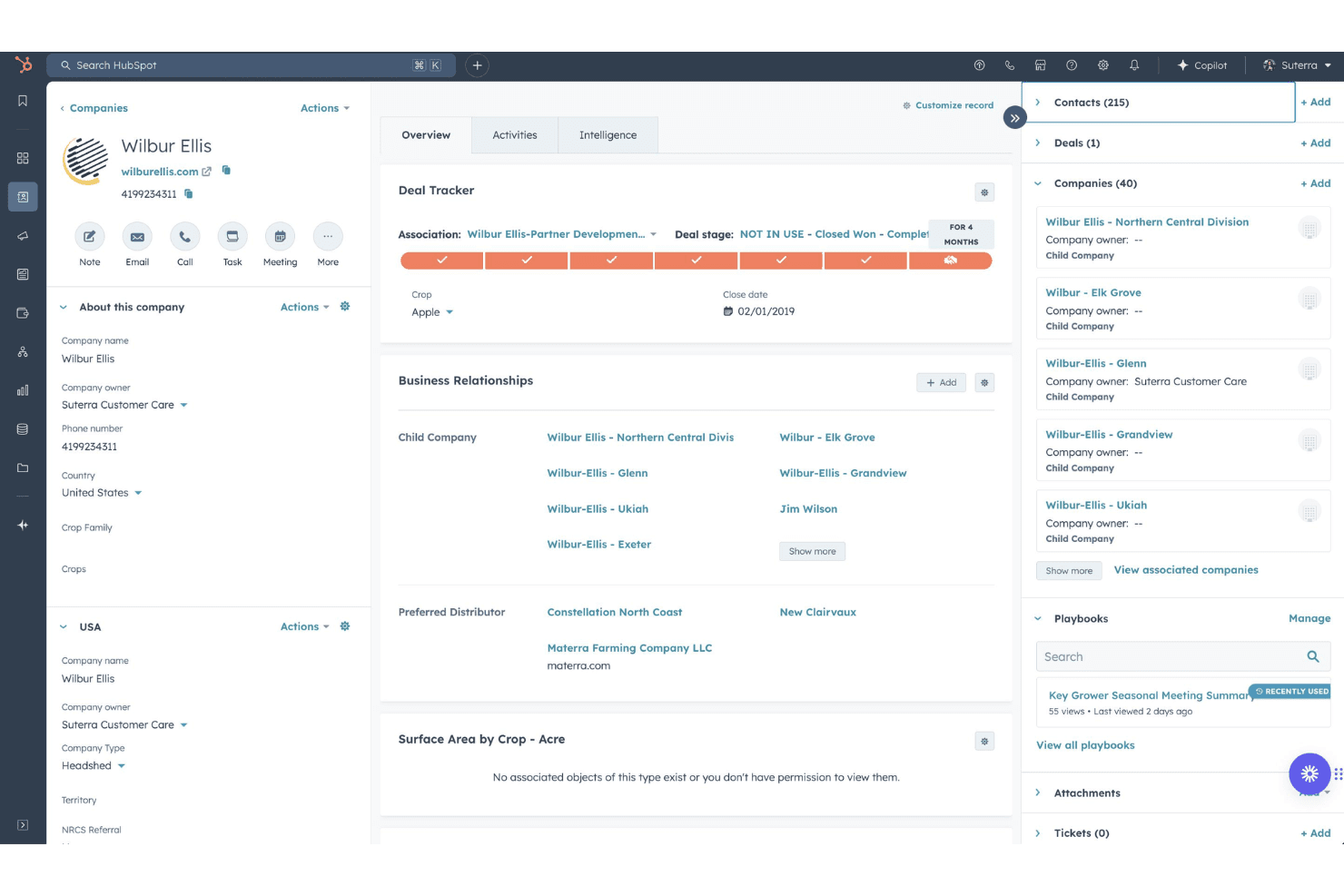
HubSpot Free CRM organizes company profiles with deals, contacts, and child companies. HubSpot Free CRM is a mobile-accessible CRM platform with native iOS and Android apps that spans sales, marketing, and customer success, offering contact management, pipeline tracking, in-app calling, activity logging, and AI-powered assistance via Breeze.
Who Is HubSpot Free CRM Best For?
HubSpot Free CRM suits revenue teams that need sales, marketing, and customer success data unified in one mobile-accessible platform.
Why I Picked HubSpot Free HubSpot CRM
HubSpot Free HubSpot CRM earns its spot on my list because no other tool I've tested spans sales, marketing, and customer success data from a single mobile app the way HubSpot does. I particularly like the Breeze Assistant, which is embedded across every screen and pulls live CRM context, so I can walk into a meeting with a full summary of the deal, open tickets, and recent activity without opening my laptop. The built-in business card scanner also logs and associates new contacts instantly, which keeps cross-department records clean from the first touchpoint.
HubSpot Free HubSpot CRM Key Features
- In-app calling with Caller ID: Make outbound calls directly from the app using HubSpot phone numbers, with incoming calls displaying linked CRM contact data automatically.
- Board view for pipeline management: A Kanban-style pipeline view lets you tap through deal stages and switch between multiple pipelines without leaving the mobile app.
- Push notifications and task alerts: Configurable push notifications surface task reminders, deal activity, and assignment alerts directly to your device.
- 2,000+ marketplace integrations: Connect HubSpot to tools like Gong, Outreach, Salesloft, Gmail, and Outlook via native integrations or the broader app marketplace.
HubSpot Free HubSpot CRM Integrations
HubSpot Free HubSpot CRM offers 2,000+ marketplace integrations, including Gong, Outreach, Salesloft, Gmail, Outlook, and Slack. Its open API and webhooks support custom connections, and Zapier is also available.
Pros and Cons
Pros:
- True cross-department CRM data access
- Built-in business card scanner is unlimited
- AI-powered assistant available on every screen
Cons:
- No native geolocation or route planning
- Offline editing capabilities are very limited
Learn more about HubSpot Free HubSpot CRM: Best for automated email harvesting
- 21-day free trial
- From $9.95/user/month (billed annually)
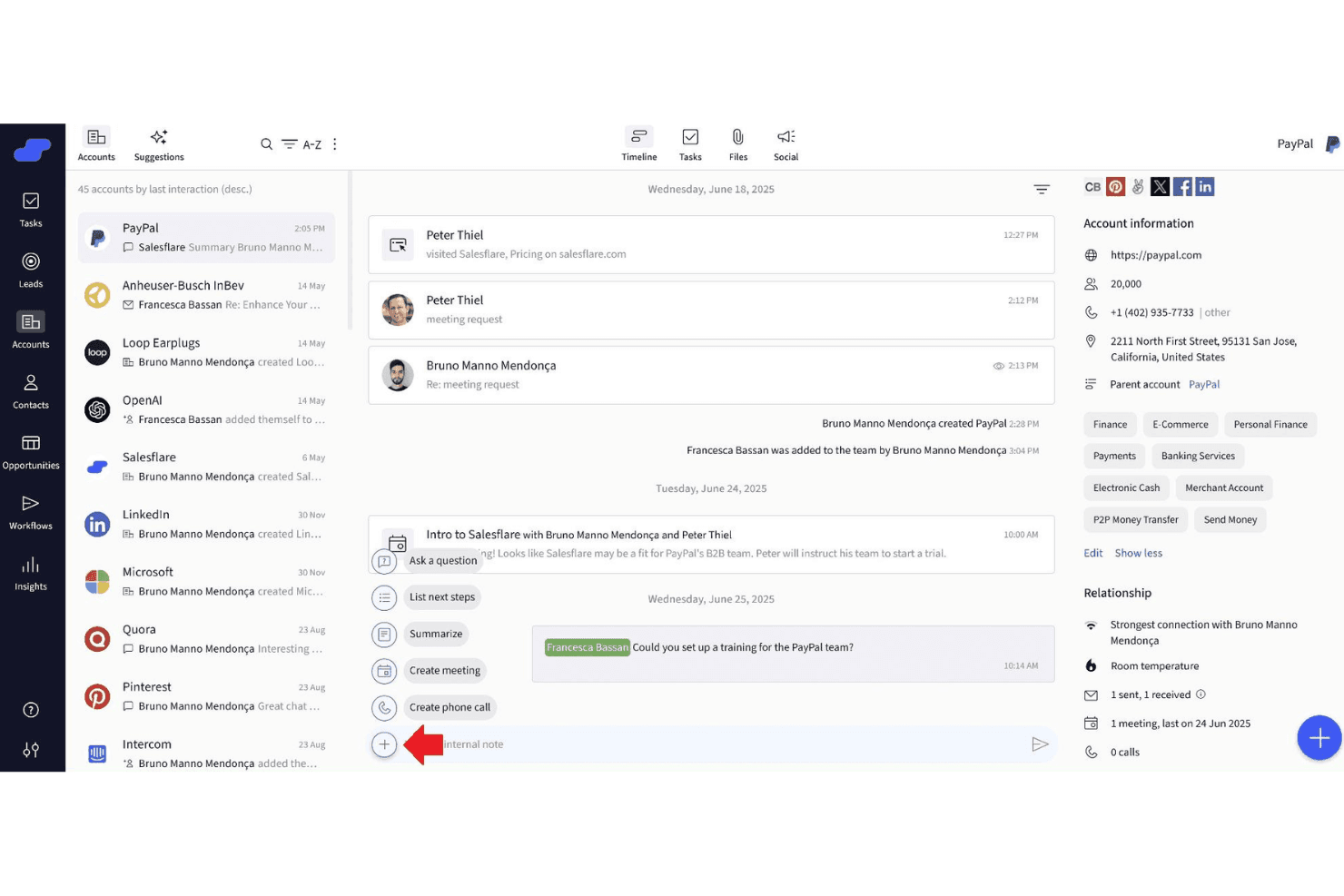
Salesflare centralizes account timelines, contacts, and AI actions in one view. OnePageCRM is a mobile CRM built for field sales teams, offering dual native apps with an AI-powered route planner, speed dialer, business card scanner, and action-based contact prioritization.
Who Is OnePageCRM Best For?
OnePageCRM is a strong fit for small field sales teams who need a mobile-first CRM with built-in route planning, speed dialing, and action-based contact prioritization.
Why I Picked OnePageCRM
OnePageCRM earns its spot on my shortlist because of how it handles automated email harvesting through its Lead Clipper browser extension and Apollo.io integration, which pull contact data and email addresses directly into CRM records without manual entry. I also love the AI Business Card Scanner built into the mobile app: snap a card after a field meeting and it instantly creates a contact record. The Action Stream then surfaces that new contact as a color-coded priority, so nothing slips after a busy day on the road.
OnePageCRM Key Features
- Action Stream prioritization: A color-coded task queue that flags overdue, due-today, and future follow-ups so you always know which contact needs attention first.
- Speed dialer: Lets you call a sequential list of prioritized contacts directly from the On the Road app, with post-call note prompts after each conversation.
- Sales Forecast View: A pipeline-level view available on all plans that shows projected revenue based on current deal stages and close dates.
- MCP-based AI logging: Connects OnePageCRM to AI assistants like ChatGPT and Claude so you can log calls, update deals, and set reminders using natural language prompts.
OnePageCRM Integrations
OnePageCRM offers 40+ marketplace integrations, including Gmail, Outlook, Google Calendar, WhatsApp, Mailchimp, ActiveCampaign, QuickBooks, Help Scout, Lead Clipper, and Apollo.io. It also supports Zapier, Make.com, an open REST API, and webhooks for custom integrations.
Pros and Cons
Pros:
- Built-in AI business card scanner
- Dual native mobile apps for field reps
- Automated email harvesting from web and Apollo
Cons:
- Lacks advanced reporting and analytics
- No offline access on any device
Learn more about Salesflare Mobile CRM App: Best for native telephony integration
- Free plan available
- From $69/month
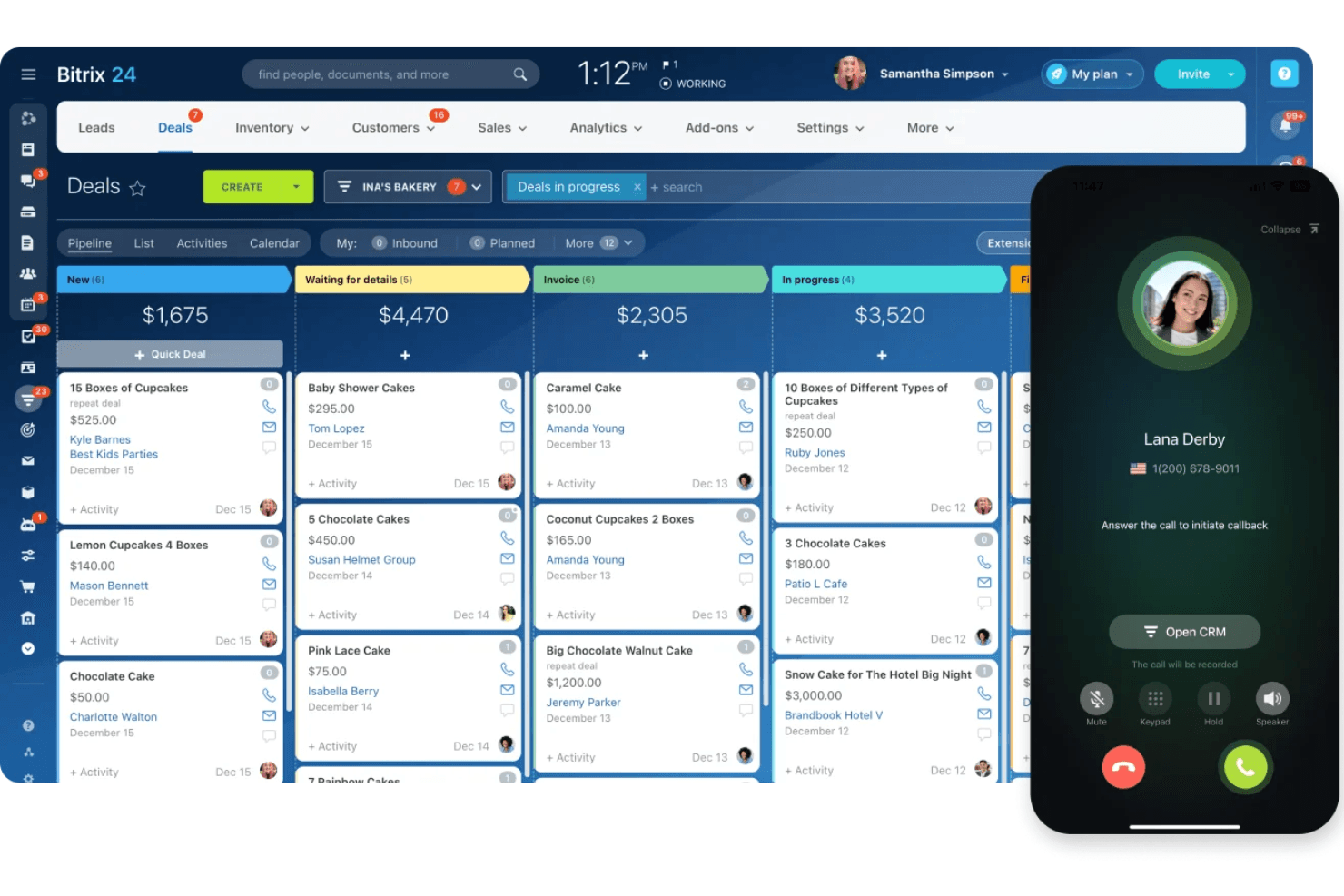
Bitrix24 manages deals and handles calls via mobile CRM. Bitrix24 Mobile CRM is a native mobile CRM app for iOS, Android, and Huawei that combines deal and pipeline management, built-in VoIP telephony, AI-powered call transcription, GPS check-ins, and omnichannel contact management in a single platform.
Who Is Bitrix24 Mobile CRM Best For?
Bitrix24 Mobile CRM is a strong fit for field sales teams that need built-in VoIP calling, AI call transcription, and deal management without a separate dialer app.
Why I Picked Bitrix24 Mobile CRM
Bitrix24 Mobile CRM earns its spot on my shortlist because its native VoIP telephony is built directly into every deal and contact record, with no external dialer needed. I can place a call, have it recorded and auto-logged, and get a CoPilot AI transcription linked to the deal, all from the mobile app. The AI also compares recorded calls against your sales scripts and surfaces coaching feedback, which is a genuine differentiator for field teams.
Bitrix24 Mobile CRM Key Features
- GPS check-in: Field reps can log client visits with time, location, and photo, all recorded directly in the activity timeline.
- Omnichannel inbox: Captures and consolidates messages from WhatsApp, Facebook Messenger, Instagram, email, and live chat in a single mobile view.
- Push notifications with Smart Notifications: Real-time alerts for deal updates, task assignments, and workflow triggers, with automatic suppression when you're active on desktop.
- Flat-rate pricing: Plans cover multiple users at a fixed monthly cost, so scaling your field team doesn't trigger per-seat pricing increases.
Bitrix24 Mobile CRM Integrations
Bitrix24 Mobile CRM offers native integrations with Gmail, Google Calendar, Microsoft 365, Google Drive, WhatsApp, Facebook Messenger, and Instagram. It also supports custom integrations through its REST API and Zapier.
Pros and Cons
Pros:
- Omnichannel inbox for all channels
- GPS check-ins for client visits
- Native VoIP calls with AI transcription
Cons:
- Business card scanning requires a companion app
- Offline access limited to viewing data
Learn more about Bitrix24 Mobile CRM: Best for AI-powered lead scoring
- 21-day free trial + free demo available
- From $9/user/month (billed annually)
Visit WebsiteCustomer Rating:4.5/5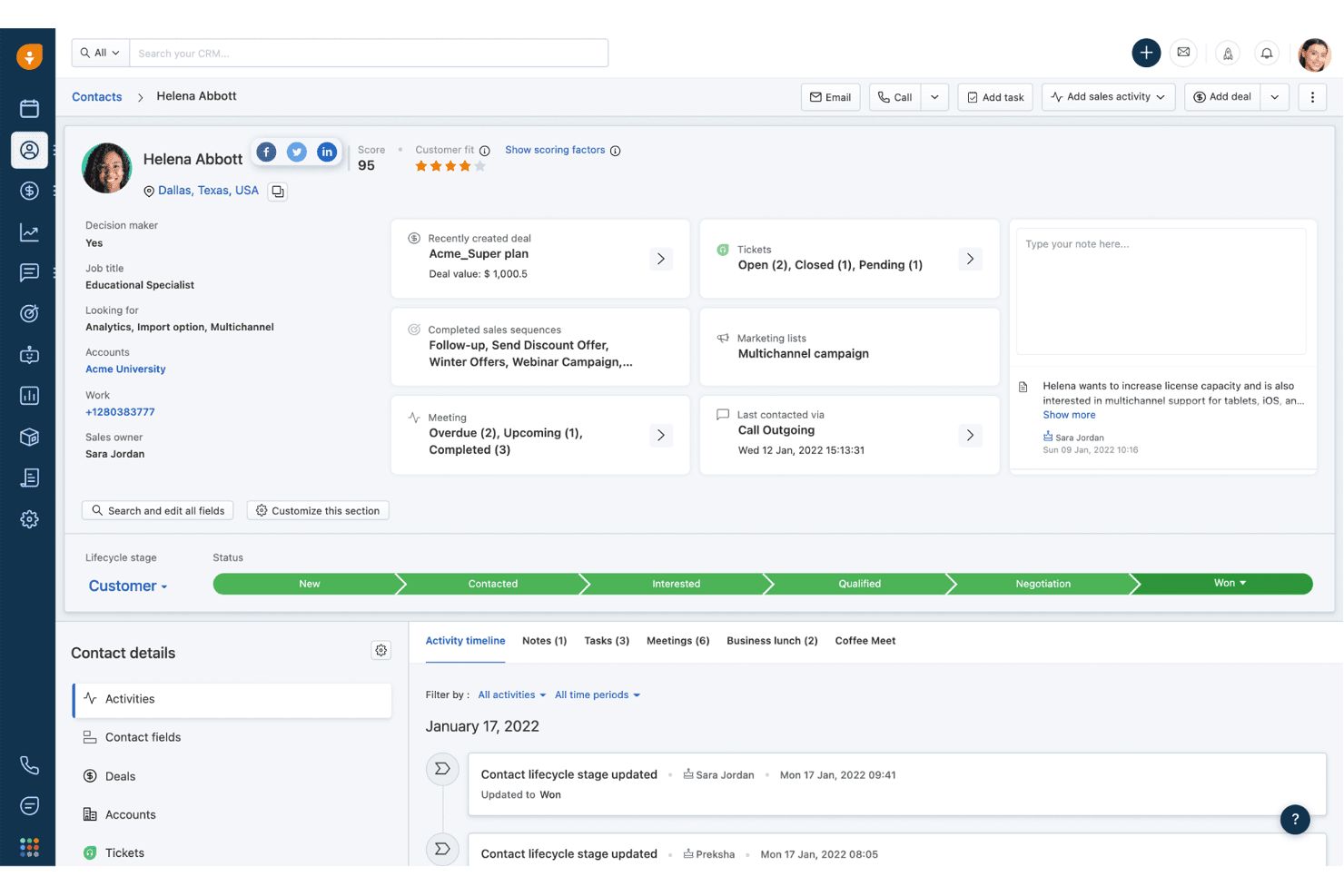
Freshsales tracks contact activity timelines and deal history in one view. Freshsales is a sales CRM with native iOS and Android apps that gives field teams access to contact management, deal pipelines, activity logging, voice notes with live transcription, GPS check-ins, and AI-powered lead scoring on the go.
Who Is Freshsales Best For?
Freshsales is a strong fit for field sales teams that need hands-free activity logging, AI lead scoring, and reliable offline access between client visits.
Why I Picked Freshsales
Freshsales earns its spot on my shortlist because Freddy AI's lead scoring doesn't just rank contacts—it pulls from your historical deal data to surface which leads are worth prioritizing before you walk into a meeting. I also love the live voice transcription on iOS, which lets field reps dictate notes in real time right after a call without typing anything. Pair that with GPS check-ins that work offline, and your team's activity data stays accurate even in low-signal areas.
Freshsales Key Features
- Business card scanner: Scan a card with your camera and the app auto-extracts contact details via OCR, creating a new record instantly.
- Offline read/write mode: Create and edit leads, contacts, deals, tasks, and notes without a connection, then sync when you're back online.
- Image-to-text notes: Capture up to three images per note and let the app transcribe the text automatically, no manual entry needed.
- Configurable push notifications: Set alerts for email opens, link clicks, deal updates, task reminders, and lead assignments directly in app settings.
Freshsales Integrations
Freshsales offers native integrations with Freshdesk, Freshchat, Freshcaller, Freshsuccess, Gmail, Outlook, Slack, and Gong, with Gong two-way sync on Enterprise. Its marketplace includes 100+ apps, and an open REST API supports custom integrations.
Pros and Cons
Pros:
- Offline editing and syncing for field access
- Live voice transcription for hands-free note capture
- Built-in OCR business card scanner for contacts
Cons:
- Business card scanner supports English only
- Reporting and analytics reliability concerns
Learn more about Freshsales: Best for enterprise revenue forecasting
- 30-day free trial
- From $25/user/month
Visit WebsiteCustomer Rating:4.2/5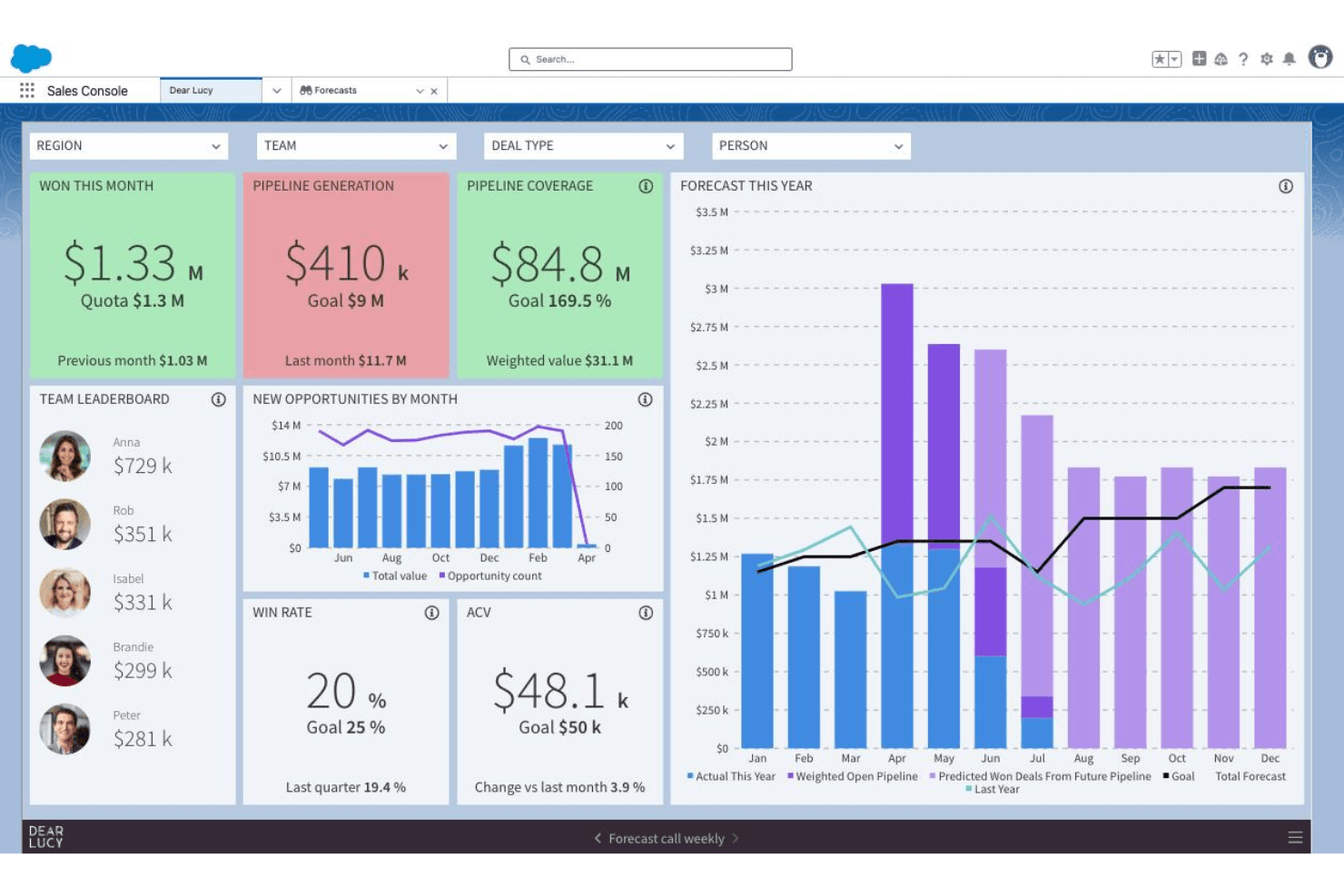
Salesforce CRM tracks sales forecasts, pipeline, and team performance in one dashboard. Salesforce CRM is an enterprise CRM platform with native iOS and Android apps that covers contact and account management, pipeline tracking, AI-driven insights via Agentforce, mobile dashboards through Tableau Next, and geolocation tools for field sales.
Who Is Salesforce CRM Best For?
Salesforce CRM is a strong fit for enterprise revenue teams that need AI-driven forecasting, field sales geolocation tools, and mobile pipeline visibility across complex, multi-cloud go-to-market operations.
Why I Picked Salesforce CRM
Salesforce CRM earns its spot on my shortlist because no other mobile CRM comes close for enterprise revenue forecasting at scale. Agentforce surfaces deal risk scores and next-best actions directly in the mobile app, while Tableau Next pushes real-time pipeline alerts before you even open a dashboard. I also rely on Salesforce Maps for field reps who need route optimization and nearby account discovery between meetings.
Salesforce CRM Key Features
- Sales Cloud Mobile Lightning App: Opens directly to a pipeline workspace showing priority meetings, tasks, leads, and opportunities for fast mobile access.
- Notification Builder: Admins configure push notifications for deal updates, task reminders, mentions, and workflow-triggered events at a granular level.
- Mobile Builder: A low-code tool that lets admins create custom, mobile-optimized layouts for any CRM object without writing code.
- Slack integration: Native Slack connectivity surfaces real-time CRM notifications and deal collaboration directly within Slack on mobile.
Salesforce CRM Integrations
Salesforce CRM offers native integrations with Slack, Microsoft Teams, Gmail, and Outlook, plus marketplace integrations through AppExchange, including Gong and Salesloft. Its open API and MuleSoft support custom enterprise connections.
Pros and Cons
Pros:
- Built-in field sales route optimization
- Deep mobile-first analytics dashboards
- AI agent suggests next-best actions
Cons:
- Mobile app has reported performance issues
- Offline access requires costly add-on
Learn more about Salesforce CRM:
Outros CRM móveis
Eis algumas opções adicionais de CRM móveis que não entraram na minha lista restrita, mas que vale a pena conhecer:
- 11Zoho CRMBest for multi-channel customer engagement
- 12SPOTIOBest for field sales tracking features
- 13SugarAIBest for fully tailored workflows
- 14StreakBest for CRM integrated with Gmail
- 15Zendesk SellBest for sales CRM with support integration
- 16CreatioBest for customizable workflow automation
- 17monday.com CRMBest for visual project-style sales management
- 18RingyBest for automated drip voice campaigns
- 19RunoBest for SIM-based outbound call tracking
How I Evaluate Mobile CRM
My evaluation splits into two layers: the baseline every tool must clear—like reliable offline access for reps in low-signal areas—and the differentiators that separate one vendor from another.
Core Functionality (Table Stakes For This List)
When I'm selecting tools for my list, I rank each one on a scale from 0 (does not offer the functionality) to 5 (excels in this area) for each core functionality listed below. Then, I calculate the tool's total score into a percentage. Each tool needs to achieve a minimum total score of 65% to be considered for inclusion.
- Native mobile apps: I check for dedicated iOS and Android apps—not just responsive web views—with feature parity close to the desktop experience.
- Offline functionality: Field reps in parking garages or rural areas need to edit records offline, so I evaluate how each tool handles sync and conflicts.
- Contact & account management: I look for full create, edit, and delete access to contacts, accounts, leads, and opportunities—not just a read-only list.
- Mobile activity logging: Reps between back-to-back meetings need fast capture, so I evaluate whether tools offer one-tap logging, voice-to-text, or call capture.
- Pipeline & deal management: Each tool should let reps update deal stages and view forecasts on mobile, not just see a static list of open opportunities.
- Push notifications & alerts: Real-time alerts for deal changes, task assignments, or workflow triggers keep reps responsive, so I evaluate configurability here.
Once I have a list of tools that meet this criteria, I consider what sets each platform apart.
Differentiating Factors (What Sets Vendors Apart)
Here's how I compare and contrast different vendors:
Standout Features
Voice-to-CRM capture is a big differentiator for reps who need to log notes hands-free between appointments. I also look at geolocation and route planning, since map-based account views and optimized routing can save field teams hours each week on territory visits. AI-powered insights matter too—I evaluate whether a tool surfaces deal risk scores or next-best actions on mobile, giving reps actionable guidance without switching to a desktop.
Beyond Features
Security matters when reps access customer data on personal devices. I evaluate whether a platform supports biometric login, remote wipe, and MDM so admins can enforce policies across a distributed team. Integration depth is equally important—a mobile CRM that doesn't sync bi-directionally with your email, calendar, and tools like Slack or Teams creates data gaps that undermine reporting. I also consider app performance, since slow load times or heavy battery drain will kill adoption with field reps faster than any missing feature.
Como escolher um CRM móvel
É fácil ficar atolado em listas extensas de funcionalidades e estruturas de preços complexas. Para o ajudar a manter o foco enquanto avança no seu processo específico de seleção de software, eis uma lista de verificação dos fatores a ter em conta:
| Fator | O que considerar |
|---|---|
| FatorEscalabilidade | O que considerarO CRM irá acompanhar o crescimento da sua equipa ou irá ultrapassar as funcionalidades essenciais depois de adicionar utilizadores ou novas áreas geográficas? |
| FatorIntegrações | O que considerarVerifique que ferramentas de e-mail, calendário e RevOps se ligam diretamente à aplicação móvel e se essas integrações sincronizam nos dois sentidos e em tempo real. |
| FatorPersonalização | O que considerarConsidere a facilidade com que pode adaptar campos, disposições de dados ou fluxos de trabalho à sua empresa — especialmente se o seu processo de vendas ou serviço não for convencional. |
| FatorFacilidade de utilização | O que considerarA aplicação é intuitiva para as suas equipas distribuídas e sempre em movimento? Teste demonstrações em vários dispositivos e esteja atento a curvas de aprendizagem acentuadas ou menus difíceis de encontrar. |
| FatorImplementação e integração inicial | O que considerarQuão difícil será a implementação para os utilizadores móveis? Avalie os recursos de formação do fornecedor, os controlos administrativos e a ajuda na configuração das permissões. |
| FatorCusto | O que considerarAnalise atentamente o acesso móvel por utilizador, os fatores que desencadeiam atualizações e os custos adicionais. As funcionalidades essenciais estão disponíveis sem obrigar à contratação de preços empresariais? |
| FatorMedidas de segurança | O que considerarQue opções de autenticação, controlos remotos dos dispositivos e políticas de administração estão incluídos para proteger os dados sensíveis dos clientes em dispositivos móveis? |
| FatorDisponibilidade do suporte | O que considerarO fornecedor oferece horários de suporte globais, ajuda na aplicação ou SLA de resposta que correspondam aos fusos horários e aos ciclos de negócio da sua equipa? |
O que é um CRM móvel?
O CRM móvel é uma plataforma de gestão de relações com clientes concebida para smartphones e tablets, proporcionando à sua equipa acesso em tempo real a contactos, negócios e dados de contas a partir de qualquer lugar. Estas soluções permitem que os representantes no terreno e as equipas de receitas distribuídas atualizem registos, registem atividades, gerem pipelines e recebam alertas enquanto estão longe da secretária, apoiando decisões mais rápidas e um serviço mais responsivo em movimento.
Funcionalidades do CRM móvel
Ao selecionar um CRM móvel, procure as seguintes funcionalidades essenciais:
- Aplicações móveis nativas: As aplicações dedicadas para iOS e Android permitem aos utilizadores aceder ao CRM a partir dos seus telemóveis e tablets, com interfaces adaptadas ao toque e a ecrãs pequenos.
- Acesso offline: Consulte, edite e adicione registos sem ligação; os dados são sincronizados automaticamente assim que voltar a estar online, permitindo às equipas de vendas trabalhar em zonas remotas ou com sinal fraco.
- Gestão de contactos e contas: Crie, edite e pesquise detalhes de contactos, contas e oportunidades a partir de qualquer lugar, garantindo uma visibilidade completa de todas as conversas com clientes.
- Registo de atividades móveis: Registe chamadas, e-mails, notas de reuniões e tarefas diretamente no telemóvel, muitas vezes incluindo conversão de voz em texto ou captura com um toque para maior rapidez e conveniência.
- Notificações push: Receba alertas sobre atualizações de negócios, tarefas atribuídas ou acionadores de fluxos de trabalho, para que os membros da equipa se mantenham responsivos a novos desenvolvimentos à medida que acontecem.
- Gestão de pipelines e negócios: Atualize as fases dos negócios, os valores previstos e acompanhe o progresso do pipeline em tempo real, mantendo a liderança e os representantes alinhados, mesmo quando estão no terreno.
- Geolocalização e planeamento de rotas: Utilize mapas integrados para visualizar contas por localização, descobrir oportunidades próximas e otimizar rotas para compromissos no terreno.
- Informações baseadas em IA: Aceda a IA no dispositivo para obter as próximas melhores ações, classificações de risco ou resumos automatizados, ajudando os representantes a concentrarem-se rapidamente nos negócios prioritários.
- Digitalização de cartões de visita: Crie instantaneamente registos de contactos captando imagens de cartões de visita, com os dados analisados e adicionados automaticamente aos campos corretos.
- Painéis personalizáveis: Consulte painéis e relatórios interativos, adaptados ao toque, a partir do telemóvel, obtendo uma visão rápida da saúde do pipeline e de informações sobre vendas.
Benefícios do CRM móvel
A implementação de um CRM móvel proporciona vários benefícios à sua equipa e à sua empresa. Eis alguns dos que pode esperar:
- Acesso a dados em tempo real: Consulte e atualize rapidamente informações sobre clientes e negócios a partir de qualquer localização, mantendo os registos atualizados mesmo quando está a viajar ou entre reuniões.
- Captura mais rápida de atividades: Registe chamadas, notas e reuniões no momento, utilizando o registo de atividades móveis e a conversão de voz em texto, para que nada fique esquecido.
- Maior visibilidade do pipeline: Aceda e gira o seu pipeline, as previsões e os painéis em movimento, facilitando o acompanhamento do progresso das vendas e a tomada de decisões informadas.
- Equipas mais responsivas: Mantenha-se a par das atualizações de negócios, menções e tarefas através de notificações push, ajudando os seus representantes a agir rapidamente e a evitar oportunidades perdidas.
- Maior produtividade no terreno: Utilize funcionalidades como o acesso offline, o planeamento de rotas e a digitalização de cartões de visita para apoiar representantes que trabalham em ambientes remotos, com sinal fraco ou de ritmo acelerado.
- Colaboração reforçada: Permita que as equipas distribuídas de vendas, marketing e sucesso do cliente colaborem em contas e negócios em tempo real, independentemente do local onde se encontram.
- Maior precisão dos dados: Registe notas e atualizações imediatamente, reduzindo a dependência da memória e minimizando os erros causados pela introdução tardia de dados.
Custos e preços do CRM móvel
A seleção de um CRM móvel exige uma compreensão dos vários modelos de preços e planos disponíveis. Os custos variam consoante as funcionalidades, o tamanho da equipa, os complementos e outros fatores. A tabela abaixo resume os planos comuns, os respetivos preços médios e as funcionalidades normalmente incluídas nas soluções de CRM móvel:
Tabela de comparação de planos de CRM móvel
| Tipo de plano | Preço médio | Funcionalidades comuns |
|---|---|---|
| Tipo de planoPlano gratuito | Preço médio$0 | Funcionalidades comunsGestão básica de contactos, acompanhamento limitado de negócios, acesso básico à aplicação móvel e apoio da comunidade. |
| Tipo de planoPlano pessoal | Preço médio$5–$25/utilizador/mês | Funcionalidades comunsAcesso completo à aplicação móvel, gestão de contactos e contas, registo de atividades, notificações e apoio de nível inicial. |
| Tipo de planoPlano empresarial | Preço médio$30–$60/utilizador/mês | Funcionalidades comunsGestão de pipelines, relatórios avançados, integrações com e-mail e calendário, geolocalização e controlos administrativos. |
| Tipo de planoPlano empresarial de grande dimensão | Preço médio$70–$150/utilizador/mês | Funcionalidades comunsSegurança avançada, fluxos de trabalho personalizados, painéis móveis, integração com a estrutura de operações de receitas e apoio dedicado. |
Perguntas frequentes sobre CRM móvel
Aqui estão algumas respostas a perguntas comuns sobre CRM móvel:
As aplicações de CRM móvel podem funcionar sem ligação à Internet?
Sim, muitas ferramentas e aplicações de CRM móvel oferecem acesso sem ligação à Internet. Pode consultar e atualizar as informações dos clientes sem uma ligação à Internet, e as suas alterações serão sincronizadas automaticamente assim que voltar a estar online. Esta capacidade é uma das principais vantagens do CRM móvel para equipas no terreno ou para qualquer pessoa que trabalhe em zonas com uma ligação pouco fiável.
Quão seguros estão os dados num CRM móvel?
As soluções de CRM móvel utilizam normalmente encriptação, inícios de sessão seguros e gestão de dispositivos móveis para proteger os seus dados. Quer esteja a gerir uma grande empresa ou empresas emergentes ágeis, procure um sistema de CRM móvel que suporte a eliminação remota, a autenticação de dois fatores e a conformidade com as normas de segurança da sua organização, de modo a reduzir os riscos.
Que tipos de equipas beneficiam mais do CRM móvel?
As equipas de vendas, de serviços no terreno e de apoio ao cliente que passam tempo longe das suas secretárias são as que mais beneficiam da gestão móvel das relações com os clientes. Para melhorar a experiência geral do cliente, estas equipas precisam de aceder aos dados dos clientes, acompanhar as interações com os clientes, atualizar registos e comunicar com os colegas enquanto estão em movimento.
Todas as funcionalidades estão disponíveis na versão móvel?
Não, algumas funcionalidades avançadas — como a modelação detalhada de previsões, a automatização de marketing complexa ou as integrações aprofundadas com redes sociais — podem estar disponíveis apenas na versão para computador do seu sistema de CRM. Consulte sempre a lista de funcionalidades da aplicação móvel de CRM, avalie a interface fácil de utilizar e teste o software de CRM móvel para garantir que suporta os principais fluxos de trabalho da sua equipa.
Como gerem as aplicações de CRM móvel as notificações?
As aplicações de CRM móvel utilizam notificações instantâneas para alertar os profissionais de vendas sobre novos contactos, atualizações de negócios, lembretes de tarefas e outras atividades importantes. Normalmente, pode personalizar as notificações que recebe para evitar interrupções desnecessárias.