

O Calendly é um software popular de agendamento de compromissos, conhecido pela sua interface fácil de utilizar e pela integração com várias plataformas de calendário. No entanto, alguns utilizadores podem procurar uma alternativa devido às suas opções de personalização limitadas ou a um preço que não se adequa a orçamentos mais reduzidos.
Com base na minha experiência com software de operações de receitas, testei e comparei várias das principais alternativas ao Calendly disponíveis. Em seguida, compilei os meus resultados em análises detalhadas para o ajudar a encontrar o melhor software para as suas necessidades específicas.
O que é o Calendly?
O Calendly é um software de agendamento de compromissos que simplifica a marcação de reuniões através da sincronização com o seu calendário. É geralmente utilizado por profissionais como equipas de vendas, recrutadores e freelancers que precisam de gerir o seu tempo de forma eficiente. O agendamento automático, a integração com calendários e as interfaces fáceis de utilizar ajudam a reduzir a troca de emails e a melhorar a produtividade. A ferramenta oferece uma forma simples de a sua equipa organizar compromissos e gerir o tempo de forma eficaz.
Why Trust Our Software Recommendations
6,700+
Reviews
20
Industry experts
16+
Evaluation factors
14
Years
Our reviews reflect our independent judgment—not a sales pitch. Learn how we stay transparent.
For this guide, we evaluated tools using hands-on testing and independent research, scoring tools using our selection criteria.
Our reviews reflect our human editorial judgment, not a sales pitch.
Tabela de comparação das alternativas ao Calendly
Este quadro comparativo resume os detalhes de preços das minhas principais alternativas ao Calendly.
| Tool | Best For | Trial Info | Price | ||
|---|---|---|---|---|---|
| 1 | Best for service-oriented businesses | 30-day free trial + free demo available | From $30/month | Website | |
| 2 | Best for customizable scheduling | Free plan + 14-day trial + demo available | Pricing upon request | Website | |
| 3 | Best for 24/7 appointment booking | Free plan + 30-day free trial + free demo available | From $12/user/month | Website | |
| 4 | Best for service industries | Free plan + 14-day free trial + demo available | From $13.9/month | Website | |
| 5 | Best for reducing no-shows | 15-day free trial + demo available | From £360 per bundle/year (billed annually) | Website | |
| 6 | Best for integrated video calls | Free plan available | From $15/user/month | Website | |
| 7 | Best for WordPress users | Free plan + free demo available | From $89/year (billed annually) | Website | |
| 8 | Best for 3-click scheduling | 7-day free trial + free demo available | From $9/user/month | Website | |
| 9 | Best for a positive client experience | Free plan + 14-day trial available | From $12/user/month | Website | |
| 10 | Best for one-click scheduling | Free plan + 14-day free trial + demo available | From $29/user/month (billed annually) | Website |


Análises das melhores alternativas ao Calendly
Abaixo encontram-se os meus resumos detalhados das melhores alternativas ao Calendly que entraram na minha lista restrita. As minhas análises apresentam uma visão detalhada das principais funcionalidades, vantagens e desvantagens, integrações e casos de utilização ideais de cada ferramenta, para o ajudar a encontrar a melhor opção para si.
 Best for service-oriented businesses
- 30-day free trial + free demo available
- From $30/month
Visit WebsiteCustomer Rating:4.7/5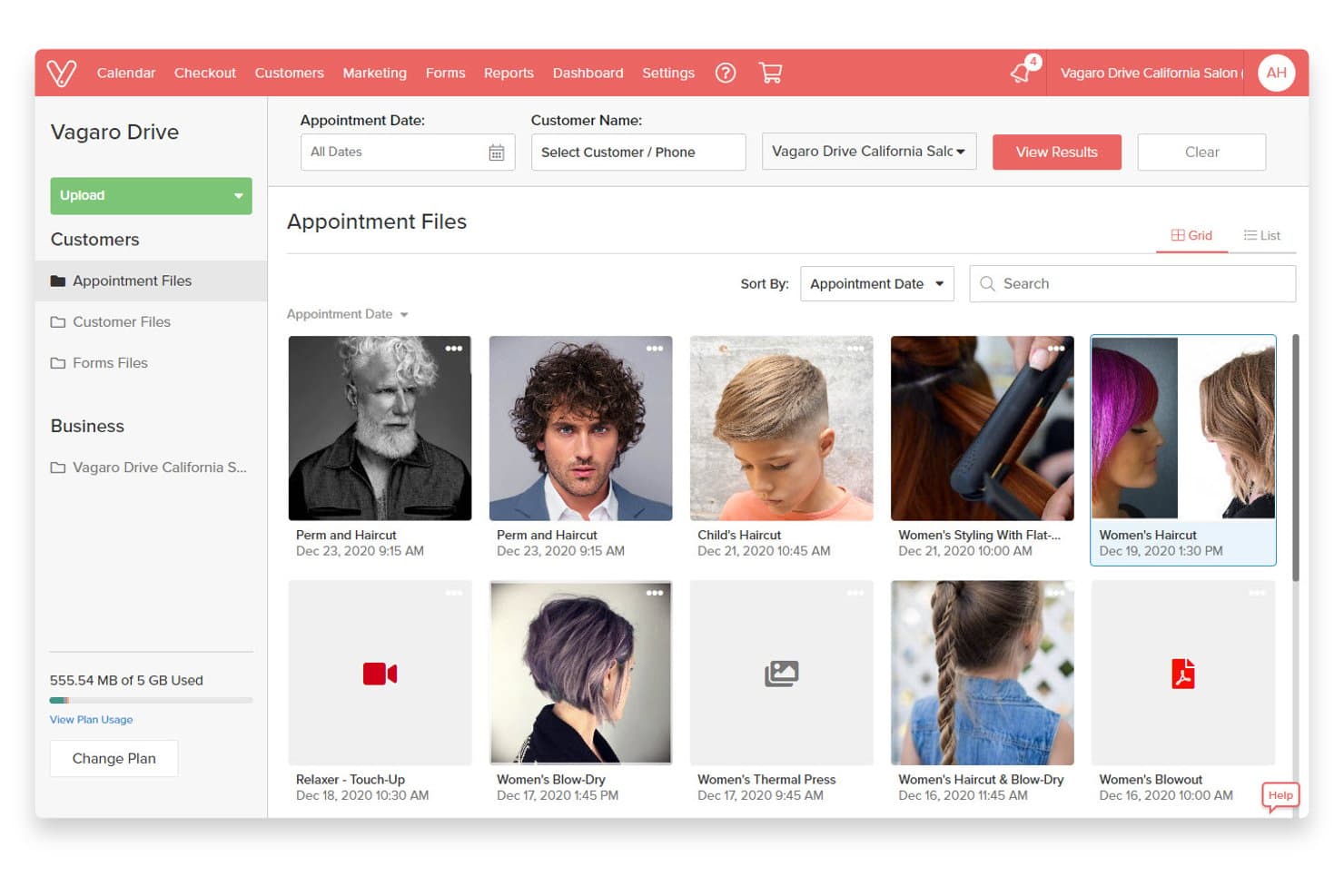
Vagaro organizes client appointment files with photos by date and service. Vagaro is an all-in-one booking and business management platform built for beauty, wellness, and fitness businesses that need client self-scheduling, payment collection, and automated reminders in a single system.
Who Is Vagaro Best For?
Vagaro suits beauty, wellness, and fitness business owners—from solo practitioners to multi-location studios—who need appointment booking, payments, and client management in one place.
Why I Picked Vagaro
I picked Vagaro as one of the best because it's purpose-built for service-oriented businesses that need client self-booking, payments, and intake all in one place. I love how you can require a deposit or card on file at the point of booking, and make intake forms mandatory before a client can confirm, so you're never chasing paperwork or payments after the fact. The 24/7 booking widget embeds directly on your site and lets clients book specific services with a named provider, which removes the back-and-forth entirely for appointment-based businesses.
Vagaro Key Features
- Customer waitlist management: Automatically adds clients to a waitlist when their preferred time is unavailable and notifies them when a slot opens.
- Membership and package tracking: Create, sell, and manage recurring memberships, service packages, and gift certificates directly within the platform.
- AI-powered marketing assistant: Vera, Vagaro's built-in AI tool, identifies open appointment slots and generates targeted promotions to help fill them.
- Multi-channel discovery and booking: Clients can find and book your business directly through Google, Instagram, Facebook, Apple Maps, and Alexa.
Vagaro Integrations
Vagaro integrates with HubSpot, Salesforce, Power BI, Tableau, NetSuite, QuickBooks, and Xero through its Data Lake, available on the Multiple Locations plan. It also offers an API and webhooks for custom integrations.
Pros and Cons
Pros:
- Deposits and intake forms can be required at booking
- Appointments, payments, and client records stay together
- Clients book and reschedule service appointments online
Cons:
- Employee assignment lacks sales lead-routing rules
- Calendar sync supports only one Google Calendar
Learn more about Vagaro: Best for customizable scheduling
- Free plan + 14-day trial + demo available
- Pricing upon request
Visit WebsiteCustomer Rating:4.7/5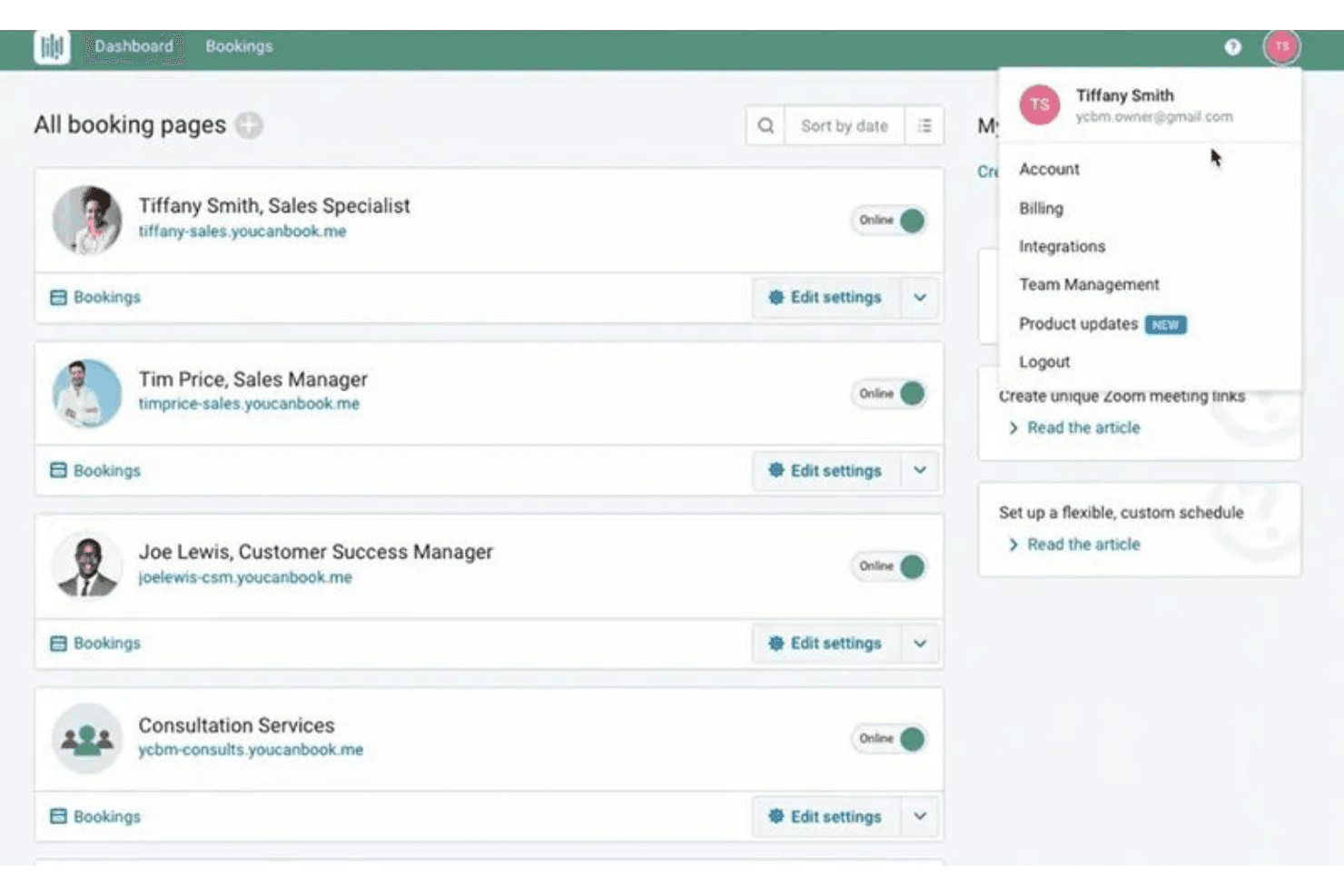
YouCanBookMe lets users manage multiple team booking pages from one dashboard. YouCanBookMe is a scheduling tool built for small businesses and freelancers who want to give clients a branded, self-service booking experience with configurable forms, payment collection, and automated reminders baked in.
Who Is YouCanBookMe Best For?
YouCanBookMe is a strong fit for freelancers and small business owners who want a branded, client-facing booking experience with custom forms and payment collection built in.
Why I Picked YouCanBookMe
YouCanBookMe earns its spot on my shortlist because the level of booking-page control it gives you goes well beyond what most scheduling tools offer out of the box. I particularly like that you can set up conditional form questions that show or hide follow-up fields based on a booker's earlier answers, which means you're collecting exactly the right information before a meeting is confirmed. Combine that with appointment-type-specific rules, durations, prices, and availability all on a single page, and you get a genuinely configurable client-facing experience that Calendly simply doesn't match.
YouCanBookMe Key Features
- Calendar overlay: Lets bookers sync their own calendar onto your booking page to visually compare mutual availability before selecting a time.
- Round-robin scheduling: Automatically distributes incoming bookings across team members using equal distribution, first available, fixed order, or availability-based logic.
- Booking workflows: Automates reminders, follow-ups, and no-show management sequences triggered by booking activity on Professional plans and above.
- Stripe payment collection: Accepts credit and debit cards, Apple Pay, and Google Pay directly within the booking flow before a meeting is confirmed.
YouCanBookMe Integrations
YouCanBookMe offers native integrations with Google Calendar, Microsoft Calendar, Apple/iCloud Calendar, Fastmail Calendar, Zoom, Google Meet, Microsoft Teams, Stripe, and HubSpot. It also supports Make and an HTTP API for custom integrations, plus Zapier.
Pros and Cons
Pros:
- Calendar overlay lets invitees compare availability
- Appointment-specific rules shape distinct booking paths
- Conditional questions qualify bookers before confirmation
Cons:
- Occasional calendar delays can expose stale availability
- Round-robin cannot route by territory or answers
Learn more about YouCanBookMe: Best for 24/7 appointment booking
- Free plan + 30-day free trial + free demo available
- From $12/user/month
Visit WebsiteCustomer Rating:4.6/5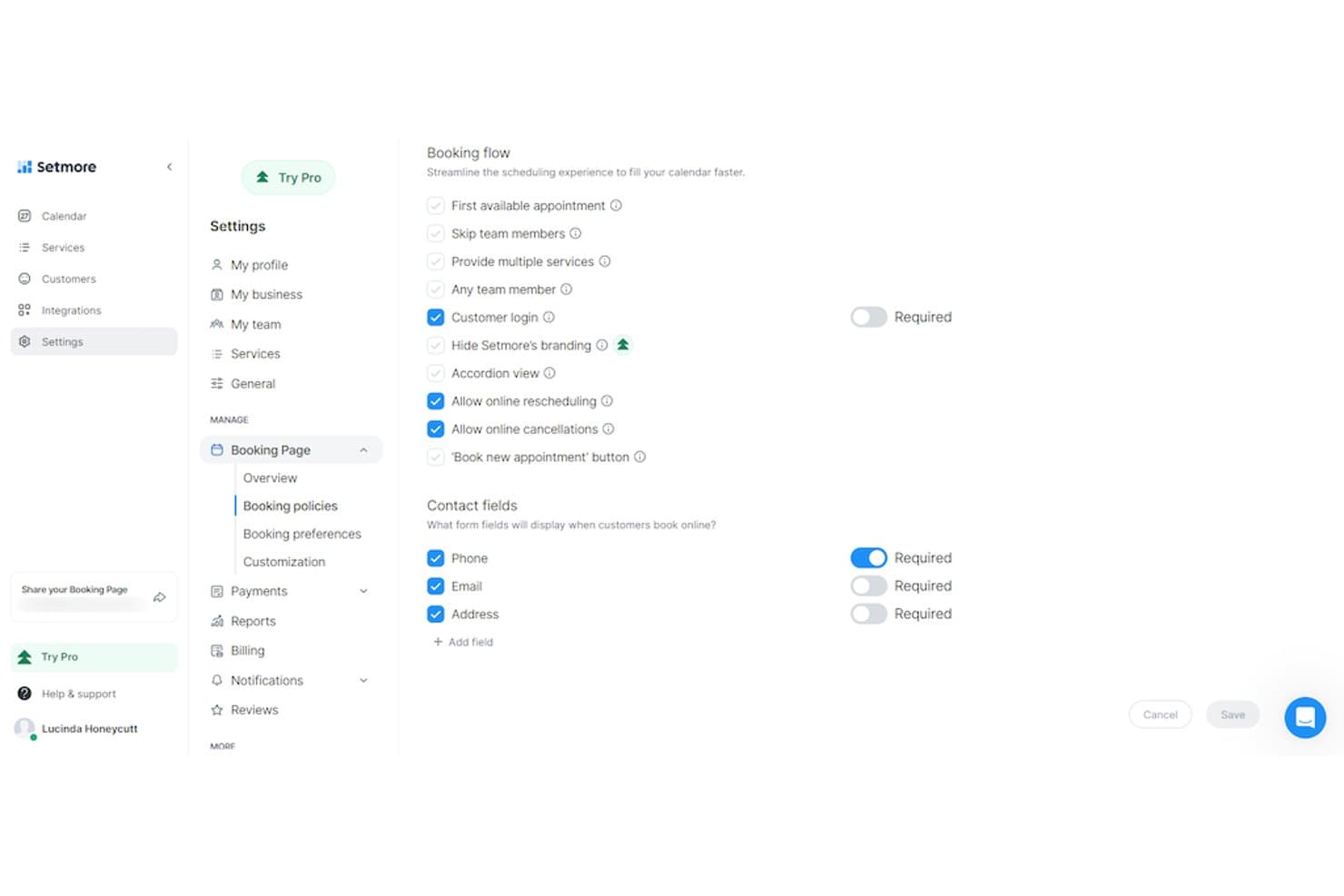
Setmore lets users customize booking flow and contact fields online. Setmore is an appointment scheduling tool built for service-based businesses and freelancers who need a branded booking page, built-in payment collection, and self-service scheduling without the complexity of a full sales platform.
Who Is Setmore Best For?
Setmore is a strong fit for freelancers and small service-based businesses that need a branded booking page with built-in payment collection and round-the-clock client self-booking.
Why I Picked Setmore
I picked Setmore as one of the best because it's built around the idea that clients should be able to book you at any hour, without you being available to confirm it. The branded Booking Page runs around the clock, letting clients view your services, see real-time availability, and secure a slot on their own. I also like that you can collect payment at the point of booking through Square, Stripe, or PayPal, so a confirmed appointment is a paid one.
Setmore Key Features
- Booking policy controls: Set lead times, booking-slot intervals, advance booking windows, and cancellation notice requirements directly on your Booking Page.
- Group class scheduling: Create bookable group sessions with seat reservations alongside individual one-on-one service appointments.
- CRM integrations: Connect natively with Salesforce, HubSpot, Zoho CRM, and other CRM tools to push customer details from new bookings into your contact lists.
- Customer intake fields: Add custom contact fields to your Booking Page to collect qualifying information from clients at the time of booking.
Setmore Integrations
Setmore offers native integrations with Google Calendar, Office 365 Calendar, Salesforce, HubSpot, Zoom, Google Meet, Slack, WordPress, Wix, and Squarespace. It also provides API access and Zapier connectivity.
Pros and Cons
Pros:
- Collect payments during appointment booking
- Group classes and one-to-one services
- Clients book, reschedule, and cancel independently
Cons:
- Reviewers report calendar-sync and time-zone problems
- No round-robin or lead-based routing
Learn more about Setmore: Best for service industries
- Free plan + 14-day free trial + demo available
- From $13.9/month
Visit WebsiteCustomer Rating:4.6/5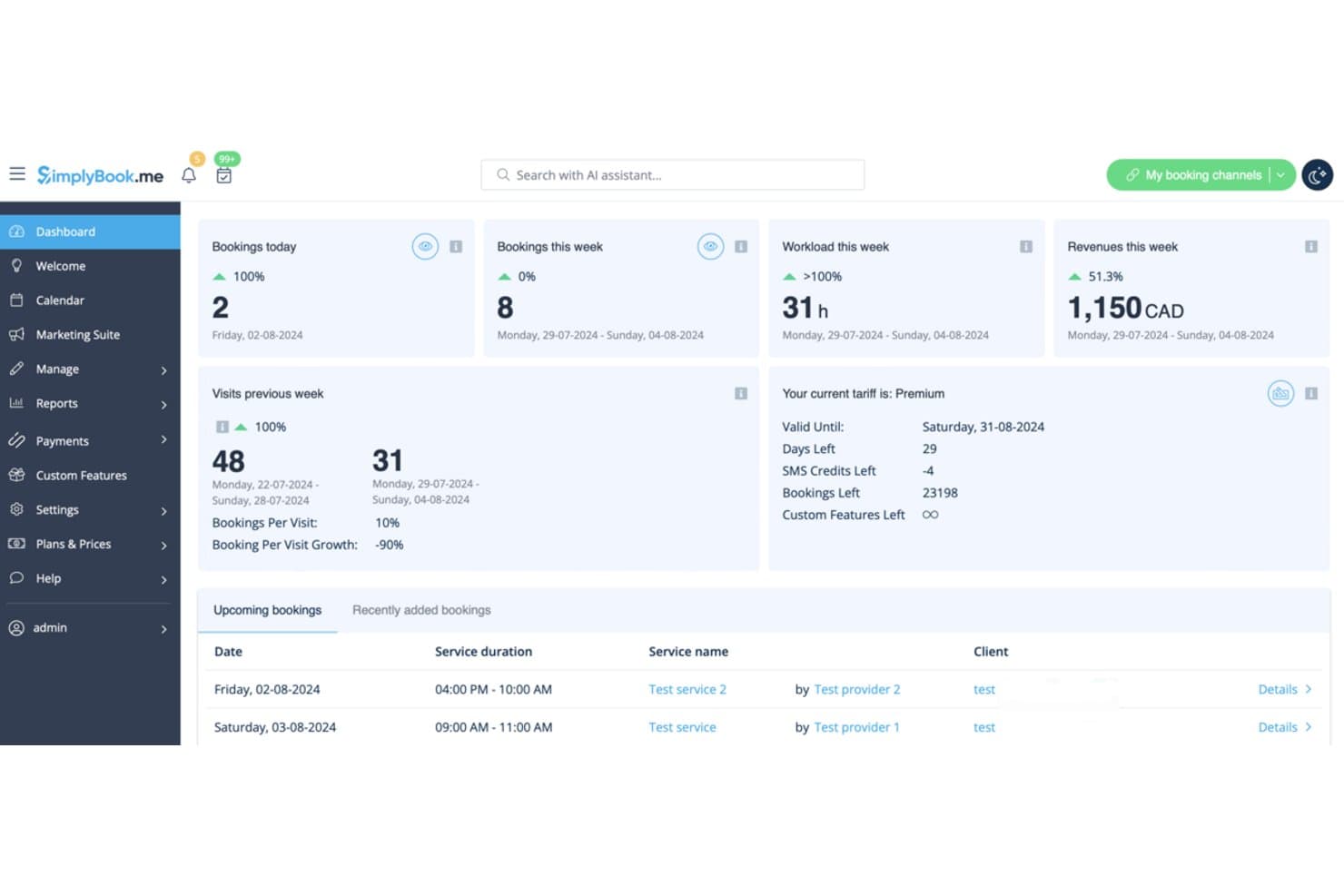
SimplyBook.me gives users a real-time overview of bookings and revenue. SimplyBook.me is an appointment booking platform built for service-based businesses, letting clients self-schedule, pay deposits, and receive automated reminders—without the back-and-forth that comes with manual scheduling.
Who Is SimplyBook.me Best For?
SimplyBook.me is a strong fit for service-based small businesses—think salons, clinics, fitness studios, and consultants—that need clients to self-book and pay in one flow.
Why I Picked SimplyBook.me
I picked SimplyBook.me as one of the best because it's purpose-built for service businesses in a way Calendly simply isn't. I especially like that clients can book a service, pay a deposit, and receive automated reminders across email, SMS, or WhatsApp, all in one flow. The configurable booking forms let me capture qualifying information at the point of booking, so there's no chasing clients for details after the fact.
SimplyBook.me Key Features
- Multi-channel notifications: Send booking confirmations, reminders, and follow-ups via email, SMS, WhatsApp, or Telegram, with customizable templates and configurable timing.
- Any Employee Selector: Automatically assign bookings to the next available provider or distribute them evenly across your team.
- Client app: Give clients a branded mobile app to book, reschedule, cancel, and view their booking and purchase history.
- Booking website with widget embeds: Publish a standalone booking site or embed iframe, button, or contact widgets directly into your existing website.
SimplyBook.me Integrations
SimplyBook.me offers native integrations with Google Calendar, Outlook Calendar, Google Meet, Microsoft 365/Teams, Stripe, PayPal, WordPress, and Google Business Profile. It also provides an API and supports Zapier.
Pros and Cons
Pros:
- Automated reminders help reduce missed appointments
- Booking forms collect details and deposits upfront
- Clients self-book, reducing scheduling back-and-forth
Cons:
- Booking features sometimes conflict with each other
- Initial setup can feel overwhelming
Learn more about SimplyBook.me: Best for reducing no-shows
- 15-day free trial + demo available
- From £360 per bundle/year (billed annually)
Visit WebsiteCustomer Rating:4.6/5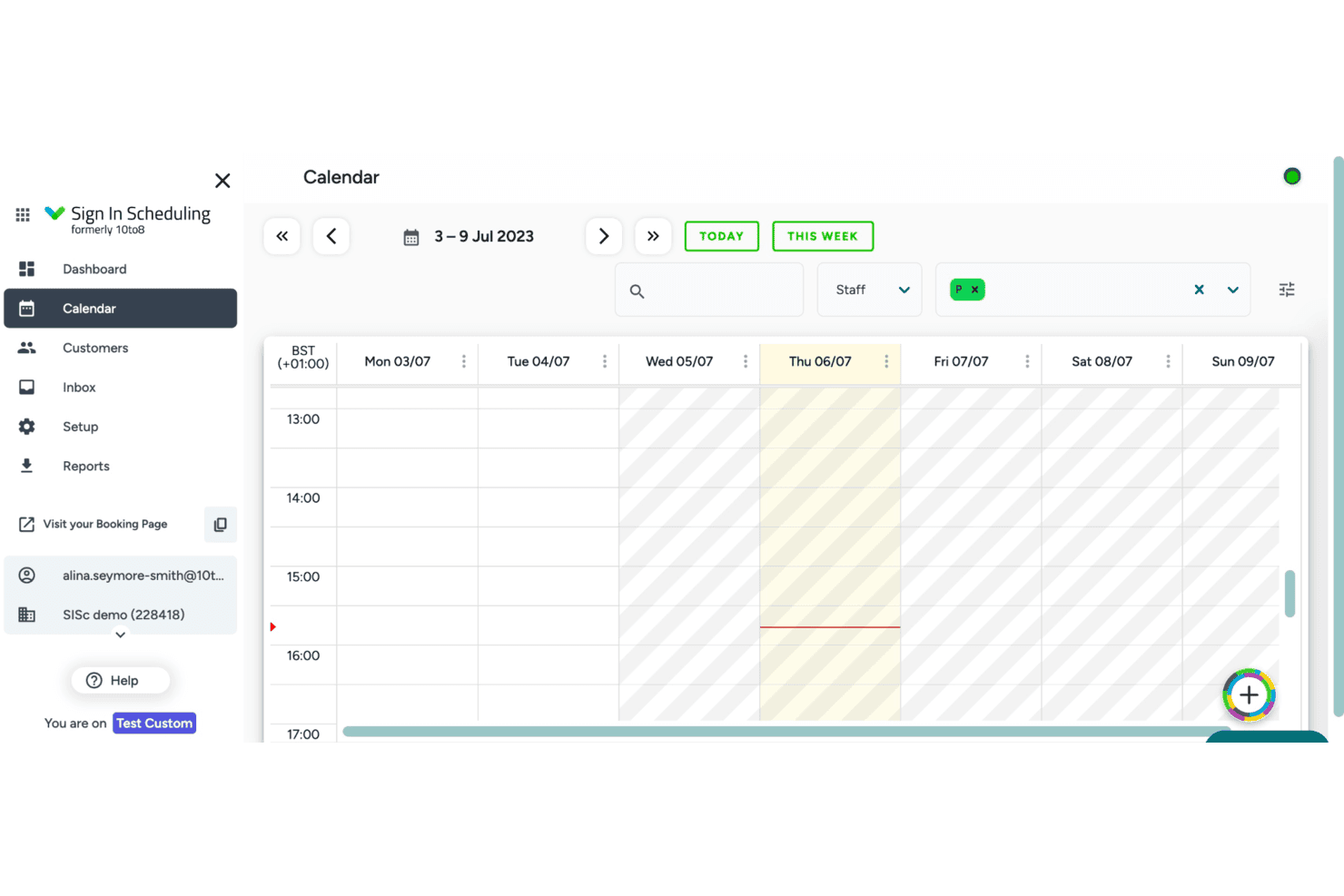
Sign In Scheduling displays a weekly calendar view for managing appointments. Sign In Scheduling is an appointment booking tool built for small businesses and independent operators who need self-service scheduling, automated reminders, and branded booking pages without the complexity of a full sales engagement platform.
Who Is Sign In Scheduling Best For?
Sign In Scheduling is a good fit for small business owners, independent consultants, and freelancers who need self-service booking, automated reminders, and branded booking pages to cut down on no-shows.
Why I Picked Sign In Scheduling
I picked Sign In Scheduling because its multi-channel reminder system is the most direct answer I've seen to the no-show problem. It sends automated email, SMS, and voice call reminders before each appointment, and the vendor's own data puts no-show reduction at up to 90%. The dashboard also tracks no-shows week over week, so you can see exactly whether your reminder cadence is working and adjust accordingly.
Sign In Scheduling Key Features
- Self-service booking page: Visitors can book, reschedule, or cancel appointments on their own through a branded public booking page without staff involvement.
- Custom qualifying questions: Services can include required or optional fields—free text, checkboxes, yes/no, or predefined choices—to collect information at the point of booking.
- Stripe and PayPal payment collection: Services can be configured to require or optionally accept payment at the time of booking through Stripe or PayPal.
- Multi-provider calendar sync: Staff can connect and sync more than one external calendar—including Google, Office 365, Exchange, iCloud, and Outlook—to block bookable time automatically.
Sign In Scheduling Integrations
Sign In Scheduling integrates with Google Calendar, Office 365, Exchange, Outlook, iCloud/iCal, Zoom, Salesforce, Microsoft Teams, Google Classroom, and Sign In App. Salesforce is limited to Enterprise/Bespoke plans, and no Scheduling-specific open API is documented.
Pros and Cons
Pros:
- Weekly staff-filtered no-show reporting
- Email, SMS, and voice reminders target no-shows
- Shared links cut client scheduling back-and-forth
Cons:
- Fixed slots complicate repeat appointment booking
- Reviewers report persistent bugs and slow support
Learn more about Sign In Scheduling: Best for integrated video calls
- Free plan available
- From $15/user/month
Visit WebsiteCustomer Rating:4.5/5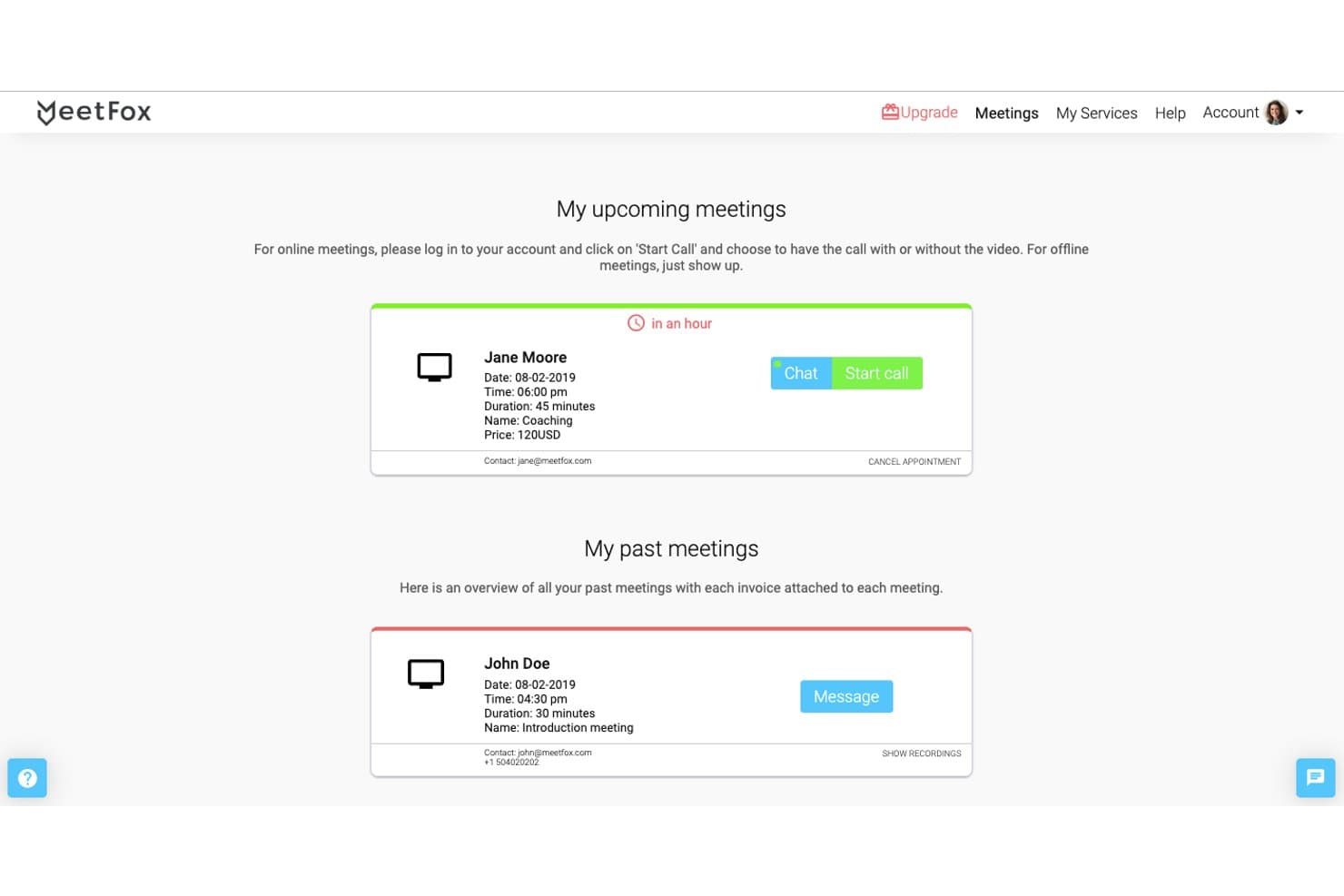
MeetFox lets users view upcoming and past meetings in one place. MeetFox is a scheduling tool that combined appointment booking, built-in video calls, and payment collection in one place, making it a practical pick for freelancers, consultants, and small business owners who charge for client meetings.
Who Is MeetFox Best For?
MeetFox was a strong fit for freelancers and independent consultants who needed scheduling, video calls, and client payments in a single tool.
Why I Picked MeetFox
I've included MeetFox in my top picks because it handles scheduling, video calls, and payment collection without bouncing clients between separate tools. I particularly like that video calls run directly in the browser, so clients don't need to download anything before joining a paid consultation. You can also collect Stripe payments at the point of booking and automate invoices, which removes a whole follow-up step for anyone charging by the meeting.
MeetFox Key Features
- Embeddable booking pages: Share your scheduling page via email, embed it on a website, or link it from social media so clients can book without leaving their preferred channel.
- Round-robin scheduling: Automatically rotate meeting assignments across team members to distribute bookings evenly.
- SMS meeting reminders: Send automated text message reminders to reduce no-shows ahead of scheduled appointments.
- Customizable cancellation policies: Set and enforce your own cancellation terms directly within the booking flow.
MeetFox Integrations
Documented integrations included Google Calendar, Stripe, Zoom, Microsoft Teams, and Google Meet. MeetFox also supported Zapier, while API availability wasn’t documented.
Pros and Cons
Pros:
- Paid consultations included scheduling and invoicing
- Clients could book without installing software
- Combined scheduling with browser-based video calls
Cons:
- Reviewers reported video quality and browser issues
- MeetFox shut down on October 31, 2025
Learn more about MeetFox: Best for WordPress users
- Free plan + free demo available
- From $89/year (billed annually)
Visit WebsiteCustomer Rating:4.5/5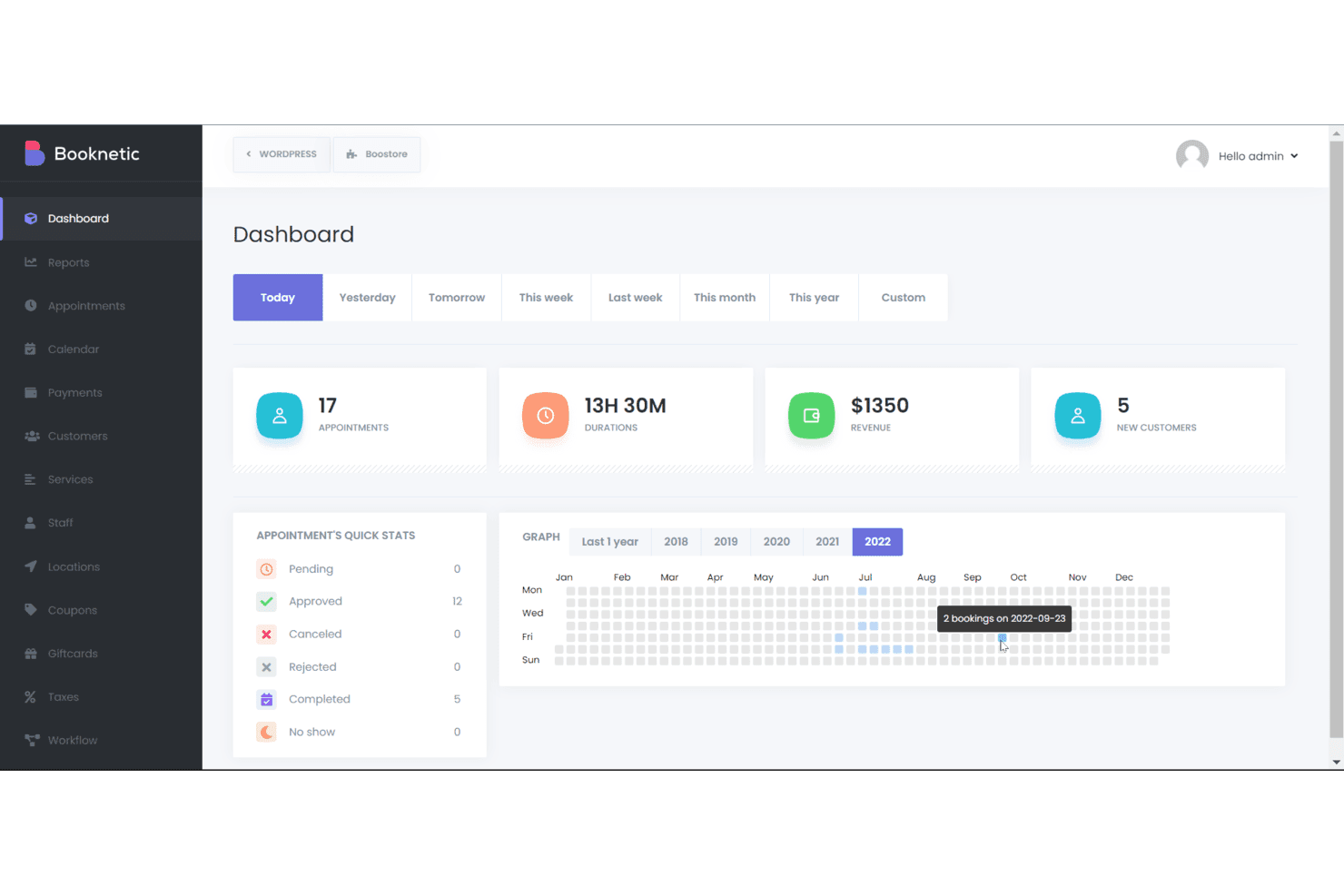
Booknetic's dashboard tracks appointments, revenue, and customer stats daily. Booknetic is a self-hosted WordPress booking plugin built for service businesses—think salons, fitness studios, and tutoring practices—that lets customers book appointments online without any back-and-forth, while handling payments, reminders, and staff scheduling in one place.
Who Is Booknetic Best For?
Booknetic is a strong fit for service-based small businesses—salons, tutors, fitness studios, and similar—that already run on WordPress and want appointment booking built directly into their existing site.
Why I Picked Booknetic
I picked Booknetic as one of the best because it's the only option on this list built specifically as a WordPress plugin, meaning your booking page lives on your own domain and your customer data stays in your own database. I love that you can embed a fully branded booking form anywhere on your WordPress site using a simple shortcode, then collect qualifying intake information through conditional Custom Forms attached to specific services. The multi-staff availability check is also genuinely useful: when a client books a service requiring multiple providers, Booknetic only surfaces times when the whole team is simultaneously free.
Booknetic Key Features
- Recurring appointments: Customers can book daily, weekly, or monthly appointments in a single session and choose to pay all at once or per appointment.
- Google Calendar two-way sync: Each staff member's connected Google Calendar blocks Booknetic availability for busy events and reflects new bookings in real time.
- Deposit payments: Customers can pay a fixed or percentage deposit at booking, with an option to pay the full amount upfront.
- Waiting lists: Customers can join a waitlist for a fully booked slot and receive automatic notifications when a cancellation opens a spot.
Booknetic Integrations
Booknetic lists 50+ integrations, including native Google Calendar, Microsoft Outlook Calendar, Zoom, Google Meet, and Microsoft Teams. It also supports a REST API and webhooks, with Zapier connectivity documented.
Pros and Cons
Pros:
- Custom intake forms collect booking details
- Customer self-booking and reminders reduce follow-up
- WordPress-hosted booking keeps customer data local
Cons:
- No rules-based routing for sales reps
- Calendar conflict checks can lag cron runs
Learn more about Booknetic: Best for 3-click scheduling
- 7-day free trial + free demo available
- From $9/user/month
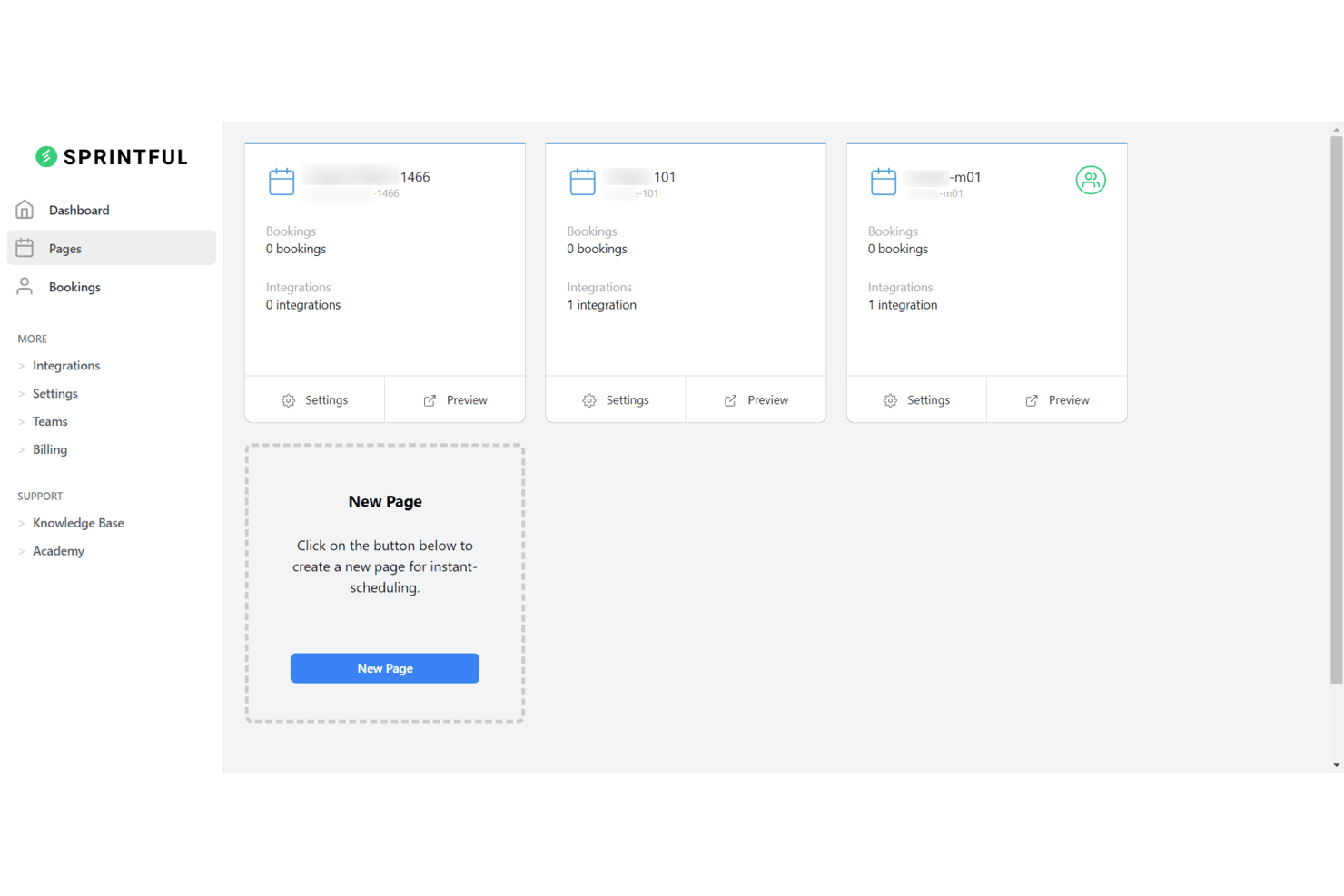
Sprintful lets users manage multiple booking pages in one dashboard. Sprintful is a scheduling automation tool built for sales teams and small businesses that want to eliminate booking back-and-forth, with support for round-robin assignment, team availability pooling, custom booking forms, and AI-powered scheduling via Claude and ChatGPT.
Who Is Sprintful Best For?
Sprintful is a strong fit for small business owners and sales teams who need fast, flexible booking setup without the complexity of enterprise scheduling tools.
Why I Picked Sprintful
I picked Sprintful as one of the best because its 3-click scheduling experience is genuinely fast to set up and even faster for invitees to use. I appreciate how booking pages can be live in under five minutes, with service selection, availability, and form collection all handled in a single flow. The AI-powered booking via Claude and ChatGPT is a standout touch, letting prospects book directly through a chat interface without ever opening a calendar link.
Sprintful Key Features
- Round-robin and prioritized assignment: Distribute bookings across team members using flexible round robin, strict round robin, or priority-based assignment with real-time availability checks.
- Multi-calendar conflict prevention: Connect Google, Outlook, and Microsoft Exchange calendars to read availability across multiple sources and block conflicting time slots automatically.
- Custom booking forms with file collection: Add custom questions, configure required fields, and collect file attachments from invitees directly within the booking flow.
- Webhook and Zapier automation: Trigger external workflows on booking, reschedule, cancellation, or reminder events through webhooks, Zapier, or custom Node.js functions.
Sprintful Integrations
Sprintful offers native integrations with Google Calendar, Outlook Calendar, Microsoft Exchange, Zoom, Google Meet, Microsoft Teams, Stripe, and Slack. It also provides REST APIs, webhooks, custom Node.js functions, and Zapier.
Pros and Cons
Pros:
- Reviewers praise customizable booking pages
- Round-robin helps distribute sales meetings
- Flexible same-day availability adjustments
Cons:
- Sparse public reviews make evaluation harder
- Some reviewers consider it expensive
Learn more about Sprintful: Best for a positive client experience
- Free plan + 14-day trial available
- From $12/user/month
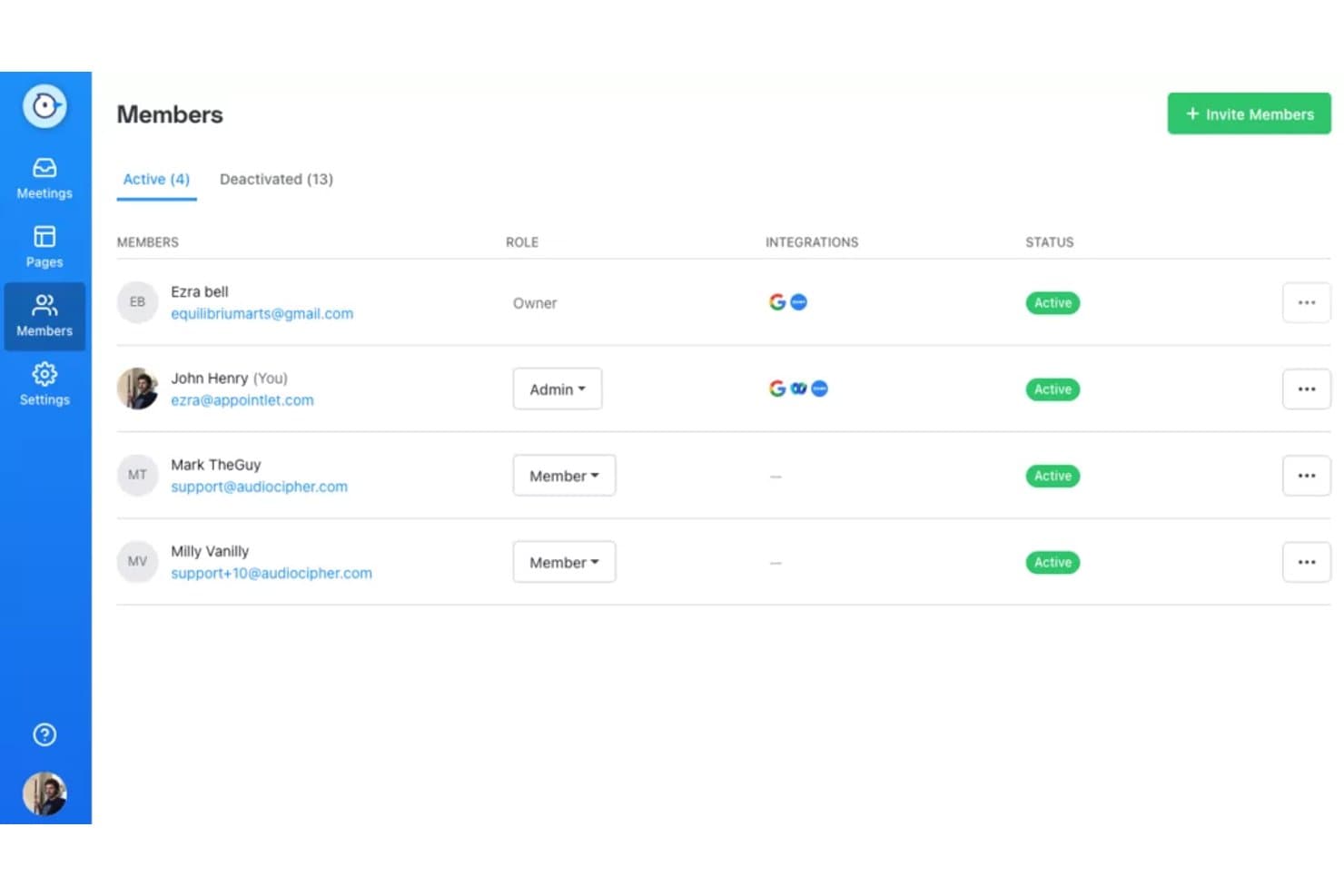
Appointlet lets users manage team members, roles, and statuses. Appointlet is a client-focused scheduling tool built for small business owners, freelancers, and client-facing teams who want to replace manual booking coordination with shareable scheduling pages, intake forms, and round-robin meeting distribution.
Who Is Appointlet Best For?
Appointlet is a strong fit for freelancers and small business owners who prioritize a smooth, low-friction booking experience for their clients.
Why I Picked Appointlet
I picked Appointlet as one of the best because it's built around making the booking experience feel polished for whoever's on the receiving end. I love how customizable intake forms let you collect qualifying information before a meeting is confirmed, and the manual approval option means you can decline prospects who aren't a fit before they ever land on your calendar. The booking page branding, including your logo, accent color, and a custom welcome message, makes the whole flow feel like yours rather than a generic scheduling link.
Appointlet Key Features
- Round-robin meeting distribution: Incoming bookings are automatically assigned to available team members based on set priority order, cycling through eligible members when higher-priority hosts are unavailable.
- Group meetings and classes: Hosts can open a single time slot to multiple attendees, supporting group sessions and classes alongside standard one-to-one meetings.
- Post-booking redirect: Premium users can send attendees to a custom URL or thank-you page immediately after completing a booking.
- Website embed options: Appointlet scheduling pages can be added to any website as an inline iFrame or a floating popup widget using a provided code snippet.
Appointlet Integrations
Appointlet offers native integrations with Google Calendar, Microsoft 365, Zoom, Google Meet, Microsoft Teams, Cisco Webex, Stripe, and PayPal. It also supports booking webhooks and Zapier; no general public API is documented.
Pros and Cons
Pros:
- Round-robin reduces cross-team booking coordination
- Intake forms screen prospects before confirmation
- Clients book without coordination back-and-forth
Cons:
- Round-robin can’t route by lead attributes
- No built-in SMS reminder channel
Learn more about Appointlet: Best for one-click scheduling
- Free plan + 14-day free trial + demo available
- From $29/user/month (billed annually)
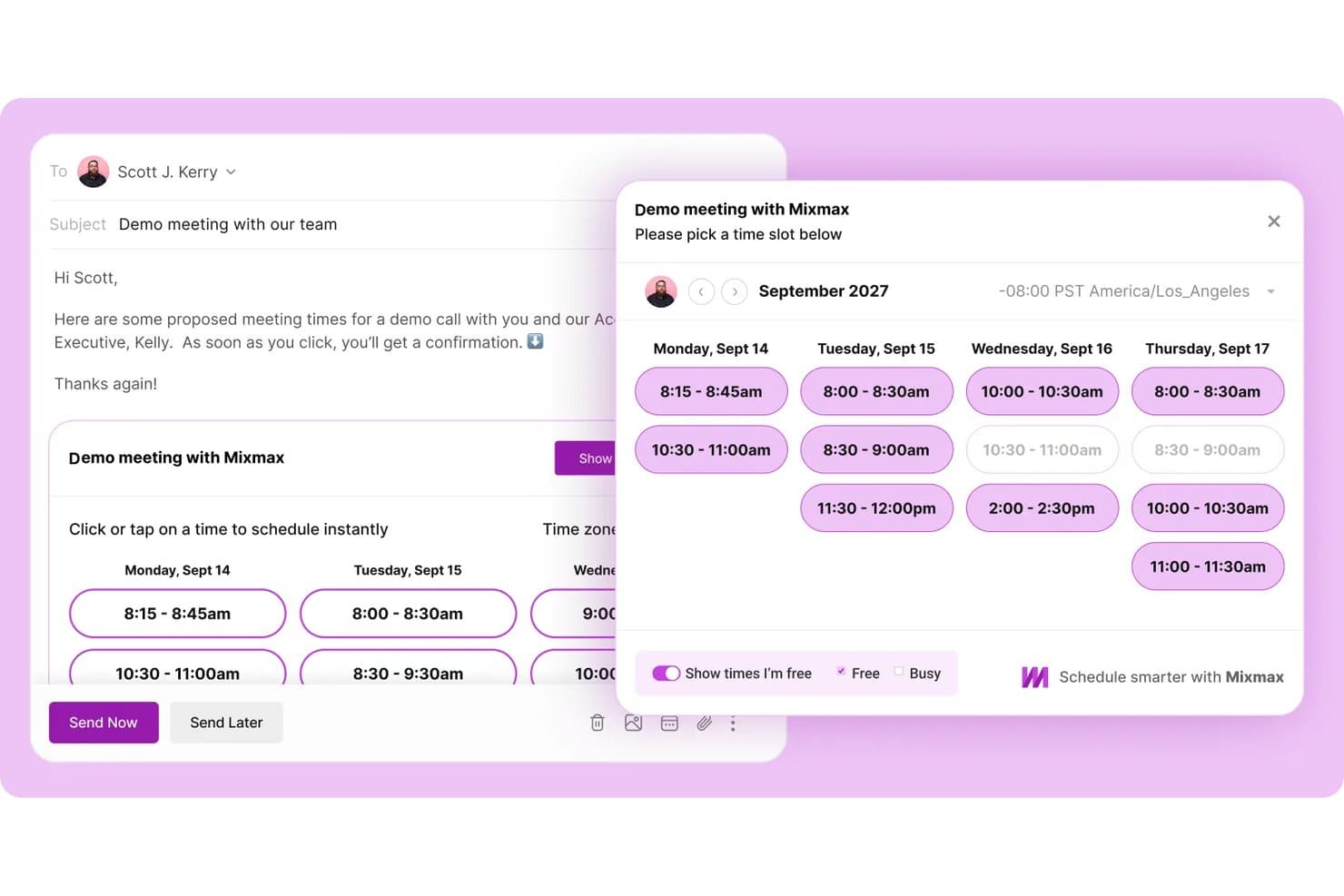
Mixmax Meetings lets users share available time slots via email. Mixmax is a Gmail-native sales engagement platform that lets sales reps, recruiters, and customer success teams schedule meetings directly inside email threads, eliminating the need for separate scheduling tools.
Who Is Mixmax Best For?
Mixmax is a strong fit for sales reps, recruiters, and customer success teams who live in Gmail and want scheduling built into their outreach workflow.
Why I Picked Mixmax Meetings
I picked Mixmax Meetings because it makes one-click scheduling feel native to email outreach rather than bolted on. I love how reps can drop available times directly into a Gmail thread, letting prospects book with a single click without ever leaving the email. That "Share Availability" feature also syncs with Google Calendar in real time, so double-booking is blocked automatically. Round Robin booking across team calendars makes it easy to rotate demo slots across an AE team without any manual coordination.
Mixmax Meetings Key Features
- Meeting polls: Let a group vote on multiple proposed times so everyone can indicate availability before a meeting is confirmed.
- AI meeting notes: Automatically generate call briefs, live notes, and post-meeting recaps with drafted follow-up emails for review.
- Custom qualifying fields: Configure optional or required fields on booking pages to collect invitee details like phone number or preferred location at the time of booking.
- Salesforce and HubSpot activity sync: Automatically log scheduled meetings and email activity to Salesforce or HubSpot records directly from the inbox.
Mixmax Meetings Integrations
Mixmax offers 40+ native integrations, including Google Calendar, Salesforce, HubSpot, Zoom, Slack, and Google Meet. It also provides an API, webhooks, SDKs, and Zapier for custom connectivity.
Pros and Cons
Pros:
- Rotate bookings across available team calendars
- Let groups vote on proposed meeting times
- Insert bookable times directly into email
Cons:
- Booking pages offer fewer recurring-meeting options
- Round robin cannot route by lead data
Learn more about Mixmax Meetings:
Outras alternativas ao Calendly
Eis algumas alternativas adicionais ao Calendly que não entraram na minha lista restrita, mas que ainda vale a pena consultar.
- 11annyBest for booking management
- 12JotformBest for privacy-focused scheduling
- 13Acuity SchedulingBest for multi-location businesses
- 14OnceHubBest for lead engagement
- 15DoodleBest for group scheduling
- 16TimeTapBest for appointment-heavy businesses
- 17Microsoft BookingsBest for Microsoft 365 users
- 18Zoho BookingsBest for Zoho ecosystem users
- 19HubSpot Meeting SchedulerBest for HubSpot CRM users
- 20Chili CalBest for sales teams
How I Evaluate Calendly Alternatives
I first check that each tool matches Calendly's baseline—calendar sync, booking pages, round-robin routing, and CRM integration. Then I look at what separates them for RevOps teams routing inbound leads to reps at scale.
Core Functionality (Table Stakes For This List)
When I'm selecting tools for my list, I rank each one on a scale from 0 (does not offer the functionality) to 5 (excels in this area) for each core functionality listed below. Then, I calculate the tool's total score into a percentage. Each tool needs to achieve a minimum total score of 65% to be considered for inclusion.
- Calendar Sync & Availability: I check whether a tool syncs bidirectionally with Google, Outlook, and iCloud so reps' availability updates in real time across multiple calendars.
- Customizable Booking Pages: Each tool needs shareable or embeddable booking pages with branding controls, multiple event types, and the flexibility to match your GTM motion.
- Automated Meeting Routing: I look for round-robin, collective, and rule-based distribution logic—like routing by territory or account ownership in Salesforce or HubSpot.
- CRM & Workflow Integrations: Deep CRM sync matters most here. I evaluate whether meetings auto-log to the right contact or deal record and trigger downstream workflows.
- Lead Qualification Forms: Booking pages should capture custom fields and apply conditional logic, so an SDR only sees demos from prospects who meet your ICP criteria.
- Automated Reminders & Notifications: I look at reminder and follow-up options across email, SMS, and Slack—especially no-show sequences that re-engage prospects automatically.
Once I have a list of tools that meet the criteria, I consider what sets each platform apart.
Differentiating Factors (What Sets Vendors Apart)
Here's how I compare and contrast different vendors:
Standout Features
Instant form handoff is a big differentiator. I look for tools that layer onto your existing HubSpot or Marketo forms and route qualified leads to a rep's calendar without a separate follow-up step. Revenue attribution reporting matters too—the strongest alternatives tie booked meetings back to pipeline and closed deals, giving demand gen teams clear ROI visibility. I also evaluate lead enrichment, where booking submissions pull in firmographic data so reps walk into calls already knowing company size and fit.
Beyond Features
Pricing model is one of the first things I check. Some vendors gate routing and CRM features behind enterprise tiers, which can catch growing sales teams off guard when they need those capabilities most. Tech stack fit is equally important—I evaluate whether a tool offers native integrations with platforms like Salesforce, Outreach, and Salesloft, plus open APIs for custom RevOps workflows. Security and compliance round out my assessment. Enterprise buyers in regulated industries should look for SOC 2 Type II certification, role-based permissions, and audit logs to satisfy procurement requirements.
Por que procurar uma alternativa ao Calendly?
Embora o Calendly seja um bom software de agendamento de compromissos, alguns utilizadores procuram soluções alternativas por vários motivos. Pode estar à procura de uma alternativa ao Calendly porque
- Precisa de mais opções de personalização
- O seu orçamento é limitado para funcionalidades premium
- Está a lidar com integrações limitadas
- Precisa de um melhor apoio ao cliente
- A sua equipa precisa de suporte para vários idiomas
- Procura funcionalidades específicas do seu setor
Se alguma destas situações lhe parece familiar, veio ao lugar certo. A minha lista inclui várias opções de software de agendamento de compromissos mais adequadas para equipas que enfrentam estes desafios com o Calendly e procuram soluções alternativas.
Principais funcionalidades do Calendly
Eis algumas das principais funcionalidades do Calendly para o ajudar a confrontar e comparar o que as soluções alternativas oferecem.
- Automatização do agendamento: Permite automatizar o agendamento de reuniões para poupar tempo e reduzir os emails trocados.
- Disponibilidade personalizável: Permite definir as suas preferências de disponibilidade, para que os convidados só possam marcar reuniões durante os seus períodos livres.
- Encaminhamento de reuniões: Ajuda a encaminhar as reuniões para os membros certos da equipa com base nos critérios que definir, melhorando a eficiência.
- Lembretes & acompanhamentos: Envia lembretes automáticos e emails de acompanhamento para manter todos informados e reduzir as faltas.
- Integrações com calendários: Sincroniza-se com os seus calendários existentes para evitar marcações duplicadas e gerir todos os compromissos num só lugar.
- Aplicações móveis: Disponibiliza aplicações para iOS e Android, para que possa gerir a sua agenda onde quer que esteja.
- Extensões para o navegador: Disponibiliza extensões para agendar reuniões diretamente a partir do navegador, sem abrir a aplicação.
- Incorporações em emails & sites: Permite incorporar ligações de agendamento em emails e sites, facilitando aos clientes a marcação de compromissos.
- Sondagens sobre reuniões: Permite criar sondagens para encontrar a melhor hora para uma reunião para todos os participantes, simplificando o agendamento em grupo.
- Tipos de eventos: Permite personalizar diferentes tipos de eventos para responder a várias necessidades e preferências de reuniões. Parece que a sua mensagem estava incompleta.