

Programvare for salgssporing for en liten bedrift er en verdifull ressurs for enhver virksomhet. Med riktig programvare kan team forbedre salgseffektiviteten og styrke arbeidet med kunderelasjoner. Men det kan være utfordrende å finne riktig programvare for salgssporing for en liten bedrift, særlig med så mange tilgjengelige alternativer.
Med utgangspunkt i min erfaring med programvare for inntektsdrift testet og sammenlignet jeg flere av de beste tilgjengelige løsningene for salgssporing for små bedrifter. Deretter samlet jeg resultatene i detaljerte vurderinger for å hjelpe deg med å finne den beste programvaren for dine behov.
Why Trust Our Software Recommendations
6,700+
Reviews
20
Industry experts
16+
Evaluation factors
14
Years
Our reviews reflect our independent judgment—not a sales pitch. Learn how we stay transparent.
For this guide, we evaluated tools using hands-on testing and independent research, scoring tools using our selection criteria.
Our reviews reflect our human editorial judgment, not a sales pitch.
Sammenligningstabell: Programvare for salgssporing for små bedrifter
Denne sammenligningstabellen oppsummerer prisdetaljene for mine utvalgte løsninger for salgssporing for små bedrifter.
| Tool | Best For | Trial Info | Price | ||
|---|---|---|---|---|---|
| 1 | Best with built-in workflow automation | Free plan + 14-day free trial + free demo available | From $49/user/month (billed annually) | Website | |
| 2 | Best for visual deal pipelines | 30-day free trial | From $39/user/month | Website | |
| 3 | Best for inside sales | 14-day free trial | From $35/user/month (billed annually) | Website | |
| 4 | Best for education sector | Free demo available | Pricing upon request | Website | |
| 5 | Best for growing sales teams | 7-day free trial | From $250/month | Website | |
| 6 | Best for automated emails | 14-day free trial | From $49/user/month (billed annually) | Website | |
| 7 | Best for UK businesses | Free trial available | From £44/user/month | Website | |
| 8 | Best for small teams | 15-day free trial | From $19.99/month per 1,000 contacts | Website | |
| 9 | Best for scalability | 30-day free trial | From $25/user/month | Website | |
| 10 | Best for sales outreach | Free plan available | From $49/user/month (billed annually) | Website |


Vurderinger av den beste programvaren for salgssporing for små bedrifter
Nedenfor finner du mine detaljerte sammendrag av de beste løsningene for salgssporing for små bedrifter som kom med på kortlisten. Vurderingene mine gir et detaljert innblikk i de viktigste funksjonene, fordelene & ulempene, integrasjonene og ideelle bruksområdene for hvert verktøy, slik at du kan finne det beste alternativet for deg.
 Best with built-in workflow automation
- Free plan + 14-day free trial + free demo available
- From $49/user/month (billed annually)
Visit WebsiteCustomer Rating:4.5/5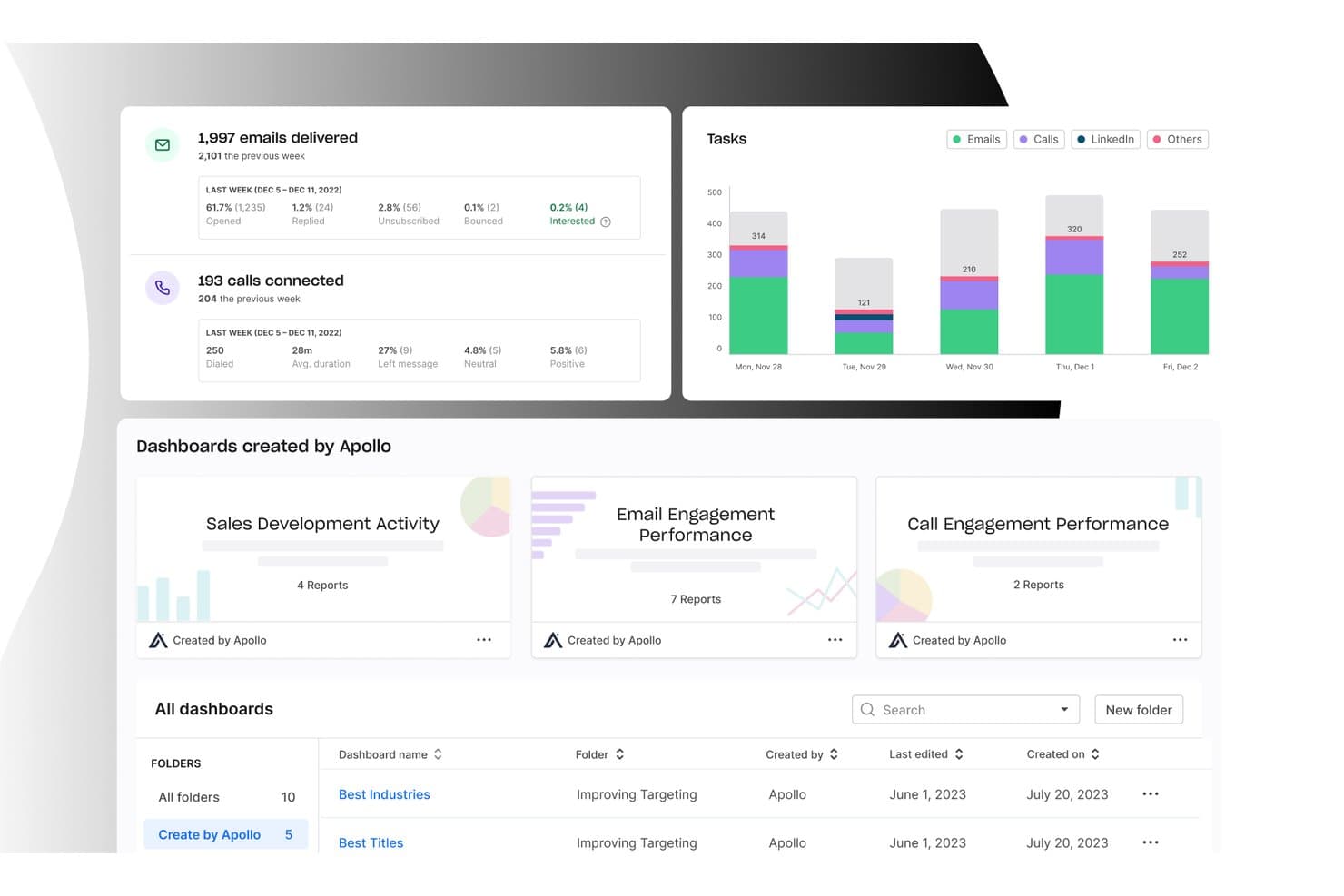
Apollo.io offers an analytics dashboard with email delivery stats, call tracking, task charts, and pre-built sales dashboards for small business sales tracking. Apollo.io is an all-in-one B2B sales platform that combines a 265M+ contact database, deal pipeline management, multichannel outreach, and sales activity tracking in a single workspace.
Who Is Apollo.io Best For?
Apollo.io suits small sales teams and SDR-led organizations that run outbound prospecting and want to manage their entire pipeline without juggling multiple tools.
Why I Picked Apollo.io
Apollo.io earns its spot on my shortlist because of its multi-branch workflow engine, which lets me build conditional-logic automations that trigger on deal stage changes, email opens, or contact behavior. I can set manual approval gates before contacts enter a sequence, keeping outreach intentional rather than fully hands-off. What I especially like is that every triggered workflow action auto-logs directly to the contact's activity timeline, so nothing gets missed without any manual entry required.
Apollo.io Key Features
- Deal management board: Organize opportunities using a visual pipeline with drag-and-drop stages for tracking progress.
- Contact data enrichment: Instantly enrich lead and company profiles from Apollo’s global B2B database.
- Sales analytics dashboard: View key sales metrics on customizable dashboards to monitor team and individual performance.
- Chrome extension for prospecting: Access Apollo’s contact database and add prospects directly from LinkedIn and company websites.
Apollo.io Integrations
Apollo.io offers native integrations with Salesforce, HubSpot, Gmail, Outlook, LinkedIn, and Slack. It also connects with Zapier and provides an API for custom integrations.
Pros and Cons
Pros:
- Pipeline and prospecting managed in one place
- 265M+ contacts enrich deal records automatically
- Built-in sequence automation saves manual outreach steps
Cons:
- Contact data can be outdated occasionally
- CRM depth trails dedicated sales platforms
Learn more about Apollo.io: Best for visual deal pipelines
- 30-day free trial
- From $39/user/month
Visit WebsiteCustomer Rating:4.7/5
Salesflare shows deal progress and revenue stats in a drag-and-drop sales pipeline. Salesflare is a CRM built to help you track your sales and leads. It works by bringing in your emails, meetings, and contact info automatically to keep everything up to date. You stay organized and on top of follow‑ups without having to manually enter data.
Why I picked Salesflare: I picked Salesflare because it gives you a drag‑and‑drop visual pipeline that lets you move your leads through stages clearly and visually—and you see where each deal sits at a glance. It also sets proactive reminders to follow up, reply to emails, or add notes so you don’t let things slip through the cracks. This kind of automatic nudge means you can stay responsive without doing extra mental work.
Standout features & integrations:
Features include live notifications and a central notification center that keep you updated the moment something happens. Plus, you can set up saved segments: combinations of advanced filters that you can reuse, making it easier to work with different lead lists without resetting everything.
Integrations include Google Workspace, Intercom, MailChimp, QuickBooks Online, Slack, Stripe, Shopify, and Calendly.
Pros and Cons
Pros:
- Contact timelines show full communication history
- Follow-up reminders reduce lead drop-off
- Automatically fills contact data from emails
Cons:
- Email workflow builder can feel cluttered
- No built-in calling or dialer tools
Learn more about Salesflare: Best for inside sales
- 14-day free trial
- From $35/user/month (billed annually)
Visit WebsiteCustomer Rating:4.7/5
Close CRM enables efficient multi-channel communication and real-time reporting. Close CRM offers advanced calling, email, and SMS features, allowing sales to engage with prospects efficiently. Its automatic task reminders, real-time reporting, and multi-channel communication streamline outreach efforts, making it an excellent tool for building relationships and closing deals.
Why I picked Close CRM: Close CRM is for inside sales teams, offering features that enhance communication and sales tracking. Its built-in calling and email functionalities keep all interactions in one place and its lead management tools help you organize and prioritize prospects efficiently. With its real-time reporting, your team can stay on top of sales activities and make informed decisions.
Standout features & integrations:
Features include a multichannel inbox that unifies communication, automated email sequences, and powerful pipeline management for tracking deals and opportunities. It also offers a robust reporting dashboard to analyze sales activities, track team performance, and help optimize workflows.
Integrations include Zapier, Slack, Gmail, Outlook, HubSpot, Pipedrive, Asana, Trello, LinkedIn, and Google Calendar.
Pros and Cons
Pros:
- Responsive customer support and onboarding
- Detailed sales tracking and reporting features
- Multi-channel communication support
Cons:
- Limited CRM customization options
- No advanced deal forecasting
Learn more about Close CRM:

Meritto CRM streamlines student enrollment and admissions for institutions. Meritto is a specialized CRM platform that offers student enrollment and admissions for educational institutions. It handles student inquiries, improves conversion rates, and integrates with popular education management systems.
Why I picked Meritto: Meritto excels in the education sector with its student admissions management and application tracking. It offers tools for managing the entire admissions pipeline, from lead generation and assignment to follow-up and reporting, all within one platform. It also provides in-depth insights into student behavior to help you refine outreach strategies and maximize conversion rates throughout the admissions process.
Standout features & integrations:
Features include application tracking, lead management, and customizable workflows. Your team can automate admissions processes to save time. The platform's analytics offer insights to optimize recruitment strategies.
Integrations include Google Analytics, Facebook, WhatsApp, Mailchimp, Salesforce, HubSpot, Zoho CRM, Microsoft Dynamics, LinkedIn, and PayPal.
Pros and Cons
Pros:
- Responsive customer support with tailored training options
- Offers real-time analytics for data-driven decisions
- Comprehensive lead tracking across recruitment stages
Cons:
- Customization options are limited for specific needs
- Limited multi-pipeline tracking options
Learn more about Meritto:

Kylas Sales CRM offers no-code customization for lead and sales management. Kylas Sales CRM is an easy-to-use platform with no-code customization for managing sales processes, lead tracking, and enhancing team collaboration. It helps growing sales teams improve productivity through lead management, pipeline tracking, and in-depth reporting.
Why I picked Kylas Sales CRM: Kylas Sales CRM supports your sales reps with its scalable sales management capabilities. It provides comprehensive lead tracking, sales pipeline management, and collaboration features. Its deal tracking and task automation help keep sales efforts organized, and the built-in reporting and activity tracking ensures you can monitor your team’s progress.
Standout features & integrations:
Features include customizable lead and deal management, comprehensive reporting, and team collaboration tools. The platform’s workflow automation and pipeline visualization allow your team to monitor and track sales progress, while the mobile app provides on-the-go access for remote sales activities.
Integrations include WhatsApp, Facebook, Google Workspace, Outlook, QuickBooks, Slack, Xero, Mailchimp, Zapier, and Twilio.
Pros and Cons
Pros:
- Strong customer support and onboarding
- Highly customizable workflows and pipelines
- Efficient lead tracking from multiple sources
Cons:
- Certain advanced features require setup support
- Limited customization in reporting options
Learn more about Kylas Sales CRM:

OpenCRM offers customer service, CRM, and project management for SMBs. OpenCRM is a feature-rich CRM that provides sales tracking, customer service, and project management functionalities for small and medium-sized businesses. Its flexible customization options allow users to tailor the platform to their needs and track KPIs.
Why I picked OpenCRM: OpenCRM provides localized support and services to meet the needs of UK businesses. It offers customizable sales pipelines, project management features, and comprehensive contact management crucial for UK-based enterprises. Additionally, it includes invoicing and expense management for businesses to manage their financial transactions and customer payments within the CRM.
Standout features & integrations:
Features include a centralized system to manage customer support, project tasks, and sales data, making it easier for teams to stay organized and efficient. You can also generate insightful reports to track your team's performance.
Integrations include Xero, Mailchimp, QuickBooks, Google Workspace, Outlook, Sage, Twilio, Dropbox, LinkedIn, and GoCardless.
Pros and Cons
Pros:
- Centralized system for customer support and sales data
- Supports detailed tracking of client interactions
- Highly customizable for specific workflows
Cons:
- Somewhat clunky mobile interface
- Limited automation features
Learn more about OpenCRM: Best for small teams
- 15-day free trial
- From $19.99/month per 1,000 contacts
Visit WebsiteCustomer Rating:4.4/5
BIGContacts simplifies contact management by organizing data and automating tasks. BIGContacts is a simple, easy-to-use software that streamlines contact management by organizing customer information, tracking sales pipelines, and automating tasks and reminders for small businesses.
Why I picked BIGContacts: This tool provides contact organization, sales pipeline tracking, and task management, which are crucial for small teams to maintain customer relationships. It also offers customizable workflows and automated email marketing for efficiently managing contacts and reporting tools for analyzing sales performance.
Standout features & integrations:
Features include automated follow-up reminders, making it easier for team members to stay organized and follow up with sales prospects. You can also customize fields and reports to match your business needs, and real-time insights help your team stay on top of sales performance and tasks.
Integrations include Google Contacts, Outlook, QuickBooks, Mailchimp, Zapier, Gmail, Calendar, and Google Drive.
Pros and Cons
Pros:
- Provides visual dashboards without complex setup
- Effective pipeline visualization with drag-and-drop
- Supports extensive sales forecasting customization
Cons:
- Limited flexibility for merging similar contacts
- Complex to filter reports by detailed fields
Learn more about BIGContacts:

Salesforce streamlines business processes with lead management and sales automation. Salesforce’s scalability is why businesses of all sizes use it widely. It serves a diverse user base, offering powerful features like lead management, sales automation, and detailed reporting to streamline important business processes and manage complex sales pipelines.
Why I picked Salesforce: Salesforce is known for its scalability, making it suitable for growing businesses. It provides extensive customization options that allow your team to tailor the system to specific needs. The platform's comprehensive reporting and analytics tools help you gain insights into sales performance and customer interactions. With its powerful support and training resources, Salesforce ensures your team can effectively leverage its capabilities as your business scales.
Standout features & integrations:
Features include customizable dashboards, in-depth analytics, and comprehensive reporting. Your team can tailor workflows to fit specific business processes. The platform supports sales forecasting and pipeline management to drive growth.
Integrations include Mailchimp, QuickBooks, Slack, Dropbox, Google Workspace, LinkedIn, Microsoft Teams, HubSpot, Zoom, and Stripe.
Pros and Cons
Pros:
- Built-in automation for workflows
- Advanced sales forecasting tools
- Customizable for any business size and industry
Cons:
- Somewhat cumbersome setup process
- Complex sales pipeline customization
Learn more about Salesforce :

Apollo enhances sales outreach with contact management, lead generation, and email sequencing. Apollo focuses on enhancing sales outreach, providing features like contact management, lead generation, and email sequencing for engaging prospects and managing sales pipelines. It optimizes outreach strategies to help close deals faster.
Why I picked Apollo: Apollo enhances sales outreach with its comprehensive lead generation and automation features. It allows your team to build targeted lead lists and automate outreach campaigns effectively. The platform's analytics provide insights into sales performance, helping you refine your strategies. Its ability to integrate outreach with lead management supports its focus on sales expansion.
Standout features & integrations:
Features include an extensive B2B contact database, customizable outreach sequences, and AI-powered insights to help prioritize high-intent leads. Its advanced filtering also allows users to segment leads by various criteria, like job title, company size, location, and industry.
Integrations include Salesforce, HubSpot, LinkedIn, Gmail, Outlook, Slack, Zapier, Google Workspace, Zoom, and Microsoft Teams.
Pros and Cons
Pros:
- AI-assisted lead scoring and prioritization
- Automated workflows for efficient multi-channel outreach
- Advanced filters for precise targeting and segmentation
Cons:
- Additional costs for accessing direct phone numbers
- Some data inaccuracies in contact information
Learn more about Apollo:


Annen programvare for salgssporing for små bedrifter
Her er noen flere alternativer for programvare for salgssporing for små bedrifter som ikke kom med på kortlisten min, men som likevel er verdt å sjekke ut:
- 11Glue UpBest for event management
- 12EngageBay CRMBest for startups
- 13CoefficientBest for seamless integrations
- 14PipedriveBest for visual sales pipelines
- 15Bigin by Zoho CRMBest for custom pipelines
- 16Less Annoying CRMBest for solo entrepreneurs
- 17InsightlyBest for project management
- 18Zendesk SellBest for customer support teams
- 19Zoho CRMBest for multi-channel support
- 20Bitrix24Best for team collaboration
How I Evaluate Sales Tracking Software for Small Business
I evaluate every tool across two layers: the baseline functionality a small sales team needs to manage a pipeline, and the differentiators that make one option a better fit than another.
Core Functionality (Table Stakes For This List)
When I'm selecting tools for my list, I rank each one on a scale from 0 (does not offer the functionality) to 5 (excels in this area) for each core functionality listed below. Then, I calculate the tool's total score into a percentage. Each tool needs to achieve a minimum total score of 65% to be considered for inclusion.
- Pipeline Management: I look for customizable deal stages, drag-and-drop boards, and multi-pipeline support so a five-person sales team can track deals from first touch to close.
- Contact & Deal Tracking: Every tool I evaluate should tie contacts, companies, and deals together with a clear history of interactions rather than siloed, disconnected records.
- Sales Activity Logging: I check whether calls, emails, and meetings are logged to the right deal automatically or if reps have to manually enter every touchpoint at end of day.
- Sales Reporting & Dashboards: Dashboards should surface metrics like win rate, average deal cycle, and revenue by source without requiring a small business owner to build reports from scratch.
- Revenue Forecasting: I evaluate how each tool handles weighted pipeline forecasts and whether a sales lead can compare projected revenue against quota across reps or time periods.
- SMB-Friendly Pricing & Scalability: Pricing tiers, contract flexibility, and self-serve onboarding all matter here—a growing team of ten should be able to get started without enterprise-level commitments.
Once I have a list of tools that meet this criteria, I consider what sets each platform apart.
Differentiating Factors (What Sets Vendors Apart)
Here's how I compare and contrast different vendors:
Standout Features
No-code workflow automation is a big differentiator. I look for tools that let a small team auto-assign leads, trigger follow-up tasks on stage changes, and send templated emails without a dedicated admin. Email and calendar sync matters just as much, since reps who juggle selling and account management need every conversation logged to the right deal automatically. I also consider mobile app quality, especially for SMB owners or field reps who update deals between client visits rather than at a desk.
Beyond Features
Integration coverage is one of the first things I check. A small business running QuickBooks for invoicing and Mailchimp for campaigns needs its sales tracker to sync data across both without manual exports. Pricing transparency also carries real weight—I evaluate whether a vendor's entry tier includes enough functionality for a growing team or gates key features behind expensive upgrades. Time-to-value rounds out my evaluation. Tools with guided setup wizards, pre-built templates, and import utilities let a small team go live in days instead of weeks.
Slik velger du programvare for salgssporing for små bedrifter
Det er lett å gå seg vill i lange funksjonslister og kompliserte prismodeller. For å hjelpe deg med å holde fokus mens du går gjennom den unike prosessen med å velge programvare, får du her en sjekkliste over faktorer du bør ha i mente:
| Faktor | Hva bør du vurdere? |
| Skalerbarhet | Vil programvaren vokse i takt med virksomhetens behov? |
| Integrasjoner | Kan den kobles til de eksisterende verktøyene og systemene dine? |
| Tilpasningsmuligheter | Kan du tilpasse programvaren til prosessene dine? |
| Brukervennlighet | Er programvaren intuitiv for teamet ditt å bruke? |
| Budsjett | Passer den innenfor de økonomiske rammene dine? |
| Sikkerhetstiltak | Er dataene og kundeinformasjonen din beskyttet? |
| Brukerstøtte | Er kundestøtte tilgjengelig når du trenger den? |
| Rapportering | Gir den innsikten teamet ditt trenger? |
Trender innen programvare for salgssporing for små bedrifter
I arbeidet med undersøkelsen hentet jeg inn utallige produktoppdateringer, pressemeldinger og endringslogger fra ulike leverandører av programvare for salgssporing for små bedrifter. Her er noen av trendene som er i ferd med å vokse frem, og som jeg følger med på:
- AI-drevne innsikter: AI blir stadig mer vanlig i verktøy for salgssporing og gir datadrevet innsikt som hjelper små bedrifter med å ta bedre beslutninger. Denne innsikten kan identifisere mønstre i salgsdata og foreslå strategier for å forbedre resultatene.
- Stemmegjenkjenning: Stemmeteknologi finner stadig oftere veien inn i programvare for salgssporing, slik at brukere kan legge inn data og hente informasjon ved hjelp av talekommandoer. Denne håndfrie tilnærmingen kan øke effektiviteten i kommunikasjonen, særlig for salgsteam på farten, og forenkle dataregistreringen.
- Forbedret datavisualisering: Verktøy tilbyr stadig flere avanserte visualiseringsalternativer for å hjelpe brukere med å forstå komplekse data. Interaktive dashbord og tilpassbare diagrammer gir tydeligere innsikt i salgsresultatene.
Hva er programvare for salgssporing for små bedrifter?
Programvare for salgssporing for små bedrifter hjelper med å administrere og overvåke salgsaktiviteter og kundeinteraksjoner. Salgsmedarbeidere, eiere av små bedrifter og markedsføringsteam bruker disse verktøyene til å øke salgseffektiviteten og forbedre kunderelasjonene.
Funksjoner for sporing av potensielle kunder, pipeline-administrasjon og rapportering hjelper med å organisere salgsprosesser og få innsikt i resultatene. Samlet sett gir disse verktøyene verdifull støtte for å øke produktiviteten i salgsarbeidet og styrke kundeengasjementet.
Funksjoner i programvare for salgssporing for små bedrifter
Når du velger programvare for salgssporing for små bedrifter, bør du se etter følgende viktige funksjoner:
- Sanntidsanalyse: Gir umiddelbar innsikt i salgsdata, slik at teamene kan ta raske, datadrevne beslutninger.
- Sporing av potensielle kunder: Organiserer og overvåker statusen til potensielle kunder gjennom salgstrakten, slik at ingen muligheter går tapt i løpet av salgssyklusen.
- Salgsprognoser: Bruker historiske og nåværende data til å anslå fremtidig salg, slik at teamene kan sette realistiske mål og administrere ressurser.
- Pipeline-administrasjon: Gir en visuell fremstilling av salgspipelinen, slik at teamene kan spore og prioritere avtaler effektivt.
- Tilpassbar rapportering: Gjør det mulig for brukere å opprette skreddersydde rapporter for å analysere bestemte måltall, og gir innsikt som er tilpasset virksomhetens behov.
- Kontaktadministrasjon: Samler informasjon om kunder og potensielle kunder på ett sted, slik at salgsteamene enkelt kan holde oversikten nøyaktig og oppdatert.
- Fastsetting og sporing av mål: Gjør det mulig å sette salgsmål og følge med på fremdriften, slik at teamene holder seg motiverte og ansvarlige.
- Oppgave-automatisering: Automatiserer repetitive salgsoppgaver, slik at salgsteamene får mer tid til å fokusere på aktiviteter med høy verdi.
- Mobil tilgang: Gir tilgang til salgsdata på farten og sender varsler, slik at salgsrepresentanter kan holde seg produktive når de arbeider eksternt eller ute i felten.
- Integrasjonsmuligheter: Sikrer sømløs dataflyt ved å integreres med CRM, e-post og andre forretningsverktøy, noe som øker den samlede effektiviteten.
Fordeler med programvare for salgssporing for små bedrifter
Implementering av programvare for salgssporing i en liten bedrift gir flere fordeler for teamet og virksomheten din. Her er noen av fordelene du kan se frem til:
- Forbedret effektivitet: Automatiseringsfunksjoner som automatiserte e-poster og stemmegjenkjenning sparer tid og reduserer manuelt arbeid.
- Bedre beslutningstaking: AI-drevet innsikt og datavisualisering gir prediktiv analyse som kan veilede salgsstrategiene dine.
- Forbedrede kunderelasjoner: Sporing av potensielle kunder og pipeline-administrasjon sikrer oppfølging i tide og bedre kundeinteraksjoner.
- Større oversikt over salget: Tilpassbare dashbord og rapporter gir deg et tydelig bilde av salgsaktiviteter og resultater.
- Datasikkerhet: Robuste personvern- og sikkerhetstiltak beskytter virksomheten og kundedataene dine.
Kostnader og priser for programvare for salgssporing for små bedrifter
Når du velger programvare for salgssporing for en liten bedrift, må du forstå de ulike prismodellene og tilgjengelige abonnementene. Kostnadene varierer basert på funksjoner, teamstørrelse, tillegg og mer. Tabellen nedenfor oppsummerer vanlige abonnementer, gjennomsnittsprisene deres og typiske funksjoner som er inkludert i løsninger for programvare for salgssporing for små bedrifter:
Sammenligningstabell for abonnementer på programvare for salgssporing for små bedrifter
| Abonnementstype | Gjennomsnittlig pris | Vanlige funksjoner |
| Gratisabonnement | $0/bruker/måned | Grunnleggende sporing av potensielle kunder, begrenset håndtering av salgspipeline og e-poststøtte. |
| Personlig abonnement | $5-$25/bruker/måned | Sporing av potensielle kunder, grunnleggende rapportering, e-postintegrasjon og begrensede tilpasningsmuligheter. |
| Forretningsabonnement | $30-$60/bruker/måned | Avansert rapportering, tilpassbare dashbord, salgsautomatisering og forbedret sikkerhet. |
| Bedriftsabonnement | $70-$120/bruker/måned | Full tilpasning, AI-drevne innsikter, dedikert støtte og avansert sikkerhet. |
Vanlige spørsmål om programvare for salgssporing for små bedrifter
Her er noen svar på vanlige spørsmål om programvare for salgssporing for små bedrifter:
Hvordan sporer små bedrifter salg?
Små bedrifter sporer salg ved hjelp av CRM-programvare, som bidrar til å håndtere kunderelasjoner og salgspipelines. Noen bruker regneark, men overgang til et CRM-system gir flere fordeler. Det gir en strukturert måte å overvåke potensielle kunder, kundeinteraksjoner og salgsresultater på. Denne tilnærmingen sikrer at bedrifter håndterer salgsprosessen effektivt og tar informerte beslutninger.
Hvordan holder man oversikt over salgsprosessen?
For å spore salg bør du sette tydelige mål og definere salgspipelinen. Et CRM-system hjelper deg med å visualisere hvert trinn fra potensiell kunde til kunde. Det lar deg tilpasse arbeidsflyter og spore hvert trinn, slik at ingen muligheter går tapt. Regelmessig gjennomgang av disse dataene forbedrer strategiene og den samlede salgsytelsen.
Hvilken type programvare bruker selgere til å spore salg?
Selgere bruker ofte CRM-programvare til å spore salg. Disse systemene tilbyr verktøy for håndtering av potensielle kunder, automatisering av oppgaver og analyse av salgsdata. CRM-programvare hjelper team med å fokusere mer på salg og mindre på administrative oppgaver, noe som øker effektiviteten og sikrer en mer organisert salgsprosess.
Hvordan holder man oversikt over salgskontoer?
Sporing av salgskontoer innebærer å bruke et CRM-system til å organisere og visualisere kundedata. Du kan sette opp en salgspipeline for å følge hver kontos fremgang gjennom salgsprosessen. Dette omfatter fastsetting av KPI-er, oppfølging av potensielle kunder og regelmessig gjennomgang av salgsdata. Denne metoden gir en tydelig oversikt over alle salgsaktiviteter og kundeinteraksjoner.
Hvordan kan programvare for salgssporing forbedre teamets resultater?
Programvare for salgssporing forbedrer teamets resultater ved å gi innsikt i salgsaktiviteter og resultater. Den bidrar til å identifisere vellykkede strategier og områder som trenger forbedring. Med funksjoner som automatisert rapportering og analyse kan team ta datadrevne beslutninger. Dette fører til en mer målrettet tilnærming til å nå salgsmål og øke produktiviteten.
Hvorfor er oppfølging av potensielle kunder viktig i salgssporing?
Oppfølging av potensielle kunder er avgjørende fordi det bygger relasjoner med potensielle kunder over tid. Programvare for salgssporing gjør det mulig å overvåke interaksjoner og tilpasse kommunikasjonen basert på kundens atferd. Denne tilnærmingen øker konverteringen av potensielle kunder og sikrer at prospekter får riktig informasjon til riktig tid, slik at de kommer nærmere en kjøpsbeslutning.