

Med så mye forskjellig programvare for innesalg tilgjengelig er det vanskelig å finne ut hva som passer for deg. Du vet at du vil optimalisere og effektivisere den eksterne salgsprosessen din, men må finne ut hvilket verktøy som er best.
Jeg hjelper deg! I dette innlegget gjør jeg valget enklere ved å dele mine personlige erfaringer med bruk av dusinvis av ulike verktøy for innesalg med forskjellige team og kontoer, samt mine anbefalinger av den beste programvaren for innesalg.
Hvorfor du kan stole på våre programvareanbefalinger
6,700+
Reviews
20
Industry experts
16+
Evaluation factors
14
Years
Anmeldelsene våre bygger på vår uavhengige vurdering, ikke på salgsargumenter. Les hvordan vi sørger for åpenhet.
I denne guiden har vi vurdert verktøyene gjennom praktisk testing og uavhengig research og gitt dem poeng ut fra våre utvelgelseskriterier.
Anmeldelsene våre bygger på vår egen redaksjonelle vurdering. De er ikke et salgsargument.
Sammenligningstabell for programvare for innesalg
Tabellen nedenfor sammenligner prisdetaljene for mine beste utvalgte programmer for innesalg.
| Tool | Best For | Trial Info | Price | ||
|---|---|---|---|---|---|
| 1 | Best for meeting scheduling and lead routing | Free plan + 14-day free trial + free demo available | From $49/user/month (billed annually) | Website | |
| 2 | Best for having the largest integration ecosystem on the market | Free demo available | Pricing upon request | Website | |
| 3 | Best for reducing missed opportunities by prioritizing high-value activities | Free 14-day trial | From $89/user/month (billed annually) | Website | |
| 4 | Best for creating and closing the sales pipeline | Free demo available | Pricing upon request | Website | |
| 5 | Best for closing and managing mortgage deals | Free demo available | From $60/month | Website | |
| 6 | Best ISO 27701-certified sales intelligence solution | Free plan available | From $37.45/month (billed annually) | Website | |
| 7 | Best lead database with over 200 million contacts | Free plan available | From $49/user/month (billed annually) | Website | |
| 8 | Best for help desk and customer support solutions | 14-day free trial + free demo available | From $25/seat/month (billed annually) | Website | |
| 9 | Best as a single, unified platform for executives and salespeople | Free demo available | Pricing upon request | Website | |
| 10 | Best for all-in-one solutions with sales CRM, project management, and invoicing capabilities | Free trial available | From $15/user/month (billed annually) | Website |


Anmeldelser av den beste programvaren for innesalg
Nedenfor finner du mine detaljerte sammendrag av den beste programvaren for innesalg som kom med på kortlisten min. Anmeldelsene mine gir en detaljert gjennomgang av de viktigste funksjonene, fordelene og ulempene, integrasjonene og ideelle bruksområdene for hvert verktøy, slik at du kan finne det beste alternativet for deg.
 Best for meeting scheduling and lead routing
- Free plan + 14-day free trial + free demo available
- From $49/user/month (billed annually)
Visit WebsiteCustomer Rating:4.5/5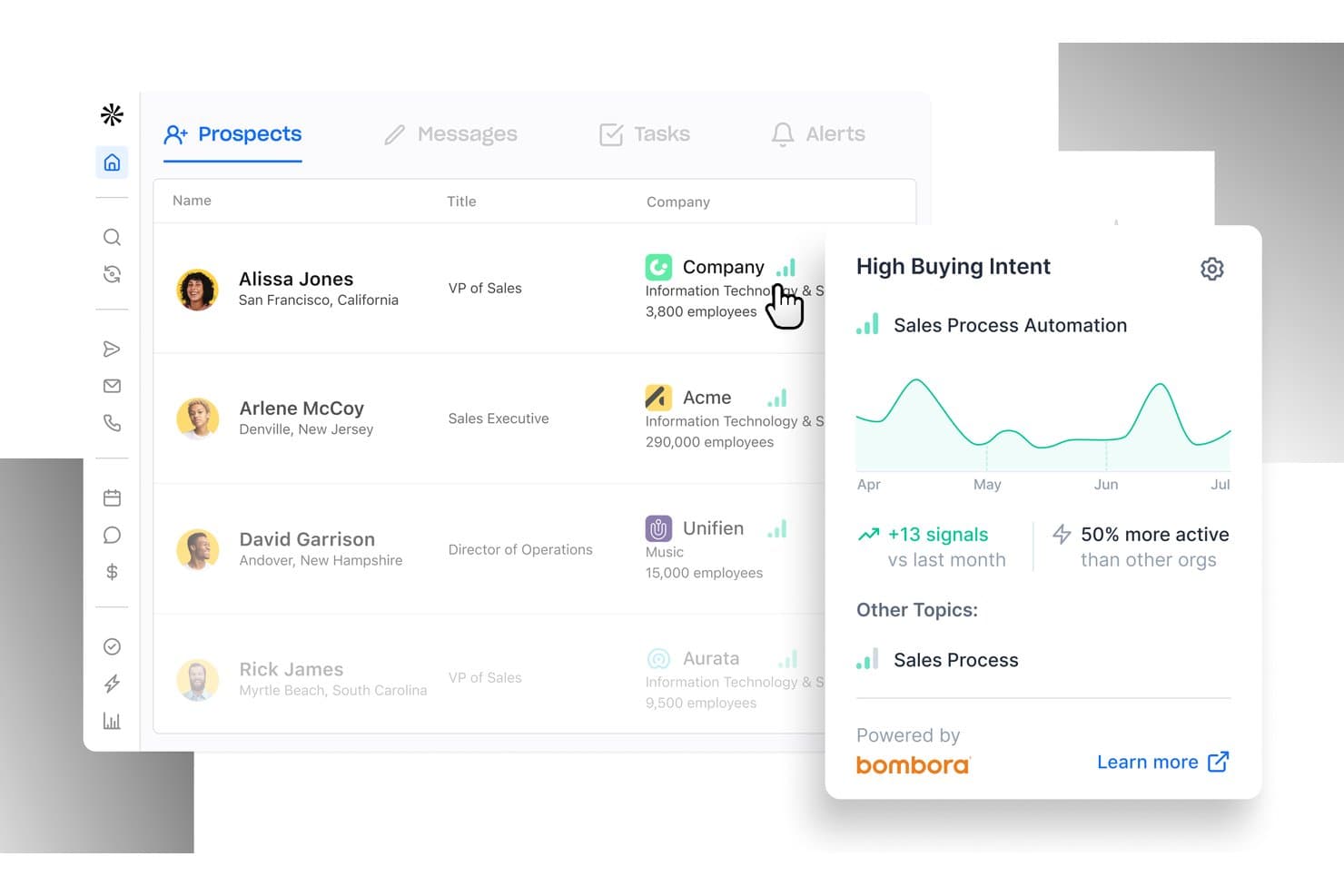
Apollo.io offers a Prospects dashboard with buying intent signals powered by Bombora, showing sales activity trends and engagement data for inside sales teams. Apollo.io is an AI-powered sales intelligence and engagement platform that combines a 210M+ contact B2B database, multi-channel outreach sequences, a built-in power dialer, and automated lead routing in a single workspace.
Who Is Apollo.io Best For?
Apollo.io suits SDR teams and inside sales managers at SMB and mid-market B2B companies that run high-volume outbound prospecting.
Why I Picked Apollo.io
Apollo.io earns its spot on my shortlist because of how tightly its meeting scheduler connects to the rest of the outreach workflow. When a prospect clicks a booking link from an Apollo sequence, the platform automatically advances the deal stage in HubSpot or Salesforce and queues a follow-up task for the rep. I also like the Inbound Lead Router, which scores and assigns incoming leads based on real-time buying signals before a rep ever picks up the phone.
Apollo.io Key Features
- AI email personalization: Automatically generate tailored outreach messages and subject lines based on prospect data and engagement history.
- Local presence dialing: Dynamically match outbound caller ID to the prospect’s area code to boost pickup rates.
- Sales playbooks and scripts: Surface dynamic call scripts and objection-handling guides within the dialer during live conversations.
- Buyer intent signals: Track web and behavioral intent data to trigger timely prospect engagement and cadence enrollment.
Apollo.io Integrations
Apollo.io offers native integrations with Salesforce, HubSpot, Outreach, Salesloft, Pipedrive, Zoho CRM, and Slack, and it connects with Zapier. An API is available for custom integrations.
Pros and Cons
Pros:
- Native power dialer with voicemail drop included
- AI-driven email personalization scales outbound cadences
- Built-in prospecting database removes separate data subscriptions
Cons:
- Analytics reporting less advanced than dedicated competitors
- Contact data accuracy inconsistent outside North America
Learn more about Apollo.io: 2Best for having the largest integration ecosystem on the market
Gong
- Free demo available
- Pricing upon request
Visit WebsiteCustomer Rating:4.7/5
Gong.io allows you to search, filter, and set up alerts for all your phone calls. As a revenue intelligence platform, Gong.io captures all customer interactions from every channel to deliver insights that are designed to help your sales representatives close more deals. With customer data from every call, email, and SMS, Gong runs all essential touchpoints through their AI revenue engine to provide strategy that improves productivity and deals.
Why I picked Gong.io: The main reason Gong caught my eye was their integration capabilities. With one of the most comprehensive integration solutions, Gong can automatically capture and update all data across your entire tech stack to improve visibility across every team and every deal. You can also connect Gong to your power dialer and collect call recordings, customer information, and phone numbers.
Gong.io Standout Features and Integrations
Standout features include a custom coaching program based on your data with actionable guidance for the team and Smart Trackers that can train Gong’s AI to pick up on essential concepts across all customer interactions.
Integrations include Apollo.io, Chili Piper, Conquer, Gainsight, Highspot, HubSpot CRM, Klue, Lessonly, Salesforce, Slack, and Zoom. Gong has over 100 native integrations with more coming soon.
Pros and Cons
Pros:
- Massive selection of integrations
- Quick to learn how to use
- Very easy to implement
Cons:
- Limited training from the Gong team
- There are occasional transcription errors
Learn more about Gong: Best for reducing missed opportunities by prioritizing high-value activities
- Free 14-day trial
- From $89/user/month (billed annually)
Visit WebsiteCustomer Rating:4.6/5
Mixmax offers over 30 types of customizable reports to help you track the most valuable interactions. As a general sales productivity app, Mixmax prioritizes email communication and workflow automation with email tracking, templates, CRM sync, nurture sequences, and one-click scheduling. This platform is an online solution that provides more flexibility for email communication with leads.
Why I picked Mixmax: This solution is on my list because of the way it measures revenue generating activities. The interactive reports and dashboards help you track which social media and other communications are getting the most engagement and push these tactics through to the rest of your team to enhance lead generation and increase conversion rates.
Mixmax Standout Features and Integrations
Standout features include sales engagement tracking with actionable insights that help you develop a better-performing sales playbook and one-click meeting scheduling with automated reminders to ensure better attendance.
Integrations include Box, Dropbox, Giphy, Github, Gong, Google Calendar, Markdown, Salesforce, Slack, Twitter, and Zoom.
Pros and Cons
Pros:
- Intuitive navigation and clean interface
- Easy to learn and use
- Combines scheduling, analytics, and email tracking
Cons:
- Meeting planning with outside platforms is clunky
- Video conferencing links are not auto-generated
Learn more about Mixmax: Best for creating and closing the sales pipeline
- Free demo available
- Pricing upon request
Visit WebsiteCustomer Rating:4.3/5
Outreach offers a conversation intelligence solution that can take notes, summarize meetings, and flag action items. As a comprehensive sales management platform, Outreach strives to integrate conversational intelligence, sales engagement, and revenue intelligence all in one place. This platform was designed as a single source of truth for all sales activities. Sales reps should be able to find everything they need here, including engagement tools, mutual action plans, coaching, deal insights, and sales forecasting.
Why I picked Outreach: This platform caught my eye because of a feature called Mutual Action Plans. With this tool, Outreach aims to build buyer trust and de-risk your deals. Salespeople can use it to digitally collaborate with all stakeholders, allowing any sales plan to evolve with everyone’s needs. This space also acts as a central repository for a deal, so even if stakeholders or team members change, they can still get up to speed right away.
Outreach Standout Features and Integrations
Standout features include an inside sales team dashboard that shows active opportunities and allows the rep to edit close dates, deal values, next steps, and sales stages for every open opportunity and an engagement timeline that shows buyer and seller activities, including meetings, emails, and calls.
Integrations include Constant Contact, Copper, Gmail, HubSpot, Linkedin Sales Navigator, Mailchimp, Microsoft 365, Okta, Rippling, Robly, and Salesforce. All integrations are bi-directional.
Pros and Cons
Pros:
- Comprehensive array of tools and features
- Global capabilities with time zone and language options
- Intuitive user interface for easy navigation
Cons:
- Steep learning curve if you’re not tech-savvy
- Complexity of the tool can be difficult to navigate
 Best for closing and managing mortgage deals
- Free demo available
- From $60/month
Visit WebsiteCustomer Rating:4.3/5
Velocify offers a variety of sales software, like Pulse, which can dial contacts from the app. As a cloud-based CRM application that incorporates email marketing, telecommunications, sales management, scheduling, and customer management, Velocify offers a massive array of tools in one platform. Currently, Velocify has Pulse® for Salesforce integration, LeadManager Enterprise™ for outreach management, and Dial-IQ® as your outbound sales dialer.
Why I picked Velocify: I added this platform to my list of inside sales software because they bill themselves as a solution for today’s modern mortgage market. They offer their software as part of the ICE Mortgage Technology® Platform to enhance your sales automation, keep your team organized, and prioritize the activities that help your sales reps close more deals.
Velocify Standout Features and Integrations
Standout features include broker and seller portals that allow you to collaborate with wholesale customers, automated underwriting solutions with Fannie Mae and Freddie Mac, and an online customer portal that allows them to fill out an application, engage with their loan officer, and e-sign documents.
Integrations include Adobe Commerce, Constant Contact, Eventbrite, Gong, GoTo Webinar, HubSpot, iContact, Keap, Mailchimp, and Marketo Engage.
Pros and Cons
Pros:
- User-friendly learning process and intuitive navigation
- Competitive pricing when compared to similar software
- Comprehensive customization options for every need
Cons:
- Takes a lot of effort to custom configure the software
- Dialer option has a lag when used remotely
Learn more about Velocify: Best ISO 27701-certified sales intelligence solution
- Free plan available
- From $37.45/month (billed annually)
Visit WebsiteCustomer Rating:4.2/5
Lusha helps you build targeted lists with laser-focused filters that ensure a good buyer match. This web-based sales solution is designed to help your organization prospect, qualify, and reach leads with dynamic, accurate data. As the only ISO-certified sales intelligence platform, Lusha empowers your team to tap into their prospecting tools to build and update contact lists with bulk enrichment through custom filters, alerts, and rules.
Why I picked Lusha: What made this platform stand out to me is its prospecting capabilities. Using the contact searching and data verification tools, you can get a list of up to 1,000 leads that connect you directly with decision-makers.
Lusha Standout Features and Integrations
Standout features include intent reports that identify a company’s willingness and readiness to buy your product, job change filters and alerts so you can reach out to warm leads who already know your product, and data enrichment that includes company name, location, industry, size, and technology.
Integrations include Bullhorn, Gmail, HubSpot, Microsoft Dynamics, Outlook, Outreach, Pipedrive, Salesforce, SalesLoft, Zapier, and Zoho.
Pros and Cons
Pros:
- Chrome extension for instant contact information
- User-friendly and intuitive navigation
- Up-to-date contact information and enrichment
Cons:
- Limited tutorials and support
- Credit-based app use
Learn more about Lusha: Best lead database with over 200 million contacts
- Free plan available
- From $49/user/month (billed annually)

The Apollo contact and account stages overview with Salesforce integration. This platform is an all-in-one sales intelligence solution that provides you with the tools you need to find new leads and engage new prospects. With a database of over 200 million contacts and 30 million companies, all you need to do to find new leads is build your ideal buyer profile and apply those filters to search the database.
Why I picked Apollo: I like the Apollo platform because you get more than just a lead generation database. This solution takes sales a step farther with a massive template library that allows you to automate and streamline outreach while customizing emails for more personalized connections.
Apollo Standout Features and Integrations
Standout features include a pre-built suite of reports and dashboards that showcase granular insights about message effectiveness and team productivity, as well as automated CRM enrichment that ensures accurate data across your entire tech stack.
Integrations include Gmail, HubSpot, LinkedIn for Business, Marketo Engage, Microsoft Outlook, Salesforce, SalesLoft, SendGrid, and Zapier.
Pros and Cons
Pros:
- Zapier integration provides access to other apps
- Once trained, the app is easy to use
- Massive existing lead database
Cons:
- Training can take extra time
- Implementation can be challenging
Learn more about Apollo: Best for help desk and customer support solutions
- 14-day free trial + free demo available
- From $25/seat/month (billed annually)

Front provides help desk capabilities with the familiarity of an email inbox setup. If you’re looking for an inside sales software to support customers and provide help desk solutions to your team, Front is the platform designed to enable sales, support, and account management teams that deliver service at scale. With this software, your team can streamline customer communication, as it combines the efficiency of a help desk with the visual and navigational elements of email.
Why I picked Front: While Front may seem like an after-sales software that’s focused on customer nurturing, it actually also provides an inbound sales solution with centralized, multi-channel communication and automated routing that ensures leads and prospects can connect with the right people.
Front Standout Features and Integrations
Standout features include collaboration functionalities that allow you to quickly loop in team members or bosses for faster solutions and approvals, as well as customer history and data pulled from bi-directional integrations with your CRM.
Integrations include Asana, DropBox Business, Gmail, HubSpot, Microsoft 365, Salesforce, Slack, Trello, WhatsApp, Zapier, and Zoom Meetings.
Pros and Cons
Pros:
- Versatile pricing for small businesses and enterprise needs
- Intuitive navigation for basic features and functionality
- Easy to learn due to the familiar visuals of an email inbox
Cons:
- Limited keyword search functionality
- Complex features have a steeper learning curve
Learn more about Front: Best as a single, unified platform for executives and salespeople
- Free demo available
- Pricing upon request

Clari Copilot provides detailed, real-time insight into the progress of every active deal. This web-based inside sales software solution can help empower your revenue team to close more deals through conversation intelligence that provides reps and executives the information they need to spot revenue leaks, improve predictability, and align buyers and sellers. The Copilot product, specifically, powers workflows with generative AI and provides proactive, actionable alerts.
Why I picked Clari Copilot: This solution stood out to me because it highlighted the need to unite execs and reps in one place. Their platform provides sales leaders with real-time pipeline status and executives with reporting tools for the board of directors.
Clari Copilot Standout Features and Integrations
Standout features include real-time monologue and battlecards alerts that help sales reps navigate objections from prospects and enterprise grade security that’s SOC 2 Type 2 certified.
Integrations include BlueJeans Meetings, Freshsales, Google Meet, HubSpot CRM, Microsoft Teams, Outreach, Pipedrive, Salesforce Sales Cloud, Slack, and Zoom Meetings.
Pros and Cons
Pros:
- Visual tool for better understanding data
- Intuitive navigation and learning experience
- Highly collaborative tool for top-down execution
Cons:
- Data updates can lag
- Limited information in error messages
Learn more about Clari: 10Best for all-in-one solutions with sales CRM, project management, and invoicing capabilities
Apptivo
- Free trial available
- From $15/user/month (billed annually)

Apptivo offers project visualization with Gantt charts. As a sales and marketing tool, Apptivo strives to provide everything you need from a sales engagement platform, including lead management, contact management, campaign management, marketing automation, and an opportunity pipeline with intuitive dashboards.
Why I picked Apptivo: One unique feature that put Apptivo on my radar is the help desk. While many other platforms offer tons of management tools, Apptivo is one of the only ones concerned with customer relationship management from this angle. With these help desk features, you can continue nurturing customer relationships even after you close deals.
Apptivo Standout Features and Integrations
Standout features include CRM tools to track the complete sales process from initial sales call to deal close and expense logging and reporting that are accessible through a mobile app.
Integrations include Dropbox Business, Gmail, Google Drive, Microsoft 365, OneDrive, PayPal, Slack, Stripe, WordPress, and Xero.
Pros and Cons
Pros:
- Outstanding customer service
- Highly customizable during the implementation stage
- Very affordable solution for companies of all sizes
Cons:
- Some API integrations require more work on the back end
- Some limited functionality in the mobile app
Learn more about Apptivo:
Annen programvare for innesalg
Her er noen flere alternativer for programvare for innesalg som ikke kom med på kortlisten min, men som likevel er verdt å undersøke:
- 11Kixie PowercallBest for advanced sales dialing and outreach
- 12ExecVisionBest conversation intelligence platform with a proprietary AI-powered engine
- 13NumerikBest for providing salespeople with more targeted direction
- 14Creatio CRMBest for no-code workflow automation
- 15Really Simple SystemsBest CRM-focused sales software for small teams
- 16LeadSquaredBest software for lead management and sales tracking features
- 17SalesloftBest sales software with AI-driven predictability insights
- 18Bitrix24Best for custom workspaces with replacements for other SaaS solutions
- 19FreshsalesBest all-in-one option with CRM, outreach, and lead management features
- 20PipedriveBest sales software for small companies with pipeline-focused initiatives
- 21DialedInBest inside sales software for call center-focused solutions
- 22Salesforce Sales CloudBest sales software driven by AI and GPT features
How I Evaluate Inside Sales Software
I evaluate inside sales software across two layers: the baseline a tool must hit—like native dialing and CRM sync—and the differentiators that make one platform better for your team.
Core Functionality (Table Stakes For This List)
When I'm selecting tools for my list, I rank each one on a scale from 0 (does not offer the functionality) to 5 (excels in this area) for each core functionality listed below. Then, I calculate the tool's total score into a percentage. Each tool needs to achieve a minimum total score of 65% to be considered for inclusion.
- Multi-Channel Outreach: I check whether reps can run phone, email, and SMS or social touches from a single workflow instead of toggling between disconnected tools.
- Built-In Sales Dialer: Power or parallel dialing matters here—I look for native dialers with voicemail drop, call recording, and dispositions baked in.
- Sales Cadence Automation: Each tool should let you build multi-step sequences with scheduled triggers, branching logic, and A/B testing across channels.
- CRM Integration: I evaluate bi-directional sync with CRMs like Salesforce and HubSpot, checking that activities, contacts, and opportunities flow both ways in real time.
- Lead Management & Routing: The platform should route inbound and outbound leads to the right rep using rules based on territory, scoring, or round-robin assignment.
- Sales Activity Analytics: I look for dashboards that track rep-level metrics like calls made, connect rates, and cadence conversion so managers can spot gaps fast.
Once I have a list of tools that meet this criteria, I consider what sets each platform apart.
Differentiating Factors (What Sets Vendors Apart)
Here's how I compare and contrast different vendors:
Standout Features
Conversation intelligence is a major differentiator—I look for tools that transcribe calls, flag objection patterns, and surface coaching moments so managers can ramp new reps faster. Local presence dialing also moves the needle because matching caller ID to a prospect's area code lifts connect rates on outbound calls. I evaluate whether a platform offers buyer intent signals, like website visit tracking or third-party intent data, that automatically enroll high-priority prospects into cadences before a competitor reaches them.
Beyond Features
Compliance is a factor I check early. Outbound dialing platforms need to handle DNC list scrubbing and consent management, especially as call regulations tighten across regions. I also evaluate how well a tool fits into an existing RevOps stack—connectors to platforms like LinkedIn Sales Navigator, ZoomInfo, or Gong matter when your reps rely on those daily. Pricing transparency rounds out my evaluation; I look for clear per-seat or usage-based models so RevOps leaders can forecast costs as the team scales.
Slik velger du programvare for innesalg
Det er lett å gå seg vill i lange funksjonslister og kompliserte prisstrukturer. For å hjelpe deg med å holde fokus mens du går gjennom den unike prosessen din for valg av programvare, får du her en sjekkliste over faktorer du bør ha i bakhodet:
| Faktor | Hva du bør vurdere |
|---|---|
| FaktorSkalerbarhet | Hva du bør vurdereHvor godt vil programvaren vokse sammen med teamet ditt? Vurder om den kan håndtere en økning i antall brukere eller datamengde uten ytelsesproblemer. |
| FaktorIntegrasjoner | Hva du bør vurdereKan den kobles til de eksisterende verktøyene dine, for eksempel CRM- eller e-postplattformer? Se etter enkel API-tilgang eller ferdige integrasjoner for å spare tid. |
| FaktorTilpasningsmuligheter | Hva du bør vurdereKan du tilpasse den til de spesifikke salgsprosessene dine? Se etter alternativer som lar deg justere arbeidsflyter og datafelter etter behovene dine. |
| FaktorBrukervennlighet | Hva du bør vurdereEr grensesnittet brukervennlig for teamet ditt? Et enkelt og intuitivt design reduserer opplæringstiden og gjør det raskere å ta løsningen i bruk. |
| FaktorImplementering og introduksjon | Hva du bør vurdereHvor lang tid tar det å komme i gang? Vurder ressursene som tilbys for introduksjon, for eksempel veiledninger og kundestøtte, for å sikre en smidig overgang. |
| FaktorKostnad | Hva du bør vurdereEr prisplanene tydelige og innenfor budsjettet ditt? Vurder de totale eierkostnadene, inkludert eventuelle skjulte gebyrer eller tillegg. |
| FaktorSikkerhetstiltak | Hva du bør vurdereEr den i samsvar med sikkerhetsstandardene dine? Se etter kryptering, funksjoner for personvern og samsvar med regelverk som GDPR. |
| FaktorTilgjengelig kundestøtte | Hva du bør vurdereNår kan du få kontakt med kundestøtten hvis det oppstår problemer? Sørg for at det finnes tilstrekkelig støtte i arbeidstiden din, enten via chat, telefon eller e-post. |
Trender innen programvare for innesalg i 2026
Programvare for innesalg fortsetter å utvikle seg raskt, noe som gjenspeiler bredere trender innen salgsteknologi og den økende sofistikeringen av inntektsoperasjoner. Denne utviklingen drives av et behov for større effektivitet, dypere innsikt og en mer personlig salgsmetode. En analyse av nylige produktoppdateringer, pressemeldinger og lanseringslogger avdekker flere viktige trender som former fremtiden for programvare for innesalg.
Funksjoner og teknologier i utvikling
- Integrasjon av AI og maskinlæring: AI-funksjonalitet integreres i økende grad for å tilby prediktiv analyse, poengsetting av potensielle kunder og automatisert innsikt i kundeinteraksjoner, noe som hjelper salgsteam med å prioritere innsatsen mer effektivt.
- Forbedret automatisering: Automatiseringsfunksjonene utvides utover enkel oppgaveautomatisering til å omfatte mer avanserte deler av salgsprosessen, for eksempel automatisert oppsøkende kontakt og oppfølging basert på kundeatferd eller engasjementsmålinger.
- Økt fokus på dataanalyse: Det er en tydelig trend mot mer avanserte dataanalysefunksjoner, som gjør det mulig for salgsteam å bruke data til strategisk planlegging, resultatsporing og beslutningstaking i sanntid.
Viktigste og mest etterspurte funksjoner
- CRM-integrasjon: Sømløs integrasjon med CRM-systemer er fortsatt avgjørende, ettersom det sikrer at salgsteam har tilgang til omfattende kundedata, noe som muliggjør mer informerte interaksjoner og strategier.
- Samarbeidsverktøy: Funksjoner som forbedrer samarbeidet mellom medlemmer av salgsteamet, også i eksterne eller hybride arbeidsmiljøer, blir stadig viktigere og legger til rette for deling av innsikt og strategier.
Nye og uvanlige funksjoner
- Stemme- og sentimentanalyse: Noen av de mest nyskapende funksjonene omfatter muligheten til å analysere stemmeleie og sentiment i salgssamtaler, noe som gir salgsrepresentanter dypere innsikt i kundenes følelser og reaksjoner.
Funksjoner som taper terreng
- Standardrapportering: Grunnleggende rapporteringsfunksjoner verdsettes mindre etter hvert som brukerne etterspør mer avansert analyse som gir dypere innsikt og handlingsrettet informasjon.
- Rigide løsninger som passer alle: Interessen for ufleksible programvareløsninger er avtakende, ettersom virksomheter i økende grad ser etter tilpasningsbare og skalerbare verktøy som kan tilpasses behovene deres i utvikling.
For ledere innen inntektsoperasjoner er det viktig å holde seg oppdatert på disse trendene for å velge programvare som ikke bare dekker dagens behov, men som også er klar til å tilpasse seg fremtidens salgslandskap. Derfor vil det være avgjørende å prioritere programvare med avansert analyse, AI-integrasjon og funksjoner for personalisering for å oppnå salgssuksess i det digitale markedet i utvikling.
Hva er programvare for innesalg?
Programvare for innesalg er et verktøy som hjelper salgsteam med å komme i kontakt med kunder uten å møtes fysisk. Den lar deg administrere potensielle kunder, følge salgstrakter, foreta samtaler, sende e-poster og automatisere rutineoppgaver – alt fra datamaskinen. Salgsrepresentanter, ledere og alle som jobber med fjernsalg, bruker dette for å holde orden, følge opp potensielle kunder og avslutte avtaler raskere, enten de er på kontoret eller jobber hjemmefra.
Funksjoner
Når du velger programvare for innesalg, bør du se etter følgende nøkkelfunksjoner:
- Sporing av potensielle kunder: Hjelper deg med å overvåke og administrere potensielle kunder gjennom hele salgstrakten.
- Kontaktadministrasjon: Organiserer og lagrer kontaktinformasjon for enkel tilgang og kommunikasjon.
- Salgsprognoser: Gir innsikt og prognoser som hjelper deg med å planlegge fremtidige salgsaktiviteter og mål.
- E-postintegrasjon: Kobler seg til e-postplattformer for å effektivisere kommunikasjon og oppfølging.
- Rapportering og analyse: Tilbyr datadrevet innsikt for å vurdere salgsresultater og strategier.
- AI-drevet innsikt: Bruker kunstig intelligens til å gi anbefalinger og optimalisere salgsinnsatsen.
- Tilpassbare dashbord: Lar deg tilpasse grensesnittet slik at det viser relevante målinger og data.
- Tilgjengelig mobilapp: Muliggjør salgsaktiviteter og oppdateringer på farten, slik at du får fleksibilitet.
- Automatiserte arbeidsflytutløsere: Sparer tid ved å automatisere repetitive oppgaver og prosesser.
- Sikkerhetstiltak: Beskytter sensitive kundedata og overholder personvernregler.
Fordeler
Implementering av programvare for innesalg gir flere fordeler for teamet og virksomheten din. Her er noen av fordelene du kan se frem til:
- Økt effektivitet: Automatiserte arbeidsflyter reduserer manuelle oppgaver og frigjør tid til mer strategiske aktiviteter.
- Bedre organisering: Sentralisert kontaktadministrasjon samler all kundeinformasjon på ett sted for enkel tilgang.
- Forbedret kommunikasjon: E-postintegrasjon sikrer oppfølging i tide og konsekvent samhandling med potensielle kunder.
- Datadrevne beslutninger: Rapportering og analyse gir innsikt som gjør det mulig å utvikle velinformerte salgsstrategier og justeringer.
- Økt fleksibilitet: Tilgang til mobilapp gjør det mulig for salgsteam å arbeide og oppdatere informasjon hvor som helst.
- Nøyaktige prognoser: Salgsprognoser bidrar til å sette realistiske mål og forutse markedstrender.
- Sikker datahåndtering: Sikkerhetstiltak beskytter kundeinformasjon og sørger for at regelverket overholdes.
Kostnader & priser
Valg av programvare for innesalg krever en forståelse av de ulike prismodellene og tilgjengelige abonnementene. Kostnadene varierer basert på funksjoner, teamstørrelse, tillegg og mer. Tabellen nedenfor oppsummerer vanlige abonnementer, gjennomsnittsprisene deres og typiske funksjoner som er inkludert i løsninger for programvare for innesalg:
Sammenligningstabell for programvare for innesalg
| Abonnementstype | Gjennomsnittspris | Vanlige funksjoner |
|---|---|---|
| AbonnementstypeGratisabonnement | Gjennomsnittspris$0 | Vanlige funksjonerGrunnleggende kontaktadministrasjon, sporing av potensielle kunder og e-postintegrasjon. |
| AbonnementstypePersonlig abonnement | Gjennomsnittspris$5-$25/bruker/måned | Vanlige funksjonerAvansert kontaktadministrasjon, grunnleggende analyse og begrensede tilpasningsmuligheter. |
| AbonnementstypeBedriftsabonnement | Gjennomsnittspris$30-$60/bruker/måned | Vanlige funksjonerFullstendig analyse, tilpassede kontrollpaneler, tilgang til mobilapp og automatiserte arbeidsflyter. |
| AbonnementstypeVirksomhetsabonnement | Gjennomsnittspris$70+/bruker/måned | Vanlige funksjonerAvanserte sikkerhetsfunksjoner, full tilpasning, prioritert kundestøtte og omfattende rapporteringsverktøy. |
Vanlige spørsmål om programvare for innesalg
Her er noen svar på vanlige spørsmål om programvare for innesalg:
Hvilke typer programvare for innesalg finnes?
Det finnes flere typer programvare for innesalg, og hver av dem dekker ulike deler av salgsprosessen. Ved å forstå disse typene kan organisasjoner velge de riktige verktøyene for å forbedre salgsarbeidet sitt:
\u003col\u003e
\u003cli\u003e\u003cstrong\u003eCRM-programvare (kunderelasjonshåndtering):\u003c/strong\u003e
\u003cul\u003e
\u003cli\u003eSentraliserer kundedata og interaksjoner, og gir salgsteam detaljert innsikt i kundenes atferd og preferanser. Denne programvaretypen er avgjørende for håndtering av potensielle kunder, salgsmuligheter og kundekontoer.\u003c/li\u003e
\u003c/ul\u003e
\u003c/li\u003e
\u003cli\u003e\u003cstrong\u003ePlattformer for salgsengasjement:\u003c/strong\u003e
\u003cul\u003e
\u003cli\u003eDisse plattformene automatiserer og optimaliserer kundeinteraksjoner på tvers av ulike kanaler, inkludert e-post, telefon og sosiale medier. De tilbyr funksjoner som e-postmaler, samtalemanus og aktivitetsoppfølging for å gjøre engasjementet mer effektivt.\u003c/li\u003e
\u003c/ul\u003e
\u003c/li\u003e
\u003cli\u003e\u003cstrong\u003eProgramvare for oppringing:\u003c/strong\u003e
\u003cul\u003e
\u003cli\u003eProgramvare for oppringing er spesielt utviklet for å foreta og administrere samtaler. Den kan automatisere oppringingsprosesser, ta opp samtaler og gi analyser av samtaleresultater, slik at salgsteam kan maksimere telefonbasert oppsøkende arbeid. Det finnes flere typer programvare for oppringing, blant annet \u003ca href=\u0022https://croclub.com/tools/best-sales-dialer-software/\u0022\u003everktøy for salgsoppringing\u003c/a\u003e og \u003ca href=\u0022https://croclub.com/tools/best-auto-dialer-software/\u0022\u003eprogramvare for automatisk oppringing\u003c/a\u003e.\u003c/li\u003e
\u003c/ul\u003e
\u003c/li\u003e
\u003cli\u003e\u003cstrong\u003eVerktøy for salgsautomatisering:\u003c/strong\u003e
\u003cul\u003e
\u003cli\u003eDisse verktøyene automatiserer gjentakende oppgaver i salgsprosessen, for eksempel oppfølging, planlegging og oppdatering av salgsregistre, slik at selgere kan konsentrere seg mer om salg og mindre om administrative oppgaver.\u003c/li\u003e
\u003c/ul\u003e
\u003c/li\u003e
\u003cli\u003e\u003cstrong\u003eProgramvare for e-postsporing:\u003c/strong\u003e
\u003cul\u003e
\u003cli\u003eDenne programvaren gir innsikt i hvordan mottakere samhandler med sendte e-poster, og tilbyr måltall som åpningsfrekvens, klikkfrekvens og svarfrekvens. Dette kan brukes til å utforme oppfølgingsstrategier og optimalisere innhold.\u003c/li\u003e
\u003c/ul\u003e
\u003c/li\u003e
\u003cli\u003e\u003cstrong\u003eSalgsanalyse og resultatstyring:\u003c/strong\u003e
\u003cul\u003e
\u003cli\u003eDisse verktøyene tilbyr detaljerte analyse- og rapporteringsfunksjoner som hjelper salgsledere med å følge opp resultater, identifisere trender og ta datadrevne beslutninger for å forbedre salgsstrategier og resultater.\u003c/li\u003e
\u003c/ul\u003e
\u003c/li\u003e
\u003cli\u003e\u003cstrong\u003eProgramvare for salgsopplæring og introduksjon:\u003c/strong\u003e
\u003cul\u003e
\u003cli\u003eDisse verktøyene er utviklet for å korte ned opplærings- og oppstartstiden for nye selgere, og tilbyr opplæringsinnhold, simuleringer og fremdriftssporing for å styrke salgsferdigheter og produktkunnskap.\u003c/li\u003e
\u003c/ul\u003e
\u003c/li\u003e
\u003cli\u003e\u003cstrong\u003eProgramvare for håndtering av tilbud og pristilbud:\u003c/strong\u003e
\u003cul\u003e
\u003cli\u003eDisse verktøyene effektiviserer oppretting, utsending og oppfølging av \u003ca href=\u0022https://croclub.com/tools/best-sales-proposal-software/\u0022\u003esalgstilbud\u003c/a\u003e og pristilbud. De sikrer nøyaktighet og konsistens, samtidig som de legger til rette for raskere behandlingstid ved inngåelse av avtaler.\u003c/li\u003e
\u003c/ul\u003e
\u003c/li\u003e
\u003c/ol\u003e
Ved å velge riktig kombinasjon av programvare for innesalg kan organisasjoner optimalisere salgsprosessene, forbedre selgernes produktivitet, styrke kundeengasjementet og til syvende og sist oppnå bedre salgsresultater.
Hvor sikre er dataene mine med programvare for innesalg?
Leverandører av programvare for innesalg bruker vanligvis sikkerhetstiltak som kryptering og personvernprotokoller for å beskytte opplysningene dine. Det er viktig å kontrollere at programvaren overholder relevante regelverk, for eksempel GDPR, for å sikre datasikkerheten. Gå alltid gjennom leverandørens sikkerhetspolicyer, og vurder ytterligere sikkerhetstiltak, som tofaktorautentisering, for bedre beskyttelse.
Hvordan kan programvare for innesalg korte ned salgssyklusene?
Se etter automatiserte oppfølginger, oppgaveutløsere og avtalevarsler. Disse funksjonene hjelper teamet med å avslutte avtaler raskere med mindre manuelt arbeid.
Hvilke måltall bør vi følge opp i programvare for innesalg?
Følg med på responstid for potensielle kunder, avtalefart og aktivitetsvolum. Disse viser om programvaren forbedrer arbeidsflyten til teamet.