

Å håndtere de intrikate kravene som følger med salg på virksomhetsnivå – koordinering av komplekse salgspipelines, samkjøring av tverrfunksjonelle team og optimalisering av inntektsstrategier – krever mer enn bare innsats; det krever riktig teknologi.
Det er her salgsprogramvare for virksomheter kommer inn – en løsning som er utviklet for å støtte salgsarbeidsflyter, forbedre samarbeidet og levere den handlingsrettede innsikten teamet ditt trenger for å prestere bedre enn konkurrentene. Alle verktøy er imidlertid ikke like gode. Som RevOps-spesialister forstår vi at mye står på spill, og verktøyene du velger, kan ha direkte innvirkning på organisasjonens suksess.
I denne veiledningen hjelper vi deg med å finne den beste salgsprogramvaren for virksomheter ut fra dine behov. Enten du ser etter et verktøy som passer budsjettet ditt, tilbyr bedre avtalesporing eller har spesifikke funksjoner for virksomheten din, tar vi deg gjennom hva du bør se etter, og hvordan du tar det riktige valget.
Hvorfor du kan stole på våre programvareanbefalinger
6,700+
Reviews
20
Industry experts
16+
Evaluation factors
14
Years
Anmeldelsene våre bygger på vår uavhengige vurdering, ikke på salgsargumenter. Les hvordan vi sørger for åpenhet.
I denne guiden har vi vurdert verktøyene gjennom praktisk testing og uavhengig research og gitt dem poeng ut fra våre utvelgelseskriterier.
Anmeldelsene våre bygger på vår egen redaksjonelle vurdering. De er ikke et salgsargument.
Sammenligningstabell: salgsprogramvare for virksomheter
Denne sammenligningstabellen oppsummerer prisopplysningene for mine beste utvalg av salgsprogramvare for virksomheter.
| Tool | Best For | Trial Info | Price | ||
|---|---|---|---|---|---|
| 1 | Best for verified B2B contact data | Free plan + 14-day free trial + free demo available | From $49/user/month (billed annually) | Website | |
| 2 | Best for field territory and route optimization | Not available | Pricing upon request | Website | |
| 3 | Best for lead management | Free demo available | From $40/user/month (billed annually) | Website | |
| 4 | Best for unified CPQ and contract management | Free demo available | Pricing upon request | Website | |
| 5 | Best for AI-driven sales insights | 14-day free trial | From $25/user/month (billed annually) | Website | |
| 6 | Best for AI-driven enterprise sales automation | Free plan + 15-day free trial+ free demo available | From $14/user/month (billed annually) | Website | |
| 7 | Best for sales engagement | Not available | Pricing upon request | Website | |
| 8 | Best for customer support integration | 14-day free trial | From $19/user/month (billed annually) | Website | |
| 9 | Best for intent data insights | Free demo available | Pricing upon request | Website | |
| 10 | Best for small businesses | 14-day free trial + free demo available | From $30/user/month (billed annually) | Website |


Anmeldelser av den beste salgsprogramvaren for virksomheter
Nedenfor finner du mine detaljerte sammendrag av den beste salgsprogramvaren for virksomheter på kortlisten min. I anmeldelsene ser jeg på hvert verktøys viktigste funksjoner, fordeler og ulemper, integrasjoner og ideelle bruksområder for å hjelpe deg med å finne det beste alternativet.
 Best for verified B2B contact data
- Free plan + 14-day free trial + free demo available
- From $49/user/month (billed annually)
Visit WebsiteCustomer Rating:4.5/5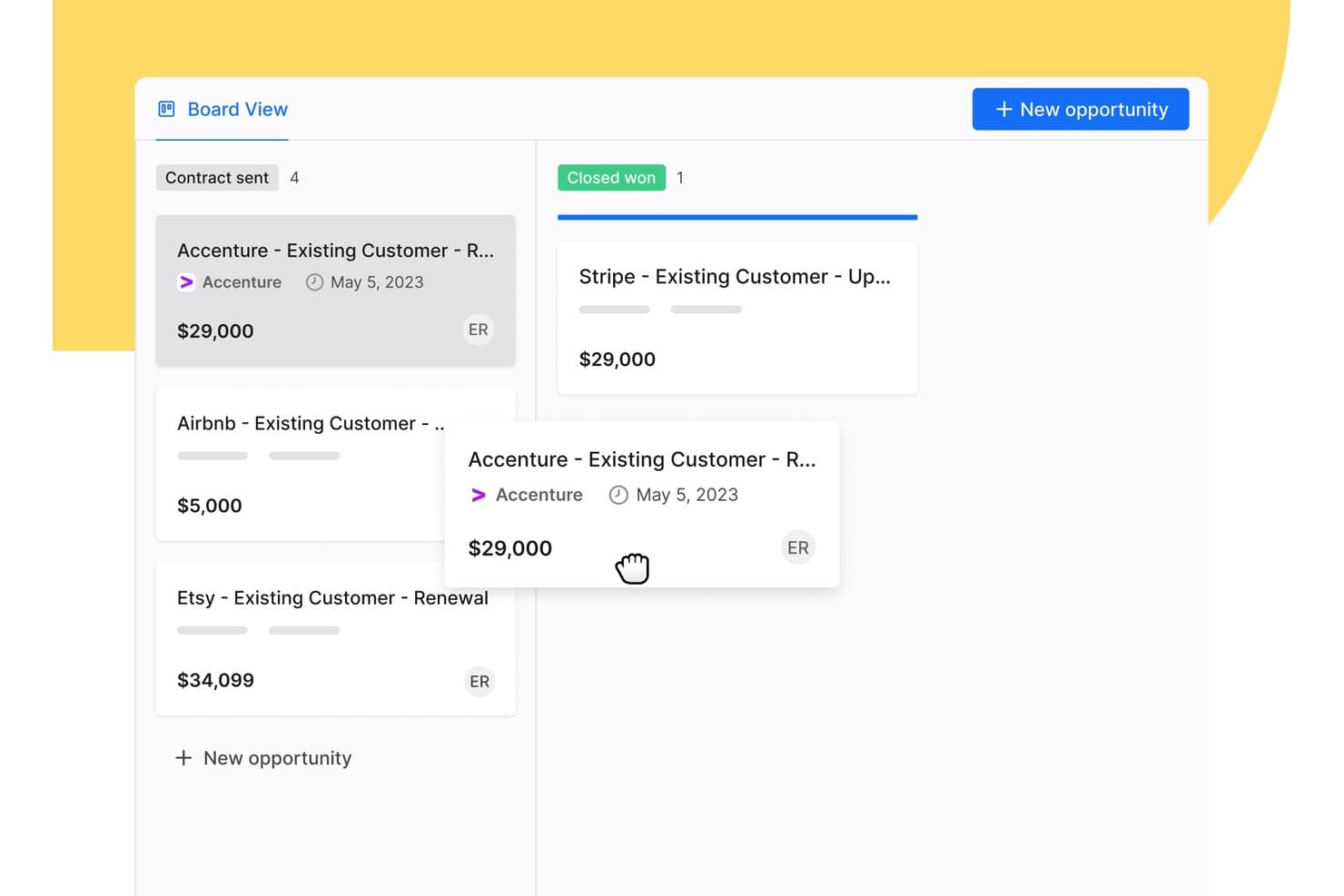
Apollo.io's pipeline board lets you drag deals between sales stages to keep every opportunity up to date. Apollo.io is a sales intelligence and engagement platform that combines a database of 240M+ contacts and 30M+ companies with pipeline management, AI-driven automation, and multi-channel outreach.
Who Is Apollo.io Best For?
Apollo.io is a strong fit for enterprise sales and revenue operations teams that need accurate prospecting data and automated outreach in one platform.
Why I Picked Apollo.io
I picked Apollo.io because its contact data is verified before it reaches your reps, so your team spends less time chasing bad leads. Every email goes through a seven-step verification process, and Apollo reports 98% email accuracy across its 240M+ contacts. Waterfall enrichment then fills gaps in your records by checking multiple data sources in sequence. I also like the AI Context Center, which lets you train Apollo's AI agents on your ICP and product so they can research leads and write personalized outreach for you.
Apollo.io Key Features
Beyond prospecting, Apollo.io includes tools that help enterprise teams manage deals and stay secure.
- Two-way CRM sync: Keeps contact data in sync between Apollo and Salesforce, HubSpot, or Pipedrive.
- Deal management: Track every deal across your sales stages in one view and get alerts when deals stall.
- Call recordings and AI insights: Record calls and review AI-generated insights to coach reps, with up to 8,000 minutes on the Organization plan.
- SSO and advanced security: The Organization plan adds single sign-on and advanced security configurations for larger teams.
Apollo.io Integrations
Integrations include Salesforce, HubSpot, Pipedrive, Gong, Slack, Outreach, Salesloft, Marketo, SendGrid, and LinkedIn. Apollo MCP also lets you use Apollo inside AI assistants like Claude and ChatGPT.
Pros and Cons
Pros:
- Enterprise-grade security with SOC 2 and ISO 27001
- AI agents auto-build and execute outreach sequences
- 240M+ contacts with 98% verified email accuracy
Cons:
- Data quality inconsistencies reported outside North America
- No native forecasting for commit or best-case scenarios
Learn more about Apollo.io: Best for field territory and route optimization
- Not available
- Pricing upon request
Visit WebsiteCustomer Rating:4.3/5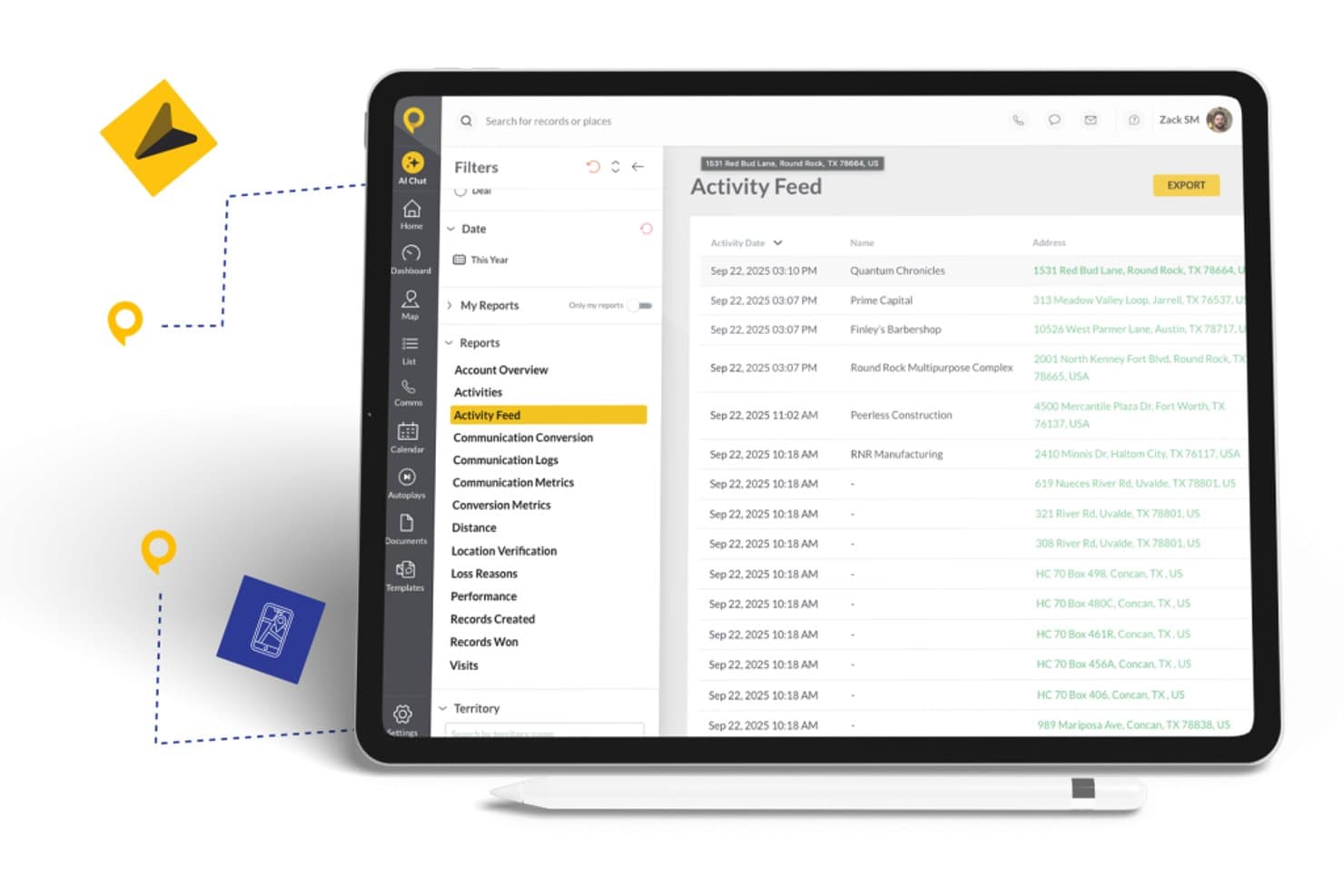
SPOTIO offers an Activity Feed report with filters, date ranges, and exportable records showing customer visits and locations. SPOTIO is a mobile-first field sales platform that combines territory management, route optimization, lead tracking, activity capture, and AI-powered rep guidance for outside sales teams.
Who Is SPOTIO Best For?
SPOTIO fits mid-market to enterprise outside sales teams in industries like telecom, solar, roofing, and home services where reps work in the field daily.
Why I Picked SPOTIO
SPOTIO earns its spot on my shortlist because of how deeply it handles territory and route management for field sales teams operating at scale. I like that managers can build territory boundaries by zip code, county, or custom map shapes, assign them with hierarchical permissions, and layer in 200+ demographic data overlays to prioritize where reps spend their time. In practice, that means a regional sales director running 50 reps across multiple markets can slice territories by lead density, assign them dynamically, and track exactly where each rep is working in real time.
SPOTIO Key Features
- DASH AI co-pilot: Uses AI to prep reps for visits, capture notes, scan business cards, and generate follow-up messages from the field.
- Next best action engine: Surfaces predictive recommendations for which accounts or leads reps should prioritize throughout the day.
- Performance analytics dashboards: Visualizes territory and rep activity with charts, drill-downs, and conversion tracking across multiple field teams.
- Native CRM integrations: Syncs activity data bidirectionally with Salesforce, HubSpot, and Microsoft Dynamics 365 for consistent enterprise reporting.
SPOTIO Integrations
SPOTIO offers native integrations with Salesforce, HubSpot, Microsoft Dynamics 365, and Pipedrive. Integrations with Zoho are available through Zapier, and an API is available for custom integrations.
Pros and Cons
Pros:
- AI-driven visit prep for field reps
- Real-time rep location tracking at enterprise scale
- Detailed territory building with demographic data overlays
Cons:
- Field-only focus limits inside sales team coverage
- Limited forecasting depth for inside sales teams
Learn more about SPOTIO: Best for lead management
- Free demo available
- From $40/user/month (billed annually)
Visit WebsiteCustomer Rating:4.7/5
CRM Creatio's lead management dashboard provides tools for tracking and managing sales leads effectively. CRM Creatio is a no-code CRM and sales management platform designed to accelerate sales processes of any complexity. It consolidates your customer data, automates lead and opportunity workflows, and enhances sales collaboration.
Why I picked CRM Creatio: One reason I chose CRM Creatio is its comprehensive lead and opportunity management capabilities. It automates the entire lead management cycle, from capturing leads to closing deals, ensuring no opportunity is overlooked. Another standout aspect is its robust sales forecasting tools. By analyzing historical data and current trends, CRM Creatio provides accurate sales forecasts that inform your strategic planning. Furthermore, I like that the platform is fully customizable without needing any coding knowledge, which is perfect for tailoring your sales processes to your unique needs.
Standout features & integrations:
Features include 360-degree customer views for customer relationship management and order and contract management, which streamlines the creation and tracking of sales documents. Additionally, the platform offers sales productivity tools that help your team manage tasks, appointments, and communications efficiently, ensuring they stay organized and responsive to client needs.
Integrations include Accelo, Act!, ActiveCampaign, Acumatica, Adobe Analytics, Asana, Microsoft Exchange, Excel, Mailchimp, HubSpot Marketing Hub, Google Calendar, and Tableau.
Pros and Cons
Pros:
- Supports scaling businesses
- No-code platform
- Extensive customization options
Cons:
- Data migration may be complex
- Customization can be time-consuming
Learn more about Creatio CRM: Best for unified CPQ and contract management
- Free demo available
- Pricing upon request
Visit WebsiteCustomer Rating:4.7/5
DealHub AI offers a quotes generation interface with financial input fields for enterprise sales quoting. DealHub AI is a quote-to-revenue platform that brings together CPQ, contract lifecycle management, digital sales rooms, subscription billing, and deal desk workflows into a single connected system.
Who Is DealHub AI Best For?
DealHub AI is well-suited for mid-market and enterprise sales teams that manage high-volume, complex deals with multiple stakeholders, approval layers, and contract negotiations.
Why I Picked DealHub AI
I picked DealHub AI as one of the best because the CPQ and CLM modules share a single data model, meaning the pricing terms your rep configures in a quote flow directly into the contract without any manual re-entry. I love how the pre-approved clause library lets legal pre-load compliant language for specific deal types, so contracts don't stall while waiting for legal to draft from scratch. The redlining and version comparison tools keep every negotiation in one place, which eliminates the "which version is final?" problem I've seen derail more deals than I can count.
DealHub AI Key Features
- DealRoom digital sales room: Create a shared, interactive buyer portal where reps present quotes, collect signatures, and track prospect engagement in real time.
- Guided selling playbooks: Build rule-based selling flows that prompt reps with the right product configurations and pricing options based on deal criteria.
- Parallel approval workflows: Route deals through multi-stakeholder approval chains at the same time, using role-based permissions and automatic escalation triggers.
- Subscription and billing management: Configure recurring billing terms, usage-based pricing, and renewal schedules within the quoting layer.
DealHub AI Integrations
DealHub AI offers native integrations with Salesforce, Microsoft Dynamics 365, HubSpot, Gong, Slack, NetSuite, Stripe, and Avalara.
Pros and Cons
Pros:
- Supports various pricing structures
- Handles line-item approvals
- Offers no-code CPQ configuration
Cons:
- Slow loading with large deal volumes
- Product documentation has notable gaps
Learn more about DealHub AI: Best for AI-driven sales insights
- 14-day free trial
- From $25/user/month (billed annually)
Visit WebsiteCustomer Rating:4.4/5
CloudTalk dashboard displaying call history, performance analytics, and sales activity metrics. In enterprise sales environments, CloudTalk is a call center software solution built to support high-volume outreach and structured sales operations. It combines AI-powered automation with CRM integrations to help teams manage conversations at scale while keeping customer data aligned. For enterprises handling large pipelines and distributed sales teams, CloudTalk can help centralize communication and reduce manual admin work.
Why I Picked CloudTalk
I picked CloudTalk because its AI-driven dialing and conversation tools directly support enterprise sales productivity. The AI Dialer offers multiple dialing modes and voicemail drop, which can help your team reduce idle time and focus on live conversations. I also like its AI Conversation Intelligence, which provides automatic call summaries and sentiment analysis so you can review performance trends and coach more effectively. For enterprise teams managing high call volumes, these features can support more consistent outreach and data-backed sales decisions.
CloudTalk Key Features
In addition to the features mentioned earlier, CloudTalk offers several other functionalities that enhance its value as an enterprise sales software:
- Local Numbers: You can access local numbers in over 160 countries, facilitating a global sales reach.
- Number Porting: This feature allows you to transfer existing numbers to CloudTalk, ensuring continuity and brand consistency.
- Branded Caller ID: Customize your caller ID with your company name and logo, enhancing brand recognition.
- Real-Time Monitoring: This feature provides live call listening and performance analytics, helping you monitor and improve team performance.
CloudTalk Integrations
Integrations include HubSpot, Salesforce, Zoho, MS Dynamics, Zendesk, Intercom, Odoo, Shopify, and more. CloudTalk also offers an API for custom integrations, ensuring seamless connection with your existing tools.
Pros and Cons
Pros:
- Real-time call monitoring tools
- Power and parallel dialers
- AI-powered call summaries
Cons:
- Higher tiers unlock AI features
- Setup can take time
Learn more about CloudTalk: Best for AI-driven enterprise sales automation
- Free plan + 15-day free trial+ free demo available
- From $14/user/month (billed annually)
Visit WebsiteCustomer Rating:4.2/5
Zoho CRM allows you to implement an omnichannel sales strategy, segment your leads, track KPIs, and lean on predictive intelligence to improve customer loyalty. Zoho CRM is a versatile sales software solution tailored for enterprises looking to enhance their sales processes. It offers a comprehensive suite of features designed to manage customer relationships and improve sales performance across various industries.
Why I Picked Zoho CRM: Zoho CRM stands out for its AI-driven tools that automate data enrichment, forecasting, and lead management, letting teams focus on strategy instead of admin work. Its sales force automation streamlines repetitive tasks, while robust customization options—including pipeline and territory management and omni-channel communication—make it adaptable to complex enterprise workflows.
Standout features & integrations:
Features include low-code development for building custom apps without extensive coding, business intelligence tools for sales and customer insights, and strong compliance with GDPR and HIPAA to protect user data.
Integrations include Microsoft Office 365, Google Workspace, Slack, Dropbox, Mailchimp, LinkedIn, Twitter, Facebook, Zoho Desk, Zoho Projects, QuickBooks, and Shopify.
Pros and Cons
Pros:
- Mobile app to improve communication with customers
- Zia (AI) helps identify prospects your team can convert
- Great for hybrid and remote teams
Cons:
- Advanced features gated behind top-tier subscriptions
- Pricey compared to other tools


Salesloft supports multi-channel outreach for personalized, efficient prospect engagement. Salesloft enables sales teams to manage multi-channel outreach from one platform, including email, calls, and social touches. It empowers teams to engage prospects more effectively and close deals faster with personalized engagement.
Why I picked Salesloft: Salesloft offers call tracking, email templates, and scheduling tools to make connecting with prospects easier and more efficient and for insights into customer interactions. The tool focuses on tracking sales activity to know what’s working and where to improve and dynamic task management to keep the team focused on the right priorities.
Standout features & integrations:
Features include cadence automation, which helps you set up and manage sales workflows. The analytics dashboard provides insights into your team's performance, helping you identify areas for improvement. Salesloft also offers call recording, allowing you to review and refine consultative communication strategies.
Integrations include Salesforce, Microsoft Dynamics 365, LinkedIn Sales Navigator, Zoom, Slack, Chorus, Gong, Vidyard, Outlook, and Gmail.
Pros and Cons
Pros:
- Real-time activity tracking
- Integrated call tracking
- Dynamic task management
Cons:
- Restricted pipeline visibility
- Complex customization options
Learn more about Salesloft: Best for customer support integration
- 14-day free trial
- From $19/user/month (billed annually)
Visit WebsiteCustomer Rating:4.4/5
Zendesk Sell unifies sales and support, offering convenient access to customer insights. Zendesk Sell integrates sales and customer support for a unified customer experience. It enables sales teams to access customer interactions, support tickets, and history within the platform, aligning sales and support teams in one tool.
Why I picked Zendesk Sell: Zendesk Sell offers a complete historic view of customer interactions, allowing your team to manage leads and deals effectively and provide consistent customer experience. It has lead prioritization, activity tracking, and detailed deal management to help you stay on top of your pipeline. The platform also has reporting and customizable dashboards and automation for repetitive tasks.
Standout features & integrations:
Features include automated lead scoring, which helps prioritize prospects based on engagement. The email tracking feature lets you know when emails are opened and read, providing insights into customer interest. Zendesk also offers sales forecasting, allowing for future sales prediction enablement for you and your team.
Integrations include Mailchimp, Slack, QuickBooks, HubSpot, Google Workspace, Microsoft Outlook, Shopify, Salesforce, Xero, and Dropbox.
Pros and Cons
Pros:
- Customizable reporting tools
- Customizable sales pipelines
- Strong sales and support integration
Cons:
- No advanced automation
- Limited forecasting tools
Learn more about Zendesk Sell: Best for intent data insights
- Free demo available
- Pricing upon request
Visit WebsiteCustomer Rating:4.4/5
Bombora identifies intent signals to help sales teams prioritize leads effectively. Bombora helps enterprise sales teams identify businesses actively researching their products or services. It consolidates data points to deliver high-precision insights, enabling sales professionals to prioritize leads and tailor outreach strategies
Why I picked Bombora: Bombora provides deep insights into potential customer behaviors, allowing you to focus on leads researching topics related to your products or services. It offers identity enrichment, digital audience targeting, and topic tracking for tailored marketing efforts. With these insights, you can create more targeted pitches and close deals faster.
Standout features & integrations:
Features include identity enrichment, which helps refine customer data for better targeting. The digital audience targeting feature allows you to engage the right audience effectively. The planning and measurement suite helps assess the impact of your campaigns.
Integrations include HubSpot, LinkedIn, Salesforce, Marketo, Eloqua, Demandbase, Microsoft Dynamics 365, Pardot, Outreach, and Drift.
Pros and Cons
Pros:
- Supports ABM strategies
- Customizable reporting tools
- Consent-based data collection
Cons:
- No built-in sales automation
- No direct lead contacts
Learn more about Bombora: 10Best for small businesses
Act!
- 14-day free trial + free demo available
- From $30/user/month (billed annually)
Visit WebsiteCustomer Rating:4/5
Act! offers cost-effective CRM with lead tracking, contact management, and scalability. Act! provides small businesses with easy-to-use features for contact management, lead tracking, and sales pipeline visualization. It is cost-effective and scalable, making it accessible for businesses with limited resources while offering room for expansion.
Why I picked Act!: Act! offers an easy way to manage contacts, organize leads, and track deal progress in one place. It has customizable dashboards for prioritizing tasks and viewing key metrics at one glance and a contact management system to track customer interactions and history. It also includes email templates, activity tracking, and marketing automation tools to support targeted campaigns.
Standout features & integrations:
Features include a marketing automation tool that helps you create and send email campaigns with ease. The sales pipeline management feature allows you to track deals from start to finish. Act! also offers customizable dashboards to display key metrics and insights relevant to your business.
Integrations include Microsoft Outlook, Google Workspace, Mailchimp, QuickBooks, Zapier, Dropbox, LinkedIn, Slack, Xero, and Shopify.
Pros and Cons
Pros:
- Advanced reporting features
- Comprehensive contact management
- Detailed opportunity tracking
Cons:
- Limited mobile app functionalities
- Minimal AI and predictive sales analytics features
Learn more about Act!:
Annen salgsprogramvare for virksomheter
Her er noen flere alternativer for salgsprogramvare for virksomheter som ikke kom med på kortlisten min, men som likevel er verdt å se nærmere på:
- 11Pipedrive CRMBest for pipeline visualization
- 12Infor CRMBest for manufacturing sectors
- 13CloseBest for inside sales teams
- 14InsightlyBest for project management
- 15PitchMonsterBest for AI-powered sales role-play training
- 16Bitrix24Best for team collaboration
- 17FreshsalesBest for AI-driven engagement
- 18Salesforce CRMBest for app integrations
- 19SugarAIBest for high customization
- 20CopperBest for Google Workspace users
- 21StreakBest for Gmail integration
- 22FullstoryBest for user experience insights
- 23GongBest for conversation analytics
- 24DockBest for client collaboration
- 25AttentionBest for real-time sales coaching
How I Evaluate Enterprise Sales Software
I look at enterprise sales tools in two layers: baseline capabilities like multi-stage forecasting and deal intelligence, then the differentiators that matter for a specific RevOps team.
Core Functionality (Table Stakes For This List)
When I'm selecting tools for my list, I rank each one on a scale from 0 (does not offer the functionality) to 5 (excels in this area) for each core functionality listed below. Then, I calculate the tool's total score into a percentage. Each tool needs to achieve a minimum total score of 65% to be considered for inclusion.
- Enterprise CRM Integration: I check whether a tool syncs bi-directionally with major CRMs like Salesforce or Microsoft Dynamics, including custom objects and field mapping.
- Pipeline & Forecasting: Multi-stage pipeline views and forecast models matter here, especially support for weighted categories like commit, best case, and upside.
- Deal & Opportunity Management: I look for buying committee mapping, deal health scoring, and stakeholder tracking that reflect how enterprise deals actually move through orgs.
- Sales Workflow Automation: Approval chains, task routing, and sequencing should handle the complexity of enterprise cycles, such as multi-level discount approvals or legal review triggers.
- Revenue Analytics & Reporting: Dashboards should go beyond vanity metrics. I evaluate whether teams can drill into conversion rates, cycle times, and pipeline velocity by segment or region.
- Enterprise Security & Scale: SSO, role-based access controls, SOC 2 compliance, and multi-region deployment support are what I look for to confirm a tool can operate at enterprise scale.
Once I have a list of tools that meet this criteria, I consider what sets each platform apart.
Differentiating Factors (What Sets Vendors Apart)
Here's how I compare and contrast different vendors:
Standout Features
AI deal intelligence is a major differentiator. I evaluate whether a platform can score deal risk and predict win probability from actual pipeline history rather than rep intuition alone. Conversation intelligence adds another layer—some tools analyze call recordings to surface objections and coaching moments that reps might overlook mid-cycle. Buyer engagement portals also matter for complex deals. When a buying committee spans ten stakeholders, a shared digital sales room keeps everyone aligned on next steps, content, and timelines.
Beyond Features
Tech stack integration depth is one of the first things I check. An enterprise sales tool needs to connect with your marketing automation, CS platform, and data warehouse—not just your CRM. Implementation support also weighs heavily. Rolling out a new platform to a 200-person sales org without dedicated onboarding resources and change management guidance can stall adoption for months. I also evaluate compliance posture, including SOC 2 Type II certification and data residency options, since enterprise procurement teams will flag gaps before a deal closes.
Slik velger du salgsprogramvare for virksomheter
Det er lett å gå seg vill i lange funksjonslister og komplekse prismodeller. For å hjelpe beslutningstakere med å holde fokus mens dere går gjennom den unike prosessen med å velge programvare, har vi laget en sjekkliste over faktorer du bør ha i mente:
| Faktor | Hva du bør vurdere |
| Skalerbarhet | Forsikre deg om at programvaren vokser med teamet ditt. Vurder om den kan håndtere flere brukere og større datamengder uten problemer. |
| Integrasjoner | Se etter funksjonsforbedrende verktøy som kobles til de eksisterende systemene og teknologistakken din, for eksempel CRM- eller markedsføringsplattformer. |
| Tilpasningsmuligheter | Kontroller om programvaren lar deg tilpasse funksjonene til teamets spesifikke arbeidsflyter og behovene i bransjen. |
| Brukervennlighet | Programvaren bør være intuitiv. Teamet ditt bør ikke trenge omfattende opplæring for å komme i gang. |
| Budsjett | Sørg for at kostnadene for verktøyet er i tråd med den økonomiske planen din. Ta høyde for abonnementsavgifter, implementeringskostnader og potensielle oppgraderinger. |
| Sikkerhetstiltak | Prioriter programvare med robuste sikkerhetstiltak. Datakryptering og samsvar med regelverk som GDPR er avgjørende. |
Trender innen salgsprogramvare for virksomheter
I undersøkelsen min hentet jeg inn utallige produktoppdateringer, pressemeldinger og utgivelseslogger fra ulike leverandører av salgsprogramvare for virksomheter. Her er noen av trendene som vokser frem, og som jeg følger med på:
- AI-drevet personalisering: Verktøy tilbyr nå AI-funksjoner som personaliserer kundeinteraksjoner basert på dataanalyse. Dette hjelper salgsteam med å tilpasse presentasjonene og engasjementsstrategiene sine, noe som forbedrer kundeopplevelsen.
- Stemme- og samtaleanalyse: Flere programvareløsninger inkluderer funksjoner for å analysere salgssamtaler og hente ut innsikt. Dette hjelper team med å forstå kundenes følelser og forbedre kommunikasjonstaktikken.
- Prediktiv salgsprognostisering: Prediktiv analyse hjelper bedrifter med å forutse salgstrender og kundeatferd. Denne trenden får stadig større utbredelse ettersom selskaper ønsker å ta mer informerte beslutninger og sette salgsmål basert på data.
- Kartlegging av kundereisen: Leverandører fokuserer på å tilby verktøy som kartlegger kundereisen fra første kontakt til avslutning. Dette hjelper salgsteam med å forstå og optimalisere hvert kontaktpunkt i salgsprosessen, slik at kundeopplevelsen blir mer helhetlig.
- Personvern og samsvar: Med stadig flere personvernregler legger salgsprogramvare vekt på funksjoner som sikrer samsvar med lover som GDPR. Denne trenden er avgjørende fordi bedrifter må beskytte kundeinformasjon og følge juridiske standarder, noe som bidrar til å bygge kundenes tillit.
Hva er programvare for bedriftssalg?
Programvare for bedriftssalg er utviklet for å hjelpe store organisasjoner med å administrere salgsprosessene og kunderelasjonene sine. Disse verktøyene brukes av salgsmedarbeidere, ledere og markedsføringsteam for å forbedre effektiviteten og øke salget.
Den inkluderer funksjoner som AI-drevet personalisering, prediktiv salgsprognostisering og kartlegging av kundereisen for å hjelpe med å rette innsatsen mot de riktige kundene og optimalisere salgsprosessen. Samlet sett gir disse verktøyene bedrifter innsikten og funksjonene de trenger for å forbedre salgsresultatene og kundetilfredsheten.
Funksjoner i programvare for bedriftssalg
Når du velger programvare for bedriftssalg, bør du se etter følgende viktige funksjoner:
- Mobiltilgjengelighet: Sikrer at salgsteam kan få tilgang til og administrere data hvor som helst ved hjelp av mobile enheter.
- Avansert rapportering og analyse: Gir detaljert innsikt i salgsresultatene, slik at beslutninger kan tas basert på data.
- Tilpassbare arbeidsflyter: Lar brukerne tilpasse prosessene slik at de samsvarer med deres unike salgsmetoder.
- AI-drevet prognostisering: Bruker kunstig intelligens til å forutsi fremtidige salgstrender med høy nøyaktighet.
- Territoriestyring: Bidrar til å organisere og fordele salgsområder for optimal produktivitet i teamet.
- God CRM-integrasjon: Kobler seg til systemer for kunderelasjonshåndtering for å effektivisere kundeinteraksjoner.
- Kommunikasjon på flere kanaler: Støtter kommunikasjon via e-post, telefon og sosiale medier på én samlet plattform.
- Automatisert poengsetting av potensielle kunder: Rangerer potensielle kunder basert på potensial, slik at salgsteam kan fokusere på verdifulle muligheter.
- Dynamiske prisverktøy: Gjør det mulig å justere prisstrategier i sanntid basert på markedsdata.
- Dokument- og kontraktsadministrasjon: Forenkler oppretting, utsending og sporing av salgsdokumenter og kontrakter.
Fordeler med programvare for bedriftssalg
Implementering av programvare for bedriftssalg gir flere fordeler for teamet og virksomheten din. Her er noen av fordelene du kan se frem til:
- Bedre beslutningstaking: Prediktiv salgsprognostisering og analyse gir datadrevet innsikt som hjelper teamet med å ta informerte beslutninger.
- Bedre kundeengasjement: AI-drevet personalisering og automatisert poengsetting av potensielle kunder sikrer at interaksjonene er tidsriktige og relevante, noe som øker kundetilfredsheten.
- Flytende salgsprosesser: Administrasjon av salgspipeline og integrasjonsmuligheter legger til rette for smidigere drift og bedre koordinering mellom teammedlemmene.
- Økt produktivitet: Automatisering av repetitive oppgaver frigjør tid for teamet, slik at de kan fokusere på aktiviteter med høy verdi, som å avslutte avtaler.
- Bedre kommunikasjon: Stemme- og samtaleanalyse bidrar til å forbedre kommunikasjonsstrategiene, noe som fører til mer effektive interaksjoner med potensielle kunder.
- Sikret samsvar: Personvernfunksjoner sikrer at virksomheten oppfyller regulatoriske krav, beskytter kundeinformasjon og opprettholder tilliten.
Kostnader og priser for programvare for bedriftssalg
Valg av programvare for bedriftssalg krever en forståelse av de ulike prismodellene og abonnementene som er tilgjengelige. Kostnadene varierer basert på funksjoner, teamstørrelse, tillegg og mer. Tabellen nedenfor oppsummerer vanlige abonnementer, gjennomsnittsprisene deres og typiske funksjoner som er inkludert i løsninger for programvare for bedriftssalg:
Sammenligningstabell for bedriftsrettet salgsprogramvare
| Plantype | Gjennomsnittlig pris | Vanlige funksjoner |
| Gratisabonnement | $0 | Grunnleggende kontaktadministrasjon, begrenset brukerstøtte og tilgang til viktige funksjoner. |
| Personlig abonnement | $5-$25/bruker/måned | Kontaktadministrasjon, e-postintegrasjon, automatisering av oppgaver og grunnleggende rapporteringsverktøy. |
| Bedriftsabonnement | $30-$75/bruker/måned | Avansert rapportering, salgsprognoser, tilpasningsmuligheter og prioritert kundestøtte. |
| Abonnement for store virksomheter | $80-$150/bruker/måned | Full tilpasning, AI-drevet innsikt, dedikert kundeansvarlig og avansert analyse. |
Vanlige spørsmål om bedriftsrettet salgsprogramvare
Her er noen svar på vanlige spørsmål om bedriftsrettet salgsprogramvare:
Hvordan skiller programvare for bedriftssystemer seg fra annen systemprogramvare?
Programvare for bedriftssystemer kan håndtere store mengder komplekse data og automatisere prosessene som bruker disse dataene. Den er utviklet for store organisasjoner som trenger løsninger som kan skaleres i takt med driften. I motsetning til vanlig bedriftsprogramvare tilbyr bedriftsløsninger avanserte funksjoner som støtter ulike avdelinger.
Er bedriftsrettet salg verdt det?
Bedriftsrettet salg kan være svært givende, gi stabile inntekter og styrke merkevarens omdømme. Det gjør det mulig å bygge langsiktige relasjoner med kunder, noe som kan føre til gjentatte kjøp. Disse salgene innebærer ofte avtaler av høyere verdi, noe som gjør det verdt å investere tid og ressurser i dem.
Hvordan kan bedriftsrettet salgsprogramvare forbedre teamets resultater?
Bedriftsrettet salgsprogramvare kan automatisere repetitive oppgaver, slik at teamet får mer tid til å fokusere på salg. Den gir innsikt i kundeatferd og salgstrender, slik at du kan ta informerte beslutninger. Programvaren forbedrer også samarbeidet mellom teammedlemmene, noe som fører til mer effektive salgsprosesser.
Hvilke utfordringer innebærer implementering av bedriftsrettet salgsprogramvare?
Implementering av bedriftsrettet salgsprogramvare kan være komplisert og krever grundig planlegging. Du kan møte utfordringer som datamigrering, opplæring av brukere og integrasjon med eksisterende systemer. Sørg for å ha en tydelig implementeringsplan og gi teamet tilstrekkelig støtte under overgangen.
Hvilke sikkerhetshensyn gjelder ved implementering av bedriftsrettet salgsprogramvare?
Ved implementering av bedriftsrettet salgsprogramvare må du sørge for at løsningen oppfyller bransjens sikkerhetsstandarder og tilbyr funksjoner som datakryptering, tilgangskontroll for brukere og regelmessige sikkerhetsoppdateringer. Dette bidrar til å beskytte sensitive kunde- og salgsdata mot uautorisert tilgang.