

Programvare for samtaletranskripsjon gjør automatisk lyd fra møter og samtaler om til skriftlig tekst som teamet ditt kan bruke i CRM-, salgstrakt- og veiledningssystemene. Hvis du trenger å registrere nøyaktige detaljer fra samtaler og føre dem direkte inn i arbeidsflytene for inntektsdrift, løser disse verktøyene de største utfordringene med dataregistrering.
I denne veiledningen finner du plattformer for samtaletranskripsjon som dekker de viktigste prioriteringene til inntektsledere – som CRM-integrasjon, AI-drevet innsikt i avtaler, veiledningssignaler og støtte for flere språk. Finn ut hvilke løsninger som gir bedre prognoser, oversikt og innsikt fra hver eneste interaksjon i førstelinjen.
Hvorfor du kan stole på våre programvareanbefalinger
6,700+
Reviews
20
Industry experts
16+
Evaluation factors
14
Years
Anmeldelsene våre bygger på vår uavhengige vurdering, ikke på salgsargumenter. Les hvordan vi sørger for åpenhet.
I denne guiden har vi vurdert verktøyene gjennom praktisk testing og uavhengig research og gitt dem poeng ut fra våre utvelgelseskriterier.
Anmeldelsene våre bygger på vår egen redaksjonelle vurdering. De er ikke et salgsargument.
Sammenligningstabell for programvare for samtaletranskripsjon
Sammenlign priser og spesifikasjoner side ved side for programvaren for samtaletranskripsjon som kom med på kortlisten min:
| Tool | Best For | Trial Info | Price | ||
|---|---|---|---|---|---|
| 1 | Best for Salesforce-native call intelligence | Free demo available | Pricing upon request | Website | |
| 2 | Best for revenue pipeline-linked call intelligence | Not available | Pricing upon request | Website | |
| 3 | Best for closing the loop between calls and coaching | Free demo available | Pricing upon request | Website | |
| 4 | Best for EU sales teams auto-filling CRM from calls | Free demo available | Pricing upon request | Website | |
| 5 | Best for UCaaS teams needing built-in transcription | 14-day free trial | From £18/user/month | Website | |
| 6 | Best for revenue teams scaling call intelligence | Free demo available | Pricing upon request | Website | |
| 7 | Best for CRM autofill from sales calls | 14-day free trial + free plan + free demo available | From $30/user/month (billed annually) | Website | |
| 8 | Best for call transcription in 60+ languages | 14-day free trial + free demo available | Pricing upon request | Website | |
| 9 | Best for all-in-one call intel and CRM sync | 14-day free trial + free demo available | From $19/user/month (billed annually) | Website | |
| 10 | Best for AI deal intelligence on call data | Free plan + free demo available | From $10/user/month (billed annually) | Website |


Anmeldelser av programvare for samtaletranskripsjon
Nedenfor finner du mine detaljerte sammendrag av den beste programvaren for samtaletranskripsjon som kom med på kortlisten min. Anmeldelsene mine gir en detaljert gjennomgang av funksjonene, de beste bruksområdene og integrasjonene til hver plattform, slik at du kan finne den beste løsningen for deg.
 Best for Salesforce-native call intelligence
- Free demo available
- Pricing upon request
Visit WebsiteCustomer Rating:4.7/5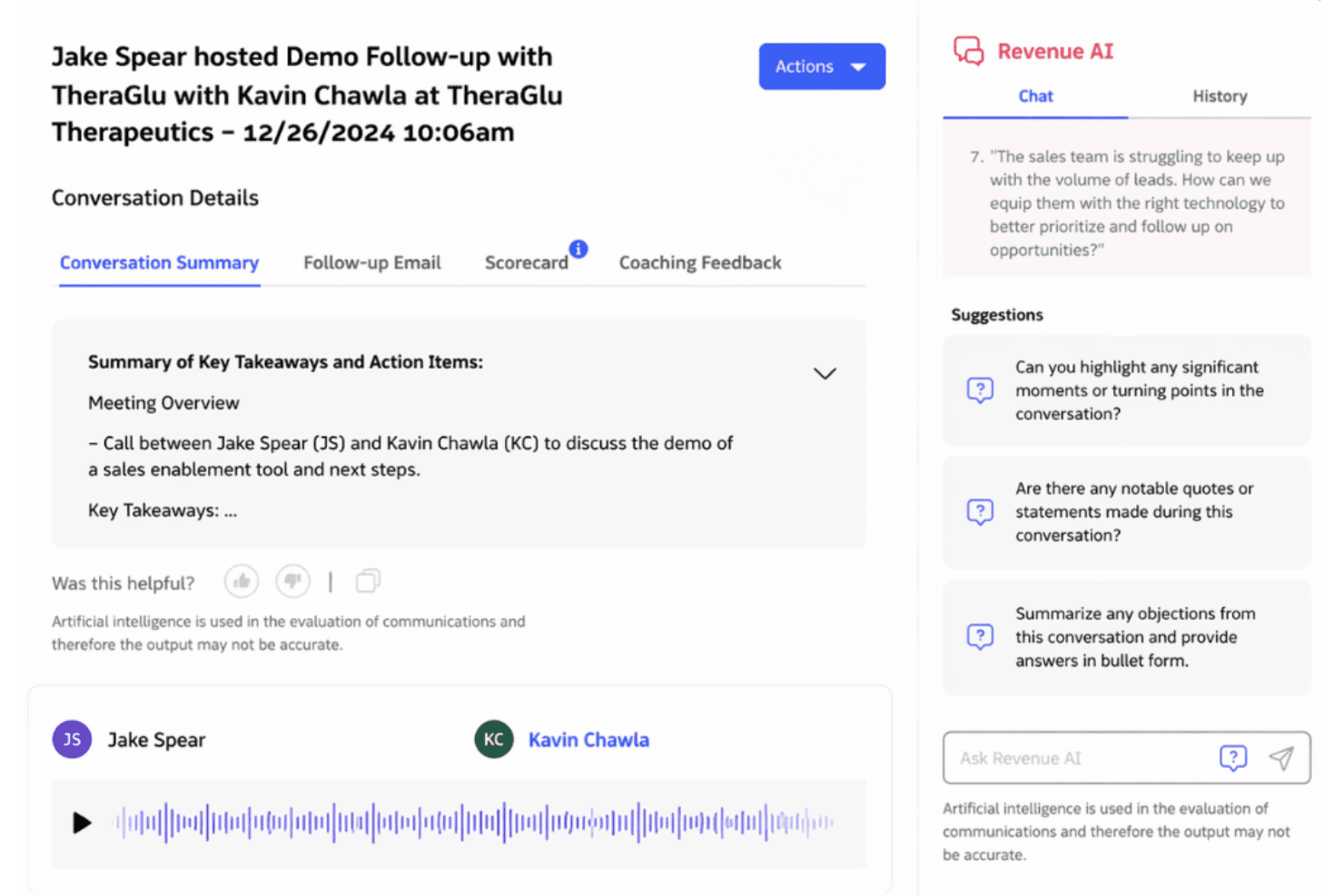
Revenue.io surfaces AI-generated call summaries and coaching insights post-demo. Revenue.io is a Salesforce-native call transcription and conversation intelligence platform that records, transcribes, and analyzes calls across phone, Zoom, Microsoft Teams, and Google Meet—with real-time in-call coaching, AI scorecards, and deal health signals built in.
Who Is Revenue.io Best For?
Revenue.io is built for mid-market and enterprise sales teams running Salesforce who need call intelligence, real-time rep coaching, and deal insights to live natively inside their CRM.
Why I Picked Revenue.io
Revenue.io earns its spot on my shortlist because of how deeply it runs inside Salesforce—not alongside it. Every transcript, AI summary, and deal health signal writes directly to Salesforce objects with no sync lag, which matters when your pipeline reporting depends on real-time data. I also like Moments™, which surfaces live battlecards and objection handlers during a call, not just after it's over.
Revenue.io Key Features
- AI scorecards: Evaluate rep calls against named sales methodologies like MEDDIC, BANT, SPICED, Sandler, and Challenger using automated scoring.
- Multilingual transcription: Automatically transcribes and analyzes calls in 23+ languages, supporting globally distributed sales teams.
- Ask Revenue™ AI: Lets you query your call and deal data conversationally to surface insights across your pipeline without manual report-building.
- Conversation Agents: AI agents that read call transcripts and automatically write structured insights directly into Salesforce fields.
Revenue.io Integrations
Revenue.io has native integrations with Salesforce, Zoom, Microsoft Teams, Google Meet, Gmail, and Microsoft Outlook.
Pros and Cons
Pros:
- Multilingual transcription for 23+ languages
- Real-time in-call coaching with Moments™
- Native Salesforce call data with zero sync lag
Cons:
- No transcription on entry-level plans
- Only works with Salesforce CRM
Learn more about Revenue.io: Best for revenue pipeline-linked call intelligence
- Not available
- Pricing upon request
Visit WebsiteCustomer Rating:4.5/5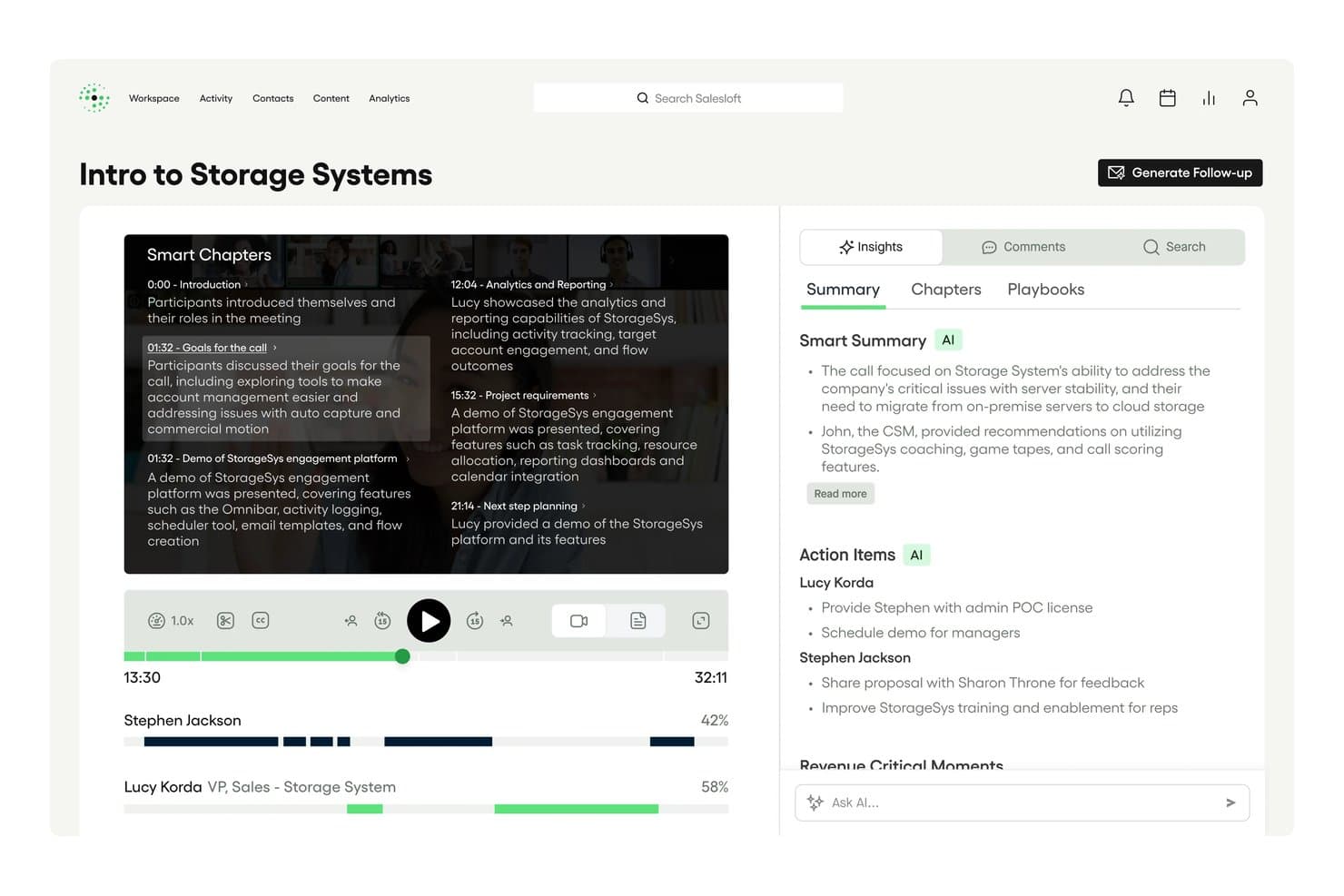
Salesloft auto-generates Smart Chapters and AI summaries from call recordings. Salesloft Conversations is a call recording and transcription product built into the Salesloft revenue platform, offering AI-generated summaries, keyword tracking, conversation scorecards, real-time battlecards, and bi-directional CRM sync with Salesforce and HubSpot.
Who Is Salesloft Best For?
Salesloft Conversations is a strong fit for enterprise revenue teams that already run—or plan to run—their full sales motion inside a single platform.
Why I Picked Salesloft
Salesloft earns its spot on my shortlist because conversation data doesn't just sit in a recording library—it flows directly into pipeline management. I love how AI-flagged Key Moments, objection signals, and deal risk indicators from recorded calls feed automatically into Salesloft Deals and Rhythm, so a rep's call with a hesitant buyer can trigger a pipeline alert without anyone manually reviewing the transcript. Real-time battlecards surfacing during live calls are another feature I think sets it apart from most transcription tools.
Salesloft Key Features
- Conversation scorecards: Evaluate recorded calls against methodology-based criteria to give managers a structured framework for rep coaching.
- Custom keyword and phrase trackers: Configure trackers for competitor names, pricing terms, or specific talk-track language to monitor how often they appear across calls.
- Smart Chapters: Automatically segment call recordings into navigable sections so reviewers can jump directly to relevant parts of a conversation.
- AI-generated follow-up emails: Draft post-call emails with extracted action items and next steps, ready to send or push into a Salesloft sequence.
Salesloft Integrations
Salesloft offers native Salesforce and HubSpot CRM sync, plus Zoom, Google Meet, Microsoft Teams, Highspot, and Seismic. It also supports custom integrations through its open API and webhooks, with Zapier available.
Pros and Cons
Pros:
- Advanced AI-generated follow-up emails
- Real-time battlecards for in-call coaching
- Conversation data flows into deal pipeline
Cons:
- Manual steps needed for Google Meet recording
- No standalone transcription-only option
Learn more about Salesloft: Best for closing the loop between calls and coaching
- Free demo available
- Pricing upon request
Visit WebsiteCustomer Rating:4.6/5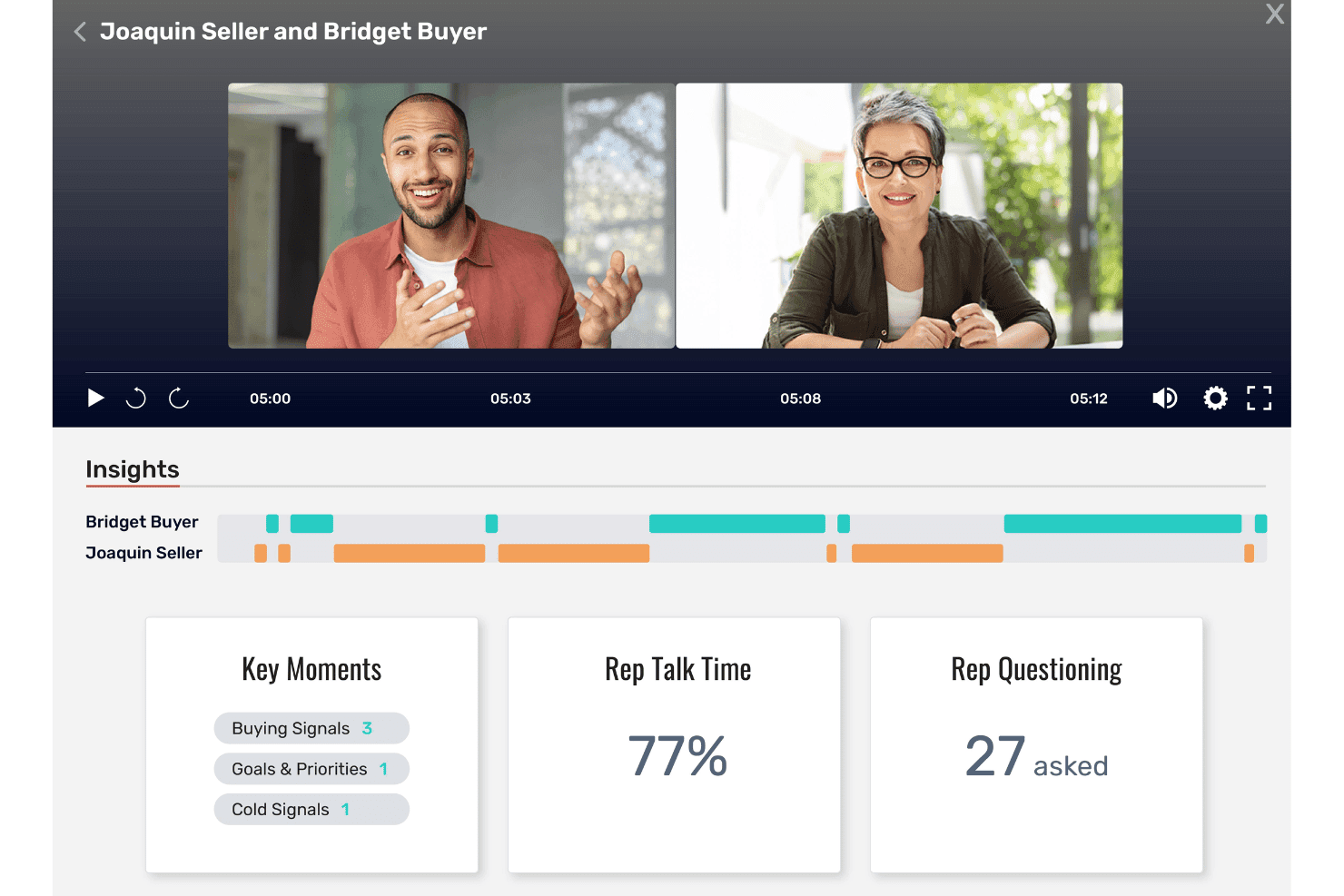
Allego surfaces call insights like talk time and buying signals. Allego is a revenue enablement platform with built-in conversation intelligence that captures and transcribes calls, surfaces AI-generated coaching signals, deal risk alerts, and methodology scorecards, and syncs insights directly into your CRM.
Who Is Allego Best For?
Allego is a strong fit for enterprise sales teams that want conversation intelligence wired directly into their coaching, training, and enablement workflows.
Why I Picked Allego
I picked Allego as one of the best because it's the only platform I've seen that takes a call insight and immediately turns it into a coaching action. When a rep's talk-to-listen ratio flags during a recorded call, Allego doesn't just log it: it can trigger a flash drill or AI role-play assignment tied to that specific gap. Manager-configurable scorecards aligned to MEDDIC, BANT, or SPICED mean coaching conversations are grounded in actual call data, not gut feeling.
Allego Key Features
- Multilingual transcription: Allego transcribes and translates calls in 99+ languages, making it usable for global sales teams operating across multiple regions.
- AI-generated follow-up emails: The platform auto-drafts post-call recap emails and action items directly from call transcripts.
- Deal health scoring: Allego surfaces deal risk signals and recommended next actions within pipeline views using AI Deal Alerts and Deal Navigator.
- CRM write-back: Call recordings, summaries, and engagement data sync to Salesforce, HubSpot, Dynamics 365, Pipedrive, and Close at the opportunity, contact, and activity levels.
Allego Integrations
Allego reports 120+ integrations, including Salesforce, HubSpot CRM, Microsoft Dynamics 365, Zoom, Microsoft Teams, Cisco Webex, Aircall, and Salesloft. It also provides an open API and an MCP API Server for custom connectivity.
Pros and Cons
Pros:
- Includes AI summaries and deal risk alerts
- Multilingual transcription supports global sales teams
- Turns call insights into immediate coaching actions
Cons:
- Platform may feel complex for small teams
- No public pricing or free trial
Learn more about Allego: Best for EU sales teams auto-filling CRM from calls
- Free demo available
- Pricing upon request
Visit WebsiteCustomer Rating:4.7/5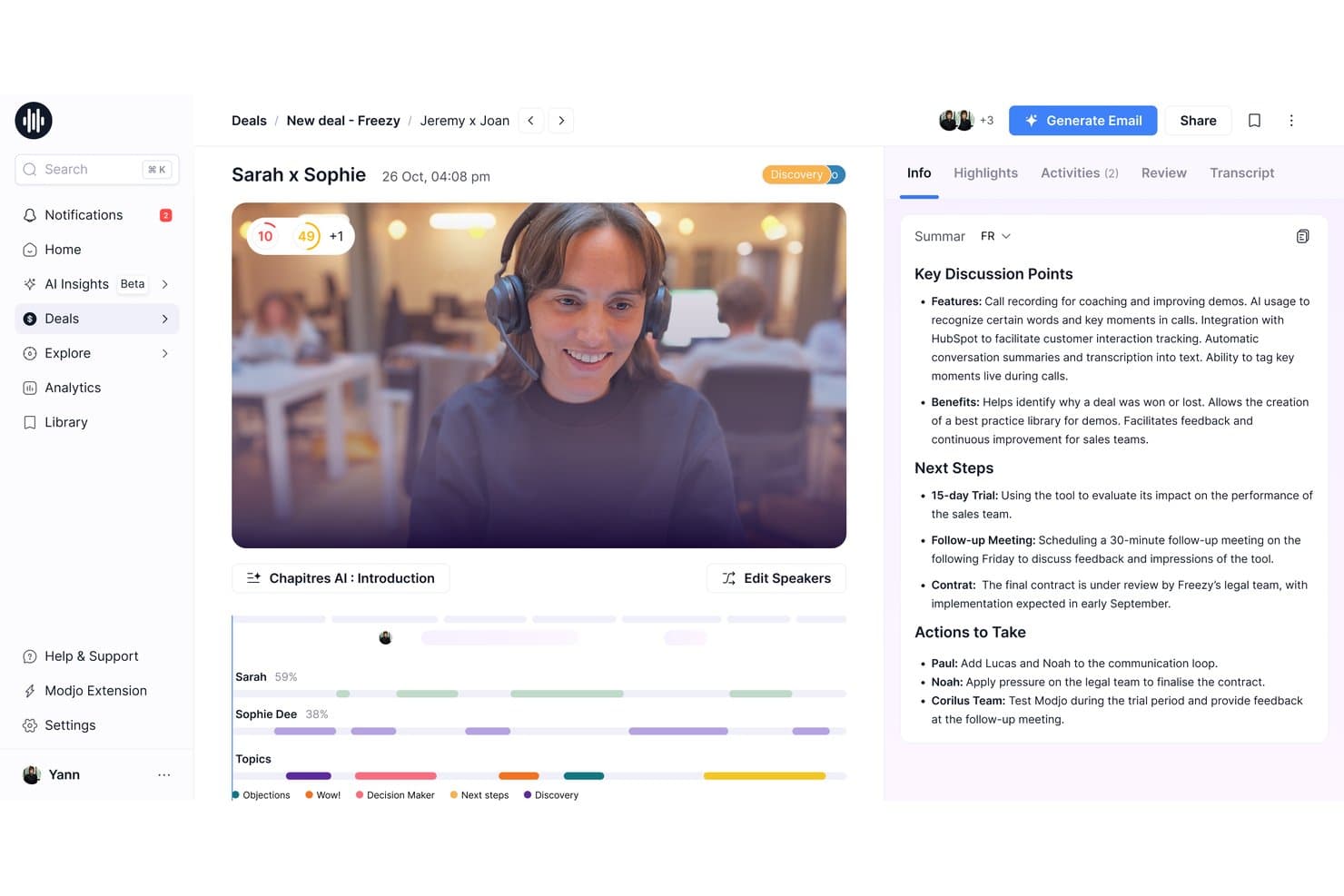
Modjo auto-generates AI call summaries with key discussion points and next steps. Modjo is a call transcription and conversation intelligence platform that records calls across video conferencing and VoIP dialers, transcribes in 100+ languages, and layers on AI-powered summaries, CRM auto-fill, deal intelligence, and coaching tools.
Who Is Modjo Best For?
Modjo is a strong fit for European B2B sales teams that need CRM data quality without relying on reps to manually log call details.
Why I Picked Modjo
I picked Modjo as one of the best because its AI CRM auto-fill is the strongest I've seen for European sales teams. After a call, Modjo automatically populates Salesforce or HubSpot fields, including custom objects and MEDDIC or SPICED qualification data, without reps touching the CRM. The Churn Detector agent also flags renewal risk directly from customer conversation signals, which is a genuinely useful layer beyond standard transcription.
Modjo Key Features
- AI call scoring: Modjo scores each call against sales methodologies like MEDDIC, BANT, or SPICED, surfacing where reps deviated from your playbook.
- Searchable call library: A centralized library lets you clip, playlist, and share call recordings across sales, marketing, and product teams.
- Talk ratio analytics: Per-participant talk time is tracked on every call, giving managers a clear view of rep listening habits across the team.
- Ask Modjo: A conversational AI interface lets you query across all recorded calls, deals, and CRM data without leaving Salesforce or HubSpot.
Modjo Integrations
Modjo documents integrations with Salesforce, HubSpot, Microsoft Teams, Zoom, Google Meet, Aircall, Ringover, CloudTalk, Slack, Gmail, and Outlook. A public API and MCP server support custom integrations, BI, and workflow routing.
Pros and Cons
Pros:
- Free listener seats for managers and leaders
- Transcribes over 100 languages accurately
- AI auto-fills CRM from call transcripts
Cons:
- CRM auto-fill only for Salesforce, HubSpot
- No real-time in-call assistance
Learn more about Modjo: Best for UCaaS teams needing built-in transcription
- 14-day free trial
- From £18/user/month
Visit WebsiteCustomer Rating:4.2/5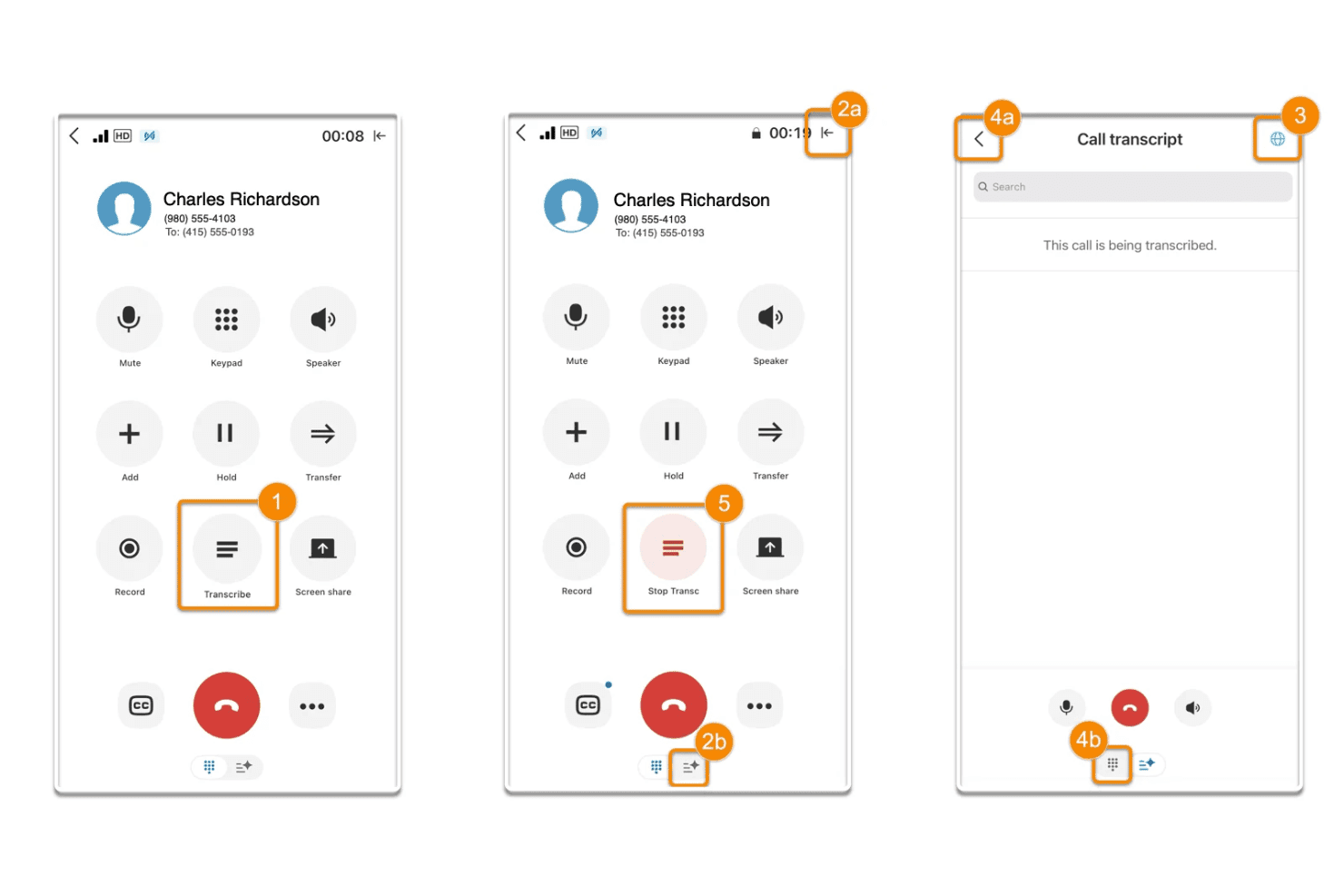
RingCentral lets users transcribe live calls and view real-time text. RingCentral is a UCaaS platform that combines cloud calling, video meetings, and messaging with built-in AI transcription, automated call notes, and conversation intelligence through its AI Conversation Expert add-on.
Who Is RingCentral Best For?
RingCentral is a strong fit for enterprise and mid-market teams already running on a UCaaS platform who want transcription and conversation intelligence built into the same system they use for calling and messaging.
Why I Picked RingCentral
RingCentral earns its spot on my shortlist because transcription isn't a bolt-on here, it's baked into the same platform your team already uses for calls and video meetings. I especially like that the AI Conversation Expert captures and transcribes calls made in Zoom, Google Meet, and Microsoft Teams, not just RingCentral's own system. Post-call, CSAT Prediction and group coaching dashboards surface team-wide patterns without requiring a separate tool.
RingCentral Key Features
- Custom trackers: Configure keyword and concept trackers with AI-powered pattern matching to surface competitor mentions, objections, or product interest across your full call library.
- CSAT prediction: Analyzes call transcripts to predict customer satisfaction scores, with 90-day trend visibility and direct links to low-satisfaction calls for QA review.
- Multi-speaker diarization: Separates and labels individual speakers within recorded conversations, making transcripts searchable by speaker, topic, and keyword.
- Compliance-ready recording: Supports FINRA Rule 3170, HIPAA, and GDPR requirements with admin-configurable retention policies, consent announcements, and audit-logged call deletion.
RingCentral Integrations
RingCentral offers native integrations with Salesforce, HubSpot, Zoho CRM, Microsoft Dynamics, and Freshdesk, plus Zoom and Microsoft Teams capture through ACE. It also supports 500+ marketplace integrations, open APIs, and webhooks for custom connectivity.
Pros and Cons
Pros:
- Advanced coaching and sentiment analysis features
- Accurate live transcription for long meetings
- Transcription built into UCaaS communications platform
Cons:
- No live in-call battle cards
- Conversation intelligence requires paid add-on
Learn more about RingCentral: 6Best for revenue teams scaling call intelligence
Gong
- Free demo available
- Pricing upon request
Visit WebsiteCustomer Rating:4.7/5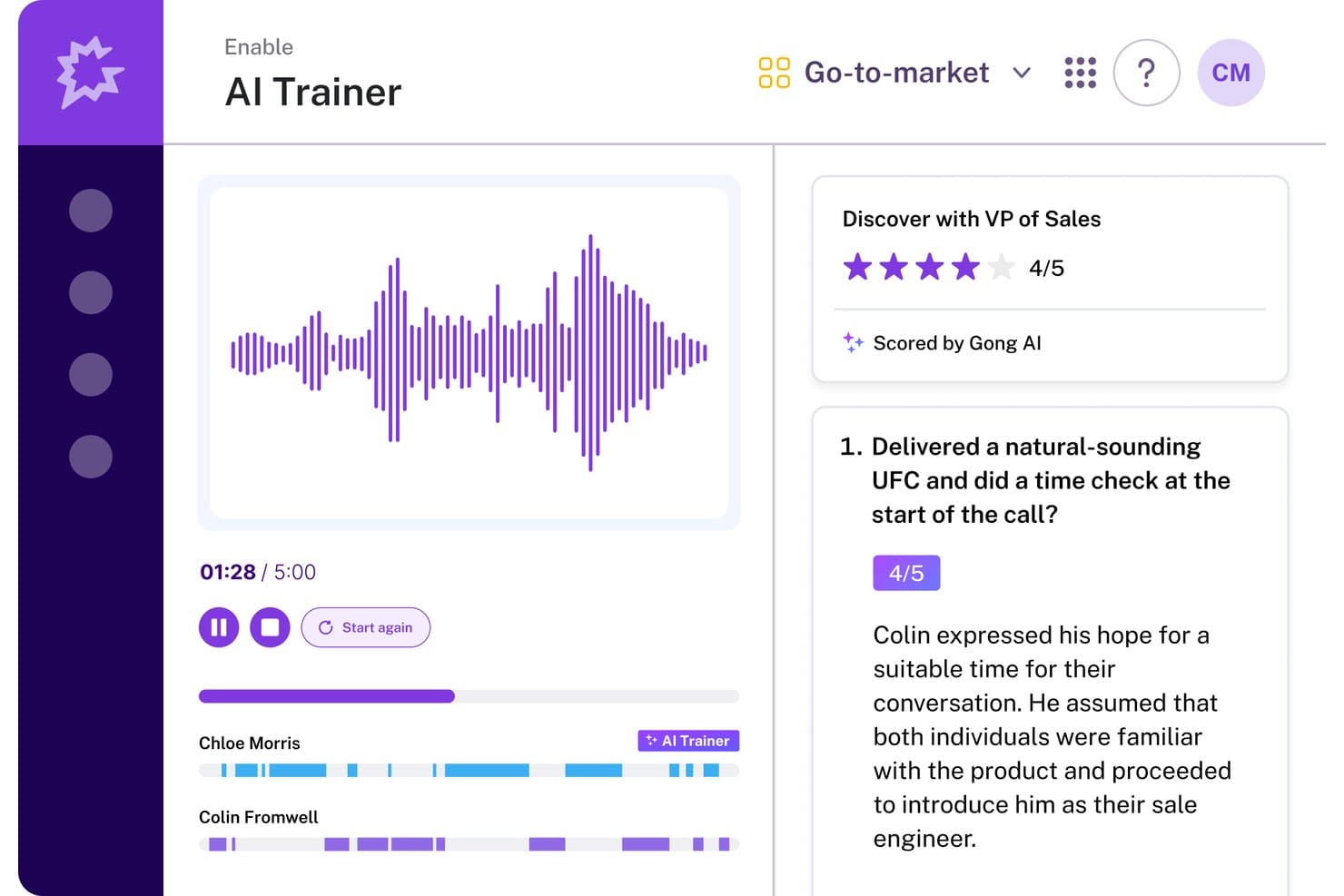
Gong's AI Trainer scores sales calls and gives feedback. Gong is a revenue intelligence platform that records, transcribes, and analyzes sales calls across Zoom, Google Meet, and Microsoft Teams, with AI-generated summaries, deal risk signals, coaching scorecards, and a searchable call library built into a single system.
Who Is Gong Best For?
Gong is built for B2B revenue teams—sales, enablement, and RevOps—that need conversation intelligence tied directly to pipeline data and coaching workflows.
Why I Picked Gong
Gong earns its spot on my shortlist because no other call transcription tool connects conversation data directly to pipeline health the way it does. I'm particularly impressed by Deal Likelihood scoring, which surfaces AI-predicted close probabilities on pipeline views based on conversation signals like buyer engagement and next-step commitments. Paired with the Ask Anything interface, where you can ask natural language questions about any recorded call, Gong gives revenue teams a way to turn transcripts into real pipeline decisions.
Gong Key Features
- Multi-speaker diarization: Gong labels each speaker by name and maps participants to CRM contacts, so you can filter playback or analysis by individual rep or buyer.
- 30+ language transcription: Calls are transcribed across more than 30 languages, with post-call translation available for multilingual and international teams.
- Custom trackers: Configure keyword and phrase trackers to monitor competitor mentions, objection patterns, or specific sales methodology adoption across every recorded call.
- Gong Enable call libraries: Build curated playlists of real calls for new hire onboarding or ongoing coaching, with AI automatically flagging coachable moments within recordings.
Gong Integrations
Gong offers native integrations with Salesforce, HubSpot, Zoom, Microsoft Teams, Google Meet, Outreach, Salesloft, Aircall, Snowflake, and Databricks. It also offers open APIs and webhooks for custom integrations.
Pros and Cons
Pros:
- CRM contact mapping for speaker identification
- Custom trackers for objection or competitor mentions
- AI-generated deal and conversation insights
Cons:
- Accuracy drops with accents or crosstalk
- No self-serve free trial available
Learn more about Gong: Best for CRM autofill from sales calls
- 14-day free trial + free plan + free demo available
- From $30/user/month (billed annually)
Visit WebsiteCustomer Rating:4.8/5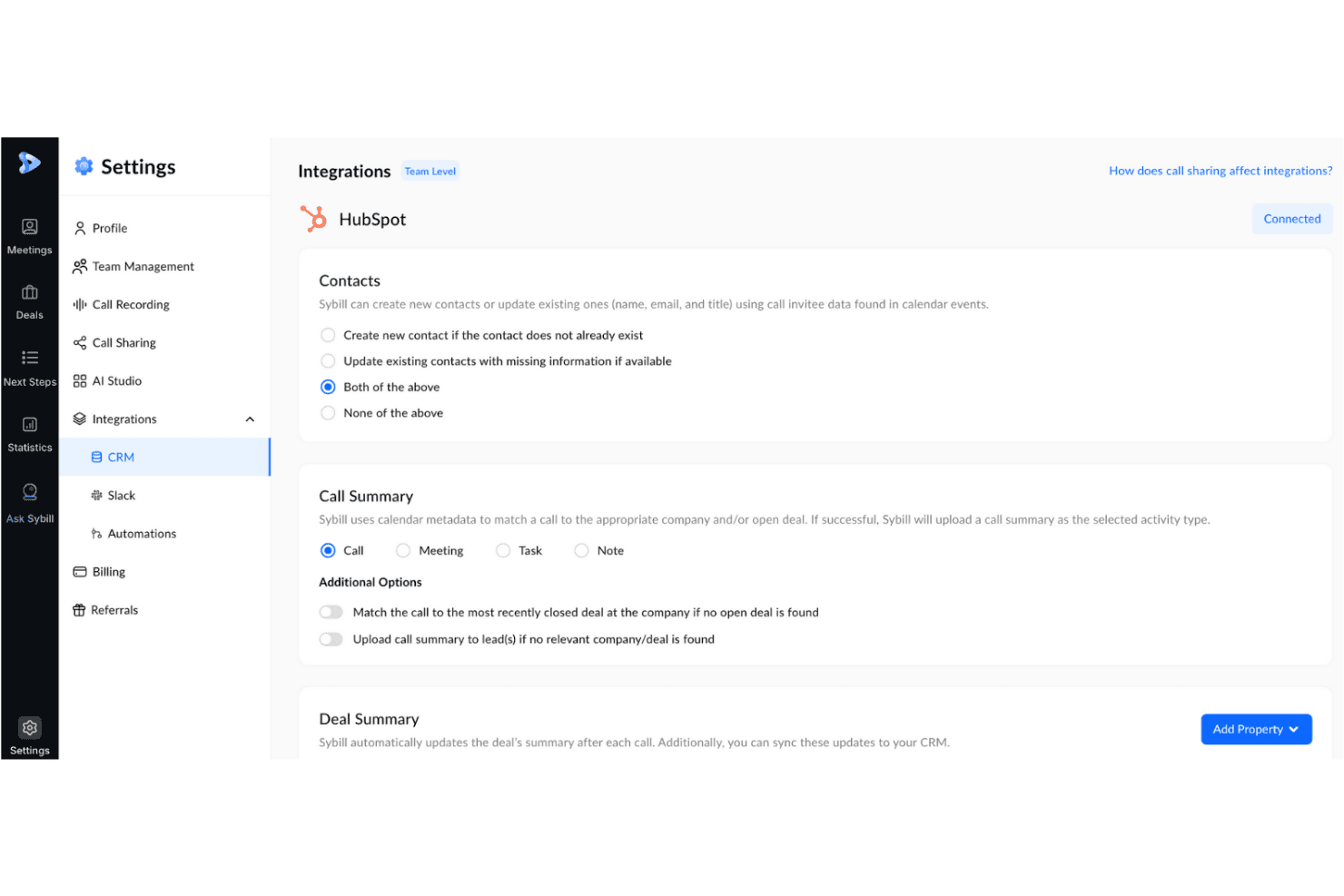
Sybill syncs call summaries and contacts directly to HubSpot CRM. Sybill is a conversation intelligence platform for B2B sales teams that records, transcribes, and analyzes sales calls, then surfaces deal insights, coaching signals, and CRM field updates from every meeting.
Who Is Sybill Best For?
Sybill is a strong fit for B2B sales teams where CRM hygiene is a persistent problem and reps spend too much time on post-call admin.
Why I Picked Sybill
Sybill earns its spot on my shortlist because CRM Autofill is genuinely one of the best implementations of post-call data capture I've seen. After every recorded call, Sybill populates CRM fields across HubSpot, Salesforce, Zoho CRM, and Dynamics 365 using custom AI prompts tuned to your team's terminology, covering MEDDPICC, BANT, deal stage, close date, and custom fields. I also like that it can backfill the last 30 deals retroactively, so you're not starting from zero on pipeline hygiene.
Sybill Key Features
- Magic Summaries: AI-generated post-call summaries that flag action items, next steps, and deal signals, delivered automatically to email, Slack, or your CRM after every meeting.
- Ask Sybill: A natural language query interface that lets you pull cross-deal intelligence—like stalled deals, objection patterns, or competitor mentions—from calls, emails, and Slack in plain English.
- Personal Coach: AI-driven call analysis that surfaces rep-level feedback on discovery, qualification, and objection handling without requiring managers to review full recordings.
- Pre-meeting briefs: AI-generated meeting prep documents that pull from calendar data, prior transcripts, CRM records, and external enrichment sources like Proxycurl and Diffbot.
Sybill Integrations
Sybill offers native integrations with Zoom, Google Meet, Microsoft Teams, HubSpot, Salesforce, Zoho CRM, and more. Business plans include API and MCP access.
Pros and Cons
Pros:
- AI-drafted follow-up emails match user style
- Unlimited call recordings on all plans
- Automatic CRM autofill after every call
Cons:
- CRM autofill limits complex data structures
- Key dialer platforms still unavailable
Learn more about Sybill: Best for call transcription in 60+ languages
- 14-day free trial + free demo available
- Pricing upon request
Visit WebsiteCustomer Rating:4.7/5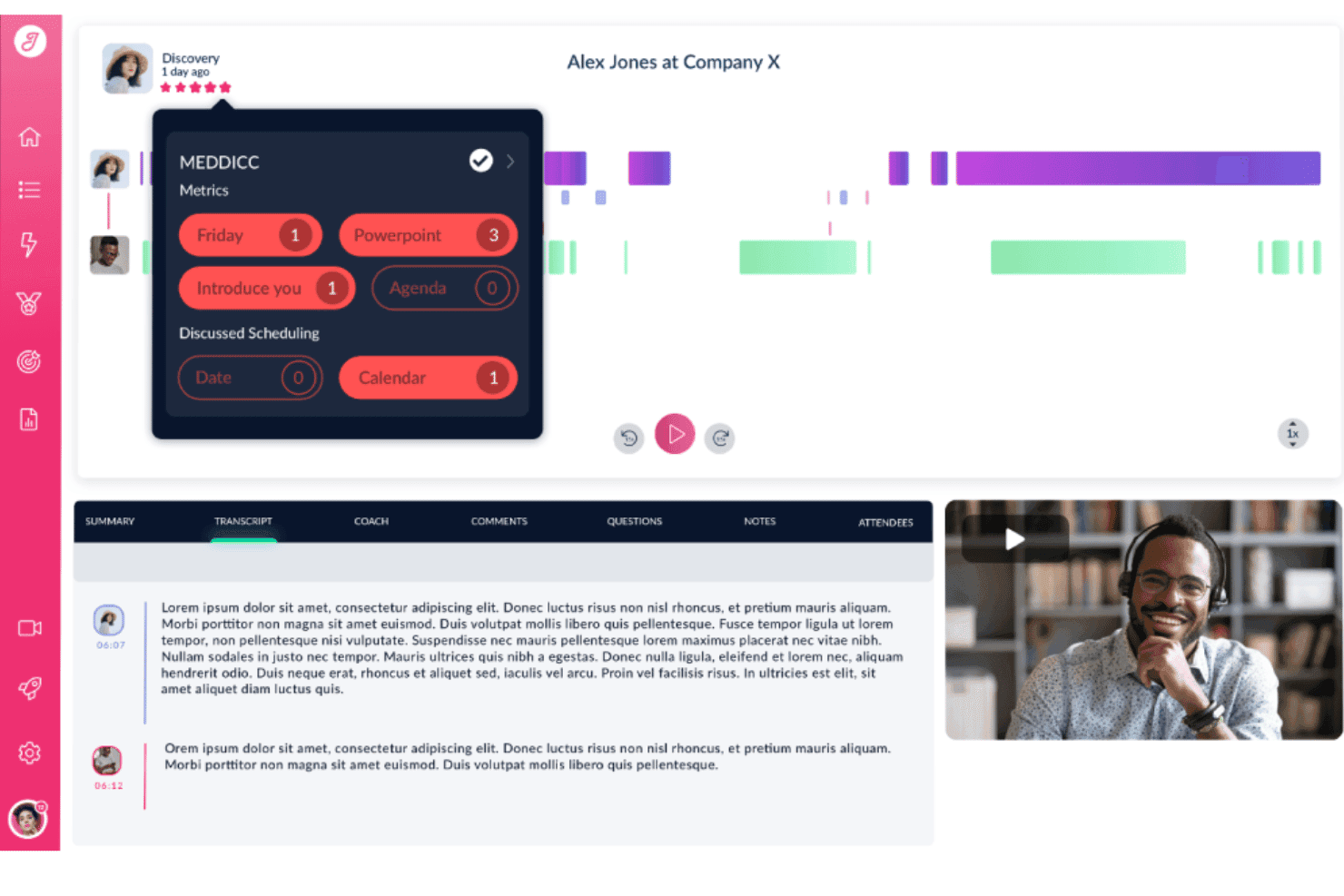
Jiminny tracks MEDDICC metrics and keywords from sales call recordings. Jiminny is a conversation intelligence platform that records, transcribes, and analyzes sales calls—with AI-generated summaries, deal risk alerts, coaching scorecards, CRM auto-filling, and a searchable call library across your entire revenue team.
Who Is Jiminny Best For?
Jiminny is a strong fit for revenue teams operating across multiple regions or languages who need call transcription, deal intelligence, and CRM automation in one platform.
Why I Picked Jiminny
Jiminny earns its spot on my shortlist because of how it handles transcription across 60+ languages, including automatic language detection that requires zero manual configuration. What I find genuinely impressive is multi-language transcription within a single call, so if a rep switches from English to Spanish mid-conversation, each section is transcribed in the language it was spoken. Pair that with AI-generated deal risk alerts that flag stalled pipelines and missed next steps, and you get a transcription tool that feeds directly into revenue decisions.
Jiminny Key Features
- AI CRM filling: Automatically extracts call and email data to populate Salesforce and HubSpot fields, with configurable append, override, or fill-empty modes and a CSV-exportable audit trail.
- Deal risk alerts: Flags stalled deals, missed next steps, dropped deal values, and overdue close dates based on conversation signals across your pipeline.
- Ask Jiminny: A plain-language AI query tool that lets you search across calls and deals for competitor mentions, common objections, or customer timelines without manually reviewing recordings.
- Coaching scorecards: Configurable scorecards tied to custom performance rubrics let managers score rep calls and track performance trends across the team.
Jiminny Integrations
Jiminny supports 25+ voice platforms, including Aircall, RingCentral, and Dialpad, plus native Salesforce, HubSpot, Zoom, Google Meet, and Microsoft Teams integrations. It also supports Pipedrive, Zoho CRM, an open API, webhooks, and Zapier.
Pros and Cons
Pros:
- Multi-language transcription within single call
- CRM fields auto-filled from call transcripts
- Transcribes 60+ languages with auto-detection
Cons:
- One-time setup fee required
- Occasional errors with technical jargon
Learn more about Jiminny: Best for all-in-one call intel and CRM sync
- 14-day free trial + free demo available
- From $19/user/month (billed annually)
Visit WebsiteCustomer Rating:4.6/5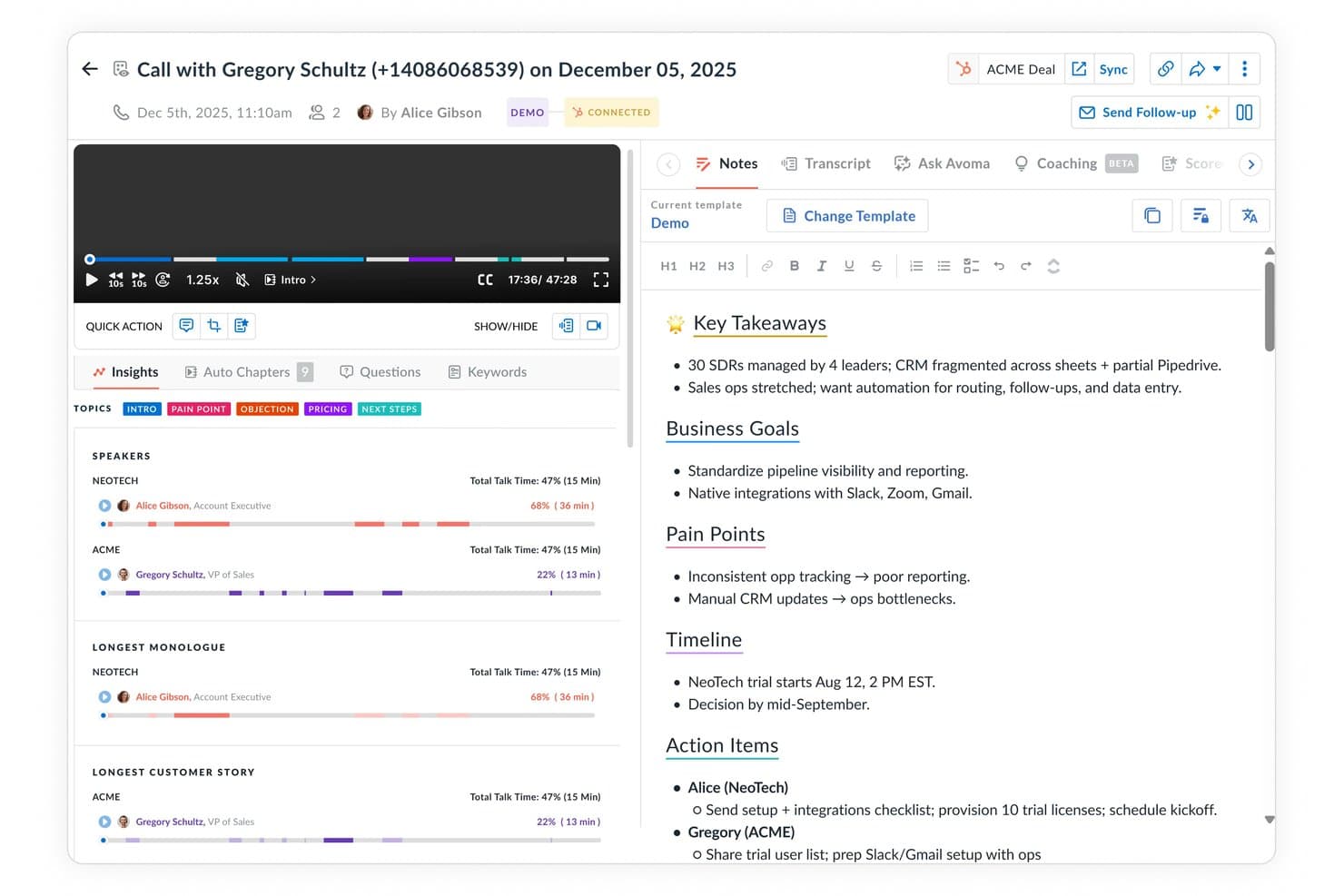
Avoma auto-generates structured call notes with key takeaways and action items. Avoma is a call transcription and conversation intelligence platform that records, transcribes, and analyzes sales calls across major conferencing tools and dialers, with built-in AI scoring, deal tracking, and bi-directional CRM sync.
Who Is Avoma Best For?
Avoma fits revenue teams that want call intelligence, CRM data entry, and pipeline visibility in one place without paying Gong-level prices.
Why I Picked Avoma
I've included Avoma in my top picks because it pulls call transcription, conversation intelligence, and CRM sync into one platform instead of making you stitch tools together. What I find genuinely useful is the bi-directional CRM sync: it auto-populates MEDDIC and BANT fields directly from conversation data, so reps never manually update deal records after a call. The "Ask Avoma" copilot also lets me query the entire call archive conversationally, pulling cited answers from real transcripts across hundreds of past deals.
Avoma Key Features
- Live Answer Assistant: Surfaces real-time, contextually triggered battlecards and objection-handling prompts to reps during an active call.
- Smart Trackers: NLP-based topic and keyword trackers that flag competitor mentions, pricing discussions, and custom-defined conversation moments across calls.
- AI-generated follow-up emails: Automatically drafts post-call recap emails with action items pulled directly from the call transcript.
- Multi-speaker diarization: Identifies and labels each speaker's dialogue individually, with per-speaker analytics covering talk-time ratios, filler words, and monologue length.
Avoma Integrations
Avoma offers native integrations with Zoom, Google Meet, Microsoft Teams, Webex, Aircall, Dialpad, RingCentral, Salesforce, HubSpot, and Pipedrive. It also supports webhooks, an open API, and Zapier.
Pros and Cons
Pros:
- Unlimited free collaborator seats for viewers
- Real-time AI prompts during live calls
- Bi-directional CRM sync auto-populates sales fields
Cons:
- Recording bot may miss or drop meetings
- Conversation intelligence features require paid add-on
Learn more about Avoma: Best for AI deal intelligence on call data
- Free plan + free demo available
- From $10/user/month (billed annually)
Visit WebsiteCustomer Rating:4.3/5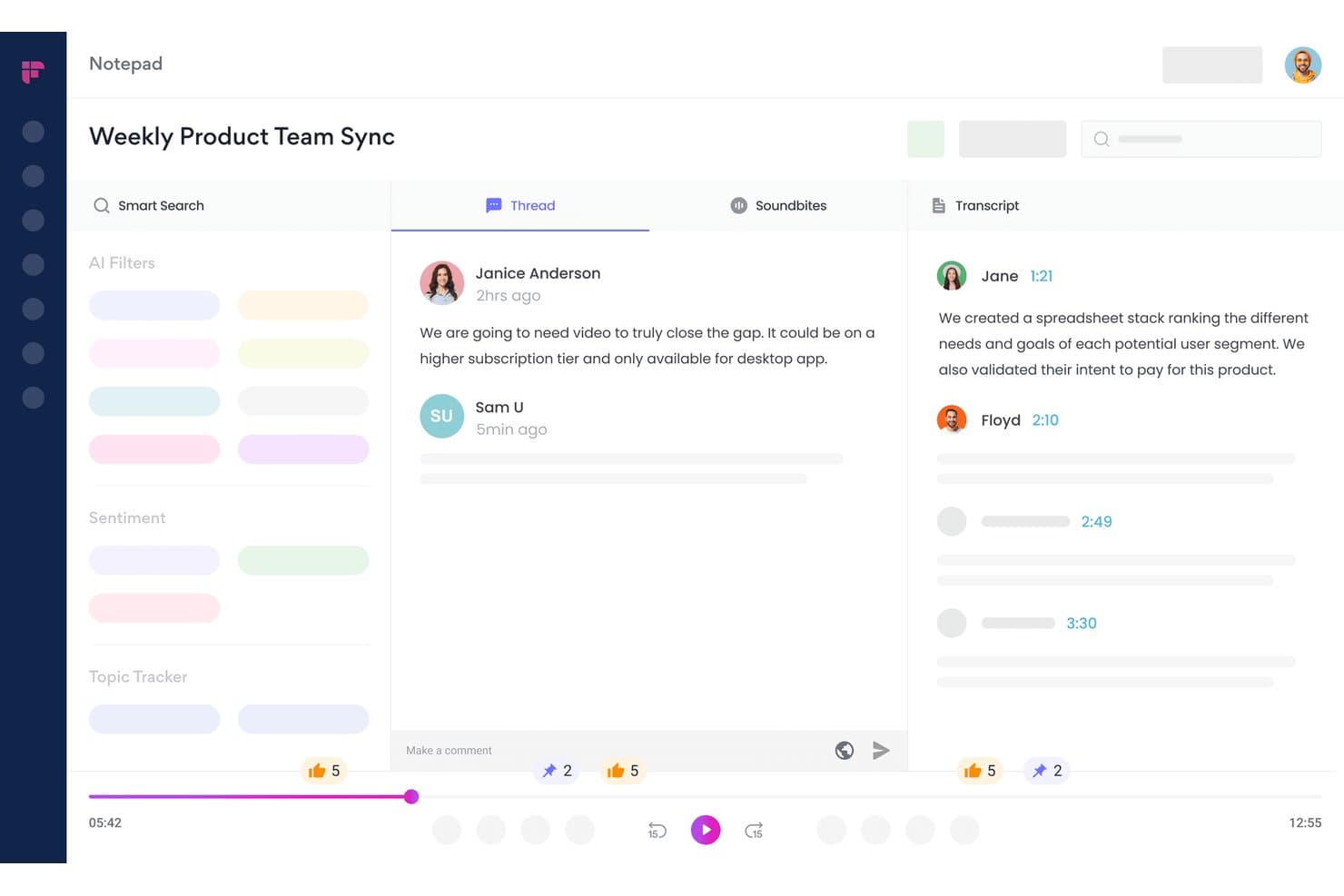
Fireflies.ai lets users review transcripts, threads, and soundbites in one view. Fireflies.ai is an AI meeting transcription and conversation intelligence platform that records calls across 10+ conferencing apps and dialers, auto-generates summaries and action items, and surfaces deal health signals, topic trackers, and rep performance analytics.
Who Is Fireflies.ai Best For?
Fireflies.ai is a strong fit for revenue teams that run high-volume sales calls and need deal health signals, coaching data, and CRM-synced call intelligence in one place.
Why I Picked Fireflies.ai
I picked Fireflies.ai as one of the best because its CRM Deal Intelligence layer turns call transcripts into live pipeline signals. Where most transcription tools stop at summaries, Fireflies surfaces deal health status (On Track, At Risk, Slipping) and an AI Close Probability score directly inside your HubSpot or Salesforce deal view. I also rely on its Topic Trackers to flag competitor mentions, objections, and pricing signals across every recorded call automatically.
Fireflies.ai Key Features
- Live Assist: Delivers real-time in-call coaching prompts, objection handling suggestions, and pre-meeting prospect briefings during active calls via the desktop app or Chrome extension.
- AskFred AI agent: Lets you query your entire call archive in natural language to pull answers, themes, or specifics from past meetings without manual transcript review.
- Topic trackers: User-configurable keyword monitors that automatically flag competitor mentions, pricing discussions, and custom signals across every recorded call.
- Soundbites: Lets you clip, label, and share specific moments from call recordings for rep coaching, onboarding, or async team review.
Fireflies.ai Integrations
Fireflies.ai offers 100+ native integrations, including Salesforce, HubSpot, Zoom, Google Meet, Microsoft Teams, Aircall, RingCentral, Slack, and Notion. An open API supports custom integrations and audio-processing pipelines.
Pros and Cons
Pros:
- Live Assist gives real-time sales coaching
- AskFred AI enables natural-language call queries
- CRM deal intelligence inside Salesforce and HubSpot
Cons:
- Speaker mislabeling happens in fast conversations
- CRM insights limited to Salesforce and HubSpot
Learn more about Fireflies.ai:
Annen programvare for samtaletranskripsjon
Her er noen flere alternativer for programvare for samtaletranskripsjon som ikke kom med på kortlisten min, men som fortsatt er verdt å undersøke:
- 11ChorusBest for pipeline intelligence tied to call data
- 12Clari CopilotBest for linking call signals to pipeline forecasting
- 13CloudTalkBest for VoIP teams scoring every call automatically
- 14DialpadBest for real-time in-call coaching from transcripts
- 15JustCallBest for outbound teams coaching reps mid-call
- 16Observe.AIBest for contact center call QA at scale
- 17FathomBest for free unlimited call transcription
- 18GrainBest for bot-free call capture and clip sharing
- 19HubSpot Sales HubBest for CRM-native call transcription and AI summaries
- 20ReadAIBest for AI search across calls, email, and Slack
How I Evaluate Call Transcription Software
I split my evaluation into baseline criteria every tool must meet and differentiating factors that separate the ones worth recommending from the rest.
Core Functionality (Table Stakes for This List)
When I'm selecting tools for my list, I rank each one on a scale from 0 (does not offer the functionality) to 5 (excels in this area) for each core functionality listed below. I then calculate the tool's total score into a percentage, using 65% as a benchmark to help assess its overall fit for the list.
- Call recording and capture: I check whether the tool automatically records across major web conferencing platforms, VoIP dialers, and phone systems without manual intervention.
- Automated transcription: Accuracy matters, so I evaluate transcript quality across languages, looking for timestamps, punctuation, and speaker-separated output that's usable without heavy editing.
- Multi-speaker diarization: Sales calls involve multiple voices. I look for reliable speaker identification that maps dialogue to named participants, not just "Speaker 1" and "Speaker 2."
- Searchable transcript library: Teams need to find past conversations fast. I evaluate whether the library supports filters like rep, account, date, and topic—not just basic keyword matching.
- AI conversation insights: Beyond raw transcripts, I look for AI that surfaces deal risk signals, competitor mentions, action items, and coaching cues your managers can act on right away.
- CRM and workflow integrations: I check for native, bi-directional sync with CRMs like Salesforce and HubSpot, plus connections to dialers, enablement tools, and scheduling platforms your GTM team already uses.
Once I have a list of tools that meet the criteria, I consider what sets each platform apart.
Differentiating Factors (What Sets Vendors Apart)
Here's how I compare and contrast different vendors:
Standout Features
I look for live call assist that delivers battle cards and objection prompts mid-conversation, not after. A rep facing a competitor mention in a discovery call needs guidance in that moment. Deal intelligence scoring is equally important—I evaluate whether the tool auto-scores deal health from conversation signals like next-step commitments and stakeholder involvement, then surfaces those scores on pipeline views. I also check for methodology-based scorecards (MEDDIC, BANT, SPICED) managers can customize to match their coaching rubrics.
Beyond Features
I evaluate how deeply each tool syncs with your revenue tech stack beyond basic call logging. A platform that writes back to Salesforce or HubSpot at the opportunity and contact level saves RevOps hours of manual field updates. Coaching workflows matter too—I look for built-in call scoring, comment threads, and curated playlists managers can pull into weekly 1:1s. I also check pricing transparency, specifically whether non-recording users like managers or CS leads need paid seats, since that cost scales fast across cross-functional teams.
Slik velger du programvare for samtaletranskripsjon
Når du skal avgjøre hvilken programvare for samtaletranskripsjon som passer best til RevOps-arbeidsflytene dine, bør du fokusere på hvordan plattformen håndterer reell dataflyt og veiledningsbehov:
| Hvis prioriteten din er ... | Se etter ... |
|---|---|
| Hvis prioriteten din er ...Nøyaktige CRM-data | Se etter ...Direkte, toveis synkronisering med det primære CRM-systemet ditt |
| Hvis prioriteten din er ...Nøyaktig transkripsjon med flere talere | Se etter ...Detaljert talerdiarisering i både direktesendte og innspilte samtaler |
| Hvis prioriteten din er ...AI-drevet innsikt i avtaler | Se etter ...Automatisk oppdagelse og fremheving av risiko- og mulighetssignaler |
| Hvis prioriteten din er ...Veiledningsintegrasjon | Se etter ...Verktøy i plattformen for samtalescoring og deling av spillelister |
| Hvis prioriteten din er ...Multinasjonale team | Se etter ...Innebygd støtte for flere transkripsjonsspråk |
Slik vurderer du kortlisten din
- Test hvor omfattende tilbakeskrivingen til CRM er: Kjør en direkte transkripsjon for å bekrefte automatisk utfylling av felter for muligheter, kontakter og aktiviteter på tvers av minst to nylige avtaler.
- Bekreft separasjon av talere: Last opp et opptak med flere personer, og sammenlign nøyaktigheten i transkripsjonens diaristisering for minst tre deltakere.
- Kontroller AI-innsikt i sanntid: Planlegg en samtale, og dokumenter om handlingspunkter, omtaler av konkurrenter og avtalefarer vises i sanntid og i rapportene etter samtalen.
- Be om et veiledningseksempel: Be om å få se et eksempel på en spilleliste eller en eksport fra et veiledningsdashbord som viser kommentarer og poengsummer fra en nylig reell brukssituasjon.
- Avveining – fleksibilitet kontra integrasjon: Avgjør om du ønsker førsteklasses transkripsjonsverktøy som fungerer uavhengig, eller integrerte pakker som gir avkall på noe tilpasningsevne til fordel for tettere koblinger til arbeidsflytene.
Hva er programvare for samtaletranskripsjon?
Programvare for transkripsjon av samtaler konverterer automatisk talte samtaler i telefon- eller videosamtaler til søkbare tekstutskrifter. Denne programvaren hjelper inntektsteam med å opprette detaljerte samtaleregistre, noe som gjør det enklere å gjennomgå viktig innsikt, følge opp oppgaver og forbedre kvaliteten på CRM-data. Ved å tilby nøyaktige utskrifter med angivelse av hvem som snakker, støtter disse verktøyene opplæring, avtaleanalyse og samsvar for salgs-, kundesuksess- og supportarbeid.
Funksjoner i programvare for transkripsjon av samtaler
Når du velger programvare for transkripsjon av samtaler, bør du se etter følgende viktige funksjoner:
- Opptak og registrering av samtaler: Tar automatisk opp lyd fra samtaler på ulike plattformer, for eksempel verktøy for nettkonferanser, VoIP-systemer og tradisjonelle telefonlinjer. Dette gir teamet ditt en pålitelig lydkilde for hver samtale uten ekstra manuelle trinn.
- Automatisk transkripsjon: Konverterer talte ord fra innspilte samtaler til skriftlig tekst. Produserer utskrifter med korrekt tegnsetting, tidsstempler og angivelse av hvem som snakker, slik at dokumentasjon og oppfølging blir enkelt.
- Identifisering av flere talere: Identifiserer og skiller individuelle stemmer i en samtale. Denne funksjonen knytter dialogen til bestemte deltakere, noe som gjør det enklere å forstå samtaler med flere personer.
- Søkebart bibliotek med utskrifter: Lagrer alle utskrifter på ett sentralt og organisert sted. Lar deg søke etter representant, konto, dato eller emne, slik at du raskt kan finne og referere til tidligere samtaler ved behov.
- Merking av talere: Merker automatisk hver dialoglinje med riktig navn eller identifikator for taleren. Reduserer forvirring i utskriftene og gir bedre kontekst for alle som gjennomgår samtalen.
- Kontroller for avspilling og navigering: Tilbyr verktøy for lydavspilling sammen med utskriften. Lar teamet spille av, sette på pause, spole tilbake eller hoppe til bestemte tidspunkter i samtalen for detaljert gjennomgang.
- Alternativer for eksport og deling: Lar deg eksportere utskrifter i ulike formater og dele dem med teammedlemmer eller eksterne partnere. Sørger for at utskriftene er tilgjengelige der og når du trenger dem.
- Integrasjoner med arbeidsflytverktøy: Kobler seg til CRM-systemer, plattformer for prosjektstyring eller systemer for dokumentlagring. Flytter automatisk utskrifter og samtaledata til plattformene teamet ditt allerede bruker.
- Innstillinger for personvern og samsvar: Tilbyr tilpassbare kontroller for datalagring, oppbevaring og tilgang basert på organisasjonens sikkerhetskrav. Hjelper virksomheten med å oppfylle bransjeregler og beskytte sensitiv informasjon.
Vanlige AI-funksjoner i programvare for transkripsjon av samtaler
I tillegg til standardfunksjonene i programvare for transkripsjon av samtaler som er nevnt ovenfor, tar mange av disse løsningene i bruk AI med funksjoner som:
- AI-genererte samtaleoppsummeringer: Oppretter automatisk korte og strukturerte oppsummeringer av hver samtale, med vekt på viktige diskusjonspunkter, beslutninger og neste trinn. Dette hjelper teamet med å gjennomgå samtaler raskt uten å lese hele utskrifter.
- Sanntidsuttrekking av oppgaver: Identifiserer og fremhever oppgaver mens de blir diskutert i samtaler, tildeler dem til deltakere eller registrerer dem i tilkoblede arbeidsflytverktøy. Dette reduserer manuell notatskriving og feil i oppfølgingen.
- Sentimentanalyse: Bruker AI til å oppdage den følelsesmessige tonen hos talerne gjennom samtalen og markerer øyeblikk med frustrasjon, entusiasme eller nøling. Dette gir ledere dypere innsikt i kundenes eller potensielle kundenes engasjement.
- Identifisering av avtalerisiko og muligheter: Analyserer samtaleinnhold for signaler på avtalerisiko – som stagnerte neste trinn eller omtale av konkurrenter – og markerer potensielle muligheter, slik at salgsteam kan prioritere oppfølgingen.
- Automatiserte forslag til opplæring: Går gjennom samtaleutskrifter og gir AI-basert tilbakemelding eller opplæringstips til salgsrepresentanter, for eksempel anbefalte forhold mellom tale og lytting eller spørsmål som ikke ble stilt i kartleggingen, og støtter dermed kontinuerlig kompetanseutvikling.
Fordeler med programvare for transkripsjon av samtaler
Implementering av programvare for transkripsjon av samtaler gir flere fordeler for teamet og virksomheten din. Her er noen av fordelene du kan se frem til:
- Nøyaktig dokumentasjon av samtaler: Fang opp og konverter samtaler automatisk til søkbare transkripsjoner med angivelse av talere, slik at manuell notatskriving og feil i oppfølgingen reduseres.
- Forbedret veiledning og opplæring: Bruk søkbare transkripsjonsbiblioteker og innebygde verktøy for samtalevurdering til å gjennomgå samtaler, fremheve læringsøyeblikk og støtte kompetanseutvikling.
- Raskere gjenfinning av samtaler: Bruk filtre for representant, konto, dato eller emne for raskt å finne tidligere diskusjoner uten å måtte lete gjennom store datamengder.
- Forbedret datakvalitet i CRM: Integrer med CRM-systemet for automatisk synkronisering av transkripsjoner og samtaleoppsummeringer, slik at oppføringer for salgsmuligheter og kontakter holdes oppdatert.
- Handlingsrettet innsikt fra KI: Få frem handlingspunkter i sanntid, risikoer for avtaler og omtale av konkurrenter under og etter samtaler, slik at teamet kan fokusere på det som betyr mest.
- Sikker håndtering av samsvar og personvern: Stol på innebygde kontroller for personvern og tilpassbare retningslinjer for oppbevaring for å sikre at samtaleoppføringer er i samsvar med interne og regulatoriske standarder.
- Sømløst samarbeid på tvers av team: Eksporter og del transkripsjoner i ulike formater, slik at samtaledata blir tilgjengelige for salg, kundeoppfølging og ledelse etter behov.
Kostnader og priser for programvare for transkripsjon av samtaler
Ved valg av programvare for transkripsjon av samtaler er det nødvendig å forstå de ulike prismodellene og tilgjengelige abonnementene. Kostnadene varierer basert på funksjoner, teamstørrelse, tillegg og mer. Tabellen nedenfor oppsummerer vanlige abonnementer, gjennomsnittsprisene deres og typiske funksjoner som inngår i programvareløsninger for transkripsjon av samtaler:
Sammenligningstabell for abonnementer for programvare for transkripsjon av samtaler
| Abonnementstype | Gjennomsnittspris | Vanlige funksjoner |
|---|---|---|
| AbonnementstypeGratisabonnement | Gjennomsnittspris$0 | Vanlige funksjonerGrunnleggende samtaleopptak, automatisk transkripsjon for et begrenset antall samtaler og enkelt søk. |
| AbonnementstypePersonlig abonnement | Gjennomsnittspris$5-$25/bruker/måned | Vanlige funksjonerUbegrenset transkripsjon, søkbart transkripsjonsbibliotek, avspillingskontroller og støtte for én bruker. |
| AbonnementstypeForretningsabonnement | Gjennomsnittspris$30-$60/bruker/måned | Vanlige funksjonerTilgang for flere brukere, CRM-integrasjoner, avansert separasjon av talere, eksportalternativer og kontroller for personvern. |
| AbonnementstypeVirksomhetsabonnement | Gjennomsnittspris$70-$120/bruker/måned | Vanlige funksjonerTilpassede integrasjoner, KI-innsikt i sanntid, arbeidsflyter for veiledning, samsvarsfunksjoner og dedikert kundestøtte. |
Vanlige spørsmål om programvare for transkribering av samtaler
Her er noen svar på vanlige spørsmål om programvare for transkribering av samtaler:
Hvor nøyaktige er automatiserte transkripsjoner av samtaler?
Nøyaktigheten avhenger av programvaren, lydkvaliteten og antallet talere. De fleste ledende programmene for transkribering av samtaler oppnår over 85 % nøyaktighet ved tydelig lyd og klare talere. Bakgrunnsstøy, overlappende tale og dårlige forbindelser kan redusere nøyaktigheten, så jeg anbefaler å laste opp ekte teamopptak før du inngår avtale med en leverandør.
Kan programvare for transkribering av samtaler integreres med CRM-systemet mitt?
Ja, mange løsninger for transkribering av samtaler tilbyr direkte integrasjoner med CRM-systemer som Salesforce og HubSpot. Se etter verktøy som automatisk kan synkronisere transkripsjoner, samtaler og avtalenotater med riktige kontakt- og salgsmulighetsposter uten manuelt arbeid. Det er lurt å teste toveis synkronisering med CRM-systemet før du ruller ut en løsning.
Er identifisering av talere tilgjengelig på alle plattformer for transkribering av samtaler?
Nei, ikke alle plattformer tilbyr separering av flere talere eller nøyaktig merking av talere. Jeg mener du bør se etter programvare som merker talere med navn eller rolle, særlig hvis du gjennomfører salgs- eller kundestøttesamtaler med flere deltakere. Test programvaren med samtaler som har minst tre deltakere, for å se hvor godt den skiller stemmene.
Hvordan beskytter disse verktøyene sensitive samtaledata?
De fleste plattformer for transkribering av samtaler tilbyr innebygde funksjoner for personvern og datasikkerhet – for eksempel konfigurerbare retningslinjer for oppbevaring, tilgangskontroller for brukere og kryptering. Hvis organisasjonen din har strenge krav til samsvar, bør du bekrefte hvilke sertifiseringer (som SOC 2 eller GDPR) leverandøren støtter, og hvordan administratorkontrollene fungerer.
Trenger ledere og brukere som ikke er salgsrepresentanter alltid betalte plasser?
Nei, noen plattformer lar ledere, CS-ledere eller samsvarsteam se, kommentere eller gi veiledning uten å betale for en full brukerplass. Andre leverandører tar imidlertid betalt for hver bruker med tilgang, noe som raskt kan bli kostbart. Sørg for å avklare prismodellene før du ferdigstiller kontrakten.
Kan jeg bruke programvare for transkribering av samtaler til samtaler som ikke foregår på engelsk?
Ja, mange ledende verktøy støtter transkripsjon på flere språk. Nøyaktigheten kan likevel variere etter språk og aksent. Hvis dere gjennomfører samtaler i flere regioner, bør du be om eksempeltranskripsjoner på hvert språk teamet trenger, og vurdere dem med hensyn til brukervennlighet og nøyaktighet.
Er transkripsjon i sanntid eller direkte AI-veiledning tilgjengelig?
Noen leverandører tilbyr direkte transkripsjon og AI-funksjoner i sanntid, som uttrekking av handlingspunkter og varsler om omtale av konkurrenter under aktive samtaler. Dette er særlig nyttig hvis du ønsker veiledningsmeldinger eller raske signaler om avtalerisiko mens samtalen fortsatt pågår. Bekreft om direktefunksjoner krever spesialoppsett eller ekstra lisenser før du inngår avtale.