

De beste Keap-alternativene gir deg fleksibel CRM, automatisering av inntektsoperasjoner og tydelig oversikt over salgstrakten – alt uten å låse deg til begrensningene i én enkelt plattform. Hvis du leder RevOps og trenger å samle data, håndtere komplekse prosesser og støtte team som raskt endrer strategier for markedsinngang, er det viktig å finne riktig løsning. I denne veiledningen har jeg sammenlignet de beste Keap-alternativene, fra verktøy tilpasset små og mellomstore bedrifter til mer omfattende pakker for større virksomheter. Jeg har sett på automatisering, integrasjonsmuligheter, brukervennlighet for tverrfunksjonelle team og støtte ved migrering. Du får innsikten du trenger for å velge et CRM-system som skaper samkjøring og kontroll i inntektsoperasjonene dine.
Hva er Keap?
Keap er en alt-i-ett-plattform for CRM og markedsføringsautomatisering, utviklet for små og mellomstore bedrifter. Den hjelper deg med å administrere kontakter, automatisere salgs- og markedsføringsprosesser, følge opp potensielle kunder og behandle betalinger på ett sted. Keap appellerer til virksomheter som ønsker å samle de viktigste oppgavene innen kundeadministrasjon og markedsføring. Plattformen tilbyr integrerte funksjoner for e-postmarkedsføring, administrasjon av salgstrakten og kundekommunikasjon, slik at hele prosessen fra potensiell kunde til betaling kan sentraliseres.
Sammenligningstabell for Keap-alternativer
Denne sammenligningstabellen oppsummerer prisdetaljene for mine beste utvalgte Keap-alternativer:
| Tool | Best For | Trial Info | Price | ||
|---|---|---|---|---|---|
| 1 | Best for volume-based email and SMS automation | Free plan + free demo available | From $8.08/month (billed annually) | Website | |
| 2 | Best for all-in-one at a fraction of Keap's cost | Free plan available | From $14.99/user/month | Website | |
| 3 | Best for all-in-one pipelines with built-in invoicing | 15-day free trial + free demo available | From $12/user/month (billed annually) | Website | |
| 4 | Best for flat-rate pricing across the whole team | 15-day free trial + free demo available | From $49/month (billed annually) | Website | |
| 5 | Best for local service SMBs needing built-in payments | Free demo + free trial available | From $85/month (billed annually) | Website | |
| 6 | Best for agencies reselling white-label automation | 14-day free trial | From $97/month | Website | |
| 7 | Best for scaling all-in-one revenue ops | Free plan available | From $20/user/month | Website | |
| 8 | Best for multi-channel lifecycle automation | 14-day free trial + free demo available | From $15/month (billed annually) | Website | |
| 9 | Best for all-in-one Keap migration with native SMS | 14-day free trial | From $83/month (billed annually) | Website | |
| 10 | Best for CRM with built-in iPaaS automation | 14-day free trial | From $29/user/month (billed annually) | Website |


Why Trust Our Software Recommendations
6,700+
Reviews
20
Industry experts
16+
Evaluation factors
14
Years
Our reviews reflect our independent judgment—not a sales pitch. Learn how we stay transparent.
For this guide, we evaluated tools using hands-on testing and independent research, scoring tools using our selection criteria.
Our reviews reflect our human editorial judgment, not a sales pitch.
Anmeldelser av Keap-alternativer
Nedenfor finner du mine detaljerte sammendrag av de beste Keap-alternativene som kom med på kortlisten. I anmeldelsene ser jeg nærmere på funksjonene, de beste bruksområdene og integrasjonene til hver plattform, slik at du kan finne den som passer best for deg.
 Best for volume-based email and SMS automation
- Free plan + free demo available
- From $8.08/month (billed annually)
Visit WebsiteCustomer Rating:4.6/5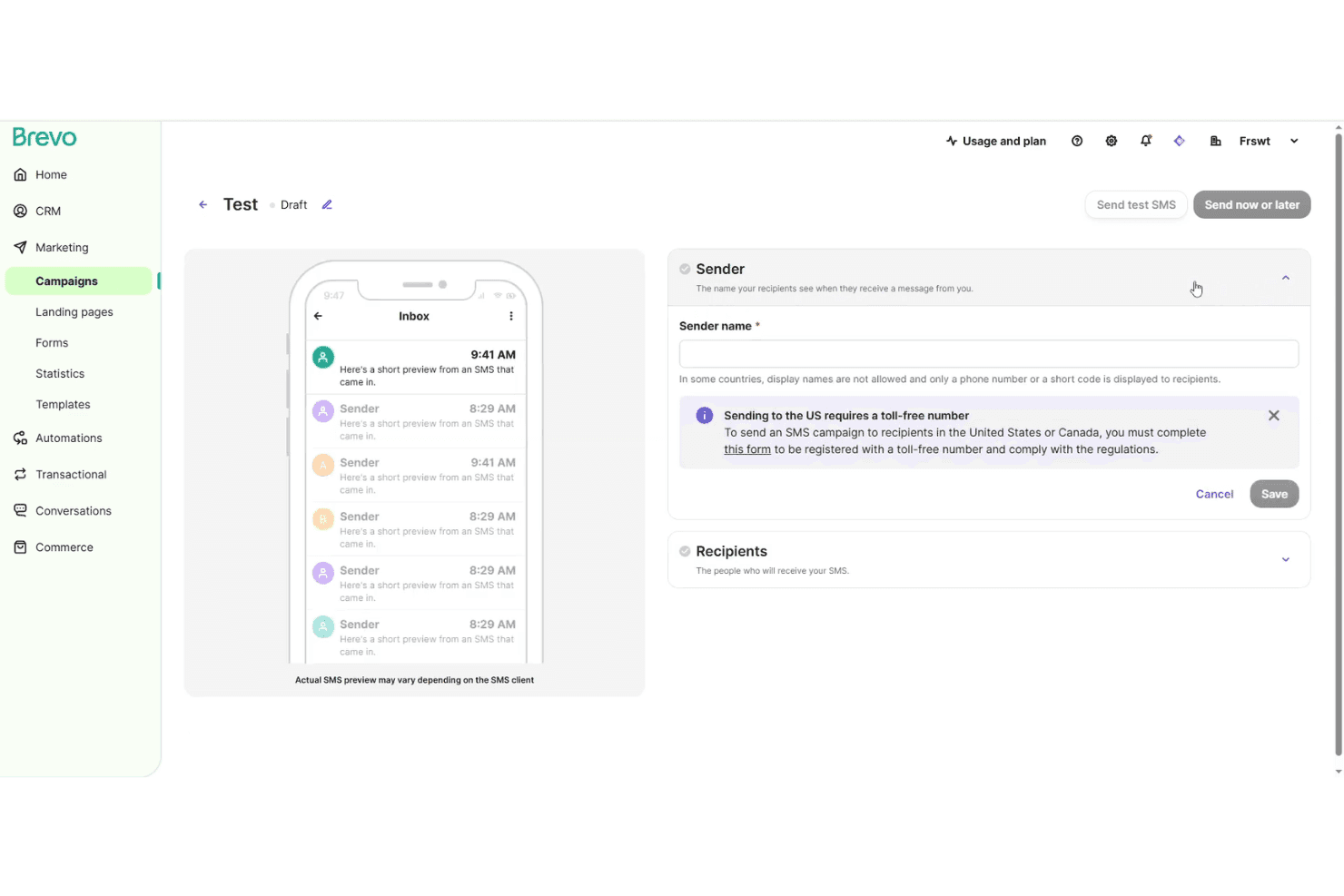
Brevo lets users build and send SMS campaigns with sender setup. Brevo is a customer communication platform that lets marketing teams and sales-driven companies manage contacts, send campaigns, and automate workflows across email and SMS—all from a single, centralized workspace.
Who Is Brevo Best For?
Brevo is a solid choice for marketing and sales teams at growing companies that need high-volume email and SMS campaign automation.
Why Brevo Is a Good Keap Alternative
I picked Brevo because it gives my team a central space to automate both email and SMS campaigns for high-volume outreach. I use Brevo’s workflow automation tools to trigger communications based on audience actions, and I can quickly manage large contact lists and campaign segmentation for marketing and sales-driven use cases.
Brevo Key Features
- Drag-and-drop email editor: Build and customize campaigns visually without any coding skills.
- Transactional email support: Send automated order confirmations, password resets, and notifications directly from your system.
- Real-time reporting dashboard: Track email and SMS performance with live data and analytics widgets.
- Contact management tools: Organize, import, and manage contacts with advanced filtering and segmentation options.
Brevo Integrations
Brevo offers native integrations with HubSpot, Salesforce, Shopify, WooCommerce, Magento, WordPress, and PrestaShop, and connects with Zapier. An API is available for custom integrations.
Pros and Cons
Pros:
- Real-time reporting for campaign performance
- Supports large contact lists and segmentation
- Centralized dashboard for email and SMS automation
Cons:
- Limited workflow automation depth for complex needs
- Advanced sales tools missing compared to Keap
Learn more about Brevo: Best for all-in-one at a fraction of Keap's cost
- Free plan available
- From $14.99/user/month
Visit WebsiteCustomer Rating:4.7/5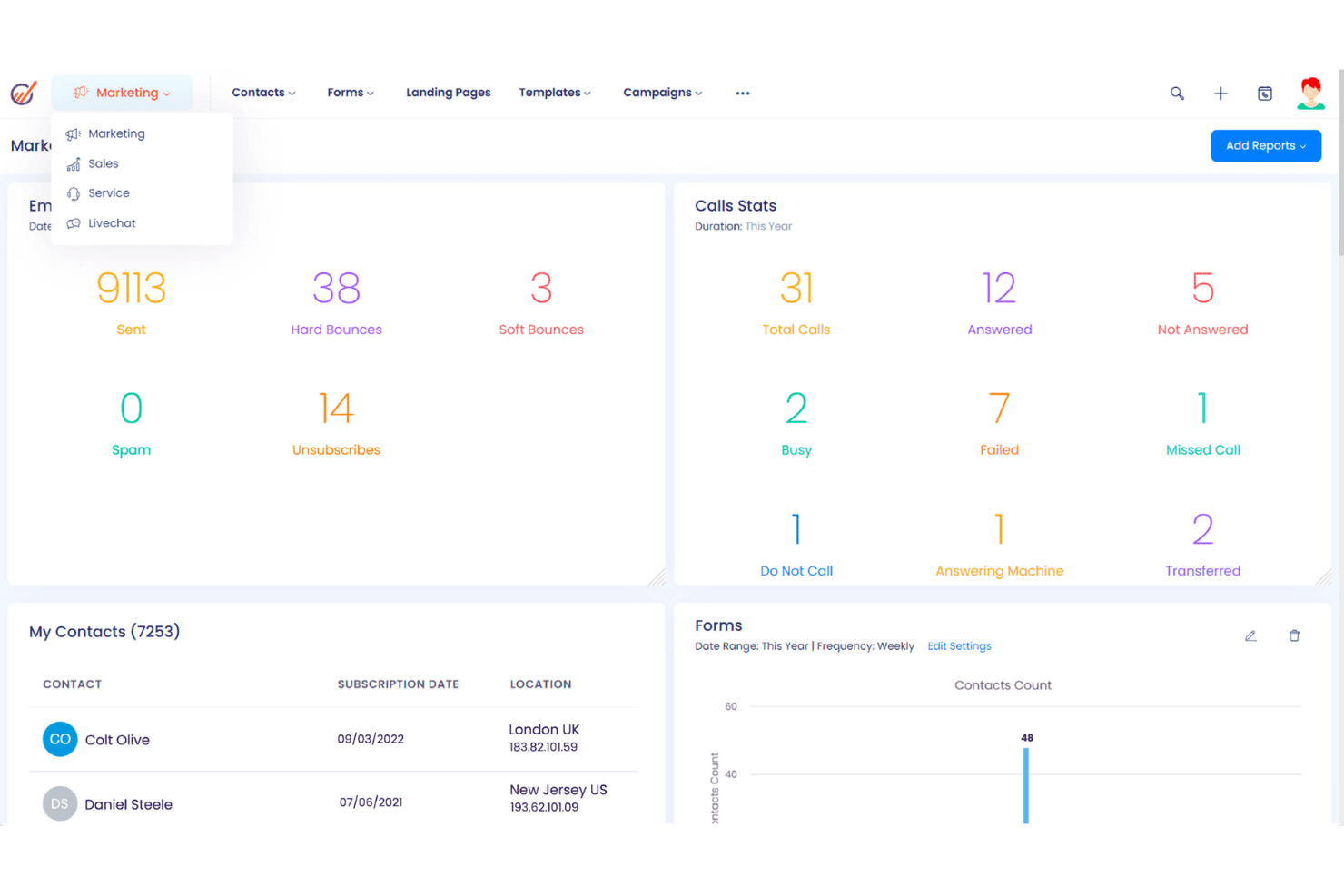
EngageBay includes marketing metrics, call activity, and contact details. EngageBay is a unified CRM platform designed for small and midsize teams who want marketing, sales, and customer support tools in a single workspace to break down silos and improve customer engagement.
Who Is EngageBay Best For?
EngageBay is a solid pick for small and midsize teams that want a unified workspace for marketing, sales, and customer support.
Why EngageBay Is a Good Keap Alternative
I picked EngageBay because I can manage marketing, sales, and customer support from one place at a fraction of Keap's cost. I like having visual sales pipelines, drag-and-drop marketing automation, and integrated ticketing together in a single dashboard. My team uses its contact management and multichannel campaign tools to keep everything connected without jumping between platforms.
EngageBay Key Features
- Email template builder: Create and customize email templates with a drag-and-drop editor for branded communications.
- Appointment scheduling: Book meetings with clients directly through a built-in calendar and sync with third-party calendars.
- Live chat widget: Add real-time chat support to your website for instant customer engagement and support.
- Lead scoring: Automatically score and prioritize leads based on engagement and predefined criteria to focus sales efforts.
EngageBay Integrations
EngageBay offers native integrations with Gmail, Outlook, Zapier, Xero, Mailgun, SendGrid, Stripe, and QuickBooks. An API is available for custom integrations.
Pros and Cons
Pros:
- Built-in live chat and appointment scheduling
- Visual pipeline tools for campaign management
- All-in-one dashboard for sales and support
Cons:
- Lacks advanced project capacity planning modules
- No native gamification elements
Learn more about EngageBay: Best for all-in-one pipelines with built-in invoicing
- 15-day free trial + free demo available
- From $12/user/month (billed annually)
Visit WebsiteCustomer Rating:4.3/5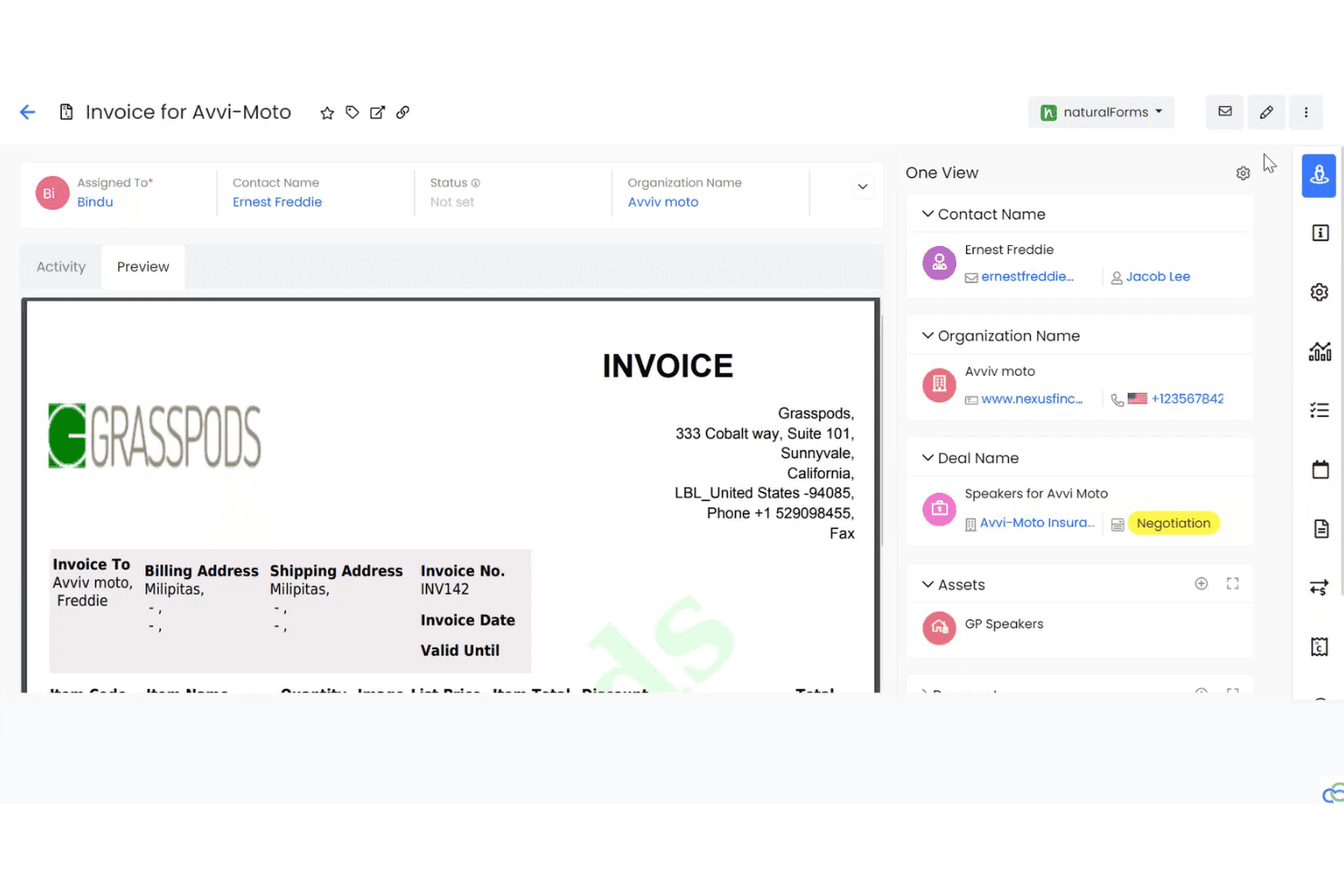
Vtiger links invoices with related contacts, deals, assets, and payment details. Vtiger is a CRM platform designed for businesses that need to manage leads, deals, and customer data in one place, making it ideal for teams that want unified workflows from first contact through to closing and post-sale support.
Who Is Vtiger Best For?
Vtiger is a good fit for growing teams that want a single platform to manage sales, marketing, and customer data end-to-end.
Why Vtiger Is a Good Keap Alternative
I picked Vtiger as a top Keap alternative because I can run all my sales pipelines and manage invoicing without leaving the same system. I use Vtiger's built-in deal management, quoting, and invoice tools to move prospects from lead to close and bill them directly, which saves my team time and reduces mistakes.
Vtiger Key Features
- Contact management: Store, organize, and segment leads, customers, and accounts in one searchable location.
- Workflow automation: Automate repetitive sales, marketing, and service tasks with customizable rules and triggers.
- Custom modules: Add custom fields and build new data modules to tailor Vtiger to your unique process needs.
- Reporting and analytics: Access dashboards and create custom reports to track pipeline, activities, and team performance.
Vtiger Integrations
Vtiger offers native integrations with Google Workspace, Microsoft 365, QuickBooks, Mailchimp, Twilio, Slack, Xero, DocuSign, and Zapier. An API is available for custom integrations.
Pros and Cons
Pros:
- Sales, marketing, and support in one platform
- Custom modules cover specialized process needs
- Built-in quoting and invoicing simplifies billing
Cons:
- Customer support channel availability varies by plan
- Lacks automatic multi-currency conversion
Learn more about Vtiger: Best for flat-rate pricing across the whole team
- 15-day free trial + free demo available
- From $49/month (billed annually)
Visit WebsiteCustomer Rating:4.2/5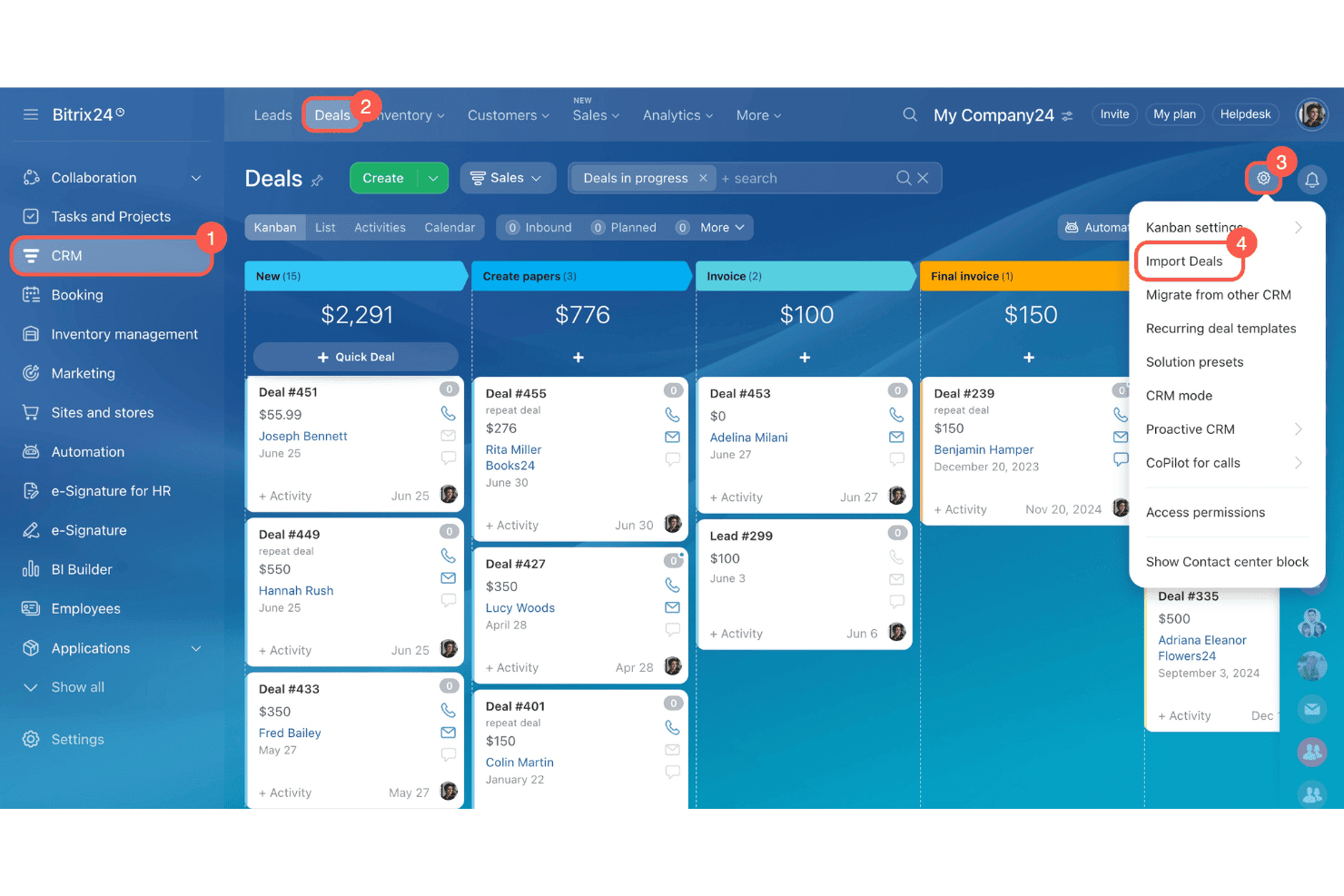
Bitrix24 lets users import deals directly into the CRM pipeline. Bitrix24 is a unified platform with CRM, project management, communications, and automation tools for businesses that want everything in one place, from sales pipelines to customer support.
Who Is Bitrix24 Best For?
Bitrix24 is a solid choice for midsize businesses that want an all-in-one platform to unify sales, marketing, and support teams.
Why Bitrix24 Is a Good Keap Alternative
I picked Bitrix24 for its all-in-one approach and flat-rate pricing across the whole team. I use its CRM, project management, and automation features together to unify sales, marketing, and support. My team tracks lead activities, automates deal flows, and manages cross-functional projects without jumping between tools.
Bitrix24 Key Features
- Omnichannel contact center: Route and handle customer queries across email, phone, live chat, social media, and messenger apps from one dashboard.
- Sales intelligence tools: Track lead sources, calculate ROI for campaigns, and analyze pipeline performance with built-in reporting.
- Custom workflow automation: Design and automate business processes using a visual workflow builder and triggers.
- Document management: Create, store, and collaborate on files and folders within secure, searchable workspaces.
Bitrix24 Integrations
Bitrix24 offers native integrations with Google Workspace, Microsoft 365, Facebook, Instagram, WhatsApp, Telegram, Mailchimp, Slack, Zoom, and Dropbox. It also provides an API for custom integrations.
Pros and Cons
Pros:
- Offers workflow automation with visual builder
- Includes omnichannel contact center for support teams
- Combines CRM, project management, and communications
Cons:
- Automation setup is less intuitive than Keap
- Interface can feel cluttered or overwhelming
Learn more about Bitrix24: Best for local service SMBs needing built-in payments
- Free demo + free trial available
- From $85/month (billed annually)
Visit WebsiteCustomer Rating:5/5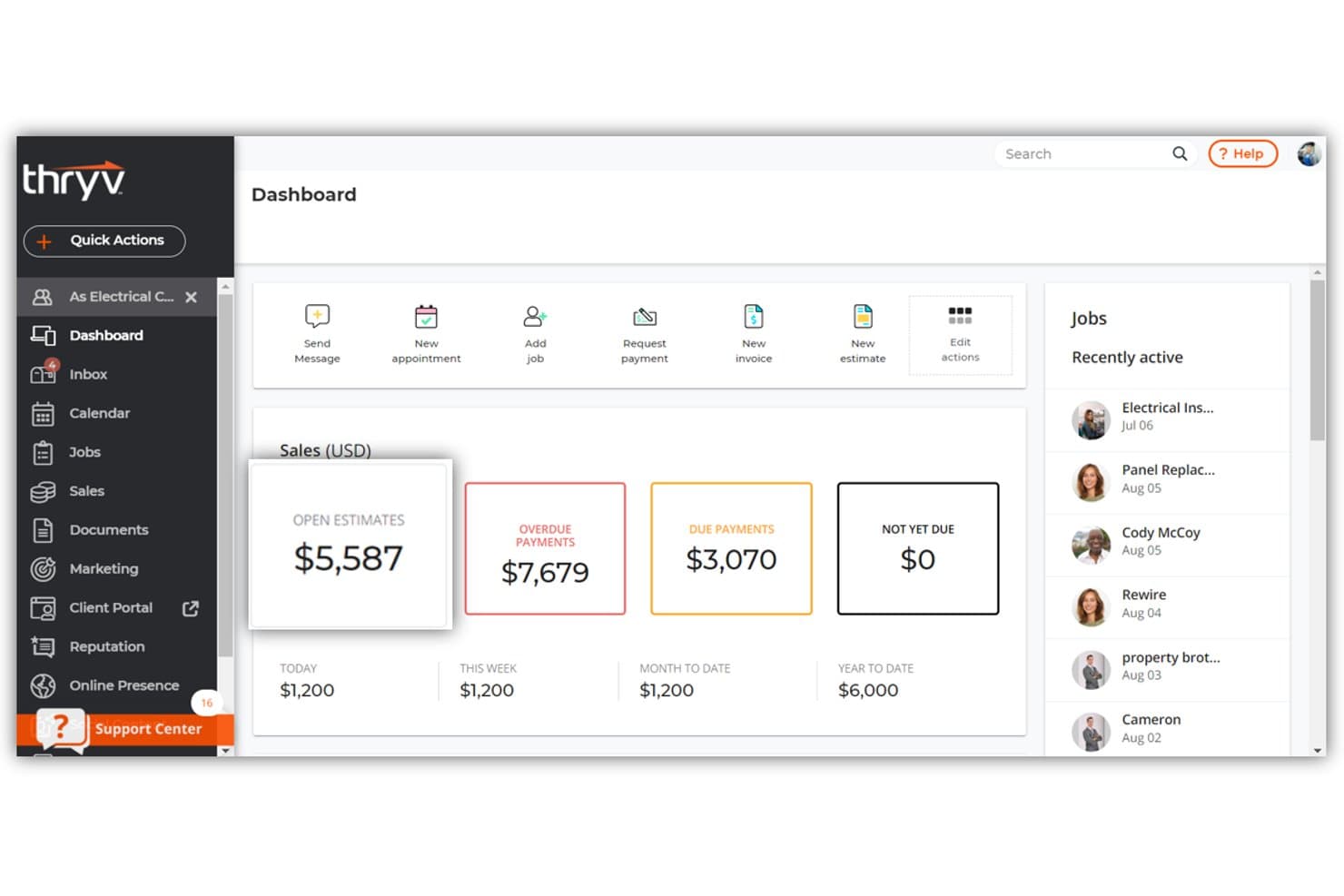
Thryv provides real-time sales totals, payment status, and recent active jobs. Thryv is a customer relationship management platform designed for small and midsize businesses focused on local services, bringing together scheduling, client communication, and invoicing in one system.
Who Is Thryv Best For?
Thryv is a good fit for small and midsize local service businesses that need a single platform for client management, scheduling, and payments.
Why Thryv Is a Good Keap Alternative
I picked Thryv as one of the best because I can manage local service appointments, handle client communications, and process payments all from one platform. My team easily schedules jobs through the built-in calendar and sends invoices that allow for direct online payments, so we keep everything organized for field services or home visits.
Thryv Key Features
- Contact management: Store detailed client information and track all client interactions in one place.
- Automated reminders: Send automated appointment, payment, and follow-up reminders to clients.
- Document storage: Upload, organize, and manage business documents within the platform.
- Mobile app access: Manage schedules, communications, and customer data from a dedicated mobile app.
Thryv Integrations
Thryv offers native integrations with Google Workspace, QuickBooks Online, Facebook, Instagram, Yelp, and Zoom. It also connects with Zapier and provides an API for custom integrations.
Pros and Cons
Pros:
- Mobile app for on-the-go service teams
- Automates appointment reminders and follow-ups
- Built-in invoicing with direct online payments
Cons:
- Customer portal branding options are restricted
- Limited access to raw backend databases
Learn more about Thryv: Best for agencies reselling white-label automation
- 14-day free trial
- From $97/month
Visit WebsiteCustomer Rating:4.6/5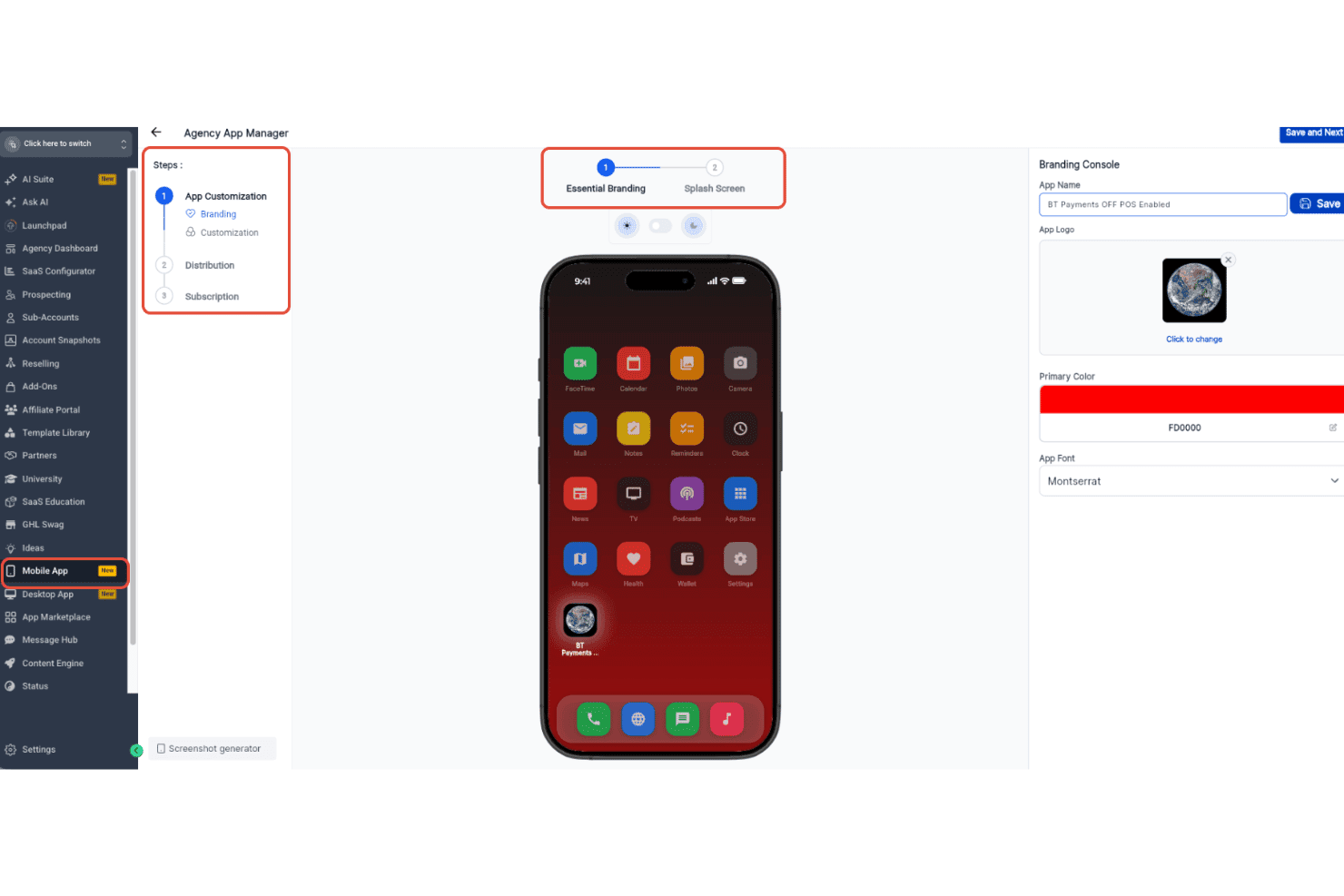
HighLevel lets users build branded mobile apps with custom logos and colors. HighLevel is an all-in-one platform for agencies and consultants who want to manage CRM workflows, automate marketing, and centralize communications across client accounts.
Who Is HighLevel Best For?
Agencies and consultancies managing multiple client accounts and looking to centralize client marketing, sales, and communications in a single platform.
Why HighLevel Is a Good Keap Alternative
I picked HighLevel as a top alternative thanks to its unique focus on agencies reselling white-label automation. My team is able to manage multiple client accounts in one place, customize white-label client portals, and automate marketing workflows at scale, making it ideal when running multi-client projects.
HighLevel Key Features
- Multi-channel messaging: Manage SMS, email, voice, and social messages from a single unified inbox.
- Automated appointment scheduling: Let clients book and manage appointments online with built-in calendar functionality.
- Pipeline management: Customize sales pipelines with drag-and-drop stages and real-time lead tracking.
- Reputation management tools: Request, track, and display reviews to improve your clients’ online presence.
HighLevel Integrations
HighLevel offers native integrations with Google My Business, Facebook, Stripe, Twilio, Mailgun, Zoom, Shopify, QuickBooks, and Google Analytics, and connects with Zapier. An API is available for custom integrations.
Pros and Cons
Pros:
- Lets you automate campaigns across multiple clients
- Supports white-label client portals and branding
- Centralizes client management for agency teams
Cons:
- Some workflows require advanced technical setup
- No built-in asset management folders
Learn more about HighLevel: Best for scaling all-in-one revenue ops
- Free plan available
- From $20/user/month
Visit WebsiteCustomer Rating:4.4/5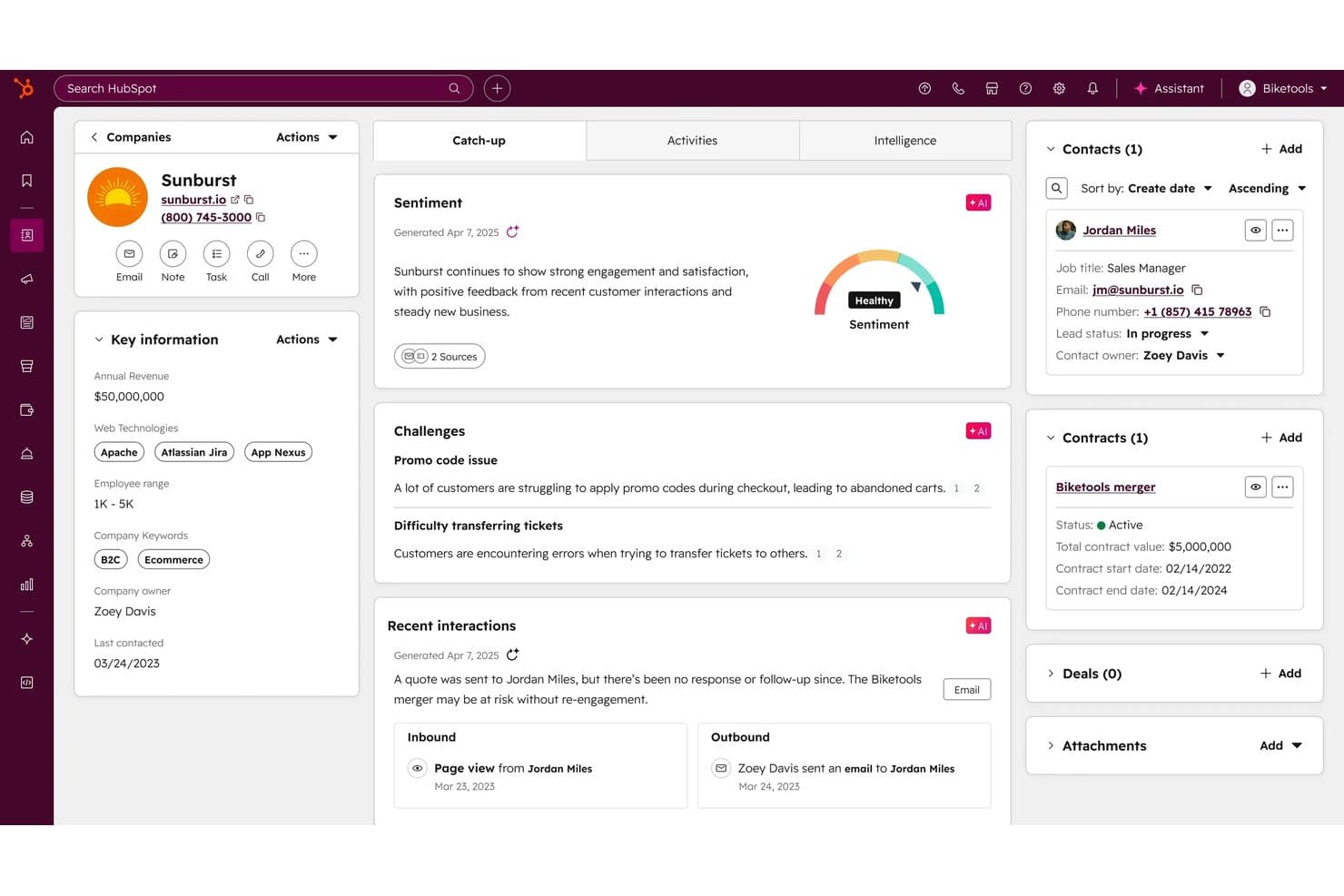
HubSpot provides company records with AI-driven insights and contact details. HubSpot is an all-in-one CRM platform designed for growing revenue teams who want one central system for sales, marketing, and customer success, with integrated tools to manage leads, pipelines, campaigns, and reporting from one place.
Who Is HubSpot Best For?
HubSpot is a smart choice for revenue teams at growing companies that need a single platform to unify sales, marketing, and customer success.
Why HubSpot Is a Good Keap Alternative
I picked HubSpot as one of the best because it can unify sales, marketing, and customer success in one place, making it much easier to manage pipelines and campaigns together. I like having lead management, campaign tracking, and custom reporting built into a single platform so my revenue team can coordinate every customer interaction at scale.
HubSpot Key Features
- Custom pipeline automation: Build flexible, automated workflows to move deals and tasks between stages.
- Email tracking and templates: Track opens and clicks in real time and use customizable email templates with your contact records.
- Meeting scheduling tool: Share personalized booking links so prospects can schedule meetings directly to your calendar.
- Live chat and chatbot builder: Engage visitors instantly or automate replies and lead capture with no-code chatbots.
HubSpot Integrations
HubSpot offers hundreds of native integrations, including Salesforce, Google Workspace, Microsoft 365, Slack, Zoom, Mailchimp, Shopify, Zendesk, QuickBooks, Facebook Ads, and Eventbrite. It also connects with Zapier and provides an API for custom integrations.
Pros and Cons
Pros:
- Built-in live chat and chatbot builder
- Customizable automation across pipeline stages
- Unified interface for sales and marketing teams
Cons:
- Lacks native backup and restore capabilities
- Workflow automation limited on lower tiers
Learn more about HubSpot: Best for multi-channel lifecycle automation
- 14-day free trial + free demo available
- From $15/month (billed annually)
Visit WebsiteCustomer Rating:4.4/5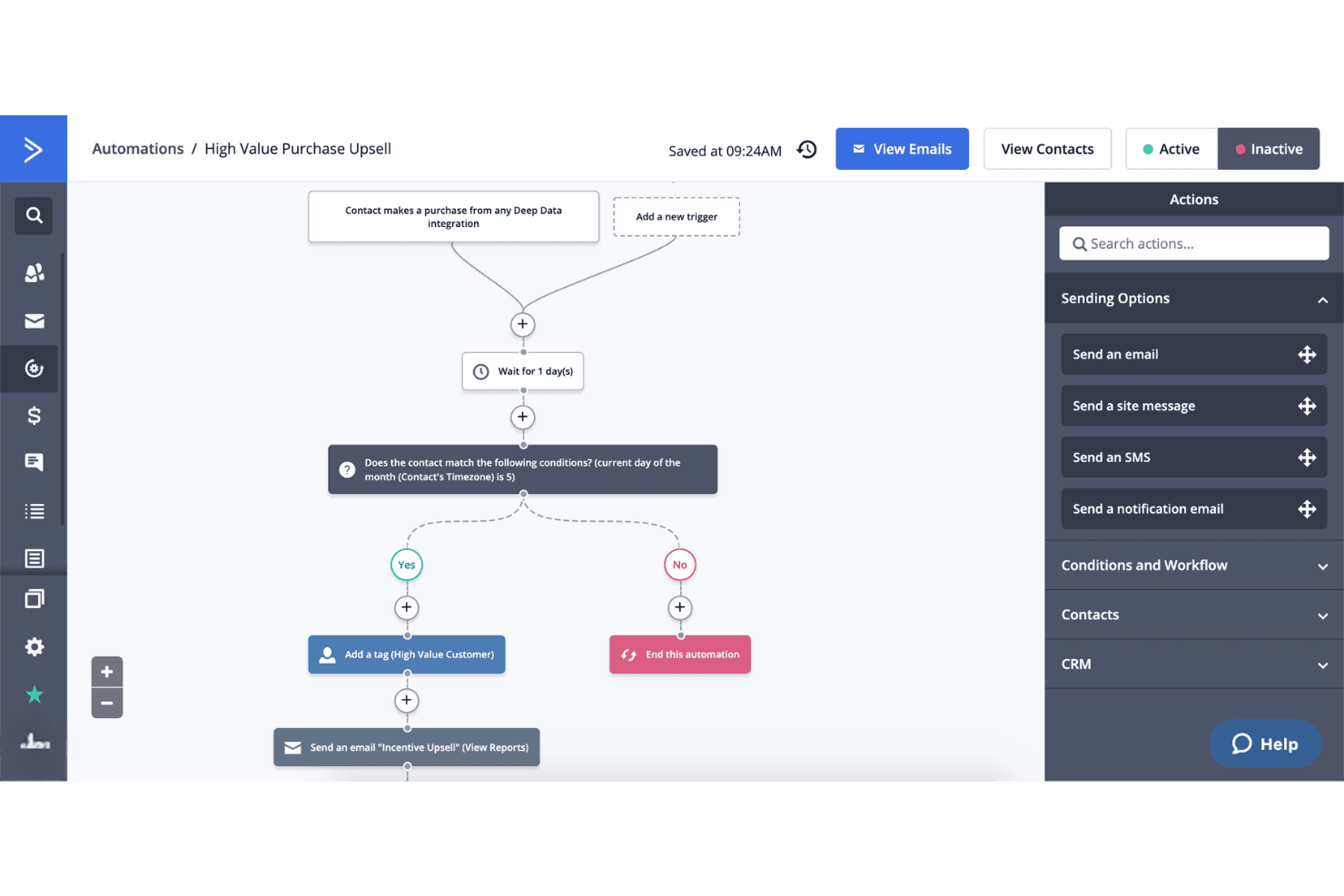
ActiveCampaign automates purchase-triggered upsell email workflows visually. ActiveCampaign gives sales, marketing, and customer success teams a single platform for building automations, managing contacts, and coordinating multi-channel engagement across the entire customer lifecycle.
Who Is ActiveCampaign Best For?
ActiveCampaign is a strong choice for revenue teams who need cross-channel automation and advanced segmentation across sales, marketing, and customer success.
Why ActiveCampaign Is a Good Keap Alternative
I picked ActiveCampaign as a top Keap alternative because I’m able to automate multi-channel campaigns from a single platform and apply advanced segmentation across email, SMS, and social. My team uses it to coordinate engagement workflows between sales, marketing, and customer success teams. That gives us real flexibility for managing the entire customer journey.
ActiveCampaign Key Features
- Pipeline management: Visualize deals and stages in a drag-and-drop sales pipeline view.
- Site tracking: Capture visitor activity on your web pages and use behavioural data to trigger automated actions.
- Lead scoring: Assign customizable scores to contacts based on actions and engagement.
- Integrations marketplace: Connect with hundreds of apps like Salesforce, Shopify, and Facebook without code.
ActiveCampaign Integrations
ActiveCampaign offers hundreds of native integrations, including Salesforce, Shopify, Facebook, Slack, WordPress, Google Analytics, Zoom, Microsoft Teams, Calendly, and WooCommerce. Zapier and an API are available for custom integrations.
Pros and Cons
Pros:
- Coordinates sales and customer success workflows
- Advanced segmentation across sales and marketing
- Automates multi-channel journeys from one platform
Cons:
- Page tracking can slow website load
- Steep setup for complex automations
Learn more about ActiveCampaign: Best for all-in-one Keap migration with native SMS
- 14-day free trial
- From $83/month (billed annually)
Visit WebsiteCustomer Rating:4.3/5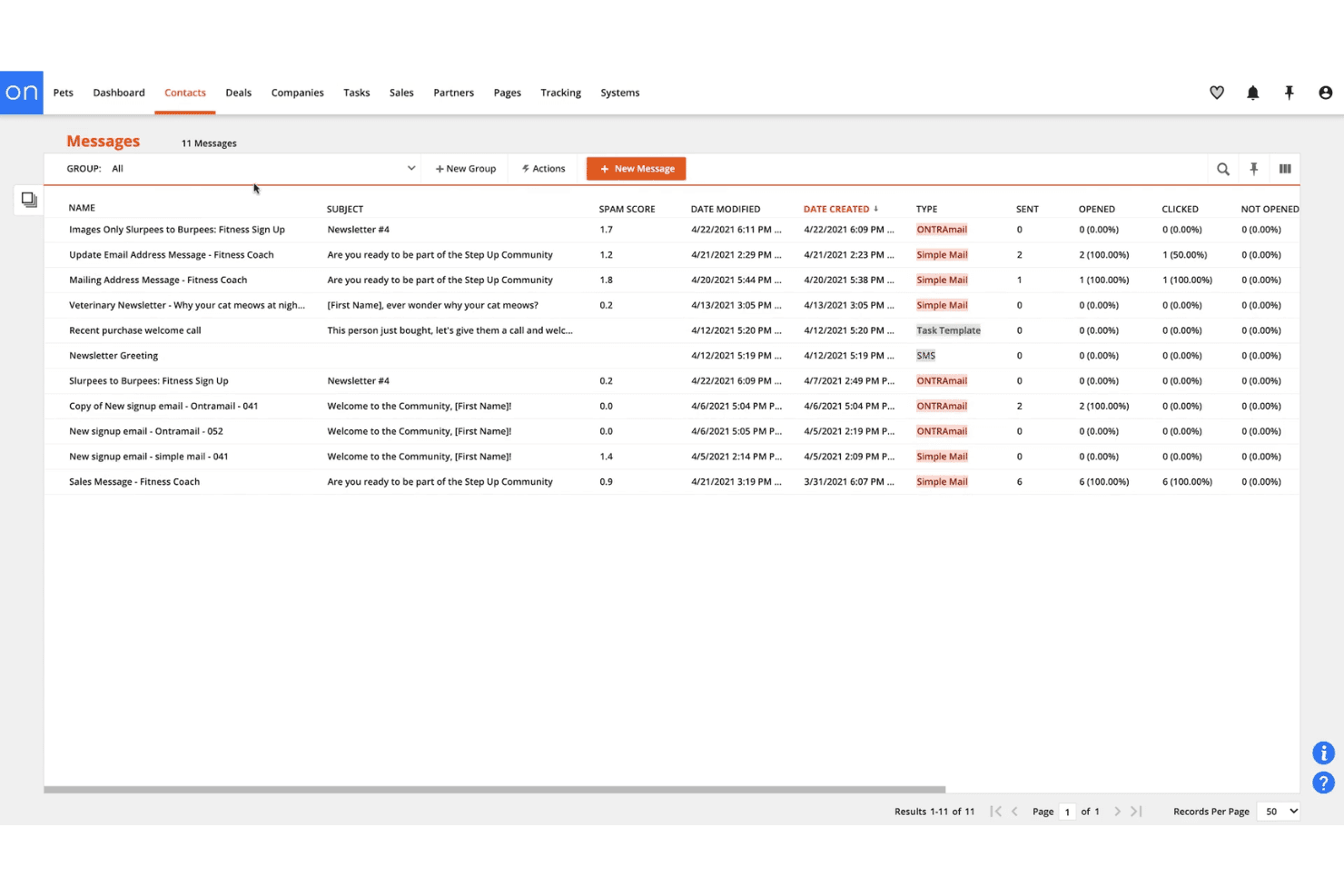
Ontraport lets users manage and track email messages with performance metrics. Ontraport is a CRM and marketing automation platform designed for growing businesses that need customizable workflows, built-in email and SMS tools, and sales pipeline management all in one place.
Who Is Ontraport Best For?
Ontraport is a solid pick for growing small businesses that want customizable sales, marketing, and SMS tools in one platform.
Why Ontraport Is a Good Keap Alternative
I picked Ontraport as a top option because of its built-in migration tools and fully native SMS messaging. When moving from Keap, I can bring over contacts, automate workflows, and set up sales pipelines while communicating with leads via SMS without extra integrations. That makes migrations and campaign execution smoother for my team.
Ontraport Key Features
- Custom objects: Create and manage custom data entities to tailor your CRM to your unique business processes.
- Task automation: Set up workflow automations that assign, notify, and track tasks across your team.
- Landing page builder: Design and publish branded landing pages using a drag-and-drop editor with built-in templates.
- Payment processing: Accept payments directly through the platform with integrated invoicing and order forms.
Ontraport Integrations
Ontraport offers native integrations with Zapier, Stripe, WordPress, Facebook, Google Analytics, Shopify, PayPal, QuickBooks, PlusThis, and Google Calendar. An API is available for custom integrations.
Pros and Cons
Pros:
- Drag-and-drop landing page builder included
- Custom objects support complex business workflows
- Native SMS messaging and automation included
Cons:
- Fewer ecommerce templates available
- Limits outbound calling directly from browser
Learn more about Ontraport: Best for CRM with built-in iPaaS automation
- 14-day free trial
- From $29/user/month (billed annually)
Visit WebsiteCustomer Rating:4.2/5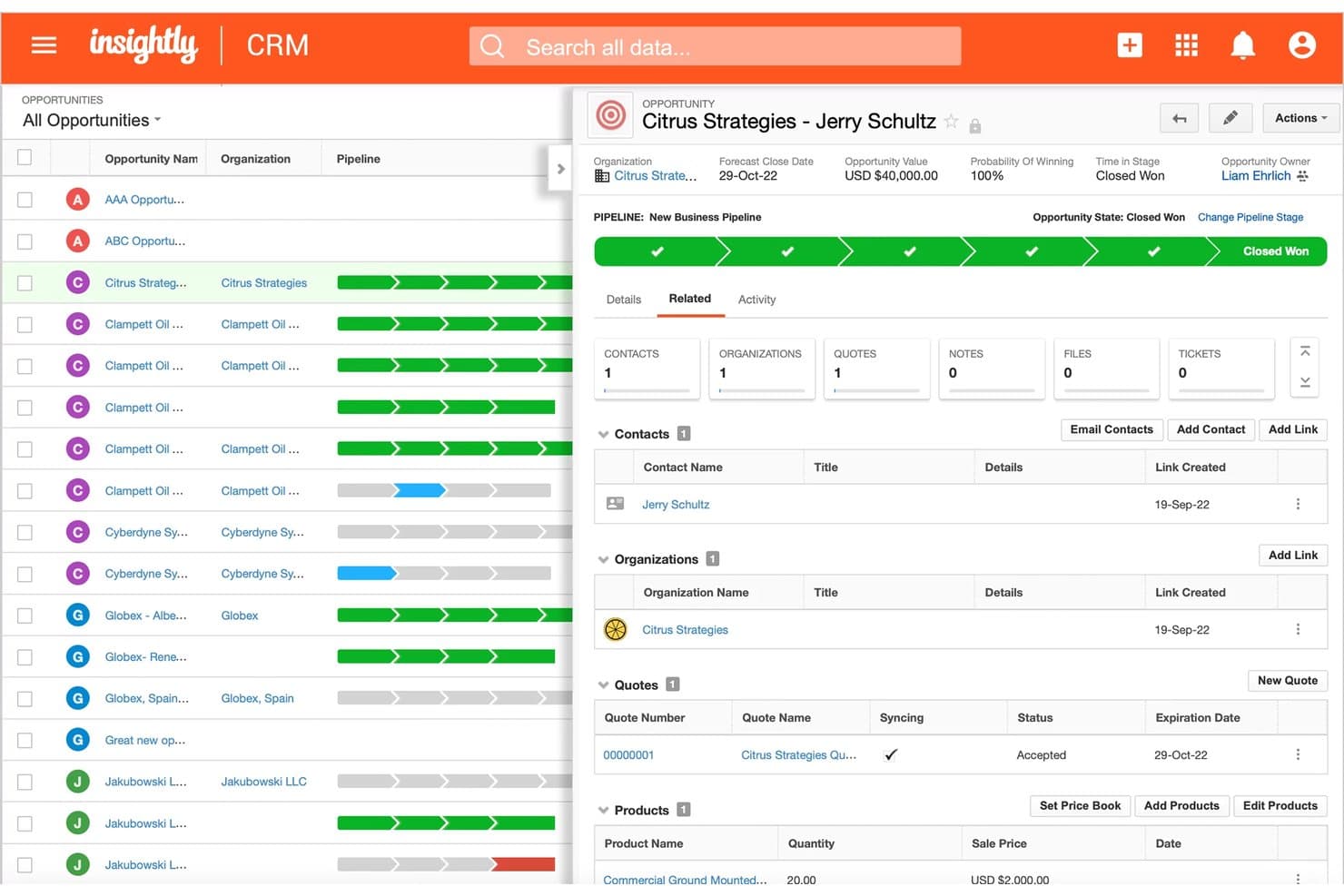
Insightly tracks deals with pipeline stages, quotes, and contacts in one view. Insightly is a CRM platform designed for sales, marketing, and project teams who need strong data management tools, workflow customizations, and unified visibility across customer and pipeline activities.
Who Is Insightly Best For?
Insightly is a good fit for sales, marketing, and project teams in midsize businesses who need customizable workflows and unified customer data management.
Why Insightly Is a Good Keap Alternative
I picked Insightly as one of the best because its built-in iPaaS automation lets my team design end-to-end workflows right within the CRM. I can connect sales activities directly to project management tasks, and trigger multi-step automations based on pipeline updates, all without leaving Insightly. That level of native workflow customization goes well beyond what I get from most CRMs.
Insightly Key Features
- Advanced contact and organization management: Store, segment, and link contacts and organizations with rich profile details and relationship mapping.
- Pipeline and opportunity tracking: Monitor deals through customizable sales pipelines and track opportunity stages, values, and outcomes.
- Project management tools: Convert won opportunities to projects and manage tasks, milestones, and project deliverables inside the CRM.
- Integrated email management: Send, receive, and track emails directly in Insightly, including Gmail and Outlook integration.
Insightly Integrations
Insightly offers native integrations with Google Workspace, Microsoft 365, Mailchimp, QuickBooks Online, Xero, Dropbox, Slack, DocuSign, and PandaDoc. It also connects with Zapier and provides an API for custom integrations.
Pros and Cons
Pros:
- Customizable pipeline and opportunity tracking
- Unified project management inside the CRM
- Built-in iPaaS automation for cross-team workflows
Cons:
- Limited custom domain mapping
- Project features lack resource management tools
Andre Keap-alternativer
Her er noen flere Keap-alternativer som ikke kom med på kortlisten, men som likevel er verdt å se nærmere på:
- 11monday CRMBest for visual pipeline AI and revops teams
- 12Zoho CRMBest for AI-driven pipeline scale-up
- 13Mailchimp Best for email-first marketing without a sales CRM
- 14GetResponseBest for email automation with built-in webinars
- 15SalesmateBest for built-in calling and SMS outreach
- 16FreshsalesBest for native multi-channel outreach in one CRM
- 17PipedriveBest for visual sales pipeline without Keap's price
- 18NutshellBest for next-action selling with built-in SMS
- 19KlaviyoBest for ecommerce lifecycle segmentation and SMS
- 20KartraBest for funnel-driven monetization and courses
How I Evaluate Keap Alternatives
I split my evaluation into two layers: the core functionality every Keap alternative must deliver—centralized CRM, automation workflows, email marketing, pipeline management, lead capture, and integrations—and the differentiators that set one platform apart from another.
Core Functionality (Table Stakes For This List)
When I'm selecting tools for my list, I rank each one on a scale from 0 (does not offer the functionality) to 5 (excels in this area) for each core functionality listed below. I then calculate the tool's total score as a percentage, using 75% as a benchmark to help assess its overall fit for the list.
- Contact & CRM management: I evaluate how each tool handles segmentation, tagging, custom fields, and activity tracking across the full contact lifecycle.
- Marketing automation workflows: Visual workflow builders with branching logic and behaviour-based triggers matter here—like auto-tagging contacts who click a pricing link, then routing them into a sales sequence.
- Email marketing: I look for broadcast sends, automated sequences, personalization tokens, and A/B testing. Deliverability tooling is a big factor, since platforms like HubSpot and ActiveCampaign approach it differently.
- Sales pipeline automation: Deal-stage tracking with automated task assignment and stage progression rules is what I check for—think auto-moving a deal to "proposal sent" when a quote is emailed.
- Lead capture tools: Native form and landing page builders that feed contacts directly into automations earn higher marks. I look at template variety, conditional logic, and how tightly submissions connect to CRM records.
- Integrations & API: The breadth of native connectors, Zapier support, and open API access all factor in. RevOps teams typically need connections to billing, support, and BI tools alongside the CRM.
Once I have a list of tools that meet the criteria, I consider what sets each platform apart.
Differentiating Factors (What Sets Vendors Apart)
Here's how I compare and contrast different vendors:
Standout Features
Native SMS and MMS tied directly to automation workflows matter because it lets you run multi-channel sequences without bolting on Twilio or a separate texting provider. I check whether SMS triggers, two-way replies, and consent management live inside the same builder as email sequences. Built-in invoicing, checkout pages, and subscription billing also separate strong contenders from basic CRMs. For service-based teams, collecting payment and firing post-purchase automations from one record beats juggling a standalone billing tool. I also evaluate lead scoring depth and whether behaviour-based scoring feeds into revenue attribution dashboards you can act on without exporting to a BI layer.
Beyond Features
I evaluate total cost of ownership closely—contact-tier pricing can look affordable at launch, then spike when your list crosses a threshold. Hidden onboarding fees or paid add-ons for SMS and landing pages change the math fast. Deliverability matters just as much: I check whether a platform offers dedicated IP options, built-in domain authentication, and list-hygiene tools, since poor inbox placement undermines every automation you build. I also look at ecosystem fit—whether native connectors, open API access, and webhook support let you tie the CRM into your billing, BI, and data warehouse without workarounds.
Hvorfor se etter et Keap-alternativ?
Selv om Keap er et godt valg av programvare for kunderelasjonshåndtering, finnes det flere grunner til at noen brukere ser etter alternative løsninger. Det kan hende du ser etter et Keap-alternativ fordi …
- Du trenger mer avansert salgsautomatisering enn enkle arbeidsflyter
- Du ønsker større åpenhet for store eller geografisk spredte team
- Du ser etter flere integrasjonsmuligheter for en fleksibel teknologistakk, for eksempel bedre integrasjon med sosiale medier eller en samlet brukerstøtteplattform
- Keaps opprinnelige fokus på grunnleggende inngående markedsføring, generering av potensielle kunder og enkeltpersonforetak ikke lenger dekker behovene dine etter hvert som virksomheten vokser
- Du trenger avanserte tilpasningsmuligheter som plattformen ikke tilbyr
- Du ønsker mer gjennomsiktige priser etter hvert som kontaktlistene vokser
Hvis noe av dette høres kjent ut, har du kommet til riktig sted. Listen min inneholder flere gode Keap-konkurrenter som passer bedre for team som møter disse utfordringene med Keap og ser etter alternative løsninger.
Viktige funksjoner i Keap
Her er noen av de viktigste funksjonene i Keap, slik at du kan sammenligne hva de alternative løsningene tilbyr:
- Kontakt- og CRM-administrasjon: Lagre, segmentere og merke kontakter, spore kommunikasjonshistorikk og administrere egendefinerte felt gjennom hele salgsprosessen. Dette hjelper team med å holde oversikt over kundeemner og tilpasse kontaktarbeidet på tvers av markedsføring og salg.
- Arbeidsflyter for markedsføringsautomatisering: Bygg visuelle automatiseringsarbeidsflyter ved hjelp av atferdsbaserte utløsere, for eksempel ved å sende e-post automatisk når et kundeemne sender inn et skjema, eller oppdatere kontaktmerker basert på interaksjoner for effektiv oppfølging av kundeemner.
- E-postmarkedsføring: Send e-postkampanjer til mange mottakere, opprett automatiserte e-postsekvenser, tilpass innhold ved hjelp av egendefinerte felt og gjennomfør A/B-testing av meldinger for god leveringsevne og engasjement. Innebygde verktøy for e-postsporing hjelper deg med å følge med på åpningsfrekvenser og svar.
- Administrasjon av salgspipeline: Administrer salgsmuligheter ved hjelp av tilpassbare salgsfaser, automatiser oppfølginger og tildel oppgaver etter hvert som avtaler beveger seg gjennom pipelinen. Dette gjør det mulig for salgsteam å holde avtalene i fremdrift og minimere manuell registrering.
- Avtaleplanlegging: Gi kunder en lenke for å planlegge møter direkte i tilgjengelige tidsluker, og integrer avtalene i CRM-oppføringer og automatiserte påminnelser.
- Netthandel og fakturering: Opprett og send fakturaer, ta imot betalinger på nett via integrert betalingsbehandling, konfigurer abonnementsfakturering og utløs automatiseringer basert på betalingsstatus eller handlekurvaktivitet – alt på samme plattform.
- Innhenting av kundeemner og skjemaer: Bruk innebygde landingssider og tilpassbare nettskjemaer til å hente inn nye kundeemner og umiddelbart legge dem til i CRM-systemet og automatiseringsarbeidsflytene.
- Integrasjonsøkosystem: Koble Keap til populære verktøy for regnskap, netthandel og markedsføring gjennom innebygde integrasjoner og et åpent API, med støtte for datasynkronisering på tvers av plattformer.
- Mobilapp: Få tilgang til kontaktoppføringer, administrer oppgaver, se avtaler og send kommunikasjon, for eksempel SMS-markedsføringsmeldinger, uansett hvor du er. Dermed kan viktig arbeid fortsette uten at du må være bundet til en datamaskin.
- Rapportering og analyse: Følg med på salgsresultater, kampanjeresultater og inntektsdata gjennom tilpassbare kontrollpaneler og rapporter, slik at ledelsen får innsikt i virksomhetens tilstand og veksttrender.
Kostnader og priser for alternativer til Keap
Når du velger alternativer til Keap, må du forstå de ulike prismodellene og tilgjengelige abonnementene. Kostnadene varierer basert på funksjoner, teamstørrelse, tillegg og mer. Tabellen nedenfor oppsummerer vanlige abonnementer, gjennomsnittsprisene deres og typiske funksjoner som er inkludert i løsninger som er alternativer til Keap:
Sammenligningstabell for abonnementer for alternativer til Keap
| Abonnementstype | Gjennomsnittspris | Vanlige funksjoner |
|---|---|---|
| AbonnementstypeGratisabonnement | Gjennomsnittspris$0-$20/bruker/måned | Vanlige funksjonerGrunnleggende kontaktadministrasjon, enkle e-postkampanjer, begrenset automatisering og grunnleggende integrasjonsalternativer. |
| AbonnementstypePersonlig abonnement | Gjennomsnittspris$20-$40/bruker/måned | Vanlige funksjonerAvansert kontaktsegmentering, egendefinerte felt, grunnleggende pipelineadministrasjon og standardrapportering. |
| AbonnementstypeBedriftsabonnement | Gjennomsnittspris$40-$100/bruker/måned | Vanlige funksjonerVisuelle automatiseringsarbeidsflyter, kontaktarbeid i flere kanaler, automatisering av salgspipeline og forbedrede integrasjoner. |
| AbonnementstypeVirksomhetsabonnement | Gjennomsnittspris$100-$300/bruker/måned | Vanlige funksjonerAvanserte tillatelser, rollebasert tilgang, støtte for egendefinert API, prioritert kundestøtte og detaljert analyse. |