

Uno strumento di coaching alle vendite con IA è un software che utilizza l'intelligenza artificiale per analizzare le conversazioni di vendita, fornire feedback personalizzati e guidare i professionisti delle vendite nel miglioramento delle proprie competenze. Se stai cercando i migliori strumenti di coaching alle vendite, probabilmente vuoi potenziare il coaching tradizionale, aiutare il tuo team a migliorare i tassi di successo e ottenere informazioni utili per aumentare i tassi di conversione da ogni chiamata.
Con così tante opzioni disponibili, è difficile capire quale piattaforma di coaching sia adatta alla tua specifica metodologia di vendita, al tuo insieme di tecnologie e ai tuoi programmi di formazione. Questa guida analizza le migliori opzioni di coaching alle vendite con IA, così potrai confrontare le funzionalità, capire cosa distingue ciascuna soluzione e prendere una decisione consapevole per il tuo team commerciale.
Perché fidarsi dei nostri consigli sui software
6,700+
Reviews
20
Industry experts
16+
Evaluation factors
14
Years
Le nostre recensioni riflettono il nostro giudizio indipendente, non un discorso di vendita. Scopri come manteniamo la trasparenza.
Per questa guida, abbiamo valutato gli strumenti attraverso test pratici e ricerche indipendenti, assegnando un punteggio agli strumenti in base ai nostri criteri di selezione.
Le nostre recensioni riflettono il nostro giudizio editoriale umano, non un discorso di vendita.
Tabella comparativa degli strumenti di coaching alle vendite con IA
Questa tabella comparativa riassume i dettagli sui prezzi delle mie principali selezioni di software per il coaching alle vendite con IA.
| Tool | Best For | Trial Info | Price | ||
|---|---|---|---|---|---|
| 1 | Ideale per suggerimenti contestuali e gestione delle obiezioni nelle chiamate | Demo gratuita disponibile | Prezzo su richiesta | Website | |
| 2 | Ideale per le analisi delle conversazioni nei team di vendita | Demo gratuita disponibile | Prezzo su richiesta | Website | |
| 3 | Ideale per la guida in tempo reale durante le conversazioni live | Prova gratuita di 14 giorni + demo gratuita | Da $80/utente/mese (fatturazione annuale) | Website | |
| 4 | Ideale per simulazioni interattive di giochi di ruolo con avatar basati sull'intelligenza artificiale | Demo gratuita disponibile | Prezzi su richiesta | Website | |
| 5 | Ideale per analisi delle lacune di competenze e coaching mirato | Piano gratuito disponibile | Prezzi disponibili su richiesta | Website | |
| 6 | Ideale per coaching di role-play con IA | Demo gratuita disponibile | Prezzo su richiesta | Website | |
| 7 | Ideale per esercitazioni su scenari con simulazioni guidate da IA | Demo gratuita disponibile | Prezzo su richiesta | Website | |
| 8 | Ideale per moduli di formazione sulle vendite personalizzati e automatizzati | Demo gratuita disponibile | Prezzo su richiesta | Website | |
| 9 | Ideale per feedback istantanei sulle performance delle chiamate di vendita | Demo gratuita disponibile | Prezzo su richiesta | Website | |
| 10 | Ideale per raccomandazioni strategiche sulle trattative guidate dall’AI | Non disponibile | A partire da $59.99/mese | Website |


Recensioni degli strumenti di coaching alle vendite con IA
Di seguito trovi le mie analisi dettagliate dei migliori software per il coaching alle vendite con IA inclusi nella mia selezione. Le mie recensioni offrono uno sguardo approfondito sulle funzionalità, sui casi d’uso migliori e sulle integrazioni di ogni piattaforma, per aiutarti a trovare quella più adatta al tuo team.
 Ideale per suggerimenti contestuali e gestione delle obiezioni nelle chiamate
- Demo gratuita disponibile
- Prezzo su richiesta
Visit WebsiteCustomer Rating:4.9/5
Salesken è una piattaforma AI per le vendite che offre ai rappresentanti una guida in tempo reale per gestire le obiezioni e mantenere il messaggio durante le chiamate. Salesken è una piattaforma di conversazione per le vendite alimentata dall'intelligenza artificiale, progettata per i team che desiderano una guida in tempo reale durante le chiamate con i clienti. È particolarmente utile per i manager e i rappresentanti delle vendite in ambienti B2B ad alto ritmo che hanno bisogno di aiuto per gestire obiezioni complesse e mantenere il focus sul messaggio. Se cerchi uno strumento che supporti attivamente i rappresentanti mentre sono al telefono, Salesken offre soluzioni mirate.
Per chi è più indicato Salesken?
Salesken è adatto ai team di vendita B2B e ai manager che desiderano una guida AI in tempo reale durante le chiamate con i clienti.
Perché ho scelto Salesken
Ciò che distingue Salesken è la capacità di offrire suggerimenti contestuali e gestione delle obiezioni direttamente durante le chiamate di vendita. La piattaforma ascolta le conversazioni in tempo reale e suggerisce ai rappresentanti argomentazioni pertinenti o risposte adeguate quando sorgono delle obiezioni, cosa particolarmente utile per formare i membri meno esperti del team. Mi piace che l'intelligenza artificiale di Salesken non si limiti ad analizzare le chiamate a posteriori, ma supporti attivamente i rappresentanti mentre sono al telefono, aiutandoli a rimanere allineati con il messaggio e i playbook di vendita. Questo lo rende una scelta forte per i team che vogliono migliorare i risultati e la coerenza delle chiamate attraverso il coaching in tempo reale, direttamente sulla chiamata.
Funzionalità principali di Salesken
Altre funzionalità che ho notato durante la recensione di Salesken includono:
- AI per l’assicurazione qualità: Valuta il 100% delle conversazioni di vendita con valutazioni e monitoraggio della conformità guidati dall'AI.
- Salesken Notetaker: Trascrive e riassume automaticamente le chiamate di vendita, catturando i punti chiave emersi e le azioni da intraprendere.
- Analisi delle vendite sul campo: Cattura e analizza le conversazioni sul campo per generare approfondimenti sulle prestazioni.
- Arricchimento CRM automatico: Invia direttamente al tuo CRM i riepiloghi delle chiamate e i dati chiave dei clienti senza inserimento manuale.
Integrazioni di Salesken
Le integrazioni includono Salesforce, HubSpot, Pipedrive, Zoom e Microsoft Teams.
Pros and Cons
Pros:
- Monitora la coerenza del pitch dei rappresentanti
- Analisi delle chiamate integrata
- Ottime integrazioni CRM
Cons:
- L'audio delle chiamate può presentare problemi
- Serve tempo per ottimizzare gli avvisi
Learn more about Salesken: 2Ideale per le analisi delle conversazioni nei team di vendita
Gong
- Demo gratuita disponibile
- Prezzo su richiesta
Visit WebsiteCustomer Rating:4.7/5
Gong utilizza l'IA per analizzare le chiamate di vendita e fornire insight che aiutano i team di revenue a offrire coaching ai venditori e ridurre i rischi di trattativa. Gong utilizza l'IA per analizzare le conversazioni di vendita e fornire approfondimenti concreti ai team di revenue. È una scelta solida per responsabili commerciali e professionisti della formazione che desiderano comprendere a fondo cosa accade durante chiamate, demo e riunioni su larga scala. I team usano Gong per individuare opportunità di coaching, segnalare rischi di trattativa e promuovere prestazioni di vendita costanti.
Per Chi è Più Indicata Gong?
Gong è ideale per i responsabili vendite e i leader di revenue di aziende B2B di medie e grandi dimensioni che vogliono una visibilità approfondita sulle conversazioni del team e l'avanzamento delle trattative.
Perché Ho Scelto Gong
Ciò che distingue Gong è la sua capacità di registrare e analizzare ogni conversazione di vendita, incluse chiamate, riunioni video ed email, offrendo ai responsabili una visione completa delle interazioni del team. Ho scelto Gong perché le sue analisi delle conversazioni evidenziano schemi in termini di tempo di parola, argomenti e rischi nelle trattative, difficili da individuare manualmente. Gli approfondimenti guidati dall'IA aiutano i manager a individuare esattamente dove i venditori hanno bisogno di formazione e a monitorare i miglioramenti nel tempo. Questo rende Gong particolarmente prezioso per i team che vogliono implementare prestazioni commerciali costanti e scalare il coaching in team numerosi e distribuiti.
Funzionalità Principali di Gong
Altre funzionalità che mi hanno colpito durante la valutazione di Gong includono:
- Coaching tra pari: I venditori possono rivedere e imparare dalle chiamate degli altri condividendo registrazioni e feedback all'interno della piattaforma.
- Strumenti di auto-coaching: Ogni venditore può accedere alle proprie registrazioni e trascrizioni delle chiamate per individuare aree di miglioramento.
- Funzione di condivisione chiamate: Gli utenti possono facilmente condividere chiamate specifiche o segmenti di chiamata con responsabili o colleghi per un feedback mirato.
- Suggerimenti personalizzati di coaching: Gong analizza le conversazioni e fornisce suggerimenti su misura per aiutare ciascun venditore a migliorare l'approccio di vendita.
Principali Integrazioni di Gong
Le integrazioni includono Salesforce, HubSpot, Zoom, Slack e Microsoft Teams.
Pros and Cons
Pros:
- Traccia i riferimenti ai concorrenti
- Si integra con tutti i CRM
- Eccellenti metriche di coaching
Cons:
- Occorrono mesi per addestrare l'IA
- Assistenza lenta per le PMI
Learn more about Gong: Ideale per la guida in tempo reale durante le conversazioni live
- Prova gratuita di 14 giorni + demo gratuita
- Da $80/utente/mese (fatturazione annuale)
Visit WebsiteCustomer Rating:4.3/5
L’AI Sales Coach di Dialpad aiuta i team di vendita a migliorare le performance delle chiamate con insight in tempo reale e coaching supportato dall’IA. L’AI Sales Coach di Dialpad è pensato per i team di vendita che desiderano migliorare le prestazioni delle chiamate grazie a insight concreti. Utilizza l’intelligenza artificiale per analizzare le conversazioni e mettere in evidenza opportunità di coaching mentre i venditori parlano con i potenziali clienti. I responsabili delle vendite e i professionisti della formazione possono utilizzarlo per identificare lacune nelle competenze e standardizzare le attività di coaching tra i team distribuiti.
Per Chi È Ideale Dialpad?
Dialpad è particolarmente indicato per i team di vendita in ambienti dinamici che necessitano di coaching in tempo reale e analisi delle conversazioni durante le chiamate live.
Perché Ho Scelto Dialpad
Ho scelto Dialpad perché il suo AI Sales Coach si distingue nell’offrire guida in tempo reale durante le conversazioni. La piattaforma utilizza l’IA per monitorare le chiamate di vendita dal vivo e fornire suggerimenti o spunti istantanei, aiutando i venditori a gestire le obiezioni e rimanere focalizzati sul messaggio senza perdere il ritmo. Apprezzo come la trascrizione in tempo reale e il monitoraggio delle parole chiave di Dialpad consentano ai manager di impostare trigger personalizzati per i momenti di coaching. Questo la rende particolarmente utile per i team che vogliono rafforzare le best practice e migliorare i risultati mentre le chiamate sono ancora in corso.
Caratteristiche Principali di Dialpad
Altre funzionalità che si distinguono in AI Sales Coach di Dialpad per i team di vendita includono:
- Registrazione e riproduzione delle chiamate: Rivedi le chiamate di vendita passate per individuare opportunità di coaching e monitorare i progressi dei venditori nel tempo.
- Riepiloghi delle chiamate generati dall’IA: Genera automaticamente riepiloghi concisi di ogni conversazione per agevolare i follow-up e la documentazione.
- Playlist di coaching: Crea e condividi raccolte delle chiamate con le migliori performance o dei momenti chiave di apprendimento per lo sviluppo continuo del team.
- Schede di valutazione personalizzabili: Crea e applica modelli di valutazione per esaminare le prestazioni dei venditori e standardizzare i feedback all’interno del team.
Integrazioni di Dialpad
Le integrazioni includono Salesforce, Zendesk, HubSpot, Microsoft 365 e Google Workspace.
Pros and Cons
Pros:
- Gestione istantanea delle obiezioni
- Sistema telefonico VoIP integrato
- Monitora il rapporto tra il tempo di parola dei venditori
Cons:
- Funzionalità premium costose
- Dipende da una connessione internet stabile
Learn more about Dialpad: Ideale per simulazioni interattive di giochi di ruolo con avatar basati sull'intelligenza artificiale
- Demo gratuita disponibile
- Prezzi su richiesta

Second Nature offre un coaching alle vendite basato sull'intelligenza artificiale, con esercitazioni realistiche per sviluppare sicurezza e coerenza nei rappresentanti. Second Nature offre un coaching alle vendite basato sull'intelligenza artificiale, progettato per i team che desiderano esercitarsi in conversazioni realistiche in un ambiente privo di rischi. I responsabili delle vendite e i professionisti dell'abilitazione alle vendite lo utilizzano per aiutare i rappresentanti a sviluppare sicurezza e coerenza prima di parlare con i clienti. Se hai bisogno di una soluzione che porti esercitazioni interattive e realistiche nella formazione alle vendite, Second Nature è una piattaforma da prendere in considerazione.
A chi è più adatta Second Nature?
Second Nature è particolarmente adatta ai responsabili dell'abilitazione alle vendite e ai formatori di organizzazioni di medie e grandi dimensioni che desiderano ampliare il coaching interattivo basato sull'intelligenza artificiale e sui giochi di ruolo per i propri team.
Perché ho scelto Second Nature
Ciò che distingue Second Nature è l'uso di avatar basati sull'intelligenza artificiale per simulazioni interattive di giochi di ruolo, che porta il coaching alle vendite molto più vicino agli scenari reali. La piattaforma consente ai rappresentanti di esercitarsi nelle conversazioni con clienti virtuali che rispondono dinamicamente, aiutandoli a perfezionare la messaggistica e la gestione delle obiezioni in un ambiente sicuro. Apprezzo il fatto che i responsabili possano esaminare le trascrizioni e i punteggi per individuare con precisione gli ambiti in cui i rappresentanti necessitano di maggiore supporto. Questo approccio facilita l'estensione di un coaching coerente e di alta qualità a team di vendita numerosi o distribuiti.
Funzionalità principali di Second Nature
Tra le altre funzionalità che mi hanno colpito esplorando Second Nature ci sono:
- Report di feedback automatizzati: La piattaforma genera un feedback dettagliato dopo ogni simulazione, evidenziando i punti di forza e le aree di miglioramento.
- Strumenti di personalizzazione degli scenari: È possibile adattare gli scenari dei giochi di ruolo ai propri processi di vendita, prodotti o profili degli acquirenti.
- Dashboard per il monitoraggio dei progressi: Responsabili e rappresentanti possono monitorare lo sviluppo delle competenze e i tassi di completamento tramite una dashboard centralizzata.
- Integrazione con i sistemi di gestione dell'apprendimento (LMS): Second Nature si collega alle piattaforme LMS più diffuse per semplificare l'assegnazione della formazione e la reportistica.
Integrazioni di Second Nature
Le integrazioni includono Salesforce, Gong, Chorus, Seismic e Highspot.
Pros and Cons
Pros:
- Feedback obiettivo immediato
- Formazione alle vendite gamificata
- Supporta l'onboarding globale
Cons:
- Prezzi elevati per le aziende
- L'intelligenza artificiale vocale interpreta male gli accenti
Learn more about Second Nature AI: Ideale per analisi delle lacune di competenze e coaching mirato
- Piano gratuito disponibile
- Prezzi disponibili su richiesta

Wonderway offre coaching alla vendita basato su IA che aiuta i leader a migliorare le prestazioni dei commerciali con approfondimenti basati sui dati. Wonderway offre coaching basato sull'intelligenza artificiale pensato per leader delle vendite e team di enablement che desiderano migliorare le prestazioni dei commerciali attraverso approfondimenti basati sui dati. La piattaforma è ideale per le organizzazioni che vogliono identificare e colmare specifiche lacune di competenze all'interno dei loro team di vendita. Il suo focus su coaching personalizzato e risultati misurabili aiuta i team a costruire piani di sviluppo mirati che generano risultati concreti.
A chi si rivolge Wonderway?
Wonderway è particolarmente indicato per i responsabili dell'enablement delle vendite e manager in aziende B2B di medie e grandi dimensioni che vogliono identificare e colmare le lacune di competenze nei loro team di vendita.
Perché ho scelto Wonderway
Quello che distingue Wonderway è la sua capacità di individuare le lacune di competenze e offrire coaching mirato basato su dati reali delle performance di vendita. Ho scelto questo strumento perché utilizza l'intelligenza artificiale per analizzare le registrazioni delle chiamate e le attività di vendita, poi collega tali informazioni direttamente a piani di coaching personalizzati per ciascun commerciale. Le valutazioni automatizzate delle competenze e i percorsi di apprendimento su misura aiutano i manager a concentrare il coaching dove avrà il maggiore impatto. Questo approccio rende Wonderway particolarmente prezioso per i team che vogliono andare oltre la formazione generica e affrontare i bisogni di sviluppo specifici dei loro venditori.
Caratteristiche principali di Wonderway
Altre funzionalità che rendono Wonderway utile per i team di coaching delle vendite includono:
- Valutazione automatica delle chiamate: La piattaforma valuta automaticamente le chiamate di vendita secondo criteri predefiniti per evidenziare i punti di forza e le aree di miglioramento.
- Gestione della libreria dei contenuti: Conserva, organizza e condividi playbook di vendita, script e materiali formativi all'interno di un hub centralizzato.
- Controlli di accesso basati sui ruoli: Imposta permessi e livelli di accesso per i diversi membri del team per garantire la sicurezza dei dati e una visibilità adeguata.
- Benchmark delle prestazioni: Confronta le prestazioni individuali e di squadra rispetto agli standard di settore o ai benchmark interni per monitorare i progressi nel tempo.
Integrazioni Wonderway
Le integrazioni includono Salesforce, HubSpot, Salesloft, Outreach e Slack.
Pros and Cons
Pros:
- Collega la formazione ai ricavi
- Ottimo per responsabili di vendita
- Percorsi di apprendimento automatizzati
Cons:
- Richiede tempo per vedere risultati
- Può sembrare troppo controllo
Learn more about Wonderway: Ideale per coaching di role-play con IA
- Demo gratuita disponibile
- Prezzo su richiesta
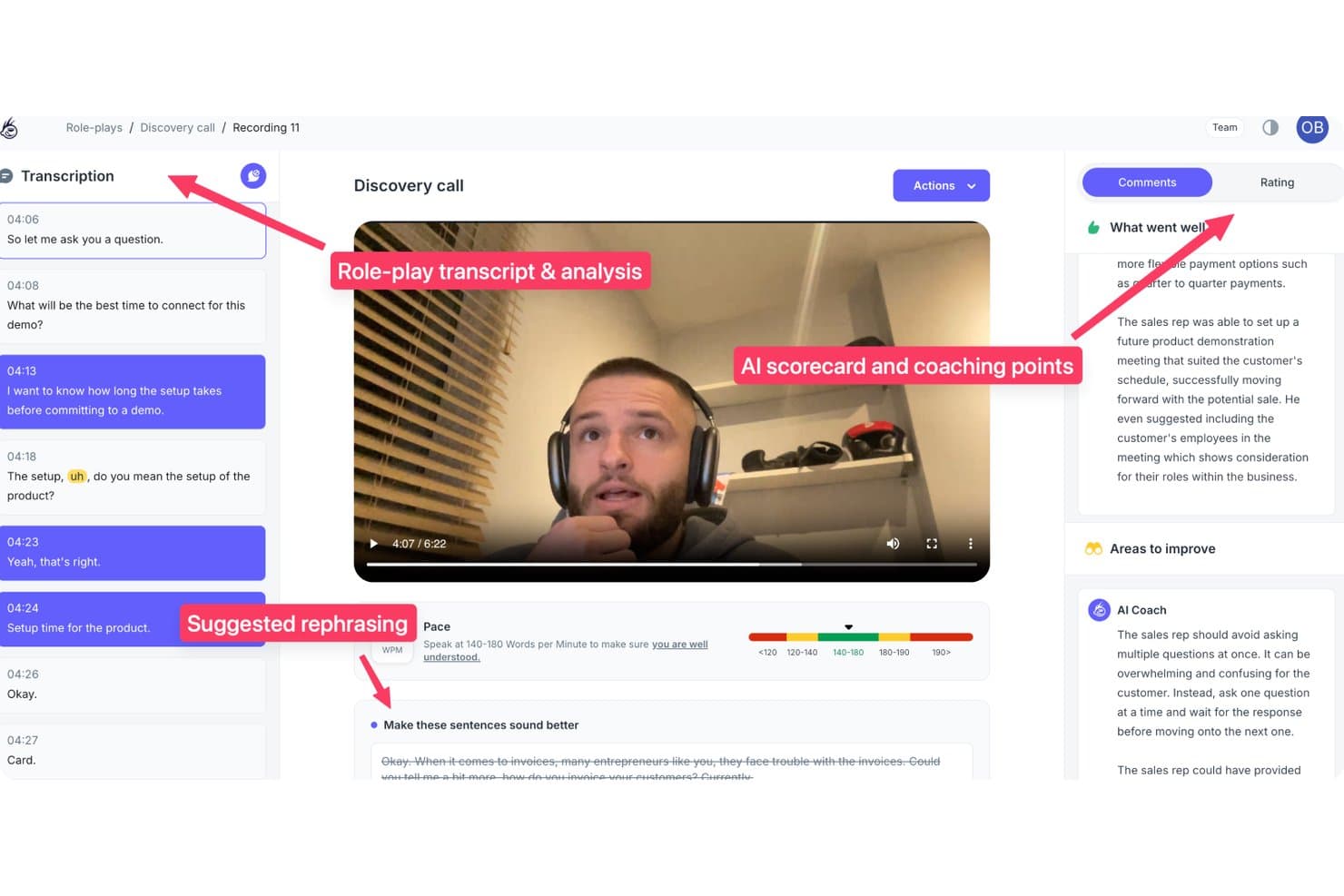
PitchMonster offre analisi delle simulazioni di vendita alimentate da IA con revisione delle trascrizioni, punti di coaching tramite scorecard IA, suggerimenti di riformulazione e metriche sul ritmo. PitchMonster è una piattaforma di simulazione e coaching per le vendite basata su IA che simula conversazioni con potenziali clienti, valuta le performance dei rappresentanti rispetto a playbook personalizzati e fornisce feedback automatici su chiamate a freddo, discovery, gestione delle obiezioni e scenari di demo.
Per chi è ideale PitchMonster?
PitchMonster è perfetto per i team di enablement delle vendite di aziende di medie e grandi dimensioni che gestiscono programmi strutturati di onboarding per gruppi di rappresentanti numerosi o in rapida crescita.
Perché ho scelto PitchMonster
PitchMonster merita un posto nella mia selezione grazie alla sua capacità di colmare il divario tra l'onboarding e le chiamate reali. Trovo utile che i nuovi rappresentanti possano generare una persona acquirente da un URL del sito web di un potenziale cliente in meno di due minuti e poi affrontare subito uno scenario completo di gestione delle obiezioni con un avatar IA. Il debrief dell'AI Coach invita poi i rappresentanti ad autodiagnosticare cosa sia cambiato nella conversazione, il che secondo me accelera la memorizzazione rispetto a un feedback passivo e verticale.
Funzionalità principali di PitchMonster
- Libreria di scenari pronti all’uso: Accedi a una libreria di 48 scenari di vendita guidati da IA che comprendono chiamate a freddo, discovery, demo e gestione delle obiezioni.
- Dashboard di analisi per i manager: Visualizza le performance dei rappresentanti, i gap di competenze e le metriche di utilizzo in una dashboard centralizzata.
- Scorecard e rubriche personalizzabili: Crea scorecard su misura per il tuo processo di vendita e monitora la qualità delle esercitazioni dei rappresentanti su larga scala.
- Integrazione con CRM e Gong: Collega Salesforce, HubSpot e Gong per importare dati sulle chiamate e personalizzare automaticamente gli esercizi di role-play.
Integrazioni di PitchMonster
PitchMonster offre integrazioni native con Salesforce, HubSpot e Gong. È disponibile un'API per integrazioni personalizzate.
Pros and Cons
Pros:
- Il role-play include personaggi di potenziali clienti generati dall’IA
- Gli scenari coprono chiamate a freddo, discovery e demo
- Playbook e rubriche di valutazione completamente personalizzabili
Cons:
- La lunghezza delle conversazioni è limitata in alcuni scenari
- La dashboard di analisi richiede esportazioni manuali in CSV
Learn more about PitchMonster: Ideale per esercitazioni su scenari con simulazioni guidate da IA
- Demo gratuita disponibile
- Prezzo su richiesta

Zenarate utilizza simulazioni IA per aiutare i team di vendita a esercitarsi in scenari reali e migliorare le prestazioni. Zenarate utilizza simulazioni guidate dall’IA per aiutare i team di vendita a esercitarsi in scenari reali in un ambiente privo di rischi. È una soluzione ideale per le organizzazioni che desiderano rafforzare sicurezza e coerenza nei propri venditori attraverso una formazione pratica e interattiva. La piattaforma è particolarmente interessante per i responsabili della formazione commerciale che cercano metodi scalabili per allenare i team a gestire conversazioni complesse e obiezioni.
Per chi è consigliato Zenarate?
Zenarate è indicato per responsabili e formatori di team vendita in aziende di medie e grandi dimensioni che necessitano di esercitazioni su scenari su larga scala sfruttando l’IA.
Perché ho scelto Zenarate
Ciò che mi ha colpito di Zenarate è il suo focus sulla pratica basata sugli scenari tramite simulazioni guidate dall’IA, particolarmente utile per i team di vendita che devono padroneggiare conversazioni complesse. La piattaforma consente di creare scenari realistici di role-play durante i quali i venditori interagiscono con avatar IA che rispondono dinamicamente, simulando obiezioni e comportamenti reali dei clienti. Apprezzo come Zenarate offra feedback istantanei e analisi dettagliate dopo ogni simulazione, così i manager possono individuare con precisione le aree in cui i venditori necessitano di maggiore coaching. Questo approccio rende molto più semplice sviluppare sicurezza e uniformità tra ampi team di vendita senza dover ricorrere a sessioni dal vivo di role-play.
Funzionalità chiave di Zenarate
Oltre alle capacità di pratica tramite scenari, ho trovato queste funzionalità particolarmente degne di nota:
- Motore di analisi vocale: la piattaforma analizza le risposte parlate valutando tono, chiarezza e aderenza agli script durante le simulazioni.
- Percorsi di apprendimento specifici per ruolo: puoi assegnare moduli formativi personalizzati in base alla mansione o all’esperienza.
- Istruzioni di coaching in tempo reale: Zenarate fornisce suggerimenti immediati durante la simulazione, aiutando l’utente a modificare il proprio approccio in tempo reale.
- Strumenti di benchmarking delle performance: confronta i risultati di singoli e team rispetto agli standard di settore o parametri interni.
Integrazioni di Zenarate
Le integrazioni includono Salesforce, Zendesk, Genesys, Avaya e Cisco.
Pros and Cons
Pros:
- Ottimo per la preparazione alla compliance
- Ambiente di simulazione sicuro
- Ideale per operatori di call center
Cons:
- Non adatto ai venditori sul campo
- Le risposte audio possono avere ritardi
Learn more about Zenarate AI Coach: Ideale per moduli di formazione sulle vendite personalizzati e automatizzati
- Demo gratuita disponibile
- Prezzo su richiesta

Hyperbound utilizza l'IA per offrire formazione e onboarding sulle vendite personalizzati per team moderni di revenue e sales enablement. Hyperbound utilizza l'IA per offrire moduli di formazione sulle vendite su misura per i team di revenue moderni. È progettato per i responsabili e i manager dell’enablement delle vendite che desiderano automatizzare lo sviluppo delle competenze e l'onboarding. Se hai bisogno di personalizzare la formazione su larga scala e mantenere i rappresentanti coinvolti con contenuti sempre aggiornati, Hyperbound affronta direttamente queste sfide.
A chi è più adatto Hyperbound?
Hyperbound è particolarmente adatto a responsabili e manager dell’enablement delle vendite all’interno di aziende orientate alla crescita che vogliono automatizzare e personalizzare la formazione sulle vendite su larga scala.
Perché ho scelto Hyperbound
Ciò che mi ha colpito di Hyperbound è l’accento sull’automazione dei moduli di formazione sulle vendite personalizzati tramite IA. La piattaforma analizza le prestazioni e i bisogni formativi di ciascun rappresentante, fornendo contenuti di formazione mirati che si adattano nel tempo. Apprezzo il fatto che Hyperbound possa generare esercizi basati su scenari e quiz adattati alle singole lacune di competenze, rendendo la formazione più rilevante e concreta. Questo approccio aiuta i leader delle vendite a garantire che ogni membro del team riceva il coaching adeguato senza sforzi manuali o contenuti generici.
Caratteristiche principali di Hyperbound
Oltre ai moduli di formazione adattivi, Hyperbound offre diverse altre funzionalità che supportano il coaching e l’enablement delle vendite:
- Strumenti di creazione dei contenuti: Crea e personalizza i materiali di formazione direttamente all’interno della piattaforma per adattarli ai processi e ai messaggi del tuo team.
- Cruscotti di monitoraggio dei progressi: Monitora i progressi di apprendimento individuali e di squadra tramite cruscotti visivi e metriche dettagliate di completamento.
- Percorsi di apprendimento basati sul ruolo: Assegna percorsi formativi specifici in base alla funzione, all’anzianità o all’area di competenza per assicurare lo sviluppo di abilità rilevanti.
- Verifiche delle conoscenze e valutazioni: Crea quiz e verifiche interattive per consolidare l’apprendimento e misurare la retention dopo ciascun modulo.
Integrazioni di Hyperbound
Le integrazioni includono Salesforce, HubSpot, Gong, Outreach, Salesloft, Orum, Google Meet, Zoom, Microsoft Teams e Webex.
Pros and Cons
Pros:
- Formazione scalabile all’istante
- Metriche di valutazione automatizzate
- Utile per la preparazione delle chiamate a freddo
Cons:
- La configurazione richiede uno sforzo considerevole
- Meglio per SDR che per AE
Learn more about Hyperbound: Ideale per feedback istantanei sulle performance delle chiamate di vendita
- Demo gratuita disponibile
- Prezzo su richiesta

Sales Closer AI analizza le chiamate di vendita e forma i rappresentanti per migliorare la qualità delle chiamate e le performance del team. Sales Closer AI utilizza l'intelligenza artificiale per analizzare le chiamate di vendita e formare i rappresentanti sulle loro prestazioni. È progettato per manager di vendita e team di abilitazione che desiderano migliorare la qualità delle chiamate e la coerenza all'interno della propria organizzazione. La piattaforma è adatta a team che cercano insight concreti e formazione basata su vere conversazioni di vendita.
Per chi è ideale Sales Closer AI?
Sales Closer AI è particolarmente indicato per manager e responsabili della formazione nelle organizzazioni di medie e grandi dimensioni che vogliono offrire formazione mirata, guidata dall'IA e basata sui dati reali delle chiamate di vendita.
Perché ho scelto Sales Closer AI
Ciò che mi ha colpito di Sales Closer AI è il suo focus nel fornire feedback istantanei e azionabili subito dopo le chiamate di vendita. La piattaforma utilizza l'intelligenza artificiale per analizzare le registrazioni e fornire indicazioni specifiche per il miglioramento, così i rappresentanti sanno esattamente cosa migliorare nella prossima chiamata. Apprezzo che evidenzi i momenti chiave nelle conversazioni, come la gestione delle obiezioni e le tecniche di chiusura, rendendo il feedback altamente rilevante per i team di vendita. Questo approccio aiuta i manager a scalare la formazione senza attendere revisioni manuali o insight ritardati.
Funzionalità principali di Sales Closer AI
Oltre a fornire feedback istantanei sulle chiamate, Sales Closer AI offre numerose funzionalità che supportano la formazione continua e il miglioramento delle performance di vendita:
- Ricerca nelle trascrizioni delle chiamate: Gli utenti possono cercare e filtrare tra le trascrizioni per trovare rapidamente conversazioni o argomenti specifici.
- Schede di valutazione personalizzabili: I manager possono impostare criteri di valutazione su misura per allinearsi al processo e agli obiettivi del proprio team.
- Flussi di lavoro per l'assegnazione della formazione: Assegna attività di formazione o follow-up direttamente dalla piattaforma per ottimizzare lo sviluppo dei rappresentanti.
- Analisi delle tendenze delle performance: Monitora il progresso individuale e del team nel tempo con dashboard visive e strumenti di reportistica.
Integrazioni di Sales Closer AI
Le integrazioni includono Zoom, Google Meet, Microsoft Teams, Salesforce e HubSpot.
Pros and Cons
Pros:
- Facile revisione delle registrazioni
- Focus sulle capacità di chiusura
- Configurazione rapida per piccole organizzazioni
Cons:
- Valutazione AI soggettiva
- L'interfaccia non è molto curata
Learn more about Sales Closer AI: Ideale per raccomandazioni strategiche sulle trattative guidate dall’AI
- Non disponibile
- A partire da $59.99/mese

Trellus.AI offre approfondimenti AI in tempo reale per aiutare i team di vendita a migliorare la strategia delle trattative e le performance della pipeline. Trellus.AI offre approfondimenti potenziati dall'intelligenza artificiale ai team di vendita che desiderano migliorare gli esiti delle trattative e la strategia. È progettato per responsabili delle entrate e account executive che vogliono raccomandazioni azionabili basate su dati della pipeline in tempo reale. Se cerchi uno strumento che vada oltre l'analisi delle chiamate per aiutare a definire le tattiche di negoziazione, Trellus.AI merita considerazione.
Per Chi È Pensato Trellus.AI?
Trellus.AI è adatto a responsabili vendite e delle entrate in organizzazioni B2B che desiderano raccomandazioni guidate dall'AI per migliorare la strategia di trattativa e la gestione della pipeline.
Perché ho scelto Trellus.AI
Ciò che mi ha colpito di Trellus.AI è il suo focus nel fornire raccomandazioni di strategia per le trattative guidate dall’intelligenza artificiale, andando oltre la semplice analisi delle conversazioni di vendita. La piattaforma analizza i dati della tua pipeline e offre suggerimenti personalizzati e azionabili per ogni trattativa, aiutando i team a dare priorità ai prossimi passi e identificare i rischi. Apprezzo come Trellus.AI metta in evidenza intuizioni strategiche che manager e rappresentanti di vendita possono usare per adattare le tattiche in tempo reale. Lo considero particolarmente prezioso per le organizzazioni che vogliono passare da una gestione reattiva a una proattiva delle trattative grazie all’AI.
Caratteristiche Principali di Trellus.AI
Altre funzionalità che distinguono Trellus.AI per i team di vendita includono:
- Punteggio di salute della trattativa: La piattaforma assegna un punteggio di salute a ciascuna trattativa, basandosi su diversi dati, aiutando i team a individuare rapidamente le opportunità a rischio.
- Revisioni automatiche della pipeline: Trellus.AI esamina regolarmente la pipeline, evidenziando le trattative che richiedono attenzione, riducendo il tempo necessario alle revisioni manuali.
- Analisi delle performance dei rappresentanti: Monitora le metriche di performance individuali e di team per individuare opportunità di coaching e lacune nelle competenze.
- Strumenti di collaborazione: Le funzioni integrate di commento e condivisione permettono a manager e rappresentanti di discutere trattative e strategie direttamente sulla piattaforma.
Integrazioni di Trellus.AI
Le integrazioni includono Salesforce, HubSpot, Outreach, Salesloft e Apollo.
Pros and Cons
Pros:
- Suggerimenti per lo script in chiamata
- Funziona bene per le chiamate a freddo
- Aiuta a costruire rapidamente rapporti
Cons:
- Ecosistema di strumenti limitato
- L’estensione per Chrome è pesante
Learn more about Trellus.AI:
Altre piattaforme di coaching alle vendite con IA
Ecco altre opzioni di coaching alle vendite con IA che non sono state incluse nella mia selezione, ma che vale comunque la pena esaminare:
Come valuto le soluzioni di AI Sales Coach
Includo solo gli strumenti che utilizzano l’IA per fare qualcosa che un foglio di calcolo o l’intuito di un manager non possono fare, come attribuire automaticamente un punteggio alle chiamate seguendo la tua metodologia o generare coaching specifico per ogni rappresentante senza bisogno di attendere un 1:1. Suddivido la mia valutazione tra funzionalità essenziali che ogni strumento deve avere per qualificarsi e fattori distintivi che separano la soluzione migliore dal gruppo.
Funzionalità essenziali (requisiti minimi per questa lista)
Quando seleziono gli strumenti per la mia lista, valuto ciascuno su una scala da 0 (non offre la funzionalità) a 5 (eccelle in quest'area) per ogni funzionalità essenziale elencata di seguito. Poi calcolo il punteggio totale dello strumento in percentuale. Ogni strumento deve raggiungere un punteggio totale minimo del 65% per essere considerato per l’inclusione.
- Conversation Intelligence: Verifico che lo strumento possa acquisire chiamate registrate e fornire insight guidati dall’IA come rapporti sul tempo di parola, rilevamento di argomenti e citazioni dei concorrenti, non solo una semplice trascrizione.
- Feedback di coaching generato dall’IA: Ogni strumento dovrebbe fornire raccomandazioni di coaching automatizzate e specifiche per il singolo rappresentante dopo le chiamate, invece di lasciare ai manager la revisione manuale di ogni registrazione.
- Scorecard di abilità & metodologia: Cerco una valutazione tramite IA rispetto a framework come MEDDIC o SPICED, con la flessibilità di costruire modelli di competenza personalizzati che rispecchino il tuo processo di vendita.
- Simulazione & role-play con IA: Gli strumenti migliori permettono ai rappresentanti di esercitarsi nelle chiamate di scoperta o nella gestione delle obiezioni tramite personaggi acquirenti generati dall’IA che si adattano in base alle risposte, non tramite script statici.
- Monitoraggio delle prestazioni & analytics: Le dashboard devono collegare l’attività di coaching a risultati come tempi di formazione o tassi di vittoria, fornendo ai team RevOps dati da presentare alla leadership.
- Integrazione con CRM & comunicazione: Lo strumento deve sincronizzarsi con piattaforme come Salesforce, HubSpot, Zoom e dialer perché gli insight di coaching vivano dove già lavorano rappresentanti e manager.
Una volta che ho una lista di strumenti che soddisfano i criteri, considero ciò che distingue ciascuna piattaforma.
Fattori distintivi (cosa distingue i fornitori)
Ecco come confronto i diversi fornitori:
Funzionalità uniche
La guida in tempo reale durante la chiamata è un elemento chiave: cerco strumenti che propongono schede «battlecard» e suggerimenti per gestire le obiezioni direttamente durante la conversazione e non solo in un riepilogo post-chiamata. Anche le informazioni di coaching a livello di trattativa sono molto rilevanti. Gli strumenti migliori collegano il coaching a specifiche opportunità aperte, segnalando rischi su cui un manager può intervenire prima che l’affare sfumi. Valuto anche se una piattaforma possa attivare automaticamente flussi di coaching quando l’IA rileva una carenza di competenze, così i rappresentanti ricevono esercitazioni mirate senza aspettare una revisione programmata.
Oltre le caratteristiche
L’impatto misurabile sui ricavi è molto importante qui. Valuto se una piattaforma sa mostrare chiaramente il collegamento tra coaching e risultati quali raggiungimento della quota o velocità di formazione: è ciò che serve ai leader RevOps per giustificare l’investimento. La compatibilità con l’ecosistema è un altro fattore fondamentale per me, soprattutto per quanto riguarda l’integrazione con il CRM, dialer e tool di enablement già utilizzati, senza la necessità di workaround personalizzati. Considero anche la scalabilità, inclusi licenze flessibili e gerarchie multi-team, perché gli strumenti di coaching che funzionano per una squadra da 20 rappresentanti spesso vanno in crisi con 200.
Come scegliere una soluzione di coaching alle vendite basata sull'IA
È facile perdersi in lunghi elenchi di funzionalità e strutture tariffarie complesse. Per aiutarti a rimanere concentrato mentre affronti il tuo specifico processo di selezione del software, ecco un elenco di fattori da tenere a mente:
| Fattore | Cosa considerare |
| Scalabilità | Lo strumento supporterà il tuo team durante la crescita? Controlla i limiti degli utenti, i livelli di prezzo e i limiti di archiviazione dei dati. |
| Integrazioni | Si connette nativamente al tuo CRM, al sistema di composizione e agli altri sistemi fondamentali? Verifica la compatibilità prima di inserirlo nella selezione. |
| Personalizzazione | Puoi adattare i flussi di lavoro, le richieste di coaching o i report al tuo processo di vendita? Fai attenzione ai modelli rigidi. |
| Semplicità d'uso | I rappresentanti e i responsabili adotteranno rapidamente lo strumento? Cerca una navigazione chiara, pochi passaggi manuali e pannelli di controllo intuitivi. |
| Implementazione e inserimento | Quanto tempo richiederà la configurazione e quali risorse saranno necessarie? Informati sul supporto alla migrazione, sulla formazione e sul tempo necessario per ottenere valore. |
| Costo | I prezzi e i termini contrattuali sono chiari? Considera tutti gli utenti, i componenti aggiuntivi e i potenziali costi per eccedenza. Confronta il costo totale di proprietà. |
| Misure di sicurezza | Lo strumento soddisfa gli standard aziendali di privacy e sicurezza dei dati? Informati sulla crittografia, sui controlli degli accessi e sulle certificazioni di conformità. |
| Disponibilità dell'assistenza | Quali canali di assistenza sono disponibili e in quali orari? Valuta se hai bisogno di supporto 24 ore su 24, 7 giorni su 7, o di un responsabile dedicato. |
Che cos'è un coach di vendita basato sull'IA?
Un coach commerciale basato sull'IA è uno strumento software che utilizza l'intelligenza artificiale per analizzare le conversazioni di vendita, generare riepiloghi delle riunioni e far emergere suggerimenti pratici per il coaching dei team commerciali. Queste piattaforme acquisiscono automaticamente i dati delle chiamate, identificano i momenti chiave e consigliano i passaggi successivi, aiutando responsabili e rappresentanti a migliorare le prestazioni. I coach commerciali basati sull'IA sono progettati per supportare lo sviluppo continuo delle competenze, la responsabilizzazione e il processo decisionale basato sui dati durante l'intero processo di vendita.
Funzionalità del coach commerciale basato sull'IA della soluzione
Quando selezioni un coach commerciale basato sull'IA, presta attenzione alle seguenti funzionalità chiave:
- Registrazione e trascrizione delle chiamate: acquisisce e trascrive automaticamente le chiamate di vendita, facilitando la revisione delle conversazioni e il riferimento ai dettagli in un secondo momento.
- Riepiloghi delle riunioni generati dall'IA: produce riepiloghi concisi e strutturati di ogni riunione, evidenziando i punti chiave della discussione e le decisioni prese.
- Monitoraggio delle attività: identifica e organizza le azioni successive, le attività e i passaggi successivi discussi durante le chiamate, aiutando i team a mantenere la responsabilità.
- Integrazione con il CRM: sincronizza i dati delle chiamate, le note e gli approfondimenti direttamente con il CRM, garantendo che tutte le informazioni siano centralizzate e accessibili.
- Analisi delle prestazioni: monitora l'attività dei rappresentanti commerciali, la qualità delle conversazioni e i risultati del coaching tramite pannelli di controllo e rapporti.
- Visualizzazione della cronologia delle trattative: mappa tutte le interazioni, le note e le tappe fondamentali di ogni trattativa, offrendo ai responsabili una visione chiara dell'avanzamento.
- Suggerimenti automatici per il coaching: fa emergere suggerimenti personalizzati per il coaching sulla base dell'analisi delle chiamate, aiutando i responsabili a fornire feedback mirati.
- Archivio delle conversazioni consultabile: consente agli utenti di cercare chiamate e riunioni passate per parola chiave, argomento o partecipante per un rapido riferimento.
- Controlli di sicurezza e conformità: protegge i dati sensibili dei clienti mediante crittografia, controlli degli accessi e conformità agli standard del settore.
- Rapporti personalizzabili: consente ai team di adattare rapporti e pannelli di controllo in base ai propri processi di vendita e KPI.
Vantaggi del coach commerciale basato sull'IA
L'implementazione di un coach commerciale basato sull'IA offre diversi vantaggi al tuo team e alla tua azienda. Ecco alcuni dei risultati che puoi aspettarti:
- Qualità costante del coaching: gli approfondimenti basati sull'IA garantiscono che ogni rappresentante commerciale riceva feedback pratici e supportati dai dati dopo ogni chiamata.
- Inserimento più rapido dei nuovi rappresentanti: i riepiloghi automatici delle riunioni e gli archivi delle chiamate consultabili aiutano i nuovi membri del team a diventare rapidamente operativi.
- Maggiore responsabilizzazione: il monitoraggio delle attività e l'integrazione con il CRM facilitano il follow-up degli impegni e la misurazione dei progressi.
- Maggiore visibilità sulla pipeline: la visualizzazione della cronologia delle trattative e l'analisi delle prestazioni offrono ai responsabili una visione chiara dello stato delle trattative e dell'attività del team.
- Riduzione del lavoro manuale: la presa di note, i riepiloghi e la reportistica automatici liberano tempo per consentire a rappresentanti commerciali e responsabili di concentrarsi sulle vendite.
- Processo decisionale basato sui dati: le analisi centralizzate e i rapporti personalizzabili supportano un coaching più informato e adeguamenti strategici.
- Maggiore sicurezza dei dati: i controlli integrati di sicurezza e conformità proteggono le informazioni sensibili sui clienti e sulle trattative durante l'intero processo di vendita.
Costi e prezzi del coach commerciale basato sull'IA
La scelta di un coach commerciale basato sull'IA richiede la conoscenza dei vari modelli di prezzo e dei piani disponibili. I costi variano in base alle funzionalità, alle dimensioni del team, agli extra e ad altri fattori. La tabella seguente riassume i piani più comuni, i relativi prezzi medi e le funzionalità tipicamente incluse nelle soluzioni di coach commerciale basate sull'IA:
Tabella comparativa dei piani per il coach commerciale basato sull'IA
| Tipo di piano | Prezzo medio | Funzionalità comuni |
| Piano gratuito | $0 | Registrazione di base delle chiamate, riepiloghi limitati delle riunioni, spazio di archiviazione limitato e supporto via e-mail. |
| Piano personale | $15-$49/user/month | Trascrizioni illimitate, riepiloghi generati dall'IA, monitoraggio delle attività, integrazione con il CRM e pannello di controllo analitico. |
| Piano aziendale | $50-$99/user/month | Analisi delle prestazioni del team, visualizzazione della cronologia delle trattative, integrazioni avanzate, rapporti personalizzabili e supporto prioritario. |
| Piano per grandi aziende | $100-$250/user/month | Inserimento personalizzato, responsabile del cliente dedicato, controlli di sicurezza avanzati, funzionalità di conformità e accesso API. |
Domande frequenti sul coach delle vendite basato sull'intelligenza artificiale
Ecco alcune risposte alle domande frequenti sul coach delle vendite basato sull’intelligenza artificiale:
In che modo un coach delle vendite basato sull'intelligenza artificiale analizza le chiamate di vendita?
Un coach delle vendite basato sull’intelligenza artificiale utilizza il riconoscimento vocale e l’elaborazione del linguaggio naturale per trascrivere le chiamate, identificare gli argomenti principali e segnalare i momenti importanti. Applica quindi algoritmi per evidenziare informazioni utili, attività da svolgere e opportunità di coaching sulla base del contenuto della conversazione.
Gli strumenti di coaching delle vendite basati sull'intelligenza artificiale possono integrarsi con il mio CRM esistente?
Sì, la maggior parte degli strumenti di coaching delle vendite basati sull’intelligenza artificiale offre integrazioni con i CRM più diffusi, come Salesforce e HubSpot. Ciò consente di sincronizzare automaticamente i dati delle chiamate, le note e le informazioni utili, mantenendo aggiornati i registri delle vendite e riducendo l’inserimento manuale dei dati.
Quali misure di sicurezza dei dati offrono le piattaforme di coaching delle vendite basate sull'intelligenza artificiale?
Le piattaforme di coaching delle vendite basate sull’intelligenza artificiale utilizzano in genere la crittografia, i controlli degli accessi e le certificazioni di conformità per proteggere i dati sensibili. Prima dell’implementazione, verifica sempre che uno strumento soddisfi gli standard di sicurezza e i requisiti normativi della tua azienda.
Le soluzioni di coaching delle vendite basate sull'intelligenza artificiale funzionano per i team di vendita da remoto o ibridi?
Sì, le soluzioni di coaching delle vendite basate sull’intelligenza artificiale sono progettate per supportare i team da remoto, ibridi e in ufficio. Acquisiscono e analizzano le chiamate da qualsiasi luogo, semplificando il coaching e il monitoraggio dei rappresentanti da parte dei responsabili, indipendentemente dal luogo in cui lavorano.
Quanto tempo occorre per implementare uno strumento di coaching delle vendite basato sull'intelligenza artificiale?
I tempi di implementazione variano, ma la maggior parte delle piattaforme offre risorse per l’avvio, come video di formazione, tour del prodotto e assistenza, per aiutare i team a iniziare rapidamente. Per i team più piccoli, la configurazione può richiedere alcuni giorni; le organizzazioni più grandi potrebbero aver bisogno di alcune settimane per il lancio completo.